reset FORD RANGER 2008 2.G User Guide
[x] Cancel search | Manufacturer: FORD, Model Year: 2008, Model line: RANGER, Model: FORD RANGER 2008 2.GPages: 272, PDF Size: 2.73 MB
Page 31 of 272
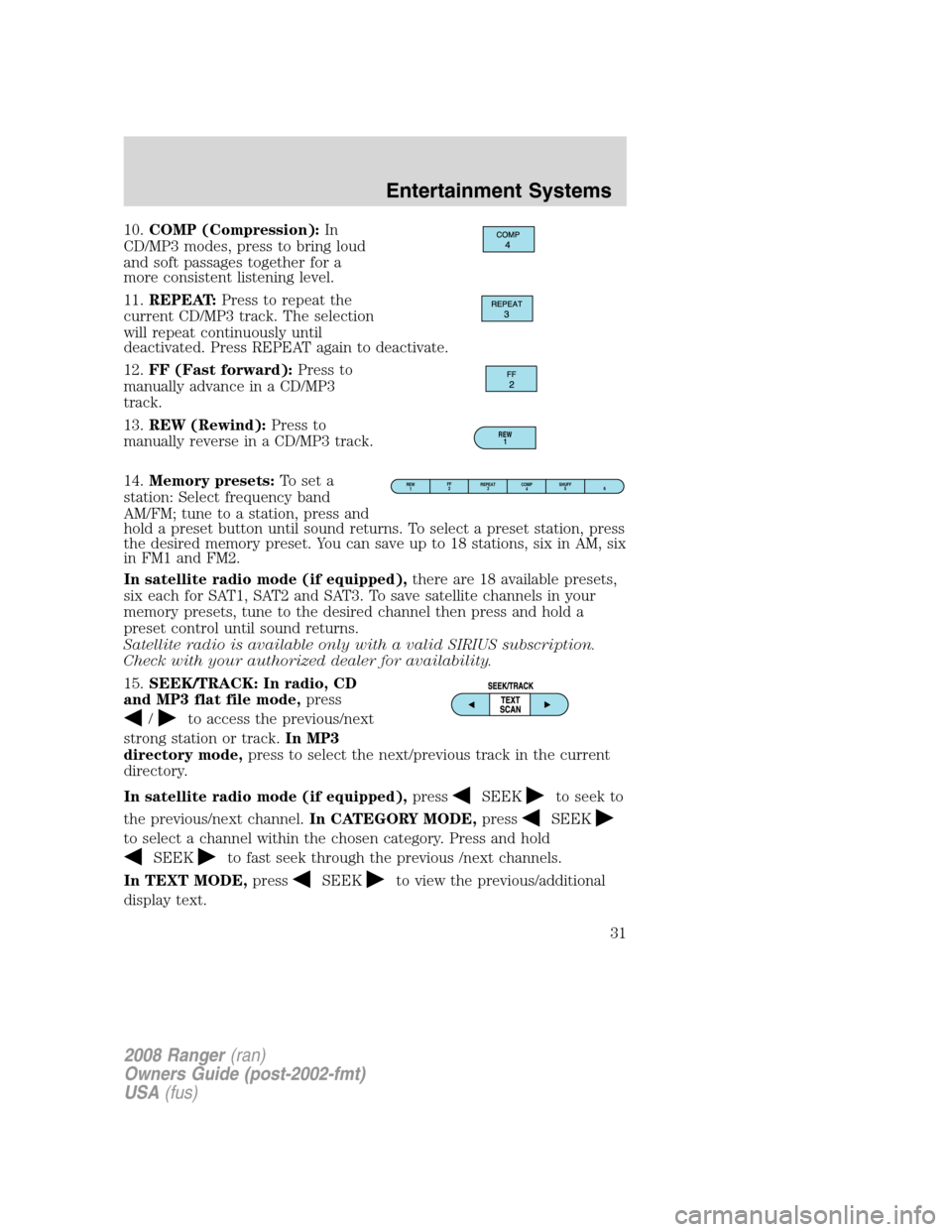
10.COMP (Compression):In
CD/MP3 modes, press to bring loud
and soft passages together for a
more consistent listening level.
11.REPEAT:Press to repeat the
current CD/MP3 track. The selection
will repeat continuously until
deactivated. Press REPEAT again to deactivate.
12.FF (Fast forward):Press to
manually advance in a CD/MP3
track.
13.REW (Rewind):Press to
manually reverse in a CD/MP3 track.
14.Memory presets:To set a
station: Select frequency band
AM/FM; tune to a station, press and
hold a preset button until sound returns. To select a preset station, press
the desired memory preset. You can save up to 18 stations, six in AM, six
in FM1 and FM2.
In satellite radio mode (if equipped),there are 18 available presets,
six each for SAT1, SAT2 and SAT3. To save satellite channels in your
memory presets, tune to the desired channel then press and hold a
preset control until sound returns.
Satellite radio is available only with a valid SIRIUS subscription.
Check with your authorized dealer for availability.
15.SEEK/TRACK: In radio, CD
and MP3 flat file mode,press
/to access the previous/next
strong station or track.In MP3
directory mode,press to select the next/previous track in the current
directory.
In satellite radio mode (if equipped),press
SEEKto seek to
the previous/next channel.In CATEGORY MODE,press
SEEK
to select a channel within the chosen category. Press and hold
SEEKto fast seek through the previous /next channels.
In TEXT MODE,press
SEEKto view the previous/additional
display text.
REW
1
REW
1FF
2REPEAT
3SHUFF
5
6 COMP
4
2008 Ranger(ran)
Owners Guide (post-2002-fmt)
USA(fus)
Entertainment Systems
31
Page 32 of 272
Satellite radio is available only with a valid SIRIUS subscription.
Check with your authorized dealer for availability.
16.TEXT/SCAN: In radio and CD
mode,press for a brief sampling of
radio stations or CD tracks. Press
again to stop.
In MP3 mode,Press and release to view the next 12 characters in the
MP3 music name/file name of the current MP3 track and directory.
Press and hold to hear a brief sampling of MP3 tracks.
In MP3 directory mode, press and hold to hear a brief sampling of all
tracks in the current directory. Press and hold again to stop.
In satellite radio mode (if equipped),press and release to view the
Satellite text message. Press and hold to hear a brief sampling of the
next channels. Press and hold again to stop.
Satellite radio is available only with a valid SIRIUS subscription.
Check with your authorized dealer for availability.
17.ON/OFF/Volume:Press to turn
ON/OFF. Turn to increase/decrease
volume.
If the volume is set above a certain
level and the ignition is turned off,
the volume will come back on at a
“nominal” listening level when the ignition switch is turned back on.
18.LOAD:Press to load a CD/MP3.
To load a CD/MP3 disc to a specific
slot, press LOAD and select the slot
number by pressing the memory preset buttons. Press and hold LOAD to
autoload up to six discs.
19.CD slot:Insert a CD/MP3, label
side up.
2008 Ranger(ran)
Owners Guide (post-2002-fmt)
USA(fus)
Entertainment Systems
32
Page 37 of 272
SIRIUS satellite radio service:SIRIUS Satellite Radio is a subscription
based satellite radio service that broadcasts music, sports, news and
entertainment programming. A service fee is required in order to receive
SIRIUS service. Vehicles that are equipped with a factory installed
SIRIUS Satellite Radio system include:
•Hardware and limited subscription term, which begins on the date of
sale or lease of the vehicle.
•Online media player providing access to all 65 SIRIUS music channels
over the internet (U.S. customers only).
For information on extended subscription terms, contact SIRIUS at
1–888–539–7474.
Note:SIRIUS reserves the unrestricted right to change, rearrange, add
or delete programming including canceling, moving or adding particular
channels, and its prices, at any time, with or without notice to you. Ford
Motor Company shall not be responsible for any such programming
changes.
Satellite Radio Electronic Serial Number (ESN):This 12–digit
Satellite Serial Number is needed to activate, modify or track your
satellite radio account. You will need this number when communicating
with SIRIUS. While in Satellite Radio mode, you can view this number on
the radio display by pressing AUX and Preset 1 control simultaneously.
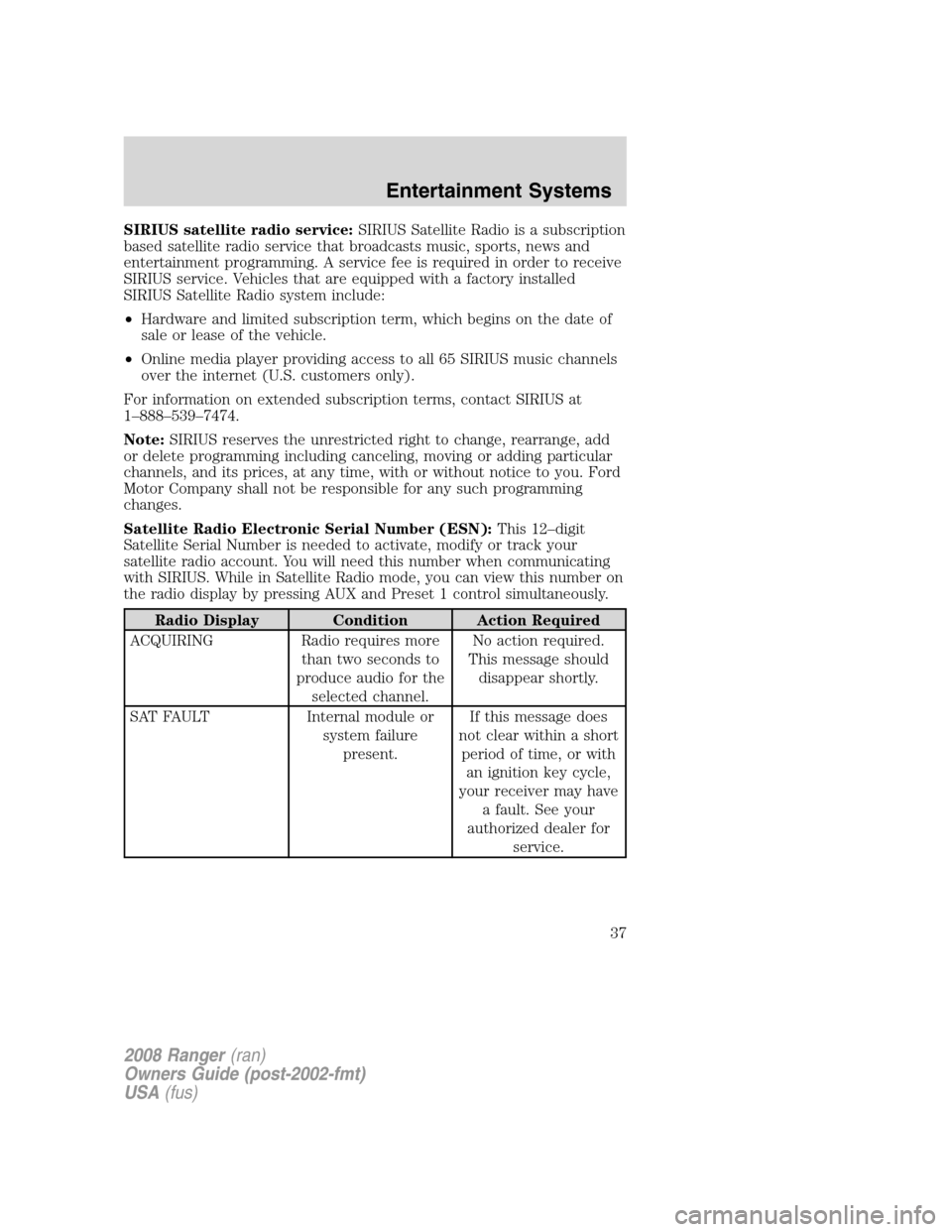
Radio Display Condition Action Required
ACQUIRING Radio requires more
than two seconds to
produce audio for the
selected channel.No action required.
This message should
disappear shortly.
SAT FAULT Internal module or
system failure
present.If this message does
not clear within a short
period of time, or with
an ignition key cycle,
your receiver may have
a fault. See your
authorized dealer for
service.
2008 Ranger(ran)
Owners Guide (post-2002-fmt)
USA(fus)
Entertainment Systems
37
Page 38 of 272
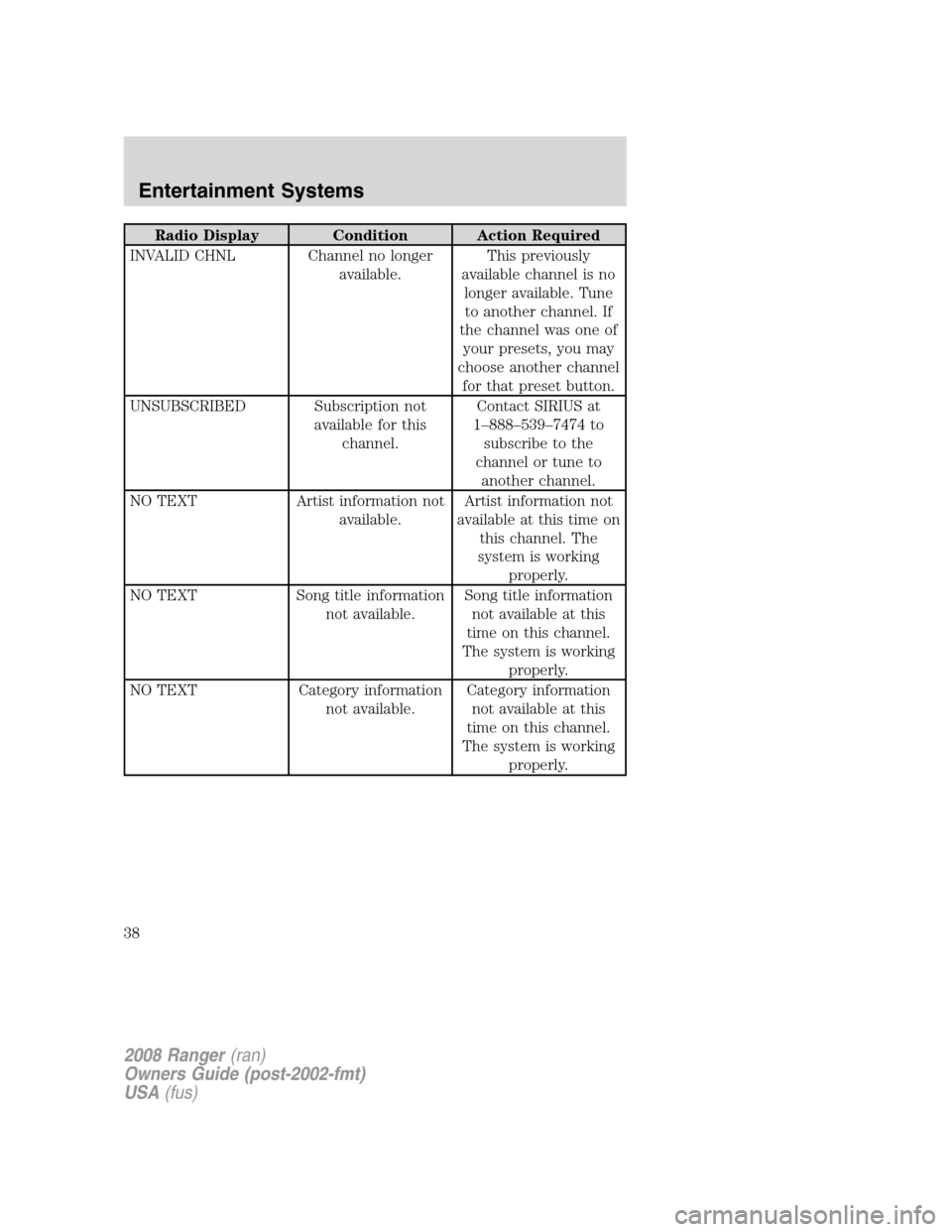
Radio Display Condition Action Required
INVALID CHNL Channel no longer
available.This previously
available channel is no
longer available. Tune
to another channel. If
the channel was one of
your presets, you may
choose another channel
for that preset button.
UNSUBSCRIBED Subscription not
available for this
channel.Contact SIRIUS at
1–888–539–7474 to
subscribe to the
channel or tune to
another channel.
NO TEXT Artist information not
available.Artist information not
available at this time on
this channel. The
system is working
properly.
NO TEXT Song title information
not available.Song title information
not available at this
time on this channel.
The system is working
properly.
NO TEXT Category information
not available.Category information
not available at this
time on this channel.
The system is working
properly.
2008 Ranger(ran)
Owners Guide (post-2002-fmt)
USA(fus)
Entertainment Systems
38
Page 45 of 272
Note:If the battery is disconnected, discharged, or a new battery is
installed, the dimmer switch requires re-calibration. Rotate the dimmer
switch from the full dim position to the full Dome/ON position to reset.
This will ensure that your displays are visible under all lighting
conditions.
AIMING THE HEADLAMPS
The headlamps on your vehicle are properly aimed before leaving the
assembly plant. If your vehicle is involved in an accident or if you have
problems fixing the alignment of your headlamps, have them checked by
a qualified service technician.
Headlamp aim adjustment
The headlamps are designed to be mechanically aimed, but can also be
aimed visually by doing the following:
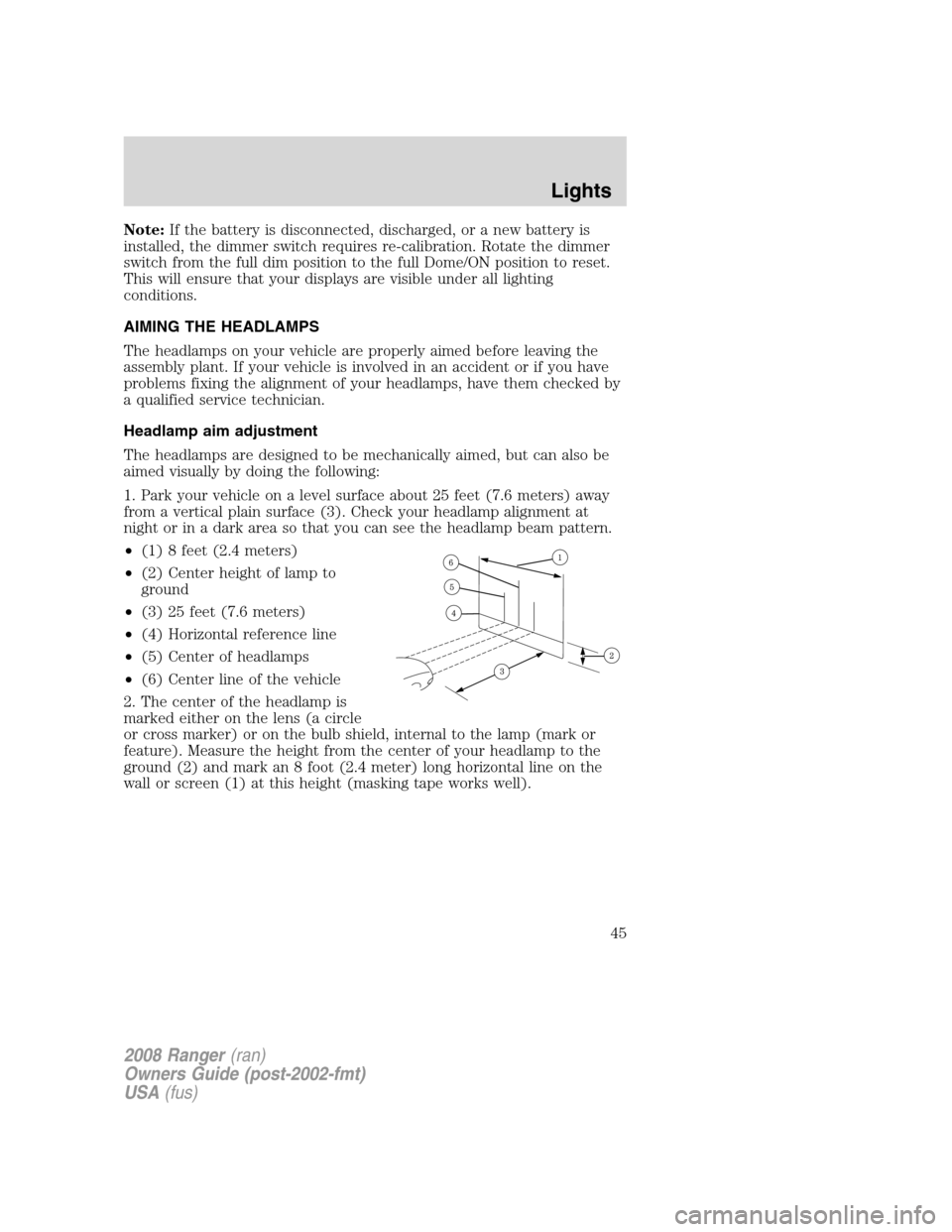
1. Park your vehicle on a level surface about 25 feet (7.6 meters) away
from a vertical plain surface (3). Check your headlamp alignment at
night or in a dark area so that you can see the headlamp beam pattern.
•(1) 8 feet (2.4 meters)
•(2) Center height of lamp to
ground
•(3) 25 feet (7.6 meters)
•(4) Horizontal reference line
•(5) Center of headlamps
•(6) Center line of the vehicle
2. The center of the headlamp is
marked either on the lens (a circle
or cross marker) or on the bulb shield, internal to the lamp (mark or
feature). Measure the height from the center of your headlamp to the
ground (2) and mark an 8 foot (2.4 meter) long horizontal line on the
wall or screen (1) at this height (masking tape works well).
2008 Ranger(ran)
Owners Guide (post-2002-fmt)
USA(fus)
Lights
45
Page 157 of 272
Driving with a 5–speed automatic transmission (if equipped)
This vehicle is equipped with an adaptive Transmission Shift Strategy.
Adaptive Shift Strategy offers the optimal transmission operation and
shift quality. When the vehicle’s battery has been disconnected for any
type of service or repair, the transmission will need to relearn the normal
shift strategy parameters, much like having to reset your radio stations
when your vehicle battery has been disconnected. The Adaptive
Transmission Strategy allows the transmission to relearn these operating
parameters. This learning process could take several transmission
upshifts and downshifts; during this learning process, slightly firmer
shifts may occur. After this learning process, normal shift feel and shift
scheduling will resume.
P (Park)
This position locks the transmission and prevents the rear wheels from
turning.
To put your vehicle in gear:
•Start the engine
•Depress the brake pedal
•Move the gearshift lever into the desired gear
To put your vehicle in P (Park):
•Come to a complete stop
•Move the gearshift lever and securely latch it in P (Park)
Always set the parking brake fully and make sure the gearshift is
latched in P (Park). Turn the ignition to the LOCK position and
remove the key whenever you leave your vehicle.
R (Reverse)
With the gearshift lever in R (Reverse), the vehicle will move backward.
Always come to a complete stop before shifting into and out of R
(Reverse).
N (Neutral)
With the gearshift lever in N (Neutral), the vehicle can be started and is
free to roll. Hold the brake pedal down while in this position.
2008 Ranger(ran)
Owners Guide (post-2002-fmt)
USA(fus)
Driving
157
Page 173 of 272
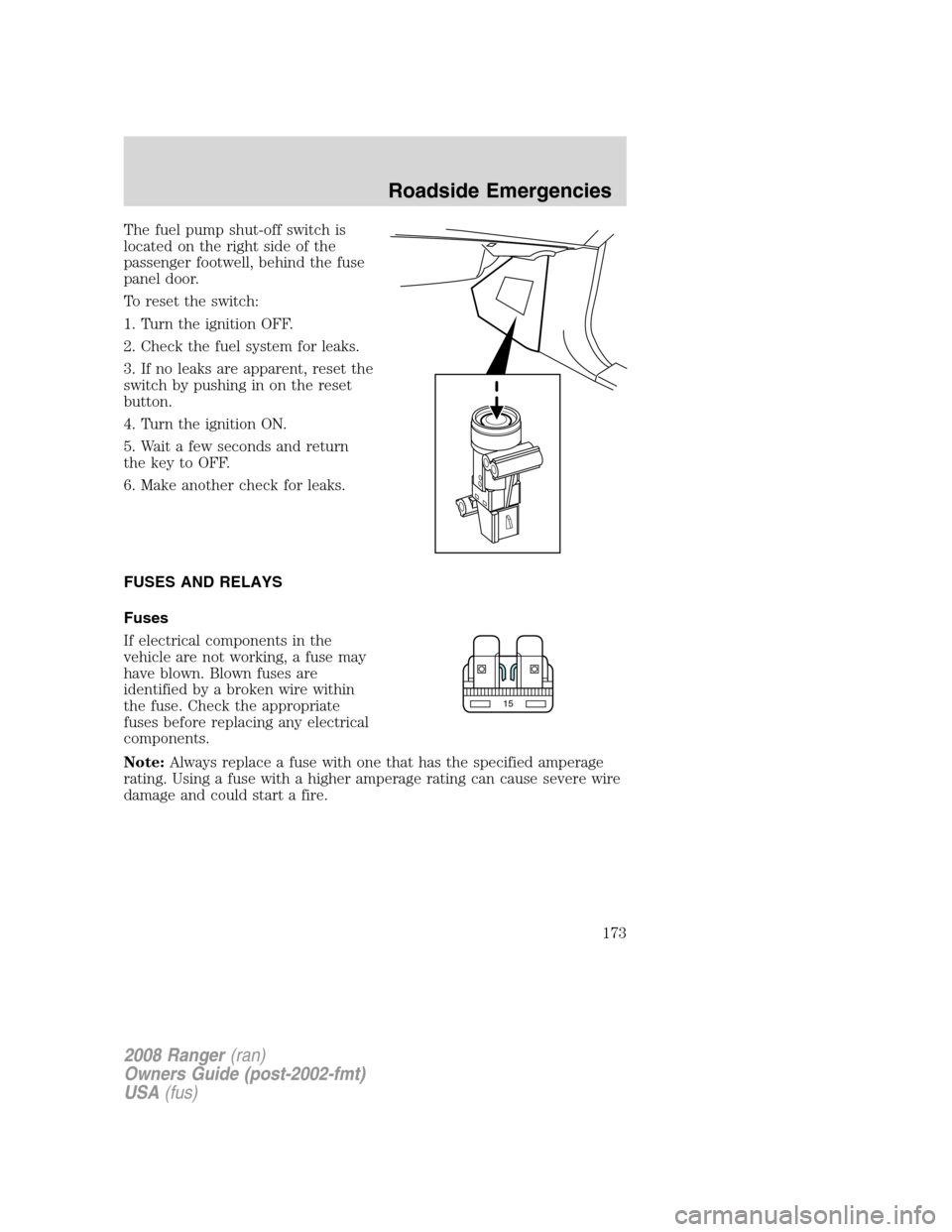
The fuel pump shut-off switch is
located on the right side of the
passenger footwell, behind the fuse
panel door.
To reset the switch:
1. Turn the ignition OFF.
2. Check the fuel system for leaks.
3. If no leaks are apparent, reset the
switch by pushing in on the reset
button.
4. Turn the ignition ON.
5. Wait a few seconds and return
the key to OFF.
6. Make another check for leaks.
FUSES AND RELAYS
Fuses
If electrical components in the
vehicle are not working, a fuse may
have blown. Blown fuses are
identified by a broken wire within
the fuse. Check the appropriate
fuses before replacing any electrical
components.
Note:Always replace a fuse with one that has the specified amperage
rating. Using a fuse with a higher amperage rating can cause severe wire
damage and could start a fire.
15
2008 Ranger(ran)
Owners Guide (post-2002-fmt)
USA(fus)
Roadside Emergencies
173
Page 229 of 272
will not affect function or durability of the transmission. Over time the
adaptive learning process will fully update transmission operation to its
optimum shift feel.
If the battery has been disconnected or a new battery has been installed,
the clock and the preset radio stations must be reset once the battery is
reconnected.
•Always dispose of automotive
batteries in a responsible manner.
Follow your local authorized
standards for disposal. Call your
local authorized recycling center
to find out more about recycling
automotive batteries.
ENGINE COOLANT
Checking engine coolant
The concentration and level of engine coolant should be checked at the
intervals listed in thescheduled maintenance information.The coolant
concentration should be maintained at 50/50 coolant and distilled water,
which equates to a freeze point of -34°F (-36°C). Coolant concentration
testing is possible with a hydrometer or antifreeze tester (such as the
Rotunda Battery and Antifreeze Tester, 014–R1060). The level of coolant
should be maintained at the “FULL COLD” level or within the “COLD
FILL RANGE” in the coolant reservoir. If the level falls below, add
coolant per the instructions in theAdding engine coolantsection.
Your vehicle was factory-filled with a 50/50 engine coolant and water
concentration. If the concentration of coolant falls below 40% or above
60%, the engine parts could become damaged or not work properly.A
50–50 mixture of coolant and water provides the following:
•Freeze protection down to -34°F (-36°C).
•Boiling protection up to 265°F (129°C).
•Protection against rust and other forms of corrosion.
•Enables calibrated gauges to work properly.
LEAD
RETURN
RECYCLE
2008 Ranger(ran)
Owners Guide (post-2002-fmt)
USA(fus)
Maintenance and Specifications
229
Page 237 of 272
Use the following guidelines to avoid electrostatic charge build-up when
filling an ungrounded fuel container:
•Place approved fuel container on the ground.
•DO NOT fill a fuel container while it is in the vehicle (including the
cargo area).
•Keep the fuel pump nozzle in contact with the fuel container while
filling.
•DO NOT use a device that would hold the fuel pump handle in the fill
position.
Fuel Filler Cap
Your vehicle is equipped with a 1/4 turn fuel filler cap, which requires
the handle to be rotated 1/4 of a turn for removal or installation.
When fueling your vehicle:
1. Turn the engine off.
2. Carefully turn the fuel filler cap counterclockwise 1/4 of a turn until it
releases from the fuel filler pipe.
3. Carefully hang the cap from the tether.
4. To install the cap, place the cap into the filler pipe and rotate until
you hear at least one click.
If the check fuel cap lamp
or a “check fuel cap” message comes on,
the fuel filler cap may not be properly installed. The lamp or message
can come on after several driving events after you’ve refueled your
vehicle.
At the next opportunity, safely pull off of the road, remove the fuel filler
cap, align the cap properly and reinstall it. The check fuel cap
lamp
or “check fuel cap” message may not reset immediately; it may
take several driving cycles for the check fuel cap lamp
or “check fuel
cap” message to turn off. A driving cycle consists of an engine start-up
(after four or more hours with the engine off) followed by city and
highway driving.
Continuing to drive with the check fuel cap lamp
or “check fuel cap”
message on may cause the
lamp to turn on as well.
If you must replace the fuel filler cap, replace it with a fuel filler
cap that is designed for your vehicle. The customer warranty may
be void for any damage to the fuel tank or fuel system if the
correct genuine Ford or Motorcraft fuel filler cap is not used.
2008 Ranger(ran)
Owners Guide (post-2002-fmt)
USA(fus)
Maintenance and Specifications
237