park assist FORD RANGER 2019 User Guide
[x] Cancel search | Manufacturer: FORD, Model Year: 2019, Model line: RANGER, Model: FORD RANGER 2019Pages: 512, PDF Size: 7.63 MB
Page 178 of 512
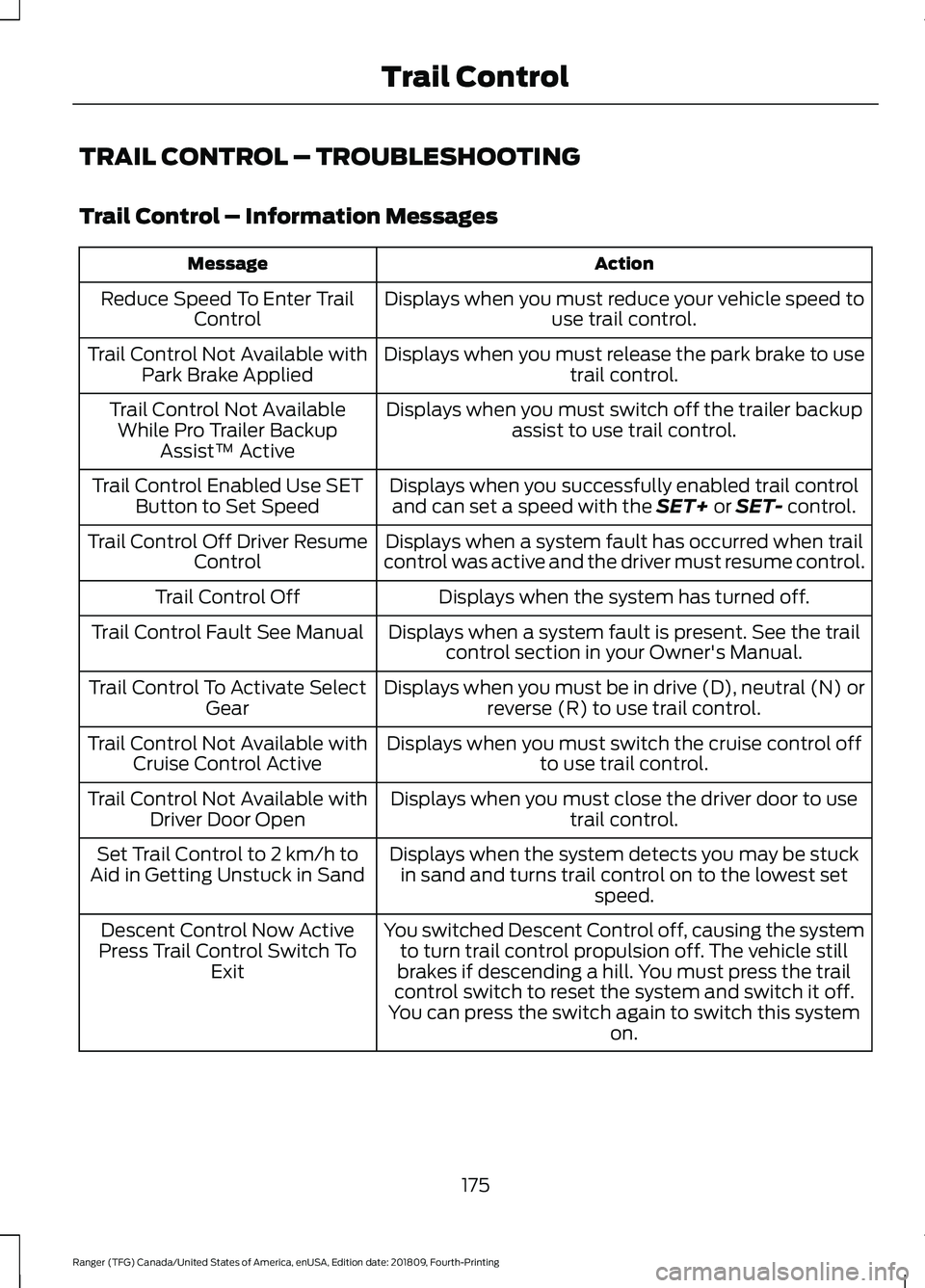
TRAIL CONTROL – TROUBLESHOOTING
Trail Control – Information Messages
Action
Message
Displays when you must reduce your vehicle speed touse trail control.
Reduce Speed To Enter Trail
Control
Displays when you must release the park brake to usetrail control.
Trail Control Not Available with
Park Brake Applied
Displays when you must switch off the trailer backupassist to use trail control.
Trail Control Not Available
While Pro Trailer Backup Assist™ Active
Displays when you successfully enabled trail controland can set a speed with the SET+ or SET- control.
Trail Control Enabled Use SET
Button to Set Speed
Displays when a system fault has occurred when trail
control was active and the driver must resume control.
Trail Control Off Driver Resume
Control
Displays when the system has turned off.
Trail Control Off
Displays when a system fault is present. See the trailcontrol section in your Owner's Manual.
Trail Control Fault See Manual
Displays when you must be in drive (D), neutral (N) orreverse (R) to use trail control.
Trail Control To Activate Select
Gear
Displays when you must switch the cruise control offto use trail control.
Trail Control Not Available with
Cruise Control Active
Displays when you must close the driver door to usetrail control.
Trail Control Not Available with
Driver Door Open
Displays when the system detects you may be stuckin sand and turns trail control on to the lowest set speed.
Set Trail Control to 2 km/h to
Aid in Getting Unstuck in Sand
You switched Descent Control off, causing the systemto turn trail control propulsion off. The vehicle still
brakes if descending a hill. You must press the trail
control switch to reset the system and switch it off.
You can press the switch again to switch this system on.
Descent Control Now Active
Press Trail Control Switch To Exit
175
Ranger (TFG) Canada/United States of America, enUSA, Edition date: 201809, Fourth-Printing Trail Control
Page 205 of 512
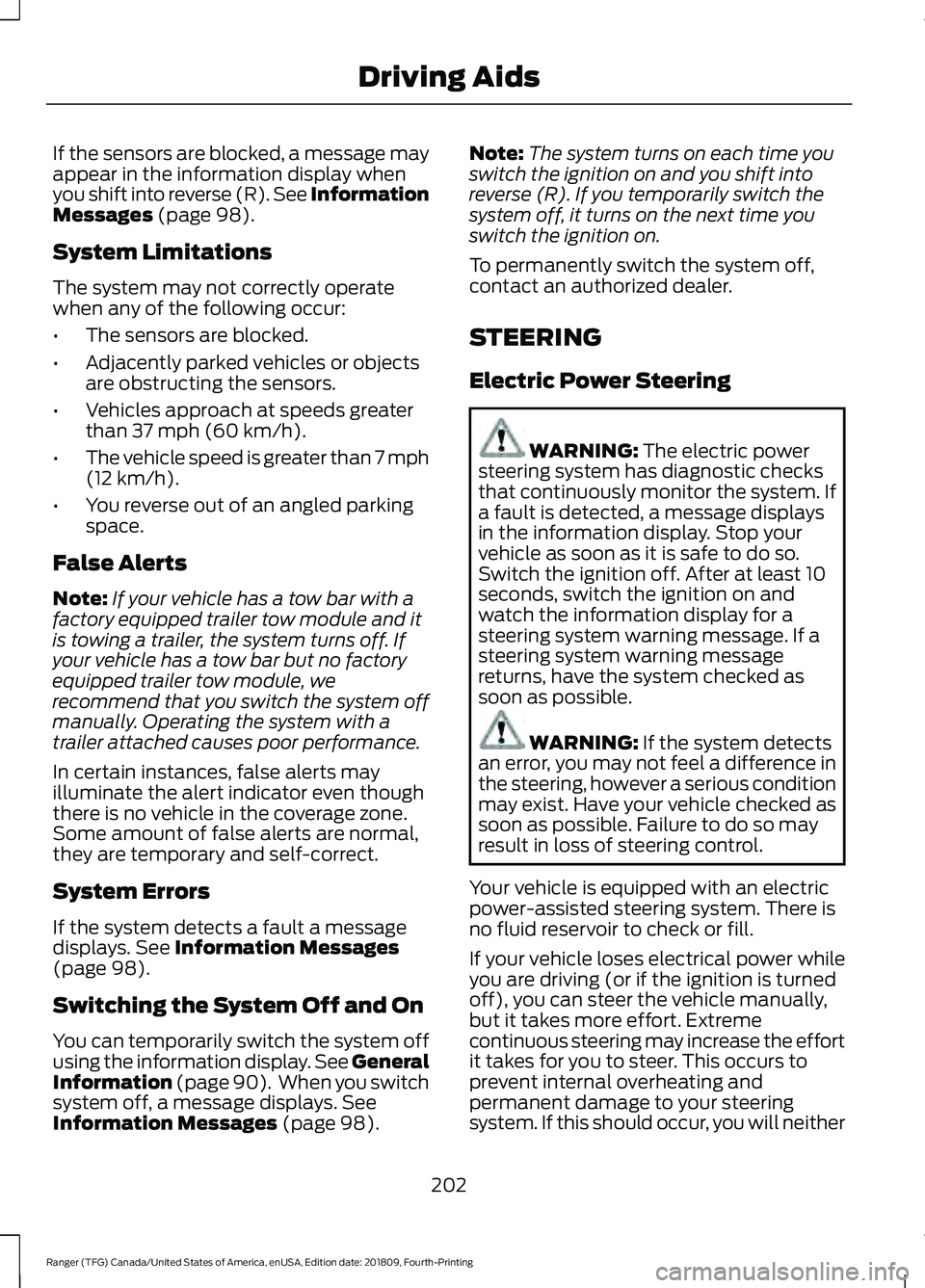
If the sensors are blocked, a message may
appear in the information display when
you shift into reverse (R). See Information
Messages (page 98).
System Limitations
The system may not correctly operate
when any of the following occur:
• The sensors are blocked.
• Adjacently parked vehicles or objects
are obstructing the sensors.
• Vehicles approach at speeds greater
than
37 mph (60 km/h).
• The vehicle speed is greater than 7 mph
(12 km/h)
.
• You reverse out of an angled parking
space.
False Alerts
Note: If your vehicle has a tow bar with a
factory equipped trailer tow module and it
is towing a trailer, the system turns off. If
your vehicle has a tow bar but no factory
equipped trailer tow module, we
recommend that you switch the system off
manually. Operating the system with a
trailer attached causes poor performance.
In certain instances, false alerts may
illuminate the alert indicator even though
there is no vehicle in the coverage zone.
Some amount of false alerts are normal,
they are temporary and self-correct.
System Errors
If the system detects a fault a message
displays.
See Information Messages
(page 98).
Switching the System Off and On
You can temporarily switch the system off
using the information display. See
General
Information (page 90). When you switch
system off, a message displays.
See
Information Messages (page 98). Note:
The system turns on each time you
switch the ignition on and you shift into
reverse (R). If you temporarily switch the
system off, it turns on the next time you
switch the ignition on.
To permanently switch the system off,
contact an authorized dealer.
STEERING
Electric Power Steering WARNING:
The electric power
steering system has diagnostic checks
that continuously monitor the system. If
a fault is detected, a message displays
in the information display. Stop your
vehicle as soon as it is safe to do so.
Switch the ignition off. After at least 10
seconds, switch the ignition on and
watch the information display for a
steering system warning message. If a
steering system warning message
returns, have the system checked as
soon as possible. WARNING:
If the system detects
an error, you may not feel a difference in
the steering, however a serious condition
may exist. Have your vehicle checked as
soon as possible. Failure to do so may
result in loss of steering control.
Your vehicle is equipped with an electric
power-assisted steering system. There is
no fluid reservoir to check or fill.
If your vehicle loses electrical power while
you are driving (or if the ignition is turned
off), you can steer the vehicle manually,
but it takes more effort. Extreme
continuous steering may increase the effort
it takes for you to steer. This occurs to
prevent internal overheating and
permanent damage to your steering
system. If this should occur, you will neither
202
Ranger (TFG) Canada/United States of America, enUSA, Edition date: 201809, Fourth-Printing Driving Aids
Page 223 of 512
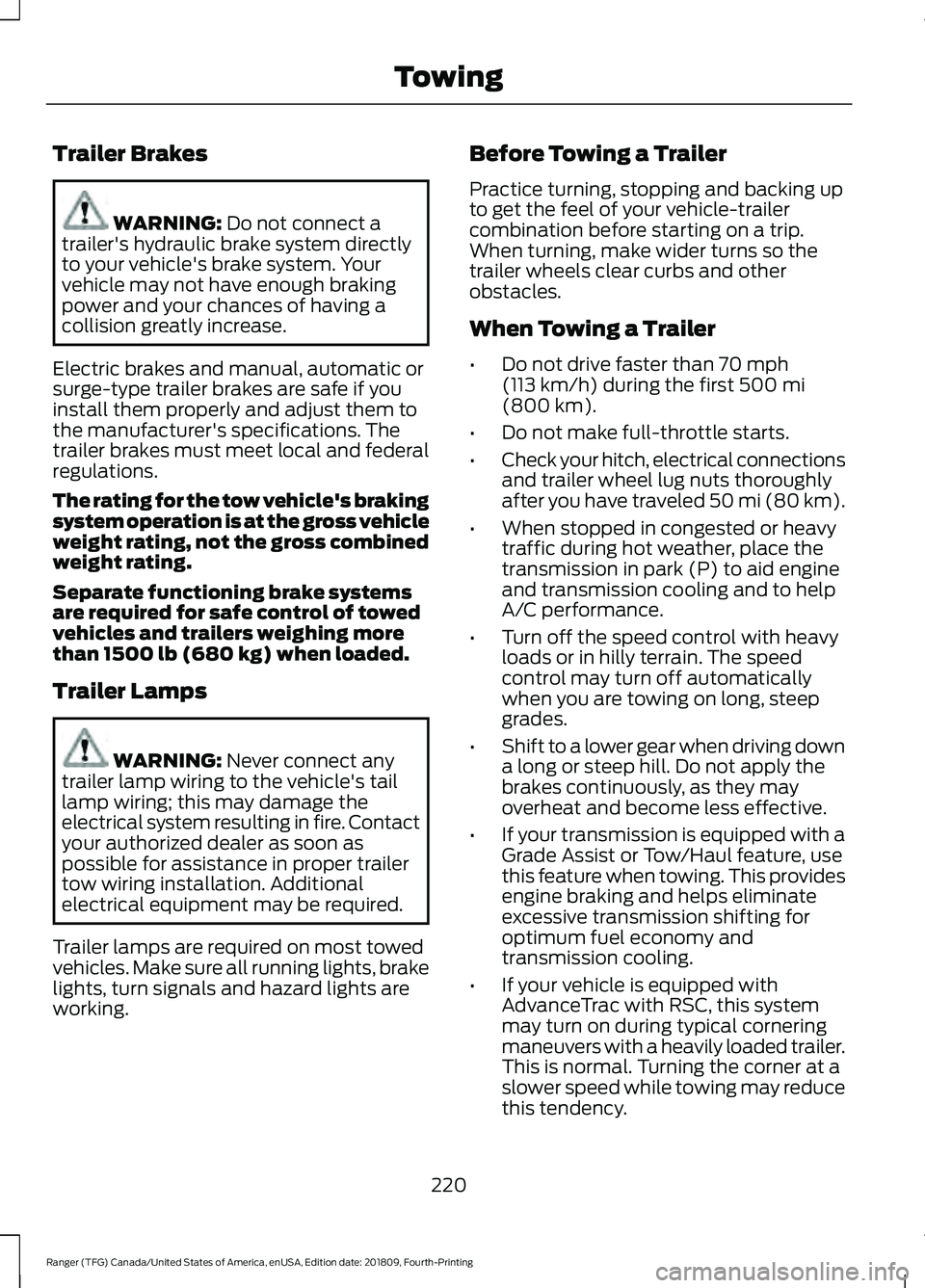
Trailer Brakes
WARNING: Do not connect a
trailer's hydraulic brake system directly
to your vehicle's brake system. Your
vehicle may not have enough braking
power and your chances of having a
collision greatly increase.
Electric brakes and manual, automatic or
surge-type trailer brakes are safe if you
install them properly and adjust them to
the manufacturer's specifications. The
trailer brakes must meet local and federal
regulations.
The rating for the tow vehicle's braking
system operation is at the gross vehicle
weight rating, not the gross combined
weight rating.
Separate functioning brake systems
are required for safe control of towed
vehicles and trailers weighing more
than 1500 lb (680 kg) when loaded.
Trailer Lamps WARNING:
Never connect any
trailer lamp wiring to the vehicle's tail
lamp wiring; this may damage the
electrical system resulting in fire. Contact
your authorized dealer as soon as
possible for assistance in proper trailer
tow wiring installation. Additional
electrical equipment may be required.
Trailer lamps are required on most towed
vehicles. Make sure all running lights, brake
lights, turn signals and hazard lights are
working. Before Towing a Trailer
Practice turning, stopping and backing up
to get the feel of your vehicle-trailer
combination before starting on a trip.
When turning, make wider turns so the
trailer wheels clear curbs and other
obstacles.
When Towing a Trailer
•
Do not drive faster than
70 mph
(113 km/h) during the first 500 mi
(800 km).
• Do not make full-throttle starts.
• Check your hitch, electrical connections
and trailer wheel lug nuts thoroughly
after you have traveled 50 mi (80 km).
• When stopped in congested or heavy
traffic during hot weather, place the
transmission in park (P) to aid engine
and transmission cooling and to help
A/C performance.
• Turn off the speed control with heavy
loads or in hilly terrain. The speed
control may turn off automatically
when you are towing on long, steep
grades.
• Shift to a lower gear when driving down
a long or steep hill. Do not apply the
brakes continuously, as they may
overheat and become less effective.
• If your transmission is equipped with a
Grade Assist or Tow/Haul feature, use
this feature when towing. This provides
engine braking and helps eliminate
excessive transmission shifting for
optimum fuel economy and
transmission cooling.
• If your vehicle is equipped with
AdvanceTrac with RSC, this system
may turn on during typical cornering
maneuvers with a heavily loaded trailer.
This is normal. Turning the corner at a
slower speed while towing may reduce
this tendency.
220
Ranger (TFG) Canada/United States of America, enUSA, Edition date: 201809, Fourth-Printing Towing
Page 234 of 512
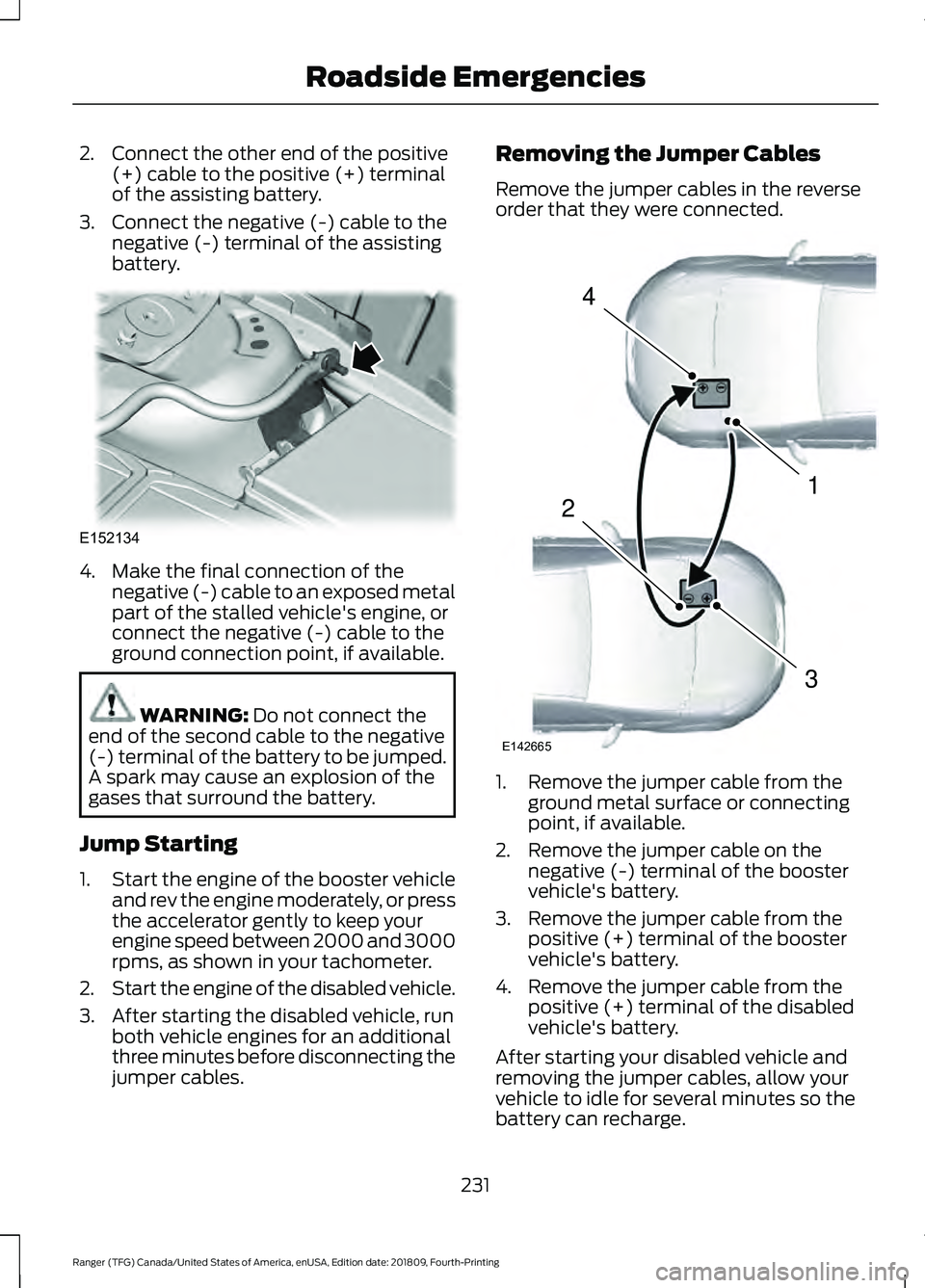
2. Connect the other end of the positive
(+) cable to the positive (+) terminal
of the assisting battery.
3. Connect the negative (-) cable to the negative (-) terminal of the assisting
battery. 4. Make the final connection of the
negative (-) cable to an exposed metal
part of the stalled vehicle's engine, or
connect the negative (-) cable to the
ground connection point, if available. WARNING: Do not connect the
end of the second cable to the negative
(-) terminal of the battery to be jumped.
A spark may cause an explosion of the
gases that surround the battery.
Jump Starting
1. Start the engine of the booster vehicle
and rev the engine moderately, or press
the accelerator gently to keep your
engine speed between 2000 and 3000
rpms, as shown in your tachometer.
2. Start the engine of the disabled vehicle.
3. After starting the disabled vehicle, run both vehicle engines for an additional
three minutes before disconnecting the
jumper cables. Removing the Jumper Cables
Remove the jumper cables in the reverse
order that they were connected.
1. Remove the jumper cable from the
ground metal surface or connecting
point, if available.
2. Remove the jumper cable on the negative (-) terminal of the booster
vehicle's battery.
3. Remove the jumper cable from the positive (+) terminal of the booster
vehicle's battery.
4. Remove the jumper cable from the positive (+) terminal of the disabled
vehicle's battery.
After starting your disabled vehicle and
removing the jumper cables, allow your
vehicle to idle for several minutes so the
battery can recharge.
231
Ranger (TFG) Canada/United States of America, enUSA, Edition date: 201809, Fourth-Printing Roadside EmergenciesE152134 4
1
3
2
E142665
Page 306 of 512
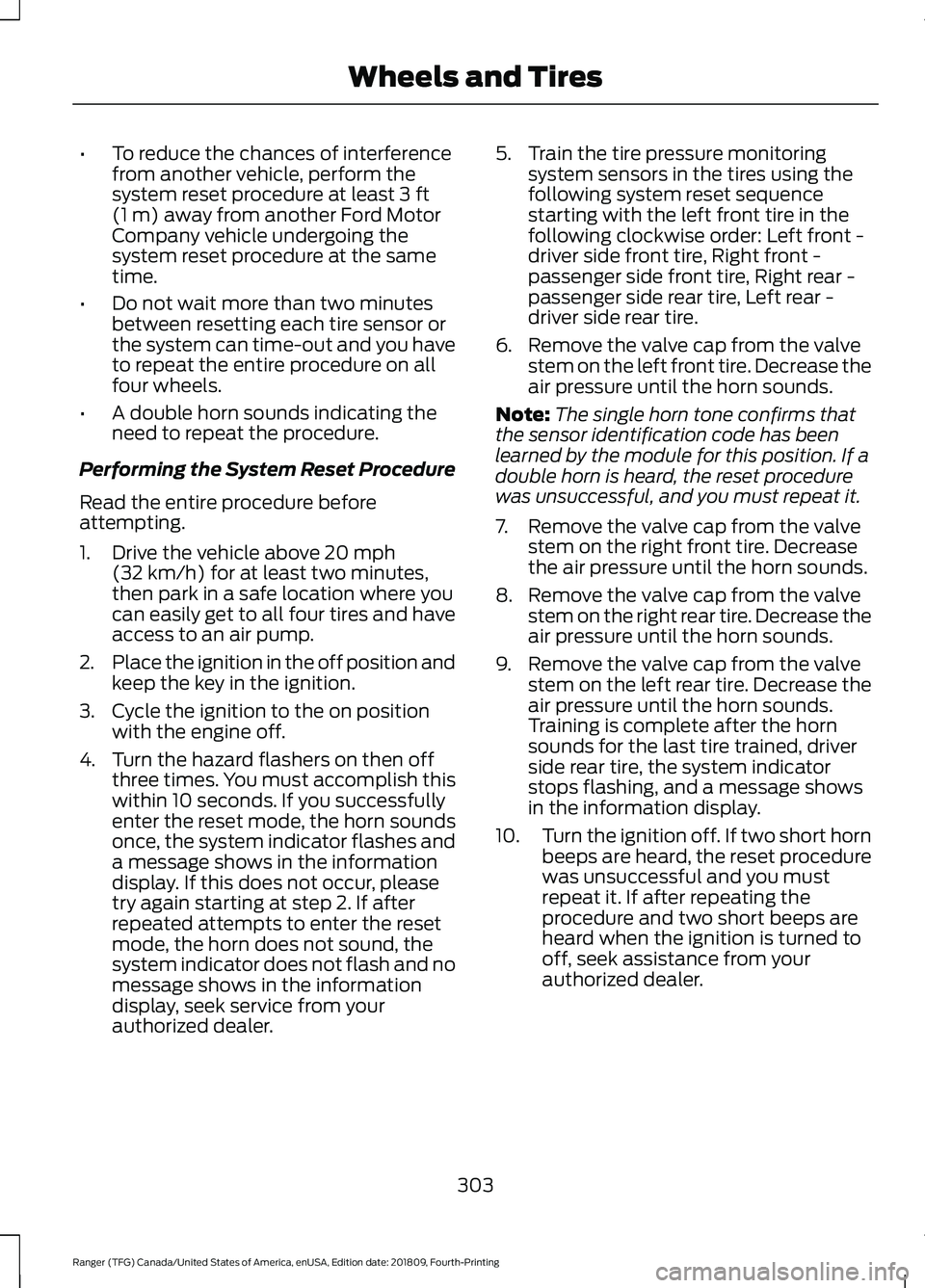
•
To reduce the chances of interference
from another vehicle, perform the
system reset procedure at least 3 ft
(1 m) away from another Ford Motor
Company vehicle undergoing the
system reset procedure at the same
time.
• Do not wait more than two minutes
between resetting each tire sensor or
the system can time-out and you have
to repeat the entire procedure on all
four wheels.
• A double horn sounds indicating the
need to repeat the procedure.
Performing the System Reset Procedure
Read the entire procedure before
attempting.
1. Drive the vehicle above
20 mph
(32 km/h) for at least two minutes,
then park in a safe location where you
can easily get to all four tires and have
access to an air pump.
2. Place the ignition in the off position and
keep the key in the ignition.
3. Cycle the ignition to the on position with the engine off.
4. Turn the hazard flashers on then off three times. You must accomplish this
within 10 seconds. If you successfully
enter the reset mode, the horn sounds
once, the system indicator flashes and
a message shows in the information
display. If this does not occur, please
try again starting at step 2. If after
repeated attempts to enter the reset
mode, the horn does not sound, the
system indicator does not flash and no
message shows in the information
display, seek service from your
authorized dealer. 5. Train the tire pressure monitoring
system sensors in the tires using the
following system reset sequence
starting with the left front tire in the
following clockwise order: Left front -
driver side front tire, Right front -
passenger side front tire, Right rear -
passenger side rear tire, Left rear -
driver side rear tire.
6. Remove the valve cap from the valve stem on the left front tire. Decrease the
air pressure until the horn sounds.
Note: The single horn tone confirms that
the sensor identification code has been
learned by the module for this position. If a
double horn is heard, the reset procedure
was unsuccessful, and you must repeat it.
7. Remove the valve cap from the valve stem on the right front tire. Decrease
the air pressure until the horn sounds.
8. Remove the valve cap from the valve stem on the right rear tire. Decrease the
air pressure until the horn sounds.
9. Remove the valve cap from the valve stem on the left rear tire. Decrease the
air pressure until the horn sounds.
Training is complete after the horn
sounds for the last tire trained, driver
side rear tire, the system indicator
stops flashing, and a message shows
in the information display.
10. Turn the ignition off. If two short horn
beeps are heard, the reset procedure
was unsuccessful and you must
repeat it. If after repeating the
procedure and two short beeps are
heard when the ignition is turned to
off, seek assistance from your
authorized dealer.
303
Ranger (TFG) Canada/United States of America, enUSA, Edition date: 201809, Fourth-Printing Wheels and Tires
Page 368 of 512
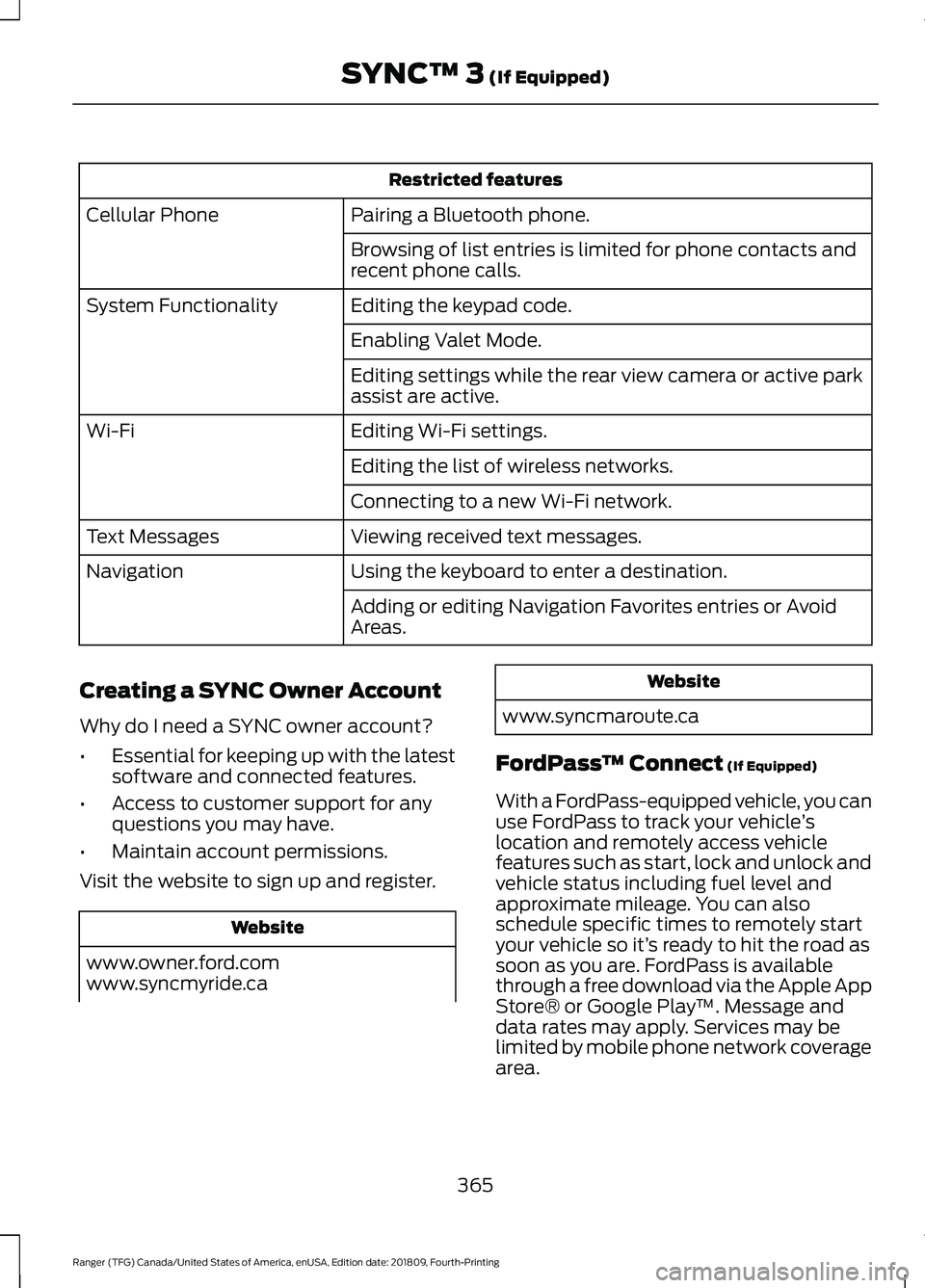
Restricted features
Pairing a Bluetooth phone.
Cellular Phone
Browsing of list entries is limited for phone contacts and
recent phone calls.
Editing the keypad code.
System Functionality
Enabling Valet Mode.
Editing settings while the rear view camera or active park
assist are active.
Editing Wi-Fi settings.
Wi-Fi
Editing the list of wireless networks.
Connecting to a new Wi-Fi network.
Viewing received text messages.
Text Messages
Using the keyboard to enter a destination.
Navigation
Adding or editing Navigation Favorites entries or Avoid
Areas.
Creating a SYNC Owner Account
Why do I need a SYNC owner account?
• Essential for keeping up with the latest
software and connected features.
• Access to customer support for any
questions you may have.
• Maintain account permissions.
Visit the website to sign up and register. Website
www.owner.ford.com
www.syncmyride.ca Website
www.syncmaroute.ca
FordPass ™ Connect (If Equipped)
With a FordPass-equipped vehicle, you can
use FordPass to track your vehicle ’s
location and remotely access vehicle
features such as start, lock and unlock and
vehicle status including fuel level and
approximate mileage. You can also
schedule specific times to remotely start
your vehicle so it’ s ready to hit the road as
soon as you are. FordPass is available
through a free download via the Apple App
Store® or Google Play ™. Message and
data rates may apply. Services may be
limited by mobile phone network coverage
area.
365
Ranger (TFG) Canada/United States of America, enUSA, Edition date: 201809, Fourth-Printing SYNC™ 3
(If Equipped)
Page 439 of 512
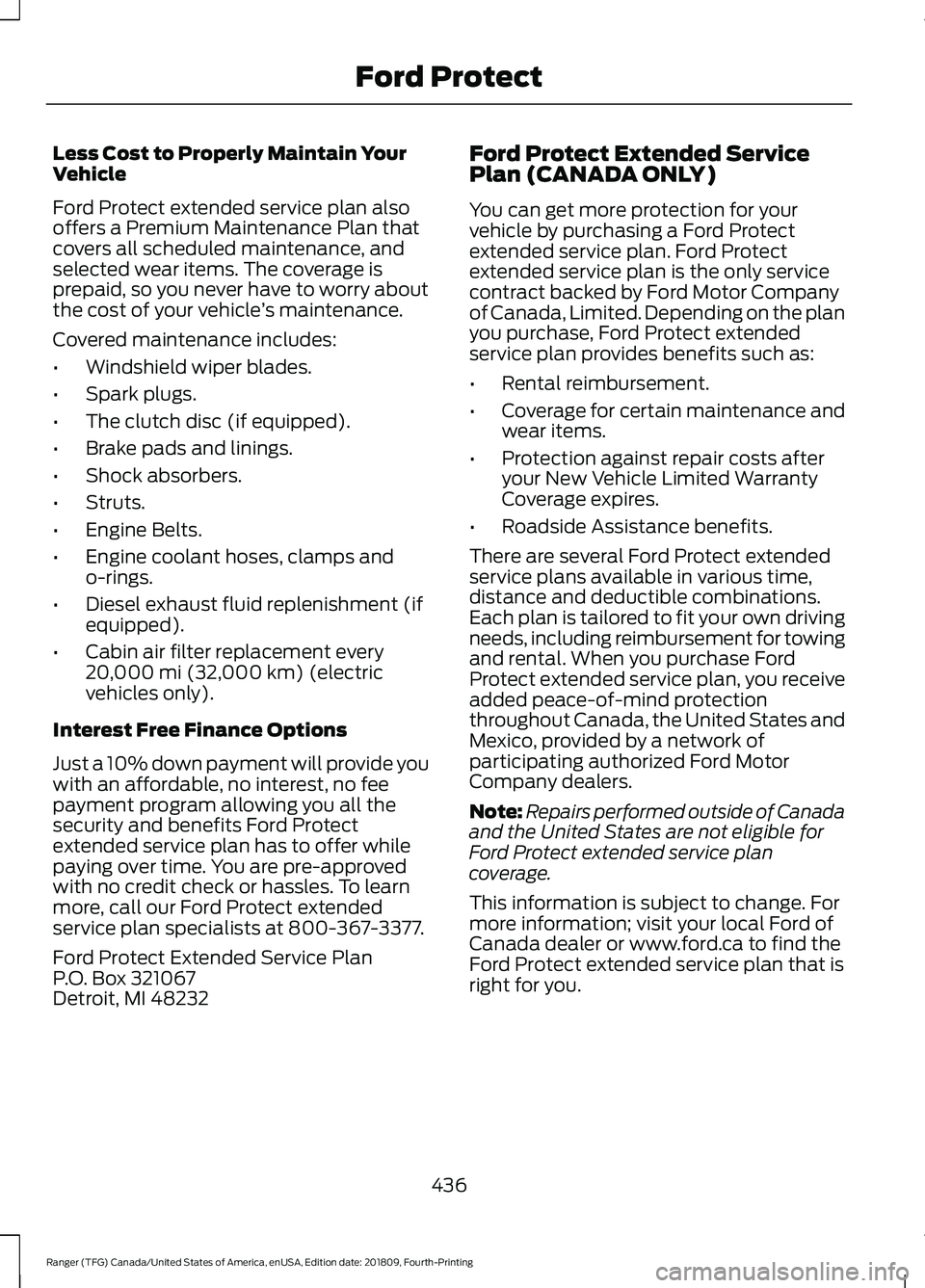
Less Cost to Properly Maintain Your
Vehicle
Ford Protect extended service plan also
offers a Premium Maintenance Plan that
covers all scheduled maintenance, and
selected wear items. The coverage is
prepaid, so you never have to worry about
the cost of your vehicle
’s maintenance.
Covered maintenance includes:
• Windshield wiper blades.
• Spark plugs.
• The clutch disc (if equipped).
• Brake pads and linings.
• Shock absorbers.
• Struts.
• Engine Belts.
• Engine coolant hoses, clamps and
o-rings.
• Diesel exhaust fluid replenishment (if
equipped).
• Cabin air filter replacement every
20,000 mi (32,000 km) (electric
vehicles only).
Interest Free Finance Options
Just a 10% down payment will provide you
with an affordable, no interest, no fee
payment program allowing you all the
security and benefits Ford Protect
extended service plan has to offer while
paying over time. You are pre-approved
with no credit check or hassles. To learn
more, call our Ford Protect extended
service plan specialists at 800-367-3377.
Ford Protect Extended Service Plan
P.O. Box 321067
Detroit, MI 48232 Ford Protect Extended Service
Plan (CANADA ONLY)
You can get more protection for your
vehicle by purchasing a Ford Protect
extended service plan. Ford Protect
extended service plan is the only service
contract backed by Ford Motor Company
of Canada, Limited. Depending on the plan
you purchase, Ford Protect extended
service plan provides benefits such as:
•
Rental reimbursement.
• Coverage for certain maintenance and
wear items.
• Protection against repair costs after
your New Vehicle Limited Warranty
Coverage expires.
• Roadside Assistance benefits.
There are several Ford Protect extended
service plans available in various time,
distance and deductible combinations.
Each plan is tailored to fit your own driving
needs, including reimbursement for towing
and rental. When you purchase Ford
Protect extended service plan, you receive
added peace-of-mind protection
throughout Canada, the United States and
Mexico, provided by a network of
participating authorized Ford Motor
Company dealers.
Note: Repairs performed outside of Canada
and the United States are not eligible for
Ford Protect extended service plan
coverage.
This information is subject to change. For
more information; visit your local Ford of
Canada dealer or www.ford.ca to find the
Ford Protect extended service plan that is
right for you.
436
Ranger (TFG) Canada/United States of America, enUSA, Edition date: 201809, Fourth-Printing Ford Protect
Page 504 of 512
Event Data Recording
See: Data Recording.............................................. 9
Exterior Mirrors...............................................80
Fold Away Exterior Mirrors............................... 80
Heated Exterior Mirrors....................................... 81
Power Exterior Mirrors........................................ 80
Power-Folding Mirrors....................................... 80
Puddle Lamps ....................................................... 81
Signal Indicator Mirrors....................................... 81
F
Fastening the Seatbelts...............................35 Seatbelt Locking Modes.................................... 36
Using Seatbelts During Pregnancy................36
Flat Tire See: Changing a Road Wheel....................... 304
Floor Mats.......................................................227
Fog Lamps - Front See: Front Fog Lamps......................................... 75
Ford Protect...................................................435 Ford Protect Extended Service Plan
(CANADA ONLY).......................................... 436
Ford Protect Extended Service Plans (U.S. Only).................................................................. 435
Four-Wheel Drive
.........................................156
Principle of Operation....................................... 156
Front Fog Lamps.............................................75
Front Parking Aid...........................................177 Obstacle Distance Indicator........................... 178
Front Passenger Sensing System............44
Fuel and Refueling........................................141
Fuel Consumption.......................................146 Advertised Capacity.......................................... 146
Calculating Fuel Economy............................... 147
Filling the Fuel Tank........................................... 147
Fuel Filler Funnel Location........................142
Fuel Quality......................................................141 Choosing the Right Fuel.................................... 141
Fuel Shutoff
...................................................229
Fuse Box Locations......................................241 Engine Compartment Fuse Box.................... 241
High Current Fuse Box..................................... 242
Passenger Compartment Fuse Box............242
Pre-fuse Box......................................................... 241
Fuses.................................................................241
Fuse Specification Chart
...........................242
Engine Compartment Fuse Box................... 242Passenger Compartment Fuse Box.............251
G
Garage Door Opener....................................125
Garage Door Opener See: Universal Garage Door Opener............125
Gauges...............................................................83 Engine Coolant Temperature Gauge............84
Fuel Gauge............................................................. 84
Information Display............................................. 83
Left Information Display.................................... 85
Type 1 and 2............................................................ 83
Type 3....................................................................... 85
Gearbox See: Transmission............................................... 152
General Information on Radio Frequencies...................................................50
Intelligent Access................................................. 50
General Maintenance Information........437 Multi-Point Inspection..................................... 439
Owner Checks and Services......................... 438
Protecting Your Investment........................... 437
Why Maintain Your Vehicle?.......................... 437
Why Maintain Your Vehicle at Your Dealership?..................................................... 437
Getting Assistance Outside the U.S. and Canada..........................................................237
Getting the Services You Need...............234 Away From Home.............................................. 234
Glove Compartment
.....................................131
Glove Box with Lock............................................ 131
H
Handbrake See: Parking Brake............................................. 166
Hazard Flashers
............................................229
Headlamp Adjusting See: Adjusting the Headlamps.................... 266
Headlamp Removal See: Removing a Headlamp......................... 268
Headrest See: Head Restraints.......................................... 118
Head Restraints
.............................................118
Adjusting the Head Restraint.......................... 119
Heated Exterior Mirrors................................116
Heated Rear Window...................................116
501
Ranger (TFG) Canada/United States of America, enUSA, Edition date: 201809, Fourth-Printing Index
Page 505 of 512
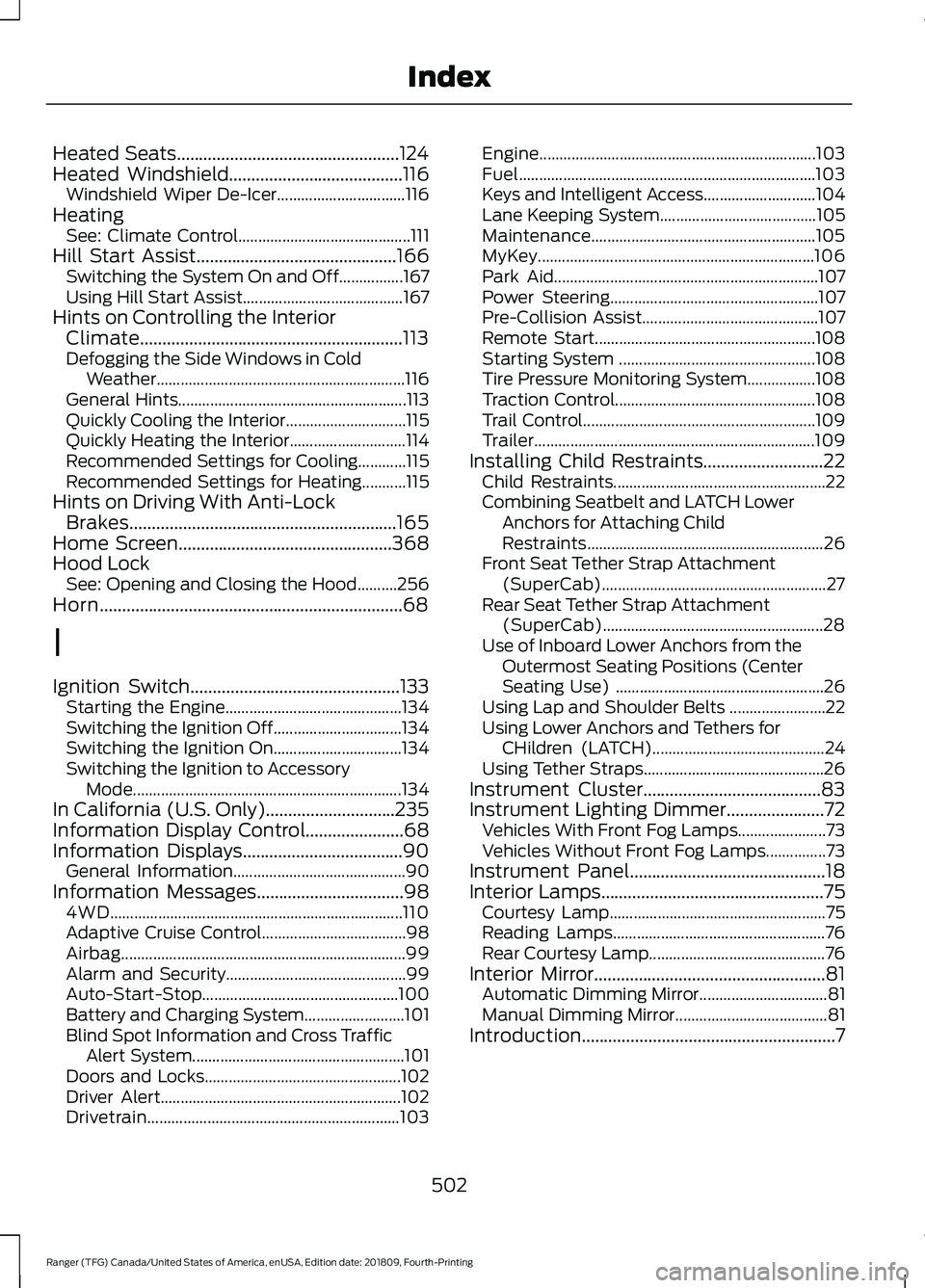
Heated Seats..................................................124
Heated Windshield.......................................116
Windshield Wiper De-Icer................................ 116
Heating See: Climate Control........................................... 111
Hill Start Assist.............................................166 Switching the System On and Off................167
Using Hill Start Assist........................................ 167
Hints on Controlling the Interior Climate...........................................................113
Defogging the Side Windows in Cold Weather.............................................................. 116
General Hints......................................................... 113
Quickly Cooling the Interior.............................. 115
Quickly Heating the Interior............................. 114
Recommended Settings for Cooling............115
Recommended Settings for Heating...........115
Hints on Driving With Anti-Lock Brakes............................................................165
Home Screen
................................................368
Hood Lock See: Opening and Closing the Hood..........256
Horn....................................................................68
I
Ignition Switch
...............................................133
Starting the Engine............................................ 134
Switching the Ignition Off................................ 134
Switching the Ignition On................................ 134
Switching the Ignition to Accessory Mode
................................................................... 134
In California (U.S. Only).............................235
Information Display Control
......................68
Information Displays....................................90
General Information........................................... 90
Information Messages
.................................98
4WD........................................................................\
. 110
Adaptive Cruise Control.................................... 98
Airbag....................................................................... 99
Alarm and Security............................................. 99
Auto-Start-Stop................................................. 100
Battery and Charging System......................... 101
Blind Spot Information and Cross Traffic Alert System..................................................... 101
Doors and Locks................................................. 102
Driver Alert............................................................ 102
Drivetrain............................................................... 103Engine.....................................................................
103
Fuel........................................................................\
.. 103
Keys and Intelligent Access............................ 104
Lane Keeping System....................................... 105
Maintenance........................................................ 105
MyKey..................................................................... 106
Park Aid.................................................................. 107
Power Steering.................................................... 107
Pre-Collision Assist............................................ 107
Remote Start....................................................... 108
Starting System ................................................. 108
Tire Pressure Monitoring System.................108
Traction Control.................................................. 108
Trail Control.......................................................... 109
Trailer...................................................................... 109
Installing Child Restraints...........................22 Child Restraints..................................................... 22
Combining Seatbelt and LATCH Lower Anchors for Attaching Child
Restraints........................................................... 26
Front Seat Tether Strap Attachment (SuperCab)........................................................ 27
Rear Seat Tether Strap Attachment (SuperCab)....................................................... 28
Use of Inboard Lower Anchors from the Outermost Seating Positions (Center
Seating Use) .................................................... 26
Using Lap and Shoulder Belts ........................ 22
Using Lower Anchors and Tethers for CHildren (LATCH)........................................... 24
Using Tether Straps............................................. 26
Instrument Cluster
........................................83
Instrument Lighting Dimmer......................72 Vehicles With Front Fog Lamps...................... 73
Vehicles Without Front Fog Lamps...............73
Instrument Panel
............................................18
Interior Lamps..................................................75
Courtesy Lamp...................................................... 75
Reading Lamps..................................................... 76
Rear Courtesy Lamp............................................ 76
Interior Mirror....................................................81 Automatic Dimming Mirror................................ 81
Manual Dimming Mirror...................................... 81
Introduction.........................................................7
502
Ranger (TFG) Canada/United States of America, enUSA, Edition date: 201809, Fourth-Printing Index
Page 507 of 512
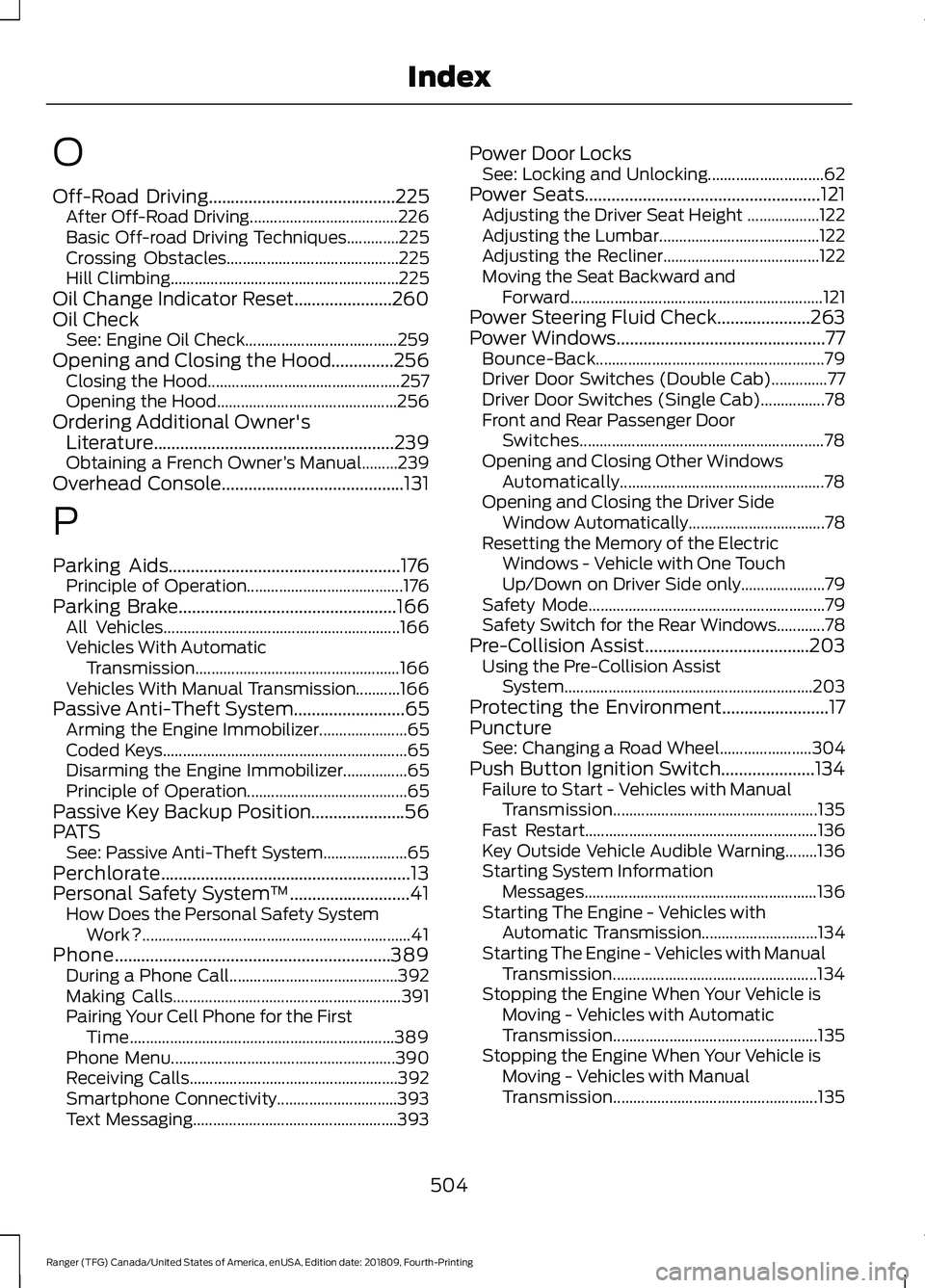
O
Off-Road Driving..........................................225
After Off-Road Driving..................................... 226
Basic Off-road Driving Techniques.............225
Crossing Obstacles........................................... 225
Hill Climbing......................................................... 225
Oil Change Indicator Reset......................260
Oil Check See: Engine Oil Check...................................... 259
Opening and Closing the Hood..............256 Closing the Hood................................................ 257
Opening the Hood............................................. 256
Ordering Additional Owner's Literature......................................................239
Obtaining a French Owner ’s Manual.........239
Overhead Console
.........................................131
P
Parking Aids
....................................................176
Principle of Operation....................................... 176
Parking Brake
.................................................166
All Vehicles........................................................... 166
Vehicles With Automatic Transmission................................................... 166
Vehicles With Manual Transmission...........166
Passive Anti-Theft System
.........................65
Arming the Engine Immobilizer...................... 65
Coded Keys............................................................. 65
Disarming the Engine Immobilizer................65
Principle of Operation........................................ 65
Passive Key Backup Position.....................56
PATS See: Passive Anti-Theft System..................... 65
Perchlorate........................................................13
Personal Safety System ™
...........................41
How Does the Personal Safety System
Work?................................................................... 41
Phone..............................................................389 During a Phone Call.......................................... 392
Making Calls......................................................... 391
Pairing Your Cell Phone for the First Time.................................................................. 389
Phone Menu........................................................ 390
Receiving Calls.................................................... 392
Smartphone Connectivity.............................. 393
Text Messaging................................................... 393Power Door Locks
See: Locking and Unlocking............................. 62
Power Seats
.....................................................121
Adjusting the Driver Seat Height .................. 122
Adjusting the Lumbar........................................ 122
Adjusting the Recliner....................................... 122
Moving the Seat Backward and Forward............................................................... 121
Power Steering Fluid Check.....................263
Power Windows...............................................77 Bounce-Back......................................................... 79
Driver Door Switches (Double Cab)..............77
Driver Door Switches (Single Cab)................78
Front and Rear Passenger Door Switches............................................................. 78
Opening and Closing Other Windows Automatically................................................... 78
Opening and Closing the Driver Side Window Automatically.................................. 78
Resetting the Memory of the Electric Windows - Vehicle with One Touch
Up/Down on Driver Side only..................... 79
Safety Mode........................................................... 79
Safety Switch for the Rear Windows............78
Pre-Collision Assist.....................................203 Using the Pre-Collision Assist
System.............................................................. 203
Protecting the Environment........................17
Puncture See: Changing a Road Wheel....................... 304
Push Button Ignition Switch.....................134 Failure to Start - Vehicles with Manual
Transmission................................................... 135
Fast Restart.......................................................... 136
Key Outside Vehicle Audible Warning........136
Starting System Information Messages.......................................................... 136
Starting The Engine - Vehicles with Automatic Transmission............................. 134
Starting The Engine - Vehicles with Manual Transmission................................................... 134
Stopping the Engine When Your Vehicle is Moving - Vehicles with Automatic
Transmission................................................... 135
Stopping the Engine When Your Vehicle is Moving - Vehicles with Manual
Transmission................................................... 135
504
Ranger (TFG) Canada/United States of America, enUSA, Edition date: 201809, Fourth-Printing Index