cruise control FORD RANGER 2019 Owner's Manual
[x] Cancel search | Manufacturer: FORD, Model Year: 2019, Model line: RANGER, Model: FORD RANGER 2019Pages: 512, PDF Size: 7.63 MB
Page 191 of 512
Optimal system performance requires a
clear view of the road by the
windshield-mounted camera.
Optimal performance may not occur if:
•
The camera is blocked.
• There is poor visibility or lighting
conditions.
• There are bad weather conditions.
System Not Available
Conditions that can cause the system to
deactivate or prevent the system from
activating when requested include:
• A blocked sensor.
• High brake temperature.
• A failure in the system or a related
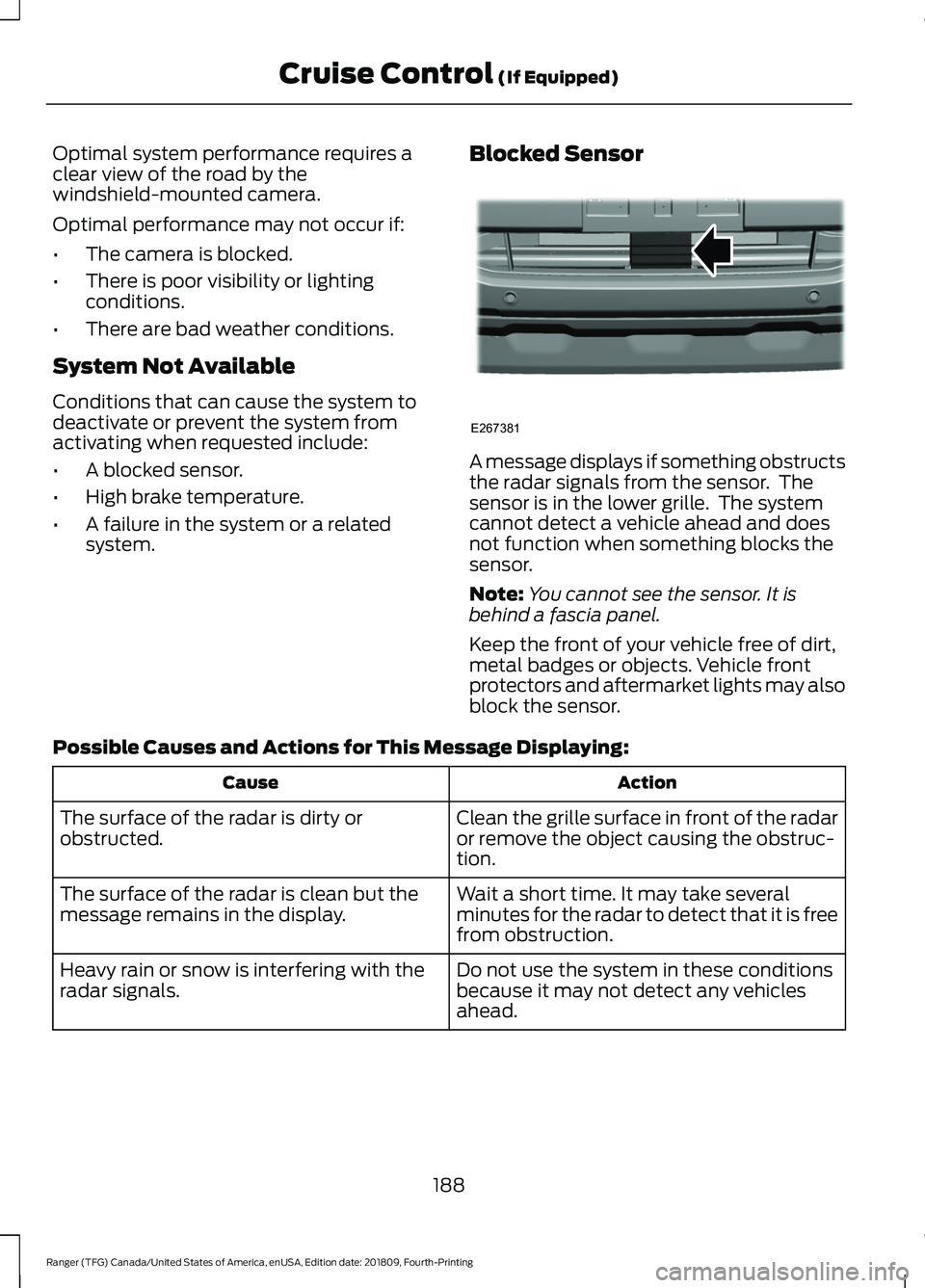
system. Blocked Sensor A message displays if something obstructs
the radar signals from the sensor. The
sensor is in the lower grille. The system
cannot detect a vehicle ahead and does
not function when something blocks the
sensor.
Note:
You cannot see the sensor. It is
behind a fascia panel.
Keep the front of your vehicle free of dirt,
metal badges or objects. Vehicle front
protectors and aftermarket lights may also
block the sensor.
Possible Causes and Actions for This Message Displaying: Action
Cause
Clean the grille surface in front of the radar
or remove the object causing the obstruc-
tion.
The surface of the radar is dirty or
obstructed.
Wait a short time. It may take several
minutes for the radar to detect that it is free
from obstruction.
The surface of the radar is clean but the
message remains in the display.
Do not use the system in these conditions
because it may not detect any vehicles
ahead.
Heavy rain or snow is interfering with the
radar signals.
188
Ranger (TFG) Canada/United States of America, enUSA, Edition date: 201809, Fourth-Printing Cruise Control (If Equipped)E267381
Page 192 of 512
Action
Cause
Do not use the system in these conditions
because it may not detect any vehicles
ahead.
Water, snow or ice on the surface of the
road may interfere with the radar signals.
Wait a short time or switch to normal cruise
control.
You are in a desert or remote area with no
other vehicles and no roadside objects.
Due to the nature of radar technology, it is possible to get a blockage warning with no
actual block. A false blocked condition either self clears, or clears after you restart your
vehicle.
Switching to Normal Cruise
Control WARNING: Normal cruise control
will not brake when your vehicle is
approaching slower vehicles. Always be
aware of which mode you have selected
and apply the brakes when necessary. The cruise control indicator light
replaces the adaptive cruise
control indicator light if you
select normal cruise control. The gap
setting does not display, and the system
does not respond to lead vehicles.
Automatic braking remains active to
maintain set speed.
You can change from adaptive cruise
control to normal cruise control through
the information display.
189
Ranger (TFG) Canada/United States of America, enUSA, Edition date: 201809, Fourth-Printing Cruise Control
(If Equipped)E71340
Page 207 of 512
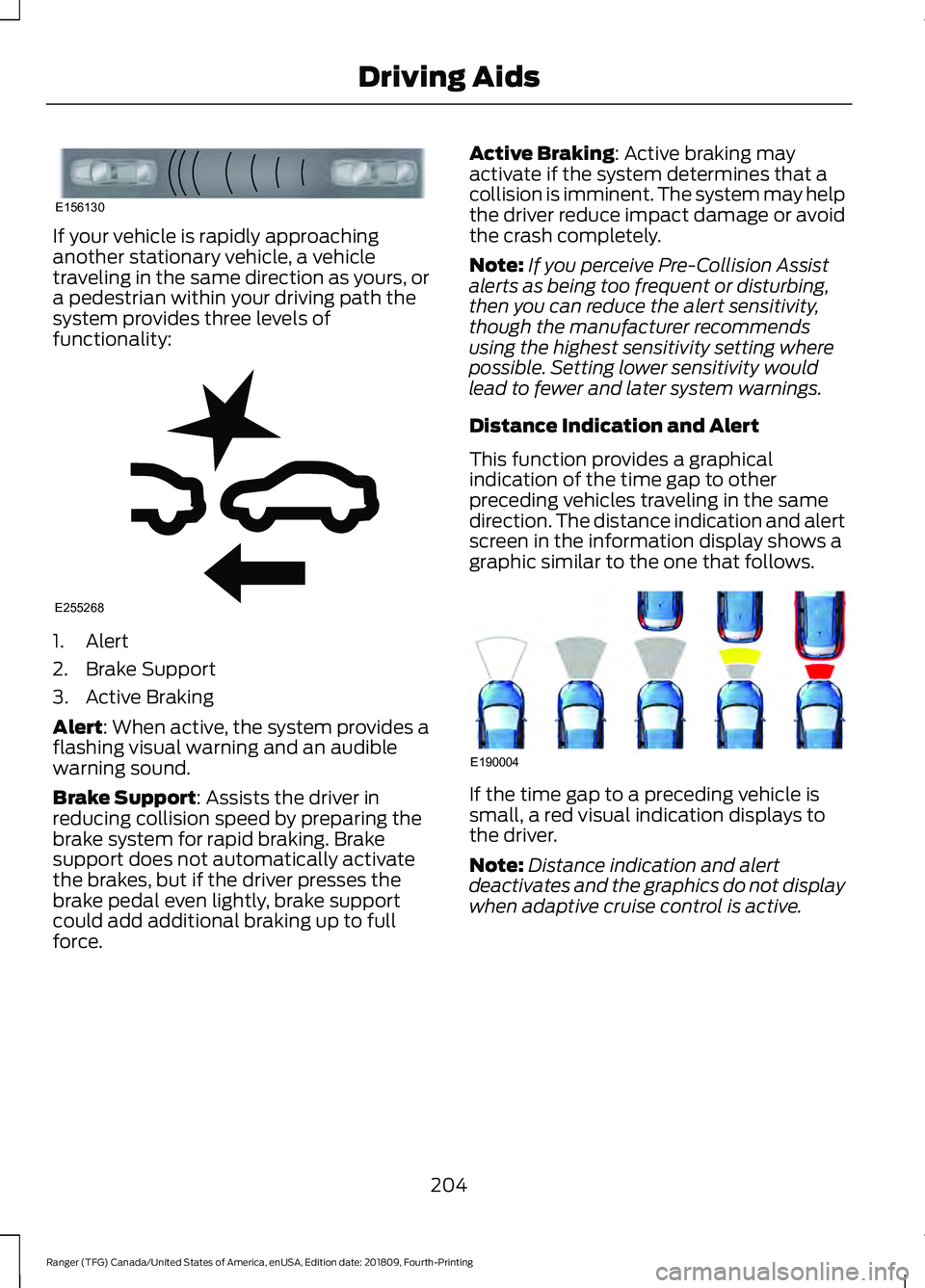
If your vehicle is rapidly approaching
another stationary vehicle, a vehicle
traveling in the same direction as yours, or
a pedestrian within your driving path the
system provides three levels of
functionality:
1. Alert
2. Brake Support
3. Active Braking
Alert: When active, the system provides a
flashing visual warning and an audible
warning sound.
Brake Support
: Assists the driver in
reducing collision speed by preparing the
brake system for rapid braking. Brake
support does not automatically activate
the brakes, but if the driver presses the
brake pedal even lightly, brake support
could add additional braking up to full
force. Active Braking
: Active braking may
activate if the system determines that a
collision is imminent. The system may help
the driver reduce impact damage or avoid
the crash completely.
Note: If you perceive Pre-Collision Assist
alerts as being too frequent or disturbing,
then you can reduce the alert sensitivity,
though the manufacturer recommends
using the highest sensitivity setting where
possible. Setting lower sensitivity would
lead to fewer and later system warnings.
Distance Indication and Alert
This function provides a graphical
indication of the time gap to other
preceding vehicles traveling in the same
direction. The distance indication and alert
screen in the information display shows a
graphic similar to the one that follows. If the time gap to a preceding vehicle is
small, a red visual indication displays to
the driver.
Note:
Distance indication and alert
deactivates and the graphics do not display
when adaptive cruise control is active.
204
Ranger (TFG) Canada/United States of America, enUSA, Edition date: 201809, Fourth-Printing Driving AidsE156130 E255268 E190004
Page 228 of 512
•
Transmissions give their best fuel
economy when operated in the top
cruise gear and with steady pressure
on the gas pedal.
• Four-wheel-drive operation (if
equipped) is less fuel efficient than
two-wheel-drive operation.
• Close the windows for high-speed
driving.
COLD WEATHER
PRECAUTIONS
The functional operation of some
components and systems can be affected
at temperatures below -13°F (-25°C).
OFF-ROAD DRIVING
Before going off-roading, consult with your
local governmental agencies to determine
designated off-road trails and recreation
areas. Also, be sure to understand any
off-road vehicle registration requirements
for the area in which you plan on driving.
Before taking your vehicle off-roading, a
basic vehicle inspection should be done to
make sure that the vehicle is in top working
condition.
Basic Off-road Driving Techniques
• Grip the steering wheel with thumbs
on the outside of the rim. This reduces
the risk of injury due to abrupt steering
wheel motions that occur when
negotiating rough terrain. Do not grip
the steering wheel with thumbs inside
the rim.
• Look ahead on your route noting
upcoming obstacles, surface texture
or color changes or any other factors
which may indicate a change in
available traction, and adjust the
vehicle speed and route accordingly. •
Always keep available ground
clearance in mind and pick a route that
minimizes the risk of catching the
underside of the vehicle on an obstacle.
• When negotiating low speed obstacles,
applying light brake pressure in
conjunction with the throttle helps
prevent the vehicle from jerking and
allows you to negotiate the obstacle
in a more controlled manner. Using 4L
also helps with this.
Crossing Obstacles
• Review the path ahead before
attempting to cross any obstacle. It is
best if the obstacle is reviewed from
outside the vehicle so that there is a
good understanding of terrain condition
both in front of and behind the
obstacle.
• If a large obstacle such as a rock
cannot be avoided, choose a path that
places the rock directly under the tire
rather than the undercarriage of the
vehicle. This helps prevent damage to
your vehicle.
Hill Climbing WARNING:
Extreme care should
be used when steering the vehicle in
reverse down a slope so as not to cause
the vehicle to swerve out of control.
225
Ranger (TFG) Canada/United States of America, enUSA, Edition date: 201809, Fourth-Printing Driving Hints
Page 254 of 512
Protected Component
Fuse Rating
Fuse Number
Not used.
-
1
Body control module.
125A
2
Voltage quality module (supplies rear lamp blind spot,
rear view camera, head up display, 4x4 switch, image
processing module and adaptive cruise control radar).
50A
3
Busbar through to power distribution box.
-
4
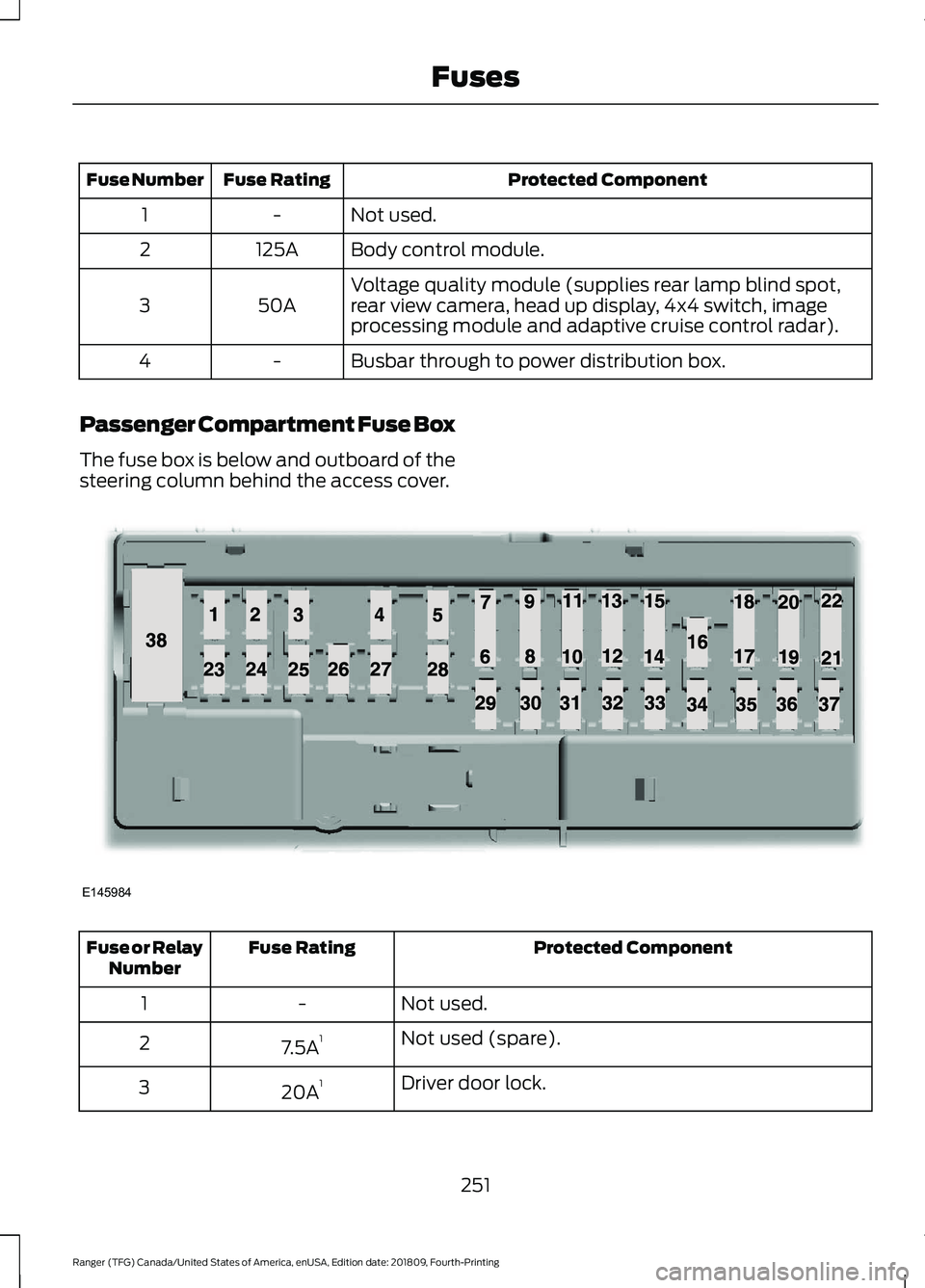
Passenger Compartment Fuse Box
The fuse box is below and outboard of the
steering column behind the access cover. Protected Component
Fuse Rating
Fuse or Relay
Number
Not used.
-
1
Not used (spare).
7.5A 1
2
Driver door lock.
20A 1
3
251
Ranger (TFG) Canada/United States of America, enUSA, Edition date: 201809, Fourth-Printing FusesE145984
Page 497 of 512
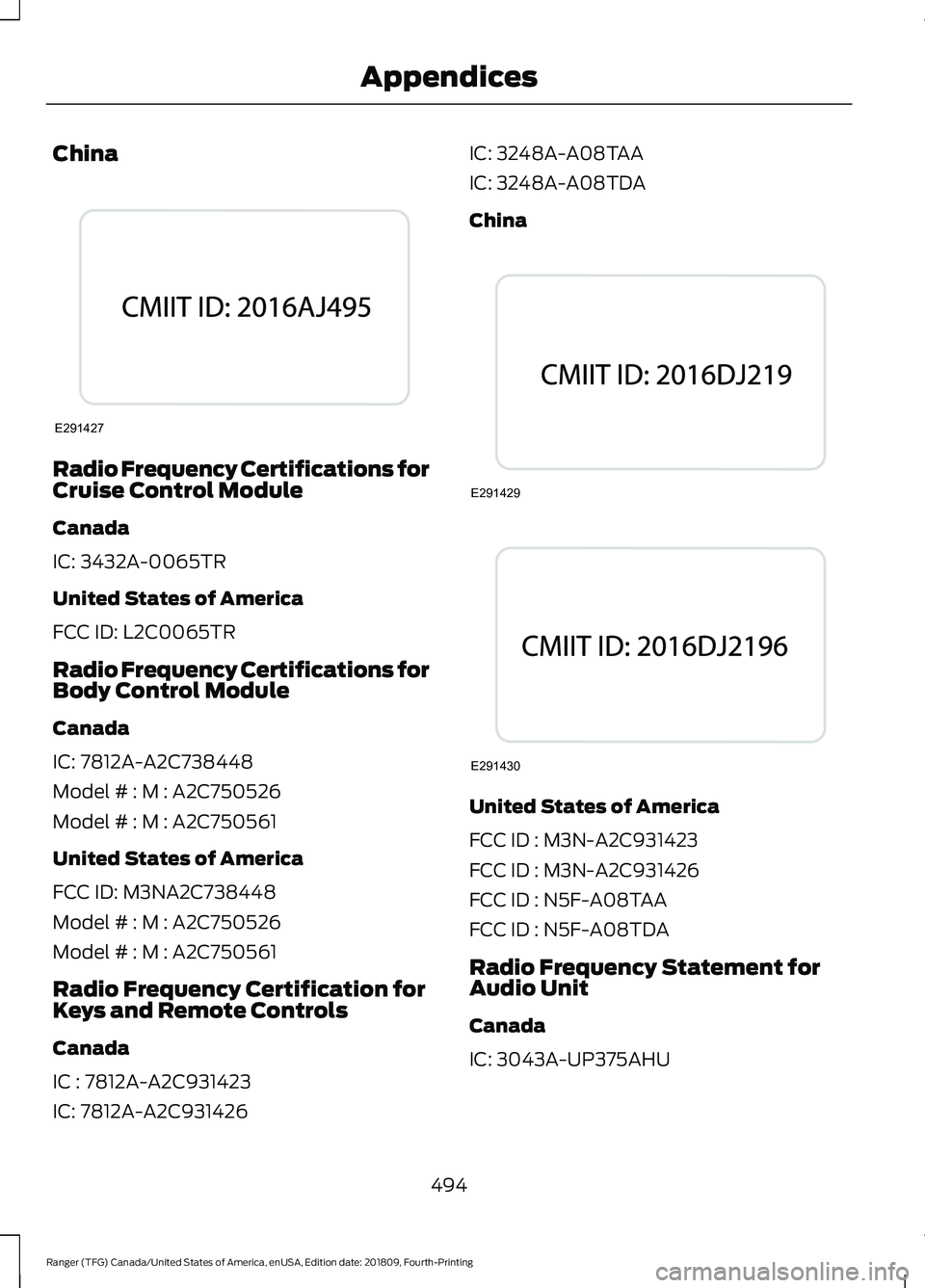
China
Radio Frequency Certifications for
Cruise Control Module
Canada
IC: 3432A-0065TR
United States of America
FCC ID: L2C0065TR
Radio Frequency Certifications for
Body Control Module
Canada
IC: 7812A-A2C738448
Model # : M : A2C750526
Model # : M : A2C750561
United States of America
FCC ID: M3NA2C738448
Model # : M : A2C750526
Model # : M : A2C750561
Radio Frequency Certification for
Keys and Remote Controls
Canada
IC : 7812A-A2C931423
IC: 7812A-A2C931426 IC: 3248A-A08TAA
IC: 3248A-A08TDA
China
United States of America
FCC ID : M3N-A2C931423
FCC ID : M3N-A2C931426
FCC ID : N5F-A08TAA
FCC ID : N5F-A08TDA
Radio Frequency Statement for
Audio Unit
Canada
IC: 3043A-UP375AHU
494
Ranger (TFG) Canada/United States of America, enUSA, Edition date: 201809, Fourth-Printing AppendicesE291427 E291429 E291430
Page 500 of 512
4
4WD
See: Four-Wheel Drive..................................... 156
A
A/C See: Climate Control........................................... 111
About This Manual...........................................7
About Trail Control.......................................174
ABS See: Brakes........................................................... 165
ABS driving hints See: Hints on Driving With Anti-Lock
Brakes................................................................ 165
Accessories....................................................433 Exterior Style....................................................... 433
Interior Style........................................................ 433
Lifestyle................................................................. 433
Peace of Mind..................................................... 433
Accessories See: Replacement Parts
Recommendation............................................ 13
ACC See: Using Adaptive Cruise Control.............183
Adjusting the Headlamps........................266 Vertical Aim Adjustment................................ 266
Adjusting the Steering Wheel...................66
Airbag Disposal
...............................................49
Air Conditioning See: Climate Control........................................... 111
Air Filter See: Changing the Engine Air Filter.............272
Alarm See: Anti-Theft Alarm........................................ 65
Ambient Lighting............................................76 Adjusting the Brightness.................................... 76
Changing the Color.............................................. 76
Switching Ambient Lighting Off..................... 76
Switching Ambient Lighting On...................... 76
Anti-Theft Alarm
............................................65
Alarm System........................................................ 65
Arming the Alarm................................................. 65
Disarming the Alarm........................................... 65
Triggering the Alarm............................................65
Appendices....................................................455 Apps.................................................................402
........................................................................\
.......... 402
SiriusXM Traffic and Travel Link.................. 404
At a Glance........................................................18
Audible Warnings and Indicators.............89 Headlamps On Warning Chime..................... 89
Key in Ignition Warning Chime........................ 89
Keyless Warning Alert........................................ 89
Parking Brake On Warning Chime.................89
Audio Control
..................................................66
Type One................................................................. 66
Type Two................................................................. 67
You can operate the following functions with the control:............................................... 67
Audio Input Jack...........................................337
Audio System................................................326 General Information......................................... 326
Audio Unit - Vehicles With: SYNC 3
......................................................................330
Adjusting the Volume...................................... 330
Changing Radio Stations................................. 331
Playing or Pausing Media................................. 331
Switching the Audio Unit On and Off..........331
Using Seek, Fast Forward and Reverse.............................................................. 331
Audio Unit - Vehicles With: SYNC.........328 Accessing the Apps Menu.............................. 328
Accessing the Clock Settings........................ 328
Accessing the Information Menu.................328
Accessing the Media Source Menu.............328
Accessing the Phone Features..................... 328
Accessing the Settings Menu........................ 328
Accessing the Sound Settings...................... 329
Adjusting the Volume....................................... 329
Changing Radio Stations................................ 329
Listening to the Radio...................................... 329
Playing or Pausing Media............................... 329
Switching Repeat Mode On and Off..........329
Switching Shuffle Mode On and Off..........329
Switching the Audio Unit On and Off........329
Switching the Display On and Off...............329
Using a Cell Phone............................................ 329
Using Seek, Fast Forward and Reverse............................................................. 330
Using the Display Control............................... 330
Using the Number Block................................. 330
497
Ranger (TFG) Canada/United States of America, enUSA, Edition date: 201809, Fourth-Printing Index
Page 503 of 512
Cruise Control..................................................67
Principle of Operation....................................... 182
Cruise control See: Using Cruise Control................................ 182
Customer Assistance.................................234
D
Data Recording
..................................................9
911 Assist Privacy Notice..................................... 13
Comfort, Convenience and Entertainment Data........................................................................\
11
Event Data................................................................. 11
Service Data............................................................ 10
Services That Third Parties Provide...............12
Services That We Provide.................................. 12
Vehicles With a Modem...................................... 12
Vehicles With SYNC............................................. 12
Daytime Running Lamps
.............................73
Type One - Conventional
(Non-Configurable)........................................ 73
Type Two - Configurable.................................... 73
Declaration of Conformity.......................483 Radio Frequency Statement......................... 483
Digital Radio..................................................332 HD Radio Reception and Station
Troubleshooting............................................ 333
Direction Indicators........................................75 Direction Indicator................................................ 75
Switching the Direction Indicators On and Off........................................................................\
.. 75
Doors and Locks.............................................62
Driver Alert
......................................................190
PRINCIPLE OF OPERATION........................... 190
USING DRIVER ALERT..................................... 190
Driver and Passenger Airbags....................43 Children and Airbags.......................................... 44
Proper Driver and Front Passenger Seating Adjustment........................................................ 43
Driving Aids.....................................................190
Driving Hints
...................................................224
Driving Through Water...............................226
DRL See: Daytime Running Lamps......................... 73
E
Economical Driving.....................................224 Electromagnetic Compatibility..............455
Electronic Locking Differential................163
Operating Electronic Locking Differential
with Spare or Mismatched Tires..............163
Emission Law.................................................148 Noise Emissions Warranty, Prohibited
Tampering Acts and Maintenance..........149
Tampering With a Noise Control System............................................................... 148
End User License Agreement..................457 VEHICLE SOFTWARE END USER LICENSE
AGREEMENT (EULA) ................................. 457
Engine Block Heater.....................................137 Using the Engine Block Heater....................... 137
Engine Coolant Check...............................260 Adding Coolant.................................................... 261
Engine Emission Control...........................148
Engine Immobilizer See: Passive Anti-Theft System..................... 65
Engine Oil Check..........................................259 Adding Engine Oil.............................................. 259
Engine Oil Dipstick
......................................259
Engine Specifications.................................316 Drivebelt Routing................................................ 316
Entertainment...............................................376 AM/FM Radio....................................................... 377
Apps....................................................................... 385
Bluetooth Stereo or USB................................ 384
CD (If equipped)................................................ 383
HD Radio ™ Information (If
Available)........................................................ 380
SiriusXM® Satellite Radio (If Activated)........................................................ 378
Sources................................................................... 377
Supported Media Players, Formats and Metadata Information................................ 385
USB Ports............................................................. 385
Environment......................................................17
Essential Towing Checks...........................218 Before Towing a Trailer.................................... 220
Launching or Retrieving a Boat or Personal Watercraft (PWC)......................................... 221
Safety Chains....................................................... 219
Trailer Brakes....................................................... 220
Trailer Lamps....................................................... 220
Trailer Towing Connector................................. 219
When Towing a Trailer..................................... 220
500
Ranger (TFG) Canada/United States of America, enUSA, Edition date: 201809, Fourth-Printing Index
Page 505 of 512
Heated Seats..................................................124
Heated Windshield.......................................116
Windshield Wiper De-Icer................................ 116
Heating See: Climate Control........................................... 111
Hill Start Assist.............................................166 Switching the System On and Off................167
Using Hill Start Assist........................................ 167
Hints on Controlling the Interior Climate...........................................................113
Defogging the Side Windows in Cold Weather.............................................................. 116
General Hints......................................................... 113
Quickly Cooling the Interior.............................. 115
Quickly Heating the Interior............................. 114
Recommended Settings for Cooling............115
Recommended Settings for Heating...........115
Hints on Driving With Anti-Lock Brakes............................................................165
Home Screen
................................................368
Hood Lock See: Opening and Closing the Hood..........256
Horn....................................................................68
I
Ignition Switch
...............................................133
Starting the Engine............................................ 134
Switching the Ignition Off................................ 134
Switching the Ignition On................................ 134
Switching the Ignition to Accessory Mode
................................................................... 134
In California (U.S. Only).............................235
Information Display Control
......................68
Information Displays....................................90
General Information........................................... 90
Information Messages
.................................98
4WD........................................................................\
. 110
Adaptive Cruise Control.................................... 98
Airbag....................................................................... 99
Alarm and Security............................................. 99
Auto-Start-Stop................................................. 100
Battery and Charging System......................... 101
Blind Spot Information and Cross Traffic Alert System..................................................... 101
Doors and Locks................................................. 102
Driver Alert............................................................ 102
Drivetrain............................................................... 103Engine.....................................................................
103
Fuel........................................................................\
.. 103
Keys and Intelligent Access............................ 104
Lane Keeping System....................................... 105
Maintenance........................................................ 105
MyKey..................................................................... 106
Park Aid.................................................................. 107
Power Steering.................................................... 107
Pre-Collision Assist............................................ 107
Remote Start....................................................... 108
Starting System ................................................. 108
Tire Pressure Monitoring System.................108
Traction Control.................................................. 108
Trail Control.......................................................... 109
Trailer...................................................................... 109
Installing Child Restraints...........................22 Child Restraints..................................................... 22
Combining Seatbelt and LATCH Lower Anchors for Attaching Child
Restraints........................................................... 26
Front Seat Tether Strap Attachment (SuperCab)........................................................ 27
Rear Seat Tether Strap Attachment (SuperCab)....................................................... 28
Use of Inboard Lower Anchors from the Outermost Seating Positions (Center
Seating Use) .................................................... 26
Using Lap and Shoulder Belts ........................ 22
Using Lower Anchors and Tethers for CHildren (LATCH)........................................... 24
Using Tether Straps............................................. 26
Instrument Cluster
........................................83
Instrument Lighting Dimmer......................72 Vehicles With Front Fog Lamps...................... 73
Vehicles Without Front Fog Lamps...............73
Instrument Panel
............................................18
Interior Lamps..................................................75
Courtesy Lamp...................................................... 75
Reading Lamps..................................................... 76
Rear Courtesy Lamp............................................ 76
Interior Mirror....................................................81 Automatic Dimming Mirror................................ 81
Manual Dimming Mirror...................................... 81
Introduction.........................................................7
502
Ranger (TFG) Canada/United States of America, enUSA, Edition date: 201809, Fourth-Printing Index
Page 509 of 512
Seatbelt Height Adjustment......................37
Seatbelt Reminder.........................................37 Seatbelt Status..................................................... 38
Seatbelts...........................................................34 Principle of Operation........................................ 34
Seats..................................................................118
Security..............................................................65
Settings...........................................................405 911 Assist............................................................... 410
Ambient Lighting................................................. 417
Bluetooth.............................................................. 407
Clock....................................................................... 407
Display.................................................................... 418
General................................................................... 415
Media Player....................................................... 406
Mobile Apps.......................................................... 413
Navigation............................................................. 412
Phone..................................................................... 407
Radio........................................................................\
411
SiriusXM.................................................................. 411
Sound.................................................................... 405
Valet Mode............................................................ 419
Vehicle..................................................................... 417
Voice Control........................................................ 418
Wi-Fi & Hotspot.................................................. 415
Setting the Trail Control Speed...............174
Side Airbags
.....................................................46
Sitting in the Correct Position...................118
Snow Chains See: Using Snow Chains.................................. 297
Spare Wheel See: Changing a Road Wheel....................... 304
Special Notices
................................................14
Fleet Telematics Modem.................................... 15
FordPass Connect................................................. 15
New Vehicle Limited Warranty......................... 14
Notice to Owners of Pickup Trucks and Utility Type Vehicles........................................ 15
On Board Diagnostics Data Link Connector ............................................................ 14
Special Instructions.............................................. 14
Using Your Vehicle as an Ambulance............15
Using Your Vehicle With a Snowplow...........15
Special Operating Conditions Scheduled Maintenance..............................................442
Exceptions........................................................... 444
Speed Control See: Cruise Control............................................ 182Stability Control
............................................169
Principle of Operation...................................... 169
Starter Switch See: Ignition Switch........................................... 133
Starting and Stopping the Engine..........133 General Information.......................................... 133
Steering...........................................................202 Electric Power Steering................................... 202
Steering Wheel...............................................66
Storage Compartments
..............................131
Sun Visors.........................................................82
Illuminated Vanity Mirror................................... 82
Supplementary Restraints System
.........42
Principle of Operation......................................... 42
Switching Trail Control On and Off........174
Symbols Glossary
.............................................7
SYNC™ 3........................................................356
General Information......................................... 356
SYNC™ 3 Troubleshooting
.......................419
SYNC™ Applications and Services
........................................................343
911 Assist............................................................... 343
SYNC Mobile Apps............................................ 345
SYNC™
............................................................339
General Information......................................... 339
SYNC™ Troubleshooting
..........................347
T
Tailgate Lock
...................................................213
Tailgate.............................................................213
Technical Specifications See: Capacities and Specifications.............316
Terrain Control................................................172 Principle of Operation........................................ 172
The Better Business Bureau (BBB) Auto Line Program (U.S. Only)
.......................236
Tire Care..........................................................282
Glossary of Tire Terminology........................ 284
Information About Uniform Tire Quality Grading............................................................. 282
Information Contained on the Tire Sidewall........................................................... 285
Temperature A B C............................................ 283
Traction AA A B C............................................... 283
Treadwear............................................................ 283
506
Ranger (TFG) Canada/United States of America, enUSA, Edition date: 201809, Fourth-Printing Index