steering wheel FORD RANGER 2019 Repair Manual
[x] Cancel search | Manufacturer: FORD, Model Year: 2019, Model line: RANGER, Model: FORD RANGER 2019Pages: 512, PDF Size: 7.63 MB
Page 390 of 512
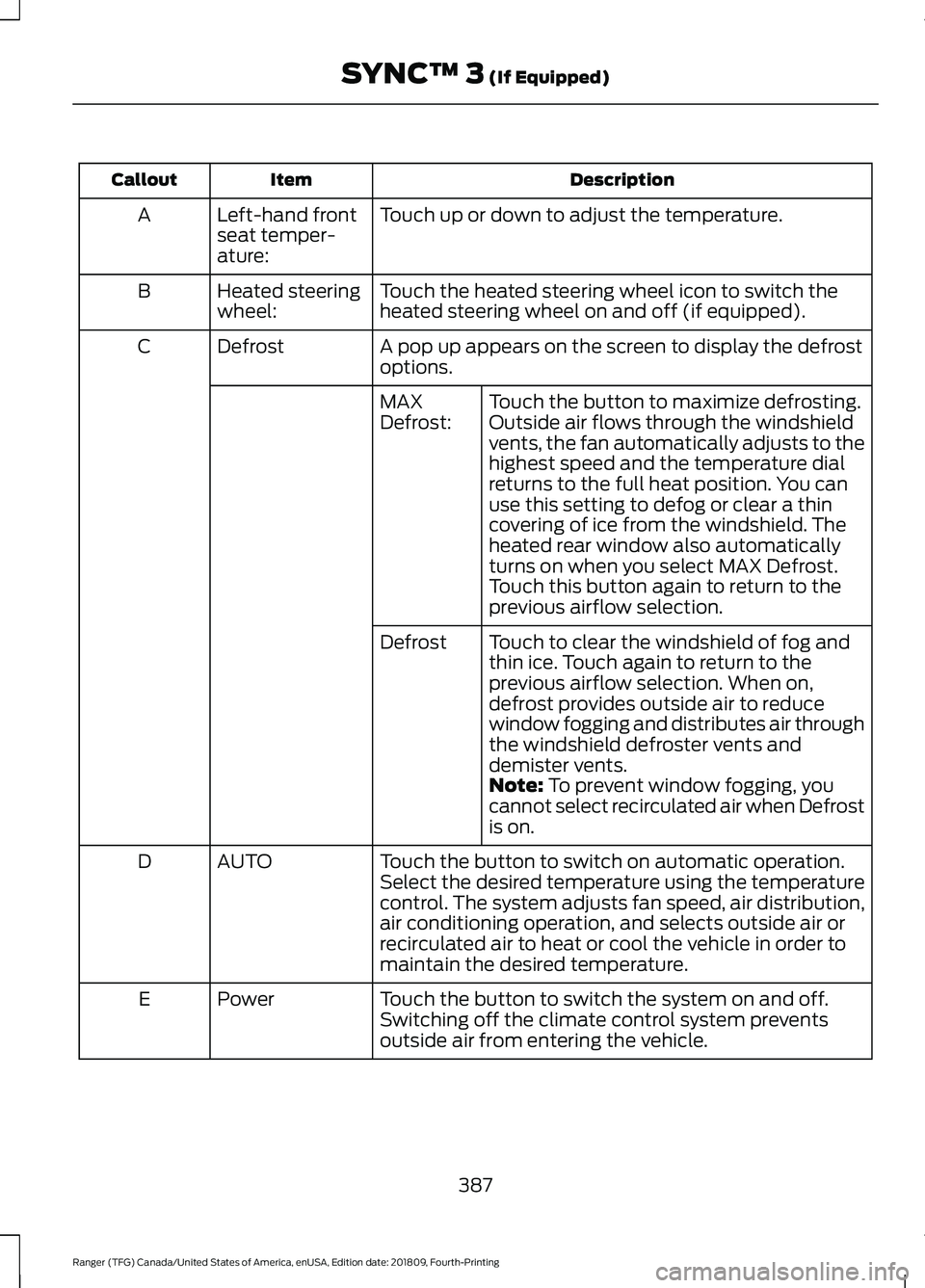
Description
Item
Callout
Touch up or down to adjust the temperature.
Left-hand front
seat temper-
ature:
A
Touch the heated steering wheel icon to switch the
heated steering wheel on and off (if equipped).
Heated steering
wheel:
B
A pop up appears on the screen to display the defrost
options.
Defrost
C
Touch the button to maximize defrosting.
Outside air flows through the windshield
vents, the fan automatically adjusts to the
highest speed and the temperature dial
returns to the full heat position. You can
use this setting to defog or clear a thin
covering of ice from the windshield. The
heated rear window also automatically
turns on when you select MAX Defrost.
Touch this button again to return to the
previous airflow selection.
MAX
Defrost:
Touch to clear the windshield of fog and
thin ice. Touch again to return to the
previous airflow selection. When on,
defrost provides outside air to reduce
window fogging and distributes air through
the windshield defroster vents and
demister vents.
Defrost
Note: To prevent window fogging, you
cannot select recirculated air when Defrost
is on.
Touch the button to switch on automatic operation.
Select the desired temperature using the temperature
control. The system adjusts fan speed, air distribution,
air conditioning operation, and selects outside air or
recirculated air to heat or cool the vehicle in order to
maintain the desired temperature.
AUTO
D
Touch the button to switch the system on and off.
Switching off the climate control system prevents
outside air from entering the vehicle.
Power
E
387
Ranger (TFG) Canada/United States of America, enUSA, Edition date: 201809, Fourth-Printing SYNC™ 3
(If Equipped)
Page 394 of 512
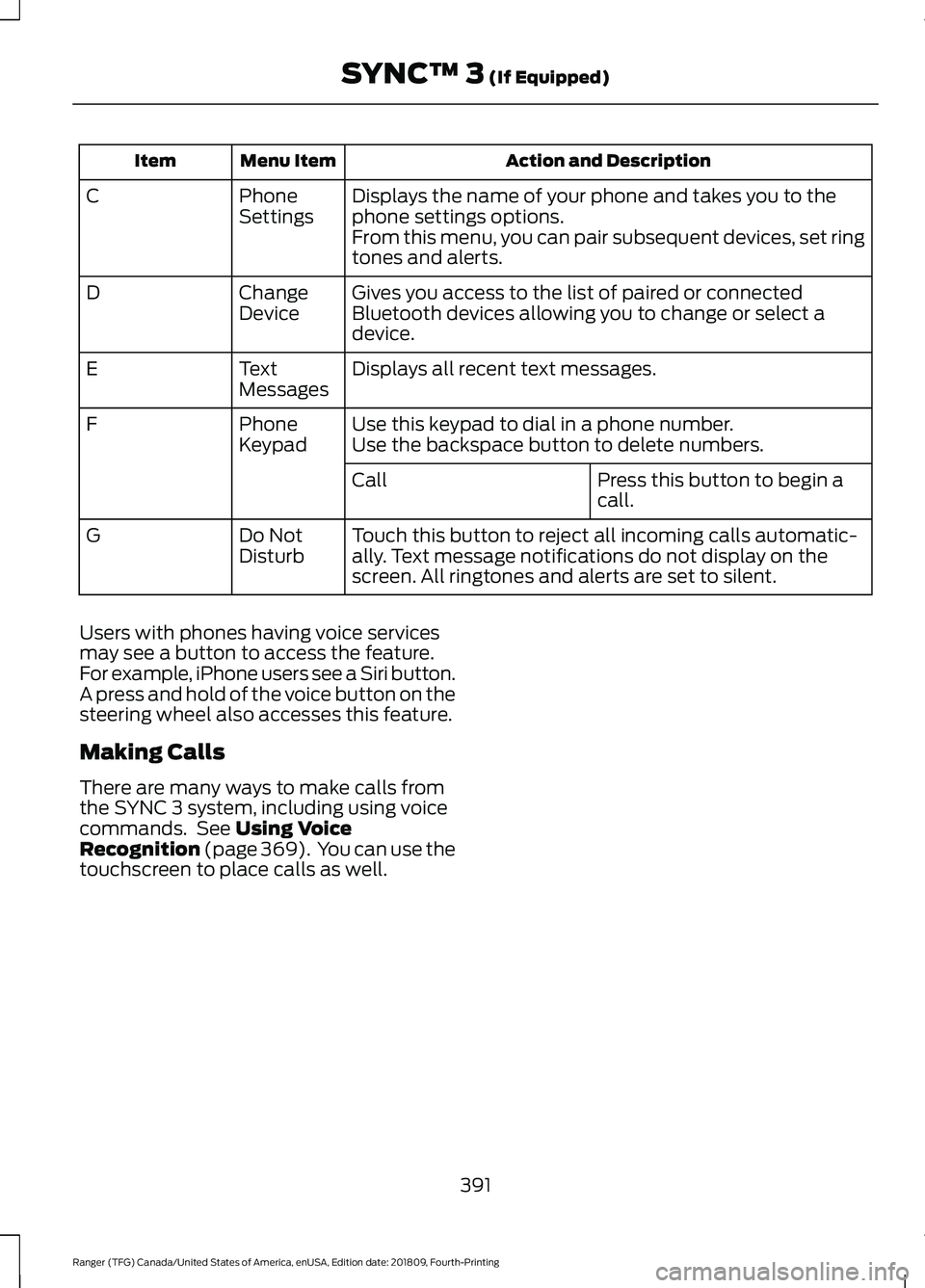
Action and Description
Menu Item
Item
Displays the name of your phone and takes you to the
phone settings options.
Phone
Settings
C
From this menu, you can pair subsequent devices, set ring
tones and alerts.
Gives you access to the list of paired or connected
Bluetooth devices allowing you to change or select a
device.
Change
Device
D
Displays all recent text messages.
Text
Messages
E
Use this keypad to dial in a phone number.
Phone
Keypad
F
Use the backspace button to delete numbers.
Press this button to begin a
call.
Call
Touch this button to reject all incoming calls automatic-
ally. Text message notifications do not display on the
screen. All ringtones and alerts are set to silent.
Do Not
Disturb
G
Users with phones having voice services
may see a button to access the feature.
For example, iPhone users see a Siri button.
A press and hold of the voice button on the
steering wheel also accesses this feature.
Making Calls
There are many ways to make calls from
the SYNC 3 system, including using voice
commands. See Using Voice
Recognition (page 369). You can use the
touchscreen to place calls as well.
391
Ranger (TFG) Canada/United States of America, enUSA, Edition date: 201809, Fourth-Printing SYNC™ 3
(If Equipped)
Page 395 of 512
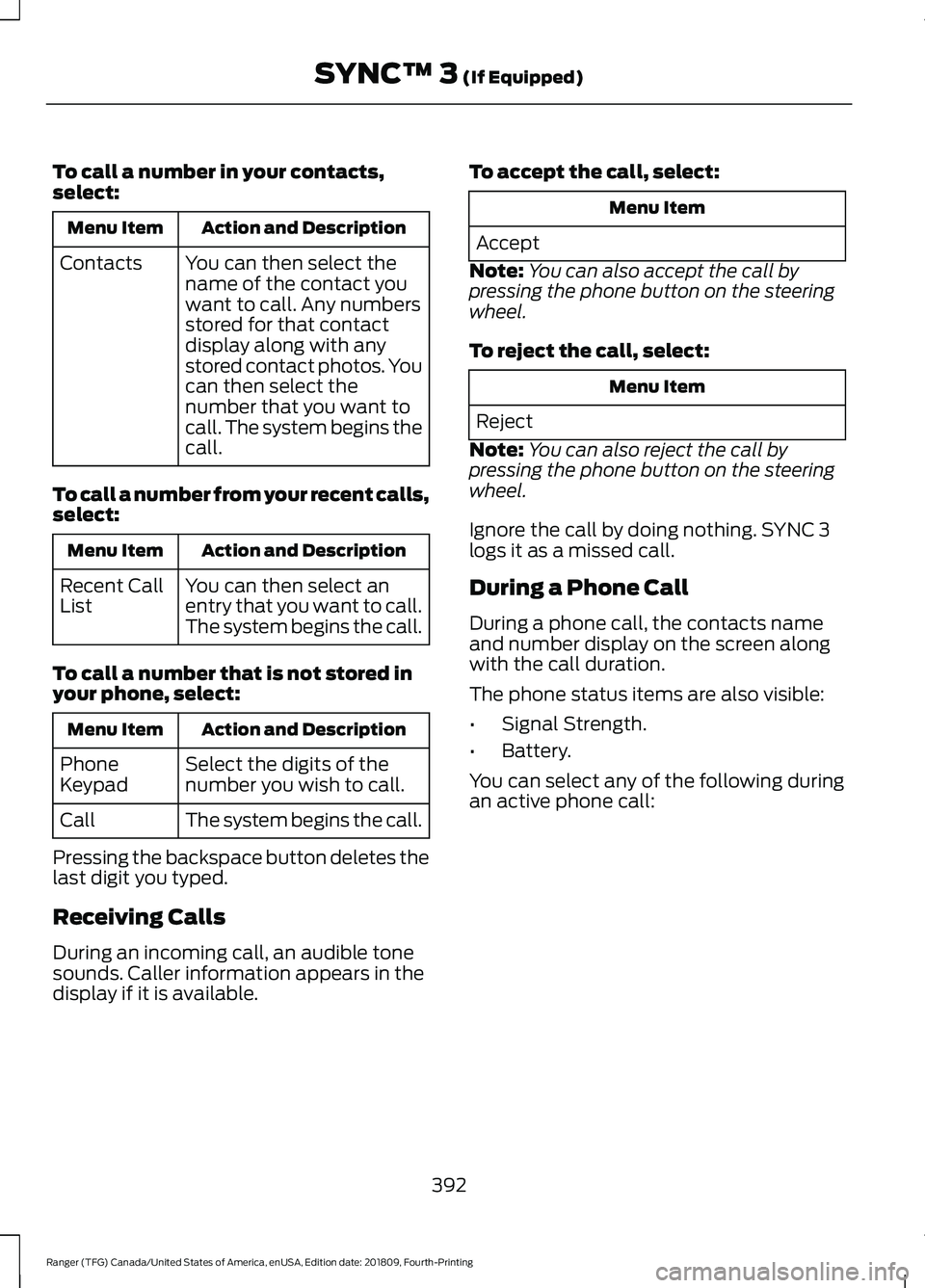
To call a number in your contacts,
select:
Action and Description
Menu Item
You can then select the
name of the contact you
want to call. Any numbers
stored for that contact
display along with any
stored contact photos. You
can then select the
number that you want to
call. The system begins the
call.
Contacts
To call a number from your recent calls,
select: Action and Description
Menu Item
You can then select an
entry that you want to call.
The system begins the call.
Recent Call
List
To call a number that is not stored in
your phone, select: Action and Description
Menu Item
Select the digits of the
number you wish to call.
Phone
Keypad
The system begins the call.
Call
Pressing the backspace button deletes the
last digit you typed.
Receiving Calls
During an incoming call, an audible tone
sounds. Caller information appears in the
display if it is available. To accept the call, select: Menu Item
Accept
Note: You can also accept the call by
pressing the phone button on the steering
wheel.
To reject the call, select: Menu Item
Reject
Note: You can also reject the call by
pressing the phone button on the steering
wheel.
Ignore the call by doing nothing. SYNC 3
logs it as a missed call.
During a Phone Call
During a phone call, the contacts name
and number display on the screen along
with the call duration.
The phone status items are also visible:
• Signal Strength.
• Battery.
You can select any of the following during
an active phone call:
392
Ranger (TFG) Canada/United States of America, enUSA, Edition date: 201809, Fourth-Printing SYNC™ 3 (If Equipped)
Page 396 of 512
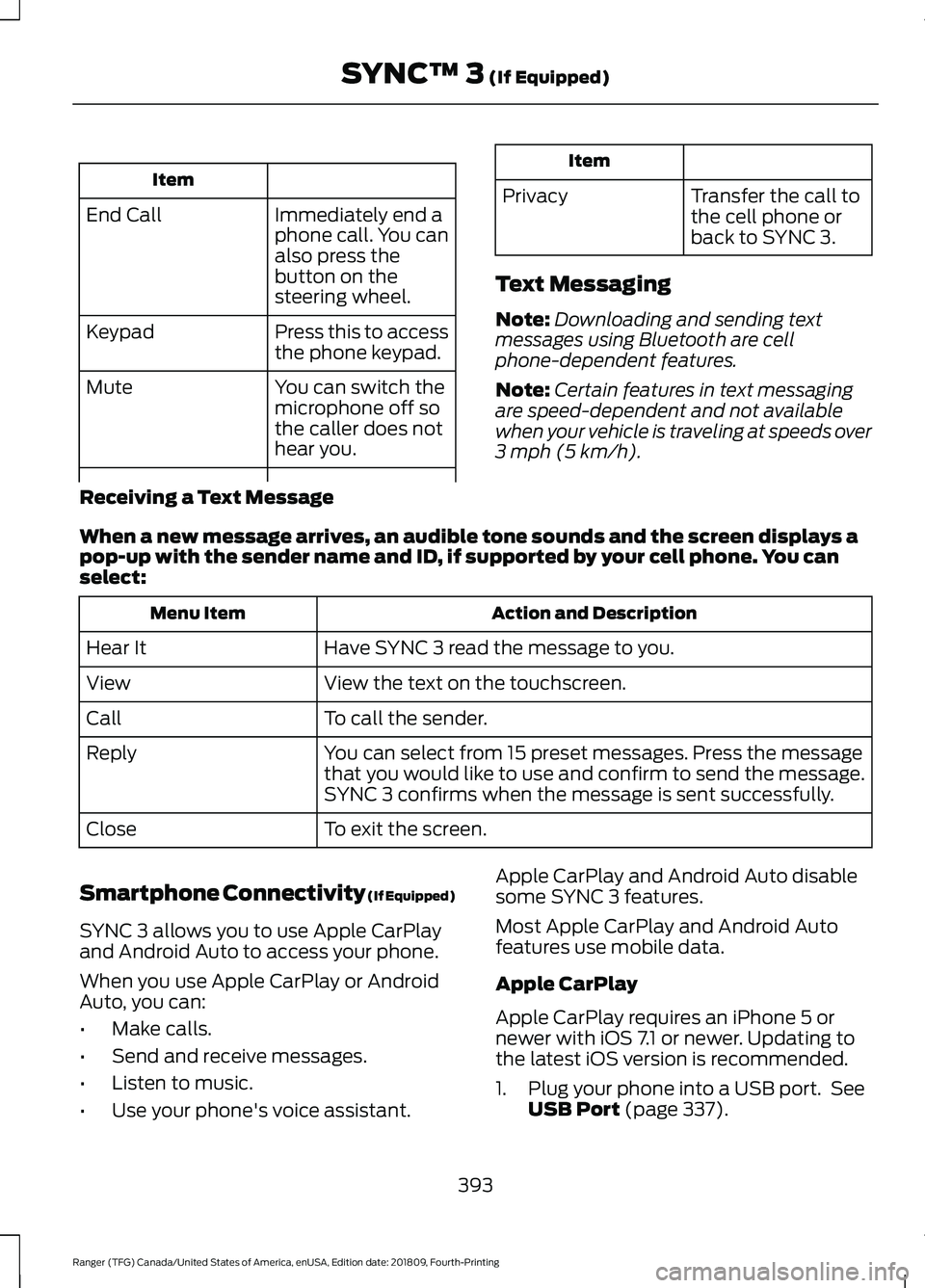
Item
Immediately end a
phone call. You can
also press the
button on the
steering wheel.
End Call
Press this to access
the phone keypad.
Keypad
You can switch the
microphone off so
the caller does not
hear you.
Mute Item
Privacy Transfer the call to
the cell phone or
back to SYNC 3.
Text Messaging
Note: Downloading and sending text
messages using Bluetooth are cell
phone-dependent features.
Note: Certain features in text messaging
are speed-dependent and not available
when your vehicle is traveling at speeds over
3 mph (5 km/h).
Receiving a Text Message
When a new message arrives, an audible tone sounds and the screen displays a
pop-up with the sender name and ID, if supported by your cell phone. You can
select: Action and Description
Menu Item
Have SYNC 3 read the message to you.
Hear It
View the text on the touchscreen.
View
To call the sender.
Call
You can select from 15 preset messages. Press the message
that you would like to use and confirm to send the message.
SYNC 3 confirms when the message is sent successfully.
Reply
To exit the screen.
Close
Smartphone Connectivity (If Equipped)
SYNC 3 allows you to use Apple CarPlay
and Android Auto to access your phone.
When you use Apple CarPlay or Android
Auto, you can:
• Make calls.
• Send and receive messages.
• Listen to music.
• Use your phone's voice assistant. Apple CarPlay and Android Auto disable
some SYNC 3 features.
Most Apple CarPlay and Android Auto
features use mobile data.
Apple CarPlay
Apple CarPlay requires an iPhone 5 or
newer with iOS 7.1 or newer. Updating to
the latest iOS version is recommended.
1. Plug your phone into a USB port. See
USB Port
(page 337).
393
Ranger (TFG) Canada/United States of America, enUSA, Edition date: 201809, Fourth-Printing SYNC™ 3
(If Equipped)
Page 405 of 512
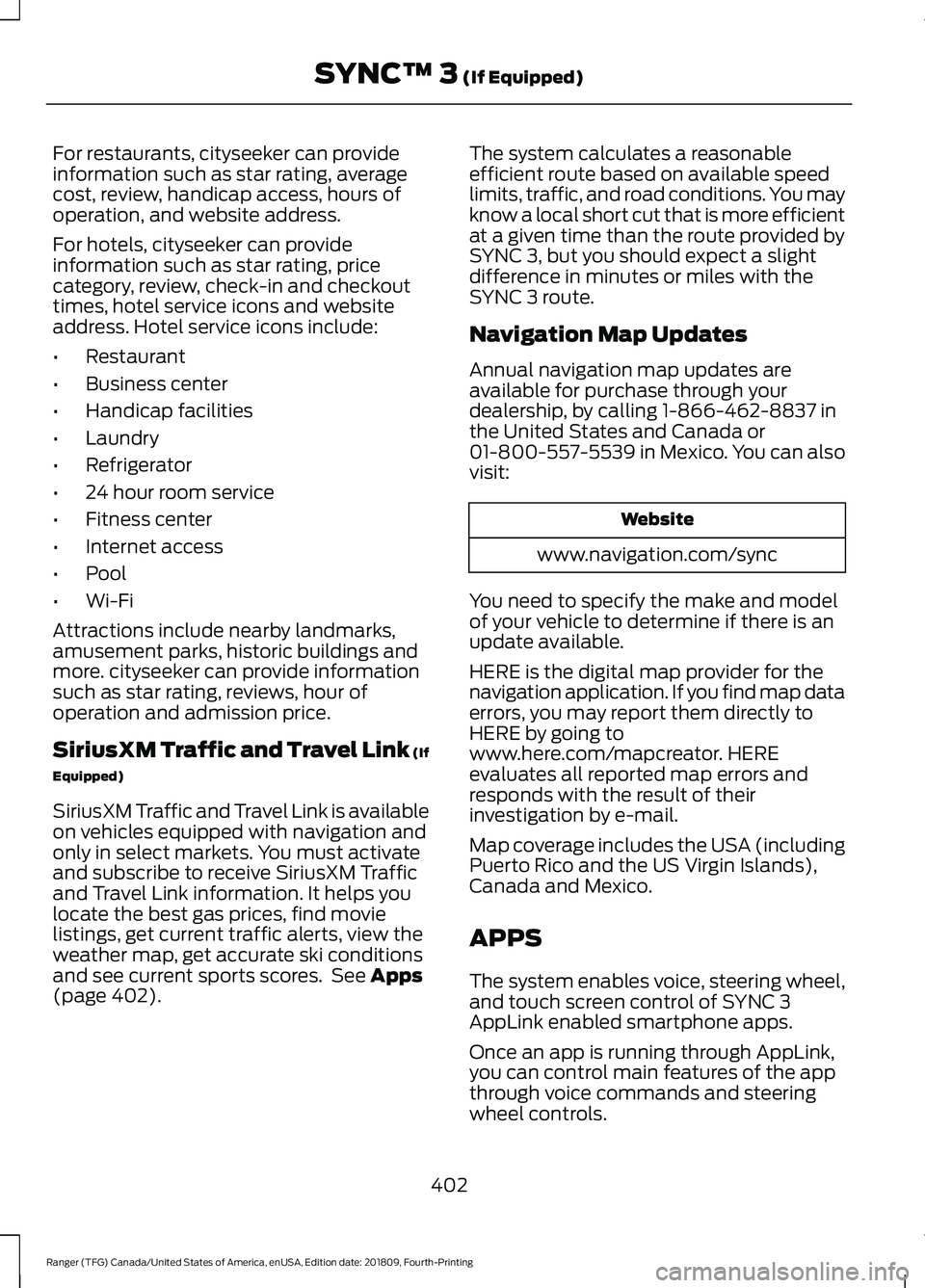
For restaurants, cityseeker can provide
information such as star rating, average
cost, review, handicap access, hours of
operation, and website address.
For hotels, cityseeker can provide
information such as star rating, price
category, review, check-in and checkout
times, hotel service icons and website
address. Hotel service icons include:
•
Restaurant
• Business center
• Handicap facilities
• Laundry
• Refrigerator
• 24 hour room service
• Fitness center
• Internet access
• Pool
• Wi-Fi
Attractions include nearby landmarks,
amusement parks, historic buildings and
more. cityseeker can provide information
such as star rating, reviews, hour of
operation and admission price.
SiriusXM Traffic and Travel Link (If
Equipped)
SiriusXM Traffic and Travel Link is available
on vehicles equipped with navigation and
only in select markets. You must activate
and subscribe to receive SiriusXM Traffic
and Travel Link information. It helps you
locate the best gas prices, find movie
listings, get current traffic alerts, view the
weather map, get accurate ski conditions
and see current sports scores. See Apps
(page 402). The system calculates a reasonable
efficient route based on available speed
limits, traffic, and road conditions. You may
know a local short cut that is more efficient
at a given time than the route provided by
SYNC 3, but you should expect a slight
difference in minutes or miles with the
SYNC 3 route.
Navigation Map Updates
Annual navigation map updates are
available for purchase through your
dealership, by calling 1-866-462-8837 in
the United States and Canada or
01-800-557-5539 in Mexico. You can also
visit:
Website
www.navigation.com/sync
You need to specify the make and model
of your vehicle to determine if there is an
update available.
HERE is the digital map provider for the
navigation application. If you find map data
errors, you may report them directly to
HERE by going to
www.here.com/mapcreator. HERE
evaluates all reported map errors and
responds with the result of their
investigation by e-mail.
Map coverage includes the USA (including
Puerto Rico and the US Virgin Islands),
Canada and Mexico.
APPS
The system enables voice, steering wheel,
and touch screen control of SYNC 3
AppLink enabled smartphone apps.
Once an app is running through AppLink,
you can control main features of the app
through voice commands and steering
wheel controls.
402
Ranger (TFG) Canada/United States of America, enUSA, Edition date: 201809, Fourth-Printing SYNC™ 3
(If Equipped)
Page 444 of 512
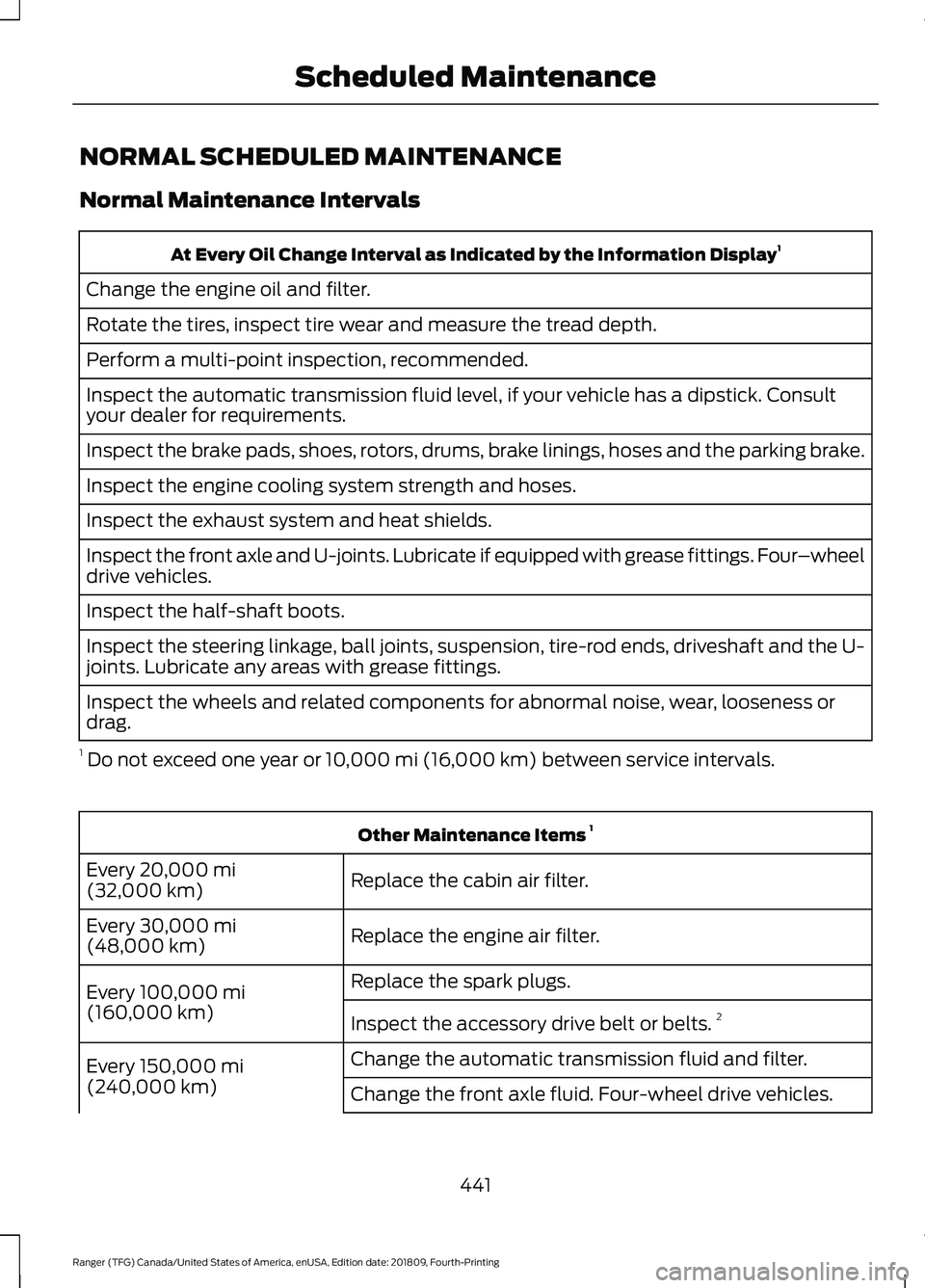
NORMAL SCHEDULED MAINTENANCE
Normal Maintenance Intervals
At Every Oil Change Interval as Indicated by the Information Display
1
Change the engine oil and filter.
Rotate the tires, inspect tire wear and measure the tread depth.
Perform a multi-point inspection, recommended.
Inspect the automatic transmission fluid level, if your vehicle has a dipstick. Consult
your dealer for requirements.
Inspect the brake pads, shoes, rotors, drums, brake linings, hoses and the parking brake.
Inspect the engine cooling system strength and hoses.
Inspect the exhaust system and heat shields.
Inspect the front axle and U-joints. Lubricate if equipped with grease fittings. Four –wheel
drive vehicles.
Inspect the half-shaft boots.
Inspect the steering linkage, ball joints, suspension, tire-rod ends, driveshaft and the U-
joints. Lubricate any areas with grease fittings.
Inspect the wheels and related components for abnormal noise, wear, looseness or
drag.
1 Do not exceed one year or 10,000 mi (16,000 km) between service intervals. Other Maintenance Items
1
Replace the cabin air filter.
Every
20,000 mi
(32,000 km)
Replace the engine air filter.
Every
30,000 mi
(48,000 km)
Replace the spark plugs.
Every
100,000 mi
(160,000 km) Inspect the accessory drive belt or belts. 2
Change the automatic transmission fluid and filter.
Every
150,000 mi
(240,000 km) Change the front axle fluid. Four-wheel drive vehicles.
441
Ranger (TFG) Canada/United States of America, enUSA, Edition date: 201809, Fourth-Printing Scheduled Maintenance
Page 446 of 512
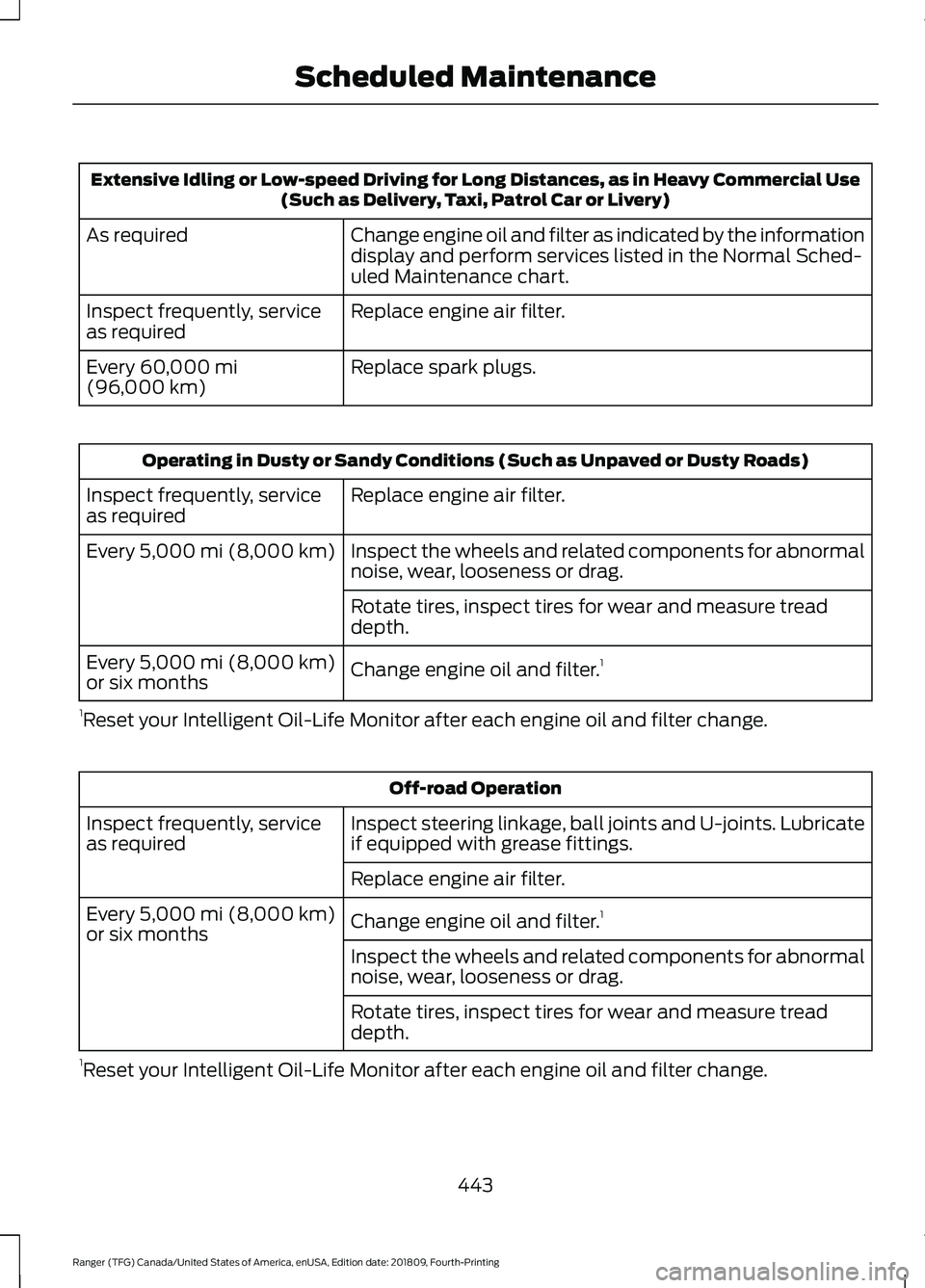
Extensive Idling or Low-speed Driving for Long Distances, as in Heavy Commercial Use
(Such as Delivery, Taxi, Patrol Car or Livery)
Change engine oil and filter as indicated by the information
display and perform services listed in the Normal Sched-
uled Maintenance chart.
As required
Replace engine air filter.
Inspect frequently, service
as required
Replace spark plugs.
Every 60,000 mi
(96,000 km) Operating in Dusty or Sandy Conditions (Such as Unpaved or Dusty Roads)
Replace engine air filter.
Inspect frequently, service
as required
Inspect the wheels and related components for abnormal
noise, wear, looseness or drag.
Every
5,000 mi (8,000 km)
Rotate tires, inspect tires for wear and measure tread
depth.
Change engine oil and filter. 1
Every
5,000 mi (8,000 km)
or six months
1 Reset your Intelligent Oil-Life Monitor after each engine oil and filter change. Off-road Operation
Inspect steering linkage, ball joints and U-joints. Lubricate
if equipped with grease fittings.
Inspect frequently, service
as required
Replace engine air filter.
Change engine oil and filter.1
Every
5,000 mi (8,000 km)
or six months
Inspect the wheels and related components for abnormal
noise, wear, looseness or drag.
Rotate tires, inspect tires for wear and measure tread
depth.
1 Reset your Intelligent Oil-Life Monitor after each engine oil and filter change.
443
Ranger (TFG) Canada/United States of America, enUSA, Edition date: 201809, Fourth-Printing Scheduled Maintenance
Page 500 of 512
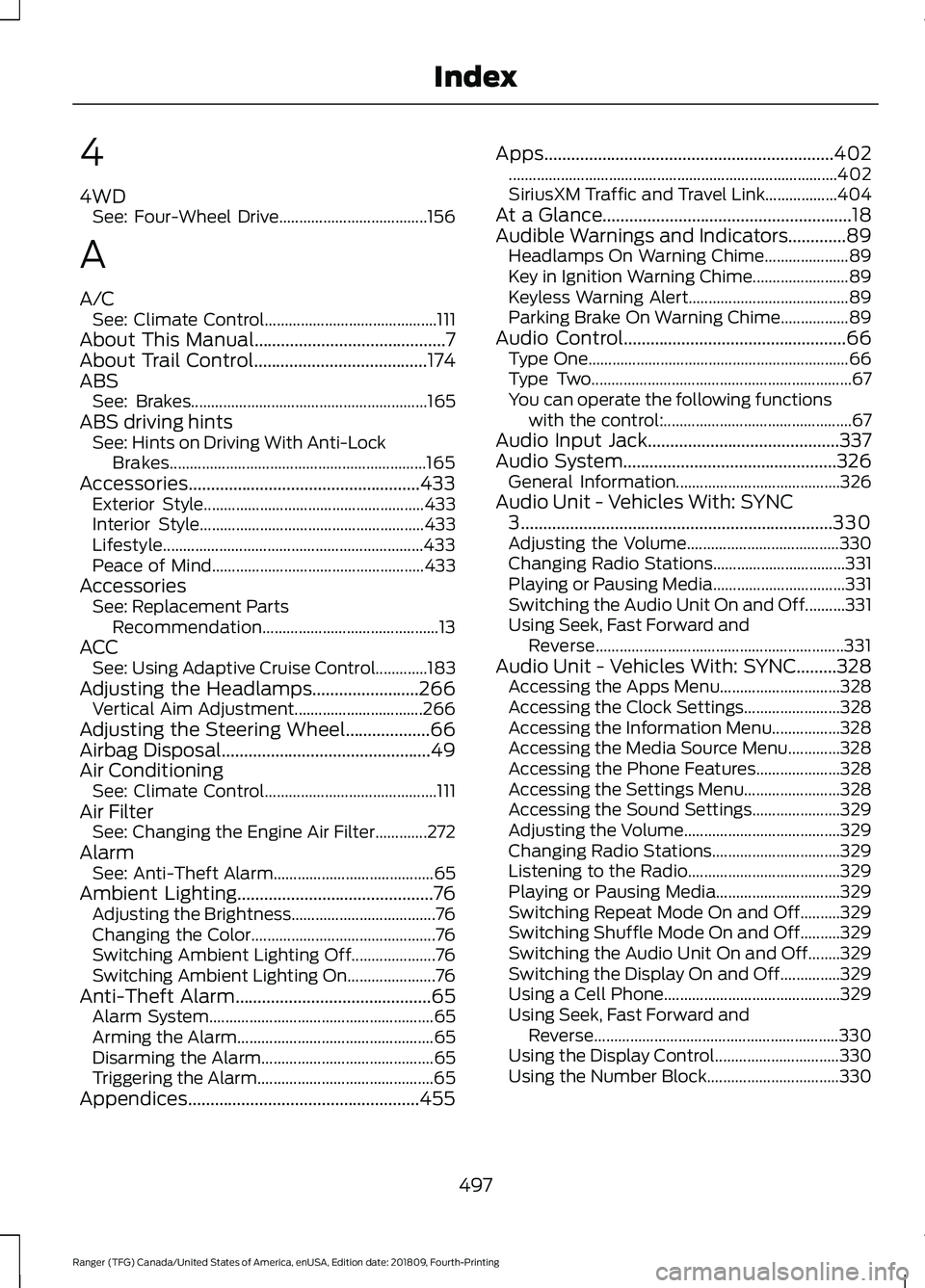
4
4WD
See: Four-Wheel Drive..................................... 156
A
A/C See: Climate Control........................................... 111
About This Manual...........................................7
About Trail Control.......................................174
ABS See: Brakes........................................................... 165
ABS driving hints See: Hints on Driving With Anti-Lock
Brakes................................................................ 165
Accessories....................................................433 Exterior Style....................................................... 433
Interior Style........................................................ 433
Lifestyle................................................................. 433
Peace of Mind..................................................... 433
Accessories See: Replacement Parts
Recommendation............................................ 13
ACC See: Using Adaptive Cruise Control.............183
Adjusting the Headlamps........................266 Vertical Aim Adjustment................................ 266
Adjusting the Steering Wheel...................66
Airbag Disposal
...............................................49
Air Conditioning See: Climate Control........................................... 111
Air Filter See: Changing the Engine Air Filter.............272
Alarm See: Anti-Theft Alarm........................................ 65
Ambient Lighting............................................76 Adjusting the Brightness.................................... 76
Changing the Color.............................................. 76
Switching Ambient Lighting Off..................... 76
Switching Ambient Lighting On...................... 76
Anti-Theft Alarm
............................................65
Alarm System........................................................ 65
Arming the Alarm................................................. 65
Disarming the Alarm........................................... 65
Triggering the Alarm............................................65
Appendices....................................................455 Apps.................................................................402
........................................................................\
.......... 402
SiriusXM Traffic and Travel Link.................. 404
At a Glance........................................................18
Audible Warnings and Indicators.............89 Headlamps On Warning Chime..................... 89
Key in Ignition Warning Chime........................ 89
Keyless Warning Alert........................................ 89
Parking Brake On Warning Chime.................89
Audio Control
..................................................66
Type One................................................................. 66
Type Two................................................................. 67
You can operate the following functions with the control:............................................... 67
Audio Input Jack...........................................337
Audio System................................................326 General Information......................................... 326
Audio Unit - Vehicles With: SYNC 3
......................................................................330
Adjusting the Volume...................................... 330
Changing Radio Stations................................. 331
Playing or Pausing Media................................. 331
Switching the Audio Unit On and Off..........331
Using Seek, Fast Forward and Reverse.............................................................. 331
Audio Unit - Vehicles With: SYNC.........328 Accessing the Apps Menu.............................. 328
Accessing the Clock Settings........................ 328
Accessing the Information Menu.................328
Accessing the Media Source Menu.............328
Accessing the Phone Features..................... 328
Accessing the Settings Menu........................ 328
Accessing the Sound Settings...................... 329
Adjusting the Volume....................................... 329
Changing Radio Stations................................ 329
Listening to the Radio...................................... 329
Playing or Pausing Media............................... 329
Switching Repeat Mode On and Off..........329
Switching Shuffle Mode On and Off..........329
Switching the Audio Unit On and Off........329
Switching the Display On and Off...............329
Using a Cell Phone............................................ 329
Using Seek, Fast Forward and Reverse............................................................. 330
Using the Display Control............................... 330
Using the Number Block................................. 330
497
Ranger (TFG) Canada/United States of America, enUSA, Edition date: 201809, Fourth-Printing Index
Page 507 of 512
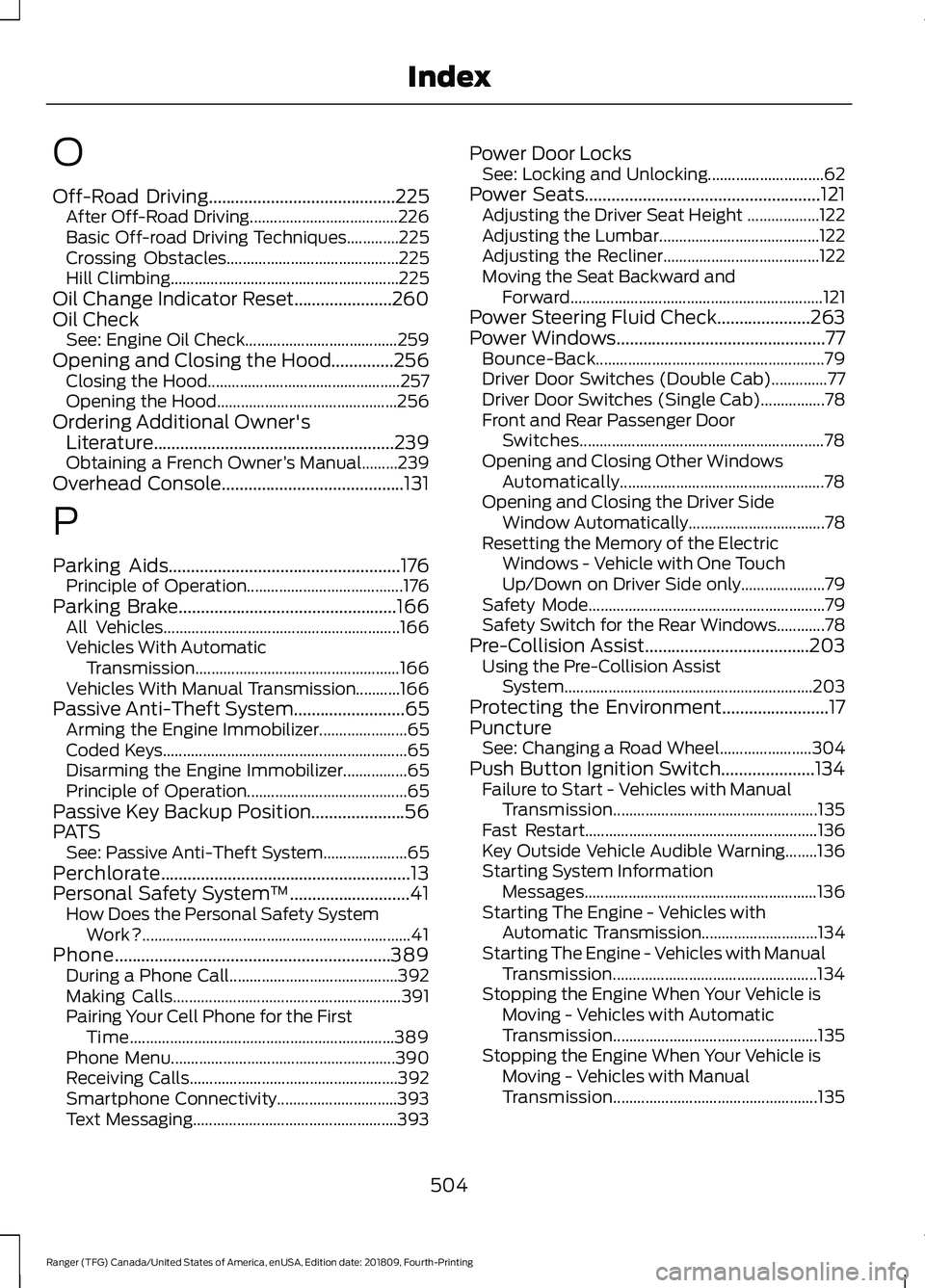
O
Off-Road Driving..........................................225
After Off-Road Driving..................................... 226
Basic Off-road Driving Techniques.............225
Crossing Obstacles........................................... 225
Hill Climbing......................................................... 225
Oil Change Indicator Reset......................260
Oil Check See: Engine Oil Check...................................... 259
Opening and Closing the Hood..............256 Closing the Hood................................................ 257
Opening the Hood............................................. 256
Ordering Additional Owner's Literature......................................................239
Obtaining a French Owner ’s Manual.........239
Overhead Console
.........................................131
P
Parking Aids
....................................................176
Principle of Operation....................................... 176
Parking Brake
.................................................166
All Vehicles........................................................... 166
Vehicles With Automatic Transmission................................................... 166
Vehicles With Manual Transmission...........166
Passive Anti-Theft System
.........................65
Arming the Engine Immobilizer...................... 65
Coded Keys............................................................. 65
Disarming the Engine Immobilizer................65
Principle of Operation........................................ 65
Passive Key Backup Position.....................56
PATS See: Passive Anti-Theft System..................... 65
Perchlorate........................................................13
Personal Safety System ™
...........................41
How Does the Personal Safety System
Work?................................................................... 41
Phone..............................................................389 During a Phone Call.......................................... 392
Making Calls......................................................... 391
Pairing Your Cell Phone for the First Time.................................................................. 389
Phone Menu........................................................ 390
Receiving Calls.................................................... 392
Smartphone Connectivity.............................. 393
Text Messaging................................................... 393Power Door Locks
See: Locking and Unlocking............................. 62
Power Seats
.....................................................121
Adjusting the Driver Seat Height .................. 122
Adjusting the Lumbar........................................ 122
Adjusting the Recliner....................................... 122
Moving the Seat Backward and Forward............................................................... 121
Power Steering Fluid Check.....................263
Power Windows...............................................77 Bounce-Back......................................................... 79
Driver Door Switches (Double Cab)..............77
Driver Door Switches (Single Cab)................78
Front and Rear Passenger Door Switches............................................................. 78
Opening and Closing Other Windows Automatically................................................... 78
Opening and Closing the Driver Side Window Automatically.................................. 78
Resetting the Memory of the Electric Windows - Vehicle with One Touch
Up/Down on Driver Side only..................... 79
Safety Mode........................................................... 79
Safety Switch for the Rear Windows............78
Pre-Collision Assist.....................................203 Using the Pre-Collision Assist
System.............................................................. 203
Protecting the Environment........................17
Puncture See: Changing a Road Wheel....................... 304
Push Button Ignition Switch.....................134 Failure to Start - Vehicles with Manual
Transmission................................................... 135
Fast Restart.......................................................... 136
Key Outside Vehicle Audible Warning........136
Starting System Information Messages.......................................................... 136
Starting The Engine - Vehicles with Automatic Transmission............................. 134
Starting The Engine - Vehicles with Manual Transmission................................................... 134
Stopping the Engine When Your Vehicle is Moving - Vehicles with Automatic
Transmission................................................... 135
Stopping the Engine When Your Vehicle is Moving - Vehicles with Manual
Transmission................................................... 135
504
Ranger (TFG) Canada/United States of America, enUSA, Edition date: 201809, Fourth-Printing Index
Page 509 of 512
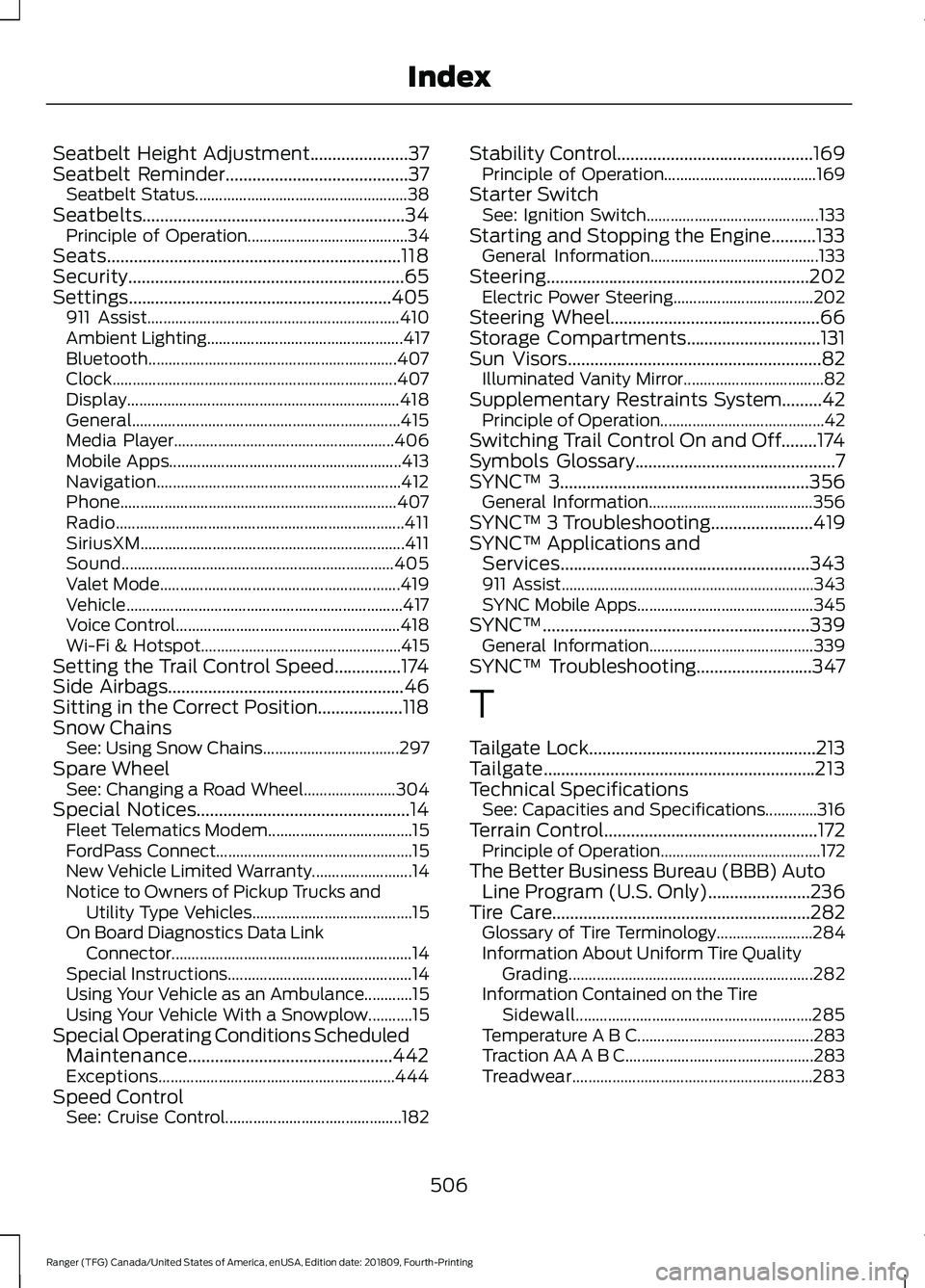
Seatbelt Height Adjustment......................37
Seatbelt Reminder.........................................37 Seatbelt Status..................................................... 38
Seatbelts...........................................................34 Principle of Operation........................................ 34
Seats..................................................................118
Security..............................................................65
Settings...........................................................405 911 Assist............................................................... 410
Ambient Lighting................................................. 417
Bluetooth.............................................................. 407
Clock....................................................................... 407
Display.................................................................... 418
General................................................................... 415
Media Player....................................................... 406
Mobile Apps.......................................................... 413
Navigation............................................................. 412
Phone..................................................................... 407
Radio........................................................................\
411
SiriusXM.................................................................. 411
Sound.................................................................... 405
Valet Mode............................................................ 419
Vehicle..................................................................... 417
Voice Control........................................................ 418
Wi-Fi & Hotspot.................................................. 415
Setting the Trail Control Speed...............174
Side Airbags
.....................................................46
Sitting in the Correct Position...................118
Snow Chains See: Using Snow Chains.................................. 297
Spare Wheel See: Changing a Road Wheel....................... 304
Special Notices
................................................14
Fleet Telematics Modem.................................... 15
FordPass Connect................................................. 15
New Vehicle Limited Warranty......................... 14
Notice to Owners of Pickup Trucks and Utility Type Vehicles........................................ 15
On Board Diagnostics Data Link Connector ............................................................ 14
Special Instructions.............................................. 14
Using Your Vehicle as an Ambulance............15
Using Your Vehicle With a Snowplow...........15
Special Operating Conditions Scheduled Maintenance..............................................442
Exceptions........................................................... 444
Speed Control See: Cruise Control............................................ 182Stability Control
............................................169
Principle of Operation...................................... 169
Starter Switch See: Ignition Switch........................................... 133
Starting and Stopping the Engine..........133 General Information.......................................... 133
Steering...........................................................202 Electric Power Steering................................... 202
Steering Wheel...............................................66
Storage Compartments
..............................131
Sun Visors.........................................................82
Illuminated Vanity Mirror................................... 82
Supplementary Restraints System
.........42
Principle of Operation......................................... 42
Switching Trail Control On and Off........174
Symbols Glossary
.............................................7
SYNC™ 3........................................................356
General Information......................................... 356
SYNC™ 3 Troubleshooting
.......................419
SYNC™ Applications and Services
........................................................343
911 Assist............................................................... 343
SYNC Mobile Apps............................................ 345
SYNC™
............................................................339
General Information......................................... 339
SYNC™ Troubleshooting
..........................347
T
Tailgate Lock
...................................................213
Tailgate.............................................................213
Technical Specifications See: Capacities and Specifications.............316
Terrain Control................................................172 Principle of Operation........................................ 172
The Better Business Bureau (BBB) Auto Line Program (U.S. Only)
.......................236
Tire Care..........................................................282
Glossary of Tire Terminology........................ 284
Information About Uniform Tire Quality Grading............................................................. 282
Information Contained on the Tire Sidewall........................................................... 285
Temperature A B C............................................ 283
Traction AA A B C............................................... 283
Treadwear............................................................ 283
506
Ranger (TFG) Canada/United States of America, enUSA, Edition date: 201809, Fourth-Printing Index