alarm FORD RANGER 2020 User Guide
[x] Cancel search | Manufacturer: FORD, Model Year: 2020, Model line: RANGER, Model: FORD RANGER 2020Pages: 478, PDF Size: 7.44 MB
Page 108 of 478
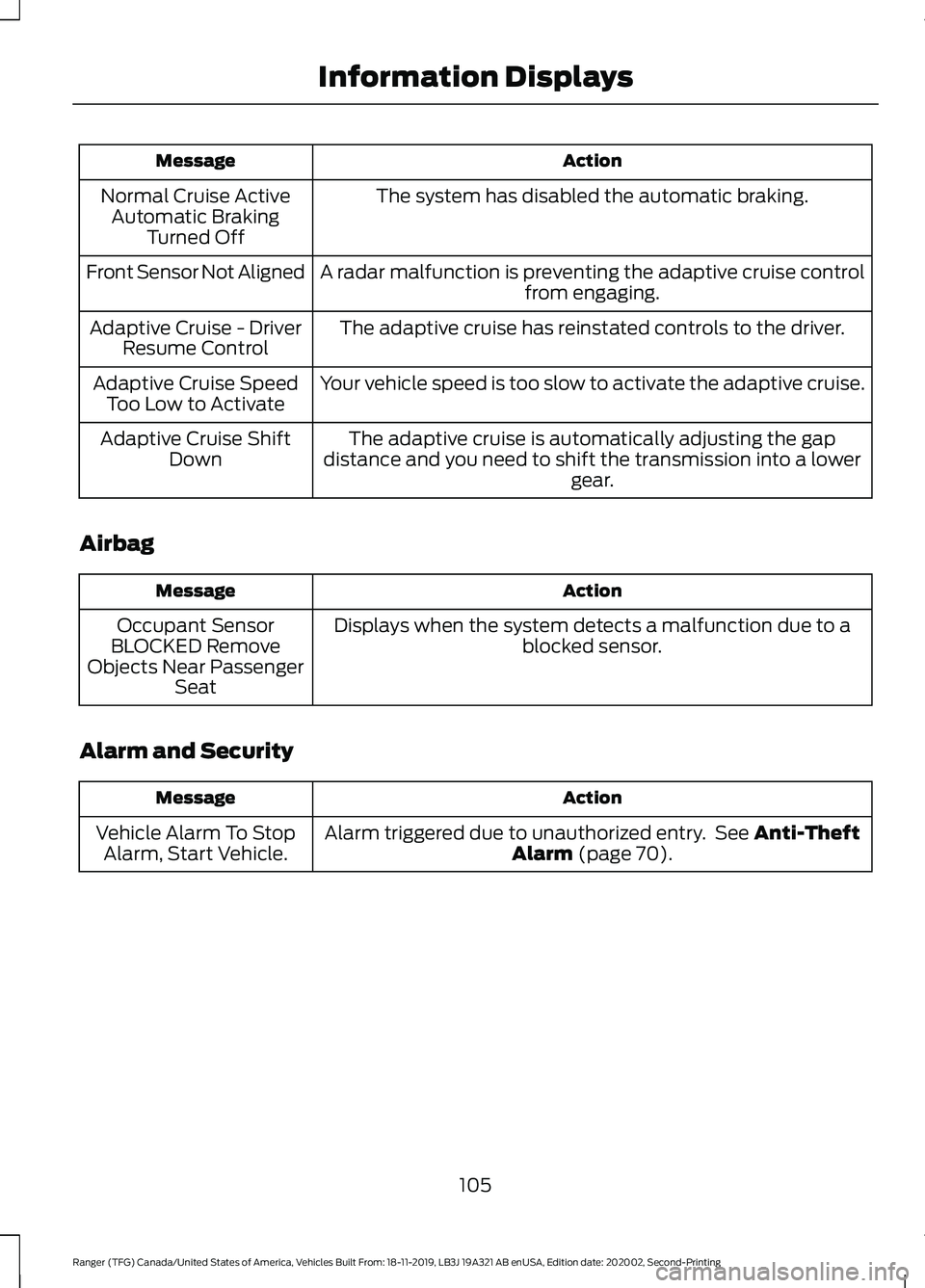
Action
Message
The system has disabled the automatic braking.
Normal Cruise Active
Automatic Braking Turned Off
A radar malfunction is preventing the adaptive cruise control from engaging.
Front Sensor Not Aligned
The adaptive cruise has reinstated controls to the driver.
Adaptive Cruise - Driver
Resume Control
Your vehicle speed is too slow to activate the adaptive cruise.
Adaptive Cruise Speed
Too Low to Activate
The adaptive cruise is automatically adjusting the gap
distance and you need to shift the transmission into a lower gear.
Adaptive Cruise Shift
Down
Airbag Action
Message
Displays when the system detects a malfunction due to a blocked sensor.
Occupant Sensor
BLOCKED Remove
Objects Near Passenger Seat
Alarm and Security Action
Message
Alarm triggered due to unauthorized entry. See Anti-Theft
Alarm (page 70).
Vehicle Alarm To Stop
Alarm, Start Vehicle.
105
Ranger (TFG) Canada/United States of America, Vehicles Built From: 18-11-2019, LB3J 19A321 AB enUSA, Edition date: 202002, Second-Printing Information Displays
Page 195 of 478
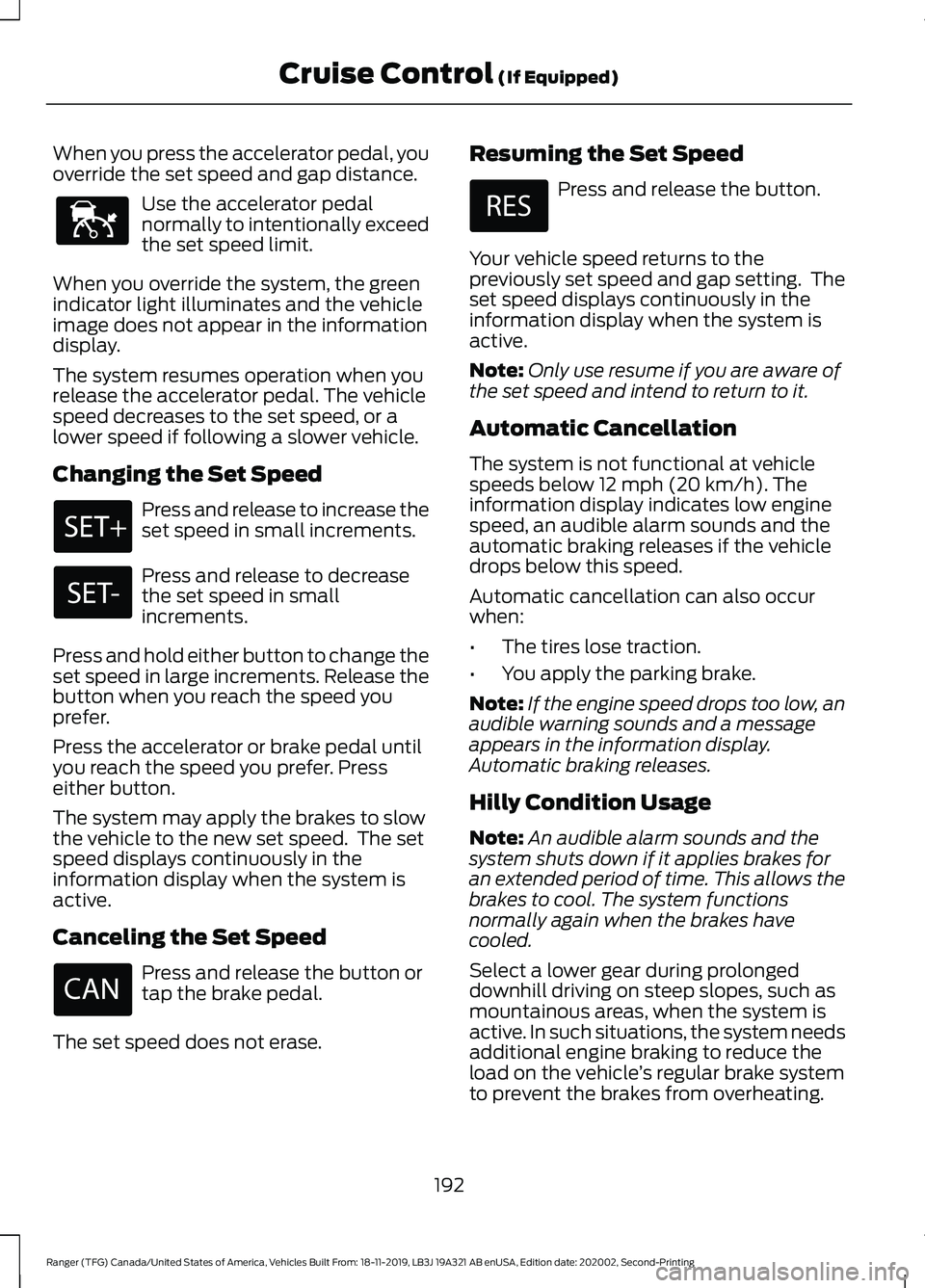
When you press the accelerator pedal, you
override the set speed and gap distance.
Use the accelerator pedal
normally to intentionally exceed
the set speed limit.
When you override the system, the green
indicator light illuminates and the vehicle
image does not appear in the information
display.
The system resumes operation when you
release the accelerator pedal. The vehicle
speed decreases to the set speed, or a
lower speed if following a slower vehicle.
Changing the Set Speed Press and release to increase the
set speed in small increments.
Press and release to decrease
the set speed in small
increments.
Press and hold either button to change the
set speed in large increments. Release the
button when you reach the speed you
prefer.
Press the accelerator or brake pedal until
you reach the speed you prefer. Press
either button.
The system may apply the brakes to slow
the vehicle to the new set speed. The set
speed displays continuously in the
information display when the system is
active.
Canceling the Set Speed Press and release the button or
tap the brake pedal.
The set speed does not erase. Resuming the Set Speed Press and release the button.
Your vehicle speed returns to the
previously set speed and gap setting. The
set speed displays continuously in the
information display when the system is
active.
Note: Only use resume if you are aware of
the set speed and intend to return to it.
Automatic Cancellation
The system is not functional at vehicle
speeds below 12 mph (20 km/h). The
information display indicates low engine
speed, an audible alarm sounds and the
automatic braking releases if the vehicle
drops below this speed.
Automatic cancellation can also occur
when:
• The tires lose traction.
• You apply the parking brake.
Note: If the engine speed drops too low, an
audible warning sounds and a message
appears in the information display.
Automatic braking releases.
Hilly Condition Usage
Note: An audible alarm sounds and the
system shuts down if it applies brakes for
an extended period of time. This allows the
brakes to cool. The system functions
normally again when the brakes have
cooled.
Select a lower gear during prolonged
downhill driving on steep slopes, such as
mountainous areas, when the system is
active. In such situations, the system needs
additional engine braking to reduce the
load on the vehicle ’s regular brake system
to prevent the brakes from overheating.
192
Ranger (TFG) Canada/United States of America, Vehicles Built From: 18-11-2019, LB3J 19A321 AB enUSA, Edition date: 202002, Second-Printing Cruise Control
(If Equipped)E144529
Page 260 of 478
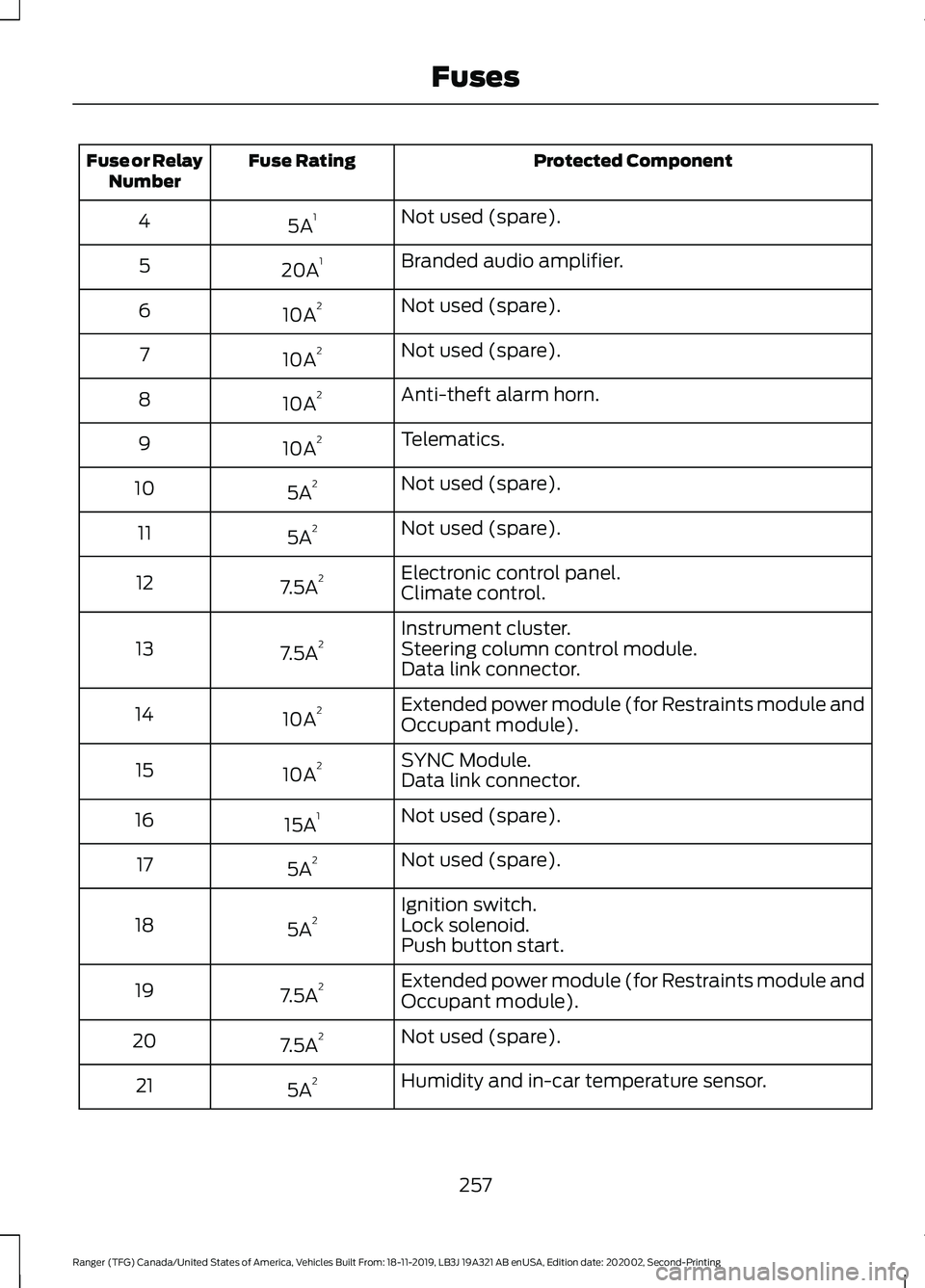
Protected Component
Fuse Rating
Fuse or Relay
Number
Not used (spare).
5A 1
4
Branded audio amplifier.
20A 1
5
Not used (spare).
10A 2
6
Not used (spare).
10A 2
7
Anti-theft alarm horn.
10A 2
8
Telematics.
10A 2
9
Not used (spare).
5A 2
10
Not used (spare).
5A 2
11
Electronic control panel.
7.5A 2
12
Climate control.
Instrument cluster.
7.5A 2
13 Steering column control module.
Data link connector.
Extended power module (for Restraints module and
Occupant module).
10A 2
14
SYNC Module.
10A 2
15
Data link connector.
Not used (spare).
15A 1
16
Not used (spare).
5A 2
17
Ignition switch.
5A 2
18 Lock solenoid.
Push button start.
Extended power module (for Restraints module and
Occupant module).
7.5A 2
19
Not used (spare).
7.5A 2
20
Humidity and in-car temperature sensor.
5A 2
21
257
Ranger (TFG) Canada/United States of America, Vehicles Built From: 18-11-2019, LB3J 19A321 AB enUSA, Edition date: 202002, Second-Printing Fuses
Page 396 of 478
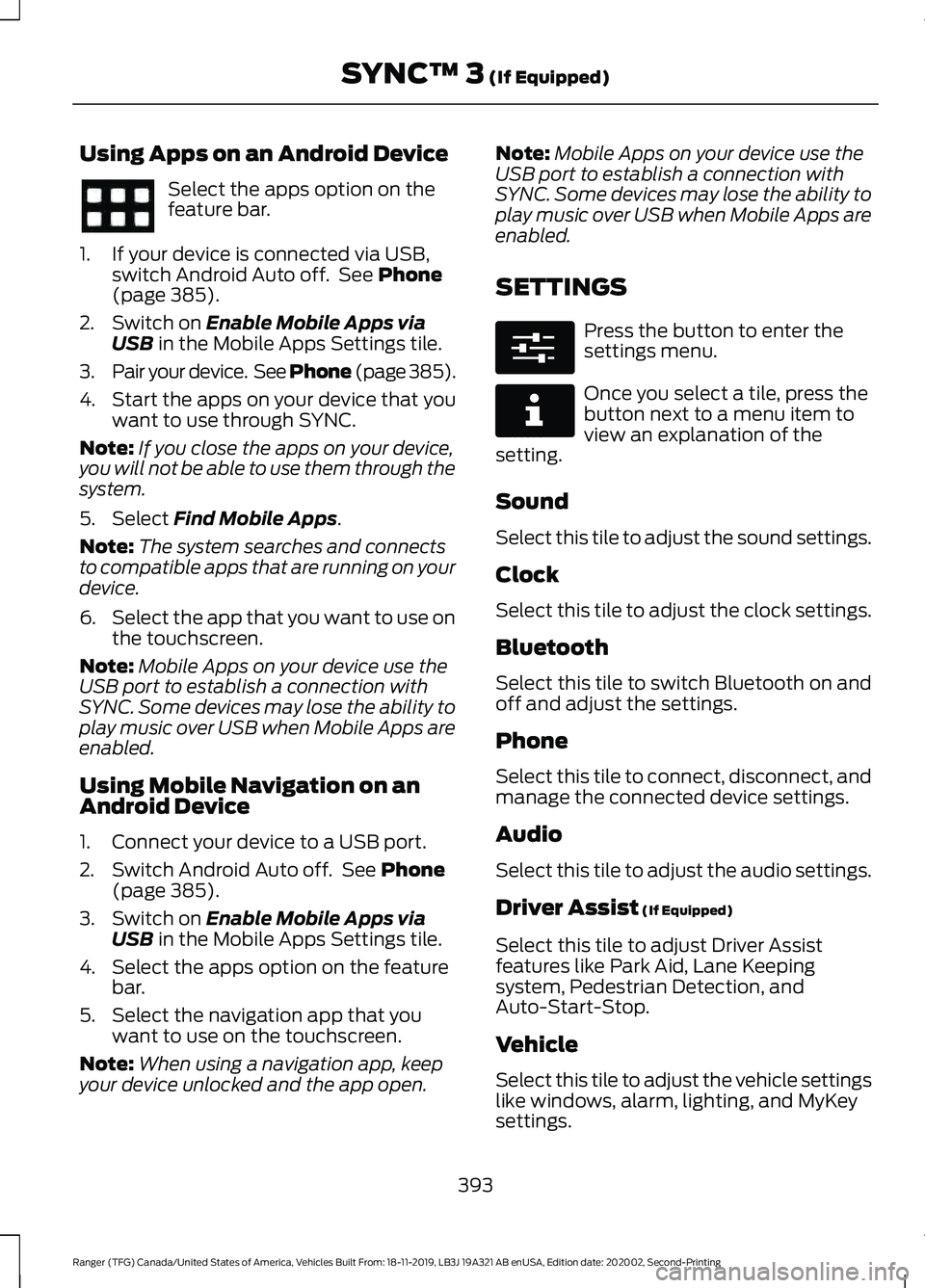
Using Apps on an Android Device
Select the apps option on the
feature bar.
1. If your device is connected via USB, switch Android Auto off. See Phone
(page 385).
2. Switch on
Enable Mobile Apps via
USB in the Mobile Apps Settings tile.
3. Pair your device. See Phone (page 385).
4. Start the apps on your device that you want to use through SYNC.
Note: If you close the apps on your device,
you will not be able to use them through the
system.
5. Select
Find Mobile Apps.
Note: The system searches and connects
to compatible apps that are running on your
device.
6. Select the app that you want to use on
the touchscreen.
Note: Mobile Apps on your device use the
USB port to establish a connection with
SYNC. Some devices may lose the ability to
play music over USB when Mobile Apps are
enabled.
Using Mobile Navigation on an
Android Device
1. Connect your device to a USB port.
2. Switch Android Auto off. See
Phone
(page 385).
3. Switch on
Enable Mobile Apps via
USB in the Mobile Apps Settings tile.
4. Select the apps option on the feature bar.
5. Select the navigation app that you want to use on the touchscreen.
Note: When using a navigation app, keep
your device unlocked and the app open. Note:
Mobile Apps on your device use the
USB port to establish a connection with
SYNC. Some devices may lose the ability to
play music over USB when Mobile Apps are
enabled.
SETTINGS Press the button to enter the
settings menu.
Once you select a tile, press the
button next to a menu item to
view an explanation of the
setting.
Sound
Select this tile to adjust the sound settings.
Clock
Select this tile to adjust the clock settings.
Bluetooth
Select this tile to switch Bluetooth on and
off and adjust the settings.
Phone
Select this tile to connect, disconnect, and
manage the connected device settings.
Audio
Select this tile to adjust the audio settings.
Driver Assist
(If Equipped)
Select this tile to adjust Driver Assist
features like Park Aid, Lane Keeping
system, Pedestrian Detection, and
Auto-Start-Stop.
Vehicle
Select this tile to adjust the vehicle settings
like windows, alarm, lighting, and MyKey
settings.
393
Ranger (TFG) Canada/United States of America, Vehicles Built From: 18-11-2019, LB3J 19A321 AB enUSA, Edition date: 202002, Second-Printing SYNC™ 3
(If Equipped) E280315 E268570
Page 411 of 478
For a complete listing of the accessories
that are available for your vehicle, please
contact your authorized dealer or visit the
online store web site:
Web Address (United States)
www.Accessories.Ford.com Web Address (Canada)
www.Accessories.Ford.ca
Ford Accessories are available for your
vehicle through an authorized Ford dealer.
Ford Motor Company will repair or replace
any properly authorized dealer-installed
Ford Original Accessory found to be
defective in factory-supplied materials or
workmanship during the warranty period,
as well as any component damaged by the
defective accessories.
Ford Motor Company will warrant your
Ford Original Accessory through the
warranty that provides the greatest
benefit:
• 24 months, unlimited mileage.
• The remainder of your new vehicle
limited warranty.
Contact an authorized dealer for details
and a copy of the warranty. Peace of Mind Footnote
*Ford Licensed Accessory. The accessory
manufacturer designs, develops and
therefore warrants Ford Licensed
Accessories, and does not design or test
these accessories to Ford Motor
Company engineering requirements.
Contact an authorized Ford dealer for the
manufacturer's limited warranty details,
and request a copy of the Ford Licensed
Accessories product limited warranty
from the accessory manufacturer.
For maximum vehicle performance, keep
the following information in mind when
adding accessories or equipment to your
vehicle:
• When adding accessories, equipment,
passengers and luggage to your
vehicle, do not exceed the total weight
capacity of the vehicle or of the front
or rear axle (GVWR or GAWR as
indicated on the Safety Compliance
Certification label). Ask an authorized
dealer for specific weight information.
• The Federal Communications
Commission (FCC) and Canadian
Radio Telecommunications
Commission (CRTC) regulate the use
of mobile communications systems
that are equipped with radio
transmitters, for example two-way
radios, telephones and theft alarms.
Any such equipment installed in your
vehicle should comply with Federal
Communications Commission (FCC)
and Canadian Radio
Telecommunications Commission
(CRTC) regulations and should be
installed only by an authorized dealer.
408
Ranger (TFG) Canada/United States of America, Vehicles Built From: 18-11-2019, LB3J 19A321 AB enUSA, Edition date: 202002, Second-Printing Accessories
Page 466 of 478
4
4WD
See: Four-Wheel Drive...................................... 162
9
911 Assist...........................................................49
A
A/C See: Climate Control........................................... 117
About This Manual
...........................................7
ABS See: Brakes............................................................. 171
ABS driving hints See: Hints on Driving With Anti-Lock
Brakes.................................................................. 171
Accessories...................................................408 Peace of Mind.................................................... 408
Accessories See: Replacement Parts
Recommendation............................................ 13
ACC See: Using Adaptive Cruise Control............189
Adjusting the Headlamps.........................275 Vertical Aim Adjustment................................. 275
Adjusting the Steering Wheel....................72
Airbag Disposal..............................................48
Air Conditioning See: Climate Control........................................... 117
Air Filter See: Changing the Engine Air Filter............280
Alarm See: Anti-Theft Alarm........................................ 70
Ambient Lighting
............................................82
Adjusting the Brightness................................... 82
Changing the Color.............................................. 82
Switching Ambient Lighting Off..................... 82
Switching Ambient Lighting On...................... 82
Anti-Theft Alarm............................................70 Alarm System........................................................ 70
Arming the Alarm.................................................. 71
Disarming the Alarm............................................ 71
Triggering the Alarm............................................. 71
Appendices....................................................432 Apps..................................................................392
Using Apps on an Android Device...............393
Using Apps on an iOS Device........................ 392
Using Mobile Navigation on an Android Device................................................................ 393
At a Glance
.........................................................17
Audible Warnings and Indicators.............95 Headlamps On Warning Chime...................... 95
Key in Ignition Warning Chime........................ 95
Keyless Warning Alert........................................ 95
Parking Brake On Warning Chime.................95
Audio Control
...................................................72
Type One.................................................................. 72
Type Two.................................................................. 73
You can operate the following functions with the control:............................................... 73
Audio Input Jack
...........................................352
Audio System................................................342
General Information......................................... 342
Audio Unit - Vehicles With: AM/FM/USB/ Bluetooth.....................................................342
Accessing the Clock Settings........................ 342
Accessing the Media Source Menu.............342
Accessing the Menu.......................................... 343
Accessing the Phone Features..................... 343
Accessing the Sound Settings...................... 343
Adjusting the Volume....................................... 343
Changing Radio Stations................................ 343
Listening to the Radio...................................... 343
Muting the Audio............................................... 343
Switching the Audio Unit On and Off........343
Using Seek, Fast Forward and Reverse............................................................. 344
Using the Display Control............................... 343
Using the Number Block................................. 344
Audio Unit - Vehicles With: SYNC 3
......................................................................346
Adjusting the Volume....................................... 347
Changing Radio Stations................................ 347
Playing or Pausing Media................................ 347
Switching the Audio Unit On and Off.........347
Using Seek, Fast Forward and Reverse.............................................................. 347
Audio Unit - Vehicles With: SYNC.........344 Accessing the Apps Menu.............................. 344
Accessing the Clock Settings........................ 344
Accessing the Information Menu................344
Accessing the Media Source Menu.............344
463
Ranger (TFG) Canada/United States of America, Vehicles Built From: 18-11-2019, LB3J 19A321 AB enUSA, Edition date: 202002, Second-Printing Index
Page 472 of 478
Heated Exterior Mirrors...............................122
Heated Rear Window..................................122
Heated Seats.................................................130
Heated Windshield.......................................122 Windshield Wiper De-Icer................................ 122
Heating See: Climate Control........................................... 117
Hill Start Assist...............................................172 Switching the System On and Off................173
Using Hill Start Assist........................................ 173
Hints on Controlling the Interior Climate..........................................................120
Defogging the Side Windows in Cold Weather............................................................. 122
General Hints....................................................... 120
Quickly Cooling the Interior.............................. 121
Quickly Heating the Interior............................ 120
Recommended Settings for Cooling............121
Recommended Settings for Heating............121
Hints on Driving With Anti-Lock Brakes..............................................................171
Hood Lock See: Opening and Closing the Hood..........262
Horn.....................................................................74
I
Ignition Switch
...............................................139
Starting the Engine............................................ 140
Switching the Ignition Off............................... 140
Switching the Ignition On................................ 140
Switching the Ignition to Accessory Mode.................................................................. 140
In California (U.S. Only)............................240
Information Display Control.......................74
Information Displays....................................96 General Information........................................... 96
Information Messages
...............................104
4WD........................................................................\
.. 116
Adaptive Cruise Control................................... 104
Airbag...................................................................... 105
Alarm and Security............................................ 105
Auto-Start-Stop................................................. 106
Battery and Charging System........................ 107
Blind Spot Information and Cross Traffic Alert System.................................................... 107
Doors and Locks................................................. 108
Driver Alert............................................................ 108Drivetrain...............................................................
109
Engine..................................................................... 109
Fuel........................................................................\
.. 109
Keys and Intelligent Access............................. 110
Lane Keeping System.......................................... 111
Maintenance........................................................... 111
MyKey....................................................................... 112
Park Aid.................................................................... 113
Power Steering..................................................... 113
Pre-Collision Assist............................................. 113
Remote Start......................................................... 114
Starting System ................................................... 114
Tire Pressure Monitoring System................... 114
Traction Control................................................... 114
Trail Control........................................................... 115
Trailer........................................................................\
115
Installing Child Restraints............................21 Child Restraints...................................................... 21
Combining Seatbelt and LATCH Lower Anchors for Attaching Child
Restraints........................................................... 25
Front Seat Tether Strap Attachment (SuperCab)....................................................... 26
Rear Seat Tether Strap Attachment (SuperCab)........................................................ 27
Use of Inboard Lower Anchors from the Outermost Seating Positions (Center
Seating Use) ..................................................... 25
Using Lap and Shoulder Belts ......................... 21
Using Lower Anchors and Tethers for CHildren (LATCH)............................................ 23
Using Tether Straps............................................. 25
Instrument Cluster
........................................89
Instrument Lighting Dimmer......................78 Vehicles With Front Fog Lamps...................... 79
Vehicles Without Front Fog Lamps...............79
Instrument Panel.............................................17
Interior Lamps
..................................................81
Courtesy Lamp....................................................... 81
Reading Lamps..................................................... 82
Rear Courtesy Lamp........................................... 82
Interior Mirror
....................................................87
Automatic Dimming Mirror.............................. 88
Manual Dimming Mirror..................................... 87
Introduction.........................................................7
469
Ranger (TFG) Canada/United States of America, Vehicles Built From: 18-11-2019, LB3J 19A321 AB enUSA, Edition date: 202002, Second-Printing Index
Page 475 of 478
Obstacle Distance Indicator..........................
186
Rear Camera Delay............................................ 187
Using the Rear View Camera System.........185
Rear View Camera See: Rear View Camera................................... 184
Recommended Towing Weights.............221 Towing Capacities.............................................. 222
Trailer Hitch Identification.............................. 222
Trailer Nose Weight........................................... 223
Refueling.........................................................150
Refueling System Overview........................... 150
Refueling System Warning.............................. 152
Refueling Your Vehicle...................................... 150
Remote Control
...............................................51
Car Finder................................................................ 55
Integrated Keyhead Transmitter...................... 51
Intelligent Access Key......................................... 52
Remote Start......................................................... 56
Replacing the Battery......................................... 53
Sounding a Panic Alarm.................................... 55
Remote Start..................................................123 Automatic Settings............................................ 123
Heated and Cooled Features.......................... 123
Last Settings......................................................... 123
Removing a Headlamp..............................276
Removing the Tailgate.................................68
Repairing Minor Paint Damage
...............287
Replacement Parts Recommendation........................................13
Collision Repairs.................................................... 14
Scheduled Maintenance and Mechanical Repairs.................................................................. 14
Warranty on Replacement Parts..................... 14
Replacing a Lost Key or Remote Control.............................................................57
Reporting Safety Defects (Canada Only)..............................................................244
Reporting Safety Defects (U.S. Only)..............................................................244
Roadside Assistance
..................................233
Vehicles Sold in Canada: Getting Roadside
Assistance....................................................... 234
Vehicles Sold in the United States: Getting Roadside Assistance................................... 233
Vehicles Sold in the United States: Using Roadside Assistance................................... 233
Roadside Emergencies..............................233
Roof Racks and Load Carriers.................218 Running-In
See: Breaking-In................................................. 229
Running Out of Fuel
....................................148
Adding Fuel From a Portable Fuel
Container.......................................................... 149
Filling a Portable Fuel Container.................. 148
S
Safety Canopy ™
............................................46
Safety Precautions.......................................147
Satellite Radio
..............................................348
Satellite Radio Electronic Serial Number
(ESN)................................................................ 349
Satellite Radio Reception Factors..............348
SiriusXM Satellite Radio Service.................349
Troubleshooting................................................. 349
Scheduled Maintenance Record
............421
Scheduled Maintenance............................412
Seatbelt Extensions......................................38
Seatbelt Height Adjustment......................36
Seatbelt Reminder........................................36 Seatbelt Status..................................................... 37
Seatbelts...........................................................33 Principle of Operation......................................... 33
Seats..................................................................124
Security..............................................................70
Settings...........................................................393 Audio...................................................................... 393
Automatic Updates.......................................... 394
Bluetooth.............................................................. 393
Charge Settings.................................................. 394
Clock....................................................................... 393
Display................................................................... 394
Driver Assist......................................................... 393
Emergency Assistance.................................... 394
FordPass............................................................... 394
General.................................................................. 394
Message Center................................................. 394
Mobile Apps......................................................... 394
Multi Contour Seats.......................................... 394
Navigation............................................................ 394
Personal Profiles................................................ 394
Phone..................................................................... 393
Seats...................................................................... 394
Sound..................................................................... 393
Valet Mode........................................................... 394
Vehicle................................................................... 393
472
Ranger (TFG) Canada/United States of America, Vehicles Built From: 18-11-2019, LB3J 19A321 AB enUSA, Edition date: 202002, Second-Printing Index