clock FORD RANGER 2020 User Guide
[x] Cancel search | Manufacturer: FORD, Model Year: 2020, Model line: RANGER, Model: FORD RANGER 2020Pages: 478, PDF Size: 7.44 MB
Page 283 of 478
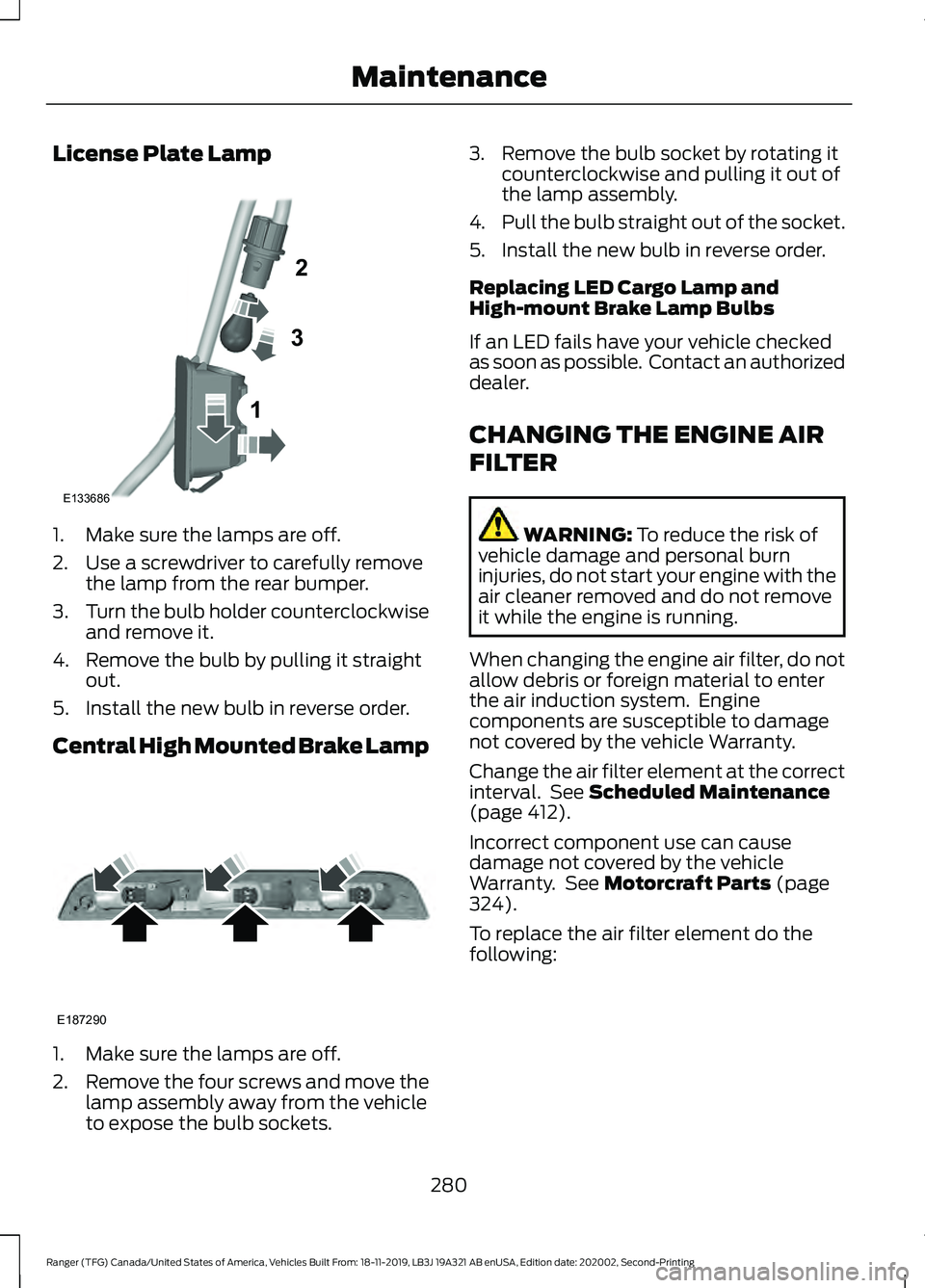
License Plate Lamp
1. Make sure the lamps are off.
2. Use a screwdriver to carefully remove
the lamp from the rear bumper.
3. Turn the bulb holder counterclockwise
and remove it.
4. Remove the bulb by pulling it straight out.
5. Install the new bulb in reverse order.
Central High Mounted Brake Lamp 1. Make sure the lamps are off.
2.
Remove the four screws and move the
lamp assembly away from the vehicle
to expose the bulb sockets. 3. Remove the bulb socket by rotating it
counterclockwise and pulling it out of
the lamp assembly.
4. Pull the bulb straight out of the socket.
5. Install the new bulb in reverse order.
Replacing LED Cargo Lamp and
High-mount Brake Lamp Bulbs
If an LED fails have your vehicle checked
as soon as possible. Contact an authorized
dealer.
CHANGING THE ENGINE AIR
FILTER WARNING: To reduce the risk of
vehicle damage and personal burn
injuries, do not start your engine with the
air cleaner removed and do not remove
it while the engine is running.
When changing the engine air filter, do not
allow debris or foreign material to enter
the air induction system. Engine
components are susceptible to damage
not covered by the vehicle Warranty.
Change the air filter element at the correct
interval. See
Scheduled Maintenance
(page 412).
Incorrect component use can cause
damage not covered by the vehicle
Warranty. See
Motorcraft Parts (page
324).
To replace the air filter element do the
following:
280
Ranger (TFG) Canada/United States of America, Vehicles Built From: 18-11-2019, LB3J 19A321 AB enUSA, Edition date: 202002, Second-Printing Maintenance1
2
3
E133686 E187290
Page 319 of 478
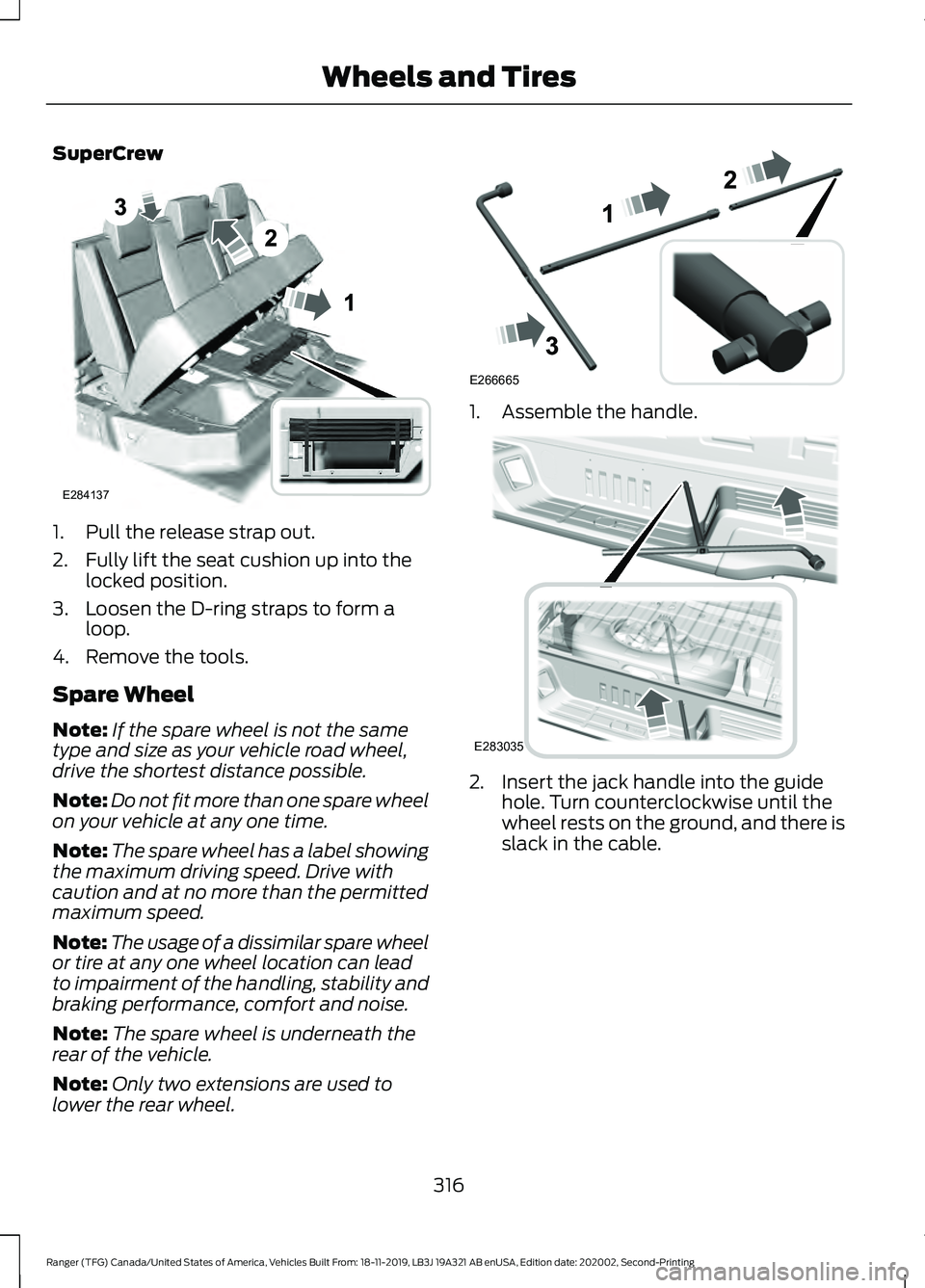
SuperCrew
1. Pull the release strap out.
2. Fully lift the seat cushion up into the
locked position.
3. Loosen the D-ring straps to form a loop.
4. Remove the tools.
Spare Wheel
Note: If the spare wheel is not the same
type and size as your vehicle road wheel,
drive the shortest distance possible.
Note: Do not fit more than one spare wheel
on your vehicle at any one time.
Note: The spare wheel has a label showing
the maximum driving speed. Drive with
caution and at no more than the permitted
maximum speed.
Note: The usage of a dissimilar spare wheel
or tire at any one wheel location can lead
to impairment of the handling, stability and
braking performance, comfort and noise.
Note: The spare wheel is underneath the
rear of the vehicle.
Note: Only two extensions are used to
lower the rear wheel. 1. Assemble the handle.
2. Insert the jack handle into the guide
hole. Turn counterclockwise until the
wheel rests on the ground, and there is
slack in the cable.
316
Ranger (TFG) Canada/United States of America, Vehicles Built From: 18-11-2019, LB3J 19A321 AB enUSA, Edition date: 202002, Second-Printing Wheels and TiresE284137 E266665 E283035
Page 323 of 478
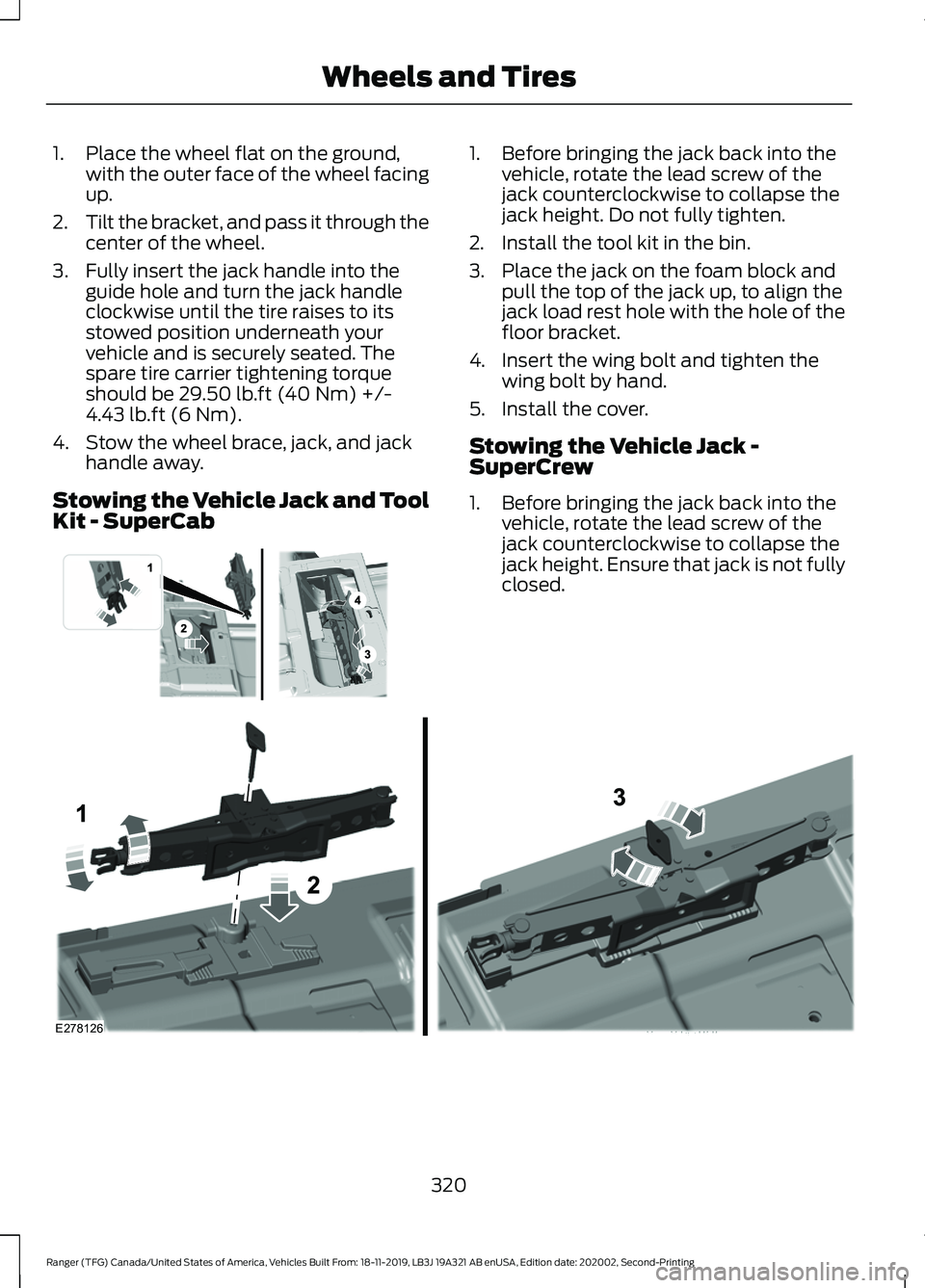
1. Place the wheel flat on the ground,
with the outer face of the wheel facing
up.
2. Tilt the bracket, and pass it through the
center of the wheel.
3. Fully insert the jack handle into the guide hole and turn the jack handle
clockwise until the tire raises to its
stowed position underneath your
vehicle and is securely seated. The
spare tire carrier tightening torque
should be 29.50 lb.ft (40 Nm) +/-
4.43 lb.ft (6 Nm).
4. Stow the wheel brace, jack, and jack handle away.
Stowing the Vehicle Jack and Tool
Kit - SuperCab 1. Before bringing the jack back into the
vehicle, rotate the lead screw of the
jack counterclockwise to collapse the
jack height. Do not fully tighten.
2. Install the tool kit in the bin.
3. Place the jack on the foam block and pull the top of the jack up, to align the
jack load rest hole with the hole of the
floor bracket.
4. Insert the wing bolt and tighten the wing bolt by hand.
5. Install the cover.
Stowing the Vehicle Jack -
SuperCrew
1. Before bringing the jack back into the vehicle, rotate the lead screw of the
jack counterclockwise to collapse the
jack height. Ensure that jack is not fully
closed. 320
Ranger (TFG) Canada/United States of America, Vehicles Built From: 18-11-2019, LB3J 19A321 AB enUSA, Edition date: 202002, Second-Printing Wheels and Tires E296013 E278126
Page 345 of 478
GENERAL INFORMATION
Radio Frequencies and Reception
Factors
AM and FM frequencies are established by
the Federal Communications Commission
(FCC) and the Canadian Radio and
Telecommunications Commission (CRTC).
Those frequencies are:
•
AM: 530-1710 kHz
• FM: 87.9-107.9 MHz
Note: Listening to loud audio for long
periods of time could damage your hearing. Radio Reception Factors
The further you travel from an AM or FM station, the
weaker the signal and the weaker the reception.
Distance and strength
Hills, mountains, tall buildings, bridges, tunnels, freeway
overpasses, parking garages, dense tree foliage and
thunderstorms can interfere with the reception.
Terrain
When you pass a ground-based broadcast repeating
tower, a stronger signal may overtake a weaker one and
result in the audio system muting.
Station overload
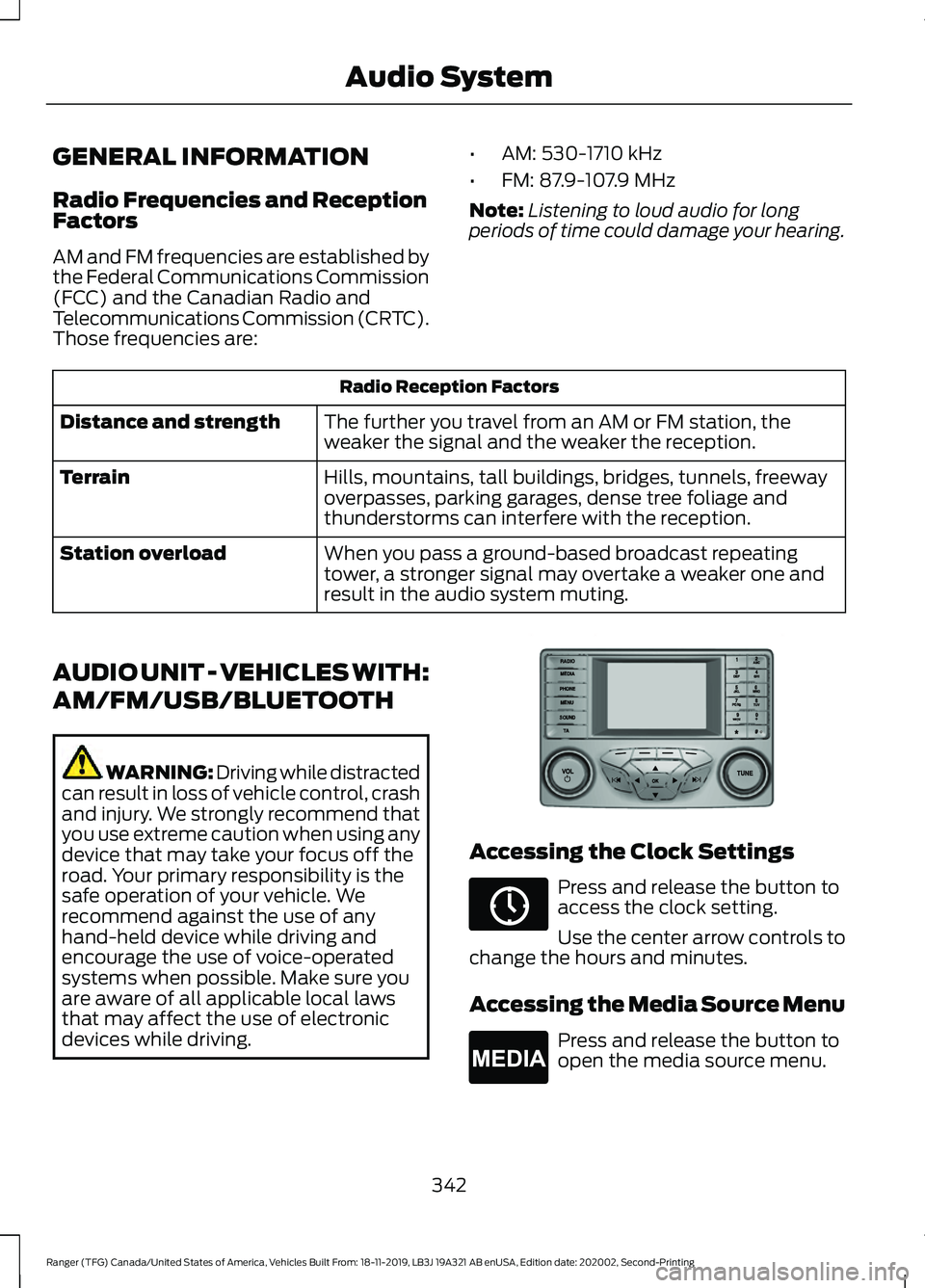
AUDIO UNIT - VEHICLES WITH:
AM/FM/USB/BLUETOOTH WARNING: Driving while distracted
can result in loss of vehicle control, crash
and injury. We strongly recommend that
you use extreme caution when using any
device that may take your focus off the
road. Your primary responsibility is the
safe operation of your vehicle. We
recommend against the use of any
hand-held device while driving and
encourage the use of voice-operated
systems when possible. Make sure you
are aware of all applicable local laws
that may affect the use of electronic
devices while driving. Accessing the Clock Settings
Press and release the button to
access the clock setting.
Use the center arrow controls to
change the hours and minutes.
Accessing the Media Source Menu Press and release the button to
open the media source menu.
342
Ranger (TFG) Canada/United States of America, Vehicles Built From: 18-11-2019, LB3J 19A321 AB enUSA, Edition date: 202002, Second-Printing Audio SystemE318482 E265036 E265035
Page 347 of 478
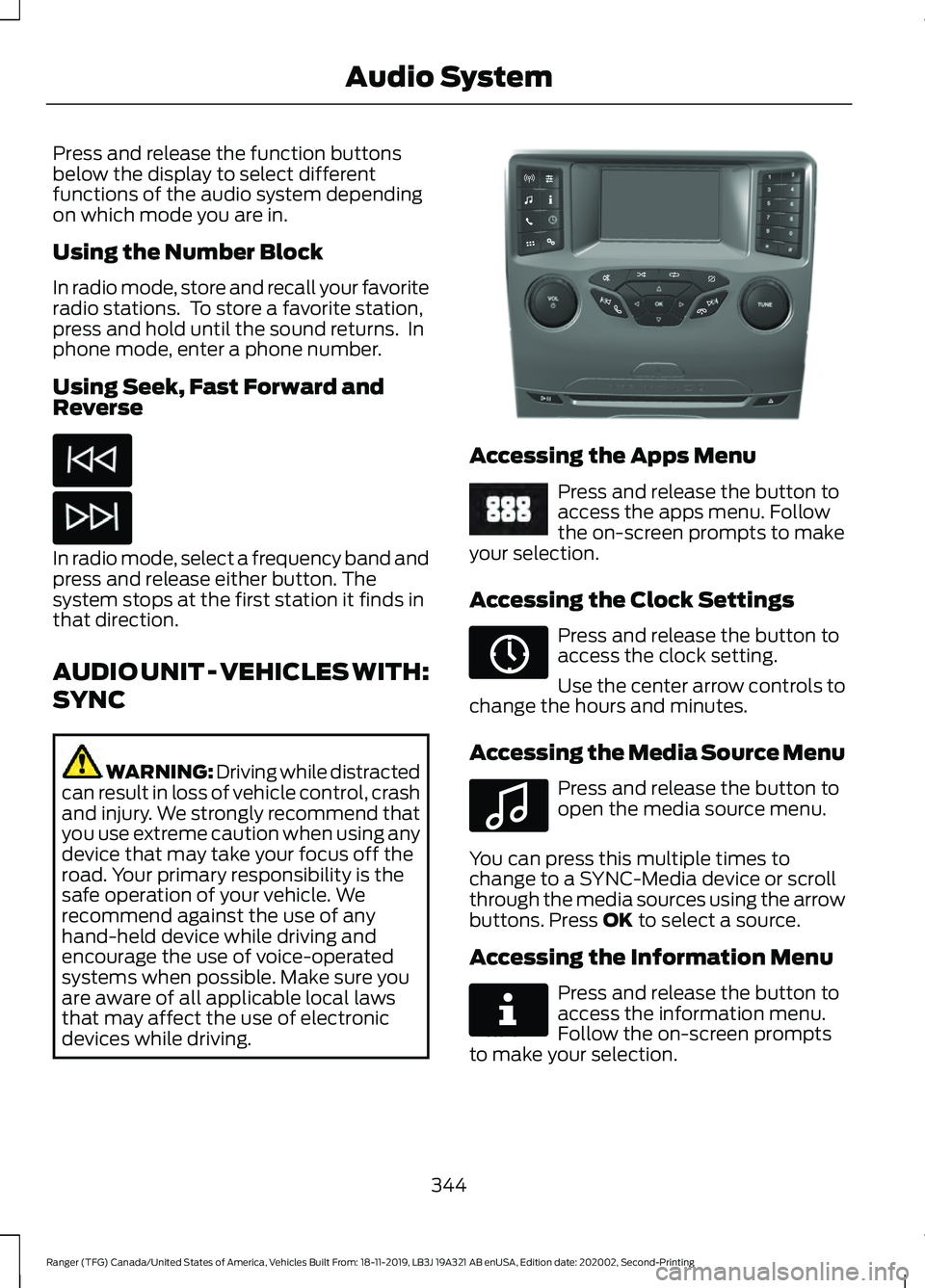
Press and release the function buttons
below the display to select different
functions of the audio system depending
on which mode you are in.
Using the Number Block
In radio mode, store and recall your favorite
radio stations. To store a favorite station,
press and hold until the sound returns. In
phone mode, enter a phone number.
Using Seek, Fast Forward and
Reverse
In radio mode, select a frequency band and
press and release either button. The
system stops at the first station it finds in
that direction.
AUDIO UNIT - VEHICLES WITH:
SYNC
WARNING: Driving while distracted
can result in loss of vehicle control, crash
and injury. We strongly recommend that
you use extreme caution when using any
device that may take your focus off the
road. Your primary responsibility is the
safe operation of your vehicle. We
recommend against the use of any
hand-held device while driving and
encourage the use of voice-operated
systems when possible. Make sure you
are aware of all applicable local laws
that may affect the use of electronic
devices while driving. Accessing the Apps Menu
Press and release the button to
access the apps menu. Follow
the on-screen prompts to make
your selection.
Accessing the Clock Settings Press and release the button to
access the clock setting.
Use the center arrow controls to
change the hours and minutes.
Accessing the Media Source Menu Press and release the button to
open the media source menu.
You can press this multiple times to
change to a SYNC-Media device or scroll
through the media sources using the arrow
buttons. Press OK to select a source.
Accessing the Information Menu Press and release the button to
access the information menu.
Follow the on-screen prompts
to make your selection.
344
Ranger (TFG) Canada/United States of America, Vehicles Built From: 18-11-2019, LB3J 19A321 AB enUSA, Edition date: 202002, Second-Printing Audio System E318505 E249410 E265036 E100027 E268570
Page 375 of 478
GENERAL INFORMATION
WARNING: Driving while distracted
can result in loss of vehicle control, crash
and injury. We strongly recommend that
you use extreme caution when using any
device that may take your focus off the
road. Your primary responsibility is the
safe operation of your vehicle. We
recommend against the use of any
hand-held device while driving and
encourage the use of voice-operated
systems when possible. Make sure you
are aware of all applicable local laws
that may affect the use of electronic
devices while driving.
About SYNC
The system allows you to interact with the
entertainment, information and
communication systems on your vehicle
using voice commands and a touchscreen.
The system provides easy interaction with
audio, phone, navigation, mobile apps and
settings.
Note: You can switch the system on and
use it for up to an hour without switching
the ignition on.
Note: You can use the system after you
switch the ignition off for up to 10 minutes
or until you open a door.
Note: For your safety, some features are
speed-dependent. Their use is limited to
when your vehicle speed is less than 3 mph
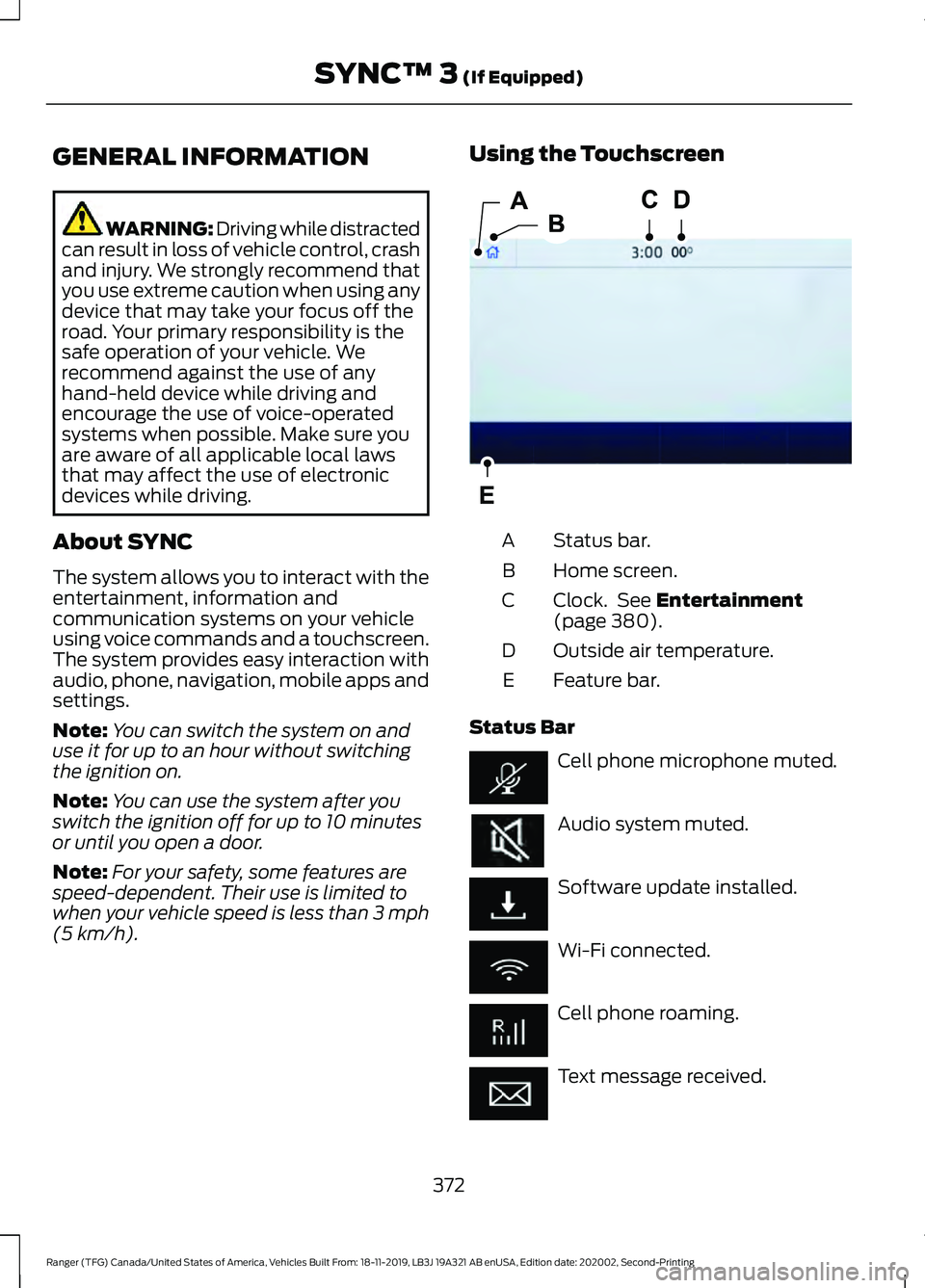
(5 km/h). Using the Touchscreen
Status bar.
A
Home screen.
B
Clock. See
Entertainment
(page 380).
C
Outside air temperature.
D
Feature bar.
E
Status Bar Cell phone microphone muted.
Audio system muted.
Software update installed.
Wi-Fi connected.
Cell phone roaming.
Text message received.
372
Ranger (TFG) Canada/United States of America, Vehicles Built From: 18-11-2019, LB3J 19A321 AB enUSA, Edition date: 202002, Second-Printing SYNC™ 3
(If Equipped)E293823
Page 396 of 478
Using Apps on an Android Device
Select the apps option on the
feature bar.
1. If your device is connected via USB, switch Android Auto off. See Phone
(page 385).
2. Switch on
Enable Mobile Apps via
USB in the Mobile Apps Settings tile.
3. Pair your device. See Phone (page 385).
4. Start the apps on your device that you want to use through SYNC.
Note: If you close the apps on your device,
you will not be able to use them through the
system.
5. Select
Find Mobile Apps.
Note: The system searches and connects
to compatible apps that are running on your
device.
6. Select the app that you want to use on
the touchscreen.
Note: Mobile Apps on your device use the
USB port to establish a connection with
SYNC. Some devices may lose the ability to
play music over USB when Mobile Apps are
enabled.
Using Mobile Navigation on an
Android Device
1. Connect your device to a USB port.
2. Switch Android Auto off. See
Phone
(page 385).
3. Switch on
Enable Mobile Apps via
USB in the Mobile Apps Settings tile.
4. Select the apps option on the feature bar.
5. Select the navigation app that you want to use on the touchscreen.
Note: When using a navigation app, keep
your device unlocked and the app open. Note:
Mobile Apps on your device use the
USB port to establish a connection with
SYNC. Some devices may lose the ability to
play music over USB when Mobile Apps are
enabled.
SETTINGS Press the button to enter the
settings menu.
Once you select a tile, press the
button next to a menu item to
view an explanation of the
setting.
Sound
Select this tile to adjust the sound settings.
Clock
Select this tile to adjust the clock settings.
Bluetooth
Select this tile to switch Bluetooth on and
off and adjust the settings.
Phone
Select this tile to connect, disconnect, and
manage the connected device settings.
Audio
Select this tile to adjust the audio settings.
Driver Assist
(If Equipped)
Select this tile to adjust Driver Assist
features like Park Aid, Lane Keeping
system, Pedestrian Detection, and
Auto-Start-Stop.
Vehicle
Select this tile to adjust the vehicle settings
like windows, alarm, lighting, and MyKey
settings.
393
Ranger (TFG) Canada/United States of America, Vehicles Built From: 18-11-2019, LB3J 19A321 AB enUSA, Edition date: 202002, Second-Printing SYNC™ 3
(If Equipped) E280315 E268570
Page 466 of 478
4
4WD
See: Four-Wheel Drive...................................... 162
9
911 Assist...........................................................49
A
A/C See: Climate Control........................................... 117
About This Manual
...........................................7
ABS See: Brakes............................................................. 171
ABS driving hints See: Hints on Driving With Anti-Lock
Brakes.................................................................. 171
Accessories...................................................408 Peace of Mind.................................................... 408
Accessories See: Replacement Parts
Recommendation............................................ 13
ACC See: Using Adaptive Cruise Control............189
Adjusting the Headlamps.........................275 Vertical Aim Adjustment................................. 275
Adjusting the Steering Wheel....................72
Airbag Disposal..............................................48
Air Conditioning See: Climate Control........................................... 117
Air Filter See: Changing the Engine Air Filter............280
Alarm See: Anti-Theft Alarm........................................ 70
Ambient Lighting
............................................82
Adjusting the Brightness................................... 82
Changing the Color.............................................. 82
Switching Ambient Lighting Off..................... 82
Switching Ambient Lighting On...................... 82
Anti-Theft Alarm............................................70 Alarm System........................................................ 70
Arming the Alarm.................................................. 71
Disarming the Alarm............................................ 71
Triggering the Alarm............................................. 71
Appendices....................................................432 Apps..................................................................392
Using Apps on an Android Device...............393
Using Apps on an iOS Device........................ 392
Using Mobile Navigation on an Android Device................................................................ 393
At a Glance
.........................................................17
Audible Warnings and Indicators.............95 Headlamps On Warning Chime...................... 95
Key in Ignition Warning Chime........................ 95
Keyless Warning Alert........................................ 95
Parking Brake On Warning Chime.................95
Audio Control
...................................................72
Type One.................................................................. 72
Type Two.................................................................. 73
You can operate the following functions with the control:............................................... 73
Audio Input Jack
...........................................352
Audio System................................................342
General Information......................................... 342
Audio Unit - Vehicles With: AM/FM/USB/ Bluetooth.....................................................342
Accessing the Clock Settings........................ 342
Accessing the Media Source Menu.............342
Accessing the Menu.......................................... 343
Accessing the Phone Features..................... 343
Accessing the Sound Settings...................... 343
Adjusting the Volume....................................... 343
Changing Radio Stations................................ 343
Listening to the Radio...................................... 343
Muting the Audio............................................... 343
Switching the Audio Unit On and Off........343
Using Seek, Fast Forward and Reverse............................................................. 344
Using the Display Control............................... 343
Using the Number Block................................. 344
Audio Unit - Vehicles With: SYNC 3
......................................................................346
Adjusting the Volume....................................... 347
Changing Radio Stations................................ 347
Playing or Pausing Media................................ 347
Switching the Audio Unit On and Off.........347
Using Seek, Fast Forward and Reverse.............................................................. 347
Audio Unit - Vehicles With: SYNC.........344 Accessing the Apps Menu.............................. 344
Accessing the Clock Settings........................ 344
Accessing the Information Menu................344
Accessing the Media Source Menu.............344
463
Ranger (TFG) Canada/United States of America, Vehicles Built From: 18-11-2019, LB3J 19A321 AB enUSA, Edition date: 202002, Second-Printing Index
Page 475 of 478
Obstacle Distance Indicator..........................
186
Rear Camera Delay............................................ 187
Using the Rear View Camera System.........185
Rear View Camera See: Rear View Camera................................... 184
Recommended Towing Weights.............221 Towing Capacities.............................................. 222
Trailer Hitch Identification.............................. 222
Trailer Nose Weight........................................... 223
Refueling.........................................................150
Refueling System Overview........................... 150
Refueling System Warning.............................. 152
Refueling Your Vehicle...................................... 150
Remote Control
...............................................51
Car Finder................................................................ 55
Integrated Keyhead Transmitter...................... 51
Intelligent Access Key......................................... 52
Remote Start......................................................... 56
Replacing the Battery......................................... 53
Sounding a Panic Alarm.................................... 55
Remote Start..................................................123 Automatic Settings............................................ 123
Heated and Cooled Features.......................... 123
Last Settings......................................................... 123
Removing a Headlamp..............................276
Removing the Tailgate.................................68
Repairing Minor Paint Damage
...............287
Replacement Parts Recommendation........................................13
Collision Repairs.................................................... 14
Scheduled Maintenance and Mechanical Repairs.................................................................. 14
Warranty on Replacement Parts..................... 14
Replacing a Lost Key or Remote Control.............................................................57
Reporting Safety Defects (Canada Only)..............................................................244
Reporting Safety Defects (U.S. Only)..............................................................244
Roadside Assistance
..................................233
Vehicles Sold in Canada: Getting Roadside
Assistance....................................................... 234
Vehicles Sold in the United States: Getting Roadside Assistance................................... 233
Vehicles Sold in the United States: Using Roadside Assistance................................... 233
Roadside Emergencies..............................233
Roof Racks and Load Carriers.................218 Running-In
See: Breaking-In................................................. 229
Running Out of Fuel
....................................148
Adding Fuel From a Portable Fuel
Container.......................................................... 149
Filling a Portable Fuel Container.................. 148
S
Safety Canopy ™
............................................46
Safety Precautions.......................................147
Satellite Radio
..............................................348
Satellite Radio Electronic Serial Number
(ESN)................................................................ 349
Satellite Radio Reception Factors..............348
SiriusXM Satellite Radio Service.................349
Troubleshooting................................................. 349
Scheduled Maintenance Record
............421
Scheduled Maintenance............................412
Seatbelt Extensions......................................38
Seatbelt Height Adjustment......................36
Seatbelt Reminder........................................36 Seatbelt Status..................................................... 37
Seatbelts...........................................................33 Principle of Operation......................................... 33
Seats..................................................................124
Security..............................................................70
Settings...........................................................393 Audio...................................................................... 393
Automatic Updates.......................................... 394
Bluetooth.............................................................. 393
Charge Settings.................................................. 394
Clock....................................................................... 393
Display................................................................... 394
Driver Assist......................................................... 393
Emergency Assistance.................................... 394
FordPass............................................................... 394
General.................................................................. 394
Message Center................................................. 394
Mobile Apps......................................................... 394
Multi Contour Seats.......................................... 394
Navigation............................................................ 394
Personal Profiles................................................ 394
Phone..................................................................... 393
Seats...................................................................... 394
Sound..................................................................... 393
Valet Mode........................................................... 394
Vehicle................................................................... 393
472
Ranger (TFG) Canada/United States of America, Vehicles Built From: 18-11-2019, LB3J 19A321 AB enUSA, Edition date: 202002, Second-Printing Index