cruise control FORD RANGER 2020 Owner's Manual
[x] Cancel search | Manufacturer: FORD, Model Year: 2020, Model line: RANGER, Model: FORD RANGER 2020Pages: 478, PDF Size: 7.44 MB
Page 197 of 478
Optimal system performance requires a
clear view of the road by the
windshield-mounted camera.
Optimal performance may not occur if:
•
The camera is blocked.
• There is poor visibility or lighting
conditions.
• There are bad weather conditions.
System Not Available
Conditions that can cause the system to
deactivate or prevent the system from
activating when requested include:
• A blocked sensor.
• High brake temperature.
• A failure in the system or a related
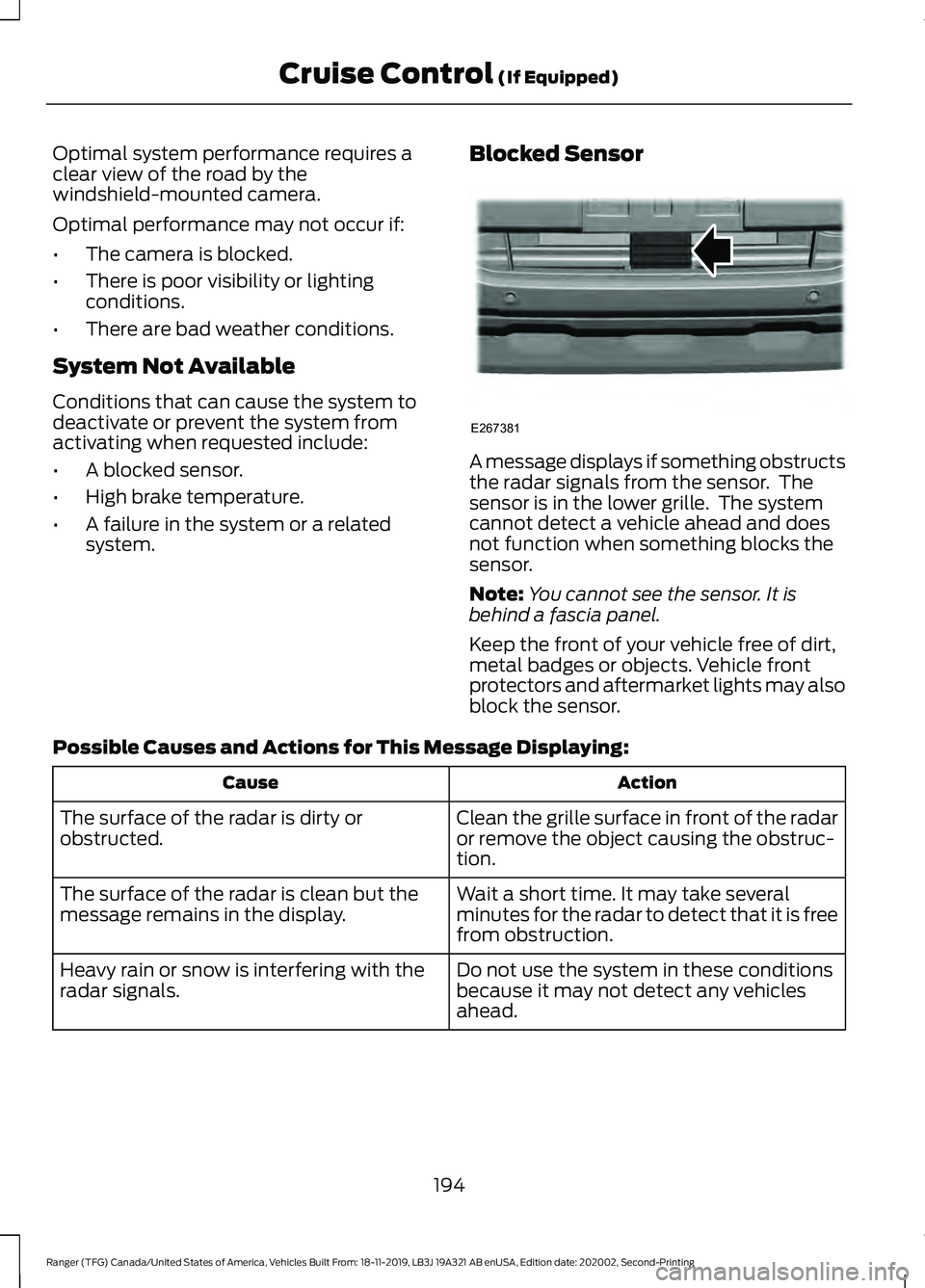
system. Blocked Sensor A message displays if something obstructs
the radar signals from the sensor. The
sensor is in the lower grille. The system
cannot detect a vehicle ahead and does
not function when something blocks the
sensor.
Note:
You cannot see the sensor. It is
behind a fascia panel.
Keep the front of your vehicle free of dirt,
metal badges or objects. Vehicle front
protectors and aftermarket lights may also
block the sensor.
Possible Causes and Actions for This Message Displaying: Action
Cause
Clean the grille surface in front of the radar
or remove the object causing the obstruc-
tion.
The surface of the radar is dirty or
obstructed.
Wait a short time. It may take several
minutes for the radar to detect that it is free
from obstruction.
The surface of the radar is clean but the
message remains in the display.
Do not use the system in these conditions
because it may not detect any vehicles
ahead.
Heavy rain or snow is interfering with the
radar signals.
194
Ranger (TFG) Canada/United States of America, Vehicles Built From: 18-11-2019, LB3J 19A321 AB enUSA, Edition date: 202002, Second-Printing Cruise Control (If Equipped)E267381
Page 198 of 478
Action
Cause
Do not use the system in these conditions
because it may not detect any vehicles
ahead.
Water, snow or ice on the surface of the
road may interfere with the radar signals.
Wait a short time or switch to normal cruise
control.
You are in a desert or remote area with no
other vehicles and no roadside objects.
Due to the nature of radar technology, it is possible to get a blockage warning with no
actual block. A false blocked condition either self clears, or clears after you restart your
vehicle.
Switching to Normal Cruise
Control WARNING: Normal cruise control
will not brake when your vehicle is
approaching slower vehicles. Always be
aware of which mode you have selected
and apply the brakes when necessary. The cruise control indicator light
replaces the adaptive cruise
control indicator light if you
select normal cruise control. The gap
setting does not display, and the system
does not respond to lead vehicles.
Automatic braking remains active to
maintain set speed.
You can change from adaptive cruise
control to normal cruise control through
the information display.
195
Ranger (TFG) Canada/United States of America, Vehicles Built From: 18-11-2019, LB3J 19A321 AB enUSA, Edition date: 202002, Second-Printing Cruise Control
(If Equipped)E71340
Page 214 of 478
Note:
If you perceive Pre-Collision Assist
alerts as being too frequent or disturbing,
then you can reduce the alert sensitivity,
though the manufacturer recommends
using the highest sensitivity setting where
possible. Setting lower sensitivity would
lead to fewer and later system warnings.
Distance Indication and Alert
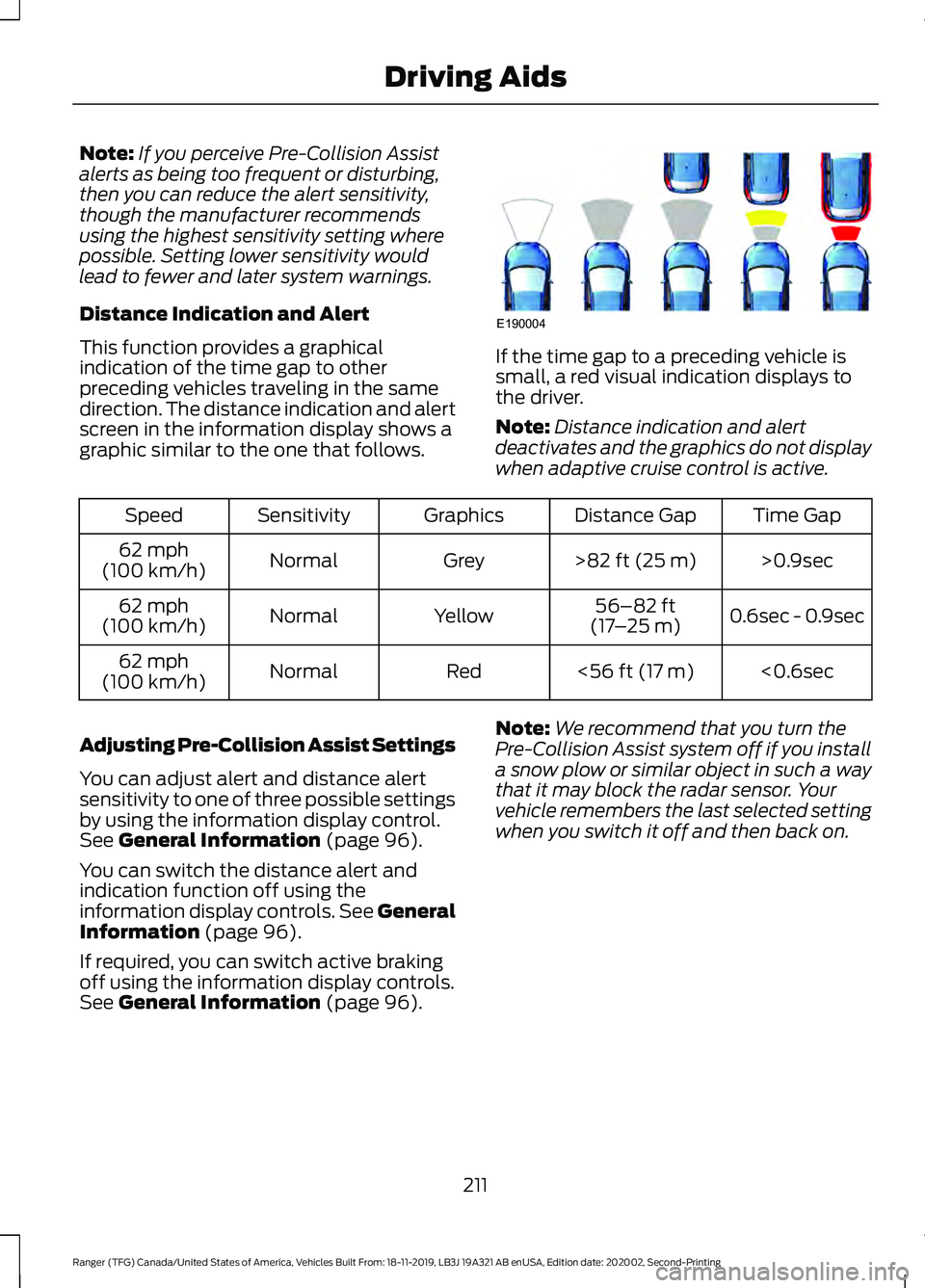
This function provides a graphical
indication of the time gap to other
preceding vehicles traveling in the same
direction. The distance indication and alert
screen in the information display shows a
graphic similar to the one that follows. If the time gap to a preceding vehicle is
small, a red visual indication displays to
the driver.
Note:
Distance indication and alert
deactivates and the graphics do not display
when adaptive cruise control is active. Time Gap
Distance Gap
Graphics
Sensitivity
Speed
>0.9sec
>82 ft (25 m)
Grey
Normal
62 mph
(100 km/h)
0.6sec - 0.9sec
56–82 ft
(17 –25 m)
Yellow
Normal
62 mph
(100 km/h)
<0.6sec
<
56 ft (17 m)
Red
Normal
62 mph
(100 km/h)
Adjusting Pre-Collision Assist Settings
You can adjust alert and distance alert
sensitivity to one of three possible settings
by using the information display control.
See
General Information (page 96).
You can switch the distance alert and
indication function off using the
information display controls. See General
Information
(page 96).
If required, you can switch active braking
off using the information display controls.
See
General Information (page 96). Note:
We recommend that you turn the
Pre-Collision Assist system off if you install
a snow plow or similar object in such a way
that it may block the radar sensor. Your
vehicle remembers the last selected setting
when you switch it off and then back on.
211
Ranger (TFG) Canada/United States of America, Vehicles Built From: 18-11-2019, LB3J 19A321 AB enUSA, Edition date: 202002, Second-Printing Driving AidsE190004
Page 233 of 478
•
Transmissions give their best fuel
economy when operated in the top
cruise gear and with steady pressure
on the gas pedal.
• Four-wheel-drive operation (if
equipped) is less fuel efficient than
two-wheel-drive operation.
COLD WEATHER
PRECAUTIONS
The functional operation of some
components and systems can be affected
at temperatures below -13°F (-25°C).
OFF-ROAD DRIVING
Before going off-roading, consult with your
local governmental agencies to determine
designated off-road trails and recreation
areas. Also, be sure to understand any
off-road vehicle registration requirements
for the area in which you plan on driving.
Before taking your vehicle off-roading, a
basic vehicle inspection should be done to
make sure that the vehicle is in top working
condition.
Basic Off-road Driving Techniques
• Grip the steering wheel with thumbs
on the outside of the rim. This reduces
the risk of injury due to abrupt steering
wheel motions that occur when
negotiating rough terrain. Do not grip
the steering wheel with thumbs inside
the rim.
• Look ahead on your route noting
upcoming obstacles, surface texture
or color changes or any other factors
which may indicate a change in
available traction, and adjust the
vehicle speed and route accordingly. •
Always keep available ground
clearance in mind and pick a route that
minimizes the risk of catching the
underside of the vehicle on an obstacle.
• When negotiating low speed obstacles,
applying light brake pressure in
conjunction with the throttle helps
prevent the vehicle from jerking and
allows you to negotiate the obstacle
in a more controlled manner. Using 4L
also helps with this.
Crossing Obstacles
• Review the path ahead before
attempting to cross any obstacle. It is
best if the obstacle is reviewed from
outside the vehicle so that there is a
good understanding of terrain condition
both in front of and behind the
obstacle.
• If a large obstacle such as a rock
cannot be avoided, choose a path that
places the rock directly under the tire
rather than the undercarriage of the
vehicle. This helps prevent damage to
your vehicle.
Hill Climbing WARNING:
Extreme care should
be used when steering the vehicle in
reverse down a slope so as not to cause
the vehicle to swerve out of control.
230
Ranger (TFG) Canada/United States of America, Vehicles Built From: 18-11-2019, LB3J 19A321 AB enUSA, Edition date: 202002, Second-Printing Driving Hints
Page 259 of 478
Protected Component
Fuse Rating
Fuse Number
Not used.
-
1
Body control module.
125A
2
Voltage quality module (supplies rear lamp blind spot,
rear view camera, head up display, 4x4 switch, image
processing module and adaptive cruise control radar).
50A
3
Busbar through to power distribution box.
-
4
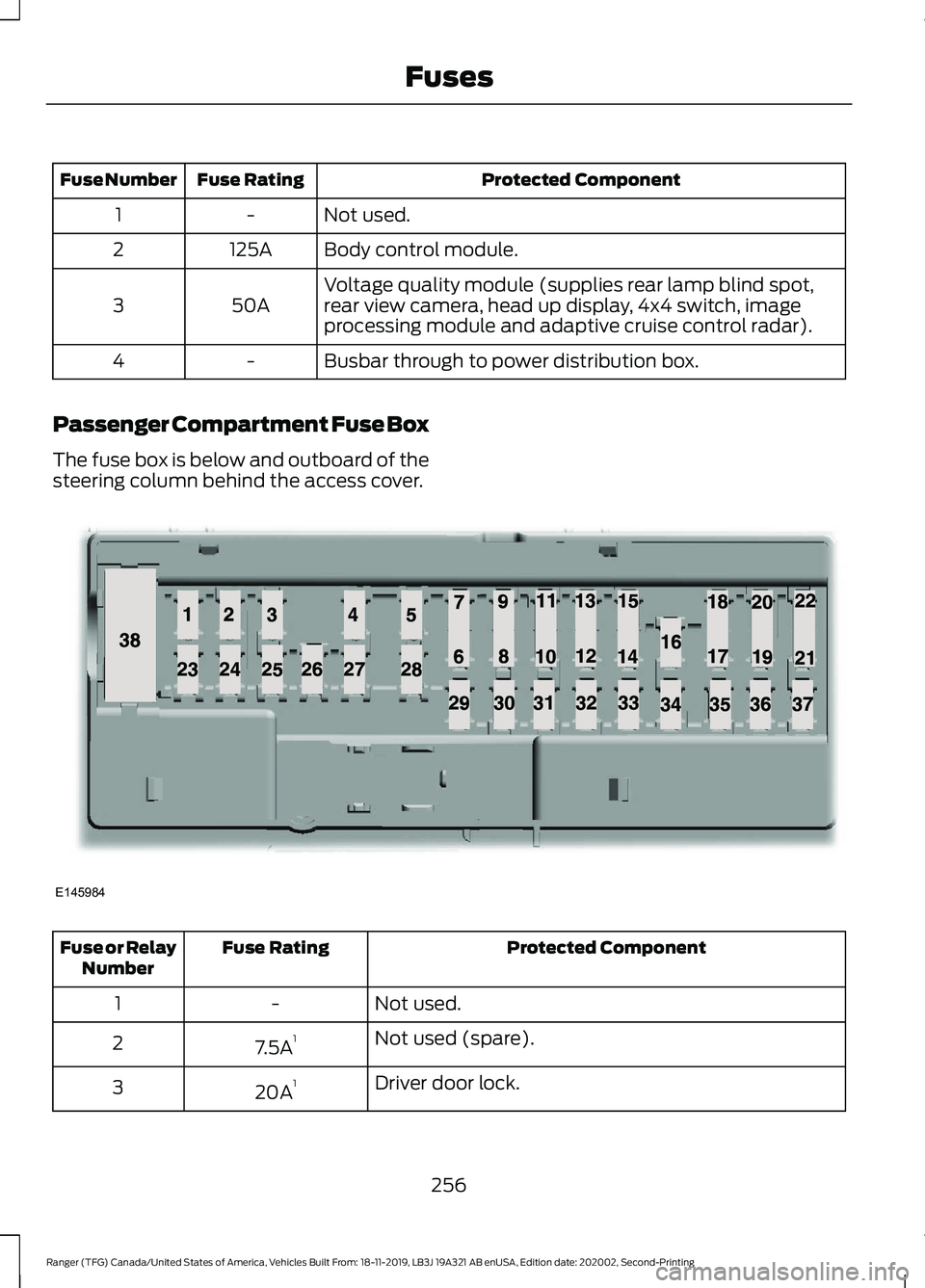
Passenger Compartment Fuse Box
The fuse box is below and outboard of the
steering column behind the access cover. Protected Component
Fuse Rating
Fuse or Relay
Number
Not used.
-
1
Not used (spare).
7.5A 1
2
Driver door lock.
20A 1
3
256
Ranger (TFG) Canada/United States of America, Vehicles Built From: 18-11-2019, LB3J 19A321 AB enUSA, Edition date: 202002, Second-Printing FusesE145984
Page 466 of 478
4
4WD
See: Four-Wheel Drive...................................... 162
9
911 Assist...........................................................49
A
A/C See: Climate Control........................................... 117
About This Manual
...........................................7
ABS See: Brakes............................................................. 171
ABS driving hints See: Hints on Driving With Anti-Lock
Brakes.................................................................. 171
Accessories...................................................408 Peace of Mind.................................................... 408
Accessories See: Replacement Parts
Recommendation............................................ 13
ACC See: Using Adaptive Cruise Control............189
Adjusting the Headlamps.........................275 Vertical Aim Adjustment................................. 275
Adjusting the Steering Wheel....................72
Airbag Disposal..............................................48
Air Conditioning See: Climate Control........................................... 117
Air Filter See: Changing the Engine Air Filter............280
Alarm See: Anti-Theft Alarm........................................ 70
Ambient Lighting
............................................82
Adjusting the Brightness................................... 82
Changing the Color.............................................. 82
Switching Ambient Lighting Off..................... 82
Switching Ambient Lighting On...................... 82
Anti-Theft Alarm............................................70 Alarm System........................................................ 70
Arming the Alarm.................................................. 71
Disarming the Alarm............................................ 71
Triggering the Alarm............................................. 71
Appendices....................................................432 Apps..................................................................392
Using Apps on an Android Device...............393
Using Apps on an iOS Device........................ 392
Using Mobile Navigation on an Android Device................................................................ 393
At a Glance
.........................................................17
Audible Warnings and Indicators.............95 Headlamps On Warning Chime...................... 95
Key in Ignition Warning Chime........................ 95
Keyless Warning Alert........................................ 95
Parking Brake On Warning Chime.................95
Audio Control
...................................................72
Type One.................................................................. 72
Type Two.................................................................. 73
You can operate the following functions with the control:............................................... 73
Audio Input Jack
...........................................352
Audio System................................................342
General Information......................................... 342
Audio Unit - Vehicles With: AM/FM/USB/ Bluetooth.....................................................342
Accessing the Clock Settings........................ 342
Accessing the Media Source Menu.............342
Accessing the Menu.......................................... 343
Accessing the Phone Features..................... 343
Accessing the Sound Settings...................... 343
Adjusting the Volume....................................... 343
Changing Radio Stations................................ 343
Listening to the Radio...................................... 343
Muting the Audio............................................... 343
Switching the Audio Unit On and Off........343
Using Seek, Fast Forward and Reverse............................................................. 344
Using the Display Control............................... 343
Using the Number Block................................. 344
Audio Unit - Vehicles With: SYNC 3
......................................................................346
Adjusting the Volume....................................... 347
Changing Radio Stations................................ 347
Playing or Pausing Media................................ 347
Switching the Audio Unit On and Off.........347
Using Seek, Fast Forward and Reverse.............................................................. 347
Audio Unit - Vehicles With: SYNC.........344 Accessing the Apps Menu.............................. 344
Accessing the Clock Settings........................ 344
Accessing the Information Menu................344
Accessing the Media Source Menu.............344
463
Ranger (TFG) Canada/United States of America, Vehicles Built From: 18-11-2019, LB3J 19A321 AB enUSA, Edition date: 202002, Second-Printing Index
Page 469 of 478
Switching Dual Zone Mode On and
Off...................................................................... 383
Switching Maximum Air Conditioning On and Off............................................................. 384
Switching Maximum Defrost On and Off...................................................................... 384
Switching Rear Auto Mode On and Off...................................................................... 384
Switching Recirculated Air On and Off...................................................................... 384
Switching the Air Conditioning On and Off...................................................................... 383
Switching the Climate Controlled Seats On and Off.............................................................. 383
Switching the Climate Control On and Off...................................................................... 383
Switching the Heated Exterior Mirrors On and Off.............................................................. 383
Switching the Heated Rear Window On and Off...................................................................... 383
Switching the Heated Seats On and Off...................................................................... 384
Switching the Heated Steering Wheel On and Off............................................................. 384
Switching the Heated Windshield On and Off...................................................................... 383
Switching the Rear Climate Controlled Seats On and Off.......................................... 385
Switching the Rear Heated Seats On and Off...................................................................... 385
Switching the Rear Ventilated Seats On and Off............................................................. 385
Switching the Ventilated Seats On and Off...................................................................... 384
Climate Control...............................................117
Cold Weather Precautions.......................230
Connected Vehicle......................................336 Connecting the Vehicle to a Mobile
Network............................................................ 336
Connected Vehicle Limitations..............336
Connected Vehicle Requirements
........336
Connected Vehicle – Troubleshooting - Vehicles With: Modem............................337
Connected Vehicle – Troubleshooting - Vehicles With: SYNC 3............................338 Connecting a Bluetooth® Device -
Vehicles With: AM/FM/USB/Bluetooth,
Vehicles Without: SYNC
.........................347
Pairing a Device.................................................. 347
Connecting the Vehicle to a Mobile Network........................................................336
Connecting FordPass to the Modem.........336
Enabling and Disabling the Modem...........336
What Is the Modem.......................................... 336
Connecting the Vehicle to a Wi-Fi Network - Vehicles With: SYNC 3
.......337
Coolant Check See: Engine Coolant Check........................... 266
Crash Sensors and Airbag Indicator........47
Creating a MyKey...........................................59 Programming and Changing Configurable
Settings.............................................................. 60
Creating a Vehicle Wi-Fi Hotspot
..........340
Connecting a Device to the Wi-Fi
Hotspot............................................................ 340
Finding the Wi-Fi Hotspot Name and Password......................................................... 340
Creating a Vehicle Wi-Fi Hotspot - Vehicles Without: SYNC
........................340
Connecting a Device to the Wi-Fi
Hotspot............................................................ 340
Purchasing a Data Plan.................................... 341
Cross Traffic Alert
........................................205
Cross Traffic Alert Behavior When Trailer
is Attached...................................................... 208
Cross Traffic Alert Indicator........................... 208
Cross Traffic Alert Information Messages......................................................... 208
Cross Traffic Alert System Limitations....................................................... 207
Cross Traffic Alert System Sensors.............207
Switching the System On and Off..............208
Using Cross Traffic Alert................................. 206
Cruise Control
..................................................73
Principle of Operation...................................... 188
Cruise control See: Using Cruise Control................................188
Customer Assistance
.................................239
466
Ranger (TFG) Canada/United States of America, Vehicles Built From: 18-11-2019, LB3J 19A321 AB enUSA, Edition date: 202002, Second-Printing Index
Page 472 of 478
Heated Exterior Mirrors...............................122
Heated Rear Window..................................122
Heated Seats.................................................130
Heated Windshield.......................................122 Windshield Wiper De-Icer................................ 122
Heating See: Climate Control........................................... 117
Hill Start Assist...............................................172 Switching the System On and Off................173
Using Hill Start Assist........................................ 173
Hints on Controlling the Interior Climate..........................................................120
Defogging the Side Windows in Cold Weather............................................................. 122
General Hints....................................................... 120
Quickly Cooling the Interior.............................. 121
Quickly Heating the Interior............................ 120
Recommended Settings for Cooling............121
Recommended Settings for Heating............121
Hints on Driving With Anti-Lock Brakes..............................................................171
Hood Lock See: Opening and Closing the Hood..........262
Horn.....................................................................74
I
Ignition Switch
...............................................139
Starting the Engine............................................ 140
Switching the Ignition Off............................... 140
Switching the Ignition On................................ 140
Switching the Ignition to Accessory Mode.................................................................. 140
In California (U.S. Only)............................240
Information Display Control.......................74
Information Displays....................................96 General Information........................................... 96
Information Messages
...............................104
4WD........................................................................\
.. 116
Adaptive Cruise Control................................... 104
Airbag...................................................................... 105
Alarm and Security............................................ 105
Auto-Start-Stop................................................. 106
Battery and Charging System........................ 107
Blind Spot Information and Cross Traffic Alert System.................................................... 107
Doors and Locks................................................. 108
Driver Alert............................................................ 108Drivetrain...............................................................
109
Engine..................................................................... 109
Fuel........................................................................\
.. 109
Keys and Intelligent Access............................. 110
Lane Keeping System.......................................... 111
Maintenance........................................................... 111
MyKey....................................................................... 112
Park Aid.................................................................... 113
Power Steering..................................................... 113
Pre-Collision Assist............................................. 113
Remote Start......................................................... 114
Starting System ................................................... 114
Tire Pressure Monitoring System................... 114
Traction Control................................................... 114
Trail Control........................................................... 115
Trailer........................................................................\
115
Installing Child Restraints............................21 Child Restraints...................................................... 21
Combining Seatbelt and LATCH Lower Anchors for Attaching Child
Restraints........................................................... 25
Front Seat Tether Strap Attachment (SuperCab)....................................................... 26
Rear Seat Tether Strap Attachment (SuperCab)........................................................ 27
Use of Inboard Lower Anchors from the Outermost Seating Positions (Center
Seating Use) ..................................................... 25
Using Lap and Shoulder Belts ......................... 21
Using Lower Anchors and Tethers for CHildren (LATCH)............................................ 23
Using Tether Straps............................................. 25
Instrument Cluster
........................................89
Instrument Lighting Dimmer......................78 Vehicles With Front Fog Lamps...................... 79
Vehicles Without Front Fog Lamps...............79
Instrument Panel.............................................17
Interior Lamps
..................................................81
Courtesy Lamp....................................................... 81
Reading Lamps..................................................... 82
Rear Courtesy Lamp........................................... 82
Interior Mirror
....................................................87
Automatic Dimming Mirror.............................. 88
Manual Dimming Mirror..................................... 87
Introduction.........................................................7
469
Ranger (TFG) Canada/United States of America, Vehicles Built From: 18-11-2019, LB3J 19A321 AB enUSA, Edition date: 202002, Second-Printing Index
Page 476 of 478
Voice Control.......................................................
394
Setting the Trail Control Speed..............180
Side Airbags.....................................................45
Sitting in the Correct Position..................124
Snow Chains See: Using Snow Chains................................. 306
Spare Wheel See: Changing a Road Wheel.......................... 311
Special Notices
................................................14
New Vehicle Limited Warranty......................... 14
Notice to Owners of Pickup Trucks and Utility Type Vehicles........................................ 15
On Board Diagnostics Data Link Connector ............................................................ 14
Special Instructions.............................................. 14
Using Your Vehicle as an Ambulance............15
Using Your Vehicle With a Snowplow...........15
Special Operating Conditions Scheduled Maintenance...............................................418
Exceptions........................................................... 420
Speed Control See: Cruise Control............................................ 188
Stability Control
.............................................175
Principle of Operation....................................... 175
Starter Switch See: Ignition Switch........................................... 139
Starting a Gasoline Engine.......................140 Automatic Engine Shutdown......................... 142
Failure to Start..................................................... 142
Guarding Against Exhaust Fumes................143
Important Ventilating Information...............143
Stopping the Engine When Your Vehicle is Moving................................................................ 143
Stopping the Engine When Your Vehicle is Stationary......................................................... 142
Vehicles with an Ignition Key........................... 141
Vehicles with Keyless Start.............................. 141
Starting and Stopping the Engine..........139 General Information.......................................... 139
Steering...........................................................209 Electric Power Steering................................... 209
Steering Wheel
................................................72
Storage Compartments.............................137
Sun Visors.........................................................88 Illuminated Vanity Mirror................................... 88
Supplementary Restraints System..........41 Principle of Operation......................................... 41
Switching Trail Control On and Off.......180 Symbols Glossary
.............................................7
SYNC™ 3.........................................................372
General Information.......................................... 372
SYNC™ 3 Troubleshooting......................395 Additional Information and
Assistance....................................................... 407
Apps....................................................................... 402
Navigation............................................................. 401
Personal Profiles............................................... 405
Phone..................................................................... 399
Resetting the System....................................... 407
USB and Bluetooth Audio.............................. 396
Voice Recognition.............................................. 395
Wi-Fi Connectivity............................................ 404
SYNC™ Applications and Services........................................................359
911 Assist............................................................... 359
SYNC Mobile Apps............................................. 361
SYNC™............................................................355 General Information......................................... 355
SYNC™ Troubleshooting.........................363
T
Tailgate Lock....................................................68 Power Tailgate Lock............................................ 68
Tailgate..............................................................68
Technical Specifications See: Capacities and Specifications............323
Terrain Control
...............................................178
Principle of Operation....................................... 178
The Better Business Bureau (BBB) Auto Line Program (U.S. Only)........................241
Tire Care
...........................................................291
Glossary of Tire Terminology......................... 293
Information About Uniform Tire Quality Grading.............................................................. 291
Information Contained on the Tire Sidewall........................................................... 294
Temperature A B C............................................ 292
Traction AA A B C............................................... 292
Treadwear............................................................. 292
Tire Pressure Monitoring System...........307 Changing Tires With a Tire Pressure
Monitoring System...................................... 308
Understanding Your Tire Pressure Monitoring System ..................................... 309
473
Ranger (TFG) Canada/United States of America, Vehicles Built From: 18-11-2019, LB3J 19A321 AB enUSA, Edition date: 202002, Second-Printing Index
Page 477 of 478
Tires
See: Wheels and Tires..................................... 290
Towing a Trailer............................................220
Towing Points................................................238
Towing the Vehicle on Four Wheels..........................................................226
Emergency Towing............................................. 227
Recreational Towing.......................................... 227
Towing.............................................................220
Traction Control.............................................174 Principle of Operation....................................... 174
Trail Control Indicators................................181
Trail Control
....................................................180
Trail Control – Troubleshooting..................... 181
Trail Control – Troubleshooting...............181 Trail Control – Information Messages.........181
Trailer Sway Control.....................................221
Transmission Code Designation............326
Transmission..................................................158
Transporting the Vehicle
...........................237
U
Under Hood Overview...............................263
Under Seat Storage.....................................138 SuperCab............................................................... 138
Unique Driving Characteristics................145
Universal Garage Door Opener.................131 HomeLink Wireless Control System.............131
USB Port
.........................................................353
Using Adaptive Cruise Control................189 Automatic Cancellation................................... 192
Blocked Sensor................................................... 194
Canceling the Set Speed................................. 192
Changing the Set Speed.................................. 192
Detection Issues.................................................. 193
Following a Vehicle............................................ 190
Hilly Condition Usage........................................ 192
Overriding the Set Speed................................. 191
Resuming the Set Speed................................. 192
Setting the Adaptive Cruise Speed.............190
Setting the Gap Distance................................. 191
Switching Adaptive Cruise Control Off....................................................................... 193
Switching Adaptive Cruise Control On........................................................................\
190
Switching to Normal Cruise Control............195
System Not Available....................................... 194Using Cruise Control...................................188
Canceling the Set Speed................................. 188
Changing the Set Speed................................. 188
Resuming the Set Speed................................. 189
Setting the Cruise Speed................................ 188
Switching Cruise Control Off......................... 189
Switching Cruise Control On.......................... 188
Using Four-Wheel Drive.............................162 4WD Indicator Lights........................................ 162
Driving Off-Road With Truck and Utility Vehicles............................................................. 164
How Your Vehicle Differs From Other Vehicles............................................................. 163
Using the Electronic Shift on the Fly 4WD system................................................................ 162
Using MyKey With Remote Start Systems...........................................................61
Using Snow Chains....................................306 Vehicles with Stability Control..................... 307
Using Stability Control................................176 AdvanceTrac ™ with Roll Stability Control ™
(RSC™)............................................................. 176
Using SYNC™ With Your Media Player............................................................362
Audio Voice Commands................................. 363
Media Sources.................................................... 362
Using SYNC™ With Your Phone
............358
Accessing Features through the Phone
Menu.................................................................. 359
Pairing a Phone.................................................. 358
Phone Controls...................................................359
Phone Voice Commands................................ 358
Using Traction Control................................174 Switching the System Off ............................... 174
System Indicator Lights and Messages........................................................... 174
Using Voice Recognition
...........................356
Apps........................................................................\
379
Automatic Blower Motor Speed Reduction........................................................ 380
Climate................................................................... 376
Entertainment..................................................... 375
General................................................................... 374
Initiating a Voice Session................................ 356
Navigation............................................................. 378
Phone...................................................................... 377
SiriusXM Traffic and Travel Link................... 379
System Interaction and Feedback...............357
474
Ranger (TFG) Canada/United States of America, Vehicles Built From: 18-11-2019, LB3J 19A321 AB enUSA, Edition date: 202002, Second-Printing Index