lac FORD RANGER 2020 Owner's Manual
[x] Cancel search | Manufacturer: FORD, Model Year: 2020, Model line: RANGER, Model: FORD RANGER 2020Pages: 478, PDF Size: 7.44 MB
Page 56 of 478
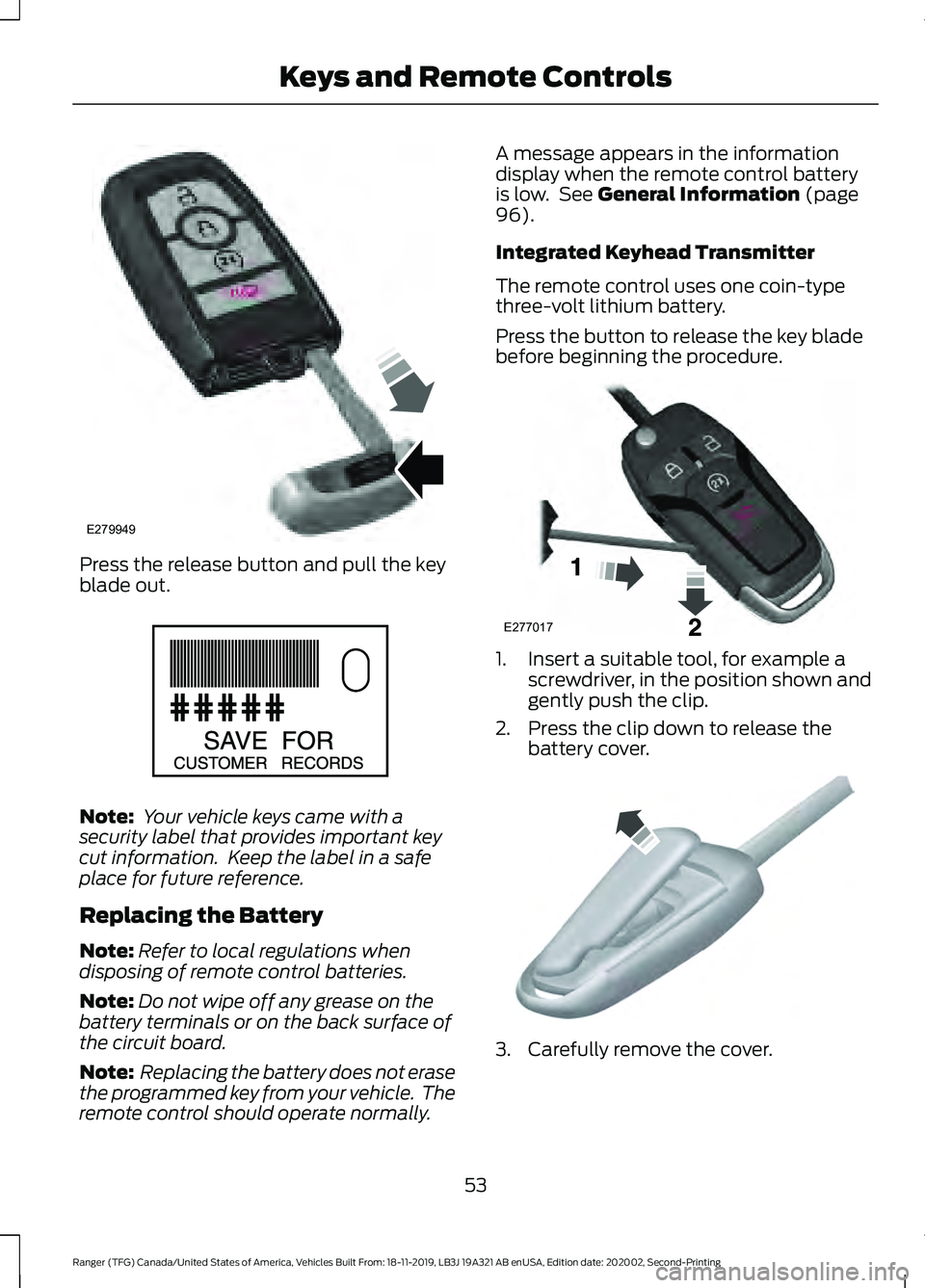
Press the release button and pull the key
blade out.
Note:
Your vehicle keys came with a
security label that provides important key
cut information. Keep the label in a safe
place for future reference.
Replacing the Battery
Note: Refer to local regulations when
disposing of remote control batteries.
Note: Do not wipe off any grease on the
battery terminals or on the back surface of
the circuit board.
Note: Replacing the battery does not erase
the programmed key from your vehicle. The
remote control should operate normally. A message appears in the information
display when the remote control battery
is low. See General Information (page
96).
Integrated Keyhead Transmitter
The remote control uses one coin-type
three-volt lithium battery.
Press the button to release the key blade
before beginning the procedure. 1. Insert a suitable tool, for example a
screwdriver, in the position shown and
gently push the clip.
2. Press the clip down to release the battery cover. 3. Carefully remove the cover.
53
Ranger (TFG) Canada/United States of America, Vehicles Built From: 18-11-2019, LB3J 19A321 AB enUSA, Edition date: 202002, Second-Printing Keys and Remote ControlsE279949 E151795 E277017 E151799
Page 57 of 478
Note:
Do not touch the battery contacts or
the printed circuit board with the
screwdriver.
4. Insert a screwdriver as shown to release the battery. 5. Remove the battery.
6. Install a new battery with the + facing
up.
7. Replace the battery cover.
Intelligent Access Key
The remote control uses one coin-type
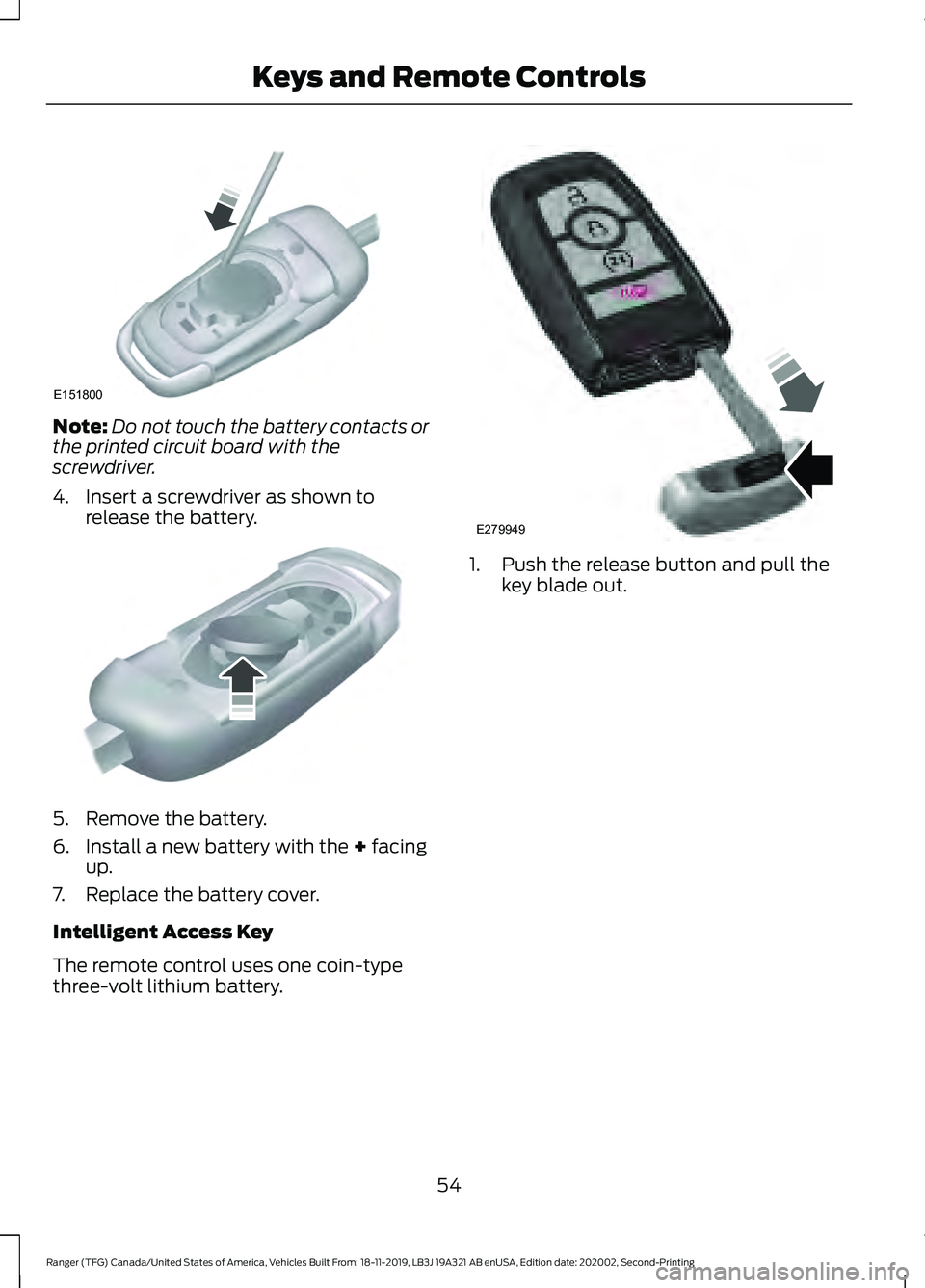
three-volt lithium battery. 1. Push the release button and pull the
key blade out.
54
Ranger (TFG) Canada/United States of America, Vehicles Built From: 18-11-2019, LB3J 19A321 AB enUSA, Edition date: 202002, Second-Printing Keys and Remote ControlsE151800 E151801 E279949
Page 60 of 478
The parking lamps remain on and your
vehicle will run for 5, 10 or 15 minutes,
depending on the setting.
Extending the Engine Running Time
To extend the engine running time duration
of your vehicle during remote start, repeat
steps 1 and 2 while the engine is running.
If the duration is set to 15 minutes, the
duration extends by another 15 minutes.
For example, if your vehicle had been
running from the first remote start for 10
minutes, your vehicle continues to run now
for a total of 30 minutes. You can extend
the engine running time duration to a
maximum of 30 minutes.
Wait at least five seconds before remote
starting after the engine stops running.
Turning Your Vehicle Off After Remote
Starting
Press the button once. Your
vehicle and the parking lamps
turn off.
You may have to be closer to your vehicle
than when starting due to ground reflection
and the added noise of your running
vehicle.
You can switch this feature on or off in the
information display.
REPLACING A LOST KEY OR
REMOTE CONTROL
Replacement keys or remote controls can
be purchased from an authorized dealer.
Authorized dealers can program remote
controls for your vehicle. PASSIVE KEY BACKUP
POSITION (IF EQUIPPED)
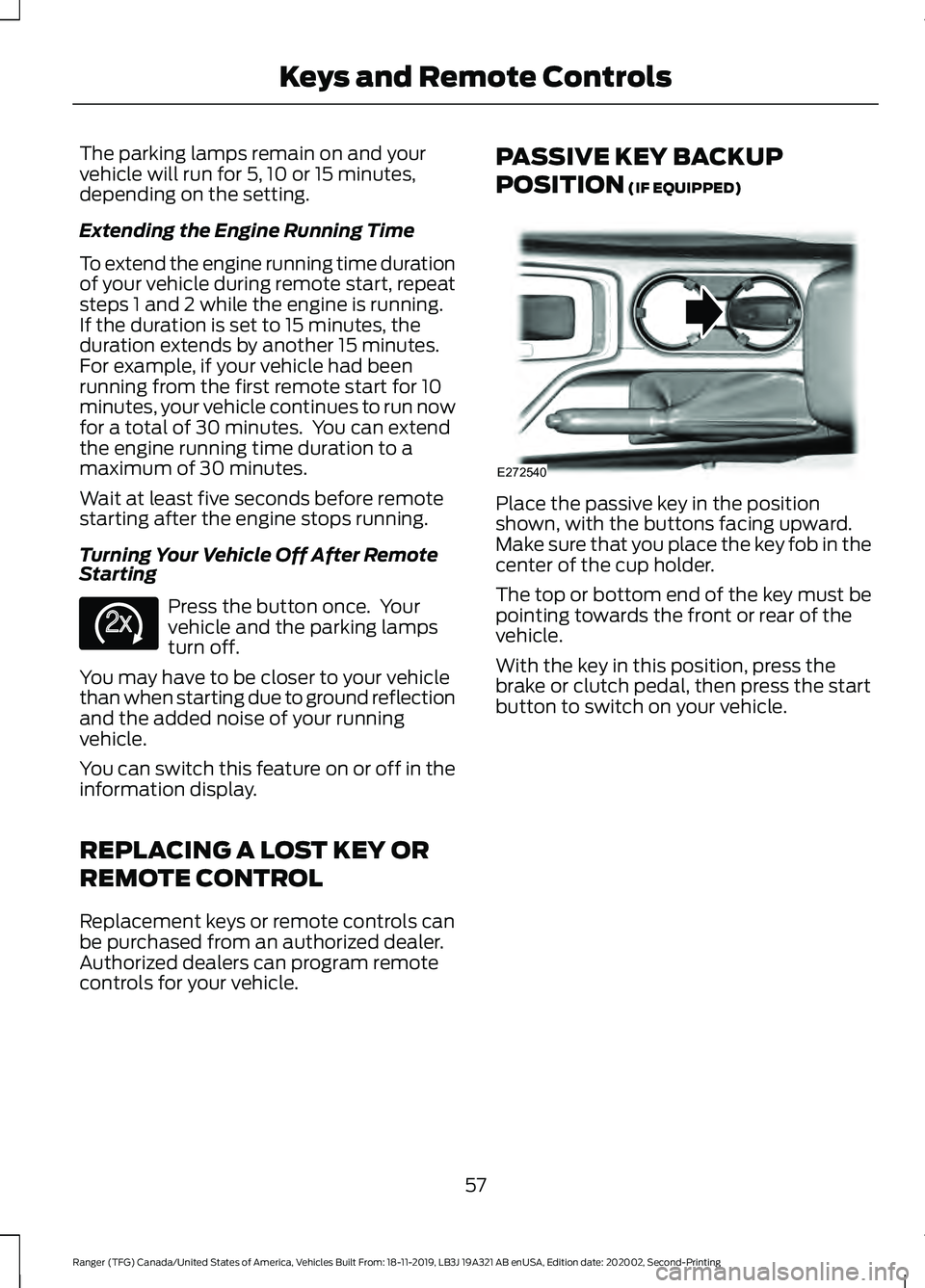
Place the passive key in the position
shown, with the buttons facing upward.
Make sure that you place the key fob in the
center of the cup holder.
The top or bottom end of the key must be
pointing towards the front or rear of the
vehicle.
With the key in this position, press the
brake or clutch pedal, then press the start
button to switch on your vehicle.
57
Ranger (TFG) Canada/United States of America, Vehicles Built From: 18-11-2019, LB3J 19A321 AB enUSA, Edition date: 202002, Second-Printing Keys and Remote ControlsE138625 E272540
Page 62 of 478
Note:
Not every feature applies to every
vehicle in every market. When they are
available for your vehicle, then they appear
in your information display, providing
choices to switch them on or off, or to select
a more specific setting.
• Various vehicle speed limits so the
MyKey driver cannot exceed certain
speeds. The information display shows
warnings followed by an audible tone
when the MyKey driver reaches the set
speed. You cannot override the set
speed by fully depressing the
accelerator pedal. WARNING: Do not set MyKey
maximum speed limit to a limit that will
prevent the driver from maintaining a
safe speed considering posted speed
limits and prevailing road conditions. The
driver is always responsible to drive in
accordance with local laws and
prevailing conditions. Failure to do so
could result in accident or injury. •
Various vehicle speed reminders so
MyKey drivers know when their vehicle
speed approaches the limits. Warnings
appear in your information display and
a tone sounds when the MyKey drivers
exceed the set vehicle speed.
• The audio system's maximum volume
limits to 45% so MyKey drivers can
concentrate on the road. A message
appears in the information display
when MyKey drivers attempt to exceed
the limited volume. MyKey also
disables the automatic volume control.
Note:
If your vehicle includes an
AM/FM radio or a very basic audio
system, then the radio may not limit.
• Always on setting. This setting forces
certain features to remain on and
active for MyKey drivers. For example,
E911 or emergency assistance and the
do not disturb features stay on even if
a MyKey driver uses the feature's
control to switch it off. When selected,
you will not be able to turn off Advance
Trac or traction control (if your vehicle
has this feature).
CREATING A MYKEY
Use the information display to create a
MyKey:
1. Insert the key you want to program into
the ignition. If your vehicle is equipped
with a push-button start, place the
remote control into the backup slot.
See
Starting a Gasoline Engine
(page 140).
2. Switch the ignition on.
3. Access the main menu in the information display and then scroll
through the menus to change the
settings of your MyKey. From the
MyKey menu select the option Create
MyKey. See
Information Displays
(page 96).
59
Ranger (TFG) Canada/United States of America, Vehicles Built From: 18-11-2019, LB3J 19A321 AB enUSA, Edition date: 202002, Second-Printing MyKey
™
Page 64 of 478
Number of MyKeys
Indicates the number of MyKeys
programmed to your vehicle. Use this
feature to detect how many MyKeys you
have for your vehicle and determine when
all MyKeys have been deleted.
Number of Admin Keys
Indicates how many admin keys are
programmed to your vehicle. Use this
feature to determine how many admin
keys you have for your vehicle, and detect
if an additional MyKey has been
programmed.
USING MYKEY WITH REMOTE
START SYSTEMS
MyKey is not compatible with non
Ford-approved, aftermarket remote start
systems. If you choose to install a remote
start system, see an authorized dealer for
a Ford-approved remote start system.
MYKEY – TROUBLESHOOTING Potential Causes
Condition
The key or transmitter used to start the vehicle
does not have admin privileges.
I cannot create a MyKey.
Vehicles with keyless start: Make sure you place
the transmitter into the backup slot. See
Passive Anti-Theft System (page 70).
The key or transmitter used to start the vehicle
is the only admin key. There always has to be
at least one admin key.
The passive anti-theft system is disabled or in
unlimited mode.
The transmitter used to start your vehicle does
not have admin privileges.
I cannot program the configurable
settings.
There are no MyKeys programmed to the
vehicle.
See Creating a MyKey (page 59).
The key or transmitter used to start the vehicle
does not have admin privileges.
I cannot clear the MyKeys.
No MyKeys are created.
See Creating a MyKey
(page 59).
Purchase a new key or transmitter from an
authorized dealer.
I lost the only admin key.
61
Ranger (TFG) Canada/United States of America, Vehicles Built From: 18-11-2019, LB3J 19A321 AB enUSA, Edition date: 202002, Second-Printing MyKey
™
Page 71 of 478
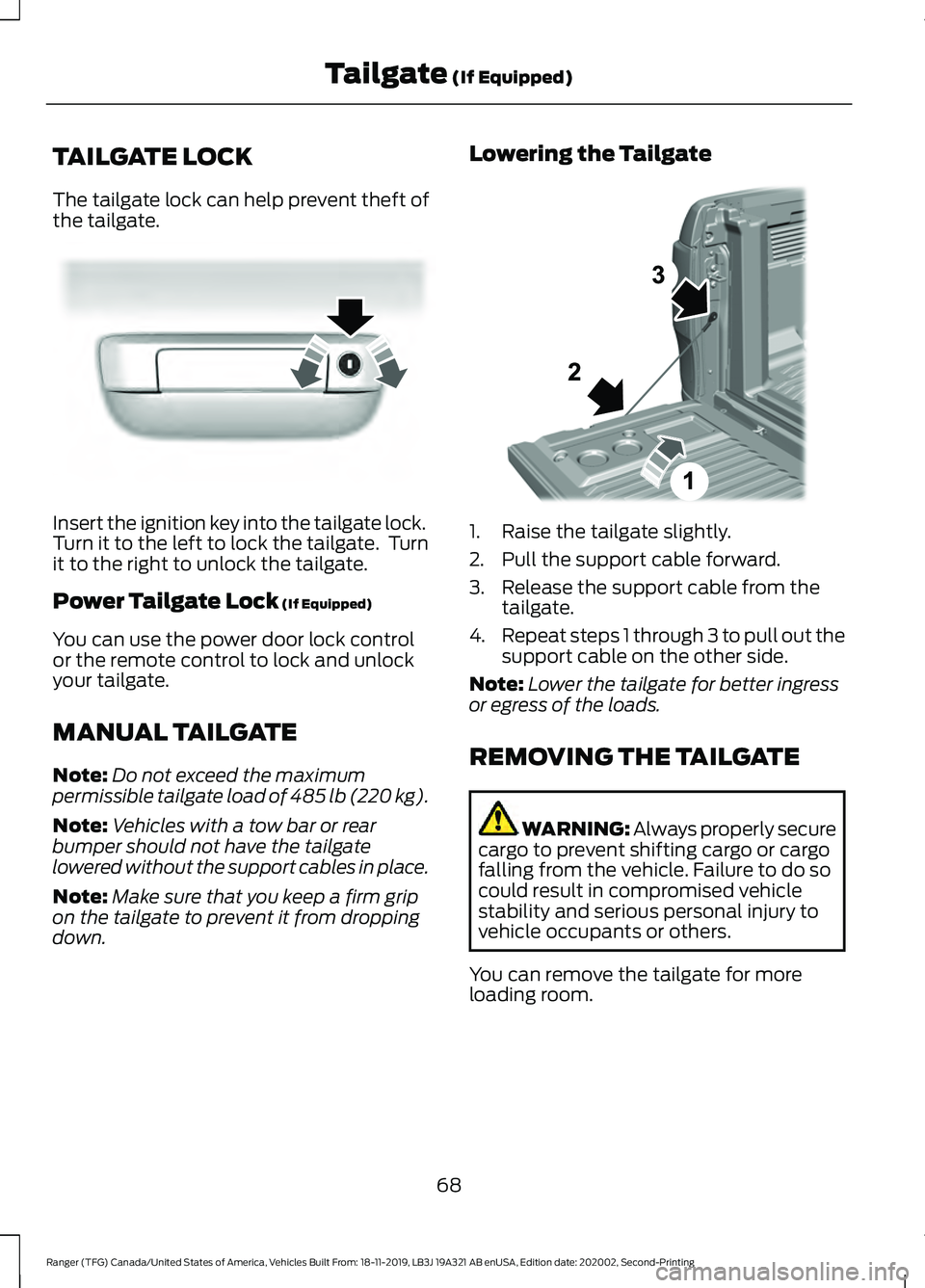
TAILGATE LOCK
The tailgate lock can help prevent theft of
the tailgate.
Insert the ignition key into the tailgate lock.
Turn it to the left to lock the tailgate. Turn
it to the right to unlock the tailgate.
Power Tailgate Lock (If Equipped)
You can use the power door lock control
or the remote control to lock and unlock
your tailgate.
MANUAL TAILGATE
Note: Do not exceed the maximum
permissible tailgate load of 485 lb (220 kg).
Note: Vehicles with a tow bar or rear
bumper should not have the tailgate
lowered without the support cables in place.
Note: Make sure that you keep a firm grip
on the tailgate to prevent it from dropping
down. Lowering the Tailgate
1. Raise the tailgate slightly.
2. Pull the support cable forward.
3. Release the support cable from the
tailgate.
4. Repeat steps 1 through 3 to pull out the
support cable on the other side.
Note: Lower the tailgate for better ingress
or egress of the loads.
REMOVING THE TAILGATE WARNING: Always properly secure
cargo to prevent shifting cargo or cargo
falling from the vehicle. Failure to do so
could result in compromised vehicle
stability and serious personal injury to
vehicle occupants or others.
You can remove the tailgate for more
loading room.
68
Ranger (TFG) Canada/United States of America, Vehicles Built From: 18-11-2019, LB3J 19A321 AB enUSA, Edition date: 202002, Second-Printing Tailgate
(If Equipped)E295939 E310459
Page 72 of 478
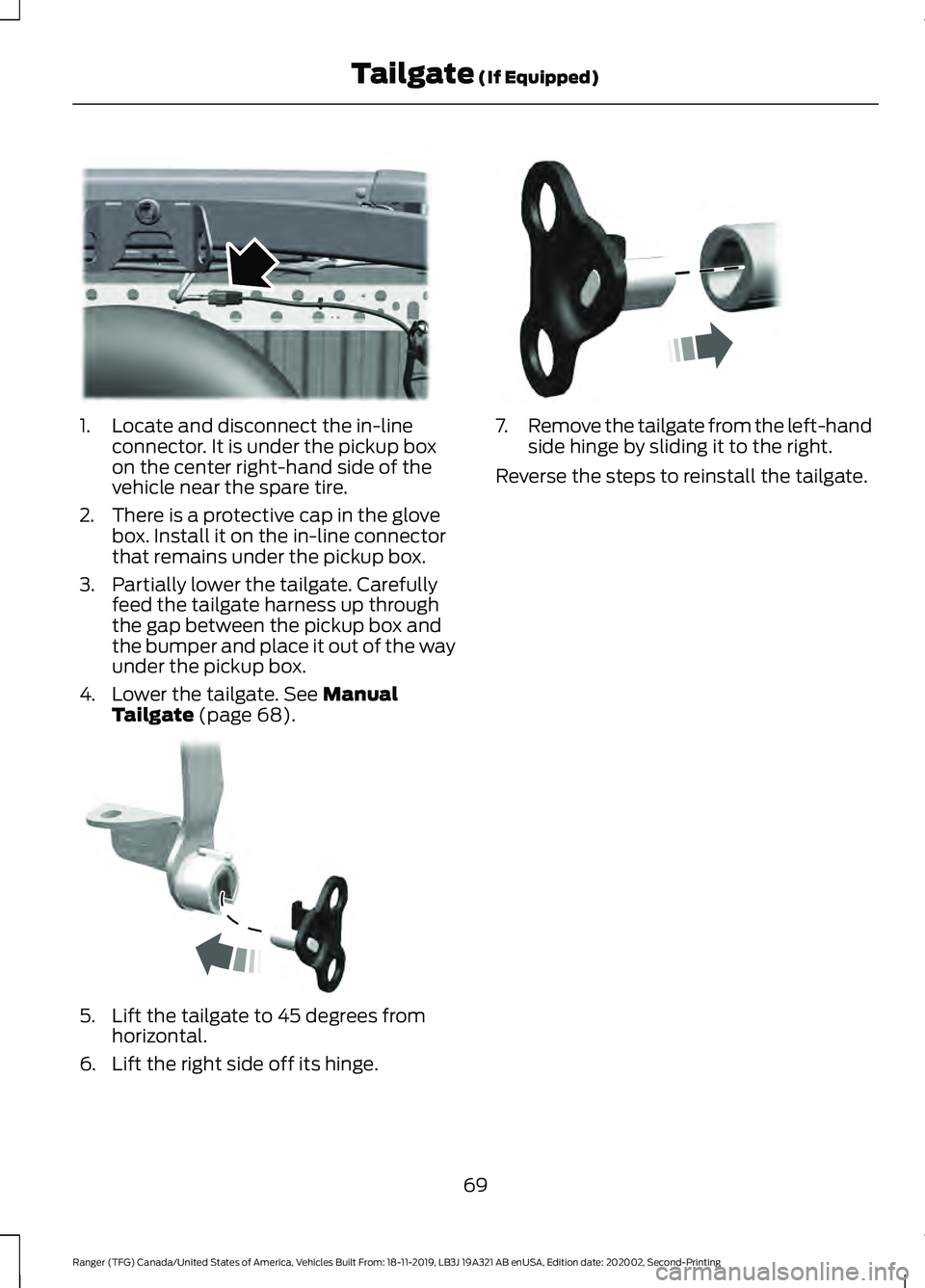
1. Locate and disconnect the in-line
connector. It is under the pickup box
on the center right-hand side of the
vehicle near the spare tire.
2. There is a protective cap in the glove box. Install it on the in-line connector
that remains under the pickup box.
3. Partially lower the tailgate. Carefully feed the tailgate harness up through
the gap between the pickup box and
the bumper and place it out of the way
under the pickup box.
4. Lower the tailgate. See Manual
Tailgate (page 68). 5. Lift the tailgate to 45 degrees from
horizontal.
6. Lift the right side off its hinge. 7.
Remove the tailgate from the left-hand
side hinge by sliding it to the right.
Reverse the steps to reinstall the tailgate.
69
Ranger (TFG) Canada/United States of America, Vehicles Built From: 18-11-2019, LB3J 19A321 AB enUSA, Edition date: 202002, Second-Printing Tailgate
(If Equipped)E295026 E295025 E295024
Page 73 of 478
PASSIVE ANTI-THEFT
SYSTEM
Note:
The system is not compatible with
non-Ford aftermarket remote start systems.
Use of these systems could result in vehicle
starting problems and a loss of security
protection.
Note: Metallic objects, electronic devices
or a second coded key on the same key
chain could cause vehicle starting problems
if they are too close to the key when starting
the engine. Prevent these objects from
touching the coded key while starting the
engine. Switch the ignition off, move all
objects on the key chain away from the
coded key and restart the engine if a
problem occurs.
Note: Do not leave a duplicate coded key
in the vehicle. Always take your keys and
lock all doors when leaving the vehicle.
SecuriLock®
The system is an engine immobilization
system. It helps to prevent anyone from
starting the engine without using a coded
key programmed to your vehicle. Using the
wrong key could prevent the engine from
starting. A message may appear in the
information display.
If you are unable to start the engine with a
correctly coded key, there is a problem with
the system and a message could appear
in the information display.
Automatic Arming
The vehicle arms immediately after you
switch the ignition off.
Automatic Disarming
Switching the ignition on with a coded key
disarms the vehicle. Replacement Keys
Note:
Your vehicle comes with two
integrated keyhead transmitters or two
intelligent access keys.
The integrated keyhead transmitter
functions as a programmed ignition key
that operates all the locks and starts the
vehicle, as well as a remote control.
The intelligent access key functions as a
programmed key that operates the driver
door lock and activates the intelligent
access with push button start system, as
well as a remote control.
If your programmed transmitters or
standard SecuriLock coded keys
(integrated keyhead transmitters only) are
lost or stolen and you do not have an extra
coded key, you will need to have your
vehicle towed to an authorized dealer. You
need to erase the key codes from your
vehicle and program new coded keys.
Store an extra programmed key away from
the vehicle in a safe place to help prevent
any inconveniences. See your authorized
dealer to purchase additional spare or
replacement keys.
Programming a Spare Intelligent
Access Key (If Equipped)
See your authorized dealer to have
additional keys programmed to your
vehicle.
ANTI-THEFT ALARM
(IF EQUIPPED)
Alarm System
Perimeter Alarm
The perimeter alarm is a deterrent against
unauthorized access to your vehicle
through the doors, luggage compartment
and the hood.
70
Ranger (TFG) Canada/United States of America, Vehicles Built From: 18-11-2019, LB3J 19A321 AB enUSA, Edition date: 202002, Second-Printing Security
Page 109 of 478
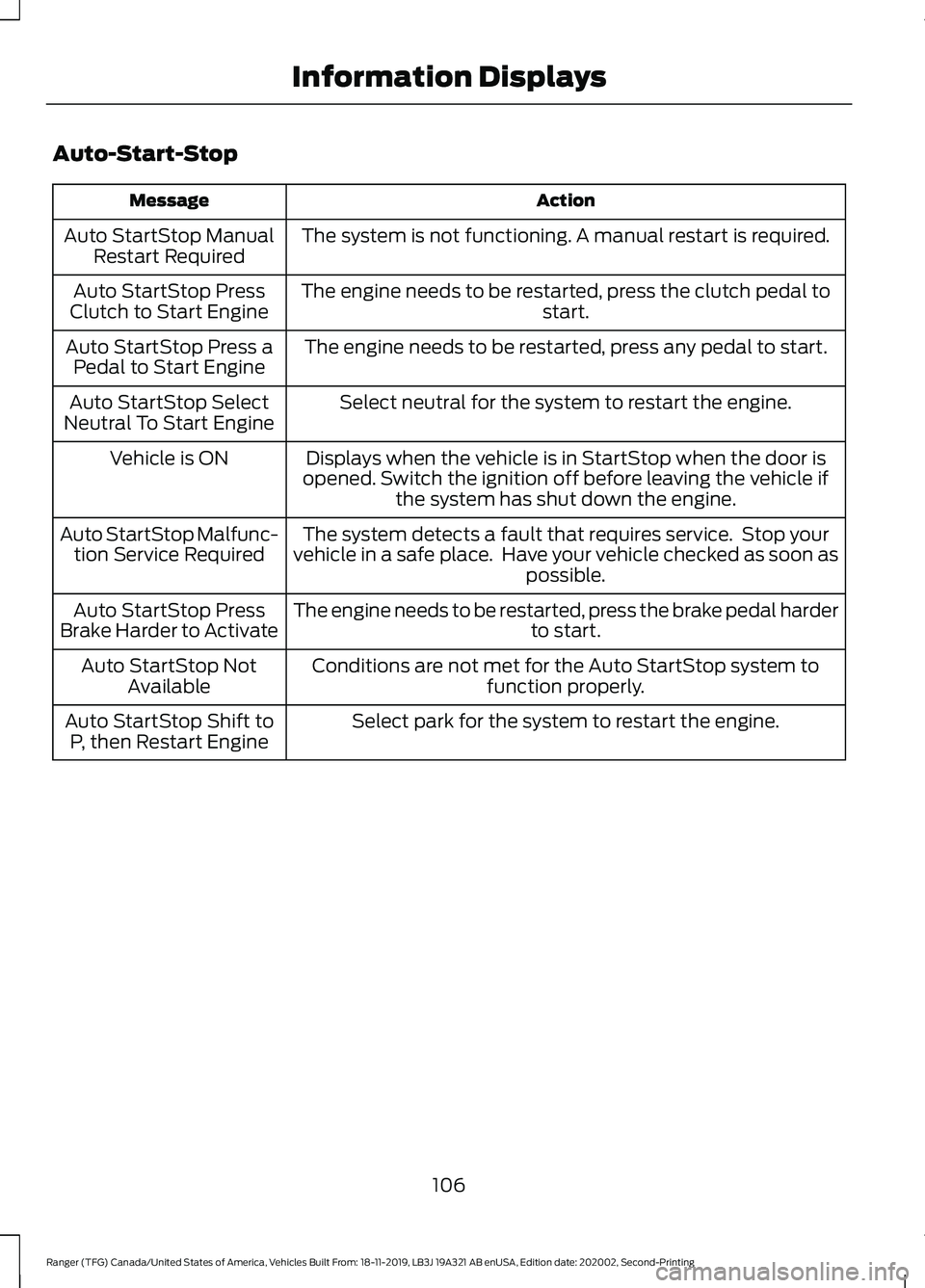
Auto-Start-Stop
Action
Message
The system is not functioning. A manual restart is required.
Auto StartStop Manual
Restart Required
The engine needs to be restarted, press the clutch pedal to start.
Auto StartStop Press
Clutch to Start Engine
The engine needs to be restarted, press any pedal to start.
Auto StartStop Press a
Pedal to Start Engine
Select neutral for the system to restart the engine.
Auto StartStop Select
Neutral To Start Engine
Displays when the vehicle is in StartStop when the door is
opened. Switch the ignition off before leaving the vehicle if the system has shut down the engine.
Vehicle is ON
The system detects a fault that requires service. Stop your
vehicle in a safe place. Have your vehicle checked as soon as possible.
Auto StartStop Malfunc-
tion Service Required
The engine needs to be restarted, press the brake pedal harder to start.
Auto StartStop Press
Brake Harder to Activate
Conditions are not met for the Auto StartStop system tofunction properly.
Auto StartStop Not
Available
Select park for the system to restart the engine.
Auto StartStop Shift to
P, then Restart Engine
106
Ranger (TFG) Canada/United States of America, Vehicles Built From: 18-11-2019, LB3J 19A321 AB enUSA, Edition date: 202002, Second-Printing Information Displays
Page 113 of 478
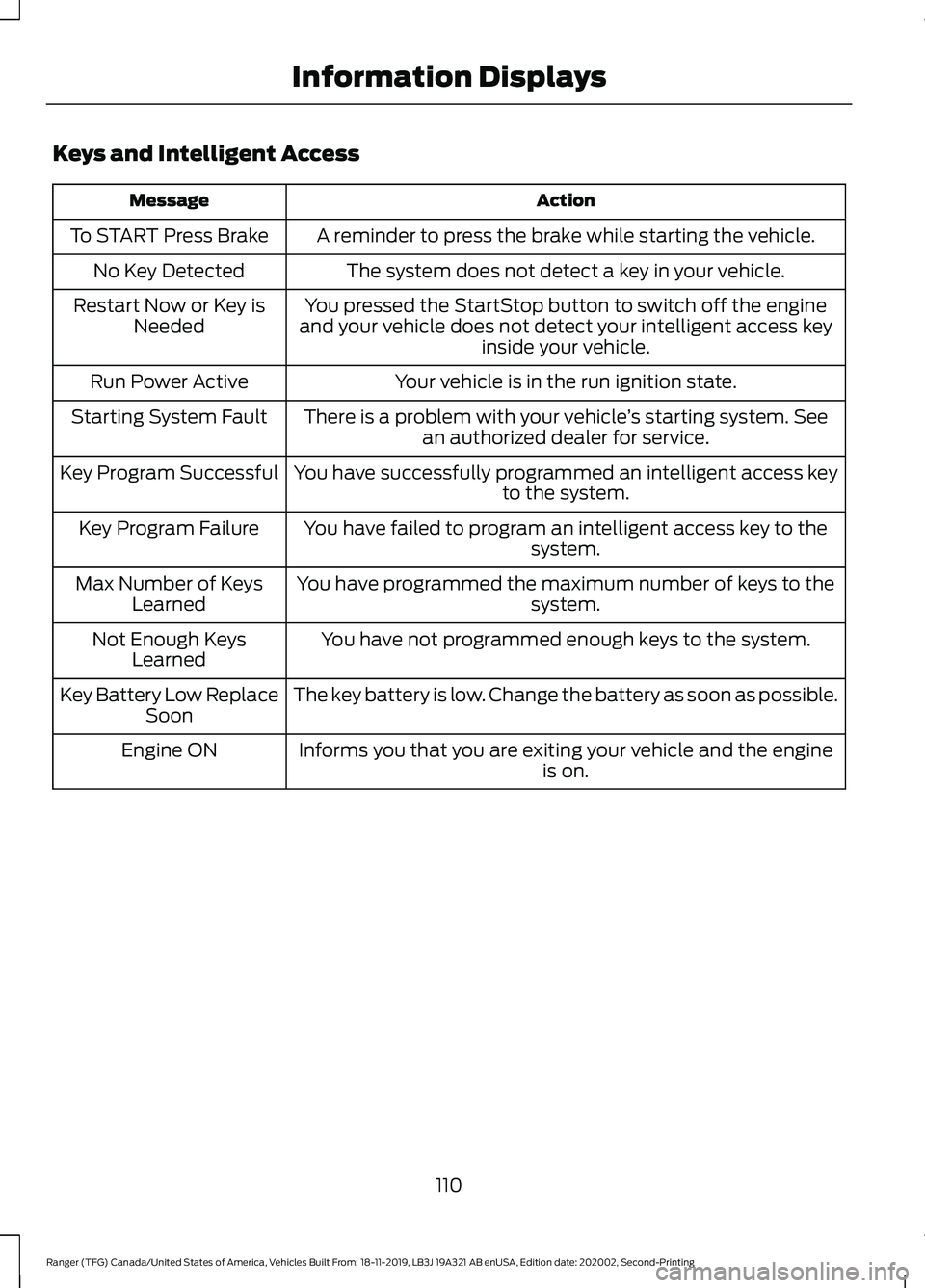
Keys and Intelligent Access
Action
Message
A reminder to press the brake while starting the vehicle.
To START Press Brake
The system does not detect a key in your vehicle.
No Key Detected
You pressed the StartStop button to switch off the engine
and your vehicle does not detect your intelligent access key inside your vehicle.
Restart Now or Key is
Needed
Your vehicle is in the run ignition state.
Run Power Active
There is a problem with your vehicle ’s starting system. See
an authorized dealer for service.
Starting System Fault
You have successfully programmed an intelligent access keyto the system.
Key Program Successful
You have failed to program an intelligent access key to thesystem.
Key Program Failure
You have programmed the maximum number of keys to the system.
Max Number of Keys
Learned
You have not programmed enough keys to the system.
Not Enough Keys
Learned
The key battery is low. Change the battery as soon as possible.
Key Battery Low Replace
Soon
Informs you that you are exiting your vehicle and the engine is on.
Engine ON
110
Ranger (TFG) Canada/United States of America, Vehicles Built From: 18-11-2019, LB3J 19A321 AB enUSA, Edition date: 202002, Second-Printing Information Displays