remote control FORD RANGER 2020 Owner's Manual
[x] Cancel search | Manufacturer: FORD, Model Year: 2020, Model line: RANGER, Model: FORD RANGER 2020Pages: 478, PDF Size: 7.44 MB
Page 117 of 478
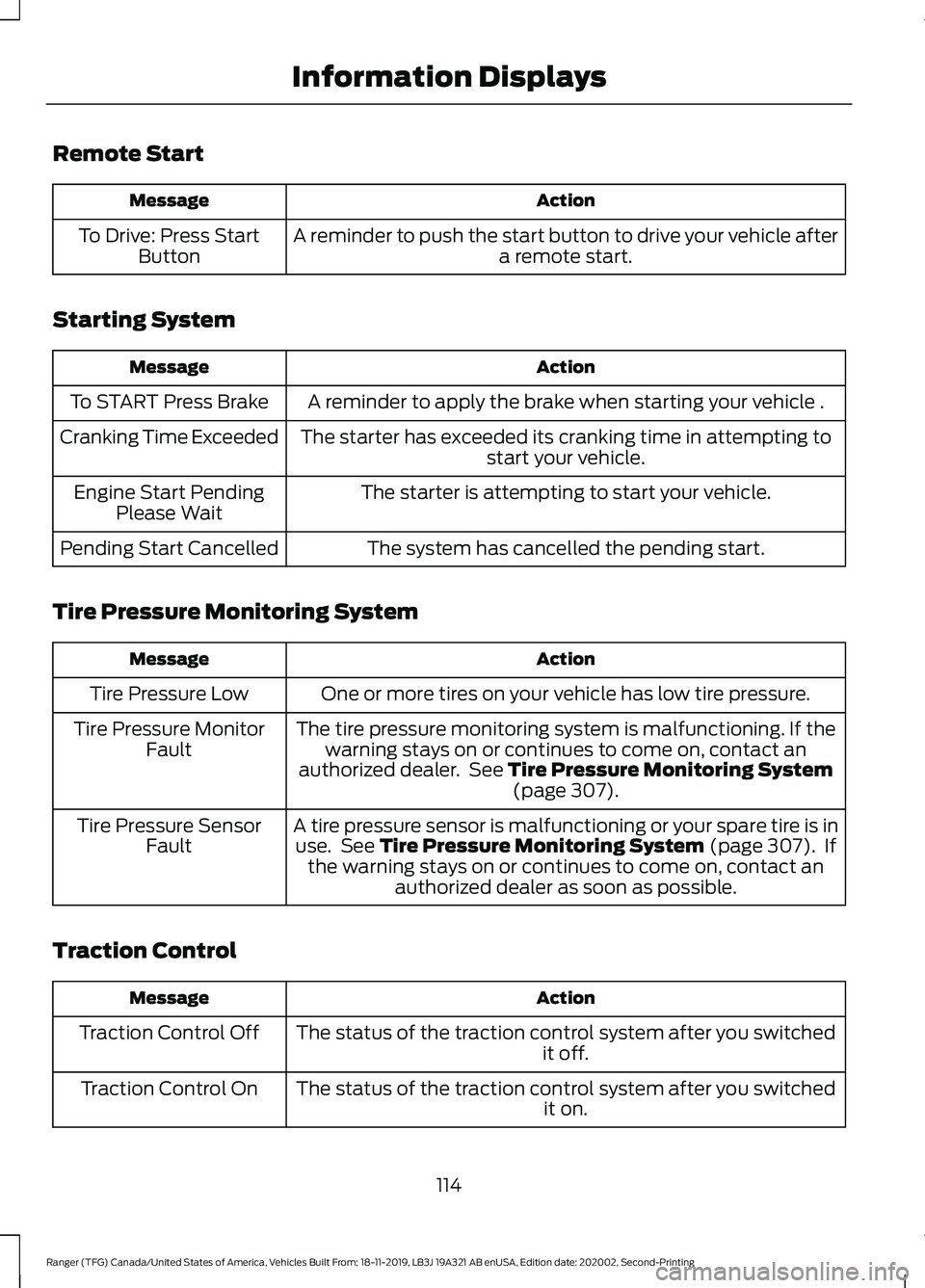
Remote Start
Action
Message
A reminder to push the start button to drive your vehicle after a remote start.
To Drive: Press Start
Button
Starting System Action
Message
A reminder to apply the brake when starting your vehicle .
To START Press Brake
The starter has exceeded its cranking time in attempting tostart your vehicle.
Cranking Time Exceeded
The starter is attempting to start your vehicle.
Engine Start Pending
Please Wait
The system has cancelled the pending start.
Pending Start Cancelled
Tire Pressure Monitoring System Action
Message
One or more tires on your vehicle has low tire pressure.
Tire Pressure Low
The tire pressure monitoring system is malfunctioning. If thewarning stays on or continues to come on, contact an
authorized dealer. See Tire Pressure Monitoring System (page 307).
Tire Pressure Monitor
Fault
A tire pressure sensor is malfunctioning or your spare tire is inuse. See
Tire Pressure Monitoring System (page 307). If
the warning stays on or continues to come on, contact an authorized dealer as soon as possible.
Tire Pressure Sensor
Fault
Traction Control Action
Message
The status of the traction control system after you switched it off.
Traction Control Off
The status of the traction control system after you switched it on.
Traction Control On
114
Ranger (TFG) Canada/United States of America, Vehicles Built From: 18-11-2019, LB3J 19A321 AB enUSA, Edition date: 202002, Second-Printing Information Displays
Page 126 of 478
You can locate the cabin air filter behind
the glove box.
Note:
Make sure you have a cabin air filter
installed at all times. This prevents foreign
objects from entering the system. Running
the system without a filter in place could
result in degradation or damage to the
system.
Replace the filter at regular intervals. See
Scheduled Maintenance (page 412).
For additional cabin air filter information,
or to replace the filter, see an authorized
dealer.
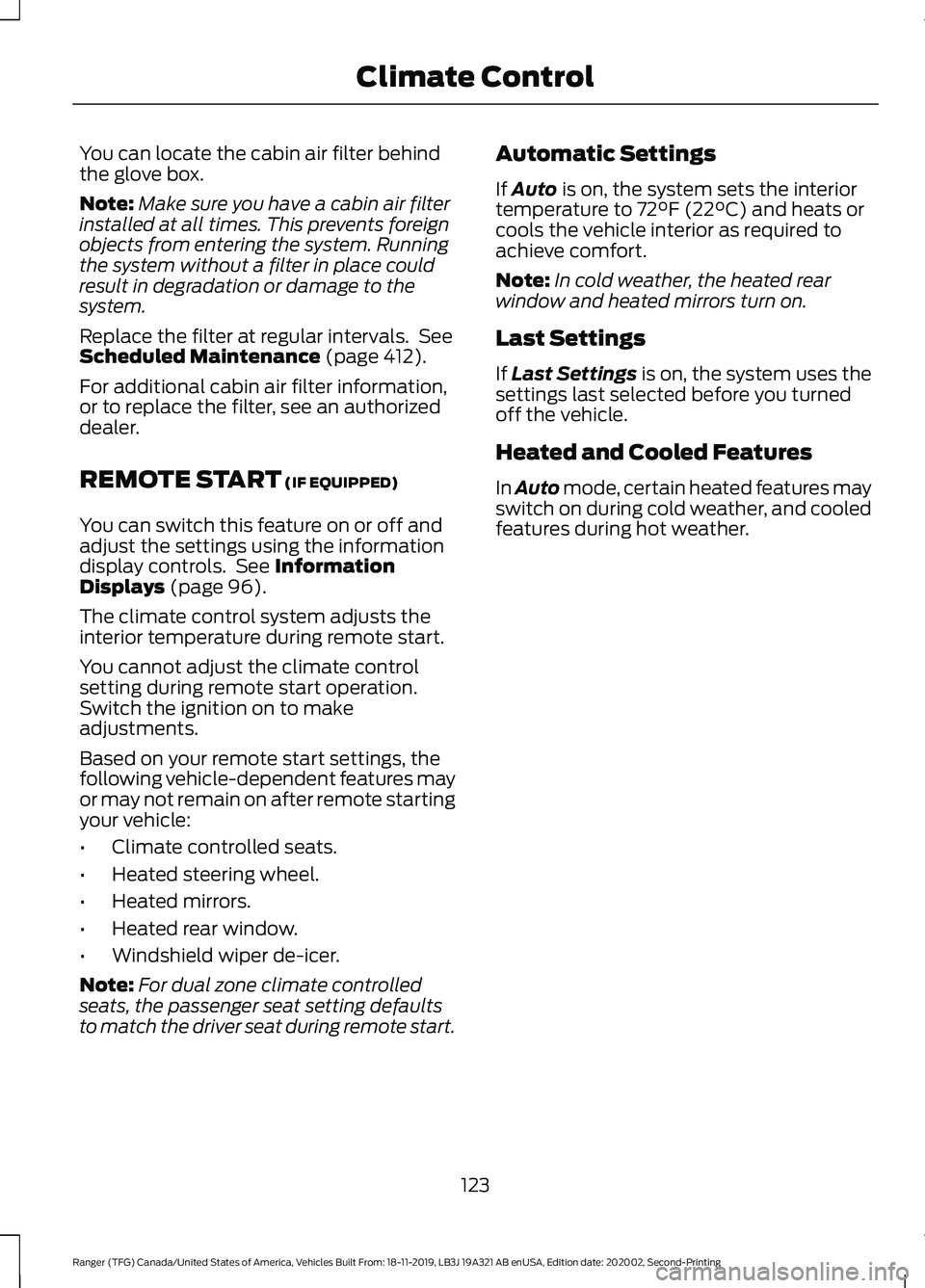
REMOTE START
(IF EQUIPPED)
You can switch this feature on or off and
adjust the settings using the information
display controls. See
Information
Displays (page 96).
The climate control system adjusts the
interior temperature during remote start.
You cannot adjust the climate control
setting during remote start operation.
Switch the ignition on to make
adjustments.
Based on your remote start settings, the
following vehicle-dependent features may
or may not remain on after remote starting
your vehicle:
• Climate controlled seats.
• Heated steering wheel.
• Heated mirrors.
• Heated rear window.
• Windshield wiper de-icer.
Note: For dual zone climate controlled
seats, the passenger seat setting defaults
to match the driver seat during remote start. Automatic Settings
If
Auto is on, the system sets the interior
temperature to 72°F (22°C) and heats or
cools the vehicle interior as required to
achieve comfort.
Note: In cold weather, the heated rear
window and heated mirrors turn on.
Last Settings
If
Last Settings is on, the system uses the
settings last selected before you turned
off the vehicle.
Heated and Cooled Features
In Auto mode, certain heated features may
switch on during cold weather, and cooled
features during hot weather.
123
Ranger (TFG) Canada/United States of America, Vehicles Built From: 18-11-2019, LB3J 19A321 AB enUSA, Edition date: 202002, Second-Printing Climate Control
Page 134 of 478
UNIVERSAL GARAGE DOOR
OPENER
HomeLink Wireless Control
System
WARNING: Do not use the system
with any garage door opener that does
not have the safety stop and reverse
feature as required by U.S. Federal
Safety Standards (this includes any
garage door opener manufactured
before April 1, 1982). A garage door
opener which cannot detect an object,
signaling the door to stop and reverse,
does not meet current federal safety
standards. Using a garage door opener
without these features increases the risk
of serious injury or death.
Note: Make sure that the garage door and
security device are free from obstruction
when you are programming. Do not program
the system with the vehicle in the garage.
Note: Make sure you keep the original
remote control transmitter for use in other
vehicles as well as for future system
programming.
Note: We recommend that upon the sale
or lease termination of your vehicle, you
erase the programmed function buttons for
security reasons. See Erasing the Function
Button Codes
later in this section.
Note: You can program a maximum of
three devices. To change or replace any of
the three devices after it has been initially
programmed, you must first erase the
current settings. See Erasing the Function
Button Codes
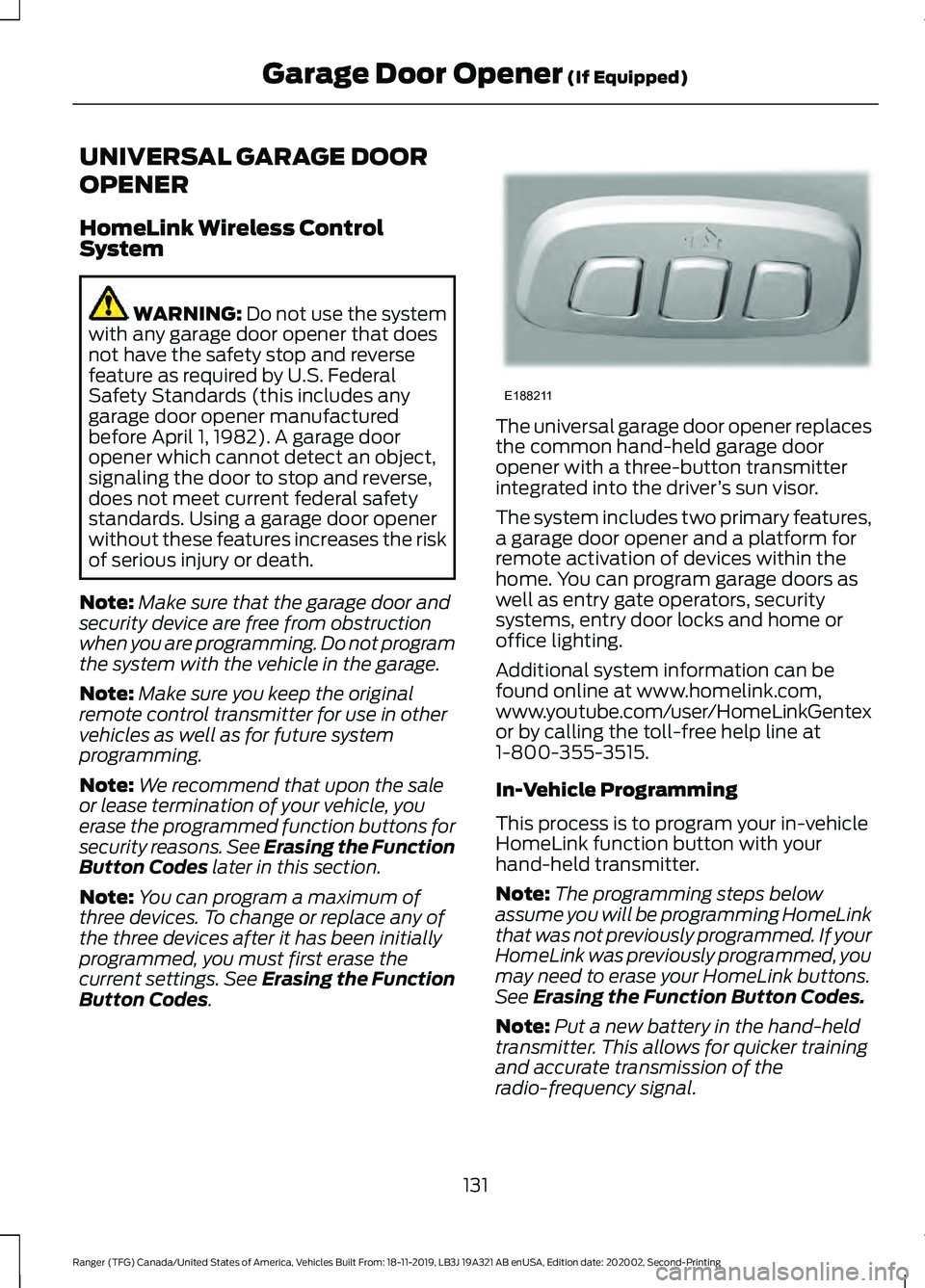
. The universal garage door opener replaces
the common hand-held garage door
opener with a three-button transmitter
integrated into the driver
’s sun visor.
The system includes two primary features,
a garage door opener and a platform for
remote activation of devices within the
home. You can program garage doors as
well as entry gate operators, security
systems, entry door locks and home or
office lighting.
Additional system information can be
found online at www.homelink.com,
www.youtube.com/user/HomeLinkGentex
or by calling the toll-free help line at
1-800-355-3515.
In-Vehicle Programming
This process is to program your in-vehicle
HomeLink function button with your
hand-held transmitter.
Note: The programming steps below
assume you will be programming HomeLink
that was not previously programmed. If your
HomeLink was previously programmed, you
may need to erase your HomeLink buttons.
See Erasing the Function Button Codes.
Note: Put a new battery in the hand-held
transmitter. This allows for quicker training
and accurate transmission of the
radio-frequency signal.
131
Ranger (TFG) Canada/United States of America, Vehicles Built From: 18-11-2019, LB3J 19A321 AB enUSA, Edition date: 202002, Second-Printing Garage Door Opener
(If Equipped)E188211
Page 198 of 478
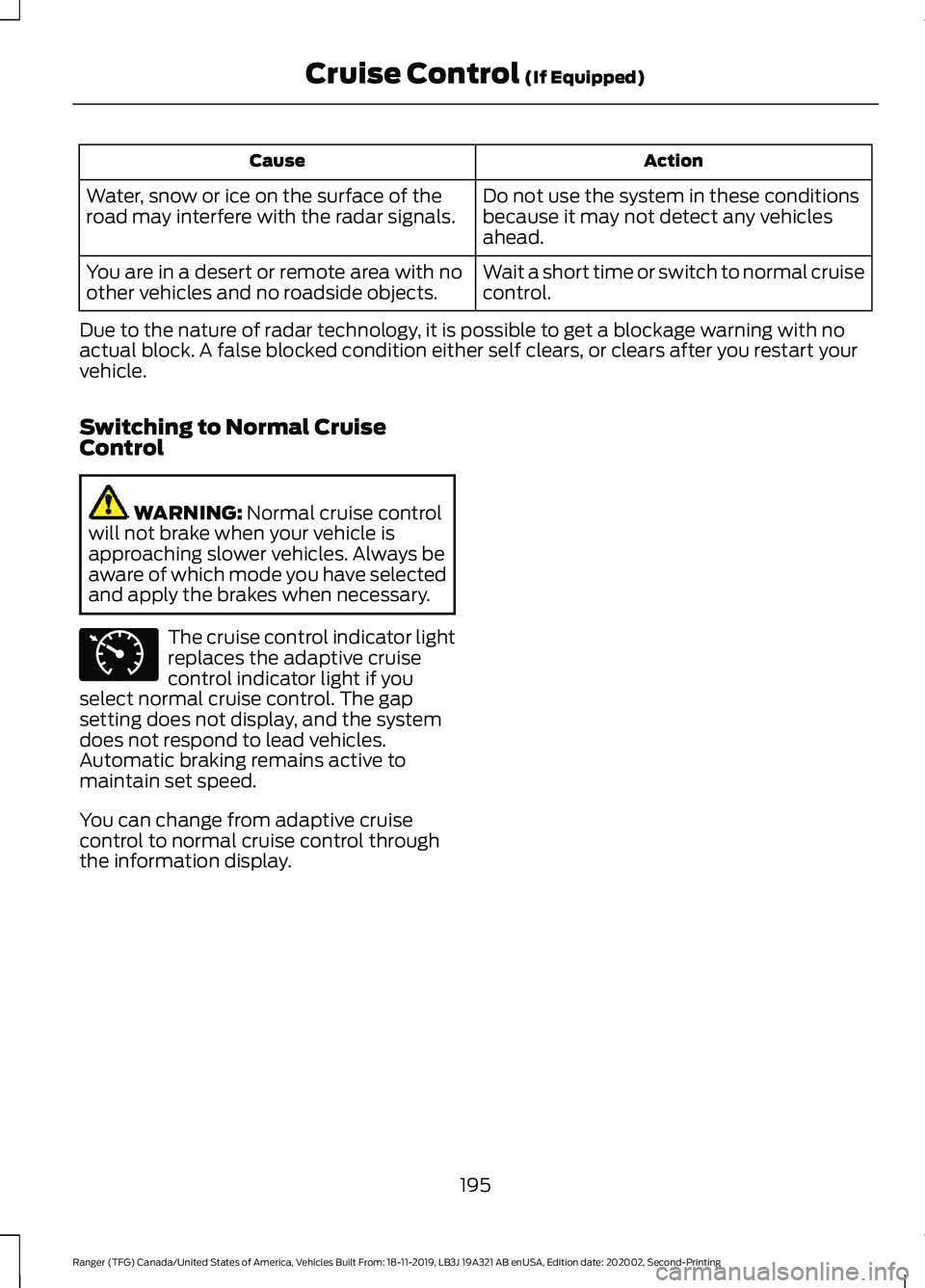
Action
Cause
Do not use the system in these conditions
because it may not detect any vehicles
ahead.
Water, snow or ice on the surface of the
road may interfere with the radar signals.
Wait a short time or switch to normal cruise
control.
You are in a desert or remote area with no
other vehicles and no roadside objects.
Due to the nature of radar technology, it is possible to get a blockage warning with no
actual block. A false blocked condition either self clears, or clears after you restart your
vehicle.
Switching to Normal Cruise
Control WARNING: Normal cruise control
will not brake when your vehicle is
approaching slower vehicles. Always be
aware of which mode you have selected
and apply the brakes when necessary. The cruise control indicator light
replaces the adaptive cruise
control indicator light if you
select normal cruise control. The gap
setting does not display, and the system
does not respond to lead vehicles.
Automatic braking remains active to
maintain set speed.
You can change from adaptive cruise
control to normal cruise control through
the information display.
195
Ranger (TFG) Canada/United States of America, Vehicles Built From: 18-11-2019, LB3J 19A321 AB enUSA, Edition date: 202002, Second-Printing Cruise Control
(If Equipped)E71340
Page 261 of 478
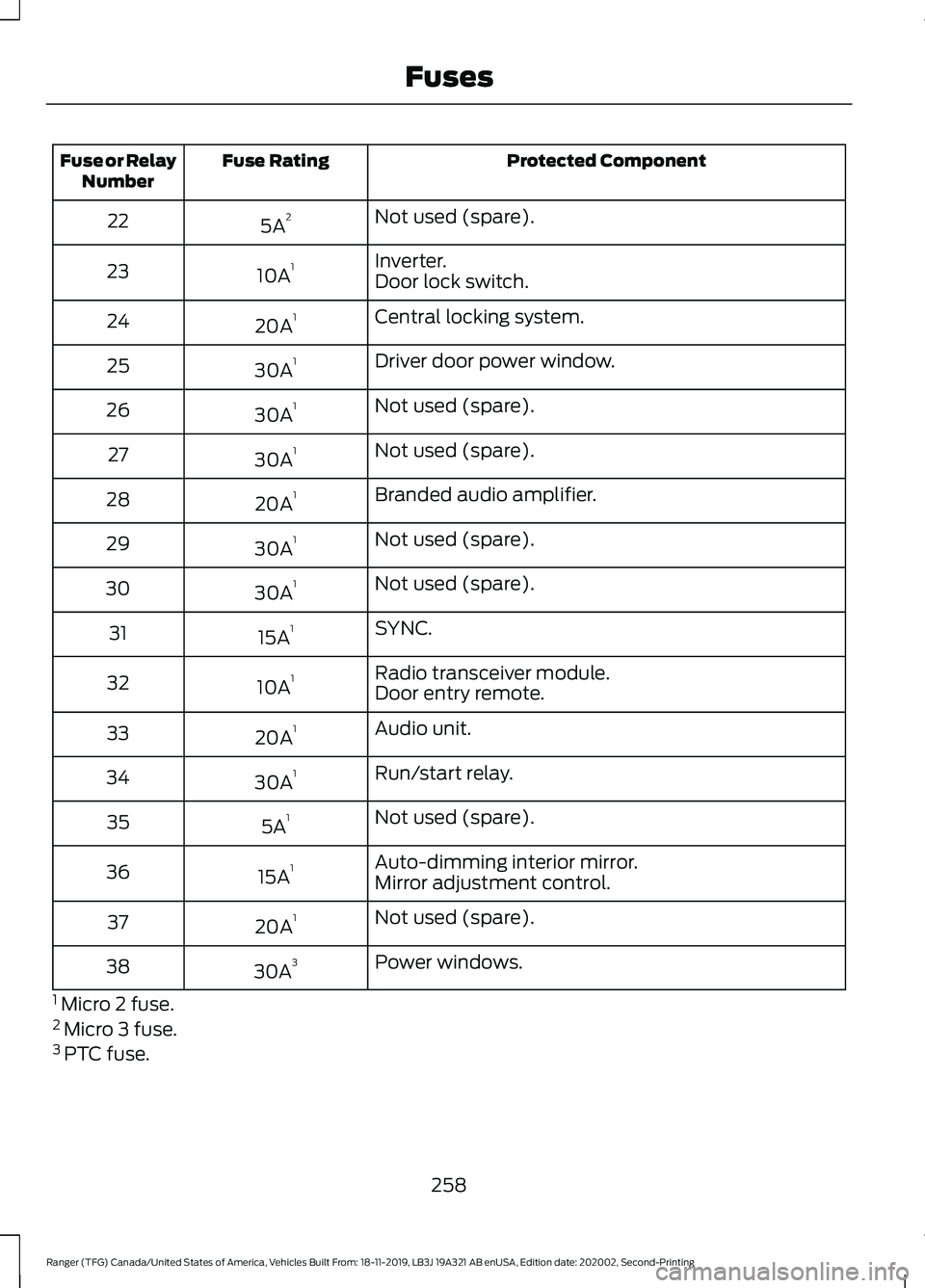
Protected Component
Fuse Rating
Fuse or Relay
Number
Not used (spare).
5A 2
22
Inverter.
10A 1
23
Door lock switch.
Central locking system.
20A 1
24
Driver door power window.
30A 1
25
Not used (spare).
30A 1
26
Not used (spare).
30A 1
27
Branded audio amplifier.
20A 1
28
Not used (spare).
30A 1
29
Not used (spare).
30A 1
30
SYNC.
15A 1
31
Radio transceiver module.
10A 1
32
Door entry remote.
Audio unit.
20A 1
33
Run/start relay.
30A 1
34
Not used (spare).
5A 1
35
Auto-dimming interior mirror.
15A 1
36
Mirror adjustment control.
Not used (spare).
20A 1
37
Power windows.
30A 3
38
1 Micro 2 fuse.
2 Micro 3 fuse.
3 PTC fuse.
258
Ranger (TFG) Canada/United States of America, Vehicles Built From: 18-11-2019, LB3J 19A321 AB enUSA, Edition date: 202002, Second-Printing Fuses
Page 339 of 478
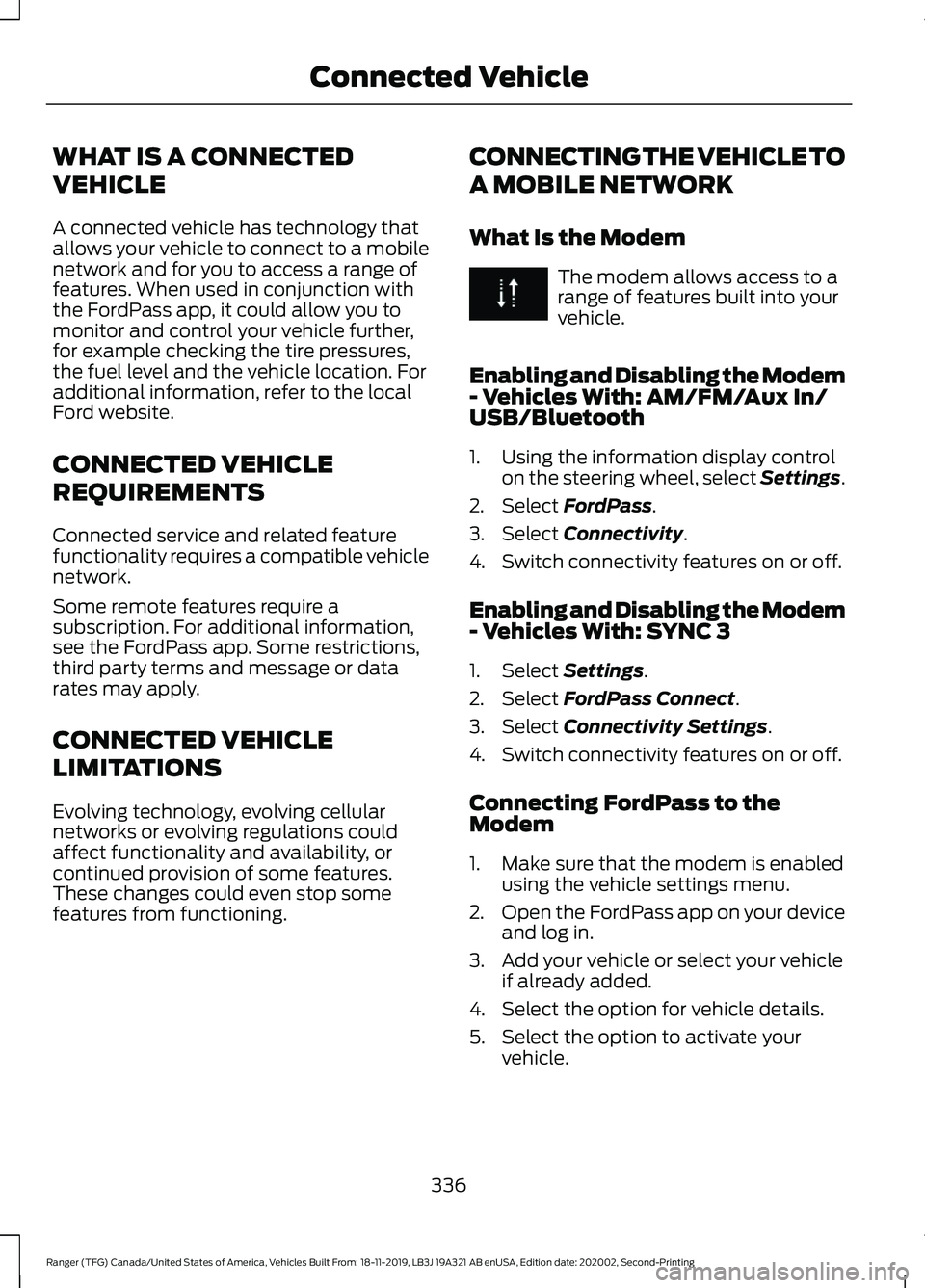
WHAT IS A CONNECTED
VEHICLE
A connected vehicle has technology that
allows your vehicle to connect to a mobile
network and for you to access a range of
features. When used in conjunction with
the FordPass app, it could allow you to
monitor and control your vehicle further,
for example checking the tire pressures,
the fuel level and the vehicle location. For
additional information, refer to the local
Ford website.
CONNECTED VEHICLE
REQUIREMENTS
Connected service and related feature
functionality requires a compatible vehicle
network.
Some remote features require a
subscription. For additional information,
see the FordPass app. Some restrictions,
third party terms and message or data
rates may apply.
CONNECTED VEHICLE
LIMITATIONS
Evolving technology, evolving cellular
networks or evolving regulations could
affect functionality and availability, or
continued provision of some features.
These changes could even stop some
features from functioning.
CONNECTING THE VEHICLE TO
A MOBILE NETWORK
What Is the Modem The modem allows access to a
range of features built into your
vehicle.
Enabling and Disabling the Modem
- Vehicles With: AM/FM/Aux In/
USB/Bluetooth
1. Using the information display control on the steering wheel, select Settings.
2. Select FordPass.
3. Select
Connectivity.
4. Switch connectivity features on or off.
Enabling and Disabling the Modem
- Vehicles With: SYNC 3
1. Select
Settings.
2. Select
FordPass Connect.
3. Select
Connectivity Settings.
4. Switch connectivity features on or off.
Connecting FordPass to the
Modem
1. Make sure that the modem is enabled using the vehicle settings menu.
2. Open the FordPass app on your device
and log in.
3. Add your vehicle or select your vehicle if already added.
4. Select the option for vehicle details.
5. Select the option to activate your vehicle.
336
Ranger (TFG) Canada/United States of America, Vehicles Built From: 18-11-2019, LB3J 19A321 AB enUSA, Edition date: 202002, Second-Printing Connected Vehicle
Page 408 of 478
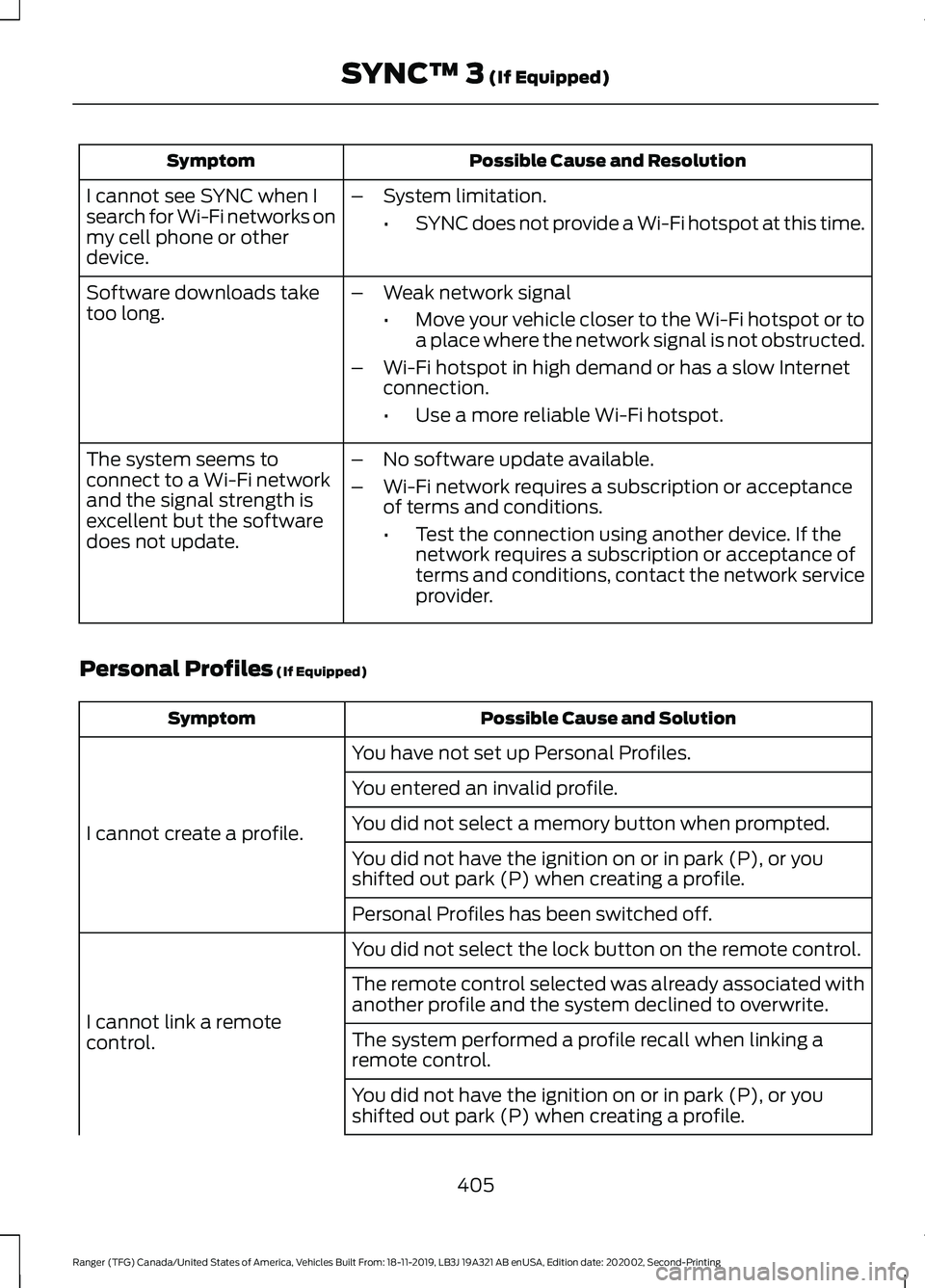
Possible Cause and Resolution
Symptom
I cannot see SYNC when I
search for Wi-Fi networks on
my cell phone or other
device. –
System limitation.
•SYNC does not provide a Wi-Fi hotspot at this time.
– Weak network signal
•Move your vehicle closer to the Wi-Fi hotspot or to
a place where the network signal is not obstructed.
– Wi-Fi hotspot in high demand or has a slow Internet
connection.
•Use a more reliable Wi-Fi hotspot.
Software downloads take
too long.
–No software update available.
– Wi-Fi network requires a subscription or acceptance
of terms and conditions.
•Test the connection using another device. If the
network requires a subscription or acceptance of
terms and conditions, contact the network service
provider.
The system seems to
connect to a Wi-Fi network
and the signal strength is
excellent but the software
does not update.
Personal Profiles (If Equipped) Possible Cause and Solution
Symptom
You have not set up Personal Profiles.
I cannot create a profile. You entered an invalid profile.
You did not select a memory button when prompted.
You did not have the ignition on or in park (P), or you
shifted out park (P) when creating a profile.
Personal Profiles has been switched off.
You did not select the lock button on the remote control.
I cannot link a remote
control. The remote control selected was already associated with
another profile and the system declined to overwrite.
The system performed a profile recall when linking a
remote control.
You did not have the ignition on or in park (P), or you
shifted out park (P) when creating a profile.
405
Ranger (TFG) Canada/United States of America, Vehicles Built From: 18-11-2019, LB3J 19A321 AB enUSA, Edition date: 202002, Second-Printing SYNC™ 3
(If Equipped)
Page 409 of 478
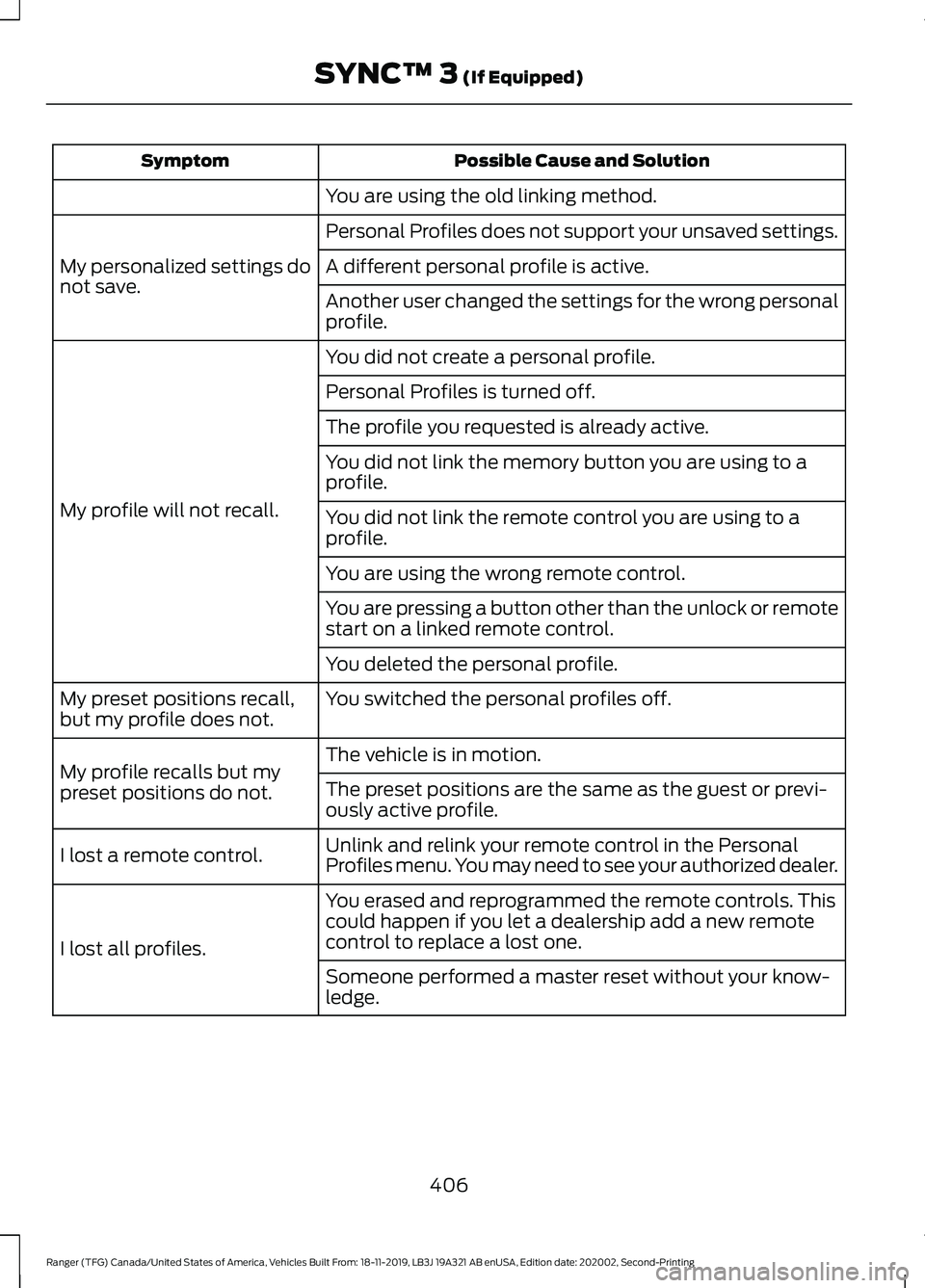
Possible Cause and Solution
Symptom
You are using the old linking method.
Personal Profiles does not support your unsaved settings.
My personalized settings do
not save. A different personal profile is active.
Another user changed the settings for the wrong personal
profile.
You did not create a personal profile.
My profile will not recall. Personal Profiles is turned off.
The profile you requested is already active.
You did not link the memory button you are using to a
profile.
You did not link the remote control you are using to a
profile.
You are using the wrong remote control.
You are pressing a button other than the unlock or remote
start on a linked remote control.
You deleted the personal profile.
You switched the personal profiles off.
My preset positions recall,
but my profile does not.
The vehicle is in motion.
My profile recalls but my
preset positions do not. The preset positions are the same as the guest or previ-
ously active profile.
Unlink and relink your remote control in the Personal
Profiles menu. You may need to see your authorized dealer.
I lost a remote control.
You erased and reprogrammed the remote controls. This
could happen if you let a dealership add a new remote
control to replace a lost one.
I lost all profiles.
Someone performed a master reset without your know-
ledge.
406
Ranger (TFG) Canada/United States of America, Vehicles Built From: 18-11-2019, LB3J 19A321 AB enUSA, Edition date: 202002, Second-Printing SYNC™ 3 (If Equipped)
Page 472 of 478
Heated Exterior Mirrors...............................122
Heated Rear Window..................................122
Heated Seats.................................................130
Heated Windshield.......................................122 Windshield Wiper De-Icer................................ 122
Heating See: Climate Control........................................... 117
Hill Start Assist...............................................172 Switching the System On and Off................173
Using Hill Start Assist........................................ 173
Hints on Controlling the Interior Climate..........................................................120
Defogging the Side Windows in Cold Weather............................................................. 122
General Hints....................................................... 120
Quickly Cooling the Interior.............................. 121
Quickly Heating the Interior............................ 120
Recommended Settings for Cooling............121
Recommended Settings for Heating............121
Hints on Driving With Anti-Lock Brakes..............................................................171
Hood Lock See: Opening and Closing the Hood..........262
Horn.....................................................................74
I
Ignition Switch
...............................................139
Starting the Engine............................................ 140
Switching the Ignition Off............................... 140
Switching the Ignition On................................ 140
Switching the Ignition to Accessory Mode.................................................................. 140
In California (U.S. Only)............................240
Information Display Control.......................74
Information Displays....................................96 General Information........................................... 96
Information Messages
...............................104
4WD........................................................................\
.. 116
Adaptive Cruise Control................................... 104
Airbag...................................................................... 105
Alarm and Security............................................ 105
Auto-Start-Stop................................................. 106
Battery and Charging System........................ 107
Blind Spot Information and Cross Traffic Alert System.................................................... 107
Doors and Locks................................................. 108
Driver Alert............................................................ 108Drivetrain...............................................................
109
Engine..................................................................... 109
Fuel........................................................................\
.. 109
Keys and Intelligent Access............................. 110
Lane Keeping System.......................................... 111
Maintenance........................................................... 111
MyKey....................................................................... 112
Park Aid.................................................................... 113
Power Steering..................................................... 113
Pre-Collision Assist............................................. 113
Remote Start......................................................... 114
Starting System ................................................... 114
Tire Pressure Monitoring System................... 114
Traction Control................................................... 114
Trail Control........................................................... 115
Trailer........................................................................\
115
Installing Child Restraints............................21 Child Restraints...................................................... 21
Combining Seatbelt and LATCH Lower Anchors for Attaching Child
Restraints........................................................... 25
Front Seat Tether Strap Attachment (SuperCab)....................................................... 26
Rear Seat Tether Strap Attachment (SuperCab)........................................................ 27
Use of Inboard Lower Anchors from the Outermost Seating Positions (Center
Seating Use) ..................................................... 25
Using Lap and Shoulder Belts ......................... 21
Using Lower Anchors and Tethers for CHildren (LATCH)............................................ 23
Using Tether Straps............................................. 25
Instrument Cluster
........................................89
Instrument Lighting Dimmer......................78 Vehicles With Front Fog Lamps...................... 79
Vehicles Without Front Fog Lamps...............79
Instrument Panel.............................................17
Interior Lamps
..................................................81
Courtesy Lamp....................................................... 81
Reading Lamps..................................................... 82
Rear Courtesy Lamp........................................... 82
Interior Mirror
....................................................87
Automatic Dimming Mirror.............................. 88
Manual Dimming Mirror..................................... 87
Introduction.........................................................7
469
Ranger (TFG) Canada/United States of America, Vehicles Built From: 18-11-2019, LB3J 19A321 AB enUSA, Edition date: 202002, Second-Printing Index
Page 473 of 478
J
Jump Starting the Vehicle........................235
Connecting the Jumper Cables.................... 235
Jump Starting...................................................... 236
Preparing Your Vehicle..................................... 235
Removing the Jumper Cables....................... 236
K
Keyless Entry...................................................66 SECURICODE™ KEYLESS ENTRY
KEYPAD.............................................................. 66
Keyless Starting............................................140
Ignition Modes..................................................... 140
Keys and Remote Controls..........................51
L
Lane Keeping System..................................197 Switching the System On and Off...............198
Lighting Control
...............................................77
Flashing the Headlamp High Beam..............78
Headlamp High Beam......................................... 77
Lighting...............................................................77 General Information............................................. 77
Load Carriers See: Roof Racks and Load Carriers..............218
Load Carrying.................................................214
Load Limit........................................................214 Special Loading Instructions for Owners of
Pick-up Trucks and Utility-type
Vehicles............................................................. 218
Vehicle Loading - with and without a Trailer.................................................................. 214
Load Retaining Fixtures..............................218 Tie Down Points.................................................. 218
Locking and Unlocking.................................63 Activating Intelligent Access........................... 64
Autolock.................................................................. 65
Locking and Unlocking the Doors with the Key Blade............................................................ 63
Mislock..................................................................... 65
Opening a Rear Door from the Inside...........64
Power Door Locks................................................ 63
Remote Control.................................................... 63
Smart Unlocks for Integrated Keyhead Transmitter........................................................ 65Lug Nuts
See: Changing a Road Wheel.......................... 311
M
Maintenance..................................................261 General Information.......................................... 261
Manual Climate Control
..............................117
Directing the Airflow........................................... 117
Setting the Blower Motor Speed.................... 117
Setting the Temperature................................... 117
Switching Maximum Air Conditioning On and Off................................................................ 118
Switching Maximum Defrost On and Off........................................................................\
118
Switching Recirculated Air On and Off........................................................................\
118
Switching the Air Conditioning On and Off........................................................................\
. 117
Switching the Climate Control On and Off........................................................................\
. 117
Manual Seats
.................................................126
Adjusting the Recliner....................................... 126
Adjusting the Seat Height................................ 127
Moving the Seat Backward and Forward............................................................. 126
Manual Tailgate
..............................................68
Lowering the Tailgate......................................... 68
Media Hub......................................................354
Message Center See: Information Displays................................. 96
Mirrors See: Windows and Mirrors................................ 83
Mobile Communications Equipment.......15
Motorcraft Parts...........................................324
MyKey – Troubleshooting............................61
MyKey ™
.............................................................58
Principle of Operation........................................ 58
N
Navigation......................................................387 Changing the Format of the Map................388
cityseeker............................................................. 390
Michelin Travel Guide........................................ 391
Navigation Map Accuracy and Updates............................................................ 392
Route Guidance................................................. 389
470
Ranger (TFG) Canada/United States of America, Vehicles Built From: 18-11-2019, LB3J 19A321 AB enUSA, Edition date: 202002, Second-Printing Index