USB FORD RANGER 2020 Owners Manual
[x] Cancel search | Manufacturer: FORD, Model Year: 2020, Model line: RANGER, Model: FORD RANGER 2020Pages: 478, PDF Size: 7.44 MB
Page 8 of 478
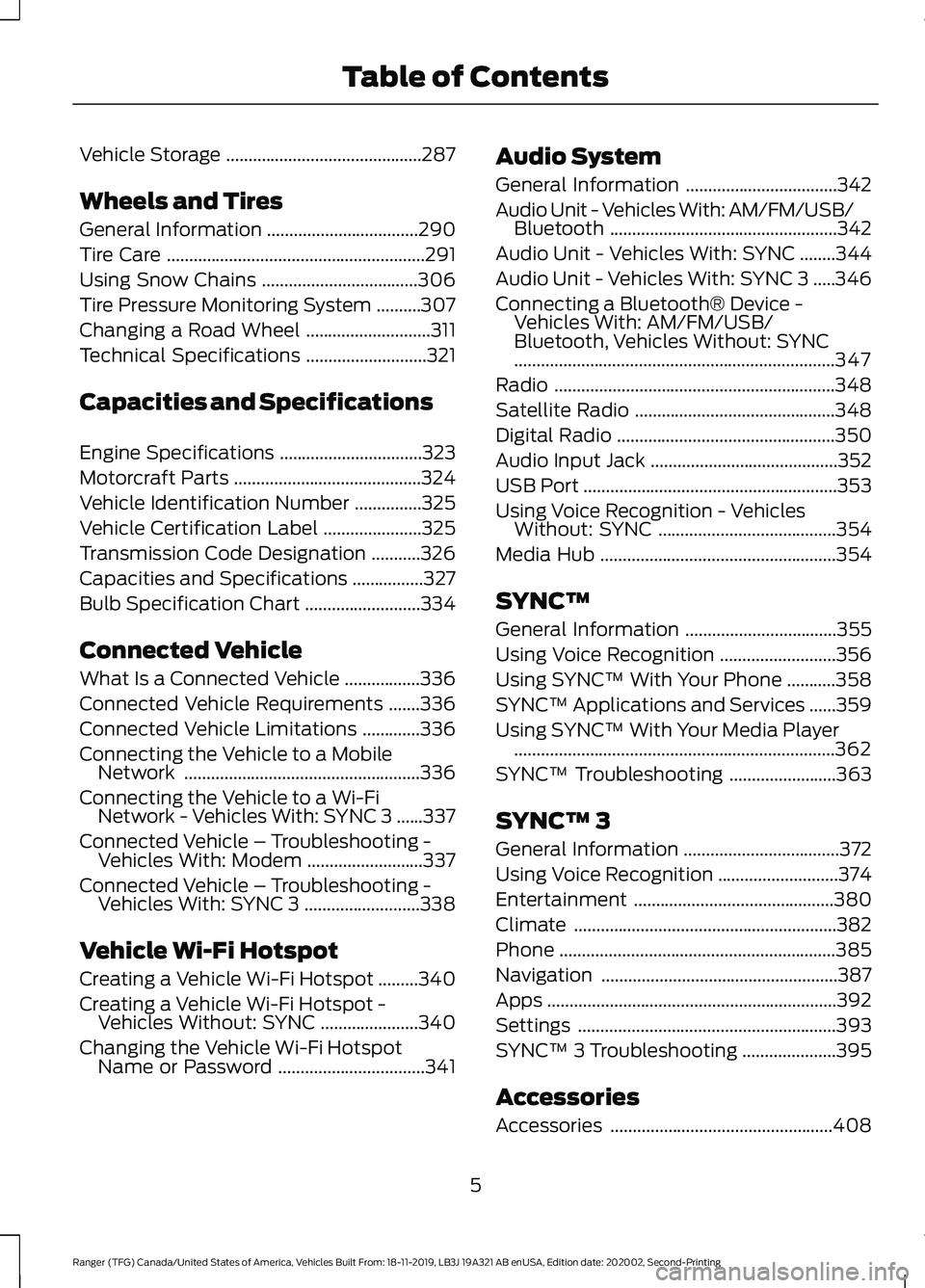
Vehicle Storage
............................................287
Wheels and Tires
General Information ..................................
290
Tire Care ..........................................................
291
Using Snow Chains ...................................
306
Tire Pressure Monitoring System ..........
307
Changing a Road Wheel ............................
311
Technical Specifications ...........................
321
Capacities and Specifications
Engine Specifications ................................
323
Motorcraft Parts ..........................................
324
Vehicle Identification Number ...............
325
Vehicle Certification Label ......................
325
Transmission Code Designation ...........
326
Capacities and Specifications ................
327
Bulb Specification Chart ..........................
334
Connected Vehicle
What Is a Connected Vehicle .................
336
Connected Vehicle Requirements .......
336
Connected Vehicle Limitations .............
336
Connecting the Vehicle to a Mobile Network .....................................................
336
Connecting the Vehicle to a Wi-Fi Network - Vehicles With: SYNC 3 ......
337
Connected Vehicle – Troubleshooting - Vehicles With: Modem ..........................
337
Connected Vehicle – Troubleshooting - Vehicles With: SYNC 3 ..........................
338
Vehicle Wi-Fi Hotspot
Creating a Vehicle Wi-Fi Hotspot .........
340
Creating a Vehicle Wi-Fi Hotspot - Vehicles Without: SYNC ......................
340
Changing the Vehicle Wi-Fi Hotspot Name or Password .................................
341Audio System
General Information
..................................
342
Audio Unit - Vehicles With: AM/FM/USB/ Bluetooth ...................................................
342
Audio Unit - Vehicles With: SYNC ........
344
Audio Unit - Vehicles With: SYNC 3 .....
346
Connecting a Bluetooth® Device - Vehicles With: AM/FM/USB/
Bluetooth, Vehicles Without: SYNC
........................................................................\
347
Radio ...............................................................
348
Satellite Radio .............................................
348
Digital Radio .................................................
350
Audio Input Jack ..........................................
352
USB Port .........................................................
353
Using Voice Recognition - Vehicles Without: SYNC ........................................
354
Media Hub .....................................................
354
SYNC™
General Information ..................................
355
Using Voice Recognition ..........................
356
Using SYNC™ With Your Phone ...........
358
SYNC™ Applications and Services ......
359
Using SYNC™ With Your Media Player ........................................................................\
362
SYNC™ Troubleshooting ........................
363
SYNC™ 3
General Information ...................................
372
Using Voice Recognition ...........................
374
Entertainment .............................................
380
Climate ...........................................................
382
Phone ..............................................................
385
Navigation .....................................................
387
Apps .................................................................
392
Settings ..........................................................
393
SYNC™ 3 Troubleshooting .....................
395
Accessories
Accessories ..................................................
408
5
Ranger (TFG) Canada/United States of America, Vehicles Built From: 18-11-2019, LB3J 19A321 AB enUSA, Edition date: 202002, Second-Printing Table of Contents
Page 14 of 478
you, where permitted by law. For Canada
only, for more information, please review
the Ford of Canada privacy policy at
www.ford.ca, including our U.S. data
storage and use of service providers in
other jurisdictions who may be subject to
legal requirements in Canada, the United
States and other countries applicable to
them, for example, lawful requirements to
disclose personal information to
governmental authorities in those
countries.
Event Data
This vehicle is equipped with an event data
recorder. The main purpose of an event
data recorder is to record, in certain crash
or near crash-like situations, such as an
airbag deployment or hitting a road
obstacle; this data assist in understanding
how a vehicle
’s systems performed. The
event data recorder is designed to record
data related to vehicle dynamics and
safety systems for a short period of time,
typically 30 seconds or less.
The event data recorder in this vehicle is
designed to record such data as:
• How various systems in your vehicle
were operating;
• Whether or not the driver and
passenger seatbelts were
buckled/fastened;
• How far (if at all) the driver was
depressing the accelerator and/or the
brake pedal; and
• How fast the vehicle was traveling; and
• Where the driver was positioning the
steering wheel.
This data can help provide a better
understanding of the circumstances in
which crashes and injuries occur. Note:
Event data recorder data is recorded
by your vehicle only if a non-trivial crash
situation occurs; no data is recorded by the
event data recorder under normal driving
conditions and no personal data or
information (e.g., name, gender, age, and
crash location) is recorded. However, other
parties, such as law enforcement, could
combine the event data recorder data with
the type of personally identifying data
routinely acquired during a crash
investigation.
To read data recorded by an event data
recorder, special equipment is required,
and access to the vehicle or the event data
recorder is needed. In addition to the
vehicle manufacturer, other parties, such
as law enforcement, that have such special
equipment, can read the information if they
have access to the vehicle or the event
data recorder.
Comfort, Convenience and
Entertainment Data
Your vehicle has electronic control units
that have the ability to store data based
on your personalized settings. The data is
stored locally in the vehicle or on devices
that you connect to it, for example, a USB
drive or digital music player. You can delete
some of this data and also choose whether
to share it through the services to which
you subscribe. See Settings (page 393).
Comfort and Convenience Data
Data recorded includes, for example:
• Seat and steering wheel position.
• Climate control settings.
• Radio presets.
11
Ranger (TFG) Canada/United States of America, Vehicles Built From: 18-11-2019, LB3J 19A321 AB enUSA, Edition date: 202002, Second-Printing Introduction
Page 140 of 478
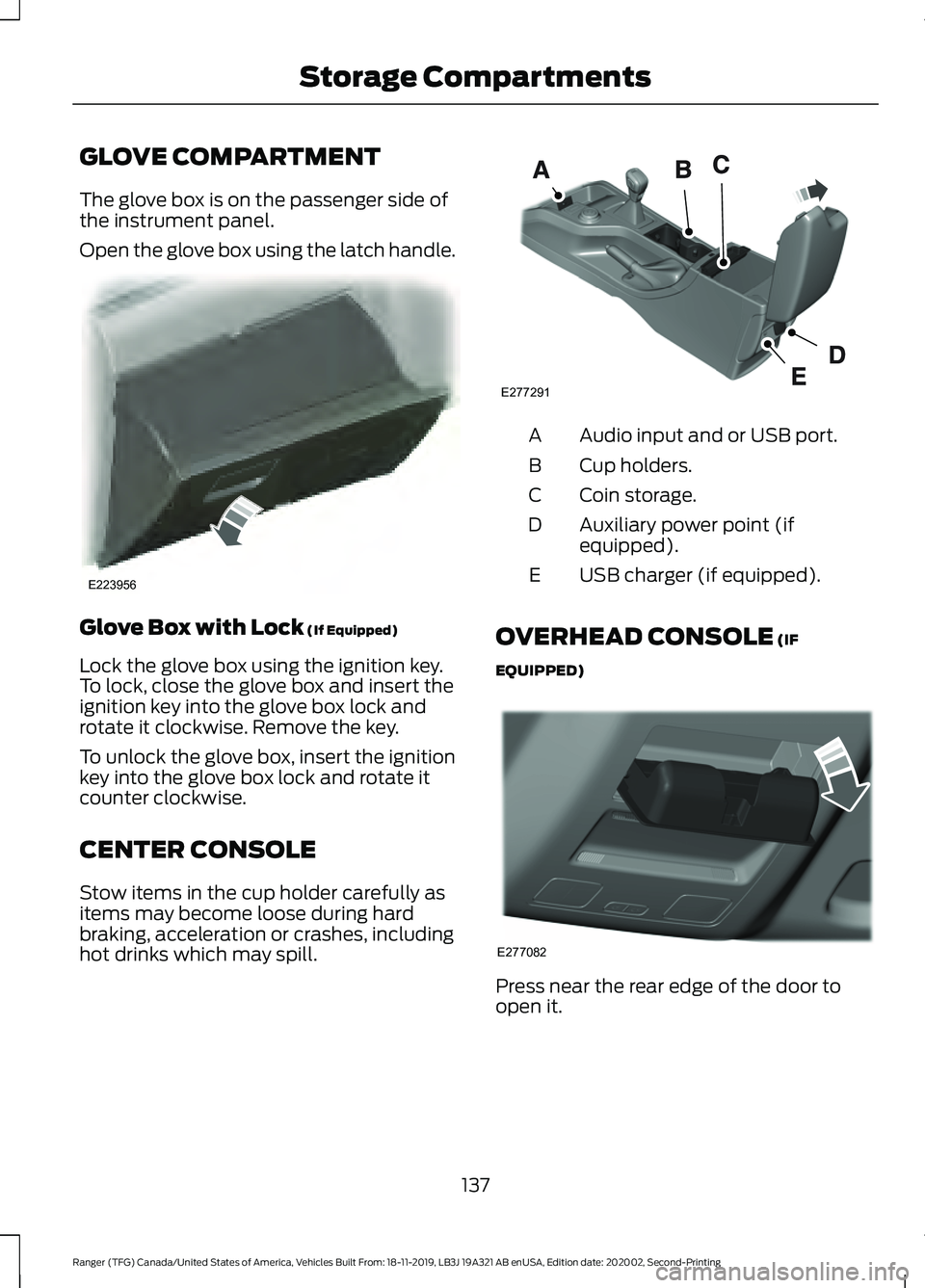
GLOVE COMPARTMENT
The glove box is on the passenger side of
the instrument panel.
Open the glove box using the latch handle.
Glove Box with Lock (If Equipped)
Lock the glove box using the ignition key.
To lock, close the glove box and insert the
ignition key into the glove box lock and
rotate it clockwise. Remove the key.
To unlock the glove box, insert the ignition
key into the glove box lock and rotate it
counter clockwise.
CENTER CONSOLE
Stow items in the cup holder carefully as
items may become loose during hard
braking, acceleration or crashes, including
hot drinks which may spill. Audio input and or USB port.
A
Cup holders.
B
Coin storage.
C
Auxiliary power point (if
equipped).
D
USB charger (if equipped).
E
OVERHEAD CONSOLE (IF
EQUIPPED) Press near the rear edge of the door to
open it.
137
Ranger (TFG) Canada/United States of America, Vehicles Built From: 18-11-2019, LB3J 19A321 AB enUSA, Edition date: 202002, Second-Printing Storage CompartmentsE223956 E277291 E277082
Page 253 of 478
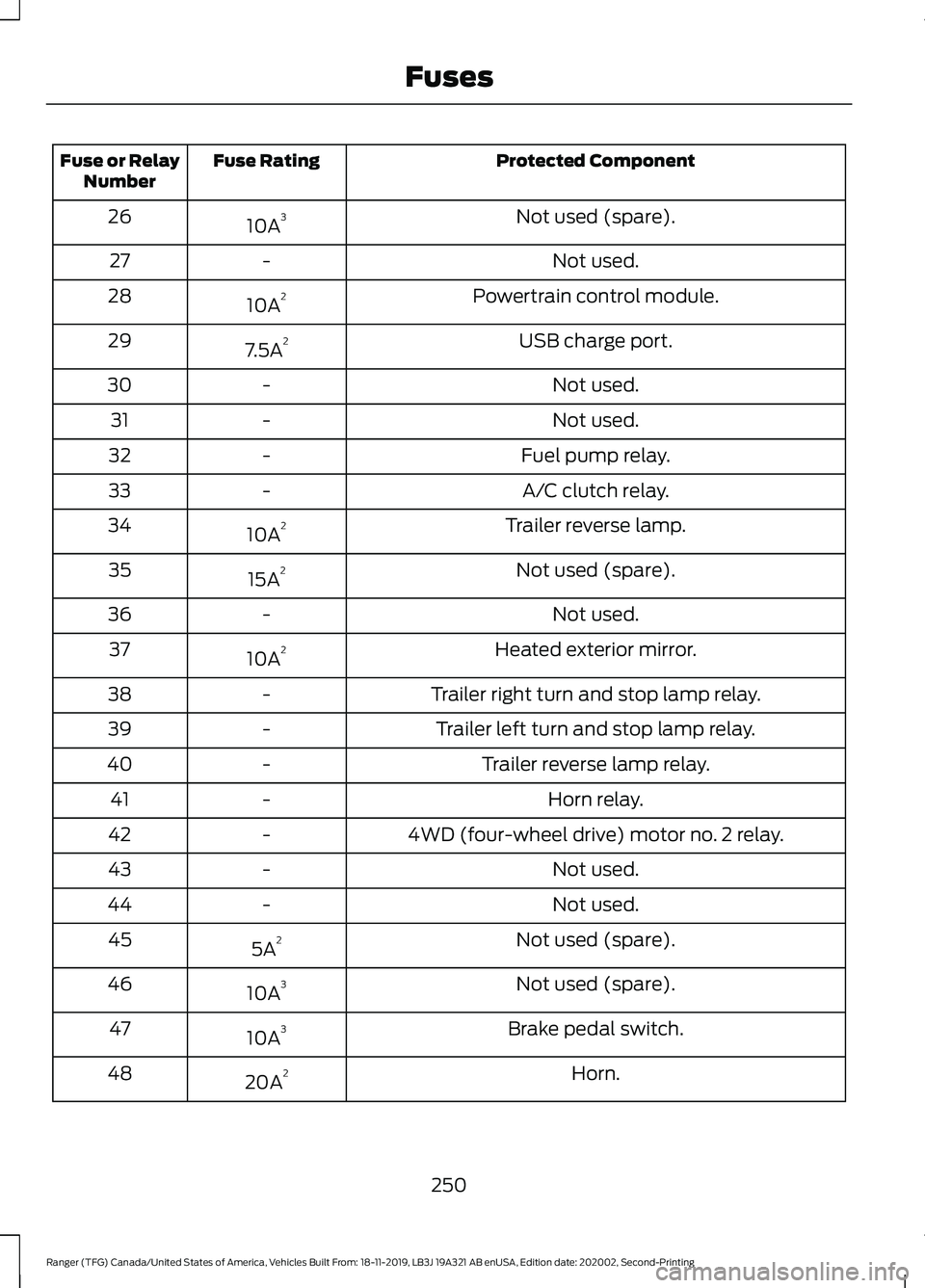
Protected Component
Fuse Rating
Fuse or Relay
Number
Not used (spare).
10A 3
26
Not used.
-
27
Powertrain control module.
10A 2
28
USB charge port.
7.5A 2
29
Not used.
-
30
Not used.
-
31
Fuel pump relay.
-
32
A/C clutch relay.
-
33
Trailer reverse lamp.
10A 2
34
Not used (spare).
15A 2
35
Not used.
-
36
Heated exterior mirror.
10A 2
37
Trailer right turn and stop lamp relay.
-
38
Trailer left turn and stop lamp relay.
-
39
Trailer reverse lamp relay.
-
40
Horn relay.
-
41
4WD (four-wheel drive) motor no. 2 relay.
-
42
Not used.
-
43
Not used.
-
44
Not used (spare).
5A 2
45
Not used (spare).
10A 3
46
Brake pedal switch.
10A 3
47
Horn.
20A 2
48
250
Ranger (TFG) Canada/United States of America, Vehicles Built From: 18-11-2019, LB3J 19A321 AB enUSA, Edition date: 202002, Second-Printing Fuses
Page 259 of 478
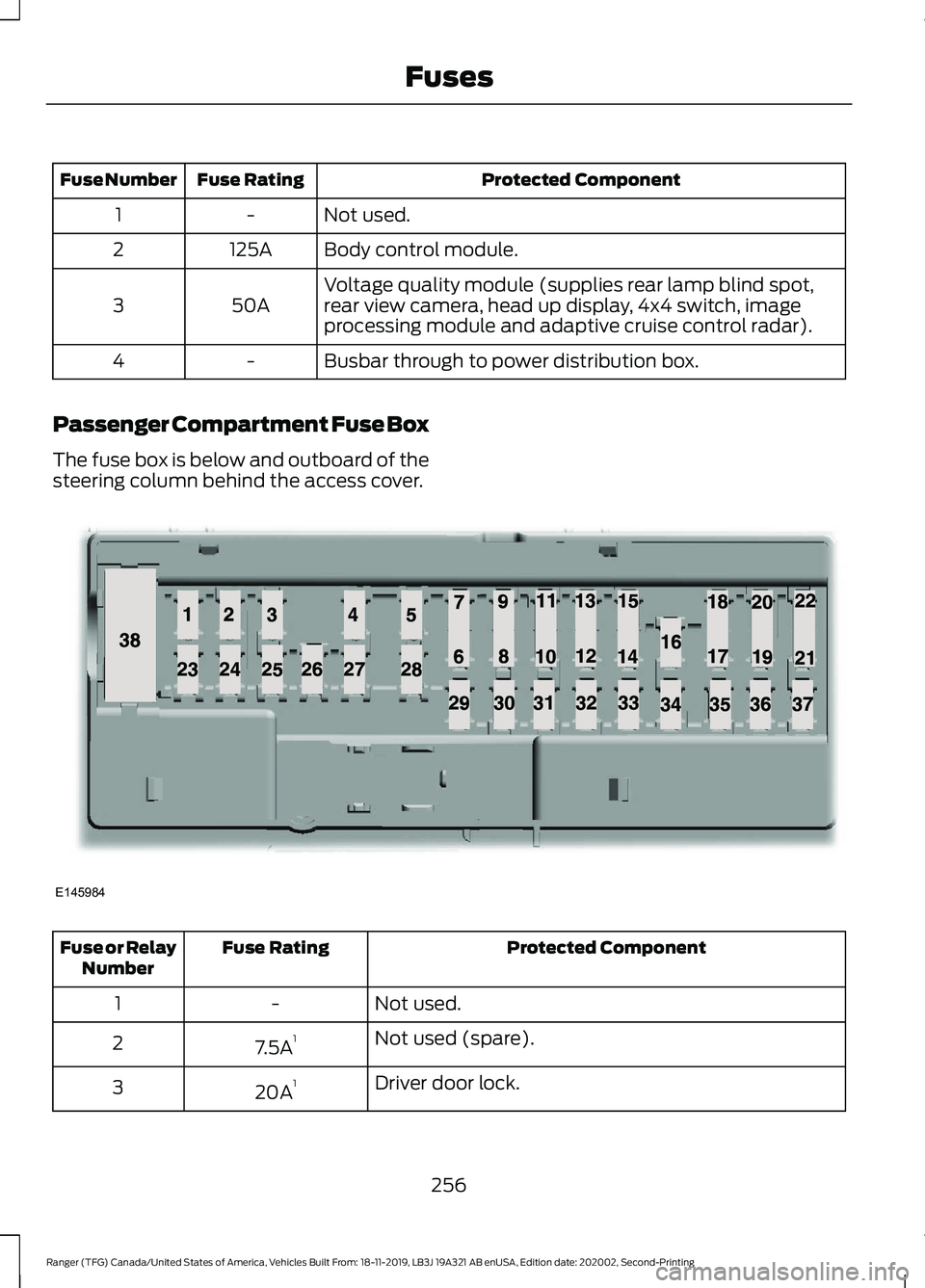
Protected Component
Fuse Rating
Fuse Number
Not used.
-
1
Body control module.
125A
2
Voltage quality module (supplies rear lamp blind spot,
rear view camera, head up display, 4x4 switch, image
processing module and adaptive cruise control radar).
50A
3
Busbar through to power distribution box.
-
4
Passenger Compartment Fuse Box
The fuse box is below and outboard of the
steering column behind the access cover. Protected Component
Fuse Rating
Fuse or Relay
Number
Not used.
-
1
Not used (spare).
7.5A 1
2
Driver door lock.
20A 1
3
256
Ranger (TFG) Canada/United States of America, Vehicles Built From: 18-11-2019, LB3J 19A321 AB enUSA, Edition date: 202002, Second-Printing FusesE145984
Page 339 of 478
WHAT IS A CONNECTED
VEHICLE
A connected vehicle has technology that
allows your vehicle to connect to a mobile
network and for you to access a range of
features. When used in conjunction with
the FordPass app, it could allow you to
monitor and control your vehicle further,
for example checking the tire pressures,
the fuel level and the vehicle location. For
additional information, refer to the local
Ford website.
CONNECTED VEHICLE
REQUIREMENTS
Connected service and related feature
functionality requires a compatible vehicle
network.
Some remote features require a
subscription. For additional information,
see the FordPass app. Some restrictions,
third party terms and message or data
rates may apply.
CONNECTED VEHICLE
LIMITATIONS
Evolving technology, evolving cellular
networks or evolving regulations could
affect functionality and availability, or
continued provision of some features.
These changes could even stop some
features from functioning.
CONNECTING THE VEHICLE TO
A MOBILE NETWORK
What Is the Modem The modem allows access to a
range of features built into your
vehicle.
Enabling and Disabling the Modem
- Vehicles With: AM/FM/Aux In/
USB/Bluetooth
1. Using the information display control on the steering wheel, select Settings.
2. Select FordPass.
3. Select
Connectivity.
4. Switch connectivity features on or off.
Enabling and Disabling the Modem
- Vehicles With: SYNC 3
1. Select
Settings.
2. Select
FordPass Connect.
3. Select
Connectivity Settings.
4. Switch connectivity features on or off.
Connecting FordPass to the
Modem
1. Make sure that the modem is enabled using the vehicle settings menu.
2. Open the FordPass app on your device
and log in.
3. Add your vehicle or select your vehicle if already added.
4. Select the option for vehicle details.
5. Select the option to activate your vehicle.
336
Ranger (TFG) Canada/United States of America, Vehicles Built From: 18-11-2019, LB3J 19A321 AB enUSA, Edition date: 202002, Second-Printing Connected Vehicle
Page 345 of 478
GENERAL INFORMATION
Radio Frequencies and Reception
Factors
AM and FM frequencies are established by
the Federal Communications Commission
(FCC) and the Canadian Radio and
Telecommunications Commission (CRTC).
Those frequencies are:
•
AM: 530-1710 kHz
• FM: 87.9-107.9 MHz
Note: Listening to loud audio for long
periods of time could damage your hearing. Radio Reception Factors
The further you travel from an AM or FM station, the
weaker the signal and the weaker the reception.
Distance and strength
Hills, mountains, tall buildings, bridges, tunnels, freeway
overpasses, parking garages, dense tree foliage and
thunderstorms can interfere with the reception.
Terrain
When you pass a ground-based broadcast repeating
tower, a stronger signal may overtake a weaker one and
result in the audio system muting.
Station overload
AUDIO UNIT - VEHICLES WITH:
AM/FM/USB/BLUETOOTH WARNING: Driving while distracted
can result in loss of vehicle control, crash
and injury. We strongly recommend that
you use extreme caution when using any
device that may take your focus off the
road. Your primary responsibility is the
safe operation of your vehicle. We
recommend against the use of any
hand-held device while driving and
encourage the use of voice-operated
systems when possible. Make sure you
are aware of all applicable local laws
that may affect the use of electronic
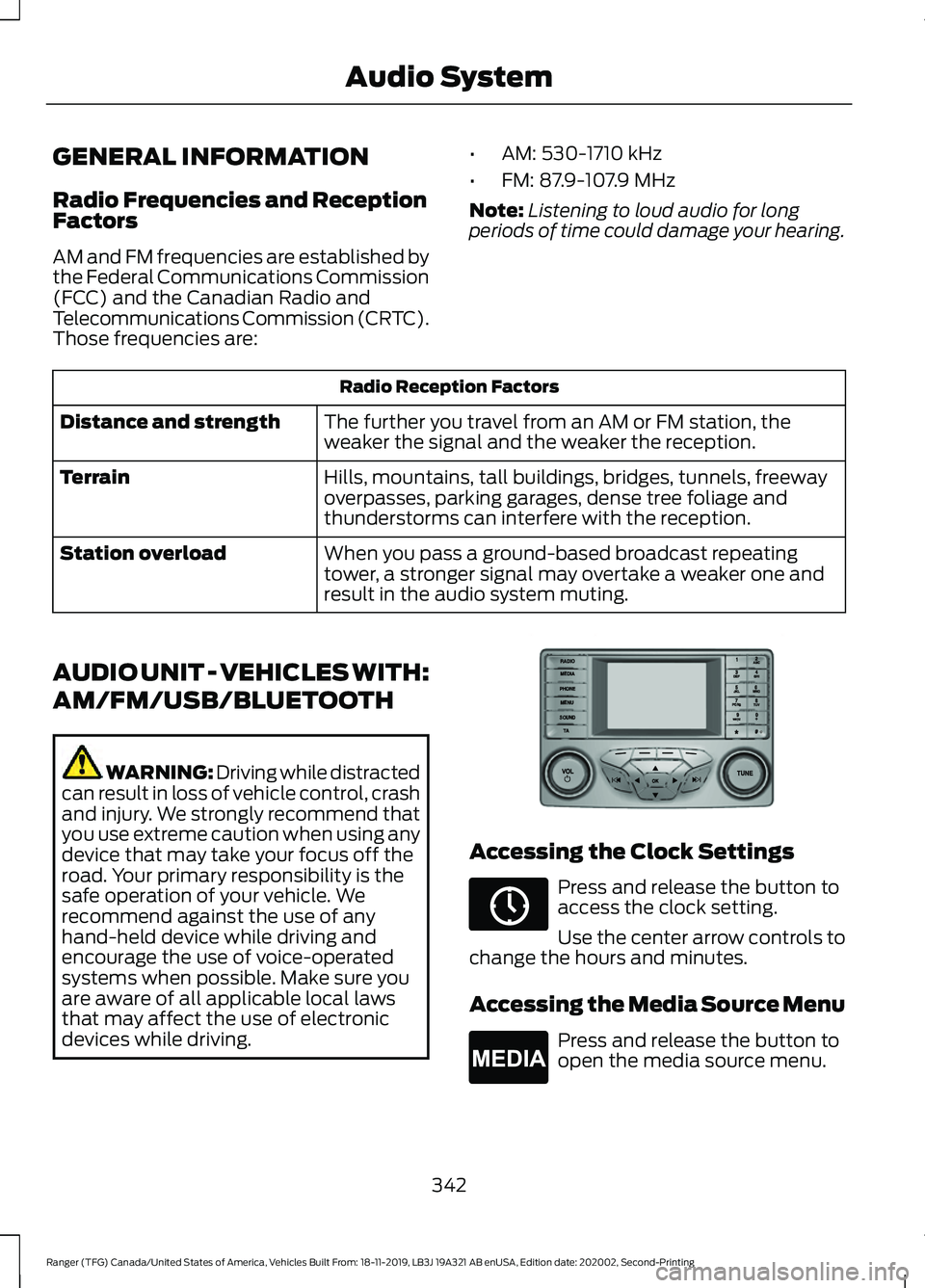
devices while driving. Accessing the Clock Settings
Press and release the button to
access the clock setting.
Use the center arrow controls to
change the hours and minutes.
Accessing the Media Source Menu Press and release the button to
open the media source menu.
342
Ranger (TFG) Canada/United States of America, Vehicles Built From: 18-11-2019, LB3J 19A321 AB enUSA, Edition date: 202002, Second-Printing Audio SystemE318482 E265036 E265035
Page 350 of 478
Adjusting the Volume
Turn to adjust the volume.
Changing Radio Stations
In radio mode, turn to search through the
radio frequency band.
In satellite radio mode, turn to find the
previous or next available satellite radio
station. Playing or Pausing Media Press and release the button to
either play or pause the audio.
Switching the Audio Unit On and
Off Press and release the button.
Using Seek, Fast Forward and
Reverse In radio mode, select a frequency band and
press and release either button. The
system stops at the first station it finds in
that direction.
In satellite radio mode, press and release
to select the next or previous satellite radio
station. If you select a specific category
such as jazz, rock or news, press to find the
next or previous station in that category.
CONNECTING A BLUETOOTH®
DEVICE - VEHICLES WITH: AM/
FM/USB/BLUETOOTH,
VEHICLES WITHOUT: SYNC
Pairing a Device
Press the button.
Select BT Devices and follow the
instructions on the screen.
Note: When pairing a new device, you can
choose to download contacts and set this
as the primary device.
347
Ranger (TFG) Canada/United States of America, Vehicles Built From: 18-11-2019, LB3J 19A321 AB enUSA, Edition date: 202002, Second-Printing Audio SystemE265373 E265696 E265037
Page 356 of 478
safe operation of your vehicle. We
recommend against the use of any
hand-held device while driving and
encourage the use of voice-operated
systems when possible. Make sure you
are aware of all applicable local laws
that may affect the use of electronic
devices while driving.
WARNING: Always place your
device in a secure location in your vehicle
so it does not become a projectile in a
sudden stop or crash. Failure to follow
this instruction could result in personal
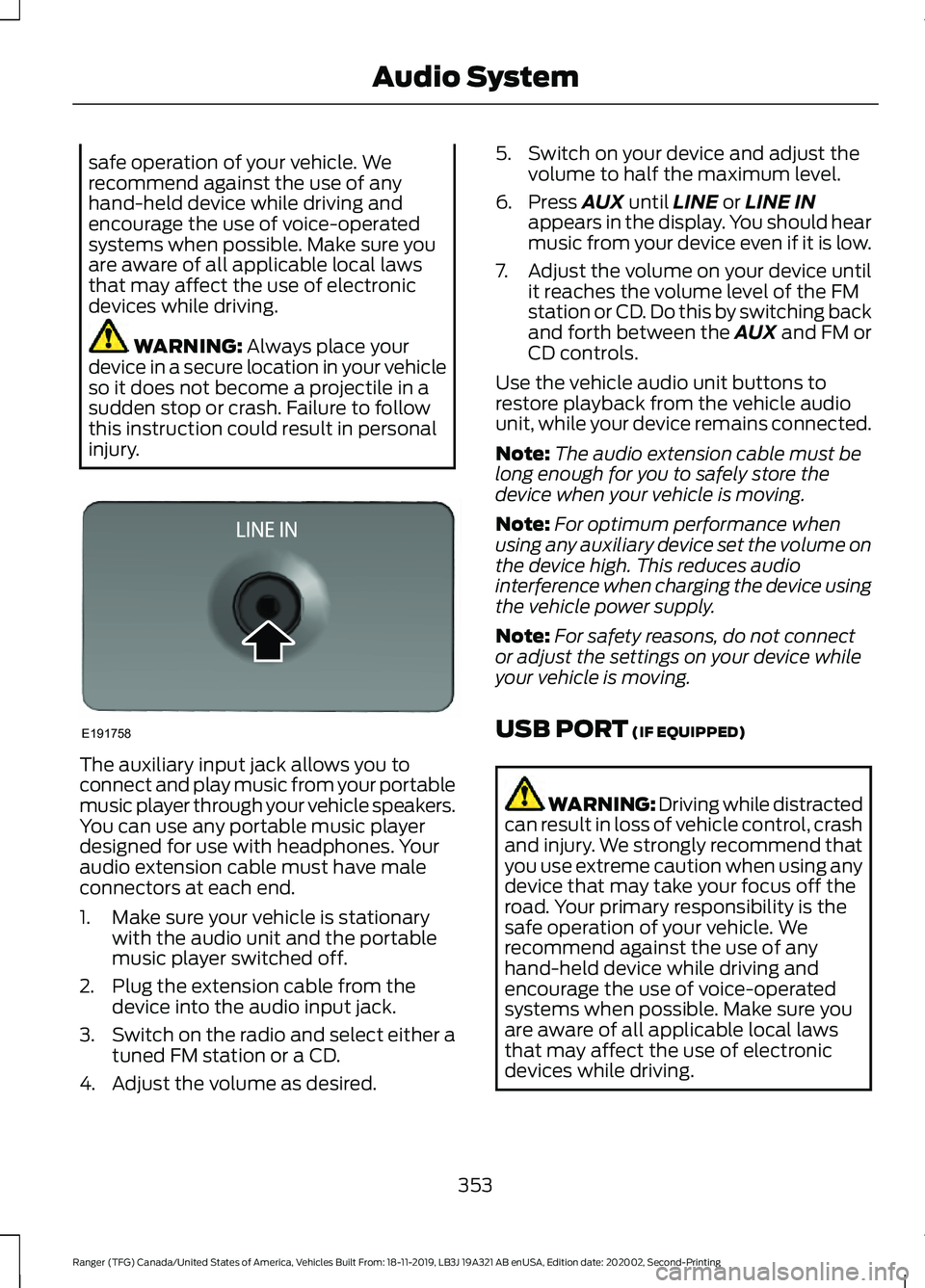
injury. The auxiliary input jack allows you to
connect and play music from your portable
music player through your vehicle speakers.
You can use any portable music player
designed for use with headphones. Your
audio extension cable must have male
connectors at each end.
1. Make sure your vehicle is stationary
with the audio unit and the portable
music player switched off.
2. Plug the extension cable from the device into the audio input jack.
3. Switch on the radio and select either a
tuned FM station or a CD.
4. Adjust the volume as desired. 5. Switch on your device and adjust the
volume to half the maximum level.
6. Press
AUX until LINE or LINE IN
appears in the display. You should hear
music from your device even if it is low.
7. Adjust the volume on your device until
it reaches the volume level of the FM
station or CD. Do this by switching back
and forth between the AUX and FM or
CD controls.
Use the vehicle audio unit buttons to
restore playback from the vehicle audio
unit, while your device remains connected.
Note: The audio extension cable must be
long enough for you to safely store the
device when your vehicle is moving.
Note: For optimum performance when
using any auxiliary device set the volume on
the device high. This reduces audio
interference when charging the device using
the vehicle power supply.
Note: For safety reasons, do not connect
or adjust the settings on your device while
your vehicle is moving.
USB PORT
(IF EQUIPPED) WARNING: Driving while distracted
can result in loss of vehicle control, crash
and injury. We strongly recommend that
you use extreme caution when using any
device that may take your focus off the
road. Your primary responsibility is the
safe operation of your vehicle. We
recommend against the use of any
hand-held device while driving and
encourage the use of voice-operated
systems when possible. Make sure you
are aware of all applicable local laws
that may affect the use of electronic
devices while driving.
353
Ranger (TFG) Canada/United States of America, Vehicles Built From: 18-11-2019, LB3J 19A321 AB enUSA, Edition date: 202002, Second-Printing Audio SystemE191758
Page 357 of 478
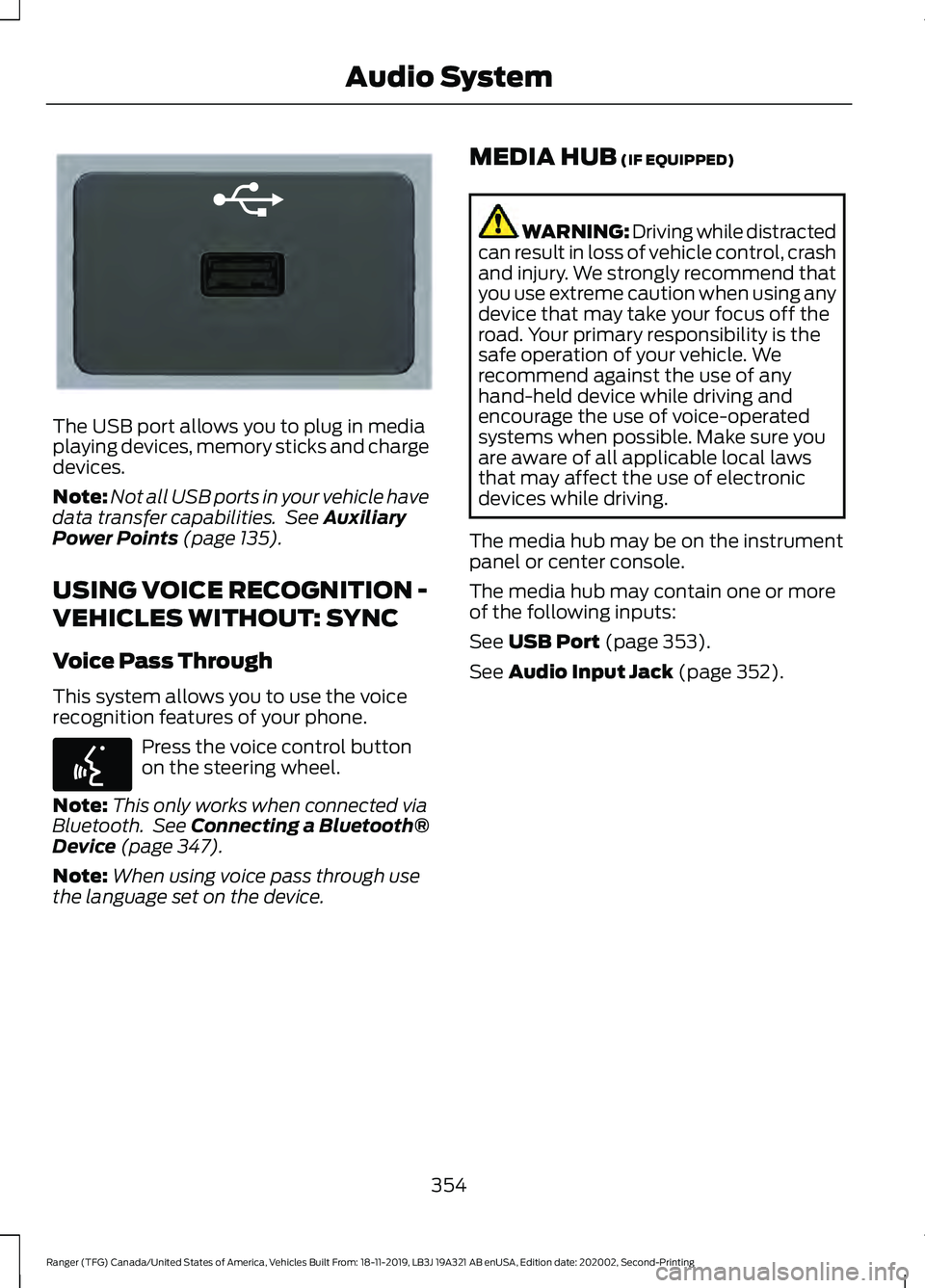
The USB port allows you to plug in media
playing devices, memory sticks and charge
devices.
Note:
Not all USB ports in your vehicle have
data transfer capabilities. See Auxiliary
Power Points (page 135).
USING VOICE RECOGNITION -
VEHICLES WITHOUT: SYNC
Voice Pass Through
This system allows you to use the voice
recognition features of your phone. Press the voice control button
on the steering wheel.
Note: This only works when connected via
Bluetooth. See
Connecting a Bluetooth®
Device (page 347).
Note: When using voice pass through use
the language set on the device. MEDIA HUB
(IF EQUIPPED) WARNING: Driving while distracted
can result in loss of vehicle control, crash
and injury. We strongly recommend that
you use extreme caution when using any
device that may take your focus off the
road. Your primary responsibility is the
safe operation of your vehicle. We
recommend against the use of any
hand-held device while driving and
encourage the use of voice-operated
systems when possible. Make sure you
are aware of all applicable local laws
that may affect the use of electronic
devices while driving.
The media hub may be on the instrument
panel or center console.
The media hub may contain one or more
of the following inputs:
See
USB Port (page 353).
See
Audio Input Jack (page 352).
354
Ranger (TFG) Canada/United States of America, Vehicles Built From: 18-11-2019, LB3J 19A321 AB enUSA, Edition date: 202002, Second-Printing Audio SystemE201595 E142599