AUX FORD RANGER 2021 User Guide
[x] Cancel search | Manufacturer: FORD, Model Year: 2021, Model line: RANGER, Model: FORD RANGER 2021Pages: 475, PDF Size: 7.9 MB
Page 262 of 475
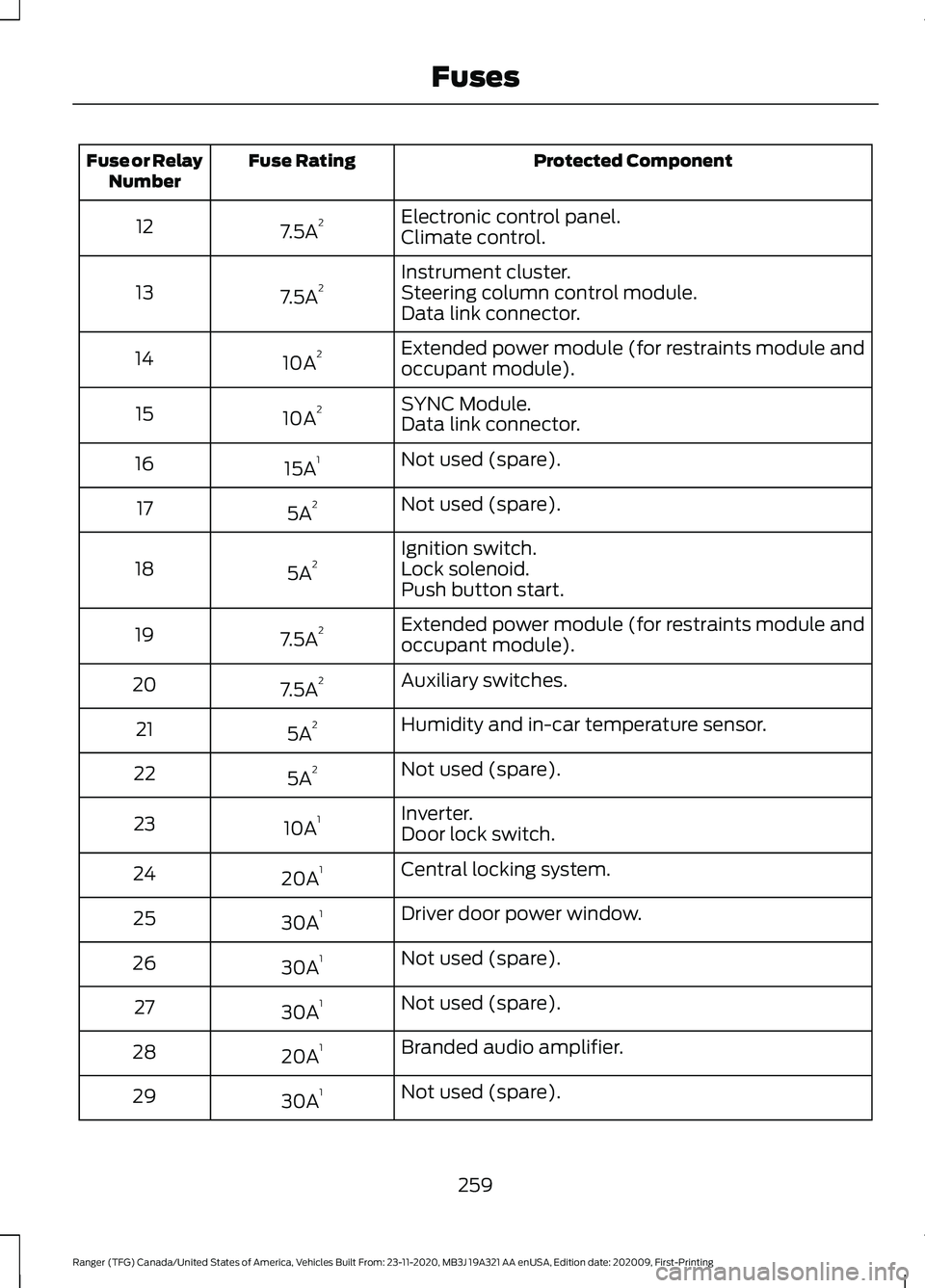
Protected Component
Fuse Rating
Fuse or Relay
Number
Electronic control panel.
7.5A 2
12
Climate control.
Instrument cluster.
7.5A 2
13 Steering column control module.
Data link connector.
Extended power module (for restraints module and
occupant module).
10A 2
14
SYNC Module.
10A 2
15
Data link connector.
Not used (spare).
15A 1
16
Not used (spare).
5A 2
17
Ignition switch.
5A 2
18 Lock solenoid.
Push button start.
Extended power module (for restraints module and
occupant module).
7.5A 2
19
Auxiliary switches.
7.5A 2
20
Humidity and in-car temperature sensor.
5A 2
21
Not used (spare).
5A 2
22
Inverter.
10A 1
23
Door lock switch.
Central locking system.
20A 1
24
Driver door power window.
30A 1
25
Not used (spare).
30A 1
26
Not used (spare).
30A 1
27
Branded audio amplifier.
20A 1
28
Not used (spare).
30A 1
29
259
Ranger (TFG) Canada/United States of America, Vehicles Built From: 23-11-2020, MB3J 19A321 AA enUSA, Edition date: 202009, First-Printing Fuses
Page 339 of 475
WHAT IS A CONNECTED
VEHICLE
A connected vehicle has technology that
allows your vehicle to connect to a mobile
network and for you to access a range of
features. When used in conjunction with
the FordPass app, it could allow you to
monitor and control your vehicle further,
for example checking the tire pressures,
the fuel level and the vehicle location. For
additional information, refer to the local
Ford website.
CONNECTED VEHICLE
REQUIREMENTS
Connected service and related feature
functionality requires a compatible vehicle
network.
Some remote features require additional
service activation. Log in to your Ford
account for details. Some restrictions, third
party terms and message or data rates
may apply.
CONNECTED VEHICLE
LIMITATIONS
Evolving technology, cellular networks, or
regulations could affect functionality and
availability, or continued provision of some
features. These changes could even stop
some features from functioning.
CONNECTING THE VEHICLE TO
A MOBILE NETWORK
What Is the Modem
The modem allows access to a
range of features built into your
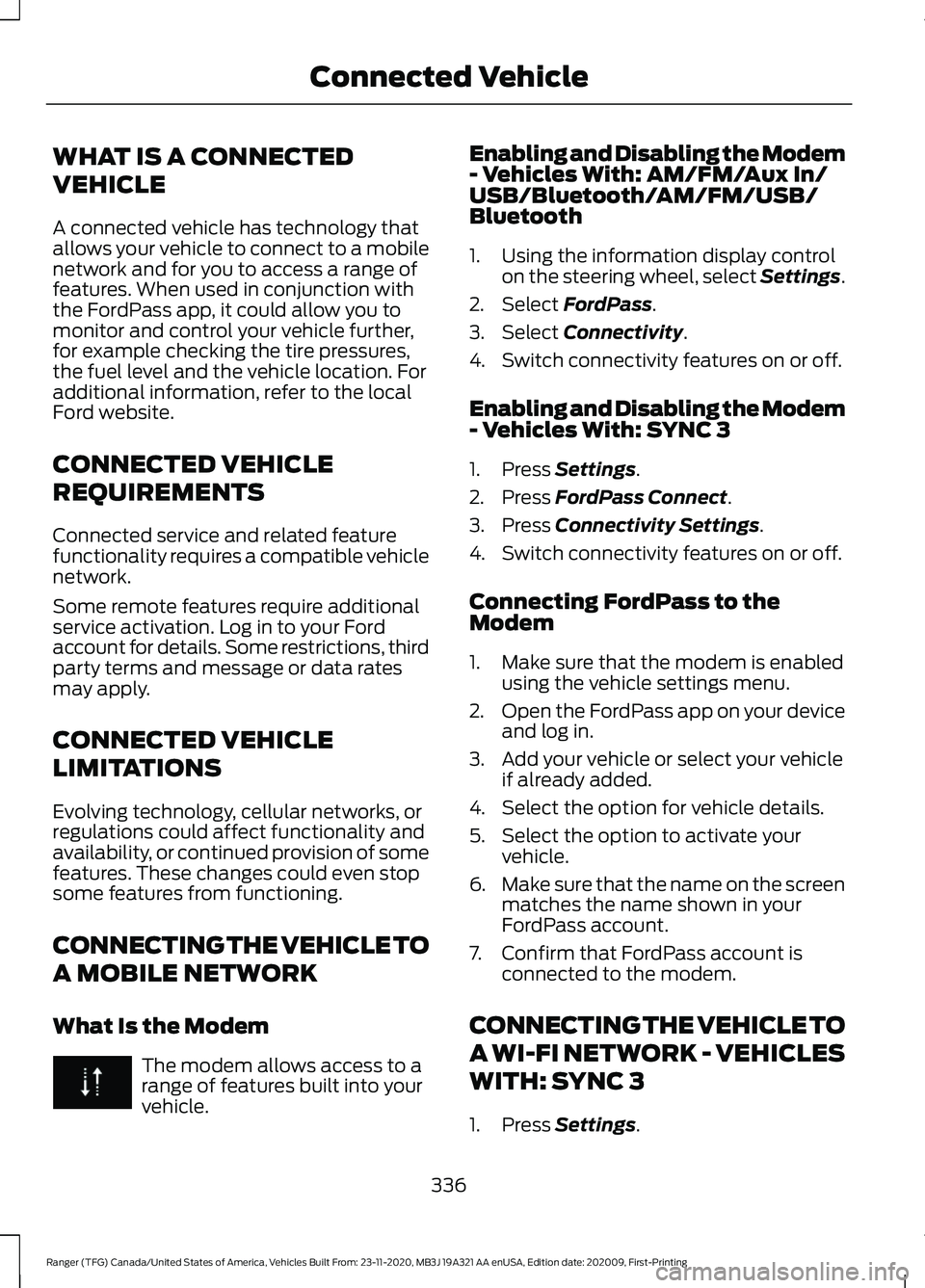
vehicle. Enabling and Disabling the Modem
- Vehicles With: AM/FM/Aux In/
USB/Bluetooth/AM/FM/USB/
Bluetooth
1. Using the information display control
on the steering wheel, select Settings.
2. Select FordPass.
3. Select
Connectivity.
4. Switch connectivity features on or off.
Enabling and Disabling the Modem
- Vehicles With: SYNC 3
1. Press
Settings.
2. Press
FordPass Connect.
3. Press
Connectivity Settings.
4. Switch connectivity features on or off.
Connecting FordPass to the
Modem
1. Make sure that the modem is enabled using the vehicle settings menu.
2. Open the FordPass app on your device
and log in.
3. Add your vehicle or select your vehicle if already added.
4. Select the option for vehicle details.
5. Select the option to activate your vehicle.
6. Make sure that the name on the screen
matches the name shown in your
FordPass account.
7. Confirm that FordPass account is connected to the modem.
CONNECTING THE VEHICLE TO
A WI-FI NETWORK - VEHICLES
WITH: SYNC 3
1. Press
Settings.
336
Ranger (TFG) Canada/United States of America, Vehicles Built From: 23-11-2020, MB3J 19A321 AA enUSA, Edition date: 202009, First-Printing Connected Vehicle
Page 356 of 475
hand-held device while driving and
encourage the use of voice-operated
systems when possible. Make sure you
are aware of all applicable local laws
that may affect the use of electronic
devices while driving.
WARNING: Always place your
device in a secure location in your vehicle
so it does not become a projectile in a
sudden stop or crash. Failure to follow
this instruction could result in personal
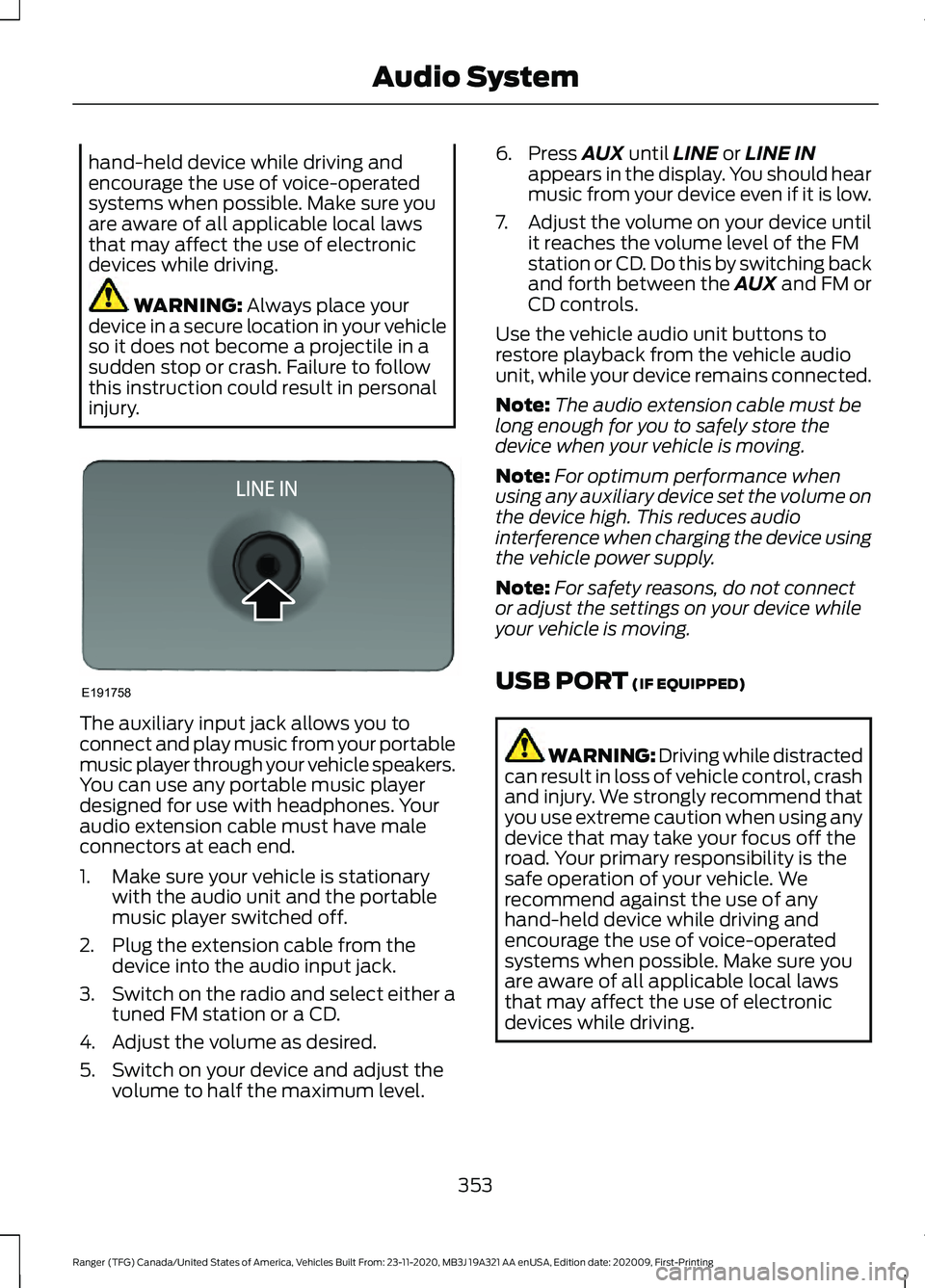
injury. The auxiliary input jack allows you to
connect and play music from your portable
music player through your vehicle speakers.
You can use any portable music player
designed for use with headphones. Your
audio extension cable must have male
connectors at each end.
1. Make sure your vehicle is stationary
with the audio unit and the portable
music player switched off.
2. Plug the extension cable from the device into the audio input jack.
3. Switch on the radio and select either a
tuned FM station or a CD.
4. Adjust the volume as desired.
5. Switch on your device and adjust the volume to half the maximum level. 6. Press
AUX until LINE or LINE IN
appears in the display. You should hear
music from your device even if it is low.
7. Adjust the volume on your device until
it reaches the volume level of the FM
station or CD. Do this by switching back
and forth between the AUX and FM or
CD controls.
Use the vehicle audio unit buttons to
restore playback from the vehicle audio
unit, while your device remains connected.
Note: The audio extension cable must be
long enough for you to safely store the
device when your vehicle is moving.
Note: For optimum performance when
using any auxiliary device set the volume on
the device high. This reduces audio
interference when charging the device using
the vehicle power supply.
Note: For safety reasons, do not connect
or adjust the settings on your device while
your vehicle is moving.
USB PORT
(IF EQUIPPED) WARNING: Driving while distracted
can result in loss of vehicle control, crash
and injury. We strongly recommend that
you use extreme caution when using any
device that may take your focus off the
road. Your primary responsibility is the
safe operation of your vehicle. We
recommend against the use of any
hand-held device while driving and
encourage the use of voice-operated
systems when possible. Make sure you
are aware of all applicable local laws
that may affect the use of electronic
devices while driving.
353
Ranger (TFG) Canada/United States of America, Vehicles Built From: 23-11-2020, MB3J 19A321 AA enUSA, Edition date: 202009, First-Printing Audio SystemE191758
Page 357 of 475
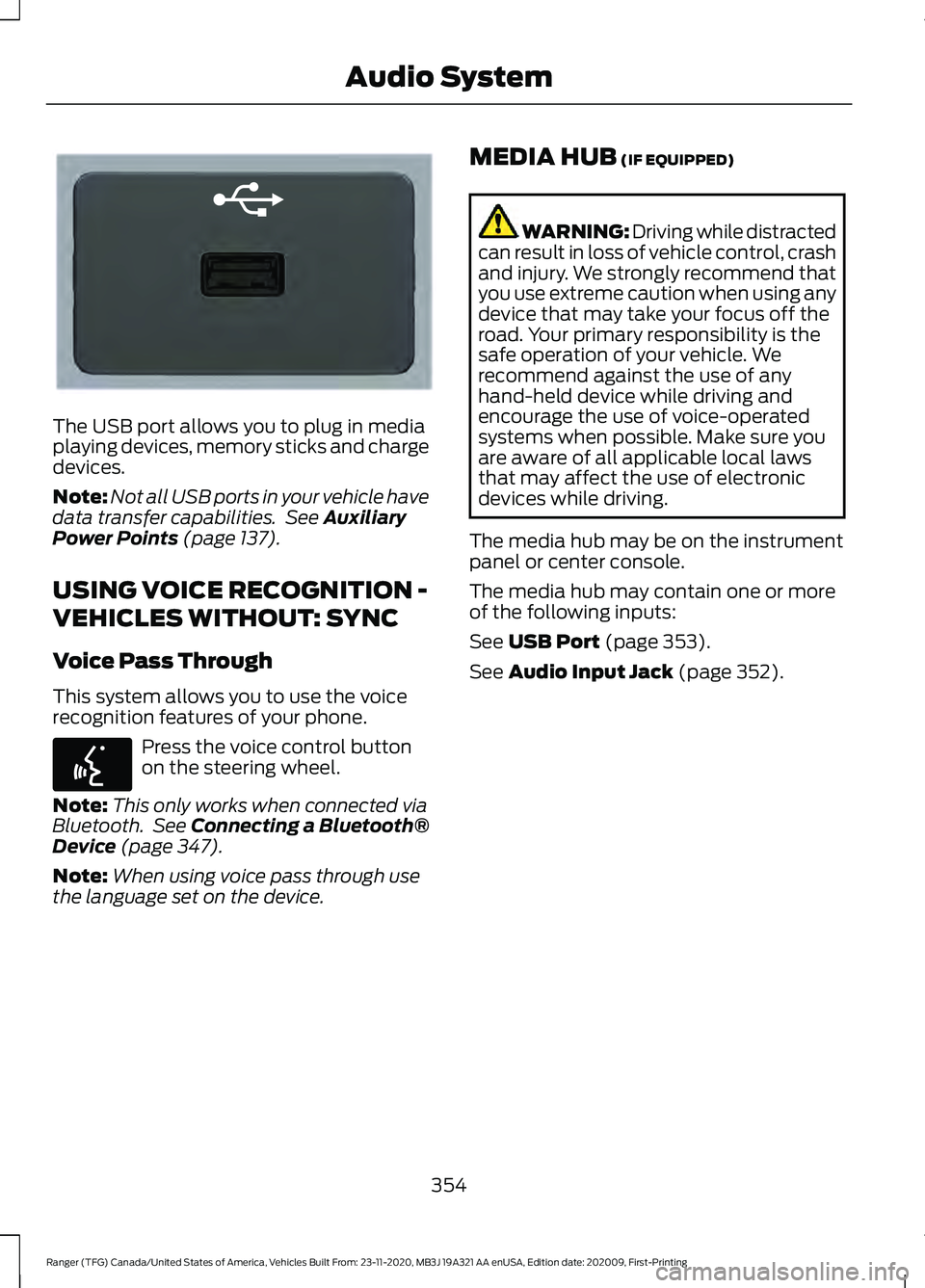
The USB port allows you to plug in media
playing devices, memory sticks and charge
devices.
Note:
Not all USB ports in your vehicle have
data transfer capabilities. See Auxiliary
Power Points (page 137).
USING VOICE RECOGNITION -
VEHICLES WITHOUT: SYNC
Voice Pass Through
This system allows you to use the voice
recognition features of your phone. Press the voice control button
on the steering wheel.
Note: This only works when connected via
Bluetooth. See
Connecting a Bluetooth®
Device (page 347).
Note: When using voice pass through use
the language set on the device. MEDIA HUB
(IF EQUIPPED) WARNING: Driving while distracted
can result in loss of vehicle control, crash
and injury. We strongly recommend that
you use extreme caution when using any
device that may take your focus off the
road. Your primary responsibility is the
safe operation of your vehicle. We
recommend against the use of any
hand-held device while driving and
encourage the use of voice-operated
systems when possible. Make sure you
are aware of all applicable local laws
that may affect the use of electronic
devices while driving.
The media hub may be on the instrument
panel or center console.
The media hub may contain one or more
of the following inputs:
See
USB Port (page 353).
See
Audio Input Jack (page 352).
354
Ranger (TFG) Canada/United States of America, Vehicles Built From: 23-11-2020, MB3J 19A321 AA enUSA, Edition date: 202009, First-Printing Audio SystemE201595 E142599
Page 365 of 475
App Permissions
App permissions are organized by groups.
You can grant these group permissions
individually. You can change a permission
group status any time when not driving, by
using the settings menu.
When you launch an app using SYNC, the
system may ask you to grant certain
permissions, for example:
•
To allow your vehicle to provide vehicle
information to the app such as, but not
limited to: Fuel level, fuel economy, fuel
consumption, engine speed, rain
sensor, odometer, VIN, external
temperature, gear position, tire
pressure, and head lamp status.
• To allow your vehicle to provide driving
characteristic information such as, but
not limited to: MyKey, seatbelt status,
engine revolutions per minute, gear
position, braking events, steering wheel
angle, and accelerator pedal position.
• To allow your vehicle to provide
location information, including: GPS
and speed.
• To allow the app to send push
notifications using the vehicle display
and voice capabilities while running in
a background state. Push notifications
may be particularly useful for news or
location based apps.
Note: You only need to grant permissions
the first time you use an app with SYNC.
Note: Ford is not responsible or liable for
any damages or loss of privacy relating to
usage of an app, or dissemination of any
vehicle data that you approve Ford to
provide to an app. Enabling SYNC Mobile Apps
In order to enable mobile apps, SYNC
requires user consent to send and receive
app authorization information and updates
using the data plan associated with the
connected device.
Data is sent to Ford in the United States
through the connected device. The
information is encrypted and includes, for
example, the vehicle identification number
of your vehicle, the SYNC module serial
number, odometer, enabled apps, usage
statistics and debugging information.
Updates may take place.
Note:
You must enable mobile apps for
each connected device the first time you
select a mobile app using the system.
Note: Standard data rates apply. Ford is
not responsible for any additional charges
you may receive from your service provider,
when your vehicle sends or receives data
through the connected device. This includes
any additional charges incurred due to
driving in areas when roaming out of a home
network.
USING SYNC™ WITH YOUR
MEDIA PLAYER
SYNC supports digital media sources
including: iPod, Bluetooth devices, and
most USB drives. SYNC also supports
audio formats, such as MP3, WMA, WAV
and ACC.
Media Sources
The AUX or MEDIA button allows you to
view and select available media sources.
Press the
AUX or MEDIA button to view
your sources. Use the directional arrows
and OK button to select your source. You
can also use the steering wheel audio
controls.
362
Ranger (TFG) Canada/United States of America, Vehicles Built From: 23-11-2020, MB3J 19A321 AA enUSA, Edition date: 202009, First-Printing SYNC™
(If Equipped)
Page 412 of 475
AUXILIARY SWITCHES
For maximum vehicle performance, keep
the following information in mind when
adding accessories or equipment to your
vehicle:
•
When adding accessories, equipment,
passengers and luggage to your
vehicle, do not exceed the total weight
capacity of the vehicle or of the front
or rear axle (GVWR or GAWR as
indicated on the Safety Compliance
Certification label). Ask an authorized
dealer for specific weight information.
• The Federal Communications
Commission (FCC) and Canadian
Radio Telecommunications
Commission (CRTC) regulate the use
of mobile communications systems
equipped with radio transmitters, for
example, two-way radios, telephones
and theft alarms. Any such equipment
installed in your vehicle should comply
with Federal Communications
Commission (FCC) and Canadian
Radio Telecommunications
Commission (CRTC) regulations, and
should be installed by an authorized
dealer.
• An authorized dealer needs to install
mobile communications systems.
Improper installation may harm the
operation of your vehicle, particularly
if the manufacturer did not design the
mobile communication system
specifically for automotive use.
• If you or an authorized Ford dealer add
any non-Ford electrical or electronic
accessories or components to your
vehicle, you may adversely affect
battery performance and durability. In
addition, you may also adversely affect
the performance of other electrical
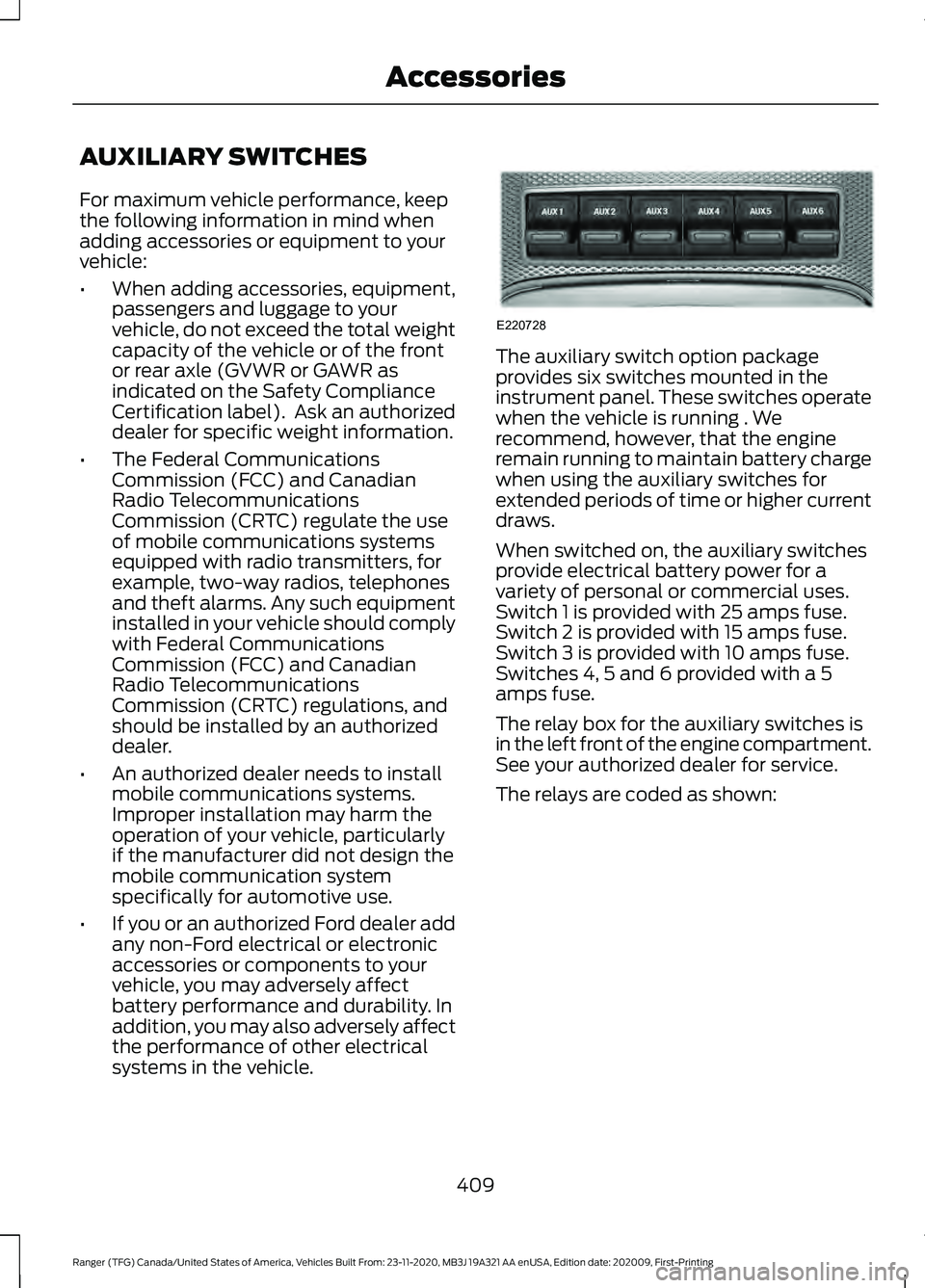
systems in the vehicle. The auxiliary switch option package
provides six switches mounted in the
instrument panel. These switches operate
when the vehicle is running . We
recommend, however, that the engine
remain running to maintain battery charge
when using the auxiliary switches for
extended periods of time or higher current
draws.
When switched on, the auxiliary switches
provide electrical battery power for a
variety of personal or commercial uses.
Switch 1 is provided with 25 amps fuse.
Switch 2 is provided with 15 amps fuse.
Switch 3 is provided with 10 amps fuse.
Switches 4, 5 and 6 provided with a 5
amps fuse.
The relay box for the auxiliary switches is
in the left front of the engine compartment.
See your authorized dealer for service.
The relays are coded as shown:
409
Ranger (TFG) Canada/United States of America, Vehicles Built From: 23-11-2020, MB3J 19A321 AA enUSA, Edition date: 202009, First-Printing AccessoriesE220728
Page 413 of 475
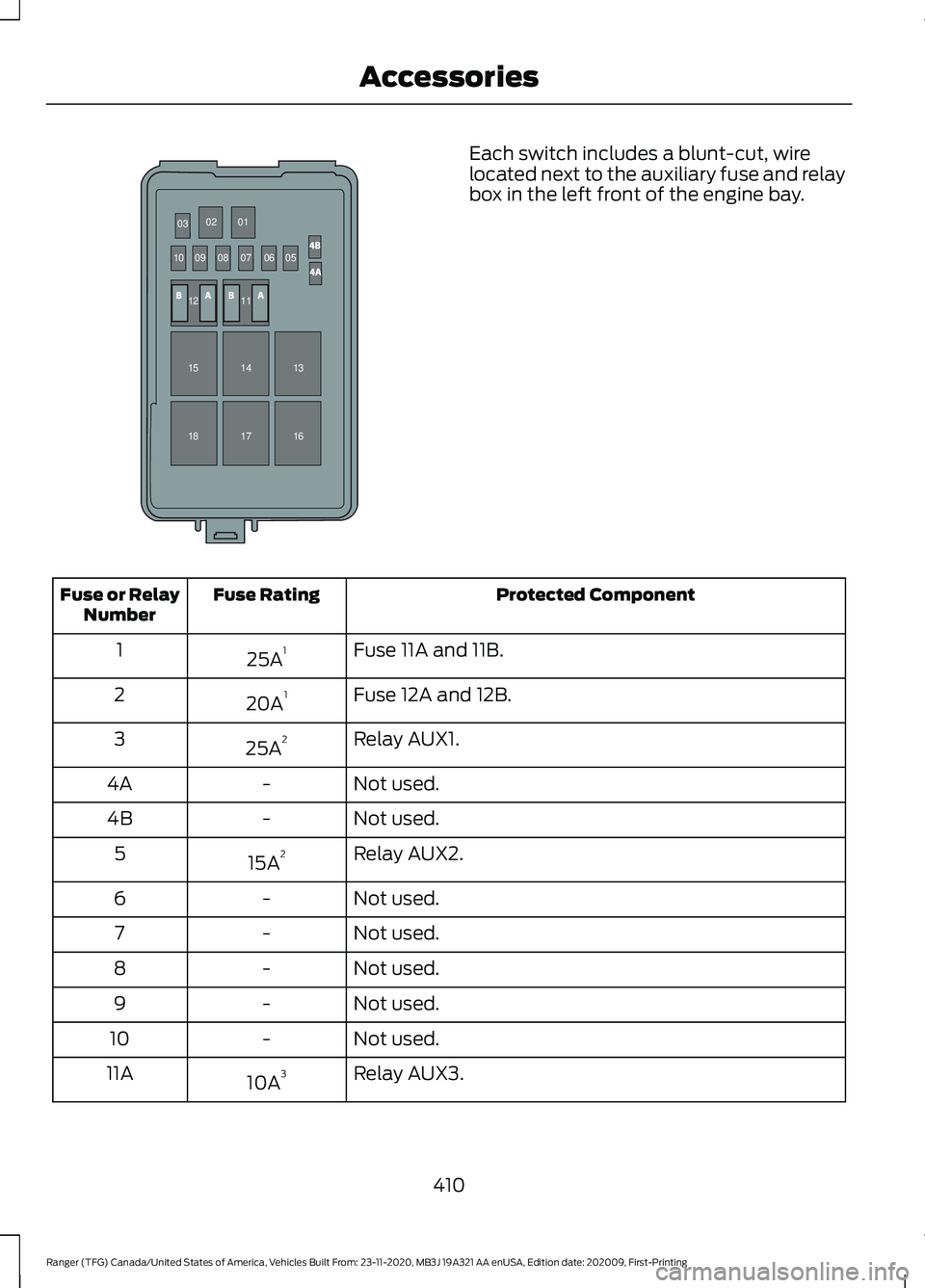
Each switch includes a blunt-cut, wire
located next to the auxiliary fuse and relay
box in the left front of the engine bay.
Protected Component
Fuse Rating
Fuse or Relay
Number
Fuse 11A and 11B.
25A 1
1
Fuse 12A and 12B.
20A 1
2
Relay AUX1.
25A 2
3
Not used.
-
4A
Not used.
-
4B
Relay AUX2.
15A 2
5
Not used.
-
6
Not used.
-
7
Not used.
-
8
Not used.
-
9
Not used.
-
10
Relay AUX3.
10A 3
11A
410
Ranger (TFG) Canada/United States of America, Vehicles Built From: 23-11-2020, MB3J 19A321 AA enUSA, Edition date: 202009, First-Printing Accessories030201
10 09
08
070605
11
15 12
1413
17 16
18E332362
Page 414 of 475
Protected Component
Fuse Rating
Fuse or Relay
Number
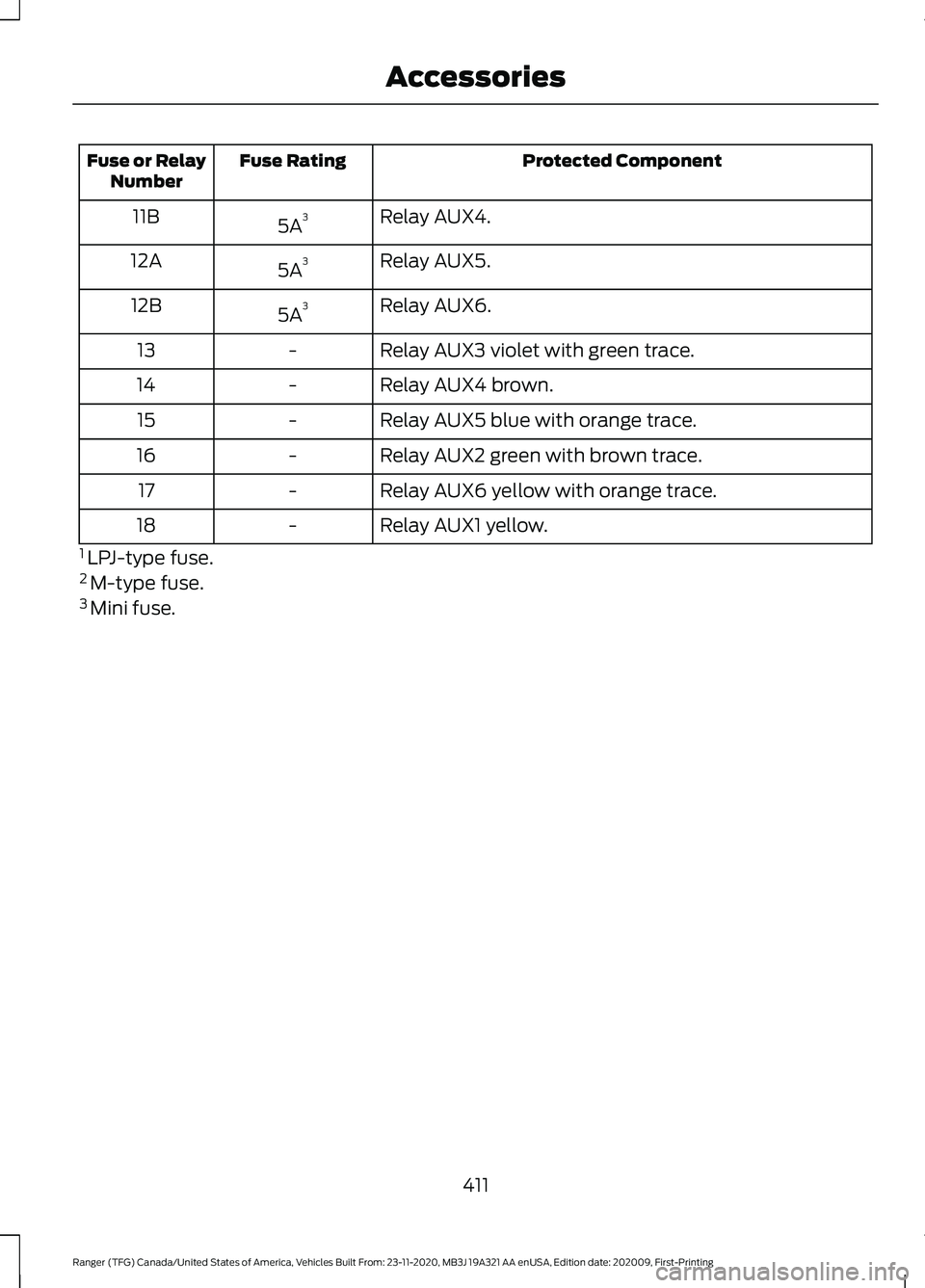
Relay AUX4.
5A 3
11B
Relay AUX5.
5A 3
12A
Relay AUX6.
5A 3
12B
Relay AUX3 violet with green trace.
-
13
Relay AUX4 brown.
-
14
Relay AUX5 blue with orange trace.
-
15
Relay AUX2 green with brown trace.
-
16
Relay AUX6 yellow with orange trace.
-
17
Relay AUX1 yellow.
-
18
1 LPJ-type fuse.
2 M-type fuse.
3 Mini fuse.
411
Ranger (TFG) Canada/United States of America, Vehicles Built From: 23-11-2020, MB3J 19A321 AA enUSA, Edition date: 202009, First-Printing Accessories
Page 415 of 475
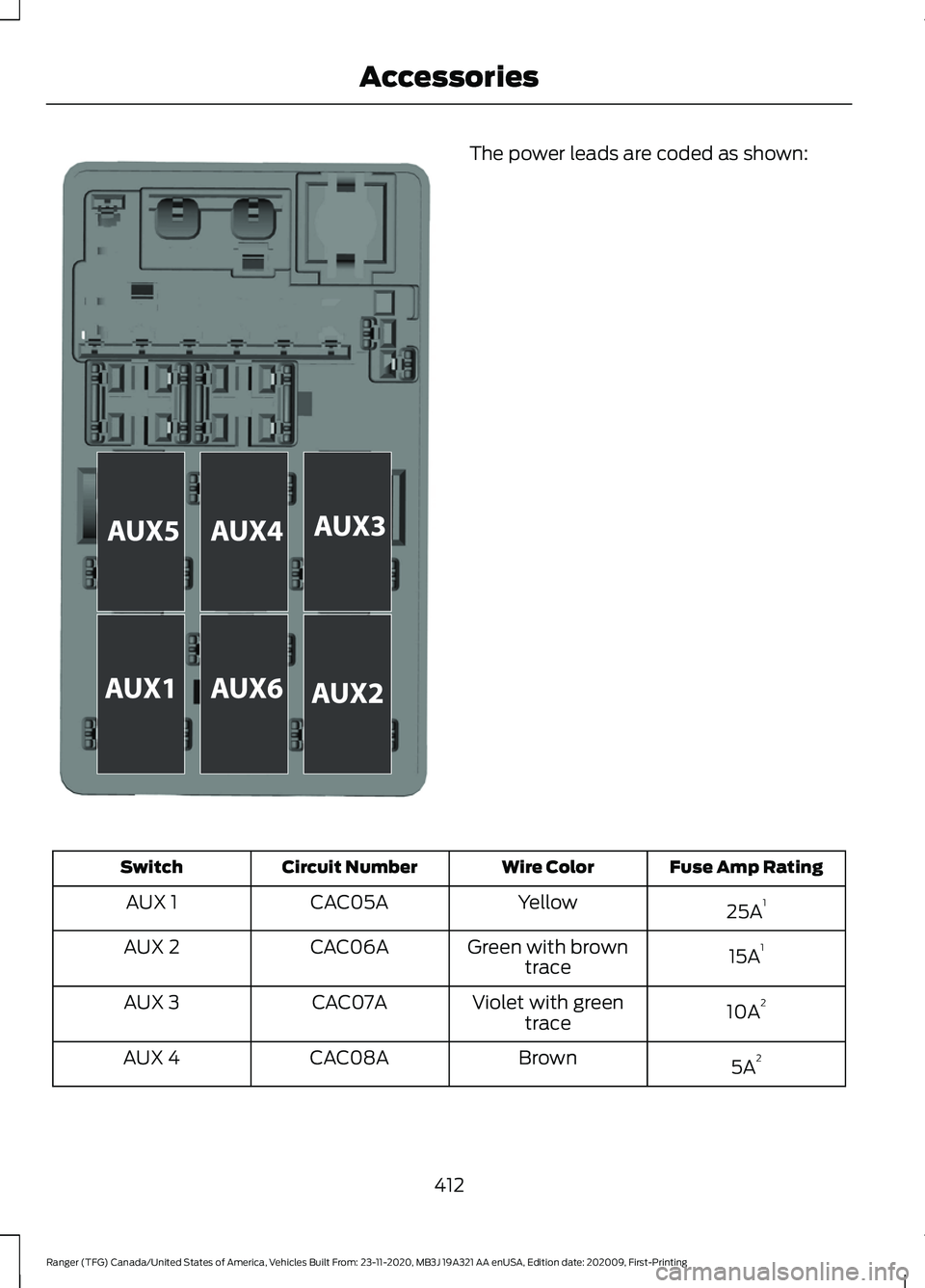
The power leads are coded as shown:
Fuse Amp Rating
Wire Color
Circuit Number
Switch
25A1
Yellow
CAC05A
AUX 1
15A1
Green with brown
trace
CAC06A
AUX 2
10A2
Violet with green
trace
CAC07A
AUX 3
5A2
Brown
CAC08A
AUX 4
412
Ranger (TFG) Canada/United States of America, Vehicles Built From: 23-11-2020, MB3J 19A321 AA enUSA, Edition date: 202009, First-Printing AccessoriesE333655
Page 416 of 475
Fuse Amp Rating
Wire Color
Circuit Number
Switch
5A2
Blue with orange
trace
CAC13A
AUX 5
5A2
Yellow with orange
trace
CAC14A
AUX 6
1 M-type fuse.
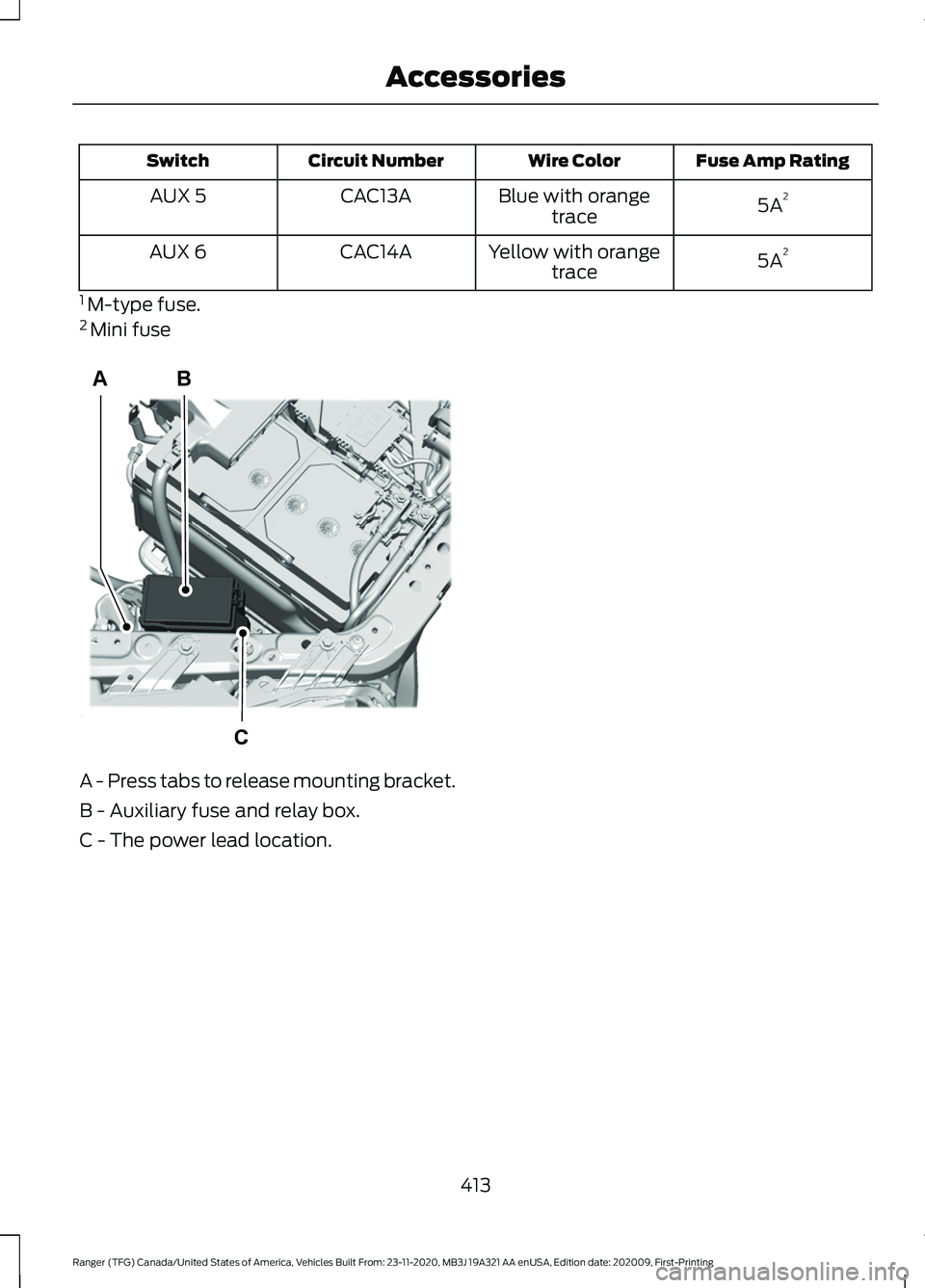
2 Mini fuse A - Press tabs to release mounting bracket.
B - Auxiliary fuse and relay box.
C - The power lead location.
413
Ranger (TFG) Canada/United States of America, Vehicles Built From: 23-11-2020, MB3J 19A321 AA enUSA, Edition date: 202009, First-Printing AccessoriesB
C
AE332775