instrument panel FORD RANGER 2021 Owner's Manual
[x] Cancel search | Manufacturer: FORD, Model Year: 2021, Model line: RANGER, Model: FORD RANGER 2021Pages: 475, PDF Size: 7.9 MB
Page 357 of 475
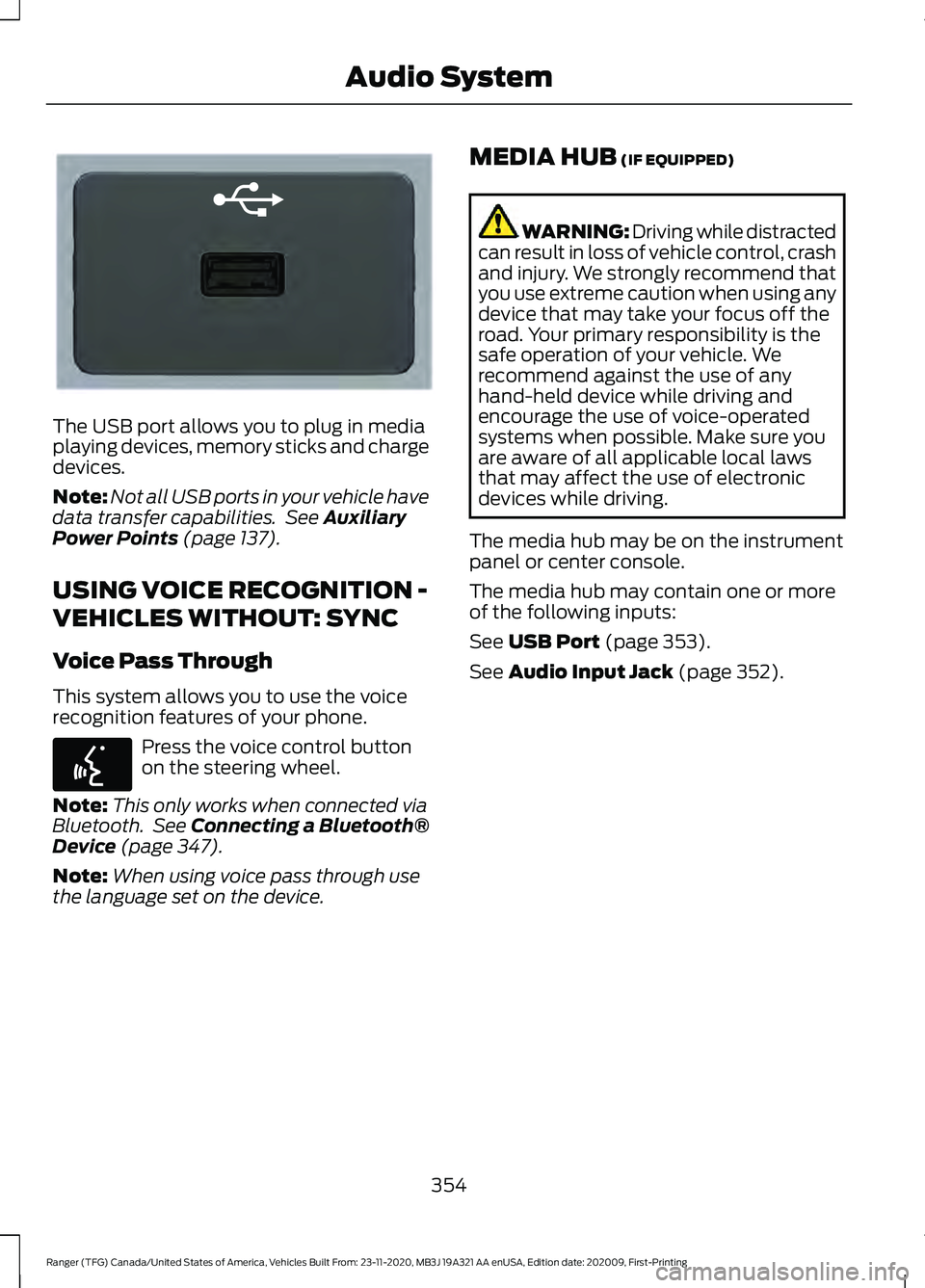
The USB port allows you to plug in media
playing devices, memory sticks and charge
devices.
Note:
Not all USB ports in your vehicle have
data transfer capabilities. See Auxiliary
Power Points (page 137).
USING VOICE RECOGNITION -
VEHICLES WITHOUT: SYNC
Voice Pass Through
This system allows you to use the voice
recognition features of your phone. Press the voice control button
on the steering wheel.
Note: This only works when connected via
Bluetooth. See
Connecting a Bluetooth®
Device (page 347).
Note: When using voice pass through use
the language set on the device. MEDIA HUB
(IF EQUIPPED) WARNING: Driving while distracted
can result in loss of vehicle control, crash
and injury. We strongly recommend that
you use extreme caution when using any
device that may take your focus off the
road. Your primary responsibility is the
safe operation of your vehicle. We
recommend against the use of any
hand-held device while driving and
encourage the use of voice-operated
systems when possible. Make sure you
are aware of all applicable local laws
that may affect the use of electronic
devices while driving.
The media hub may be on the instrument
panel or center console.
The media hub may contain one or more
of the following inputs:
See
USB Port (page 353).
See
Audio Input Jack (page 352).
354
Ranger (TFG) Canada/United States of America, Vehicles Built From: 23-11-2020, MB3J 19A321 AA enUSA, Edition date: 202009, First-Printing Audio SystemE201595 E142599
Page 385 of 475
Select USB.
Note: The system indexes your music
before you can play it.
Searching for Tracks on a USB or Media
Player
Select Browse.
Select a track.
Note: Select the cover art to view
information about the current track.
Note: You can also browse by album, artist,
audiobook, genre, playlist, podcast or track
name.
Repeating Tracks on a USB or Media
Player Select the repeat icon to repeat
tracks.
Note: You can repeat one track or all tracks
on an audio format USB or media player.
You can repeat one track, all tracks or all
tracks in one folder on a USB or media
player.
Note: A small number one appears next to
the repeat icon to indicate that a track is set
to repeat. A small folder icon appears next
to it to indicate that a folder is set to repeat
Supported Devices
The system supports most USB and media
players, including iOS and Android devices.
Supported File Formats
The system supports the following file
formats:
• MP3, MP4, WMA, WAV, AAC, AIFF, APE,
DSD, and FLAC audio file formats.
• MP3, WMA, WAV, M4A, M4B, AAC, and
FLAC file extensions.
• FAT, exFAT, and NTFS file systems. Audio File Metadata
The system organizes files on your USB or
media player by metadata tags. Metadata
tags contain information about the file. If
the metadata tags for the files on your USB
or media player contain no information,
the system classifies them as unknown.
The system can index up to 50000 tracks
on a USB device or media player, and up
to 10 devices.
CLIMATE
Touch the climate button on the
touchscreen to access your climate control
features.
Note:
You can switch temperature units
between Fahrenheit and Celsius. See
Settings
(page 393).
Accessing the Climate Control
Menu Touch the button to access
additional controls for the front
climate system.
Directing the Airflow Touch the button to direct
airflow to the windshield air
vents and de-mister.
Touch the button to direct
airflow to the instrument panel
air vents.
Touch the button to direct
airflow to the footwell air vents.
You can direct air through any combination
of these air vents.
382
Ranger (TFG) Canada/United States of America, Vehicles Built From: 23-11-2020, MB3J 19A321 AA enUSA, Edition date: 202009, First-Printing SYNC™ 3
(If Equipped) E265038 E244097
Page 386 of 475
Setting the Blower Motor Speed
Touch up or down to increase or
decrease the volume of air that
circulates in your vehicle.
Setting the Temperature
Touch up or down on the left-hand
temperature control to set the left-hand
temperature.
Note: This control also adjusts the
right-hand side temperature when you
switch off dual zone mode.
Touch up or down on the right-hand
temperature control to set the right-hand
temperature.
Switching Auto Mode On and Off Touch the button to switch on
automatic operation, then set
the temperature.
The system adjusts the blower motor
speed, air distribution, air conditioning
operation, and outside or recirculated air
to reach and maintain the temperature you
have set.
Switching the Air Conditioning On
and Off A pop-up appears on the screen
to display the air conditioning
options.
MAX A/C: Touch the button to activate
and maximize cooling. The driver and
passenger temperatures are set to LO,
recirculated air flows through the
instrument panel vents, air conditioning
automatically turns on and the fan
automatically adjusts to the highest speed.
A/C:
Touch to switch the air conditioning
on or off. Use A/C with recirculated air to
improve cooling performance and
efficiency. Note:
In certain conditions, such as
maximum defrost, the air conditioning
compressor may continue to operate even
though you switch off the air conditioning.
Switching the Climate Control On
and Off Touch the button.
Switching the Climate Controlled
Seats On and Off Touch the button to cycle
through the various climate
controlled seat settings.
Switching Dual Zone Mode On and
Off Touch the button to switch on
temperature control for the
right-hand side of the vehicle.
Switching the Heated Exterior
Mirrors On and Off Touch the button.
Switching the Heated Windshield
On and Off Touch the button to clear the
windshield of thin ice and fog.
The heated windshield turns off
after a short period of time.
Switching the Heated Rear
Window On and Off Touch the button to clear the
rear window of thin ice and fog.
383
Ranger (TFG) Canada/United States of America, Vehicles Built From: 23-11-2020, MB3J 19A321 AA enUSA, Edition date: 202009, First-Printing SYNC™ 3
(If Equipped) E265282 E265280 E266189 E184884
Page 387 of 475
Switching the Heated Seats On
and Off
Touch the button to cycle
through the various heat
settings.
Switching the Heated Steering
Wheel On and Off Touch the button.
Switching Maximum Air
Conditioning On and Off Touch the button for maximum
cooling.
Recirculated air flows through the
instrument panel air vents, air conditioning
turns on and the blower motor adjusts to
the highest speed.
Switching Maximum Defrost On
and Off Touch the button for maximum
defrosting.
Air flows through the windshield air vents,
and the blower motor adjusts to the
highest speed.
You can also use this setting to defog and
clear the windshield of a thin covering of
ice.
Note: To prevent window fogging, you
cannot select recirculated air when
maximum defrost is on.
Note: The heated rear window also turns
on when you select maximum defrost. Switching Recirculated Air On and
Off Touch the button to switch
between outside air and
recirculated air.
The air currently in the passenger
compartment recirculates. This may
reduce the time needed to cool the interior,
when used with A/C, and reduce unwanted
odors from entering your vehicle.
Note: Recirculated air may turn off, or
prevent you from switching on, in all air flow
modes except MAX A/C to reduce the risk
of fogging. Recirculation may also turn on
and off in various air distribution control
combinations during hot weather to improve
cooling efficiency.
Switching the Ventilated Seats On
and Off Touch the button to cycle
through the various ventilated
seat settings.
Accessing Rear Climate Controls Touch the button to access
additional controls for the rear
climate system.
Rear Climate Control Lock
Indicator Touch the button.
When on, you can only operate
the rear passenger settings
through the front controls.
Switching Rear Auto Mode On and
Off Touch the button to switch on
rear automatic operation, then
set the temperature.
384
Ranger (TFG) Canada/United States of America, Vehicles Built From: 23-11-2020, MB3J 19A321 AA enUSA, Edition date: 202009, First-Printing SYNC™ 3
(If Equipped) E268558 E270447 E265289
Page 412 of 475
AUXILIARY SWITCHES
For maximum vehicle performance, keep
the following information in mind when
adding accessories or equipment to your
vehicle:
•
When adding accessories, equipment,
passengers and luggage to your
vehicle, do not exceed the total weight
capacity of the vehicle or of the front
or rear axle (GVWR or GAWR as
indicated on the Safety Compliance
Certification label). Ask an authorized
dealer for specific weight information.
• The Federal Communications
Commission (FCC) and Canadian
Radio Telecommunications
Commission (CRTC) regulate the use
of mobile communications systems
equipped with radio transmitters, for
example, two-way radios, telephones
and theft alarms. Any such equipment
installed in your vehicle should comply
with Federal Communications
Commission (FCC) and Canadian
Radio Telecommunications
Commission (CRTC) regulations, and
should be installed by an authorized
dealer.
• An authorized dealer needs to install
mobile communications systems.
Improper installation may harm the
operation of your vehicle, particularly
if the manufacturer did not design the
mobile communication system
specifically for automotive use.
• If you or an authorized Ford dealer add
any non-Ford electrical or electronic
accessories or components to your
vehicle, you may adversely affect
battery performance and durability. In
addition, you may also adversely affect
the performance of other electrical
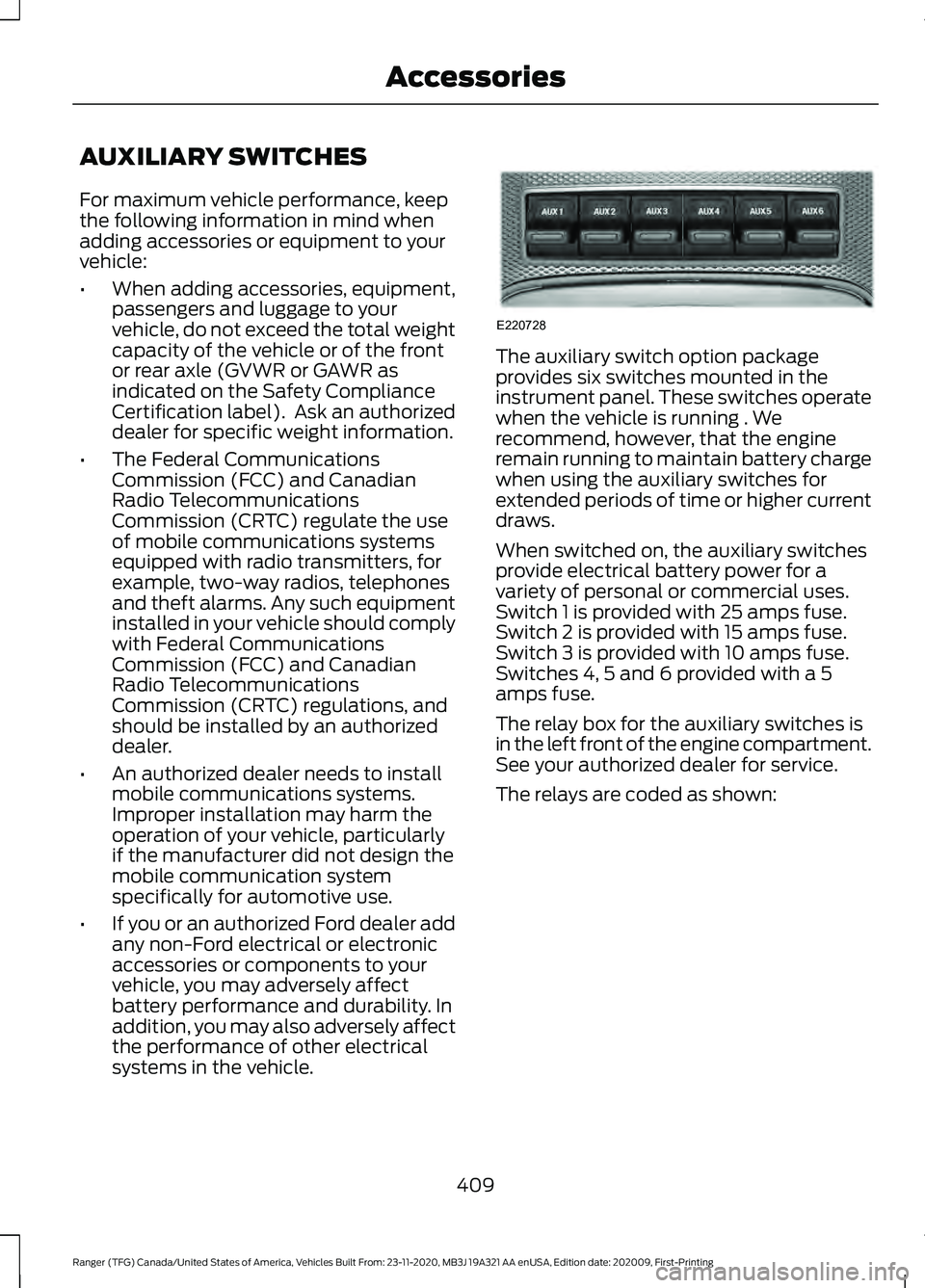
systems in the vehicle. The auxiliary switch option package
provides six switches mounted in the
instrument panel. These switches operate
when the vehicle is running . We
recommend, however, that the engine
remain running to maintain battery charge
when using the auxiliary switches for
extended periods of time or higher current
draws.
When switched on, the auxiliary switches
provide electrical battery power for a
variety of personal or commercial uses.
Switch 1 is provided with 25 amps fuse.
Switch 2 is provided with 15 amps fuse.
Switch 3 is provided with 10 amps fuse.
Switches 4, 5 and 6 provided with a 5
amps fuse.
The relay box for the auxiliary switches is
in the left front of the engine compartment.
See your authorized dealer for service.
The relays are coded as shown:
409
Ranger (TFG) Canada/United States of America, Vehicles Built From: 23-11-2020, MB3J 19A321 AA enUSA, Edition date: 202009, First-Printing AccessoriesE220728
Page 464 of 475
Engine Oil.............................................................
330
Front Axle.............................................................. 333
Fuel Tank................................................................ 331
Grease..................................................................... 331
Hydraulic Brake System.................................. 332
Locks....................................................................... 332
Rear Axle............................................................... 333
Transfer Case....................................................... 332
Washer Reservoir............................................... 334
Cargo Lamps....................................................82
Car Wash See: Cleaning the Exterior.............................. 284
Catalytic Converter
.......................................157
On-Board Diagnostics (OBD-II)................... 158
Readiness for Inspection and Maintenance (I/M) Testing................................................... 159
Center Console..............................................139
Changing a Bulb...........................................278 Approach Lamp and Side Direction
Indicator........................................................... 280
Central High Mounted Brake Lamp............282
Front Fog Lamps............................................... 280
Front Side Marker Bulb.................................... 279
License Plate Lamp.......................................... 282
Rear Lamps......................................................... 280
Replacing LED Fog Lamp Bulbs.................. 280
Replacing the Headlamp Bulbs ................... 278
Changing a Fuse..........................................260 Fuses...................................................................... 260
Changing a Road Wheel
.............................312
Dissimilar Spare Wheel and Tire Assembly
Information....................................................... 312
Installing a Road Wheel.................................. 320
Jacking and Lifting Points................................ 318
Removing a Road Wheel................................. 319
Spare Wheel......................................................... 317
Stowing the Flat Tire........................................ 320
Stowing the Tool Kit - SuperCrew...............322
Stowing the Vehicle Jack and Tool Kit - SuperCab.......................................................... 321
Stowing the Vehicle Jack - SuperCrew........................................................ 321
Tire Change Procedure..................................... 313
Vehicle Jack........................................................... 314
Changing the 12V Battery..........................274 Remove and Reinstall the Battery...............275
Changing the Engine Air Filter................266 Changing the Vehicle Wi-Fi Hotspot
Name or Password
....................................341
Changing the Wiper Blades.....................276 Changing the Windshield Wiper
Blades................................................................ 276
Charging the 12V Battery...........................273 Battery Management System....................... 273
Checking MyKey System Status..............60 MyKey Distance.................................................... 60
Number of Admin Keys....................................... 61
Number of MyKeys............................................... 61
Checking the Wiper Blades
......................276
Child Restraint and Seatbelt Maintenance.................................................38
Child Restraint Positioning
.........................30
Child Safety.......................................................19
General Information............................................. 19
Child Safety Locks...........................................31 Left-Hand Side...................................................... 32
Right-Hand Side................................................... 32
Cleaning Leather Seats.............................287
Cleaning Products
.......................................283
Materials............................................................... 283
Cleaning the Engine....................................285
Cleaning the Exterior..................................284 Cleaning the Exterior Lamps......................... 284
Cleaning the Exterior Precautions...............284
Exterior Chrome Parts..................................... 284
Exterior Plastic Parts........................................ 284
Stripes or Graphics........................................... 284
Underbody........................................................... 285
Under Hood......................................................... 285
Cleaning the Instrument Panel and Instrument Cluster Lens.........................287
Cleaning the Interior...................................286 Mirrors.................................................................... 286
Cleaning the Wheels..................................288
Cleaning the Windows and Wiper Blades...........................................................286
Clearing All MyKeys......................................60
Climate............................................................382 Accessing Rear Climate Controls................384
Accessing the Climate Control Menu.........382
Directing the Airflow......................................... 382
Rear Climate Control Lock Indicator..........384
Setting the Blower Motor Speed.................383
Setting the Temperature................................ 383
Switching Auto Mode On and Off...............383
461
Ranger (TFG) Canada/United States of America, Vehicles Built From: 23-11-2020, MB3J 19A321 AA enUSA, Edition date: 202009, First-Printing Index
Page 468 of 475
Heated Windshield.......................................122
Windshield Wiper De-Icer................................ 122
Heating See: Climate Control........................................... 117
Hill Start Assist..............................................174 Switching the System On and Off................175
Using Hill Start Assist........................................ 174
Hints on Controlling the Interior Climate..........................................................120
Defogging the Side Windows in Cold Weather............................................................. 122
General Hints....................................................... 120
Quickly Cooling the Interior.............................. 121
Quickly Heating the Interior............................ 120
Recommended Settings for Cooling............121
Recommended Settings for Heating............121
Hints on Driving With Anti-Lock Brakes.............................................................173
Hood Lock See: Opening and Closing the Hood..........263
Horn.....................................................................74
How Does the Rear Occupant Alert System Work
................................................131
I
Ignition Switch................................................141 Starting the Engine............................................ 142
Switching the Ignition Off................................ 142
Switching the Ignition On................................ 142
Switching the Ignition to Accessory Mode................................................................... 142
In California (U.S. Only)..............................241
Information Display Control.......................74
Information Displays....................................96 General Information........................................... 96
Information Messages
...............................104
4WD........................................................................\
.. 116
Adaptive Cruise Control................................... 105
Airbag...................................................................... 105
Alarm and Security............................................ 105
Auto-Start-Stop................................................. 106
Battery and Charging System........................ 107
Blind Spot Information and Cross Traffic Alert System.................................................... 107
Doors and Locks................................................. 108
Driver Alert............................................................ 108
Drivetrain............................................................... 109Engine.....................................................................
109
Fuel........................................................................\
.. 109
Keys and Intelligent Access............................. 110
Lane Keeping System.......................................... 111
Maintenance........................................................... 111
MyKey....................................................................... 112
Park Aid.................................................................... 113
Power Steering..................................................... 113
Pre-Collision Assist............................................. 113
Remote Start......................................................... 114
Starting System ................................................... 114
Tire Pressure Monitoring System................... 114
Traction Control................................................... 114
Trail Control........................................................... 115
Trailer........................................................................\
115
Installing Child Restraints............................21 Child Restraints...................................................... 21
Combining Seatbelt and LATCH Lower Anchors for Attaching Child
Restraints........................................................... 25
Front Seat Tether Strap Attachment (SuperCab)....................................................... 26
Rear Seat Tether Strap Attachment (SuperCab)........................................................ 27
Use of Inboard Lower Anchors from the Outermost Seating Positions (Center
Seating Use) ..................................................... 25
Using Lap and Shoulder Belts ......................... 21
Using Lower Anchors and Tethers for CHildren (LATCH)............................................ 23
Using Tether Straps............................................. 25
Instrument Cluster
........................................89
Instrument Lighting Dimmer......................78 Vehicles With Front Fog Lamps...................... 79
Vehicles Without Front Fog Lamps...............79
Instrument Panel.............................................17
Interior Lamps
..................................................81
Courtesy Lamp....................................................... 81
Reading Lamps..................................................... 82
Rear Courtesy Lamp........................................... 82
Interior Mirror
....................................................87
Automatic Dimming Mirror.............................. 88
Manual Dimming Mirror..................................... 87
Introduction.........................................................7
465
Ranger (TFG) Canada/United States of America, Vehicles Built From: 23-11-2020, MB3J 19A321 AA enUSA, Edition date: 202009, First-Printing Index