trailer FORD RANGER 2021 Owners Manual
[x] Cancel search | Manufacturer: FORD, Model Year: 2021, Model line: RANGER, Model: FORD RANGER 2021Pages: 475, PDF Size: 7.9 MB
Page 7 of 475
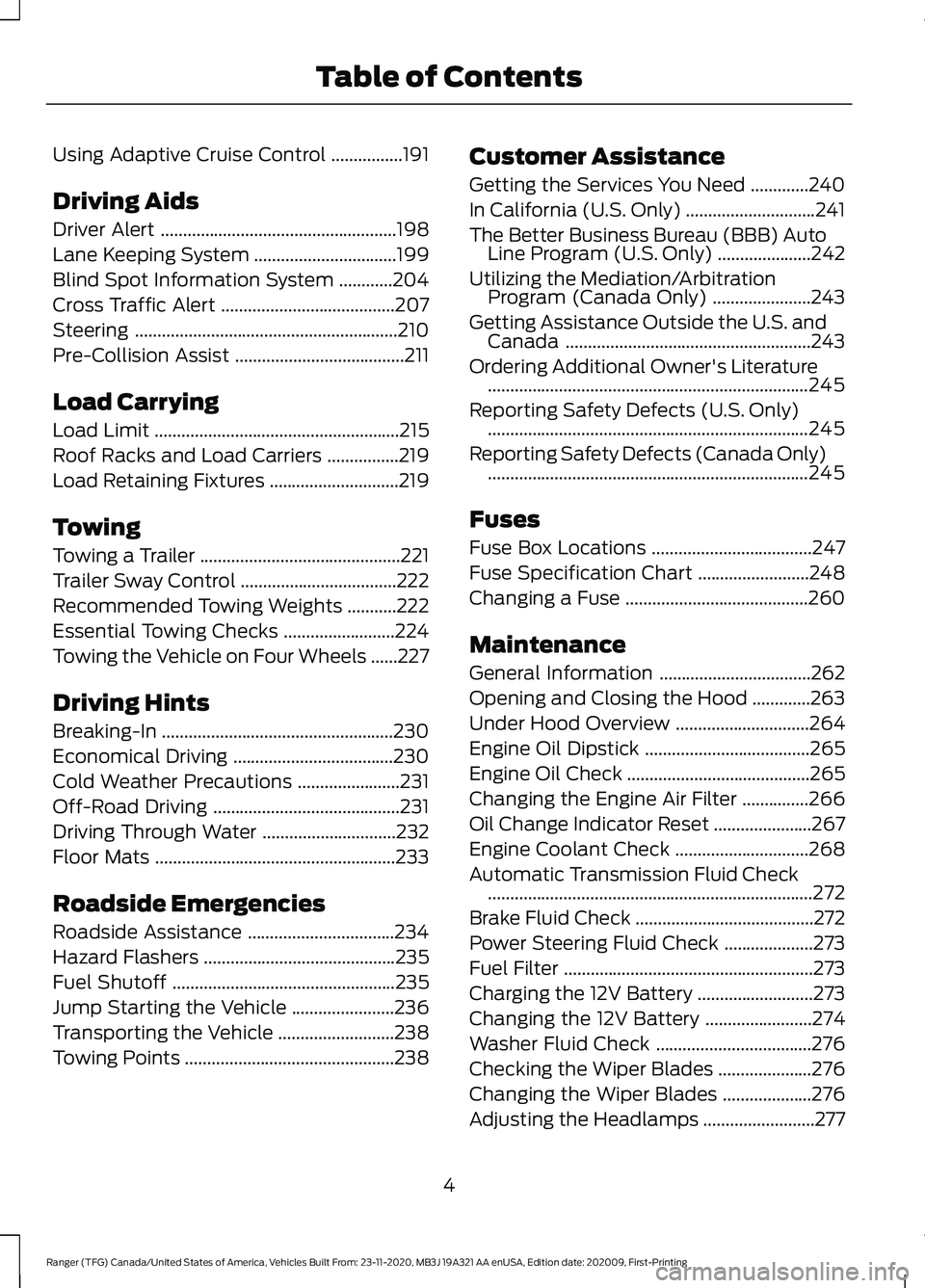
Using Adaptive Cruise Control
................191
Driving Aids
Driver Alert .....................................................
198
Lane Keeping System ................................
199
Blind Spot Information System ............
204
Cross Traffic Alert .......................................
207
Steering ...........................................................
210
Pre-Collision Assist ......................................
211
Load Carrying
Load Limit .......................................................
215
Roof Racks and Load Carriers ................
219
Load Retaining Fixtures .............................
219
Towing
Towing a Trailer .............................................
221
Trailer Sway Control ...................................
222
Recommended Towing Weights ...........
222
Essential Towing Checks .........................
224
Towing the Vehicle on Four Wheels ......
227
Driving Hints
Breaking-In ....................................................
230
Economical Driving ....................................
230
Cold Weather Precautions .......................
231
Off-Road Driving ..........................................
231
Driving Through Water ..............................
232
Floor Mats ......................................................
233
Roadside Emergencies
Roadside Assistance .................................
234
Hazard Flashers ...........................................
235
Fuel Shutoff ..................................................
235
Jump Starting the Vehicle .......................
236
Transporting the Vehicle ..........................
238
Towing Points ...............................................
238Customer Assistance
Getting the Services You Need
.............
240
In California (U.S. Only) .............................
241
The Better Business Bureau (BBB) Auto Line Program (U.S. Only) .....................
242
Utilizing the Mediation/Arbitration Program (Canada Only) ......................
243
Getting Assistance Outside the U.S. and Canada .......................................................
243
Ordering Additional Owner's Literature ........................................................................\
245
Reporting Safety Defects (U.S. Only) ........................................................................\
245
Reporting Safety Defects (Canada Only) ........................................................................\
245
Fuses
Fuse Box Locations ....................................
247
Fuse Specification Chart .........................
248
Changing a Fuse .........................................
260
Maintenance
General Information ..................................
262
Opening and Closing the Hood .............
263
Under Hood Overview ..............................
264
Engine Oil Dipstick .....................................
265
Engine Oil Check .........................................
265
Changing the Engine Air Filter ...............
266
Oil Change Indicator Reset ......................
267
Engine Coolant Check ..............................
268
Automatic Transmission Fluid Check ........................................................................\
.
272
Brake Fluid Check ........................................
272
Power Steering Fluid Check ....................
273
Fuel Filter ........................................................
273
Charging the 12V Battery ..........................
273
Changing the 12V Battery ........................
274
Washer Fluid Check ...................................
276
Checking the Wiper Blades .....................
276
Changing the Wiper Blades ....................
276
Adjusting the Headlamps .........................
277
4
Ranger (TFG) Canada/United States of America, Vehicles Built From: 23-11-2020, MB3J 19A321 AA enUSA, Edition date: 202009, First-Printing Table of Contents
Page 102 of 475
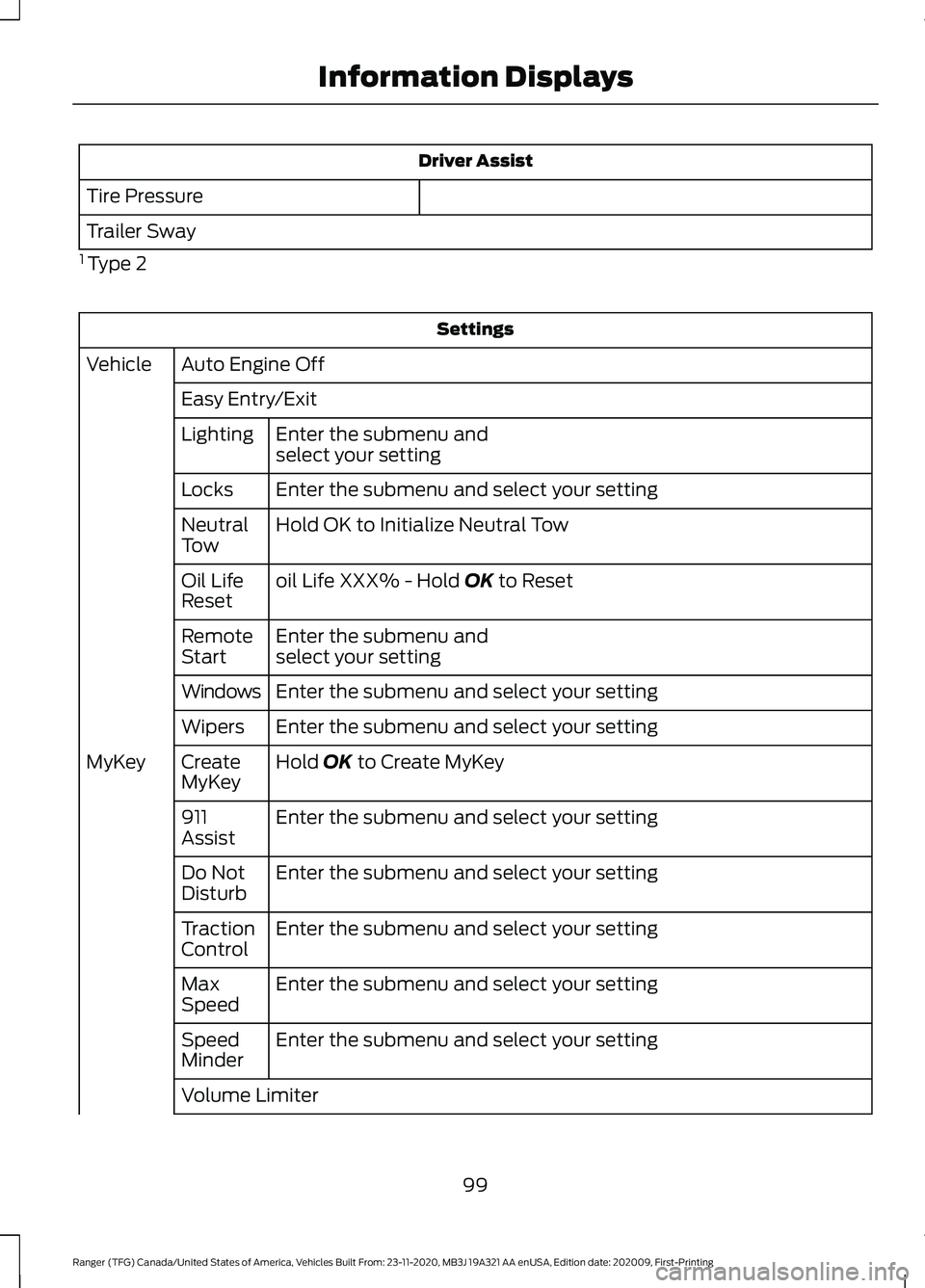
Driver Assist
Tire Pressure
Trailer Sway
1 Type 2 Settings
Auto Engine Off
Vehicle
Easy Entry/ExitEnter the submenu and
select your setting
Lighting
Enter the submenu and select your setting
Locks
Hold OK to Initialize Neutral Tow
Neutral
Tow
oil Life XXX% - Hold OK to Reset
Oil Life
Reset
Enter the submenu and
select your setting
Remote
Start
Enter the submenu and select your setting
Windows
Enter the submenu and select your setting
Wipers
Hold
OK to Create MyKey
Create
MyKey
MyKey
Enter the submenu and select your setting
911
Assist
Enter the submenu and select your setting
Do Not
Disturb
Enter the submenu and select your setting
Traction
Control
Enter the submenu and select your setting
Max
Speed
Enter the submenu and select your setting
Speed
Minder
Volume Limiter
99
Ranger (TFG) Canada/United States of America, Vehicles Built From: 23-11-2020, MB3J 19A321 AA enUSA, Edition date: 202009, First-Printing Information Displays
Page 105 of 475
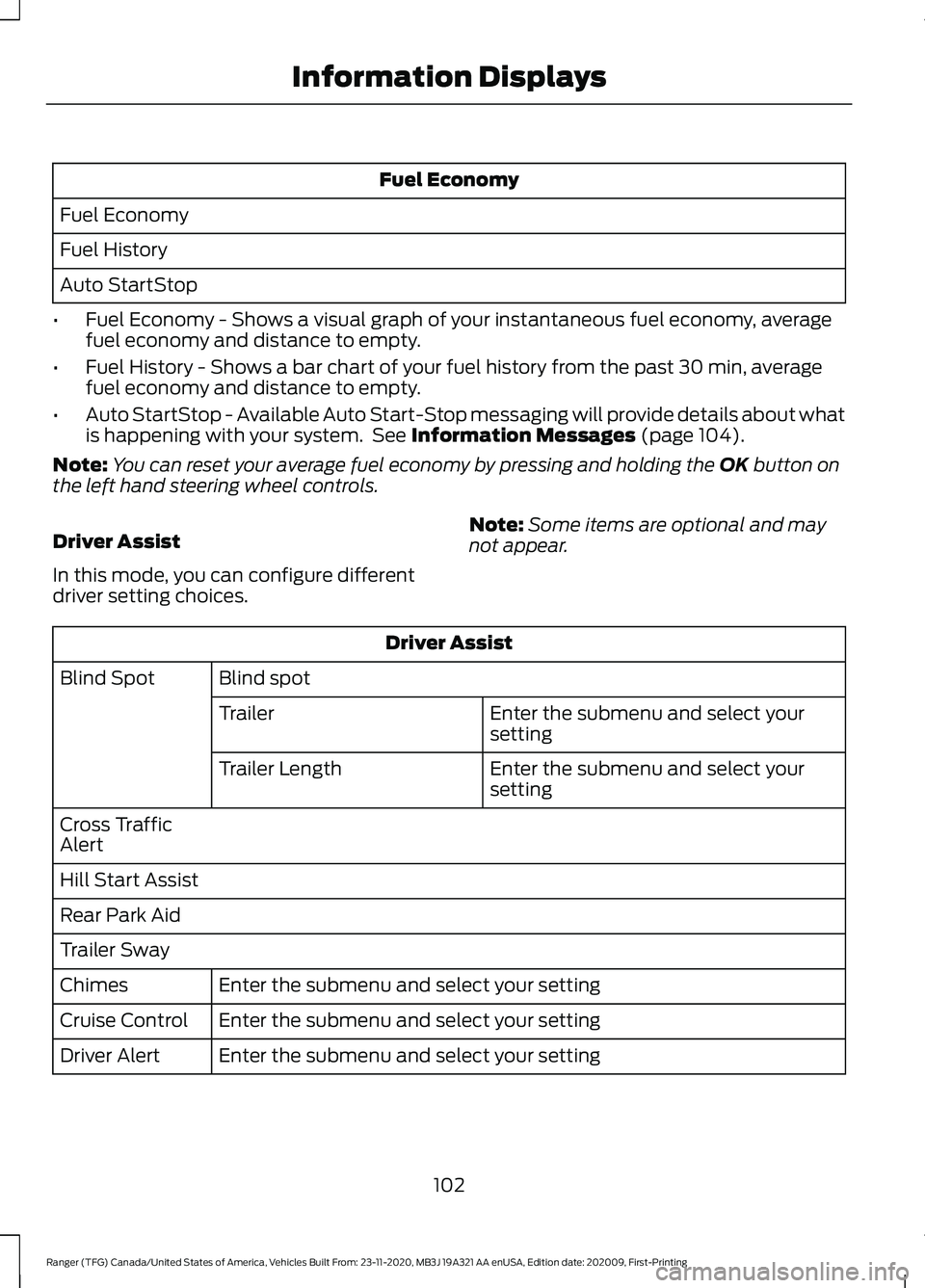
Fuel Economy
Fuel Economy
Fuel History
Auto StartStop
• Fuel Economy - Shows a visual graph of your instantaneous fuel economy, average
fuel economy and distance to empty.
• Fuel History - Shows a bar chart of your fuel history from the past 30 min, average
fuel economy and distance to empty.
• Auto StartStop - Available Auto Start-Stop messaging will provide details about what
is happening with your system. See Information Messages (page 104).
Note: You can reset your average fuel economy by pressing and holding the
OK button on
the left hand steering wheel controls.
Driver Assist
In this mode, you can configure different
driver setting choices. Note:
Some items are optional and may
not appear. Driver Assist
Blind spot
Blind Spot
Enter the submenu and select your
setting
Trailer
Enter the submenu and select your
setting
Trailer Length
Cross Traffic
Alert
Hill Start Assist
Rear Park Aid
Trailer Sway Enter the submenu and select your setting
Chimes
Enter the submenu and select your setting
Cruise Control
Enter the submenu and select your setting
Driver Alert
102
Ranger (TFG) Canada/United States of America, Vehicles Built From: 23-11-2020, MB3J 19A321 AA enUSA, Edition date: 202009, First-Printing Information Displays
Page 111 of 475
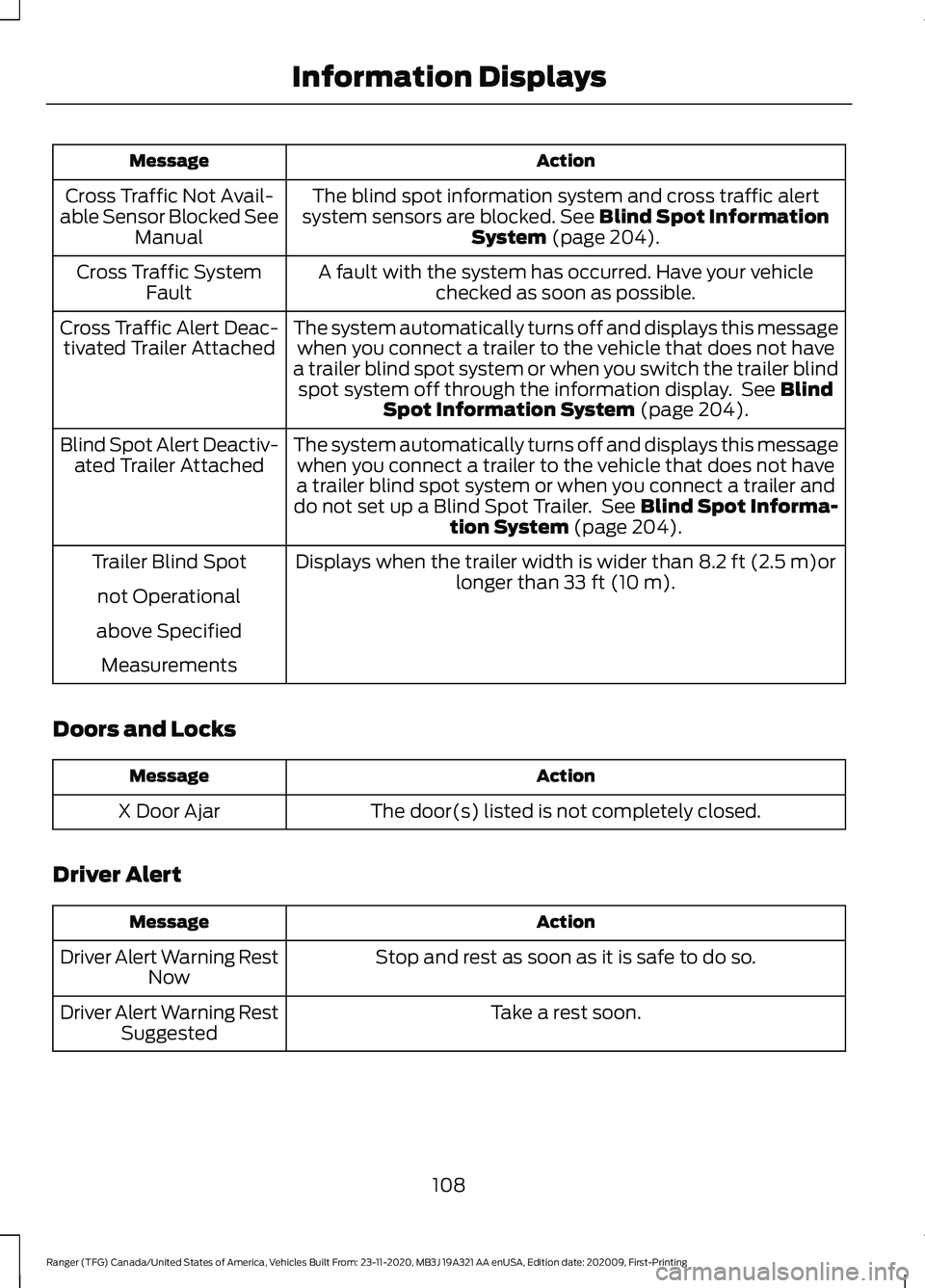
Action
Message
The blind spot information system and cross traffic alert
system sensors are blocked. See Blind Spot Information
System (page 204).
Cross Traffic Not Avail-
able Sensor Blocked See Manual
A fault with the system has occurred. Have your vehiclechecked as soon as possible.
Cross Traffic System
Fault
The system automatically turns off and displays this messagewhen you connect a trailer to the vehicle that does not have
a trailer blind spot system or when you switch the trailer blind spot system off through the information display. See
Blind
Spot Information System (page 204).
Cross Traffic Alert Deac-
tivated Trailer Attached
The system automatically turns off and displays this messagewhen you connect a trailer to the vehicle that does not have
a trailer blind spot system or when you connect a trailer and
do not set up a Blind Spot Trailer. See
Blind Spot Informa-
tion System (page 204).
Blind Spot Alert Deactiv-
ated Trailer Attached
Displays when the trailer width is wider than
8.2 ft (2.5 m)or
longer than 33 ft (10 m).
Trailer Blind Spot
not Operational
above Specified Measurements
Doors and Locks Action
Message
The door(s) listed is not completely closed.
X Door Ajar
Driver Alert Action
Message
Stop and rest as soon as it is safe to do so.
Driver Alert Warning Rest
Now
Take a rest soon.
Driver Alert Warning Rest
Suggested
108
Ranger (TFG) Canada/United States of America, Vehicles Built From: 23-11-2020, MB3J 19A321 AA enUSA, Edition date: 202009, First-Printing Information Displays
Page 118 of 475
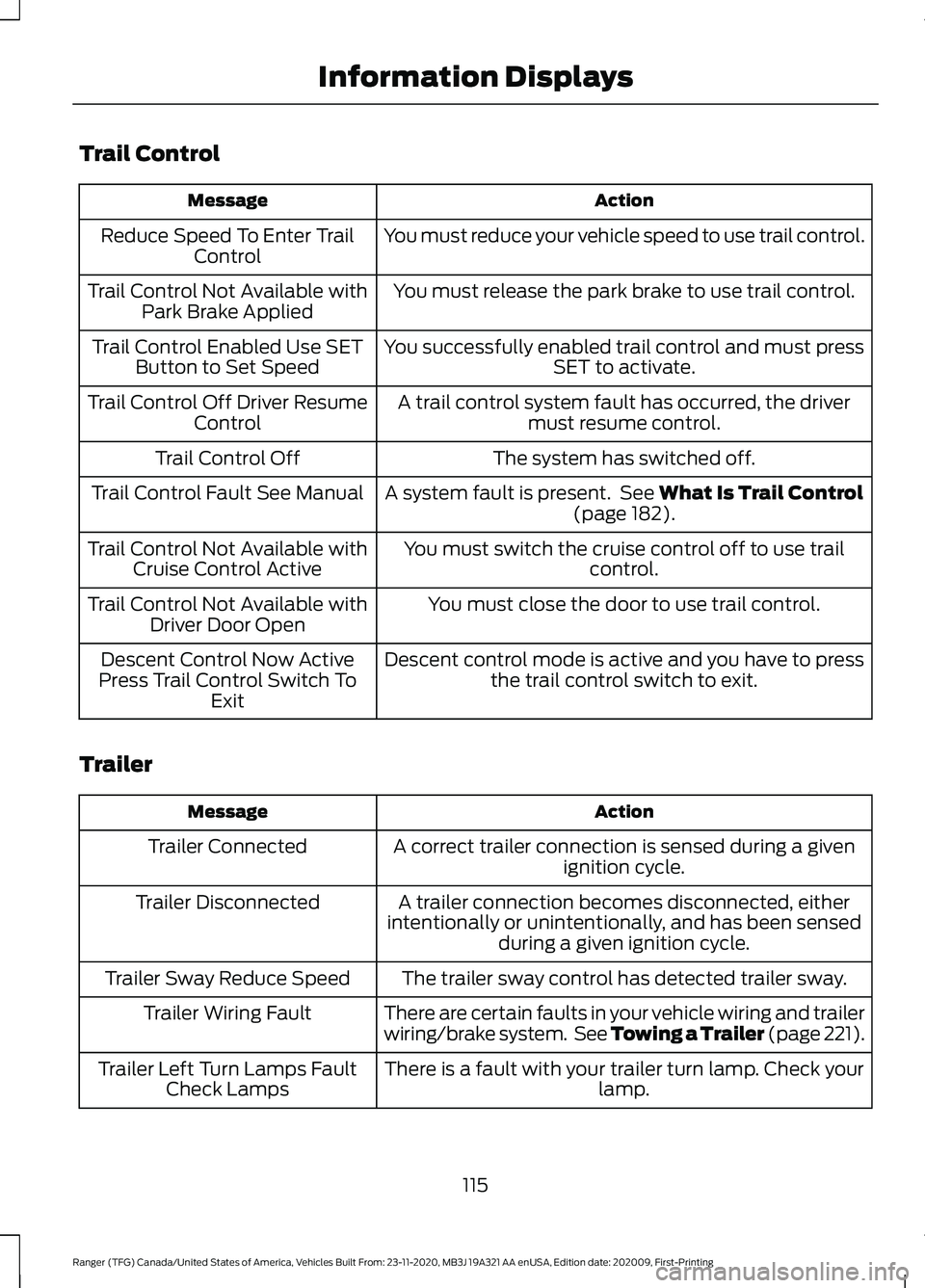
Trail Control
Action
Message
You must reduce your vehicle speed to use trail control.
Reduce Speed To Enter Trail
Control
You must release the park brake to use trail control.
Trail Control Not Available with
Park Brake Applied
You successfully enabled trail control and must pressSET to activate.
Trail Control Enabled Use SET
Button to Set Speed
A trail control system fault has occurred, the drivermust resume control.
Trail Control Off Driver Resume
Control
The system has switched off.
Trail Control Off
A system fault is present. See What Is Trail Control
(page 182).
Trail Control Fault See Manual
You must switch the cruise control off to use trailcontrol.
Trail Control Not Available with
Cruise Control Active
You must close the door to use trail control.
Trail Control Not Available with
Driver Door Open
Descent control mode is active and you have to pressthe trail control switch to exit.
Descent Control Now Active
Press Trail Control Switch To Exit
Trailer Action
Message
A correct trailer connection is sensed during a givenignition cycle.
Trailer Connected
A trailer connection becomes disconnected, either
intentionally or unintentionally, and has been sensed during a given ignition cycle.
Trailer Disconnected
The trailer sway control has detected trailer sway.
Trailer Sway Reduce Speed
There are certain faults in your vehicle wiring and trailer
wiring/brake system. See Towing a Trailer (page 221).
Trailer Wiring Fault
There is a fault with your trailer turn lamp. Check yourlamp.
Trailer Left Turn Lamps Fault
Check Lamps
115
Ranger (TFG) Canada/United States of America, Vehicles Built From: 23-11-2020, MB3J 19A321 AA enUSA, Edition date: 202009, First-Printing Information Displays
Page 119 of 475
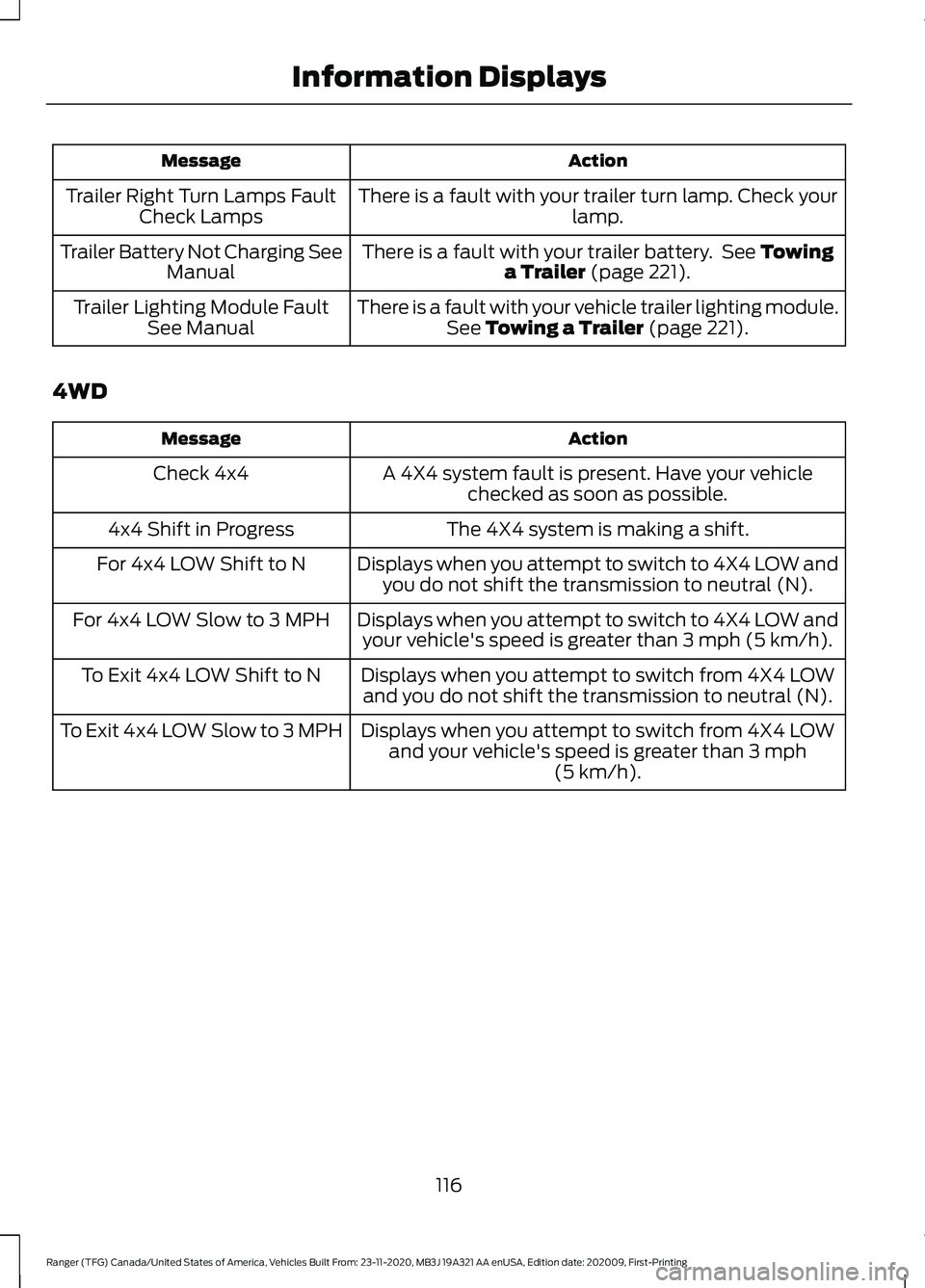
Action
Message
There is a fault with your trailer turn lamp. Check your lamp.
Trailer Right Turn Lamps Fault
Check Lamps
There is a fault with your trailer battery. See Towing
a Trailer (page 221).
Trailer Battery Not Charging See
Manual
There is a fault with your vehicle trailer lighting module.See
Towing a Trailer (page 221).
Trailer Lighting Module Fault
See Manual
4WD Action
Message
A 4X4 system fault is present. Have your vehiclechecked as soon as possible.
Check 4x4
The 4X4 system is making a shift.
4x4 Shift in Progress
Displays when you attempt to switch to 4X4 LOW andyou do not shift the transmission to neutral (N).
For 4x4 LOW Shift to N
Displays when you attempt to switch to 4X4 LOW andyour vehicle's speed is greater than
3 mph (5 km/h).
For 4x4 LOW Slow to 3 MPH
Displays when you attempt to switch from 4X4 LOWand you do not shift the transmission to neutral (N).
To Exit 4x4 LOW Shift to N
Displays when you attempt to switch from 4X4 LOWand your vehicle's speed is greater than
3 mph
(5 km/h).
To Exit 4x4 LOW Slow to 3 MPH
116
Ranger (TFG) Canada/United States of America, Vehicles Built From: 23-11-2020, MB3J 19A321 AA enUSA, Edition date: 202009, First-Printing Information Displays
Page 153 of 475
Some fuel stations, particularly those in
high altitude areas, offer fuels posted as
regular unleaded gasoline with an octane
rating below 87. The use of these fuels
could result in engine damage that will not
be covered by the vehicle warranty.
For best overall vehicle and engine
performance, premium fuel with an octane
rating of 91 or higher is recommended. The
performance gained by using premium fuel
is most noticeable in hot weather as well
as other conditions, for example when
towing a trailer. See Towing (page 221).
Do not be concerned if the engine
sometimes knocks lightly. However, if the
engine knocks heavily while using fuel with
the recommended octane rating, contact
an authorized dealer to prevent any engine
damage.
We recommend Top Tier detergent
gasolines, where available to help minimize
engine deposits and maintain optimal
vehicle and engine performance. For
additional information, refer to
www.toptiergas.com.
Note: Use of any fuel for which the vehicle
was not designed can impair the emission
control system, cause loss of vehicle
performance, and cause damage to the
engine which may not be covered by the
vehicle Warranty.
Do not use:
• Diesel fuel.
• Fuels containing kerosene or paraffin.
• Fuel containing more than 15% ethanol
or E85 fuel.
• Fuels containing methanol.
• Fuels containing metallic-based
additives, including manganese-based
compounds. •
Fuels containing the octane booster
additive, methylcyclopentadienyl
manganese tricarbonyl (MMT).
• Leaded fuel, using leaded fuel is
prohibited by law.
The use of fuels with metallic compounds
such as methylcyclopentadienyl
manganese tricarbonyl (commonly known
as MMT), which is a manganese-based
fuel additive, will impair engine
performance and affect the emission
control system.
FUEL FILLER FUNNEL
LOCATION
The fuel filler funnel is located under the
rear bench seat or behind the rear seat.
RUNNING OUT OF FUEL
Running out of fuel can cause damage not
covered by the vehicle Warranty.
If your vehicle runs out of fuel:
• Add a minimum of
1.3 gal (5 L) of fuel
to restart the engine.
• You may need to switch the ignition
from off to on several times after
refueling to allow the fuel system to
pump the fuel from the tank to the
engine. When restarting, cranking time
takes a few seconds longer than
normal.
Note: If your vehicle is on a steep slope,
more fuel may be required.
Filling a Portable Fuel Container WARNING:
Flow of fuel through a
fuel pump nozzle can produce static
electricity. This can cause a fire if you are
filling an ungrounded fuel container.
150
Ranger (TFG) Canada/United States of America, Vehicles Built From: 23-11-2020, MB3J 19A321 AA enUSA, Edition date: 202009, First-Printing Fuel and Refueling
Page 164 of 475
Sport Mode (S)
Switch on sport mode by shifting the
transmission selector lever to sport (S). In
sport (S), the transmission selects the
optimum gear for best performance. This
gear selection is typically lower than that
of drive (D), and the shifts are faster.
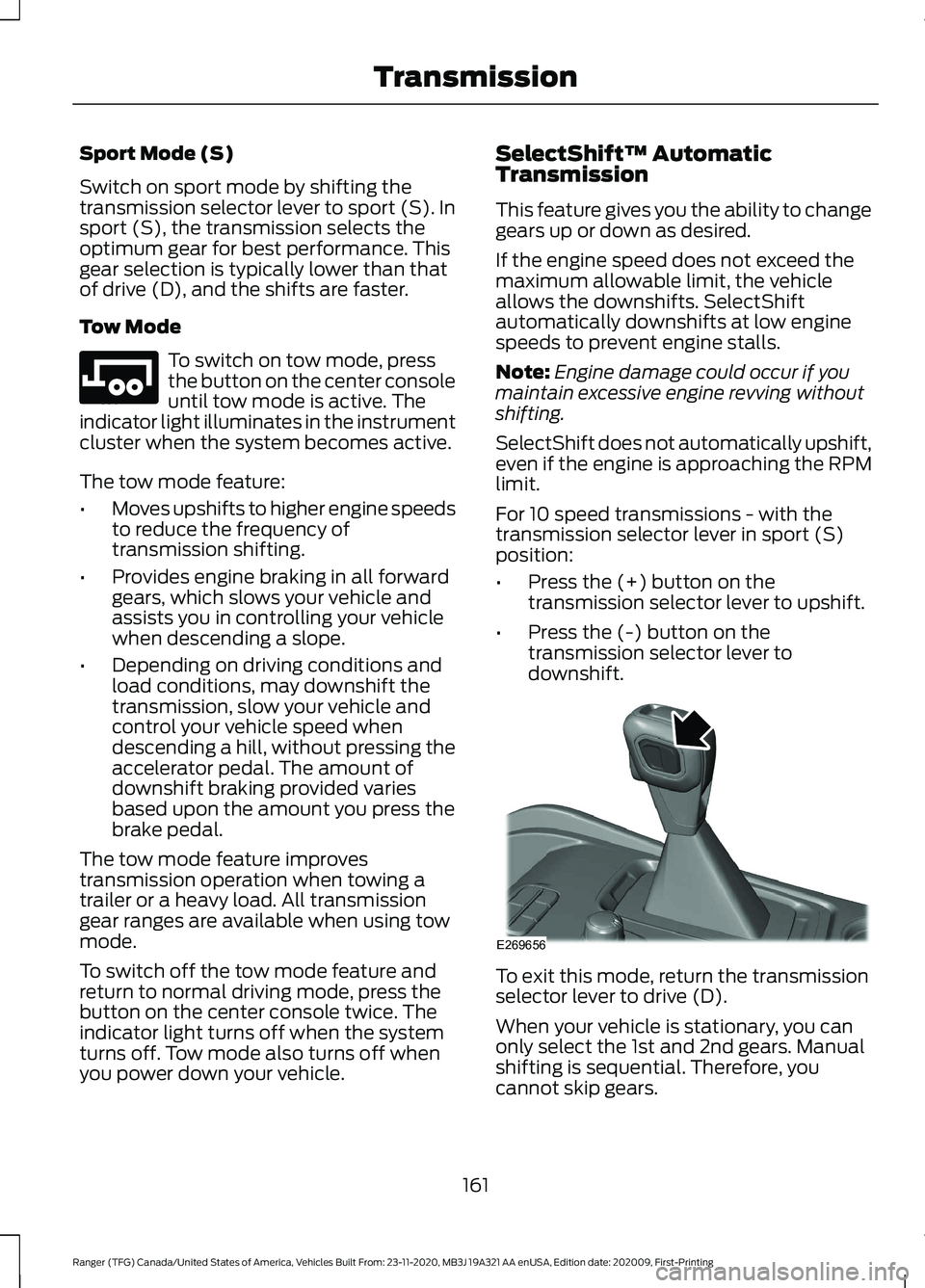
Tow Mode
To switch on tow mode, press
the button on the center console
until tow mode is active. The
indicator light illuminates in the instrument
cluster when the system becomes active.
The tow mode feature:
• Moves upshifts to higher engine speeds
to reduce the frequency of
transmission shifting.
• Provides engine braking in all forward
gears, which slows your vehicle and
assists you in controlling your vehicle
when descending a slope.
• Depending on driving conditions and
load conditions, may downshift the
transmission, slow your vehicle and
control your vehicle speed when
descending a hill, without pressing the
accelerator pedal. The amount of
downshift braking provided varies
based upon the amount you press the
brake pedal.
The tow mode feature improves
transmission operation when towing a
trailer or a heavy load. All transmission
gear ranges are available when using tow
mode.
To switch off the tow mode feature and
return to normal driving mode, press the
button on the center console twice. The
indicator light turns off when the system
turns off. Tow mode also turns off when
you power down your vehicle. SelectShift™ Automatic
Transmission
This feature gives you the ability to change
gears up or down as desired.
If the engine speed does not exceed the
maximum allowable limit, the vehicle
allows the downshifts. SelectShift
automatically downshifts at low engine
speeds to prevent engine stalls.
Note:
Engine damage could occur if you
maintain excessive engine revving without
shifting.
SelectShift does not automatically upshift,
even if the engine is approaching the RPM
limit.
For 10 speed transmissions - with the
transmission selector lever in sport (S)
position:
• Press the (+) button on the
transmission selector lever to upshift.
• Press the (-) button on the
transmission selector lever to
downshift. To exit this mode, return the transmission
selector lever to drive (D).
When your vehicle is stationary, you can
only select the 1st and 2nd gears. Manual
shifting is sequential. Therefore, you
cannot skip gears.
161
Ranger (TFG) Canada/United States of America, Vehicles Built From: 23-11-2020, MB3J 19A321 AA enUSA, Edition date: 202009, First-Printing TransmissionE246592 E269656
Page 174 of 475
ELECTRONIC LOCKING
DIFFERENTIAL (IF EQUIPPED)
Note: Do not operate the system on dry
hard surface roads. Doing so could lead to
excessive tire noise and wear. Use the
system only on consistently slippery or loose
surfaces.
The system locks the left and right portions
of the rear axle together to form a solid
driving axle, resulting in increased rear
wheel traction in certain conditions.
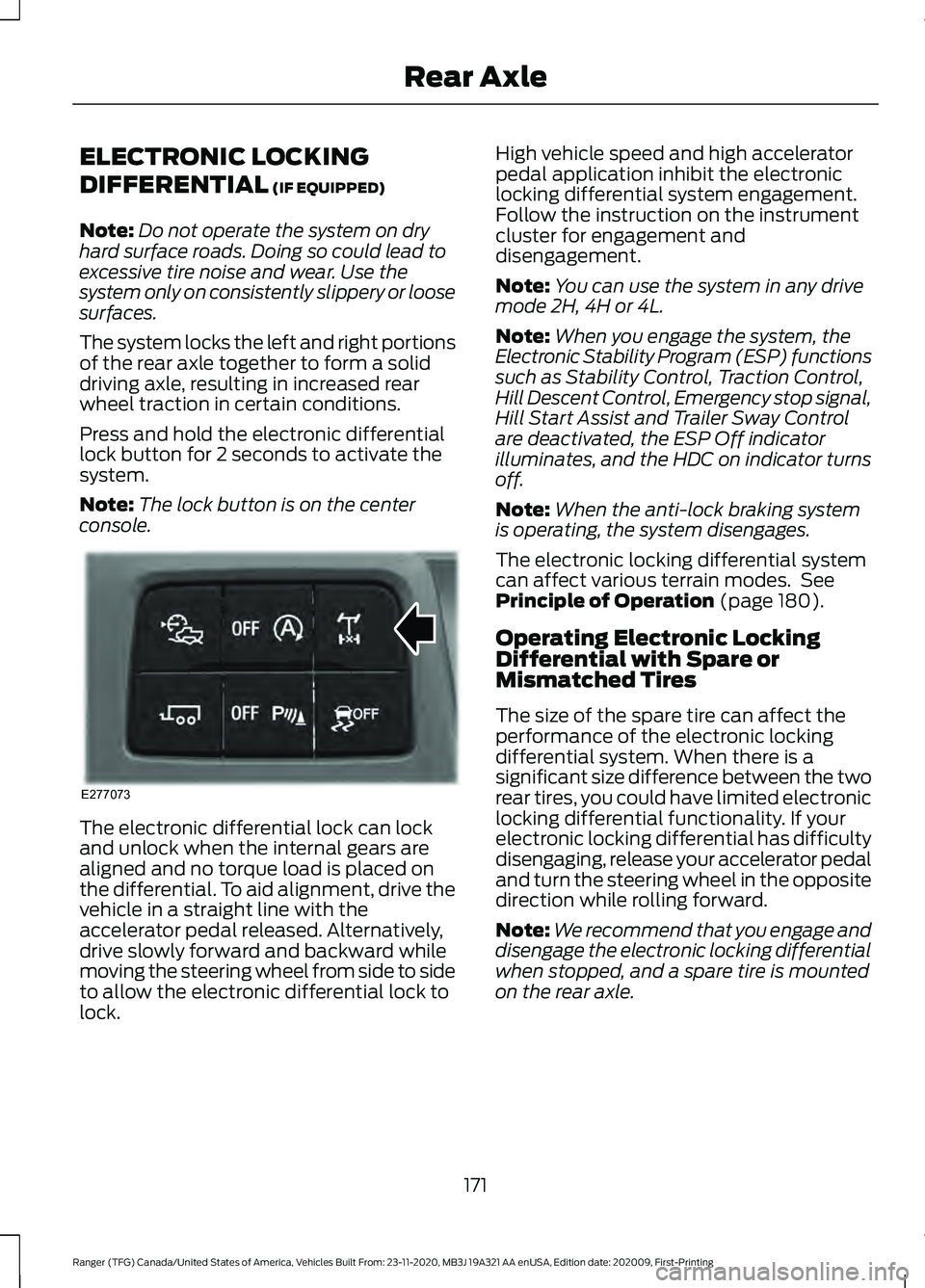
Press and hold the electronic differential
lock button for 2 seconds to activate the
system.
Note: The lock button is on the center
console. The electronic differential lock can lock
and unlock when the internal gears are
aligned and no torque load is placed on
the differential. To aid alignment, drive the
vehicle in a straight line with the
accelerator pedal released. Alternatively,
drive slowly forward and backward while
moving the steering wheel from side to side
to allow the electronic differential lock to
lock. High vehicle speed and high accelerator
pedal application inhibit the electronic
locking differential system engagement.
Follow the instruction on the instrument
cluster for engagement and
disengagement.
Note:
You can use the system in any drive
mode 2H, 4H or 4L.
Note: When you engage the system, the
Electronic Stability Program (ESP) functions
such as Stability Control, Traction Control,
Hill Descent Control, Emergency stop signal,
Hill Start Assist and Trailer Sway Control
are deactivated, the ESP Off indicator
illuminates, and the HDC on indicator turns
off.
Note: When the anti-lock braking system
is operating, the system disengages.
The electronic locking differential system
can affect various terrain modes. See
Principle of Operation
(page 180).
Operating Electronic Locking
Differential with Spare or
Mismatched Tires
The size of the spare tire can affect the
performance of the electronic locking
differential system. When there is a
significant size difference between the two
rear tires, you could have limited electronic
locking differential functionality. If your
electronic locking differential has difficulty
disengaging, release your accelerator pedal
and turn the steering wheel in the opposite
direction while rolling forward.
Note: We recommend that you engage and
disengage the electronic locking differential
when stopped, and a spare tire is mounted
on the rear axle.
171
Ranger (TFG) Canada/United States of America, Vehicles Built From: 23-11-2020, MB3J 19A321 AA enUSA, Edition date: 202009, First-Printing Rear AxleE277073
Page 187 of 475
PRINCIPLE OF OPERATION
WARNING: To help avoid personal
injury, always use caution when in
reverse (R) and when using the sensing
system. WARNING:
The system may not
detect objects with surfaces that absorb
reflection. Always drive with due care
and attention. Failure to take care may
result in a crash. WARNING: Traffic control systems,
inclement weather, air brakes, external
motors and fans may affect the correct
operation of the sensing system. This
may cause reduced performance or false
alerts. WARNING:
The system may not
detect small or moving objects,
particularly those close to the ground. WARNING:
If damage occurs in the
immediate area surrounding the sensor,
have your vehicle checked as soon as
possible. WARNING:
The parking aid system
can only assist you to detect objects
when your vehicle is moving at parking
speeds. To help avoid personal injury you
must take care when using the parking
aid system. WARNING:
In cold and severe
weather conditions the system may not
function. Rain, snow and spray can all
limit sensor performance. WARNING:
The system may not
function if the sensor is blocked. Note:
If your vehicle has MyKey ™, the
sensing system cannot be switched off
when a MyKey ™ is present.
See Principle
of Operation (page 58).
Note: Do not clean the sensors with sharp
objects.
Note: If your vehicle sustains damage to
the bumper or fascia and you leave it
misaligned or bent, the sensing zone may
be altered causing inaccurate measurement
of obstacles or false alerts.
Note: Certain add-on devices installed
around the bumper or fascia may create
false alerts. For example, large trailer
hitches, bike or surfboard racks, license plate
brackets, bumper covers or any other device
that may block the normal detection zone
of the system. Remove the add-on device
to prevent false alerts.
Note: When you connect a trailer to your
vehicle, the rear parking aid may detect the
trailer and therefore provide an alert. Disable
the rear parking aid when you connect a
trailer to prevent the alert.
The sensing system warns you of obstacles
within a certain range of your vehicle. The
system turns on when you switch the
ignition on.
You can switch the system off through the
information display menu or from the
pop-up message that appears once you
shift the transmission into reverse (R). See
General Information
(page 96). If your
vehicle has a parking aid button, you can
switch the system off by pressing the
button. The system turns on when you
switch the ignition on.
If a fault is present in the system, a warning
message appears in the information
display. See
Information Messages
(page 104).
184
Ranger (TFG) Canada/United States of America, Vehicles Built From: 23-11-2020, MB3J 19A321 AA enUSA, Edition date: 202009, First-Printing Parking Aids
(If Equipped)