instrument panel FORD SUPER DUTY 2003 1.G User Guide
[x] Cancel search | Manufacturer: FORD, Model Year: 2003, Model line: SUPER DUTY, Model: FORD SUPER DUTY 2003 1.GPages: 256, PDF Size: 2.3 MB
Page 157 of 256
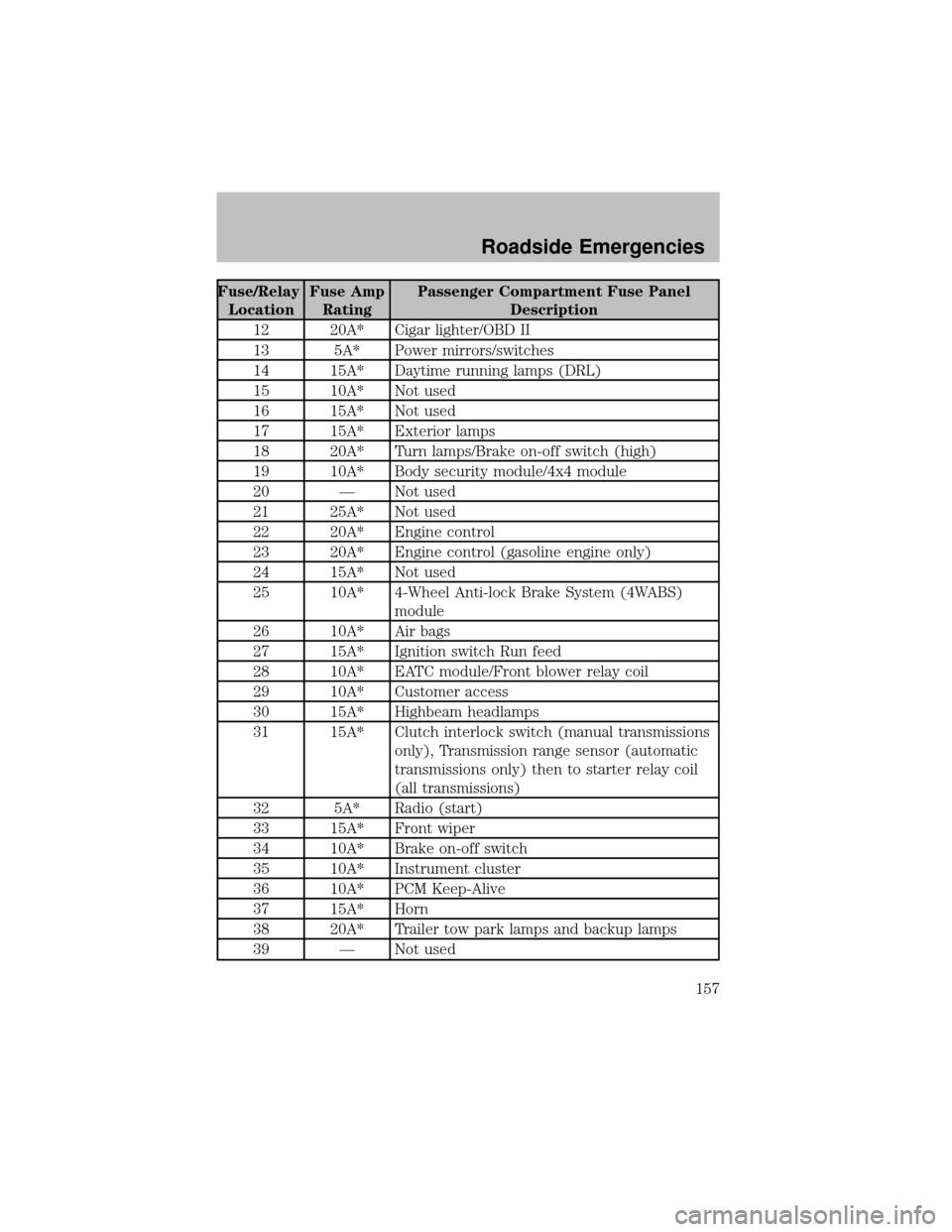
Fuse/Relay
LocationFuse Amp
RatingPassenger Compartment Fuse Panel
Description
12 20A* Cigar lighter/OBD II
13 5A* Power mirrors/switches
14 15A* Daytime running lamps (DRL)
15 10A* Not used
16 15A* Not used
17 15A* Exterior lamps
18 20A* Turn lamps/Brake on-off switch (high)
19 10A* Bodysecuritymodule/4x4 module
20 — Not used
21 25A* Not used
22 20A* Engine control
23 20A* Engine control (gasoline engine only)
24 15A* Not used
25 10A* 4-Wheel Anti-lock Brake System (4WABS)
module
26 10A* Air bags
27 15A* Ignition switch Run feed
28 10A* EATC module/Front blower relaycoil
29 10A* Customer access
30 15A* Highbeam headlamps
31 15A* Clutch interlock switch (manual transmissions
only), Transmission range sensor (automatic
transmissions only) then to starter relay coil
(all transmissions)
32 5A* Radio (start)
33 15A* Front wiper
34 10A* Brake on-off switch
35 10A* Instrument cluster
36 10A* PCM Keep-Alive
37 15A* Horn
38 20A* Trailer tow park lamps and backup lamps
39 — Not used
Roadside Emergencies
157
Page 158 of 256
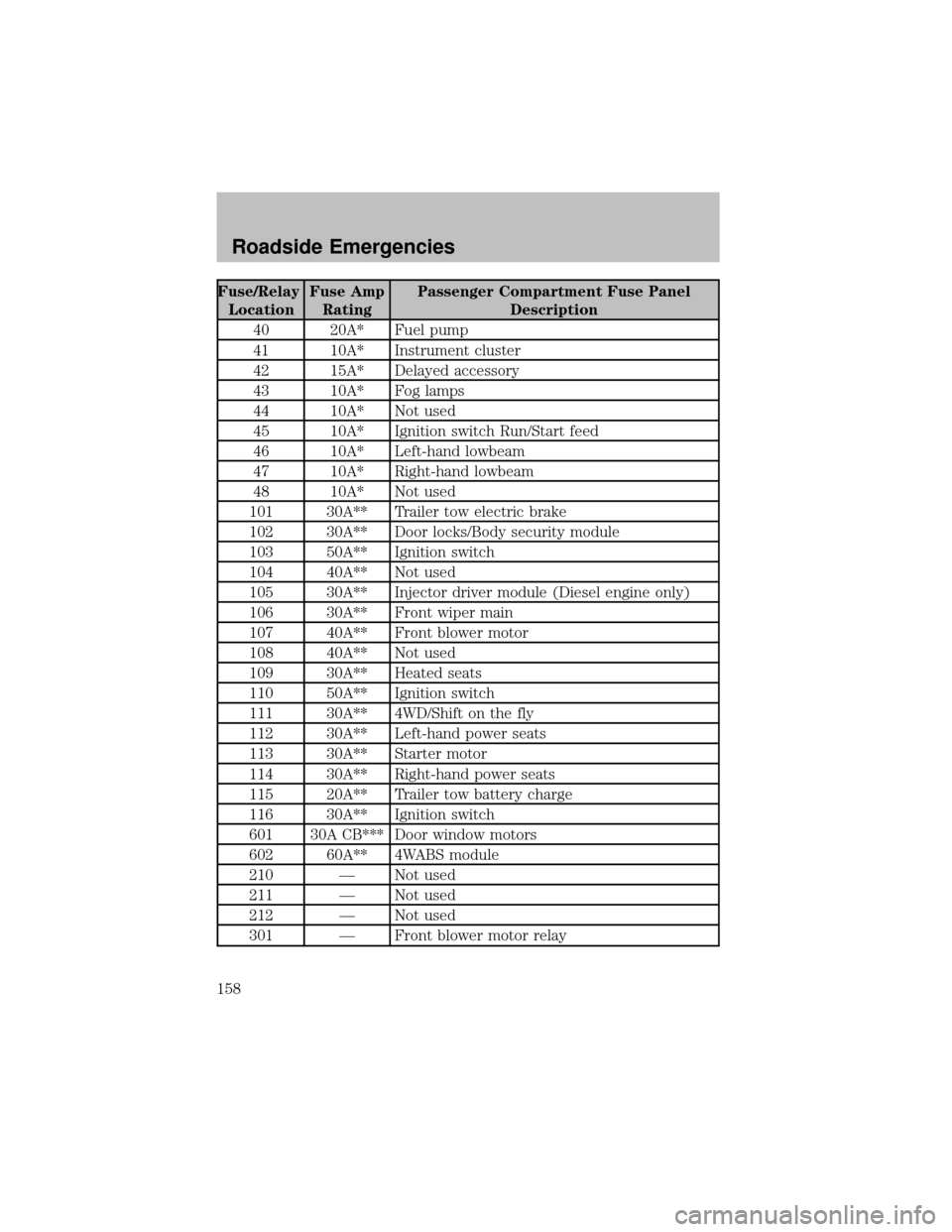
Fuse/Relay
LocationFuse Amp
RatingPassenger Compartment Fuse Panel
Description
40 20A* Fuel pump
41 10A* Instrument cluster
42 15A* Delayed accessory
43 10A* Fog lamps
44 10A* Not used
45 10A* Ignition switch Run/Start feed
46 10A* Left-hand lowbeam
47 10A* Right-hand lowbeam
48 10A* Not used
101 30A** Trailer tow electric brake
102 30A** Door locks/Bodysecuritymodule
103 50A** Ignition switch
104 40A** Not used
105 30A** Injector driver module (Diesel engine only)
106 30A** Front wiper main
107 40A** Front blower motor
108 40A** Not used
109 30A** Heated seats
110 50A** Ignition switch
111 30A** 4WD/Shift on the fly
112 30A** Left-hand power seats
113 30A** Starter motor
114 30A** Right-hand power seats
115 20A** Trailer tow batterycharge
116 30A** Ignition switch
601 30A CB*** Door window motors
602 60A** 4WABS module
210 — Not used
211 — Not used
212 — Not used
301 — Front blower motor relay
Roadside Emergencies
158
Page 187 of 256
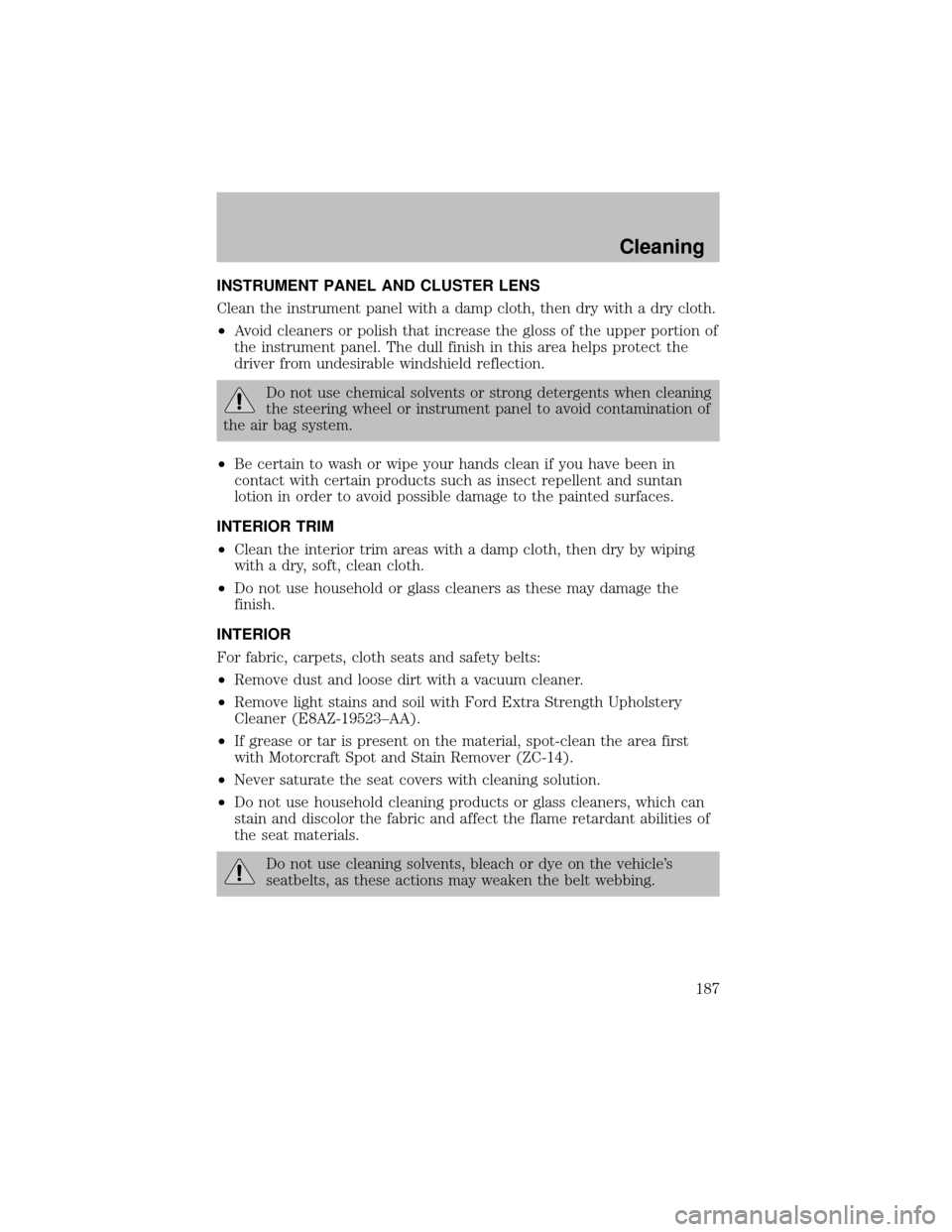
INSTRUMENT PANEL AND CLUSTER LENS
Clean the instrument panel with a damp cloth, then drywith a drycloth.
•Avoid cleaners or polish that increase the gloss of the upper portion of
the instrument panel. The dull finish in this area helps protect the
driver from undesirable windshield reflection.
Do not use chemical solvents or strong detergents when cleaning
the steering wheel or instrument panel to avoid contamination of
the air bag system.
•Be certain to wash or wipe your hands clean if you have been in
contact with certain products such as insect repellent and suntan
lotion in order to avoid possible damage to the painted surfaces.
INTERIOR TRIM
•Clean the interior trim areas with a damp cloth, then drybywiping
with a dry, soft, clean cloth.
•Do not use household or glass cleaners as these maydamage the
finish.
INTERIOR
For fabric, carpets, cloth seats and safetybelts:
•Remove dust and loose dirt with a vacuum cleaner.
•Remove light stains and soil with Ford Extra Strength Upholstery
Cleaner (E8AZ-19523–AA).
•If grease or tar is present on the material, spot-clean the area first
with Motorcraft Spot and Stain Remover (ZC-14).
•Never saturate the seat covers with cleaning solution.
•Do not use household cleaning products or glass cleaners, which can
stain and discolor the fabric and affect the flame retardant abilities of
the seat materials.
Do not use cleaning solvents, bleach or dye on the vehicle’s
seatbelts, as these actions mayweaken the belt webbing.
Cleaning
187
Page 192 of 256
•Manual transmission:
1. Set the parking brake, depress the clutch and place the gearshift in N
(Neutral).
2. Block the wheels.
Note:Do not start your engine with the air cleaner removed and do not
remove it while the engine is running.
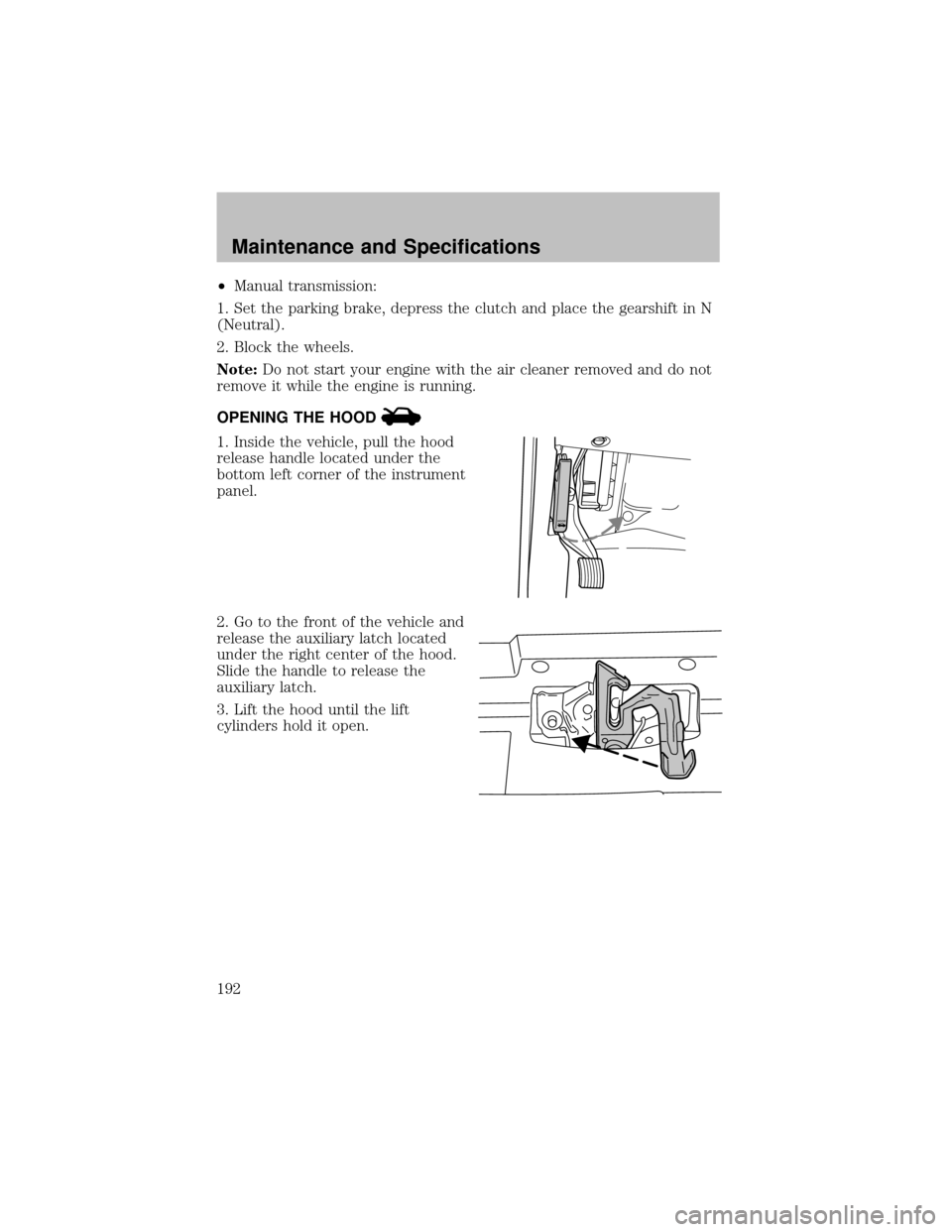
OPENING THE HOOD
1. Inside the vehicle, pull the hood
release handle located under the
bottom left corner of the instrument
panel.
2. Go to the front of the vehicle and
release the auxiliarylatch located
under the right center of the hood.
Slide the handle to release the
auxiliarylatch.
3. Lift the hood until the lift
cylinders hold it open.
H
O
O
D
Maintenance and Specifications
192
Page 244 of 256

Vehicle identification number (VIN)
The vehicle identification number is
attached to a metal tag and is
located on the driver side
instrument panel. (Please note that
in the graphic XXXX is
representative of your vehicle
identification number.)
1. World manufacturer identifier
2. Brake type and gross vehicle
weight rating (GVWR)
3. Vehicle line, series, bodytype
4. Engine type
5. Check digit
6. Model year
7. Assemblyplant
8. Production sequence number
Engine number
The engine number (the last eight numbers of the vehicle identification
number) is stamped on the engine block, transmission, frame and
transfer case (if equipped).
XXXXXXXXXXXXXXXXX
Maintenance and Specifications
244
Page 249 of 256

A
Accessorydelay ..........................47
Air bag supplemental restraint
system ..........................................79
and child safetyseats ..............80
description ................................79
disposal ......................................83
driver air bag ............................81
indicator light ...........................82
operation ...................................81
passenger air bag .....................81
passenger deactivation
switch ........................................83
Air cleaner filter .......220–221, 228
Ambulance packages ....................6
Antifreeze
(see Engine coolant) ................199
Anti-lock brake system
(see Brakes) ......................103–104
Audio system
(see Radio) ................17–18, 21, 25
Automatic transmission ............106
driving an automatic
overdrive .................................107
fluid, adding ............................216
fluid, checking ........................216
fluid, refill capacities ..............228
fluid, specification ..................235
Auxiliarypower point .................46
Axle
lubricant specifications ..232, 235
refill capacities ........................228
traction lok ..............................105
B
Battery.......................................197
acid, treating emergencies .....197jumping a disabled battery....168
maintenance-free ....................197
replacement, specifications ...228
servicing ..................................197
BeltMinder ...................................74
Brakes ........................................102
anti-lock ...........................102–104
anti-lock brake system (ABS)
warning light ...........................103
fluid, checking and adding ....215
fluid, refill capacities ..............228
fluid, specifications .........232, 235
lubricant specifications ..232, 235
parking ....................................104
shift interlock ..........................106
Break-in period .............................5
Bulbs ............................................38
C
Calculating load ........................127
Capacities for refilling fluids ....228
Cassette tape player ...................25
CD changer .................................28
CD-single premium .........17–18, 21
Certification Label ....................243
Child safetyrestraints ................88
child safetybelts ......................88
Child safetyseats ........................90
attaching with tether straps ....94
in front seat ..............................92
in rear seat ................................92
Cleaning your vehicle
engine compartment ..............185
instrument panel ....................187
interior .....................................187
interior trim ............................187
plastic parts ............................186
Index
249
Page 252 of 256

Instrument panel
cleaning ...................................187
cluster ........................................10
lighting up panel and
interior .......................................37
J
Jump-starting your vehicle ......168
K
Keyless entry system
autolock .....................................61
Keys
positions of the ignition ...........98
L
Lamps
autolamp system .......................35
bulb replacement
specifications chart ..................38
cargo lamps ...............................37
daytime running light ...............36
fog lamps ...................................36
headlamps .................................35
headlamps, flash to pass ..........37
instrument panel, dimming .....37
interior lamps ...........................38
replacing bulbs ...................38–43
Lane change indicator
(see Turn signal) ........................37
Lights, warning and indicator ....10
anti-lock brakes (ABS) ..........103
speed control ............................51
Load limits .................................125
GAWR ......................................125
GVWR ......................................125
trailer towing ..........................125
Loading instructions .................127Locks
autolock .....................................61
childproof ..................................57
Lubricant specifications ...232, 235
Lumbar support, seats ...............67
M
Manual transmission .................109
fluid capacities ........................228
lubricant specifications ..........235
reverse .....................................110
Message center ...........................51
english/metric button ...............52
menu button .............................52
Mirrors .........................................45
fold away...................................48
side view mirrors (power) .......47
Motorcraft parts ................209, 228
O
Octane rating ............................208
Oil (see Engine oil) ..................194
P
Parking brake ............................104
Parts (see Motorcraft parts) ....228
Pedals (see Power adjustable
foot pedals) .................................48
Power adjustable foot pedals .....48
Power distribution box
(see Fuses) ...............................155
Power door locks ..................56, 61
Power point .................................46
Power steering ..........................105
fluid, checking and adding ....215
Index
252