ignition FORD SUPER DUTY 2010 2.G User Guide
[x] Cancel search | Manufacturer: FORD, Model Year: 2010, Model line: SUPER DUTY, Model: FORD SUPER DUTY 2010 2.GPages: 407, PDF Size: 3.36 MB
Page 36 of 407
![FORD SUPER DUTY 2010 2.G User Guide To reset the oil monitoring system to 100% after each oil change
(approximately 7,500 miles [12,000 km] or 12 months) perform the
following:
1. Press and release the SETUP button to display “OIL LIF](/img/11/5288/w960_5288-35.png "FORD SUPER DUTY 2010 2.G User Guide To reset the oil monitoring system to 100% after each oil change
(approximately 7,500 miles [12,000 km] or 12 months) perform the
following:
1. Press and release the SETUP button to display “OIL LIF")
To reset the oil monitoring system to 100% after each oil change
(approximately 7,500 miles [12,000 km] or 12 months) perform the
following:
1. Press and release the SETUP button to display “OIL LIFE XXX%
HOLD RESET = NEW”.
2. Press and hold the RESET button for two seconds and release to reset
the oil life to 100%.
Note:To change oil life 100% miles value from 7,500 miles (12,000 km)
or 12 months to another value, proceed to Step 3.
3. Once “OIL LIFE SET TO XXX%” is displayed, release and press the
RESET button to change the Oil Life Start Value. Each release and press
will reduce the value by 10%.
Note:Oil life start value of 100% equals 7,500 miles (12,000 km) or
12 months. For example, setting oil life start value to 60% sets the oil
life start value to 4,500 miles (7,200 km) and 219 days.
UNITS
Displays the current units English or Metric.
Press the RESET button to change from English to Metric.
AUTOLAMP (SEC)
This feature keeps your headlights on for up to three minutes after the
ignition is switched off.
Press the RESET control to select the new Autolamp delay values of 0,
10, 20, 30, 60, 90, 120 or 180 seconds.
AUTOLOCK
This feature automatically locks all vehicle doors when the vehicle is
shifted into any gear, putting the vehicle in motion.
Press the RESET control to turn autolock on or off.
ZONE
The compass heading is displayed as one of N, NE, E, SE, S, SW, W and
NW in the message center display.
The compass reading may be affected when you drive near large
buildings, bridges, power lines and powerful broadcast antenna. Magnetic
or metallic objects placed in, on or near the vehicle may also affect
compass accuracy.
Instrument Cluster
36
2010 F-250/350/450/550(f23)
Owners Guide, 1st Printing
USA(fus)
Page 37 of 407
Usually, when something affects the compass readings, the compass will
correct itself after a few days of operating your vehicle in normal
conditions. If the compass still appears to be inaccurate, a manual
calibration may be necessary. Refer toCompass zone/calibration
adjustment.
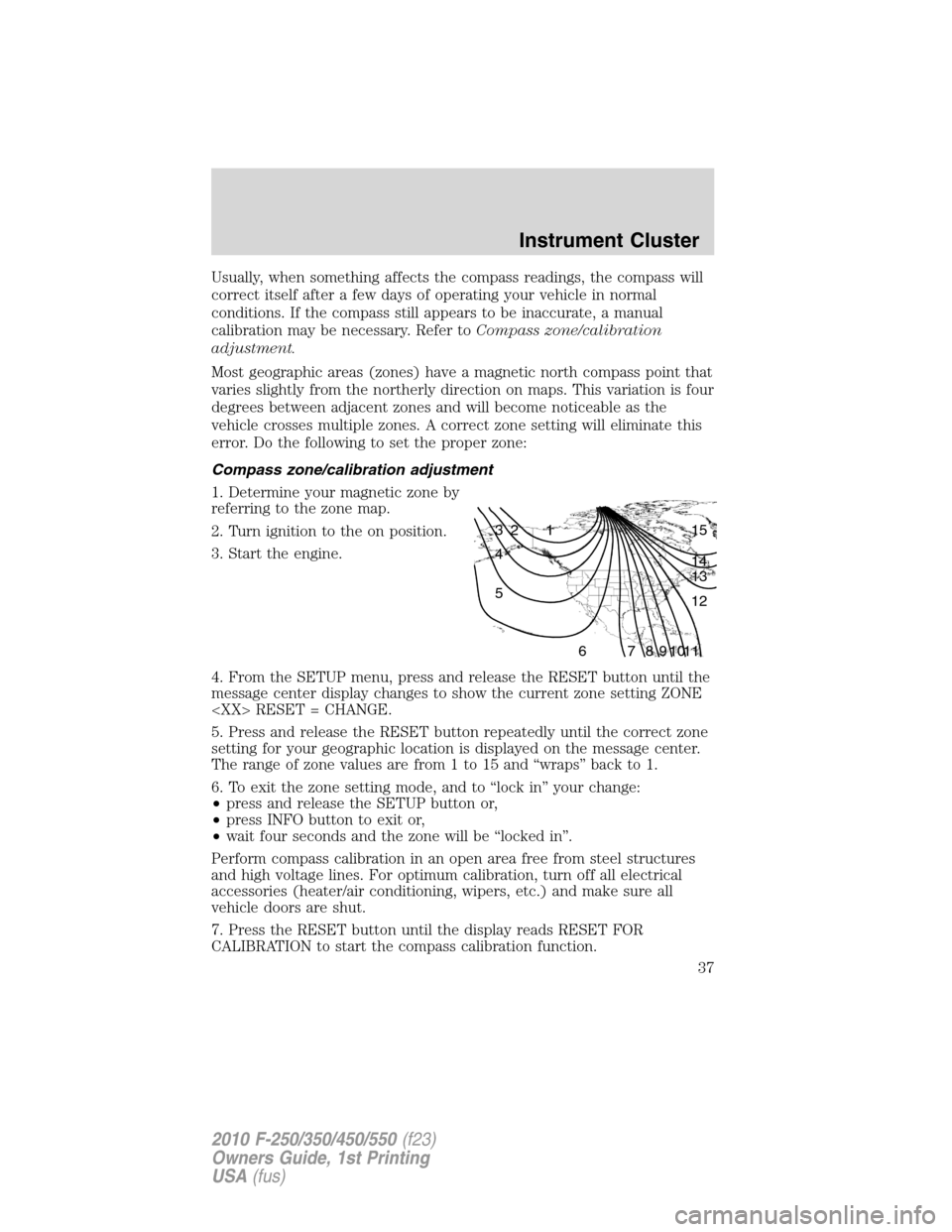
Most geographic areas (zones) have a magnetic north compass point that
varies slightly from the northerly direction on maps. This variation is four
degrees between adjacent zones and will become noticeable as the
vehicle crosses multiple zones. A correct zone setting will eliminate this
error. Do the following to set the proper zone:
Compass zone/calibration adjustment
1. Determine your magnetic zone by
referring to the zone map.
2. Turn ignition to the on position.
3. Start the engine.
4. From the SETUP menu, press and release the RESET button until the
message center display changes to show the current zone setting ZONE
5. Press and release the RESET button repeatedly until the correct zone
setting for your geographic location is displayed on the message center.
The range of zone values are from 1 to 15 and “wraps” back to 1.
6. To exit the zone setting mode, and to “lock in” your change:
•press and release the SETUP button or,
•press INFO button to exit or,
•wait four seconds and the zone will be “locked in”.
Perform compass calibration in an open area free from steel structures
and high voltage lines. For optimum calibration, turn off all electrical
accessories (heater/air conditioning, wipers, etc.) and make sure all
vehicle doors are shut.
7. Press the RESET button until the display reads RESET FOR
CALIBRATION to start the compass calibration function.
1 2 3
4
5
6 7 8 9 101112 13 14 15
Instrument Cluster
37
2010 F-250/350/450/550(f23)
Owners Guide, 1st Printing
USA(fus)
Page 39 of 407
DRIVER DOOR AJAR— Displayed when the driver’s door is not
completely closed.
PASSENGER DOOR AJAR— Displayed when the passenger’s door is
not completely closed.
REAR LEFT DOOR AJAR— Displayed when the rear left door is not
completely closed.
REAR RIGHT DOOR AJAR— Displayed when the rear right door is
not completely closed.
FUEL LEVEL LOW— Displayed as an early reminder of a low fuel
condition.
WIRING FAULT ON TRAILER (if equipped)— Displayed and
accompanied by a single chime if there are certain faults in the vehicle
wiring and trailer wiring/brake system. Refer toTrailer towingin the
Tires, Wheels and Loadingchapter for more information.
TRAILER BRAKE MODULE FAULT (if equipped)— Displayed and
accompanied by a single chime in response to faults sensed by the TBC.
Refer toTrailer towingin theTires, Wheels and Loadingchapter for
more information.
TRAILER CONNECTED (if equipped)— Displayed when a correct
trailer connection (a trailer with electric trailer brakes) is sensed during
a given ignition cycle. Refer toTrailer towingin theTires, Wheels and
Loadingchapter for more information.
TRAILER DISCONNECTED (if equipped)— Displayed and
accompanied by a single chime when a trailer connection becomes
disconnected, either intentionally or unintentionally, and has been sensed
during a given ignition cycle. Refer toTrailer towingin theTires,
Wheels and Loadingchapter for more information.
BRAKE FLUID LEVEL LOW— Indicates the brake fluid level is low
and the brake system should be inspected immediately. Refer toBrake
fluidin theMaintenance and Specificationschapter.
LOW TIRE PRESSURE (if equipped)— Displayed when one or more
tires on your vehicle have low tire pressure. Refer toInflating your
tiresin theTires, Wheels and Loadingchapter.
TIRE PRESSURE MONITOR FAULT (if equipped)— Displayed
when the Tire Pressure Monitoring System is malfunctioning. If the
warning stays on or continues to come on, contact your authorized
dealer as soon as possible.
Instrument Cluster
39
2010 F-250/350/450/550(f23)
Owners Guide, 1st Printing
USA(fus)
Page 42 of 407
EXHAUST FILTER DRIVE COMPLETE (Diesel engine only)—
Displayed when the Diesel Particulate Filter (DPF) has been adequately
cleaned after the DRIVE TO CLEAN EXHAUST FILTER followed by
CLEANING EXHAUST FILTER messages have been displayed. This
message is NORMAL. Refer to yourPower Stroke 6.0 and 6.4 Liter
Direct Injection Turbo Diesel Owner’s Guide Supplementfor more
information.
STOP SAFELY NOW (Diesel engine only)— Displayed and a chime
sounds when the vehicle exhaust system temperature exceeds intended
operating range. If this warning occurs, engine power is reduced and the
engine will shut down when the vehicle speed is below 3 mph (5 km/h).
Stop the vehicle as soon as safely possibleand contact your
authorized dealer. Depending on the severity of the over-temperature
condition, the vehicle may not restart after cycling the ignition off. If the
vehicle restarts, there may be limited power. If the exhaust
over-temperature condition reoccurs, the message center will display
STOP SAFELY NOW, the chime will sound, and engine power will be
reduced again and shut down below 3 mph (5km/h). Refer to your
Power Stroke 6.0 and 6.4 Liter Direct Injection Turbo Diesel Owner’s
Guide Supplementfor more information.
OIL LIFE CHANGE SOON (Gas engine only)— Displayed when the
engine oil life remaining is 5% or less.
OIL CHANGE REQUIRED (Gas engine only)— Displayed when the
oil life left reaches 0%. OIL LIFE OK displays after you have changed the
oil.
Instrument Cluster
42
2010 F-250/350/450/550(f23)
Owners Guide, 1st Printing
USA(fus)
Page 43 of 407
AUDIO SYSTEMS
AM/FM stereo system (if equipped)
WARNING:Driving while distracted can result in loss of vehicle
control, accident and injury. Ford strongly recommends that
drivers use extreme caution when using any device that may take their
focus off the road. The driver’s primary responsibility is the safe
operation of their vehicle. Only use cell phones and other devices not
essential to the driving task when it is safe to do so.
The AM/FM stereo system does not contain rear speakers; only front
driver side and passenger side speakers.
Accessory delay:Your vehicle is equipped with accessory delay. With
this feature, the window switches and radio may be used for up to ten
minutes after the ignition is turned off or until either front door is
opened.
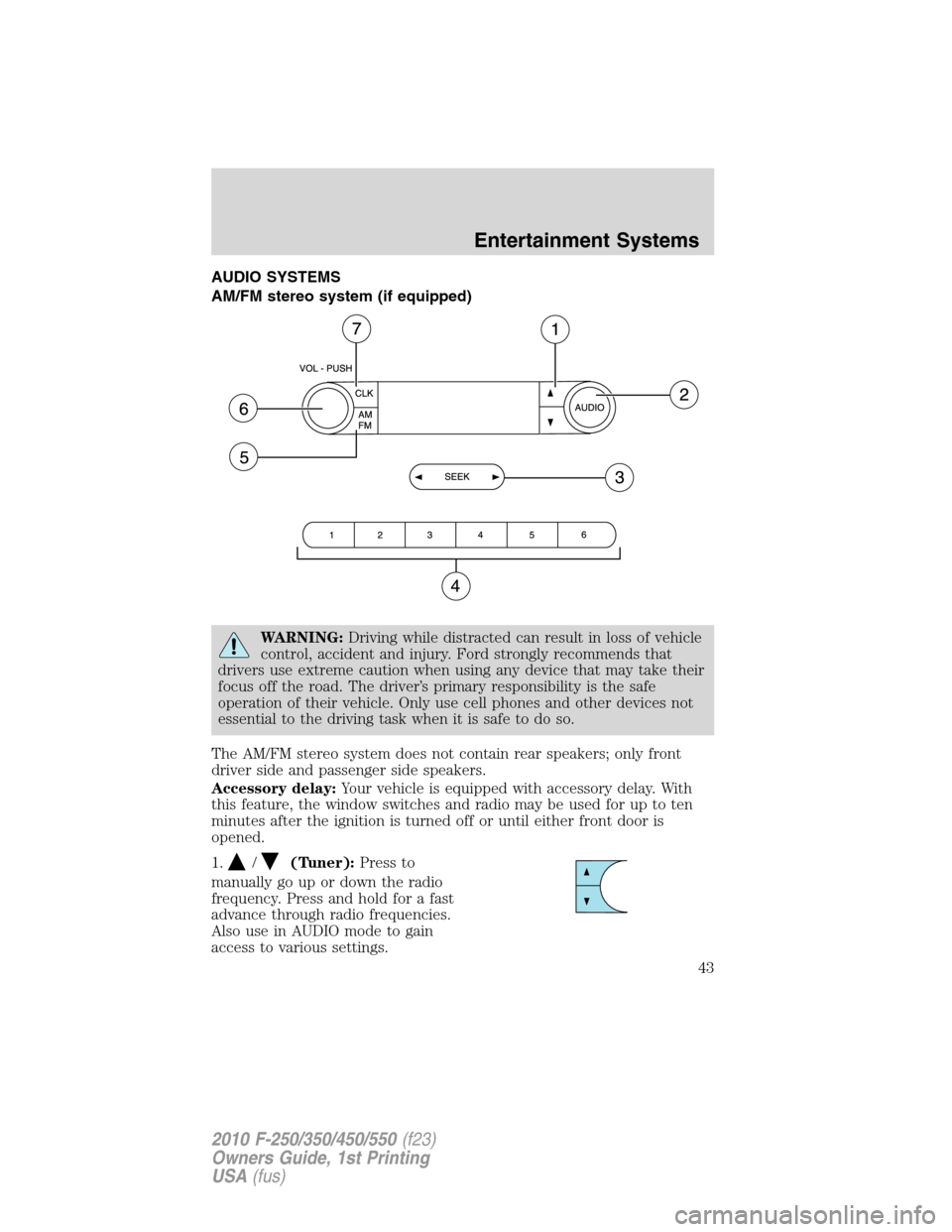
1.
/(Tuner):Press to
manually go up or down the radio
frequency. Press and hold for a fast
advance through radio frequencies.
Also use in AUDIO mode to gain
access to various settings.
Entertainment Systems
43
2010 F-250/350/450/550(f23)
Owners Guide, 1st Printing
USA(fus)
Page 45 of 407
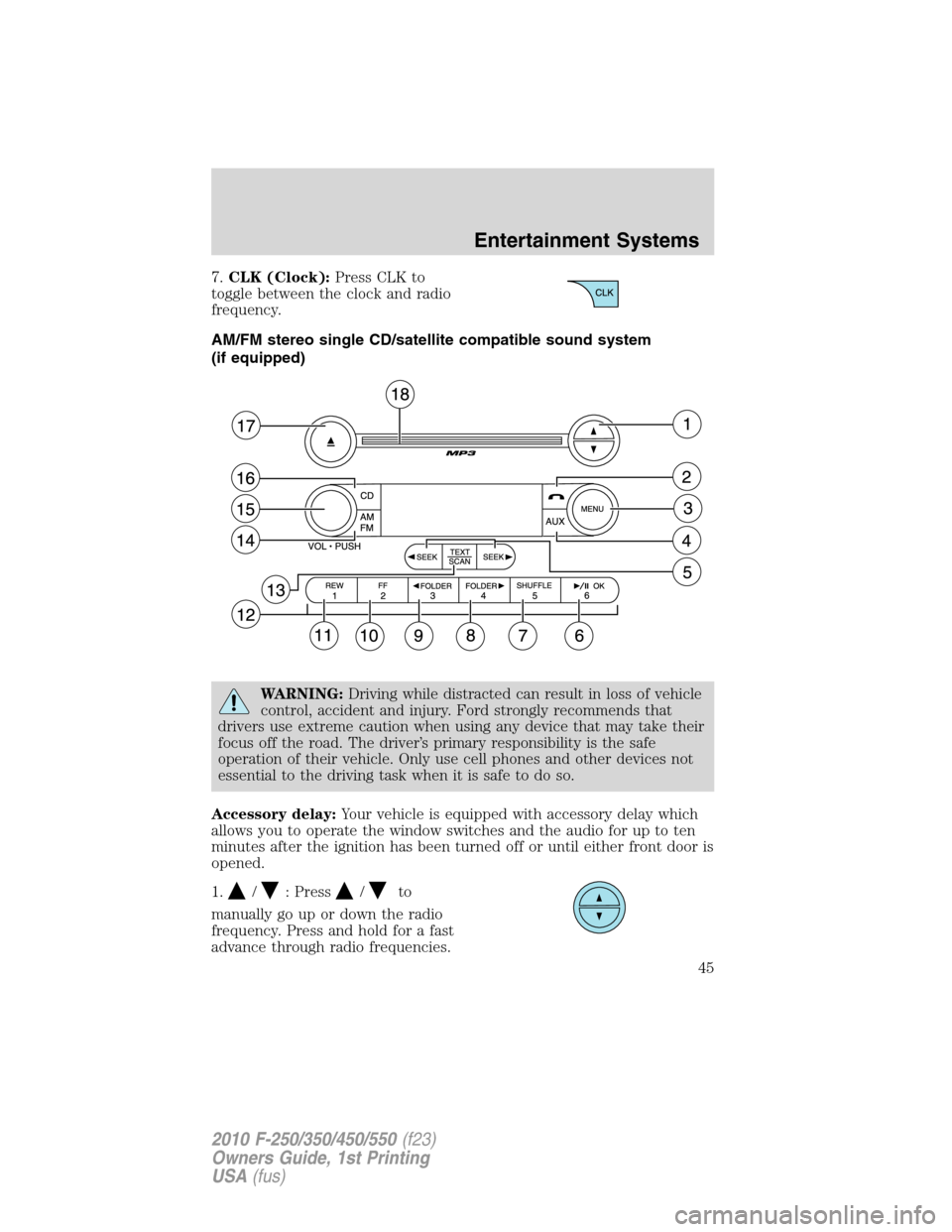
7.CLK (Clock):Press CLK to
toggle between the clock and radio
frequency.
AM/FM stereo single CD/satellite compatible sound system
(if equipped)
WARNING:Driving while distracted can result in loss of vehicle
control, accident and injury. Ford strongly recommends that
drivers use extreme caution when using any device that may take their
focus off the road. The driver’s primary responsibility is the safe
operation of their vehicle. Only use cell phones and other devices not
essential to the driving task when it is safe to do so.
Accessory delay:Your vehicle is equipped with accessory delay which
allows you to operate the window switches and the audio for up to ten
minutes after the ignition has been turned off or until either front door is
opened.
1.
/: Press/to
manually go up or down the radio
frequency. Press and hold for a fast
advance through radio frequencies.
Entertainment Systems
45
2010 F-250/350/450/550(f23)
Owners Guide, 1st Printing
USA(fus)
Page 51 of 407
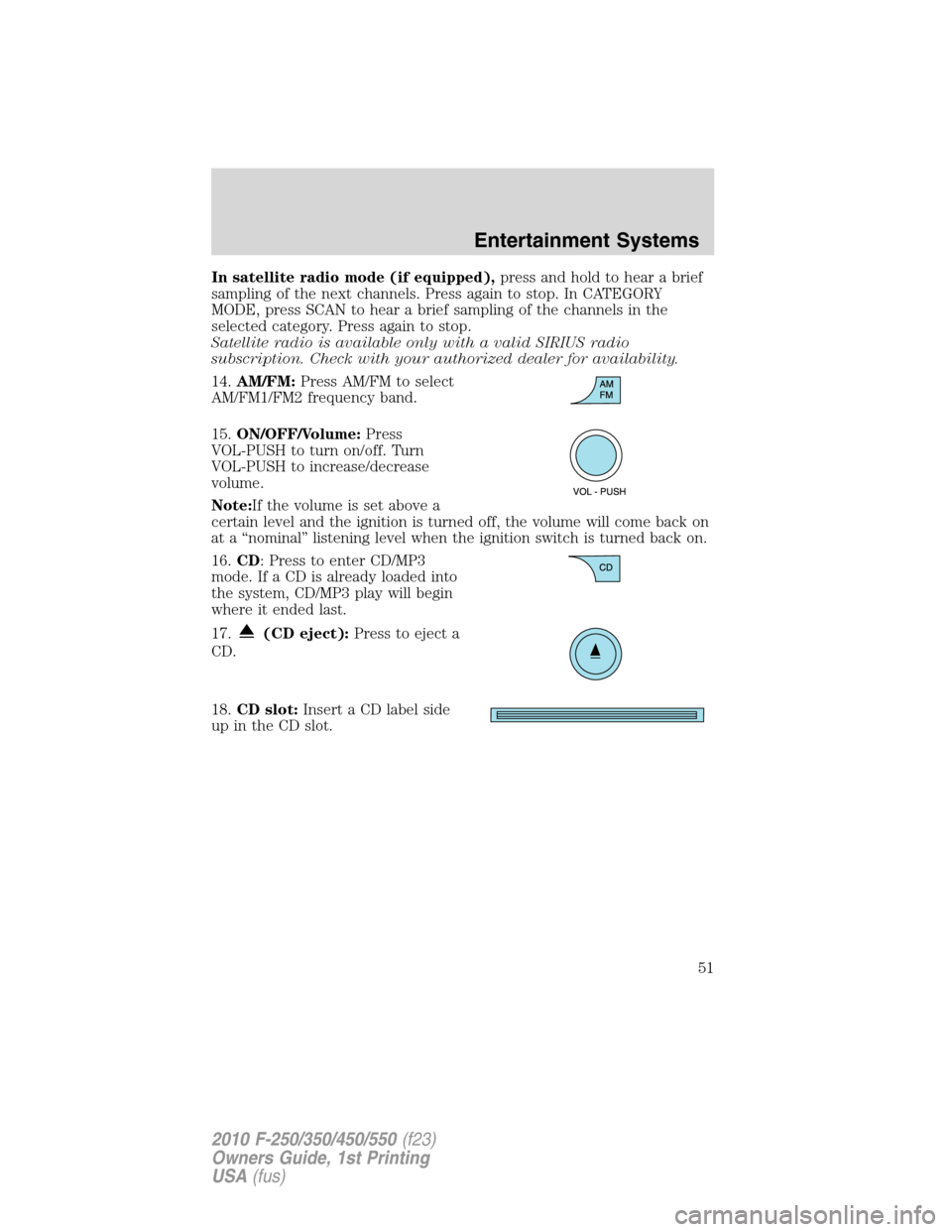
In satellite radio mode (if equipped),press and hold to hear a brief
sampling of the next channels. Press again to stop. In CATEGORY
MODE, press SCAN to hear a brief sampling of the channels in the
selected category. Press again to stop.
Satellite radio is available only with a valid SIRIUS radio
subscription. Check with your authorized dealer for availability.
14.AM/FM:Press AM/FM to select
AM/FM1/FM2 frequency band.
15.ON/OFF/Volume:Press
VOL-PUSH to turn on/off. Turn
VOL-PUSH to increase/decrease
volume.
Note:If the volume is set above a
certain level and the ignition is turned off, the volume will come back on
at a “nominal” listening level when the ignition switch is turned back on.
16.CD: Press to enter CD/MP3
mode. If a CD is already loaded into
the system, CD/MP3 play will begin
where it ended last.
17.
(CD eject):Press to eject a
CD.
18.CD slot:Insert a CD label side
up in the CD slot.
Entertainment Systems
51
2010 F-250/350/450/550(f23)
Owners Guide, 1st Printing
USA(fus)
Page 52 of 407
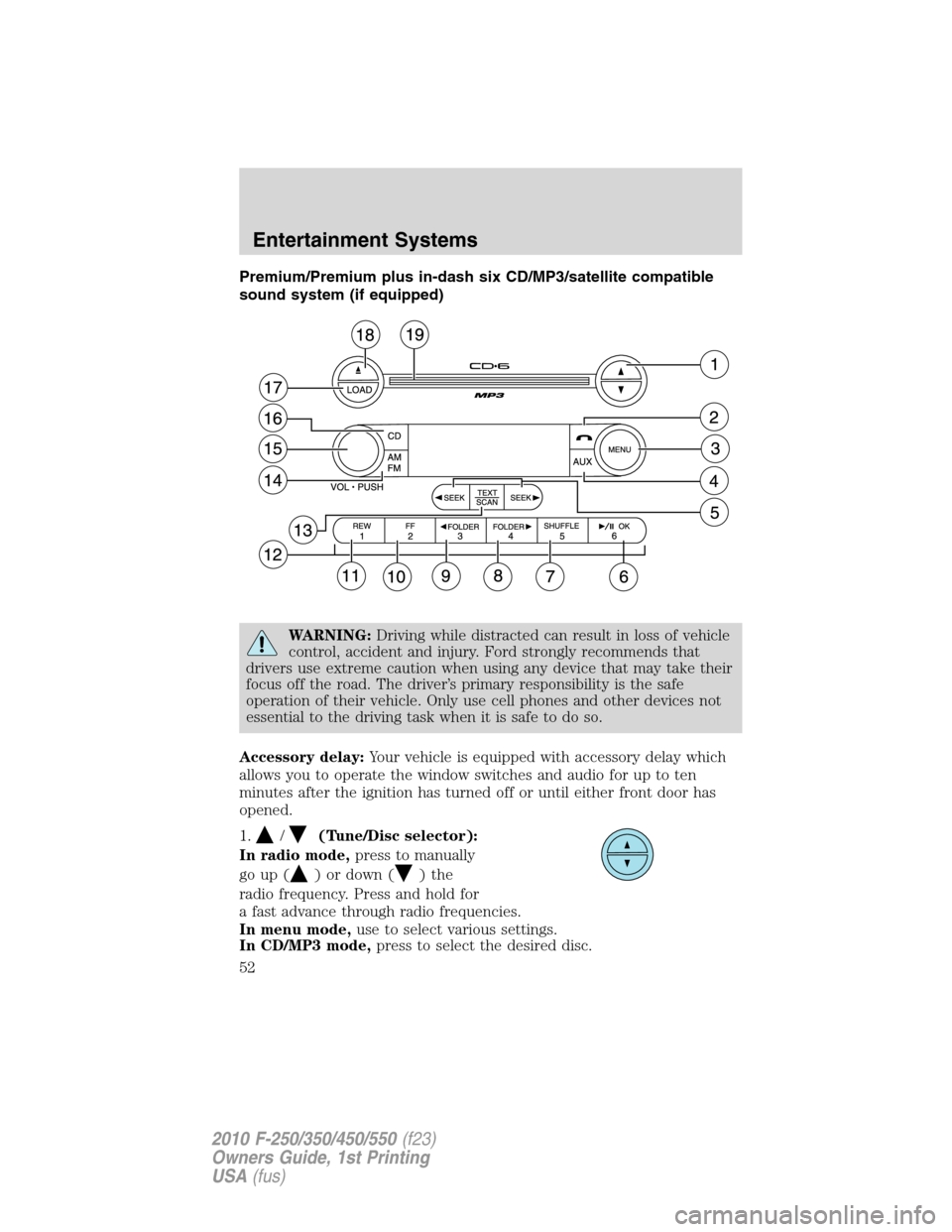
Premium/Premium plus in-dash six CD/MP3/satellite compatible
sound system (if equipped)
WARNING:Driving while distracted can result in loss of vehicle
control, accident and injury. Ford strongly recommends that
drivers use extreme caution when using any device that may take their
focus off the road. The driver’s primary responsibility is the safe
operation of their vehicle. Only use cell phones and other devices not
essential to the driving task when it is safe to do so.
Accessory delay:Your vehicle is equipped with accessory delay which
allows you to operate the window switches and audio for up to ten
minutes after the ignition has turned off or until either front door has
opened.
1.
/(Tune/Disc selector):
In radio mode,press to manually
go up (
) or down ()the
radio frequency. Press and hold for
a fast advance through radio frequencies.
In menu mode,use to select various settings.
In CD/MP3 mode,press to select the desired disc.
Entertainment Systems
52
2010 F-250/350/450/550(f23)
Owners Guide, 1st Printing
USA(fus)
Page 58 of 407
In satellite radio mode (if equipped), there are 18 available presets,
six each for SAT1, SAT2 and SAT3. To save satellite channels in your
memory presets, tune to the desired channel then press and hold a
preset control until sound returns.
Satellite radio is available only with a valid SIRIUS radio
subscription. Check with your authorized dealer for availability.
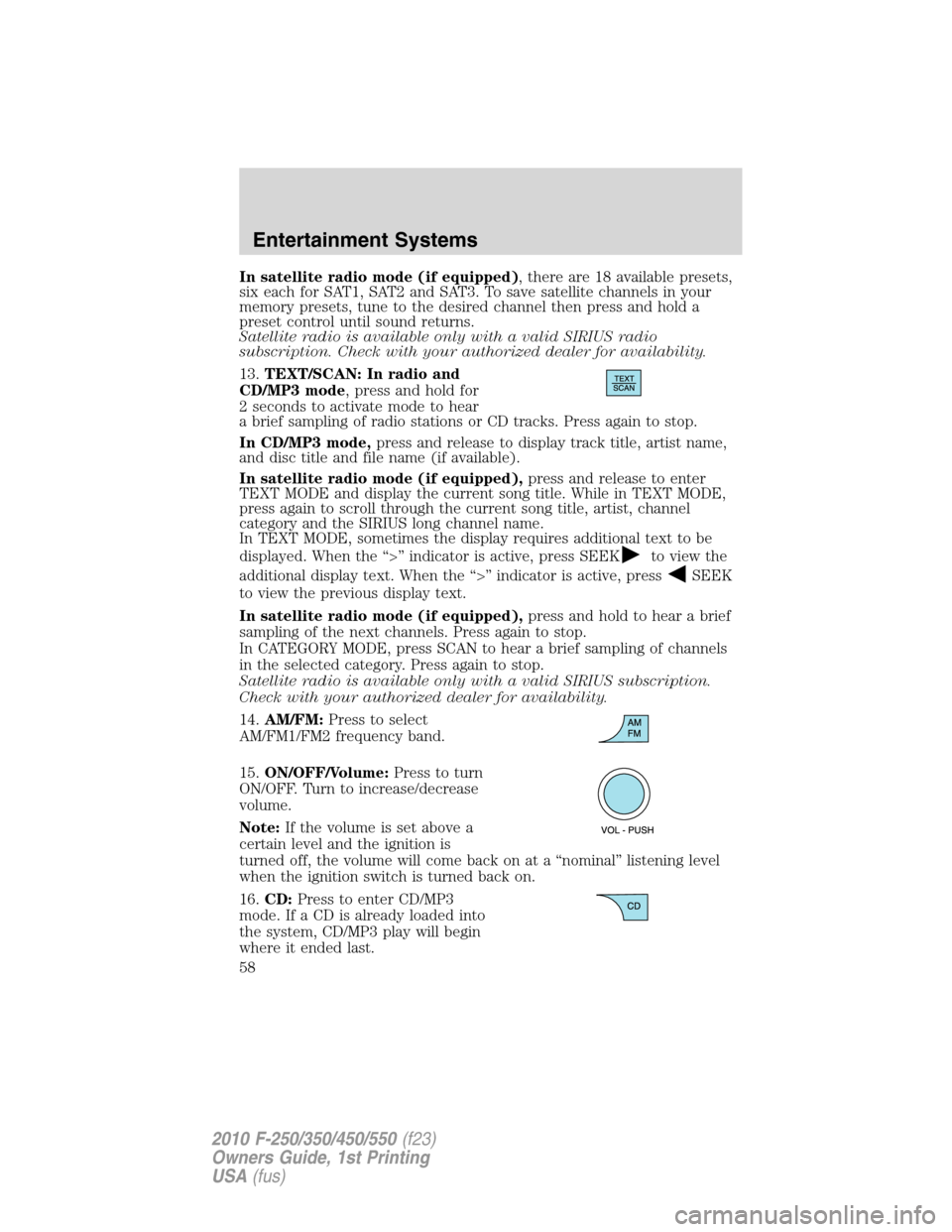
13.TEXT/SCAN: In radio and
CD/MP3 mode, press and hold for
2 seconds to activate mode to hear
a brief sampling of radio stations or CD tracks. Press again to stop.
In CD/MP3 mode,press and release to display track title, artist name,
and disc title and file name (if available).
In satellite radio mode (if equipped),press and release to enter
TEXT MODE and display the current song title. While in TEXT MODE,
press again to scroll through the current song title, artist, channel
category and the SIRIUS long channel name.
In TEXT MODE, sometimes the display requires additional text to be
displayed. When the “>” indicator is active, press SEEK
to view the
additional display text. When the “>” indicator is active, press
SEEK
to view the previous display text.
In satellite radio mode (if equipped),press and hold to hear a brief
sampling of the next channels. Press again to stop.
In CATEGORY MODE, press SCAN to hear a brief sampling of channels
in the selected category. Press again to stop.
Satellite radio is available only with a valid SIRIUS subscription.
Check with your authorized dealer for availability.
14.AM/FM:Press to select
AM/FM1/FM2 frequency band.
15.ON/OFF/Volume:Press to turn
ON/OFF. Turn to increase/decrease
volume.
Note:If the volume is set above a
certain level and the ignition is
turned off, the volume will come back on at a “nominal” listening level
when the ignition switch is turned back on.
16.CD:Press to enter CD/MP3
mode. If a CD is already loaded into
the system, CD/MP3 play will begin
where it ended last.
Entertainment Systems
58
2010 F-250/350/450/550(f23)
Owners Guide, 1st Printing
USA(fus)
Page 66 of 407
Note:SIRIUS reserves the unrestricted right to change, rearrange, add
or delete programming including canceling, moving or adding particular
channels, and its prices, at any time, with or without notice to you. Ford
Motor Company shall not be responsible for any such programming
changes.
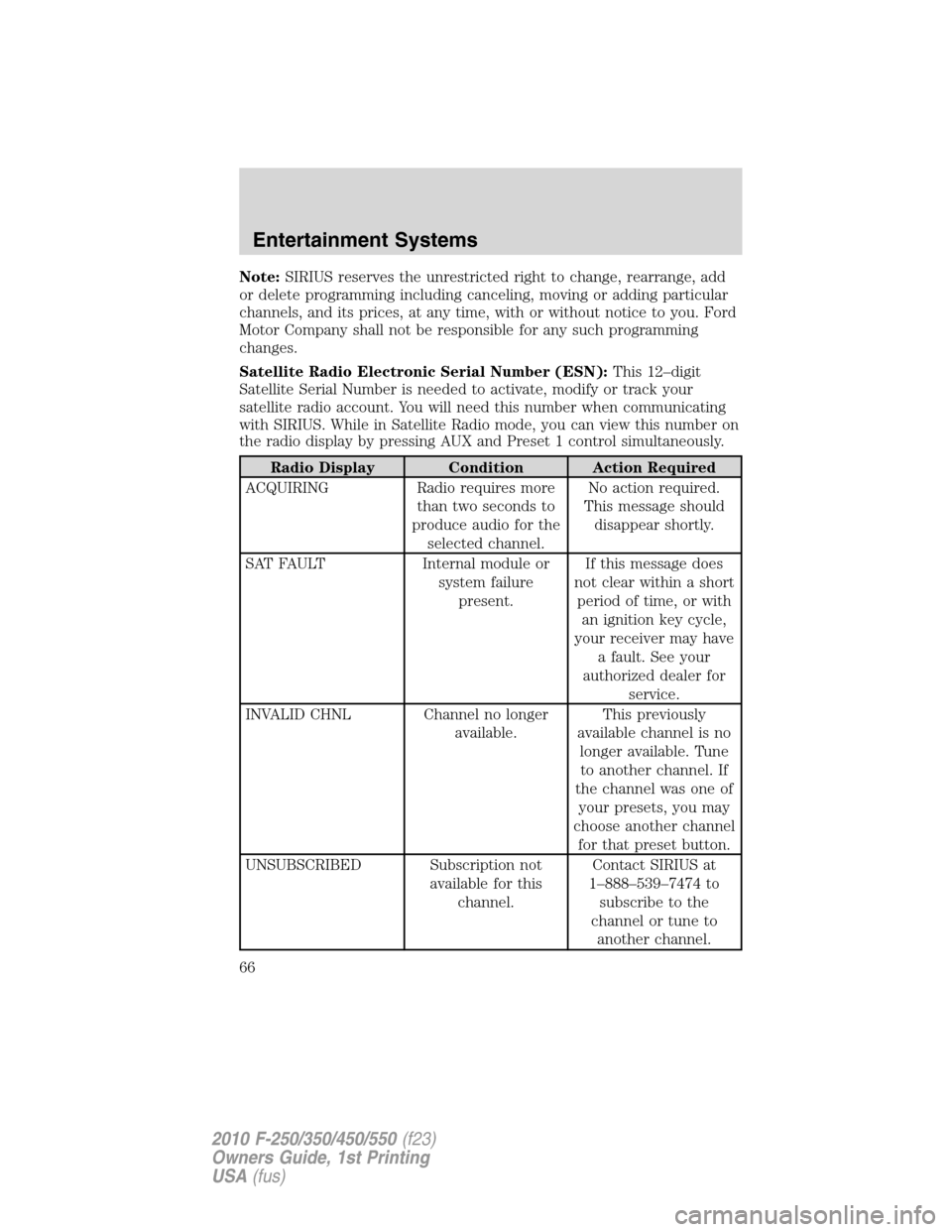
Satellite Radio Electronic Serial Number (ESN):This 12–digit
Satellite Serial Number is needed to activate, modify or track your
satellite radio account. You will need this number when communicating
with SIRIUS. While in Satellite Radio mode, you can view this number on
the radio display by pressing AUX and Preset 1 control simultaneously.
Radio Display Condition Action Required
ACQUIRING Radio requires more
than two seconds to
produce audio for the
selected channel.No action required.
This message should
disappear shortly.
SAT FAULT Internal module or
system failure
present.If this message does
not clear within a short
period of time, or with
an ignition key cycle,
your receiver may have
a fault. See your
authorized dealer for
service.
INVALID CHNL Channel no longer
available.This previously
available channel is no
longer available. Tune
to another channel. If
the channel was one of
your presets, you may
choose another channel
for that preset button.
UNSUBSCRIBED Subscription not
available for this
channel.Contact SIRIUS at
1–888–539–7474 to
subscribe to the
channel or tune to
another channel.
Entertainment Systems
66
2010 F-250/350/450/550(f23)
Owners Guide, 1st Printing
USA(fus)