fuel filter FORD SUPER DUTY 2013 3.G Owners Manual
[x] Cancel search | Manufacturer: FORD, Model Year: 2013, Model line: SUPER DUTY, Model: FORD SUPER DUTY 2013 3.GPages: 563, PDF Size: 7.27 MB
Page 7 of 563
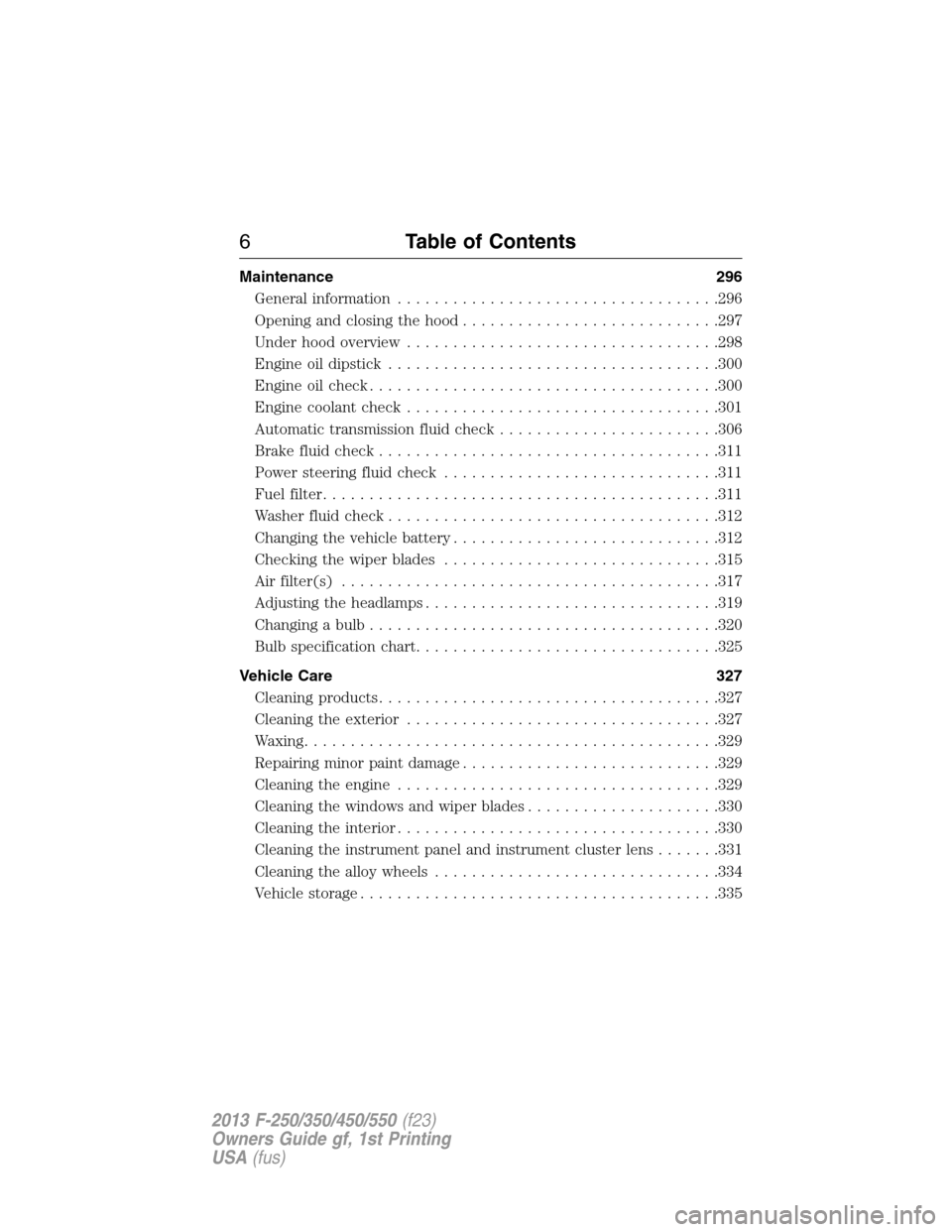
Maintenance 296
General information...................................296
Opening and closing the hood............................297
Under hood overview..................................298
Engine oil dipstick....................................300
Engine oil check......................................300
Engine coolant check..................................301
Automatic transmission fluid check........................306
Brake fluid check.....................................311
Power steering fluid check..............................311
Fuel filter...........................................311
Washer fluid check....................................312
Changing the vehicle battery.............................312
Checking the wiper blades..............................315
Air filter(s).........................................317
Adjusting the headlamps................................319
Changing a bulb......................................320
Bulb specification chart.................................325
Vehicle Care 327
Cleaning products.....................................327
Cleaning the exterior..................................327
Waxing.............................................329
Repairing minor paint damage............................329
Cleaning the engine...................................329
Cleaning the windows and wiper blades.....................330
Cleaning the interior...................................330
Cleaning the instrument panel and instrument cluster lens.......331
Cleaning the alloy wheels...............................334
Vehicle storage.......................................335
6Table of Contents
2013 F-250/350/450/550(f23)
Owners Guide gf, 1st Printing
USA(fus)
Page 11 of 563
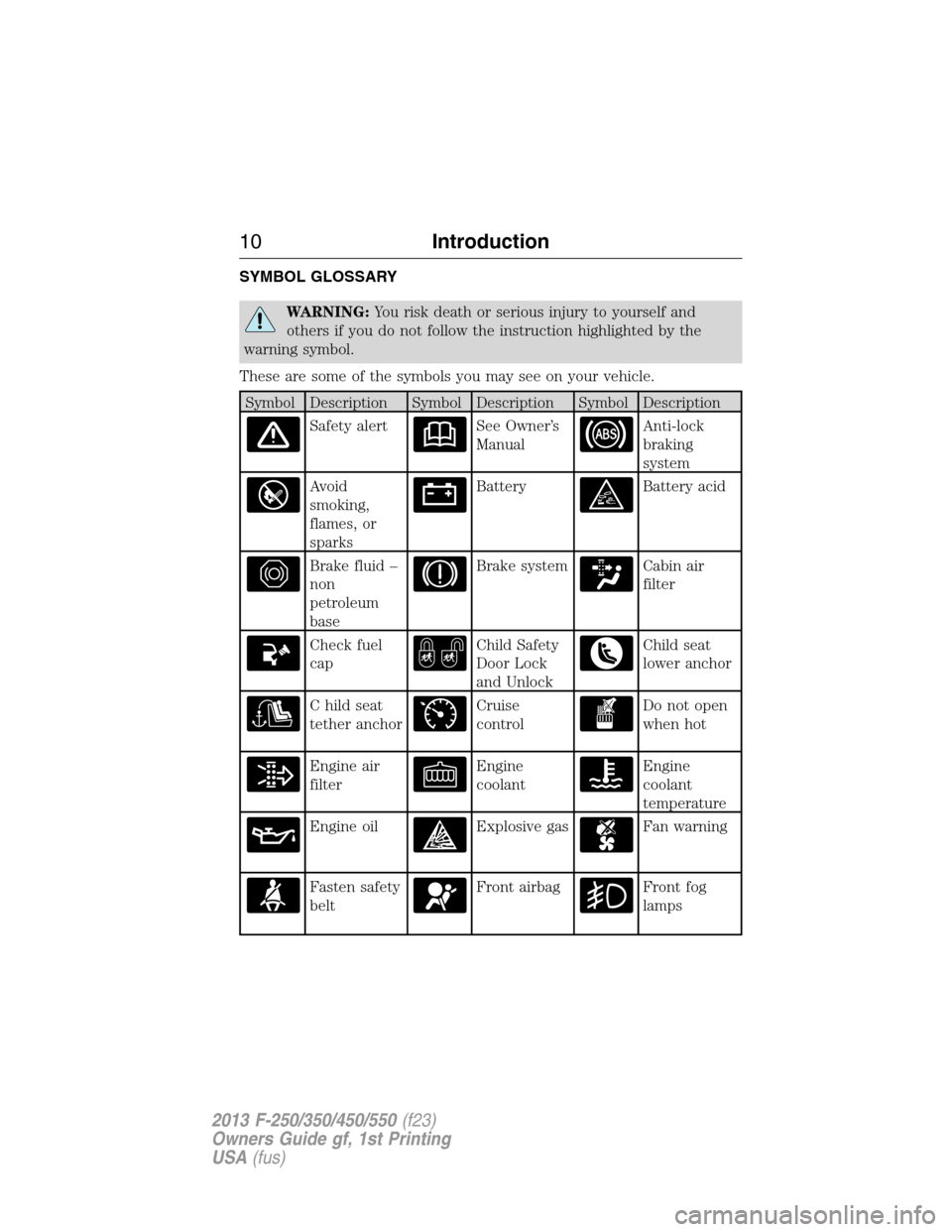
SYMBOL GLOSSARY
WARNING:You risk death or serious injury to yourself and
others if you do not follow the instruction highlighted by the
warning symbol.
These are some of the symbols you may see on your vehicle.
Symbol Description Symbol Description Symbol Description
Safety alertSee Owner’s
ManualAnti-lock
braking
system
Avoid
smoking,
flames, or
sparksBatteryBattery acid
Brake fluid –
non
petroleum
baseBrake systemCabin air
filter
Check fuel
capChild Safety
Door Lock
and UnlockChild seat
lower anchor
C hild seat
tether anchorCruise
controlDo not open
when hot
Engine air
filterEngine
coolantEngine
coolant
temperature
Engine oilExplosive gasFan warning
Fasten safety
beltFront airbagFront fog
lamps
10Introduction
2013 F-250/350/450/550(f23)
Owners Guide gf, 1st Printing
USA(fus)
Page 104 of 563
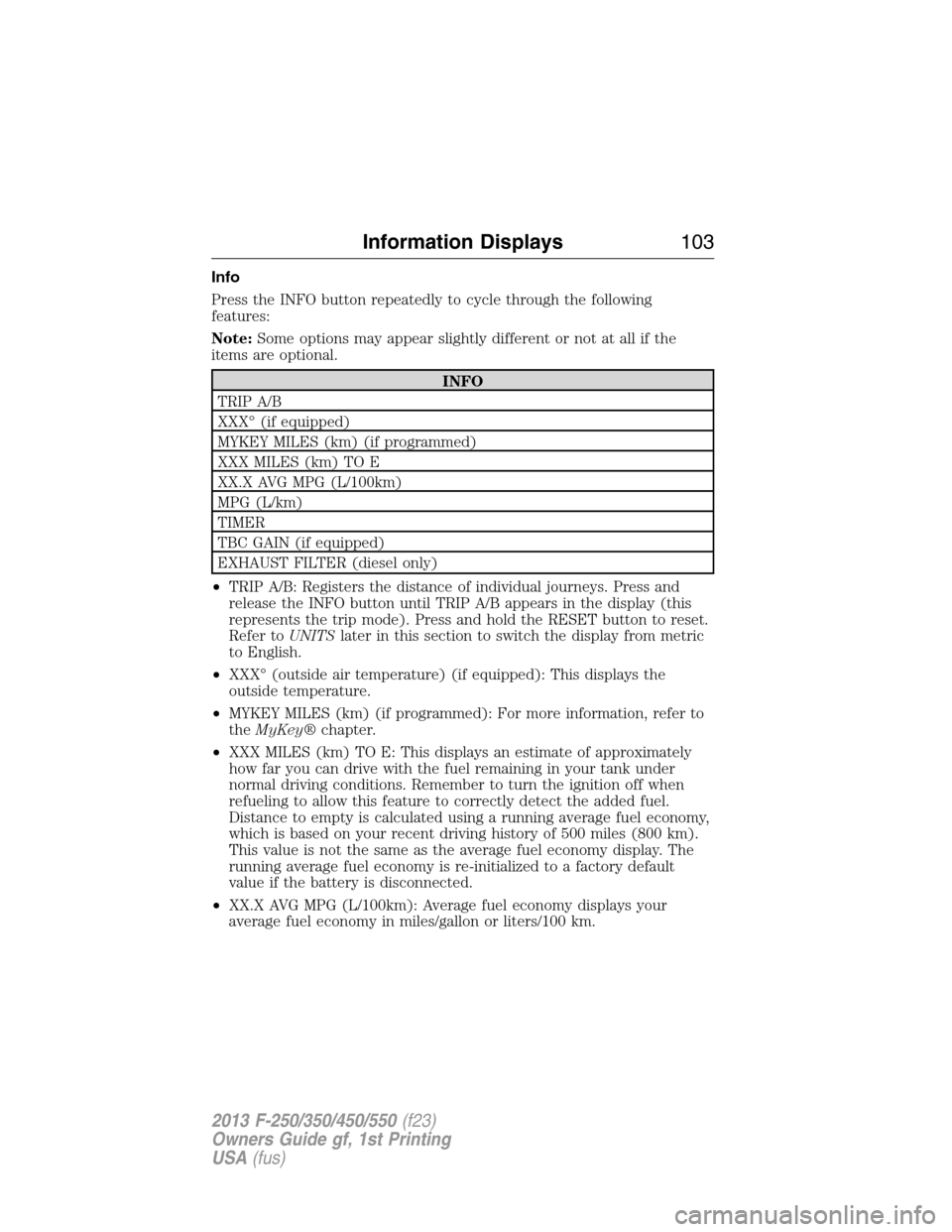
Info
Press the INFO button repeatedly to cycle through the following
features:
Note:Some options may appear slightly different or not at all if the
items are optional.
INFO
TRIP A/B
XXX° (if equipped)
MYKEY MILES (km) (if programmed)
XXX MILES (km) TO E
XX.X AVG MPG (L/100km)
MPG (L/km)
TIMER
TBC GAIN (if equipped)
EXHAUST FILTER (diesel only)
•TRIP A/B: Registers the distance of individual journeys. Press and
release the INFO button until TRIP A/B appears in the display (this
represents the trip mode). Press and hold the RESET button to reset.
Refer toUNITSlater in this section to switch the display from metric
to English.
•XXX° (outside air temperature) (if equipped): This displays the
outside temperature.
•MYKEY MILES (km) (if programmed): For more information, refer to
theMyKey®chapter.
•XXX MILES (km) TO E: This displays an estimate of approximately
how far you can drive with the fuel remaining in your tank under
normal driving conditions. Remember to turn the ignition off when
refueling to allow this feature to correctly detect the added fuel.
Distance to empty is calculated using a running average fuel economy,
which is based on your recent driving history of 500 miles (800 km).
This value is not the same as the average fuel economy display. The
running average fuel economy is re-initialized to a factory default
value if the battery is disconnected.
•XX.X AVG MPG (L/100km): Average fuel economy displays your
average fuel economy in miles/gallon or liters/100 km.
Information Displays103
2013 F-250/350/450/550(f23)
Owners Guide gf, 1st Printing
USA(fus)
Page 105 of 563
•MPG (L/km): This displays instantaneous fuel economy as a bar graph.
Your vehicle must be moving to calculate instantaneous fuel economy.
Instantaneous fuel economy cannot be reset.
•TIMER: Displays the trip elapsed drive time. Press and release RESET
to pause the timer. Press and hold RESET to reset the timer.
•TBC GAIN (if equipped): Displays the level of trailer brake gain or if
the trailer is not connected.
•EXHAUST FILTER (Diesel only): For more information, refer to the
Diesel exhaust system: oxidation catalyst/diesel particulate filter
systemin your diesel supplement for more information.
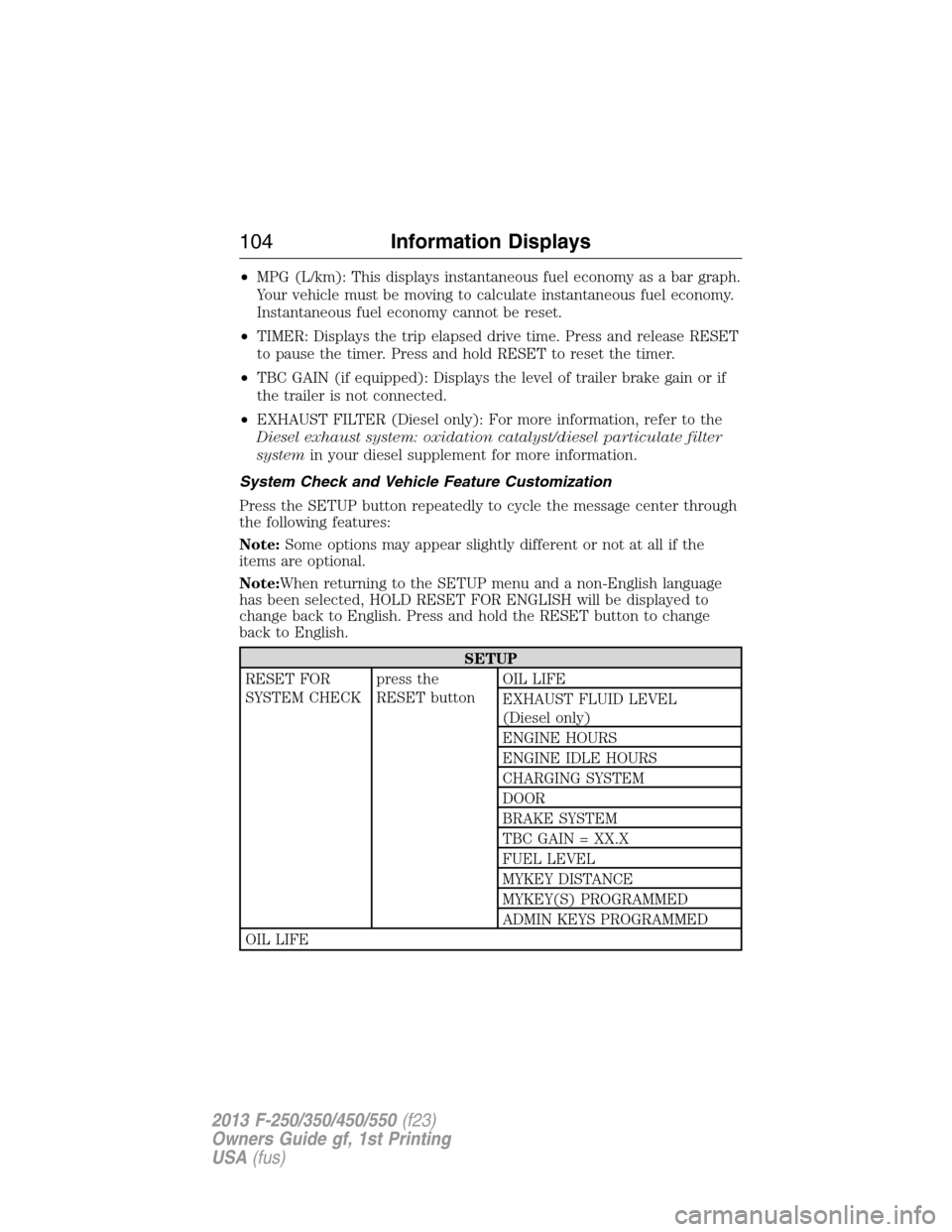
System Check and Vehicle Feature Customization
Press the SETUP button repeatedly to cycle the message center through
the following features:
Note:Some options may appear slightly different or not at all if the
items are optional.
Note:When returning to the SETUP menu and a non-English language
has been selected, HOLD RESET FOR ENGLISH will be displayed to
change back to English. Press and hold the RESET button to change
back to English.
SETUP
RESET FOR
SYSTEM CHECKpress the
RESET buttonOIL LIFE
EXHAUST FLUID LEVEL
(Diesel only)
ENGINE HOURS
ENGINE IDLE HOURS
CHARGING SYSTEM
DOOR
BRAKE SYSTEM
TBC GAIN = XX.X
FUEL LEVEL
MYKEY DISTANCE
MYKEY(S) PROGRAMMED
ADMIN KEYS PROGRAMMED
OIL LIFE
104Information Displays
2013 F-250/350/450/550(f23)
Owners Guide gf, 1st Printing
USA(fus)
Page 116 of 563
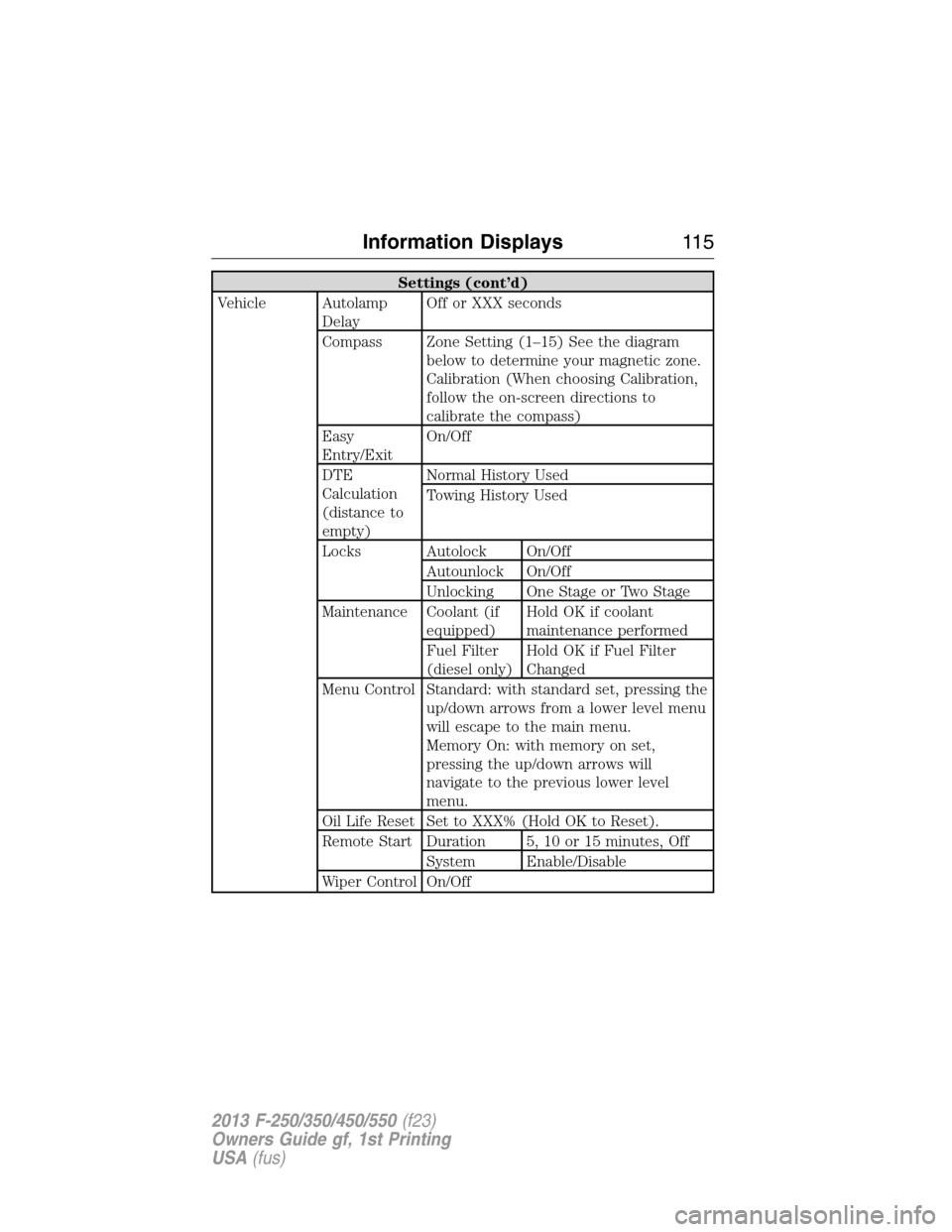
Settings (cont’d)
Vehicle Autolamp
DelayOff or XXX seconds
Compass Zone Setting (1–15) See the diagram
below to determine your magnetic zone.
Calibration (When choosing Calibration,
follow the on-screen directions to
calibrate the compass)
Easy
Entry/ExitOn/Off
DTE
Calculation
(distance to
empty)Normal History Used
Towing History Used
Locks Autolock On/Off
Autounlock On/Off
Unlocking One Stage or Two Stage
Maintenance Coolant (if
equipped)Hold OK if coolant
maintenance performed
Fuel Filter
(diesel only)Hold OK if Fuel Filter
Changed
Menu Control Standard: with standard set, pressing the
up/down arrows from a lower level menu
will escape to the main menu.
Memory On: with memory on set,
pressing the up/down arrows will
navigate to the previous lower level
menu.
Oil Life Reset Set to XXX% (Hold OK to Reset).
Remote Start Duration 5, 10 or 15 minutes, Off
System Enable/Disable
Wiper Control On/Off
Information Displays11 5
2013 F-250/350/450/550(f23)
Owners Guide gf, 1st Printing
USA(fus)
Page 125 of 563
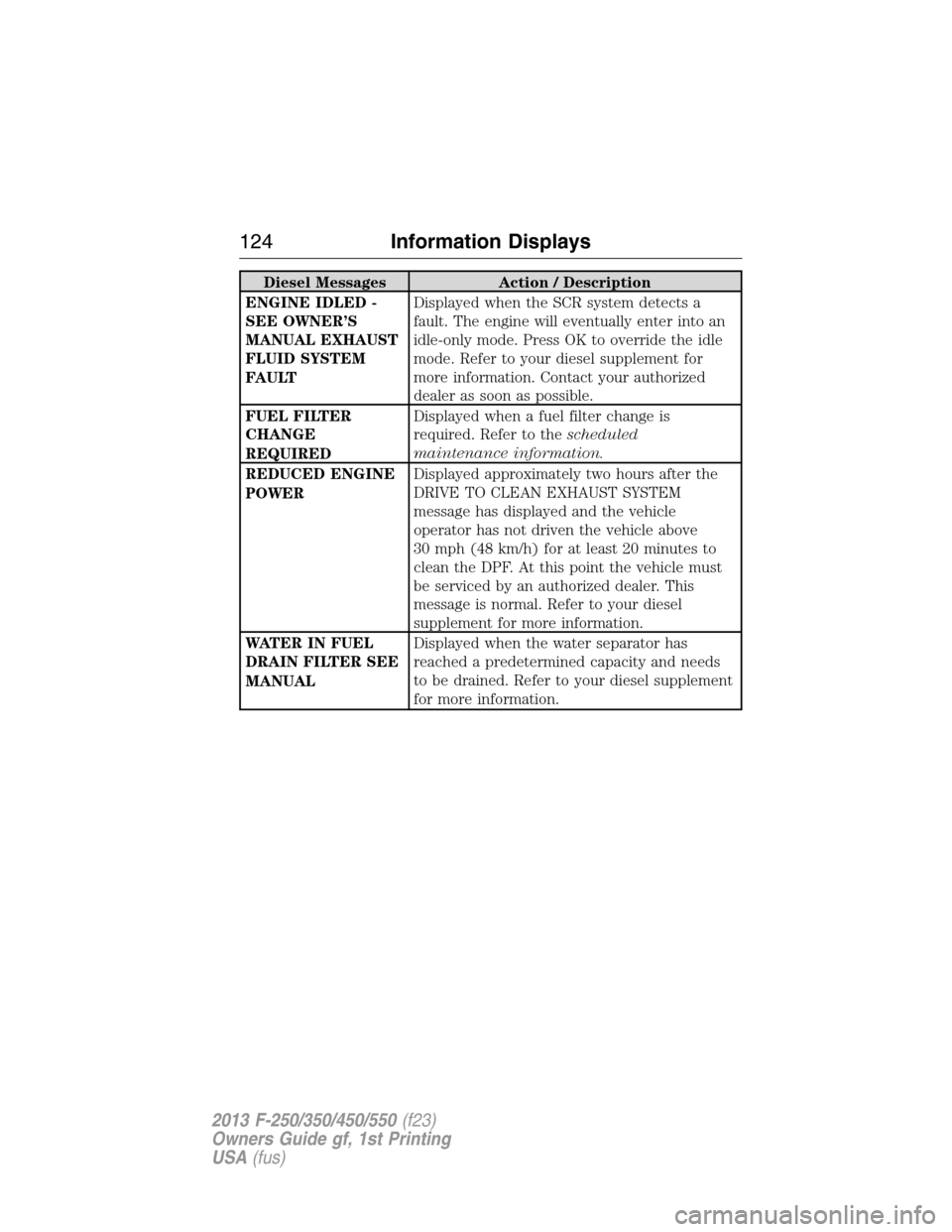
Diesel Messages Action / Description
ENGINE IDLED -
SEE OWNER’S
MANUAL EXHAUST
FLUID SYSTEM
FAULTDisplayed when the SCR system detects a
fault. The engine will eventually enter into an
idle-only mode. Press OK to override the idle
mode. Refer to your diesel supplement for
more information. Contact your authorized
dealer as soon as possible.
FUEL FILTER
CHANGE
REQUIREDDisplayed when a fuel filter change is
required. Refer to thescheduled
maintenance information.
REDUCED ENGINE
POWERDisplayed approximately two hours after the
DRIVE TO CLEAN EXHAUST SYSTEM
message has displayed and the vehicle
operator has not driven the vehicle above
30 mph (48 km/h) for at least 20 minutes to
clean the DPF. At this point the vehicle must
be serviced by an authorized dealer. This
message is normal. Refer to your diesel
supplement for more information.
WATER IN FUEL
DRAIN FILTER SEE
MANUALDisplayed when the water separator has
reached a predetermined capacity and needs
to be drained. Refer to your diesel supplement
for more information.
124Information Displays
2013 F-250/350/450/550(f23)
Owners Guide gf, 1st Printing
USA(fus)
Page 126 of 563
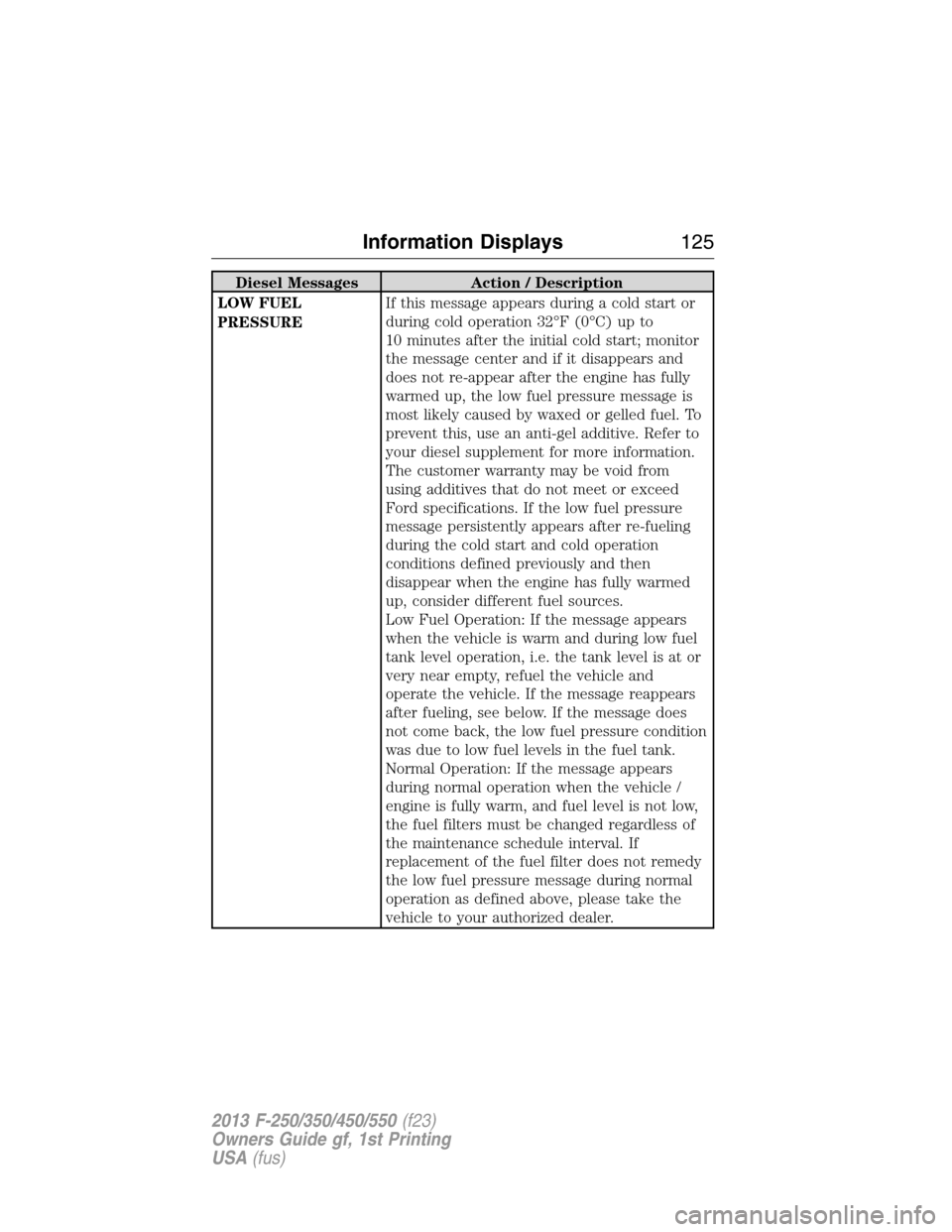
Diesel Messages Action / Description
LOW FUEL
PRESSUREIf this message appears during a cold start or
during cold operation 32°F (0°C) up to
10 minutes after the initial cold start; monitor
the message center and if it disappears and
does not re-appear after the engine has fully
warmed up, the low fuel pressure message is
most likely caused by waxed or gelled fuel. To
prevent this, use an anti-gel additive. Refer to
your diesel supplement for more information.
The customer warranty may be void from
using additives that do not meet or exceed
Ford specifications. If the low fuel pressure
message persistently appears after re-fueling
during the cold start and cold operation
conditions defined previously and then
disappear when the engine has fully warmed
up, consider different fuel sources.
Low Fuel Operation: If the message appears
when the vehicle is warm and during low fuel
tank level operation, i.e. the tank level is at or
very near empty, refuel the vehicle and
operate the vehicle. If the message reappears
after fueling, see below. If the message does
not come back, the low fuel pressure condition
was due to low fuel levels in the fuel tank.
Normal Operation: If the message appears
during normal operation when the vehicle /
engine is fully warm, and fuel level is not low,
the fuel filters must be changed regardless of
the maintenance schedule interval. If
replacement of the fuel filter does not remedy
the low fuel pressure message during normal
operation as defined above, please take the
vehicle to your authorized dealer.
Information Displays125
2013 F-250/350/450/550(f23)
Owners Guide gf, 1st Printing
USA(fus)
Page 312 of 563
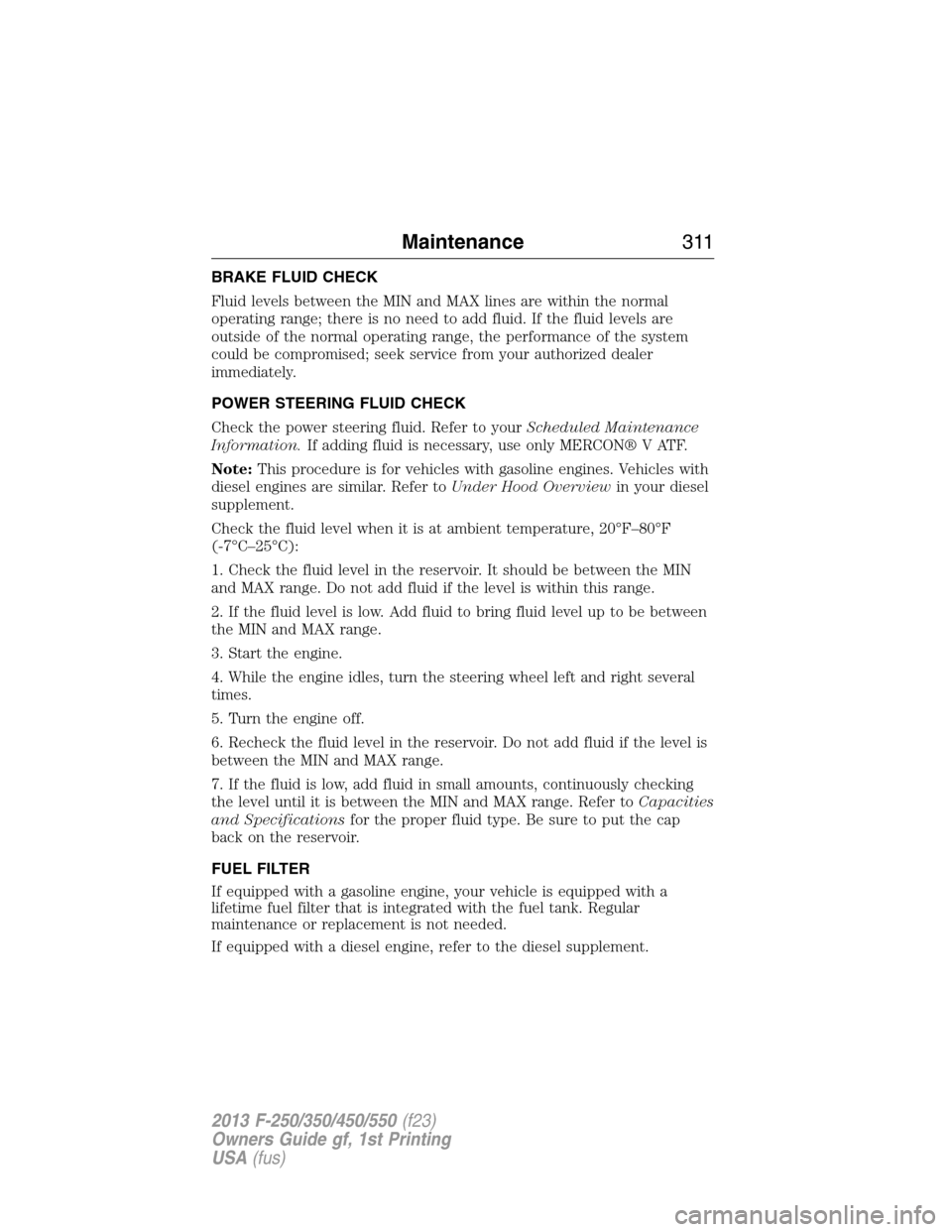
BRAKE FLUID CHECK
Fluid levels between the MIN and MAX lines are within the normal
operating range; there is no need to add fluid. If the fluid levels are
outside of the normal operating range, the performance of the system
could be compromised; seek service from your authorized dealer
immediately.
POWER STEERING FLUID CHECK
Check the power steering fluid. Refer to yourScheduled Maintenance
Information.If adding fluid is necessary, use only MERCON® V ATF.
Note:This procedure is for vehicles with gasoline engines. Vehicles with
diesel engines are similar. Refer toUnder Hood Overviewin your diesel
supplement.
Check the fluid level when it is at ambient temperature, 20°F–80°F
(-7°C–25°C):
1. Check the fluid level in the reservoir. It should be between the MIN
and MAX range. Do not add fluid if the level is within this range.
2. If the fluid level is low. Add fluid to bring fluid level up to be between
the MIN and MAX range.
3. Start the engine.
4. While the engine idles, turn the steering wheel left and right several
times.
5. Turn the engine off.
6. Recheck the fluid level in the reservoir. Do not add fluid if the level is
between the MIN and MAX range.
7. If the fluid is low, add fluid in small amounts, continuously checking
the level until it is between the MIN and MAX range. Refer toCapacities
and Specificationsfor the proper fluid type. Be sure to put the cap
back on the reservoir.
FUEL FILTER
If equipped with a gasoline engine, your vehicle is equipped with a
lifetime fuel filter that is integrated with the fuel tank. Regular
maintenance or replacement is not needed.
If equipped with a diesel engine, refer to the diesel supplement.
Maintenance311
2013 F-250/350/450/550(f23)
Owners Guide gf, 1st Printing
USA(fus)
Page 337 of 563
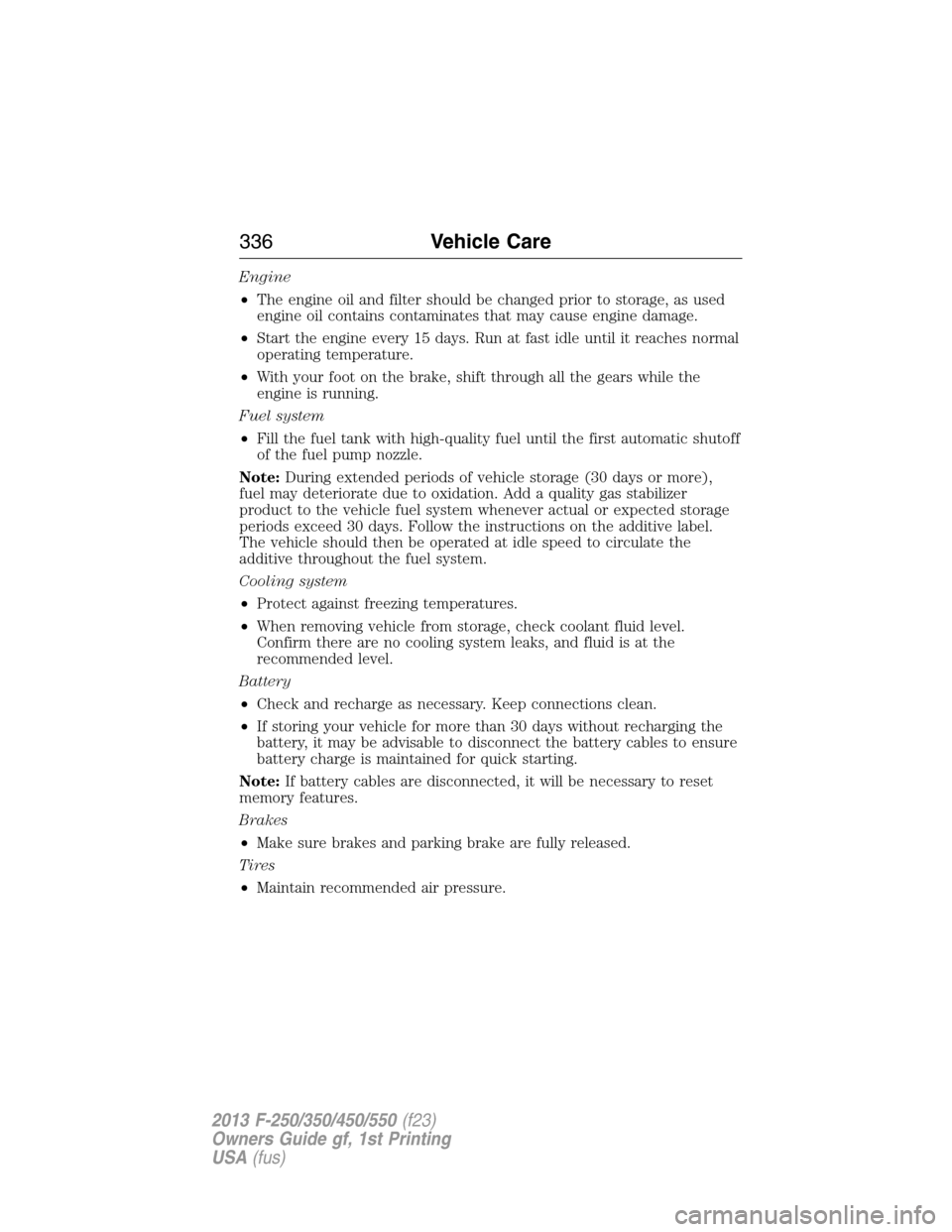
Engine
•The engine oil and filter should be changed prior to storage, as used
engine oil contains contaminates that may cause engine damage.
•Start the engine every 15 days. Run at fast idle until it reaches normal
operating temperature.
•With your foot on the brake, shift through all the gears while the
engine is running.
Fuel system
•Fill the fuel tank with high-quality fuel until the first automatic shutoff
of the fuel pump nozzle.
Note:During extended periods of vehicle storage (30 days or more),
fuel may deteriorate due to oxidation. Add a quality gas stabilizer
product to the vehicle fuel system whenever actual or expected storage
periods exceed 30 days. Follow the instructions on the additive label.
The vehicle should then be operated at idle speed to circulate the
additive throughout the fuel system.
Cooling system
•Protect against freezing temperatures.
•When removing vehicle from storage, check coolant fluid level.
Confirm there are no cooling system leaks, and fluid is at the
recommended level.
Battery
•Check and recharge as necessary. Keep connections clean.
•If storing your vehicle for more than 30 days without recharging the
battery, it may be advisable to disconnect the battery cables to ensure
battery charge is maintained for quick starting.
Note:If battery cables are disconnected, it will be necessary to reset
memory features.
Brakes
•Make sure brakes and parking brake are fully released.
Tires
•Maintain recommended air pressure.
336Vehicle Care
2013 F-250/350/450/550(f23)
Owners Guide gf, 1st Printing
USA(fus)
Page 409 of 563
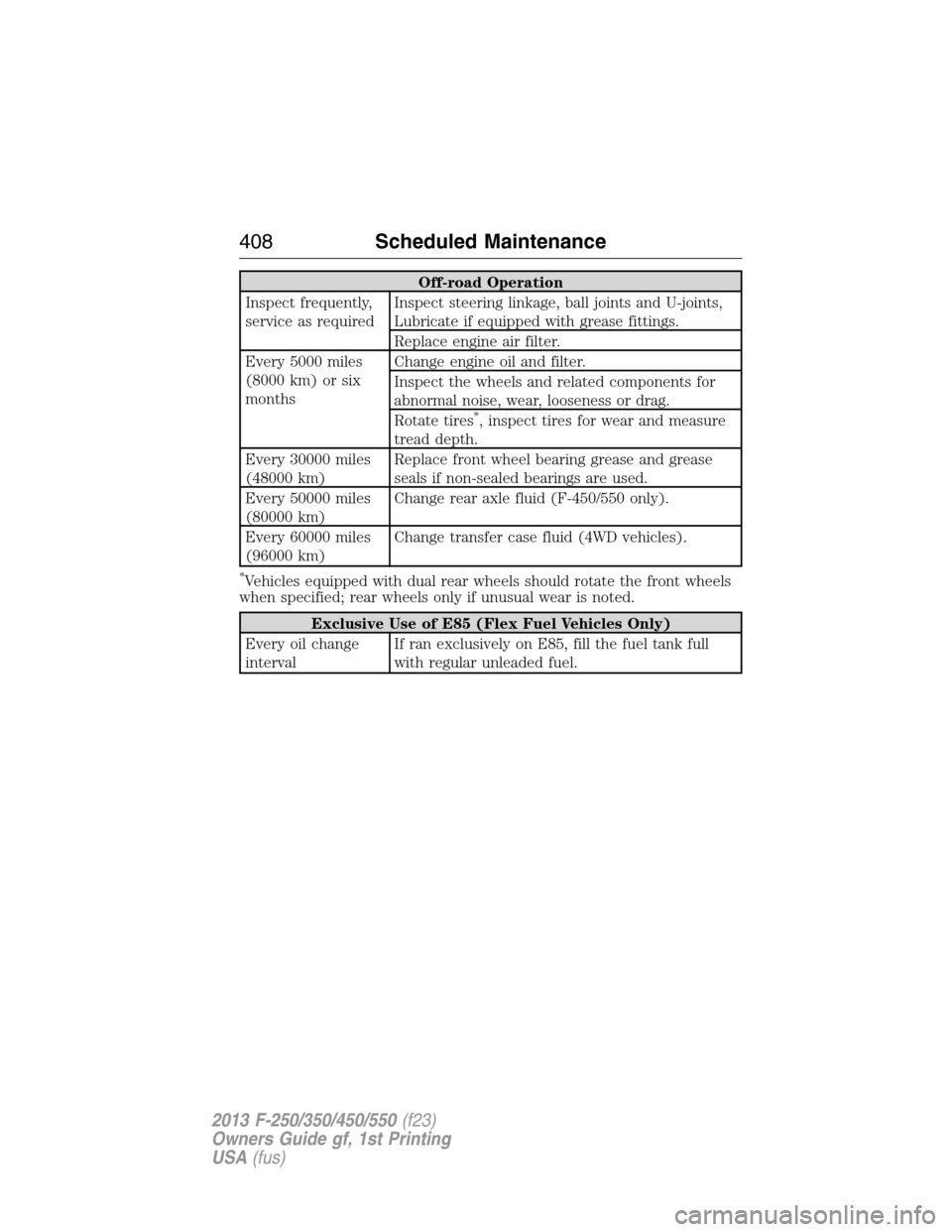
Off-road Operation
Inspect frequently,
service as requiredInspect steering linkage, ball joints and U-joints,
Lubricate if equipped with grease fittings.
Replace engine air filter.
Every 5000 miles
(8000 km) or six
monthsChange engine oil and filter.
Inspect the wheels and related components for
abnormal noise, wear, looseness or drag.
Rotate tires
*, inspect tires for wear and measure
tread depth.
Every 30000 miles
(48000 km)Replace front wheel bearing grease and grease
seals if non-sealed bearings are used.
Every 50000 miles
(80000 km)Change rear axle fluid (F-450/550 only).
Every 60000 miles
(96000 km)Change transfer case fluid (4WD vehicles).
*Vehicles equipped with dual rear wheels should rotate the front wheels
when specified; rear wheels only if unusual wear is noted.
Exclusive Use of E85 (Flex Fuel Vehicles Only)
Every oil change
intervalIf ran exclusively on E85, fill the fuel tank full
with regular unleaded fuel.
408Scheduled Maintenance
2013 F-250/350/450/550(f23)
Owners Guide gf, 1st Printing
USA(fus)