mirror FORD SUPER DUTY 2016 3.G User Guide
[x] Cancel search | Manufacturer: FORD, Model Year: 2016, Model line: SUPER DUTY, Model: FORD SUPER DUTY 2016 3.GPages: 510, PDF Size: 5.42 MB
Page 117 of 510
HEATED WINDOWS AND
MIRRORS
Heated Rear Window (If Equipped)
Note: Make sure the engine is running
before operating the heated windows.
Note: If your vehicle is equipped with a
sliding rear window, the feature still
operates when you open the window. Press the button to clear the
heated rear window of thin ice
and fog. The heated rear window
will automatically turn off after a short
period of time. Start the engine before you
switch the heated rear window on.
Do not use razor blades or other sharp
objects to clean or remove decals from
the inside of the heated rear window.
The vehicle warranty does not cover
damage caused to the heated rear
window grid lines.
Heated Exterior Mirror
When you switch the heated rear window
on, the heated exterior mirrors will
automatically turn on.
Note: Do not remove ice from the mirrors
with a scraper or adjust the mirror glass
when it is frozen in place.
Note: Do not clean the mirror housing or
glass with harsh abrasives, fuel or other
petroleum-based cleaning products.
REMOTE START
(If Equipped)
The remote start feature allows you to
pre-condition the interior of your vehicle.
The climate control system works to
achieve comfort according to your previous
settings.
Note: You cannot adjust the system during
remote start operation. Turn the ignition on to return the system
to its previous settings. You can now make
adjustments normally, but you need to turn
certain vehicle-dependent features back
on, such as:
•
Heated seats.
• Cooled seats.
• Heated steering wheel.
• Heated mirrors.
• Heated rear window.
You can adjust the default remote start
settings using the information display
controls. See
Information Displays
(page 88).
Automatic Settings
In hot weather, the system is set to
72°F
(22°C). The cooled seats are set to high
(if available, and selected to AUTO in the
information display).
In moderate weather, the system either
heats or cools (based on previous
settings). The rear defroster, heated
mirrors and heated seats do not
automatically turn on.
In cold weather, the system is set to
72°F
(22°C). The heated seats are set to high
(if available, and selected to AUTO in the
information display). The rear defroster
and heated mirrors automatically turn on.
114
Super Duty (TFA) Canada/United States of America, enUSA, Second Printing Climate ControlE184884
Page 122 of 510
WARNINGS
Do not use the memory function
when your vehicle is moving.
This feature automatically recalls the
position of the following:
•
Driver seat.
• Power mirrors.
• Optional adjustable pedals.
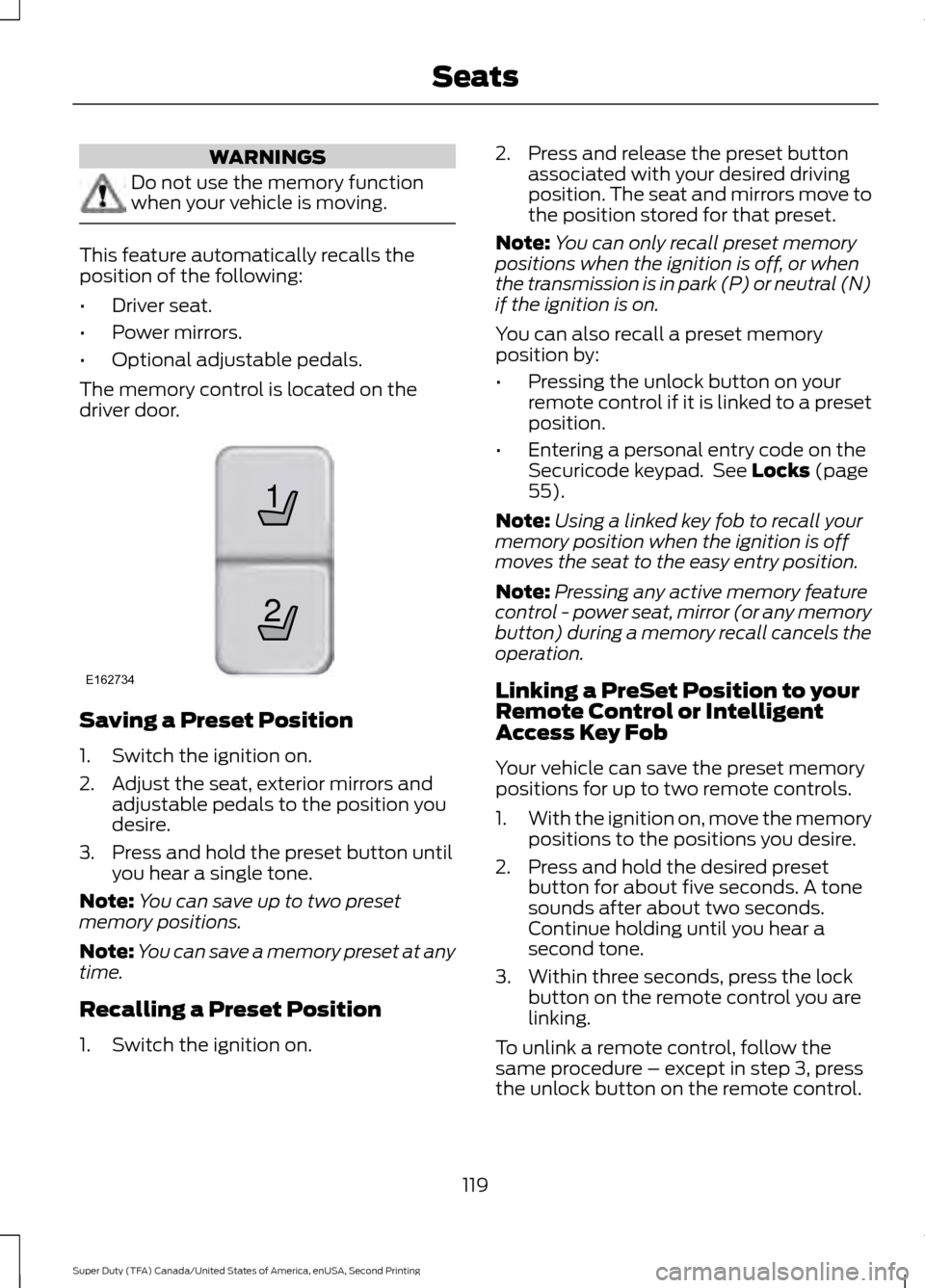
The memory control is located on the
driver door. Saving a Preset Position
1. Switch the ignition on.
2. Adjust the seat, exterior mirrors and
adjustable pedals to the position you
desire.
3. Press and hold the preset button until you hear a single tone.
Note: You can save up to two preset
memory positions.
Note: You can save a memory preset at any
time.
Recalling a Preset Position
1. Switch the ignition on. 2. Press and release the preset button
associated with your desired driving
position. The seat and mirrors move to
the position stored for that preset.
Note: You can only recall preset memory
positions when the ignition is off, or when
the transmission is in park (P) or neutral (N)
if the ignition is on.
You can also recall a preset memory
position by:
• Pressing the unlock button on your
remote control if it is linked to a preset
position.
• Entering a personal entry code on the
Securicode keypad. See Locks (page
55).
Note: Using a linked key fob to recall your
memory position when the ignition is off
moves the seat to the easy entry position.
Note: Pressing any active memory feature
control - power seat, mirror (or any memory
button) during a memory recall cancels the
operation.
Linking a PreSet Position to your
Remote Control or Intelligent
Access Key Fob
Your vehicle can save the preset memory
positions for up to two remote controls.
1. With the ignition on, move the memory
positions to the positions you desire.
2. Press and hold the desired preset button for about five seconds. A tone
sounds after about two seconds.
Continue holding until you hear a
second tone.
3. Within three seconds, press the lock button on the remote control you are
linking.
To unlink a remote control, follow the
same procedure – except in step 3, press
the unlock button on the remote control.
119
Super Duty (TFA) Canada/United States of America, enUSA, Second Printing Seats21
E162734
Page 181 of 510
The system detects certain objects while
the transmission is in reverse (R):
•
Your vehicle is moving toward a
stationary object at a speed of 3 mph
(5 km/h) or less.
• Your vehicle is not moving, but a
moving object is approaching the rear
of your vehicle at a speed of
3 mph
(5 km/h) or less.
• Your vehicle is moving at a speed of
less than 3 mph (5 km/h) and a moving
object is approaching the rear of your
vehicle at a speed of less than
3 mph
(5 km/h).
REAR VIEW CAMERA
(If Equipped) WARNINGS
The rear view camera system is a
reverse aid supplement device that
still requires the driver to use it in
conjunction with the interior and exterior
mirrors for maximum coverage. Objects that are close to either
corner of the bumper or under the
bumper, might not be seen on the
screen due to the limited coverage of the
camera system. Back up as slow as possible since
higher speeds might limit your
reaction time to stop the vehicle.
Use caution when using the rear
video camera and the tailgate is ajar.
If the tailgate is ajar, the camera will
be out of position and the video image may
be incorrect. All guidelines will be removed
when the tailgate is ajar. Use caution when turning camera
features on or off while in reverse
(R). Make sure your vehicle is not
moving. The rear view camera system provides a
video image of the area behind your
vehicle.
During operation, lines appear in the
display which represent your vehicle
’s path
and proximity to objects behind your
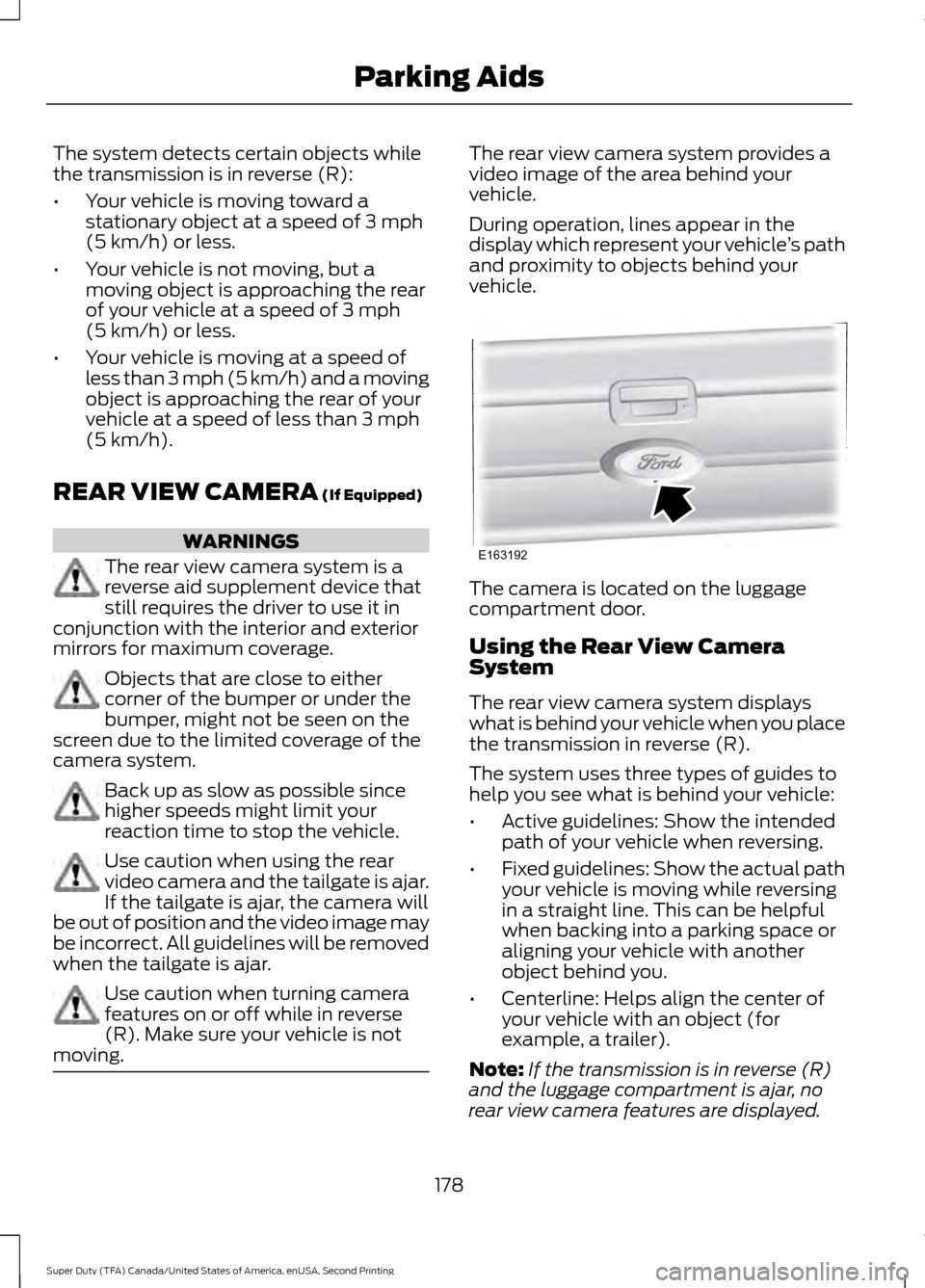
vehicle. The camera is located on the luggage
compartment door.
Using the Rear View Camera
System
The rear view camera system displays
what is behind your vehicle when you place
the transmission in reverse (R).
The system uses three types of guides to
help you see what is behind your vehicle:
•
Active guidelines: Show the intended
path of your vehicle when reversing.
• Fixed guidelines: Show the actual path
your vehicle is moving while reversing
in a straight line. This can be helpful
when backing into a parking space or
aligning your vehicle with another
object behind you.
• Centerline: Helps align the center of
your vehicle with an object (for
example, a trailer).
Note: If the transmission is in reverse (R)
and the luggage compartment is ajar, no
rear view camera features are displayed.
178
Super Duty (TFA) Canada/United States of America, enUSA, Second Printing Parking AidsE163192
Page 183 of 510
Always use caution while reversing.
Objects in the red zone are closest to your
vehicle and objects in the green zone are
farther away. Objects are getting closer to
your vehicle as they move from the green
zone to the yellow or red zones. Use the
side view mirrors and rear view mirror to
get better coverage on both sides and rear
of your vehicle.
Enhanced Park Aids or Park Pilot
Note:
Enhanced park aids is only available
when the transmission is in reverse (R).
Note: The reverse sensing system is not
effective at speeds above 3 mph (5 km/h)
and may not detect certain angular or
moving objects.
The system uses red, yellow and green
highlights which appear on top of the video
image when an object is detected by the
reverse sensing system. The alert highlights
the closest object detected. The reverse
sensing alert can be disabled and if visual
park aid alert is enabled, highlighted areas
are still displayed.
Selectable settings for this feature are ON
and OFF.
Rear Camera Delay
Selectable settings for this feature are ON
and OFF.
When shifting the transmission out of
reverse (R) and into any gear other than
park (P), the camera image remains in the
display until:
• Your vehicle speed sufficiently
increases.
• You shift your vehicle into park (P).
180
Super Duty (TFA) Canada/United States of America, enUSA, Second Printing Parking Aids
Page 199 of 510
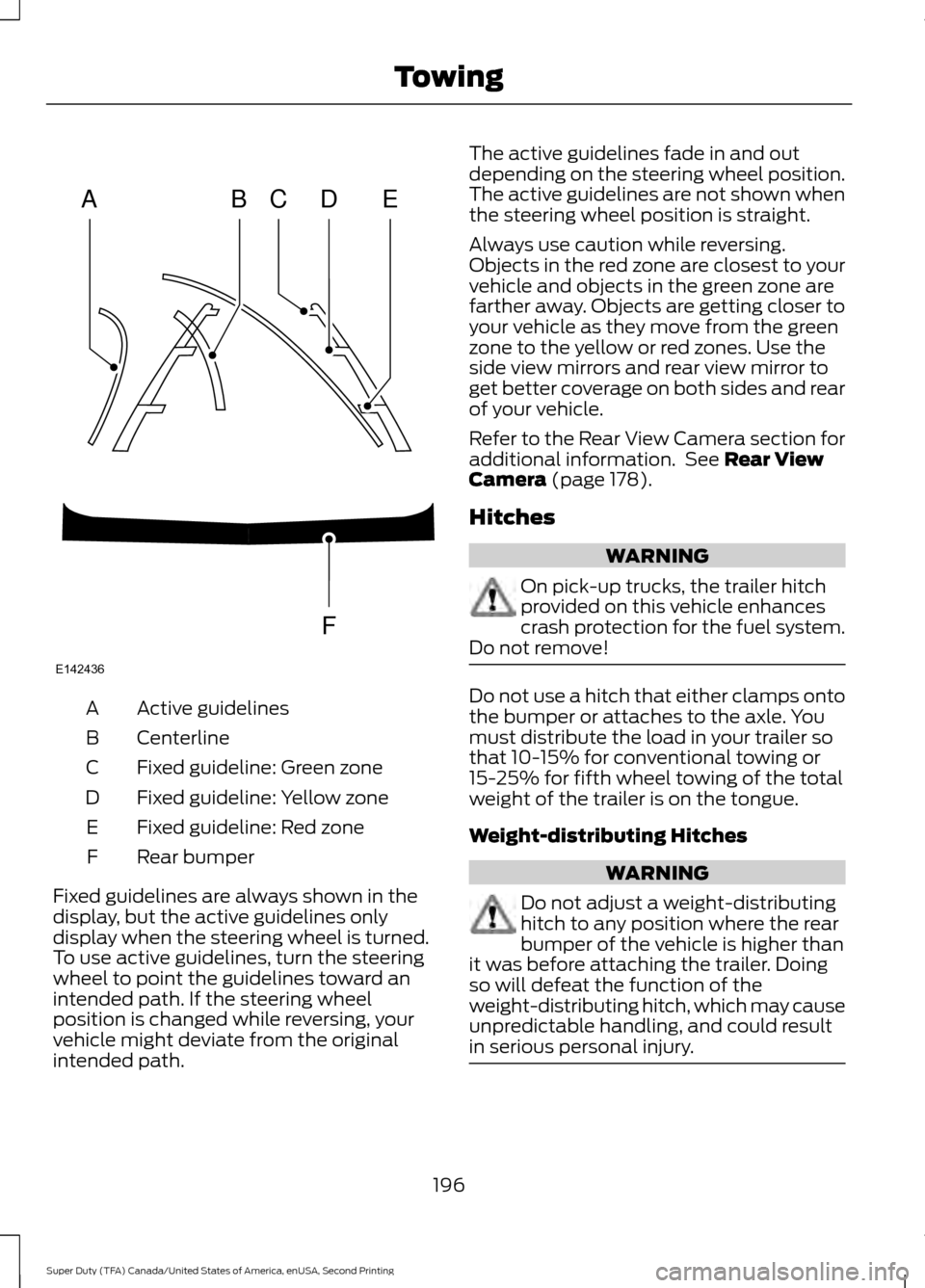
Active guidelines
A
Centerline
B
Fixed guideline: Green zone
C
Fixed guideline: Yellow zone
D
Fixed guideline: Red zone
E
Rear bumper
F
Fixed guidelines are always shown in the
display, but the active guidelines only
display when the steering wheel is turned.
To use active guidelines, turn the steering
wheel to point the guidelines toward an
intended path. If the steering wheel
position is changed while reversing, your
vehicle might deviate from the original
intended path. The active guidelines fade in and out
depending on the steering wheel position.
The active guidelines are not shown when
the steering wheel position is straight.
Always use caution while reversing.
Objects in the red zone are closest to your
vehicle and objects in the green zone are
farther away. Objects are getting closer to
your vehicle as they move from the green
zone to the yellow or red zones. Use the
side view mirrors and rear view mirror to
get better coverage on both sides and rear
of your vehicle.
Refer to the Rear View Camera section for
additional information. See Rear View
Camera (page 178).
Hitches WARNING
On pick-up trucks, the trailer hitch
provided on this vehicle enhances
crash protection for the fuel system.
Do not remove! Do not use a hitch that either clamps onto
the bumper or attaches to the axle. You
must distribute the load in your trailer so
that 10-15% for conventional towing or
15-25% for fifth wheel towing of the total
weight of the trailer is on the tongue.
Weight-distributing Hitches
WARNING
Do not adjust a weight-distributing
hitch to any position where the rear
bumper of the vehicle is higher than
it was before attaching the trailer. Doing
so will defeat the function of the
weight-distributing hitch, which may cause
unpredictable handling, and could result
in serious personal injury. 196
Super Duty (TFA) Canada/United States of America, enUSA, Second Printing TowingABCD
F
E
E142436
Page 226 of 510
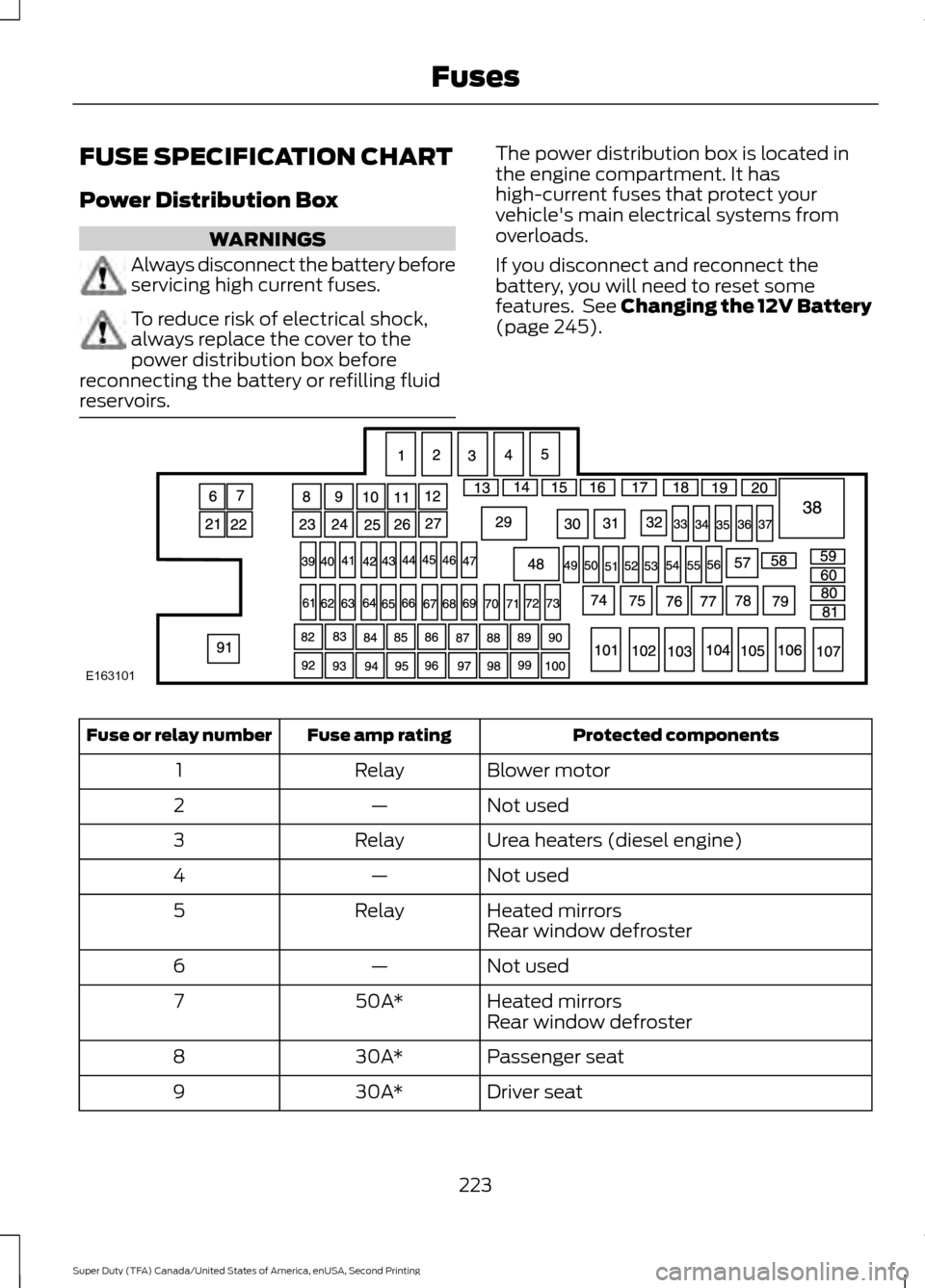
FUSE SPECIFICATION CHART
Power Distribution Box
WARNINGS
Always disconnect the battery before
servicing high current fuses.
To reduce risk of electrical shock,
always replace the cover to the
power distribution box before
reconnecting the battery or refilling fluid
reservoirs. The power distribution box is located in
the engine compartment. It has
high-current fuses that protect your
vehicle's main electrical systems from
overloads.
If you disconnect and reconnect the
battery, you will need to reset some
features. See Changing the 12V Battery
(page 245).
Protected components
Fuse amp rating
Fuse or relay number
Blower motor
Relay
1
Not used
—
2
Urea heaters (diesel engine)
Relay
3
Not used
—
4
Heated mirrors
Relay
5
Rear window defroster
Not used
—
6
Heated mirrors
50A*
7
Rear window defroster
Passenger seat
30A*
8
Driver seat
30A*
9
223
Super Duty (TFA) Canada/United States of America, enUSA, Second Printing FusesE163101
Page 227 of 510
Protected components
Fuse amp rating
Fuse or relay number
Trailer tow
40A*
10
Not used
—
11
Driver smart window motor
30A*
12
Not used
—
13
Not used
—
14
Fuel pump (diesel engine)
Diode
15
Not used
—
16
Heated mirror
15A**
17
Not used
—
18
Not used
—
19
Not used
—
20
Not used
—
21
Trailer tow electric brake
30A*
22
Blower motor
40A*
23
Not used
—
24
Wipers
30A*
25
Trailer tow park lamps
30A*
26
Urea heaters (diesel engine)
25A*
27
Buss bar
—
28
Trailer tow park lamps
Relay
29
A/C clutch
Relay
30
Wipers
Relay
31
Not used
—
32
Vehicle power 1
15A**
33
Vehicle power 2 (diesel engine)
15A**
34
Vehicle power 2 (gas engine)
20A**
Vehicle power 3
10A**
35
224
Super Duty (TFA) Canada/United States of America, enUSA, Second Printing Fuses
Page 232 of 510
Protected components
Fuse amp rating
Fuse or relay number
Driver lumbar motor
7.5A
7
Driver seat switch
Power mirror switch
10A
8
Auxiliary switch relay #3
10A
9
Customer access feed
10A
10
Run/accessory relay
Instrument cluster
10A
11
Interior lighting
15A
12
Lighted running board lamps
Right turn signals and brake lamps
15A
13
Left turn signals and brake lamps
15A
14
Backup lamps, Trailer tow backup relay
15A
15
High-mounted stop lamps
Reverse signal interior mirror
Right low beam headlamp
10A
16
Left low beam headlamp
10A
17
Brake shift interlock
10A
18
Keypad illumination
Passive anti-theft transceiver
Powertrain control module
Amplifier
20A
19
Subwoofer
Power door locks
20A
20
Brake on/off switch
10A
21
Horn
20A
22
Not used (spare)
15A
23
Diagnostic connector
15A
24
Electronic finish panel
Power fold mirror relay
Remote keyless entry
Steering wheel control module
Not used (spare)
15A
25
229
Super Duty (TFA) Canada/United States of America, enUSA, Second Printing Fuses
Page 233 of 510
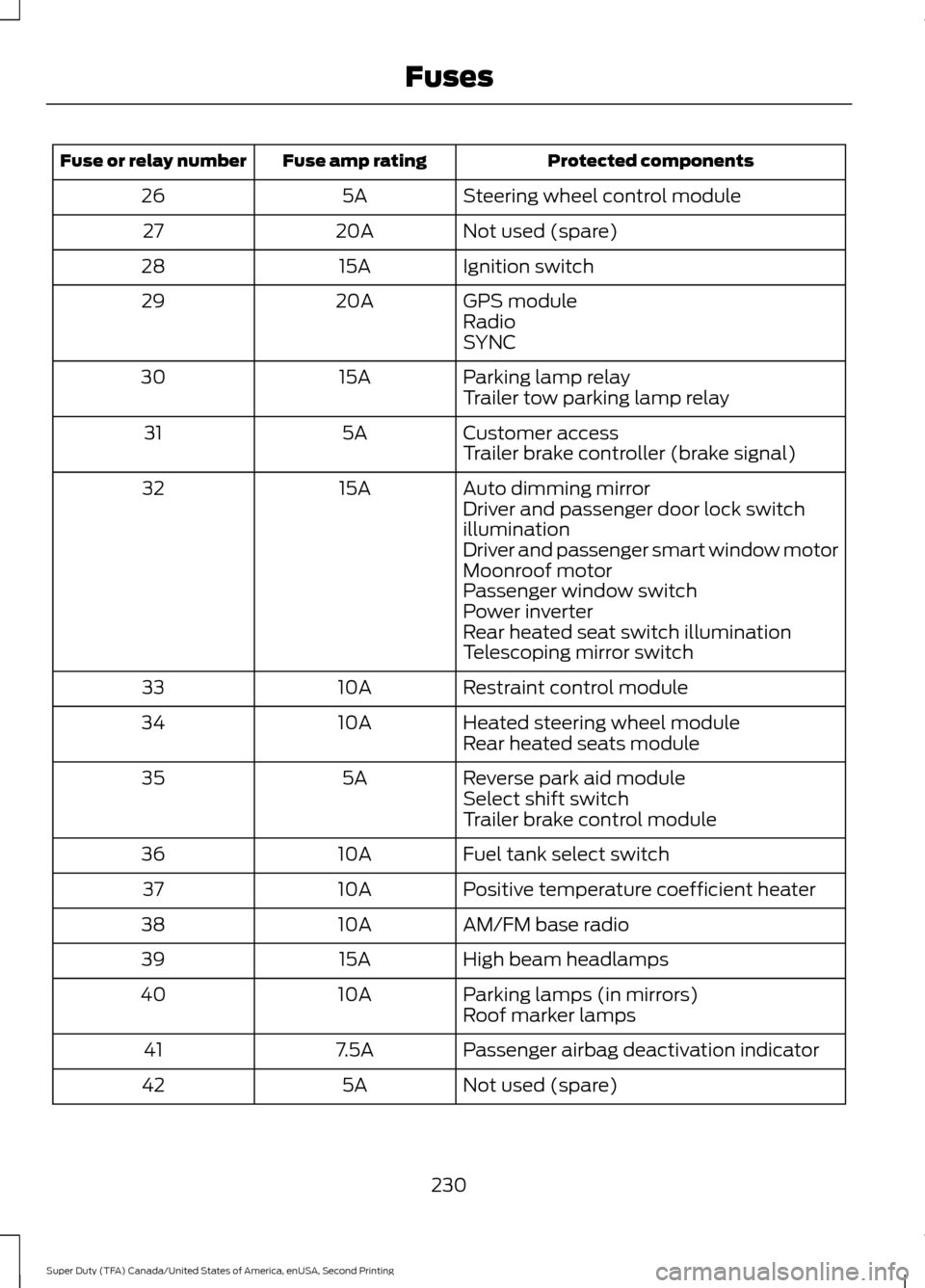
Protected components
Fuse amp rating
Fuse or relay number
Steering wheel control module
5A
26
Not used (spare)
20A
27
Ignition switch
15A
28
GPS module
20A
29
Radio
SYNC
Parking lamp relay
15A
30
Trailer tow parking lamp relay
Customer access
5A
31
Trailer brake controller (brake signal)
Auto dimming mirror
15A
32
Driver and passenger door lock switch
illumination
Driver and passenger smart window motor
Moonroof motor
Passenger window switch
Power inverter
Rear heated seat switch illumination
Telescoping mirror switch
Restraint control module
10A
33
Heated steering wheel module
10A
34
Rear heated seats module
Reverse park aid module
5A
35
Select shift switch
Trailer brake control module
Fuel tank select switch
10A
36
Positive temperature coefficient heater
10A
37
AM/FM base radio
10A
38
High beam headlamps
15A
39
Parking lamps (in mirrors)
10A
40
Roof marker lamps
Passenger airbag deactivation indicator
7.5A
41
Not used (spare)
5A
42
230
Super Duty (TFA) Canada/United States of America, enUSA, Second Printing Fuses
Page 256 of 510
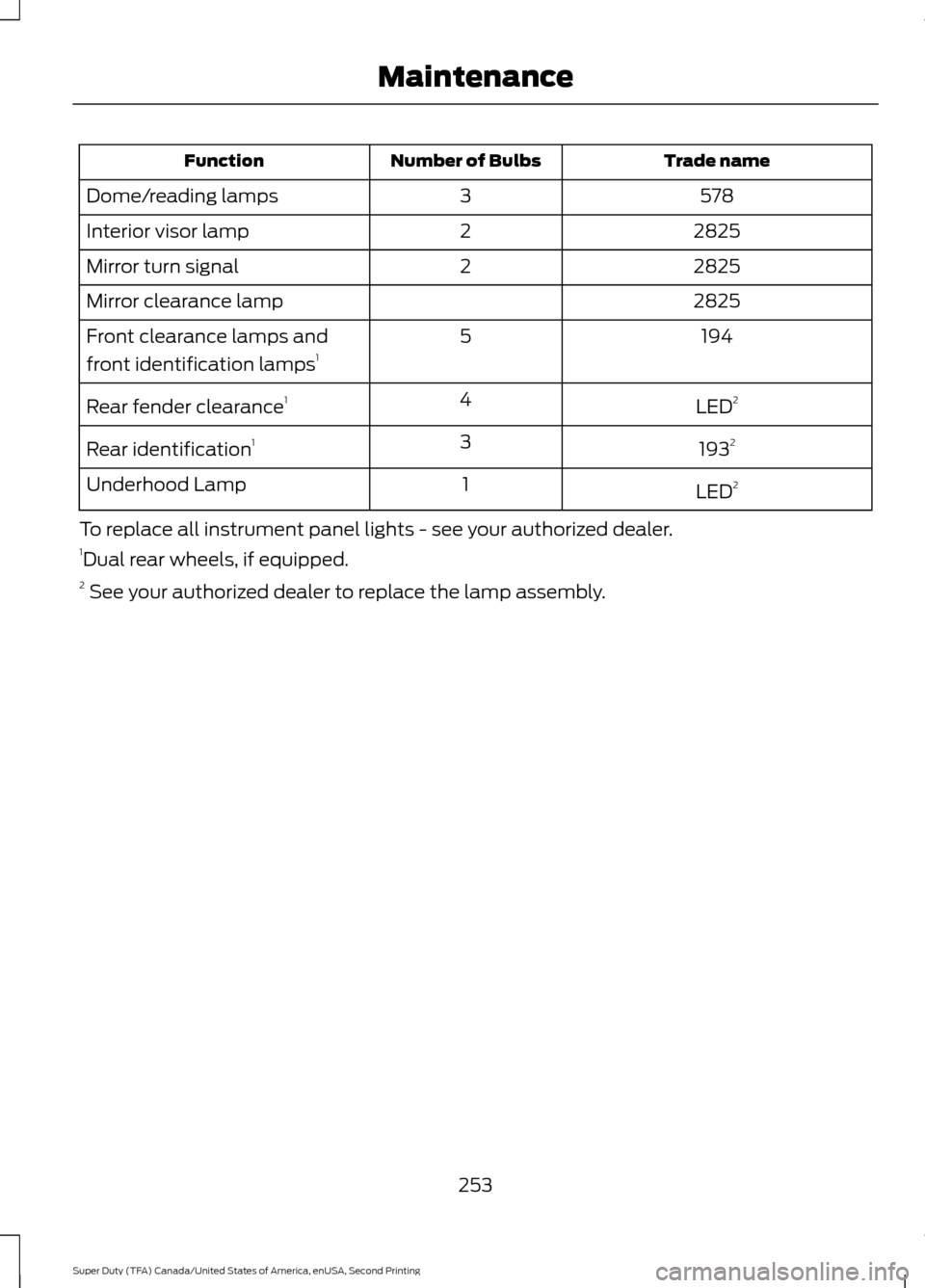
Trade name
Number of Bulbs
Function
578
3
Dome/reading lamps
2825
2
Interior visor lamp
2825
2
Mirror turn signal
2825
Mirror clearance lamp
194
5
Front clearance lamps and
front identification lamps 1
LED2
4
Rear fender clearance 1
1932
3
Rear identification 1
LED2
1
Underhood Lamp
To replace all instrument panel lights - see your authorized dealer.
1 Dual rear wheels, if equipped.
2 See your authorized dealer to replace the lamp assembly.
253
Super Duty (TFA) Canada/United States of America, enUSA, Second Printing Maintenance