remote start FORD SUPER DUTY 2016 3.G User Guide
[x] Cancel search | Manufacturer: FORD, Model Year: 2016, Model line: SUPER DUTY, Model: FORD SUPER DUTY 2016 3.GPages: 510, PDF Size: 5.42 MB
Page 94 of 510
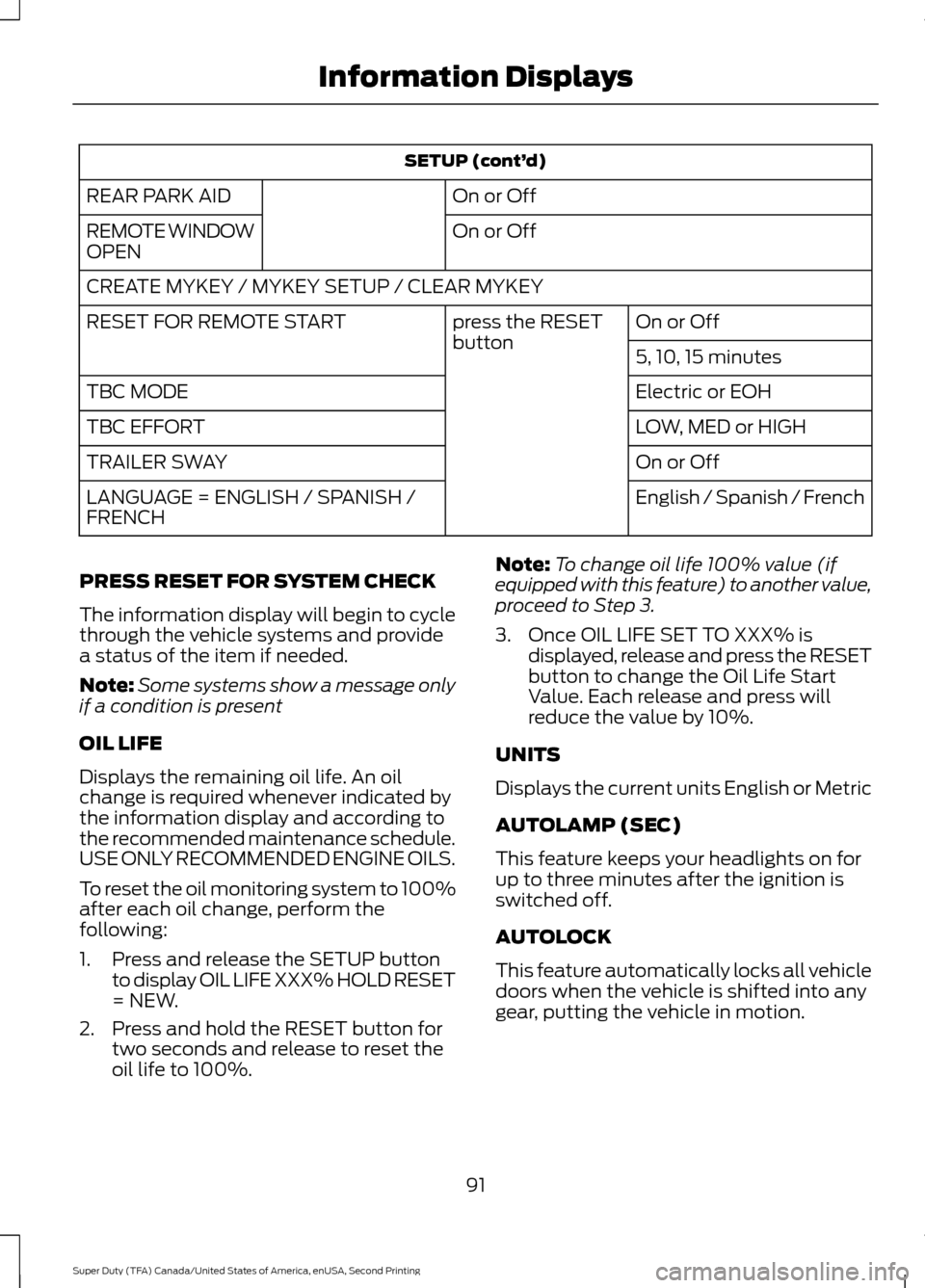
SETUP (cont’
d)
On or Off
REAR PARK AID
On or Off
REMOTE WINDOW
OPEN
CREATE MYKEY / MYKEY SETUP / CLEAR MYKEY
On or Off
press the RESET
button
RESET FOR REMOTE START
5, 10, 15 minutes
Electric or EOH
TBC MODE
LOW, MED or HIGH
TBC EFFORT
On or Off
TRAILER SWAY
English / Spanish / French
LANGUAGE = ENGLISH / SPANISH /
FRENCH
PRESS RESET FOR SYSTEM CHECK
The information display will begin to cycle
through the vehicle systems and provide
a status of the item if needed.
Note: Some systems show a message only
if a condition is present
OIL LIFE
Displays the remaining oil life. An oil
change is required whenever indicated by
the information display and according to
the recommended maintenance schedule.
USE ONLY RECOMMENDED ENGINE OILS.
To reset the oil monitoring system to 100%
after each oil change, perform the
following:
1. Press and release the SETUP button to display OIL LIFE XXX% HOLD RESET
= NEW.
2. Press and hold the RESET button for two seconds and release to reset the
oil life to 100%. Note:
To change oil life 100% value (if
equipped with this feature) to another value,
proceed to Step 3.
3. Once OIL LIFE SET TO XXX% is displayed, release and press the RESET
button to change the Oil Life Start
Value. Each release and press will
reduce the value by 10%.
UNITS
Displays the current units English or Metric
AUTOLAMP (SEC)
This feature keeps your headlights on for
up to three minutes after the ignition is
switched off.
AUTOLOCK
This feature automatically locks all vehicle
doors when the vehicle is shifted into any
gear, putting the vehicle in motion.
91
Super Duty (TFA) Canada/United States of America, enUSA, Second Printing Information Displays
Page 95 of 510
AUTOUNLOCK
This feature automatically unlocks all
vehicle doors when the driver
’s door is
opened within 10 minutes of the ignition
being turned off.
COURTESY WIPE
This feature allows for an extra swipe of
the wipers after a wipe/wash cycle.
CREATE MYKEY / MYKEY SETUP /
CLEAR MYKEY
For more information, See Creating a
MyKey (page 51).
RESET FOR REMOTE START (if
equipped)
REAR PARK AID
This feature sounds a warning tone to warn
the driver of obstacles near the rear
bumper, and functions only when R
(Reverse) gear is selected.
TBC MODE (if equipped)
Allows you to choose the trailer brake
mode.
TBC EFFORT (if equipped)
Allows you to choose the level of initial
braking.
TRAILER SWAY (if equipped)
This feature uses the electronic stability
control to mitigate trailer sway.
LANGUAGE = ENGLISH / SPANISH /
FRENCH
Allows you to choose which language the
message center will display in.
Waiting four seconds or pressing the
RESET button cycles the message center
through each of the language choices. Press the RESET button to set the
language choice.
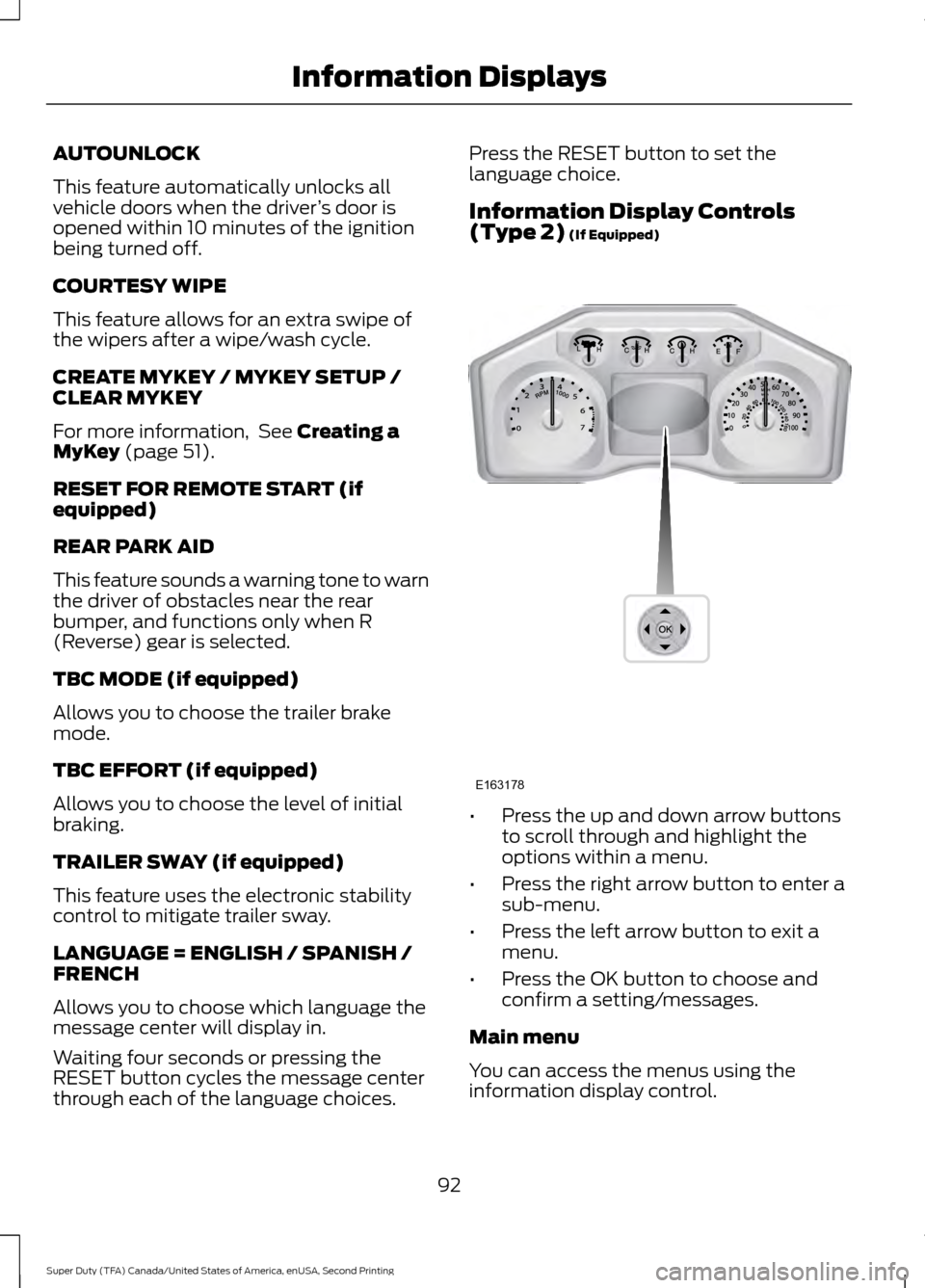
Information Display Controls
(Type 2)
(If Equipped)
•
Press the up and down arrow buttons
to scroll through and highlight the
options within a menu.
• Press the right arrow button to enter a
sub-menu.
• Press the left arrow button to exit a
menu.
• Press the OK button to choose and
confirm a setting/messages.
Main menu
You can access the menus using the
information display control.
92
Super Duty (TFA) Canada/United States of America, enUSA, Second Printing Information DisplaysE163178
Page 100 of 510
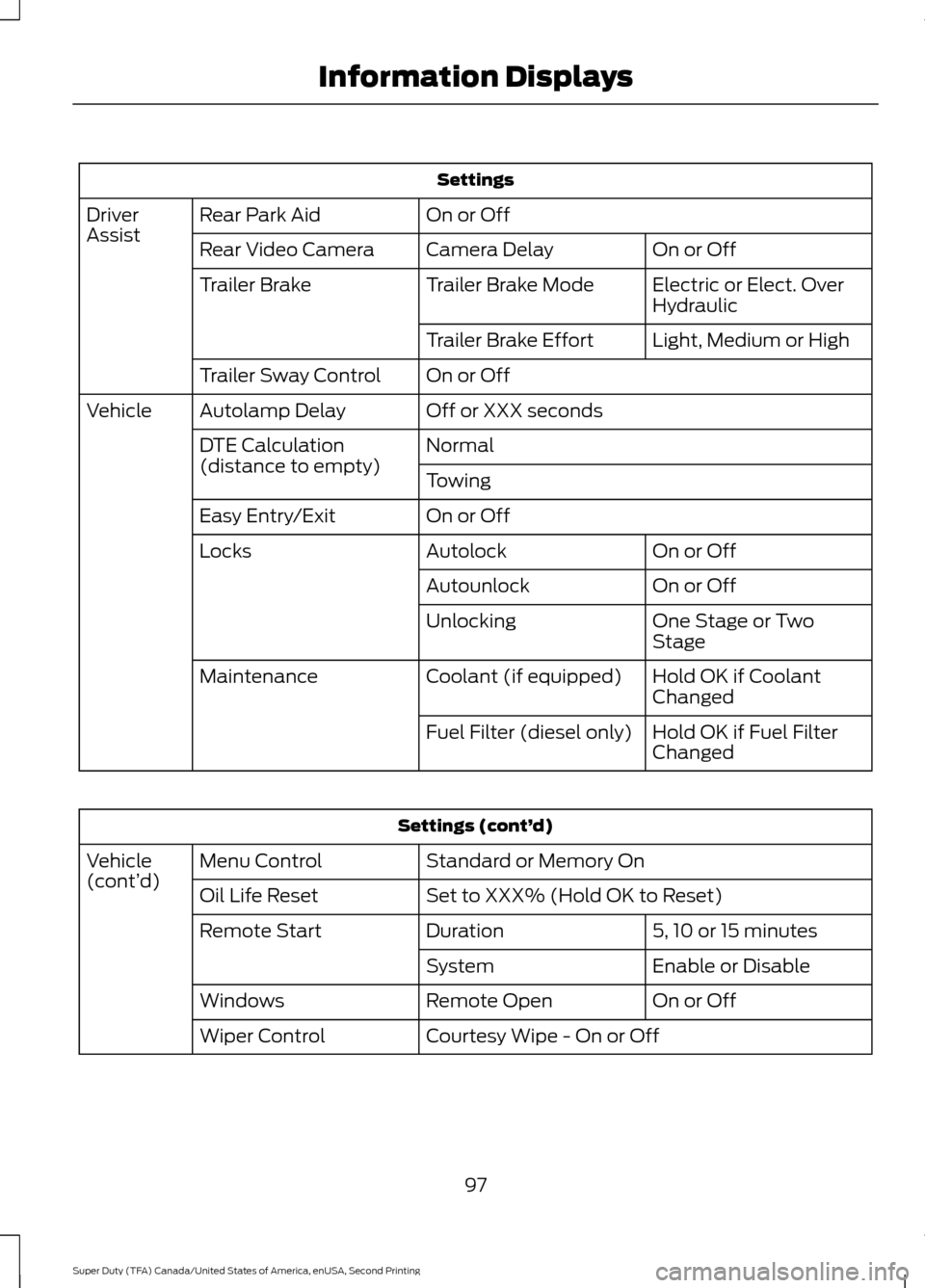
Settings
On or Off
Rear Park Aid
Driver
Assist
On or Off
Camera Delay
Rear Video Camera
Electric or Elect. Over
Hydraulic
Trailer Brake Mode
Trailer Brake
Light, Medium or High
Trailer Brake Effort
On or Off
Trailer Sway Control
Off or XXX seconds
Autolamp Delay
Vehicle
Normal
DTE Calculation
(distance to empty)
Towing
On or Off
Easy Entry/Exit
On or Off
Autolock
Locks
On or Off
Autounlock
One Stage or Two
Stage
Unlocking
Hold OK if Coolant
Changed
Coolant (if equipped)
Maintenance
Hold OK if Fuel Filter
Changed
Fuel Filter (diesel only) Settings (cont’
d)
Standard or Memory On
Menu Control
Vehicle
(cont’ d)
Set to XXX% (Hold OK to Reset)
Oil Life Reset
5, 10 or 15 minutes
Duration
Remote Start
Enable or Disable
System
On or Off
Remote Open
Windows
Courtesy Wipe - On or Off
Wiper Control
97
Super Duty (TFA) Canada/United States of America, enUSA, Second Printing Information Displays
Page 107 of 510
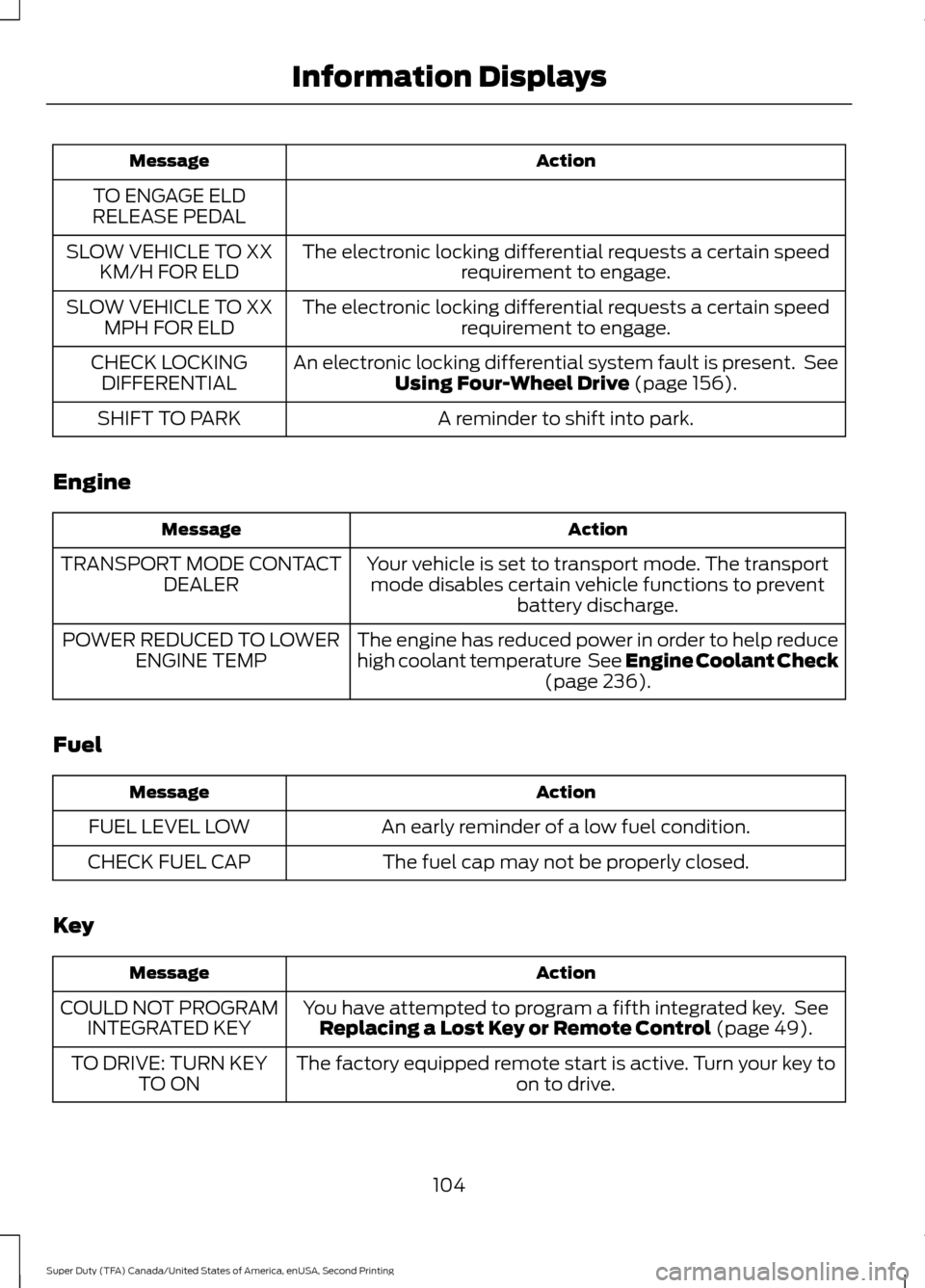
Action
Message
TO ENGAGE ELD
RELEASE PEDAL
The electronic locking differential requests a certain speedrequirement to engage.
SLOW VEHICLE TO XX
KM/H FOR ELD
The electronic locking differential requests a certain speedrequirement to engage.
SLOW VEHICLE TO XX
MPH FOR ELD
An electronic locking differential system fault is present. SeeUsing Four-Wheel Drive (page 156).
CHECK LOCKING
DIFFERENTIAL
A reminder to shift into park.
SHIFT TO PARK
Engine Action
Message
Your vehicle is set to transport mode. The transportmode disables certain vehicle functions to prevent battery discharge.
TRANSPORT MODE CONTACT
DEALER
The engine has reduced power in order to help reduce
high coolant temperature See Engine Coolant Check(page
236).
POWER REDUCED TO LOWER
ENGINE TEMP
Fuel Action
Message
An early reminder of a low fuel condition.
FUEL LEVEL LOW
The fuel cap may not be properly closed.
CHECK FUEL CAP
Key Action
Message
You have attempted to program a fifth integrated key. SeeReplacing a Lost Key or Remote Control
(page 49).
COULD NOT PROGRAM
INTEGRATED KEY
The factory equipped remote start is active. Turn your key to on to drive.
TO DRIVE: TURN KEY
TO ON
104
Super Duty (TFA) Canada/United States of America, enUSA, Second Printing Information Displays
Page 117 of 510
HEATED WINDOWS AND
MIRRORS
Heated Rear Window (If Equipped)
Note: Make sure the engine is running
before operating the heated windows.
Note: If your vehicle is equipped with a
sliding rear window, the feature still
operates when you open the window. Press the button to clear the
heated rear window of thin ice
and fog. The heated rear window
will automatically turn off after a short
period of time. Start the engine before you
switch the heated rear window on.
Do not use razor blades or other sharp
objects to clean or remove decals from
the inside of the heated rear window.
The vehicle warranty does not cover
damage caused to the heated rear
window grid lines.
Heated Exterior Mirror
When you switch the heated rear window
on, the heated exterior mirrors will
automatically turn on.
Note: Do not remove ice from the mirrors
with a scraper or adjust the mirror glass
when it is frozen in place.
Note: Do not clean the mirror housing or
glass with harsh abrasives, fuel or other
petroleum-based cleaning products.
REMOTE START
(If Equipped)
The remote start feature allows you to
pre-condition the interior of your vehicle.
The climate control system works to
achieve comfort according to your previous
settings.
Note: You cannot adjust the system during
remote start operation. Turn the ignition on to return the system
to its previous settings. You can now make
adjustments normally, but you need to turn
certain vehicle-dependent features back
on, such as:
•
Heated seats.
• Cooled seats.
• Heated steering wheel.
• Heated mirrors.
• Heated rear window.
You can adjust the default remote start
settings using the information display
controls. See
Information Displays
(page 88).
Automatic Settings
In hot weather, the system is set to
72°F
(22°C). The cooled seats are set to high
(if available, and selected to AUTO in the
information display).
In moderate weather, the system either
heats or cools (based on previous
settings). The rear defroster, heated
mirrors and heated seats do not
automatically turn on.
In cold weather, the system is set to
72°F
(22°C). The heated seats are set to high
(if available, and selected to AUTO in the
information display). The rear defroster
and heated mirrors automatically turn on.
114
Super Duty (TFA) Canada/United States of America, enUSA, Second Printing Climate ControlE184884
Page 134 of 510
The universal garage door opener replaces
the common hand-held garage door
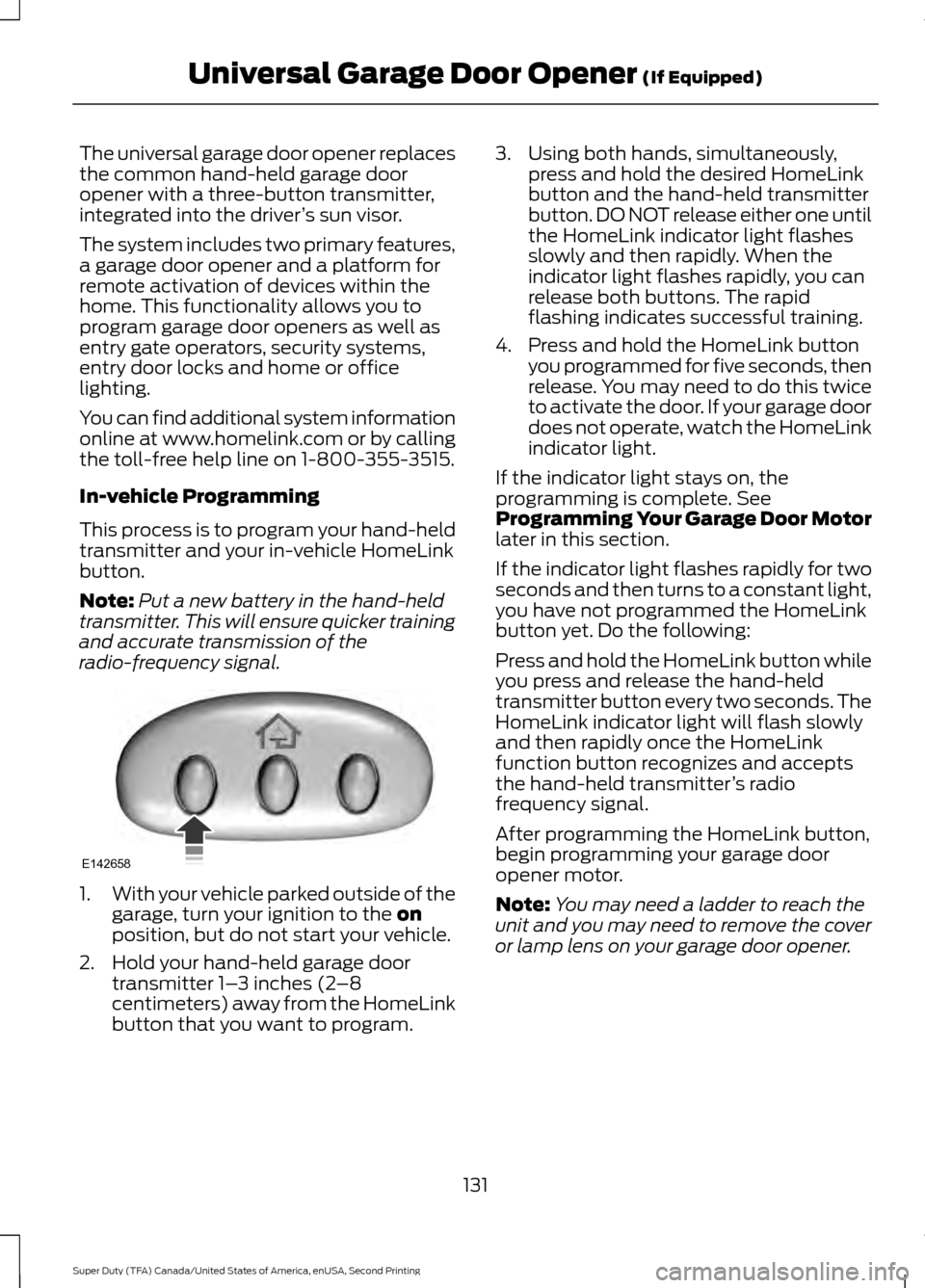
opener with a three-button transmitter,
integrated into the driver
’s sun visor.
The system includes two primary features,
a garage door opener and a platform for
remote activation of devices within the
home. This functionality allows you to
program garage door openers as well as
entry gate operators, security systems,
entry door locks and home or office
lighting.
You can find additional system information
online at www.homelink.com or by calling
the toll-free help line on 1-800-355-3515.
In-vehicle Programming
This process is to program your hand-held
transmitter and your in-vehicle HomeLink
button.
Note: Put a new battery in the hand-held
transmitter. This will ensure quicker training
and accurate transmission of the
radio-frequency signal. 1.
With your vehicle parked outside of the
garage, turn your ignition to the on
position, but do not start your vehicle.
2. Hold your hand-held garage door transmitter 1– 3 inches (2–8
centimeters) away from the HomeLink
button that you want to program. 3. Using both hands, simultaneously,
press and hold the desired HomeLink
button and the hand-held transmitter
button. DO NOT release either one until
the HomeLink indicator light flashes
slowly and then rapidly. When the
indicator light flashes rapidly, you can
release both buttons. The rapid
flashing indicates successful training.
4. Press and hold the HomeLink button you programmed for five seconds, then
release. You may need to do this twice
to activate the door. If your garage door
does not operate, watch the HomeLink
indicator light.
If the indicator light stays on, the
programming is complete. See
Programming Your Garage Door Motor
later in this section.
If the indicator light flashes rapidly for two
seconds and then turns to a constant light,
you have not programmed the HomeLink
button yet. Do the following:
Press and hold the HomeLink button while
you press and release the hand-held
transmitter button every two seconds. The
HomeLink indicator light will flash slowly
and then rapidly once the HomeLink
function button recognizes and accepts
the hand-held transmitter ’s radio
frequency signal.
After programming the HomeLink button,
begin programming your garage door
opener motor.
Note: You may need a ladder to reach the
unit and you may need to remove the cover
or lamp lens on your garage door opener.
131
Super Duty (TFA) Canada/United States of America, enUSA, Second Printing Universal Garage Door Opener
(If Equipped)E142658
Page 453 of 510
For a complete listing of the accessories
that are available for your vehicle, please
contact your authorized dealer or visit the
online store web site:
Web Address (United States)
www.Accessories.Ford.com Web Address (Canada)
www.Accessories.Ford.ca
Ford Accessories are available for your
vehicle through an authorized Ford dealer.
Ford Motor Company will repair or replace
any properly authorized dealer-installed
Ford Original Accessory found to be
defective in factory-supplied materials or
workmanship during the warranty period,
as well as any component damaged by the
defective accessories.
Ford Motor Company will warrant your
vehicle through the warranty that provides
the greatest benefit:
• 24 months, unlimited mileage.
• The remainder of your new vehicle
limited warranty.
Contact an authorized dealer for details
and a copy of the warranty.
Exterior style
• Bug shields.
• Commercial graphics.*
• Commercial LED warning strobe lights.
• Deflectors.
• Exhaust tip.
• Fog lamps.
• Running boards.
• Splash guards.
• Stainless-steel wheel covers.* •
Step bars.
• Wheel well liners.
Interior style
• Cargo organizers.
• Custom seat covers.*
• Floor mats.
Lifestyle
• Ash cup / smoker's package.
• Bed extender.
• Bedliners and bedmats.
• Racks and carriers.*
• Rear-seat entertainment.*
• Sportliner cargo liner.*
• Tonneau covers*.
• Trailer hitches, wiring harnesses and
accessories.
• Truck bed camping tent.*
Peace of mind
• Back-up alarm.*
• Bed hooks.*
• Bumper and hitch-mounted parking
sensors.*
• Cable lock.*
• Ford Telematics.
• Keyless entry keypad.
• Protective seat covers.*
• Remote start and alarms.
• Speed/Cruise control.
• Tool or Cargo boxes.*
• Wheel locks.
450
Super Duty (TFA) Canada/United States of America, enUSA, Second Printing Accessories
Page 506 of 510
Ordering Additional Owner's
Literature.....................................................220
Obtaining a French Owner ’s Manual...........221
Overhead Console........................................137
P
Parking Aid.......................................................177 Rear Parking Aid................................................... 177
Parking Aids
.....................................................177
Parking Brake.................................................168
Passive Anti-Theft System
.........................63
SecuriLock ™.......................................................... 63
PATS See: Passive Anti-Theft System..................... 63
Pedals................................................................68
Perchlorate.........................................................11
Phone................................................................414 Making Calls.......................................................... 417
Pairing Subsequent Cell Phones.................. 416
Pairing Your Cell Phone for the First Time.................................................................... 415
Phone Menu Options......................................... 417
Phone Settings................................................... 420
Phone Voice Commands................................. 421
Receiving Calls..................................................... 417
Text Messaging................................................... 418
Post-Crash Alert System...........................215
Power Door Locks See: Locking and Unlocking............................. 55
Power Seats
....................................................118
Power Lumbar...................................................... 118
Power Recline....................................................... 118
Power Steering Fluid Check
.....................244
Power Take-Off.............................................154
Power Windows..............................................75
Accessory Delay.................................................... 76
Bounce-Back.......................................................... 75
One-Touch Up or Down..................................... 75
Window Lock.......................................................... 76
Protecting the Environment........................14
R
Rear Axle..........................................................165
Rear Seat Armrest........................................126 Rear Seats.......................................................120
Folding the Rear Seat Back (Crew Cab)
........................................................................\
...... 120
Folding up the Rear Seat Cushion................120
Rear Under Seat Storage (Crew Cab)..........121
Returning the Seat to the Seating Position.............................................................. 120
Rear View Camera........................................178 Camera Guidelines............................................. 179
Enhanced Park Aids or Park Pilot................180
Rear Camera Delay............................................ 180
Using the Rear View Camera System.........178
Rear View Camera See: Rear View Camera.................................... 178
Recommended Towing Weights.............191 Calculating the Maximum Loaded Trailer
Weight for Your Vehicle............................... 194
Refueling..........................................................144 Fuel Filler Cap...................................................... 145
Remote Control
..............................................46
Car Finder................................................................ 47
Integrated Keyhead Transmitters .................46
Memory Feature.................................................... 47
Remote Start ......................................................... 47
Replacing the Battery......................................... 46
Sounding a Panic Alarm.................................... 47
Remote Start...................................................114 Automatic Settings............................................. 114
Removing a Headlamp..............................249
Removing the Tailgate.................................59
Repairing Minor Paint Damage...............261
Replacement Parts Recommendation.........................................11
Collision Repairs..................................................... 11
Scheduled Maintenance and Mechanical Repairs................................................................... 11
Warranty on Replacement Parts..................... 12
Replacing a Lost Key or Remote Control............................................................49
Reporting Safety Defects (Canada Only)...............................................................221
Reporting Safety Defects (U.S. Only)...............................................................221
503
Super Duty (TFA) Canada/United States of America, enUSA, Second Printing Index
Page 508 of 510
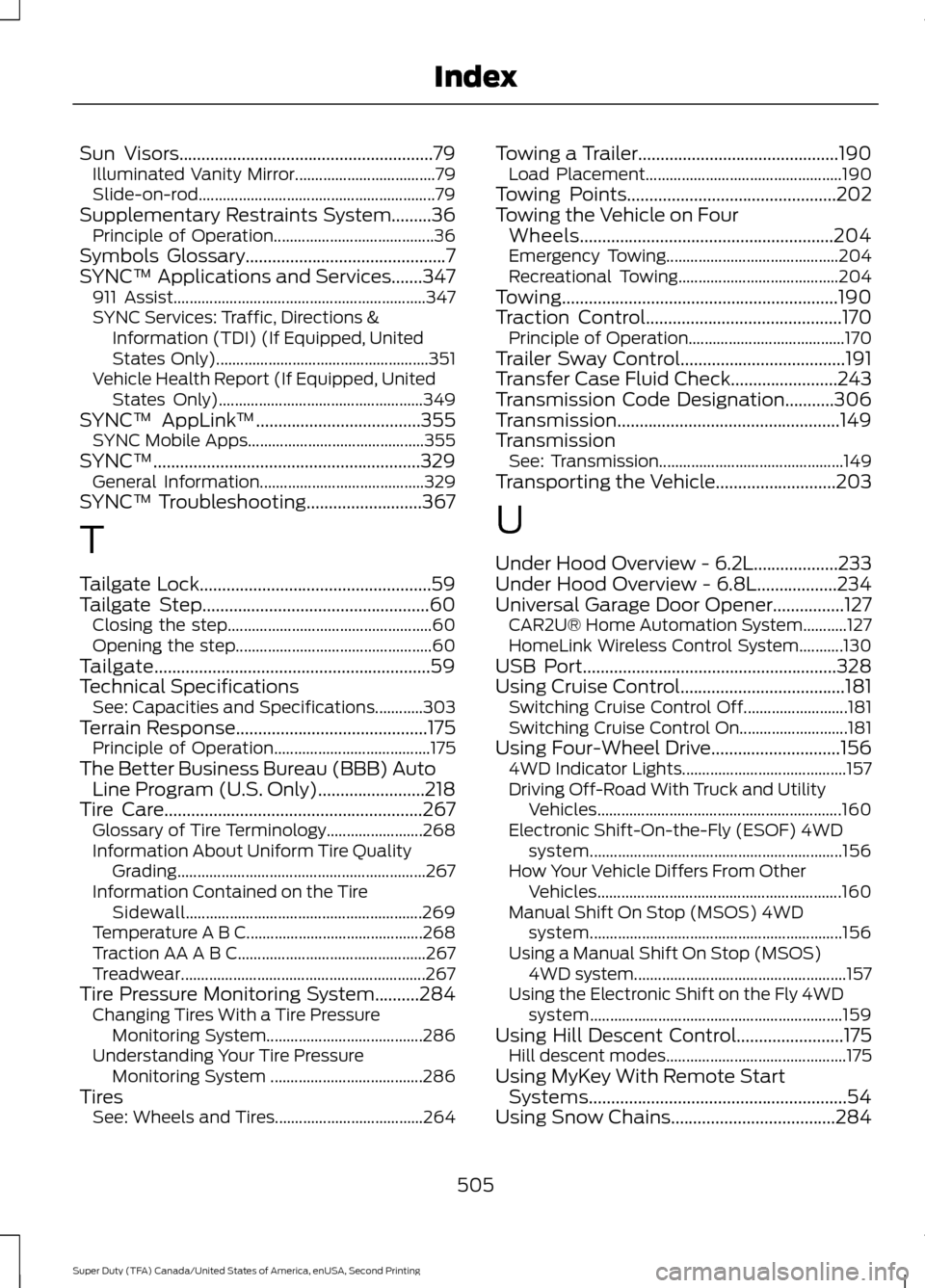
Sun Visors.........................................................79
Illuminated Vanity Mirror................................... 79
Slide-on-rod........................................................... 79
Supplementary Restraints System.........36 Principle of Operation........................................ 36
Symbols Glossary.............................................7
SYNC™ Applications and Services.......347 911 Assist............................................................... 347
SYNC Services: Traffic, Directions & Information (TDI) (If Equipped, United
States Only)..................................................... 351
Vehicle Health Report (If Equipped, United States Only)................................................... 349
SYNC™ AppLink ™
.....................................355
SYNC Mobile Apps............................................ 355
SYNC™............................................................329 General Information......................................... 329
SYNC™ Troubleshooting..........................367
T
Tailgate Lock....................................................59
Tailgate Step...................................................60 Closing the step................................................... 60
Opening the step................................................. 60
Tailgate..............................................................59
Technical Specifications See: Capacities and Specifications............303
Terrain Response
...........................................175
Principle of Operation....................................... 175
The Better Business Bureau (BBB) Auto Line Program (U.S. Only)........................218
Tire Care
..........................................................267
Glossary of Tire Terminology........................ 268
Information About Uniform Tire Quality Grading.............................................................. 267
Information Contained on the Tire Sidewall........................................................... 269
Temperature A B C............................................ 268
Traction AA A B C............................................... 267
Treadwear............................................................. 267
Tire Pressure Monitoring System..........284 Changing Tires With a Tire Pressure
Monitoring System....................................... 286
Understanding Your Tire Pressure Monitoring System ...................................... 286
Tires See: Wheels and Tires..................................... 264Towing a Trailer.............................................190
Load Placement................................................. 190
Towing Points
...............................................202
Towing the Vehicle on Four Wheels
.........................................................204
Emergency Towing........................................... 204
Recreational Towing........................................ 204
Towing..............................................................190
Traction Control
............................................170
Principle of Operation....................................... 170
Trailer Sway Control
.....................................191
Transfer Case Fluid Check........................243
Transmission Code Designation...........306
Transmission..................................................149
Transmission See: Transmission.............................................. 149
Transporting the Vehicle...........................203
U
Under Hood Overview - 6.2L...................233
Under Hood Overview - 6.8L..................234
Universal Garage Door Opener................127 CAR2U® Home Automation System...........127
HomeLink Wireless Control System...........130
USB Port
.........................................................328
Using Cruise Control.....................................181
Switching Cruise Control Off.......................... 181
Switching Cruise Control On........................... 181
Using Four-Wheel Drive.............................156 4WD Indicator Lights......................................... 157
Driving Off-Road With Truck and Utility Vehicles............................................................. 160
Electronic Shift-On-the-Fly (ESOF) 4WD system............................................................... 156
How Your Vehicle Differs From Other Vehicles............................................................. 160
Manual Shift On Stop (MSOS) 4WD system............................................................... 156
Using a Manual Shift On Stop (MSOS) 4WD system..................................................... 157
Using the Electronic Shift on the Fly 4WD system............................................................... 159
Using Hill Descent Control........................175 Hill descent modes............................................. 175
Using MyKey With Remote Start Systems..........................................................54
Using Snow Chains
.....................................284
505
Super Duty (TFA) Canada/United States of America, enUSA, Second Printing Index