ECO mode FORD SUPER DUTY 2016 3.G Owner's Manual
[x] Cancel search | Manufacturer: FORD, Model Year: 2016, Model line: SUPER DUTY, Model: FORD SUPER DUTY 2016 3.GPages: 510, PDF Size: 5.42 MB
Page 95 of 510
AUTOUNLOCK
This feature automatically unlocks all
vehicle doors when the driver
’s door is
opened within 10 minutes of the ignition
being turned off.
COURTESY WIPE
This feature allows for an extra swipe of
the wipers after a wipe/wash cycle.
CREATE MYKEY / MYKEY SETUP /
CLEAR MYKEY
For more information, See Creating a
MyKey (page 51).
RESET FOR REMOTE START (if
equipped)
REAR PARK AID
This feature sounds a warning tone to warn
the driver of obstacles near the rear
bumper, and functions only when R
(Reverse) gear is selected.
TBC MODE (if equipped)
Allows you to choose the trailer brake
mode.
TBC EFFORT (if equipped)
Allows you to choose the level of initial
braking.
TRAILER SWAY (if equipped)
This feature uses the electronic stability
control to mitigate trailer sway.
LANGUAGE = ENGLISH / SPANISH /
FRENCH
Allows you to choose which language the
message center will display in.
Waiting four seconds or pressing the
RESET button cycles the message center
through each of the language choices. Press the RESET button to set the
language choice.
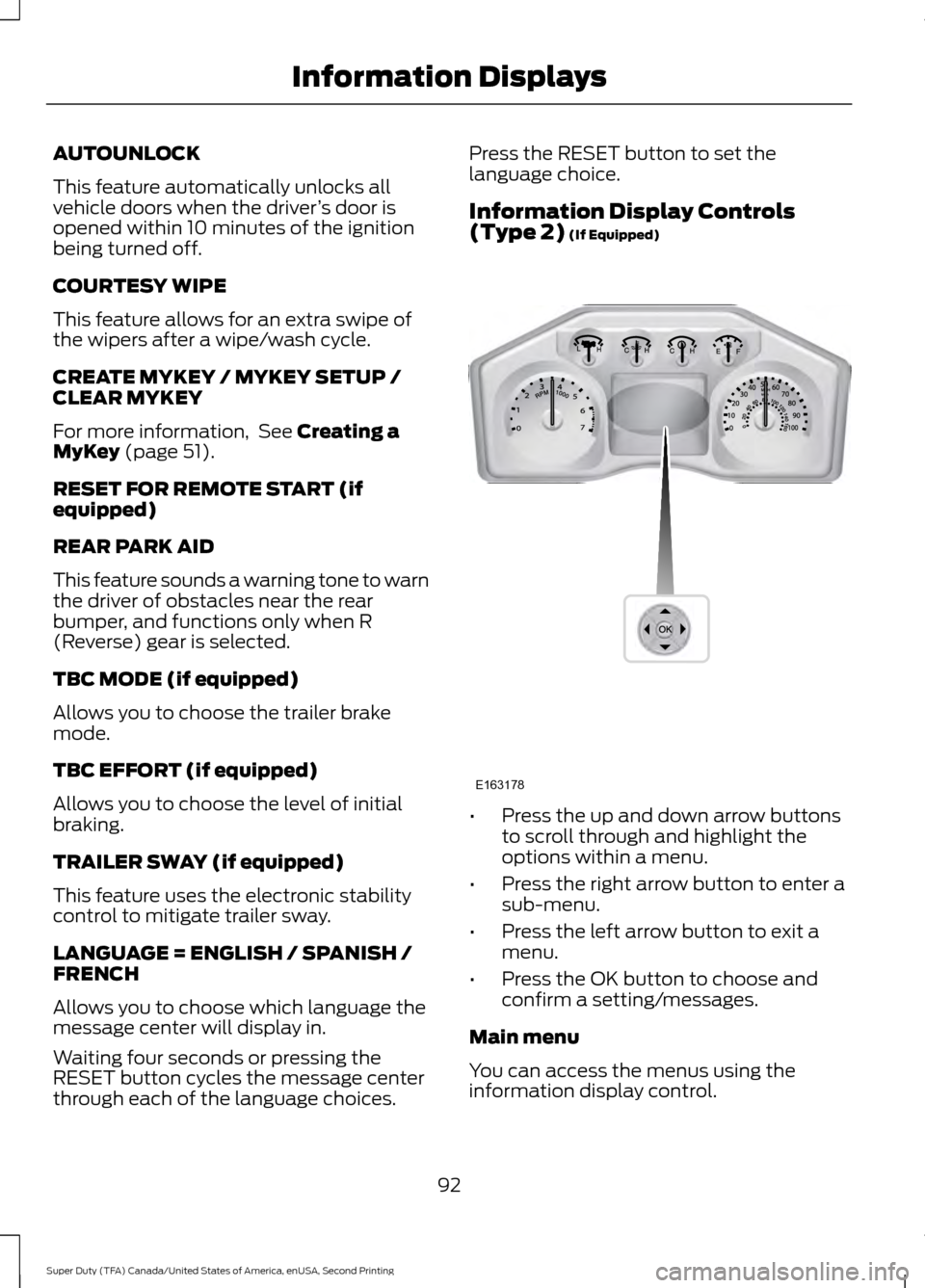
Information Display Controls
(Type 2)
(If Equipped)
•
Press the up and down arrow buttons
to scroll through and highlight the
options within a menu.
• Press the right arrow button to enter a
sub-menu.
• Press the left arrow button to exit a
menu.
• Press the OK button to choose and
confirm a setting/messages.
Main menu
You can access the menus using the
information display control.
92
Super Duty (TFA) Canada/United States of America, enUSA, Second Printing Information DisplaysE163178
Page 96 of 510
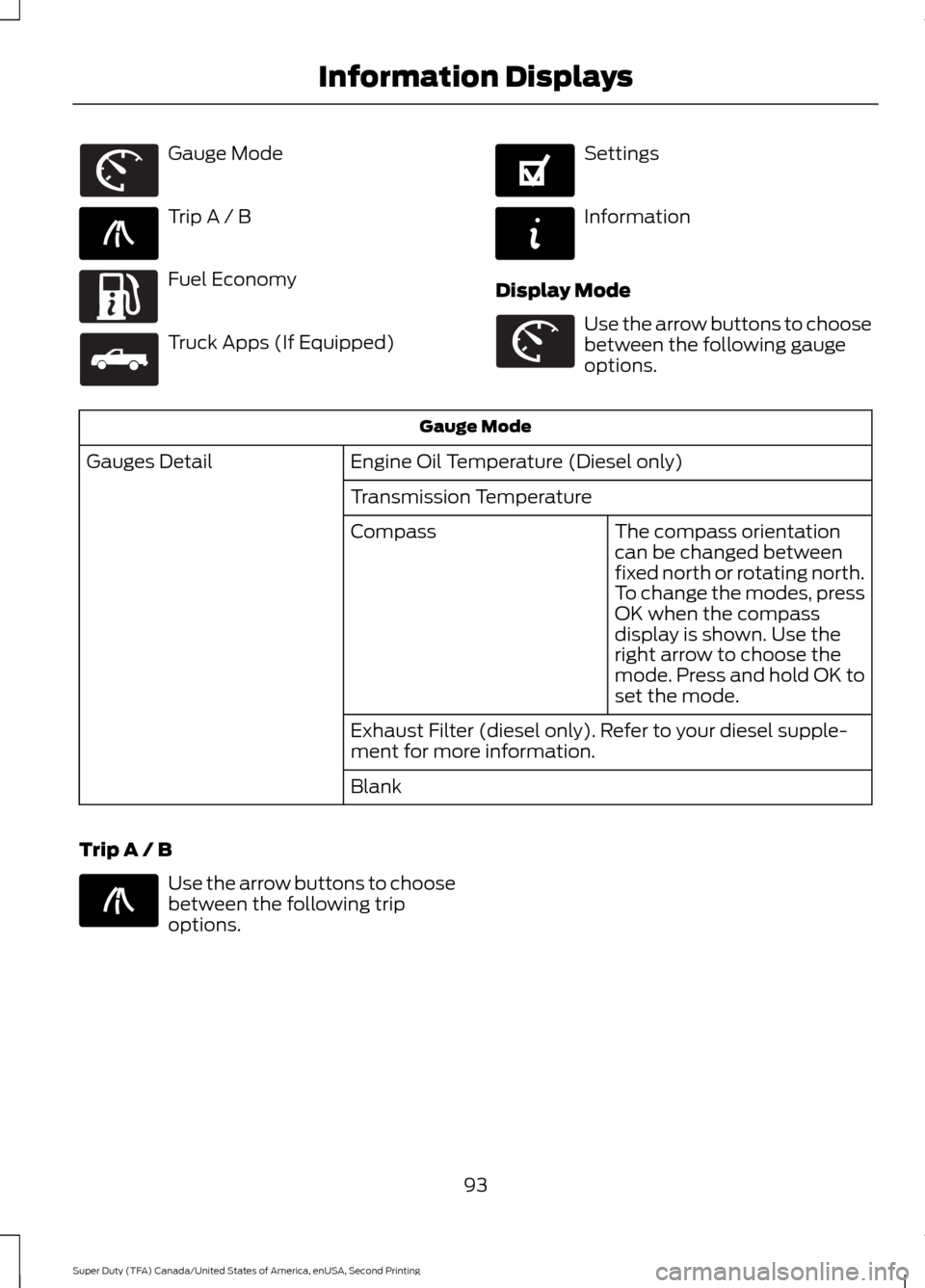
Gauge Mode
Trip A / B
Fuel Economy
Truck Apps (If Equipped) Settings
Information
Display Mode Use the arrow buttons to choose
between the following gauge
options.
Gauge Mode
Engine Oil Temperature (Diesel only)
Gauges Detail
Transmission TemperatureThe compass orientation
can be changed between
fixed north or rotating north.
To change the modes, press
OK when the compass
display is shown. Use the
right arrow to choose the
mode. Press and hold OK to
set the mode.
Compass
Exhaust Filter (diesel only). Refer to your diesel supple-
ment for more information.
Blank
Trip A / B Use the arrow buttons to choose
between the following trip
options.
93
Super Duty (TFA) Canada/United States of America, enUSA, Second Printing Information DisplaysE163179 E138660 E163180 E163181 E144641 E144642 E163179 E138660
Page 98 of 510
Fuel Hist.
Shows fuel usage as a bar graph based on
time. The graph is updated each minute
with the fuel economy that was achieved
during the prior 5, 10, 30 minutes of driving.
Truck Apps In this mode, off-road
information depicted with
graphics and trailer towing
application options are available.
Note: Some items are optional and may
not appear. Truck Apps
Pitch and bank angle (in degrees)
Off Road
Steering angle (in degrees)
Differential lock/unlock
Energy flow ELD (Electronic Locking Differential)
Press OK for Info
Hill Descent Control
4X4 System
Traction Control
AdvanceTrac + RSC
Active trailer name or default trailer
Trailer
Accumulated trailer distance
Trailer gain and output
Trailer Disconnected Options
Press OK for options
Change Active Trailer
Adding a new trailerConventional, Fifth
Wheel or Gooseneck
Connection Checklist (if
equipped)
Delete Trailer
Tow / Haul or Trailer
Brake Controller
Information Screen
95
Super Duty (TFA) Canada/United States of America, enUSA, Second Printing Information DisplaysE163181
Page 100 of 510
Settings
On or Off
Rear Park Aid
Driver
Assist
On or Off
Camera Delay
Rear Video Camera
Electric or Elect. Over
Hydraulic
Trailer Brake Mode
Trailer Brake
Light, Medium or High
Trailer Brake Effort
On or Off
Trailer Sway Control
Off or XXX seconds
Autolamp Delay
Vehicle
Normal
DTE Calculation
(distance to empty)
Towing
On or Off
Easy Entry/Exit
On or Off
Autolock
Locks
On or Off
Autounlock
One Stage or Two
Stage
Unlocking
Hold OK if Coolant
Changed
Coolant (if equipped)
Maintenance
Hold OK if Fuel Filter
Changed
Fuel Filter (diesel only) Settings (cont’
d)
Standard or Memory On
Menu Control
Vehicle
(cont’ d)
Set to XXX% (Hold OK to Reset)
Oil Life Reset
5, 10 or 15 minutes
Duration
Remote Start
Enable or Disable
System
On or Off
Remote Open
Windows
Courtesy Wipe - On or Off
Wiper Control
97
Super Duty (TFA) Canada/United States of America, enUSA, Second Printing Information Displays
Page 101 of 510
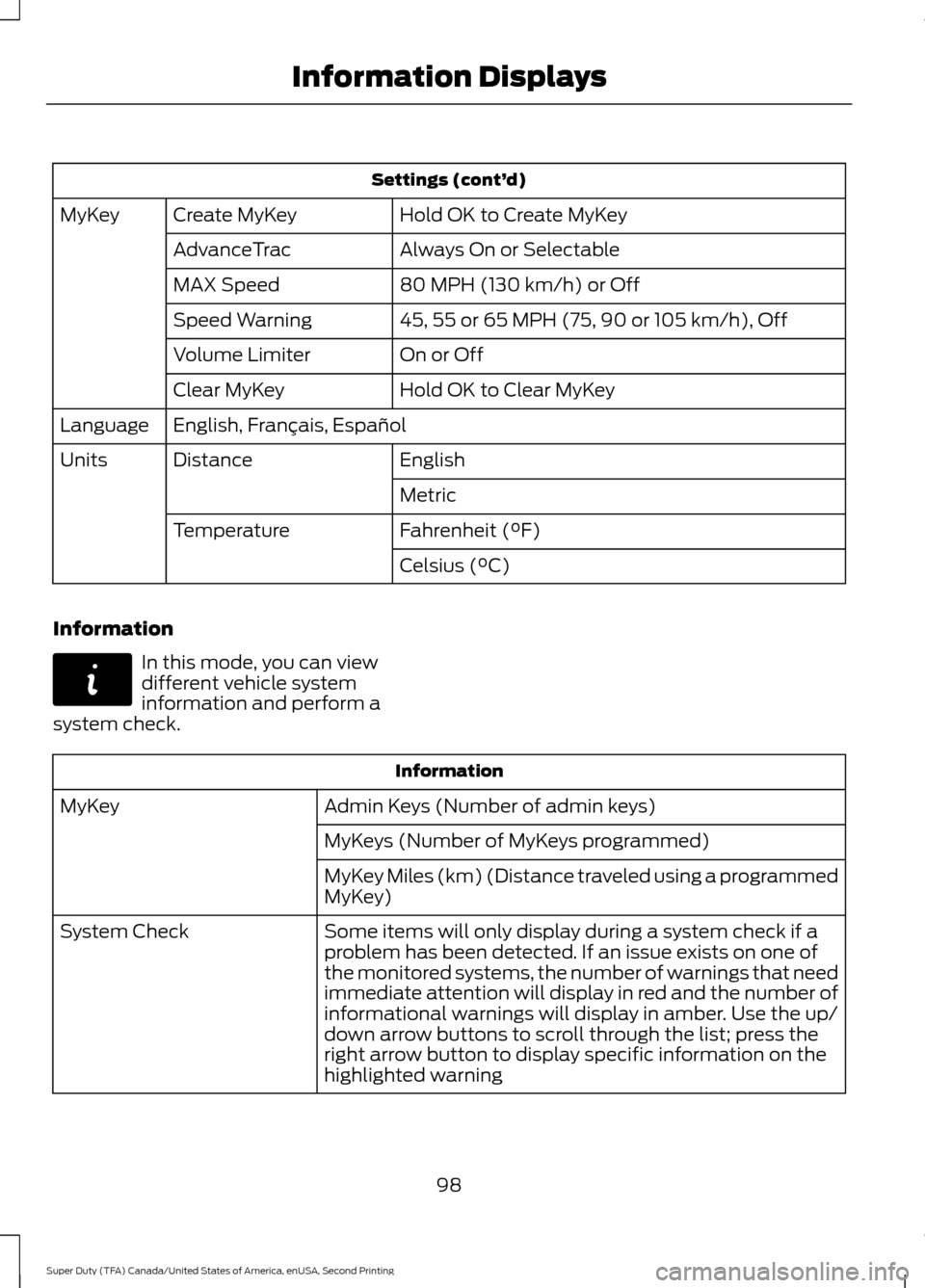
Settings (cont’
d)
Hold OK to Create MyKey
Create MyKey
MyKey
Always On or Selectable
AdvanceTrac
80 MPH (130 km/h) or Off
MAX Speed
45, 55 or 65 MPH (75, 90 or 105 km/h), Off
Speed Warning
On or Off
Volume Limiter
Hold OK to Clear MyKey
Clear MyKey
English, Français, Español
Language
English
Distance
Units
Metric
Fahrenheit (°F)
Temperature
Celsius (°C)
Information In this mode, you can view
different vehicle system
information and perform a
system check. Information
Admin Keys (Number of admin keys)
MyKey
MyKeys (Number of MyKeys programmed)
MyKey Miles (km) (Distance traveled using a programmed
MyKey)
Some items will only display during a system check if a
problem has been detected. If an issue exists on one of
the monitored systems, the number of warnings that need
immediate attention will display in red and the number of
informational warnings will display in amber. Use the up/
down arrow buttons to scroll through the list; press the
right arrow button to display specific information on the
highlighted warning
System Check
98
Super Duty (TFA) Canada/United States of America, enUSA, Second Printing Information DisplaysE144642
Page 102 of 510
Compass/Transmission indicator
display (if equipped)
The compass heading will display in the
upper right corner of the information
display; the transmission gear indicator
displays in the right side of the information
display when using the SelectShift
Automatic
™ transmission feature. These
displays will not be shown in all screen
modes. For example: when programming
certain vehicle features or in certain
information menus. INFORMATION MESSAGES
Note:
Depending on your vehicle options
and instrument cluster type, not all of the
messages will display or be available.
Additionally, the information display may
abbreviate or shorten certain messages.
Press the RESET button for Type 1 displays
or the OK button for Type 2 displays to
acknowledge and remove some messages
from the information display. The
information display automatically removes
other messages after a short time.
You need to confirm certain messages
before you can access the menus.
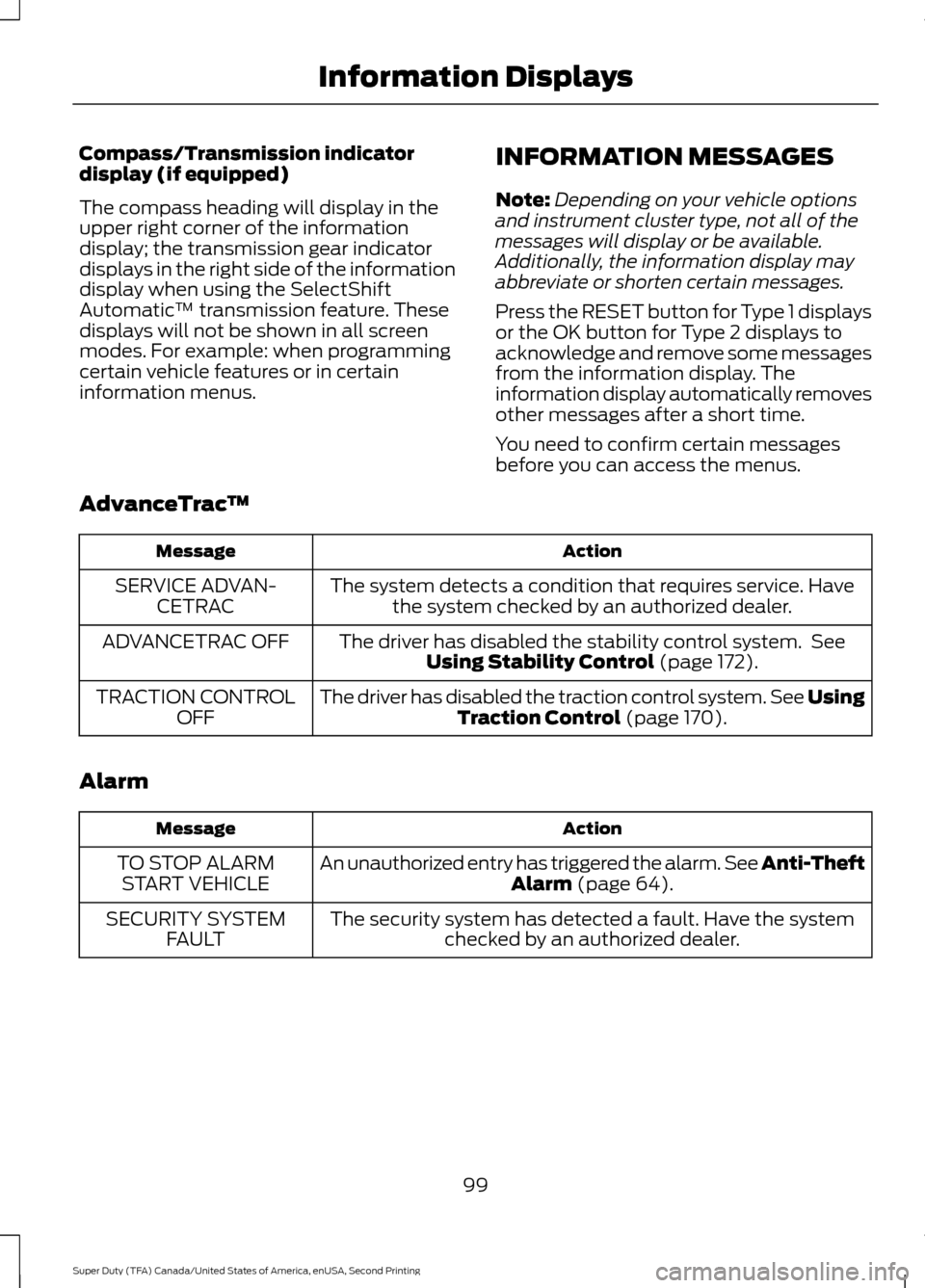
AdvanceTrac ™ Action
Message
The system detects a condition that requires service. Havethe system checked by an authorized dealer.
SERVICE ADVAN-
CETRAC
The driver has disabled the stability control system. SeeUsing Stability Control (page 172).
ADVANCETRAC OFF
The driver has disabled the traction control system. See UsingTraction Control
(page 170).
TRACTION CONTROL
OFF
Alarm Action
Message
An unauthorized entry has triggered the alarm. See Anti-Theft Alarm
(page 64).
TO STOP ALARM
START VEHICLE
The security system has detected a fault. Have the systemchecked by an authorized dealer.
SECURITY SYSTEM
FAULT
99
Super Duty (TFA) Canada/United States of America, enUSA, Second Printing Information Displays
Page 103 of 510
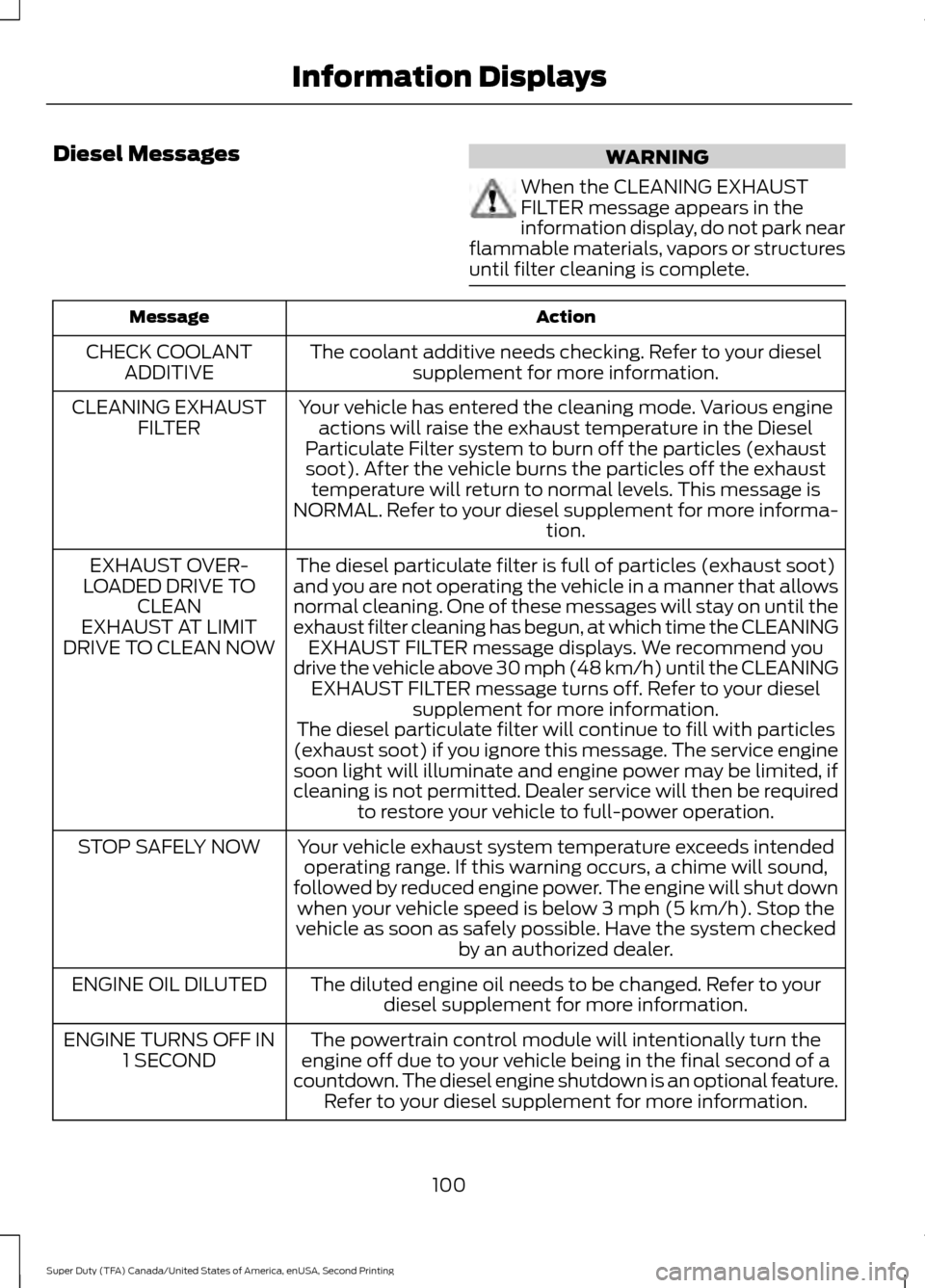
Diesel Messages
WARNING
When the CLEANING EXHAUST
FILTER message appears in the
information display, do not park near
flammable materials, vapors or structures
until filter cleaning is complete. Action
Message
The coolant additive needs checking. Refer to your dieselsupplement for more information.
CHECK COOLANT
ADDITIVE
Your vehicle has entered the cleaning mode. Various engineactions will raise the exhaust temperature in the Diesel
Particulate Filter system to burn off the particles (exhaust soot). After the vehicle burns the particles off the exhaust temperature will return to normal levels. This message is
NORMAL. Refer to your diesel supplement for more informa- tion.
CLEANING EXHAUST
FILTER
The diesel particulate filter is full of particles (exhaust soot)
and you are not operating the vehicle in a manner that allows
normal cleaning. One of these messages will stay on until the
exhaust filter cleaning has begun, at which time the CLEANING EXHAUST FILTER message displays. We recommend you
drive the vehicle above 30 mph (48 km/h) until the CLEANING EXHAUST FILTER message turns off. Refer to your diesel supplement for more information.
EXHAUST OVER-
LOADED DRIVE TO CLEAN
EXHAUST AT LIMIT
DRIVE TO CLEAN NOW
The diesel particulate filter will continue to fill with particles
(exhaust soot) if you ignore this message. The service engine soon light will illuminate and engine power may be limited, if
cleaning is not permitted. Dealer service will then be required to restore your vehicle to full-power operation.
Your vehicle exhaust system temperature exceeds intended operating range. If this warning occurs, a chime will sound,
followed by reduced engine power. The engine will shut down when your vehicle speed is below 3 mph (5 km/h). Stop the
vehicle as soon as safely possible. Have the system checked by an authorized dealer.
STOP SAFELY NOW
The diluted engine oil needs to be changed. Refer to yourdiesel supplement for more information.
ENGINE OIL DILUTED
The powertrain control module will intentionally turn the
engine off due to your vehicle being in the final second of a
countdown. The diesel engine shutdown is an optional feature. Refer to your diesel supplement for more information.
ENGINE TURNS OFF IN
1 SECOND
100
Super Duty (TFA) Canada/United States of America, enUSA, Second Printing Information Displays
Page 105 of 510
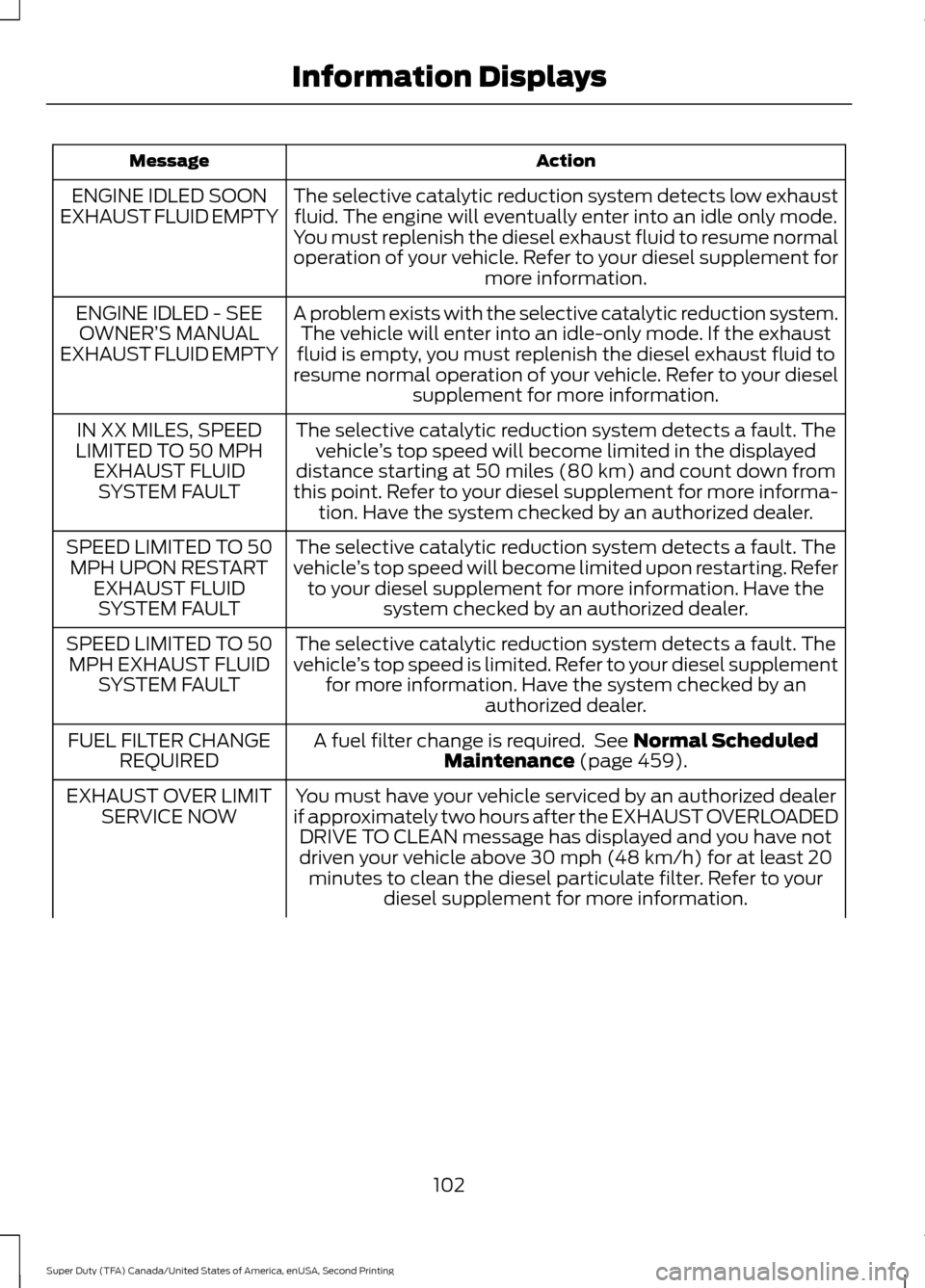
Action
Message
The selective catalytic reduction system detects low exhaustfluid. The engine will eventually enter into an idle only mode.
You must replenish the diesel exhaust fluid to resume normal
operation of your vehicle. Refer to your diesel supplement for more information.
ENGINE IDLED SOON
EXHAUST FLUID EMPTY
A problem exists with the selective catalytic reduction system.The vehicle will enter into an idle-only mode. If the exhaust
fluid is empty, you must replenish the diesel exhaust fluid to
resume normal operation of your vehicle. Refer to your diesel supplement for more information.
ENGINE IDLED - SEE
OWNER’ S MANUAL
EXHAUST FLUID EMPTY
The selective catalytic reduction system detects a fault. Thevehicle ’s top speed will become limited in the displayed
distance starting at 50 miles (80 km) and count down from
this point. Refer to your diesel supplement for more informa- tion. Have the system checked by an authorized dealer.
IN XX MILES, SPEED
LIMITED TO 50 MPH EXHAUST FLUIDSYSTEM FAULT
The selective catalytic reduction system detects a fault. The
vehicle ’s top speed will become limited upon restarting. Refer
to your diesel supplement for more information. Have the system checked by an authorized dealer.
SPEED LIMITED TO 50
MPH UPON RESTART EXHAUST FLUIDSYSTEM FAULT
The selective catalytic reduction system detects a fault. The
vehicle ’s top speed is limited. Refer to your diesel supplement
for more information. Have the system checked by an authorized dealer.
SPEED LIMITED TO 50
MPH EXHAUST FLUID SYSTEM FAULT
A fuel filter change is required. See Normal Scheduled
Maintenance (page 459).
FUEL FILTER CHANGE
REQUIRED
You must have your vehicle serviced by an authorized dealer
if approximately two hours after the EXHAUST OVERLOADED DRIVE TO CLEAN message has displayed and you have not
driven your vehicle above 30 mph (48 km/h) for at least 20 minutes to clean the diesel particulate filter. Refer to your diesel supplement for more information.
EXHAUST OVER LIMIT
SERVICE NOW
102
Super Duty (TFA) Canada/United States of America, enUSA, Second Printing Information Displays
Page 107 of 510
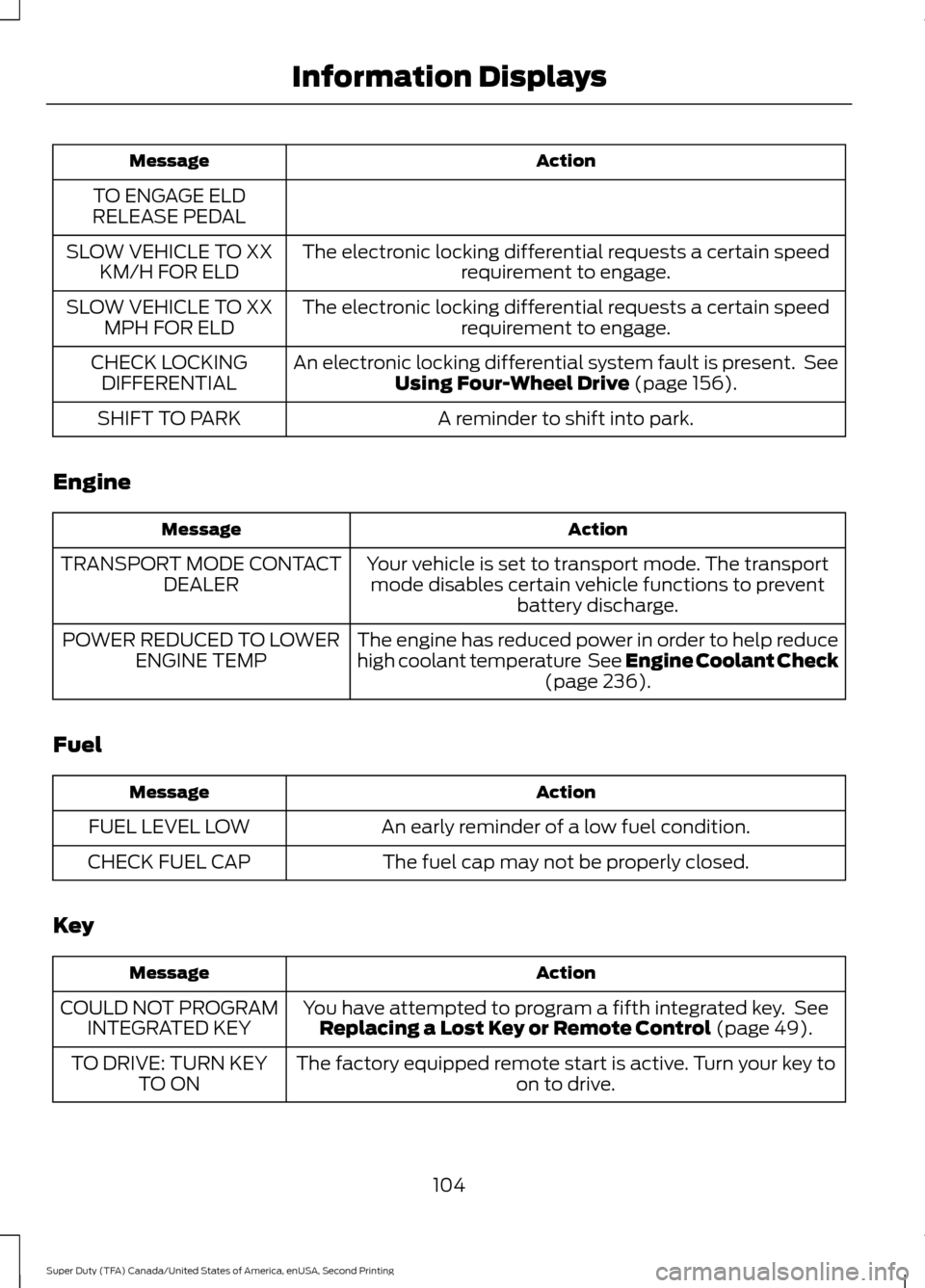
Action
Message
TO ENGAGE ELD
RELEASE PEDAL
The electronic locking differential requests a certain speedrequirement to engage.
SLOW VEHICLE TO XX
KM/H FOR ELD
The electronic locking differential requests a certain speedrequirement to engage.
SLOW VEHICLE TO XX
MPH FOR ELD
An electronic locking differential system fault is present. SeeUsing Four-Wheel Drive (page 156).
CHECK LOCKING
DIFFERENTIAL
A reminder to shift into park.
SHIFT TO PARK
Engine Action
Message
Your vehicle is set to transport mode. The transportmode disables certain vehicle functions to prevent battery discharge.
TRANSPORT MODE CONTACT
DEALER
The engine has reduced power in order to help reduce
high coolant temperature See Engine Coolant Check(page
236).
POWER REDUCED TO LOWER
ENGINE TEMP
Fuel Action
Message
An early reminder of a low fuel condition.
FUEL LEVEL LOW
The fuel cap may not be properly closed.
CHECK FUEL CAP
Key Action
Message
You have attempted to program a fifth integrated key. SeeReplacing a Lost Key or Remote Control
(page 49).
COULD NOT PROGRAM
INTEGRATED KEY
The factory equipped remote start is active. Turn your key to on to drive.
TO DRIVE: TURN KEY
TO ON
104
Super Duty (TFA) Canada/United States of America, enUSA, Second Printing Information Displays
Page 109 of 510
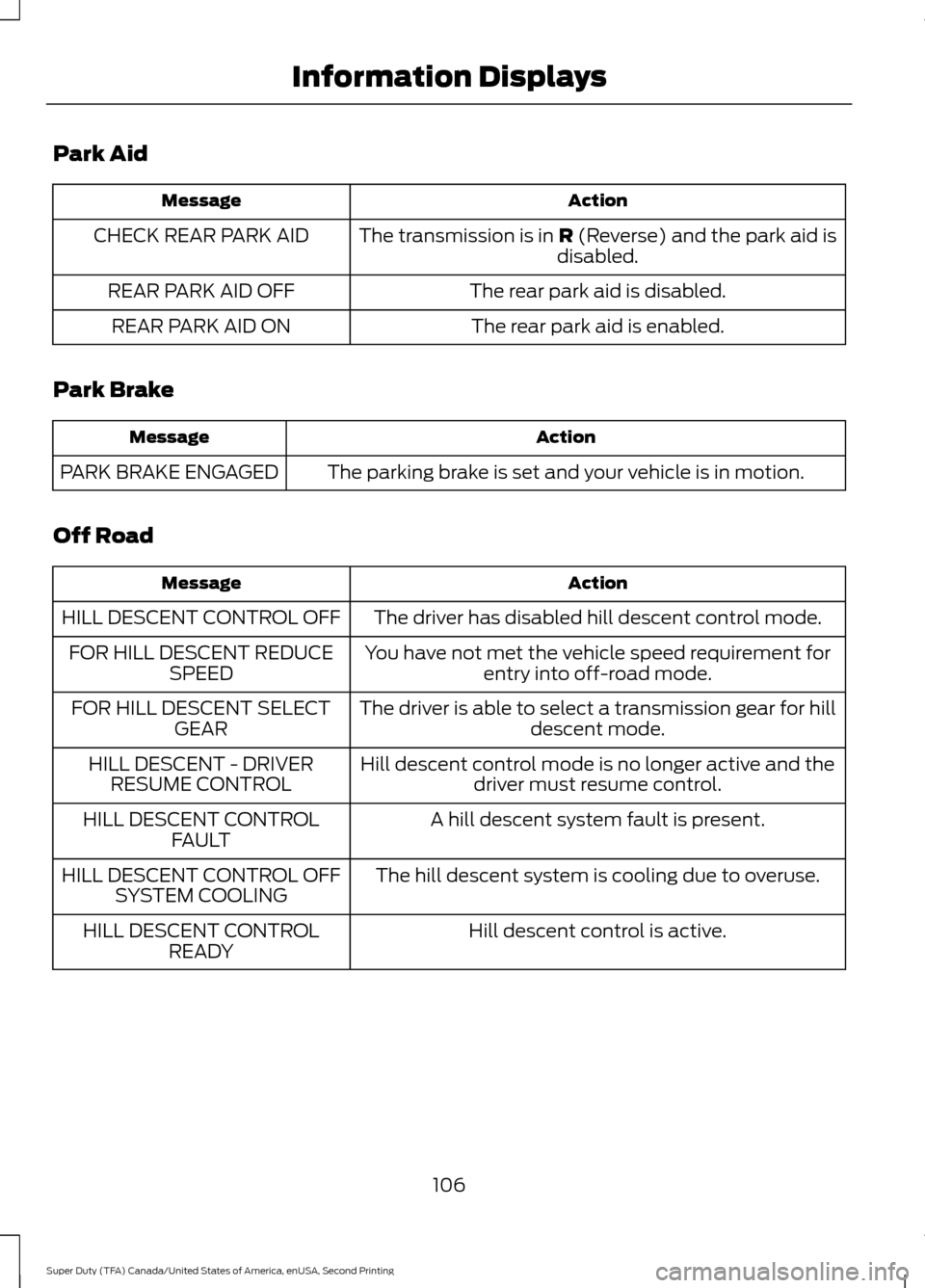
Park Aid
Action
Message
The transmission is in R (Reverse) and the park aid is
disabled.
CHECK REAR PARK AID
The rear park aid is disabled.
REAR PARK AID OFF
The rear park aid is enabled.
REAR PARK AID ON
Park Brake Action
Message
The parking brake is set and your vehicle is in motion.
PARK BRAKE ENGAGED
Off Road Action
Message
The driver has disabled hill descent control mode.
HILL DESCENT CONTROL OFF
You have not met the vehicle speed requirement forentry into off-road mode.
FOR HILL DESCENT REDUCE
SPEED
The driver is able to select a transmission gear for hilldescent mode.
FOR HILL DESCENT SELECT
GEAR
Hill descent control mode is no longer active and thedriver must resume control.
HILL DESCENT - DRIVER
RESUME CONTROL
A hill descent system fault is present.
HILL DESCENT CONTROL
FAULT
The hill descent system is cooling due to overuse.
HILL DESCENT CONTROL OFF
SYSTEM COOLING
Hill descent control is active.
HILL DESCENT CONTROL
READY
106
Super Duty (TFA) Canada/United States of America, enUSA, Second Printing Information Displays