light FORD SUPER DUTY 2016 3.G Owner's Guide
[x] Cancel search | Manufacturer: FORD, Model Year: 2016, Model line: SUPER DUTY, Model: FORD SUPER DUTY 2016 3.GPages: 510, PDF Size: 5.42 MB
Page 94 of 510
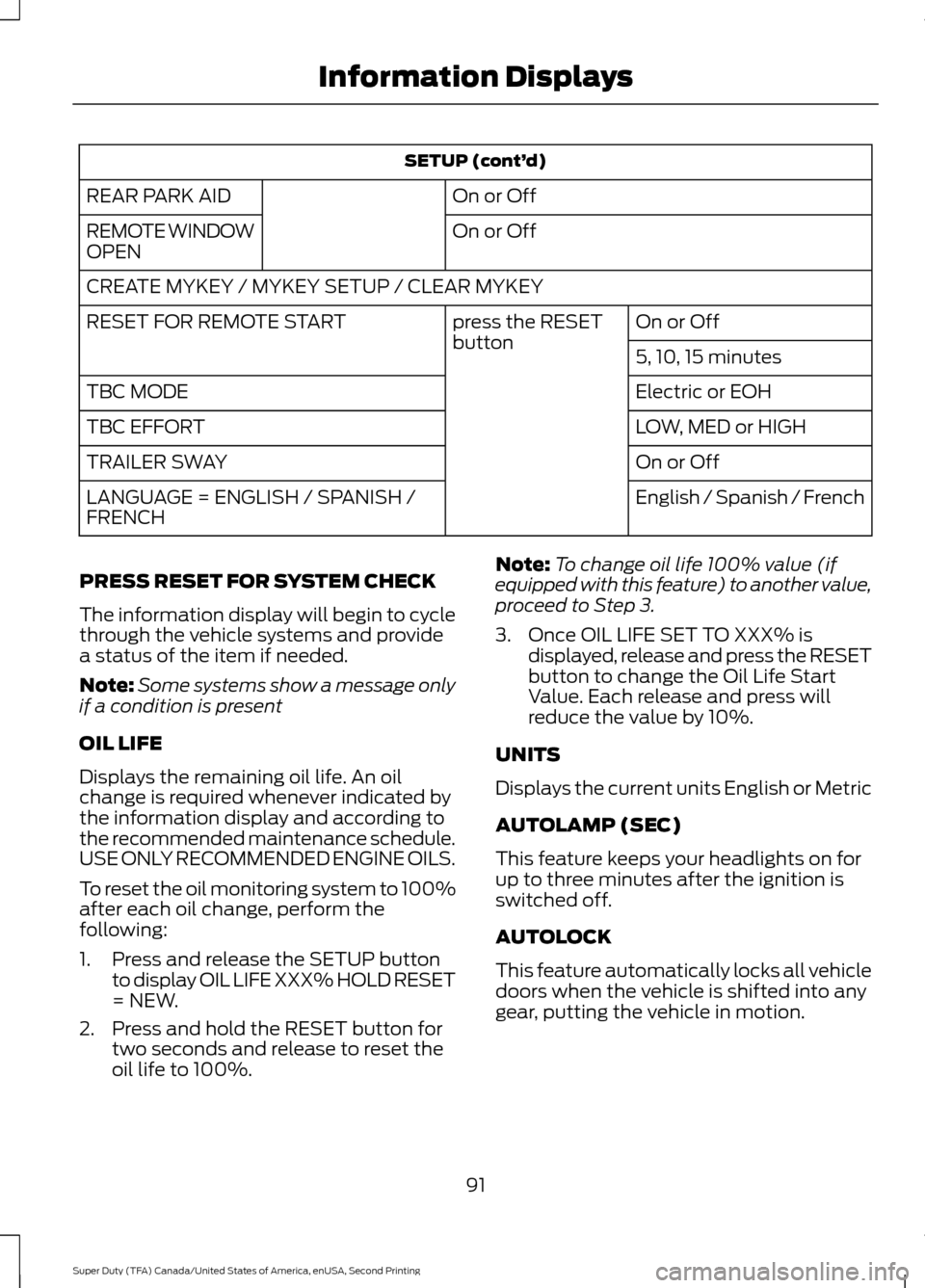
SETUP (cont’
d)
On or Off
REAR PARK AID
On or Off
REMOTE WINDOW
OPEN
CREATE MYKEY / MYKEY SETUP / CLEAR MYKEY
On or Off
press the RESET
button
RESET FOR REMOTE START
5, 10, 15 minutes
Electric or EOH
TBC MODE
LOW, MED or HIGH
TBC EFFORT
On or Off
TRAILER SWAY
English / Spanish / French
LANGUAGE = ENGLISH / SPANISH /
FRENCH
PRESS RESET FOR SYSTEM CHECK
The information display will begin to cycle
through the vehicle systems and provide
a status of the item if needed.
Note: Some systems show a message only
if a condition is present
OIL LIFE
Displays the remaining oil life. An oil
change is required whenever indicated by
the information display and according to
the recommended maintenance schedule.
USE ONLY RECOMMENDED ENGINE OILS.
To reset the oil monitoring system to 100%
after each oil change, perform the
following:
1. Press and release the SETUP button to display OIL LIFE XXX% HOLD RESET
= NEW.
2. Press and hold the RESET button for two seconds and release to reset the
oil life to 100%. Note:
To change oil life 100% value (if
equipped with this feature) to another value,
proceed to Step 3.
3. Once OIL LIFE SET TO XXX% is displayed, release and press the RESET
button to change the Oil Life Start
Value. Each release and press will
reduce the value by 10%.
UNITS
Displays the current units English or Metric
AUTOLAMP (SEC)
This feature keeps your headlights on for
up to three minutes after the ignition is
switched off.
AUTOLOCK
This feature automatically locks all vehicle
doors when the vehicle is shifted into any
gear, putting the vehicle in motion.
91
Super Duty (TFA) Canada/United States of America, enUSA, Second Printing Information Displays
Page 95 of 510
AUTOUNLOCK
This feature automatically unlocks all
vehicle doors when the driver
’s door is
opened within 10 minutes of the ignition
being turned off.
COURTESY WIPE
This feature allows for an extra swipe of
the wipers after a wipe/wash cycle.
CREATE MYKEY / MYKEY SETUP /
CLEAR MYKEY
For more information, See Creating a
MyKey (page 51).
RESET FOR REMOTE START (if
equipped)
REAR PARK AID
This feature sounds a warning tone to warn
the driver of obstacles near the rear
bumper, and functions only when R
(Reverse) gear is selected.
TBC MODE (if equipped)
Allows you to choose the trailer brake
mode.
TBC EFFORT (if equipped)
Allows you to choose the level of initial
braking.
TRAILER SWAY (if equipped)
This feature uses the electronic stability
control to mitigate trailer sway.
LANGUAGE = ENGLISH / SPANISH /
FRENCH
Allows you to choose which language the
message center will display in.
Waiting four seconds or pressing the
RESET button cycles the message center
through each of the language choices. Press the RESET button to set the
language choice.
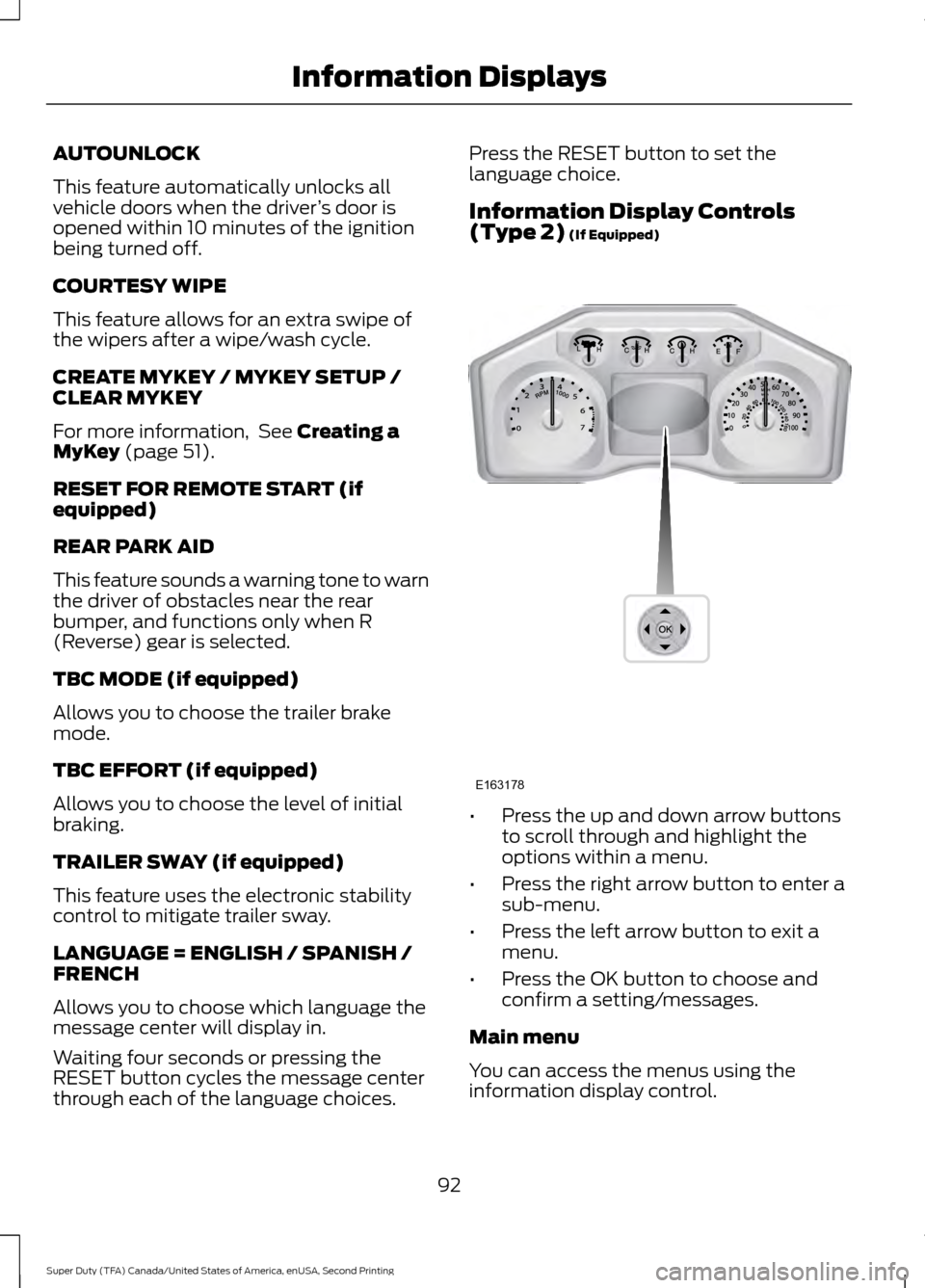
Information Display Controls
(Type 2)
(If Equipped)
•
Press the up and down arrow buttons
to scroll through and highlight the
options within a menu.
• Press the right arrow button to enter a
sub-menu.
• Press the left arrow button to exit a
menu.
• Press the OK button to choose and
confirm a setting/messages.
Main menu
You can access the menus using the
information display control.
92
Super Duty (TFA) Canada/United States of America, enUSA, Second Printing Information DisplaysE163178
Page 99 of 510
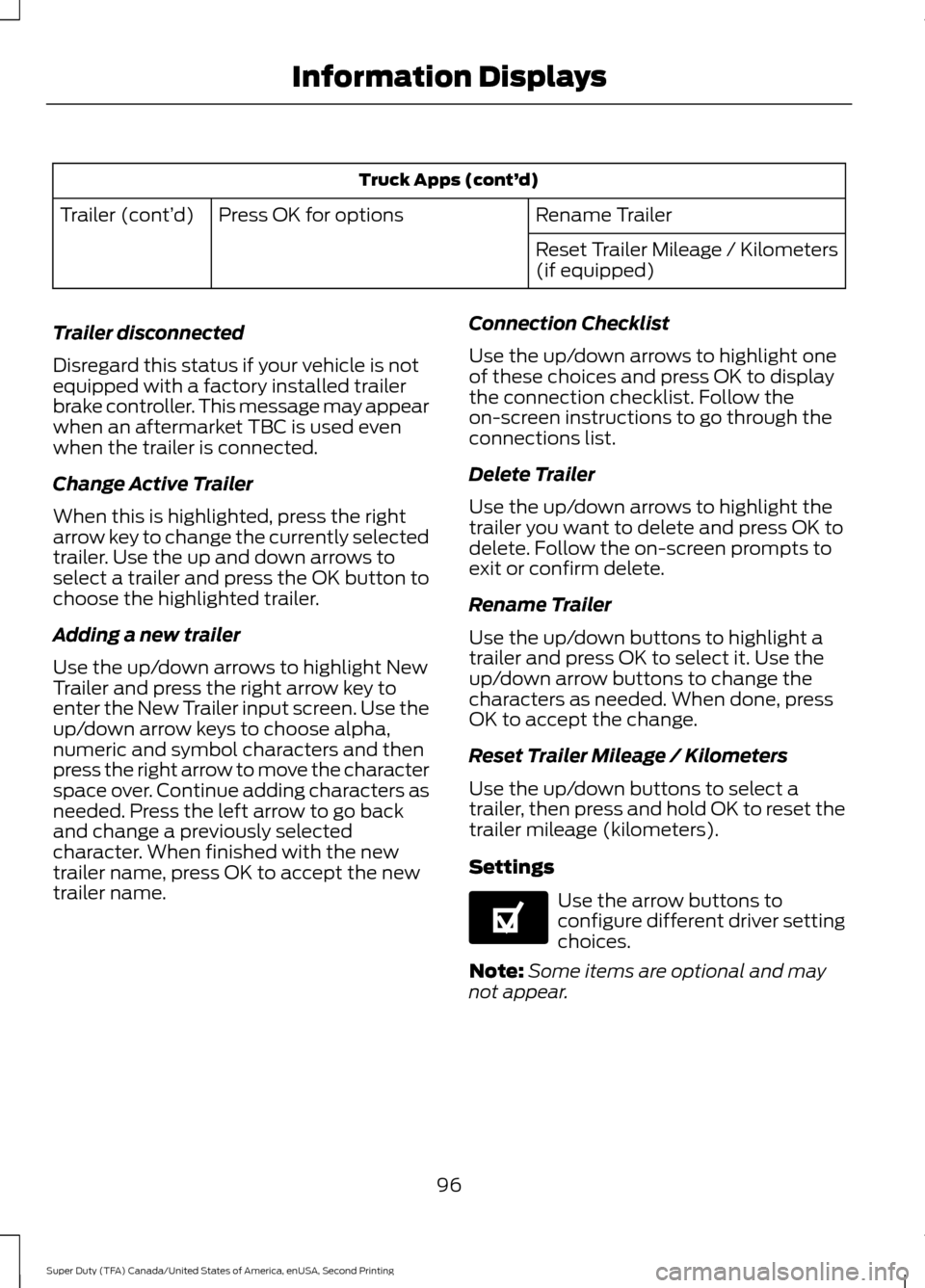
Truck Apps (cont’
d)
Rename Trailer
Press OK for options
Trailer (cont’ d)
Reset Trailer Mileage / Kilometers
(if equipped)
Trailer disconnected
Disregard this status if your vehicle is not
equipped with a factory installed trailer
brake controller. This message may appear
when an aftermarket TBC is used even
when the trailer is connected.
Change Active Trailer
When this is highlighted, press the right
arrow key to change the currently selected
trailer. Use the up and down arrows to
select a trailer and press the OK button to
choose the highlighted trailer.
Adding a new trailer
Use the up/down arrows to highlight New
Trailer and press the right arrow key to
enter the New Trailer input screen. Use the
up/down arrow keys to choose alpha,
numeric and symbol characters and then
press the right arrow to move the character
space over. Continue adding characters as
needed. Press the left arrow to go back
and change a previously selected
character. When finished with the new
trailer name, press OK to accept the new
trailer name. Connection Checklist
Use the up/down arrows to highlight one
of these choices and press OK to display
the connection checklist. Follow the
on-screen instructions to go through the
connections list.
Delete Trailer
Use the up/down arrows to highlight the
trailer you want to delete and press OK to
delete. Follow the on-screen prompts to
exit or confirm delete.
Rename Trailer
Use the up/down buttons to highlight a
trailer and press OK to select it. Use the
up/down arrow buttons to change the
characters as needed. When done, press
OK to accept the change.
Reset Trailer Mileage / Kilometers
Use the up/down buttons to select a
trailer, then press and hold OK to reset the
trailer mileage (kilometers).
Settings
Use the arrow buttons to
configure different driver setting
choices.
Note: Some items are optional and may
not appear.
96
Super Duty (TFA) Canada/United States of America, enUSA, Second Printing Information DisplaysE144641
Page 100 of 510
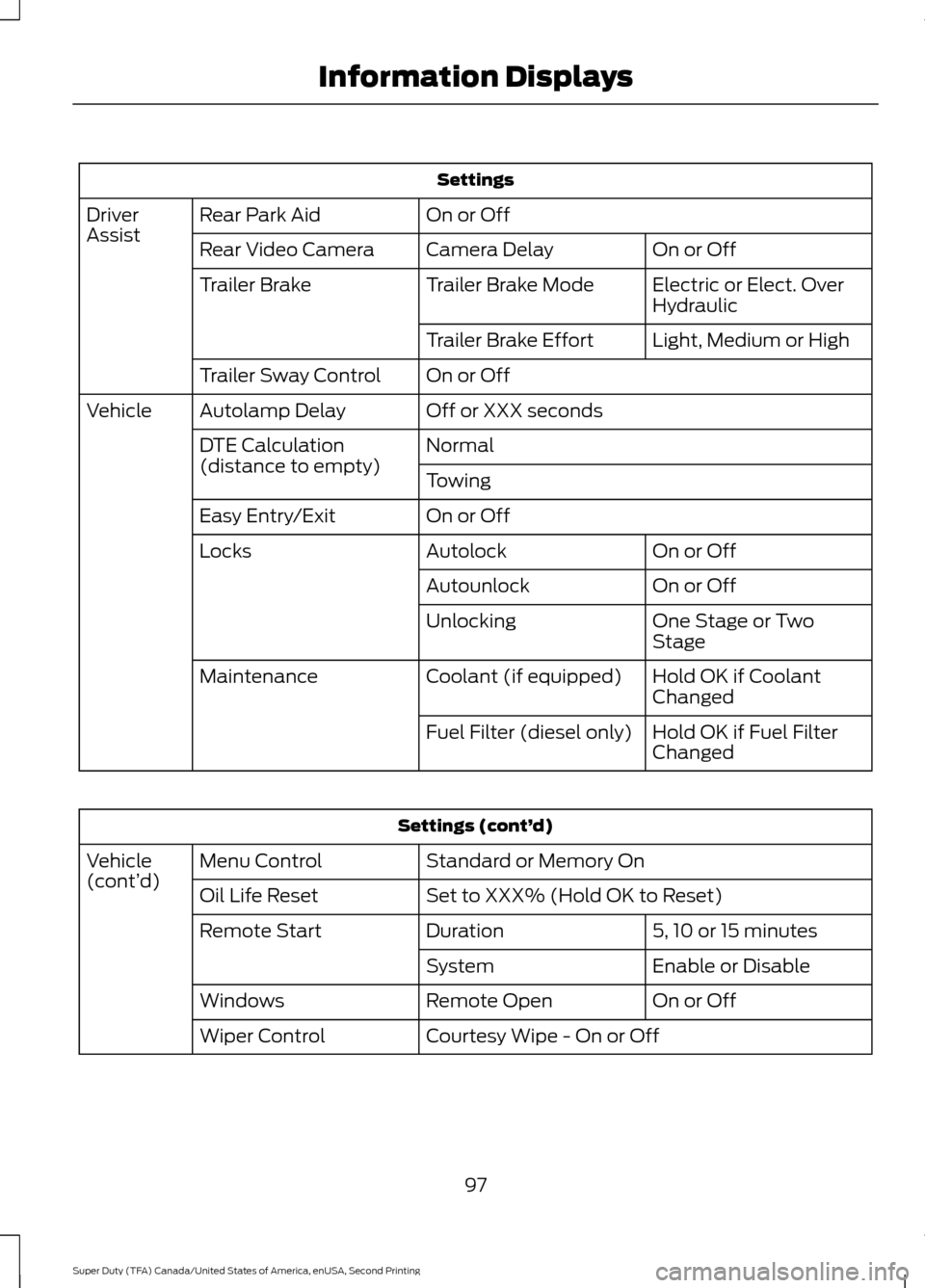
Settings
On or Off
Rear Park Aid
Driver
Assist
On or Off
Camera Delay
Rear Video Camera
Electric or Elect. Over
Hydraulic
Trailer Brake Mode
Trailer Brake
Light, Medium or High
Trailer Brake Effort
On or Off
Trailer Sway Control
Off or XXX seconds
Autolamp Delay
Vehicle
Normal
DTE Calculation
(distance to empty)
Towing
On or Off
Easy Entry/Exit
On or Off
Autolock
Locks
On or Off
Autounlock
One Stage or Two
Stage
Unlocking
Hold OK if Coolant
Changed
Coolant (if equipped)
Maintenance
Hold OK if Fuel Filter
Changed
Fuel Filter (diesel only) Settings (cont’
d)
Standard or Memory On
Menu Control
Vehicle
(cont’ d)
Set to XXX% (Hold OK to Reset)
Oil Life Reset
5, 10 or 15 minutes
Duration
Remote Start
Enable or Disable
System
On or Off
Remote Open
Windows
Courtesy Wipe - On or Off
Wiper Control
97
Super Duty (TFA) Canada/United States of America, enUSA, Second Printing Information Displays
Page 101 of 510
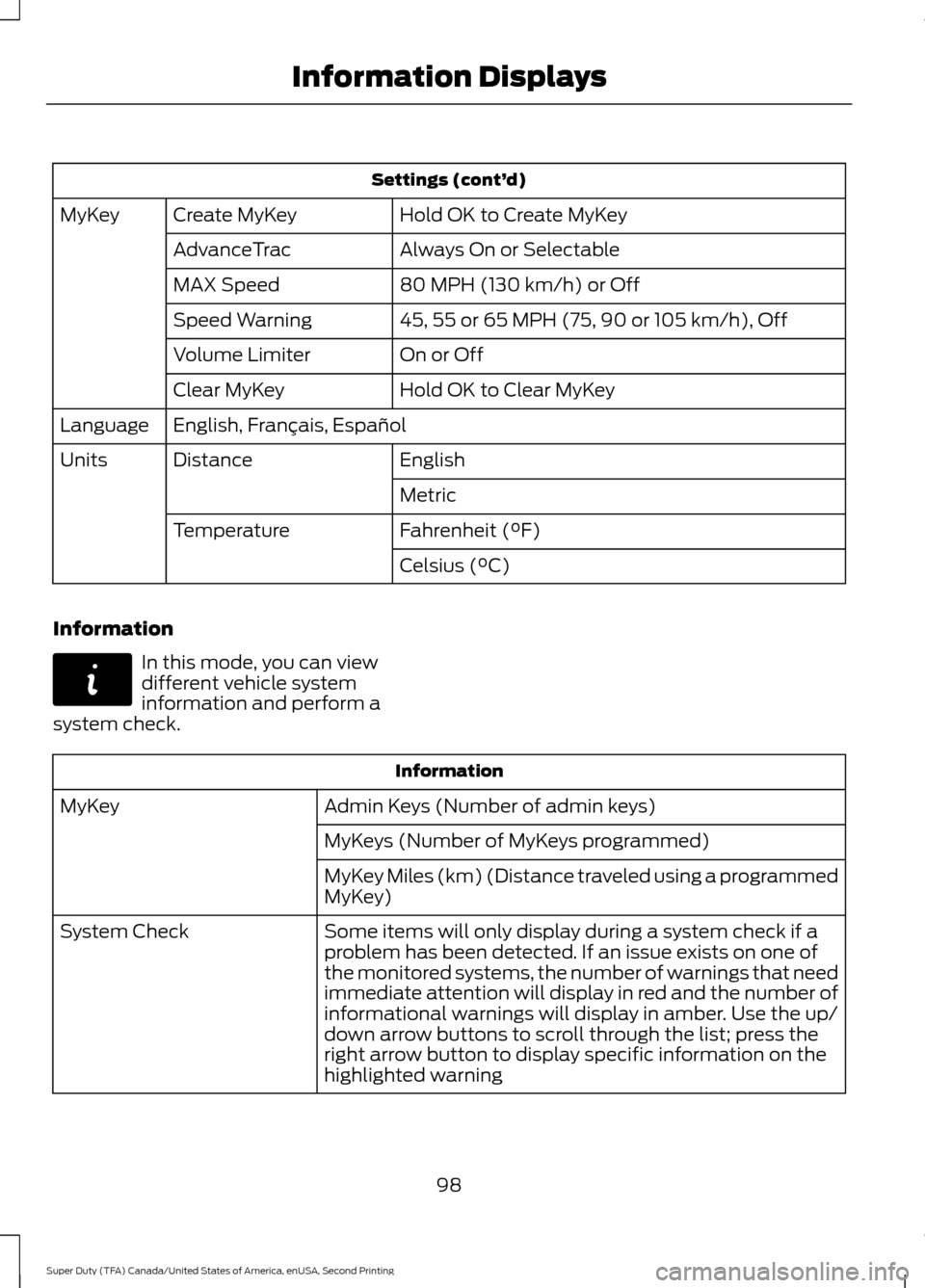
Settings (cont’
d)
Hold OK to Create MyKey
Create MyKey
MyKey
Always On or Selectable
AdvanceTrac
80 MPH (130 km/h) or Off
MAX Speed
45, 55 or 65 MPH (75, 90 or 105 km/h), Off
Speed Warning
On or Off
Volume Limiter
Hold OK to Clear MyKey
Clear MyKey
English, Français, Español
Language
English
Distance
Units
Metric
Fahrenheit (°F)
Temperature
Celsius (°C)
Information In this mode, you can view
different vehicle system
information and perform a
system check. Information
Admin Keys (Number of admin keys)
MyKey
MyKeys (Number of MyKeys programmed)
MyKey Miles (km) (Distance traveled using a programmed
MyKey)
Some items will only display during a system check if a
problem has been detected. If an issue exists on one of
the monitored systems, the number of warnings that need
immediate attention will display in red and the number of
informational warnings will display in amber. Use the up/
down arrow buttons to scroll through the list; press the
right arrow button to display specific information on the
highlighted warning
System Check
98
Super Duty (TFA) Canada/United States of America, enUSA, Second Printing Information DisplaysE144642
Page 103 of 510
Diesel Messages
WARNING
When the CLEANING EXHAUST
FILTER message appears in the
information display, do not park near
flammable materials, vapors or structures
until filter cleaning is complete. Action
Message
The coolant additive needs checking. Refer to your dieselsupplement for more information.
CHECK COOLANT
ADDITIVE
Your vehicle has entered the cleaning mode. Various engineactions will raise the exhaust temperature in the Diesel
Particulate Filter system to burn off the particles (exhaust soot). After the vehicle burns the particles off the exhaust temperature will return to normal levels. This message is
NORMAL. Refer to your diesel supplement for more informa- tion.
CLEANING EXHAUST
FILTER
The diesel particulate filter is full of particles (exhaust soot)
and you are not operating the vehicle in a manner that allows
normal cleaning. One of these messages will stay on until the
exhaust filter cleaning has begun, at which time the CLEANING EXHAUST FILTER message displays. We recommend you
drive the vehicle above 30 mph (48 km/h) until the CLEANING EXHAUST FILTER message turns off. Refer to your diesel supplement for more information.
EXHAUST OVER-
LOADED DRIVE TO CLEAN
EXHAUST AT LIMIT
DRIVE TO CLEAN NOW
The diesel particulate filter will continue to fill with particles
(exhaust soot) if you ignore this message. The service engine soon light will illuminate and engine power may be limited, if
cleaning is not permitted. Dealer service will then be required to restore your vehicle to full-power operation.
Your vehicle exhaust system temperature exceeds intended operating range. If this warning occurs, a chime will sound,
followed by reduced engine power. The engine will shut down when your vehicle speed is below 3 mph (5 km/h). Stop the
vehicle as soon as safely possible. Have the system checked by an authorized dealer.
STOP SAFELY NOW
The diluted engine oil needs to be changed. Refer to yourdiesel supplement for more information.
ENGINE OIL DILUTED
The powertrain control module will intentionally turn the
engine off due to your vehicle being in the final second of a
countdown. The diesel engine shutdown is an optional feature. Refer to your diesel supplement for more information.
ENGINE TURNS OFF IN
1 SECOND
100
Super Duty (TFA) Canada/United States of America, enUSA, Second Printing Information Displays
Page 114 of 510
A/C: Press the button to switch the air conditioning on or off. Air conditioning
cools your vehicle using outside air. To improve the time to reach a comfortable
temperature in hot weather, drive with the windows open until you feel cold air
through the air vents.
E
Note: In certain conditions (for example, maximum defrost), the air conditioning
compressor may continue to operate even though the air conditioning is
switched off.
MAX A/C: Press the button for maximum cooling. Recirculated air flows through
the instrument panel vents, air conditioning automatically turns on and the fan
automatically adjusts to the highest speed.
F
Recirculated air:
Press the button to switch between outside air and
recirculated air. The air currently in the passenger compartment recirculates.
This can reduce the time needed to cool the interior and reduce unwanted odors
from entering your vehicle.
G
Note:
Recirculated air may also turn on and off automatically in instrument
panel or instrument panel and floor airflow modes during hot weather to improve
cooling efficiency.
Passenger temperature control:
Adjusts the temperature on the passenger
side.
H
Fan speed control:
Adjusts the volume of air circulated in the vehicle.
I
AUTO:
Press the button to switch on automatic operation. Adjust to select the
desired temperature. Fan speed, air distribution, air conditioning operation, and
outside or recirculated air are automatically adjusted to heat or cool the vehicle
to maintain the desired temperature. You can also turn off dual zone mode by
pressing and holding the button for greater than two seconds.
J
HINTS ON CONTROLLING THE
INTERIOR CLIMATE
General Hints
Note: Prolonged use of recirculated air may
cause the windows to fog up.
Note: You may feel a small amount of air
from the footwell air vents regardless of the
air distribution setting.
Note: To reduce humidity build-up inside
your vehicle, do not drive with the system
switched off or with recirculated air always
switched on. Note:
Do not place objects under the front
seats as this may interfere with the airflow
to the rear seats.
Note: Remove any snow, ice or leaves from
the air intake area at the base of the
windshield.
Note: To improve the time to reach comfort
in hot weather, drive with the windows
slightly open for 2-3 minutes after start-up
or until your vehicle airs out.
Manual Climate Control
Note: To reduce fogging of the windshield
during humid weather, adjust the air
distribution control to the windshield air
vents position.
111
Super Duty (TFA) Canada/United States of America, enUSA, Second Printing Climate Control
Page 118 of 510
SITTING IN THE CORRECT
POSITION
WARNINGS
Sitting improperly, out of position or
with the seatback reclined too far
can take weight off the seat cushion
and affect the decision of the passenger
sensing system, resulting in serious injury
or death in the event of a crash. Always sit
upright against your seat back, with your
feet on the floor. Do not recline the seatback as this
can cause the occupant to slide
under the safety belt, resulting in
serious injury in the event of a crash. Do not place objects higher than the
seatback to reduce the risk of serious
injury in the event of a crash or during
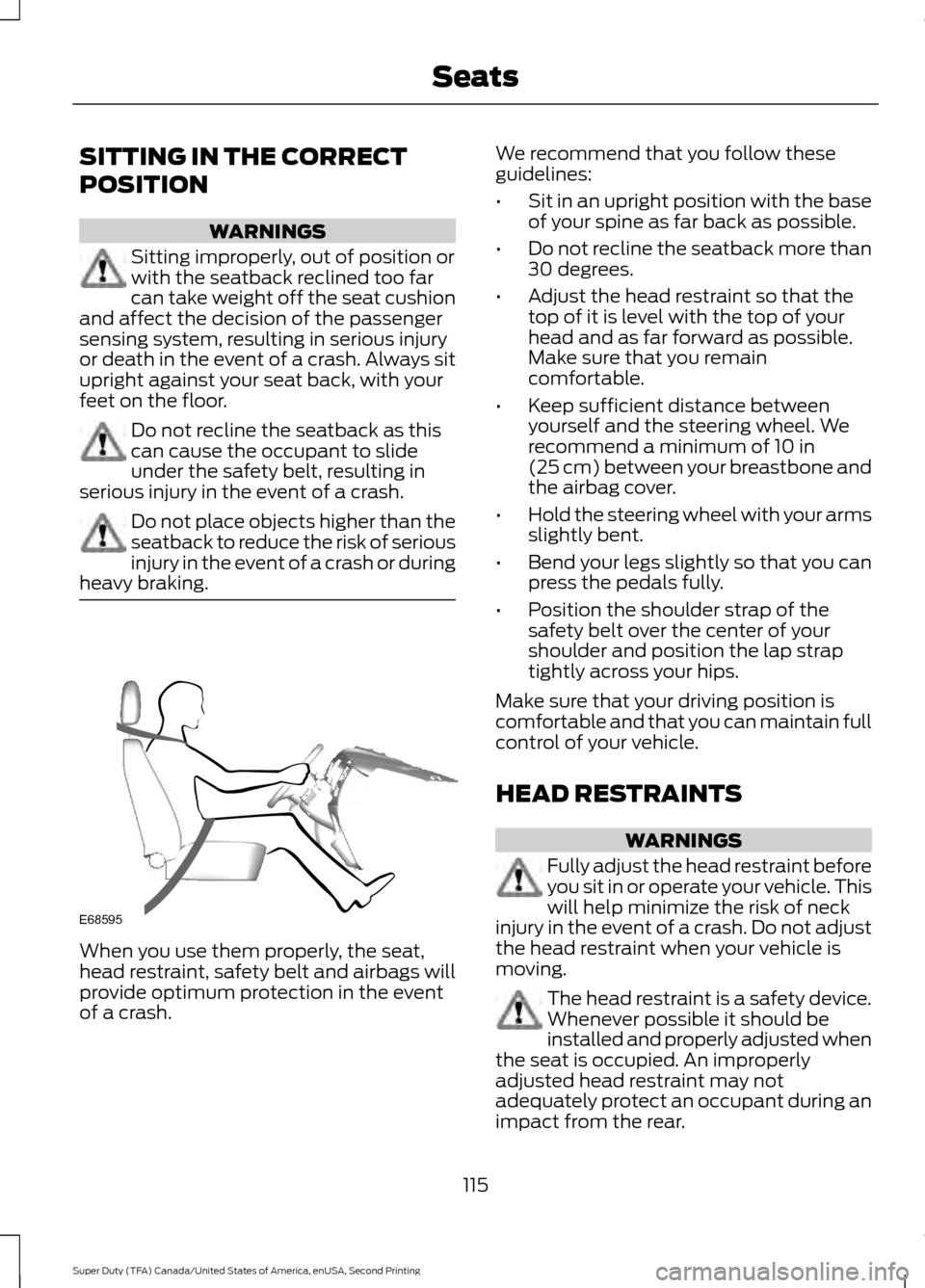
heavy braking. When you use them properly, the seat,
head restraint, safety belt and airbags will
provide optimum protection in the event
of a crash. We recommend that you follow these
guidelines:
•
Sit in an upright position with the base
of your spine as far back as possible.
• Do not recline the seatback more than
30 degrees.
• Adjust the head restraint so that the
top of it is level with the top of your
head and as far forward as possible.
Make sure that you remain
comfortable.
• Keep sufficient distance between
yourself and the steering wheel. We
recommend a minimum of 10 in
(25 cm) between your breastbone and
the airbag cover.
• Hold the steering wheel with your arms
slightly bent.
• Bend your legs slightly so that you can
press the pedals fully.
• Position the shoulder strap of the
safety belt over the center of your
shoulder and position the lap strap
tightly across your hips.
Make sure that your driving position is
comfortable and that you can maintain full
control of your vehicle.
HEAD RESTRAINTS WARNINGS
Fully adjust the head restraint before
you sit in or operate your vehicle. This
will help minimize the risk of neck
injury in the event of a crash. Do not adjust
the head restraint when your vehicle is
moving. The head restraint is a safety device.
Whenever possible it should be
installed and properly adjusted when
the seat is occupied. An improperly
adjusted head restraint may not
adequately protect an occupant during an
impact from the rear.
115
Super Duty (TFA) Canada/United States of America, enUSA, Second Printing SeatsE68595
Page 125 of 510
HEATED SEATS (If Equipped)
WARNING
People who are unable to feel pain
to their skin because of advanced
age, chronic illness, diabetes, spinal
cord injury, medication, alcohol use,
exhaustion or other physical conditions,
must exercise care when using the heated
seat. The heated seat may cause burns
even at low temperatures, especially if
used for long periods of time. Do not place
anything on the seat that insulates against
heat, such as a blanket or cushion. This
may cause the heated seat to overheat.
Do not puncture the seat with pins, needles
or other pointed objects. This may damage
the heating element which may cause the
heated seat to overheat. An overheated
seat may cause serious personal injury. Do not do the following:
•
Place heavy objects on the seat.
• Operate the heated seat if water or any
other liquid spills on the seat. Allow the
seat to dry thoroughly.
• Operate the heated seats unless the
engine is running. Doing so can cause
the battery to lose charge. Press the heated seat symbol on the
touchscreen to cycle through the various
heat settings and off. More indicator lights
indicate warmer settings. Note:
After 60 minutes of operation, the
heated seats switch off. Press the heated
seat symbol to switch the heated seats on.
Rear Heated Seats
(If Equipped) WARNING
Persons who are unable to feel pain
to the skin because of advanced age,
chronic illness, diabetes, spinal cord
injury, medication, alcohol use, exhaustion,
or other physical conditions, must exercise
care when using the seat heater. The seat
heater may cause burns even at low
temperatures, especially if used for long
periods of time. Do not place anything on
the seat that insulates against heat, such
as a blanket or cushion, because this may
cause the seat heater to overheat. Do not
puncture the seat with pins, needles, or
other pointed objects because this may
damage the heating element which may
cause the seat heater to overheat. An
overheated seat may cause serious
personal injury. Note:
Do not do the following:
• Place heavy objects on the seat.
• Operate the seat heater if water or any
other liquid spills on the seat. Allow the
seat to dry thoroughly.
The rear seat heat controls are located on
the rear door armrest.
122
Super Duty (TFA) Canada/United States of America, enUSA, Second Printing SeatsE146322
Page 126 of 510
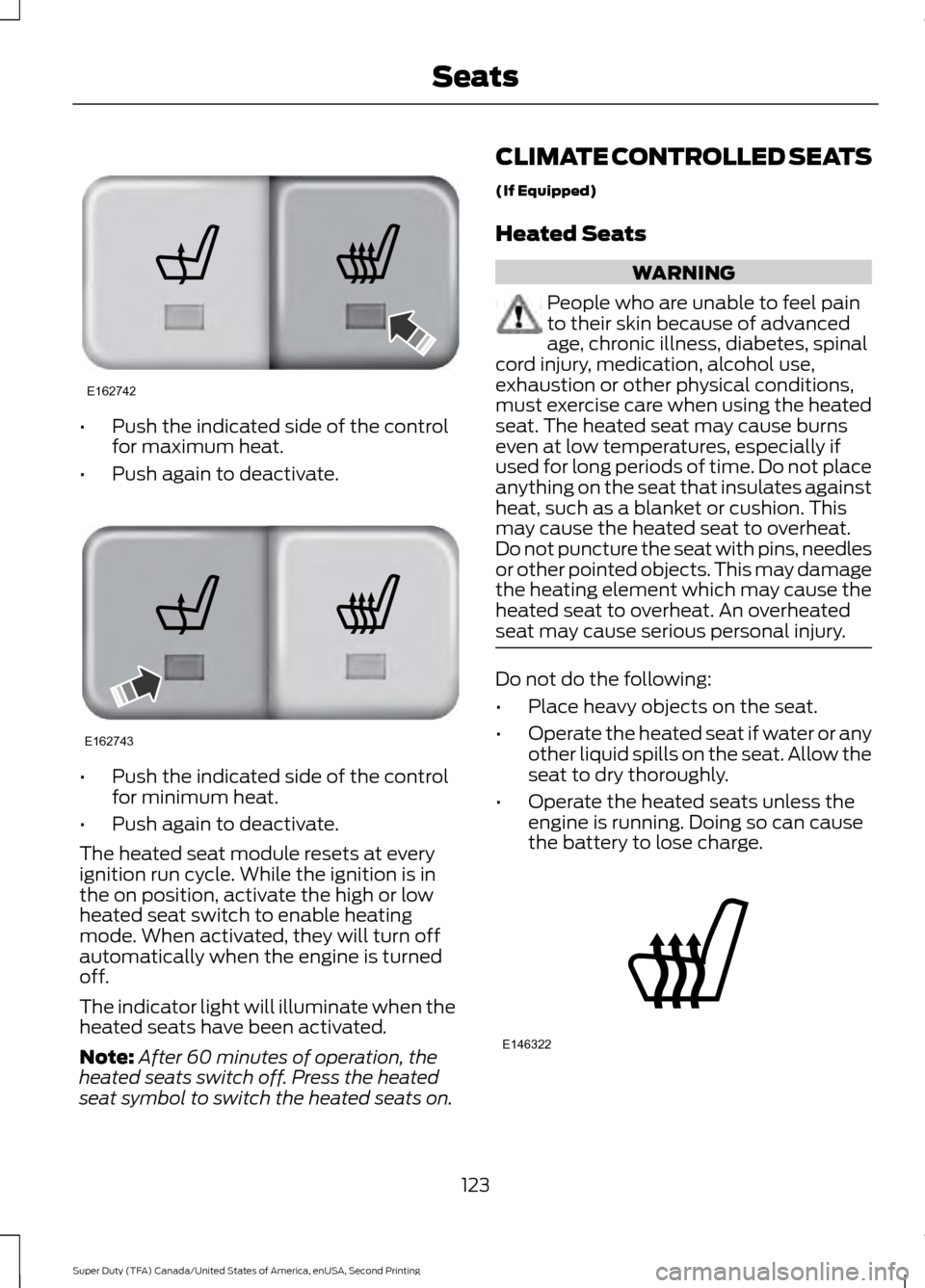
•
Push the indicated side of the control
for maximum heat.
• Push again to deactivate. •
Push the indicated side of the control
for minimum heat.
• Push again to deactivate.
The heated seat module resets at every
ignition run cycle. While the ignition is in
the on position, activate the high or low
heated seat switch to enable heating
mode. When activated, they will turn off
automatically when the engine is turned
off.
The indicator light will illuminate when the
heated seats have been activated.
Note: After 60 minutes of operation, the
heated seats switch off. Press the heated
seat symbol to switch the heated seats on. CLIMATE CONTROLLED SEATS
(If Equipped)
Heated Seats WARNING
People who are unable to feel pain
to their skin because of advanced
age, chronic illness, diabetes, spinal
cord injury, medication, alcohol use,
exhaustion or other physical conditions,
must exercise care when using the heated
seat. The heated seat may cause burns
even at low temperatures, especially if
used for long periods of time. Do not place
anything on the seat that insulates against
heat, such as a blanket or cushion. This
may cause the heated seat to overheat.
Do not puncture the seat with pins, needles
or other pointed objects. This may damage
the heating element which may cause the
heated seat to overheat. An overheated
seat may cause serious personal injury. Do not do the following:
•
Place heavy objects on the seat.
• Operate the heated seat if water or any
other liquid spills on the seat. Allow the
seat to dry thoroughly.
• Operate the heated seats unless the
engine is running. Doing so can cause
the battery to lose charge. 123
Super Duty (TFA) Canada/United States of America, enUSA, Second Printing SeatsE162742 E162743 E146322