steering FORD SUPER DUTY 2016 3.G Repair Manual
[x] Cancel search | Manufacturer: FORD, Model Year: 2016, Model line: SUPER DUTY, Model: FORD SUPER DUTY 2016 3.GPages: 510, PDF Size: 5.42 MB
Page 430 of 510
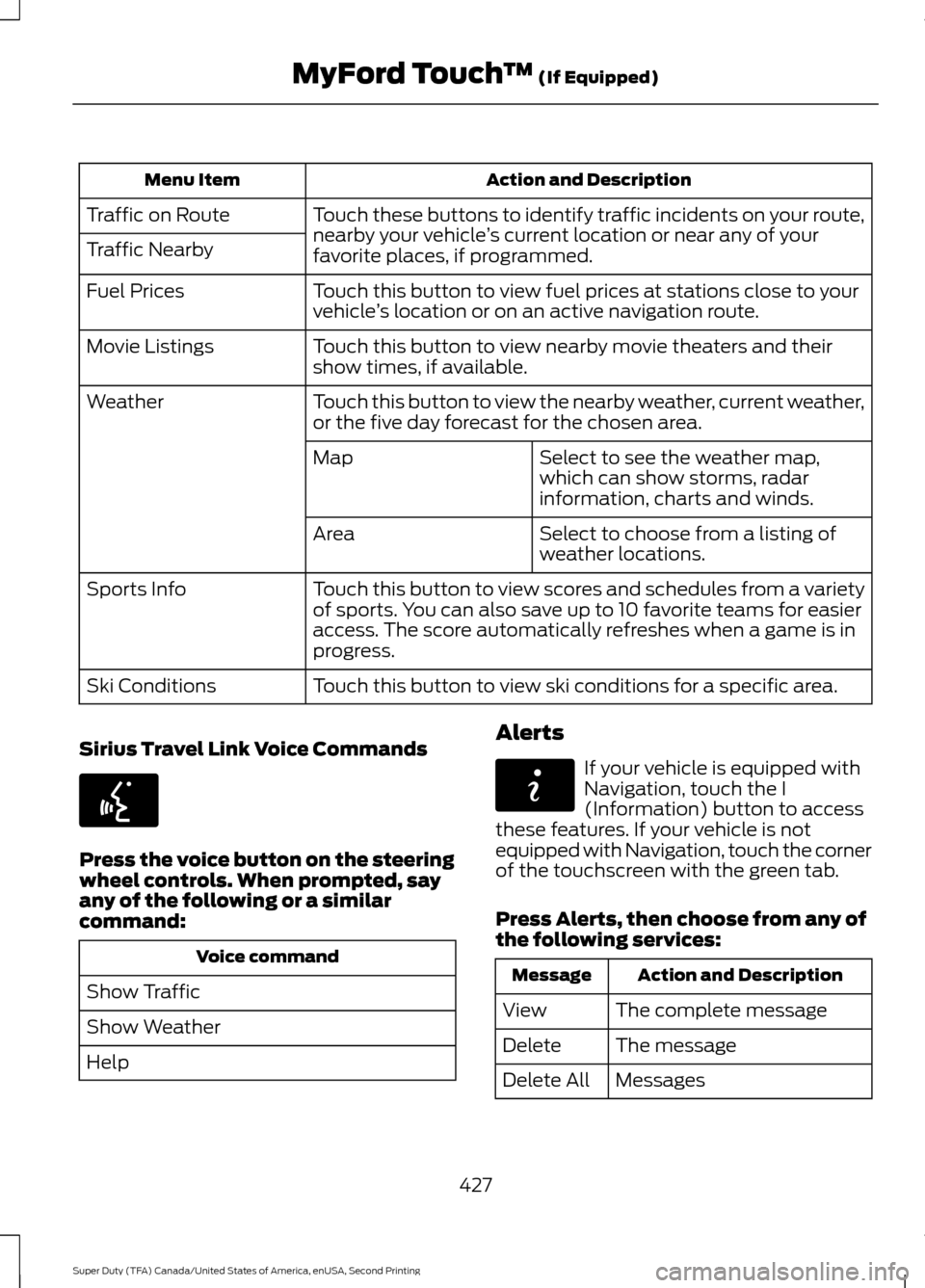
Action and Description
Menu Item
Touch these buttons to identify traffic incidents on your route,
nearby your vehicle ’s current location or near any of your
favorite places, if programmed.
Traffic on Route
Traffic Nearby
Touch this button to view fuel prices at stations close to your
vehicle’s location or on an active navigation route.
Fuel Prices
Touch this button to view nearby movie theaters and their
show times, if available.
Movie Listings
Touch this button to view the nearby weather, current weather,
or the five day forecast for the chosen area.
Weather
Select to see the weather map,
which can show storms, radar
information, charts and winds.
Map
Select to choose from a listing of
weather locations.
Area
Touch this button to view scores and schedules from a variety
of sports. You can also save up to 10 favorite teams for easier
access. The score automatically refreshes when a game is in
progress.
Sports Info
Touch this button to view ski conditions for a specific area.
Ski Conditions
Sirius Travel Link Voice Commands Press the voice button on the steering
wheel controls. When prompted, say
any of the following or a similar
command:
Voice command
Show Traffic
Show Weather
Help Alerts If your vehicle is equipped with
Navigation, touch the I
(Information) button to access
these features. If your vehicle is not
equipped with Navigation, touch the corner
of the touchscreen with the green tab.
Press Alerts, then choose from any of
the following services: Action and Description
Message
The complete message
View
The message
Delete
Messages
Delete All
427
Super Duty (TFA) Canada/United States of America, enUSA, Second Printing MyFord Touch
™
(If Equipped)E142599 E142608
Page 432 of 510
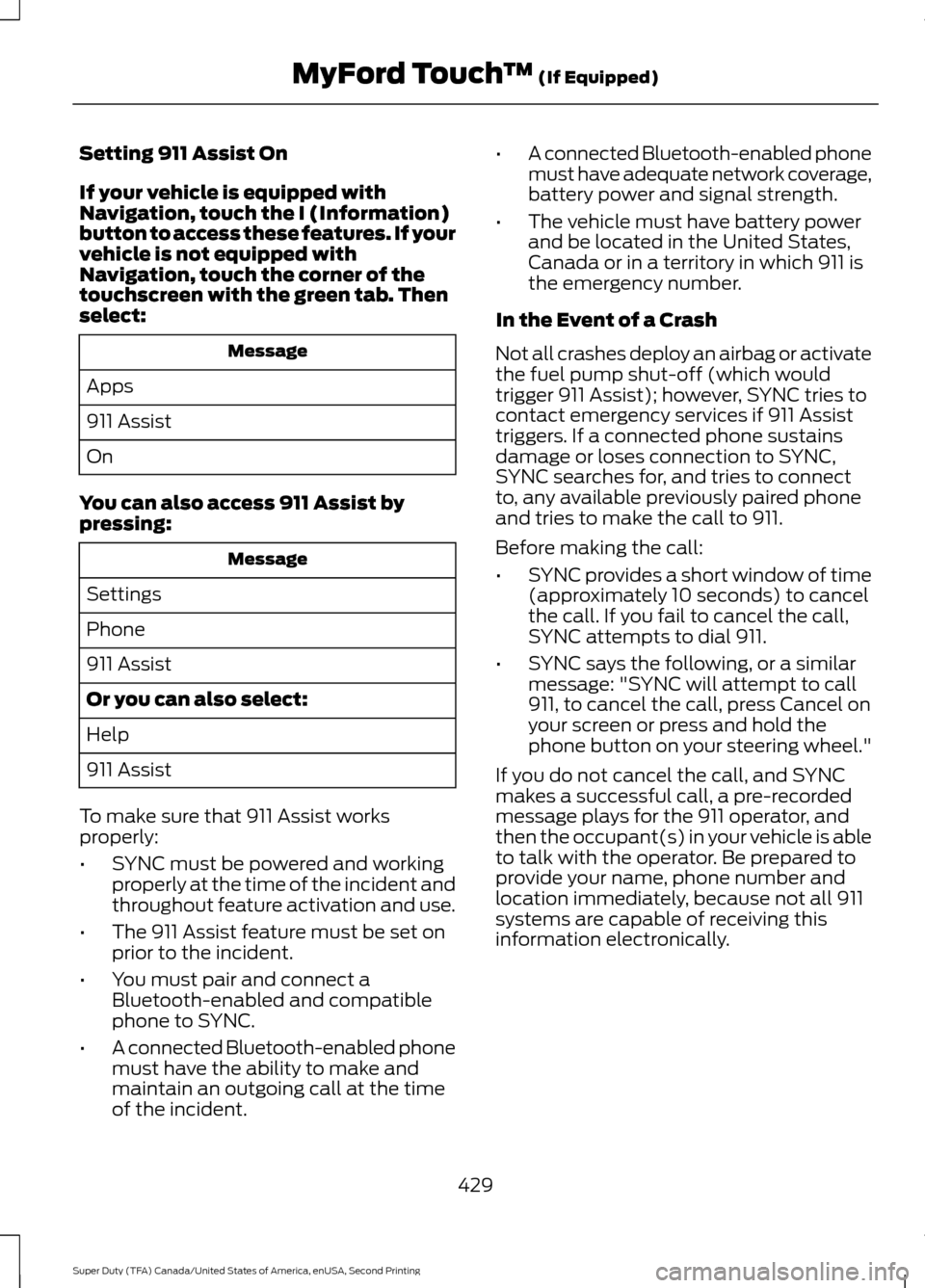
Setting 911 Assist On
If your vehicle is equipped with
Navigation, touch the I (Information)
button to access these features. If your
vehicle is not equipped with
Navigation, touch the corner of the
touchscreen with the green tab. Then
select:
Message
Apps
911 Assist
On
You can also access 911 Assist by
pressing: Message
Settings
Phone
911 Assist
Or you can also select:
Help
911 Assist
To make sure that 911 Assist works
properly:
• SYNC must be powered and working
properly at the time of the incident and
throughout feature activation and use.
• The 911 Assist feature must be set on
prior to the incident.
• You must pair and connect a
Bluetooth-enabled and compatible
phone to SYNC.
• A connected Bluetooth-enabled phone
must have the ability to make and
maintain an outgoing call at the time
of the incident. •
A connected Bluetooth-enabled phone
must have adequate network coverage,
battery power and signal strength.
• The vehicle must have battery power
and be located in the United States,
Canada or in a territory in which 911 is
the emergency number.
In the Event of a Crash
Not all crashes deploy an airbag or activate
the fuel pump shut-off (which would
trigger 911 Assist); however, SYNC tries to
contact emergency services if 911 Assist
triggers. If a connected phone sustains
damage or loses connection to SYNC,
SYNC searches for, and tries to connect
to, any available previously paired phone
and tries to make the call to 911.
Before making the call:
• SYNC provides a short window of time
(approximately 10 seconds) to cancel
the call. If you fail to cancel the call,
SYNC attempts to dial 911.
• SYNC says the following, or a similar
message: "SYNC will attempt to call
911, to cancel the call, press Cancel on
your screen or press and hold the
phone button on your steering wheel."
If you do not cancel the call, and SYNC
makes a successful call, a pre-recorded
message plays for the 911 operator, and
then the occupant(s) in your vehicle is able
to talk with the operator. Be prepared to
provide your name, phone number and
location immediately, because not all 911
systems are capable of receiving this
information electronically.
429
Super Duty (TFA) Canada/United States of America, enUSA, Second Printing MyFord Touch
™ (If Equipped)
Page 437 of 510
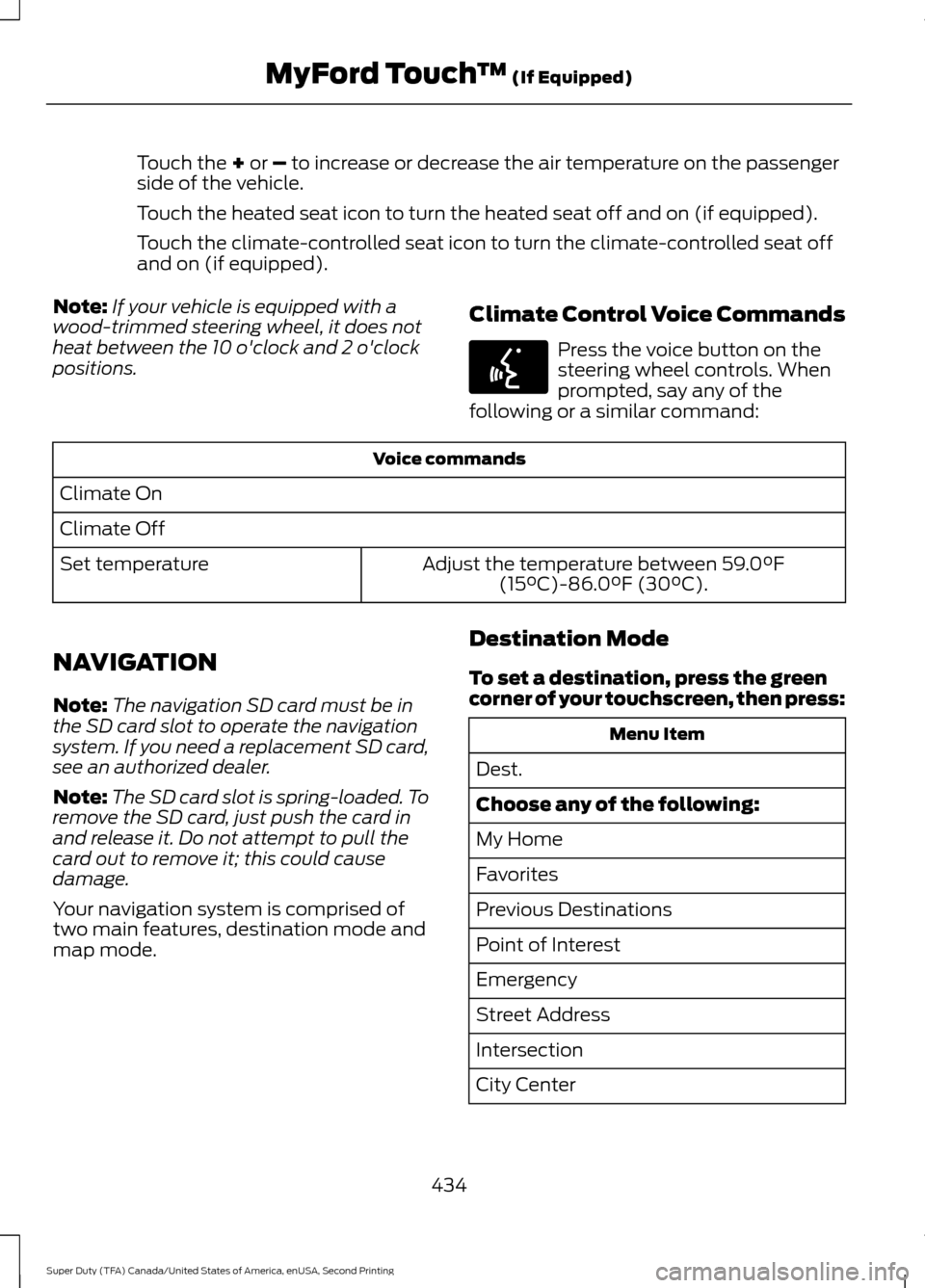
Touch the + or – to increase or decrease the air temperature on the passenger
side of the vehicle.
Touch the heated seat icon to turn the heated seat off and on (if equipped).
Touch the climate-controlled seat icon to turn the climate-controlled seat off
and on (if equipped).
Note: If your vehicle is equipped with a
wood-trimmed steering wheel, it does not
heat between the 10 o'clock and 2 o'clock
positions. Climate Control Voice Commands Press the voice button on the
steering wheel controls. When
prompted, say any of the
following or a similar command: Voice commands
Climate On
Climate Off Adjust the temperature between
59.0°F
(15°C)-86.0°F (30°C).
Set temperature
NAVIGATION
Note: The navigation SD card must be in
the SD card slot to operate the navigation
system. If you need a replacement SD card,
see an authorized dealer.
Note: The SD card slot is spring-loaded. To
remove the SD card, just push the card in
and release it. Do not attempt to pull the
card out to remove it; this could cause
damage.
Your navigation system is comprised of
two main features, destination mode and
map mode. Destination Mode
To set a destination, press the green
corner of your touchscreen, then press: Menu Item
Dest.
Choose any of the following:
My Home
Favorites
Previous Destinations
Point of Interest
Emergency
Street Address
Intersection
City Center
434
Super Duty (TFA) Canada/United States of America, enUSA, Second Printing MyFord Touch
™
(If Equipped)E142599
Page 446 of 510
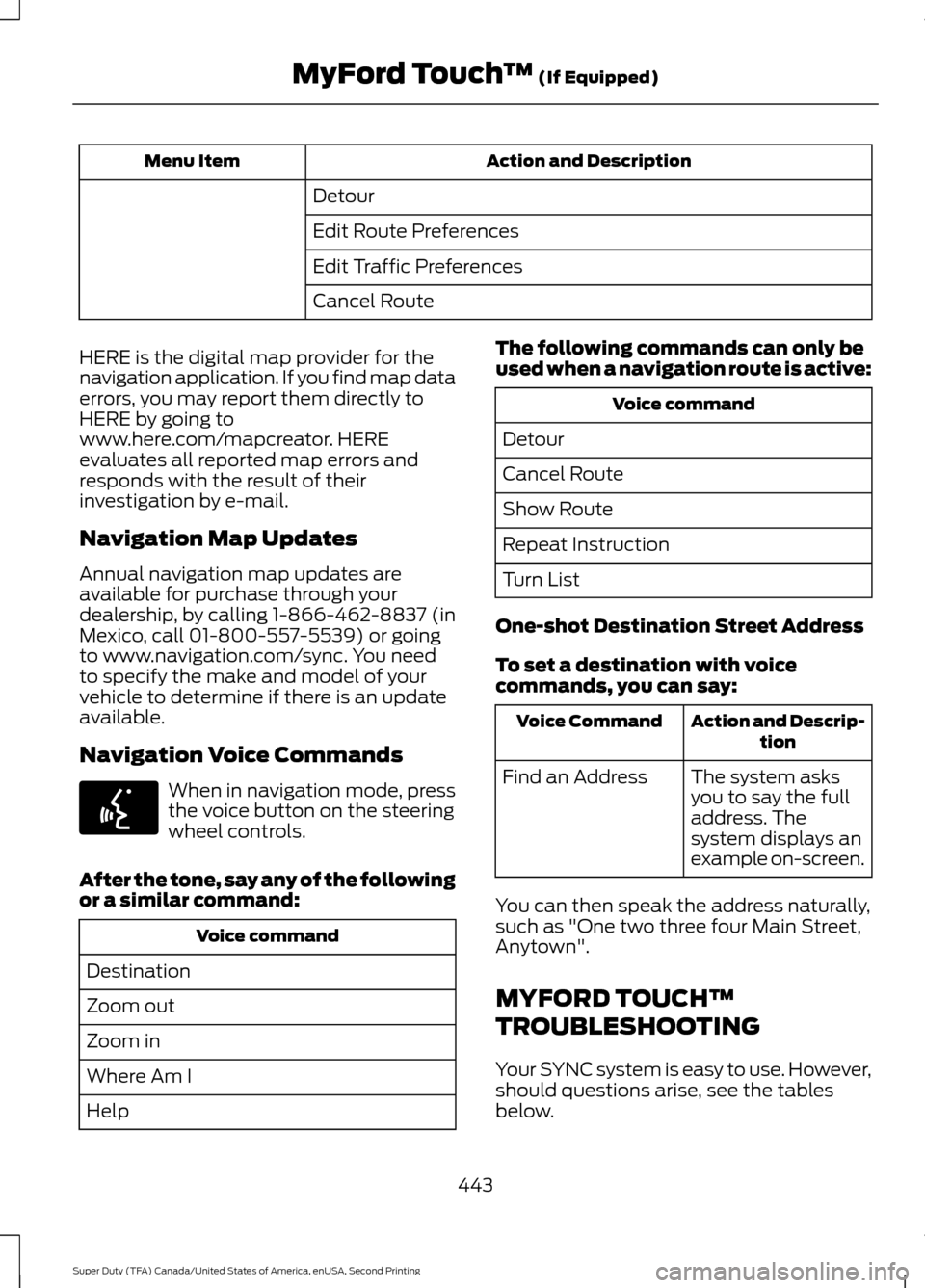
Action and Description
Menu Item
Detour
Edit Route Preferences
Edit Traffic Preferences
Cancel Route
HERE is the digital map provider for the
navigation application. If you find map data
errors, you may report them directly to
HERE by going to
www.here.com/mapcreator. HERE
evaluates all reported map errors and
responds with the result of their
investigation by e-mail.
Navigation Map Updates
Annual navigation map updates are
available for purchase through your
dealership, by calling 1-866-462-8837 (in
Mexico, call 01-800-557-5539) or going
to www.navigation.com/sync. You need
to specify the make and model of your
vehicle to determine if there is an update
available.
Navigation Voice Commands When in navigation mode, press
the voice button on the steering
wheel controls.
After the tone, say any of the following
or a similar command: Voice command
Destination
Zoom out
Zoom in
Where Am I
Help The following commands can only be
used when a navigation route is active: Voice command
Detour
Cancel Route
Show Route
Repeat Instruction
Turn List
One-shot Destination Street Address
To set a destination with voice
commands, you can say: Action and Descrip-
tion
Voice Command
The system asks
you to say the full
address. The
system displays an
example on-screen.
Find an Address
You can then speak the address naturally,
such as "One two three four Main Street,
Anytown".
MYFORD TOUCH™
TROUBLESHOOTING
Your SYNC system is easy to use. However,
should questions arise, see the tables
below.
443
Super Duty (TFA) Canada/United States of America, enUSA, Second Printing MyFord Touch
™ (If Equipped)E142599
Page 455 of 510
•
An authorized dealer needs to install
mobile communications systems.
Improper installation may harm the
operation of your vehicle, particularly
if the manufacturer did not design the
mobile communication system
specifically for automotive use.
• If you or an authorized Ford dealer add
any non-Ford electrical or electronic
accessories or components to your
vehicle, you may adversely affect
battery performance and durability. In
addition, you may also adversely affect
the performance of other electrical
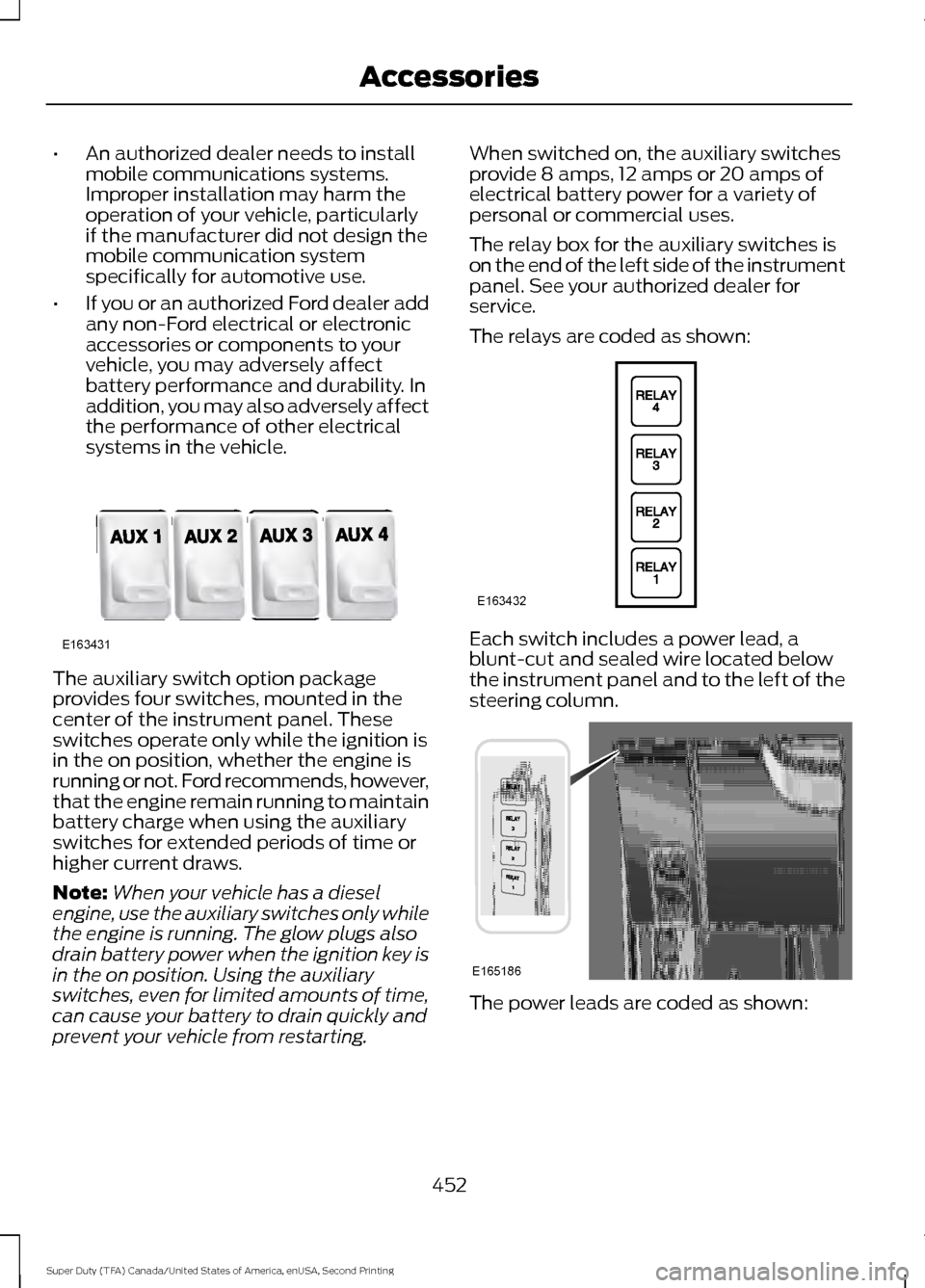
systems in the vehicle. The auxiliary switch option package
provides four switches, mounted in the
center of the instrument panel. These
switches operate only while the ignition is
in the on position, whether the engine is
running or not. Ford recommends, however,
that the engine remain running to maintain
battery charge when using the auxiliary
switches for extended periods of time or
higher current draws.
Note:
When your vehicle has a diesel
engine, use the auxiliary switches only while
the engine is running. The glow plugs also
drain battery power when the ignition key is
in the on position. Using the auxiliary
switches, even for limited amounts of time,
can cause your battery to drain quickly and
prevent your vehicle from restarting. When switched on, the auxiliary switches
provide 8 amps, 12 amps or 20 amps of
electrical battery power for a variety of
personal or commercial uses.
The relay box for the auxiliary switches is
on the end of the left side of the instrument
panel. See your authorized dealer for
service.
The relays are coded as shown:
Each switch includes a power lead, a
blunt-cut and sealed wire located below
the instrument panel and to the left of the
steering column.
The power leads are coded as shown:
452
Super Duty (TFA) Canada/United States of America, enUSA, Second Printing AccessoriesE163431 E163432 E165186
Page 461 of 510
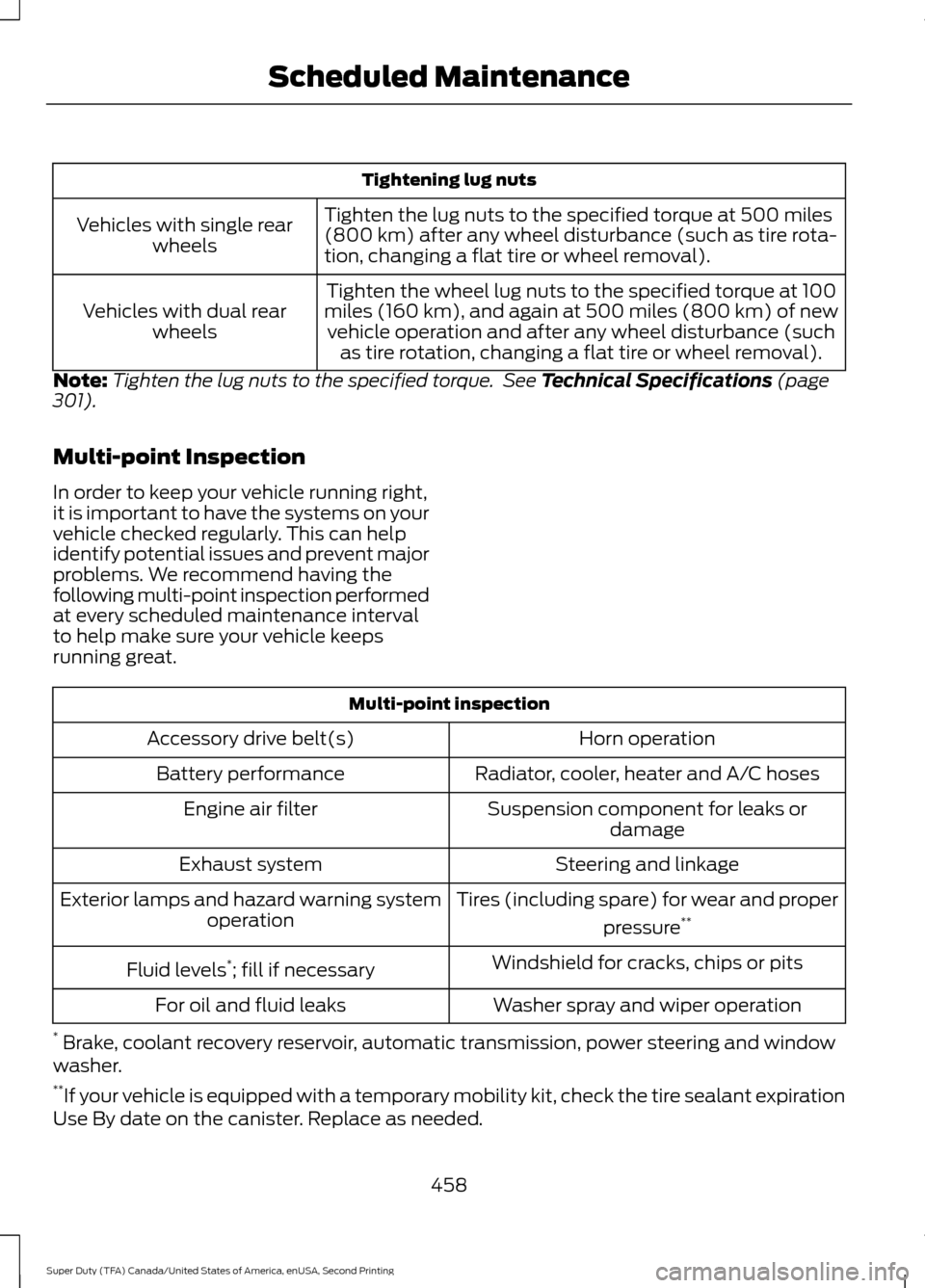
Tightening lug nuts
Tighten the lug nuts to the specified torque at 500 miles
(800 km) after any wheel disturbance (such as tire rota-
tion, changing a flat tire or wheel removal).
Vehicles with single rear
wheels
Tighten the wheel lug nuts to the specified torque at 100
miles (160 km), and again at 500 miles (800 km) of new vehicle operation and after any wheel disturbance (such as tire rotation, changing a flat tire or wheel removal).
Vehicles with dual rear
wheels
Note: Tighten the lug nuts to the specified torque. See Technical Specifications (page
301).
Multi-point Inspection
In order to keep your vehicle running right,
it is important to have the systems on your
vehicle checked regularly. This can help
identify potential issues and prevent major
problems. We recommend having the
following multi-point inspection performed
at every scheduled maintenance interval
to help make sure your vehicle keeps
running great. Multi-point inspection
Horn operation
Accessory drive belt(s)
Radiator, cooler, heater and A/C hoses
Battery performance
Suspension component for leaks ordamage
Engine air filter
Steering and linkage
Exhaust system
Tires (including spare) for wear and properpressure**
Exterior lamps and hazard warning system
operation
Windshield for cracks, chips or pits
Fluid levels *
; fill if necessary
Washer spray and wiper operation
For oil and fluid leaks
* Brake, coolant recovery reservoir, automatic transmission, power steering and window
washer.
** If your vehicle is equipped with a temporary mobility kit, check the tire sealant expiration
Use By date on the canister. Replace as needed.
458
Super Duty (TFA) Canada/United States of America, enUSA, Second Printing Scheduled Maintenance
Page 462 of 510
Be sure to ask your dealership service
advisor or technician about the multi-point
vehicle inspection. It is a comprehensive
way to perform a thorough inspection of
your vehicle. Your checklist gives you
immediate feedback on the overall
condition of your vehicle.
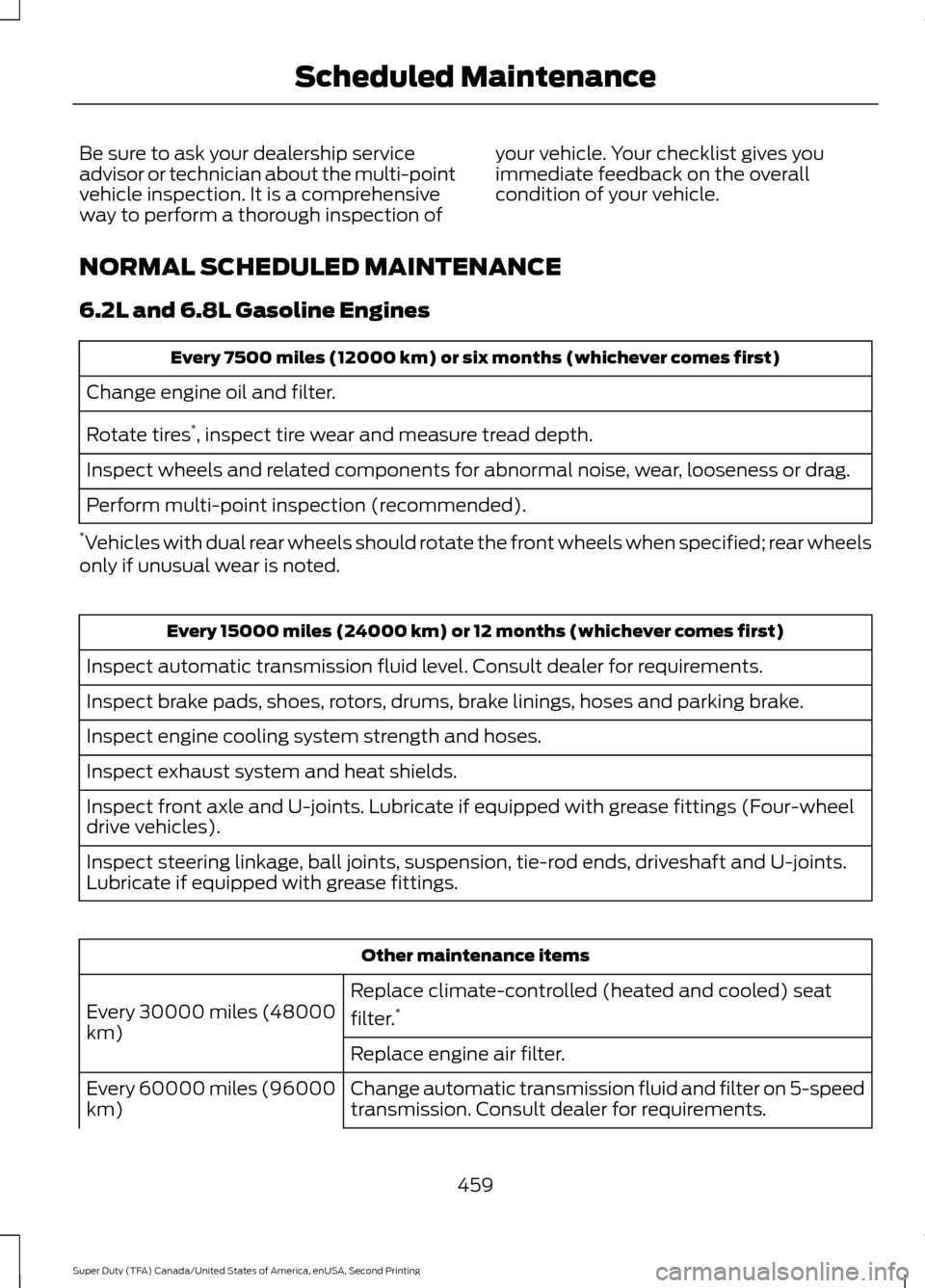
NORMAL SCHEDULED MAINTENANCE
6.2L and 6.8L Gasoline Engines Every 7500 miles (12000 km) or six months (whichever comes first)
Change engine oil and filter.
Rotate tires *
, inspect tire wear and measure tread depth.
Inspect wheels and related components for abnormal noise, wear, looseness or drag.
Perform multi-point inspection (recommended).
* Vehicles with dual rear wheels should rotate the front wheels when specified; rear wheels
only if unusual wear is noted. Every 15000 miles (24000 km) or 12 months (whichever comes first)
Inspect automatic transmission fluid level. Consult dealer for requirements.
Inspect brake pads, shoes, rotors, drums, brake linings, hoses and parking brake.
Inspect engine cooling system strength and hoses.
Inspect exhaust system and heat shields.
Inspect front axle and U-joints. Lubricate if equipped with grease fittings (Four-wheel
drive vehicles).
Inspect steering linkage, ball joints, suspension, tie-rod ends, driveshaft and U-joints.
Lubricate if equipped with grease fittings. Other maintenance items
Replace climate-controlled (heated and cooled) seat
filter. *
Every 30000 miles (48000
km)
Replace engine air filter.
Change automatic transmission fluid and filter on 5-speed
transmission. Consult dealer for requirements.
Every 60000 miles (96000
km)
459
Super Duty (TFA) Canada/United States of America, enUSA, Second Printing Scheduled Maintenance
Page 464 of 510
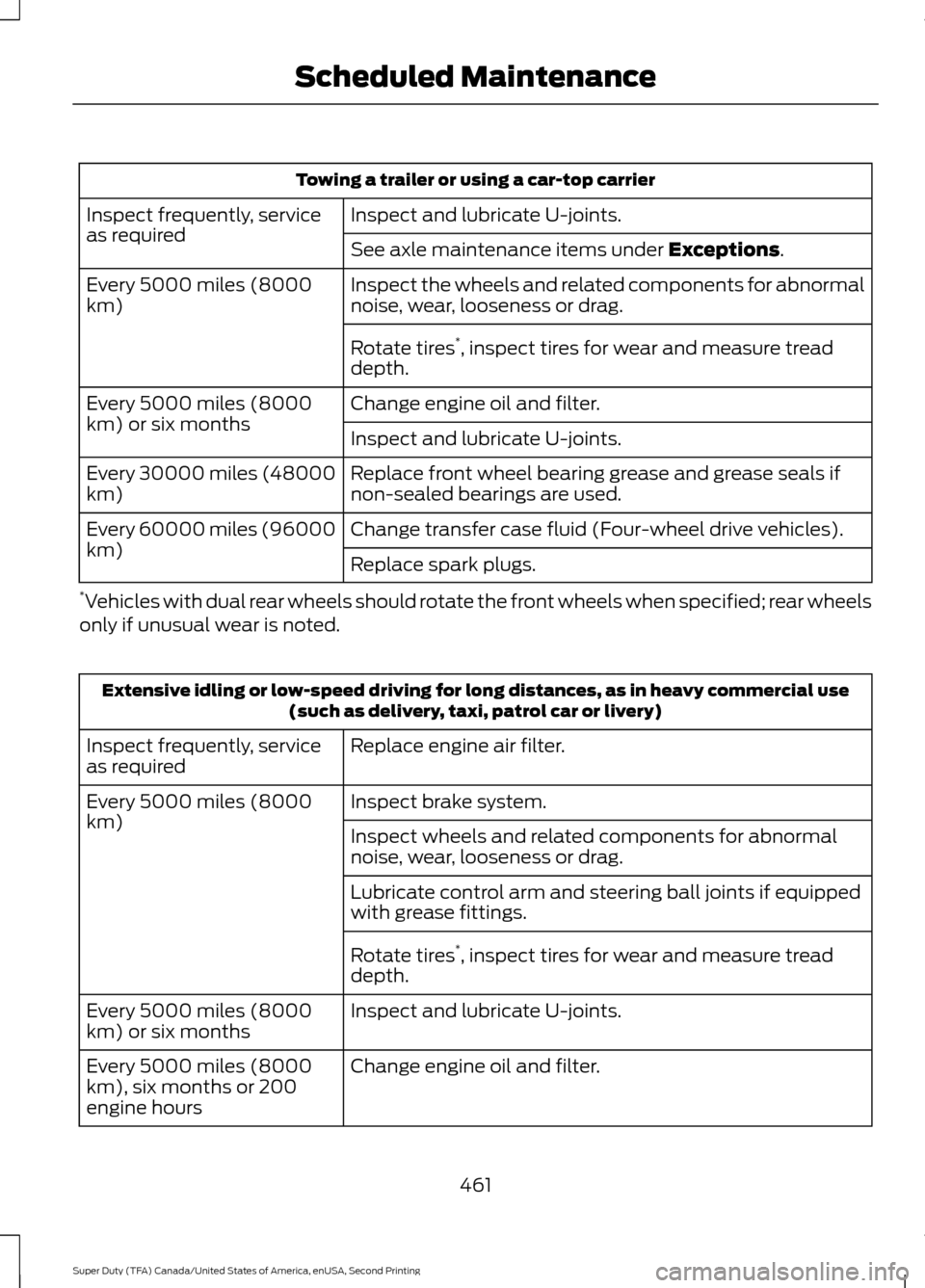
Towing a trailer or using a car-top carrier
Inspect and lubricate U-joints.
Inspect frequently, service
as required
See axle maintenance items under Exceptions.
Inspect the wheels and related components for abnormal
noise, wear, looseness or drag.
Every 5000 miles (8000
km)
Rotate tires*
, inspect tires for wear and measure tread
depth.
Change engine oil and filter.
Every 5000 miles (8000
km) or six months
Inspect and lubricate U-joints.
Replace front wheel bearing grease and grease seals if
non-sealed bearings are used.
Every 30000 miles (48000
km)
Change transfer case fluid (Four-wheel drive vehicles).
Every 60000 miles (96000
km)
Replace spark plugs.
* Vehicles with dual rear wheels should rotate the front wheels when specified; rear wheels
only if unusual wear is noted. Extensive idling or low-speed driving for long distances, as in heavy commercial use
(such as delivery, taxi, patrol car or livery)
Replace engine air filter.
Inspect frequently, service
as required
Inspect brake system.
Every 5000 miles (8000
km)
Inspect wheels and related components for abnormal
noise, wear, looseness or drag.
Lubricate control arm and steering ball joints if equipped
with grease fittings.
Rotate tires*
, inspect tires for wear and measure tread
depth.
Inspect and lubricate U-joints.
Every 5000 miles (8000
km) or six months
Change engine oil and filter.
Every 5000 miles (8000
km), six months or 200
engine hours
461
Super Duty (TFA) Canada/United States of America, enUSA, Second Printing Scheduled Maintenance
Page 466 of 510
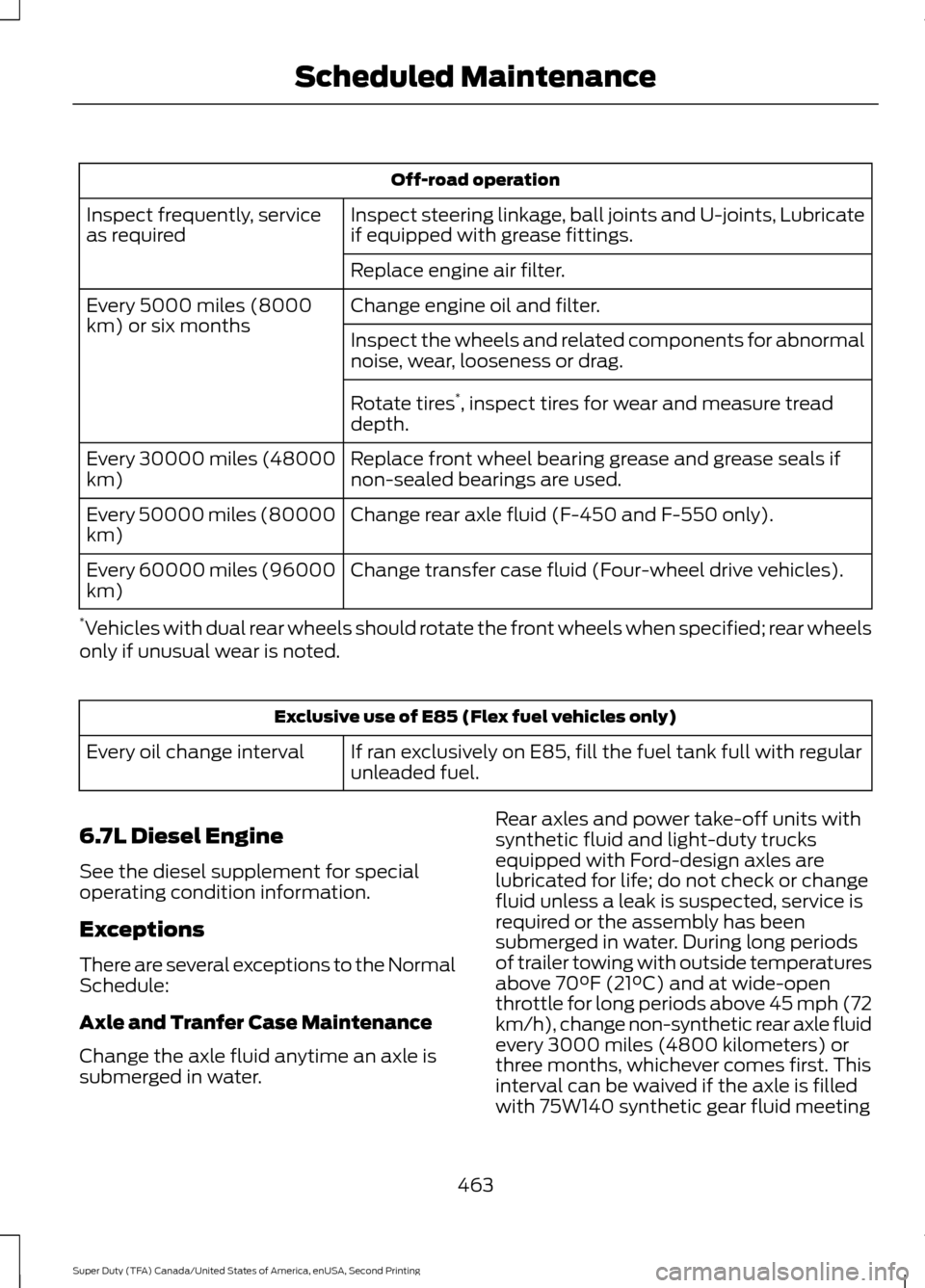
Off-road operation
Inspect steering linkage, ball joints and U-joints, Lubricate
if equipped with grease fittings.
Inspect frequently, service
as required
Replace engine air filter.
Change engine oil and filter.
Every 5000 miles (8000
km) or six months
Inspect the wheels and related components for abnormal
noise, wear, looseness or drag.
Rotate tires*
, inspect tires for wear and measure tread
depth.
Replace front wheel bearing grease and grease seals if
non-sealed bearings are used.
Every 30000 miles (48000
km)
Change rear axle fluid (F-450 and F-550 only).
Every 50000 miles (80000
km)
Change transfer case fluid (Four-wheel drive vehicles).
Every 60000 miles (96000
km)
* Vehicles with dual rear wheels should rotate the front wheels when specified; rear wheels
only if unusual wear is noted. Exclusive use of E85 (Flex fuel vehicles only)
If ran exclusively on E85, fill the fuel tank full with regular
unleaded fuel.
Every oil change interval
6.7L Diesel Engine
See the diesel supplement for special
operating condition information.
Exceptions
There are several exceptions to the Normal
Schedule:
Axle and Tranfer Case Maintenance
Change the axle fluid anytime an axle is
submerged in water. Rear axles and power take-off units with
synthetic fluid and light-duty trucks
equipped with Ford-design axles are
lubricated for life; do not check or change
fluid unless a leak is suspected, service is
required or the assembly has been
submerged in water. During long periods
of trailer towing with outside temperatures
above 70°F (21°C) and at wide-open
throttle for long periods above 45 mph (72
km/h), change non-synthetic rear axle fluid
every 3000 miles (4800 kilometers) or
three months, whichever comes first. This
interval can be waived if the axle is filled
with 75W140 synthetic gear fluid meeting
463
Super Duty (TFA) Canada/United States of America, enUSA, Second Printing Scheduled Maintenance
Page 500 of 510
4
4WD
See: Four-Wheel Drive..................................... 156
A
A/C See: Climate Control......................................... 109
About This Manual...........................................7
ABS See: Brakes............................................................ 167
ABS driving hints See: Hints on Driving With Anti-Lock
Brakes................................................................. 167
Accessories....................................................450 Exterior style....................................................... 450
Interior style......................................................... 450
Lifestyle................................................................. 450
Peace of mind.................................................... 450
Accessories See: Replacement Parts
Recommendation............................................. 11
Adjusting the Headlamps.........................247 Horizontal Aim Adjustment........................... 248
Vertical Aim Adjustment................................. 247
Adjusting the Pedals
....................................68
Adjusting the Steering Wheel...................65
Airbag Disposal...............................................45
Air Conditioning See: Climate Control......................................... 109
Air Filter See: Changing the Engine Air Filter.............254
Alarm See: Anti-Theft Alarm........................................ 64
Anti-Theft Alarm
............................................64
Arming the Alarm................................................. 64
Disarming the Alarm........................................... 64
Appendices....................................................475
Audible Warnings and Indicators
.............86
Headlamps On Warning Chime..................... 86
Key in Ignition Warning Chime........................ 86
Parking Brake On Warning Chime.................. 87
Audio Control..................................................65 Media........................................................................\
66
Seek, Next or Previous....................................... 66
Audio System.................................................317 General Information........................................... 317Audio Unit - Vehicles With: AM/FM/CD/
SYNC..............................................................319
Audio Unit - Vehicles With: AM/FM/CD/ Touchscreen Display
................................322
Audio Unit - Vehicles With: AM/FM.......318
Autolamps..........................................................71 Autolamps - Programmable Exit Delay........71
Automatic Climate Control.......................110
Automatic Transmission
...........................149
Brake-Shift Interlock......................................... 153
If Your Vehicle Gets Stuck In Mud or Snow.................................................................. 154
Understanding the Shift Positions of a 6– Speed Automatic Transmission........150
Understanding the Shift Positions of the 5– Speed Automatic Transmission.........149
Understanding your SelectShift Automatic ™ transmission......................... 152
Automatic Transmission Fluid Check............................................................240
Checking Automatic Transmission Fluid................................................................... 240
Auxiliary Power Points
................................135
110 Volt AC Power Point................................... 135
12 Volt DC Power Point..................................... 135
Locations............................................................... 135
Auxiliary Switches
........................................451
B
Battery See: Changing the 12V Battery..................... 245
Bed Extender....................................................61 Grocery mode........................................................ 62
Tailgate mode......................................................... 61
Bonnet Lock See: Opening and Closing the Hood...........232
Booster Seats..................................................24 Types of Booster Seats...................................... 25
Brake Fluid Check........................................244
Brakes................................................................167 General Information........................................... 167
Breaking-In....................................................206
Bulb Specification Chart
...........................252
C
California Proposition 65..............................11
497
Super Duty (TFA) Canada/United States of America, enUSA, Second Printing Index