ignition FORD SUPER DUTY 2017 4.G Owners Manual
[x] Cancel search | Manufacturer: FORD, Model Year: 2017, Model line: SUPER DUTY, Model: FORD SUPER DUTY 2017 4.GPages: 636, PDF Size: 10.56 MB
Page 488 of 636
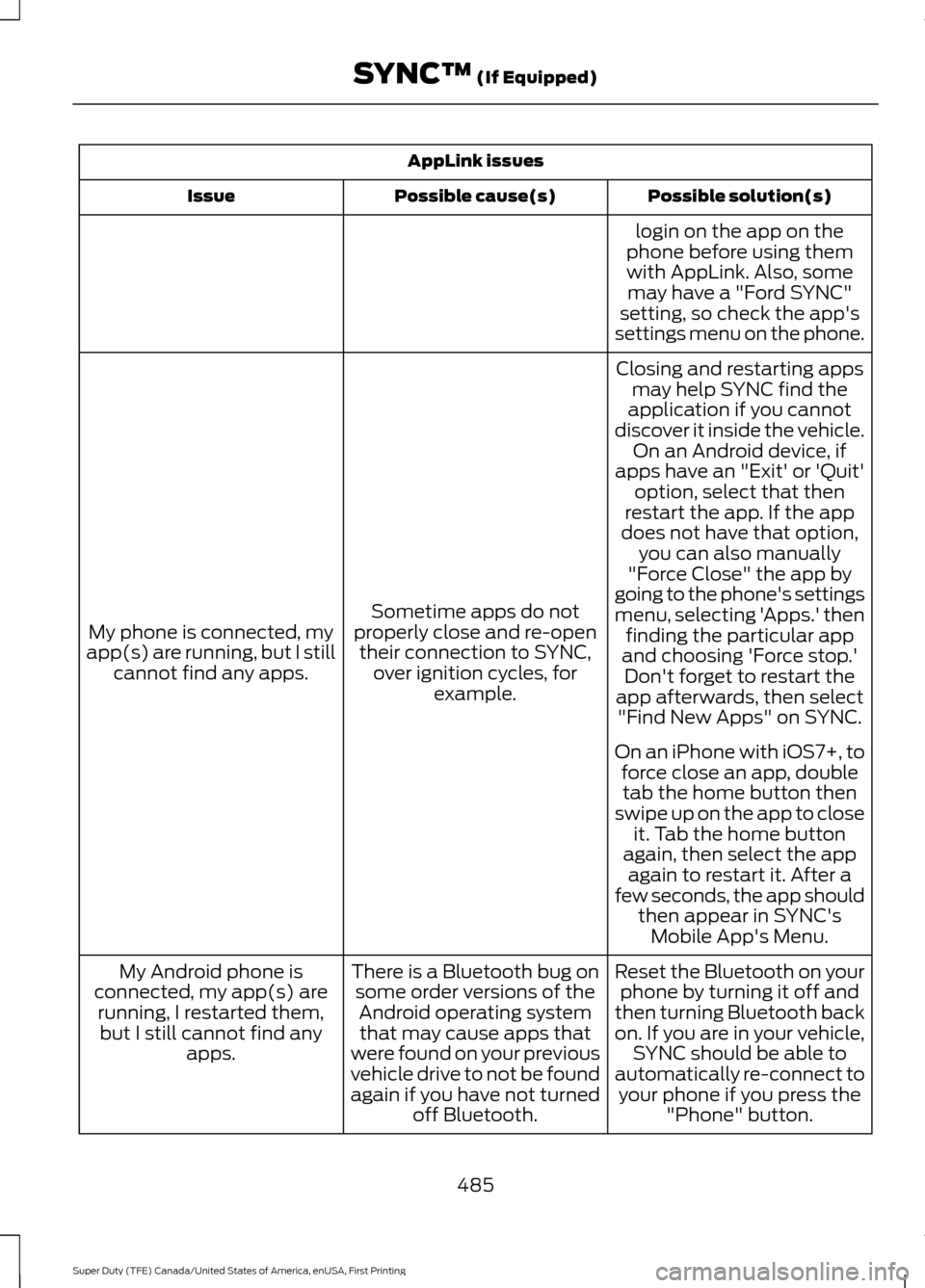
AppLink issues
Possible solution(s)
Possible cause(s)
Issue
login on the app on the
phone before using them with AppLink. Also, some may have a "Ford SYNC"
setting, so check the app's
settings menu on the phone.
Closing and restarting apps may help SYNC find the
application if you cannot
discover it inside the vehicle. On an Android device, if
apps have an "Exit' or 'Quit'
Sometime apps do not
properly close and re-open their connection to SYNC, over ignition cycles, for example.
My phone is connected, my
app(s) are running, but I still cannot find any apps. option, select that then
restart the app. If the app
does not have that option, you can also manually
"Force Close" the app by
going to the phone's settings
menu, selecting 'Apps.' then finding the particular app
and choosing 'Force stop.' Don't forget to restart the
app afterwards, then select "Find New Apps" on SYNC.
On an iPhone with iOS7+, to force close an app, doubletab the home button then
swipe up on the app to close it. Tab the home button
again, then select the app again to restart it. After a
few seconds, the app should then appear in SYNC'sMobile App's Menu.
Reset the Bluetooth on your phone by turning it off and
then turning Bluetooth back
on. If you are in your vehicle, SYNC should be able to
automatically re-connect to your phone if you press the "Phone" button.
There is a Bluetooth bug on
some order versions of theAndroid operating systemthat may cause apps that
were found on your previous
vehicle drive to not be found
again if you have not turned off Bluetooth.
My Android phone is
connected, my app(s) are running, I restarted them,but I still cannot find any apps.
485
Super Duty (TFE) Canada/United States of America, enUSA, First Printing SYNC™ (If Equipped)
Page 491 of 636
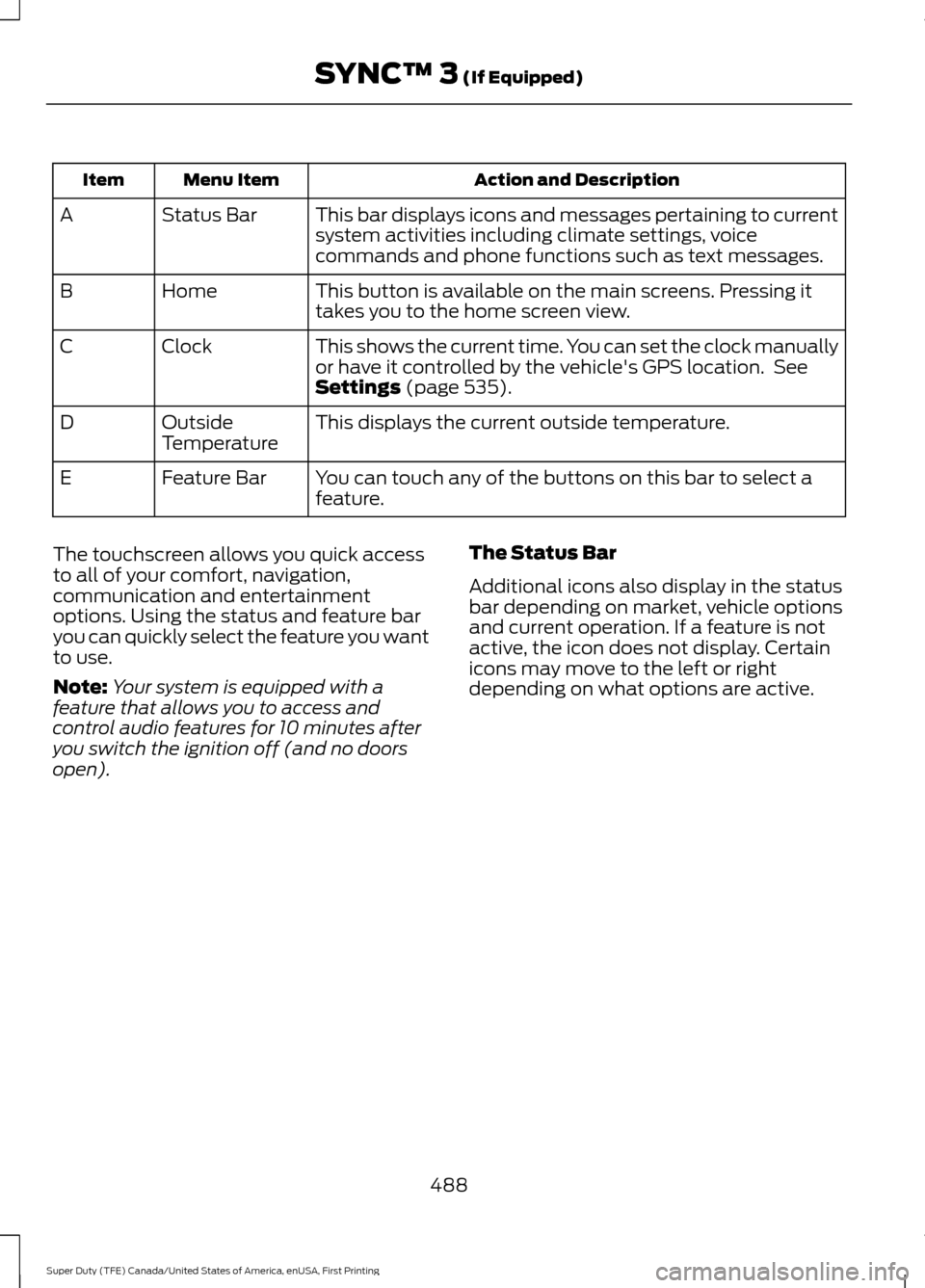
Action and Description
Menu Item
Item
This bar displays icons and messages pertaining to current
system activities including climate settings, voice
commands and phone functions such as text messages.
Status Bar
A
This button is available on the main screens. Pressing it
takes you to the home screen view.
Home
B
This shows the current time. You can set the clock manually
or have it controlled by the vehicle's GPS location. See
Settings (page 535).
Clock
C
This displays the current outside temperature.
Outside
Temperature
D
You can touch any of the buttons on this bar to select a
feature.
Feature Bar
E
The touchscreen allows you quick access
to all of your comfort, navigation,
communication and entertainment
options. Using the status and feature bar
you can quickly select the feature you want
to use.
Note: Your system is equipped with a
feature that allows you to access and
control audio features for 10 minutes after
you switch the ignition off (and no doors
open). The Status Bar
Additional icons also display in the status
bar depending on market, vehicle options
and current operation. If a feature is not
active, the icon does not display. Certain
icons may move to the left or right
depending on what options are active.
488
Super Duty (TFE) Canada/United States of America, enUSA, First Printing SYNC™ 3
(If Equipped)
Page 500 of 636
When Wi-Fi and automatic updates are
enabled, your system checks for software
updates periodically. If a new version is
available, it downloads at that time.
Software downloads can take place for up
to 30 minutes after you have switched your
vehicle off. The updates do not interrupt
the normal use of your SYNC 3 system. If
a download does not complete for any
reason, the download continues where it
left off at the next Wi-Fi connected
opportunity. Upon activation of an update,
a banner displays on the touchscreen
indicating the system update. Select the
icon to see more detail. This icon displays
for two ignition cycles.
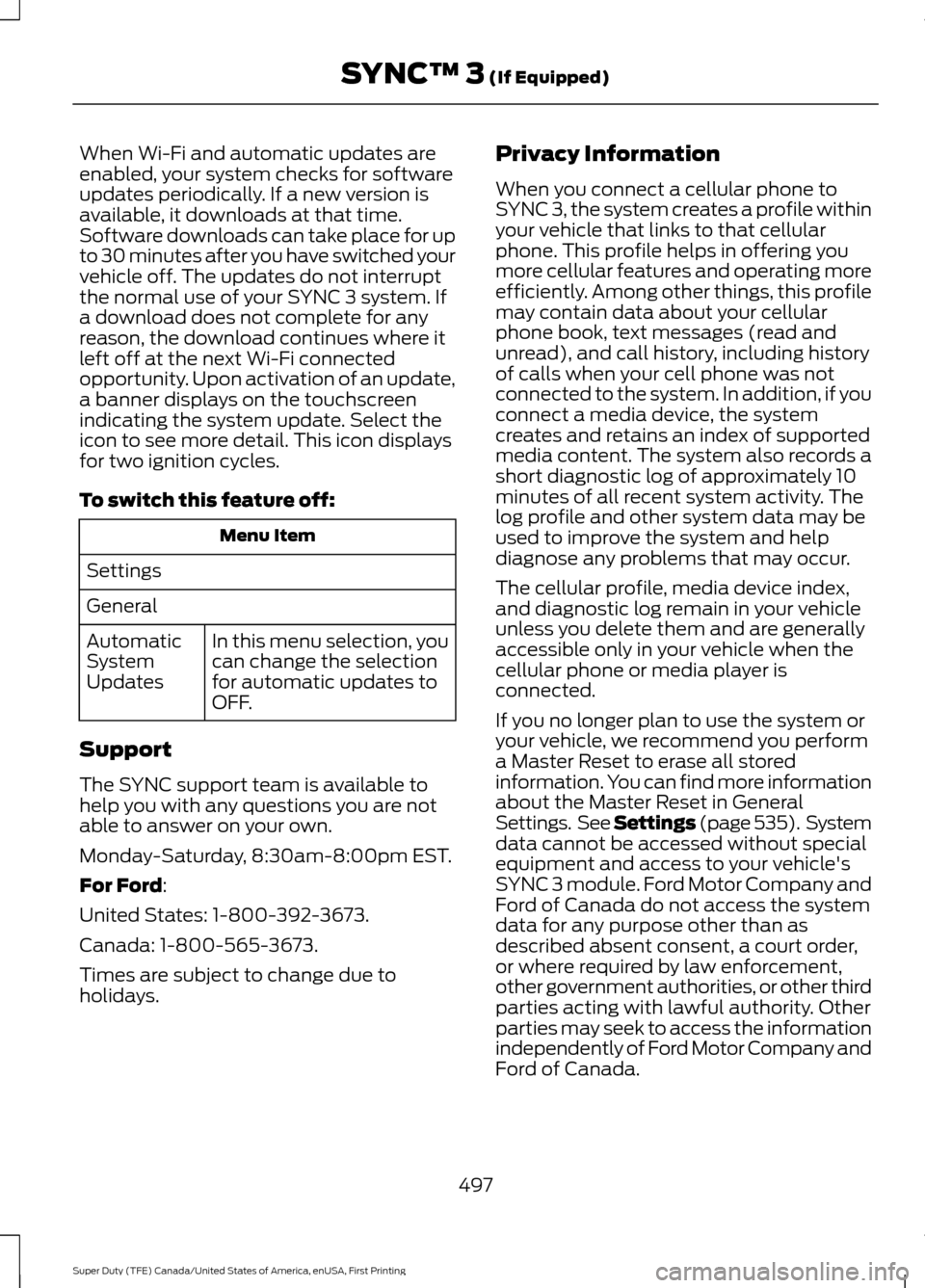
To switch this feature off:
Menu Item
Settings
General In this menu selection, you
can change the selection
for automatic updates to
OFF.
Automatic
System
Updates
Support
The SYNC support team is available to
help you with any questions you are not
able to answer on your own.
Monday-Saturday, 8:30am-8:00pm EST.
For Ford:
United States: 1-800-392-3673.
Canada: 1-800-565-3673.
Times are subject to change due to
holidays. Privacy Information
When you connect a cellular phone to
SYNC 3, the system creates a profile within
your vehicle that links to that cellular
phone. This profile helps in offering you
more cellular features and operating more
efficiently. Among other things, this profile
may contain data about your cellular
phone book, text messages (read and
unread), and call history, including history
of calls when your cell phone was not
connected to the system. In addition, if you
connect a media device, the system
creates and retains an index of supported
media content. The system also records a
short diagnostic log of approximately 10
minutes of all recent system activity. The
log profile and other system data may be
used to improve the system and help
diagnose any problems that may occur.
The cellular profile, media device index,
and diagnostic log remain in your vehicle
unless you delete them and are generally
accessible only in your vehicle when the
cellular phone or media player is
connected.
If you no longer plan to use the system or
your vehicle, we recommend you perform
a Master Reset to erase all stored
information. You can find more information
about the Master Reset in General
Settings. See Settings (page 535). System
da
ta cannot be accessed without special
equipment and access to your vehicle's
SYNC 3 module. Ford Motor Company and
Ford of Canada do not access the system
data for any purpose other than as
described absent consent, a court order,
or where required by law enforcement,
other government authorities, or other third
parties acting with lawful authority. Other
parties may seek to access the information
independently of Ford Motor Company and
Ford of Canada.
497
Super Duty (TFE) Canada/United States of America, enUSA, First Printing SYNC™ 3
(If Equipped)
Page 513 of 636
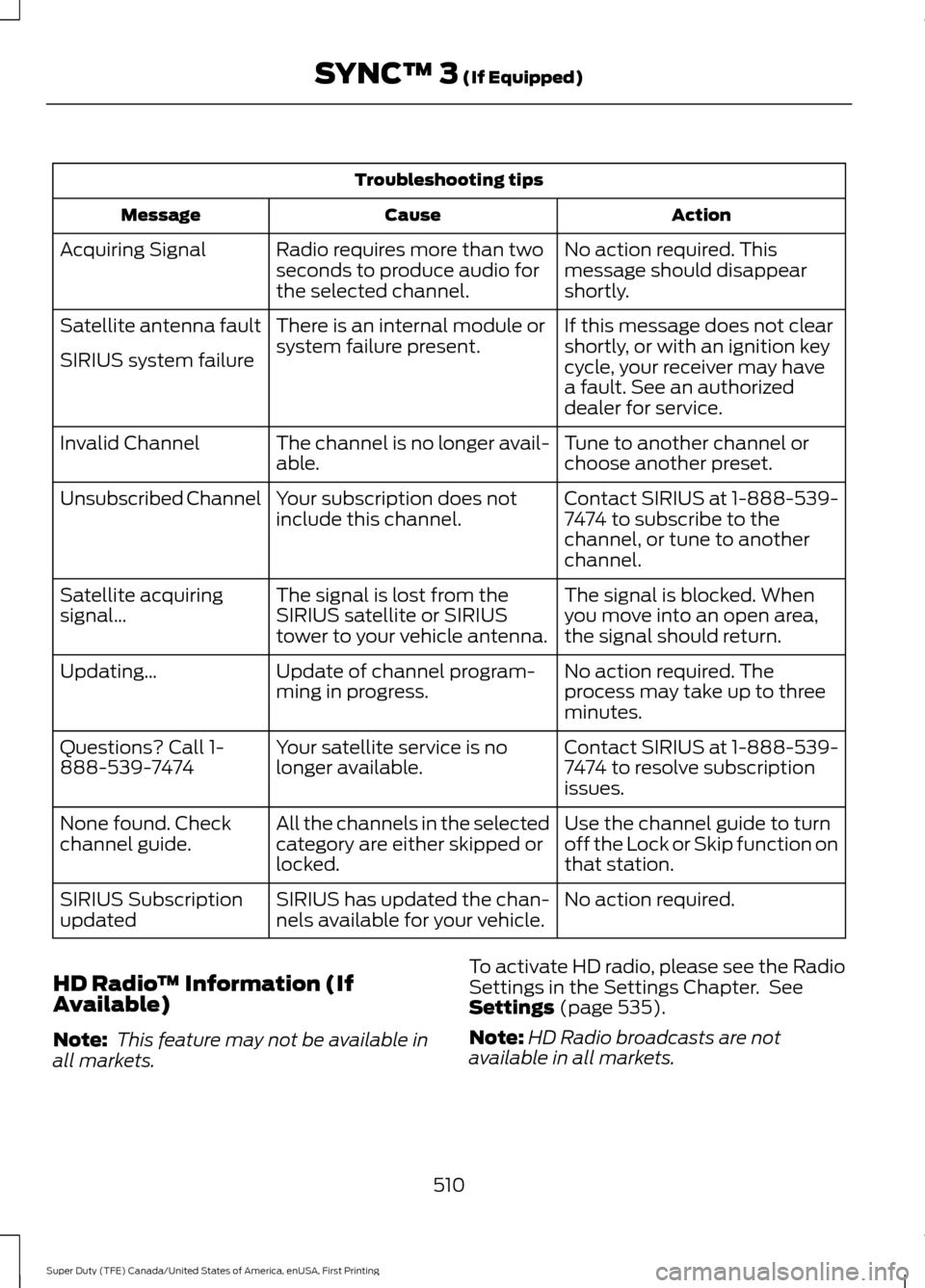
Troubleshooting tips
Action
Cause
Message
No action required. This
message should disappear
shortly.
Radio requires more than two
seconds to produce audio for
the selected channel.
Acquiring Signal
If this message does not clear
shortly, or with an ignition key
cycle, your receiver may have
a fault. See an authorized
dealer for service.
There is an internal module or
system failure present.
Satellite antenna fault
SIRIUS system failure
Tune to another channel or
choose another preset.
The channel is no longer avail-
able.
Invalid Channel
Contact SIRIUS at 1-888-539-
7474 to subscribe to the
channel, or tune to another
channel.
Your subscription does not
include this channel.
Unsubscribed Channel
The signal is blocked. When
you move into an open area,
the signal should return.
The signal is lost from the
SIRIUS satellite or SIRIUS
tower to your vehicle antenna.
Satellite acquiring
signal\b
No action required. The
process may take up to three
minutes.
Update of channel program-
ming in progress.
Updating\b
Contact SIRIUS at 1-888-539-
7474 to resolve subscription
issues.
Your satellite service is no
longer available.
Questions? Call 1-
888-539-7474
Use the channel guide to turn
off the Lock or Skip function on
that station.
All the channels in the selected
category are either skipped or
locked.
None found. Check
channel guide.
No action required.
SIRIUS has updated the chan-
nels available for your vehicle.
SIRIUS Subscription
updated
HD Radio ™ Information (If
Available)
Note: This feature may not be available in
all markets. To activate HD radio, please see the Radio
Settings in the Settings Chapter. See
Settings (page 535).
Note: HD Radio broadcasts are not
available in all markets.
510
Super Duty (TFE) Canada/United States of America, enUSA, First Printing SYNC™ 3
(If Equipped)
Page 557 of 636
AppLink issues
Possible solution(s)
Possible cause(s)
Issue
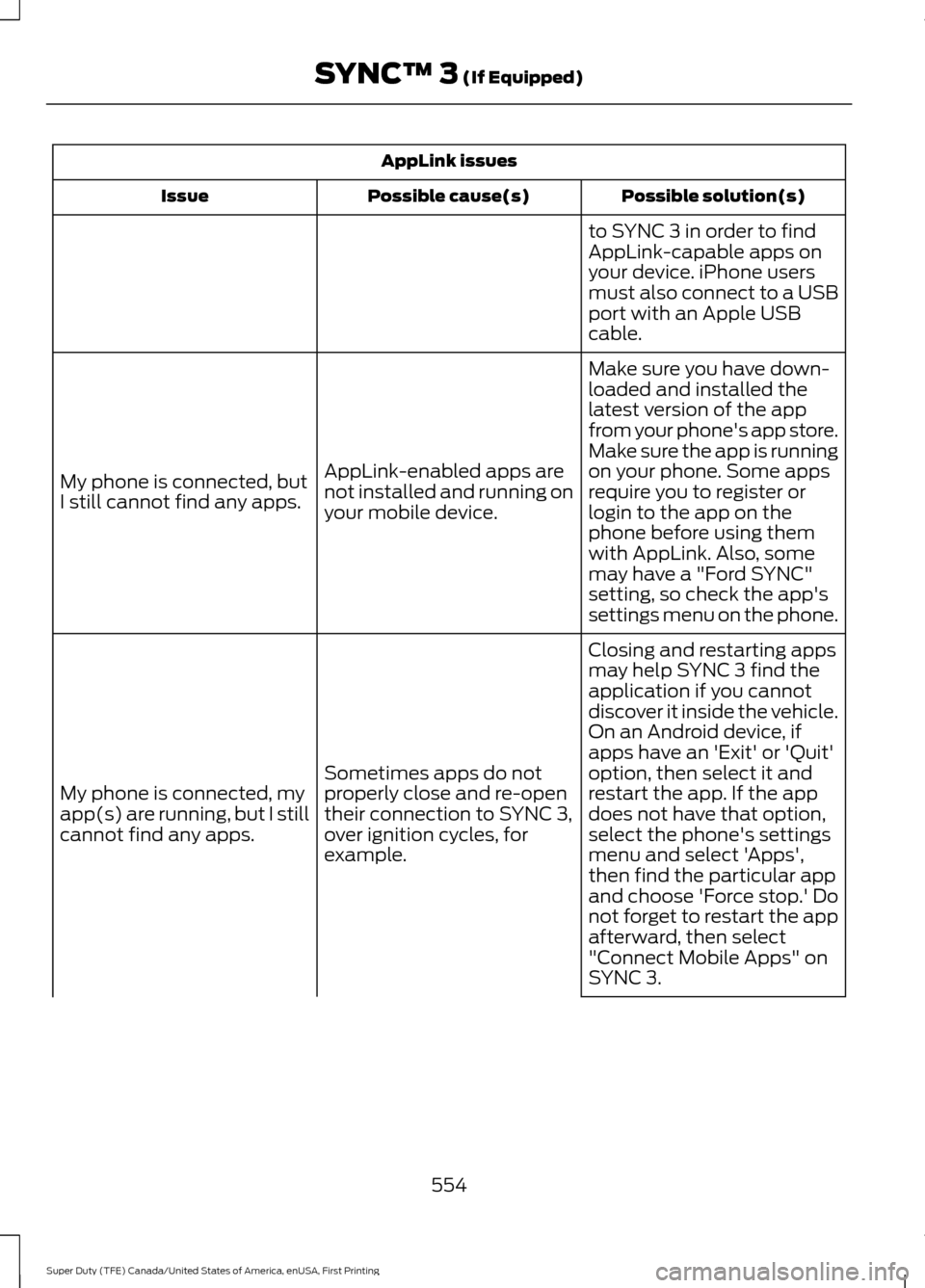
to SYNC 3 in order to find
AppLink-capable apps on
your device. iPhone users
must also connect to a USB
port with an Apple USB
cable.
Make sure you have down-
loaded and installed the
latest version of the app
from your phone's app store.
Make sure the app is running
on your phone. Some apps
AppLink-enabled apps are
not installed and running on
your mobile device.
My phone is connected, but
I still cannot find any apps.
require you to register or
login to the app on the
phone before using them
with AppLink. Also, some
may have a "Ford SYNC"
setting, so check the app's
settings menu on the phone.
Closing and restarting apps
may help SYNC 3 find the
application if you cannot
discover it inside the vehicle.
On an Android device, if
apps have an 'Exit' or 'Quit'
Sometimes apps do not
properly close and re-open
their connection to SYNC 3,
over ignition cycles, for
example.
My phone is connected, my
app(s) are running, but I still
cannot find any apps. option, then select it and
restart the app. If the app
does not have that option,
select the phone's settings
menu and select 'Apps',
then find the particular app
and choose 'Force stop.' Do
not forget to restart the app
afterward, then select
"Connect Mobile Apps" on
SYNC 3.
554
Super Duty (TFE) Canada/United States of America, enUSA, First Printing SYNC™ 3 (If Equipped)
Page 565 of 636
•
An authorized dealer needs to install
mobile communications systems.
Improper installation may harm the
operation of your vehicle, particularly
if the manufacturer did not design the
mobile communication system
specifically for automotive use.
• If you or an authorized Ford dealer add
any non-Ford electrical or electronic
accessories or components to your
vehicle, you may adversely affect
battery performance and durability. In
addition, you may also adversely affect
the performance of other electrical
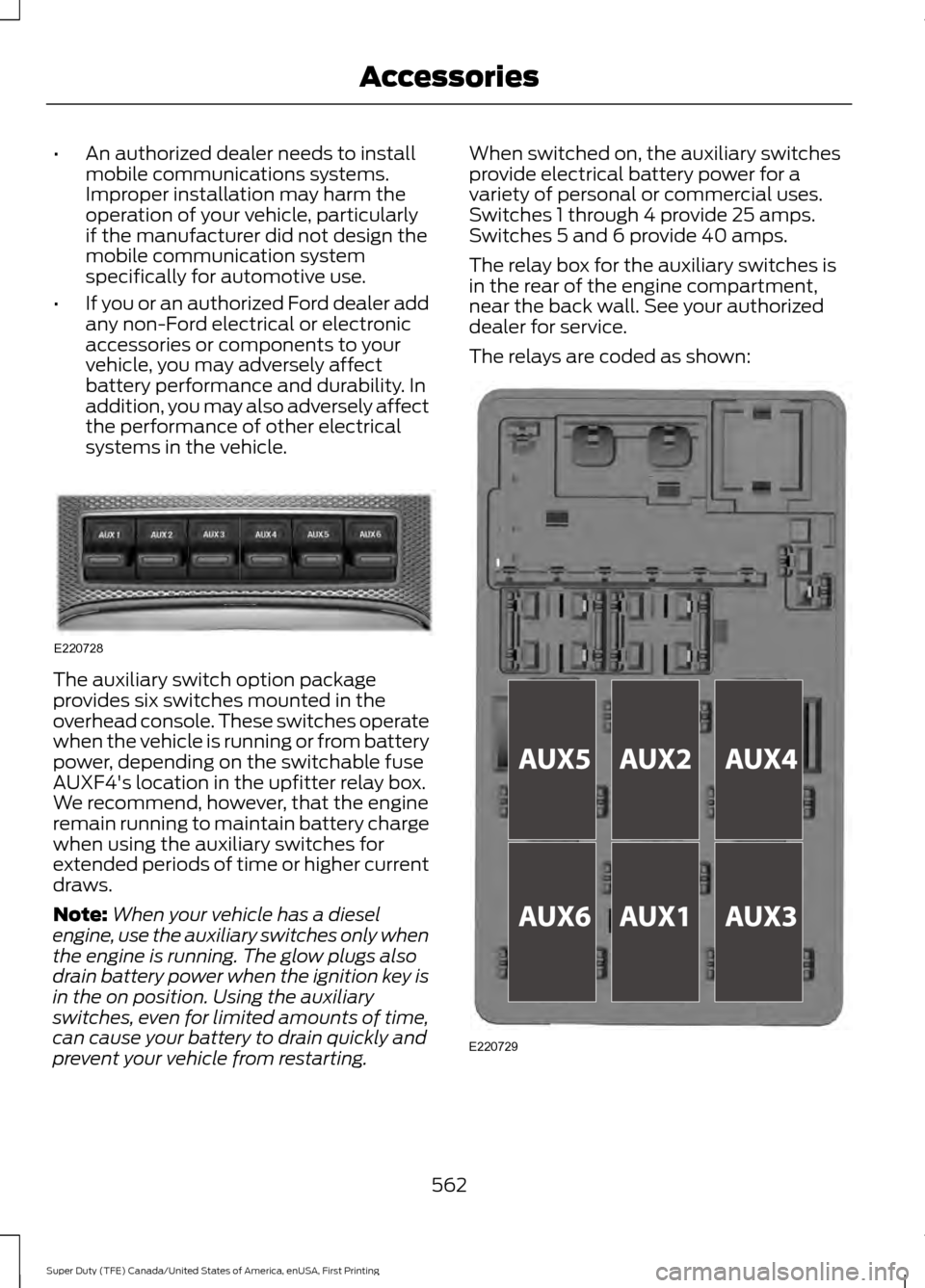
systems in the vehicle. The auxiliary switch option package
provides six switches mounted in the
overhead console. These switches operate
when the vehicle is running or from battery
power, depending on the switchable fuse
AUXF4's location in the upfitter relay box.
We recommend, however, that the engine
remain running to maintain battery charge
when using the auxiliary switches for
extended periods of time or higher current
draws.
Note:
When your vehicle has a diesel
engine, use the auxiliary switches only when
the engine is running. The glow plugs also
drain battery power when the ignition key is
in the on position. Using the auxiliary
switches, even for limited amounts of time,
can cause your battery to drain quickly and
prevent your vehicle from restarting. When switched on, the auxiliary switches
provide electrical battery power for a
variety of personal or commercial uses.
Switches 1 through 4 provide 25 amps.
Switches 5 and 6 provide 40 amps.
The relay box for the auxiliary switches is
in the rear of the engine compartment,
near the back wall. See your authorized
dealer for service.
The relays are coded as shown:
562
Super Duty (TFE) Canada/United States of America, enUSA, First Printing AccessoriesE220728 E220729
Page 624 of 636
3
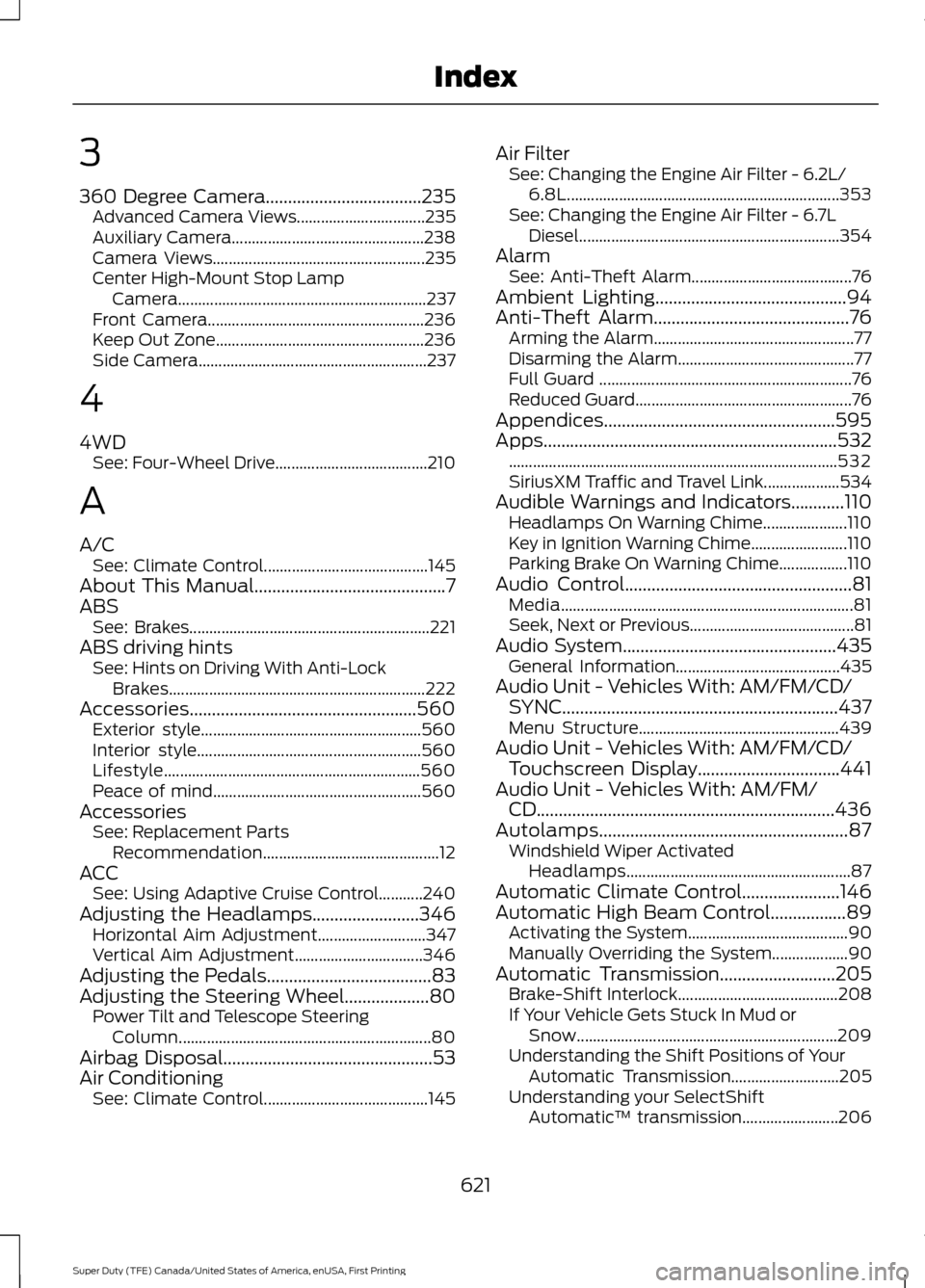
360 Degree Camera...................................235
Advanced Camera Views................................ 235
Auxiliary Camera................................................ 238
Camera Views..................................................... 235
Center High-Mount Stop Lamp Camera.............................................................. 237
Front Camera...................................................... 236
Keep Out Zone.................................................... 236
Side Camera......................................................... 237
4
4WD See: Four-Wheel Drive...................................... 210
A
A/C See: Climate Control......................................... 145
About This Manual...........................................7
ABS See: Brakes............................................................ 221
ABS driving hints See: Hints on Driving With Anti-Lock
Brakes................................................................ 222
Accessories...................................................560 Exterior style....................................................... 560
Interior style........................................................ 560
Lifestyle................................................................ 560
Peace of mind.................................................... 560
Accessories See: Replacement Parts
Recommendation............................................ 12
ACC See: Using Adaptive Cruise Control...........240
Adjusting the Headlamps........................346 Horizontal Aim Adjustment........................... 347
Vertical Aim Adjustment................................ 346
Adjusting the Pedals
.....................................83
Adjusting the Steering Wheel...................80 Power Tilt and Telescope Steering
Column............................................................... 80
Airbag Disposal
...............................................53
Air Conditioning See: Climate Control......................................... 145Air Filter
See: Changing the Engine Air Filter - 6.2L/
6.8L.................................................................... 353
See: Changing the Engine Air Filter - 6.7L Diesel................................................................. 354
Alarm See: Anti-Theft Alarm........................................ 76
Ambient Lighting
...........................................94
Anti-Theft Alarm............................................76
Arming the Alarm.................................................. 77
Disarming the Alarm............................................ 77
Full Guard ............................................................... 76
Reduced Guard...................................................... 76
Appendices....................................................595
Apps..................................................................532 ........................................................................\
.......... 532
SiriusXM Traffic and Travel Link...................534
Audible Warnings and Indicators............110 Headlamps On Warning Chime.....................110
Key in Ignition Warning Chime........................110
Parking Brake On Warning Chime.................110
Audio Control
...................................................81
Media........................................................................\
. 81
Seek, Next or Previous......................................... 81
Audio System
................................................435
General Information......................................... 435
Audio Unit - Vehicles With: AM/FM/CD/ SYNC
..............................................................437
Menu Structure.................................................. 439
Audio Unit - Vehicles With: AM/FM/CD/ Touchscreen Display................................441
Audio Unit - Vehicles With: AM/FM/ CD...................................................................436
Autolamps........................................................87 Windshield Wiper Activated
Headlamps........................................................ 87
Automatic Climate Control......................146
Automatic High Beam Control.................89 Activating the System........................................ 90
Manually Overriding the System................... 90
Automatic Transmission
..........................205
Brake-Shift Interlock........................................ 208
If Your Vehicle Gets Stuck In Mud or Snow................................................................. 209
Understanding the Shift Positions of Your Automatic Transmission........................... 205
Understanding your SelectShift Automatic ™ transmission........................ 206
621
Super Duty (TFE) Canada/United States of America, enUSA, First Printing Index
Page 629 of 636
Getting the Services You Need..............303
Away From Home............................................. 303
Global Opening
..............................................96
Opening the Windows....................................... 96
H
Handbrake See: Parking Brake............................................. 222
Hazard Warning Flashers.........................296
HDC See: Using Hill Descent Control................... 229
Headlamp Adjusting See: Adjusting the Headlamps.................... 346
Head Restraints
.............................................152
Adjusting the Head Restraint......................... 153
Heated Seats.................................................160 Rear Heated Seats............................................. 160
Heated Steering Wheel
................................82
Heated Windows and Mirrors..................150 Heated Exterior Mirrors...................................... 151
Heated Rear Window........................................ 150
Heating See: Climate Control......................................... 145
Hill Start Assist
.............................................223
Switching the System On and Off...............224
Using Hill Start Assist....................................... 223
Hints on Controlling the Interior Climate..........................................................148
Cooling the Interior Quickly............................ 149
General Hints....................................................... 148
Heating the Interior Quickly............................ 149
Recommended Settings for Cooling..........150
Recommended Settings for Heating..........149
Side Window Defogging in Cold Weather............................................................ 150
Hints on Driving With Anti-Lock Brakes............................................................222
Home Screen................................................498
Hood Lock See: Opening and Closing the Hood..........320
I
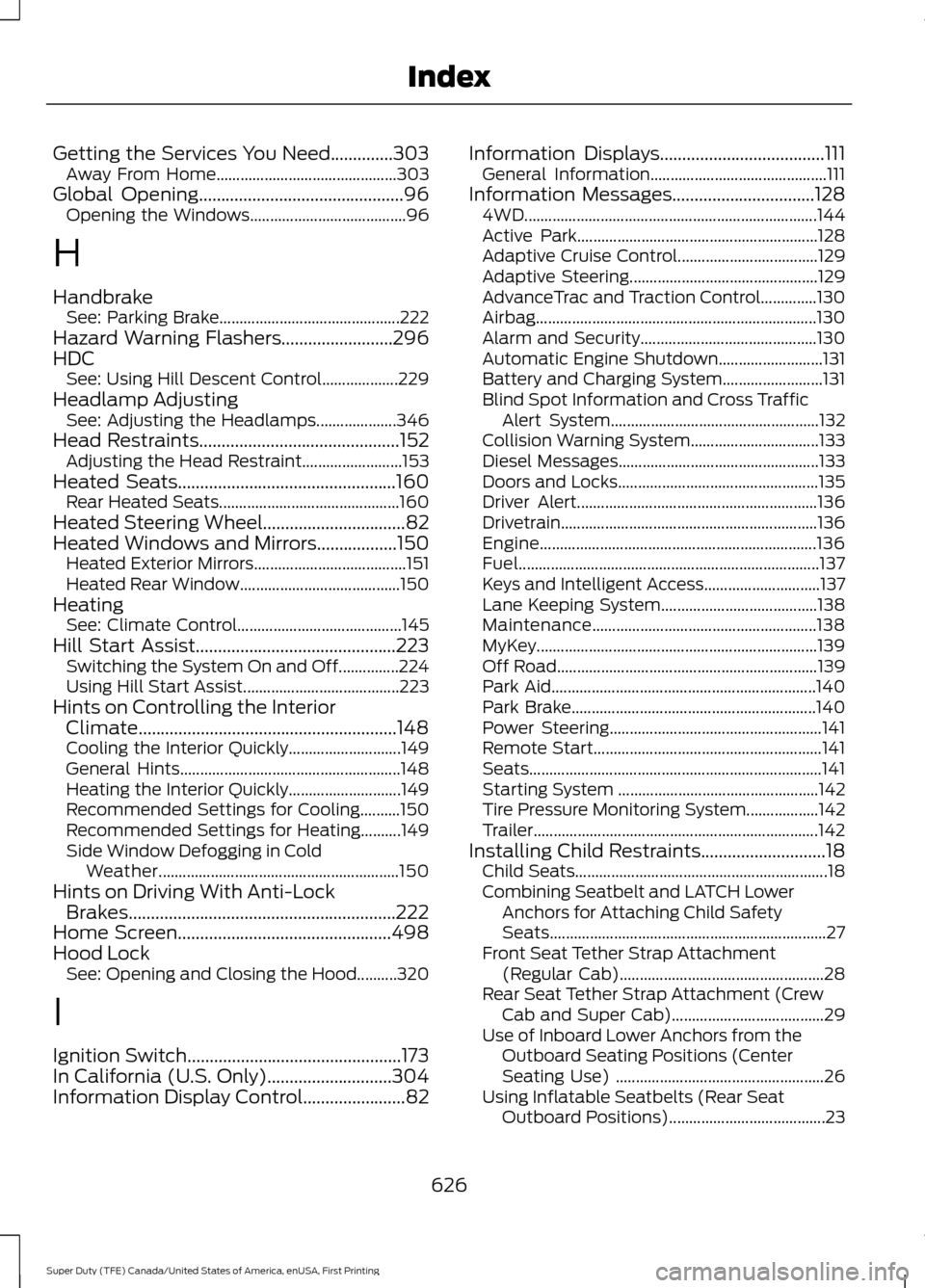
Ignition Switch
................................................173
In California (U.S. Only)............................304
Information Display Control
.......................82 Information Displays.....................................111
General Information............................................ 111
Information Messages
................................128
4WD........................................................................\
. 144
Active Park............................................................ 128
Adaptive Cruise Control................................... 129
Adaptive Steering............................................... 129
AdvanceTrac and Traction Control..............130
Airbag...................................................................... 130
Alarm and Security............................................ 130
Automatic Engine Shutdown.......................... 131
Battery and Charging System......................... 131
Blind Spot Information and Cross Traffic Alert System.................................................... 132
Collision Warning System................................ 133
Diesel Messages.................................................. 133
Doors and Locks.................................................. 135
Driver Alert............................................................ 136
Drivetrain................................................................ 136
Engine..................................................................... 136
Fuel........................................................................\
... 137
Keys and Intelligent Access............................. 137
Lane Keeping System....................................... 138
Maintenance........................................................ 138
MyKey...................................................................... 139
Off Road................................................................. 139
Park Aid.................................................................. 140
Park Brake............................................................. 140
Power Steering..................................................... 141
Remote Start......................................................... 141
Seats........................................................................\
. 141
Starting System .................................................. 142
Tire Pressure Monitoring System.................. 142
Trailer....................................................................... 142
Installing Child Restraints
............................18
Child Seats............................................................... 18
Combining Seatbelt and LATCH Lower Anchors for Attaching Child Safety
Seats..................................................................... 27
Front Seat Tether Strap Attachment (Regular Cab)................................................... 28
Rear Seat Tether Strap Attachment (Crew Cab and Super Cab)...................................... 29
Use of Inboard Lower Anchors from the Outboard Seating Positions (Center
Seating Use) .................................................... 26
Using Inflatable Seatbelts (Rear Seat Outboard Positions)....................................... 23
626
Super Duty (TFE) Canada/United States of America, enUSA, First Printing Index
Page 630 of 636
Using Lap and Shoulder Belts (Except Front
Center Position of Super Cab and Crew
Cab)....................................................................... 19
Using Lap and Shoulder Belts (Front Center Position of Super Cab and Crew
Cab)....................................................................... 21
Using Lower Anchors and Tethers for CHildren (LATCH)............................................ 25
Using Tether Straps............................................. 27
Instrument Cluster.......................................102
Instrument Lighting Dimmer.....................88
Interior Lamps..................................................91 Front Interior Lamps........................................... 92
Rear Interior Lamps............................................. 93
Interior Mirror
...................................................98
Auto-Dimming Mirror......................................... 99
Introduction.........................................................7
J
Jump Starting the Vehicle........................298 Connecting the Jumper Cables.................... 298
Jump Starting..................................................... 299
Preparing Your Vehicle.................................... 298
Removing the Jumper Cables....................... 299
K
Keyless Entry
....................................................67
SECURICODE™ KEYLESS ENTRY
KEYPAD............................................................... 67
Keyless Starting
.............................................174
Starting Your Vehicle......................................... 174
Switching the Ignition On................................. 174
Keys and Remote Controls.........................54
L
Lane Keeping System
.................................247
Switching the System On and Off...............247
System Display................................................... 248
System Settings.................................................. 247
Troubleshooting................................................. 248
Lighting Control..............................................86 Headlamp Flasher................................................ 87
High Beam.............................................................. 86
Lighting..............................................................86 General Information........................................... 86Limited Slip Differential.............................219
Load Carrying
.................................................261
Load Limit........................................................261
Special Loading Instructions for Owners of
Pick-up Trucks and Utility-type
Vehicles............................................................ 265
Vehicle Loading - with and without a Trailer.................................................................. 261
Locking and Unlocking.................................65 Activating Intelligent Access............................ 65
Autolock and Autounlock.................................. 67
Battery Saver.......................................................... 67
Illuminated Entry.................................................. 67
Power Door Locks................................................ 65
Remote Control.................................................... 65
Smart Unlock........................................................ 66
Smart Unlocks for Intelligent Access Keys...................................................................... 66
Lug Nuts See: Changing a Road Wheel....................... 398
M
Maintenance.................................................320 General Information......................................... 320
Manual Climate Control
.............................145
Manual Seats.................................................154
Manual Lumbar .................................................. 155
Moving the Seat Backward and Forward............................................................. 155
Recline Adjustment........................................... 155
Media Hub
.....................................................448
Memory Function..........................................157 Easy Entry and Exit Feature............................ 158
Linking a PreSet Position to your Remote Control or Intelligent Access Key Fob
........................................................................\
...... 158
Recalling a Preset Position............................. 158
Saving a Preset Position.................................. 158
Message Center See: Information Displays.................................. 111
Mirrors See: Heated Windows and Mirrors..............150
See: Windows and Mirrors................................ 95
Mobile Communications Equipment......14
Moonroof........................................................100 Bounce-Back
........................................................ 101
Opening and Closing the Moonroof...........100
627
Super Duty (TFE) Canada/United States of America, enUSA, First Printing Index
Page 633 of 636
Sitting in the Correct Position..................152
Sliding Windows............................................99 Power Sliding Back Window........................... 99
Snow Chains See: Using Snow Chains................................. 390
Snowplowing
................................................292
Engine temperature while plowing.............293
Installing the Snowplow................................. 292
Operating the Vehicle with the Snowplow Attached.......................................................... 293
Snowplowing with your Airbag Equipped Vehicle.............................................................. 293
Transmission operation while plowing............................................................. 294
Special Notices
................................................13
New Vehicle Limited Warranty......................... 13
On Board Diagnostics Data Link Connector............................................................ 13
Special Instructions.............................................. 13
Using your Vehicle as an Ambulance.............13
Using your Vehicle as a Stationary Power Source................................................................... 14
Using your Vehicle With a Snowplow............13
Special Operating Conditions Scheduled Maintenance...............................................575
Diesel Engine(s).................................................. 577
Exceptions............................................................ 583
Gasoline Engine(s)............................................ 575
Speed Control See: Cruise Control........................................... 239
Spot Lamps
.......................................................91
Cargo and Trailer Hookup Lamps...................91
Stability Control
...........................................226
Principle of Operation...................................... 226
Starter Switch See: Ignition Switch............................................ 173
Starting a Diesel Engine - 6.7L Diesel..............................................................176
........................................................................\
............ 176
Cold Weather Operation................................... 177
Cold Weather Starting....................................... 177
Diesel Engine Fast Start Glow Plug System................................................................ 177
Starting a Gasoline Engine - 6.2L/ 6.8L..................................................................174
Cold Weather Starting (Flexible Fuel Vehicles Only).................................................. 175
Failure to Start...................................................... 175Guarding Against Exhaust Fumes................176
Important Ventilating Information...............176
Stopping the Engine When Your Vehicle is
Moving................................................................ 175
Stopping the Engine When Your Vehicle is Stationary.......................................................... 175
Starting and Stopping the Engine
..........173
General Information........................................... 173
Steering...........................................................256 Adaptive Steering............................................... 257
Power Steering................................................... 256
Steering Wheel
...............................................80
Storage Compartments.............................170
Sunroof See: Moonroof..................................................... 100
Sun Visors
.........................................................99
Illuminated Vanity Mirror................................. 100
Supplementary Restraints System.........44 Principle of Operation........................................ 44
Switching Off the Engine - 6.7L Diesel.............................................................180
Symbols Glossary.............................................8
SYNC™ 3........................................................487 General Information......................................... 487
SYNC™ 3 Troubleshooting......................547
SYNC™ Applications and Services........................................................465
911 Assist............................................................... 465
SYNC Mobile Apps............................................ 467
SYNC™...........................................................449 General Information......................................... 449
SYNC™ Troubleshooting
..........................479
T
Tailgate Lock....................................................70
Tailgate Step
.....................................................71
Closing the Step..................................................... 71
Opening the Step................................................... 71
Tailgate...............................................................70
Technical Specifications See: Capacities and Specifications..............411
Terrain Response
.........................................229
Principle of Operation...................................... 229
The Better Business Bureau (BBB) Auto Line Program (U.S. Only)......................305
Tire Care
..........................................................373
Glossary of Tire Terminology......................... 374
630
Super Duty (TFE) Canada/United States of America, enUSA, First Printing Index