fuel FORD SUPER DUTY 2017 4.G Owner's Manual
[x] Cancel search | Manufacturer: FORD, Model Year: 2017, Model line: SUPER DUTY, Model: FORD SUPER DUTY 2017 4.GPages: 636, PDF Size: 10.56 MB
Page 118 of 636
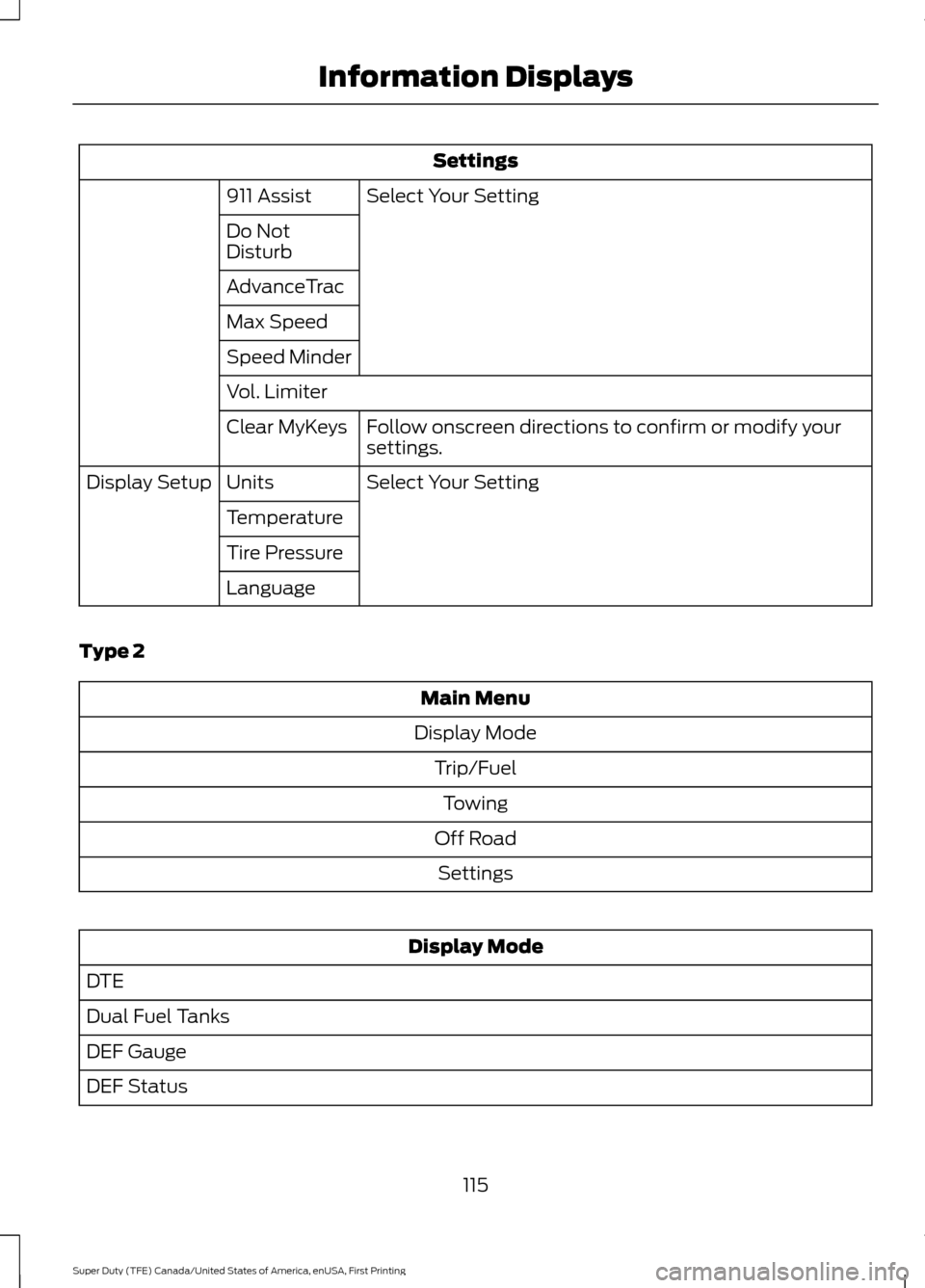
Settings
Select Your Setting
911 Assist
Do Not
Disturb
AdvanceTrac
Max Speed
Speed Minder
Vol. Limiter
Follow onscreen directions to confirm or modify your
settings.
Clear MyKeys
Select Your Setting
Units
Display Setup
Temperature
Tire Pressure
Language
Type 2 Main Menu
Display Mode Trip/FuelTowing
Off Road Settings Display Mode
DTE
Dual Fuel Tanks
DEF Gauge
DEF Status
115
Super Duty (TFE) Canada/United States of America, enUSA, First Printing Information Displays
Page 119 of 636
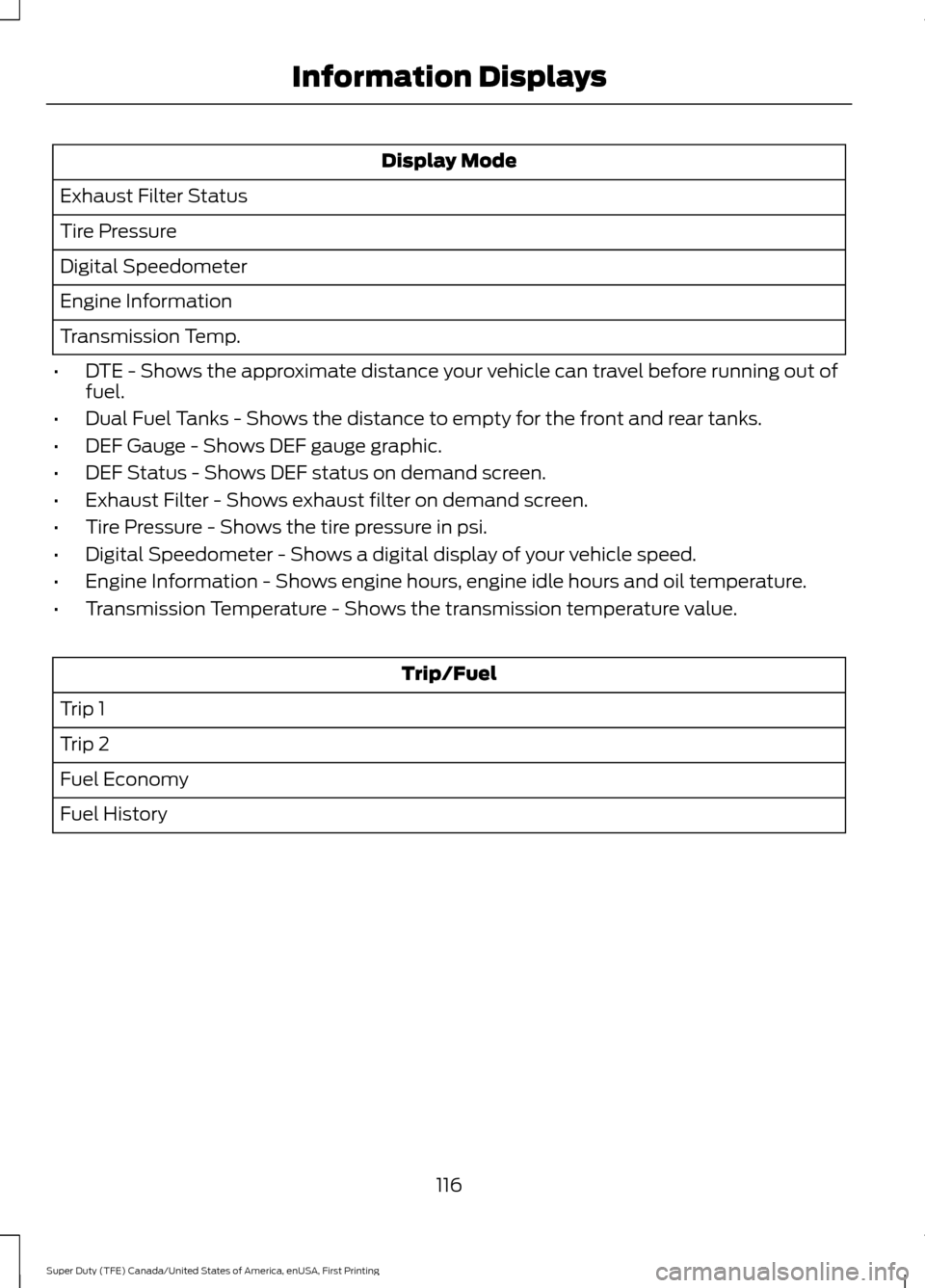
Display Mode
Exhaust Filter Status
Tire Pressure
Digital Speedometer
Engine Information
Transmission Temp.
• DTE - Shows the approximate distance your vehicle can travel before running out of
fuel.
• Dual Fuel Tanks - Shows the distance to empty for the front and rear tanks.
• DEF Gauge - Shows DEF gauge graphic.
• DEF Status - Shows DEF status on demand screen.
• Exhaust Filter - Shows exhaust filter on demand screen.
• Tire Pressure - Shows the tire pressure in psi.
• Digital Speedometer - Shows a digital display of your vehicle speed.
• Engine Information - Shows engine hours, engine idle hours and oil temperature.
• Transmission Temperature - Shows the transmission temperature value. Trip/Fuel
Trip 1
Trip 2
Fuel Economy
Fuel History
116
Super Duty (TFE) Canada/United States of America, enUSA, First Printing Information Displays
Page 120 of 636
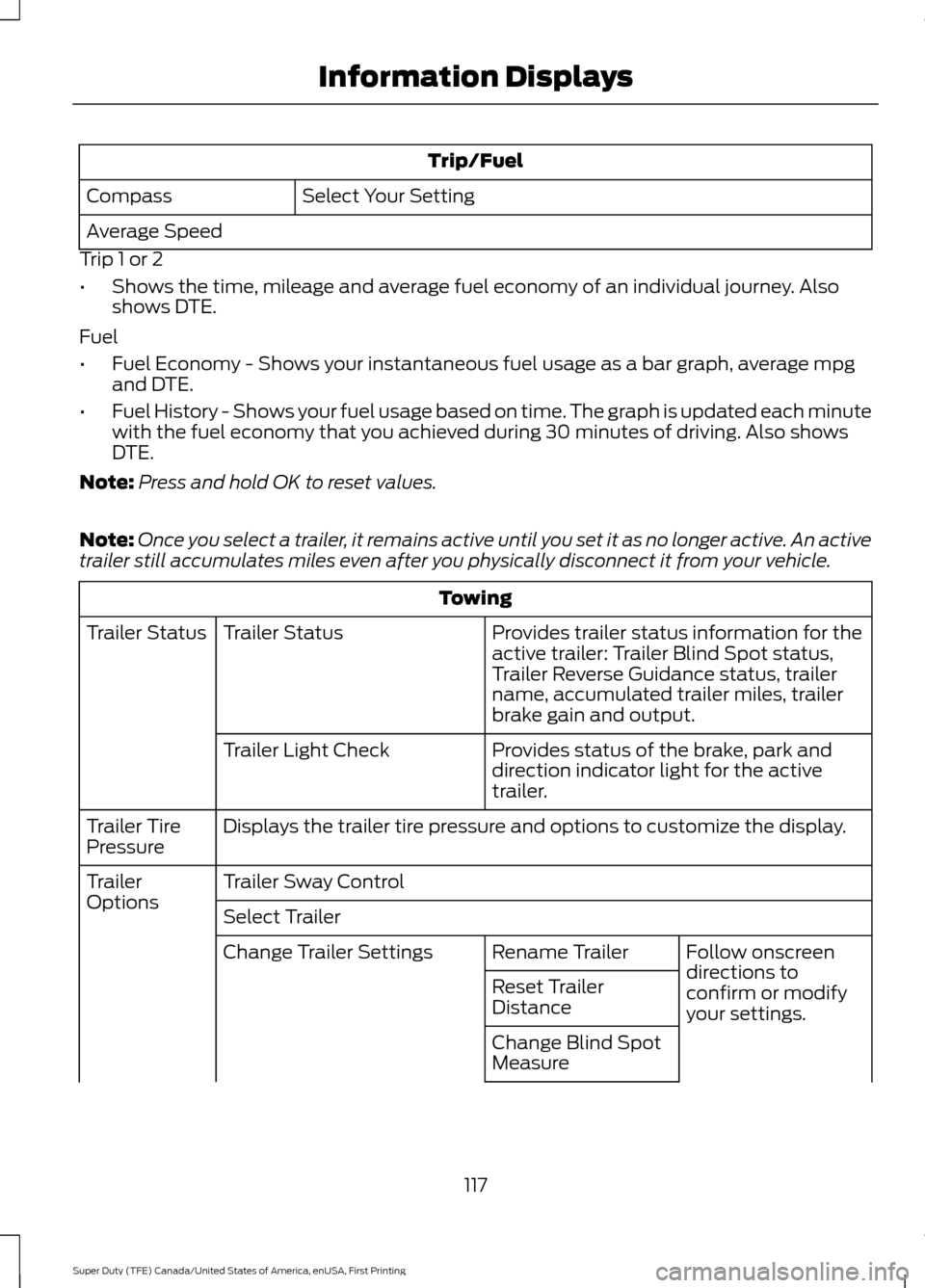
Trip/Fuel
Select Your Setting
Compass
Average Speed
Trip 1 or 2
• Shows the time, mileage and average fuel economy of an individual journey. Also
shows DTE.
Fuel
• Fuel Economy - Shows your instantaneous fuel usage as a bar graph, average mpg
and DTE.
• Fuel History - Shows your fuel usage based on time. The graph is updated each minute
with the fuel economy that you achieved during 30 minutes of driving. Also shows
DTE.
Note: Press and hold OK to reset values.
Note: Once you select a trailer, it remains active until you set it as no longer active. An active
trailer still accumulates miles even after you physically disconnect it from your vehicle. Towing
Provides trailer status information for the
active trailer: Trailer Blind Spot status,
Trailer Reverse Guidance status, trailer
name, accumulated trailer miles, trailer
brake gain and output.
Trailer Status
Trailer Status
Provides status of the brake, park and
direction indicator light for the active
trailer.
Trailer Light Check
Displays the trailer tire pressure and options to customize the display.
Trailer Tire
Pressure
Trailer Sway Control
Trailer
Options
Select Trailer
Follow onscreen
directions to
confirm or modify
your settings.
Rename Trailer
Change Trailer Settings
Reset Trailer
Distance
Change Blind Spot
Measure
117
Super Duty (TFE) Canada/United States of America, enUSA, First Printing Information Displays
Page 124 of 636
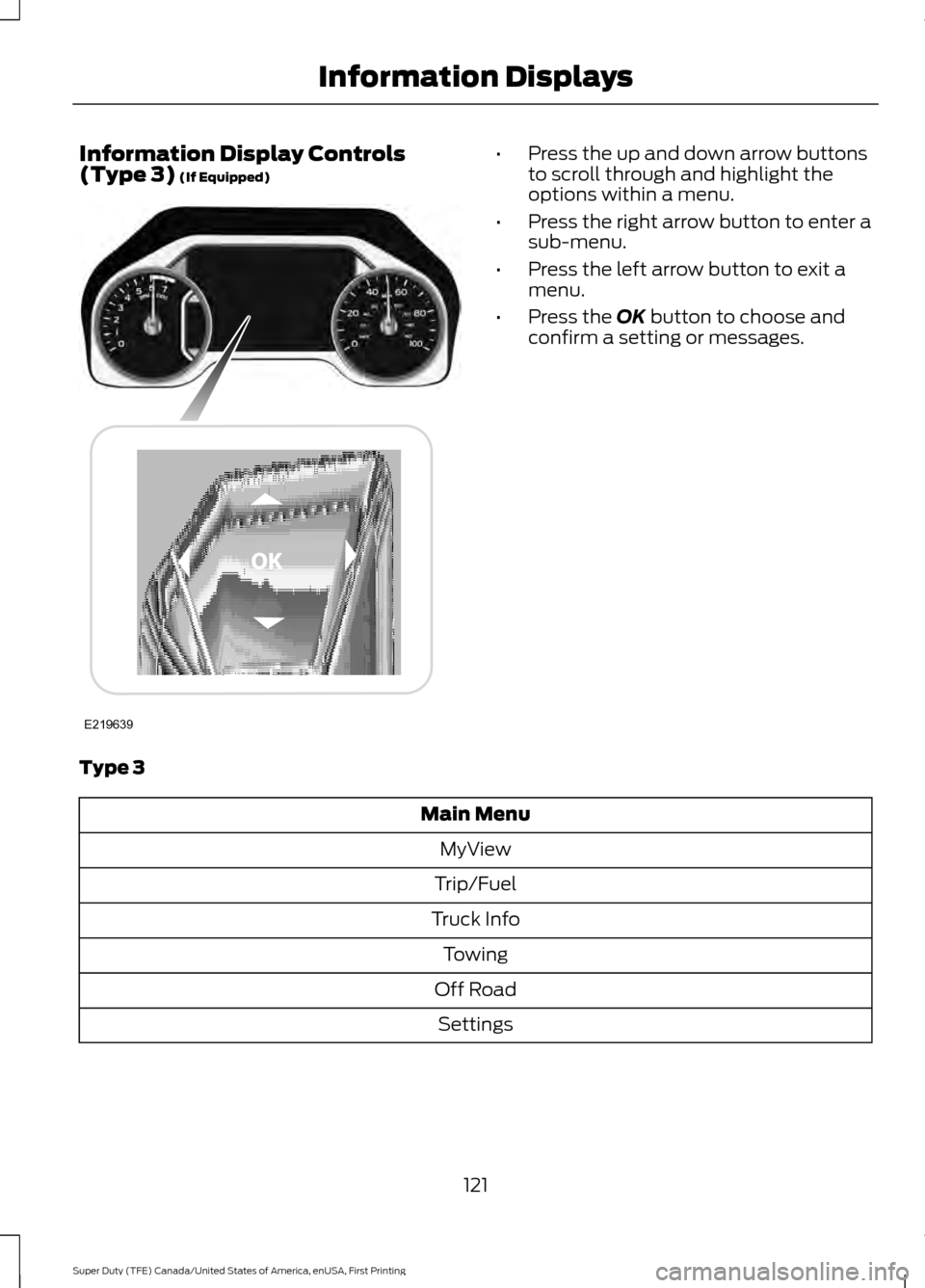
Information Display Controls
(Type 3) (If Equipped) •
Press the up and down arrow buttons
to scroll through and highlight the
options within a menu.
• Press the right arrow button to enter a
sub-menu.
• Press the left arrow button to exit a
menu.
• Press the
OK button to choose and
confirm a setting or messages.
Type 3 Main Menu
MyView
Trip/Fuel
Truck Info Towing
Off Road Settings
121
Super Duty (TFE) Canada/United States of America, enUSA, First Printing Information DisplaysE219639
Page 125 of 636
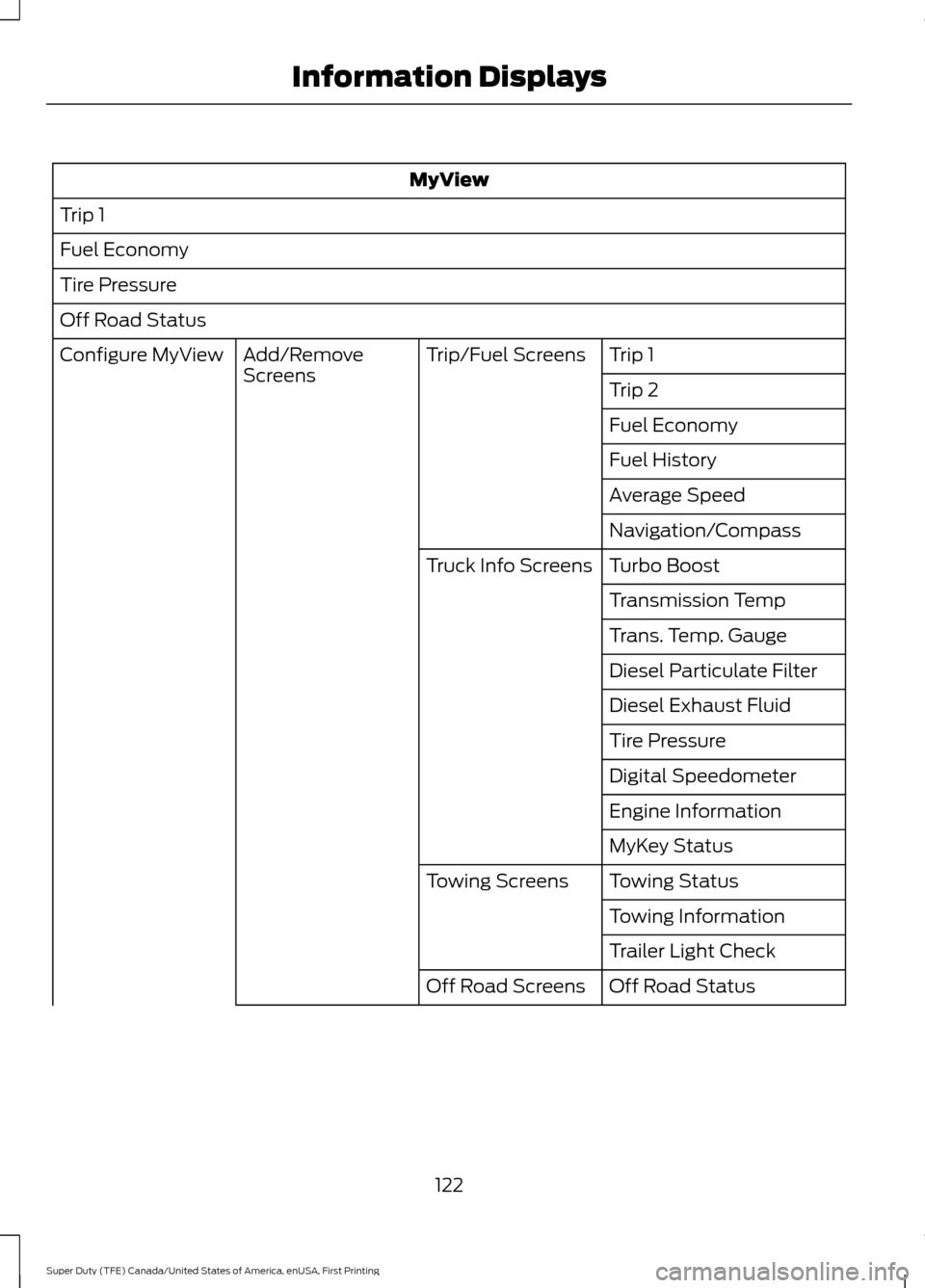
MyView
Trip 1
Fuel Economy
Tire Pressure
Off Road Status Trip 1
Trip/Fuel Screens
Add/Remove
Screens
Configure MyView
Trip 2
Fuel Economy
Fuel History
Average Speed
Navigation/Compass
Turbo Boost
Truck Info Screens
Transmission Temp
Trans. Temp. Gauge
Diesel Particulate Filter
Diesel Exhaust Fluid
Tire Pressure
Digital Speedometer
Engine Information
MyKey Status
Towing Status
Towing Screens
Towing Information
Trailer Light Check
Off Road Status
Off Road Screens
122
Super Duty (TFE) Canada/United States of America, enUSA, First Printing Information Displays
Page 126 of 636
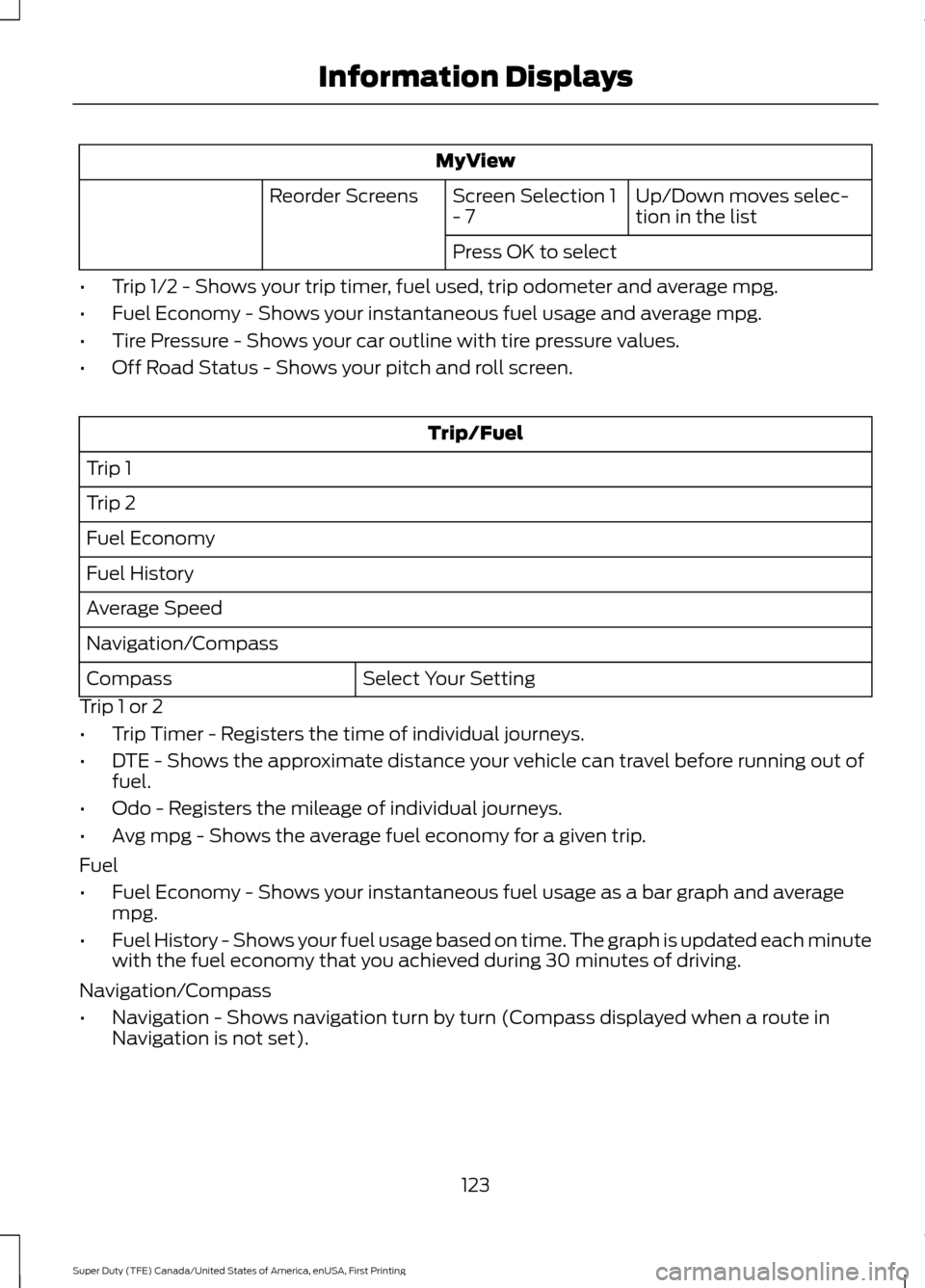
MyView
Up/Down moves selec-
tion in the list
Screen Selection 1
- 7
Reorder Screens
Press OK to select
• Trip 1/2 - Shows your trip timer, fuel used, trip odometer and average mpg.
• Fuel Economy - Shows your instantaneous fuel usage and average mpg.
• Tire Pressure - Shows your car outline with tire pressure values.
• Off Road Status - Shows your pitch and roll screen. Trip/Fuel
Trip 1
Trip 2
Fuel Economy
Fuel History
Average Speed
Navigation/Compass Select Your Setting
Compass
Trip 1 or 2
• Trip Timer - Registers the time of individual journeys.
• DTE - Shows the approximate distance your vehicle can travel before running out of
fuel.
• Odo - Registers the mileage of individual journeys.
• Avg mpg - Shows the average fuel economy for a given trip.
Fuel
• Fuel Economy - Shows your instantaneous fuel usage as a bar graph and average
mpg.
• Fuel History - Shows your fuel usage based on time. The graph is updated each minute
with the fuel economy that you achieved during 30 minutes of driving.
Navigation/Compass
• Navigation - Shows navigation turn by turn (Compass displayed when a route in
Navigation is not set).
123
Super Duty (TFE) Canada/United States of America, enUSA, First Printing Information Displays
Page 127 of 636
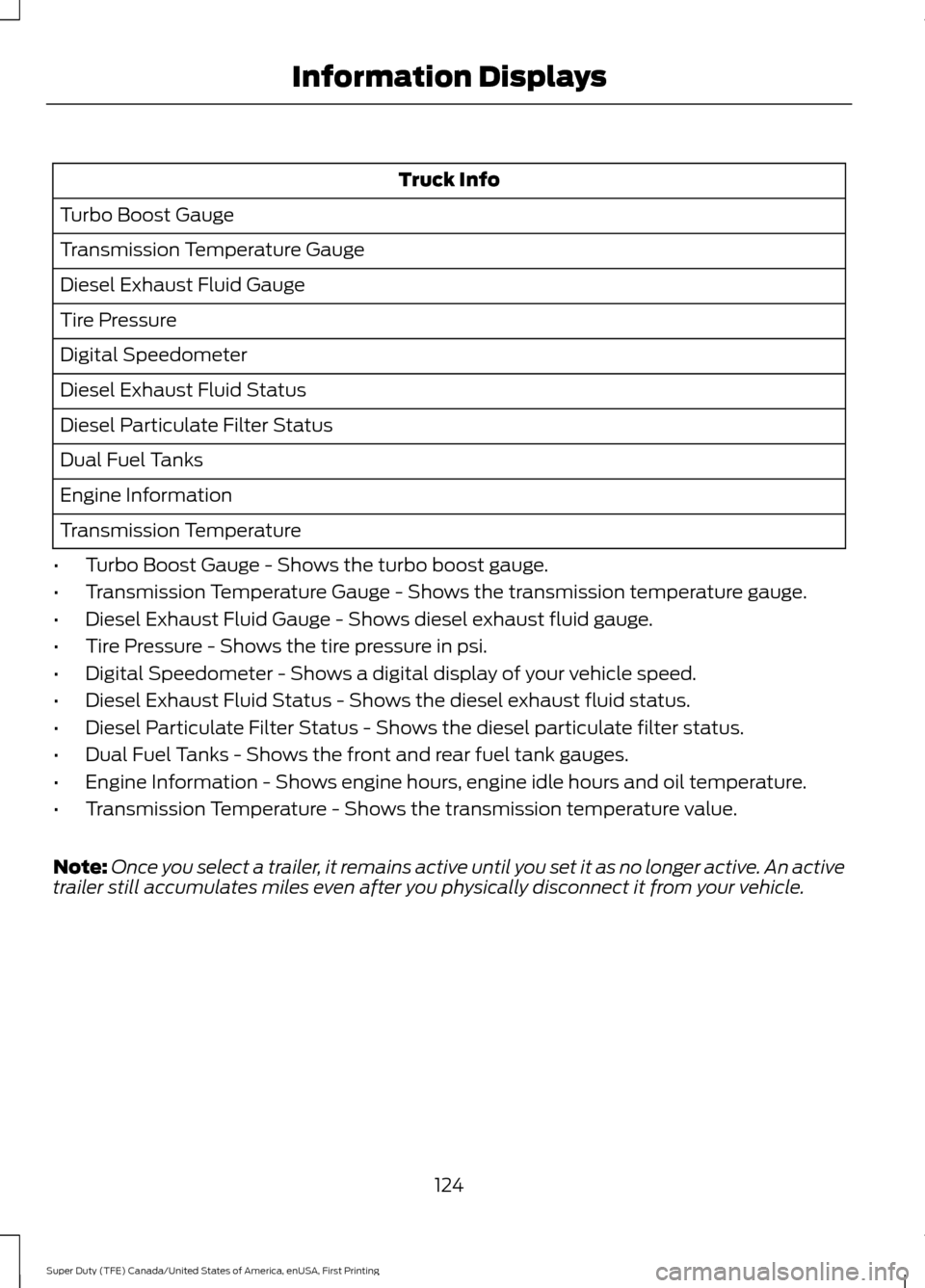
Truck Info
Turbo Boost Gauge
Transmission Temperature Gauge
Diesel Exhaust Fluid Gauge
Tire Pressure
Digital Speedometer
Diesel Exhaust Fluid Status
Diesel Particulate Filter Status
Dual Fuel Tanks
Engine Information
Transmission Temperature
• Turbo Boost Gauge - Shows the turbo boost gauge.
• Transmission Temperature Gauge - Shows the transmission temperature gauge.
• Diesel Exhaust Fluid Gauge - Shows diesel exhaust fluid gauge.
• Tire Pressure - Shows the tire pressure in psi.
• Digital Speedometer - Shows a digital display of your vehicle speed.
• Diesel Exhaust Fluid Status - Shows the diesel exhaust fluid status.
• Diesel Particulate Filter Status - Shows the diesel particulate filter status.
• Dual Fuel Tanks - Shows the front and rear fuel tank gauges.
• Engine Information - Shows engine hours, engine idle hours and oil temperature.
• Transmission Temperature - Shows the transmission temperature value.
Note: Once you select a trailer, it remains active until you set it as no longer active. An active
trailer still accumulates miles even after you physically disconnect it from your vehicle.
124
Super Duty (TFE) Canada/United States of America, enUSA, First Printing Information Displays
Page 134 of 636
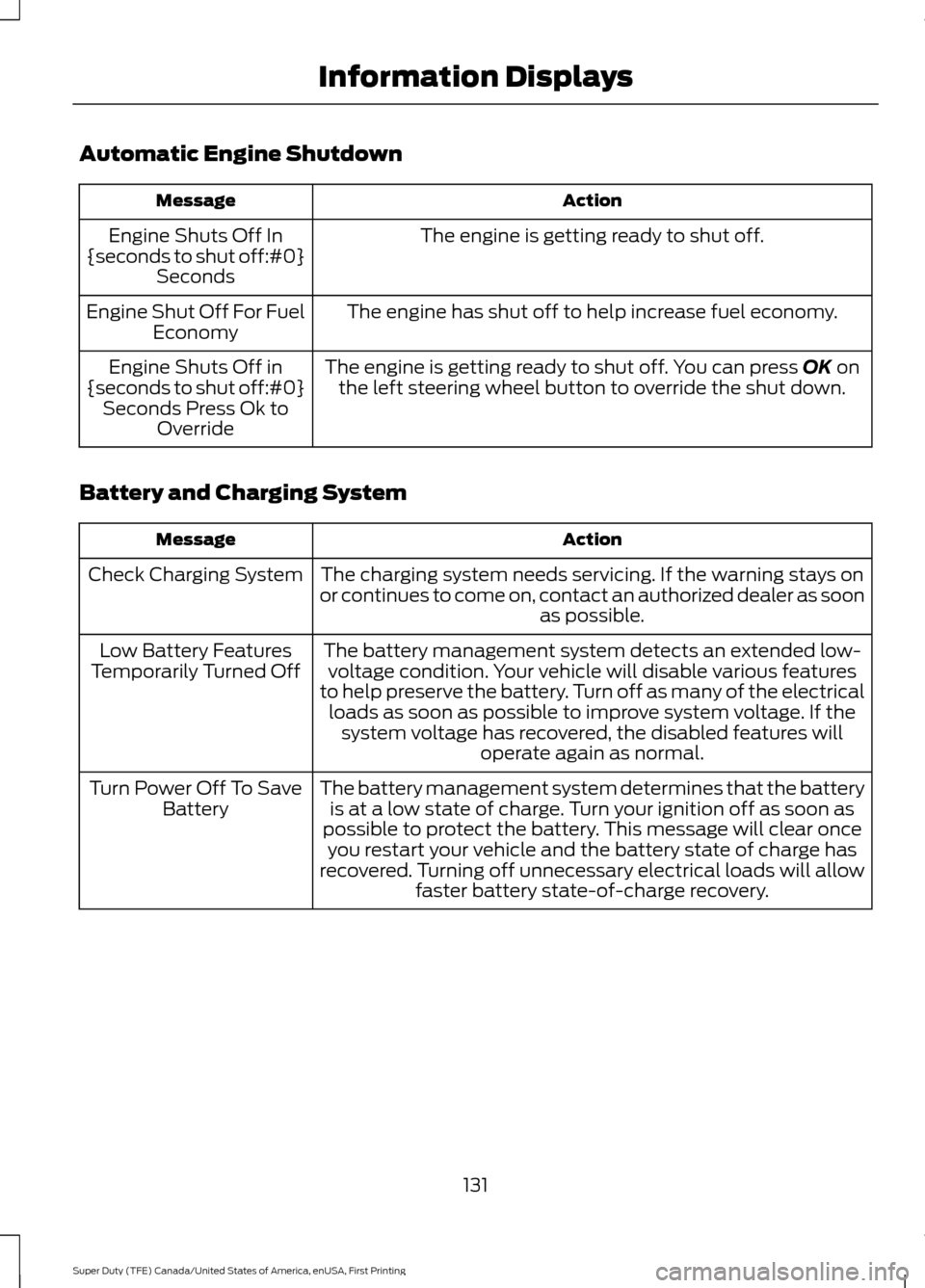
Automatic Engine Shutdown
Action
Message
The engine is getting ready to shut off.
Engine Shuts Off In
{seconds to shut off:#0} Seconds
The engine has shut off to help increase fuel economy.
Engine Shut Off For Fuel
Economy
The engine is getting ready to shut off. You can press OK on
the left steering wheel button to override the shut down.
Engine Shuts Off in
{seconds to shut off:#0} Seconds Press Ok to Override
Battery and Charging System Action
Message
The charging system needs servicing. If the warning stays on
or continues to come on, contact an authorized dealer as soon as possible.
Check Charging System
The battery management system detects an extended low-voltage condition. Your vehicle will disable various features
to help preserve the battery. Turn off as many of the electrical loads as soon as possible to improve system voltage. If the system voltage has recovered, the disabled features will operate again as normal.
Low Battery Features
Temporarily Turned Off
The battery management system determines that the batteryis at a low state of charge. Turn your ignition off as soon as
possible to protect the battery. This message will clear once you restart your vehicle and the battery state of charge has
recovered. Turning off unnecessary electrical loads will allow faster battery state-of-charge recovery.
Turn Power Off To Save
Battery
131
Super Duty (TFE) Canada/United States of America, enUSA, First Printing Information Displays
Page 138 of 636
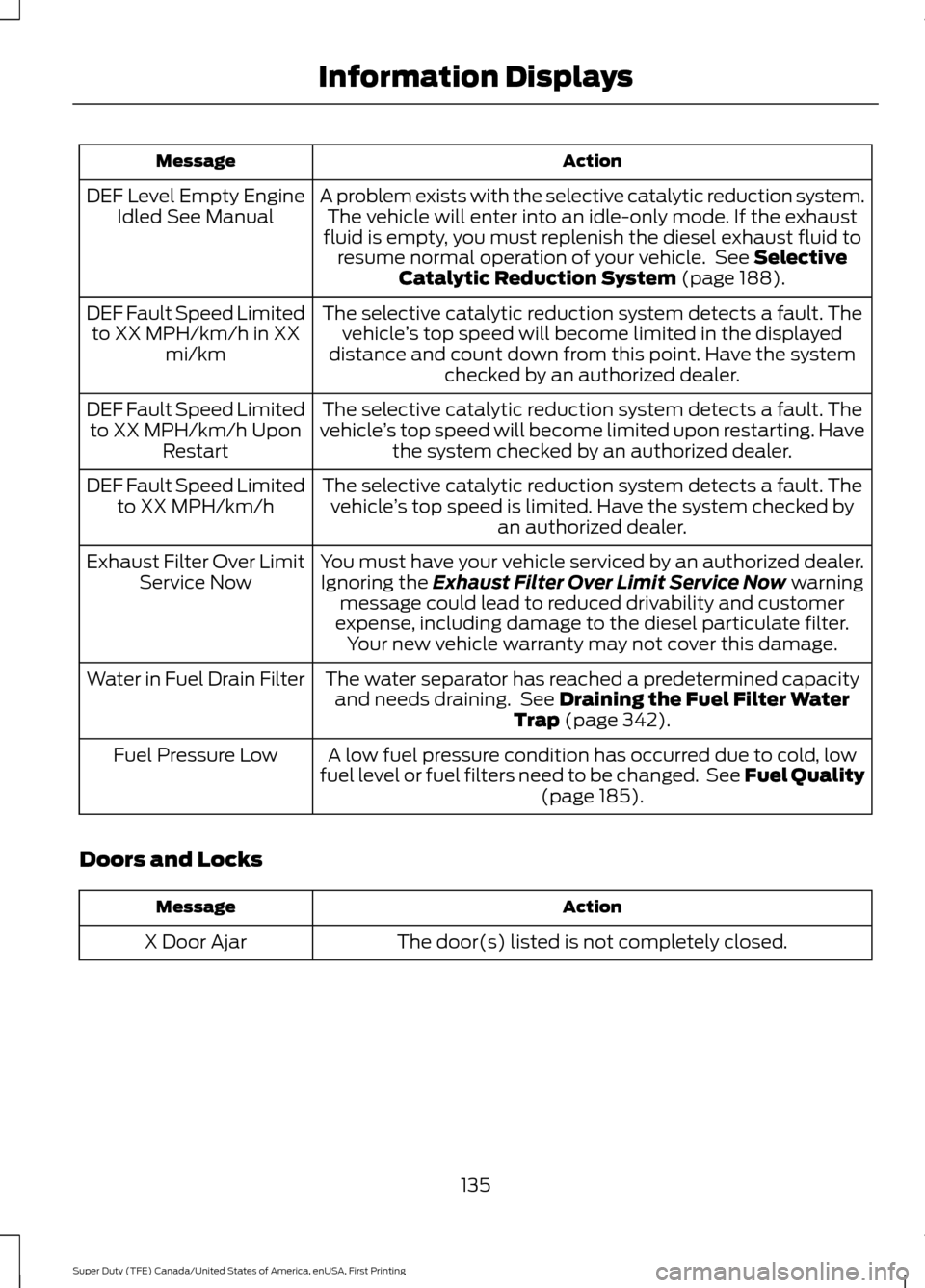
Action
Message
A problem exists with the selective catalytic reduction system.The vehicle will enter into an idle-only mode. If the exhaust
fluid is empty, you must replenish the diesel exhaust fluid to resume normal operation of your vehicle. See Selective
Catalytic Reduction System (page 188).
DEF Level Empty Engine
Idled See Manual
The selective catalytic reduction system detects a fault. Thevehicle ’s top speed will become limited in the displayed
distance and count down from this point. Have the system checked by an authorized dealer.
DEF Fault Speed Limited
to XX MPH/km/h in XX mi/km
The selective catalytic reduction system detects a fault. The
vehicle ’s top speed will become limited upon restarting. Have
the system checked by an authorized dealer.
DEF Fault Speed Limited
to XX MPH/km/h Upon Restart
The selective catalytic reduction system detects a fault. Thevehicle ’s top speed is limited. Have the system checked by
an authorized dealer.
DEF Fault Speed Limited
to XX MPH/km/h
You must have your vehicle serviced by an authorized dealer.Ignoring the
Exhaust Filter Over Limit Service Now warning
message could lead to reduced drivability and customer
expense, including damage to the diesel particulate filter. Your new vehicle warranty may not cover this damage.
Exhaust Filter Over Limit
Service Now
The water separator has reached a predetermined capacityand needs draining. See
Draining the Fuel Filter Water
Trap (page 342).
Water in Fuel Drain Filter
A low fuel pressure condition has occurred due to cold, low
fuel level or fuel filters need to be changed. See Fuel Quality (page
185).
Fuel Pressure Low
Doors and Locks Action
Message
The door(s) listed is not completely closed.
X Door Ajar
135
Super Duty (TFE) Canada/United States of America, enUSA, First Printing Information Displays
Page 140 of 636
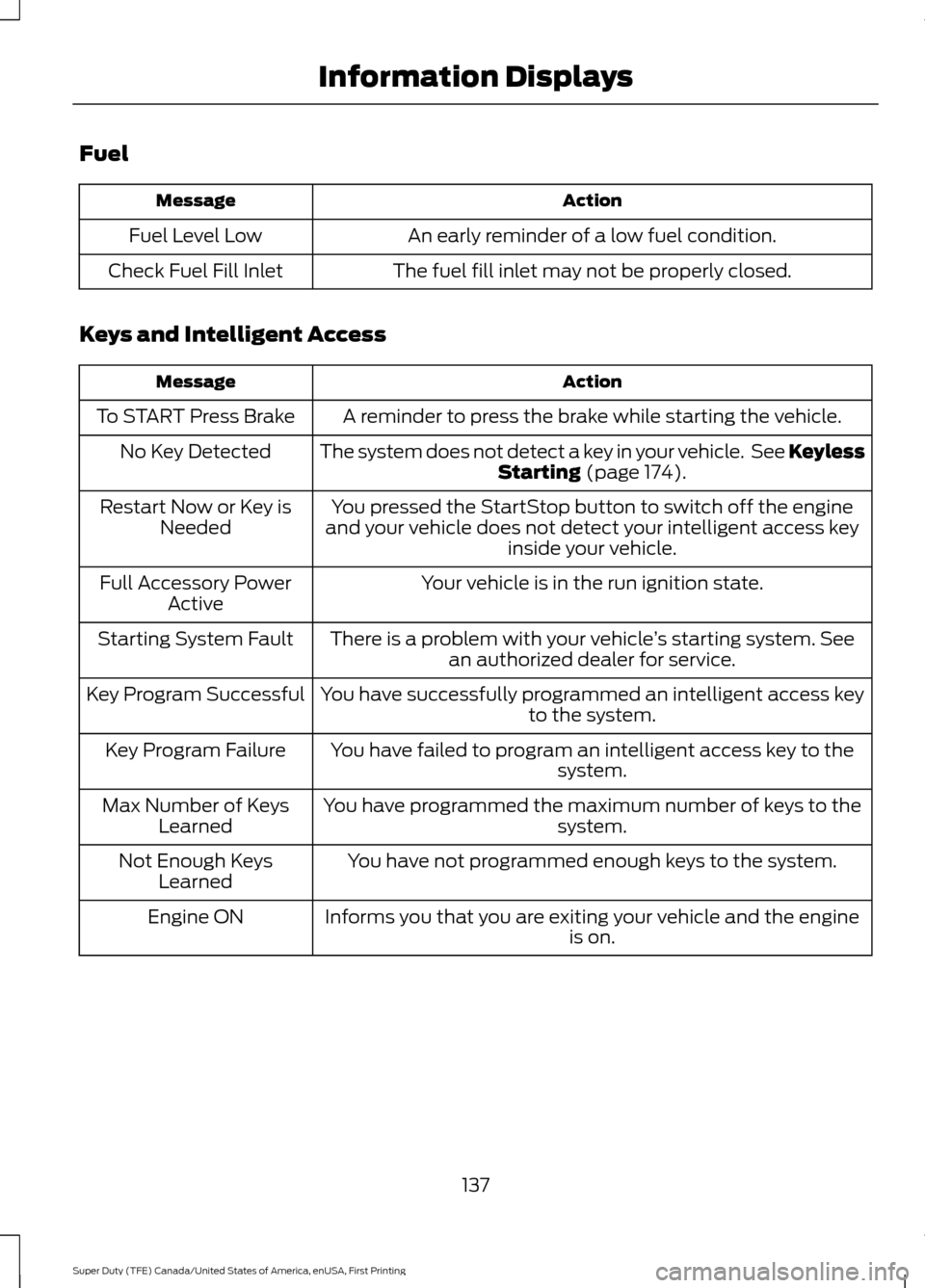
Fuel
Action
Message
An early reminder of a low fuel condition.
Fuel Level Low
The fuel fill inlet may not be properly closed.
Check Fuel Fill Inlet
Keys and Intelligent Access Action
Message
A reminder to press the brake while starting the vehicle.
To START Press Brake
The system does not detect a key in your vehicle. See KeylessStarting (page 174).
No Key Detected
You pressed the StartStop button to switch off the engine
and your vehicle does not detect your intelligent access key inside your vehicle.
Restart Now or Key is
Needed
Your vehicle is in the run ignition state.
Full Accessory Power
Active
There is a problem with your vehicle ’s starting system. See
an authorized dealer for service.
Starting System Fault
You have successfully programmed an intelligent access keyto the system.
Key Program Successful
You have failed to program an intelligent access key to thesystem.
Key Program Failure
You have programmed the maximum number of keys to the system.
Max Number of Keys
Learned
You have not programmed enough keys to the system.
Not Enough Keys
Learned
Informs you that you are exiting your vehicle and the engine is on.
Engine ON
137
Super Duty (TFE) Canada/United States of America, enUSA, First Printing Information Displays