remote start FORD SUPER DUTY 2017 4.G Owners Manual
[x] Cancel search | Manufacturer: FORD, Model Year: 2017, Model line: SUPER DUTY, Model: FORD SUPER DUTY 2017 4.GPages: 636, PDF Size: 10.56 MB
Page 4 of 636
Introduction
About This Manual...........................................7
Symbols Glossary.............................................8
Data Recording
................................................10
California Proposition 65
.............................12
Perchlorate.........................................................12
Ford Credit
.........................................................12
Replacement Parts Recommendation.......................................12
Special Notices
................................................13
Mobile Communications Equipment.....................................................14
Export Unique Options
.................................14
Environment
Protecting the Environment........................16
Child Safety
General Information.......................................17
Installing Child Restraints
............................18
Booster Seats..................................................30
Child Restraint Positioning.........................32
Child Safety Locks..........................................33
Seatbelts
Principle of Operation..................................35
Fastening the Seatbelts..............................36
Seatbelt Height Adjustment.....................40
Seatbelt Warning Lamp and Indicator Chime.............................................................40
Seatbelt Reminder.........................................41
Child Restraint and Seatbelt Maintenance................................................42
Seatbelt Extension
........................................43
Supplementary Restraints System
Principle of Operation..................................44
Driver and Passenger Airbags
...................45
Side Airbags
.....................................................50 Safety Canopy
™
..............................................51
Crash Sensors and Airbag Indicator
........52
Airbag Disposal
...............................................53
Keys and Remote Controls
General Information on Radio Frequencies..................................................54
Remote Control..............................................54
Replacing a Lost Key or Remote Control...........................................................60
MyKey ™
Principle of Operation...................................61
Creating a MyKey
............................................62
Clearing All MyKeys.......................................63
Checking MyKey System Status...............63
Using MyKey With Remote Start Systems.........................................................64
MyKey Troubleshooting...............................64
Doors and Locks
Locking and Unlocking
.................................65
Keyless Entry....................................................67
Tailgate
Tailgate Lock....................................................70
Removing the Tailgate
.................................70
Tailgate Step
.....................................................71
Bed Extender
....................................................72
Security
Passive Anti-Theft System.........................74
Anti-Theft Alarm
............................................76
Power Running Boards
Using Power Running Boards....................78
Steering Wheel
Adjusting the Steering Wheel...................80
Audio Control
...................................................81
1
Super Duty (TFE) Canada/United States of America, enUSA, First Printing Table of Contents
Page 5 of 636
Voice Control...................................................82
Cruise Control..................................................82
Information Display Control
.......................82
Heated Steering Wheel
................................82
Pedals
Adjusting the Pedals
.....................................83
Wipers and Washers
Windshield Wipers........................................84
Autowipers
.......................................................84
Windshield Washers
.....................................85
Lighting
General Information.....................................86
Lighting Control..............................................86
Autolamps........................................................87
Instrument Lighting Dimmer.....................88
Daytime Running Lamps............................88
Automatic High Beam Control.................89
Front Fog Lamps............................................90
Direction Indicators
.......................................90
Spot Lamps
.......................................................91
Interior Lamps..................................................91
Ambient Lighting
...........................................94
Windows and Mirrors
Power Windows
.............................................95
Global Opening
..............................................96
Exterior Mirrors
................................................96
Interior Mirror
...................................................98
Sliding Windows............................................99
Sun Visors
.........................................................99
Moonroof........................................................100
Instrument Cluster
Gauges ..............................................................
102
Warning Lamps and Indicators...............105
Audible Warnings and Indicators............110 Information Displays
General Information
......................................111
Information Messages
................................128
Climate Control
Manual Climate Control
.............................145
Automatic Climate Control
......................146
Hints on Controlling the Interior Climate.........................................................148
Heated Windows and Mirrors..................150
Cabin Air Filter
.................................................151
Remote Start...................................................151
Seats
Sitting in the Correct Position
..................152
Head Restraints
.............................................152
Manual Seats
.................................................154
Power Seats
....................................................155
Memory Function
..........................................157
Rear Seats.......................................................159
Heated Seats.................................................160
Climate Controlled Seats...........................161
Front Seat Armrest......................................162
Rear Seat Armrest........................................163
Universal Garage Door Opener
Universal Garage Door Opener...............164
Auxiliary Power Points
Auxiliary Power Points...............................168
Storage Compartments
Center Console..............................................170
Overhead Console
........................................170
Under Seat Storage.....................................170
2
Super Duty (TFE) Canada/United States of America, enUSA, First Printing Table of Contents
Page 57 of 636
GENERAL INFORMATION ON
RADIO FREQUENCIES
This device complies with Part 15 of the
FCC Rules and with Industry Canada
license-exempt RSS standard(s).
Operation is subject to the following two
conditions: (1) This device may not cause
harmful interference, and (2) This device
must accept any interference received,
including interference that may cause
undesired operation.
Note:
Changes or modifications not
expressively approved by the party
responsible for compliance could void the
user's authority to operate the equipment.
The term IC before the radio certification
number only signifies that Industry Canada
technical specifications were met.
The typical operating range for your
transmitter is approximately 33 feet (10
meters). Vehicles with the remote start
feature will have a greater range. One of
the following could cause a decrease in
operating range:
• weather conditions
• nearby radio towers
• structures around the vehicle
• other vehicles parked next to your
vehicle
Other short-distance radio transmitters,
such as amateur radios, medical
equipment, wireless headphones, remote
controls and alarm systems may operate
on the same frequency as your remote
control. If other transmitters are operating
on those frequencies, you may not be able
to use your remote control. Using your
remote control near some types of
electronic equipment, such as USB devices, computers or cell phones can interfere with
remote operation. Operating your remote
control near metal or metallic-finished
purses, bags or clothing can interfere with
remote operation. You can lock and unlock
the doors with the key.
Note:
Make sure to lock your vehicle before
leaving it unattended.
Note: If you are in range, the remote control
will operate if you press any button
unintentionally.
Intelligent Access
The system uses a radio frequency signal
to communicate with your vehicle and
authorize your vehicle to unlock when one
of the following conditions are met:
• You touch the inside of the front
exterior door handle within
3 ft (1 m)
proximity of an intelligent access key.
• You press the tailgate release button.
• You press a button on the transmitter.
If excessive radio frequency interference
is present in the area or if the transmitter
battery is low, you may need to
mechanically unlock your door. You can
use the mechanical key blade in your
intelligent access key to open the driver
door in this situation. See
Remote
Control (page 54).
REMOTE CONTROL
Integrated Keyhead Transmitter (If
Equipped)
Use the key blade to start your vehicle and
unlock or lock the driver door from outside
your vehicle. The transmitter portion
functions as the remote control.
54
Super Duty (TFE) Canada/United States of America, enUSA, First Printing Keys and Remote Controls
Page 58 of 636
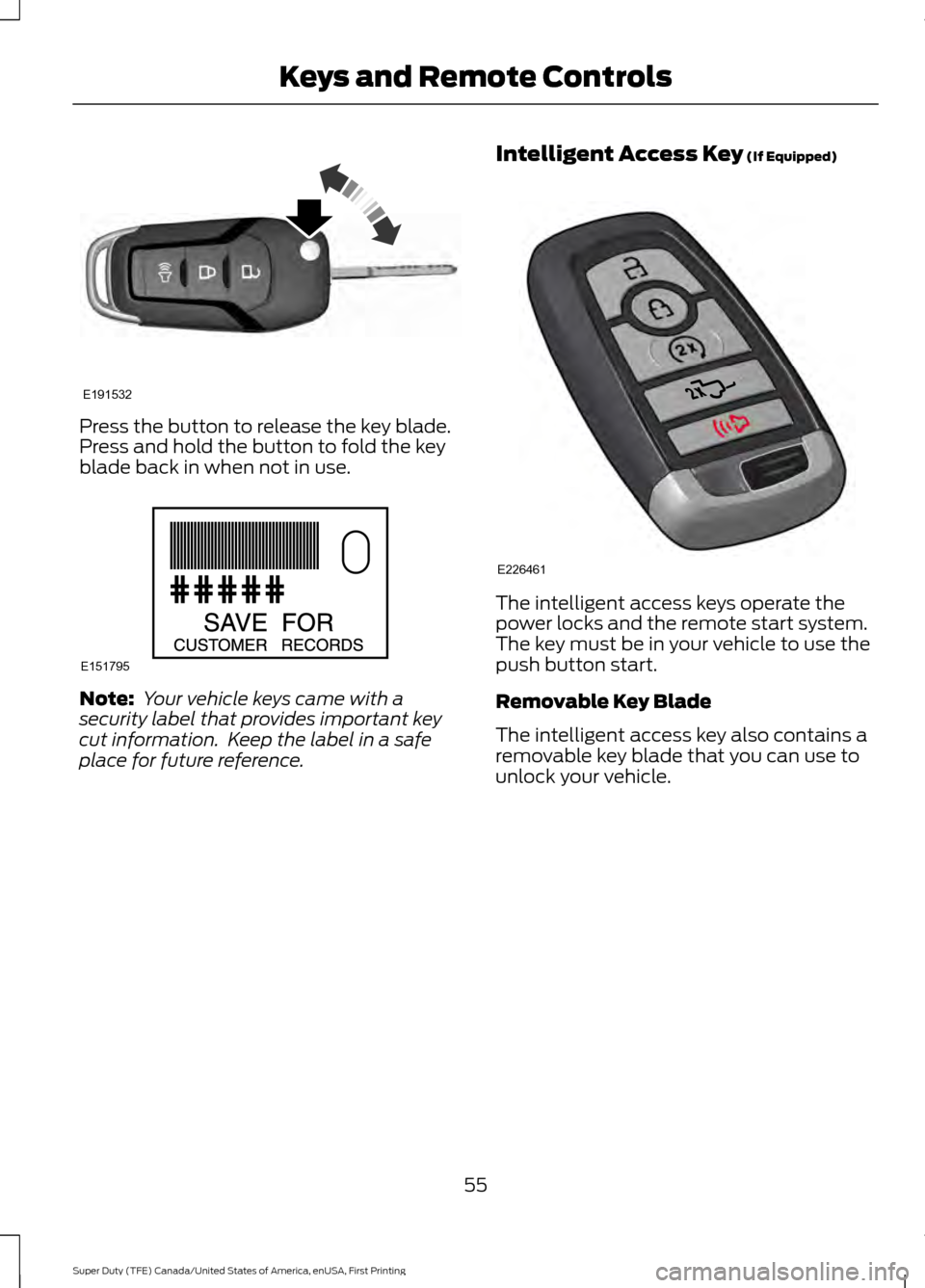
Press the button to release the key blade.
Press and hold the button to fold the key
blade back in when not in use.
Note:
Your vehicle keys came with a
security label that provides important key
cut information. Keep the label in a safe
place for future reference. Intelligent Access Key (If Equipped) The intelligent access keys operate the
power locks and the remote start system.
The key must be in your vehicle to use the
push button start.
Removable Key Blade
The intelligent access key also contains a
removable key blade that you can use to
unlock your vehicle.
55
Super Duty (TFE) Canada/United States of America, enUSA, First Printing Keys and Remote ControlsE191532 E151795 E226461
Page 62 of 636

Car Finder
Press the button twice within
three seconds. A tone sounds
and the direction indicators will
flash. We recommend you use this method
to locate your vehicle, rather than using
the panic alarm.
Sounding the Panic Alarm Press the button to sound the
panic alarm. Press the button
again or switch the ignition on to
turn it off.
Note: The panic alarm only operates when
the ignition is off.
Remote Start (If Equipped) WARNING
To avoid exhaust fumes, do not use
remote start if your vehicle is parked
indoors or in areas that are not well
ventilated. Note:
Do not use remote start if your fuel
level is low. The remote start button is on the
transmitter.
This feature allows you to start your
vehicle from the outside. The transmitter
has an extended operating range.
You can configure vehicles with automatic
climate control to turn on the automatic
climate control when you remote start your
vehicle. See Automatic Climate Control
(page
146). A manual climate control
system runs at the setting you set it to
when you switched your vehicle off.
Many states and provinces restrict the use
of remote start. Check your local and state
or provincial laws for specific requirements
regarding remote start systems. The remote start system does not work if
any of the following occur:
•
The ignition is on.
• The anti-theft alarm triggers.
• You switch off the feature.
• The hood is open.
• The transmission is not in park (P).
• The battery voltage is below the
minimum operating voltage.
• The service engine soon light is on.
Remote Control Feedback
An LED on the remote control provides
status feedback of remote start or stop
commands. Status
LED
Remote start orextension
successful
Solid green
Remote stop
successful; vehicle off
Solid red
Remote start orstop failed
Blinking red
Waiting for statusupdate
Blinking green
Remote Starting Your Vehicle
Note: You must press each button within
three seconds of each other. 59
Super Duty (TFE) Canada/United States of America, enUSA, First Printing Keys and Remote ControlsE138623 E138624 E138625 E138626
Page 63 of 636
The label on your transmitter details the
starting procedure.
To remote start your vehicle:
1. Press the lock button.
2. Press the remote start button twice.
The exterior lamps flash twice.
The horn sounds if the system fails to start,
unless quiet start is on. Quiet start runs the
blower fan at a slower speed to reduce
noise. You can switch it on or off in the
information display. See General
Information (page 111).
Note: If you do not follow this sequence,
your vehicle does not start remotely, the
direction indicators do not flash twice and
the horn does not sound.
Note: If you remote start your vehicle with
an integrated keyhead transmitter, you must
switch on the ignition before driving your
vehicle. If you remote start your vehicle with
an intelligent access transmitter, you must
press the push button ignition switch on the
instrument panel once while applying the
brake pedal before driving your vehicle.
The power windows do not work during
remote start and the radio does not turn
on automatically.
The parking lamps remain on and your
vehicle runs for 5, 10 or 15 minutes
depending on the setting.
Extending the Engine Running Time
To extend the engine running time duration
of your vehicle during remote start, repeat
steps 1 and 2 while the engine is running.
If the duration is set to 10 minutes, the
duration extends by another 10 minutes.
For example, if your vehicle had been
running from the first remote start for 5
minutes, your vehicle continues to run now
for a total of 20 minutes. You can extend
the remote start up to a maximum of 35
minutes. Wait at least five seconds before remote
starting after the engine stops running.
Turning Your Vehicle Off After Remote
Starting Press the button once. The
parking lamps turn off.
You may have to be closer to the
vehicle than when starting due to ground
reflection and the added noise of the
running vehicle.
You can turn the remote start system on
or off using the information display. See
General Information
(page 111).
REPLACING A LOST KEY OR
REMOTE CONTROL
Replacement keys or remote controls can
be purchased from an authorized dealer.
Authorized dealers can program remote
controls for your vehicle. See
Passive
Anti-Theft System (page 74).
60
Super Duty (TFE) Canada/United States of America, enUSA, First Printing Keys and Remote ControlsE138625
Page 67 of 636
USING MYKEY WITH REMOTE
START SYSTEMS
MyKey is not compatible with non
Ford-approved, aftermarket remote start
systems. If you choose to install a remote
start system, see an authorized dealer for
a Ford-approved remote start system.
MYKEY TROUBLESHOOTING Potential causes
Condition
· The key or transmitter used to start the
vehicle does not have admin privileges.
I cannot create a MyKey.
· Vehicles with keyless start: Make sure you
place the transmitter into the backup posi-
tion. See Starting a Gasoline Engine
(page 174).
· The key or transmitter used to start the
vehicle is the only admin key. There always
has to be at least one admin key.
· SecuriLock passive anti-theft system is
disabled or in unlimited mode.
· The key or transmitter used to start the
vehicle does not have admin privileges.
I cannot program the configurable settings.
· There are no MyKeys programmed to the
vehicle.
See Creating a MyKey (page 62).
· An admin transmitter is present when you
started your vehicle.
For vehicles with keyless start: No MyKey
restrictions are available when starting the
vehicle.
· There are no MyKeys programmed to the
vehicle. See
Creating a MyKey (page 62).
· The key or transmitter used to start the
vehicle does not have admin privileges.
I cannot clear the MyKeys.
· No MyKeys are created. See
Creating a
MyKey (page 62).
· Purchase a new key or tranmitter from
your authorized dealer.
I lost the only admin key.
· Program a spare key or transmitter. You
may need to see your authorized dealer.
See
Passive Anti-Theft System (page
74).
I lost a key.
· The MyKey user is not using the MyKey.
MyKey distances do not accumulate.
· An admin key holder cleared the MyKeys
and created new MyKeys.
· The key system has been reset.
64
Super Duty (TFE) Canada/United States of America, enUSA, First Printing MyKey
™
Page 68 of 636
LOCKING AND UNLOCKING
You can use the power door lock control
or the remote control to lock and unlock
your vehicle.
See Tailgate Lock (page 70).
Power Door Locks
(If Equipped)
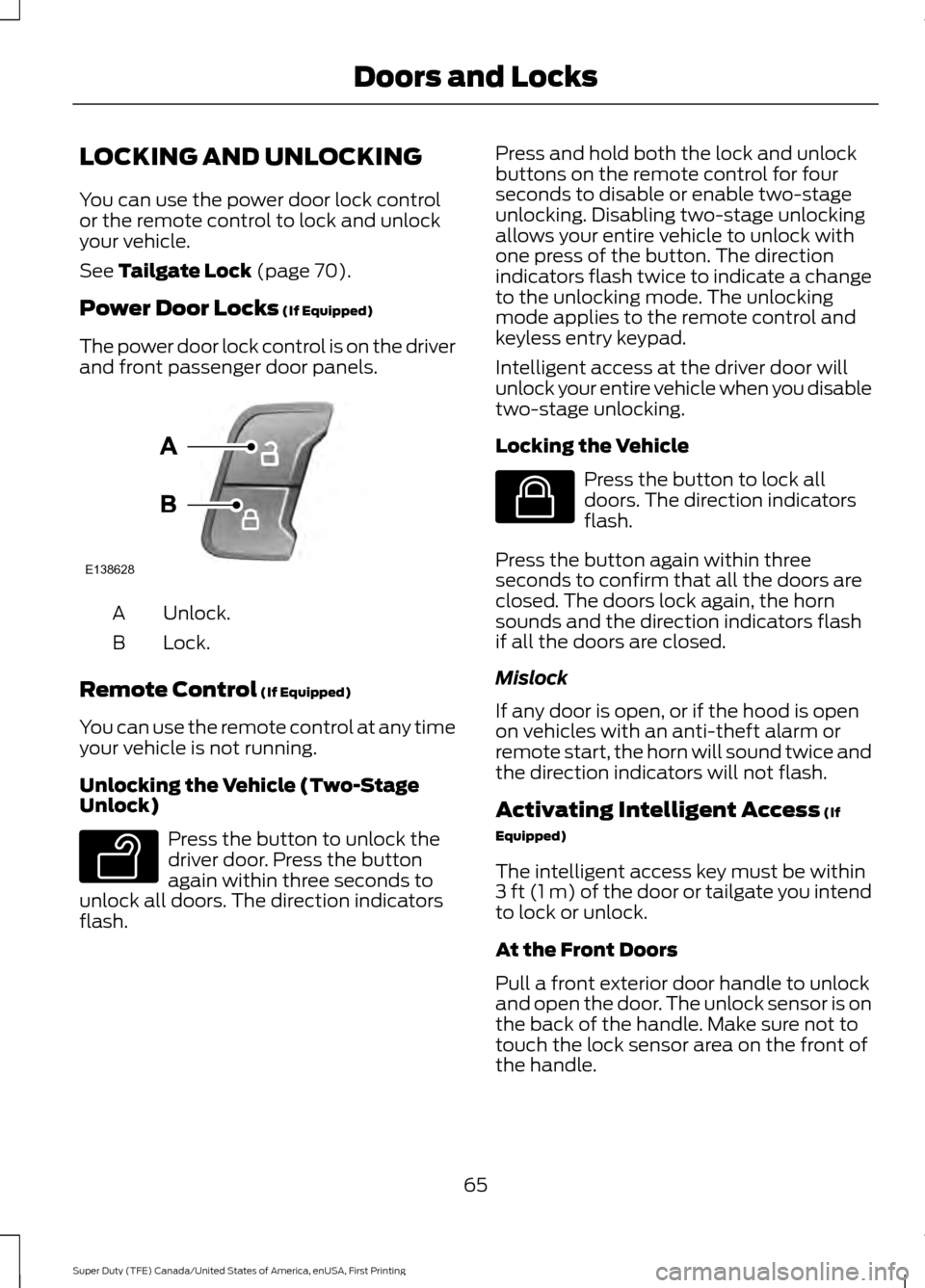
The power door lock control is on the driver
and front passenger door panels. Unlock.
A
Lock.
B
Remote Control
(If Equipped)
You can use the remote control at any time
your vehicle is not running.
Unlocking the Vehicle (Two-Stage
Unlock) Press the button to unlock the
driver door. Press the button
again within three seconds to
unlock all doors. The direction indicators
flash. Press and hold both the lock and unlock
buttons on the remote control for four
seconds to disable or enable two-stage
unlocking. Disabling two-stage unlocking
allows your entire vehicle to unlock with
one press of the button. The direction
indicators flash twice to indicate a change
to the unlocking mode. The unlocking
mode applies to the remote control and
keyless entry keypad.
Intelligent access at the driver door will
unlock your entire vehicle when you disable
two-stage unlocking.
Locking the Vehicle
Press the button to lock all
doors. The direction indicators
flash.
Press the button again within three
seconds to confirm that all the doors are
closed. The doors lock again, the horn
sounds and the direction indicators flash
if all the doors are closed.
Mislock
If any door is open, or if the hood is open
on vehicles with an anti-theft alarm or
remote start, the horn will sound twice and
the direction indicators will not flash.
Activating Intelligent Access
(If
Equipped)
The intelligent access key must be within
3 ft (1 m)
of the door or tailgate you intend
to lock or unlock.
At the Front Doors
Pull a front exterior door handle to unlock
and open the door. The unlock sensor is on
the back of the handle. Make sure not to
touch the lock sensor area on the front of
the handle.
65
Super Duty (TFE) Canada/United States of America, enUSA, First Printing Doors and LocksE138628 E138629 E138623
Page 77 of 636
PASSIVE ANTI-THEFT
SYSTEM
Note:
The system is not compatible with
non-Ford aftermarket remote start systems.
Use of these systems may result in engine
starting problems and a loss of security
protection.
Note: Metallic objects, electronic devices
or a second coded key on the same key
chain may result in vehicle starting
problems, especially if they are too close to
the key when starting your vehicle. Prevent
these objects from touching the coded key
when starting your vehicle. Switch the
ignition off, move all objects on the key
chain away from the coded key and restart
your vehicle if a problem occurs.
Note: Do not leave a duplicate coded key
in your vehicle. Always take your keys and
lock all doors when leaving your vehicle.
SecuriLock®
The system helps prevent the engine from
starting unless you use a coded key
programmed to your vehicle. Using the
wrong key may prevent your vehicle from
starting. A message may appear in the
information display.
If you are unable to start your vehicle with
a coded key, it is not operating correctly.
A message may appear in the information
display.
Automatic Arming
The system arms when you switch the
ignition off.
Automatic Disarming
The system disarms when you switch the
ignition on with a coded key.
Replacement Keys
Note: Your vehicle comes with two keys. The integrated keyhead transmitter
functions as a programmed ignition key
that operates all the locks and starts your
vehicle, as well as a remote control.
The intelligent access key functions as a
programmed key that operates the driver
door lock and turns on the intelligent
access with push button start system, as
well as a remote control.
If your coded keys are lost or stolen and
you do not have an extra coded key, you
need to erase the key codes from your
vehicle and program new coded keys.
Contact an authorized dealer.
Store an extra programmed key away from
your vehicle in a safe place. You can
purchase replacement keys or remote
controls from an authorized dealer.
Programming a Spare Integrated
Keyhead Transmitter
Note:
You can program a maximum of six
keys to your vehicle. All six can be integrated
keyhead transmitters.
You can program your own integrated
keyhead transmitter or standard
SecuriLock coded keys to your vehicle.
This procedure programs both the vehicle
immobilizer keycode and the remote
control to your vehicle.
Only use integrated keyhead transmitters
or standard SecuriLock keys.
You must have two previously
programmed coded keys and the new
unprogrammed key readily accessible.
Contact an authorized dealer to have the
spare key programmed if two previously
programmed keys are not available.
Read and understand the entire procedure
before you begin.
1. Insert the first previously programmed
coded key into the ignition.
74
Super Duty (TFE) Canada/United States of America, enUSA, First Printing Security
Page 78 of 636
2.
Switch the ignition from off to on. Keep
the ignition on for at least 3 seconds,
but no more than 10 seconds.
3. Switch the ignition off and remove the
first coded key from the ignition.
4. After at least 3 seconds but within 10 seconds of switching the ignition off,
insert the second previously coded key
into the ignition.
5. Switch the ignition from off to on. Keep
the ignition on for at least 3 seconds,
but no more than 10 seconds.
6. Switch the ignition off and remove the
second previously programmed coded
key from the ignition.
7. After at least 3 seconds but within 10 seconds of switching the ignition off
and removing the previously
programmed coded key, insert the new
unprogrammed key into the ignition.
8. Switch the ignition from off to on. Keep
the ignition on for at least six seconds.
9. Remove the newly programmed coded
key from the ignition.
If you have successfully programmed the
new integrated keyhead transmitter, it will
start your vehicle and operate the remote
entry system.
If programming was unsuccessful, wait 10
seconds and repeat steps 1 through 9. If
you are still unsuccessful, take your vehicle
to your authorized dealer.
Programming a Spare Intelligent
Access Key
Note: You can program a maximum of six
keys to your vehicle. All six must be
intelligent access keys.
This procedure programs both the vehicle
immobilizer keycode and the remote
control to your vehicle. You must have two previously
programmed intelligent access keys inside
your vehicle and the new unprogrammed
intelligent access key readily accessible.
Contact an authorized dealer to have the
spare key programmed if two previously
programmed keys are not available.
Make sure that the ignition is switched off
before beginning this procedure. Make sure
that you close all the doors before
beginning and that they remain closed
throughout the procedure. Carry out all
steps within 30 seconds of starting the
sequence. Stop and wait for at least one
minute before starting again if you carry
out any steps out of sequence.
Read and understand the entire procedure
before you begin.
1. Remove the key blade from the
transmitter.
75
Super Duty (TFE) Canada/United States of America, enUSA, First Printing Security