tire pressure reset FORD SUPER DUTY 2021 User Guide
[x] Cancel search | Manufacturer: FORD, Model Year: 2021, Model line: SUPER DUTY, Model: FORD SUPER DUTY 2021Pages: 666, PDF Size: 8.48 MB
Page 430 of 666
11.
Set all four tires to the recommended
air pressure as indicated on the
Safety Compliance Certification
Label, affixed to either the door hinge
pillar, door-latch post, or the door
edge that meets the door-latch post,
next to the driver seating position or
Tire Label located on the B-Pillar or
the edge of the driver door.
Performing the System Reset Procedure
- Dual Rear Wheel
For further information see
Understanding Your Tire Pressure
Monitoring System and refer to Dual
Rear Wheel, earlier in this section.
Read the entire procedure before
attempting.
1. Drive the vehicle above
20 mph
(32 km/h) for at least two minutes,
then park in a safe location where you
can easily get to all six tires and have
access to an air pump.
2. Place the ignition in the off position and
keep the key in the ignition.
3. Cycle the ignition to the on position with the engine off.
4. Turn the hazard flashers on then off three times. You must accomplish this
within 10 seconds. If you successfully
enter the reset mode, the horn sounds
once, the system indicator flashes and
a message shows in the information
display. If this does not occur, please
try again starting at step 2. If after
repeated attempts to enter the reset
mode, the horn does not sound, the
system indicator does not flash and no
message shows in the information
display, seek service from your
authorized dealer. 5. Train the tire pressure monitoring
system sensors in the tires using the
following system reset sequence
starting with the left front tire in the
following order: Left front - driver side
front tire, Right front - passenger side
front tire, Right outer rear -passenger
side rear outer tire, Right inner rear -
passenger side rear inner tire, Left outer
rear - driver side rear outer tire, Left
inner rear - driver side rear inner tire.
6. Remove the valve cap from the valve stem on the left front tire. Decrease the
air pressure until the horn sounds.
Note: The single horn chirp confirms that
the sensor identification code has been
learned by the module for this position. If a
double horn is heard, the reset procedure
was unsuccessful, and you must repeat it.
7. Remove the valve cap from the valve stem on the right front tire. Decrease
the air pressure until the horn sounds.
8. Remove the valve cap from the valve stem on the right outer rear tire.
Decrease the air pressure until the horn
sounds.
9. Remove the valve cap from the valve stem on the right inner rear tire.
Decrease the air pressure until the horn
sounds.
10. Remove the valve cap from the valve
stem on the left outer rear tire.
Decrease the air pressure until the
horn sounds.
11. Remove the valve cap from the valve
stem on the left inner rear tire.
Decrease the air pressure until the
horn sounds. Training is complete
after the horn sounds for the last tire
trained, the system indicator stops
flashing, and a message is shown in
the information display.
427
Super Duty (TFE) Canada/United States of America, enUSA, Edition date: 202008, Second-Printing Wheels and Tires
Page 431 of 666
12.
Turn the ignition off. If two short horn
beeps are heard, the reset procedure
was unsuccessful and you must
repeat it. If after repeating the
procedure and two short beeps are
heard when the ignition is turned to
off, seek assistance from your
authorized dealer.
13. Set all six tires to the recommended air pressure as indicated on the
Safety Compliance Certification
Label, affixed to either the door hinge
pillar, door-latch post, or the door
edge that meets the door-latch post,
next to the driver seating position or
Tire Label located on the B-Pillar or
the edge of the driver door.
Trailer Tire Pressure Monitoring
System (If Equipped)
Note: Additional equipment may be
required for your vehicle to support trailer
tire pressure monitoring. See your authorized
dealer for more information.
Note: The trailer tire pressure monitoring
system is not a substitute for proper tire
maintenance. It is your responsibility to
maintain correct tire pressures at all times.
Note: If a trailer tire is repaired, replaced or
broken down for service, the screw and valve
on the trailer tire pressure sensor should be
replaced. See your authorized dealer for
details. The trailer tire pressure monitoring system
is an added safety feature that allows you
to view your trailer tire pressures through
the information display.
See General
Information (page 110). Tire pressure
sensors are mounted into each tire on your
trailer. The sensors send a message to your
vehicle indicating the current trailer tire
pressure.
If the trailer tire pressure monitoring
system detects that a tire is low, a warning
message appears in the information
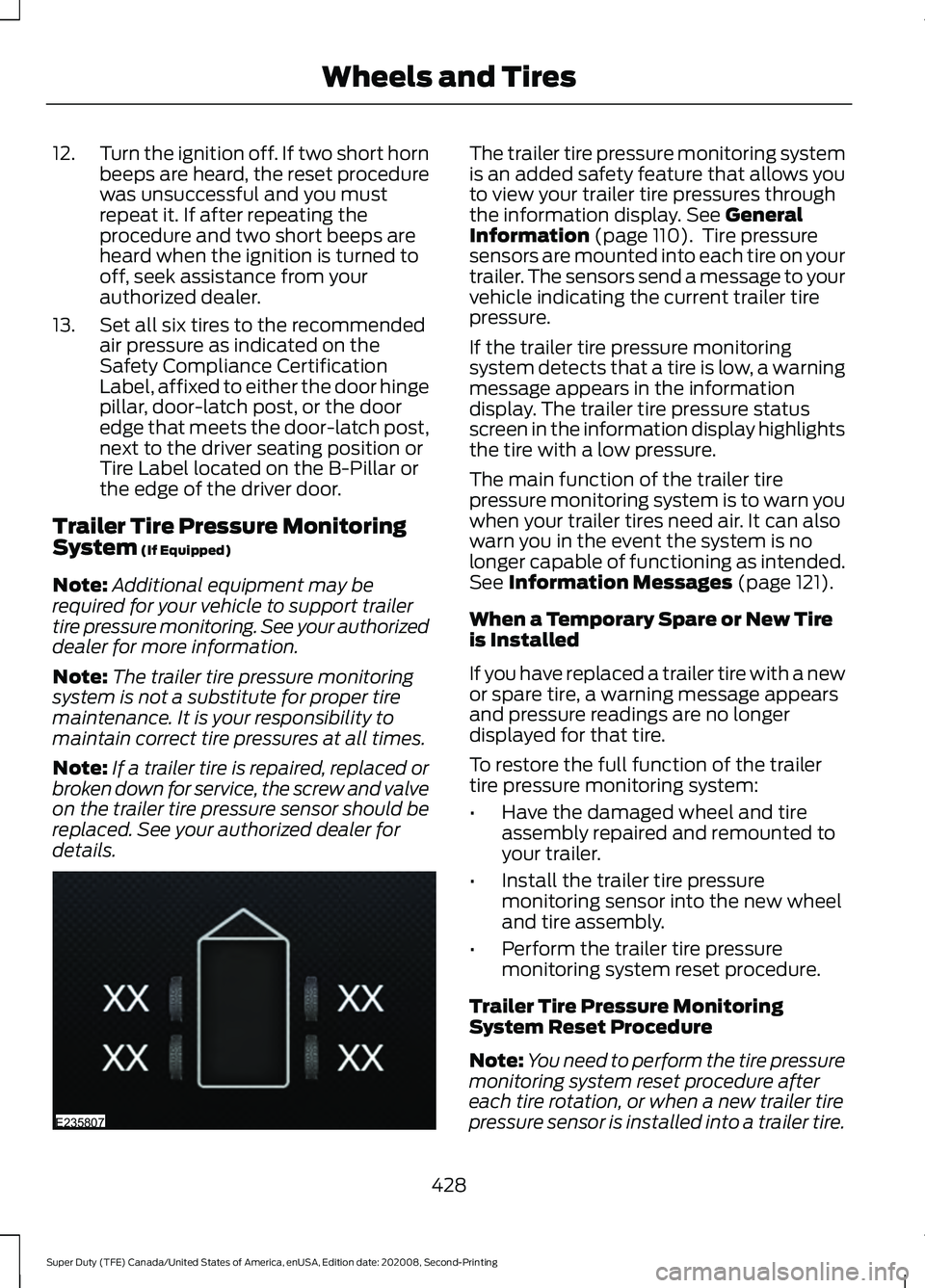
display. The trailer tire pressure status
screen in the information display highlights
the tire with a low pressure.
The main function of the trailer tire
pressure monitoring system is to warn you
when your trailer tires need air. It can also
warn you in the event the system is no
longer capable of functioning as intended.
See
Information Messages (page 121).
When a Temporary Spare or New Tire
is Installed
If you have replaced a trailer tire with a new
or spare tire, a warning message appears
and pressure readings are no longer
displayed for that tire.
To restore the full function of the trailer
tire pressure monitoring system:
• Have the damaged wheel and tire
assembly repaired and remounted to
your trailer.
• Install the trailer tire pressure
monitoring sensor into the new wheel
and tire assembly.
• Perform the trailer tire pressure
monitoring system reset procedure.
Trailer Tire Pressure Monitoring
System Reset Procedure
Note: You need to perform the tire pressure
monitoring system reset procedure after
each tire rotation, or when a new trailer tire
pressure sensor is installed into a trailer tire.
428
Super Duty (TFE) Canada/United States of America, enUSA, Edition date: 202008, Second-Printing Wheels and TiresE235807
Page 432 of 666
The trailer tire pressure monitoring system
can be reset through the menu in the
information display. See General
Information (page 110). Performing the
trailer setup process also resets the trailer
tire pressure monitoring system.
CHANGING A ROAD WHEEL WARNING:
If the tire pressure
monitor sensor becomes damaged it
may not function.
Note: If your vehicle is equipped with the
tire pressure monitoring system, the
indicator light illuminates when the spare
tire is in use. To restore the full function of
the monitoring system, all road wheels
equipped with tire pressure monitoring
sensors must be mounted on the vehicle.
Note: You should only use tire sealants in
roadside emergencies as they may cause
damage to the tire pressure monitoring
system sensor.
If you get a flat tire when driving, do not
apply the brake heavily. Instead, gradually
decrease your speed. Hold the steering
wheel firmly and slowly move to a safe
place on the side of the road.
If your vehicle is equipped with the tire
pressure monitoring system, have a flat
serviced by an authorized dealer in order
to prevent damage to the system sensors.
See
Tire Pressure Monitoring System
(page 421). Replace the spare tire with a
road tire as soon as possible. During
repairing or replacing of the flat tire, have
the authorized dealer inspect the system
sensor for damage. Dissimilar Spare Wheel and Tire
Assembly Information WARNING:
Failure to follow these
guidelines could result in an increased
risk of loss of vehicle control, injury or
death.
If you have a dissimilar spare wheel and
tire, then it is intended for temporary use
only. This means that if you need to use it,
you should replace it as soon as possible
with a road wheel and tire assembly that
is the same size and type as the road tires
and wheels that were originally provided
by Ford. If the dissimilar spare tire or wheel
is damaged, it should be replaced rather
than repaired.
A dissimilar spare wheel and tire assembly
is defined as a spare wheel and tire
assembly that is different in brand, size or
appearance from the road tires and
wheels.
Full-size dissimilar spare
When driving with the full-size dissimilar
spare wheel and tire assembly, do not:
• Exceed
70 mph (113 km/h).
• Use more than one dissimilar spare
wheel and tire assembly at a time.
• Use snow chains on the end of the
vehicle with the dissimilar spare wheel
and tire assembly.
When driving with the full-size dissimilar
spare wheel and tire assembly, 4WD
functionality may be limited. You may
experience the following:
• Additional noise from the transfer case
or other drive components.
• Difficulty shifting out of a mechanically
locked 4WD mode.
429
Super Duty (TFE) Canada/United States of America, enUSA, Edition date: 202008, Second-Printing Wheels and Tires
Page 663 of 666

Switching Rear Occupant Alert System
On and Off - Vehicles With: SYNC
3........................................................................\
162
Semiannual Reminder...................................... 162
Switching Rear Occupant Alert System On and Off - Vehicles With:
SYNC..............................................................163
Semiannual Reminder...................................... 163
Switching Recirculated Air On and Off....................................................................143
Switching the Heated Mirrors On and Off...................................................................144
Switching the Heated Rear Window On and Off..........................................................144
Switching the Heated Wiper Park On and Off...................................................................144
Switching Trail Control On and Off........231
Symbols Glossary
.............................................9
SYNC™ 3.........................................................513
General Information.......................................... 513
SYNC™ 3 Troubleshooting
......................545
Additional Information and
Assistance........................................................ 557
Apps........................................................................\
552
Navigation............................................................. 551
Personal Profiles................................................ 555
Phone..................................................................... 549
Resetting the System....................................... 557
USB and Bluetooth Audio.............................. 546
Voice Recognition.............................................. 545
Wi-Fi Connectivity............................................. 554
SYNC™ Applications and Services.......................................................500
911 Assist.............................................................. 500
SYNC Mobile Apps............................................ 502
SYNC™...........................................................496 General Information......................................... 496
SYNC™ Troubleshooting.........................504
T
Tailgate Lock
.....................................................71
Tailgate Step.....................................................72
Closing the Step.................................................... 73
Opening the Step................................................. 73
Tailgate................................................................71
Technical Specifications See: Capacities and Specifications.............441 Terrain Control
..............................................232
Principle of Operation...................................... 232
The Better Business Bureau (BBB) Auto Line Program (U.S. Only)
.......................334
Tire Care.........................................................404
Glossary of Tire Terminology........................ 405
Information About Uniform Tire Quality Grading............................................................. 404
Information Contained on the Tire Sidewall........................................................... 406
Temperature A B C........................................... 405
Traction AA A B C.............................................. 404
Treadwear............................................................ 404
Tire Pressure Monitoring System............421 Trailer Tire Pressure Monitoring
System.............................................................. 428
Vehicle Tire Pressure Monitoring System............................................................... 421
Tires See: Wheels and Tires..................................... 402
Towing a Trailer
............................................282
Load Placement................................................. 282
Towing Points...............................................330
Towing the Vehicle on Four Wheels...........................................................314
Emergency Towing............................................. 314
Recreational Towing.......................................... 314
Towing..............................................................282
Traction Control
............................................227
Principle of Operation....................................... 227
Trail Control Indicators................................231
Trail Control
.....................................................231
Trailer Reversing Aids.................................283 Conventional Trailer Setup............................ 285
Fifth Wheel and Gooseneck Trailer Setup................................................................. 288
Positioning Your Vehicle and Trailer...........284
Pro Trailer Backup Assist With Trailer Reverse Guidance......................................... 283
Setting Up the System.................................... 285
Troubleshooting - Conventional Trailer................................................................. 292
Troubleshooting - Fifth Wheel and Gooseneck Trailer......................................... 297
Using Pro Trailer Backup Assist................... 289
Using Trailer Reverse Guidance................... 290
Trailer Sway Control
...................................300
660
Super Duty (TFE) Canada/United States of America, enUSA, Edition date: 202008, Second-Printing Index