bluetooth FORD SUPER DUTY 2021 Owner's Manual
[x] Cancel search | Manufacturer: FORD, Model Year: 2021, Model line: SUPER DUTY, Model: FORD SUPER DUTY 2021Pages: 666, PDF Size: 8.48 MB
Page 549 of 666
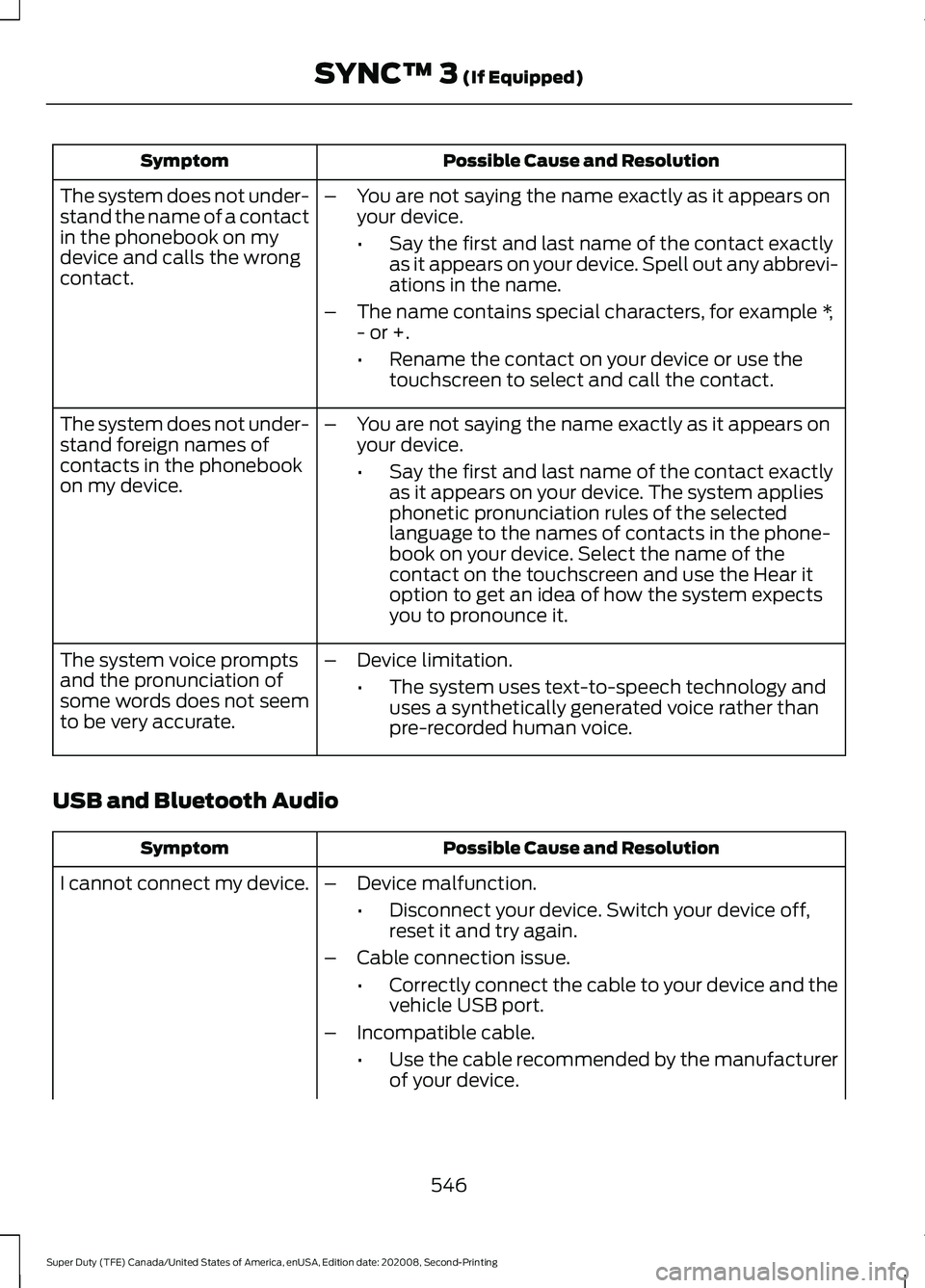
Possible Cause and Resolution
Symptom
–You are not saying the name exactly as it appears on
your device.
•Say the first and last name of the contact exactly
as it appears on your device. Spell out any abbrevi-
ations in the name.
– The name contains special characters, for example *,
- or +.
•Rename the contact on your device or use the
touchscreen to select and call the contact.
The system does not under-
stand the name of a contact
in the phonebook on my
device and calls the wrong
contact.
–You are not saying the name exactly as it appears on
your device.
•Say the first and last name of the contact exactly
as it appears on your device. The system applies
phonetic pronunciation rules of the selected
language to the names of contacts in the phone-
book on your device. Select the name of the
contact on the touchscreen and use the Hear it
option to get an idea of how the system expects
you to pronounce it.
The system does not under-
stand foreign names of
contacts in the phonebook
on my device.
–Device limitation.
•The system uses text-to-speech technology and
uses a synthetically generated voice rather than
pre-recorded human voice.
The system voice prompts
and the pronunciation of
some words does not seem
to be very accurate.
USB and Bluetooth Audio Possible Cause and Resolution
Symptom
I cannot connect my device. –Device malfunction.
•Disconnect your device. Switch your device off,
reset it and try again.
– Cable connection issue.
•Correctly connect the cable to your device and the
vehicle USB port.
– Incompatible cable.
•Use the cable recommended by the manufacturer
of your device.
546
Super Duty (TFE) Canada/United States of America, enUSA, Edition date: 202008, Second-Printing SYNC™ 3 (If Equipped)
Page 550 of 666
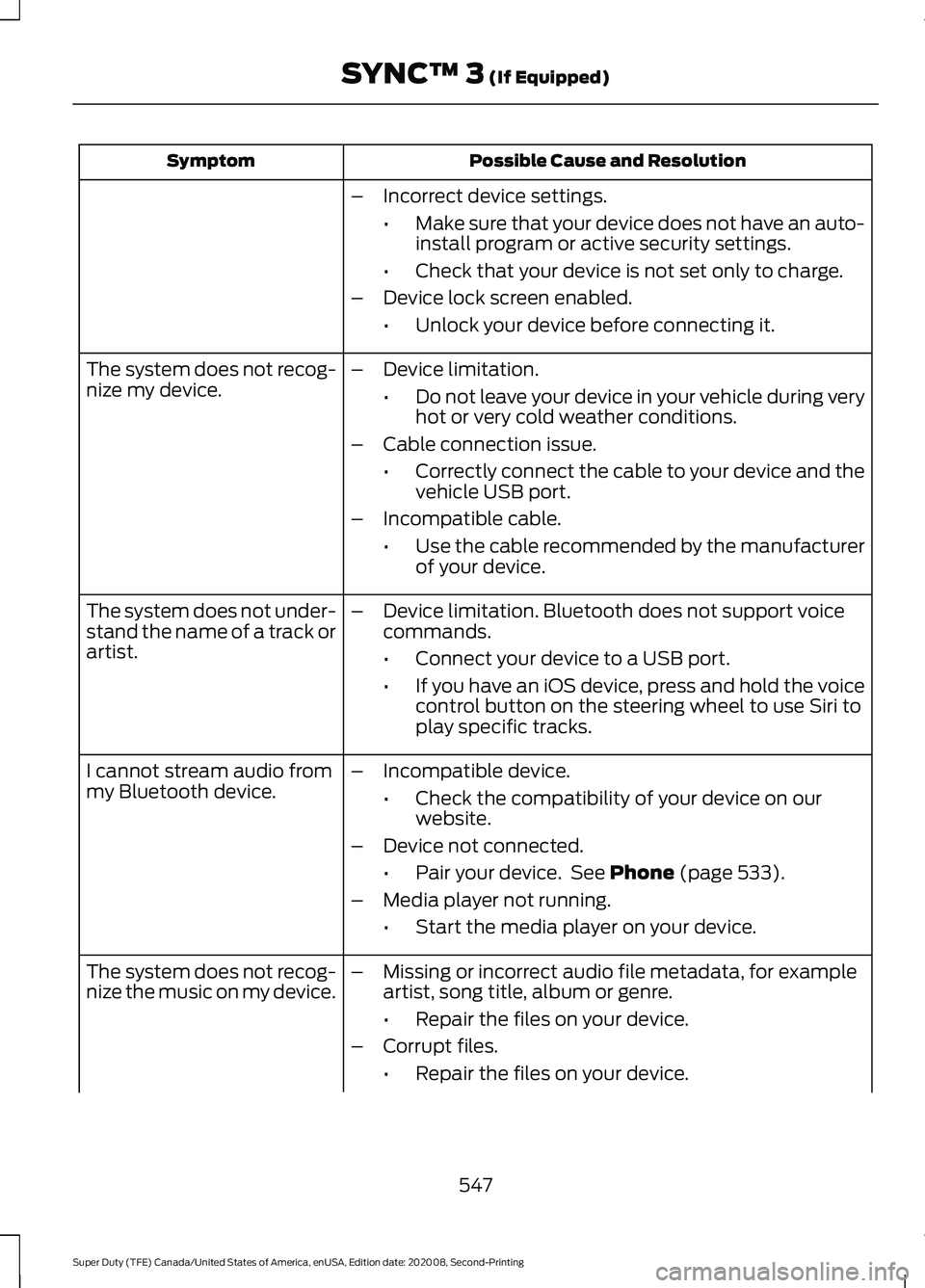
Possible Cause and Resolution
Symptom
–Incorrect device settings.
•Make sure that your device does not have an auto-
install program or active security settings.
• Check that your device is not set only to charge.
– Device lock screen enabled.
•Unlock your device before connecting it.
The system does not recog-
nize my device. –
Device limitation.
•Do not leave your device in your vehicle during very
hot or very cold weather conditions.
– Cable connection issue.
•Correctly connect the cable to your device and the
vehicle USB port.
– Incompatible cable.
•Use the cable recommended by the manufacturer
of your device.
The system does not under-
stand the name of a track or
artist. –
Device limitation. Bluetooth does not support voice
commands.
•Connect your device to a USB port.
• If you have an iOS device, press and hold the voice
control button on the steering wheel to use Siri to
play specific tracks.
I cannot stream audio from
my Bluetooth device. –
Incompatible device.
•Check the compatibility of your device on our
website.
– Device not connected.
•Pair your device. See Phone (page 533).
– Media player not running.
•Start the media player on your device.
The system does not recog-
nize the music on my device. –
Missing or incorrect audio file metadata, for example
artist, song title, album or genre.
•Repair the files on your device.
– Corrupt files.
•Repair the files on your device.
547
Super Duty (TFE) Canada/United States of America, enUSA, Edition date: 202008, Second-Printing SYNC™ 3
(If Equipped)
Page 552 of 666
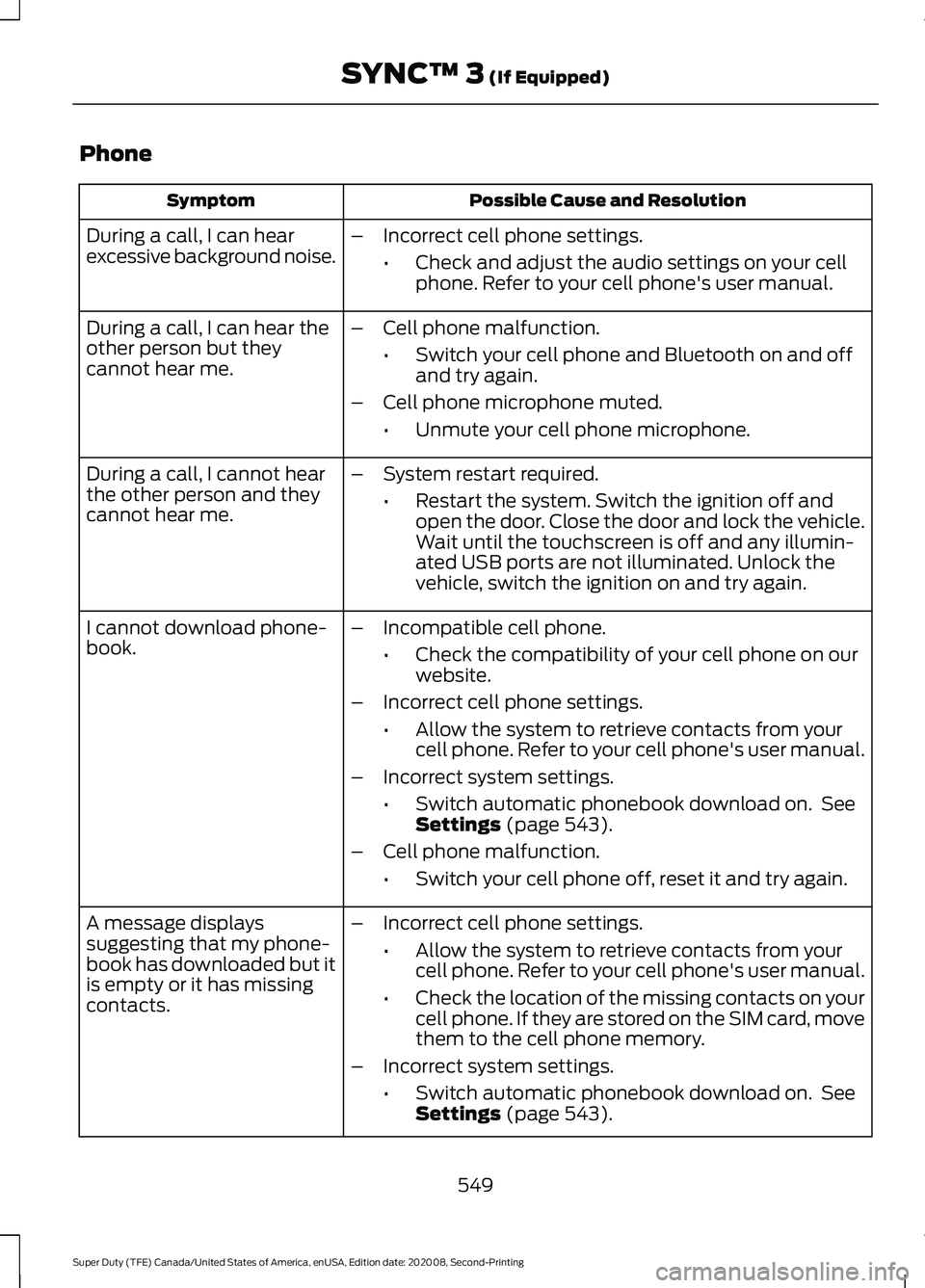
Phone
Possible Cause and Resolution
Symptom
During a call, I can hear
excessive background noise. –
Incorrect cell phone settings.
•Check and adjust the audio settings on your cell
phone. Refer to your cell phone's user manual.
– Cell phone malfunction.
•Switch your cell phone and Bluetooth on and off
and try again.
– Cell phone microphone muted.
•Unmute your cell phone microphone.
During a call, I can hear the
other person but they
cannot hear me.
During a call, I cannot hear
the other person and they
cannot hear me.
–
System restart required.
•Restart the system. Switch the ignition off and
open the door. Close the door and lock the vehicle.
Wait until the touchscreen is off and any illumin-
ated USB ports are not illuminated. Unlock the
vehicle, switch the ignition on and try again.
I cannot download phone-
book. –
Incompatible cell phone.
•Check the compatibility of your cell phone on our
website.
– Incorrect cell phone settings.
•Allow the system to retrieve contacts from your
cell phone. Refer to your cell phone's user manual.
– Incorrect system settings.
•Switch automatic phonebook download on. See
Settings (page 543).
– Cell phone malfunction.
•Switch your cell phone off, reset it and try again.
– Incorrect cell phone settings.
•Allow the system to retrieve contacts from your
cell phone. Refer to your cell phone's user manual.
• Check the location of the missing contacts on your
cell phone. If they are stored on the SIM card, move
them to the cell phone memory.
– Incorrect system settings.
•Switch automatic phonebook download on. See
Settings
(page 543).
A message displays
suggesting that my phone-
book has downloaded but it
is empty or it has missing
contacts.
549
Super Duty (TFE) Canada/United States of America, enUSA, Edition date: 202008, Second-Printing SYNC™ 3
(If Equipped)
Page 555 of 666
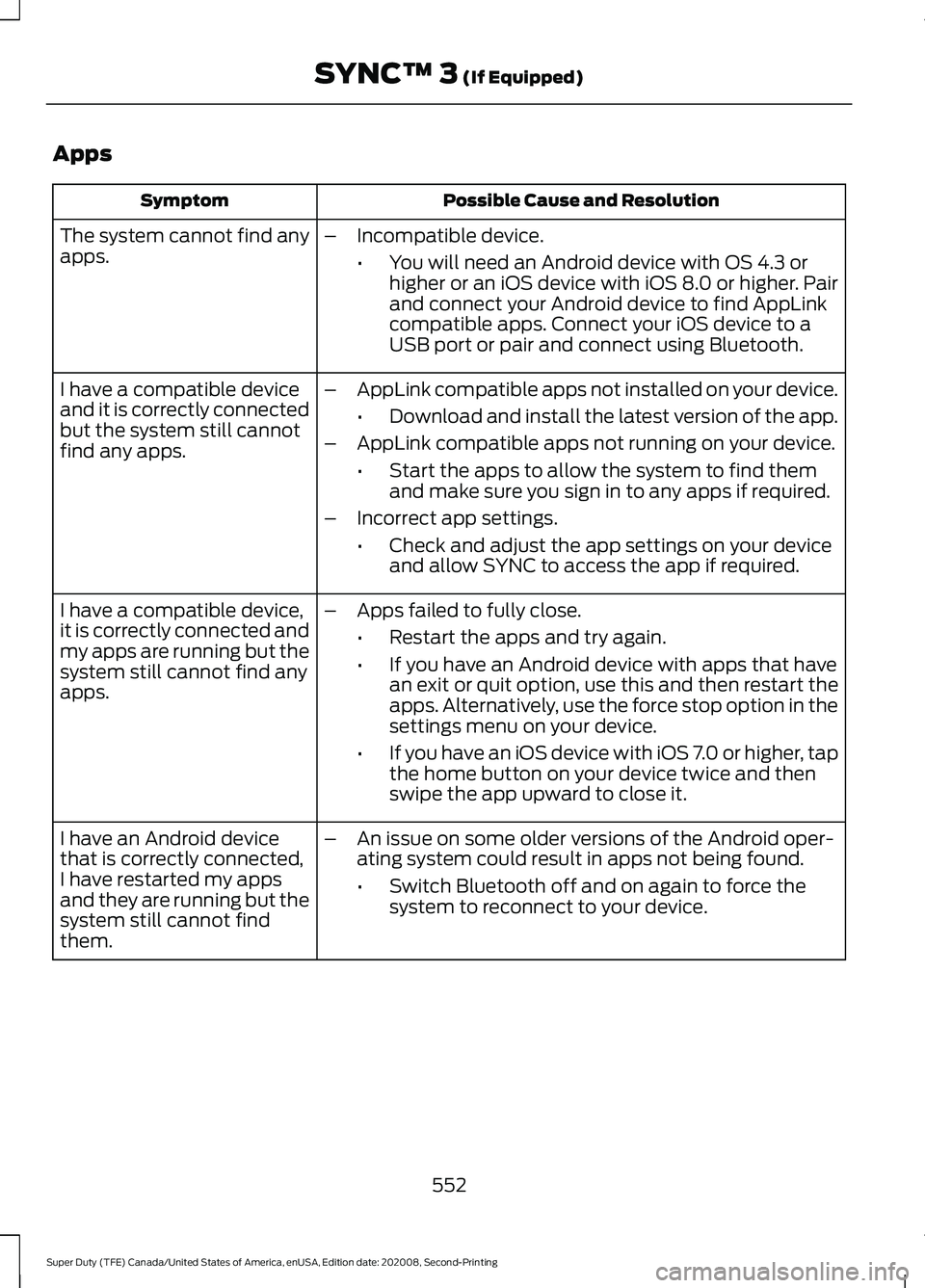
Apps
Possible Cause and Resolution
Symptom
The system cannot find any
apps. –
Incompatible device.
•You will need an Android device with OS 4.3 or
higher or an iOS device with iOS 8.0 or higher. Pair
and connect your Android device to find AppLink
compatible apps. Connect your iOS device to a
USB port or pair and connect using Bluetooth.
I have a compatible device
and it is correctly connected
but the system still cannot
find any apps. –
AppLink compatible apps not installed on your device.
•Download and install the latest version of the app.
– AppLink compatible apps not running on your device.
•Start the apps to allow the system to find them
and make sure you sign in to any apps if required.
– Incorrect app settings.
•Check and adjust the app settings on your device
and allow SYNC to access the app if required.
I have a compatible device,
it is correctly connected and
my apps are running but the
system still cannot find any
apps. –
Apps failed to fully close.
•Restart the apps and try again.
• If you have an Android device with apps that have
an exit or quit option, use this and then restart the
apps. Alternatively, use the force stop option in the
settings menu on your device.
• If you have an iOS device with iOS 7.0 or higher, tap
the home button on your device twice and then
swipe the app upward to close it.
I have an Android device
that is correctly connected,
I have restarted my apps
and they are running but the
system still cannot find
them. –
An issue on some older versions of the Android oper-
ating system could result in apps not being found.
•Switch Bluetooth off and on again to force the
system to reconnect to your device.
552
Super Duty (TFE) Canada/United States of America, enUSA, Edition date: 202008, Second-Printing SYNC™ 3 (If Equipped)
Page 556 of 666
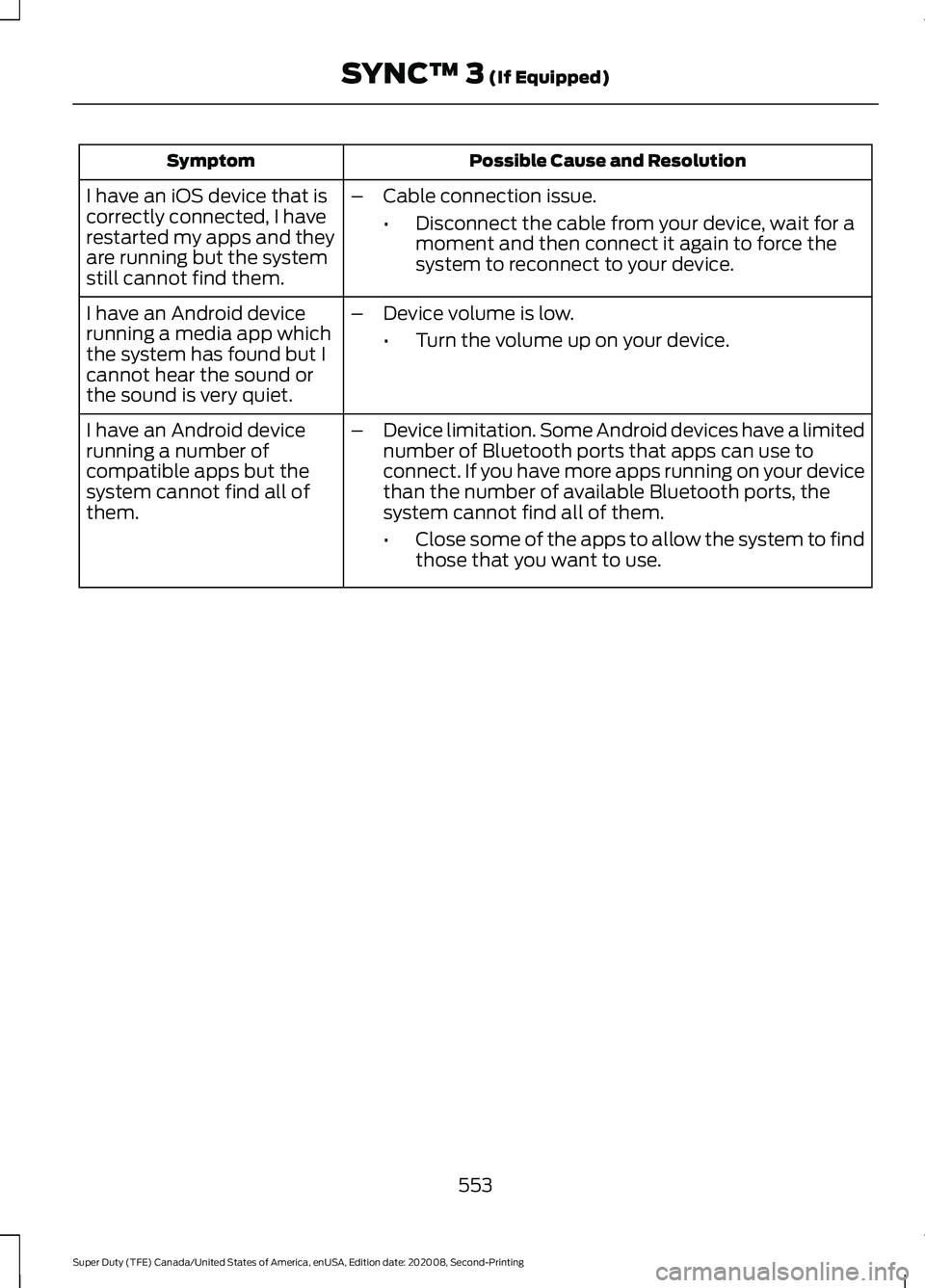
Possible Cause and Resolution
Symptom
I have an iOS device that is
correctly connected, I have
restarted my apps and they
are running but the system
still cannot find them. –
Cable connection issue.
•Disconnect the cable from your device, wait for a
moment and then connect it again to force the
system to reconnect to your device.
I have an Android device
running a media app which
the system has found but I
cannot hear the sound or
the sound is very quiet. –
Device volume is low.
•Turn the volume up on your device.
I have an Android device
running a number of
compatible apps but the
system cannot find all of
them. –
Device limitation. Some Android devices have a limited
number of Bluetooth ports that apps can use to
connect. If you have more apps running on your device
than the number of available Bluetooth ports, the
system cannot find all of them.
•Close some of the apps to allow the system to find
those that you want to use.
553
Super Duty (TFE) Canada/United States of America, enUSA, Edition date: 202008, Second-Printing SYNC™ 3 (If Equipped)
Page 621 of 666
ELECTROMAGNETIC
COMPATIBILITY
WARNING: Do not place objects
or mount equipment on or near the
airbag cover, on the side of the front or
rear seatbacks, or in areas that may
come into contact with a deploying
airbag. Failure to follow these
instructions may increase the risk of
personal injury in the event of a crash. WARNING: Do not fasten antenna
cables to vehicle wiring, fuel pipes and
brake pipes. WARNING:
Keep antenna and
power cables at least 4 in (10 cm) from
any electronic modules and airbags. Note:
We test and certify your vehicle to
meet electromagnetic compatibility
legislation. It is your responsibility to make
sure that any equipment an authorized
dealer installs on your vehicle complies with
applicable local legislation and other
requirements. Installation of some
aftermarket electronic devices could
degrade the performance of vehicle
functions, which use radio frequency signals
such as broadcast radio receiver, tire
pressure monitoring system, push button
start, Bluetooth connectivity or satellite
navigation.
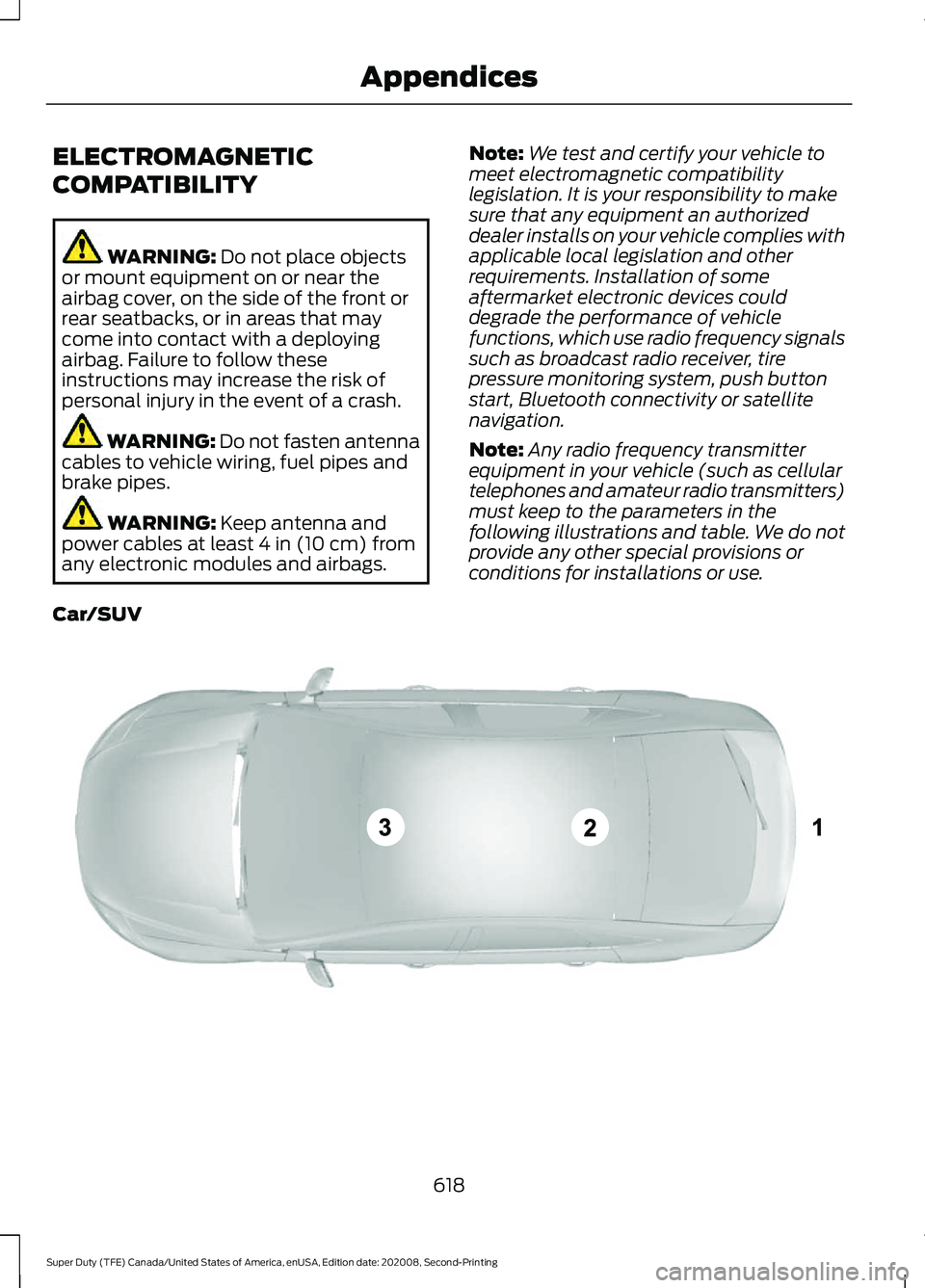
Note: Any radio frequency transmitter
equipment in your vehicle (such as cellular
telephones and amateur radio transmitters)
must keep to the parameters in the
following illustrations and table. We do not
provide any other special provisions or
conditions for installations or use.
Car/SUV 618
Super Duty (TFE) Canada/United States of America, enUSA, Edition date: 202008, Second-Printing AppendicesE239120
Page 655 of 666
Severe Climates.................................................
365
Engine Coolant Check - 6.7L Diesel............................................................368
Adding Coolant.................................................. 368
Coolant Change................................................... 371
Engine and Secondary Cooling System Refill Procedure............................................. 370
Engine-driven Cooling Fan.............................. 371
Recycled Coolant............................................... 370
Severe Climates................................................... 371
Engine Coolant Check - 7.3L.....................371 Adding Coolant................................................... 372
Coolant Change.................................................. 374
Engine Coolant Temperature Management.................................................. 375
Engine-driven Cooling Fan (Fan Clutch).............................................................. 374
Fail-Safe Cooling................................................ 374
Recycled Coolant............................................... 373
Severe Climates.................................................. 374
Engine Emission Control...........................194
Engine Idle Shutdown.................................182
Engine Immobilizer See: Passive Anti-Theft System..................... 76
Engine Oil Capacity and Specification - 6.2L................................................................449
Alternative Engine Oil for Extremely Cold Climates ........................................................... 450
Engine Oil Capacity and Specification - 6.7L Diesel...................................................450
Alternative Engine Oil for Biodiesel Fuel Blends (B20 Max)........................................ 452
Alternative Engine Oil for Extremely Cold Climates........................................................... 452
Alternative Engine Oil for Severe Duty Service.............................................................. 453
Engine Oil............................................................. 450
Engine Oil Capacity and Specification - 7.3L.................................................................453
Alternative Engine Oil for Extremely Cold Climates........................................................... 454
Engine Oil Check - 6.2L..............................352 Adding Engine Oil.............................................. 353
Engine Oil Check - 6.7L Diesel................354 Adding Engine Oil.............................................. 354
Engine lubrication for severe service operation ......................................................... 355Engine Oil Check - 7.3L..............................355
Adding Engine Oil.............................................. 355
Engine Oil Dipstick - 6.2L..........................352
Engine Oil Dipstick - 6.7L Diesel.............352
Engine Oil Dipstick - 7.3L...........................352
Engine Specifications - 6.2L.....................441 Drivebelt Routing................................................ 441
Engine Specifications - 6.7L Diesel.......441 Drivebelt Routing............................................... 442
Engine Specifications - 7.3L.....................442 Drivebelt Routing............................................... 443
Entertainment................................................521 AM/FM Radio...................................................... 522
Apps....................................................................... 530
Bluetooth Stereo or USB................................ 529
CD........................................................................\
.... 528
HD Radio ™ Information (If
Available)......................................................... 525
SiriusXM® Satellite Radio (If Activated)........................................................ 523
Sources.................................................................. 522
Supported Media Players, Formats and Metadata Information................................ 530
USB Ports............................................................. 530
Environment.....................................................19
Essential Towing Checks..........................305 Before Towing a Trailer..................................... 313
Dynamic Hitching Using the Rear View Camera System............................................ 306
Hitches................................................................... 307
Integrated Trailer Brake Controller...............310
Launching or Retrieving a Boat or Personal Watercraft (PWC)......................................... 314
Safety Chains..................................................... 309
Trailer Brakes...................................................... 309
Trailer Lamps........................................................ 313
Trailer Towing Connector............................... 305
When Towing a Trailer...................................... 313
Event Data Recording See: Data Recording.............................................. 11
Export Unique Options
.................................18
Extending the Remote Start Duration........................................................140
Exterior Mirrors
................................................96
Blind Spot Information System...................... 99
Clearance Lamps ................................................ 98
Direction Indicator Mirrors ............................... 98
Fold-Away Exterior Mirrors............................... 96
652
Super Duty (TFE) Canada/United States of America, enUSA, Edition date: 202008, Second-Printing Index
Page 661 of 666

Switching the Heated Seat Settings On and
Off........................................................................\
. 141
Switching the Heated Steering Wheel Settings On and Off....................................... 141
Removing the Tailgate..................................72
Repairing Minor Paint Damage..............399
Replacement Parts Recommendation........................................16
Collision Repairs.................................................... 16
Scheduled Maintenance and Mechanical Repairs................................................................. 16
Warranty on Replacement Parts.................... 16
Replacing a Lost Key or Remote Control
............................................................60
Replacing the Cabin Air Filter..................150
Reporting Safety Defects (Canada Only)..............................................................337
Reporting Safety Defects (U.S. Only)..............................................................337
Resuming the Set Speed..........................243
Roadside Assistance
..................................325
Vehicles Sold in Canada: Getting Roadside
Assistance....................................................... 326
Vehicles Sold in the United States: Getting Roadside Assistance................................... 325
Vehicles Sold in the United States: Using Roadside Assistance................................... 325
Roadside Emergencies..............................325
Running-In See: Breaking-In................................................. 320
Running Out of Fuel....................................189
S
Safety Canopy ™
.............................................52
Safety Precautions......................................184
Satellite Radio
..............................................484
Satellite Radio Electronic Serial Number
(ESN)................................................................ 485
Satellite Radio Reception Factors..............485
SiriusXM Satellite Radio Service.................485
Troubleshooting................................................ 486
Scheduled Maintenance
..........................565
Seatbelt Extensions......................................44
Seatbelt Height Adjustment......................42
Seatbelt Reminder........................................43
Belt-Minder™........................................................ 43Seatbelts...........................................................38
Principle of Operation........................................ 38
Seatbelt Warning Lamp and Indicator Chime...............................................................42
Conditions of operation..................................... 42
Seats...................................................................151
Security..............................................................76
Selective Catalytic Reductant System - Diesel..............................................................197
Contaminated Diesel Exhaust Fluid or Inoperative Selective Catalytic Reduction
System............................................................... 201
Diesel Exhaust Fluid Guidelines and Information..................................................... 200
Diesel Exhaust Fluid Level............................... 197
Diesel Exhaust Fluid Warning Messages and Vehicle Operations............................... 199
Filling the Diesel Exhaust Fluid Tank..........198
Settings...........................................................543 911 Assist............................................................... 543
Ambient Lighting............................................... 544
Audio...................................................................... 543
Automatic Updates.......................................... 543
Bluetooth.............................................................. 543
Charge Settings................................................. 544
Clock....................................................................... 543
Display................................................................... 544
Driver Assist......................................................... 543
FordPass............................................................... 543
General.................................................................. 543
Message Center................................................. 544
Mobile Apps......................................................... 543
Multi Contour Seats.......................................... 544
Navigation............................................................ 544
Personal Profiles................................................ 544
Phone..................................................................... 543
Seats...................................................................... 544
Sound..................................................................... 543
Valet Mode........................................................... 544
Vehicle................................................................... 543
Voice Control....................................................... 544
Setting the Blower Motor Speed............144
Setting the Cruise Control Speed..........242 Changing the Set Speed................................. 242
Setting the Temperature...........................144
Setting the Trail Control Speed...............231
Side Airbags......................................................51
Sitting in the Correct Position...................151
658
Super Duty (TFE) Canada/United States of America, enUSA, Edition date: 202008, Second-Printing Index
Page 663 of 666

Switching Rear Occupant Alert System
On and Off - Vehicles With: SYNC
3........................................................................\
162
Semiannual Reminder...................................... 162
Switching Rear Occupant Alert System On and Off - Vehicles With:
SYNC..............................................................163
Semiannual Reminder...................................... 163
Switching Recirculated Air On and Off....................................................................143
Switching the Heated Mirrors On and Off...................................................................144
Switching the Heated Rear Window On and Off..........................................................144
Switching the Heated Wiper Park On and Off...................................................................144
Switching Trail Control On and Off........231
Symbols Glossary
.............................................9
SYNC™ 3.........................................................513
General Information.......................................... 513
SYNC™ 3 Troubleshooting
......................545
Additional Information and
Assistance........................................................ 557
Apps........................................................................\
552
Navigation............................................................. 551
Personal Profiles................................................ 555
Phone..................................................................... 549
Resetting the System....................................... 557
USB and Bluetooth Audio.............................. 546
Voice Recognition.............................................. 545
Wi-Fi Connectivity............................................. 554
SYNC™ Applications and Services.......................................................500
911 Assist.............................................................. 500
SYNC Mobile Apps............................................ 502
SYNC™...........................................................496 General Information......................................... 496
SYNC™ Troubleshooting.........................504
T
Tailgate Lock
.....................................................71
Tailgate Step.....................................................72
Closing the Step.................................................... 73
Opening the Step................................................. 73
Tailgate................................................................71
Technical Specifications See: Capacities and Specifications.............441 Terrain Control
..............................................232
Principle of Operation...................................... 232
The Better Business Bureau (BBB) Auto Line Program (U.S. Only)
.......................334
Tire Care.........................................................404
Glossary of Tire Terminology........................ 405
Information About Uniform Tire Quality Grading............................................................. 404
Information Contained on the Tire Sidewall........................................................... 406
Temperature A B C........................................... 405
Traction AA A B C.............................................. 404
Treadwear............................................................ 404
Tire Pressure Monitoring System............421 Trailer Tire Pressure Monitoring
System.............................................................. 428
Vehicle Tire Pressure Monitoring System............................................................... 421
Tires See: Wheels and Tires..................................... 402
Towing a Trailer
............................................282
Load Placement................................................. 282
Towing Points...............................................330
Towing the Vehicle on Four Wheels...........................................................314
Emergency Towing............................................. 314
Recreational Towing.......................................... 314
Towing..............................................................282
Traction Control
............................................227
Principle of Operation....................................... 227
Trail Control Indicators................................231
Trail Control
.....................................................231
Trailer Reversing Aids.................................283 Conventional Trailer Setup............................ 285
Fifth Wheel and Gooseneck Trailer Setup................................................................. 288
Positioning Your Vehicle and Trailer...........284
Pro Trailer Backup Assist With Trailer Reverse Guidance......................................... 283
Setting Up the System.................................... 285
Troubleshooting - Conventional Trailer................................................................. 292
Troubleshooting - Fifth Wheel and Gooseneck Trailer......................................... 297
Using Pro Trailer Backup Assist................... 289
Using Trailer Reverse Guidance................... 290
Trailer Sway Control
...................................300
660
Super Duty (TFE) Canada/United States of America, enUSA, Edition date: 202008, Second-Printing Index