fuel FORD SUPER DUTY 2021 Owner's Manual
[x] Cancel search | Manufacturer: FORD, Model Year: 2021, Model line: SUPER DUTY, Model: FORD SUPER DUTY 2021Pages: 666, PDF Size: 8.48 MB
Page 116 of 666
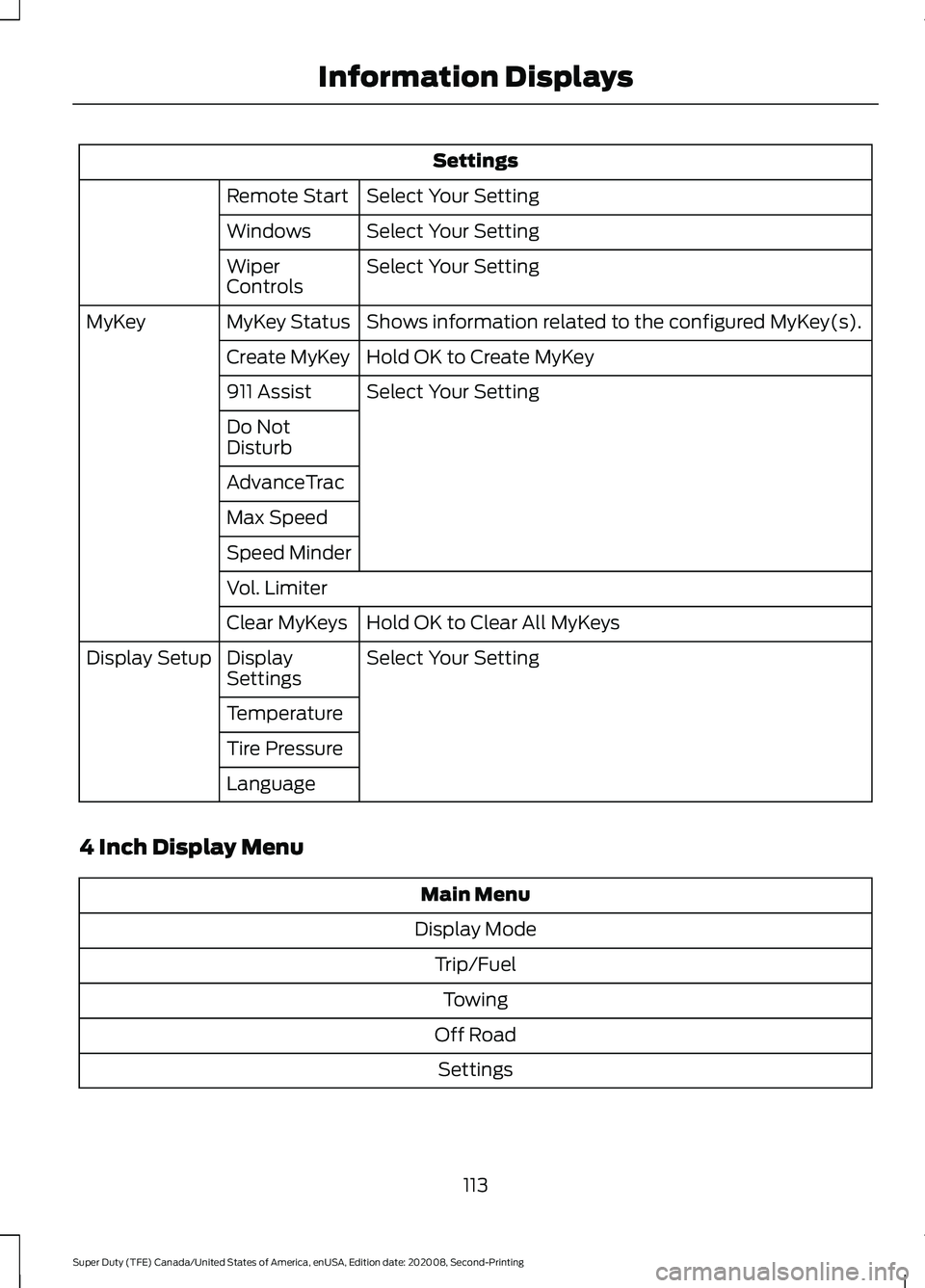
Settings
Select Your Setting
Remote Start
Select Your Setting
Windows
Select Your Setting
Wiper
Controls
Shows information related to the configured MyKey(s).
MyKey Status
MyKey
Hold OK to Create MyKey
Create MyKey
Select Your Setting
911 Assist
Do Not
Disturb
AdvanceTrac
Max Speed
Speed Minder
Vol. Limiter
Hold OK to Clear All MyKeys
Clear MyKeys
Select Your Setting
Display
Settings
Display Setup
Temperature
Tire Pressure
Language
4 Inch Display Menu Main Menu
Display Mode Trip/FuelTowing
Off Road Settings
113
Super Duty (TFE) Canada/United States of America, enUSA, Edition date: 202008, Second-Printing Information Displays
Page 117 of 666
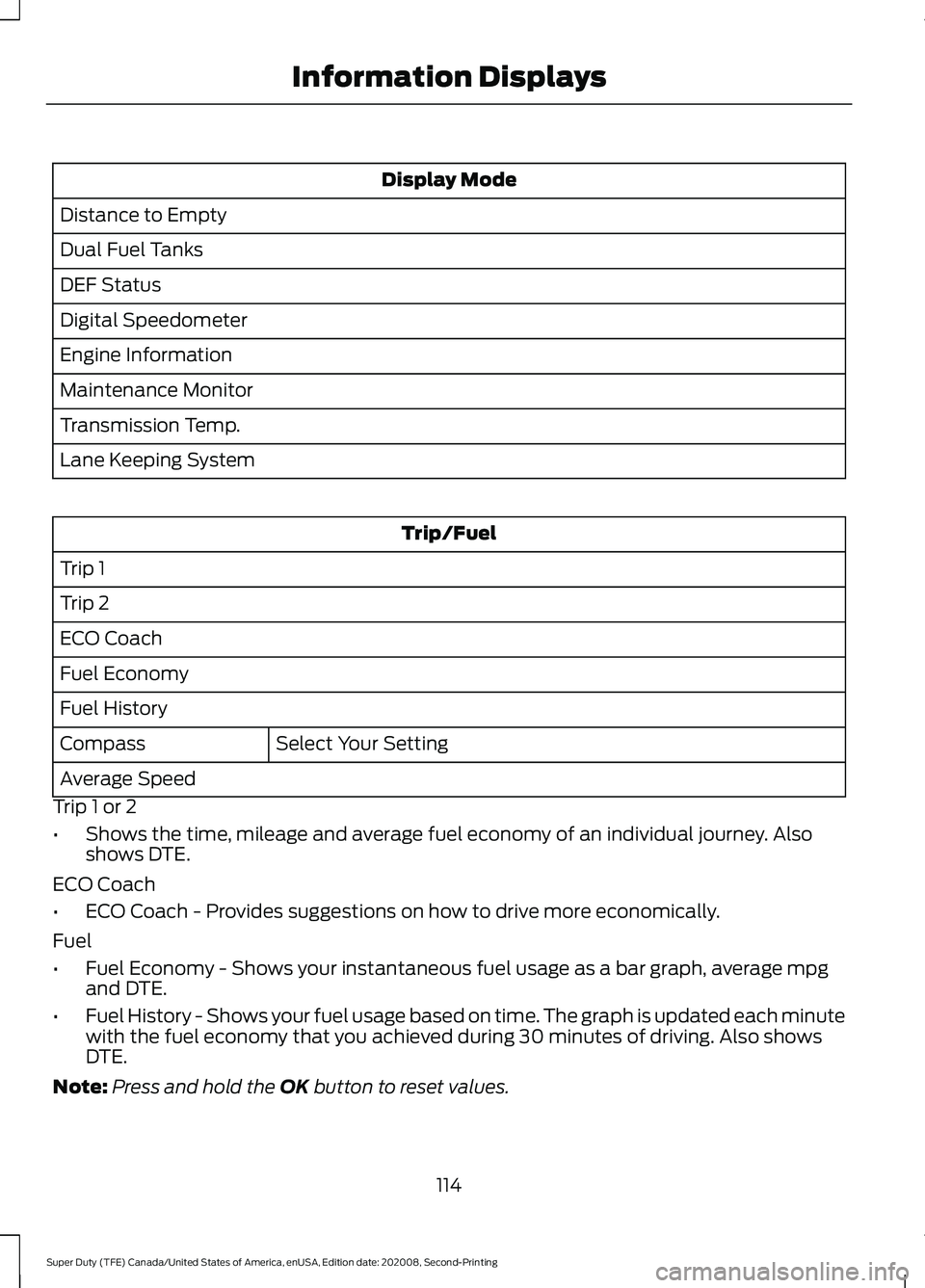
Display Mode
Distance to Empty
Dual Fuel Tanks
DEF Status
Digital Speedometer
Engine Information
Maintenance Monitor
Transmission Temp.
Lane Keeping System Trip/Fuel
Trip 1
Trip 2
ECO Coach
Fuel Economy
Fuel History Select Your Setting
Compass
Average Speed
Trip 1 or 2
• Shows the time, mileage and average fuel economy of an individual journey. Also
shows DTE.
ECO Coach
• ECO Coach - Provides suggestions on how to drive more economically.
Fuel
• Fuel Economy - Shows your instantaneous fuel usage as a bar graph, average mpg
and DTE.
• Fuel History - Shows your fuel usage based on time. The graph is updated each minute
with the fuel economy that you achieved during 30 minutes of driving. Also shows
DTE.
Note: Press and hold the OK button to reset values.
114
Super Duty (TFE) Canada/United States of America, enUSA, Edition date: 202008, Second-Printing Information Displays
Page 120 of 666
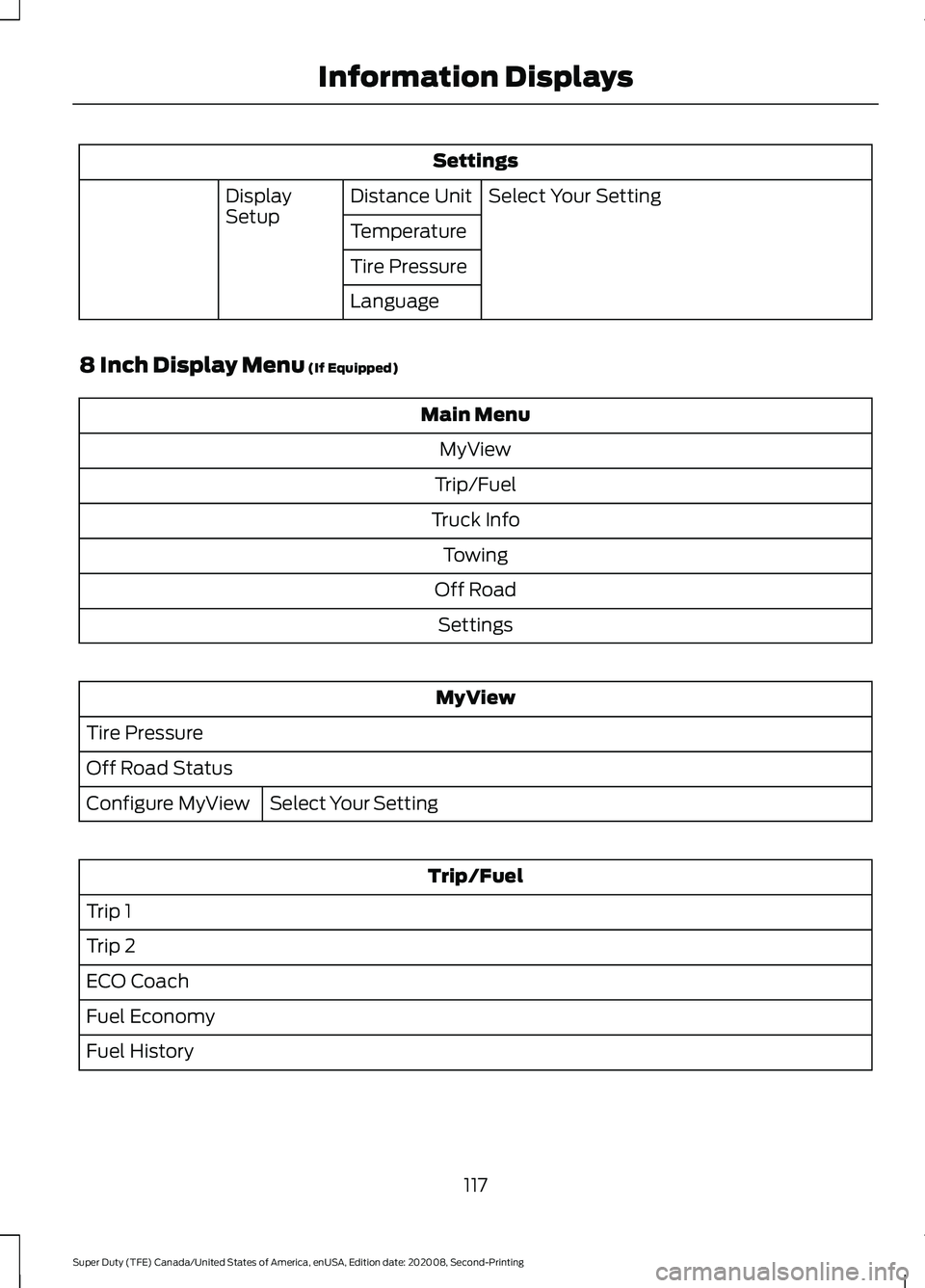
Settings
Select Your Setting
Distance Unit
Display
Setup
Temperature
Tire Pressure
Language
8 Inch Display Menu (If Equipped) Main Menu
MyView
Trip/Fuel
Truck Info Towing
Off Road Settings MyView
Tire Pressure
Off Road Status Select Your Setting
Configure MyView Trip/Fuel
Trip 1
Trip 2
ECO Coach
Fuel Economy
Fuel History
117
Super Duty (TFE) Canada/United States of America, enUSA, Edition date: 202008, Second-Printing Information Displays
Page 121 of 666
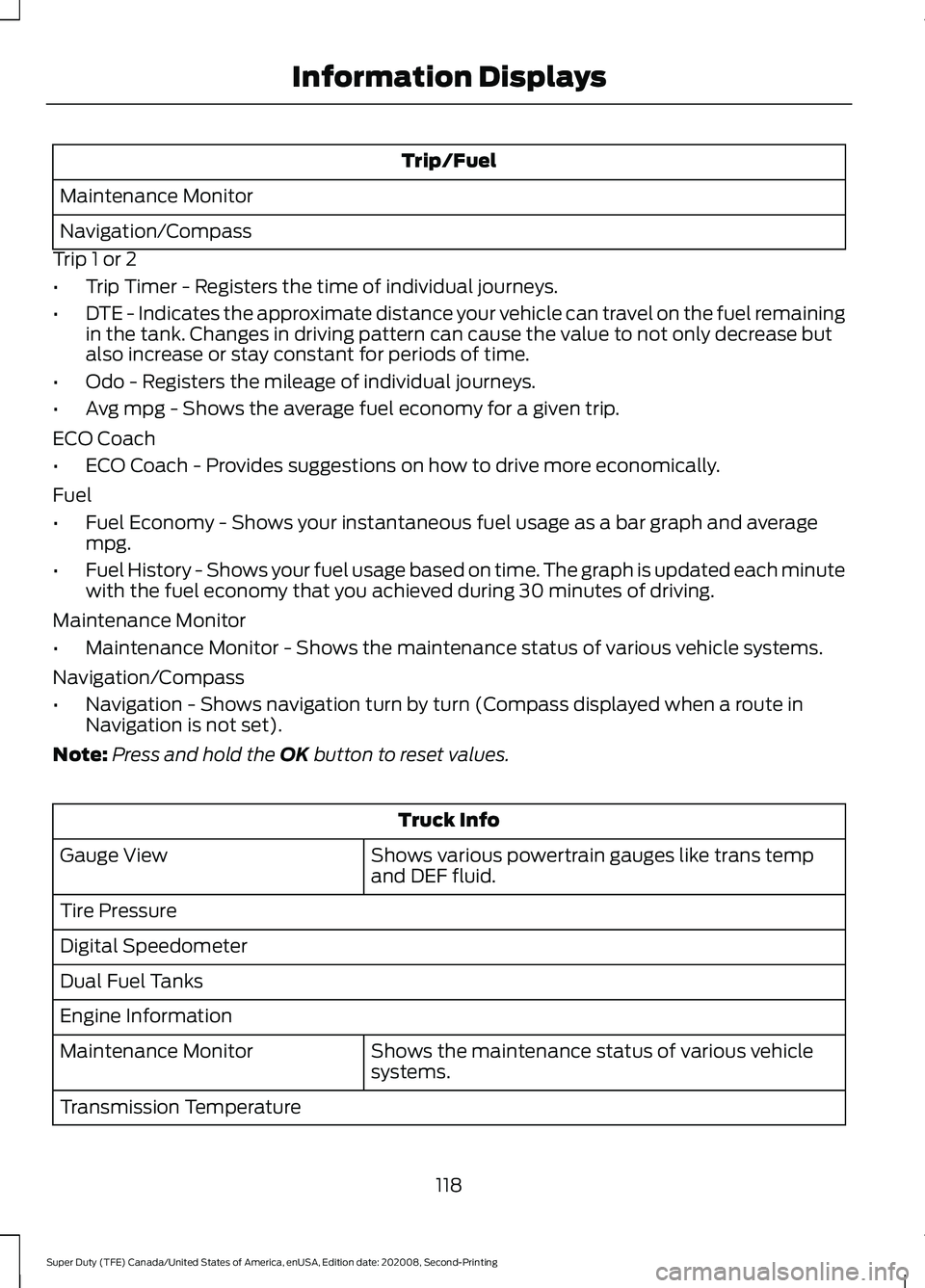
Trip/Fuel
Maintenance Monitor
Navigation/Compass
Trip 1 or 2
• Trip Timer - Registers the time of individual journeys.
• DTE - Indicates the approximate distance your vehicle can travel on the fuel remaining
in the tank. Changes in driving pattern can cause the value to not only decrease but
also increase or stay constant for periods of time.
• Odo - Registers the mileage of individual journeys.
• Avg mpg - Shows the average fuel economy for a given trip.
ECO Coach
• ECO Coach - Provides suggestions on how to drive more economically.
Fuel
• Fuel Economy - Shows your instantaneous fuel usage as a bar graph and average
mpg.
• Fuel History - Shows your fuel usage based on time. The graph is updated each minute
with the fuel economy that you achieved during 30 minutes of driving.
Maintenance Monitor
• Maintenance Monitor - Shows the maintenance status of various vehicle systems.
Navigation/Compass
• Navigation - Shows navigation turn by turn (Compass displayed when a route in
Navigation is not set).
Note: Press and hold the OK button to reset values. Truck Info
Shows various powertrain gauges like trans temp
and DEF fluid.
Gauge View
Tire Pressure
Digital Speedometer
Dual Fuel Tanks
Engine Information
Shows the maintenance status of various vehicle
systems.
Maintenance Monitor
Transmission Temperature
118
Super Duty (TFE) Canada/United States of America, enUSA, Edition date: 202008, Second-Printing Information Displays
Page 127 of 666
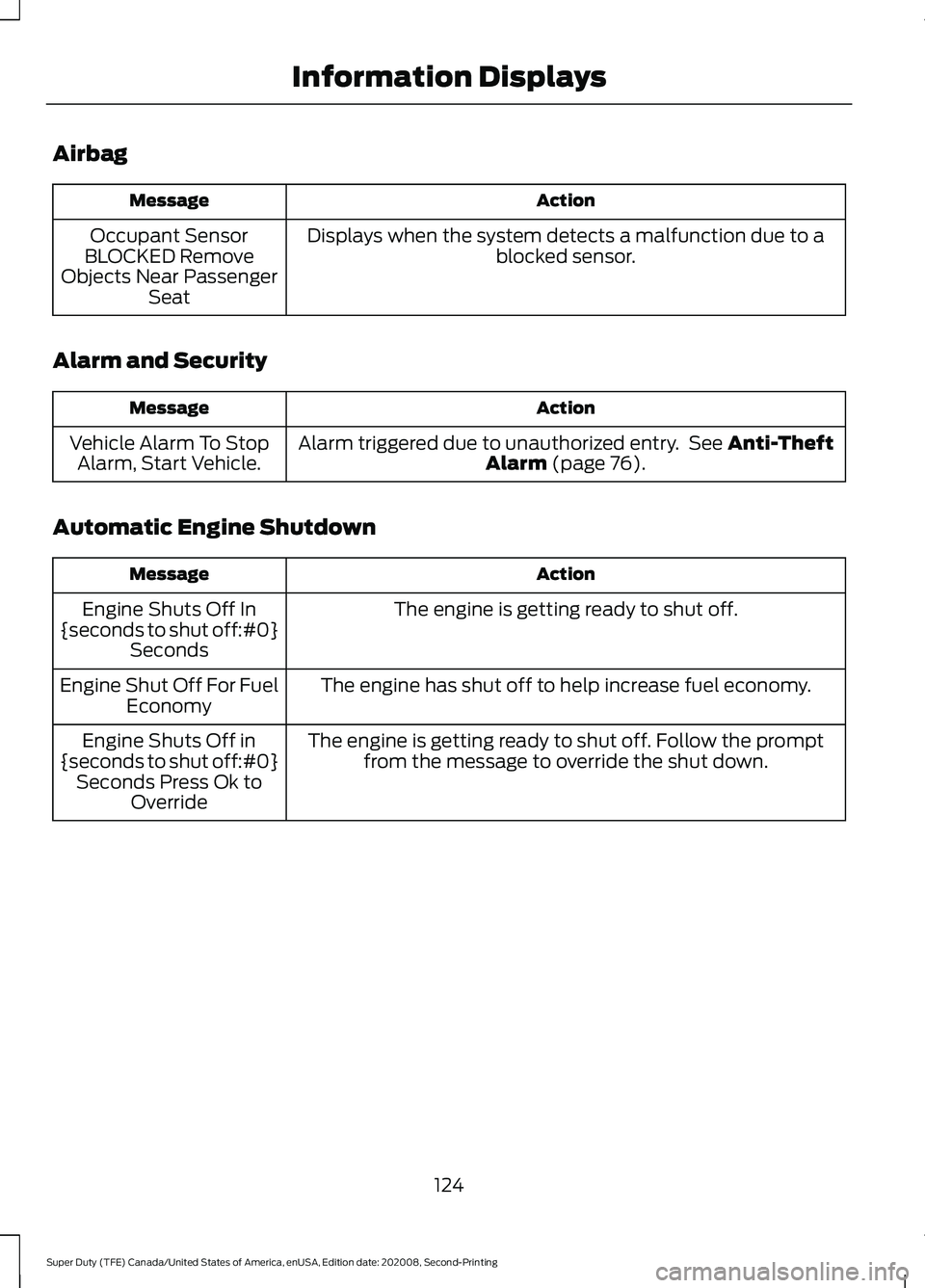
Airbag
Action
Message
Displays when the system detects a malfunction due to a blocked sensor.
Occupant Sensor
BLOCKED Remove
Objects Near Passenger Seat
Alarm and Security Action
Message
Alarm triggered due to unauthorized entry. See Anti-Theft
Alarm (page 76).
Vehicle Alarm To Stop
Alarm, Start Vehicle.
Automatic Engine Shutdown Action
Message
The engine is getting ready to shut off.
Engine Shuts Off In
{seconds to shut off:#0} Seconds
The engine has shut off to help increase fuel economy.
Engine Shut Off For Fuel
Economy
The engine is getting ready to shut off. Follow the promptfrom the message to override the shut down.
Engine Shuts Off in
{seconds to shut off:#0} Seconds Press Ok to Override
124
Super Duty (TFE) Canada/United States of America, enUSA, Edition date: 202008, Second-Printing Information Displays
Page 131 of 666
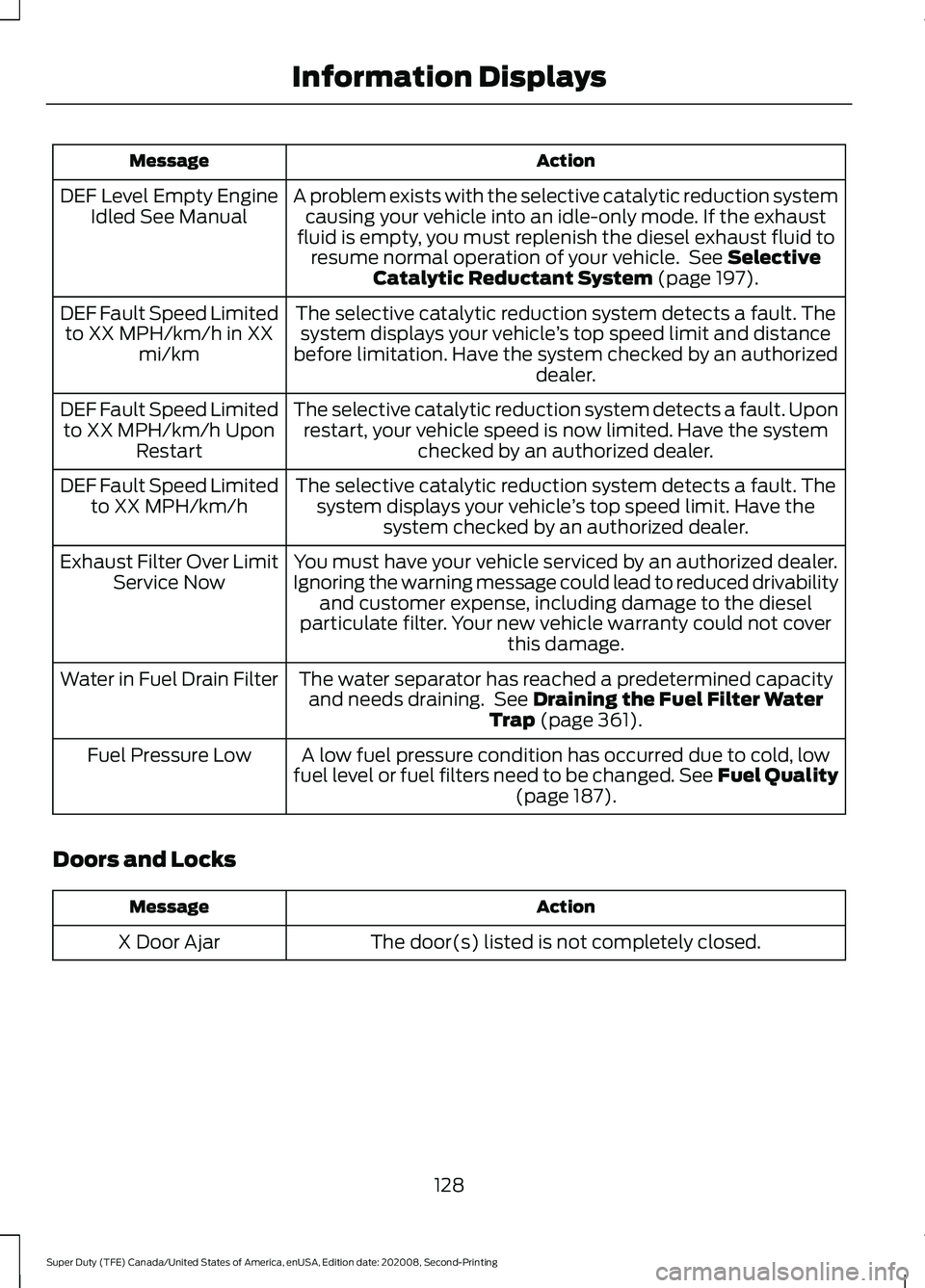
Action
Message
A problem exists with the selective catalytic reduction systemcausing your vehicle into an idle-only mode. If the exhaust
fluid is empty, you must replenish the diesel exhaust fluid to resume normal operation of your vehicle. See Selective
Catalytic Reductant System (page 197).
DEF Level Empty Engine
Idled See Manual
The selective catalytic reduction system detects a fault. Thesystem displays your vehicle ’s top speed limit and distance
before limitation. Have the system checked by an authorized dealer.
DEF Fault Speed Limited
to XX MPH/km/h in XX mi/km
The selective catalytic reduction system detects a fault. Uponrestart, your vehicle speed is now limited. Have the system checked by an authorized dealer.
DEF Fault Speed Limited
to XX MPH/km/h Upon Restart
The selective catalytic reduction system detects a fault. Thesystem displays your vehicle ’s top speed limit. Have the
system checked by an authorized dealer.
DEF Fault Speed Limited
to XX MPH/km/h
You must have your vehicle serviced by an authorized dealer.
Ignoring the warning message could lead to reduced drivability and customer expense, including damage to the diesel
particulate filter. Your new vehicle warranty could not cover this damage.
Exhaust Filter Over Limit
Service Now
The water separator has reached a predetermined capacityand needs draining. See
Draining the Fuel Filter Water
Trap (page 361).
Water in Fuel Drain Filter
A low fuel pressure condition has occurred due to cold, low
fuel level or fuel filters need to be changed. See Fuel Quality (page
187).
Fuel Pressure Low
Doors and Locks Action
Message
The door(s) listed is not completely closed.
X Door Ajar
128
Super Duty (TFE) Canada/United States of America, enUSA, Edition date: 202008, Second-Printing Information Displays
Page 133 of 666
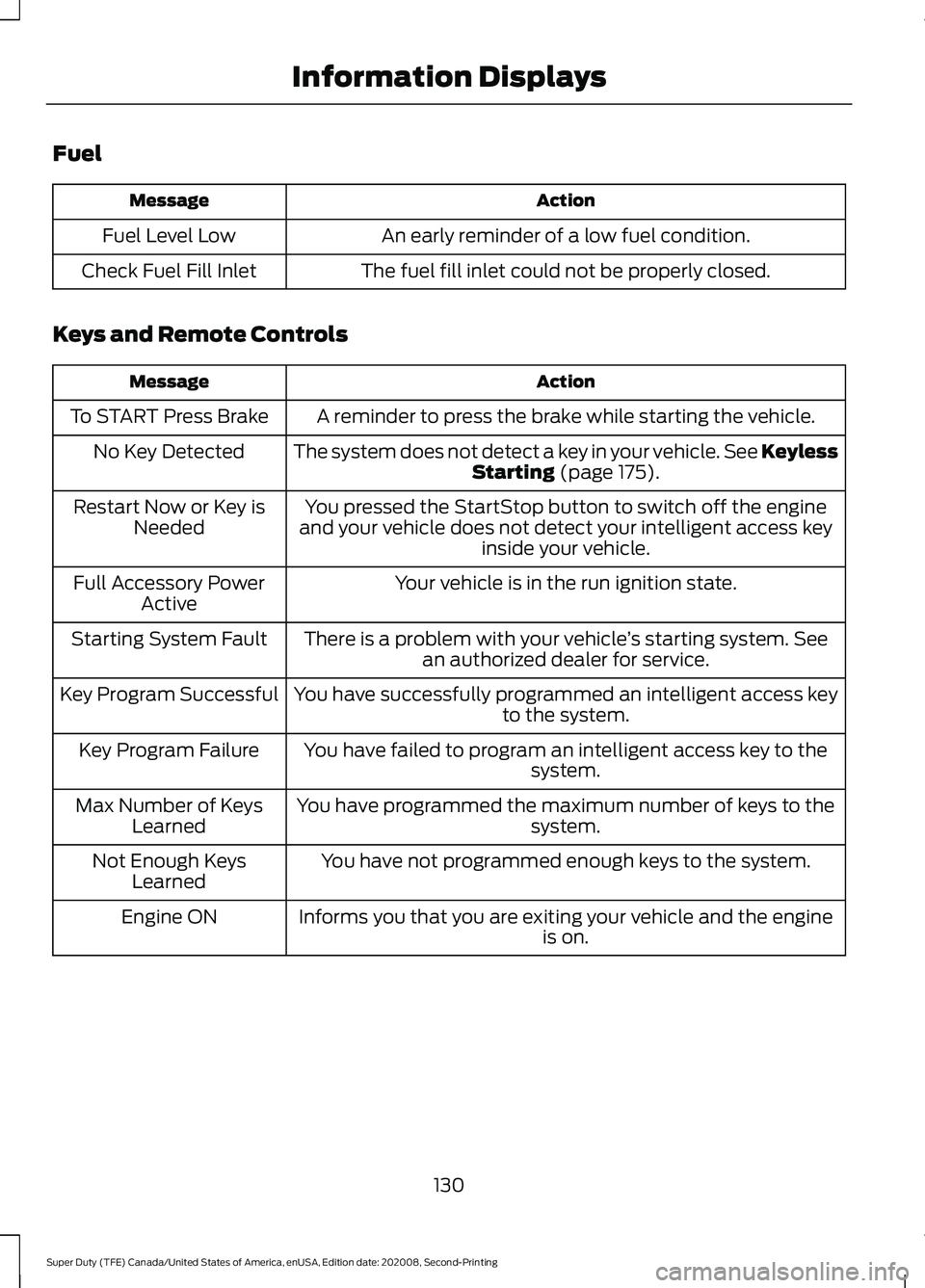
Fuel
Action
Message
An early reminder of a low fuel condition.
Fuel Level Low
The fuel fill inlet could not be properly closed.
Check Fuel Fill Inlet
Keys and Remote Controls Action
Message
A reminder to press the brake while starting the vehicle.
To START Press Brake
The system does not detect a key in your vehicle. See KeylessStarting (page 175).
No Key Detected
You pressed the StartStop button to switch off the engine
and your vehicle does not detect your intelligent access key inside your vehicle.
Restart Now or Key is
Needed
Your vehicle is in the run ignition state.
Full Accessory Power
Active
There is a problem with your vehicle ’s starting system. See
an authorized dealer for service.
Starting System Fault
You have successfully programmed an intelligent access keyto the system.
Key Program Successful
You have failed to program an intelligent access key to thesystem.
Key Program Failure
You have programmed the maximum number of keys to the system.
Max Number of Keys
Learned
You have not programmed enough keys to the system.
Not Enough Keys
Learned
Informs you that you are exiting your vehicle and the engine is on.
Engine ON
130
Super Duty (TFE) Canada/United States of America, enUSA, Edition date: 202008, Second-Printing Information Displays
Page 143 of 666
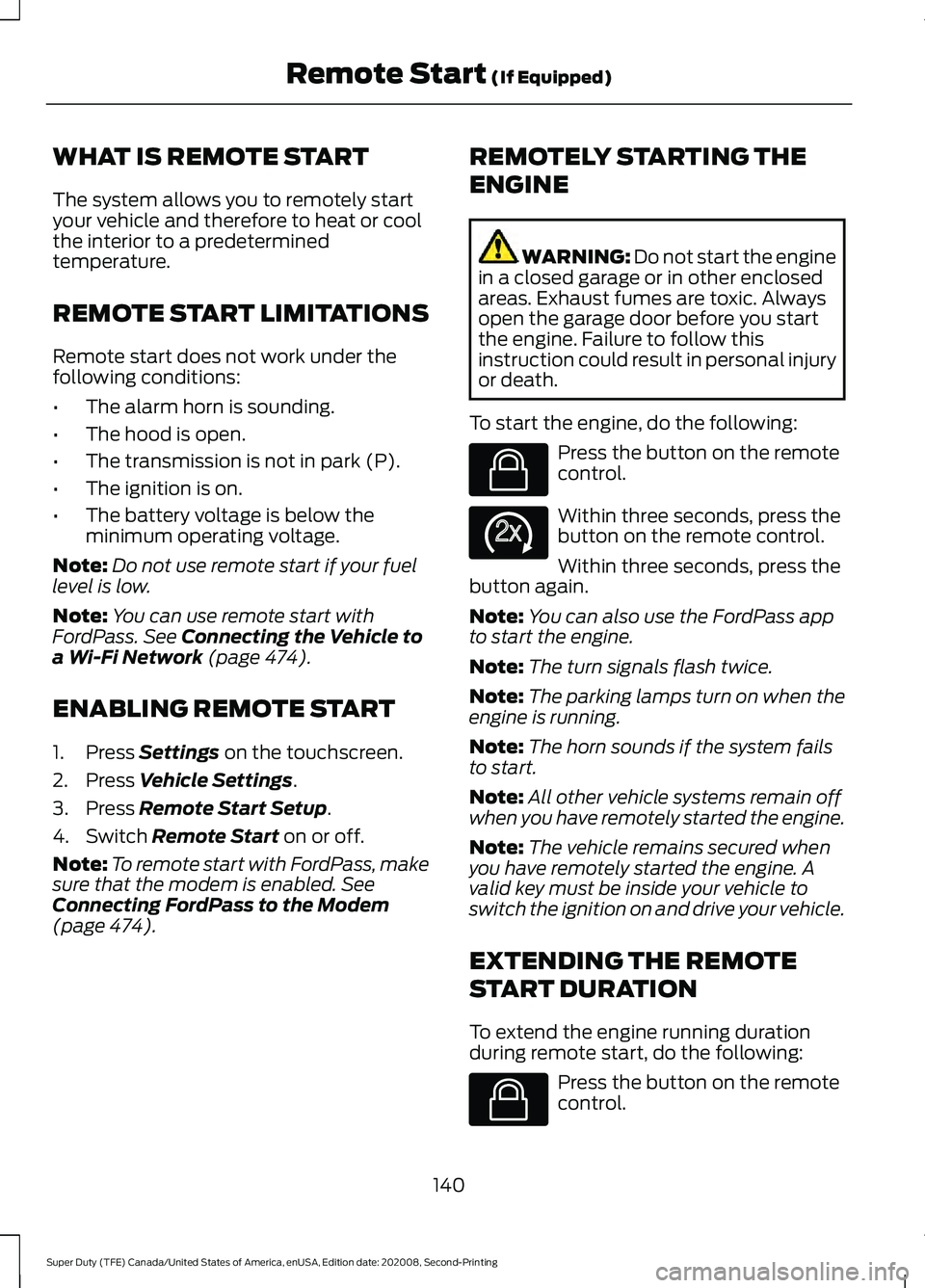
WHAT IS REMOTE START
The system allows you to remotely start
your vehicle and therefore to heat or cool
the interior to a predetermined
temperature.
REMOTE START LIMITATIONS
Remote start does not work under the
following conditions:
•
The alarm horn is sounding.
• The hood is open.
• The transmission is not in park (P).
• The ignition is on.
• The battery voltage is below the
minimum operating voltage.
Note: Do not use remote start if your fuel
level is low.
Note: You can use remote start with
FordPass. See Connecting the Vehicle to
a Wi-Fi Network (page 474).
ENABLING REMOTE START
1. Press
Settings on the touchscreen.
2. Press
Vehicle Settings.
3. Press
Remote Start Setup.
4. Switch
Remote Start on or off.
Note: To remote start with FordPass, make
sure that the modem is enabled.
See
Connecting FordPass to the Modem
(page
474). REMOTELY STARTING THE
ENGINE WARNING: Do not start the engine
in a closed garage or in other enclosed
areas. Exhaust fumes are toxic. Always
open the garage door before you start
the engine. Failure to follow this
instruction could result in personal injury
or death.
To start the engine, do the following: Press the button on the remote
control.
Within three seconds, press the
button on the remote control.
Within three seconds, press the
button again.
Note: You can also use the FordPass app
to start the engine.
Note: The turn signals flash twice.
Note: The parking lamps turn on when the
engine is running.
Note: The horn sounds if the system fails
to start.
Note: All other vehicle systems remain off
when you have remotely started the engine.
Note: The vehicle remains secured when
you have remotely started the engine. A
valid key must be inside your vehicle to
switch the ignition on and drive your vehicle.
EXTENDING THE REMOTE
START DURATION
To extend the engine running duration
during remote start, do the following: Press the button on the remote
control.
140
Super Duty (TFE) Canada/United States of America, enUSA, Edition date: 202008, Second-Printing Remote Start
(If Equipped)E138623 E138625 E138623
Page 179 of 666
2. Turn the key to position III to start the
engine.
3. When the engine starts, release the brake pedal.
Do not crank the engine for more than 10
seconds as starter damage may occur. If
the engine does not start, switch the
ignition off and wait 30 seconds before
trying again.
Vehicles with Keyless Start
Note: Do not touch the accelerator pedal.
Note: If you press the push button ignition
switch again prior to the engine starting, the
ignition switches to accessory mode and
will not start.
Note: If you release the brake pedal before
the engine starts, follow the engine start
sequence again.
1. Fully press the brake pedal.
2. Press the center of the push button ignition switch.
3. When the engine starts, release the brake pedal.
Failure to Start
If you cannot start the engine after three
attempts, wait 10 seconds and follow this
procedure:
1. Fully press the brake pedal.
2. Fully press the accelerator pedal and hold it there.
3. Start the engine.
Stopping the Engine When Your
Vehicle is Stationary
1. When your vehicle has stopped, shift into park (P) and switch the ignition
off.
2. Apply the parking brake. Stopping the Engine When Your
Vehicle is Moving WARNING:
Switching off the
engine when your vehicle is still moving
results in a significant decrease in
braking assistance. Higher effort is
required to apply the brakes and to stop
your vehicle. A significant decrease in
steering assistance could also occur. The
steering does not lock, but higher effort
could be required to steer your vehicle.
When you switch the ignition off, some
electrical circuits, for example airbags,
also turn off. If you unintentionally switch
the ignition off, shift into neutral (N) and
restart the engine.
1. Put the transmission into neutral (N) and use the brakes to bring your vehicle
to a safe stop.
2. When your vehicle has stopped, shift into park (P) and switch the ignition
off.
3. Apply the parking brake.
Automatic Engine Shutdown
If your vehicle has a keyless ignition, it has
a feature that shuts down the engine if it
has been idling for an extended period of
time. The ignition also turns off in order to
save battery power. Before the engine
shuts down, a message appears in the
information display showing a timer
counting down from 30 seconds. If you do
not intervene within 30 seconds, the engine
shuts down. Another message appears in
the information display to inform you that
the engine has shut down in order to save
fuel. Start your vehicle as you normally do.
176
Super Duty (TFE) Canada/United States of America, enUSA, Edition date: 202008, Second-Printing Starting and Stopping the Engine
Page 180 of 666
Cold Weather Starting (Flexible
Fuel Vehicles Only)
The starting characteristics of all grades
of E85 ethanol make it unsuitable for use
when ambient temperatures fall below
0°F (-18°C). Consult your fuel distributor
for the availability of winter grade ethanol.
As the outside temperature approaches
freezing, ethanol fuel distributors should
supply winter grade ethanol, the same as
with unleaded gasoline.
If summer grade ethanol is used in cold
weather conditions, 0°F (-18°C), you may
experience increased cranking times, rough
idle or hesitation until the engine has
warmed up.
You may experience a decrease in
performance when the engine is cold when
operating on E85 ethanol.
Do not use starting fluid such as ether in
the air intake system. Such fluid could
cause immediate explosive damage to the
engine and possible personal injury.
If you should experience cold weather
starting problems on E85 ethanol, and
neither an alternative brand of E85 ethanol
nor an engine block heater is available, the
addition of unleaded gasoline to your tank
improves cold starting performance. Your
vehicle is designed to operate on E85
ethanol alone, unleaded gasoline alone, or
any mixture of the two.
If the Engine Fails to Start Using the
Preceding Instructions (Flexible Fuel
Vehicles Only)
1. Press the accelerator pedal down one-third to one-half of its travel, and
then crank the engine.
2. When the engine starts, release the key, then gradually release the
accelerator pedal as the engine speed
increases. If the engine still does not
start, repeat Step 1. Guarding Against Exhaust Fumes WARNING:
Exhaust leaks may
result in entry of harmful and potentially
lethal fumes into the passenger
compartment. If you smell exhaust
fumes inside your vehicle, have your
vehicle inspected immediately. Do not
drive if you smell exhaust fumes.
Important Ventilating Information
If you stop your vehicle and then leave the
engine idling for long periods of time, we
recommend that you do one of the
following:
• Open the windows at least
1 in
(2.5 cm).
• Set your climate control to outside air.
STARTING A DIESEL ENGINE -
6.7L DIESEL
Read all starting instructions carefully
before you start your vehicle.
For temperatures below
32°F (0°C), the
use of the correct grade engine oil is
essential for proper operation. Refer to
engine oil specifications for more
information. See
Engine Oil Capacity
and Specification (page 449).
Your vehicle may have a cold weather
starting strategy that prevents severe
engine damage by assisting in engine
lubrication warm-up. In extremely cold
ambient temperatures, this strategy
activates and prevents the accelerator
pedal from being used for 30 seconds after
you start your vehicle. A message appears
in the information display as your vehicle
warms up. By not allowing the accelerator
pedal to be used, the engine oil is allowed
to properly lubricate the bearings
177
Super Duty (TFE) Canada/United States of America, enUSA, Edition date: 202008, Second-Printing Starting and Stopping the Engine