trailer FORD SUPER DUTY 2021 Manual Online
[x] Cancel search | Manufacturer: FORD, Model Year: 2021, Model line: SUPER DUTY, Model: FORD SUPER DUTY 2021Pages: 666, PDF Size: 8.48 MB
Page 378 of 666
If the engine reaches a preset
over-temperature condition, the engine
switches to alternating cylinder operation.
Each disabled cylinder acts as an air pump
and cools the engine.
When this occurs, your vehicle still
operates, however:
•
Engine power is limited.
• The air conditioning system turns off.
Continued operation increases the engine
temperature, causing the engine to
completely shut down. Your steering and
braking effort increases in this situation.
When the engine temperature cools, you
can re-start the engine. Have your vehicle
checked as soon as possible to minimize
engine damage.
When Fail-Safe Mode Is Activated WARNING: Fail-safe mode is for
use during emergencies only. Operate
your vehicle in fail-safe mode only as
long as necessary to bring your vehicle
to rest in a safe location and seek
immediate repairs. When in fail-safe
mode, your vehicle will have limited
power, will not be able to maintain
high-speed operation, and may
completely shut down without warning,
potentially losing engine power, power
steering assist, and power brake assist,
which may increase the possibility of a
crash resulting in serious injury. WARNING:
Do not remove the
coolant reservoir cap when the engine is
on or the cooling system is hot. Wait 10
minutes for the cooling system to cool
down. Cover the coolant reservoir cap
with a thick cloth to prevent the
possibility of scalding and slowly remove
the cap. Failure to follow this instruction
could result in personal injury. Your vehicle has limited engine power
when in the fail-safe mode, drive your
vehicle with caution. Your vehicle does not
maintain high-speed operation and the
engine may operate poorly.
Remember that the engine is capable of
shutting down to prevent engine damage.
In this situation:
1. Pull off the road as soon as safely
possible and switch the engine off.
2. If you are a member of a roadside assistance program, we recommend
that you contact your roadside
assistance service provider.
3. If this is not possible, wait a short period for the engine to cool.
4. Check the coolant level. If the coolant level is at or below the minimum mark,
add prediluted coolant immediately.
5. When the engine temperature cools, you can re-start the engine. Have your
vehicle checked as soon as possible to
minimize engine damage.
Note: Driving your vehicle without repair
increases the chance of engine damage.
Engine Coolant Temperature
Management
(If Equipped) WARNING:
To reduce the risk of
crash and injury, be prepared that the
vehicle speed may reduce and the
vehicle may not be able to accelerate
with full power until the coolant
temperature reduces.
If you tow a trailer with your vehicle, the
engine may temporarily reach a higher
temperature during severe operating
conditions, for example ascending a long
or steep grade in high ambient
temperatures.
375
Super Duty (TFE) Canada/United States of America, enUSA, Edition date: 202008, Second-Printing Maintenance
Page 431 of 666
12.
Turn the ignition off. If two short horn
beeps are heard, the reset procedure
was unsuccessful and you must
repeat it. If after repeating the
procedure and two short beeps are
heard when the ignition is turned to
off, seek assistance from your
authorized dealer.
13. Set all six tires to the recommended air pressure as indicated on the
Safety Compliance Certification
Label, affixed to either the door hinge
pillar, door-latch post, or the door
edge that meets the door-latch post,
next to the driver seating position or
Tire Label located on the B-Pillar or
the edge of the driver door.
Trailer Tire Pressure Monitoring
System (If Equipped)
Note: Additional equipment may be
required for your vehicle to support trailer
tire pressure monitoring. See your authorized
dealer for more information.
Note: The trailer tire pressure monitoring
system is not a substitute for proper tire
maintenance. It is your responsibility to
maintain correct tire pressures at all times.
Note: If a trailer tire is repaired, replaced or
broken down for service, the screw and valve
on the trailer tire pressure sensor should be
replaced. See your authorized dealer for
details. The trailer tire pressure monitoring system
is an added safety feature that allows you
to view your trailer tire pressures through
the information display.
See General
Information (page 110). Tire pressure
sensors are mounted into each tire on your
trailer. The sensors send a message to your
vehicle indicating the current trailer tire
pressure.
If the trailer tire pressure monitoring
system detects that a tire is low, a warning
message appears in the information
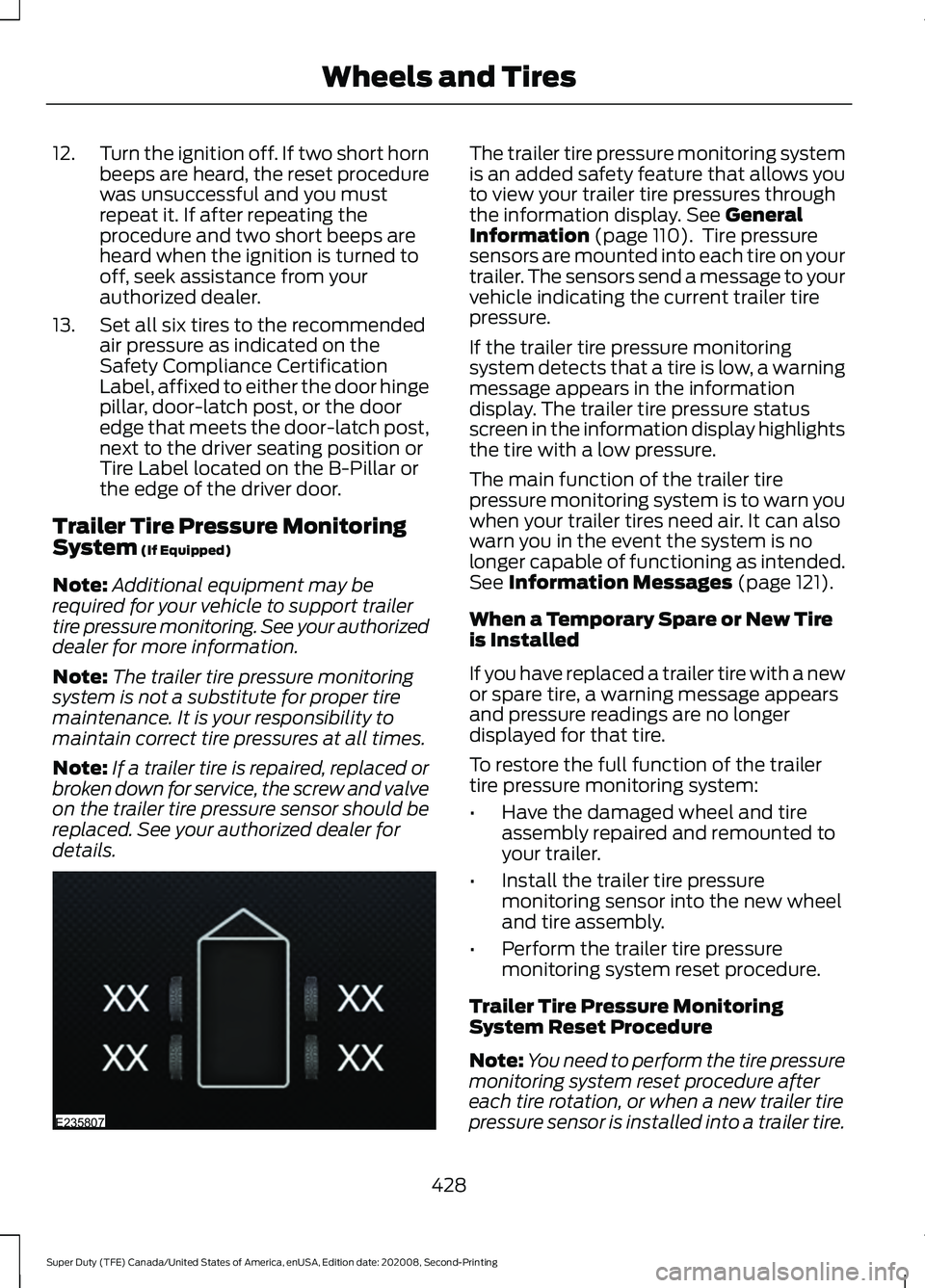
display. The trailer tire pressure status
screen in the information display highlights
the tire with a low pressure.
The main function of the trailer tire
pressure monitoring system is to warn you
when your trailer tires need air. It can also
warn you in the event the system is no
longer capable of functioning as intended.
See
Information Messages (page 121).
When a Temporary Spare or New Tire
is Installed
If you have replaced a trailer tire with a new
or spare tire, a warning message appears
and pressure readings are no longer
displayed for that tire.
To restore the full function of the trailer
tire pressure monitoring system:
• Have the damaged wheel and tire
assembly repaired and remounted to
your trailer.
• Install the trailer tire pressure
monitoring sensor into the new wheel
and tire assembly.
• Perform the trailer tire pressure
monitoring system reset procedure.
Trailer Tire Pressure Monitoring
System Reset Procedure
Note: You need to perform the tire pressure
monitoring system reset procedure after
each tire rotation, or when a new trailer tire
pressure sensor is installed into a trailer tire.
428
Super Duty (TFE) Canada/United States of America, enUSA, Edition date: 202008, Second-Printing Wheels and TiresE235807
Page 432 of 666
The trailer tire pressure monitoring system
can be reset through the menu in the
information display. See General
Information (page 110). Performing the
trailer setup process also resets the trailer
tire pressure monitoring system.
CHANGING A ROAD WHEEL WARNING:
If the tire pressure
monitor sensor becomes damaged it
may not function.
Note: If your vehicle is equipped with the
tire pressure monitoring system, the
indicator light illuminates when the spare
tire is in use. To restore the full function of
the monitoring system, all road wheels
equipped with tire pressure monitoring
sensors must be mounted on the vehicle.
Note: You should only use tire sealants in
roadside emergencies as they may cause
damage to the tire pressure monitoring
system sensor.
If you get a flat tire when driving, do not
apply the brake heavily. Instead, gradually
decrease your speed. Hold the steering
wheel firmly and slowly move to a safe
place on the side of the road.
If your vehicle is equipped with the tire
pressure monitoring system, have a flat
serviced by an authorized dealer in order
to prevent damage to the system sensors.
See
Tire Pressure Monitoring System
(page 421). Replace the spare tire with a
road tire as soon as possible. During
repairing or replacing of the flat tire, have
the authorized dealer inspect the system
sensor for damage. Dissimilar Spare Wheel and Tire
Assembly Information WARNING:
Failure to follow these
guidelines could result in an increased
risk of loss of vehicle control, injury or
death.
If you have a dissimilar spare wheel and
tire, then it is intended for temporary use
only. This means that if you need to use it,
you should replace it as soon as possible
with a road wheel and tire assembly that
is the same size and type as the road tires
and wheels that were originally provided
by Ford. If the dissimilar spare tire or wheel
is damaged, it should be replaced rather
than repaired.
A dissimilar spare wheel and tire assembly
is defined as a spare wheel and tire
assembly that is different in brand, size or
appearance from the road tires and
wheels.
Full-size dissimilar spare
When driving with the full-size dissimilar
spare wheel and tire assembly, do not:
• Exceed
70 mph (113 km/h).
• Use more than one dissimilar spare
wheel and tire assembly at a time.
• Use snow chains on the end of the
vehicle with the dissimilar spare wheel
and tire assembly.
When driving with the full-size dissimilar
spare wheel and tire assembly, 4WD
functionality may be limited. You may
experience the following:
• Additional noise from the transfer case
or other drive components.
• Difficulty shifting out of a mechanically
locked 4WD mode.
429
Super Duty (TFE) Canada/United States of America, enUSA, Edition date: 202008, Second-Printing Wheels and Tires
Page 433 of 666
When driving with the full-size dissimilar
spare wheel and tire assembly, it is
recommended that you do not:
•
Exceed 50 mph (80 km/h) in 4WD.
• Engage 4WD unless the vehicle is
stationary.
• Use 4WD on dry pavement.
The usage of a full-size dissimilar spare
wheel and tire assembly can lead to
impairment of the following:
• Handling, stability and braking
performance.
• Comfort and noise.
• Ground clearance and parking at curbs.
• Winter weather driving capability. •
Wet weather driving capability.
• Four-wheel drive capability.
When driving with the full-size dissimilar
spare wheel and tire assembly additional
caution should be given to:
• Towing a trailer.
• Driving vehicles equipped with a
camper body.
• Driving vehicles with a load on the
cargo rack.
Drive cautiously when using a full-size
dissimilar spare wheel and tire assembly
and seek service as soon as possible.
Location of the Spare Tire and
Tools
See the following table for their locations: Location
Item
Under the vehicle, just forward of the rearbumper.
Spare tire - pick-up trucks only
Fastened to the floor pan behind the rear-most seat on the passenger side.
Jack
Regular Cab: Fastened to floor behind thedriver seat.
Jack handle, lug wrench, lug wrench exten-
sion - only provided on dual rear wheel vehicles. Super Cab and Crew Cab: Fastened to the
floor under the rear seat on the driver's side.
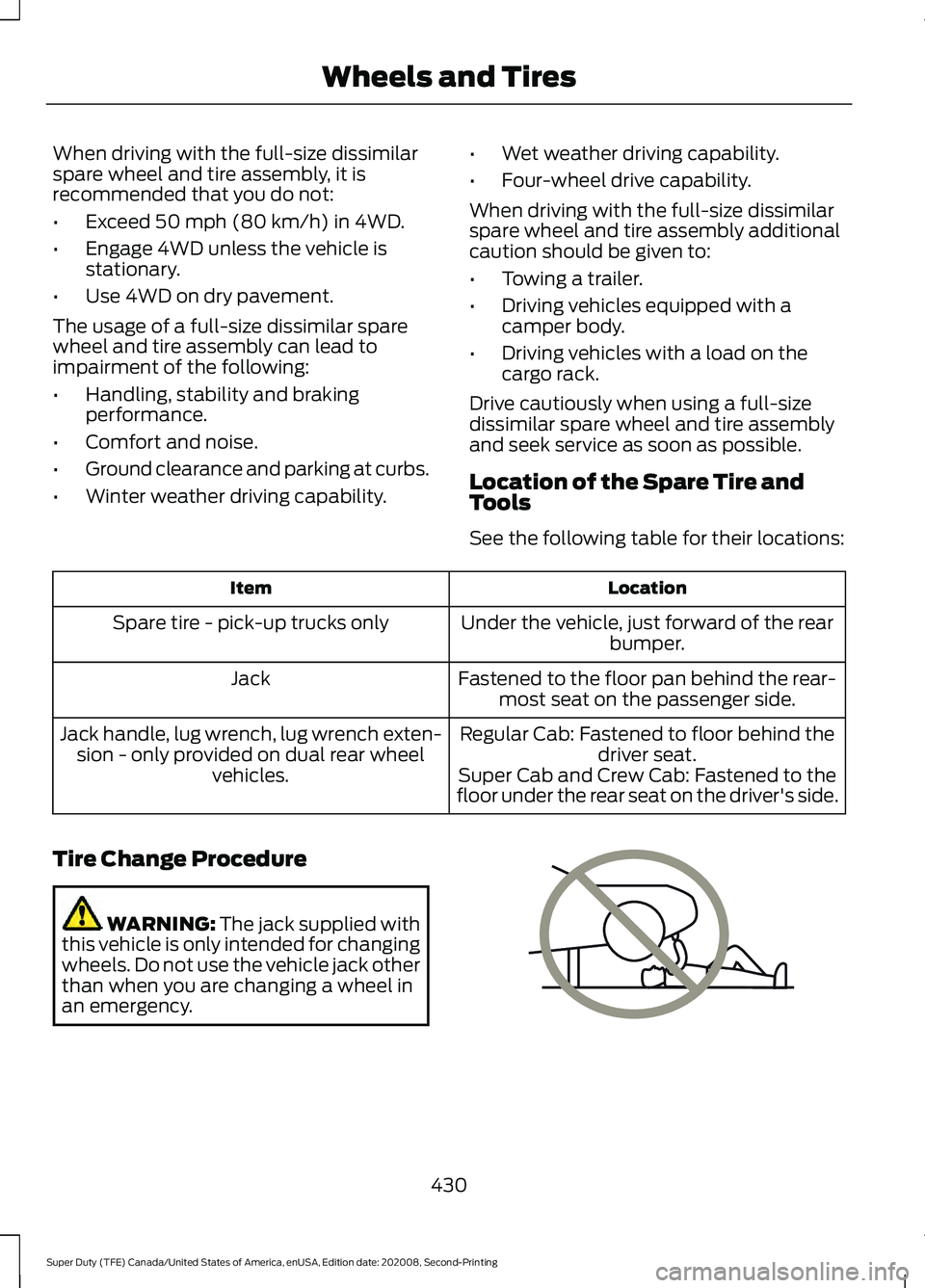
Tire Change Procedure WARNING:
The jack supplied with
this vehicle is only intended for changing
wheels. Do not use the vehicle jack other
than when you are changing a wheel in
an emergency. 430
Super Duty (TFE) Canada/United States of America, enUSA, Edition date: 202008, Second-Printing Wheels and TiresE166722
Page 578 of 666
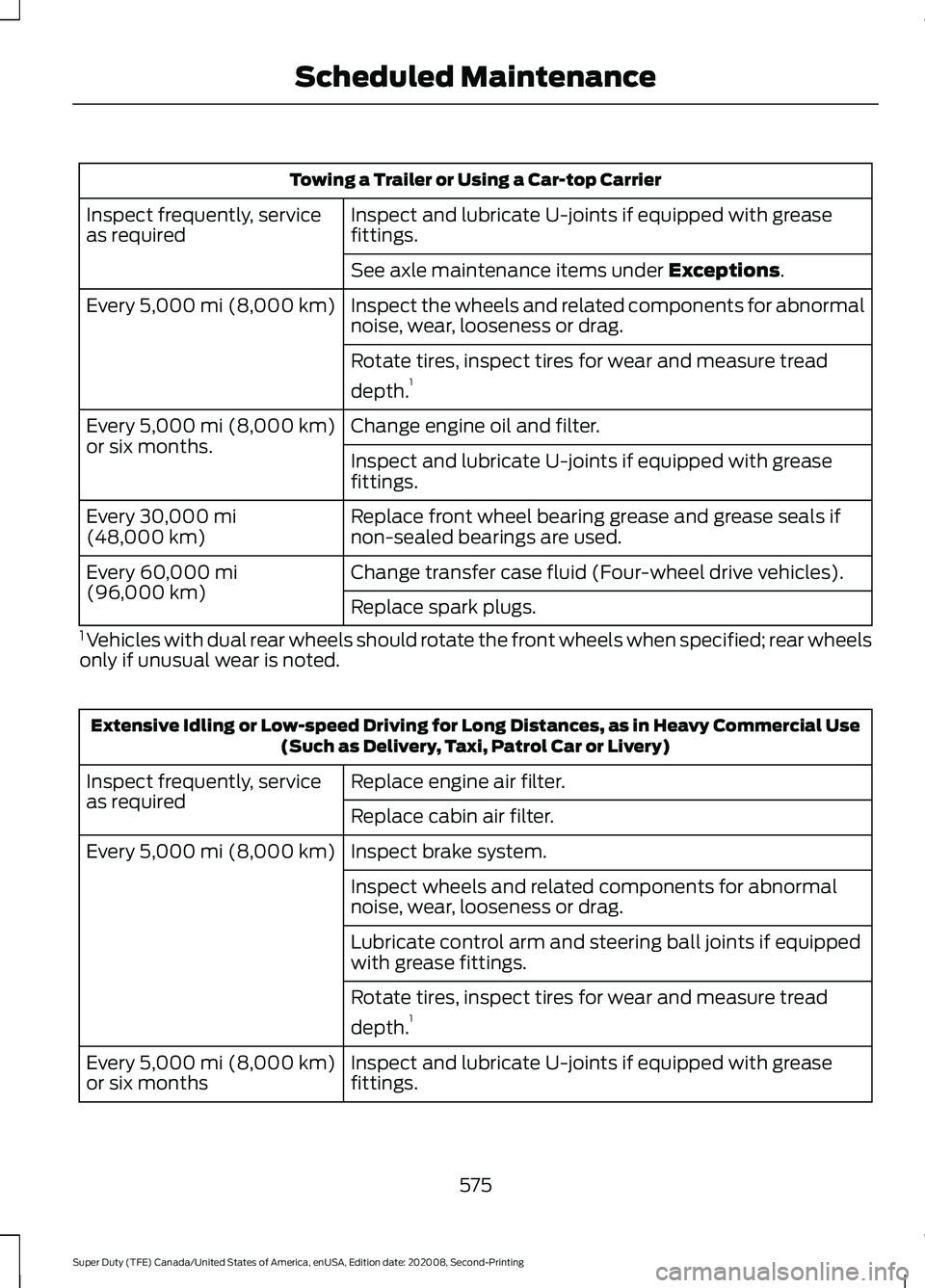
Towing a Trailer or Using a Car-top Carrier
Inspect and lubricate U-joints if equipped with grease
fittings.
Inspect frequently, service
as required
See axle maintenance items under Exceptions.
Inspect the wheels and related components for abnormal
noise, wear, looseness or drag.
Every
5,000 mi (8,000 km)
Rotate tires, inspect tires for wear and measure tread
depth.1
Change engine oil and filter.
Every
5,000 mi (8,000 km)
or six months. Inspect and lubricate U-joints if equipped with grease
fittings.
Replace front wheel bearing grease and grease seals if
non-sealed bearings are used.
Every
30,000 mi
(48,000 km)
Change transfer case fluid (Four-wheel drive vehicles).
Every
60,000 mi
(96,000 km) Replace spark plugs.
1 Vehicles with dual rear wheels should rotate the front wheels when specified; rear wheels
only if unusual wear is noted. Extensive Idling or Low-speed Driving for Long Distances, as in Heavy Commercial Use
(Such as Delivery, Taxi, Patrol Car or Livery)
Replace engine air filter.
Inspect frequently, service
as required
Replace cabin air filter.
Inspect brake system.
Every
5,000 mi (8,000 km)
Inspect wheels and related components for abnormal
noise, wear, looseness or drag.
Lubricate control arm and steering ball joints if equipped
with grease fittings.
Rotate tires, inspect tires for wear and measure tread
depth.1
Inspect and lubricate U-joints if equipped with grease
fittings.
Every
5,000 mi (8,000 km)
or six months
575
Super Duty (TFE) Canada/United States of America, enUSA, Edition date: 202008, Second-Printing Scheduled Maintenance
Page 580 of 666
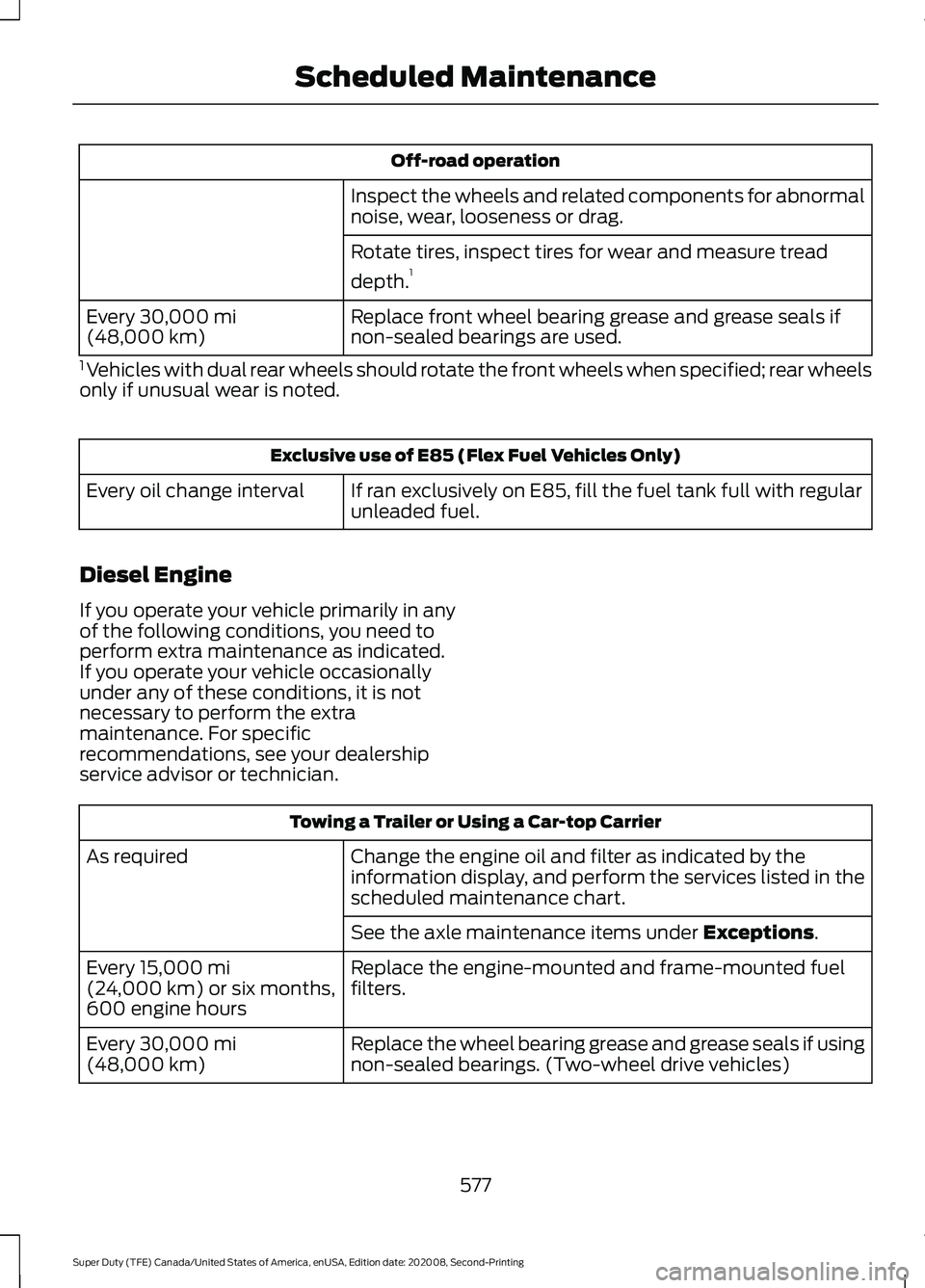
Off-road operation
Inspect the wheels and related components for abnormal
noise, wear, looseness or drag.
Rotate tires, inspect tires for wear and measure tread
depth. 1
Replace front wheel bearing grease and grease seals if
non-sealed bearings are used.
Every 30,000 mi
(48,000 km)
1 Vehicles with dual rear wheels should rotate the front wheels when specified; rear wheels
only if unusual wear is noted. Exclusive use of E85 (Flex Fuel Vehicles Only)
If ran exclusively on E85, fill the fuel tank full with regular
unleaded fuel.
Every oil change interval
Diesel Engine
If you operate your vehicle primarily in any
of the following conditions, you need to
perform extra maintenance as indicated.
If you operate your vehicle occasionally
under any of these conditions, it is not
necessary to perform the extra
maintenance. For specific
recommendations, see your dealership
service advisor or technician. Towing a Trailer or Using a Car-top Carrier
Change the engine oil and filter as indicated by the
information display, and perform the services listed in the
scheduled maintenance chart.
As required
See the axle maintenance items under
Exceptions.
Replace the engine-mounted and frame-mounted fuel
filters.
Every
15,000 mi
(24,000 km) or six months,
600 engine hours
Replace the wheel bearing grease and grease seals if using
non-sealed bearings. (Two-wheel drive vehicles)
Every
30,000 mi
(48,000 km)
577
Super Duty (TFE) Canada/United States of America, enUSA, Edition date: 202008, Second-Printing Scheduled Maintenance
Page 581 of 666
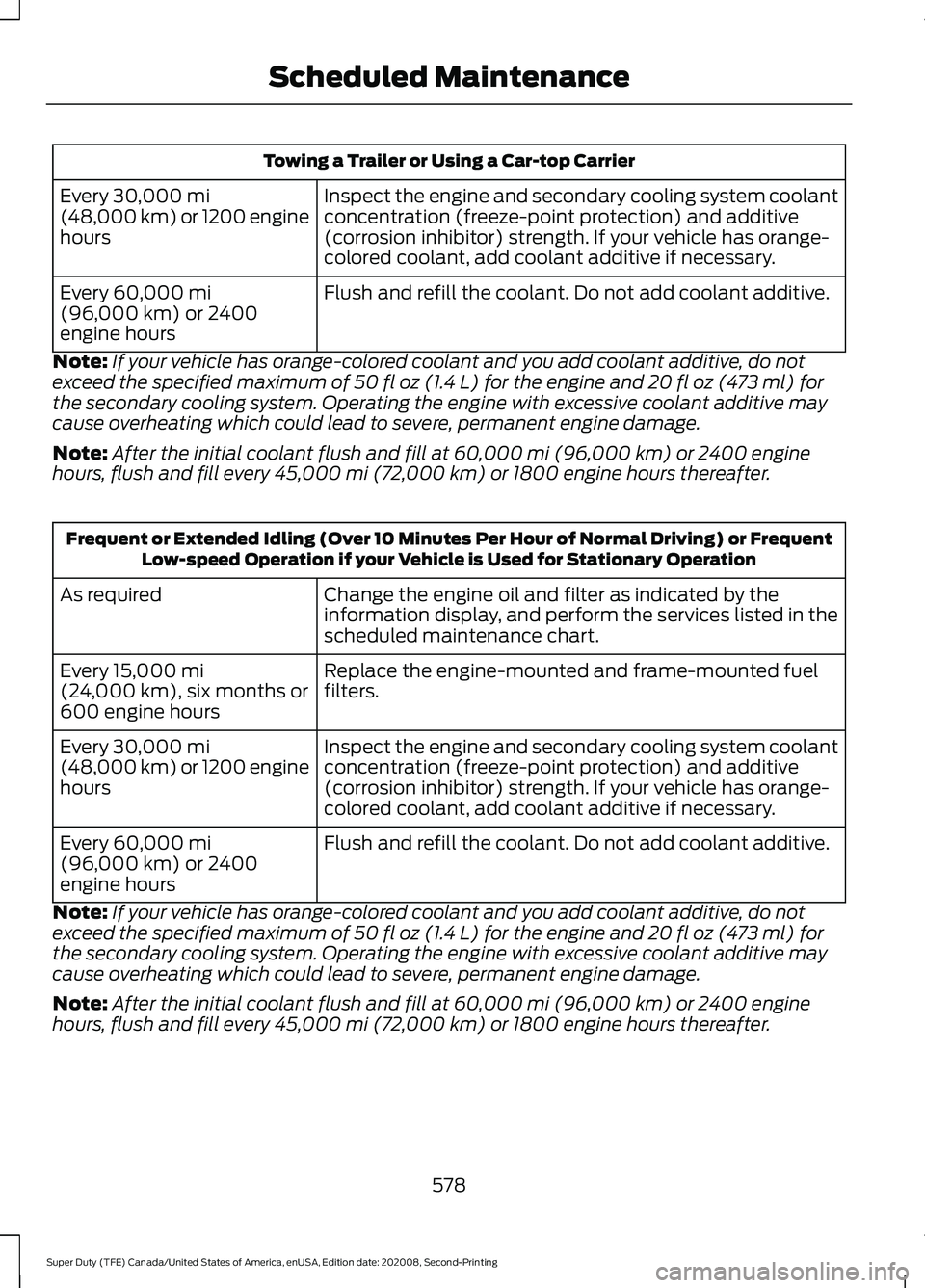
Towing a Trailer or Using a Car-top Carrier
Inspect the engine and secondary cooling system coolant
concentration (freeze-point protection) and additive
(corrosion inhibitor) strength. If your vehicle has orange-
colored coolant, add coolant additive if necessary.
Every 30,000 mi
(48,000 km) or 1200 engine
hours
Flush and refill the coolant. Do not add coolant additive.
Every
60,000 mi
(96,000 km) or 2400
engine hours
Note: If your vehicle has orange-colored coolant and you add coolant additive, do not
exceed the specified maximum of
50 fl oz (1.4 L) for the engine and 20 fl oz (473 ml) for
the secondary cooling system. Operating the engine with excessive coolant additive may
cause overheating which could lead to severe, permanent engine damage.
Note: After the initial coolant flush and fill at
60,000 mi (96,000 km) or 2400 engine
hours, flush and fill every 45,000 mi (72,000 km) or 1800 engine hours thereafter. Frequent or Extended Idling (Over 10 Minutes Per Hour of Normal Driving) or Frequent
Low-speed Operation if your Vehicle is Used for Stationary Operation
Change the engine oil and filter as indicated by the
information display, and perform the services listed in the
scheduled maintenance chart.
As required
Replace the engine-mounted and frame-mounted fuel
filters.
Every
15,000 mi
(24,000 km), six months or
600 engine hours
Inspect the engine and secondary cooling system coolant
concentration (freeze-point protection) and additive
(corrosion inhibitor) strength. If your vehicle has orange-
colored coolant, add coolant additive if necessary.
Every
30,000 mi
(48,000 km) or 1200 engine
hours
Flush and refill the coolant. Do not add coolant additive.
Every
60,000 mi
(96,000 km) or 2400
engine hours
Note: If your vehicle has orange-colored coolant and you add coolant additive, do not
exceed the specified maximum of
50 fl oz (1.4 L) for the engine and 20 fl oz (473 ml) for
the secondary cooling system. Operating the engine with excessive coolant additive may
cause overheating which could lead to severe, permanent engine damage.
Note: After the initial coolant flush and fill at
60,000 mi (96,000 km) or 2400 engine
hours, flush and fill every 45,000 mi (72,000 km) or 1800 engine hours thereafter.
578
Super Duty (TFE) Canada/United States of America, enUSA, Edition date: 202008, Second-Printing Scheduled Maintenance
Page 585 of 666
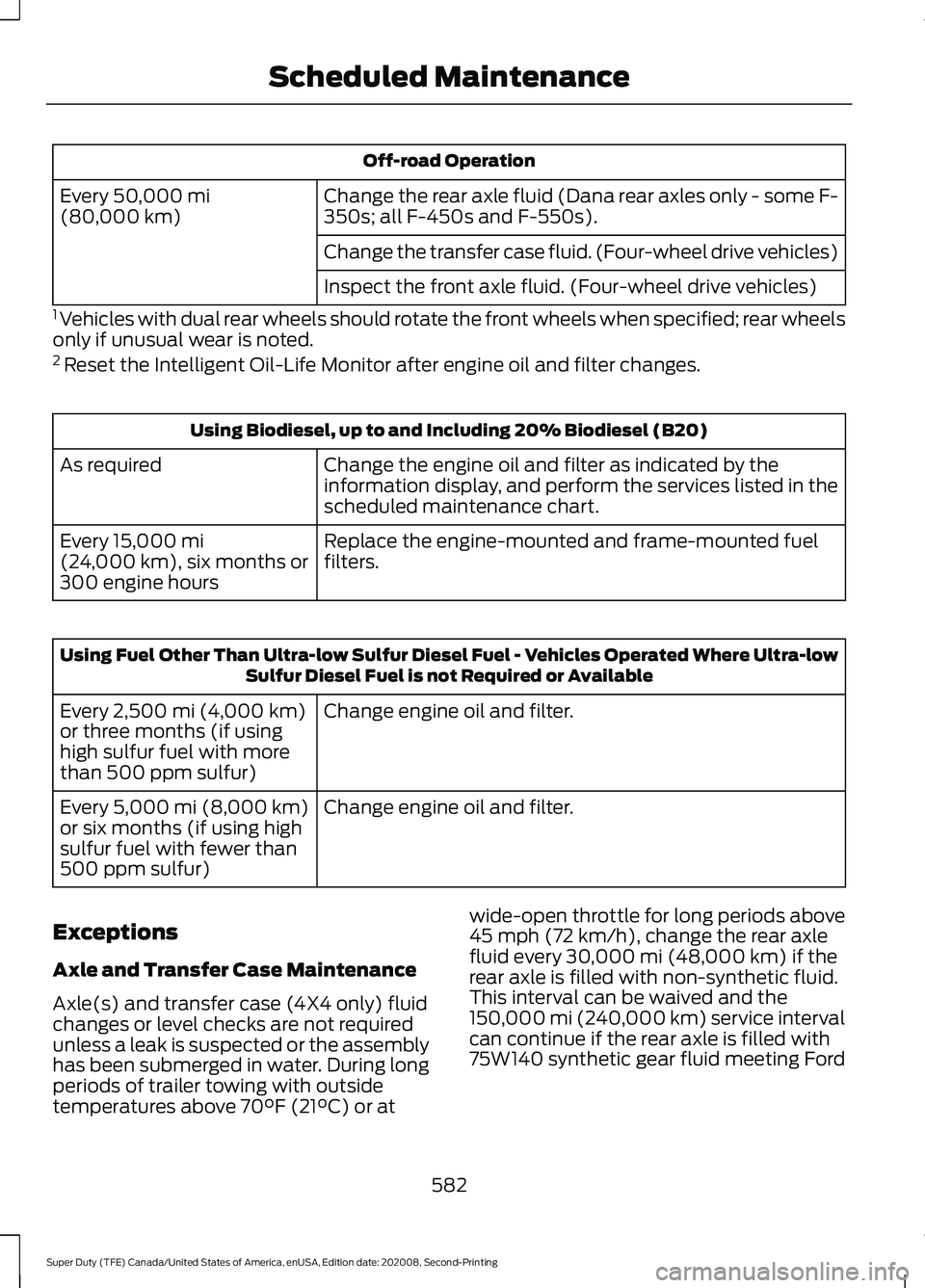
Off-road Operation
Change the rear axle fluid (Dana rear axles only - some F-
350s; all F-450s and F-550s).
Every 50,000 mi
(80,000 km)
Change the transfer case fluid. (Four-wheel drive vehicles)
Inspect the front axle fluid. (Four-wheel drive vehicles)
1 Vehicles with dual rear wheels should rotate the front wheels when specified; rear wheels
only if unusual wear is noted.
2 Reset the Intelligent Oil-Life Monitor after engine oil and filter changes. Using Biodiesel, up to and Including 20% Biodiesel (B20)
Change the engine oil and filter as indicated by the
information display, and perform the services listed in the
scheduled maintenance chart.
As required
Replace the engine-mounted and frame-mounted fuel
filters.
Every
15,000 mi
(24,000 km), six months or
300 engine hours Using Fuel Other Than Ultra-low Sulfur Diesel Fuel - Vehicles Operated Where Ultra-low
Sulfur Diesel Fuel is not Required or Available
Change engine oil and filter.
Every
2,500 mi (4,000 km)
or three months (if using
high sulfur fuel with more
than 500 ppm sulfur)
Change engine oil and filter.
Every
5,000 mi (8,000 km)
or six months (if using high
sulfur fuel with fewer than
500 ppm sulfur)
Exceptions
Axle and Transfer Case Maintenance
Axle(s) and transfer case (4X4 only) fluid
changes or level checks are not required
unless a leak is suspected or the assembly
has been submerged in water. During long
periods of trailer towing with outside
temperatures above
70°F (21°C) or at wide-open throttle for long periods above
45 mph (72 km/h)
, change the rear axle
fluid every 30,000 mi (48,000 km) if the
rear axle is filled with non-synthetic fluid.
This interval can be waived and the
150,000 mi (240,000 km) service interval
can continue if the rear axle is filled with
75W140 synthetic gear fluid meeting Ford
582
Super Duty (TFE) Canada/United States of America, enUSA, Edition date: 202008, Second-Printing Scheduled Maintenance
Page 651 of 666
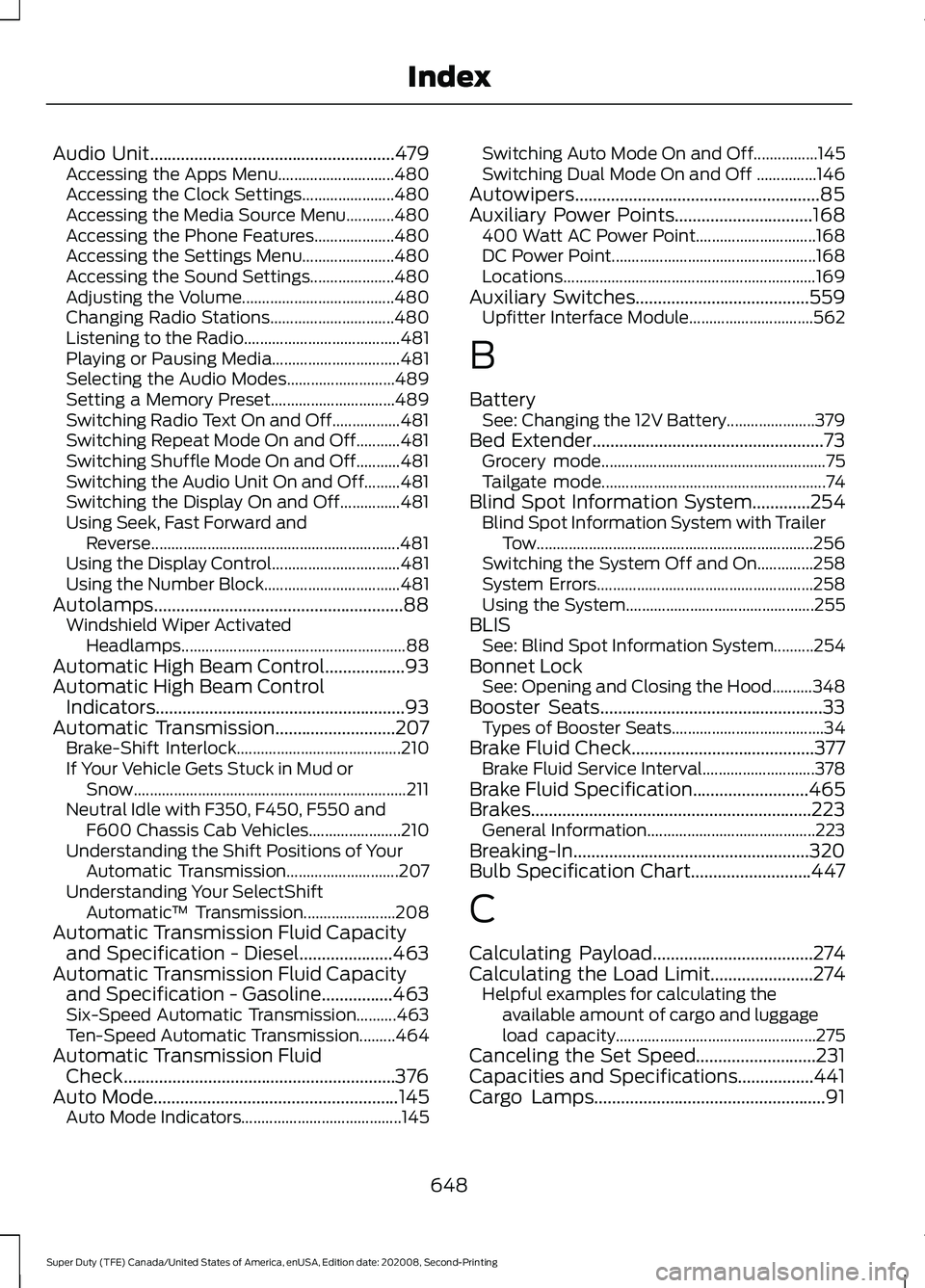
Audio Unit.......................................................479
Accessing the Apps Menu............................. 480
Accessing the Clock Settings....................... 480
Accessing the Media Source Menu............480
Accessing the Phone Features.................... 480
Accessing the Settings Menu....................... 480
Accessing the Sound Settings..................... 480
Adjusting the Volume...................................... 480
Changing Radio Stations............................... 480
Listening to the Radio....................................... 481
Playing or Pausing Media................................ 481
Selecting the Audio Modes........................... 489
Setting a Memory Preset............................... 489
Switching Radio Text On and Off.................481
Switching Repeat Mode On and Off...........481
Switching Shuffle Mode On and Off...........481
Switching the Audio Unit On and Off.........481
Switching the Display On and Off...............481
Using Seek, Fast Forward and Reverse.............................................................. 481
Using the Display Control................................ 481
Using the Number Block.................................. 481
Autolamps........................................................88 Windshield Wiper Activated
Headlamps........................................................ 88
Automatic High Beam Control..................93
Automatic High Beam Control Indicators........................................................93
Automatic Transmission...........................207
Brake-Shift Interlock......................................... 210
If Your Vehicle Gets Stuck in Mud or Snow.................................................................... 211
Neutral Idle with F350, F450, F550 and F600 Chassis Cab Vehicles....................... 210
Understanding the Shift Positions of Your Automatic Transmission............................ 207
Understanding Your SelectShift Automatic ™ Transmission....................... 208
Automatic Transmission Fluid Capacity and Specification - Diesel.....................463
Automatic Transmission Fluid Capacity and Specification - Gasoline
................463
Six-Speed Automatic Transmission..........463
Ten-Speed Automatic Transmission.........464
Automatic Transmission Fluid Check.............................................................376
Auto Mode
.......................................................145
Auto Mode Indicators........................................ 145Switching Auto Mode On and Off................145
Switching Dual Mode On and Off ...............146
Autowipers.......................................................85
Auxiliary Power Points...............................168 400 Watt AC Power Point.............................. 168
DC Power Point................................................... 168
Locations............................................................... 169
Auxiliary Switches
.......................................559
Upfitter Interface Module............................... 562
B
Battery See: Changing the 12V Battery...................... 379
Bed Extender....................................................73 Grocery mode........................................................ 75
Tailgate mode........................................................ 74
Blind Spot Information System
.............254
Blind Spot Information System with Trailer
Tow..................................................................... 256
Switching the System Off and On..............258
System Errors...................................................... 258
Using the System............................................... 255
BLIS See: Blind Spot Information System..........254
Bonnet Lock See: Opening and Closing the Hood..........348
Booster Seats..................................................33 Types of Booster Seats...................................... 34
Brake Fluid Check.........................................377 Brake Fluid Service Interval............................ 378
Brake Fluid Specification..........................465
Brakes...............................................................223 General Information.......................................... 223
Breaking-In.....................................................320
Bulb Specification Chart...........................447
C
Calculating Payload
....................................274
Calculating the Load Limit.......................274
Helpful examples for calculating the
available amount of cargo and luggage
load capacity.................................................. 275
Canceling the Set Speed...........................231
Capacities and Specifications
.................441
Cargo Lamps....................................................91
648
Super Duty (TFE) Canada/United States of America, enUSA, Edition date: 202008, Second-Printing Index
Page 653 of 666
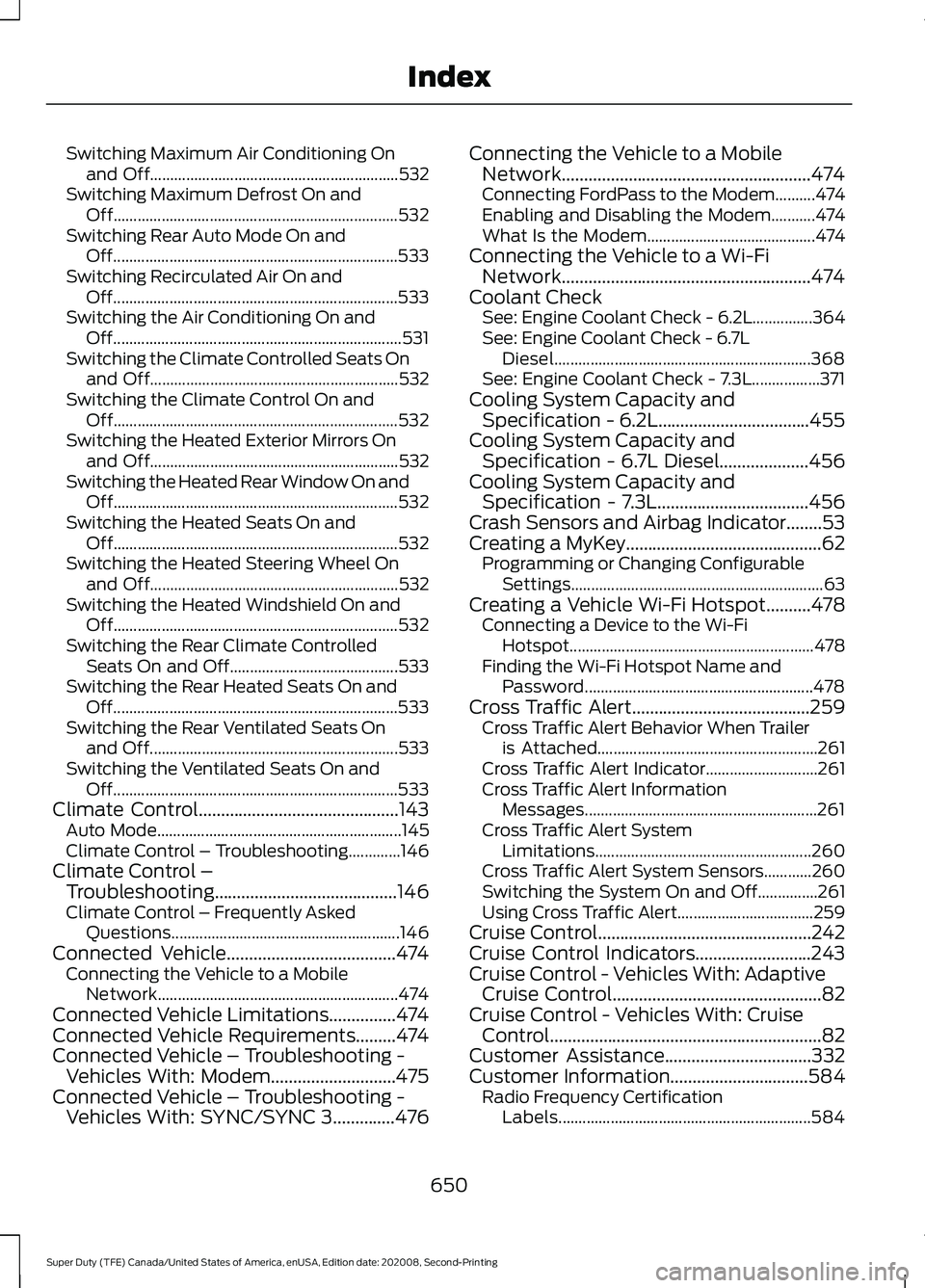
Switching Maximum Air Conditioning On
and Off.............................................................. 532
Switching Maximum Defrost On and Off....................................................................... 532
Switching Rear Auto Mode On and Off....................................................................... 533
Switching Recirculated Air On and Off....................................................................... 533
Switching the Air Conditioning On and Off........................................................................\
531
Switching the Climate Controlled Seats On and Off.............................................................. 532
Switching the Climate Control On and Off....................................................................... 532
Switching the Heated Exterior Mirrors On and Off.............................................................. 532
Switching the Heated Rear Window On and Off....................................................................... 532
Switching the Heated Seats On and Off....................................................................... 532
Switching the Heated Steering Wheel On and Off.............................................................. 532
Switching the Heated Windshield On and Off....................................................................... 532
Switching the Rear Climate Controlled Seats On and Off.......................................... 533
Switching the Rear Heated Seats On and Off....................................................................... 533
Switching the Rear Ventilated Seats On and Off.............................................................. 533
Switching the Ventilated Seats On and Off....................................................................... 533
Climate Control.............................................143 Auto Mode............................................................. 145
Climate Control – Troubleshooting.............146
Climate Control – Troubleshooting.........................................146
Climate Control – Frequently Asked
Questions......................................................... 146
Connected Vehicle
......................................474
Connecting the Vehicle to a Mobile
Network............................................................ 474
Connected Vehicle Limitations
...............474
Connected Vehicle Requirements.........474
Connected Vehicle – Troubleshooting - Vehicles With: Modem............................475
Connected Vehicle – Troubleshooting - Vehicles With: SYNC/SYNC 3..............476 Connecting the Vehicle to a Mobile
Network........................................................474
Connecting FordPass to the Modem..........474
Enabling and Disabling the Modem...........474
What Is the Modem.......................................... 474
Connecting the Vehicle to a Wi-Fi Network........................................................474
Coolant Check See: Engine Coolant Check - 6.2L...............364
See: Engine Coolant Check - 6.7L
Diesel................................................................ 368
See: Engine Coolant Check - 7.3L.................371
Cooling System Capacity and Specification - 6.2L..................................455
Cooling System Capacity and Specification - 6.7L Diesel....................456
Cooling System Capacity and Specification - 7.3L..................................456
Crash Sensors and Airbag Indicator........53
Creating a MyKey
............................................62
Programming or Changing Configurable
Settings............................................................... 63
Creating a Vehicle Wi-Fi Hotspot..........478 Connecting a Device to the Wi-Fi
Hotspot............................................................. 478
Finding the Wi-Fi Hotspot Name and Password......................................................... 478
Cross Traffic Alert........................................259 Cross Traffic Alert Behavior When Trailer
is Attached....................................................... 261
Cross Traffic Alert Indicator............................ 261
Cross Traffic Alert Information Messages.......................................................... 261
Cross Traffic Alert System Limitations...................................................... 260
Cross Traffic Alert System Sensors............260
Switching the System On and Off...............261
Using Cross Traffic Alert.................................. 259
Cruise Control................................................242
Cruise Control Indicators
..........................243
Cruise Control - Vehicles With: Adaptive Cruise Control
...............................................82
Cruise Control - Vehicles With: Cruise Control.............................................................82
Customer Assistance.................................332
Customer Information
...............................584
Radio Frequency Certification
Labels............................................................... 584
650
Super Duty (TFE) Canada/United States of America, enUSA, Edition date: 202008, Second-Printing Index