AUX FORD SUPER DUTY 2022 User Guide
[x] Cancel search | Manufacturer: FORD, Model Year: 2022, Model line: SUPER DUTY, Model: FORD SUPER DUTY 2022Pages: 740, PDF Size: 9.95 MB
Page 395 of 740
Protected Component
Rating
Item
Auxiliary lighting module.
40 A
67
Powertrain control module.
10 A
68
Body control module power.
60 A
69
Trailer tow stoplamp and
turn lamps.
30 A
70
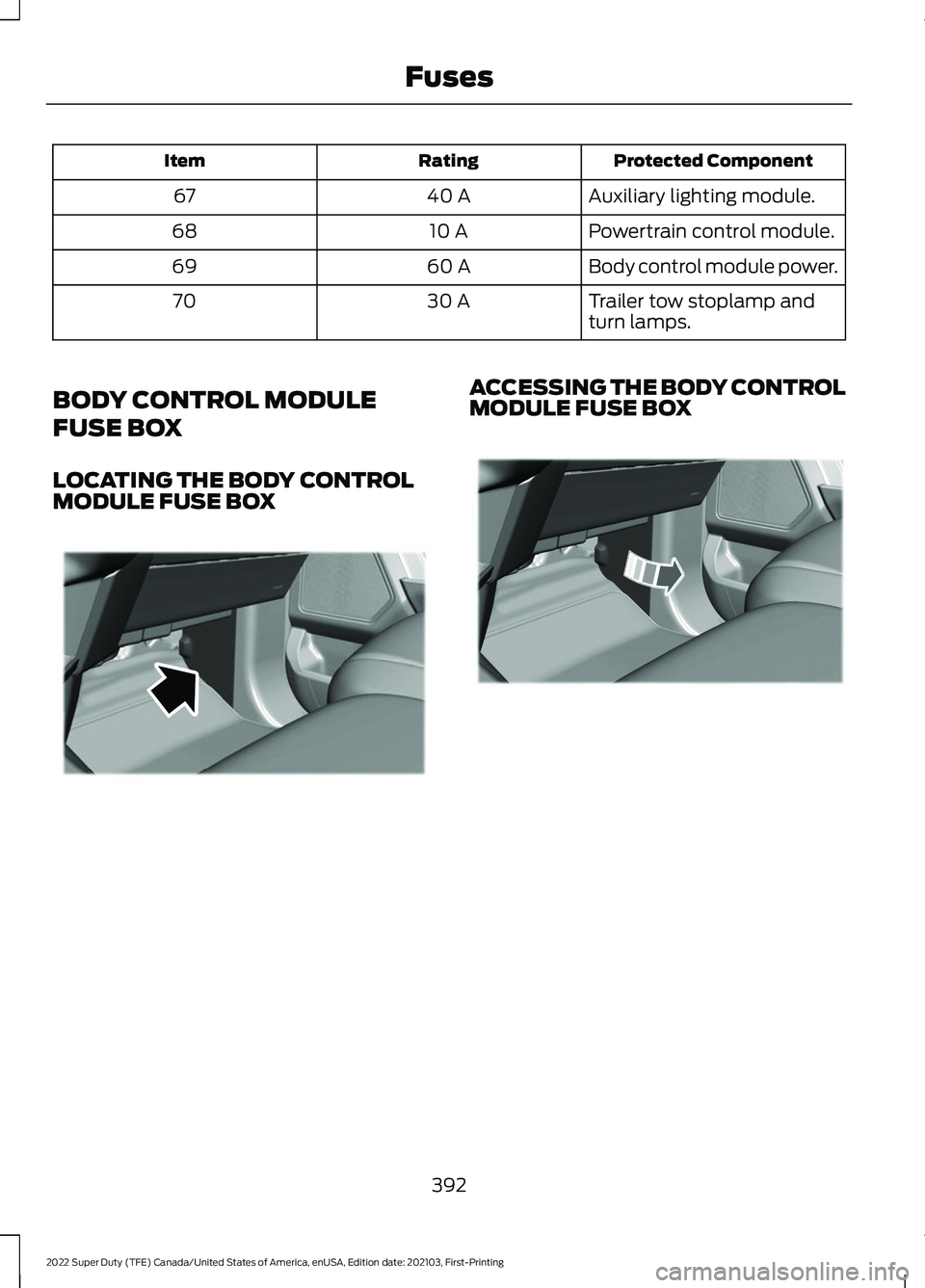
BODY CONTROL MODULE
FUSE BOX
LOCATING THE BODY CONTROL
MODULE FUSE BOX ACCESSING THE BODY CONTROL
MODULE FUSE BOX
392
2022 Super Duty (TFE) Canada/United States of America, enUSA, Edition date: 202103, First-Printing FusesE322874 E322804
Page 409 of 740
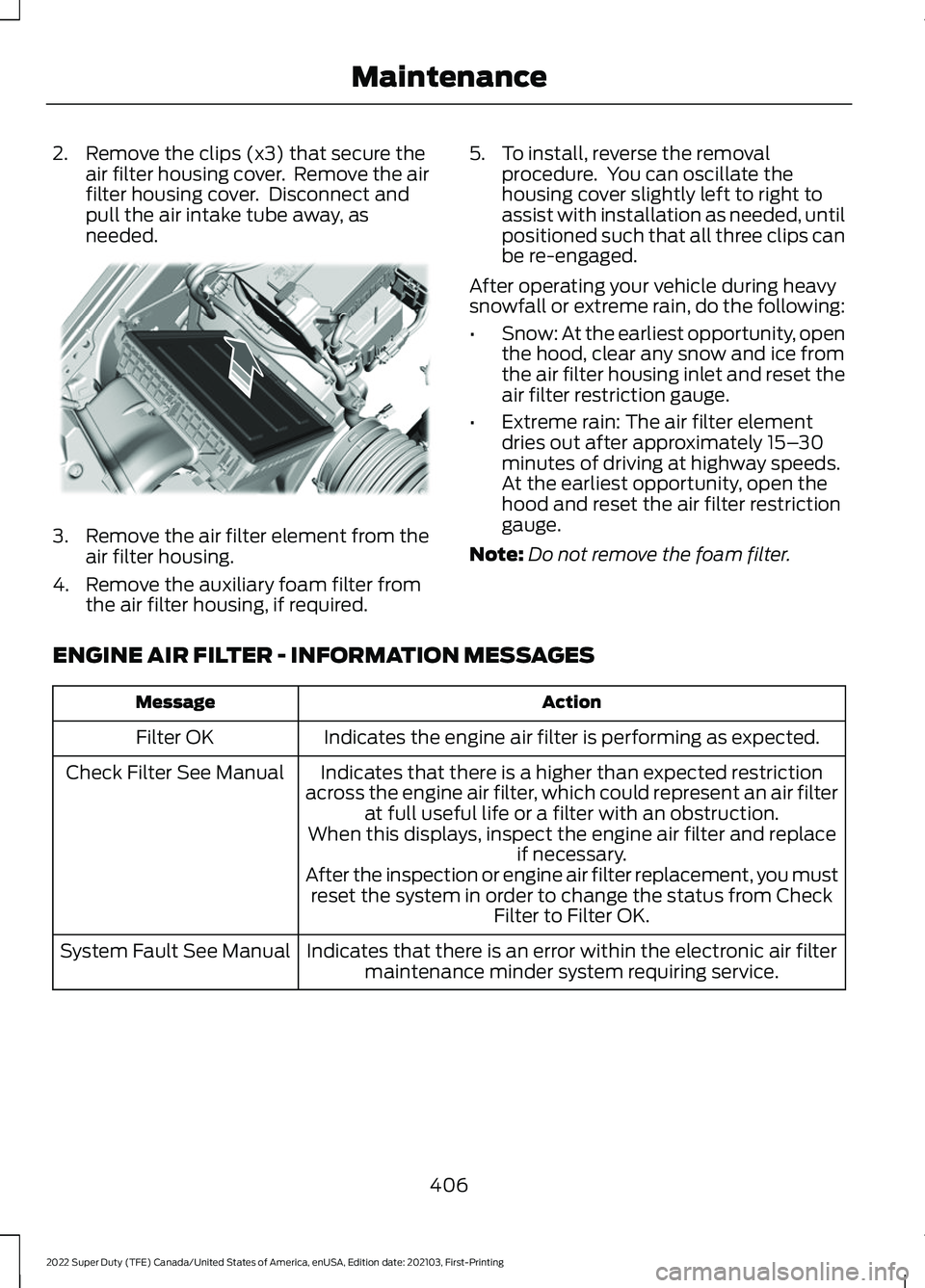
2. Remove the clips (x3) that secure the
air filter housing cover. Remove the air
filter housing cover. Disconnect and
pull the air intake tube away, as
needed. 3.
Remove the air filter element from the
air filter housing.
4. Remove the auxiliary foam filter from the air filter housing, if required. 5. To install, reverse the removal
procedure. You can oscillate the
housing cover slightly left to right to
assist with installation as needed, until
positioned such that all three clips can
be re-engaged.
After operating your vehicle during heavy
snowfall or extreme rain, do the following:
• Snow: At the earliest opportunity, open
the hood, clear any snow and ice from
the air filter housing inlet and reset the
air filter restriction gauge.
• Extreme rain: The air filter element
dries out after approximately 15– 30
minutes of driving at highway speeds.
At the earliest opportunity, open the
hood and reset the air filter restriction
gauge.
Note: Do not remove the foam filter.
ENGINE AIR FILTER - INFORMATION MESSAGES Action
Message
Indicates the engine air filter is performing as expected.
Filter OK
Indicates that there is a higher than expected restriction
across the engine air filter, which could represent an air filter at full useful life or a filter with an obstruction.
When this displays, inspect the engine air filter and replace if necessary.
After the inspection or engine air filter replacement, you must reset the system in order to change the status from Check Filter to Filter OK.
Check Filter See Manual
Indicates that there is an error within the electronic air filtermaintenance minder system requiring service.
System Fault See Manual
406
2022 Super Duty (TFE) Canada/United States of America, enUSA, Edition date: 202103, First-Printing MaintenanceE310319
Page 545 of 740
Data is sent to Ford in the United States
through the connected device. The
information is encrypted and includes, for
example, the vehicle identification number
of your vehicle, the SYNC module serial
number, odometer, enabled apps, usage
statistics and debugging information.
Updates may take place.
Note:
You must enable mobile apps for
each connected device the first time you
select a mobile app using the system.
Note: Standard data rates apply. Ford is
not responsible for any additional charges
you may receive from your service provider,
when your vehicle sends or receives data
through the connected device. This includes
any additional charges incurred due to
driving in areas when roaming out of a home
network.
USING SYNC™ WITH YOUR
MEDIA PLAYER
SYNC supports digital media sources
including: iPod, Bluetooth® devices, and
most USB drives. SYNC also supports
audio formats, such as MP3, WMA, WAV
and ACC.
Media Sources
The
AUX or MEDIA button allows you to
view and select available media sources.
Press the
AUX or MEDIA button to view
your sources. Use the directional arrows
and OK button to select your source. You
can also use the steering wheel audio
controls. Audio Voice Commands Press the voice button. You can
do things like play a specific song
or album, or tune to a radio
station. When prompted, say a command.
See the following table for example
commands. Not all commands may be
available on your vehicle. Command
___ List of Commands Help
Pause Play
AM ___ FM ___
CD Player
Sirius Channel ___ USB
Bluetooth Audio
__ is a dynamic listing, meaning that it
could be the name of anything, such as an
artist, station, or media source.
SYNC™ TROUBLESHOOTING
Your SYNC system is easy to use. However,
should questions arise, see the tables
below.
Use your local Ford website at any time to
check your phone's compatibility, register
your account and set preferences as well
as access a customer representative via
an online chat (during certain hours).
542
2022 Super Duty (TFE) Canada/United States of America, enUSA, Edition date: 202103, First-Printing SYNC™E142599
Page 619 of 740
AUXILIARY SWITCHES
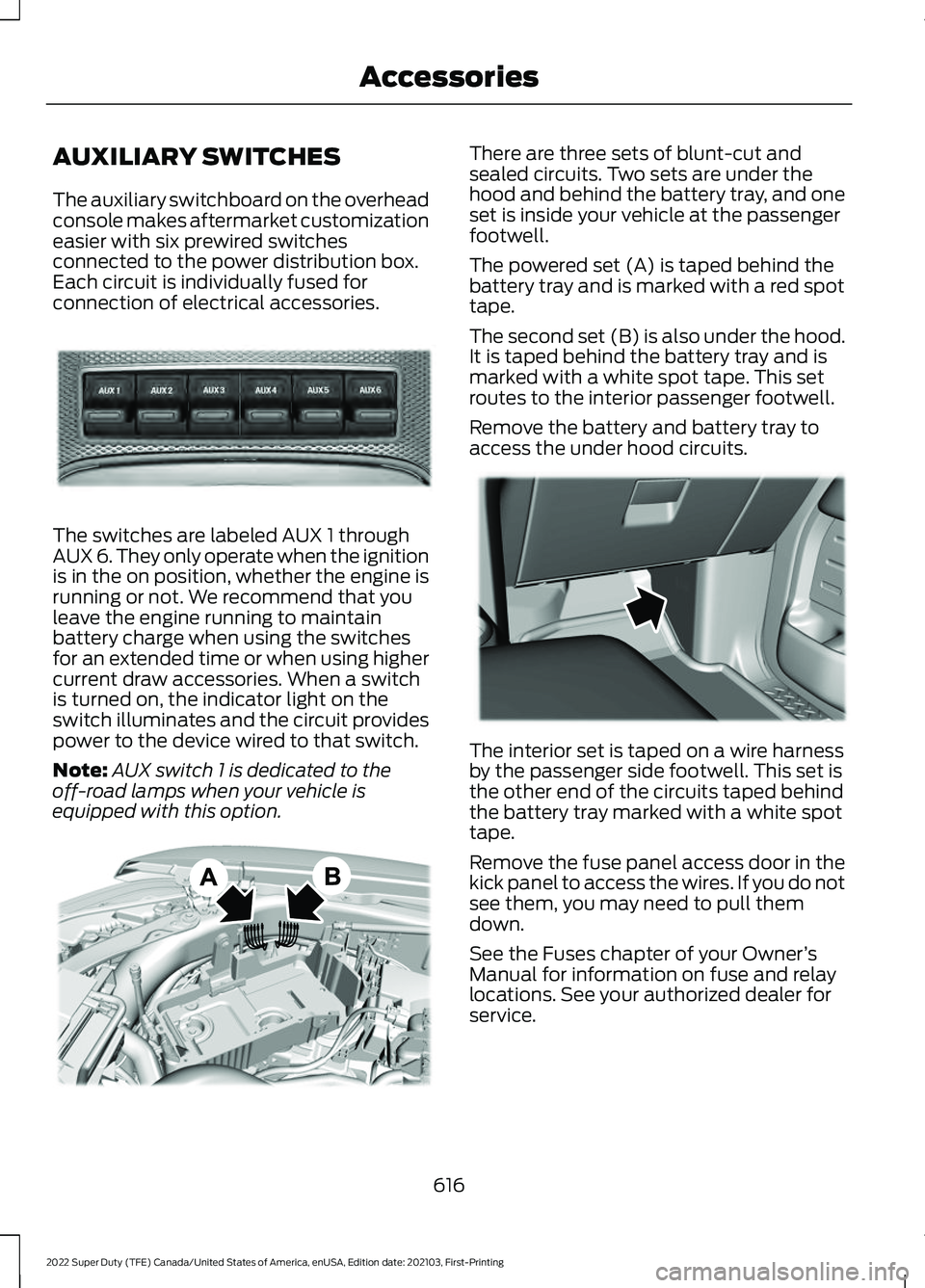
The auxiliary switchboard on the overhead
console makes aftermarket customization
easier with six prewired switches
connected to the power distribution box.
Each circuit is individually fused for
connection of electrical accessories.
The switches are labeled AUX 1 through
AUX 6. They only operate when the ignition
is in the on position, whether the engine is
running or not. We recommend that you
leave the engine running to maintain
battery charge when using the switches
for an extended time or when using higher
current draw accessories. When a switch
is turned on, the indicator light on the
switch illuminates and the circuit provides
power to the device wired to that switch.
Note:
AUX switch 1 is dedicated to the
off-road lamps when your vehicle is
equipped with this option. There are three sets of blunt-cut and
sealed circuits. Two sets are under the
hood and behind the battery tray, and one
set is inside your vehicle at the passenger
footwell.
The powered set (A) is taped behind the
battery tray and is marked with a red spot
tape.
The second set (B) is also under the hood.
It is taped behind the battery tray and is
marked with a white spot tape. This set
routes to the interior passenger footwell.
Remove the battery and battery tray to
access the under hood circuits.
The interior set is taped on a wire harness
by the passenger side footwell. This set is
the other end of the circuits taped behind
the battery tray marked with a white spot
tape.
Remove the fuse panel access door in the
kick panel to access the wires. If you do not
see them, you may need to pull them
down.
See the Fuses chapter of your Owner
’s
Manual for information on fuse and relay
locations. See your authorized dealer for
service.
616
2022 Super Duty (TFE) Canada/United States of America, enUSA, Edition date: 202103, First-Printing AccessoriesE220728 E347548 E347399
Page 620 of 740
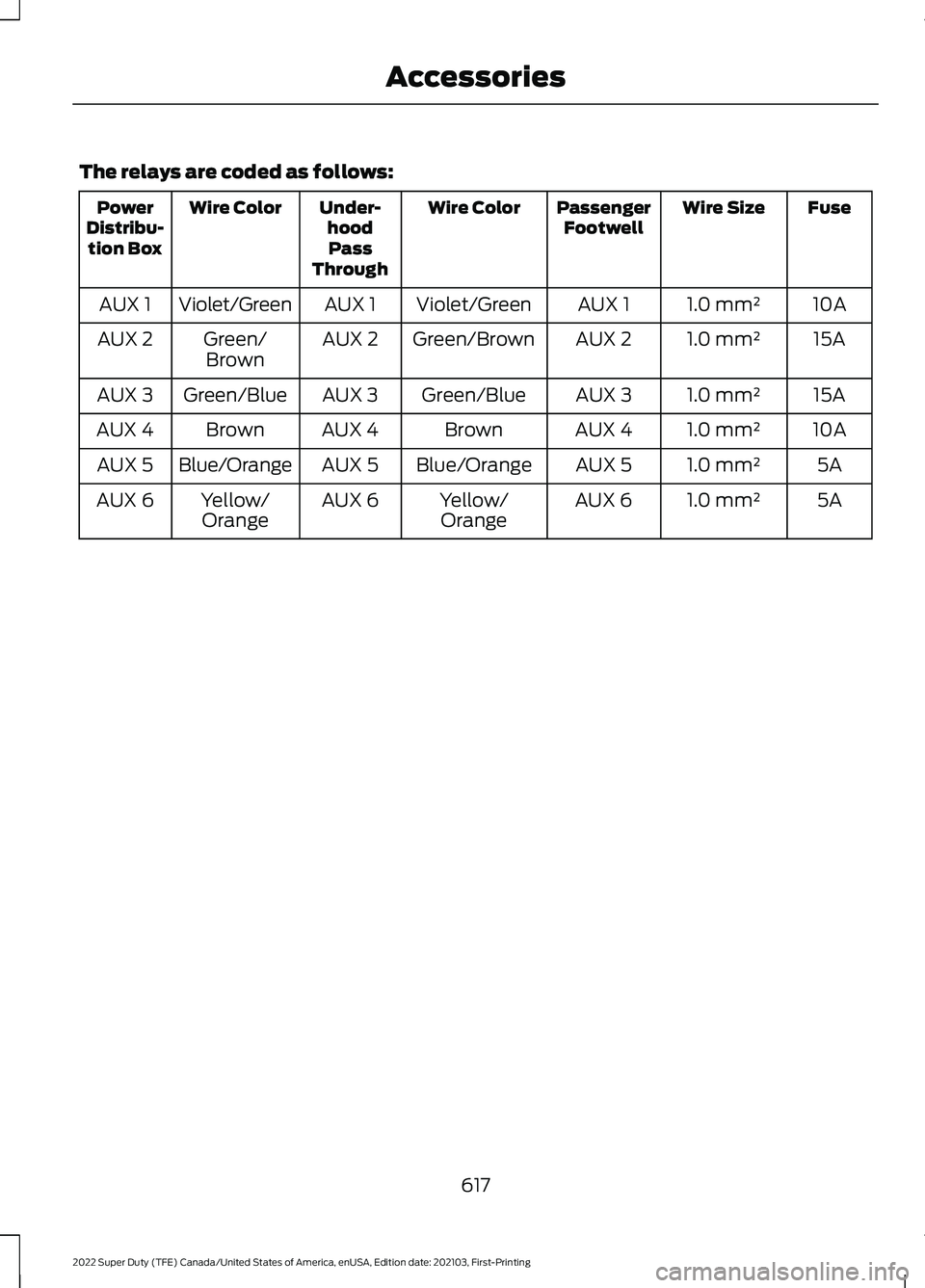
The relays are coded as follows:
Fuse
Wire Size
Passenger
Footwell
Wire Color
Under-
hoodPass
Through
Wire Color
Power
Distribu- tion Box
10A
1.0 mm²
AUX 1
Violet/Green
AUX 1
Violet/Green
AUX 1
15A
1.0 mm²
AUX 2
Green/Brown
AUX 2
Green/
Brown
AUX 2
15A
1.0 mm²
AUX 3
Green/Blue
AUX 3
Green/Blue
AUX 3
10A
1.0 mm²
AUX 4
Brown
AUX 4
Brown
AUX 4
5A
1.0 mm²
AUX 5
Blue/Orange
AUX 5
Blue/Orange
AUX 5
5A
1.0 mm²
AUX 6
Yellow/
Orange
AUX 6
Yellow/
Orange
AUX 6
617
2022 Super Duty (TFE) Canada/United States of America, enUSA, Edition date: 202103, First-Printing Accessories
Page 621 of 740
WHAT ARE THE AUXILIARY
SWITCHES
The auxiliary switchboard on the overhead
console makes aftermarket customization
easier with six prewired switches
connected to the power distribution box.
Each circuit is individually fused for
connection of electrical accessories.
LOCATING THE AUXILIARY
SWITCHES
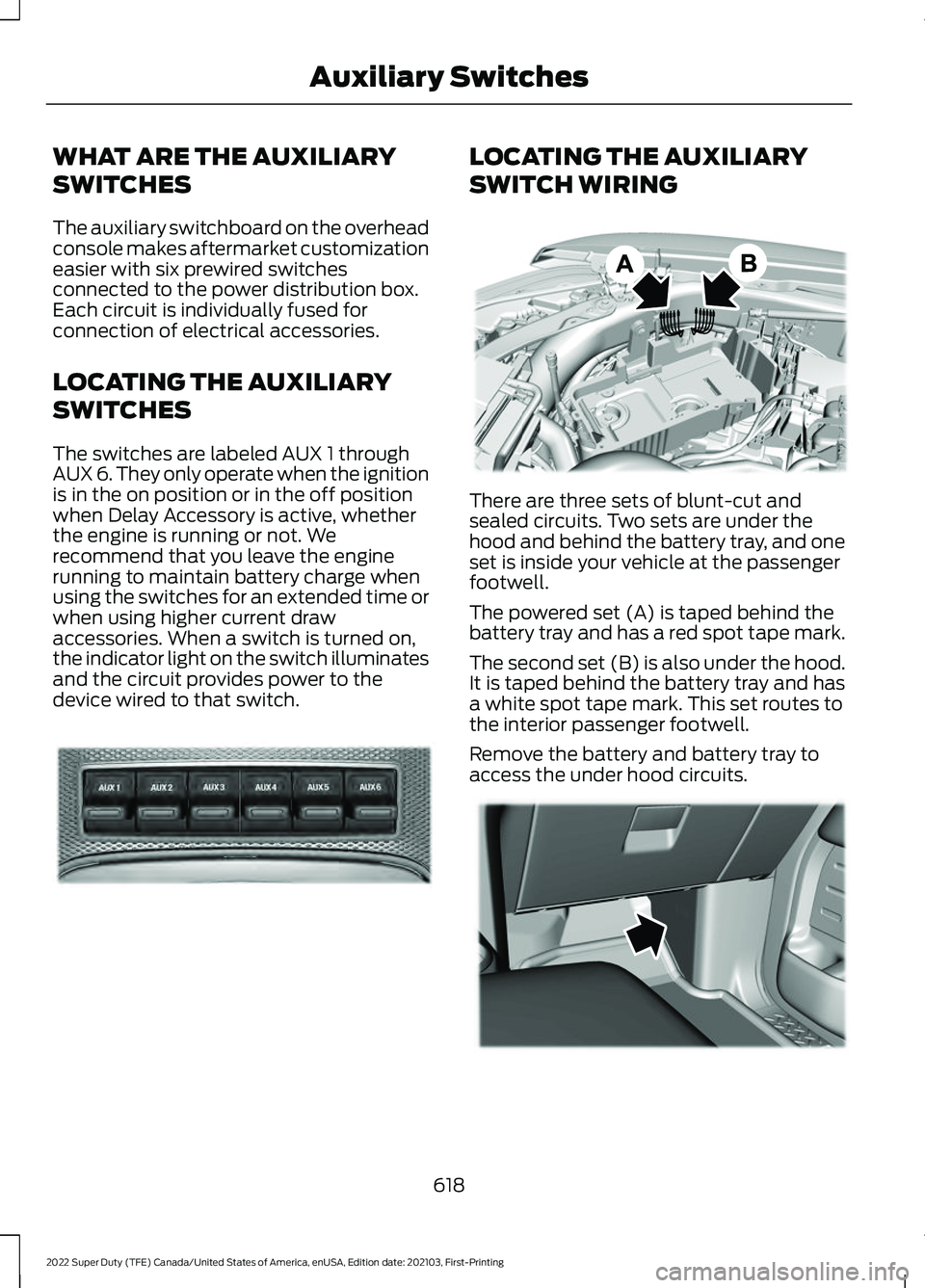
The switches are labeled AUX 1 through
AUX 6. They only operate when the ignition
is in the on position or in the off position
when Delay Accessory is active, whether
the engine is running or not. We
recommend that you leave the engine
running to maintain battery charge when
using the switches for an extended time or
when using higher current draw
accessories. When a switch is turned on,
the indicator light on the switch illuminates
and the circuit provides power to the
device wired to that switch. LOCATING THE AUXILIARY
SWITCH WIRING
There are three sets of blunt-cut and
sealed circuits. Two sets are under the
hood and behind the battery tray, and one
set is inside your vehicle at the passenger
footwell.
The powered set (A) is taped behind the
battery tray and has a red spot tape mark.
The second set (B) is also under the hood.
It is taped behind the battery tray and has
a white spot tape mark. This set routes to
the interior passenger footwell.
Remove the battery and battery tray to
access the under hood circuits.
618
2022 Super Duty (TFE) Canada/United States of America, enUSA, Edition date: 202103, First-Printing Auxiliary SwitchesE220728 E347548 E347399
Page 622 of 740
The interior set is taped on a wire harness
by the passenger side footwell. This set is
the other end of the circuits taped behind
the battery tray, with a white spot tape
mark.
Remove the fuse panel access door in the
kick panel to access the wires. If you do not
see them, you may need to pull them
down.
Additional information on fuse and relay
locations is available. See Fuses (page
387). See your authorized dealer for service.
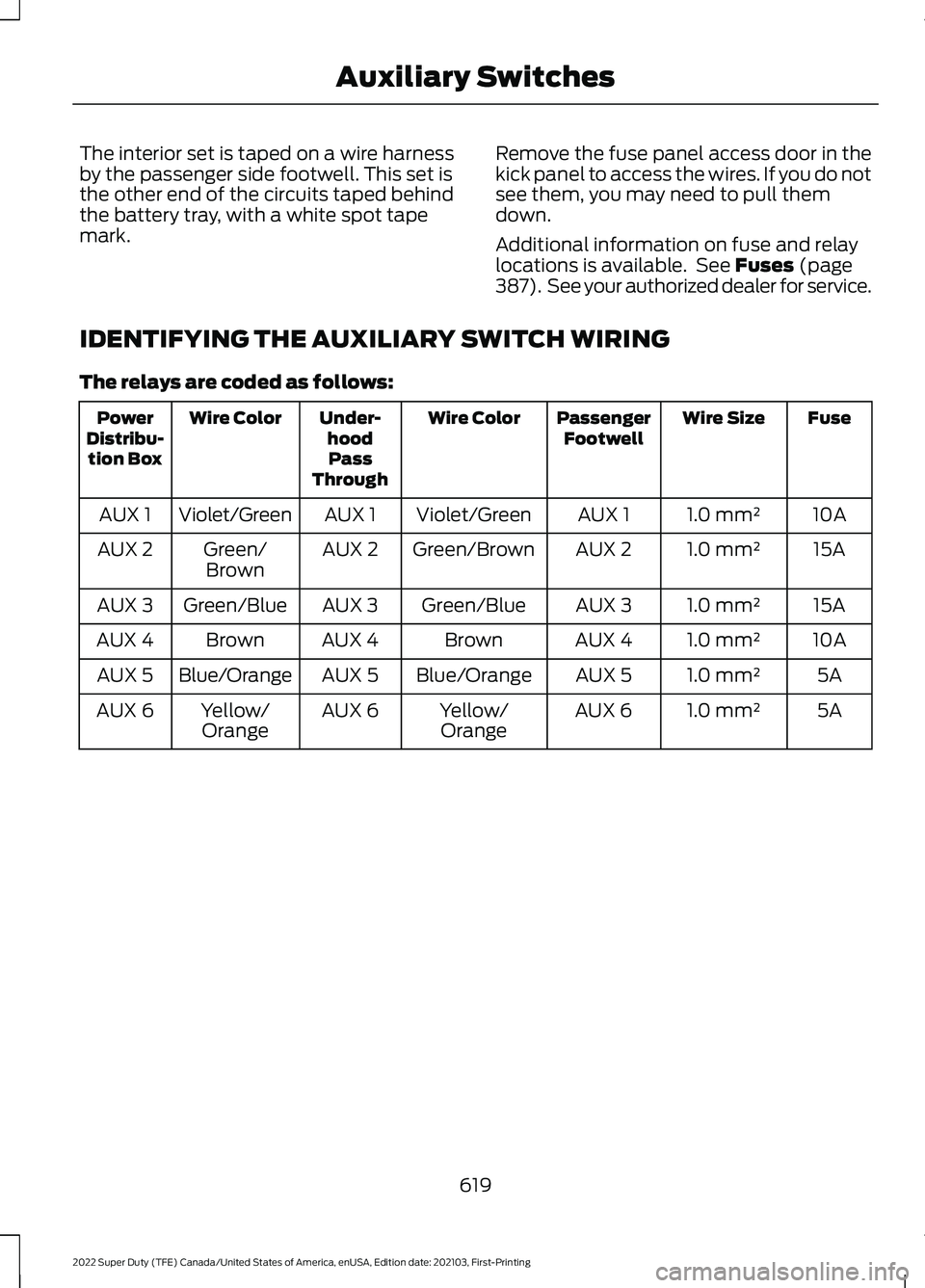
IDENTIFYING THE AUXILIARY SWITCH WIRING
The relays are coded as follows: Fuse
Wire Size
Passenger
Footwell
Wire Color
Under-
hoodPass
Through
Wire Color
Power
Distribu- tion Box
10A
1.0 mm²
AUX 1
Violet/Green
AUX 1
Violet/Green
AUX 1
15A
1.0 mm²
AUX 2
Green/Brown
AUX 2
Green/
Brown
AUX 2
15A
1.0 mm²
AUX 3
Green/Blue
AUX 3
Green/Blue
AUX 3
10A
1.0 mm²
AUX 4
Brown
AUX 4
Brown
AUX 4
5A
1.0 mm²
AUX 5
Blue/Orange
AUX 5
Blue/Orange
AUX 5
5A
1.0 mm²
AUX 6
Yellow/
Orange
AUX 6
Yellow/
Orange
AUX 6
619
2022 Super Duty (TFE) Canada/United States of America, enUSA, Edition date: 202103, First-Printing Auxiliary Switches
Page 722 of 740
Automatic Locking Mode.............................51
Disengaging Automatic Locking Mode........52
Engaging Automatic Locking Mode..............52
What Is Automatic Locking Mode................... 51
When to Use Automatic Locking Mode........51
Automatic Transmission...........................224 Automatic Transmission Positions.............224
Brake Shift Interlock......................................... 225
Manually Shifting Gears.................................. 225
Power Take-Off................................................... 227
Automatic Transmission Fluid Capacity and Specification - Diesel
.....................487
Automatic Transmission Fluid Capacity and Specification - Gasoline................487
Automatic Transmission Positions.......224 Drive (D)................................................................ 224
Manual (M).......................................................... 224
Neutral (N)........................................................... 224
Park (P)................................................................. 224
Reverse (R).......................................................... 224
Automatic Transmission Precautions.................................................224
Auto Mode
........................................................151
Auto Mode Indicators......................................... 151
Switching Auto Mode On and Off.................151
Switching Dual Mode On and Off.................152
Autounlock.......................................................84 Autounlock Requirements................................ 84
Switching Autounlock On and Off................84
What Is Autounlock............................................. 84
Autowipers.......................................................115 Adjusting the Sensitivity of the Rain
Sensor................................................................. 115
Autowipers Settings........................................... 115
What Are Autowipers......................................... 115
Auxiliary Switches........................................616
B
Battery See: Changing the 12V Battery.................... 409
Bed Extender...................................................96 Bed Extender Precautions................................ 96
Using the Bed Extender..................................... 97
Beginning a Voice Interaction................600
Blind Spot Information System.............293 Blind Spot Information System –
Troubleshooting............................................ 297Blind Spot Information System With Trailer
Coverage.......................................................... 295
Blind Spot Information System Indicators.....................................................296
Blind Spot Information System Limitations..................................................293
Blind Spot Information System Precautions.................................................293
Blind Spot Information System Requirements.............................................293
Blind Spot Information System – Troubleshooting........................................297
Blind Spot Information System – Information Messages................................. 297
Blind Spot Information System With Trailer Coverage
........................................295
Blind Spot Information System With Trailer
Coverage Limitations.................................. 295
Selecting a Trailer.............................................. 296
Setting a Trailer Length................................... 295
What Is Blind Spot Information System with Trailer Coverage............................................. 295
Bluetooth®....................................................607
Body Control Module Fuse Box..............392 Accessing the Body Control Module Fuse
Box...................................................................... 392
Identifying the Fuses in the Body Control Module Fuse Box.......................................... 393
Locating the Body Control Module Fuse Box...................................................................... 392
Bonnet Lock See: Opening and Closing the Hood..........396
Booster Seats
..................................................46
Brake Fluid Specification...........................241
Brake Over Accelerator
.............................240
Brake Precautions.......................................240
Brakes..............................................................240
Anti-Lock Braking System............................. 240
Brakes – Troubleshooting............................... 241
Brake Shift Interlock
...................................225
Brake Shift Interlock Precautions................225
Using Brake Shift Interlock............................. 226
What Is Brake Shift Interlock......................... 225
Brakes – Troubleshooting
.........................241
Brakes – Frequently Asked
Questions.......................................................... 241
Brakes – Warning Lamps................................. 241
Breaking-In.....................................................373
719
2022 Super Duty (TFE) Canada/United States of America, enUSA, Edition date: 202103, First-Printing Index
Page 729 of 740
How Do the Front Airbags Work...............57
How Do the Side Airbags Work.................57
Hydraulic Power Steering Fluid Capacity and Specification.....................................496
Hydraulic Power Steering.........................256 Checking the Hydraulic Power Steering
Fluid.................................................................... 257
Hydraulic Power Steering Adaptive Steering............................................................ 258
Hydraulic Power Steering Guidelines.........256
Locating the Hydraulic Power Steering Fluid Reservoir........................................................... 257
I
Identifying Fuse Types
...............................395
Identifying the Audio Unit........................535
Identifying the Auxiliary Switch Wiring
.............................................................619
Identifying the Climate Control Unit.................................................................149
Ignition Switch
................................................191
Inflating the Tires..........................................441
Information On Demand Screen
...........599
Information on the Tire Sidewall..........430
Inspecting the Tire for Damage.............445
Inspecting the Tire for Wear
....................444
Inspecting the Wheel Valve Stems...........................................................446
Installing Child Restraints...........................39 Attaching the Front Seat Tether
Strap.................................................................... 44
Attaching the Rear Seat Tether Strap..........45
Combining the Seatbelt and Lower Anchors for Attaching Child Restraints.................... 44
Installing a Child Restraint in a Center Seat...................................................................... 43
Using Lower Anchors and Tethers for Children............................................................... 43
Using Seatbelts..................................................... 39
Using Tether Straps............................................. 44
Instrument Cluster Display
........................141
Personalized Settings....................................... 142
Instrument Cluster Display Main Menu - Vehicles With: 2.3 Inch Screen...............141
Instrument Cluster Display Main Menu - Vehicles With: 4.2 Inch Screen
..............141 Instrument Cluster Display Main Menu -
Vehicles With: 8 Inch Screen.................142
Instrument Cluster Indicators..................138
Instrument Cluster
.......................................133
Fuel Gauge............................................................ 136
Instrument Cluster Overview - Vehicles With: 2.3 Inch Screen................................133
Instrument Cluster Overview - Vehicles With: 4.2 Inch Screen
...............................134
Instrument Cluster Overview - Vehicles With: 8 Inch Screen...................................135
Instrument Cluster Warning Lamps.......137
Instrument Panel.............................................31
Integrated Trailer Brake Controller........334 Integrated Trailer Brake Controller –
Troubleshooting............................................ 336
Integrated Trailer Brake Controller Precautions.................................................334
Integrated Trailer Brake Controller – Troubleshooting........................................336
Integrated Trailer Brake Controller – Frequently Asked Questions..................... 337
Integrated Trailer Brake Controller – Information Messages................................ 336
Interior Air Quality.........................................157
Interior Bulbs
..................................................419
Interior Bulb Specification Chart.................. 419
Interior Lamp Function...............................124 Switching the Interior Lamp Function On
and Off............................................................... 124
What Is the Interior Lamp Function.............124
Interior Lighting..............................................124 Ambient Lighting................................................ 125
Interior Lamp Function..................................... 124
Interior Lighting – Troubleshooting..............125
Interior Lighting – Troubleshooting.......125 Interior Lighting – Frequently Asked
Questions.......................................................... 125
Interior Mirror..................................................128 Auto-Dimming Interior Mirror......................... 128
Interior Mirror Precautions........................128
Introduction .......................................................
19
J
Jump Starting the Vehicle
........................379
Jump Starting Precautions............................. 379
Jump Starting the Vehicle.............................. 380
726
2022 Super Duty (TFE) Canada/United States of America, enUSA, Edition date: 202103, First-Printing Index
Page 730 of 740
Preparing the Vehicle......................................
380
K
Keyless Entry....................................................87
Keyless Entry – Troubleshooting................... 88
Keyless Entry Keypad...................................89 Keyless Entry Keypad –
Troubleshooting............................................... 91
Keyless Entry Keypad Limitations
...........89
Keyless Entry Keypad Master Access Code.................................................................89
Keyless Entry Keypad Personal Access Codes..............................................................90
Keyless Entry Keypad – Troubleshooting
...........................................91
Keyless Entry Keypad – Frequently Asked
Questions............................................................ 91
Keyless Entry Limitations............................87
Keyless Entry Settings
..................................87
Keyless Entry – Troubleshooting.............88 Keyless Entry – Frequently Asked
Questions........................................................... 88
Keys and Remote Controls........................69 Keys and Remote Controls –
Troubleshooting............................................... 76
Keys and Remote Controls – Troubleshooting...........................................76
Keys and Remote Controls – Information Messages............................................................ 76
L
Lane Keeping System Indicators...........289
Lane Keeping System................................286 Alert Mode........................................................... 288
Lane Keeping System – Troubleshooting............................................ 290
Lane Keeping System Limitations........286
Lane Keeping System Precautions................................................286
Lane Keeping System – Troubleshooting.......................................290
Lane Keeping System – Frequently Asked Questions......................................................... 291
Lane Keeping System – Information Messages......................................................... 290Launching or Retrieving a Boat or
Personal Watercraft
................................330
Live Traffic......................................................610
Switching Live Traffic On and Off................610
What Is Live Traffic............................................ 610
Load Carrying
..................................................311
Load Carrying Precautions.........................311
Loading Your Trailer....................................329
Locating the 360 Degree Cameras.......................................................266
Locating the Auxiliary Switches.............618
Locating the Auxiliary Switch Wiring.............................................................618
Locating the Blind Spot Information System Sensors
........................................294
Locating the Brake Fluid Reservoir.......240
Locating the Cross Traffic Alert Sensors........................................................299
Locating the Keyless Entry Keypad.........89
Locating the Memory Function Buttons
...........................................................174
Locating the Power Outlet........................182
Locating the Pre-Collision Assist Sensors........................................................303
Locating the Rear View Camera............263
Locating the Safety Compliance Certification Labels
...................................312
Locating the Tire label...............................429
Locating the USB Ports.............................180
Locating the Wireless Accessory Charger..........................................................185
Locating Your Vehicle...................................70
Locking and Unlocking the Tailgate........94
Locking the Rear Window Controls........127
M
Maintenance.................................................396 Engine Air Filter.................................................. 405
Engine Oil............................................................. 400
Exterior Bulbs....................................................... 412
Interior Bulbs........................................................ 419
Maintenance Precautions........................396
Making and Receiving a Phone Call................................................................604
Manually Dimming the Interior Mirror..............................................................128
727
2022 Super Duty (TFE) Canada/United States of America, enUSA, Edition date: 202103, First-Printing Index