reset FORD SUPER DUTY 2022 Owner's Manual
[x] Cancel search | Manufacturer: FORD, Model Year: 2022, Model line: SUPER DUTY, Model: FORD SUPER DUTY 2022Pages: 740, PDF Size: 9.95 MB
Page 178 of 740
2. Press and hold the preferred preset
button for about five seconds. A tone
sounds, and the instrument panel
prompts you to press the lock button
on your remote control.
3. Within ten seconds, press the lock button on the remote control you are
linking. The instrument panel indicates
a successful link.
To unlink a remote control, follow the
same procedure – except in step 3, press
the unlock button on the remote control.
Note: If more than one linked remote
control is in range, the memory function
moves to the settings of the first key to
initiate a memory recall.
175
2022 Super Duty (TFE) Canada/United States of America, enUSA, Edition date: 202103, First-Printing Memory Function
Page 185 of 740
WHAT IS THE POWER OUTLET
The power outlet can power devices that
require up to the rating on the outlet cover.
Note:
The total power delivered is divided
if more than one outlet is used.
POWER OUTLET
PRECAUTIONS WARNING: Do not keep electrical
devices plugged in the power point
whenever the device is not in use. Do not
use any extension cord with the 120 volt
AC power point, since it will defeat the
safety protection design. Doing so may
cause the power point to overload due
to powering multiple devices that can
reach beyond the 400 watt load limit
and could result in fire or serious injury.
POWER OUTLET LIMITATIONS
Devices may exceed the power rating
shown the device label when plugged in.
Unplug the device and switch the ignition
on and off to reset the system.
You should not use the power outlet for
these types of electric devices:
• Cathode ray tube type televisions.
• Motor loads, for example vacuum
cleaners, electric saws and other
electric power tools, or
compressor-driven refrigerators.
• Measuring devices which process
precise data, for example medical
equipment or measuring equipment.
• Other appliances requiring an
extremely stable power supply, for
example microcomputer-controlled
electric blankets or touch sensor
lamps. LOCATING THE POWER
OUTLET
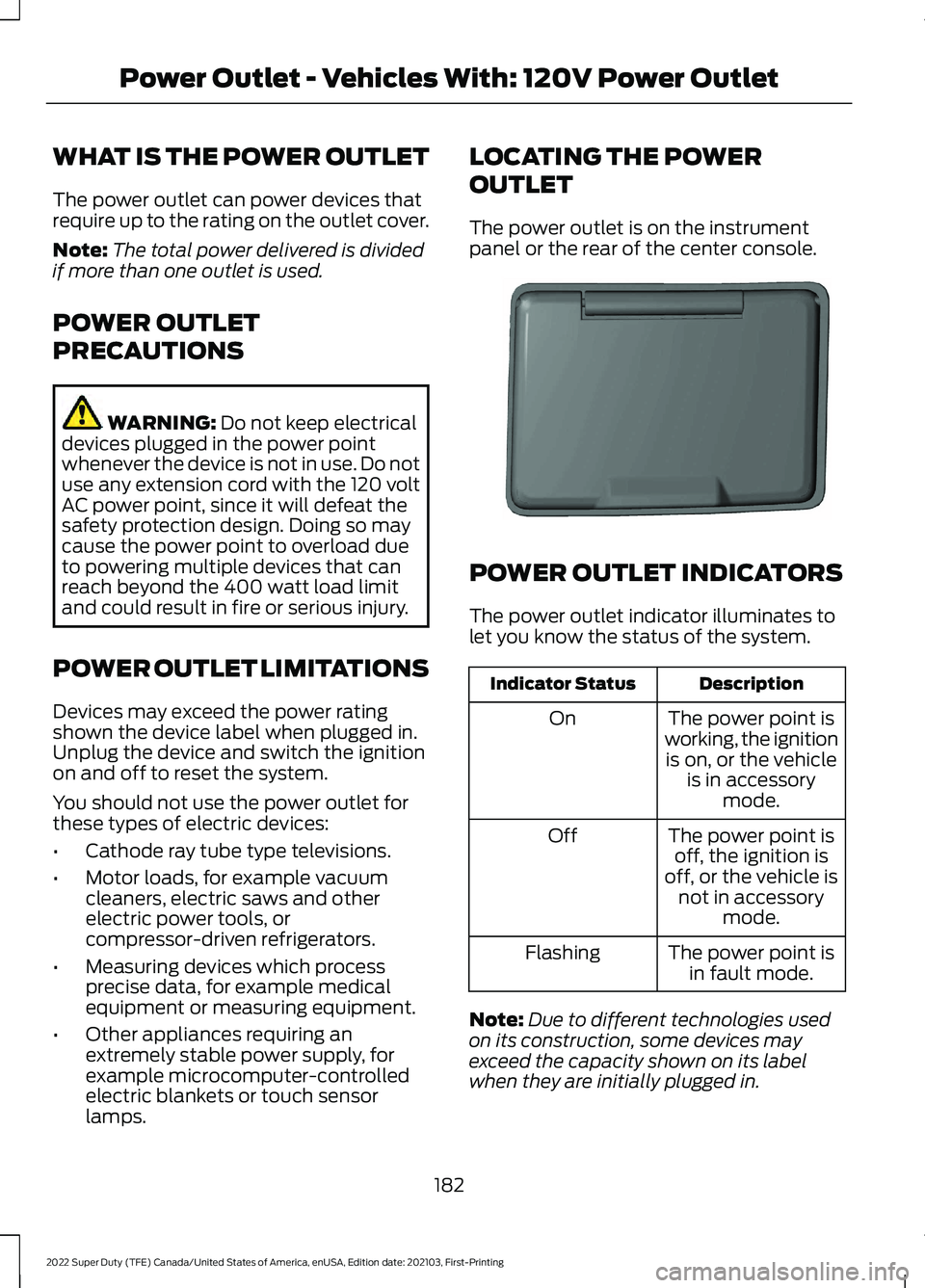
The power outlet is on the instrument
panel or the rear of the center console.
POWER OUTLET INDICATORS
The power outlet indicator illuminates to
let you know the status of the system.
Description
Indicator Status
The power point is
working, the ignition is on, or the vehicle is in accessory mode.
On
The power point isoff, the ignition is
off, or the vehicle is not in accessory mode.
Off
The power point isin fault mode.
Flashing
Note: Due to different technologies used
on its construction, some devices may
exceed the capacity shown on its label
when they are initially plugged in.
182
2022 Super Duty (TFE) Canada/United States of America, enUSA, Edition date: 202103, First-Printing Power Outlet - Vehicles With: 120V Power OutletE353449
Page 186 of 740
Note:
The power outlet temporarily turns
off power when in fault mode if the device
exceeds the Watt limit. Unplug your device
and switch the ignition off. Switch the
ignition back on, but do not plug your device
back in. Let the system cool off and switch
the ignition off to reset the fault mode.
Switch the ignition back on and make sure
the indicator light remains on.
183
2022 Super Duty (TFE) Canada/United States of America, enUSA, Edition date: 202103, First-Printing Power Outlet - Vehicles With: 120V Power Outlet
Page 200 of 740
HOW DOES AUTOMATIC ENGINE
STOP WORK
Automatic engine stop turns the engine
off. The ignition also turns off in order to
save battery power. Before the engine
shuts down, a message appears in the
information display showing a timer
counting down. If you do not intervene
within 30 seconds, the engine shuts down.
Another message appears in the
information display to inform you that the
engine has shut down in order to save fuel.
Start your vehicle as you normally do.
SWITCHING AUTOMATIC ENGINE
STOP ON AND OFF - VEHICLES
WITH: 2.3 INCH SCREEN/4.2 INCH
SCREEN
1. Using the information display controls
on the steering wheel, select Settings.
2. Select Vehicle Settings.
3. Switch
30min Max Idle on or off.
Note: You cannot permanently switch off
the automatic shutdown. If you switch it
off, it turns on each time you switch the
ignition on.
SWITCHING AUTOMATIC ENGINE
STOP ON AND OFF - VEHICLES
WITH: 8 INCH SCREEN
1. Press the menu button on the steering
wheel to enter the information display
main menu.
2. Select
Settings.
3. Switch
Auto Engine Off on or off.
Note: You cannot permanently switch off
the automatic shutdown. If you switch it
off, it turns on each time you switch the
ignition on. OVERRIDING AUTOMATIC ENGINE
STOP
You can stop the engine shutdown, or reset
the timer, at any point before the
30-second countdown has expired by
doing any of the following:
•
Pressing the brake pedal or accelerator
pedal.
• Pressing the
OK or RESET button
during the countdown.
Note: You cannot permanently switch off
the automatic engine shutdown feature.
When you switch it off temporarily, it turns
on at the next ignition cycle.
ACCESSING THE PASSIVE KEY
BACKUP POSITION
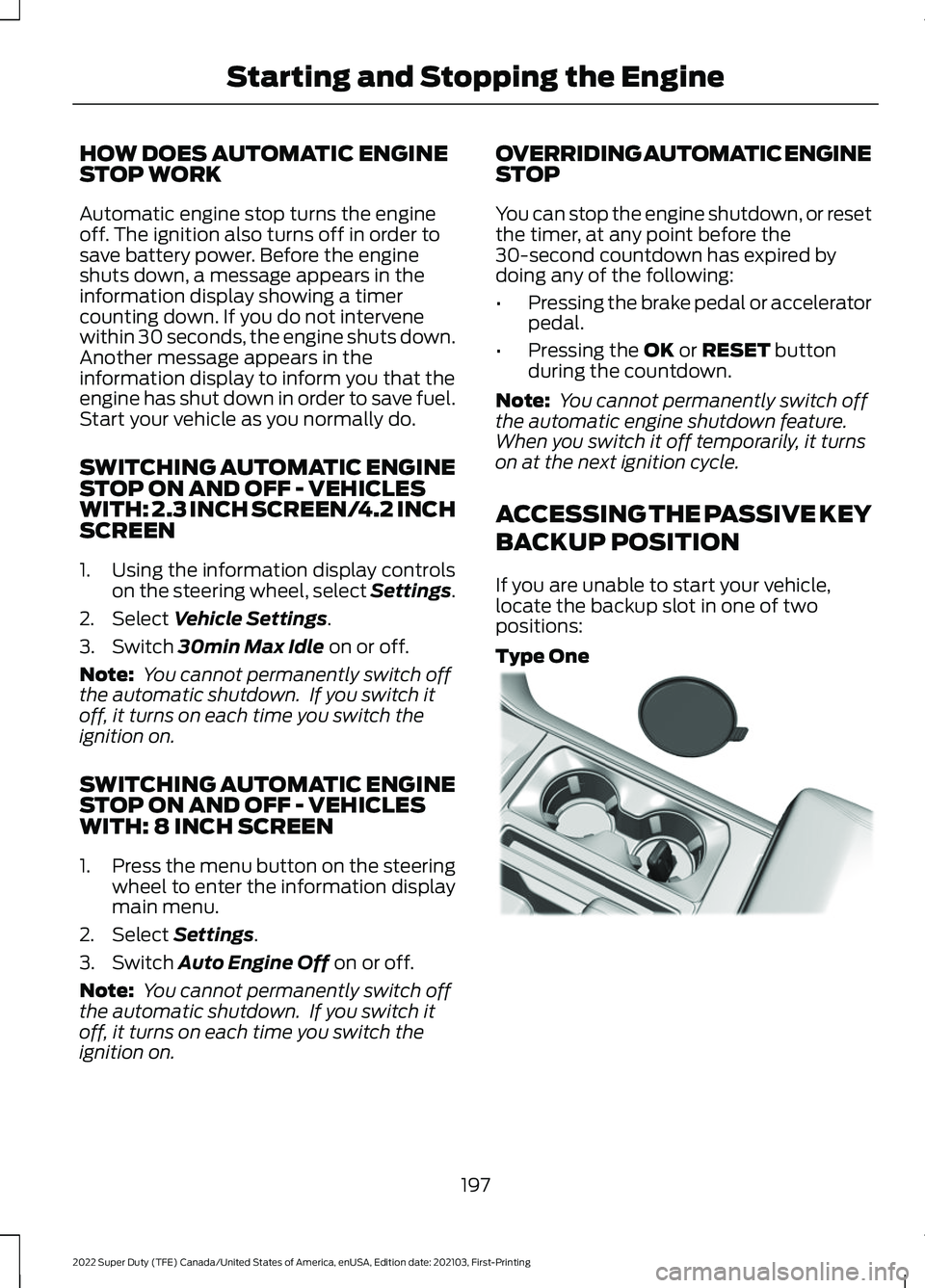
If you are unable to start your vehicle,
locate the backup slot in one of two
positions:
Type One 197
2022 Super Duty (TFE) Canada/United States of America, enUSA, Edition date: 202103, First-Printing Starting and Stopping the EngineE312216
Page 221 of 740
Driving without refilling, replacing
contaminated diesel exhaust fluid, or
having the selective catalytic reduction
system repaired results in the following
actions as required by the California Air
Resources Board (CARB) and the U.S.
Environmental Protection Agency (EPA):
•
Within a preset distance to empty,
speed is limited upon vehicle restart.
Prior to this occurring a message
appears in the information display.
• Further vehicle operation without
refilling or replacing contaminated
diesel exhaust fluid causes the engine
to enter an idle-only condition. This
only occurs upon vehicle refueling,
vehicle idling in park for 1 hour, or
engine shutdown for 10 minutes or
more and is indicated by a message in
the information display indicating
required actions to resume normal
operation. It is required to add a
minimum of 1.0 gal (3.8 L) of diesel
exhaust fluid to the tank to exit the
idle-only condition, but your vehicle is
still in the speed-limiting mode until
you refill the tank completely.
Note: For vehicle speed limiting or idle-only
condition, normal vehicle operation resumes
when you refill the diesel exhaust fluid tank
or repair the contaminated system. If the
system is contaminated or inoperative, have
your vehicle checked as soon as possible. SELECTIVE CATALYTIC
REDUCTION SYSTEM
REQUIREMENTS Only use diesel exhaust fluid that is
certified by the American Petroleum
Institute (API).
You can purchase diesel exhaust fluid at
an authorized dealer, or contact roadside
assistance for help in finding a retailer that
sells diesel exhaust fluid.
Note:
Non-certified diesel exhaust fluid use
can cause damage that your Warranty may
not cover
SELECTIVE CATALYTIC
REDUCTION SYSTEM
GUIDELINES
• Diesel exhaust fluid is non-flammable,
non-toxic, colorless and water-soluble
liquid.
• In order for the system to operate
correctly you must maintain the diesel
exhaust fluid level.
• Do not overfill the diesel exhaust fluid
tank.
• Diesel exhaust fluid is corrosive.
218
2022 Super Duty (TFE) Canada/United States of America, enUSA, Edition date: 202103, First-Printing Selective Catalytic Reduction SystemE163354
Page 313 of 740
SWITCHING DRIVER ALERT ON
AND OFF - VEHICLES WITH: 4.2
INCH SCREEN
To switch the system on or off, use the
instrument cluster display:
1. Select Driver Assist.
2. Select
Driver Alert.
3. Switch the feature on or off.
Note: The system remains on or off
depending on how it was last set.
Resetting Driver Alert
You can reset the system by either:
• Switching the ignition off and on.
• Stopping the vehicle and then opening
and closing the driver door. SWITCHING DRIVER ALERT ON
AND OFF - VEHICLES WITH: 8
INCH SCREEN
To switch the system on or off, use the
instrument cluster display:
1. Select
Driver Assist.
2. Select
Driver Alert.
3. Switch the feature on or off.
Note: The system remains on or off
depending on how it was last set.
Resetting Driver Alert
You can reset the system by either:
• Switching the ignition off and on.
• Stopping the vehicle and then opening
and closing the driver door.
DRIVER ALERT – TROUBLESHOOTING
DRIVER ALERT – INFORMATION MESSAGES Action
Message
Stop and rest as soon as it is safe to do so.
Driver Alert Warning Rest Now
Take a rest soon.
Driver Alert Warning Rest Suggested
310
2022 Super Duty (TFE) Canada/United States of America, enUSA, Edition date: 202103, First-Printing Driver Alert
Page 404 of 740
Note:
The oil consumption of new engines
reaches its normal level after approximately
3,000 mi (5,000 km).
ADDING ENGINE OIL WARNING: Do not remove the filler
cap when the engine is running. WARNING:
Do not add engine oil
when the engine is hot. Failure to follow
this instruction could result in personal
injury.
Do not use supplemental engine oil
additives because they are unnecessary
and could lead to engine damage that the
vehicle warranty may not cover.
1. Clean the area surrounding the engine oil filler cap before you remove it.
2. Remove the engine oil filler cap.
3. Add engine oil that meets our specifications. See
Engine Oil (page
401).
4. Reinstall the engine oil filler cap. Turn it clockwise until you feel a strong
resistance.
Note: Do not add oil further than the
maximum mark. Oil levels above the
maximum mark may cause engine damage.
Note: Immediately soak up any oil spillage
with an absorbent cloth.
RESETTING THE ENGINE OIL
CHANGE REMINDER - VEHICLES
WITH: 2.3 INCH SCREEN/4.2 INCH
SCREEN
1. Press the Menu button on the steering
wheel to enter the information display
main menu.
2. Select
Truck Info.
3. Select
Oil Life. 4. Select
Reset Oil Life.
5. Press and hold the OK button until the
system reset confirmation appears.
RESETTING THE ENGINE OIL
CHANGE REMINDER - VEHICLES
WITH: 8 INCH SCREEN
Depending on your cluster, there are two
paths to reset the engine oil change
reminder.
Path 1
1. Press the Menu button on the steering
wheel to enter the information display
main menu.
2. Select
Settings.
3. Select
Vehicle Maintenance.
4. Select
Oil Life.
5. Press and hold the OK button until the
system reset confirmation appears.
Path 2
1. Press the Menu button on the steering
wheel to enter the information display
main menu.
2. Select
Truck Info.
3. Select
Engine Information.
4. Press and hold the OK button until the
system reset confirmation appears.
ENGINE OIL CAPACITY AND
SPECIFICATION
For filling information, please refer to the
Capacities and Specifications section of
your owner's manual. See
Engine Oil
Capacity and Specification (page 401).
401
2022 Super Duty (TFE) Canada/United States of America, enUSA, Edition date: 202103, First-Printing Maintenance
Page 406 of 740
3.
Replace the coolant reservoir cap. Turn
the cap clockwise until it contacts the
hard stop.
4. Check the coolant level in the coolant reservoir the next few times you drive
your vehicle. If necessary, repeat step
2.
If you have to add more than 1.1 qt (1 L) of
engine coolant per month, have your
vehicle checked as soon as possible.
Operating an engine with a low level of
coolant can result in engine overheating
and possible engine damage.
In case of emergency, you can add a large
amount of water without engine coolant
in order to reach a vehicle service location.
Service your vehicle as soon as possible.
Water alone, without engine coolant, can
cause engine damage from corrosion,
overheating or freezing.
Do not use the following as a coolant
substitute, as they can cause engine
damage from overheating or freezing:
• Alcohol.
• Methanol.
• Brine.
• Any coolant mixed with alcohol or
methanol antifreeze.
Do not add extra inhibitors or additives to
the coolant. These can be harmful and
compromise the corrosion protection of
the coolant.
Severe Climates
If you drive in extremely cold climates, you
may need to increase the coolant
concentration above 50%.
Note: A coolant concentration of 60%
provides improved freeze point protection.
Coolant concentrations above 60%
decrease the overheat protection
characteristics of the coolant and could
cause engine damage. If you drive in extremely hot climates, you
may need to decrease the coolant
concentration to 40%.
Note:
A coolant concentration of 40%
provides improved overheat protection.
Coolant concentrations below 40%
decrease the overheat and corrosion
protection characteristics of the coolant and
could cause engine damage.
Coolant Change
Change the coolant at specific mileage
intervals. Refer to the scheduled
maintenance information. See
Normal
Scheduled Maintenance (page 628).
Note: Dispose of used coolant in the
appropriate manner.
Follow your community's regulations and
standards for recycling and disposing of
automotive fluids.
Fail-Safe Cooling
Fail-safe cooling allows you to temporarily
drive your vehicle before any incremental
component damage occurs. The fail-safe
distance depends on ambient
temperature, vehicle load and terrain.
How Fail-Safe Cooling Works If the engine begins to overheat,
the coolant temperature gauge
moves toward the red zone:
A warning lamp illuminates and
a message may appear in the
information display.
If the engine reaches a preset
over-temperature condition, the engine
automatically switches to alternating
cylinder operation. Each disabled cylinder
acts as an air pump and cools the engine.
403
2022 Super Duty (TFE) Canada/United States of America, enUSA, Edition date: 202103, First-Printing Maintenance
Page 409 of 740
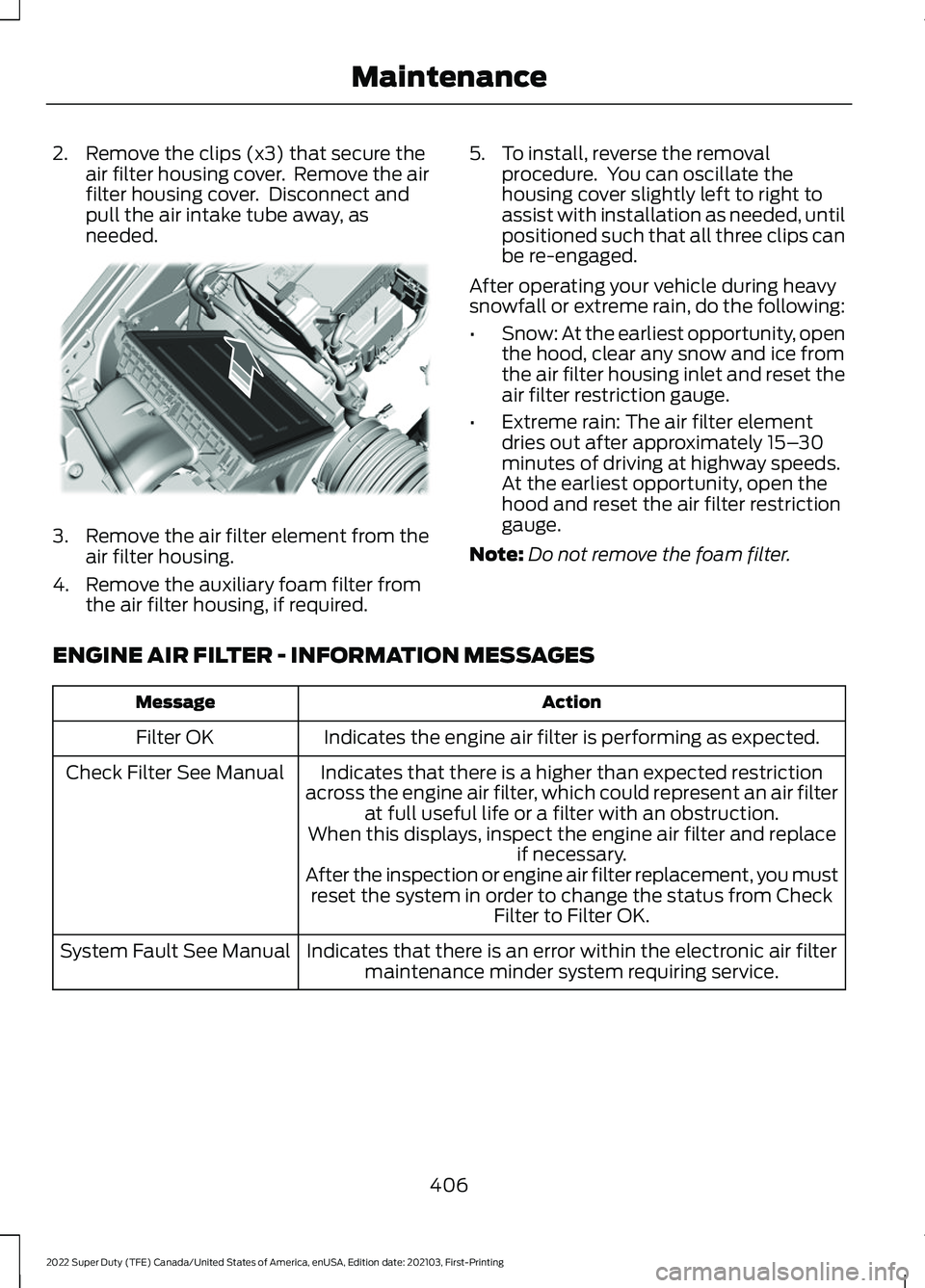
2. Remove the clips (x3) that secure the
air filter housing cover. Remove the air
filter housing cover. Disconnect and
pull the air intake tube away, as
needed. 3.
Remove the air filter element from the
air filter housing.
4. Remove the auxiliary foam filter from the air filter housing, if required. 5. To install, reverse the removal
procedure. You can oscillate the
housing cover slightly left to right to
assist with installation as needed, until
positioned such that all three clips can
be re-engaged.
After operating your vehicle during heavy
snowfall or extreme rain, do the following:
• Snow: At the earliest opportunity, open
the hood, clear any snow and ice from
the air filter housing inlet and reset the
air filter restriction gauge.
• Extreme rain: The air filter element
dries out after approximately 15– 30
minutes of driving at highway speeds.
At the earliest opportunity, open the
hood and reset the air filter restriction
gauge.
Note: Do not remove the foam filter.
ENGINE AIR FILTER - INFORMATION MESSAGES Action
Message
Indicates the engine air filter is performing as expected.
Filter OK
Indicates that there is a higher than expected restriction
across the engine air filter, which could represent an air filter at full useful life or a filter with an obstruction.
When this displays, inspect the engine air filter and replace if necessary.
After the inspection or engine air filter replacement, you must reset the system in order to change the status from Check Filter to Filter OK.
Check Filter See Manual
Indicates that there is an error within the electronic air filtermaintenance minder system requiring service.
System Fault See Manual
406
2022 Super Duty (TFE) Canada/United States of America, enUSA, Edition date: 202103, First-Printing MaintenanceE310319
Page 413 of 740
To maintain correct operation of the
battery management system, if you add
any electrical devices to your vehicle, do
not connect the ground connection directly
to the negative battery terminal. A
connection at the negative battery terminal
can cause inaccurate measurements of
the battery condition and potential
incorrect system operation.
Note:
If you add electrical accessories or
components to your vehicle this may
adversely affect battery performance,
durability and the performance of other
electrical systems on your vehicle.
If you replace the battery make sure it
matches the electrical requirements of
your vehicle.
If you disconnect or replace the battery
and your vehicle has an automatic
transmission, it must relearn its adaptive
strategy. Because of this, the transmission
may shift firmly when first driven. This is
normal operation while the transmission
fully updates its operation to optimum
shift feel.
Remove and Reinstall the Battery
To disconnect or remove the battery, do
the following:
1. Apply the parking brake and switch the
ignition off.
2. Switch all electrical equipment off, for
example lights and radio.
3. Wait a minimum of two minutes before
disconnecting the battery.
Note: The engine management system has
a power hold function and remains powered
for a period of time after you switch the
ignition off. This is to allow diagnostic and
adaptive tables to be stored. Disconnecting
the battery without waiting can cause
damage not covered by the vehicle
Warranty. 4. Disconnect the negative battery cable
terminal.
5. Disconnect the positive battery cable terminal.
6. Remove the battery securing clamp.
7. Remove the battery.
8. To install, reverse the removal procedure.
Note: Before reconnecting the battery,
make sure the ignition remains switched off.
Note: Make sure the battery cable terminals
are fully tightened.
Note: After cleaning or replacing the
battery, make sure you reinstall the battery
cover or shield.
If you disconnect or replace the vehicle
battery, you must reset the following
features:
• Window bounce-back. See Window
Bounce-Back (page 126).
• Clock Settings.
• Pre-set radio stations.
• Steering Angle Sensor.
Note: To calibrate the steering angle
sensor, drive the vehicle above
30 mph
(50 km/h) for a minimum of 1.2 mi (2 km).
Make sure to drive straight ahead for a
minimum of 30 seconds. Several vehicle
functions are disabled and a warning light
could appear until the sensor is calibrated.
Battery Management System
The battery management system monitors
battery conditions and takes actions to
extend battery life. If excessive battery
drain is detected, the system temporarily
disables some of the following features:
• Heated rear window.
• Heated seats.
• Climate control.
• Heated steering wheel.
410
2022 Super Duty (TFE) Canada/United States of America, enUSA, Edition date: 202103, First-Printing Maintenance