wheel FORD SUPER DUTY 2022 Workshop Manual
[x] Cancel search | Manufacturer: FORD, Model Year: 2022, Model line: SUPER DUTY, Model: FORD SUPER DUTY 2022Pages: 740, PDF Size: 9.95 MB
Page 241 of 740
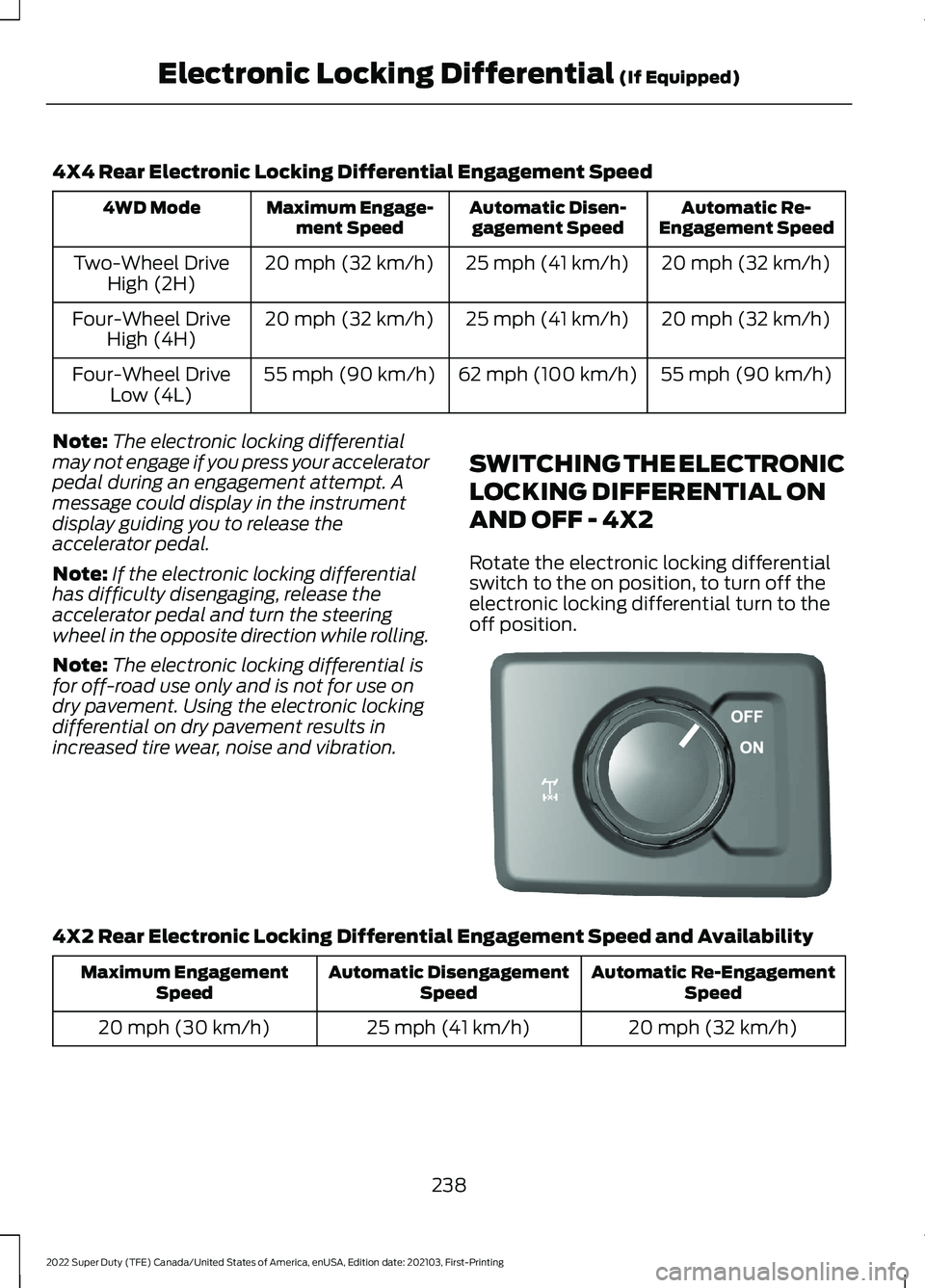
4X4 Rear Electronic Locking Differential Engagement Speed
Automatic Re-
Engagement Speed
Automatic Disen-
gagement Speed
Maximum Engage-
ment Speed
4WD Mode
20 mph (32 km/h)
25 mph (41 km/h)
20 mph (32 km/h)
Two-Wheel Drive
High (2H)
20 mph (32 km/h)
25 mph (41 km/h)
20 mph (32 km/h)
Four-Wheel Drive
High (4H)
55 mph (90 km/h)
62 mph (100 km/h)
55 mph (90 km/h)
Four-Wheel Drive
Low (4L)
Note: The electronic locking differential
may not engage if you press your accelerator
pedal during an engagement attempt. A
message could display in the instrument
display guiding you to release the
accelerator pedal.
Note: If the electronic locking differential
has difficulty disengaging, release the
accelerator pedal and turn the steering
wheel in the opposite direction while rolling.
Note: The electronic locking differential is
for off-road use only and is not for use on
dry pavement. Using the electronic locking
differential on dry pavement results in
increased tire wear, noise and vibration. SWITCHING THE ELECTRONIC
LOCKING DIFFERENTIAL ON
AND OFF - 4X2
Rotate the electronic locking differential
switch to the on position, to turn off the
electronic locking differential turn to the
off position.4X2 Rear Electronic Locking Differential Engagement Speed and Availability
Automatic Re-Engagement
Speed
Automatic Disengagement
Speed
Maximum Engagement
Speed
20 mph (32 km/h)
25 mph (41 km/h)
20 mph (30 km/h)
238
2022 Super Duty (TFE) Canada/United States of America, enUSA, Edition date: 202103, First-Printing Electronic Locking Differential (If Equipped)E183740
Page 242 of 740
Note:
The electronic locking differential
may not engage if you press your accelerator
pedal during an engagement attempt. A
message could display in the instrument
display guiding you to release the
accelerator pedal.
Note: If the electronic locking differential
has difficulty disengaging, release the
accelerator pedal and turn the steering
wheel in the opposite direction while rolling.
Note: The electronic locking differential is
for off-road use only and is not for use on
dry pavement. Using the electronic locking
differential on dry pavement results in
increased tire wear, noise and vibration.
ELECTRONIC LOCKING
DIFFERENTIAL INDICATORS Once the indicator light
illuminates in the information
display, both rear wheel axle
shafts lock together providing added
traction. If the indicator does not come on, or the
indicator turns off while driving, one of the
following has occurred:
•
The vehicle speed is too high.
• The left and right rear wheel speed
difference is too high during an
engagement attempt.
• The system has malfunctioned and a
message in the information display
appears. See your authorized dealer
for assistance.
• The vehicle is experiencing an anti-lock
brake activation.
If you select the electronic locking
differential, but it malfunctions a message
appears in the information display. See
your authorized dealer for assistance.
Note: If the vehicle is experiencing an
anti-lock braking event, the electronic
locking differential may momentarily
disengage.
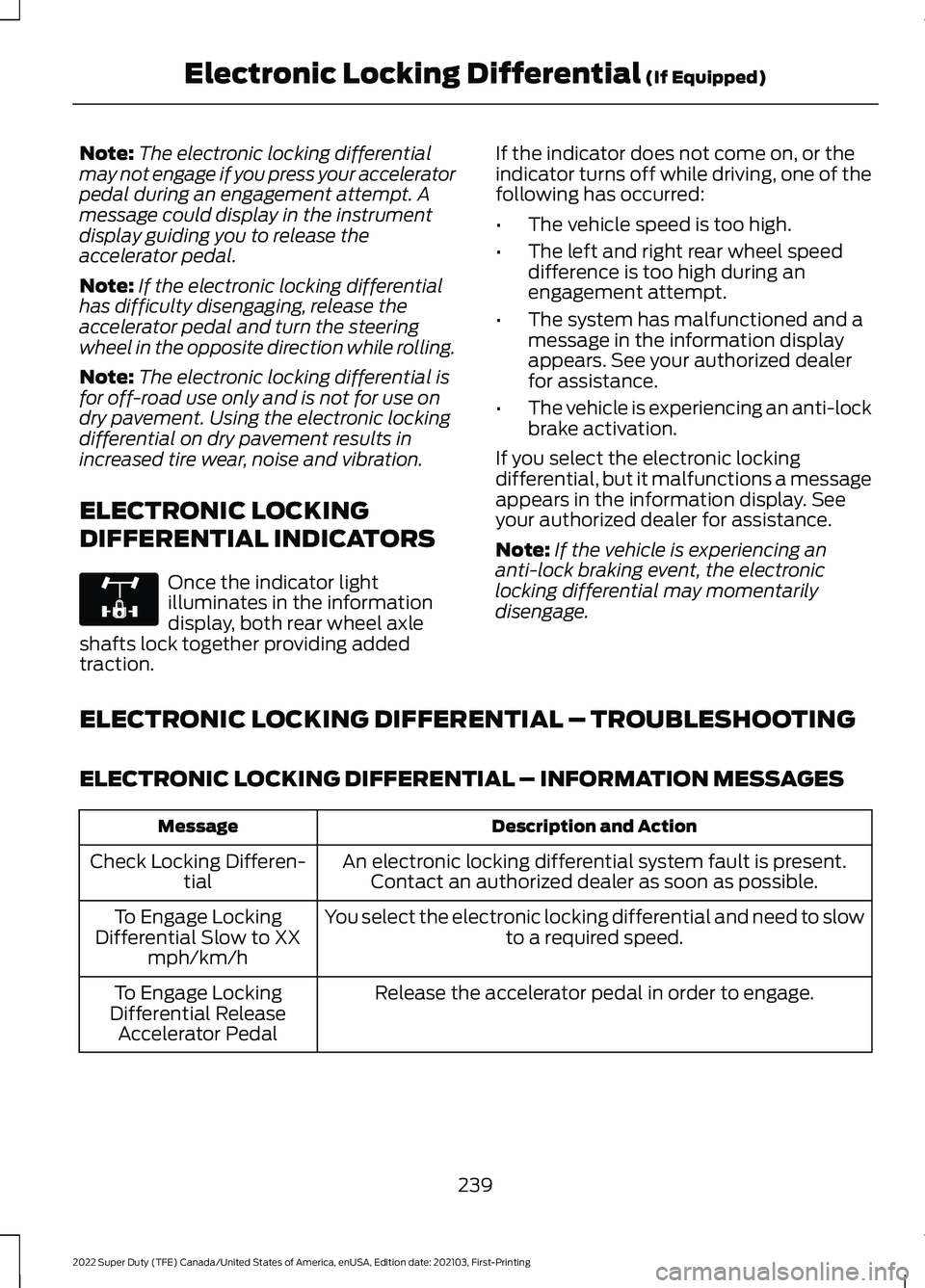
ELECTRONIC LOCKING DIFFERENTIAL – TROUBLESHOOTING
ELECTRONIC LOCKING DIFFERENTIAL – INFORMATION MESSAGES Description and Action
Message
An electronic locking differential system fault is present.Contact an authorized dealer as soon as possible.
Check Locking Differen-
tial
You select the electronic locking differential and need to slow to a required speed.
To Engage Locking
Differential Slow to XX mph/km/h
Release the accelerator pedal in order to engage.
To Engage Locking
Differential Release Accelerator Pedal
239
2022 Super Duty (TFE) Canada/United States of America, enUSA, Edition date: 202103, First-Printing Electronic Locking Differential (If Equipped)E325779
Page 245 of 740
There is an electrical motor sound
when I press on the brake pedal or
activate the park brake switch. Is this
normal?
Yes, those sounds are the electronic
brake booster or the electronic park
brake operating.
Note: Brake dust could accumulate on the
wheels, even under normal driving
conditions. Some dust is inevitable as the
brakes wear and does not contribute to
brake noise. See Cleaning Wheels (page
422).
242
2022 Super Duty (TFE) Canada/United States of America, enUSA, Edition date: 202103, First-Printing Brakes
Page 246 of 740
APPLYING THE PARKING
BRAKE
WARNING: Apply the parking
brake, shift into park (P), switch the
ignition off and remove the key before
you leave your vehicle. Failure to follow
this instruction could result in personal
injury or death.
Apply the parking brake whenever you park
your vehicle. Press the pedal downward to
set the parking brake. The brake warning
lamp in the instrument cluster will
illuminate and remains illuminated until
you release the parking brake. If you are parking your vehicle on a grade
or with a trailer, press and hold the brake
pedal down, then set the parking brake.
There may be a little vehicle movement as
the parking brake sets to hold the vehicle's
weight. This is normal and should be no
reason for concern. If needed, press and
hold the service brake pedal down, then
try reapplying the parking brake. Chock the
wheels if required. If the parking brake
cannot hold the weight of the vehicle, the
parking brake may need service or the
vehicle may be overloaded.
RELEASING THE PARKING
BRAKE
To release, pull the brake release lever
located at the lower left side of the
instrument panel.
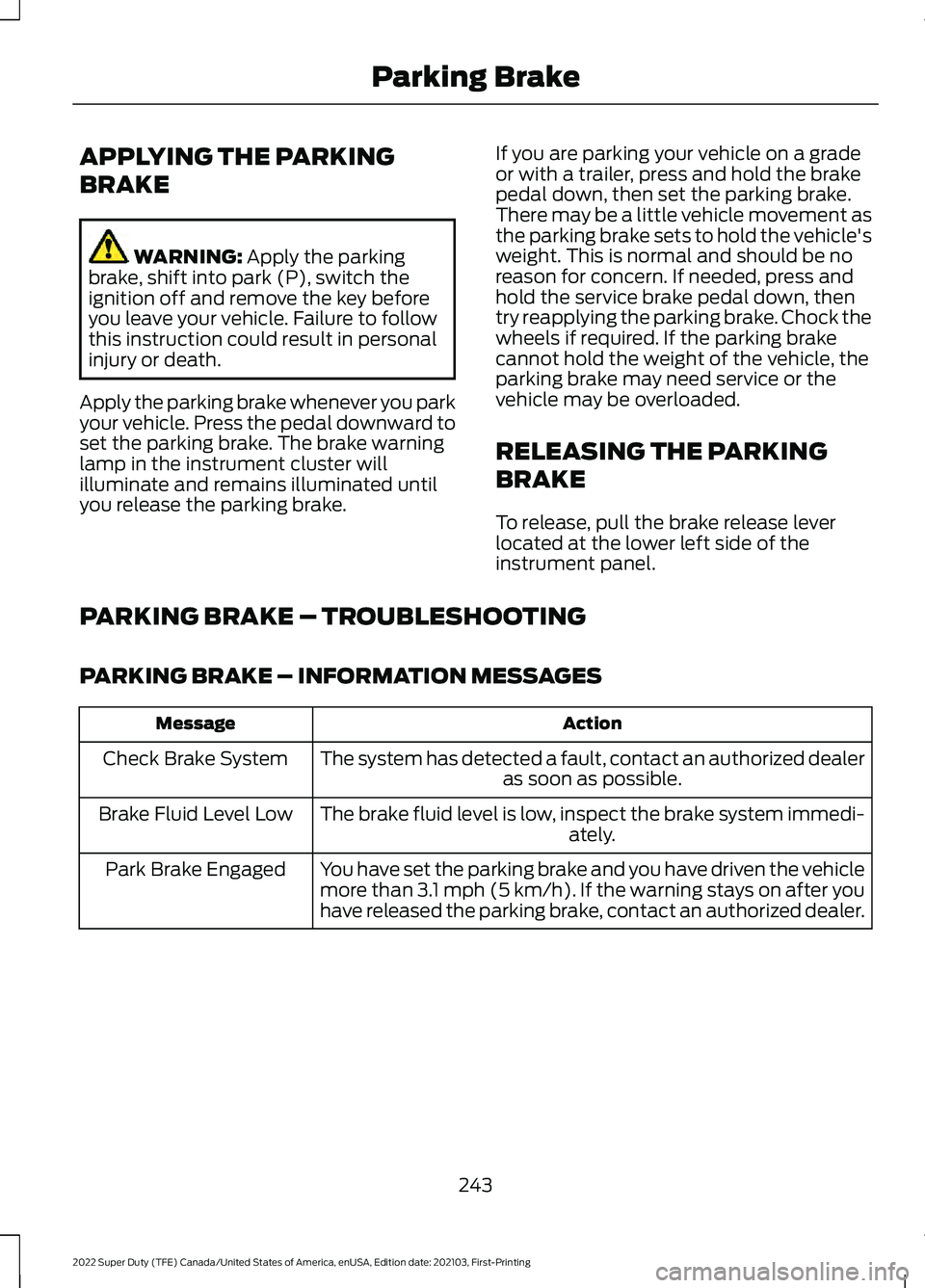
PARKING BRAKE – TROUBLESHOOTING
PARKING BRAKE – INFORMATION MESSAGES Action
Message
The system has detected a fault, contact an authorized dealer as soon as possible.
Check Brake System
The brake fluid level is low, inspect the brake system immedi- ately.
Brake Fluid Level Low
You have set the parking brake and you have driven the vehicle
more than 3.1 mph (5 km/h). If the warning stays on after you
have released the parking brake, contact an authorized dealer.
Park Brake Engaged
243
2022 Super Duty (TFE) Canada/United States of America, enUSA, Edition date: 202103, First-Printing Parking Brake
Page 250 of 740
WHAT IS TRACTION CONTROL
The traction control system helps to avoid
drive wheel spin and loss of traction.
HOW DOES TRACTION
CONTROL WORK
If your vehicle begins to slide, the system
applies the brakes to individual wheels
and, when needed, reduces engine power
at the same time. If the wheels spin when
accelerating on slippery or loose surfaces,
the system reduces engine power in order
to increase traction.
SWITCHING TRACTION
CONTROL ON AND OFF
WARNING: Operating your vehicle
with the traction control disabled could
lead to an increased risk of loss of vehicle
control, vehicle rollover, personal injury
and death. The traction control system turns on each
time you switch the ignition on.
The button for the stability and traction
control system is on the instrument panel. Press and release the button to switch
traction control off. The stability control
system remains fully active, to switch it off,
press and hold the button for a few
seconds, then release.
When you switch traction control off, a
message and an illuminated icon appear
on the instrument cluster.
Press the switch again to turn the traction
control system back on to normal
operation.
If your vehicle is stuck in mud or snow,
switching traction control off may be
beneficial as this allows the wheels to spin.
Your vehicle may have MyKey restrictions
regarding this feature. See
What Is
MyKey (page 77).
TRACTION CONTROL
INDICATOR
Stability and Traction Control
Indicator If the indicator does not
illuminate when you switch the
ignition on, or remains on when
the engine is running, this indicates a
malfunction. Have your vehicle checked
by an authorized dealer as soon as
possible. The traction control off indicator
illuminates when you switch the
traction control system off, or
when an alternative stability control mode
is selected that requires the traction
control off depending on the drive mode
selected.
247
2022 Super Duty (TFE) Canada/United States of America, enUSA, Edition date: 202103, First-Printing Traction ControlE327252 E138639 E130458
Page 252 of 740
HOW DOES STABILITY
CONTROL WORK
WARNING: Vehicle modifications
involving braking system, aftermarket
roof racks, suspension, steering system,
tire construction and wheel and tire size
may change the handling characteristics
of your vehicle and may adversely affect
the performance of the electronic
stability control system. In addition,
installing any stereo speakers may
interfere with and adversely affect the
electronic stability control system.
Reducing the effectiveness of the
electronic stability control system could
lead to an increased risk of loss of vehicle
control, vehicle rollover, personal injury
and death. WARNING:
Remember that even
advanced technology cannot defy the
laws of physics. It's always possible to
lose control of a vehicle due to
inappropriate driver input for the
conditions. Aggressive driving on any
road condition can cause you to lose
control of your vehicle increasing the risk
of personal injury or property damage.
Activation of the electronic stability
control system is an indication that at
least some of the tires have exceeded
their ability to grip the road; this could
reduce the operator's ability to control
the vehicle potentially resulting in a loss
of vehicle control, vehicle rollover,
personal injury and death. WARNING: You are responsible for
controlling your vehicle at all times. The
system is designed to be an aid and does
not relieve you of your responsibility to
drive with due care and attention. Failure
to follow this instruction could result in
the loss of control of your vehicle,
personal injury or death.
If a driving condition activates either the
stability control or traction control you may
experience the following conditions:
• The stability and traction control light
flashes.
• Your vehicle slows down.
• Reduced engine power.
The stability control system has several
features built into it to help you maintain
control of your vehicle:
Electronic Stability Control
Electronic stability control enhances your
vehicle ’s ability to prevent skids or lateral
slides by applying brakes to one or more
of the wheels individually and, if necessary,
reducing engine power.
Roll Stability Control
Roll stability control enhances your
vehicle ’s ability to prevent rollovers by
detecting your vehicle ’s roll motion and
the rate at which it changes by applying
the brakes to one or more wheels
individually.
Curve Control
Curve control enhances your vehicle ’s
ability to follow the road when cornering
severely or avoiding objects in the roadway.
Curve control operates by reducing engine
power and, if necessary, applying brakes
to one or more of the wheels individually.
249
2022 Super Duty (TFE) Canada/United States of America, enUSA, Edition date: 202103, First-Printing Stability Control
Page 253 of 740
Side Wind Stabilization
Side wind stabilization is an advanced
feature that works by carefully applying
the brakes on one side of the vehicle to
reduce the effect of a side wind gust on
the vehicle's path.
Torque Vectoring by Brakes
Torque vectoring control applies brake
torque on the inner driven wheel in a curve
for better traction to avoid an understeer,
or oversteer situation. Unlike electronic
stability control, enhanced torque
vectoring control does not slow the
vehicle. It helps control excessive wheel
slip and gives the vehicle improved
cornering agility.
Traction Control
Traction control enhances your vehicle
’s
ability to maintain traction of the wheels
by detecting and controlling wheel spin.
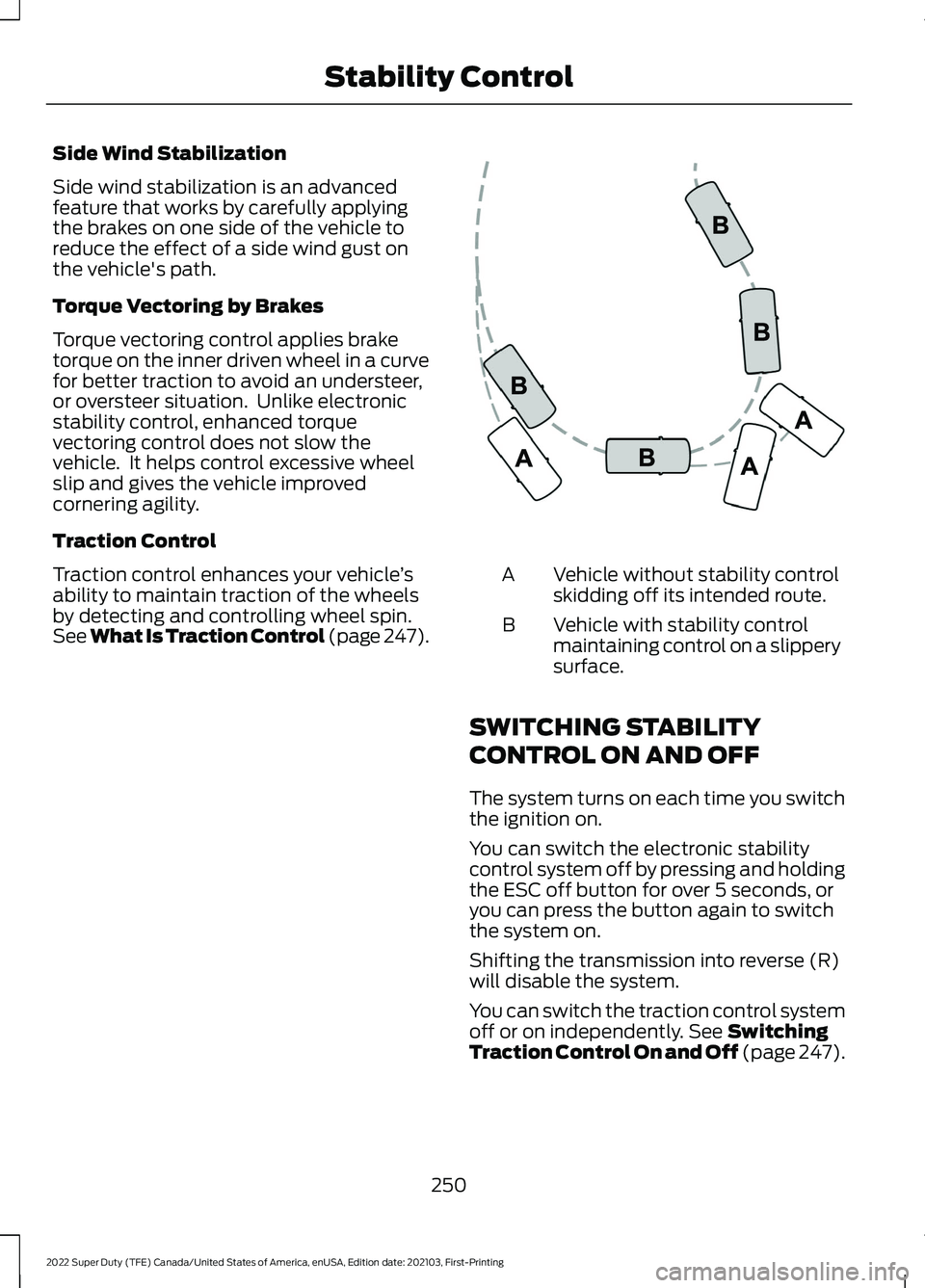
See What Is Traction Control (page 247). Vehicle without stability control
skidding off its intended route.
A
Vehicle with stability control
maintaining control on a slippery
surface.
B
SWITCHING STABILITY
CONTROL ON AND OFF
The system turns on each time you switch
the ignition on.
You can switch the electronic stability
control system off by pressing and holding
the ESC off button for over 5 seconds, or
you can press the button again to switch
the system on.
Shifting the transmission into reverse (R)
will disable the system.
You can switch the traction control system
off or on independently.
See Switching
Traction Control On and Off (page 247).
250
2022 Super Duty (TFE) Canada/United States of America, enUSA, Edition date: 202103, First-Printing Stability ControlE72903
Page 255 of 740
WHAT IS TRAIL CONTROL
WARNING: The system does not
control speed in low traction conditions
or extremely steep slopes. The system
is designed to be an aid and does not
relieve you of your responsibility to drive
with due care and attention. Failure to
follow this instruction could result in
personal injury.
Trail control lets you focus on steering
during low-speed and off-road use by
controlling your vehicle's acceleration and
braking to maintain the speed that you set.
You may hear a noise from the anti-lock
brake system pump motor when you use
the system. This is normal.
SWITCHING TRAIL CONTROL
ON AND OFF Press the button.
The system switches off if you press the
button again or exceed 40 mph (64 km/h).
SETTING THE TRAIL CONTROL
SPEED
Note: The buttons are located on the
steering wheel. Drive to your preferred speed. Press button to increase the set
current speed.
Press button to decrease the set
current speed.
Note: The indicator changes color.
You can adjust the set speed in small or
large increments. Press the toggle button
upward or downward once to adjust the
set speed in small increments. Press and
hold the toggle button upward or
downward to adjust the set speed in large
increments.
You can also adjust the set speed by
braking.
Note: Pressing the brake pedal does not
switch off the system.
CANCELING THE SET SPEED Press the button.
TRAIL CONTROL INDICATORS 252
2022 Super Duty (TFE) Canada/United States of America, enUSA, Edition date: 202103, First-Printing Trail Control
(If Equipped)E332910 E265298 E272858
Page 257 of 740
WHAT IS HILL DESCENT
CONTROL
Hill descent control allows the driver to set
and maintain vehicle speed while
descending steep slopes in various surface
conditions.
HOW DOES HILL DESCENT
CONTROL WORK
Hill descent control can maintain vehicle
speeds on downhill slopes between
2
– 20 mph (3– 32 km/h). Above 20 mph
(32 km/h), the system remains on but the
descent speed cannot be set or
maintained.
Note: The system does not function below
2 mph (3 km/h)
.
The system requires a cool down interval
after a period of sustained use. Hill descent
control provides a warning in the message
center and a tone sounds when the system
is about to disengage for cooling. At this
time, manually apply the brakes as needed
to maintain descent speed.
Note: The amount of time that the system
can remain active before cooling varies with
conditions.
HILL DESCENT CONTROL
PRECAUTIONS WARNING:
The system does not
control speed in low traction conditions
or extremely steep slopes. The system
is designed to be an aid and does not
relieve you of your responsibility to drive
with due care and attention. Failure to
follow this instruction could result in
personal injury. WARNING:
Hill descent control
cannot control descent in all surface
conditions and circumstances, such as
ice or extremely steep grades. Hill
descent control is a driver assist system
and cannot substitute for good judgment
by the driver. Failure to do so may result
in loss of vehicle control, crash or serious
injury. WARNING:
The system does not
replace the parking brake. When you
leave your vehicle, always apply the
parking brake and shift the transmission
into park (P) for automatic transmission
or first gear for manual transmission.
SWITCHING HILL DESCENT
CONTROL ON AND OFF Press the button on the
instrument panel. A light
illuminates and a tone sounds
when the system is active.
SETTING THE HILL DESCENT
SPEED
To increase or decrease the descent speed,
press the accelerator or brake pedal, or use
the SET
+ and SET - buttons on the
steering wheel. Once you reach the
preferred speed remove your feet from the
pedals.
HILL DESCENT CONTROL
INDICATOR Illuminates when you switch hill
descent control on.
254
2022 Super Duty (TFE) Canada/United States of America, enUSA, Edition date: 202103, First-Printing Hill Descent Control
(If Equipped)E163171 E163171
Page 259 of 740
HYDRAULIC POWER
STEERING
HYDRAULIC POWER STEERING
GUIDELINES
To help prevent damage to the power
steering system:
•
Do not hold the steering wheel at its
furthest turning points for more than
three to five seconds when the engine
is running.
• Avoid continuously steering back and
forth with elevated engine RPM as this
may overheat the system. If trying to
free a stuck vehicle, pause between
attempts to allow the power steering
system to cool or seek assistance.
Typical steering and driving maneuvers
allow the system to cool.
• Do not operate the vehicle if the power
steering pump fluid level is below the
MIN mark on the reservoir.
• Some noise is normal during operation.
If excessive, check for low power
steering pump fluid level before
seeking service by your dealer.
• Heavy or uneven efforts may be caused
by low power steering fluid. Check for
low power steering pump fluid level
before seeking service by your dealer.
• Do not fill the power steering pump
reservoir above the MAX mark on the
reservoir, as this may result in leaks
from the reservoir.
If the power steering system breaks down
or if you switch the engine off, you can
steer the vehicle manually, but it takes
more effort. If you have any steering components
serviced or replaced, install new fasteners.
Many fasteners have coatings with thread
adhesive, or have prevailing torque
features you cannot reuse. Do not reuse a
bolt or nut. Torque fasteners to
specifications.
Steering Tips
If the steering wanders or pulls, check for:
•
An improperly inflated tire.
• Uneven tire wear.
• Loose or worn suspension
components.
• Loose or worn steering components.
• Improper vehicle alignment.
Note: A high crown in the road or high
crosswinds may also make the steering
seem to wander or pull.
Electronic Torque Overlay Steering
(If Equipped) WARNING: The electric power
steering system has diagnostic checks
that continuously monitor the system. If
a fault is detected, a message displays
in the information display. Stop your
vehicle as soon as it is safe to do so.
Switch the ignition off. After at least 10
seconds, switch the ignition on and
watch the information display for a
steering system warning message. If a
steering system warning message
returns, have the system checked as
soon as possible. WARNING:
If the system detects
an error, you may not feel a difference in
the steering, however a serious condition
may exist. Have your vehicle checked as
soon as possible. Failure to do so may
result in loss of steering control.
256
2022 Super Duty (TFE) Canada/United States of America, enUSA, Edition date: 202103, First-Printing Steering