ECO mode FORD TAURUS 2016 6.G User Guide
[x] Cancel search | Manufacturer: FORD, Model Year: 2016, Model line: TAURUS, Model: FORD TAURUS 2016 6.GPages: 424, PDF Size: 4.04 MB
Page 85 of 424
•
It may take a short time for the needle
to reach full after leaving the gas
station. This is normal and depends
upon the slope of pavement at the gas
station.
• The fuel amount dispensed into the
tank is a little less or more than the
gauge indicated. This is normal and
depends upon the slope of pavement
at the gas station.
• If the gas station nozzle shuts off
before the tank is full, try a different
gas pump nozzle.
• There is a small reserve left in the tank
when the fuel gauge reaches empty.
Low Fuel Reminder
A low fuel reminder triggers when the
distance to empty reaches 75 miles (120
km), 50 miles (80 km), 25 miles (40 km),
10 miles (20 km) and 0 miles (0 km) .
Variations:
Note: The low fuel warning and
distance-to-empty warning can appear at
different fuel gauge positions depending on
fuel economy conditions. This variation is
normal.
WARNING LAMPS AND
INDICATORS
The following warning lamps and
indicators alert you to a vehicle condition
that may become serious. Some lamps
illuminate when you start your vehicle to
make sure they work. If any lamps remain
on after starting your vehicle, refer to the
respective system warning lamp for further
information.
Note: Some warning indicators appear in
the information display and function the
same as a warning lamp, but do not display
when you start your vehicle. Adaptive Cruise Control (If Equipped) The speed control system
indicator light changes color to
indicate what mode the system
is in. See Using Adaptive Cruise Control
(page
174).
On (white light): Illuminates when you
switch on the adaptive cruise control
system. Turns off when the speed control
system is turned off.
Engaged (green light): Illuminates when
you engage the adaptive cruise control
system. Turns off when you disengage the
speed control system.
Anti-Lock Braking System If it illuminates when you are
driving, this indicates a
malfunction. You continue to
have the normal braking system (without
ABS) unless the brake system warning
lamp is also illuminated. Have the system
checked by an authorized dealer.
Automatic High Beam Control It will illuminate when this
feature is on. See
Automatic
High Beam Control (page 72).
Battery If it illuminates while driving, it
indicates a malfunction. Switch
off all unnecessary electrical
equipment and have the system checked
by an authorized dealer immediately.
Blind Spot Monitor
(If Equipped) It illuminates when you switch
this feature off or in conjunction
with a message. See Blind Spot
Information System
(page 186).
82
Taurus (CPH) Canada/United States of America, enUSA, First Printing Instrument ClusterE144524 E151262
Page 91 of 424
Information
Information
MyKey® Dist. (if key is programmed) — Distance traveled when a programmed key is
in use.
MyKey® Info — Number of MyKeys and admin keys programmed
Coolant Temp. — The engine coolant indicator will change colors indicating: blue for
cool, gray for normal and red for hot. If the engine coolant temperature exceeds the
normal range, stop the vehicle as soon as safely possible, switch off the engine and let
the engine cool.
Settings
In this mode, you can configure different
driver setting choices. Note:
Some items are optional and may
not appear. Settings
Traction Ctrl
Driver Assist
Blindspot High, Normal or Low
Sensitivity
Collision
Warn
Chimes
Warning
Cross Traffic Adaptive or Normal
Cruise
Control
Rear Park Aid
Select your applicable language
Language
Display
Miles & Gal, km/L or L/100km
Distance
Units
Fahrenheit (°F) or Celsius (°C)
Temperature
Auto Engine Off
Auto Highbeam Off or number of seconds
Autolamp
Delay
88
Taurus (CPH) Canada/United States of America, enUSA, First Printing Information Displays
Page 93 of 424
Settings
Volume Limiter Always On or User Selectable
Do Not
Disturb
Hold OK to Clear All MyKeys
Clear
MyKeys
Note: Some MyKey items only appear if a
MyKey is set.
Information Display Controls
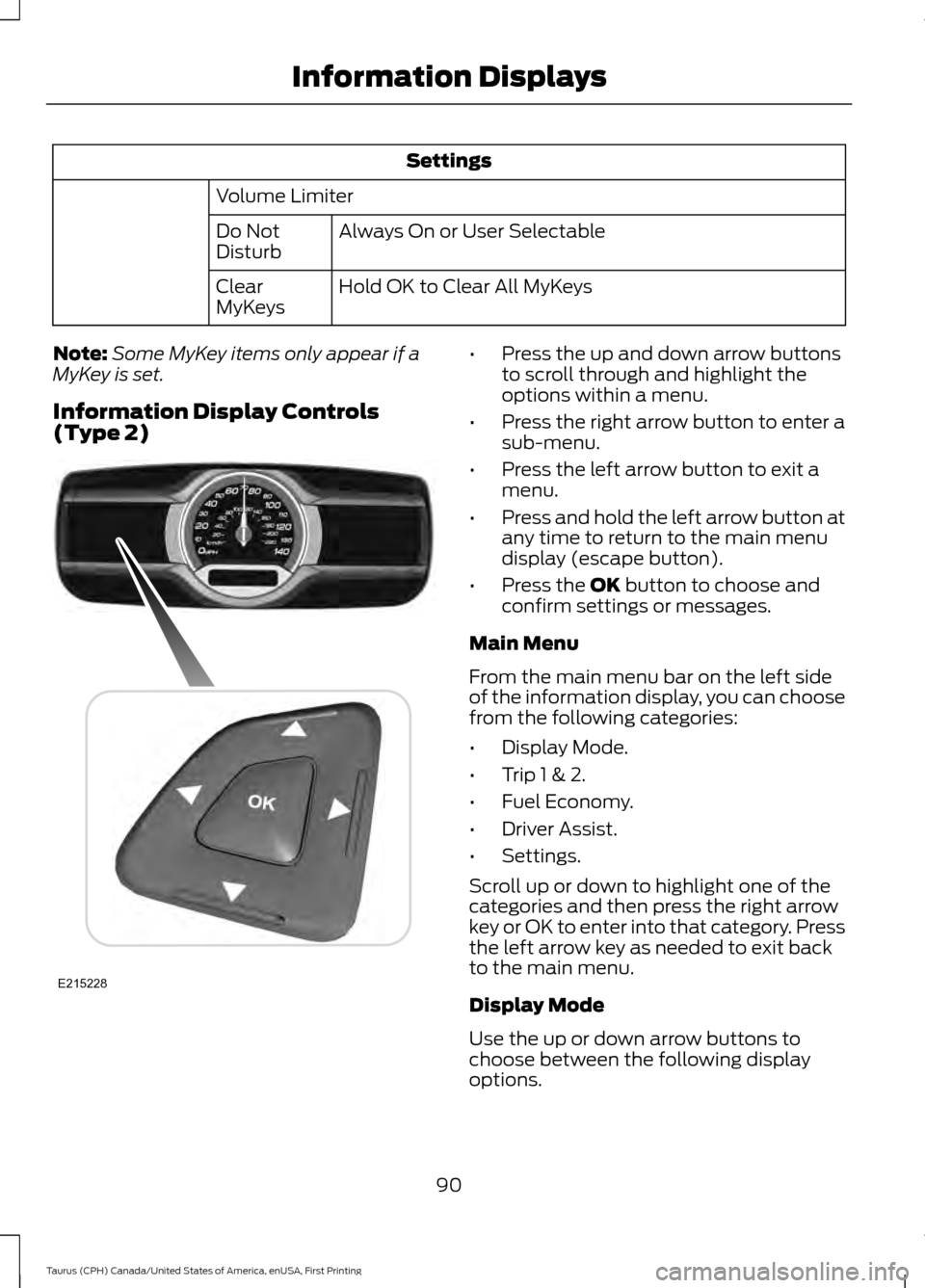
(Type 2) •
Press the up and down arrow buttons
to scroll through and highlight the
options within a menu.
• Press the right arrow button to enter a
sub-menu.
• Press the left arrow button to exit a
menu.
• Press and hold the left arrow button at
any time to return to the main menu
display (escape button).
• Press the OK button to choose and
confirm settings or messages.
Main Menu
From the main menu bar on the left side
of the information display, you can choose
from the following categories:
• Display Mode.
• Trip 1 & 2.
• Fuel Economy.
• Driver Assist.
• Settings.
Scroll up or down to highlight one of the
categories and then press the right arrow
key or OK to enter into that category. Press
the left arrow key as needed to exit back
to the main menu.
Display Mode
Use the up or down arrow buttons to
choose between the following display
options.
90
Taurus (CPH) Canada/United States of America, enUSA, First Printing Information DisplaysE215228
Page 94 of 424
Display Mode
XXX mi (km) to empty, Fuel gauge and Total odometer
Option 1
Round tachometer, Fuel gauge and Total odometer
Option 2
Round tachometer, Engine coolant temp gauge, Fuel gauge and Total
odometer
Option 3
Digital speedometer, Fuel gauge and Total odometer
Option 4
Regardless of display mode chosen, when you use the SelectShift Automatic ™ trans-
mission (SST), the cluster will change to the round tachometer if not already selected.
XXX mi (km) to empty
Shows approximate fuel level before the
fuel tank reaches empty. The value is
dynamic and can change (raise or lower)
depending on driving style.
Fuel gauge
Switch the ignition on. The fuel gauge
indicates approximately how much fuel is
in the fuel tank. The arrow next to the fuel
pump symbol shows the fuel filler door
side of your vehicle. When the fuel level
becomes low, the level indicator changes
to amber. When the fuel level becomes
critically low, the level indicator changes
to red.
Note: The fuel gauge level may vary slightly
when your vehicle is moving or when driving
on a slope.
Note: When a MyKey is in use, low fuel
warnings display earlier. Round tachometer
Indicates the engine speed in revolutions
per minute. Driving with your tachometer
pointer continuously at the top of the scale
may damage the engine. During SelectShift
Automatic
™ transmission (SST) use, the
currently selected gear appears in the
display.
Engine coolant temperature gauge
Indicates engine coolant temperature. At
normal operating temperature, the level
indicator is in the normal range. If the
engine coolant temperature exceeds the
normal range, stop your vehicle as soon as
safely possible, switch off the engine and
let the engine cool.
Trip 1 & 2
You can access the menu using the
information display control.
Note: Some options may appear slightly
different or not at all if the items are
optional.
91
Taurus (CPH) Canada/United States of America, enUSA, First Printing Information Displays
Page 95 of 424
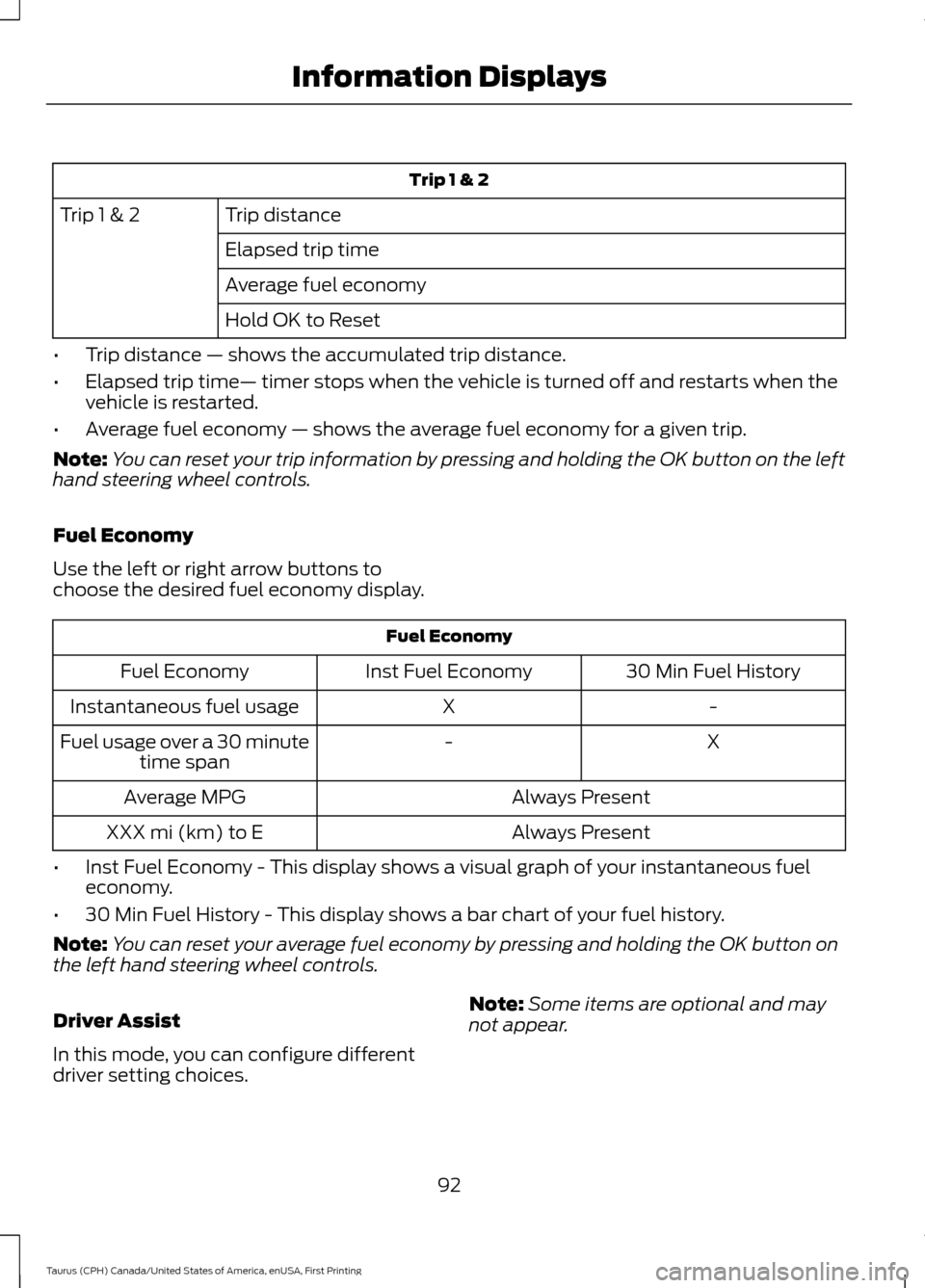
Trip 1 & 2
Trip distance
Trip 1 & 2
Elapsed trip time
Average fuel economy
Hold OK to Reset
• Trip distance — shows the accumulated trip distance.
• Elapsed trip time— timer stops when the vehicle is turned off and restarts when the
vehicle is restarted.
• Average fuel economy — shows the average fuel economy for a given trip.
Note: You can reset your trip information by pressing and holding the OK button on the left
hand steering wheel controls.
Fuel Economy
Use the left or right arrow buttons to
choose the desired fuel economy display. Fuel Economy
30 Min Fuel History
Inst Fuel Economy
Fuel Economy
-
X
Instantaneous fuel usage
X
-
Fuel usage over a 30 minute
time span
Always Present
Average MPG
Always Present
XXX mi (km) to E
• Inst Fuel Economy - This display shows a visual graph of your instantaneous fuel
economy.
• 30 Min Fuel History - This display shows a bar chart of your fuel history.
Note: You can reset your average fuel economy by pressing and holding the OK button on
the left hand steering wheel controls.
Driver Assist
In this mode, you can configure different
driver setting choices. Note:
Some items are optional and may
not appear.
92
Taurus (CPH) Canada/United States of America, enUSA, First Printing Information Displays
Page 96 of 424
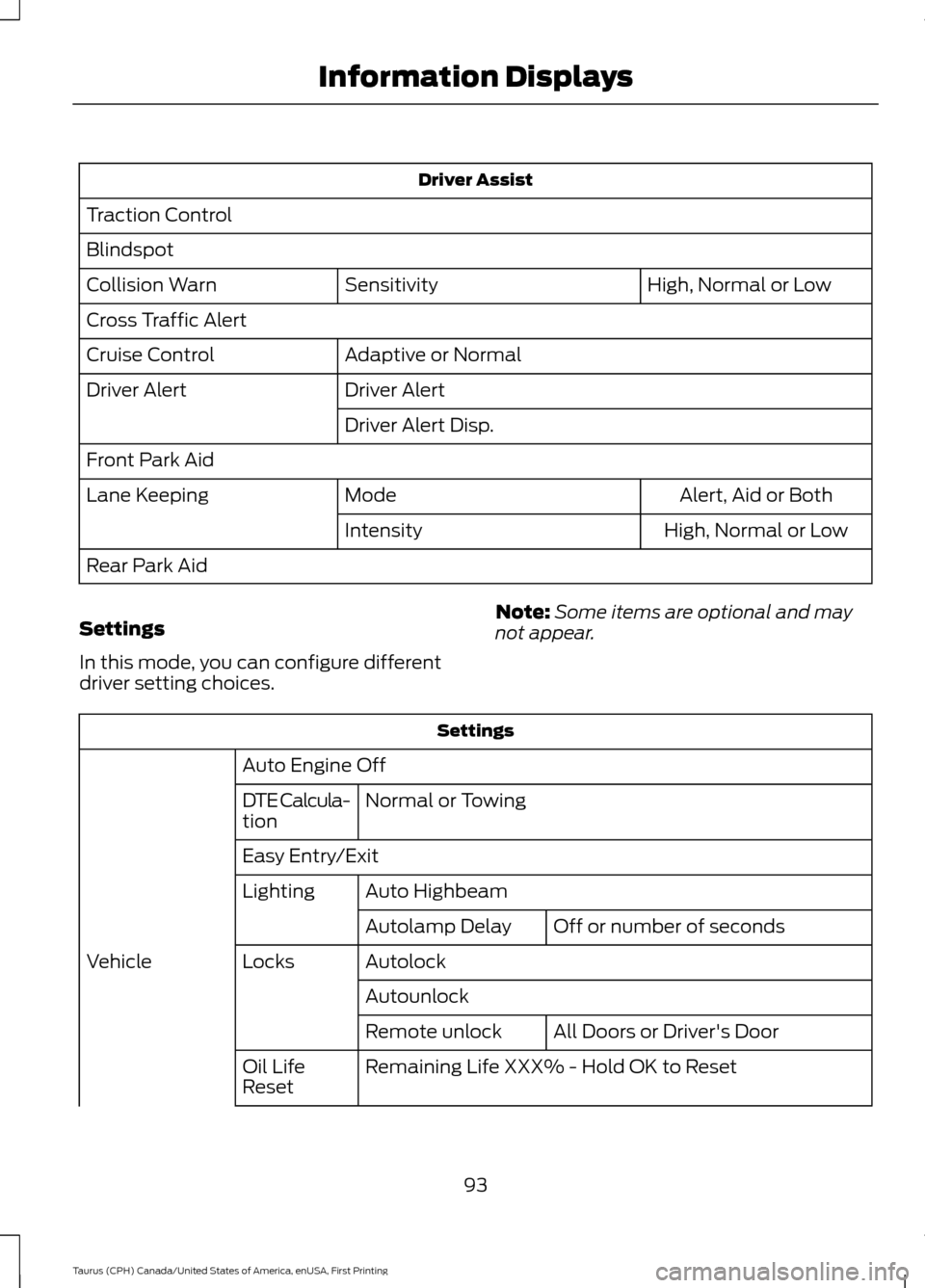
Driver Assist
Traction Control
Blindspot High, Normal or Low
Sensitivity
Collision Warn
Cross Traffic Alert
Adaptive or Normal
Cruise Control
Driver Alert
Driver Alert
Driver Alert Disp.
Front Park Aid Alert, Aid or Both
Mode
Lane Keeping
High, Normal or Low
Intensity
Rear Park Aid
Settings
In this mode, you can configure different
driver setting choices. Note:
Some items are optional and may
not appear. Settings
Auto Engine Off Normal or Towing
DTE Calcula-
tion
Easy Entry/Exit
Auto Highbeam
Lighting
Off or number of seconds
Autolamp Delay
Autolock
Locks
Vehicle
AutounlockAll Doors or Driver's Door
Remote unlock
Remaining Life XXX% - Hold OK to Reset
Oil Life
Reset
93
Taurus (CPH) Canada/United States of America, enUSA, First Printing Information Displays
Page 110 of 424
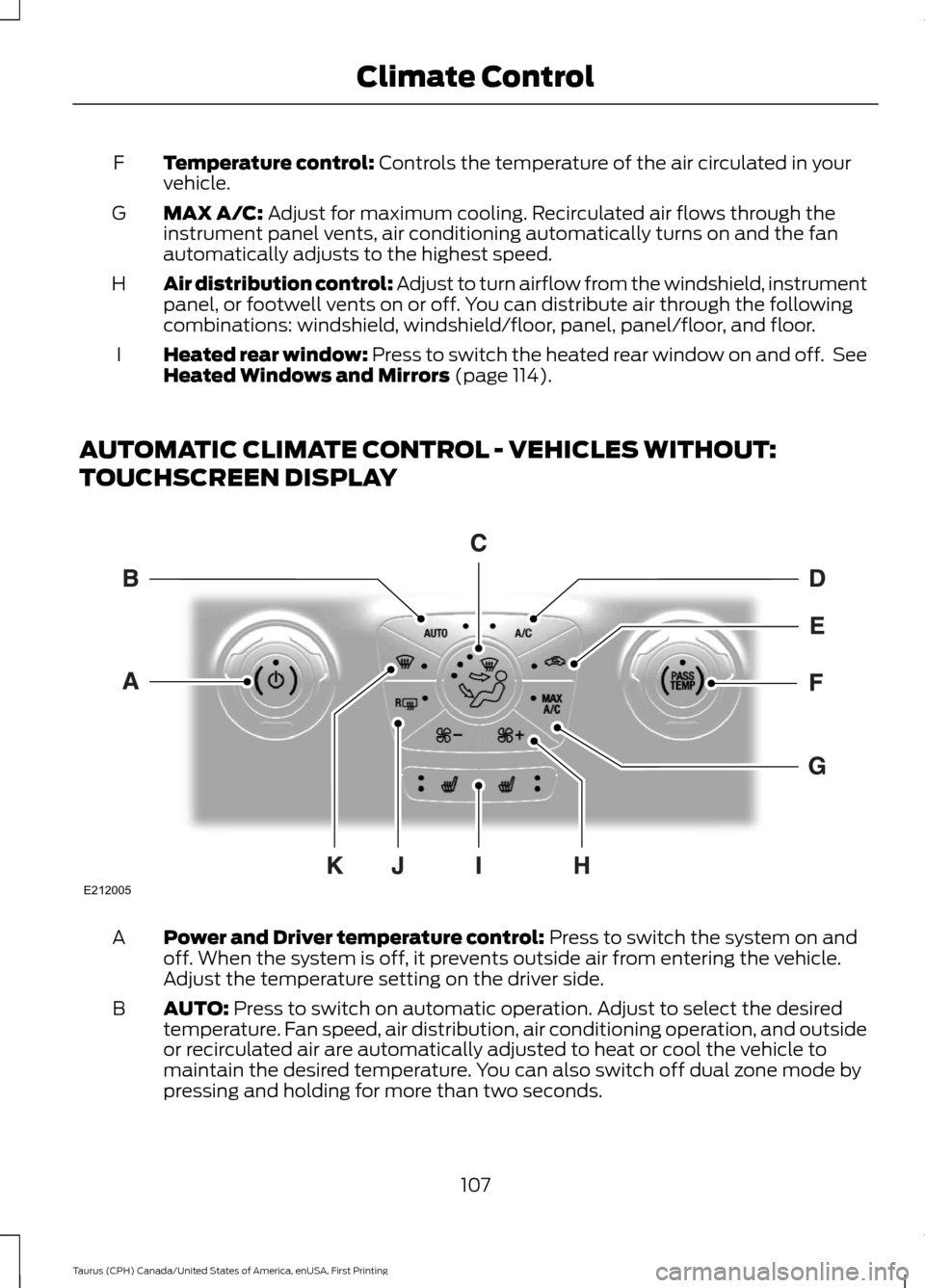
Temperature control: Controls the temperature of the air circulated in your
vehicle.
F
MAX A/C:
Adjust for maximum cooling. Recirculated air flows through the
instrument panel vents, air conditioning automatically turns on and the fan
automatically adjusts to the highest speed.
G
Air distribution control: Adjust to turn airflow from the windshield, instrument
panel, or footwell vents on or off. You can distribute air through the following
combinations: windshield, windshield/floor, panel, panel/floor, and floor.
H
Heated rear window: Press to switch the heated rear window on and off. See
Heated Windows and Mirrors
(page 114).
I
AUTOMATIC CLIMATE CONTROL - VEHICLES WITHOUT:
TOUCHSCREEN DISPLAY Power and Driver temperature control:
Press to switch the system on and
off. When the system is off, it prevents outside air from entering the vehicle.
Adjust the temperature setting on the driver side.
A
AUTO:
Press to switch on automatic operation. Adjust to select the desired
temperature. Fan speed, air distribution, air conditioning operation, and outside
or recirculated air are automatically adjusted to heat or cool the vehicle to
maintain the desired temperature. You can also switch off dual zone mode by
pressing and holding for more than two seconds.
B
107
Taurus (CPH) Canada/United States of America, enUSA, First Printing Climate ControlE212005
Page 113 of 424
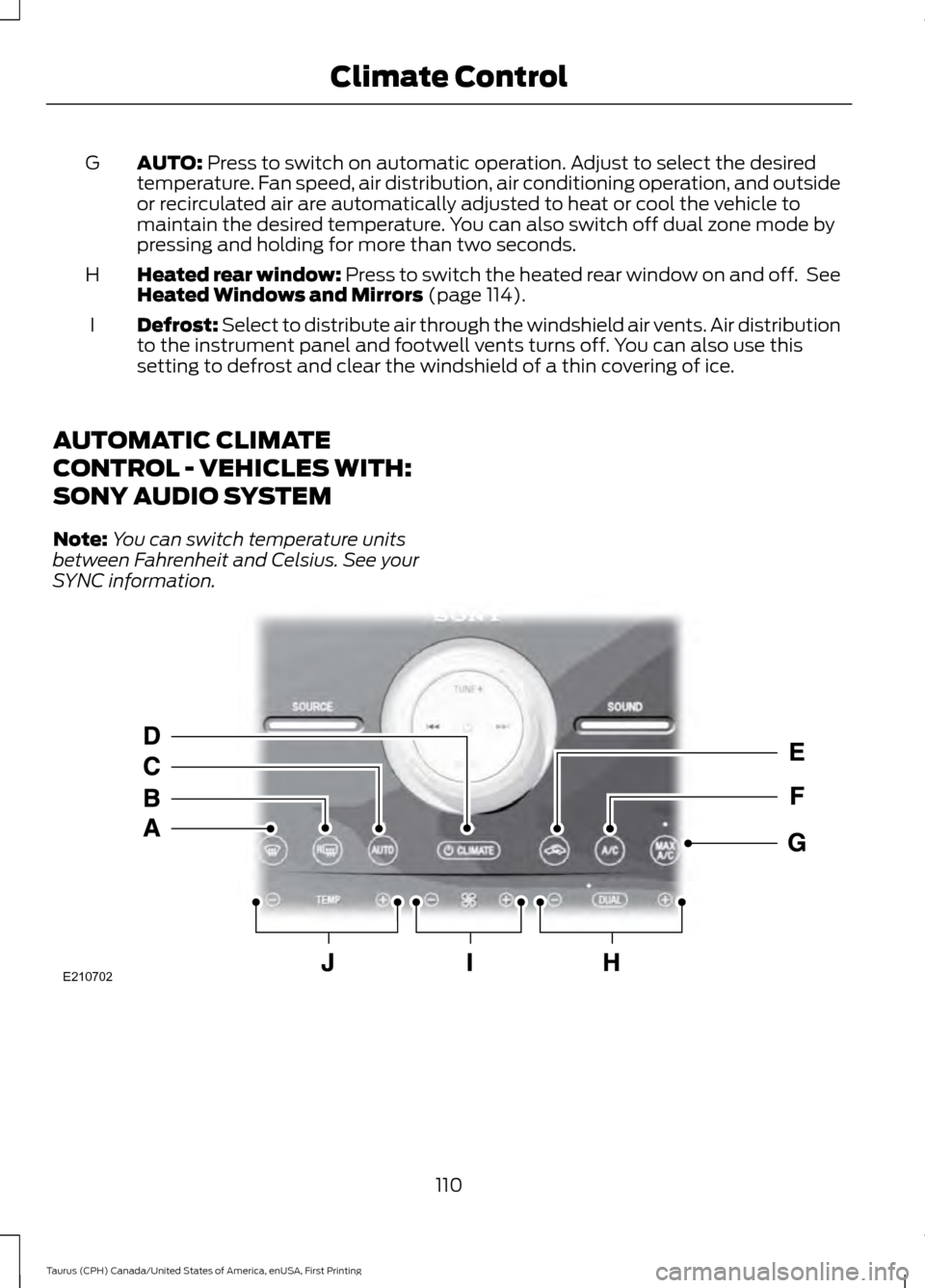
AUTO: Press to switch on automatic operation. Adjust to select the desired
temperature. Fan speed, air distribution, air conditioning operation, and outside
or recirculated air are automatically adjusted to heat or cool the vehicle to
maintain the desired temperature. You can also switch off dual zone mode by
pressing and holding for more than two seconds.
G
Heated rear window: Press to switch the heated rear window on and off. See
Heated Windows and Mirrors
(page 114).
H
Defrost: Select to distribute air through the windshield air vents. Air distribution
to the instrument panel and footwell vents turns off. You can also use this
setting to defrost and clear the windshield of a thin covering of ice.
I
AUTOMATIC CLIMATE
CONTROL - VEHICLES WITH:
SONY AUDIO SYSTEM
Note: You can switch temperature units
between Fahrenheit and Celsius. See your
SYNC information. 110
Taurus (CPH) Canada/United States of America, enUSA, First Printing Climate ControlE210702
Page 114 of 424
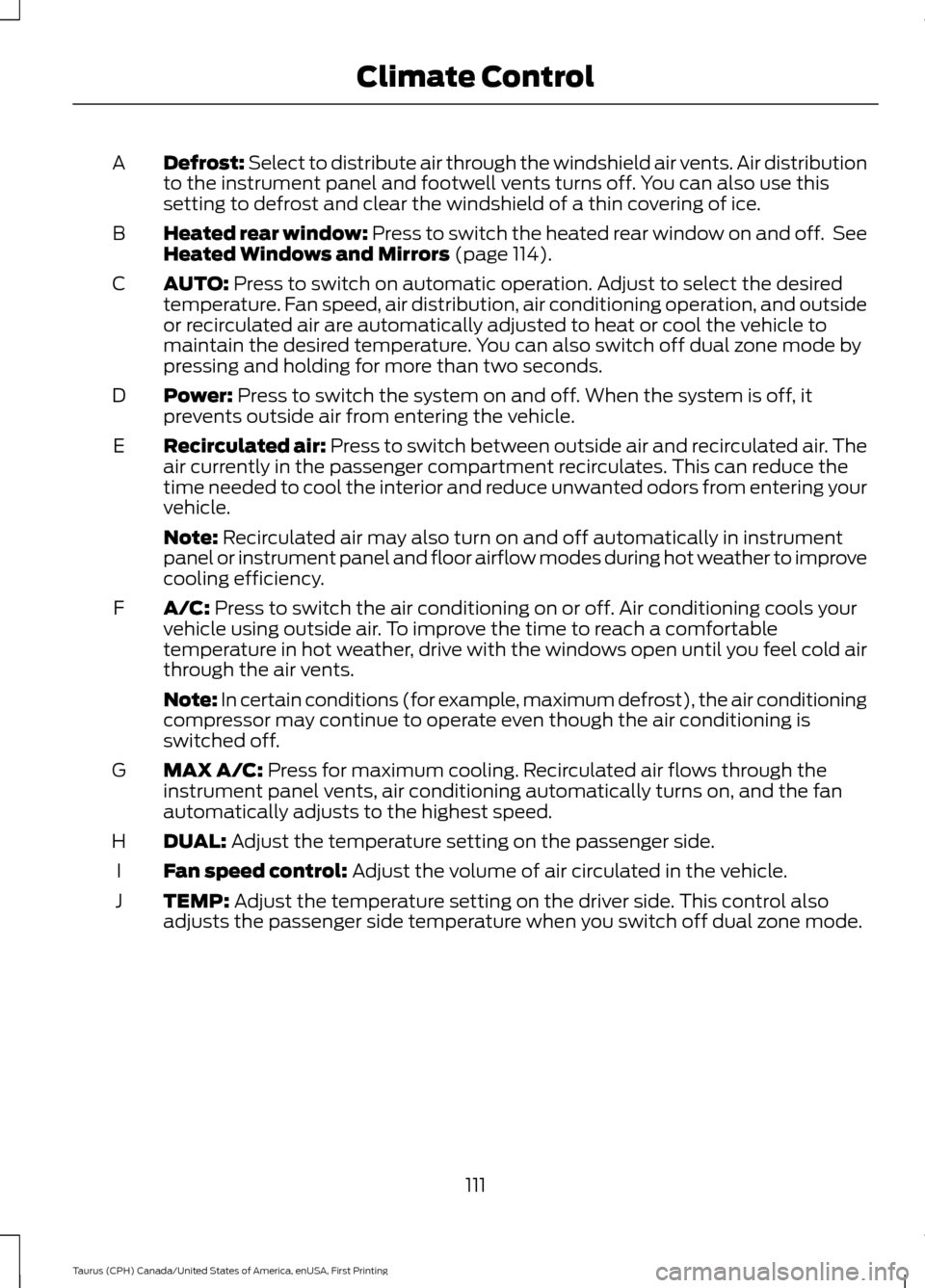
Defrost: Select to distribute air through the windshield air vents. Air distribution
to the instrument panel and footwell vents turns off. You can also use this
setting to defrost and clear the windshield of a thin covering of ice.
A
Heated rear window: Press to switch the heated rear window on and off. See
Heated Windows and Mirrors (page 114).
B
AUTO:
Press to switch on automatic operation. Adjust to select the desired
temperature. Fan speed, air distribution, air conditioning operation, and outside
or recirculated air are automatically adjusted to heat or cool the vehicle to
maintain the desired temperature. You can also switch off dual zone mode by
pressing and holding for more than two seconds.
C
Power:
Press to switch the system on and off. When the system is off, it
prevents outside air from entering the vehicle.
D
Recirculated air:
Press to switch between outside air and recirculated air. The
air currently in the passenger compartment recirculates. This can reduce the
time needed to cool the interior and reduce unwanted odors from entering your
vehicle.
E
Note:
Recirculated air may also turn on and off automatically in instrument
panel or instrument panel and floor airflow modes during hot weather to improve
cooling efficiency.
A/C:
Press to switch the air conditioning on or off. Air conditioning cools your
vehicle using outside air. To improve the time to reach a comfortable
temperature in hot weather, drive with the windows open until you feel cold air
through the air vents.
F
Note: In certain conditions (for example, maximum defrost), the air conditioning
compressor may continue to operate even though the air conditioning is
switched off.
MAX A/C:
Press for maximum cooling. Recirculated air flows through the
instrument panel vents, air conditioning automatically turns on, and the fan
automatically adjusts to the highest speed.
G
DUAL:
Adjust the temperature setting on the passenger side.
H
Fan speed control:
Adjust the volume of air circulated in the vehicle.
I
TEMP:
Adjust the temperature setting on the driver side. This control also
adjusts the passenger side temperature when you switch off dual zone mode.
J
111
Taurus (CPH) Canada/United States of America, enUSA, First Printing Climate Control
Page 124 of 424
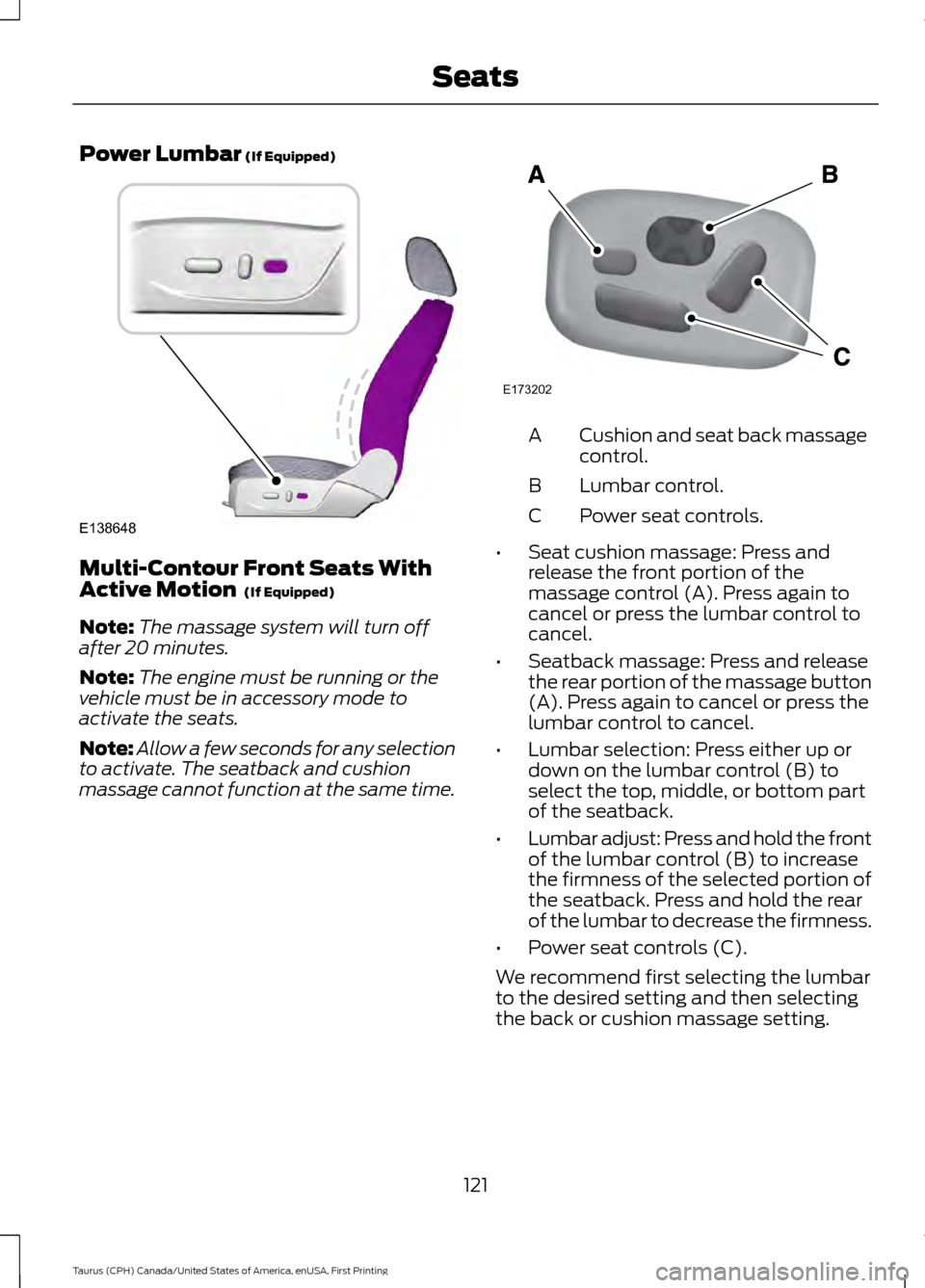
Power Lumbar (If Equipped)
Multi-Contour Front Seats With
Active Motion
(If Equipped)
Note: The massage system will turn off
after 20 minutes.
Note: The engine must be running or the
vehicle must be in accessory mode to
activate the seats.
Note: Allow a few seconds for any selection
to activate. The seatback and cushion
massage cannot function at the same time. Cushion and seat back massage
control.
A
Lumbar control.
B
Power seat controls.
C
• Seat cushion massage: Press and
release the front portion of the
massage control (A). Press again to
cancel or press the lumbar control to
cancel.
• Seatback massage: Press and release
the rear portion of the massage button
(A). Press again to cancel or press the
lumbar control to cancel.
• Lumbar selection: Press either up or
down on the lumbar control (B) to
select the top, middle, or bottom part
of the seatback.
• Lumbar adjust: Press and hold the front
of the lumbar control (B) to increase
the firmness of the selected portion of
the seatback. Press and hold the rear
of the lumbar to decrease the firmness.
• Power seat controls (C).
We recommend first selecting the lumbar
to the desired setting and then selecting
the back or cushion massage setting.
121
Taurus (CPH) Canada/United States of America, enUSA, First Printing SeatsE138648 E173202