remote control FORD TAURUS 2016 6.G Owner's Manual
[x] Cancel search | Manufacturer: FORD, Model Year: 2016, Model line: TAURUS, Model: FORD TAURUS 2016 6.GPages: 424, PDF Size: 4.04 MB
Page 92 of 424
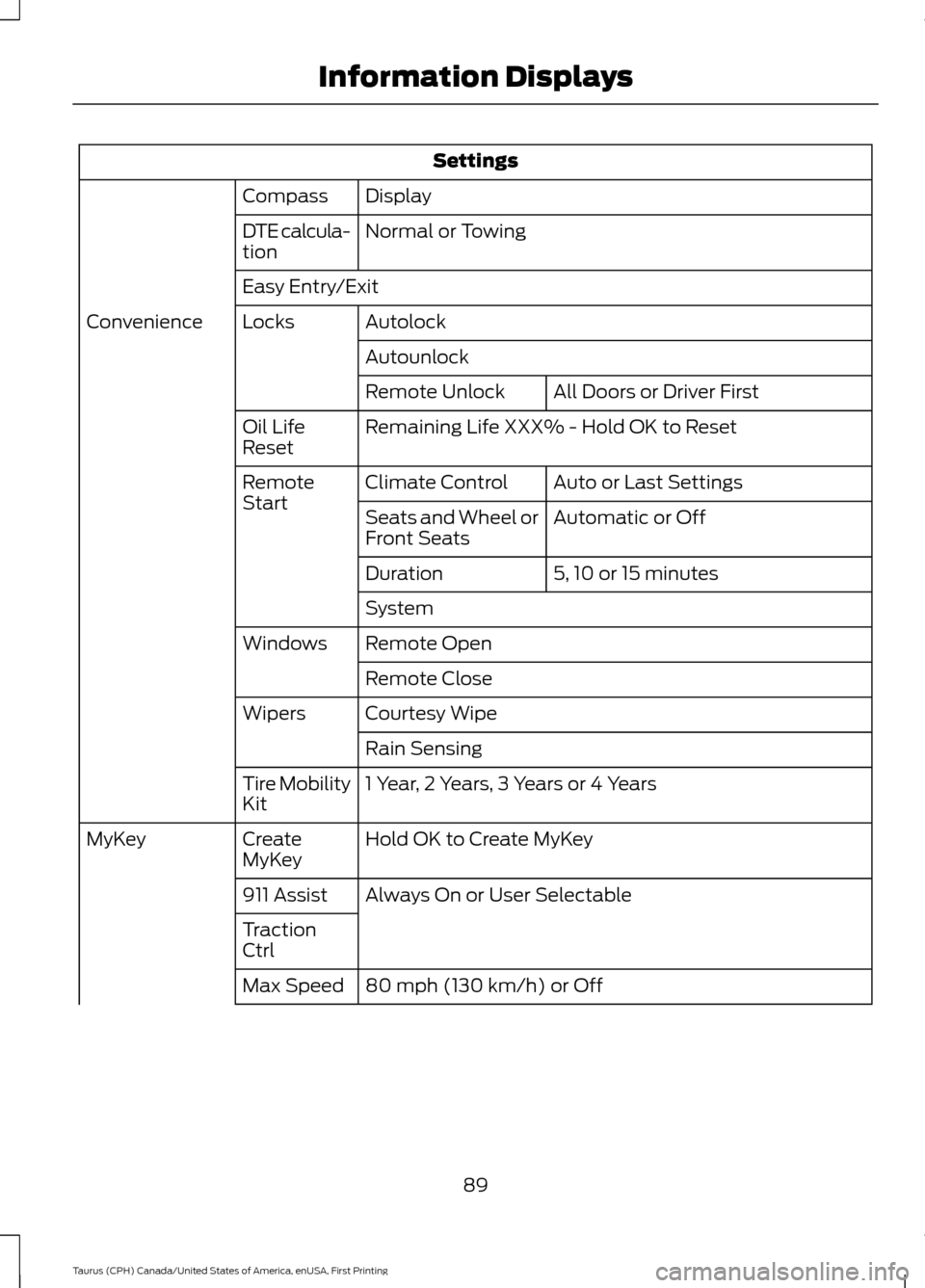
Settings
Display
Compass
Normal or Towing
DTE calcula-
tion
Easy Entry/Exit
Autolock
Locks
Convenience
AutounlockAll Doors or Driver First
Remote Unlock
Remaining Life XXX% - Hold OK to Reset
Oil Life
Reset
Auto or Last Settings
Climate Control
Remote
Start
Automatic or Off
Seats and Wheel or
Front Seats
5, 10 or 15 minutes
Duration
System
Remote Open
Windows
Remote Close
Courtesy Wipe
Wipers
Rain Sensing
1 Year, 2 Years, 3 Years or 4 Years
Tire Mobility
Kit
Hold OK to Create MyKey
Create
MyKey
MyKey
Always On or User Selectable
911 Assist
Traction
Ctrl
80 mph (130 km/h) or Off
Max Speed
89
Taurus (CPH) Canada/United States of America, enUSA, First Printing Information Displays
Page 96 of 424
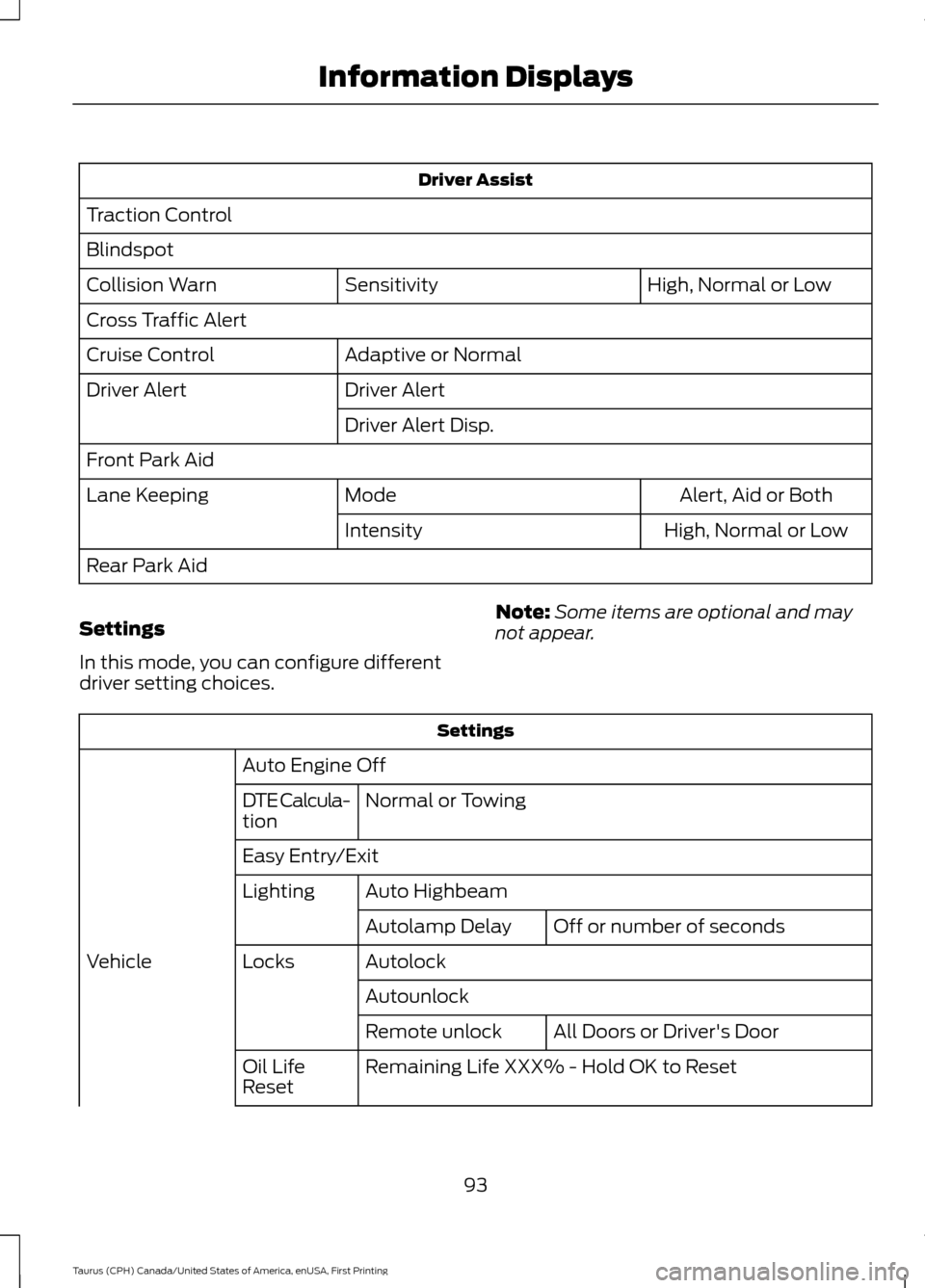
Driver Assist
Traction Control
Blindspot High, Normal or Low
Sensitivity
Collision Warn
Cross Traffic Alert
Adaptive or Normal
Cruise Control
Driver Alert
Driver Alert
Driver Alert Disp.
Front Park Aid Alert, Aid or Both
Mode
Lane Keeping
High, Normal or Low
Intensity
Rear Park Aid
Settings
In this mode, you can configure different
driver setting choices. Note:
Some items are optional and may
not appear. Settings
Auto Engine Off Normal or Towing
DTE Calcula-
tion
Easy Entry/Exit
Auto Highbeam
Lighting
Off or number of seconds
Autolamp Delay
Autolock
Locks
Vehicle
AutounlockAll Doors or Driver's Door
Remote unlock
Remaining Life XXX% - Hold OK to Reset
Oil Life
Reset
93
Taurus (CPH) Canada/United States of America, enUSA, First Printing Information Displays
Page 97 of 424
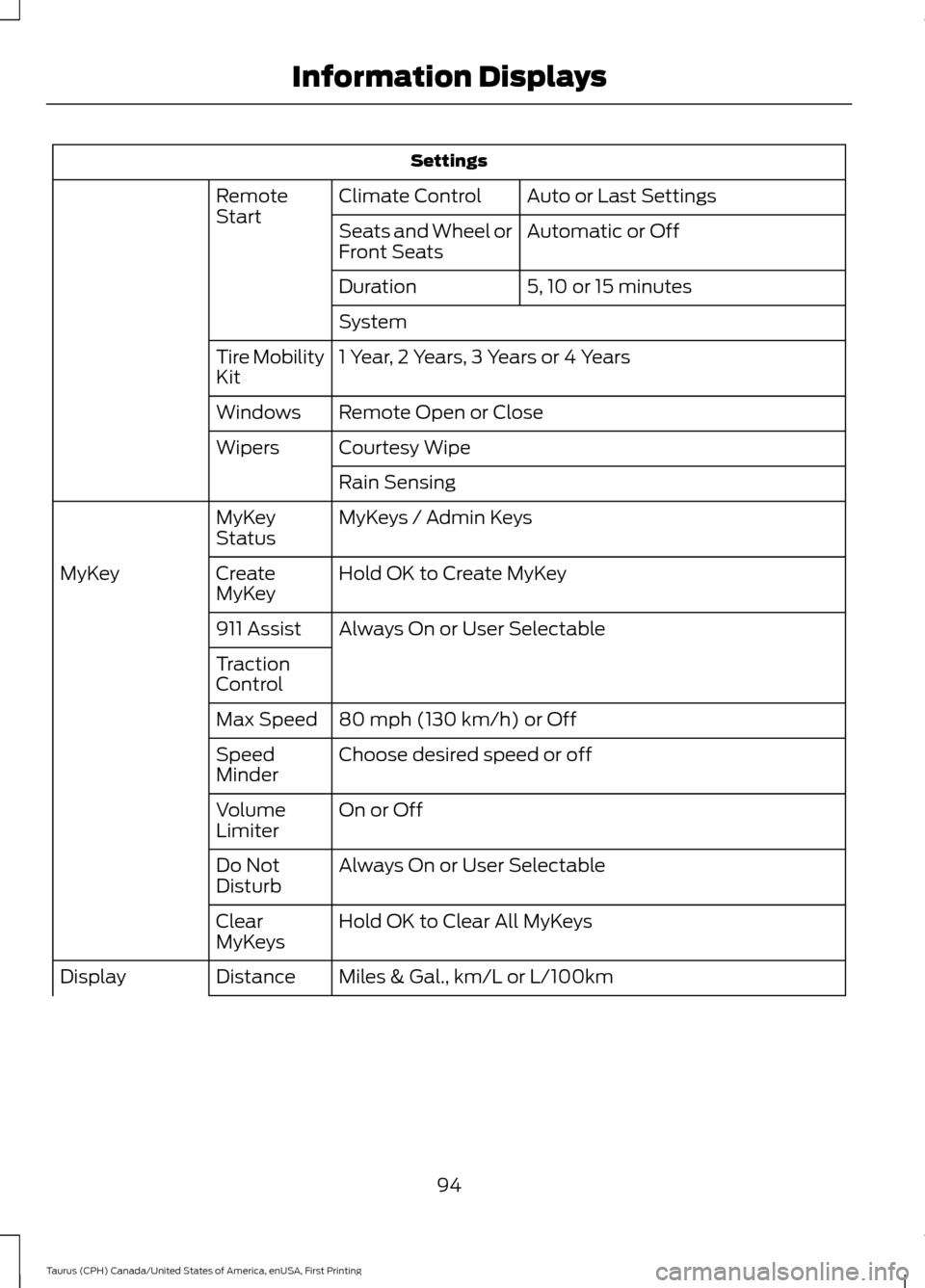
Settings
Auto or Last Settings
Climate Control
Remote
Start
Automatic or Off
Seats and Wheel or
Front Seats
5, 10 or 15 minutes
Duration
System
1 Year, 2 Years, 3 Years or 4 Years
Tire Mobility
Kit
Remote Open or Close
Windows
Courtesy Wipe
Wipers
Rain Sensing
MyKeys / Admin Keys
MyKey
Status
Hold OK to Create MyKey
Create
MyKey
MyKey
Always On or User Selectable
911 Assist
Traction
Control
80 mph (130 km/h) or Off
Max Speed
Choose desired speed or off
Speed
Minder
On or Off
Volume
Limiter
Always On or User Selectable
Do Not
Disturb
Hold OK to Clear All MyKeys
Clear
MyKeys
Miles & Gal., km/L or L/100km
Distance
Display
94
Taurus (CPH) Canada/United States of America, enUSA, First Printing Information Displays
Page 118 of 424
For additional cabin air filter information,
or to replace the filter, see an authorized
dealer.
REMOTE START
The remote start feature allows you to
pre-condition the interior of your vehicle.
The climate control system works to
achieve comfort according to your
pre-selected settings.
Note:
You cannot adjust the system during
remote start operation. You cannot switch
on the displays or indicators during remote
start.
Switch the ignition on to return the system
to its previous settings. The following
features remain on if they automatically
turned on during remote start, or remain
off if they did not turn on during remote
start.
• Heated seats.
• Cooled seats.
• Heated steering wheel.
• Heated mirrors.
• Heated rear window.
Note: Passenger heated and cooled seats
only remain on during remote start if they
were on when you switched the vehicle off.
You can adjust the default remote start
settings using the information display
controls. See Information Displays
(page 86).
Automatic Settings
In hot weather, the system is set to 72°F
(22°C). The cooled seats are set to high
(if available, and selected to AUTO in the
information display). In moderate weather, the system either
heats or cools (based on pre-selected
settings). The rear defroster, heated
mirrors and heated seats do not
automatically switch on.
In cold weather, the system is set to 72°F
(22°C). The heated and cooled seats and
heated steering wheel are set to high (if
available, and selected to AUTO in the
information display). The rear defroster
and heated mirrors automatically switch
on.
115
Taurus (CPH) Canada/United States of America, enUSA, First Printing Climate Control
Page 125 of 424
MEMORY FUNCTION (If Equipped)
WARNINGS
Before activating the seat memory,
make sure that the area immediately
surrounding the seat is clear of
obstructions and that all occupants are
clear of moving parts. Do not use the memory function
when your vehicle is moving.
This function automatically recalls the
position of these features.
•
Driver seat.
• Power mirrors.
• Optional power adjustable pedals.
• Optional power steering column.
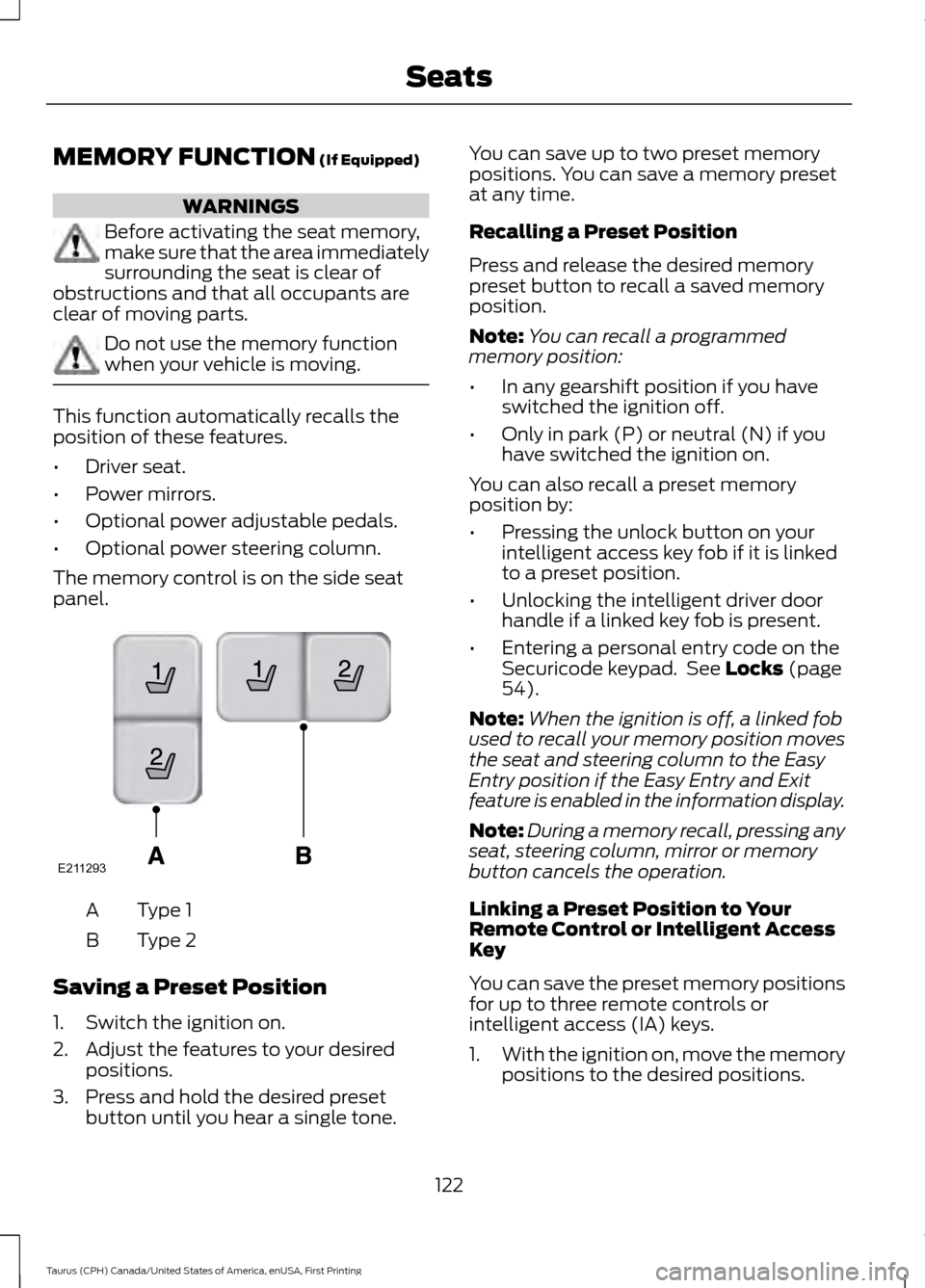
The memory control is on the side seat
panel. Type 1
A
Type 2
B
Saving a Preset Position
1. Switch the ignition on.
2. Adjust the features to your desired positions.
3. Press and hold the desired preset button until you hear a single tone. You can save up to two preset memory
positions. You can save a memory preset
at any time.
Recalling a Preset Position
Press and release the desired memory
preset button to recall a saved memory
position.
Note:
You can recall a programmed
memory position:
• In any gearshift position if you have
switched the ignition off.
• Only in park (P) or neutral (N) if you
have switched the ignition on.
You can also recall a preset memory
position by:
• Pressing the unlock button on your
intelligent access key fob if it is linked
to a preset position.
• Unlocking the intelligent driver door
handle if a linked key fob is present.
• Entering a personal entry code on the
Securicode keypad. See
Locks (page
54).
Note: When the ignition is off, a linked fob
used to recall your memory position moves
the seat and steering column to the Easy
Entry position if the Easy Entry and Exit
feature is enabled in the information display.
Note: During a memory recall, pressing any
seat, steering column, mirror or memory
button cancels the operation.
Linking a Preset Position to Your
Remote Control or Intelligent Access
Key
You can save the preset memory positions
for up to three remote controls or
intelligent access (IA) keys.
1. With the ignition on, move the memory
positions to the desired positions.
122
Taurus (CPH) Canada/United States of America, enUSA, First Printing SeatsE211293
Page 126 of 424
2. Press and hold the desired preset
button for five seconds. A tone sounds
after about two seconds. Continue
holding until you hear a second tone.
3. Within three seconds, press the lock button on the remote control you are
linking.
To unlink a remote control, follow the
same procedure – except in Step 3, press
the unlock button on the remote control.
Easy Entry and Exit Feature (If
Equipped)
If you enable the easy entry and exit
feature, it automatically moves the driver
seat position rearward up to two inches
(five centimeters) and the steering column
up and forward when you switch the
ignition off.
When you switch the ignition on, the driver
seat and steering column return to the
previous position.
You can enable or disable this feature in
the information display. See Information
Displays
(page 86).
REAR SEATS
Split-folding Rear Seat WARNING
Before returning the seatback to its
original position, make sure that
cargo or any objects are not trapped
behind the seatback. After returning the
seatback to its original position, pull on the
seatback to make sure that it has fully
latched. An unlatched seat may become
dangerous in the event of a sudden stop
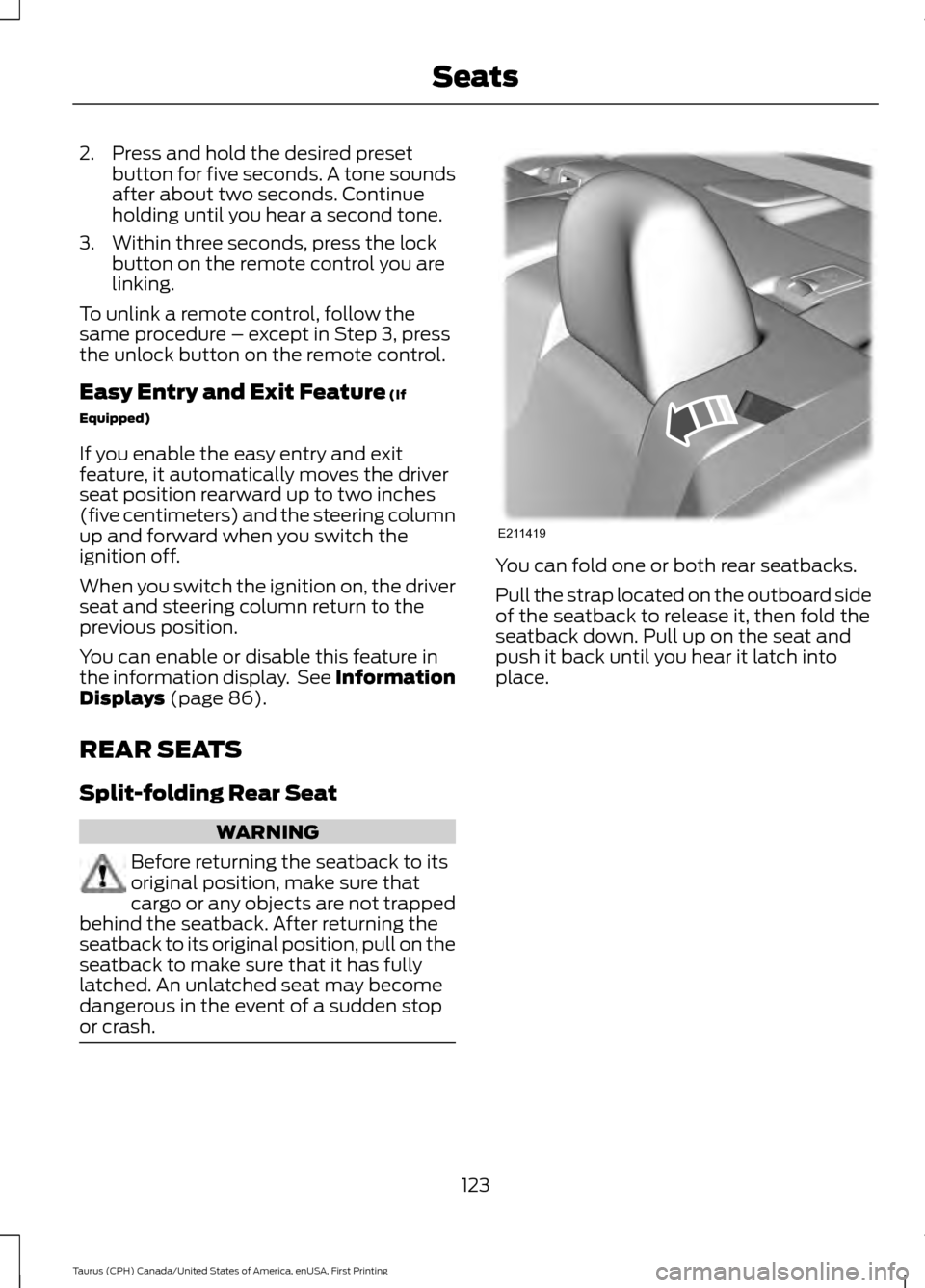
or crash. You can fold one or both rear seatbacks.
Pull the strap located on the outboard side
of the seatback to release it, then fold the
seatback down. Pull up on the seat and
push it back until you hear it latch into
place.
123
Taurus (CPH) Canada/United States of America, enUSA, First Printing SeatsE211419
Page 130 of 424
HomeLink Wireless Control
System
WARNINGS
Make sure that the garage door and
security device are free from
obstruction when you are
programming. Do not program the system
with the vehicle in the garage. Do not use the system with any
garage door opener that does not
have the safety stop and reverse
feature as required by U.S. Federal Safety
Standards (this includes any garage door
opener manufactured before April 1, 1982).
A garage door opener which cannot detect
an object, signaling the door to stop and
reverse, does not meet current federal
safety standards. Using a garage door
opener without these features increases
the risk of serious injury or death. Note:
Make sure you keep the original
remote control transmitter for use in other
vehicles as well as for future system
programming.
Note: We recommend that upon the sale
or lease termination of your vehicle, you
erase the programmed function buttons for
security reasons. See Erasing the Function
Button Codes.
Note: You can program a maximum of
three devices. To change or replace any of
the three devices after it has been initially
programmed, you must first erase the
current settings. See Erasing the Function
Button Codes
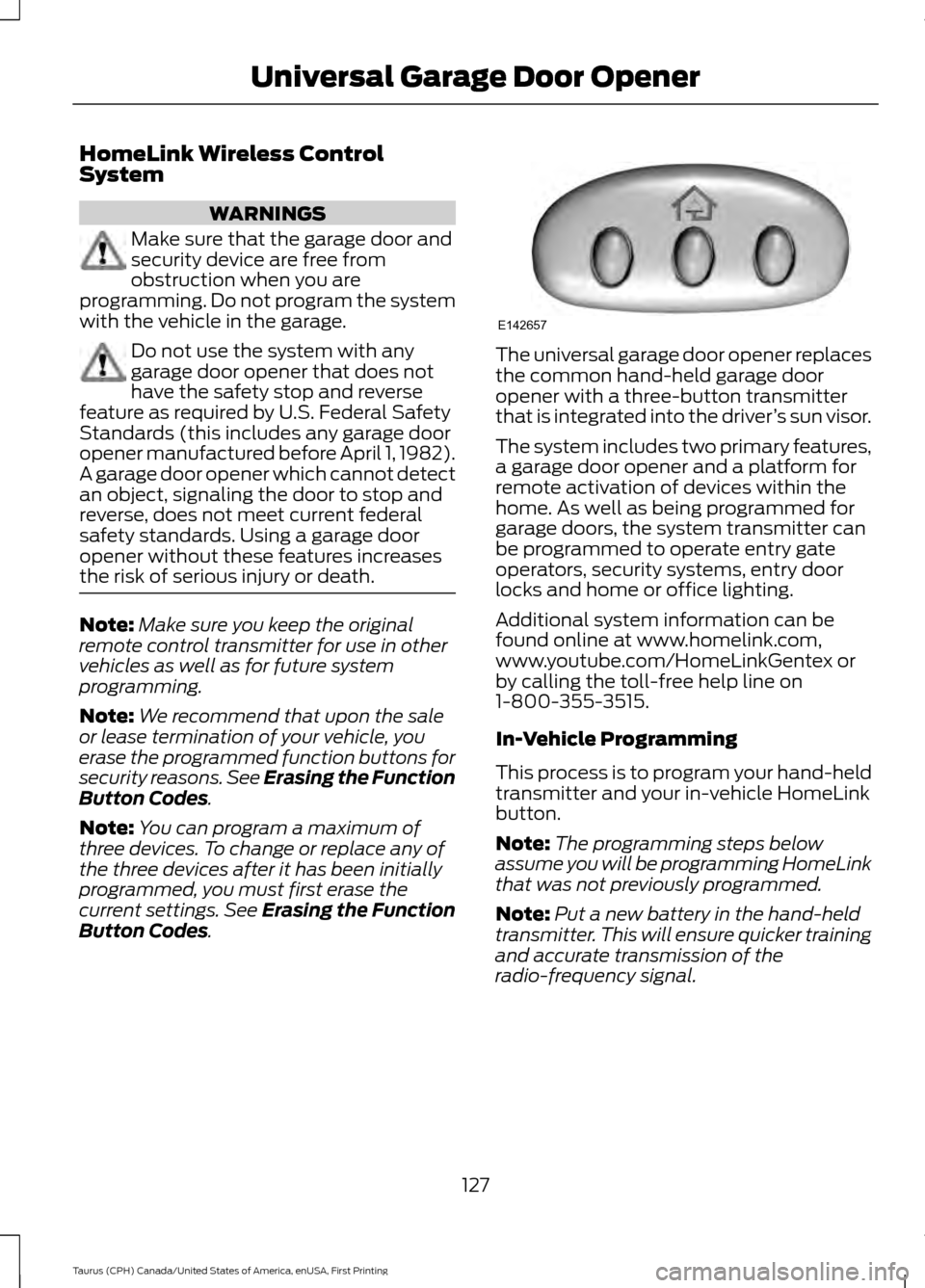
. The universal garage door opener replaces
the common hand-held garage door
opener with a three-button transmitter
that is integrated into the driver
’s sun visor.
The system includes two primary features,
a garage door opener and a platform for
remote activation of devices within the
home. As well as being programmed for
garage doors, the system transmitter can
be programmed to operate entry gate
operators, security systems, entry door
locks and home or office lighting.
Additional system information can be
found online at www.homelink.com,
www.youtube.com/HomeLinkGentex or
by calling the toll-free help line on
1-800-355-3515.
In-Vehicle Programming
This process is to program your hand-held
transmitter and your in-vehicle HomeLink
button.
Note: The programming steps below
assume you will be programming HomeLink
that was not previously programmed.
Note: Put a new battery in the hand-held
transmitter. This will ensure quicker training
and accurate transmission of the
radio-frequency signal.
127
Taurus (CPH) Canada/United States of America, enUSA, First Printing Universal Garage Door OpenerE142657
Page 182 of 424
If something hits the front end of your
vehicle or damage occurs, the
radar-sensing zone may change. This could
cause missed or false vehicle detections.
See an authorized dealer to have the radar
checked for proper coverage and
operation.
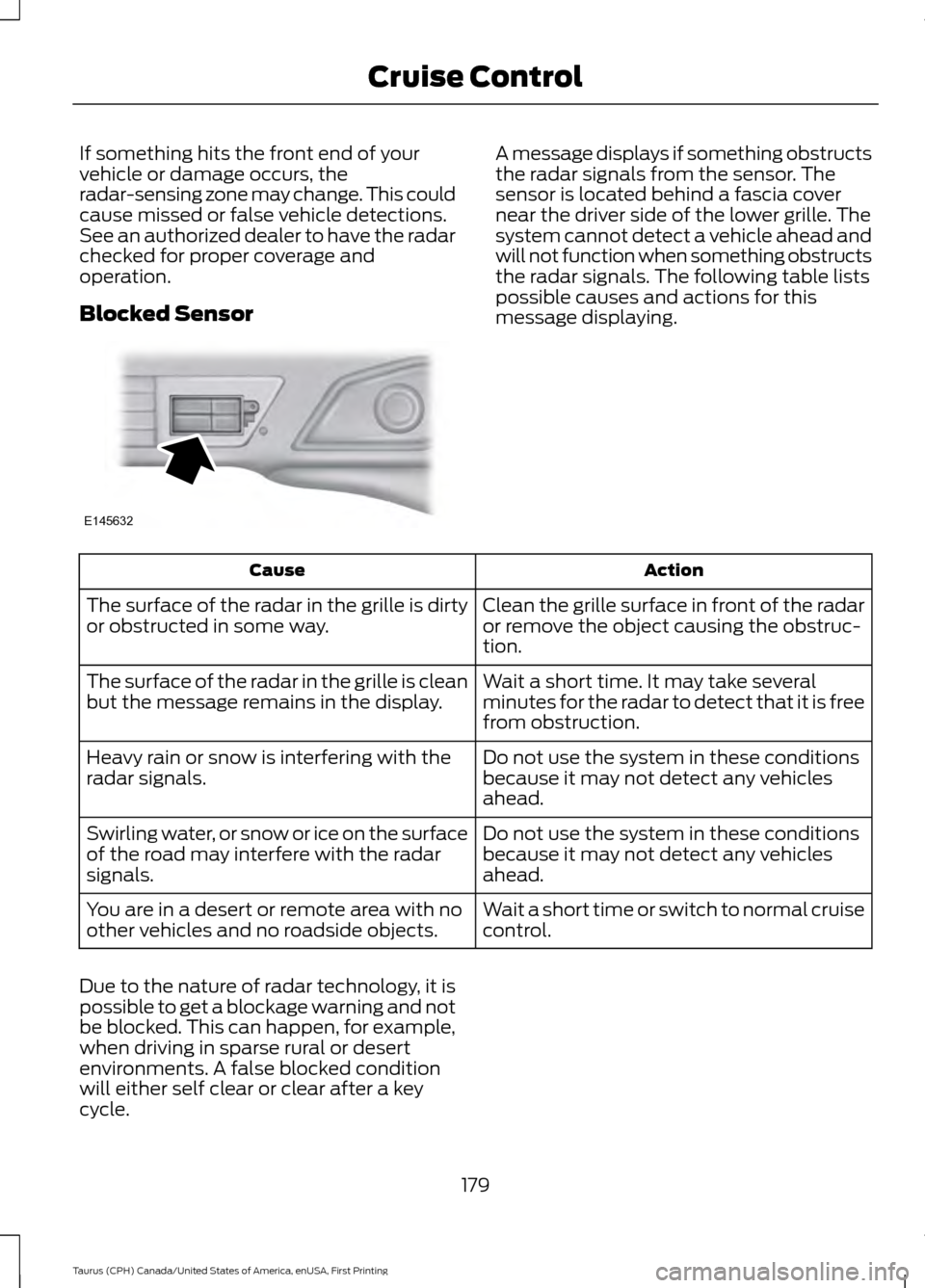
Blocked Sensor A message displays if something obstructs
the radar signals from the sensor. The
sensor is located behind a fascia cover
near the driver side of the lower grille. The
system cannot detect a vehicle ahead and
will not function when something obstructs
the radar signals. The following table lists
possible causes and actions for this
message displaying.
Action
Cause
Clean the grille surface in front of the radar
or remove the object causing the obstruc-
tion.
The surface of the radar in the grille is dirty
or obstructed in some way.
Wait a short time. It may take several
minutes for the radar to detect that it is free
from obstruction.
The surface of the radar in the grille is clean
but the message remains in the display.
Do not use the system in these conditions
because it may not detect any vehicles
ahead.
Heavy rain or snow is interfering with the
radar signals.
Do not use the system in these conditions
because it may not detect any vehicles
ahead.
Swirling water, or snow or ice on the surface
of the road may interfere with the radar
signals.
Wait a short time or switch to normal cruise
control.
You are in a desert or remote area with no
other vehicles and no roadside objects.
Due to the nature of radar technology, it is
possible to get a blockage warning and not
be blocked. This can happen, for example,
when driving in sparse rural or desert
environments. A false blocked condition
will either self clear or clear after a key
cycle.
179
Taurus (CPH) Canada/United States of America, enUSA, First Printing Cruise ControlE145632
Page 219 of 424
2. Remove the jumper cable on the
negative (-) terminal of the booster
vehicle battery.
3. Remove the jumper cable from the positive (+) terminal of the booster
vehicle battery.
4. Remove the jumper cable from the positive (+) terminal of the disabled
vehicle battery.
5. Allow the engine to idle for at least one
minute.
POST-CRASH ALERT SYSTEM
The system flashes the direction indicators
and sounds the horn (intermittently) in the
event of a serious impact that deploys an
airbag (front, side, side curtain or Safety
Canopy) or the safety belt pretensioners.
The horn and indicators will turn off when:
• You press the hazard control button.
• You press the panic button on the
remote entry transmitter (if equipped).
• Your vehicle runs out of power.
216
Taurus (CPH) Canada/United States of America, enUSA, First Printing Roadside Emergencies
Page 418 of 424
Hints on Controlling the Interior
Climate...........................................................112
Cooling the Interior Quickly.............................. 113
General Hints......................................................... 112
Heating the Interior Quickly............................. 112
Recommended Settings for Cooling............113
Recommended Settings for Heating............113
Side Window Defogging in Cold Weather.............................................................. 114
Hints on Driving With Anti-Lock Brakes............................................................159
Hood Lock See: Opening and Closing the Hood..........234
I
Ignition Switch...............................................134
In California (U.S. Only).............................218
Information Display Control.......................65
Information Displays
....................................86
General Information........................................... 86Information Messages
.................................95
Adaptive Cruise Control.................................... 95
AdvanceTrac ™..................................................... 96
Alarm........................................................................\
96
All Wheel Drive...................................................... 97
Automatic Engine Shutdown.......................... 96
Automatic High Beam Control....................... 96
Battery and Charging System.......................... 97
Blind Spot Information and Cross Traffic Alert System..................................................... 98
Brake System........................................................ 98
Collision Warning System................................. 99
Doors and Locks................................................... 99
Driver Alert.............................................................. 99
Fuel........................................................................\
.... 99
Keys and Intelligent Access........................... 100
Lane Keeping System....................................... 100
Maintenance......................................................... 101
MyKey...................................................................... 101
Park Aid.................................................................. 102
Passenger Sensing System Message.........102
Power Steering.................................................... 102
Reminder Messages.......................................... 102
Remote Start....................................................... 103
Seats....................................................................... 103
Starting System.................................................. 103
Tire Pressure Monitoring System.................103
Traction Control.................................................. 104
Transmission........................................................ 104
Installing Child Restraints
............................16
Child Seats............................................................... 16
Using Lap and Shoulder Belts.......................... 17
Using Lower Anchors and Tethers for CHildren (LATCH)............................................ 19
Using Tether Straps............................................. 20
Instrument Cluster
........................................80
Instrument Lighting Dimmer.......................71
Interior Lamps
..................................................73
Front Row Map Lamps....................................... 73
Second Row Map Lamps.................................. 74
Interior Luggage Compartment Release............................................................59
Interior Mirror
....................................................78
Auto-Dimming Mirror.......................................... 78
Introduction.........................................................7
415
Taurus (CPH) Canada/United States of America, enUSA, First Printing Index