display FORD TAURUS 2016 6.G Service Manual
[x] Cancel search | Manufacturer: FORD, Model Year: 2016, Model line: TAURUS, Model: FORD TAURUS 2016 6.GPages: 424, PDF Size: 4.04 MB
Page 107 of 424
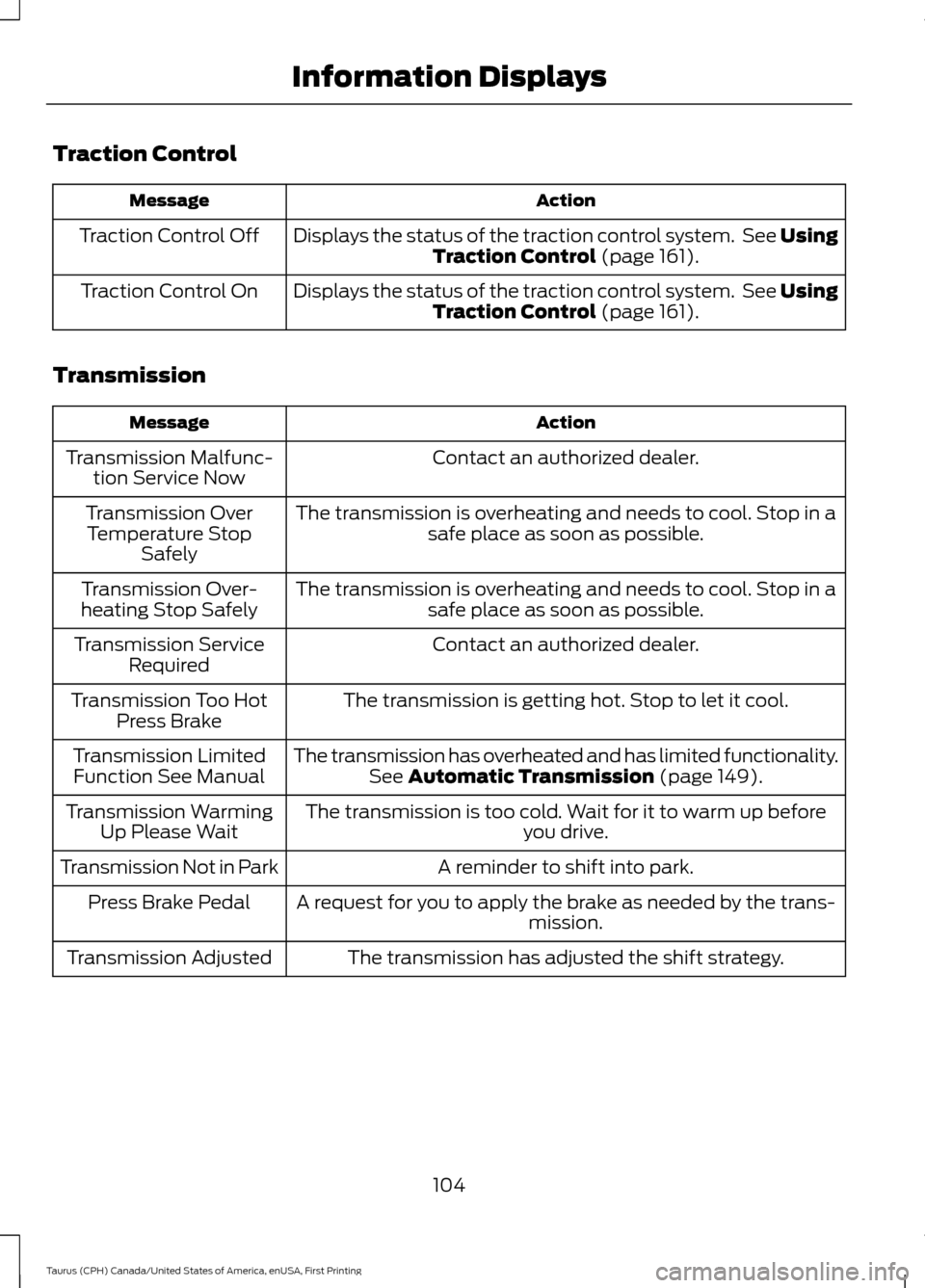
Traction Control
Action
Message
Displays the status of the traction control system. See UsingTraction Control (page 161).
Traction Control Off
Displays the status of the traction control system. See UsingTraction Control
(page 161).
Traction Control On
Transmission Action
Message
Contact an authorized dealer.
Transmission Malfunc-
tion Service Now
The transmission is overheating and needs to cool. Stop in asafe place as soon as possible.
Transmission Over
Temperature Stop Safely
The transmission is overheating and needs to cool. Stop in asafe place as soon as possible.
Transmission Over-
heating Stop Safely
Contact an authorized dealer.
Transmission Service
Required
The transmission is getting hot. Stop to let it cool.
Transmission Too Hot
Press Brake
The transmission has overheated and has limited functionality.See
Automatic Transmission (page 149).
Transmission Limited
Function See Manual
The transmission is too cold. Wait for it to warm up beforeyou drive.
Transmission Warming
Up Please Wait
A reminder to shift into park.
Transmission Not in Park
A request for you to apply the brake as needed by the trans-mission.
Press Brake Pedal
The transmission has adjusted the shift strategy.
Transmission Adjusted
104
Taurus (CPH) Canada/United States of America, enUSA, First Printing Information Displays
Page 108 of 424
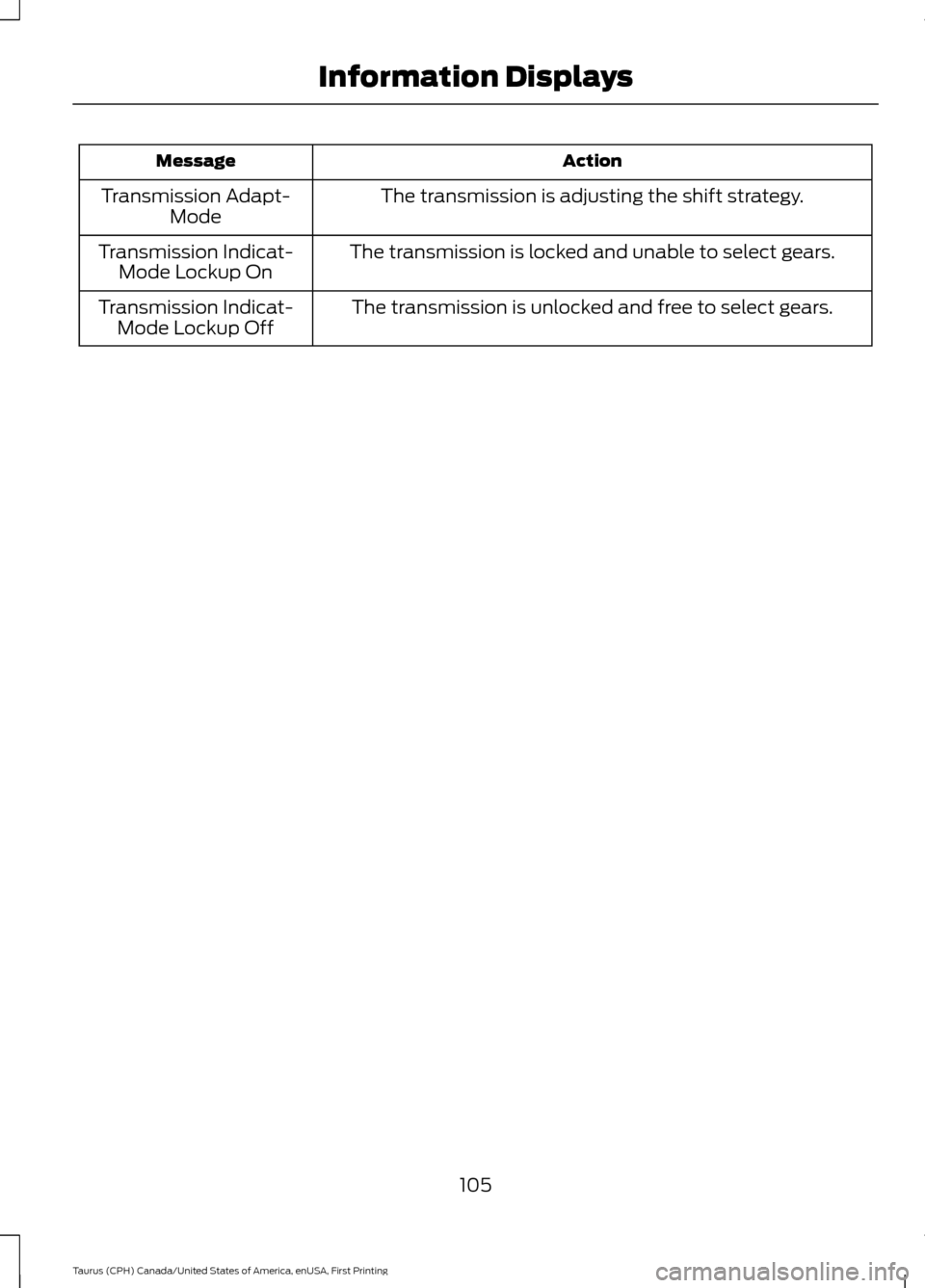
Action
Message
The transmission is adjusting the shift strategy.
Transmission Adapt-
Mode
The transmission is locked and unable to select gears.
Transmission Indicat-
Mode Lockup On
The transmission is unlocked and free to select gears.
Transmission Indicat-
Mode Lockup Off
105
Taurus (CPH) Canada/United States of America, enUSA, First Printing Information Displays
Page 110 of 424
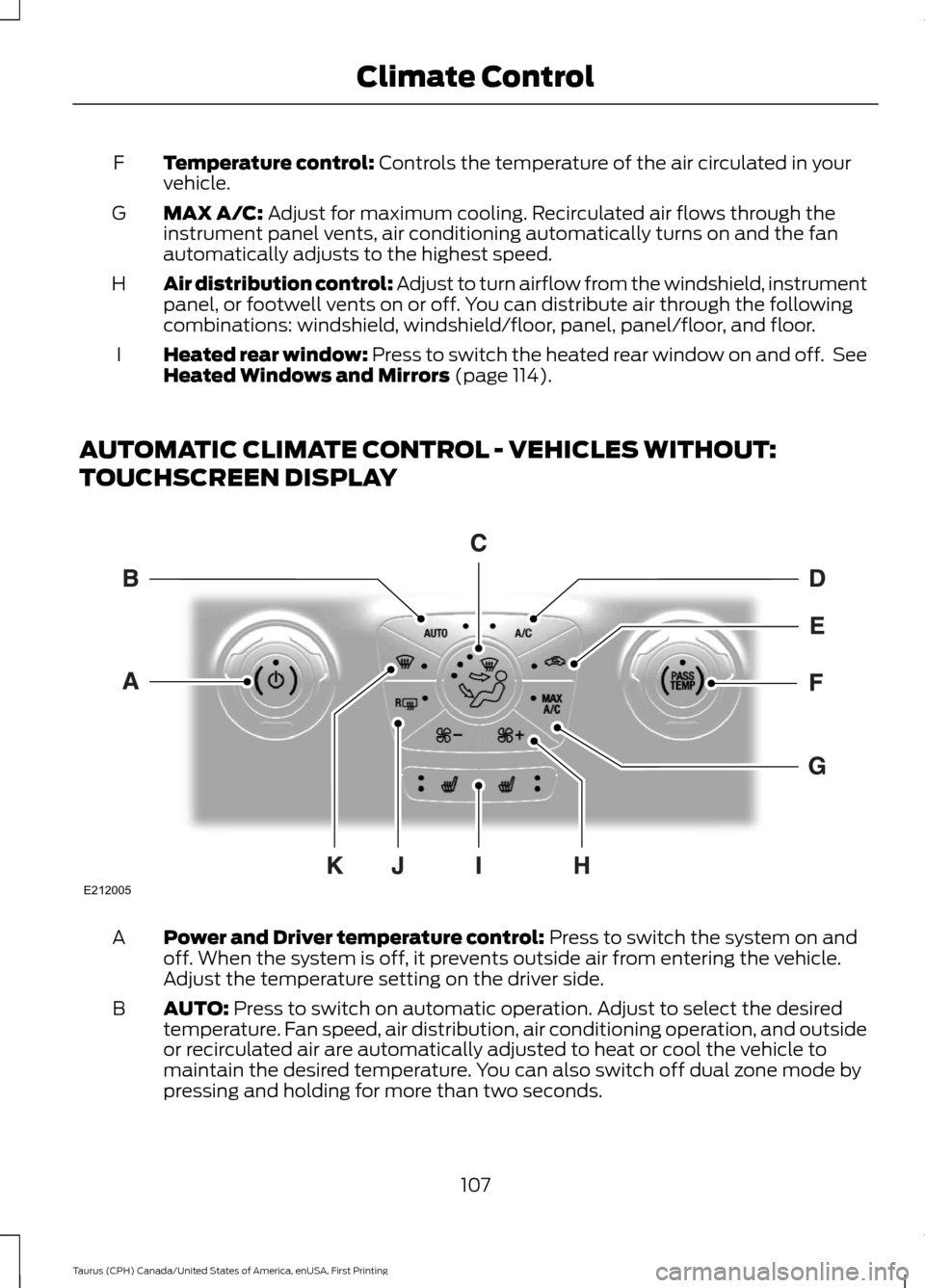
Temperature control: Controls the temperature of the air circulated in your
vehicle.
F
MAX A/C:
Adjust for maximum cooling. Recirculated air flows through the
instrument panel vents, air conditioning automatically turns on and the fan
automatically adjusts to the highest speed.
G
Air distribution control: Adjust to turn airflow from the windshield, instrument
panel, or footwell vents on or off. You can distribute air through the following
combinations: windshield, windshield/floor, panel, panel/floor, and floor.
H
Heated rear window: Press to switch the heated rear window on and off. See
Heated Windows and Mirrors
(page 114).
I
AUTOMATIC CLIMATE CONTROL - VEHICLES WITHOUT:
TOUCHSCREEN DISPLAY Power and Driver temperature control:
Press to switch the system on and
off. When the system is off, it prevents outside air from entering the vehicle.
Adjust the temperature setting on the driver side.
A
AUTO:
Press to switch on automatic operation. Adjust to select the desired
temperature. Fan speed, air distribution, air conditioning operation, and outside
or recirculated air are automatically adjusted to heat or cool the vehicle to
maintain the desired temperature. You can also switch off dual zone mode by
pressing and holding for more than two seconds.
B
107
Taurus (CPH) Canada/United States of America, enUSA, First Printing Climate ControlE212005
Page 118 of 424
For additional cabin air filter information,
or to replace the filter, see an authorized
dealer.
REMOTE START
The remote start feature allows you to
pre-condition the interior of your vehicle.
The climate control system works to
achieve comfort according to your
pre-selected settings.
Note:
You cannot adjust the system during
remote start operation. You cannot switch
on the displays or indicators during remote
start.
Switch the ignition on to return the system
to its previous settings. The following
features remain on if they automatically
turned on during remote start, or remain
off if they did not turn on during remote
start.
• Heated seats.
• Cooled seats.
• Heated steering wheel.
• Heated mirrors.
• Heated rear window.
Note: Passenger heated and cooled seats
only remain on during remote start if they
were on when you switched the vehicle off.
You can adjust the default remote start
settings using the information display
controls. See Information Displays
(page 86).
Automatic Settings
In hot weather, the system is set to 72°F
(22°C). The cooled seats are set to high
(if available, and selected to AUTO in the
information display). In moderate weather, the system either
heats or cools (based on pre-selected
settings). The rear defroster, heated
mirrors and heated seats do not
automatically switch on.
In cold weather, the system is set to 72°F
(22°C). The heated and cooled seats and
heated steering wheel are set to high (if
available, and selected to AUTO in the
information display). The rear defroster
and heated mirrors automatically switch
on.
115
Taurus (CPH) Canada/United States of America, enUSA, First Printing Climate Control
Page 125 of 424
MEMORY FUNCTION (If Equipped)
WARNINGS
Before activating the seat memory,
make sure that the area immediately
surrounding the seat is clear of
obstructions and that all occupants are
clear of moving parts. Do not use the memory function
when your vehicle is moving.
This function automatically recalls the
position of these features.
•
Driver seat.
• Power mirrors.
• Optional power adjustable pedals.
• Optional power steering column.
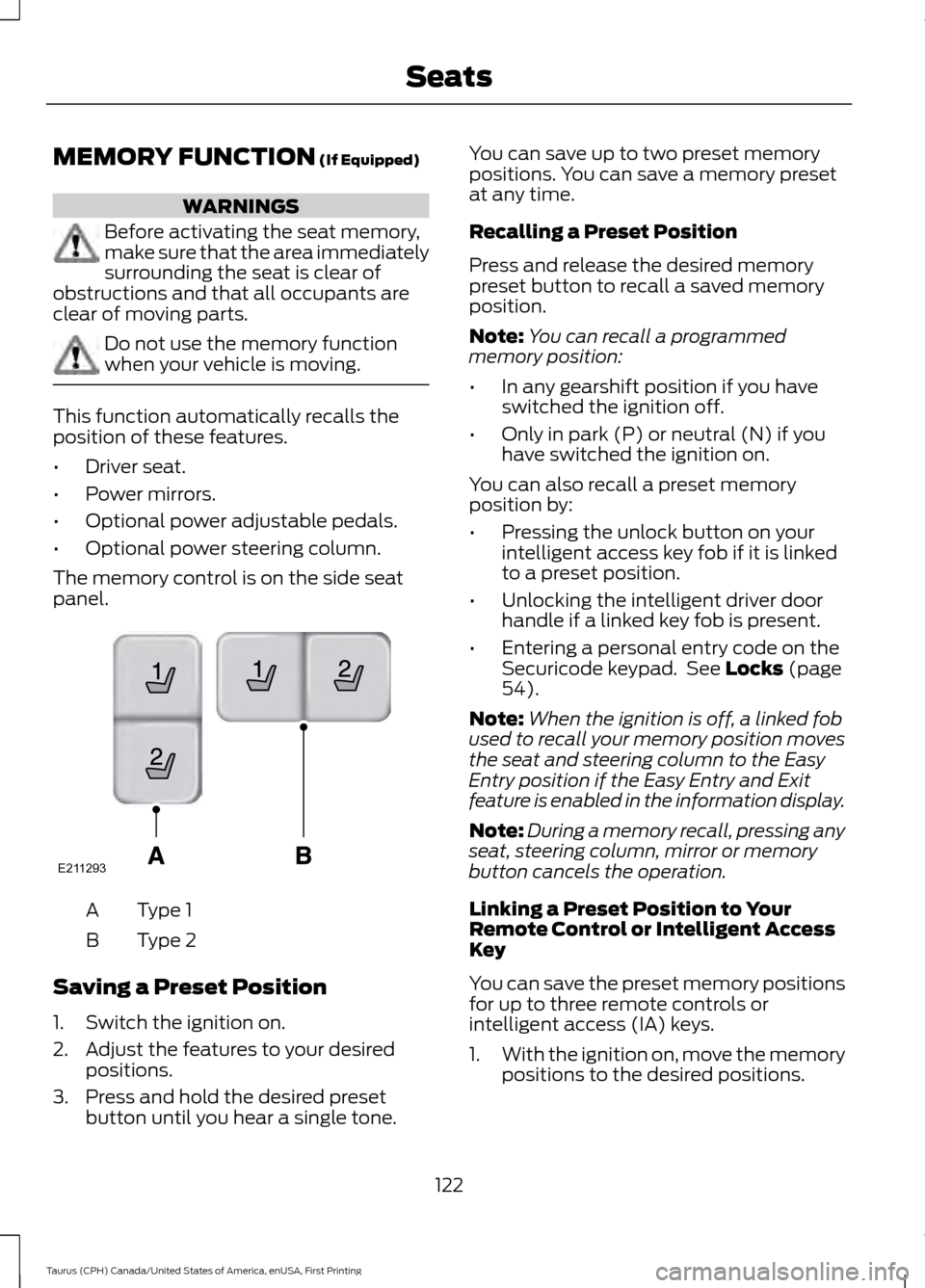
The memory control is on the side seat
panel. Type 1
A
Type 2
B
Saving a Preset Position
1. Switch the ignition on.
2. Adjust the features to your desired positions.
3. Press and hold the desired preset button until you hear a single tone. You can save up to two preset memory
positions. You can save a memory preset
at any time.
Recalling a Preset Position
Press and release the desired memory
preset button to recall a saved memory
position.
Note:
You can recall a programmed
memory position:
• In any gearshift position if you have
switched the ignition off.
• Only in park (P) or neutral (N) if you
have switched the ignition on.
You can also recall a preset memory
position by:
• Pressing the unlock button on your
intelligent access key fob if it is linked
to a preset position.
• Unlocking the intelligent driver door
handle if a linked key fob is present.
• Entering a personal entry code on the
Securicode keypad. See
Locks (page
54).
Note: When the ignition is off, a linked fob
used to recall your memory position moves
the seat and steering column to the Easy
Entry position if the Easy Entry and Exit
feature is enabled in the information display.
Note: During a memory recall, pressing any
seat, steering column, mirror or memory
button cancels the operation.
Linking a Preset Position to Your
Remote Control or Intelligent Access
Key
You can save the preset memory positions
for up to three remote controls or
intelligent access (IA) keys.
1. With the ignition on, move the memory
positions to the desired positions.
122
Taurus (CPH) Canada/United States of America, enUSA, First Printing SeatsE211293
Page 126 of 424
2. Press and hold the desired preset
button for five seconds. A tone sounds
after about two seconds. Continue
holding until you hear a second tone.
3. Within three seconds, press the lock button on the remote control you are
linking.
To unlink a remote control, follow the
same procedure – except in Step 3, press
the unlock button on the remote control.
Easy Entry and Exit Feature (If
Equipped)
If you enable the easy entry and exit
feature, it automatically moves the driver
seat position rearward up to two inches
(five centimeters) and the steering column
up and forward when you switch the
ignition off.
When you switch the ignition on, the driver
seat and steering column return to the
previous position.
You can enable or disable this feature in
the information display. See Information
Displays
(page 86).
REAR SEATS
Split-folding Rear Seat WARNING
Before returning the seatback to its
original position, make sure that
cargo or any objects are not trapped
behind the seatback. After returning the
seatback to its original position, pull on the
seatback to make sure that it has fully
latched. An unlatched seat may become
dangerous in the event of a sudden stop
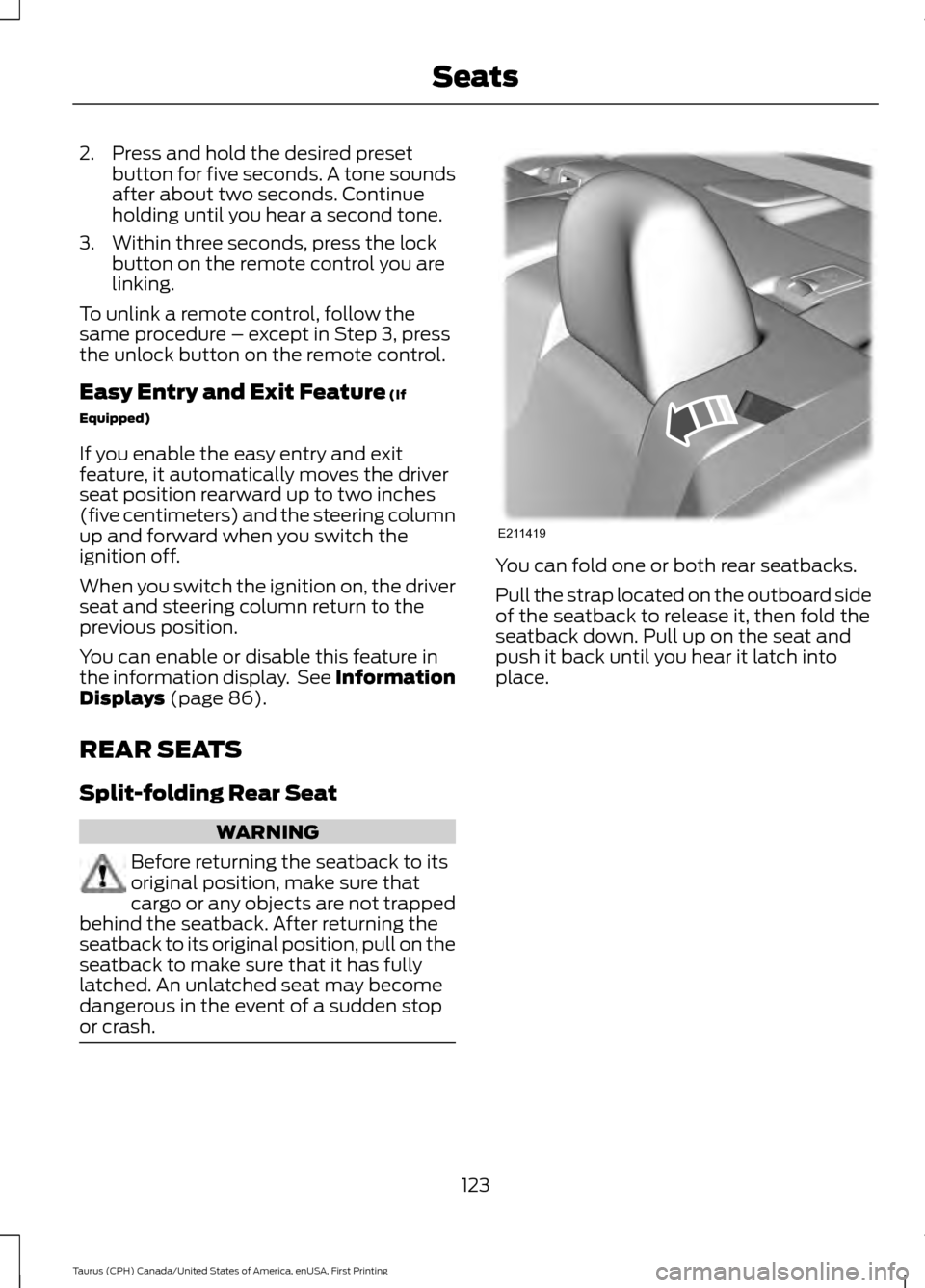
or crash. You can fold one or both rear seatbacks.
Pull the strap located on the outboard side
of the seatback to release it, then fold the
seatback down. Pull up on the seat and
push it back until you hear it latch into
place.
123
Taurus (CPH) Canada/United States of America, enUSA, First Printing SeatsE211419
Page 133 of 424
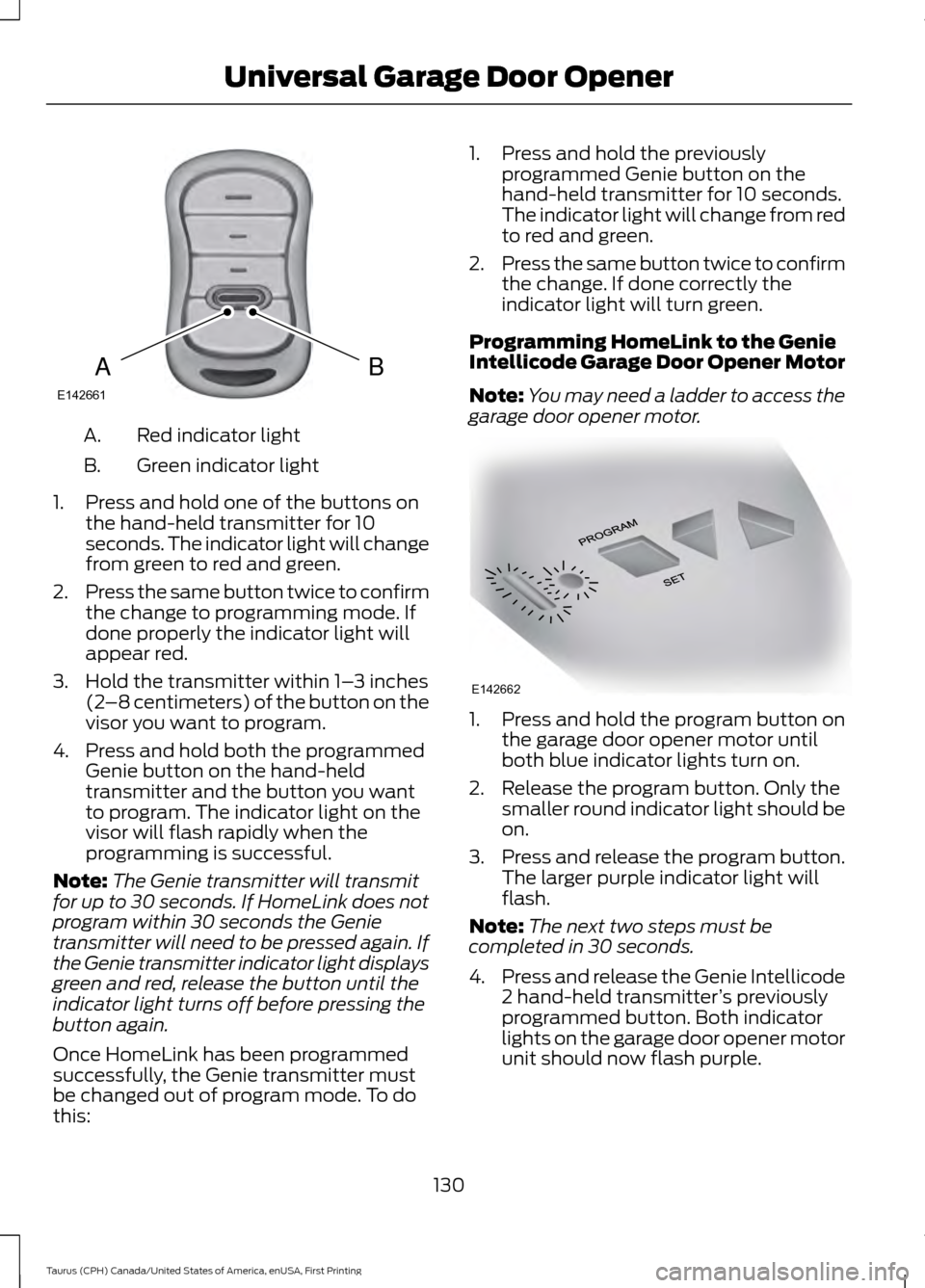
Red indicator light
A.
Green indicator light
B.
1. Press and hold one of the buttons on the hand-held transmitter for 10
seconds. The indicator light will change
from green to red and green.
2. Press the same button twice to confirm
the change to programming mode. If
done properly the indicator light will
appear red.
3. Hold the transmitter within 1– 3 inches
(2 –8 centimeters) of the button on the
visor you want to program.
4. Press and hold both the programmed Genie button on the hand-held
transmitter and the button you want
to program. The indicator light on the
visor will flash rapidly when the
programming is successful.
Note: The Genie transmitter will transmit
for up to 30 seconds. If HomeLink does not
program within 30 seconds the Genie
transmitter will need to be pressed again. If
the Genie transmitter indicator light displays
green and red, release the button until the
indicator light turns off before pressing the
button again.
Once HomeLink has been programmed
successfully, the Genie transmitter must
be changed out of program mode. To do
this: 1. Press and hold the previously
programmed Genie button on the
hand-held transmitter for 10 seconds.
The indicator light will change from red
to red and green.
2. Press the same button twice to confirm
the change. If done correctly the
indicator light will turn green.
Programming HomeLink to the Genie
Intellicode Garage Door Opener Motor
Note: You may need a ladder to access the
garage door opener motor. 1. Press and hold the program button on
the garage door opener motor until
both blue indicator lights turn on.
2. Release the program button. Only the smaller round indicator light should be
on.
3. Press and release the program button.
The larger purple indicator light will
flash.
Note: The next two steps must be
completed in 30 seconds.
4. Press and release the Genie Intellicode
2 hand-held transmitter ’s previously
programmed button. Both indicator
lights on the garage door opener motor
unit should now flash purple.
130
Taurus (CPH) Canada/United States of America, enUSA, First Printing Universal Garage Door OpenerBAE142661 E142662
Page 138 of 424
Ignition Modes
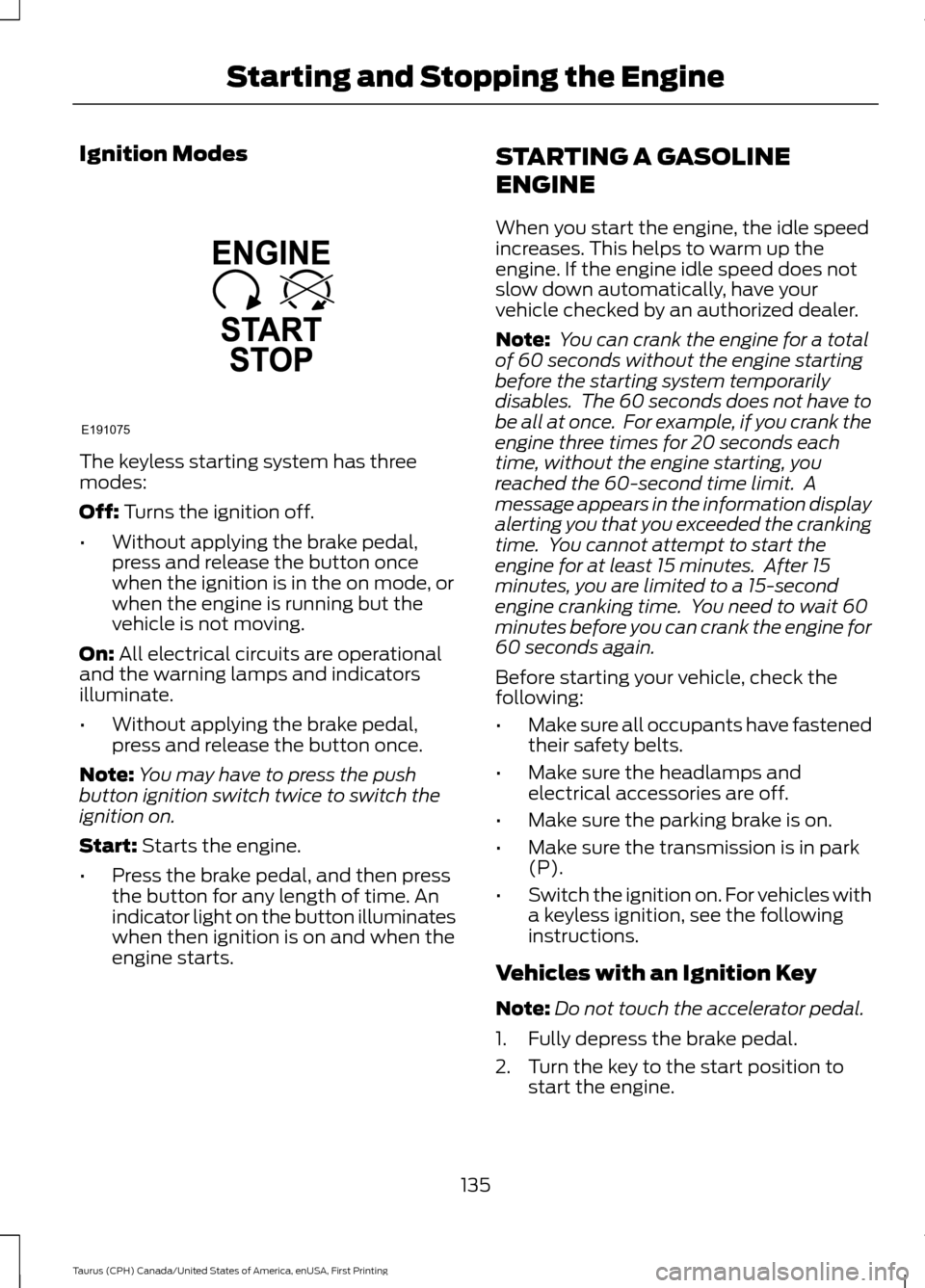
The keyless starting system has three
modes:
Off: Turns the ignition off.
• Without applying the brake pedal,
press and release the button once
when the ignition is in the on mode, or
when the engine is running but the
vehicle is not moving.
On:
All electrical circuits are operational
and the warning lamps and indicators
illuminate.
• Without applying the brake pedal,
press and release the button once.
Note: You may have to press the push
button ignition switch twice to switch the
ignition on.
Start:
Starts the engine.
• Press the brake pedal, and then press
the button for any length of time. An
indicator light on the button illuminates
when then ignition is on and when the
engine starts. STARTING A GASOLINE
ENGINE
When you start the engine, the idle speed
increases. This helps to warm up the
engine. If the engine idle speed does not
slow down automatically, have your
vehicle checked by an authorized dealer.
Note:
You can crank the engine for a total
of 60 seconds without the engine starting
before the starting system temporarily
disables. The 60 seconds does not have to
be all at once. For example, if you crank the
engine three times for 20 seconds each
time, without the engine starting, you
reached the 60-second time limit. A
message appears in the information display
alerting you that you exceeded the cranking
time. You cannot attempt to start the
engine for at least 15 minutes. After 15
minutes, you are limited to a 15-second
engine cranking time. You need to wait 60
minutes before you can crank the engine for
60 seconds again.
Before starting your vehicle, check the
following:
• Make sure all occupants have fastened
their safety belts.
• Make sure the headlamps and
electrical accessories are off.
• Make sure the parking brake is on.
• Make sure the transmission is in park
(P).
• Switch the ignition on. For vehicles with
a keyless ignition, see the following
instructions.
Vehicles with an Ignition Key
Note: Do not touch the accelerator pedal.
1. Fully depress the brake pedal.
2. Turn the key to the start position to start the engine.
135
Taurus (CPH) Canada/United States of America, enUSA, First Printing Starting and Stopping the EngineE191075
Page 140 of 424
Within 20 seconds of switching the engine
off, press the brake pedal and press the
push button ignition switch. After 20
seconds, you can no longer start your
vehicle if it does not detect a valid passive
key.
Once your vehicle starts, it remains running
until you press the push button ignition
switch, even if your vehicle does not detect
a valid passive key. If you open and close
a door while your vehicle is running, the
system searches for a valid passive key.
You cannot start your vehicle if the system
does not detect a valid passive key within
20 seconds.
Failure to Start
If you cannot start the engine after three
attempts, wait 10 seconds and follow this
procedure:
1. Fully depress the brake pedal.
2. Shift into park (P).
3.
Fully depress the accelerator pedal and
hold it there.
4. Start the engine.
Automatic Engine Shutdown
For vehicles with a keyless ignition, this
feature automatically shuts down the
engine if it has been idling for an extended
period. The ignition also turns off in order
to save battery power. Before your vehicle
shuts down, a message appears in the
information display showing a timer
counting down from 30 seconds. If you do
not intervene within 30 seconds, your
vehicle shuts down. Another message
appears in the information display to
inform you that your vehicle has shut down
to save fuel. Start your vehicle as you
normally do. Automatic Engine Shutdown Override
Note:
You cannot permanently switch off
the automatic shutdown feature. When you
switch it off temporarily, it turns on at the
next ignition cycle.
You can stop the shutdown, or reset the
timer, at any point before the 30-second
countdown has expired by doing any of the
following:
• You can reset the timer by interacting
with your vehicle, for example pressing
the brake or accelerator pedal.
• You can temporarily switch off the
shutdown feature any time the ignition
is on using the information display. See
Information Displays (page 86). The
feature only remains off for the current
ignition cycle.
• During the 30-second countdown, the
system prompts you to press OK or
RESET to temporarily switch the
feature off for the current ignition cycle
only.
Stopping the Engine When Your
Vehicle is Stationary
Vehicles with an Ignition Key
1. Shift into park (P).
2. Switch the ignition off.
3. Apply the parking brake.
Vehicles with Keyless Start
1. Shift into park (P).
2. Press the push button ignition switch.
3. Apply the parking brake.
Note: The ignition, all electrical circuits and
all warning lamps and indicators will be
turned off.
Note: If the engine is idling for 30 minutes,
the ignition and engine automatically shut
down.
137
Taurus (CPH) Canada/United States of America, enUSA, First Printing Starting and Stopping the Engine
Page 153 of 424
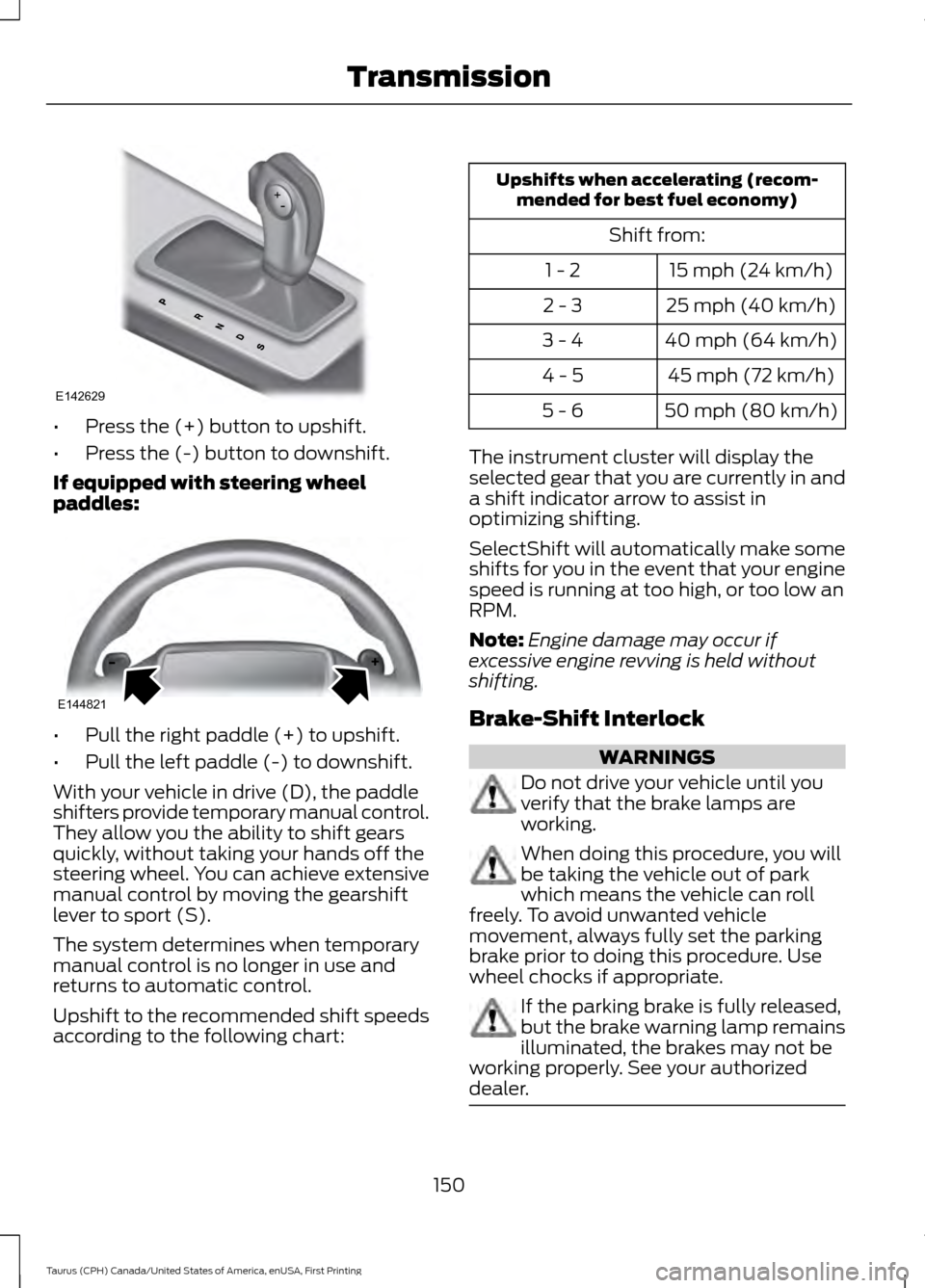
•
Press the (+) button to upshift.
• Press the (-) button to downshift.
If equipped with steering wheel
paddles: •
Pull the right paddle (+) to upshift.
• Pull the left paddle (-) to downshift.
With your vehicle in drive (D), the paddle
shifters provide temporary manual control.
They allow you the ability to shift gears
quickly, without taking your hands off the
steering wheel. You can achieve extensive
manual control by moving the gearshift
lever to sport (S).
The system determines when temporary
manual control is no longer in use and
returns to automatic control.
Upshift to the recommended shift speeds
according to the following chart: Upshifts when accelerating (recom-
mended for best fuel economy)
Shift from:15 mph (24 km/h)
1 - 2
25 mph (40 km/h)
2 - 3
40 mph (64 km/h)
3 - 4
45 mph (72 km/h)
4 - 5
50 mph (80 km/h)
5 - 6
The instrument cluster will display the
selected gear that you are currently in and
a shift indicator arrow to assist in
optimizing shifting.
SelectShift will automatically make some
shifts for you in the event that your engine
speed is running at too high, or too low an
RPM.
Note: Engine damage may occur if
excessive engine revving is held without
shifting.
Brake-Shift Interlock WARNINGS
Do not drive your vehicle until you
verify that the brake lamps are
working.
When doing this procedure, you will
be taking the vehicle out of park
which means the vehicle can roll
freely. To avoid unwanted vehicle
movement, always fully set the parking
brake prior to doing this procedure. Use
wheel chocks if appropriate. If the parking brake is fully released,
but the brake warning lamp remains
illuminated, the brakes may not be
working properly. See your authorized
dealer. 150
Taurus (CPH) Canada/United States of America, enUSA, First Printing TransmissionE142629 E144821