lock FORD TAURUS 2017 Owners Manual
[x] Cancel search | Manufacturer: FORD, Model Year: 2017, Model line: TAURUS, Model: FORD TAURUS 2017Pages: 504, PDF Size: 5.84 MB
Page 296 of 504
WARNINGS
Do not attempt to change a tire onthe side of the vehicle close tomoving traffic. Pull far enough off theroad to avoid the danger of being hit whenoperating the jack or changing the wheel.
Always use the jack provided asoriginal equipment with your vehicle.If using a jack other than the oneprovided, make sure the jack capacity isadequate for the vehicle weight, includingany vehicle cargo or modifications. If youare unsure if the jack capacity is adequate,contact the authorized dealer.
Note:Passengers should not remain in yourvehicle when the vehicle is being jacked.
Note:Jack at the specified locations toavoid damage to the vehicle.
1.Park on a level surface, set the parkingbrake and activate the hazard flashers.
2.Place the transmission in park (P) andturn the engine off.
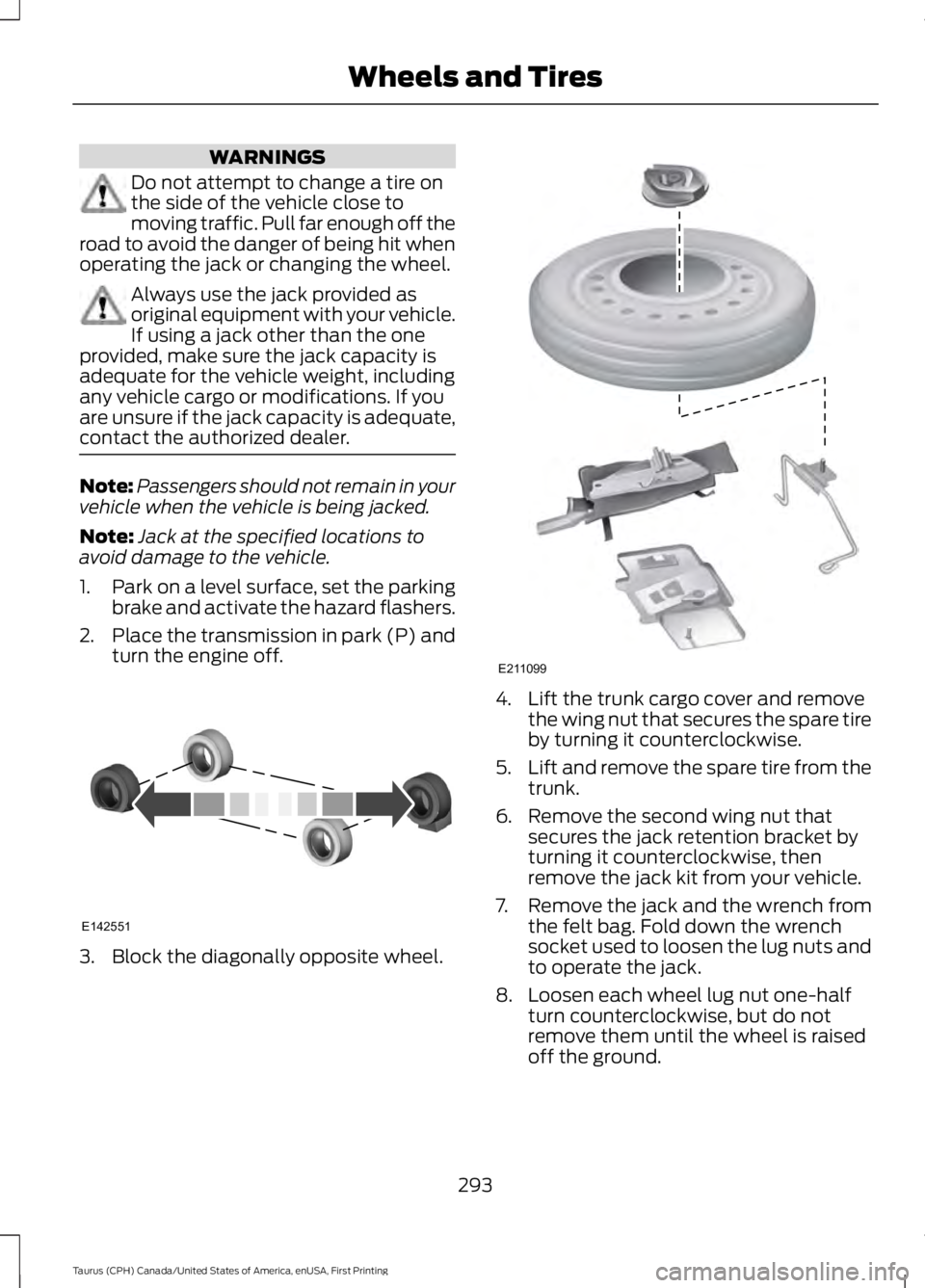
3. Block the diagonally opposite wheel.
4. Lift the trunk cargo cover and removethe wing nut that secures the spare tireby turning it counterclockwise.
5.Lift and remove the spare tire from thetrunk.
6. Remove the second wing nut thatsecures the jack retention bracket byturning it counterclockwise, thenremove the jack kit from your vehicle.
7. Remove the jack and the wrench fromthe felt bag. Fold down the wrenchsocket used to loosen the lug nuts andto operate the jack.
8. Loosen each wheel lug nut one-halfturn counterclockwise, but do notremove them until the wheel is raisedoff the ground.
293
Taurus (CPH) Canada/United States of America, enUSA, First Printing
Wheels and TiresE142551 E211099
Page 297 of 504
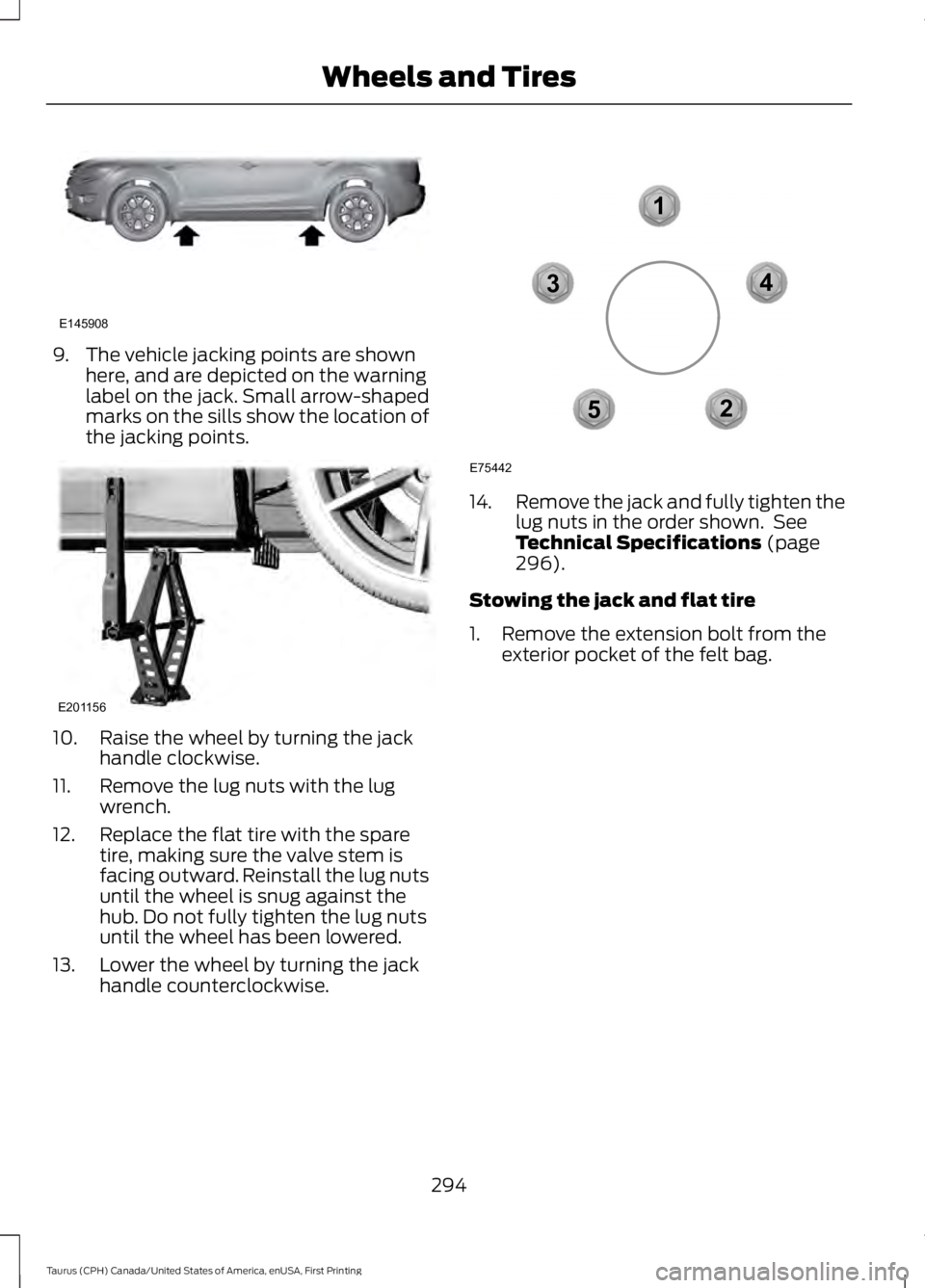
9. The vehicle jacking points are shownhere, and are depicted on the warninglabel on the jack. Small arrow-shapedmarks on the sills show the location ofthe jacking points.
10. Raise the wheel by turning the jackhandle clockwise.
11. Remove the lug nuts with the lugwrench.
12. Replace the flat tire with the sparetire, making sure the valve stem isfacing outward. Reinstall the lug nutsuntil the wheel is snug against thehub. Do not fully tighten the lug nutsuntil the wheel has been lowered.
13. Lower the wheel by turning the jackhandle counterclockwise.
14.Remove the jack and fully tighten thelug nuts in the order shown. SeeTechnical Specifications (page296).
Stowing the jack and flat tire
1. Remove the extension bolt from theexterior pocket of the felt bag.
294
Taurus (CPH) Canada/United States of America, enUSA, First Printing
Wheels and TiresE145908 E201156 12
3
4
5
E75442
Page 309 of 504
SpecificationName
ESB-M1C93-BMulti-purpose grease:Motorcraft® Multi-Purpose Grease SprayXL-5
--Lock cylinders (U.S.):Penetrating and Lock LubricantXL-1
--Lock cylinders (Canada):Penetrating FluidCXC-51-A
If you use oil and fluids that do not meetthe defined specification and viscositygrade, this may lead to:
•Component damage which is notcovered by the vehicle warranty.
•Longer engine cranking periods.
•Increased emission levels.
•Reduced engine performance.
•Reduced fuel economy.
•Degraded brake performance.
We recommend Motorcraft® motor oil foryour vehicle. If Motorcraft® oil is notavailable, use motor oils of therecommended viscosity grade that meetAPI SN requirements and display the APICertification Mark for gasoline engines. Donot use oil labeled with API SN servicecategory unless the label also displays theAPI certification mark.
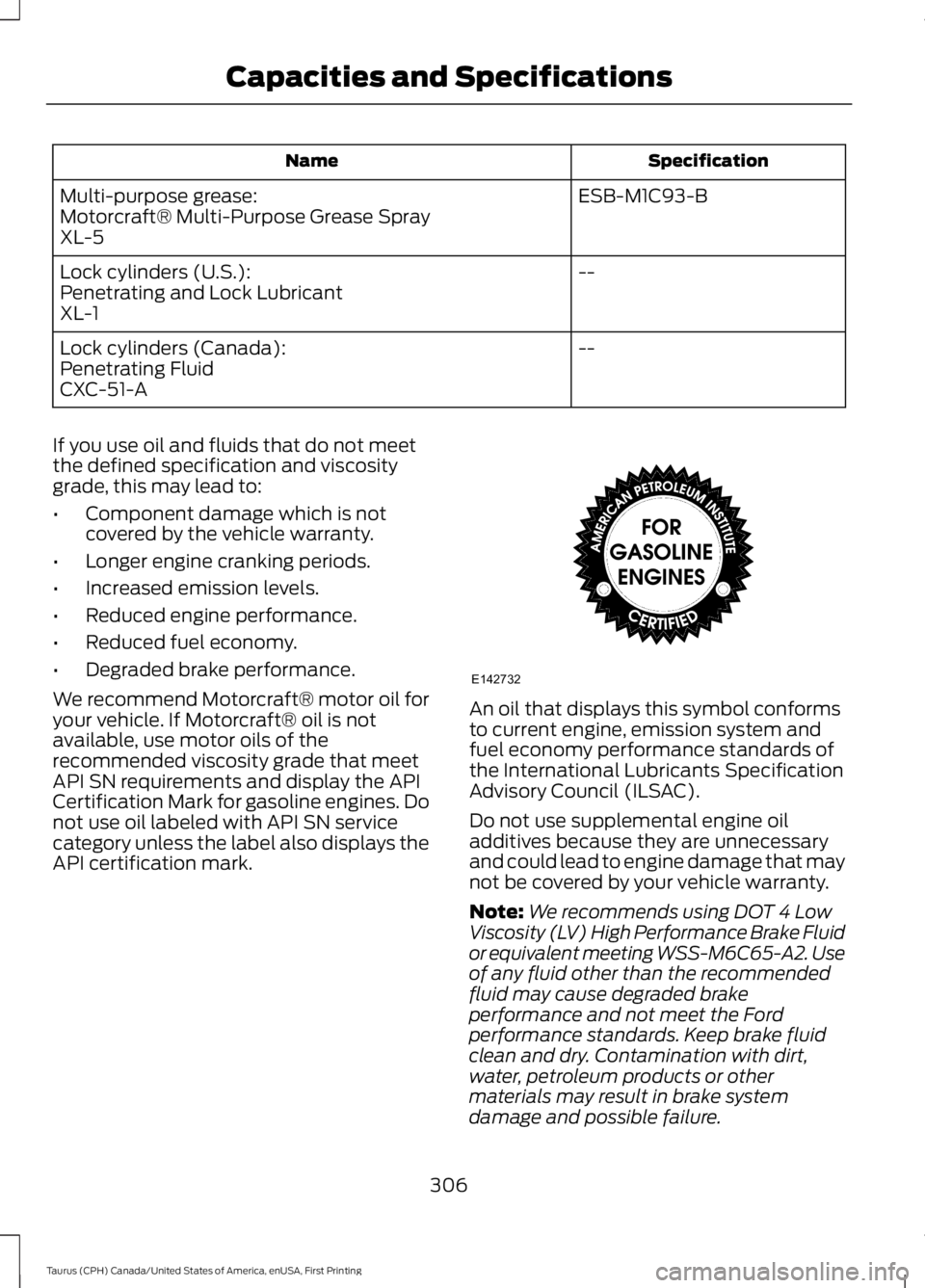
An oil that displays this symbol conformsto current engine, emission system andfuel economy performance standards ofthe International Lubricants SpecificationAdvisory Council (ILSAC).
Do not use supplemental engine oiladditives because they are unnecessaryand could lead to engine damage that maynot be covered by your vehicle warranty.
Note:We recommends using DOT 4 LowViscosity (LV) High Performance Brake Fluidor equivalent meeting WSS-M6C65-A2. Useof any fluid other than the recommendedfluid may cause degraded brakeperformance and not meet the Fordperformance standards. Keep brake fluidclean and dry. Contamination with dirt,water, petroleum products or othermaterials may result in brake systemdamage and possible failure.
306
Taurus (CPH) Canada/United States of America, enUSA, First Printing
Capacities and SpecificationsE142732
Page 312 of 504
SpecificationName
WSL-M2C192-APower Transfer Unit (PTU) fluid (All Wheel Drive) (U.S.and Mexico)Motorcraft® SAE 75W-140 Synthetic Rear Axle LubricantXY-75W140-QL
WSL-M2C192-APower Transfer Unit (PTU) fluid (All Wheel Drive)(Canada)Motorcraft® SAE 75W-140 Synthetic Rear Axle LubricantCXY-75W140-1L
WSS-M14P19-AWindshield washer fluid (U.S. and Mexico):Motorcraft® Premium Windshield Wash Concentratewith BitterantZC-32-B2
WSS-M14P19-AWindshield washer fluid (Canada):Motorcraft® Premium Quality Windshield Washer FluidCXC-37-(A, B, D, F)
WSH-M17B19-AA/C refrigerant (U.S.):Motorcraft® R-134a RefrigerantYN-19
WSH-M17B19-AA/C refrigerant (Canada):Motorcraft® R-134a RefrigerantCYN-16-R
WSH-M17B19-AA/C refrigerant (Mexico):Motorcraft® R-134a RefrigerantMYN-19-R
WSH-M1C231-BA/C refrigerant compressor oil:Motorcraft® PAG Refrigerant Compressor OilYN-12-D
ESA-M1C75-BTransmission, parking brake linkage and pivots and brakepedal shift grease:Premium Long-Life GreaseXG-1-E1
ESB-M1C93-BMulti-purpose grease:Motorcraft® Multi-Purpose Grease SprayXL-5
--Lock cylinders (U.S.):Penetrating and Lock LubricantXL-1
--Lock cylinders (Canada):
309
Taurus (CPH) Canada/United States of America, enUSA, First Printing
Capacities and Specifications
Page 316 of 504
SpecificationName
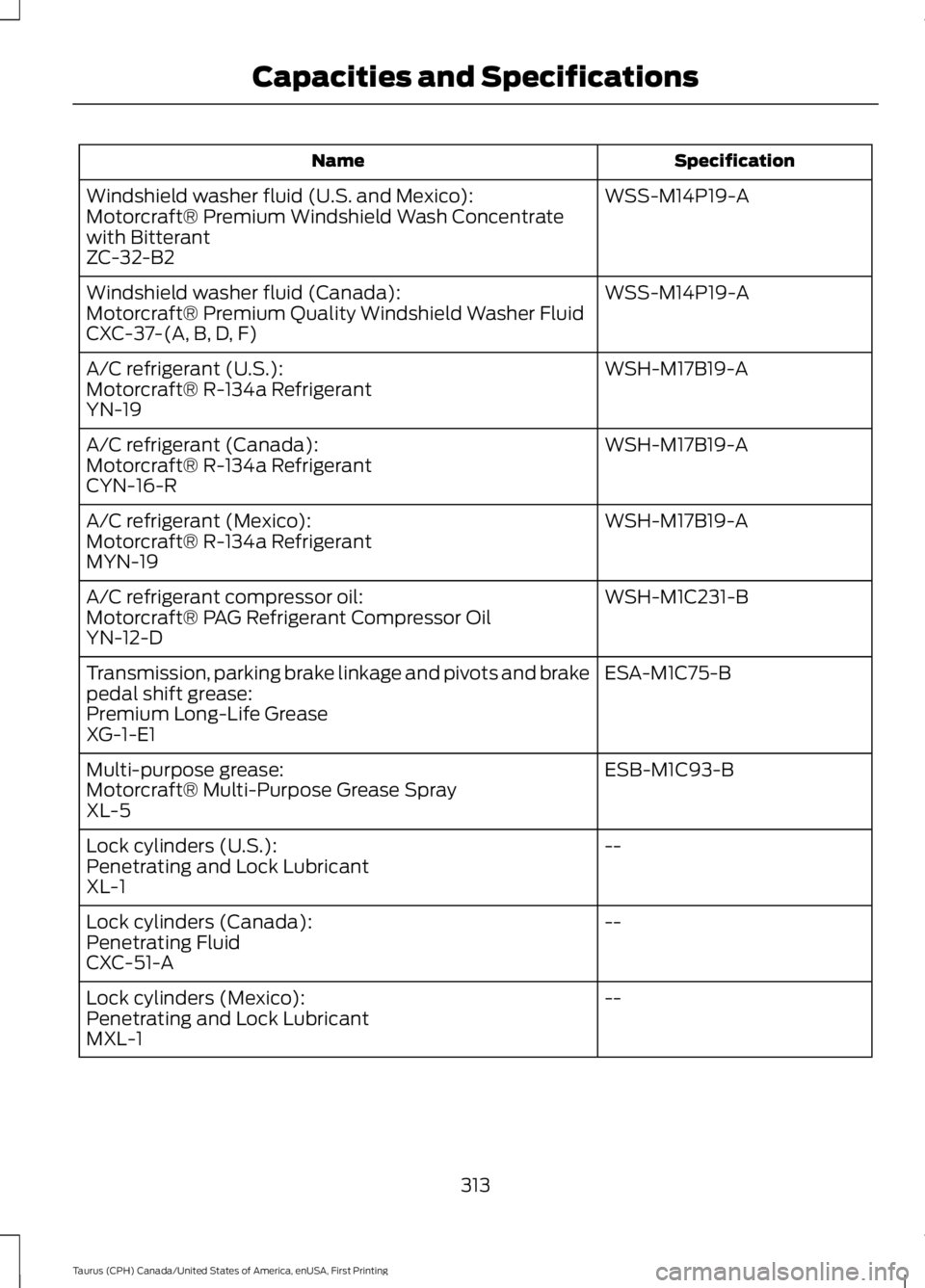
WSS-M14P19-AWindshield washer fluid (U.S. and Mexico):Motorcraft® Premium Windshield Wash Concentratewith BitterantZC-32-B2
WSS-M14P19-AWindshield washer fluid (Canada):Motorcraft® Premium Quality Windshield Washer FluidCXC-37-(A, B, D, F)
WSH-M17B19-AA/C refrigerant (U.S.):Motorcraft® R-134a RefrigerantYN-19
WSH-M17B19-AA/C refrigerant (Canada):Motorcraft® R-134a RefrigerantCYN-16-R
WSH-M17B19-AA/C refrigerant (Mexico):Motorcraft® R-134a RefrigerantMYN-19
WSH-M1C231-BA/C refrigerant compressor oil:Motorcraft® PAG Refrigerant Compressor OilYN-12-D
ESA-M1C75-BTransmission, parking brake linkage and pivots and brakepedal shift grease:Premium Long-Life GreaseXG-1-E1
ESB-M1C93-BMulti-purpose grease:Motorcraft® Multi-Purpose Grease SprayXL-5
--Lock cylinders (U.S.):Penetrating and Lock LubricantXL-1
--Lock cylinders (Canada):Penetrating FluidCXC-51-A
--Lock cylinders (Mexico):Penetrating and Lock LubricantMXL-1
313
Taurus (CPH) Canada/United States of America, enUSA, First Printing
Capacities and Specifications
Page 320 of 504
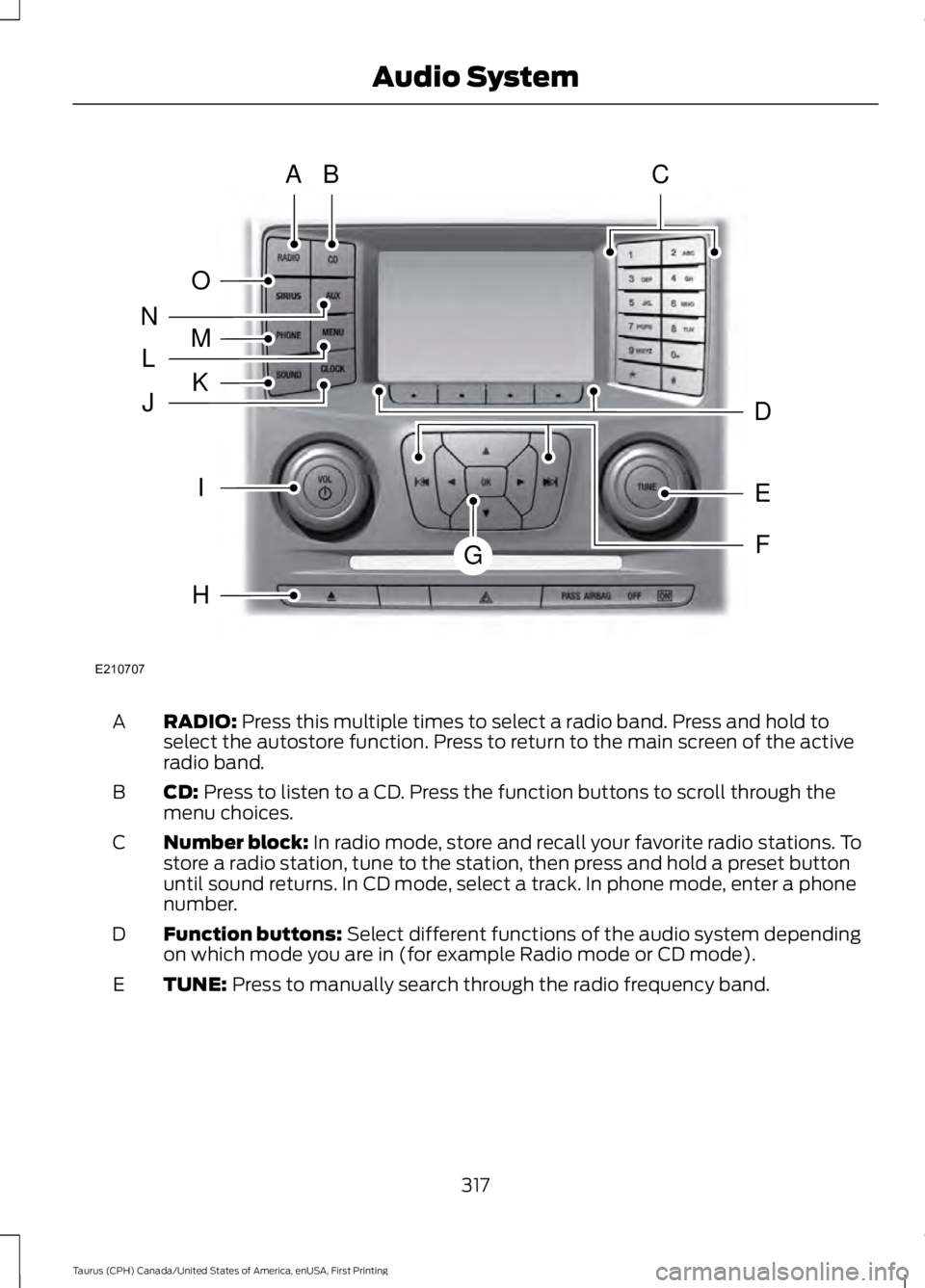
RADIO: Press this multiple times to select a radio band. Press and hold toselect the autostore function. Press to return to the main screen of the activeradio band.
A
CD: Press to listen to a CD. Press the function buttons to scroll through themenu choices.B
Number block: In radio mode, store and recall your favorite radio stations. Tostore a radio station, tune to the station, then press and hold a preset buttonuntil sound returns. In CD mode, select a track. In phone mode, enter a phonenumber.
C
Function buttons: Select different functions of the audio system dependingon which mode you are in (for example Radio mode or CD mode).D
TUNE: Press to manually search through the radio frequency band.E
317
Taurus (CPH) Canada/United States of America, enUSA, First Printing
Audio SystemE210707
AB
O
NMLKJ
EI
H
C
FG
D
Page 321 of 504
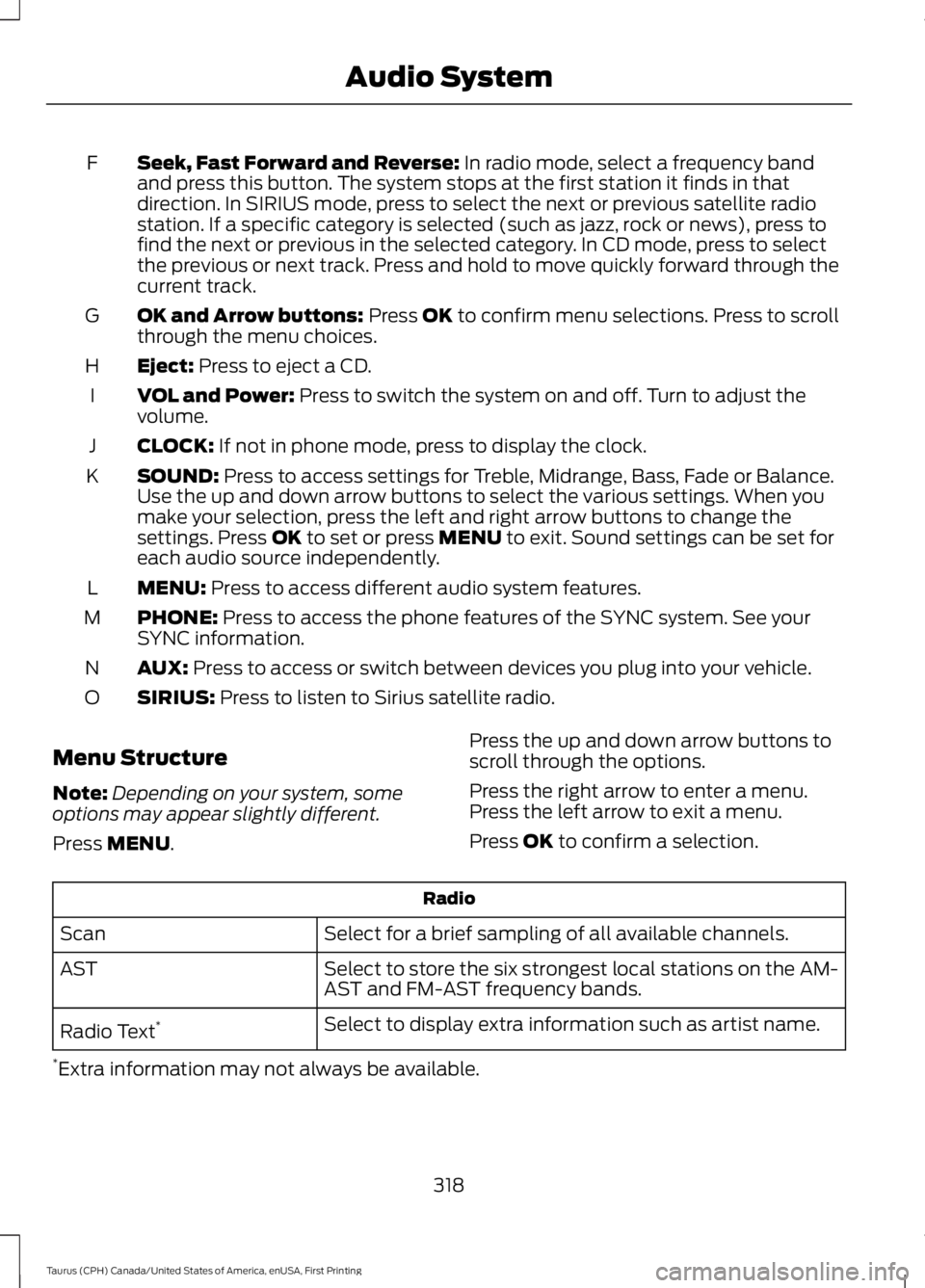
Seek, Fast Forward and Reverse: In radio mode, select a frequency bandand press this button. The system stops at the first station it finds in thatdirection. In SIRIUS mode, press to select the next or previous satellite radiostation. If a specific category is selected (such as jazz, rock or news), press tofind the next or previous in the selected category. In CD mode, press to selectthe previous or next track. Press and hold to move quickly forward through thecurrent track.
F
OK and Arrow buttons: Press OK to confirm menu selections. Press to scrollthrough the menu choices.G
Eject: Press to eject a CD.H
VOL and Power: Press to switch the system on and off. Turn to adjust thevolume.I
CLOCK: If not in phone mode, press to display the clock.J
SOUND: Press to access settings for Treble, Midrange, Bass, Fade or Balance.Use the up and down arrow buttons to select the various settings. When youmake your selection, press the left and right arrow buttons to change thesettings. Press OK to set or press MENU to exit. Sound settings can be set foreach audio source independently.
K
MENU: Press to access different audio system features.L
PHONE: Press to access the phone features of the SYNC system. See yourSYNC information.M
AUX: Press to access or switch between devices you plug into your vehicle.N
SIRIUS: Press to listen to Sirius satellite radio.O
Menu Structure
Note:Depending on your system, someoptions may appear slightly different.
Press MENU.
Press the up and down arrow buttons toscroll through the options.
Press the right arrow to enter a menu.Press the left arrow to exit a menu.
Press OK to confirm a selection.
Radio
Select for a brief sampling of all available channels.Scan
Select to store the six strongest local stations on the AM-AST and FM-AST frequency bands.AST
Select to display extra information such as artist name.Radio Text*
*Extra information may not always be available.
318
Taurus (CPH) Canada/United States of America, enUSA, First Printing
Audio System
Page 322 of 504
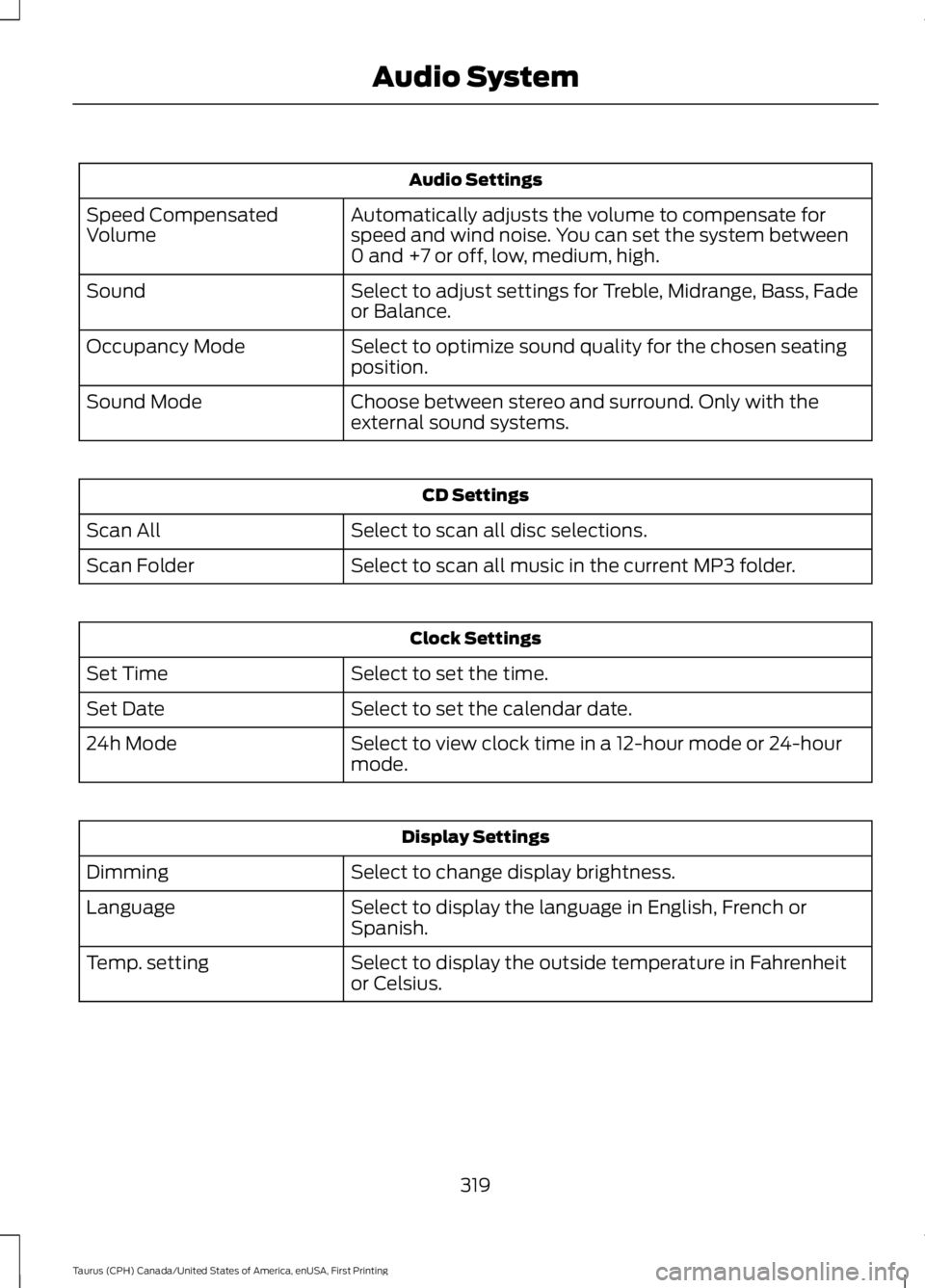
Audio Settings
Automatically adjusts the volume to compensate forspeed and wind noise. You can set the system between0 and +7 or off, low, medium, high.
Speed CompensatedVolume
Select to adjust settings for Treble, Midrange, Bass, Fadeor Balance.Sound
Select to optimize sound quality for the chosen seatingposition.Occupancy Mode
Choose between stereo and surround. Only with theexternal sound systems.Sound Mode
CD Settings
Select to scan all disc selections.Scan All
Select to scan all music in the current MP3 folder.Scan Folder
Clock Settings
Select to set the time.Set Time
Select to set the calendar date.Set Date
Select to view clock time in a 12-hour mode or 24-hourmode.24h Mode
Display Settings
Select to change display brightness.Dimming
Select to display the language in English, French orSpanish.Language
Select to display the outside temperature in Fahrenheitor Celsius.Temp. setting
319
Taurus (CPH) Canada/United States of America, enUSA, First Printing
Audio System
Page 327 of 504
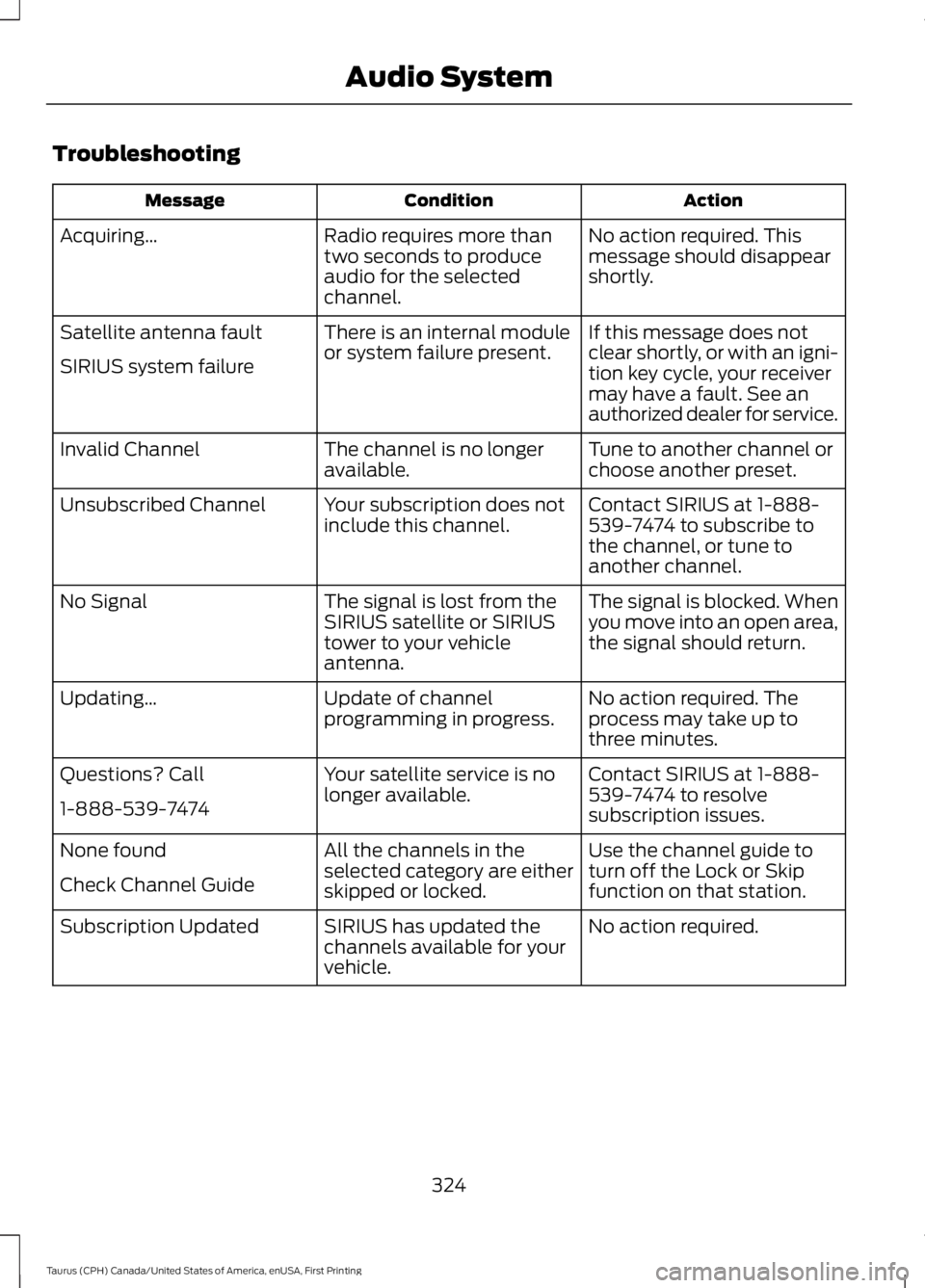
Troubleshooting
ActionConditionMessage
No action required. Thismessage should disappearshortly.
Radio requires more thantwo seconds to produceaudio for the selectedchannel.
Acquiring…
If this message does notclear shortly, or with an igni-tion key cycle, your receivermay have a fault. See anauthorized dealer for service.
There is an internal moduleor system failure present.Satellite antenna fault
SIRIUS system failure
Tune to another channel orchoose another preset.The channel is no longeravailable.Invalid Channel
Contact SIRIUS at 1-888-539-7474 to subscribe tothe channel, or tune toanother channel.
Your subscription does notinclude this channel.Unsubscribed Channel
The signal is blocked. Whenyou move into an open area,the signal should return.
The signal is lost from theSIRIUS satellite or SIRIUStower to your vehicleantenna.
No Signal
No action required. Theprocess may take up tothree minutes.
Update of channelprogramming in progress.Updating…
Contact SIRIUS at 1-888-539-7474 to resolvesubscription issues.
Your satellite service is nolonger available.Questions? Call
1-888-539-7474
Use the channel guide toturn off the Lock or Skipfunction on that station.
All the channels in theselected category are eitherskipped or locked.
None found
Check Channel Guide
No action required.SIRIUS has updated thechannels available for yourvehicle.
Subscription Updated
324
Taurus (CPH) Canada/United States of America, enUSA, First Printing
Audio System
Page 365 of 504
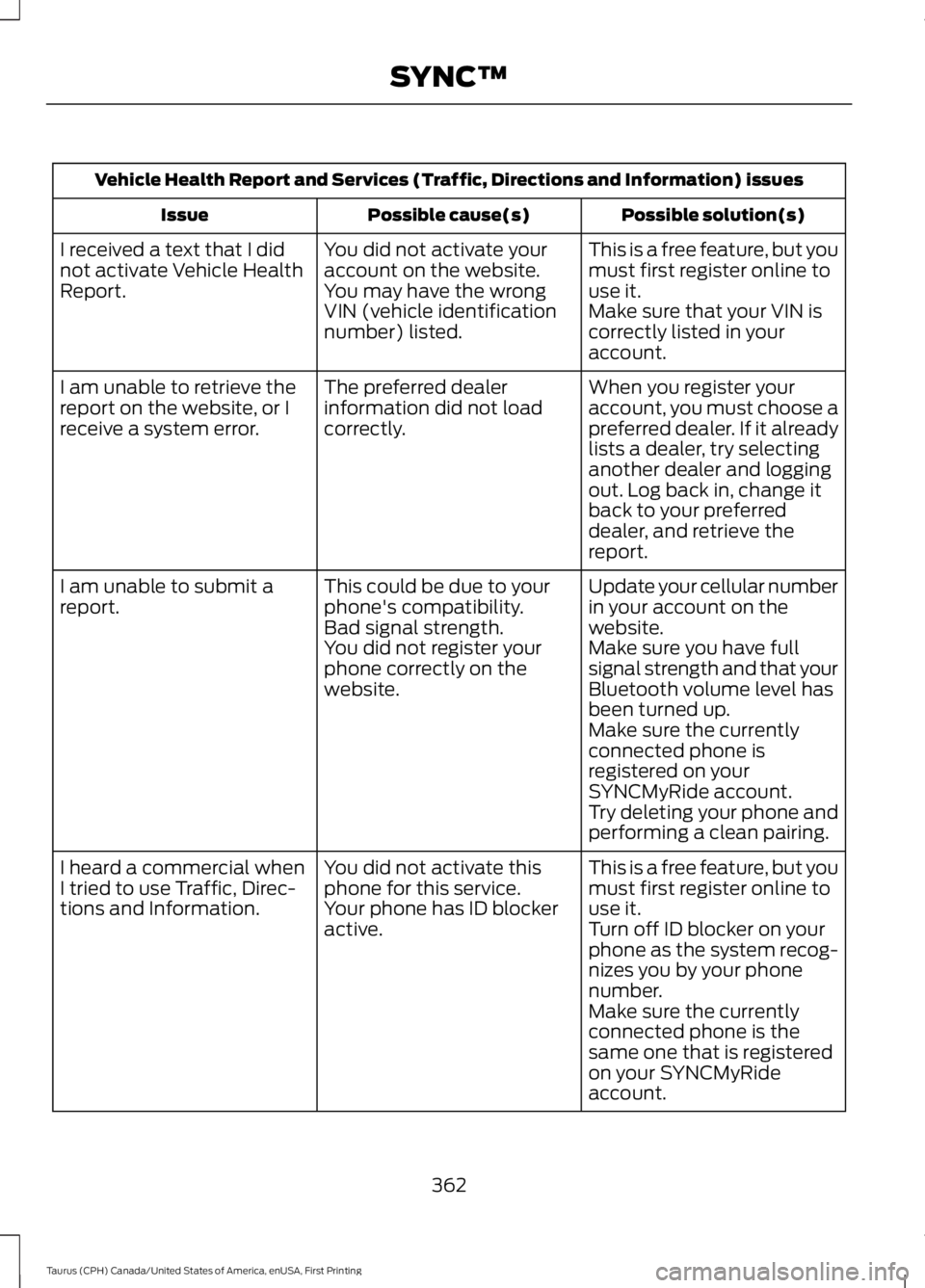
Vehicle Health Report and Services (Traffic, Directions and Information) issues
Possible solution(s)Possible cause(s)Issue
This is a free feature, but youmust first register online touse it.
You did not activate youraccount on the website.You may have the wrongVIN (vehicle identificationnumber) listed.
I received a text that I didnot activate Vehicle HealthReport.Make sure that your VIN iscorrectly listed in youraccount.
When you register youraccount, you must choose apreferred dealer. If it alreadylists a dealer, try selectinganother dealer and loggingout. Log back in, change itback to your preferreddealer, and retrieve thereport.
The preferred dealerinformation did not loadcorrectly.
I am unable to retrieve thereport on the website, or Ireceive a system error.
Update your cellular numberin your account on thewebsite.
This could be due to yourphone's compatibility.Bad signal strength.
I am unable to submit areport.
Make sure you have fullsignal strength and that yourBluetooth volume level hasbeen turned up.
You did not register yourphone correctly on thewebsite.
Make sure the currentlyconnected phone isregistered on yourSYNCMyRide account.Try deleting your phone andperforming a clean pairing.
This is a free feature, but youmust first register online touse it.
You did not activate thisphone for this service.Your phone has ID blockeractive.
I heard a commercial whenI tried to use Traffic, Direc-tions and Information.Turn off ID blocker on yourphone as the system recog-nizes you by your phonenumber.Make sure the currentlyconnected phone is thesame one that is registeredon your SYNCMyRideaccount.
362
Taurus (CPH) Canada/United States of America, enUSA, First Printing
SYNC™