headlamp FORD TAURUS 2017 User Guide
[x] Cancel search | Manufacturer: FORD, Model Year: 2017, Model line: TAURUS, Model: FORD TAURUS 2017Pages: 504, PDF Size: 5.84 MB
Page 141 of 504
Ignition Modes
The keyless starting system has threemodes:
Off: Turns the ignition off.
•Without applying the brake pedal,press and release the button oncewhen the ignition is in the on mode, orwhen the engine is running but thevehicle is not moving.
On: All electrical circuits are operationaland the warning lamps and indicatorsilluminate.
•Without applying the brake pedal,press and release the button once.
Note:You may have to press the pushbutton ignition switch twice to switch theignition on.
Start: Starts the engine.
•Press the brake pedal, and then pressthe button for any length of time. Anindicator light on the button illuminateswhen then ignition is on and when theengine starts.
STARTING A GASOLINE
ENGINE
When you start the engine, the idle speedincreases. This helps to warm up theengine. If the engine idle speed does notslow down automatically, have yourvehicle checked by an authorized dealer.
Note: You can crank the engine for a totalof 60 seconds without the engine startingbefore the starting system temporarilydisables. The 60 seconds does not have tobe all at once. For example, if you crank theengine three times for 20 seconds eachtime, without the engine starting, youreached the 60-second time limit. Amessage appears in the information displayalerting you that you exceeded the crankingtime. You cannot attempt to start theengine for at least 15 minutes. After 15minutes, you are limited to a 15-secondengine cranking time. You need to wait 60minutes before you can crank the engine for60 seconds again.
Before starting your vehicle, check thefollowing:
•Make sure all occupants have fastenedtheir safety belts.
•Make sure the headlamps andelectrical accessories are off.
•Make sure the parking brake is on.
•Make sure the transmission is in park(P).
•Switch the ignition on. For vehicles witha keyless ignition, see the followinginstructions.
Vehicles with an Ignition Key
Note:Do not touch the accelerator pedal.
1. Fully depress the brake pedal.
2. Turn the key to the start position tostart the engine.
138
Taurus (CPH) Canada/United States of America, enUSA, First Printing
Starting and Stopping the EngineE191075
Page 193 of 504
•The road has no or poor lane markingsin the camera field-of-view.
•The camera is obscured or unable todetect the lane markings due toenvironmental conditions (significantsun angles, shadows, snow, heavy rainor fog), traffic conditions (following alarge vehicle that is blocking orshadowing the lane), or vehicleconditions (poor headlampillumination).
See Troubleshooting for additionalinformation.
Green: Indicates that the system isavailable or ready to provide a warning orintervention, on the indicated side(s).
Yellow: Indicates that the system isproviding or has just provided a lanekeeping aid intervention.
Red: Indicates that the system is providingor has just provided a lane keeping alertwarning.
The system can be temporarily suppressedat any time by the following:
•Quick braking.
•Fast acceleration.
•Using the turn signal indicator.
•Evasive steering maneuver.
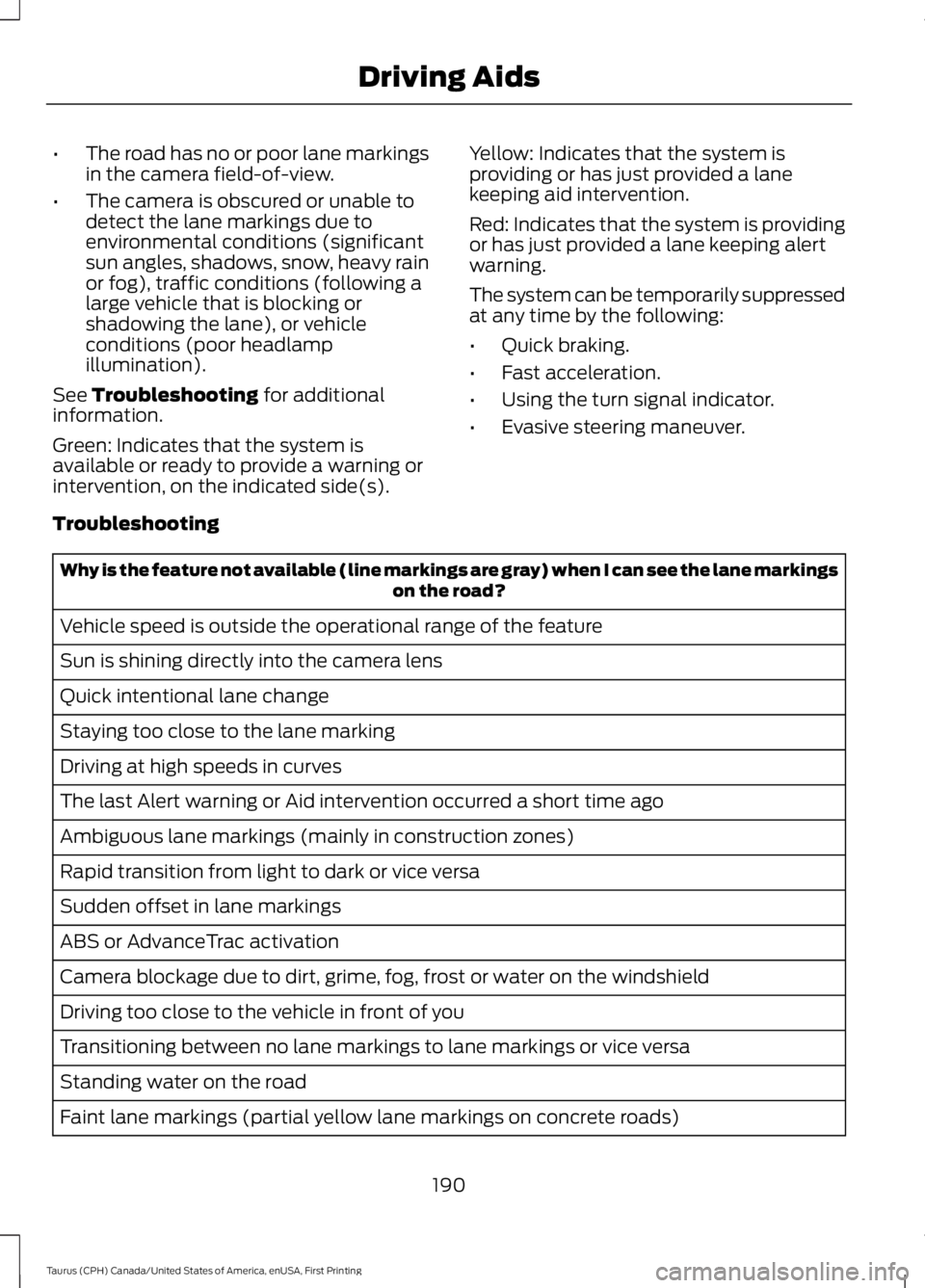
Troubleshooting
Why is the feature not available (line markings are gray) when I can see the lane markingson the road?
Vehicle speed is outside the operational range of the feature
Sun is shining directly into the camera lens
Quick intentional lane change
Staying too close to the lane marking
Driving at high speeds in curves
The last Alert warning or Aid intervention occurred a short time ago
Ambiguous lane markings (mainly in construction zones)
Rapid transition from light to dark or vice versa
Sudden offset in lane markings
ABS or AdvanceTrac activation
Camera blockage due to dirt, grime, fog, frost or water on the windshield
Driving too close to the vehicle in front of you
Transitioning between no lane markings to lane markings or vice versa
Standing water on the road
Faint lane markings (partial yellow lane markings on concrete roads)
190
Taurus (CPH) Canada/United States of America, enUSA, First Printing
Driving Aids
Page 202 of 504
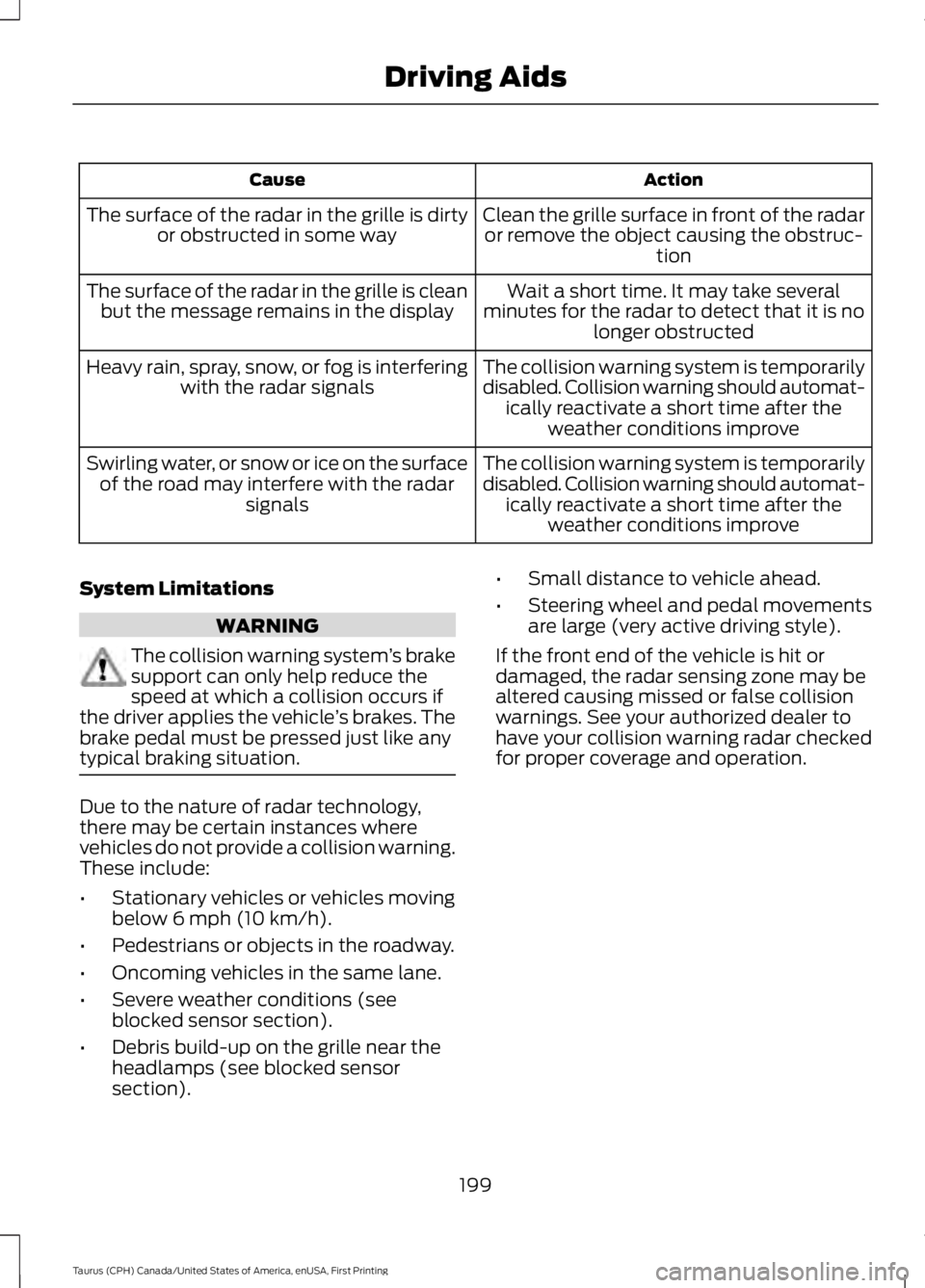
ActionCause
Clean the grille surface in front of the radaror remove the object causing the obstruc-tion
The surface of the radar in the grille is dirtyor obstructed in some way
Wait a short time. It may take severalminutes for the radar to detect that it is nolonger obstructed
The surface of the radar in the grille is cleanbut the message remains in the display
The collision warning system is temporarilydisabled. Collision warning should automat-ically reactivate a short time after theweather conditions improve
Heavy rain, spray, snow, or fog is interferingwith the radar signals
The collision warning system is temporarilydisabled. Collision warning should automat-ically reactivate a short time after theweather conditions improve
Swirling water, or snow or ice on the surfaceof the road may interfere with the radarsignals
System Limitations
WARNING
The collision warning system’s brakesupport can only help reduce thespeed at which a collision occurs ifthe driver applies the vehicle’s brakes. Thebrake pedal must be pressed just like anytypical braking situation.
Due to the nature of radar technology,there may be certain instances wherevehicles do not provide a collision warning.These include:
•Stationary vehicles or vehicles movingbelow 6 mph (10 km/h).
•Pedestrians or objects in the roadway.
•Oncoming vehicles in the same lane.
•Severe weather conditions (seeblocked sensor section).
•Debris build-up on the grille near theheadlamps (see blocked sensorsection).
•Small distance to vehicle ahead.
•Steering wheel and pedal movementsare large (very active driving style).
If the front end of the vehicle is hit ordamaged, the radar sensing zone may bealtered causing missed or false collisionwarnings. See your authorized dealer tohave your collision warning radar checkedfor proper coverage and operation.
199
Taurus (CPH) Canada/United States of America, enUSA, First Printing
Driving Aids
Page 233 of 504
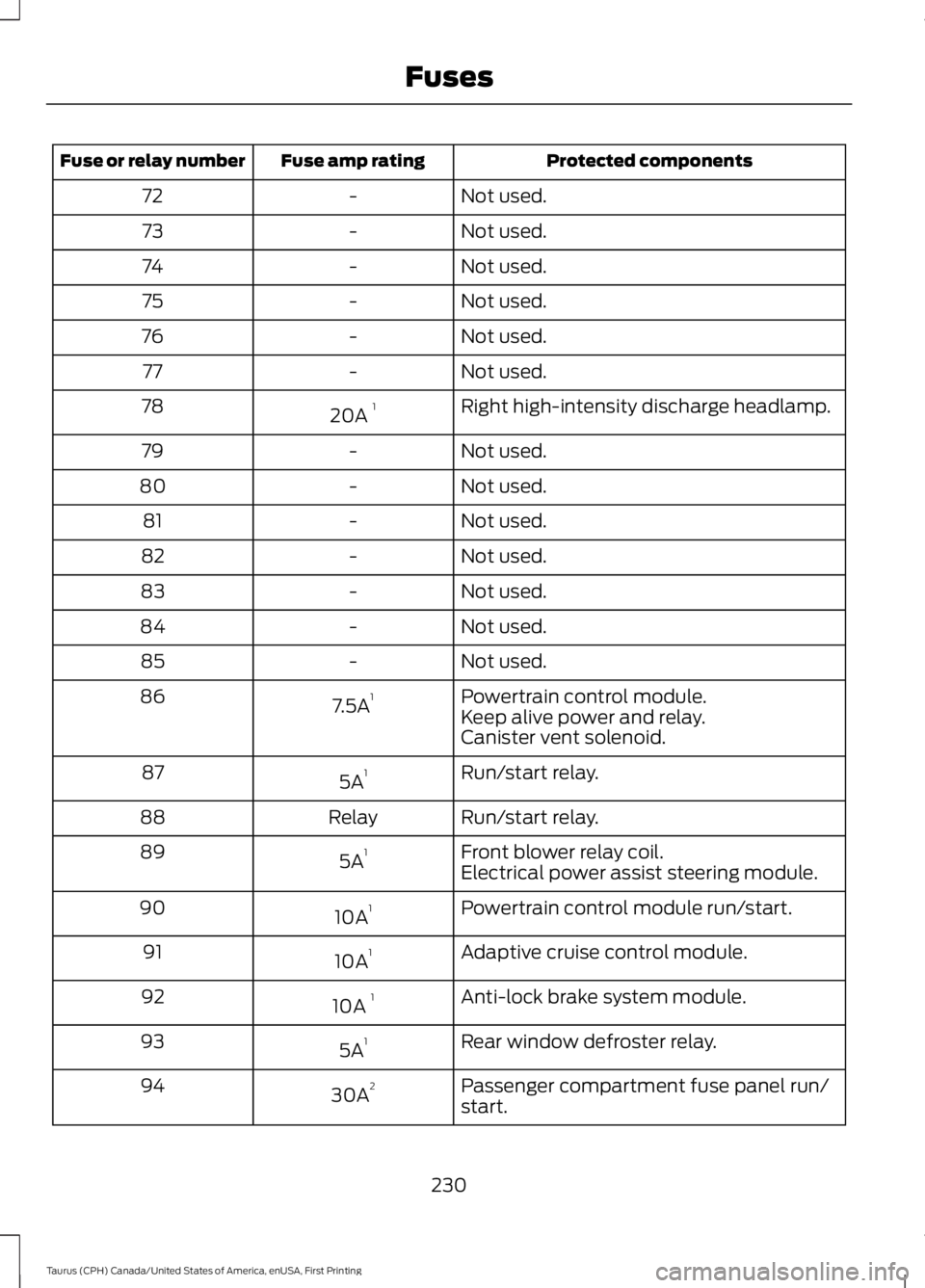
Protected componentsFuse amp ratingFuse or relay number
Not used.-72
Not used.-73
Not used.-74
Not used.-75
Not used.-76
Not used.-77
Right high-intensity discharge headlamp.20A 178
Not used.-79
Not used.-80
Not used.-81
Not used.-82
Not used.-83
Not used.-84
Not used.-85
Powertrain control module.7.5A186Keep alive power and relay.Canister vent solenoid.
Run/start relay.5A187
Run/start relay.Relay88
Front blower relay coil.5A189Electrical power assist steering module.
Powertrain control module run/start.10A190
Adaptive cruise control module.10A191
Anti-lock brake system module.10A 192
Rear window defroster relay.5A193
Passenger compartment fuse panel run/start.30A294
230
Taurus (CPH) Canada/United States of America, enUSA, First Printing
Fuses
Page 258 of 504
ADJUSTING THE HEADLAMPS
Vertical Aim Adjustment
The headlamps on your vehicle areproperly aimed at the assembly plant. Ifyour vehicle has been in an accident, havethe alignment of your headlamps checkedby your authorized dealer.
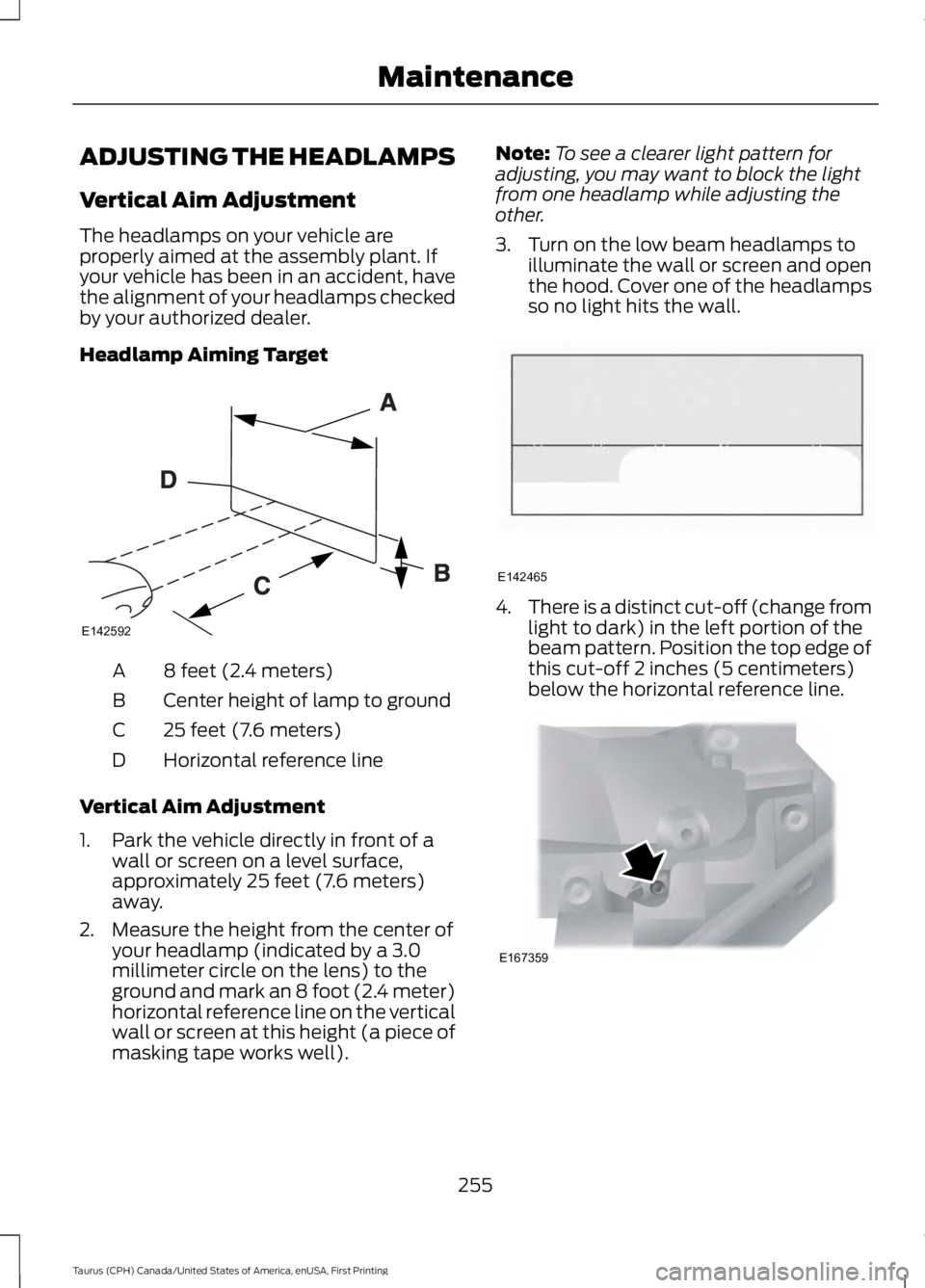
Headlamp Aiming Target
8 feet (2.4 meters)A
Center height of lamp to groundB
25 feet (7.6 meters)C
Horizontal reference lineD
Vertical Aim Adjustment
1. Park the vehicle directly in front of awall or screen on a level surface,approximately 25 feet (7.6 meters)away.
2. Measure the height from the center ofyour headlamp (indicated by a 3.0millimeter circle on the lens) to theground and mark an 8 foot (2.4 meter)horizontal reference line on the verticalwall or screen at this height (a piece ofmasking tape works well).
Note:To see a clearer light pattern foradjusting, you may want to block the lightfrom one headlamp while adjusting theother.
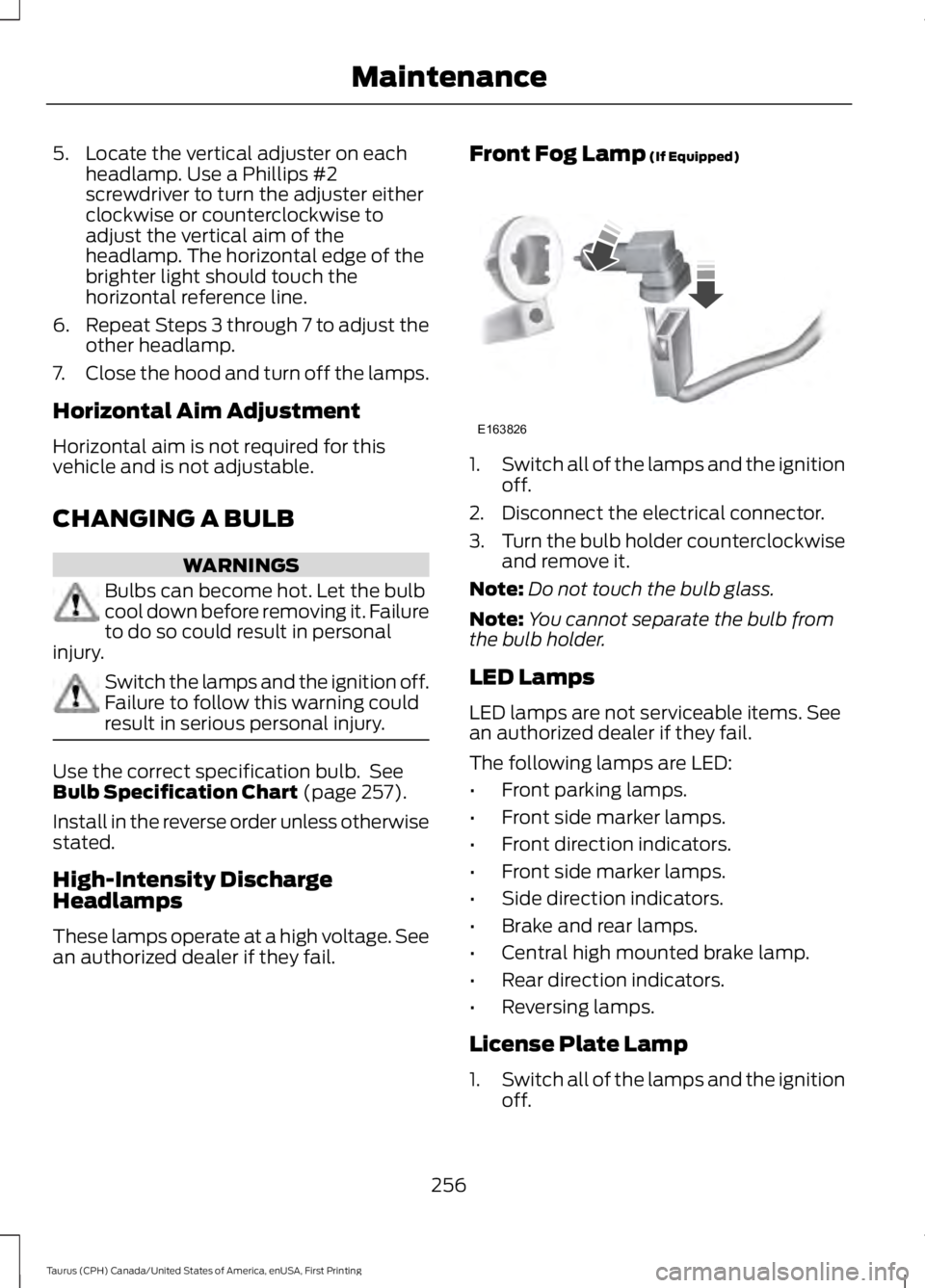
3. Turn on the low beam headlamps toilluminate the wall or screen and openthe hood. Cover one of the headlampsso no light hits the wall.
4.There is a distinct cut-off (change fromlight to dark) in the left portion of thebeam pattern. Position the top edge ofthis cut-off 2 inches (5 centimeters)below the horizontal reference line.
255
Taurus (CPH) Canada/United States of America, enUSA, First Printing
MaintenanceE142592 E142465 E167359
Page 259 of 504
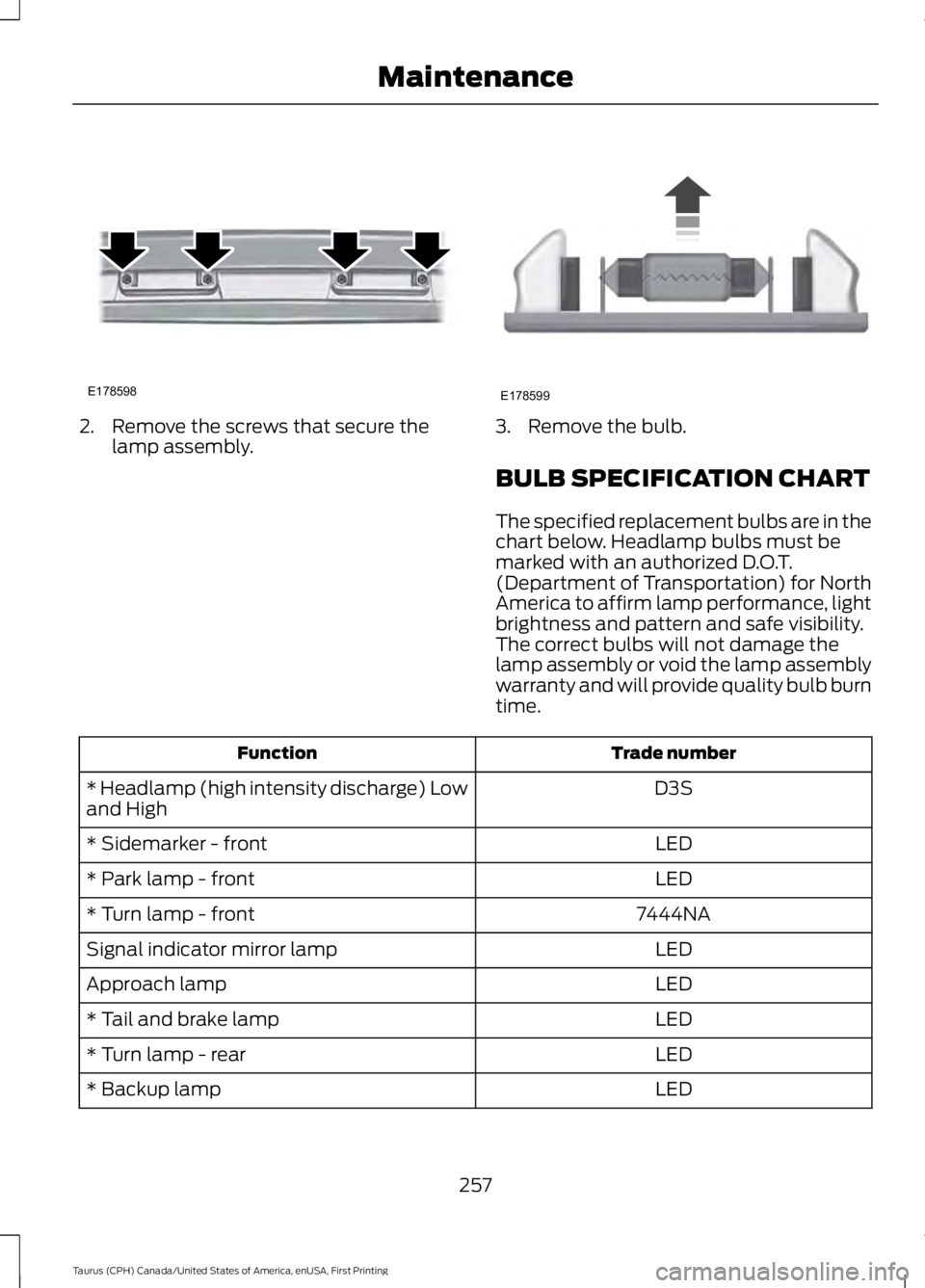
5. Locate the vertical adjuster on eachheadlamp. Use a Phillips #2screwdriver to turn the adjuster eitherclockwise or counterclockwise toadjust the vertical aim of theheadlamp. The horizontal edge of thebrighter light should touch thehorizontal reference line.
6.Repeat Steps 3 through 7 to adjust theother headlamp.
7.Close the hood and turn off the lamps.
Horizontal Aim Adjustment
Horizontal aim is not required for thisvehicle and is not adjustable.
CHANGING A BULB
WARNINGS
Bulbs can become hot. Let the bulbcool down before removing it. Failureto do so could result in personalinjury.
Switch the lamps and the ignition off.Failure to follow this warning couldresult in serious personal injury.
Use the correct specification bulb. SeeBulb Specification Chart (page 257).
Install in the reverse order unless otherwisestated.
High-Intensity DischargeHeadlamps
These lamps operate at a high voltage. Seean authorized dealer if they fail.
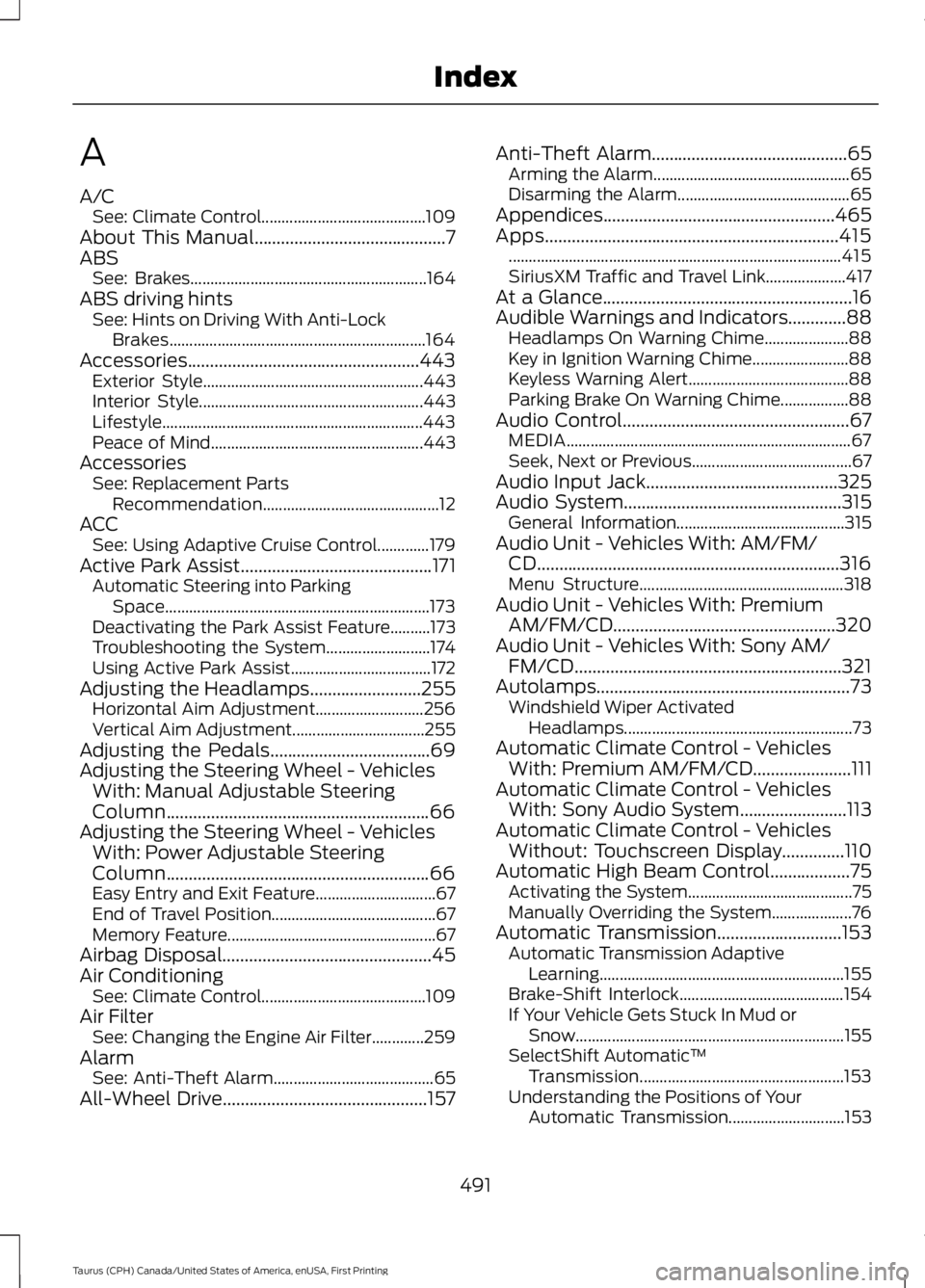
Front Fog Lamp (If Equipped)
1.Switch all of the lamps and the ignitionoff.
2. Disconnect the electrical connector.
3.Turn the bulb holder counterclockwiseand remove it.
Note:Do not touch the bulb glass.
Note:You cannot separate the bulb fromthe bulb holder.
LED Lamps
LED lamps are not serviceable items. Seean authorized dealer if they fail.
The following lamps are LED:
•Front parking lamps.
•Front side marker lamps.
•Front direction indicators.
•Front side marker lamps.
•Side direction indicators.
•Brake and rear lamps.
•Central high mounted brake lamp.
•Rear direction indicators.
•Reversing lamps.
License Plate Lamp
1.Switch all of the lamps and the ignitionoff.
256
Taurus (CPH) Canada/United States of America, enUSA, First Printing
MaintenanceE163826
Page 260 of 504
2. Remove the screws that secure thelamp assembly.3. Remove the bulb.
BULB SPECIFICATION CHART
The specified replacement bulbs are in thechart below. Headlamp bulbs must bemarked with an authorized D.O.T.(Department of Transportation) for NorthAmerica to affirm lamp performance, lightbrightness and pattern and safe visibility.The correct bulbs will not damage thelamp assembly or void the lamp assemblywarranty and will provide quality bulb burntime.
Trade numberFunction
D3S* Headlamp (high intensity discharge) Lowand High
LED* Sidemarker - front
LED* Park lamp - front
7444NA* Turn lamp - front
LEDSignal indicator mirror lamp
LEDApproach lamp
LED* Tail and brake lamp
LED* Turn lamp - rear
LED* Backup lamp
257
Taurus (CPH) Canada/United States of America, enUSA, First Printing
MaintenanceE178598 E178599
Page 494 of 504
A
A/CSee: Climate Control.........................................109About This Manual...........................................7ABSSee: Brakes...........................................................164ABS driving hintsSee: Hints on Driving With Anti-LockBrakes................................................................164Accessories....................................................443Exterior Style.......................................................443Interior Style........................................................443Lifestyle.................................................................443Peace of Mind.....................................................443AccessoriesSee: Replacement PartsRecommendation............................................12ACCSee: Using Adaptive Cruise Control.............179Active Park Assist...........................................171Automatic Steering into ParkingSpace..................................................................173Deactivating the Park Assist Feature..........173Troubleshooting the System..........................174Using Active Park Assist...................................172Adjusting the Headlamps.........................255Horizontal Aim Adjustment...........................256Vertical Aim Adjustment.................................255Adjusting the Pedals....................................69Adjusting the Steering Wheel - VehiclesWith: Manual Adjustable SteeringColumn...........................................................66Adjusting the Steering Wheel - VehiclesWith: Power Adjustable SteeringColumn...........................................................66Easy Entry and Exit Feature..............................67End of Travel Position.........................................67Memory Feature....................................................67Airbag Disposal...............................................45Air ConditioningSee: Climate Control.........................................109Air FilterSee: Changing the Engine Air Filter.............259AlarmSee: Anti-Theft Alarm........................................65All-Wheel Drive..............................................157
Anti-Theft Alarm............................................65Arming the Alarm.................................................65Disarming the Alarm...........................................65Appendices....................................................465Apps..................................................................415...................................................................................415SiriusXM Traffic and Travel Link....................417At a Glance........................................................16Audible Warnings and Indicators.............88Headlamps On Warning Chime.....................88Key in Ignition Warning Chime........................88Keyless Warning Alert........................................88Parking Brake On Warning Chime.................88Audio Control...................................................67MEDIA.......................................................................67Seek, Next or Previous........................................67Audio Input Jack...........................................325Audio System.................................................315General Information..........................................315Audio Unit - Vehicles With: AM/FM/CD....................................................................316Menu Structure...................................................318Audio Unit - Vehicles With: PremiumAM/FM/CD..................................................320Audio Unit - Vehicles With: Sony AM/FM/CD............................................................321Autolamps.........................................................73Windshield Wiper ActivatedHeadlamps.........................................................73Automatic Climate Control - VehiclesWith: Premium AM/FM/CD......................111Automatic Climate Control - VehiclesWith: Sony Audio System........................113Automatic Climate Control - VehiclesWithout: Touchscreen Display..............110Automatic High Beam Control..................75Activating the System.........................................75Manually Overriding the System....................76Automatic Transmission............................153Automatic Transmission AdaptiveLearning.............................................................155Brake-Shift Interlock.........................................154If Your Vehicle Gets Stuck In Mud orSnow...................................................................155SelectShift Automatic™Transmission...................................................153Understanding the Positions of YourAutomatic Transmission.............................153
491
Taurus (CPH) Canada/United States of America, enUSA, First Printing
Index
Page 495 of 504
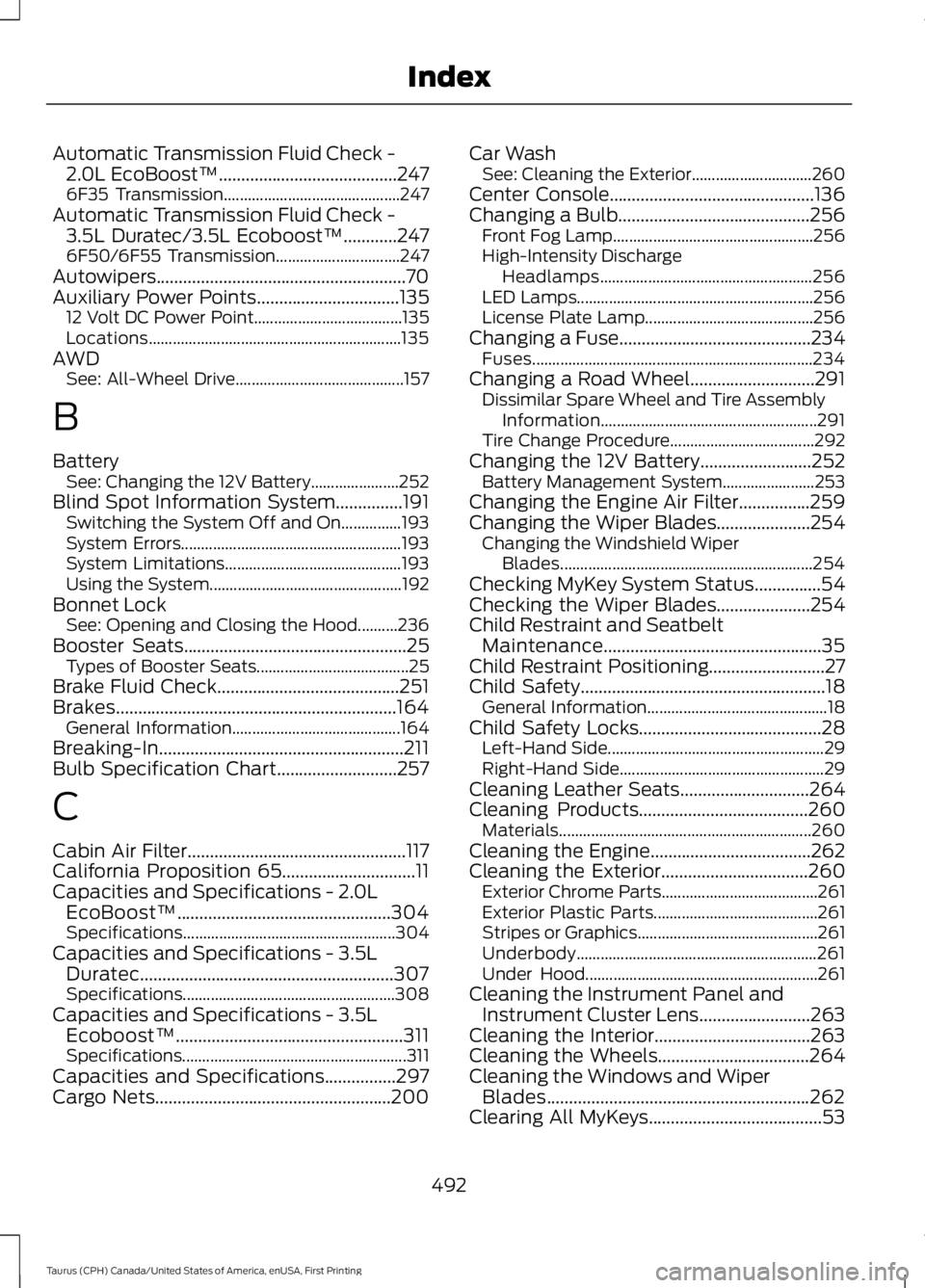
Automatic Transmission Fluid Check -2.0L EcoBoost™........................................2476F35 Transmission............................................247Automatic Transmission Fluid Check -3.5L Duratec/3.5L Ecoboost™............2476F50/6F55 Transmission...............................247Autowipers........................................................70Auxiliary Power Points................................13512 Volt DC Power Point.....................................135Locations...............................................................135AWDSee: All-Wheel Drive..........................................157
B
BatterySee: Changing the 12V Battery......................252Blind Spot Information System...............191Switching the System Off and On...............193System Errors.......................................................193System Limitations............................................193Using the System................................................192Bonnet LockSee: Opening and Closing the Hood..........236Booster Seats..................................................25Types of Booster Seats......................................25Brake Fluid Check.........................................251Brakes...............................................................164General Information..........................................164Breaking-In.......................................................211Bulb Specification Chart...........................257
C
Cabin Air Filter.................................................117California Proposition 65..............................11Capacities and Specifications - 2.0LEcoBoost™................................................304Specifications.....................................................304Capacities and Specifications - 3.5LDuratec.........................................................307Specifications.....................................................308Capacities and Specifications - 3.5LEcoboost™...................................................311Specifications........................................................311Capacities and Specifications................297Cargo Nets.....................................................200
Car WashSee: Cleaning the Exterior..............................260Center Console..............................................136Changing a Bulb...........................................256Front Fog Lamp..................................................256High-Intensity DischargeHeadlamps.....................................................256LED Lamps...........................................................256License Plate Lamp..........................................256Changing a Fuse...........................................234Fuses......................................................................234Changing a Road Wheel............................291Dissimilar Spare Wheel and Tire AssemblyInformation......................................................291Tire Change Procedure....................................292Changing the 12V Battery.........................252Battery Management System.......................253Changing the Engine Air Filter................259Changing the Wiper Blades.....................254Changing the Windshield WiperBlades...............................................................254Checking MyKey System Status...............54Checking the Wiper Blades.....................254Child Restraint and SeatbeltMaintenance.................................................35Child Restraint Positioning..........................27Child Safety.......................................................18General Information.............................................18Child Safety Locks.........................................28Left-Hand Side......................................................29Right-Hand Side...................................................29Cleaning Leather Seats.............................264Cleaning Products......................................260Materials...............................................................260Cleaning the Engine....................................262Cleaning the Exterior.................................260Exterior Chrome Parts.......................................261Exterior Plastic Parts.........................................261Stripes or Graphics.............................................261Underbody............................................................261Under Hood..........................................................261Cleaning the Instrument Panel andInstrument Cluster Lens.........................263Cleaning the Interior...................................263Cleaning the Wheels..................................264Cleaning the Windows and WiperBlades...........................................................262Clearing All MyKeys.......................................53
492
Taurus (CPH) Canada/United States of America, enUSA, First Printing
Index
Page 498 of 504
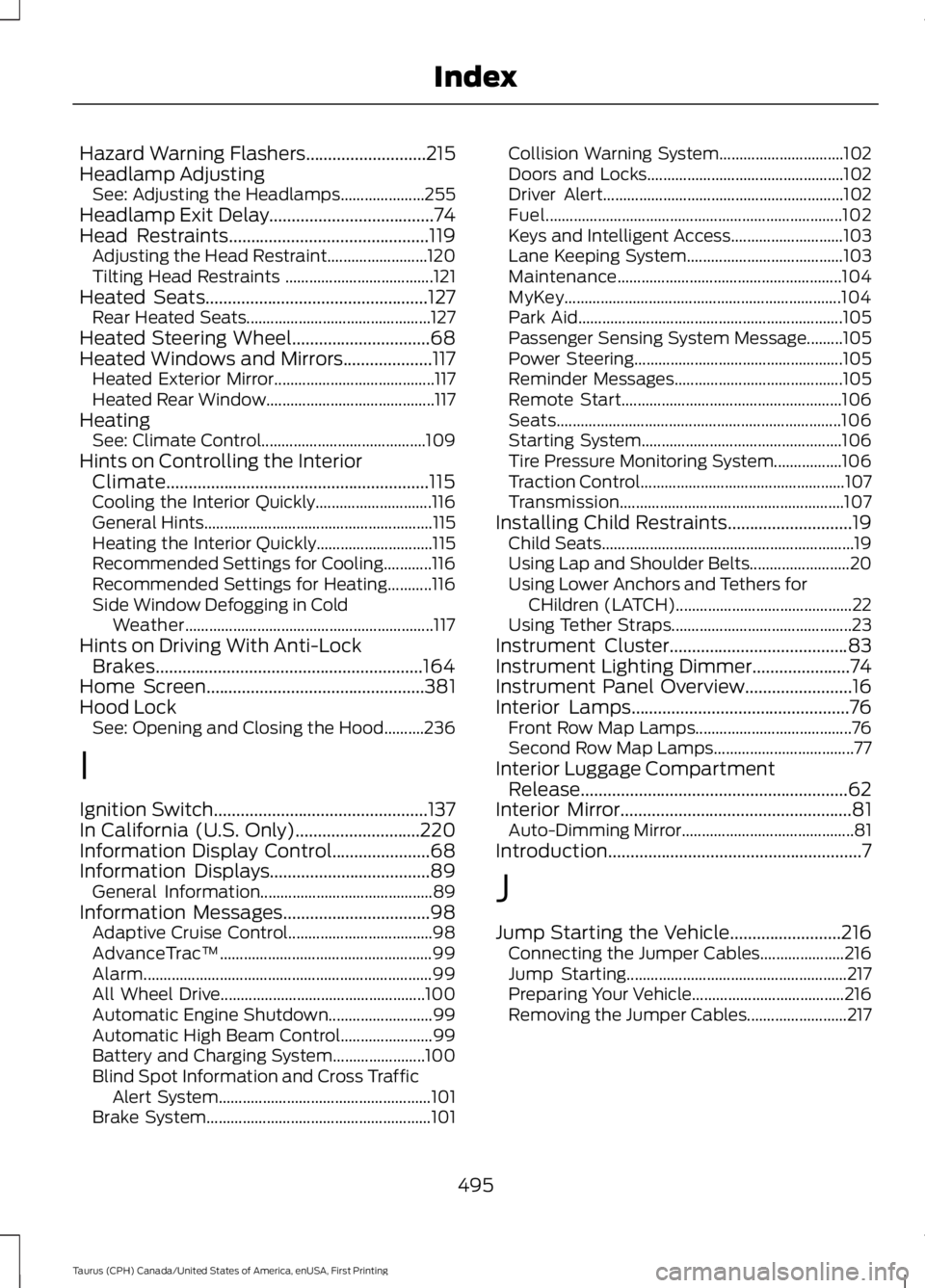
Hazard Warning Flashers...........................215Headlamp AdjustingSee: Adjusting the Headlamps.....................255Headlamp Exit Delay.....................................74Head Restraints.............................................119Adjusting the Head Restraint.........................120Tilting Head Restraints .....................................121Heated Seats..................................................127Rear Heated Seats..............................................127Heated Steering Wheel...............................68Heated Windows and Mirrors....................117Heated Exterior Mirror........................................117Heated Rear Window..........................................117HeatingSee: Climate Control.........................................109Hints on Controlling the InteriorClimate...........................................................115Cooling the Interior Quickly.............................116General Hints.........................................................115Heating the Interior Quickly.............................115Recommended Settings for Cooling............116Recommended Settings for Heating...........116Side Window Defogging in ColdWeather..............................................................117Hints on Driving With Anti-LockBrakes............................................................164Home Screen.................................................381Hood LockSee: Opening and Closing the Hood..........236
I
Ignition Switch................................................137In California (U.S. Only)............................220Information Display Control......................68Information Displays....................................89General Information...........................................89Information Messages.................................98Adaptive Cruise Control....................................98AdvanceTrac™.....................................................99Alarm........................................................................99All Wheel Drive...................................................100Automatic Engine Shutdown..........................99Automatic High Beam Control.......................99Battery and Charging System.......................100Blind Spot Information and Cross TrafficAlert System.....................................................101Brake System........................................................101
Collision Warning System...............................102Doors and Locks.................................................102Driver Alert............................................................102Fuel..........................................................................102Keys and Intelligent Access............................103Lane Keeping System.......................................103Maintenance........................................................104MyKey.....................................................................104Park Aid..................................................................105Passenger Sensing System Message.........105Power Steering....................................................105Reminder Messages..........................................105Remote Start.......................................................106Seats.......................................................................106Starting System..................................................106Tire Pressure Monitoring System.................106Traction Control...................................................107Transmission........................................................107Installing Child Restraints............................19Child Seats...............................................................19Using Lap and Shoulder Belts.........................20Using Lower Anchors and Tethers forCHildren (LATCH)............................................22Using Tether Straps.............................................23Instrument Cluster........................................83Instrument Lighting Dimmer......................74Instrument Panel Overview........................16Interior Lamps.................................................76Front Row Map Lamps.......................................76Second Row Map Lamps...................................77Interior Luggage CompartmentRelease............................................................62Interior Mirror....................................................81Auto-Dimming Mirror...........................................81Introduction.........................................................7
J
Jump Starting the Vehicle.........................216Connecting the Jumper Cables.....................216Jump Starting.......................................................217Preparing Your Vehicle......................................216Removing the Jumper Cables.........................217
495
Taurus (CPH) Canada/United States of America, enUSA, First Printing
Index