wheel FORD TAURUS 2017 User Guide
[x] Cancel search | Manufacturer: FORD, Model Year: 2017, Model line: TAURUS, Model: FORD TAURUS 2017Pages: 504, PDF Size: 5.84 MB
Page 71 of 504
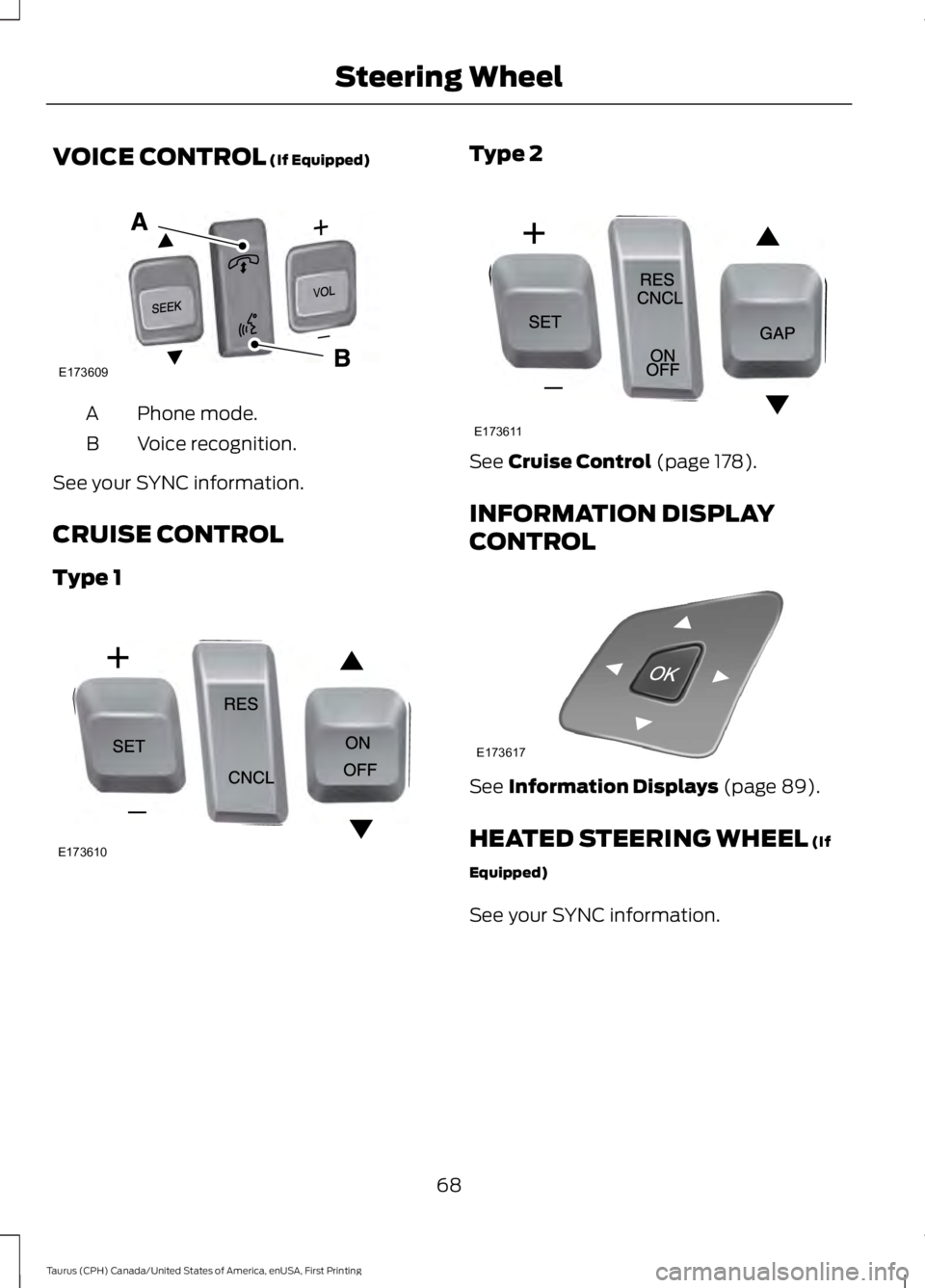
VOICE CONTROL (If Equipped)
Phone mode.A
Voice recognition.B
See your SYNC information.
CRUISE CONTROL
Type 1
Type 2
See Cruise Control (page 178).
INFORMATION DISPLAY
CONTROL
See Information Displays (page 89).
HEATED STEERING WHEEL (If
Equipped)
See your SYNC information.
68
Taurus (CPH) Canada/United States of America, enUSA, First Printing
Steering WheelE173609
V E173610 E173611 E173617
Page 92 of 504
GENERAL INFORMATION
WARNING
Driving while distracted can result inloss of vehicle control, crash andinjury. We strongly recommend thatyou use extreme caution when using anydevice that may take your focus off theroad. Your primary responsibility is the safeoperation of your vehicle. We recommendagainst the use of any hand-held devicewhile driving and encourage the use ofvoice-operated systems when possible.Make sure you are aware of all applicablelocal laws that may affect the use ofelectronic devices while driving.
You can control various systems on yourvehicle using the information displaycontrols on the steering wheel.Corresponding information appears in theinformation display.
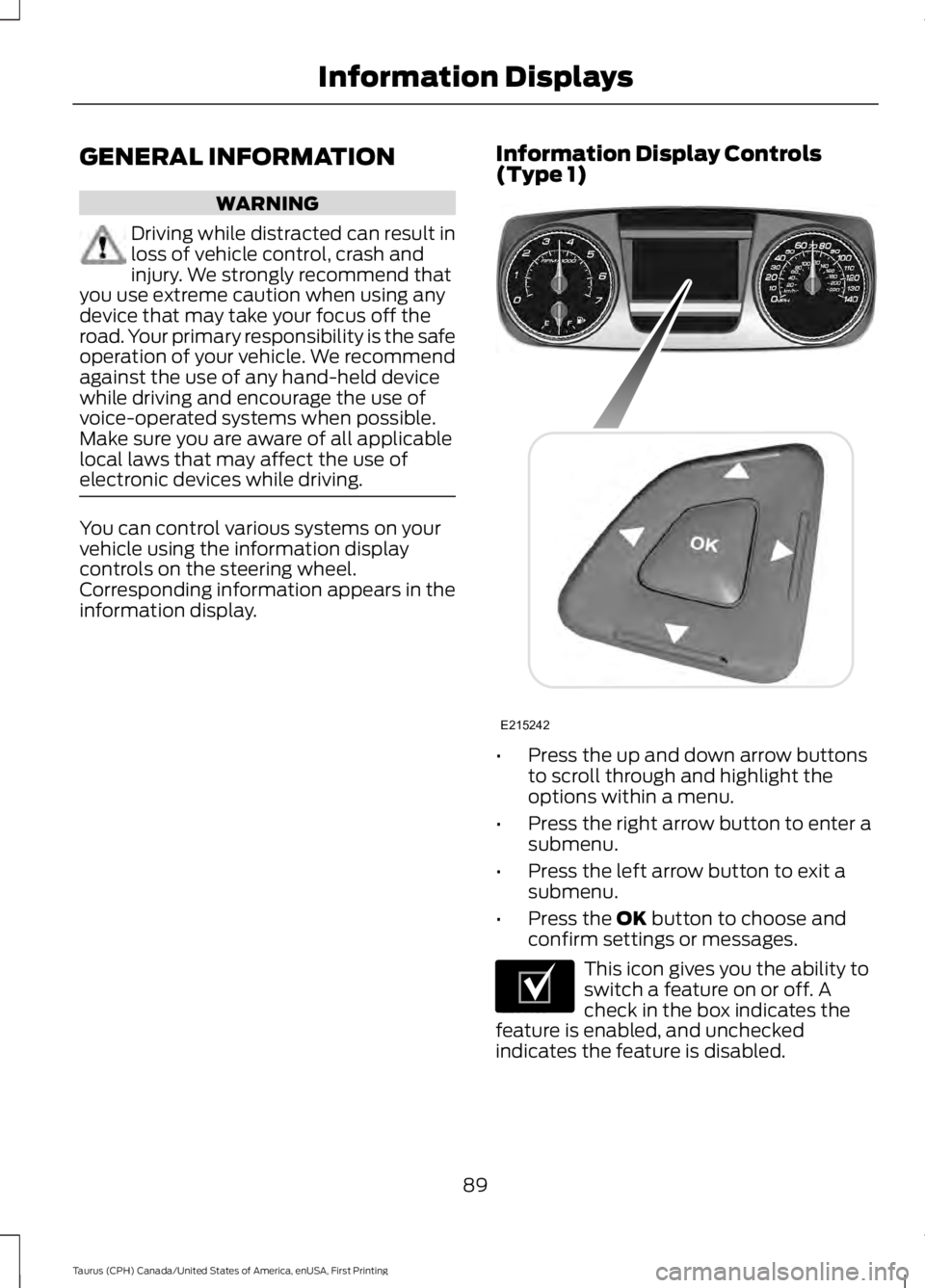
Information Display Controls(Type 1)
•Press the up and down arrow buttonsto scroll through and highlight theoptions within a menu.
•Press the right arrow button to enter asubmenu.
•Press the left arrow button to exit asubmenu.
•Press the OK button to choose andconfirm settings or messages.
This icon gives you the ability toswitch a feature on or off. Acheck in the box indicates thefeature is enabled, and uncheckedindicates the feature is disabled.
89
Taurus (CPH) Canada/United States of America, enUSA, First Printing
Information DisplaysE215242 E204495
Page 93 of 504
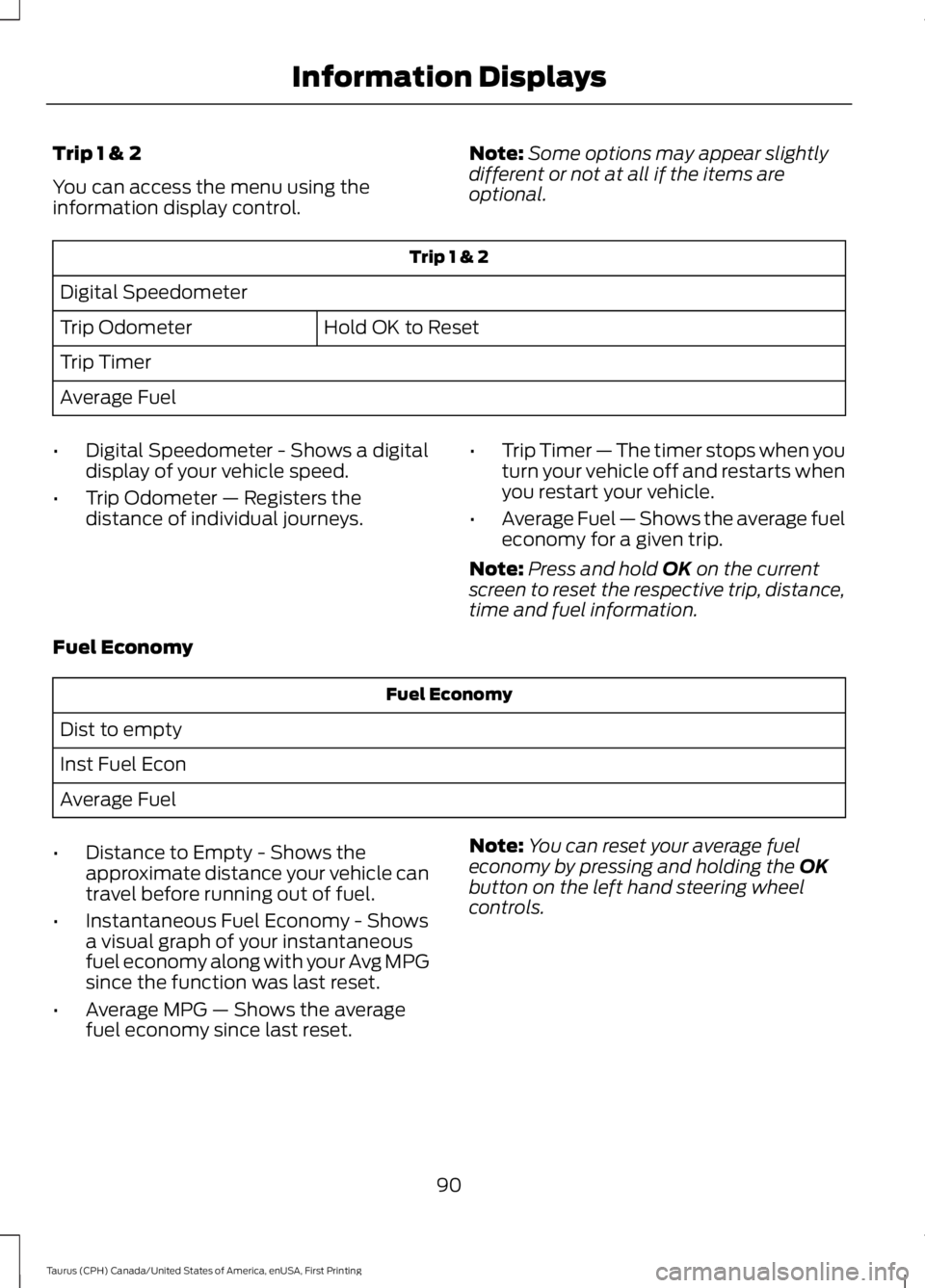
Trip 1 & 2
You can access the menu using theinformation display control.
Note:Some options may appear slightlydifferent or not at all if the items areoptional.
Trip 1 & 2
Digital Speedometer
Hold OK to ResetTrip Odometer
Trip Timer
Average Fuel
•Digital Speedometer - Shows a digitaldisplay of your vehicle speed.
•Trip Odometer — Registers thedistance of individual journeys.
•Trip Timer — The timer stops when youturn your vehicle off and restarts whenyou restart your vehicle.
•Average Fuel — Shows the average fueleconomy for a given trip.
Note:Press and hold OK on the currentscreen to reset the respective trip, distance,time and fuel information.
Fuel Economy
Fuel Economy
Dist to empty
Inst Fuel Econ
Average Fuel
•Distance to Empty - Shows theapproximate distance your vehicle cantravel before running out of fuel.
•Instantaneous Fuel Economy - Showsa visual graph of your instantaneousfuel economy along with your Avg MPGsince the function was last reset.
•Average MPG — Shows the averagefuel economy since last reset.
Note:You can reset your average fueleconomy by pressing and holding the OKbutton on the left hand steering wheelcontrols.
90
Taurus (CPH) Canada/United States of America, enUSA, First Printing
Information Displays
Page 95 of 504
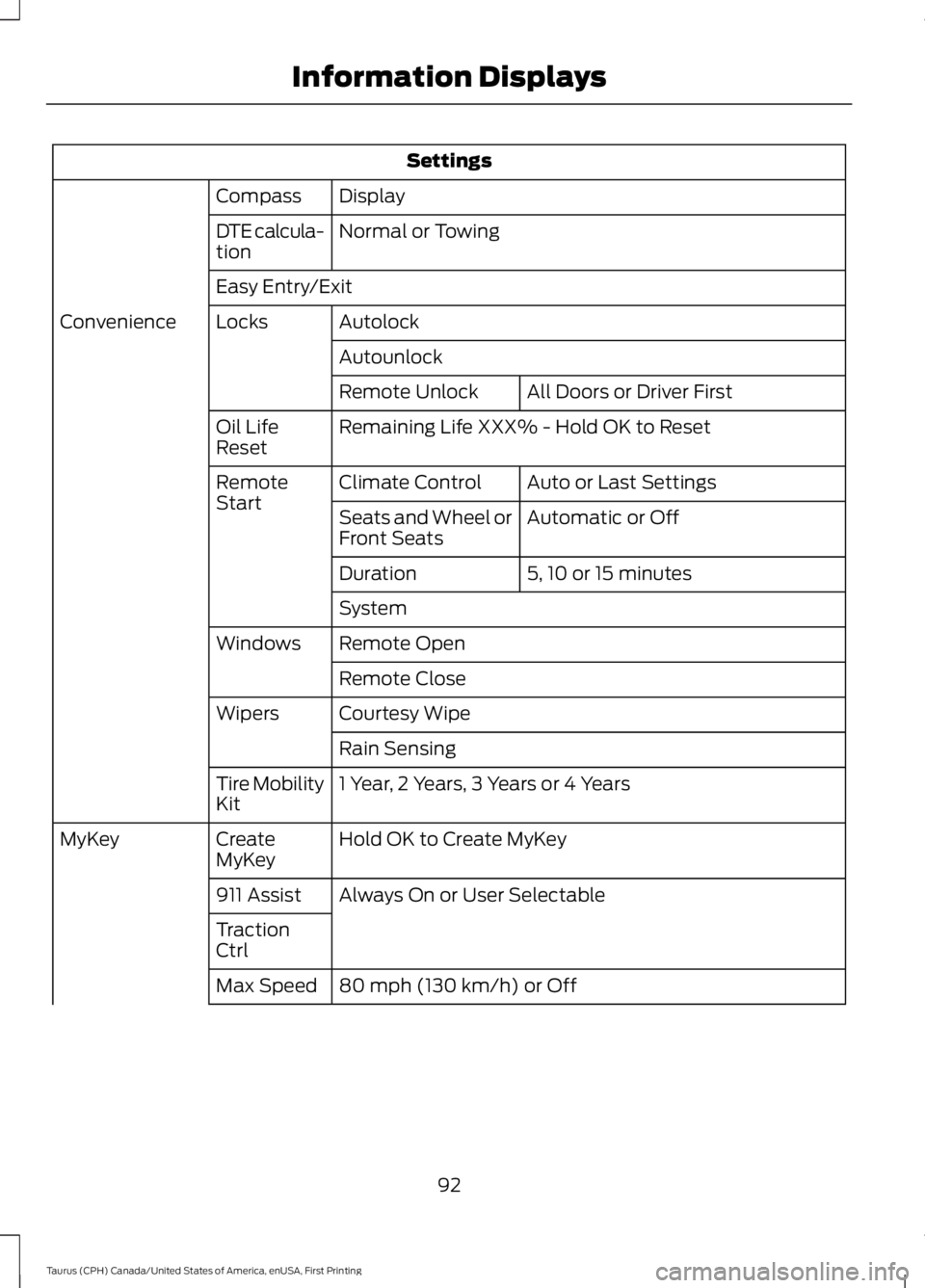
Settings
DisplayCompass
Normal or TowingDTE calcula-tion
Easy Entry/Exit
AutolockLocksConvenience
Autounlock
All Doors or Driver FirstRemote Unlock
Remaining Life XXX% - Hold OK to ResetOil LifeReset
Auto or Last SettingsClimate ControlRemoteStartAutomatic or OffSeats and Wheel orFront Seats
5, 10 or 15 minutesDuration
System
Remote OpenWindows
Remote Close
Courtesy WipeWipers
Rain Sensing
1 Year, 2 Years, 3 Years or 4 YearsTire MobilityKit
Hold OK to Create MyKeyCreateMyKeyMyKey
Always On or User Selectable911 Assist
TractionCtrl
80 mph (130 km/h) or OffMax Speed
92
Taurus (CPH) Canada/United States of America, enUSA, First Printing
Information Displays
Page 98 of 504
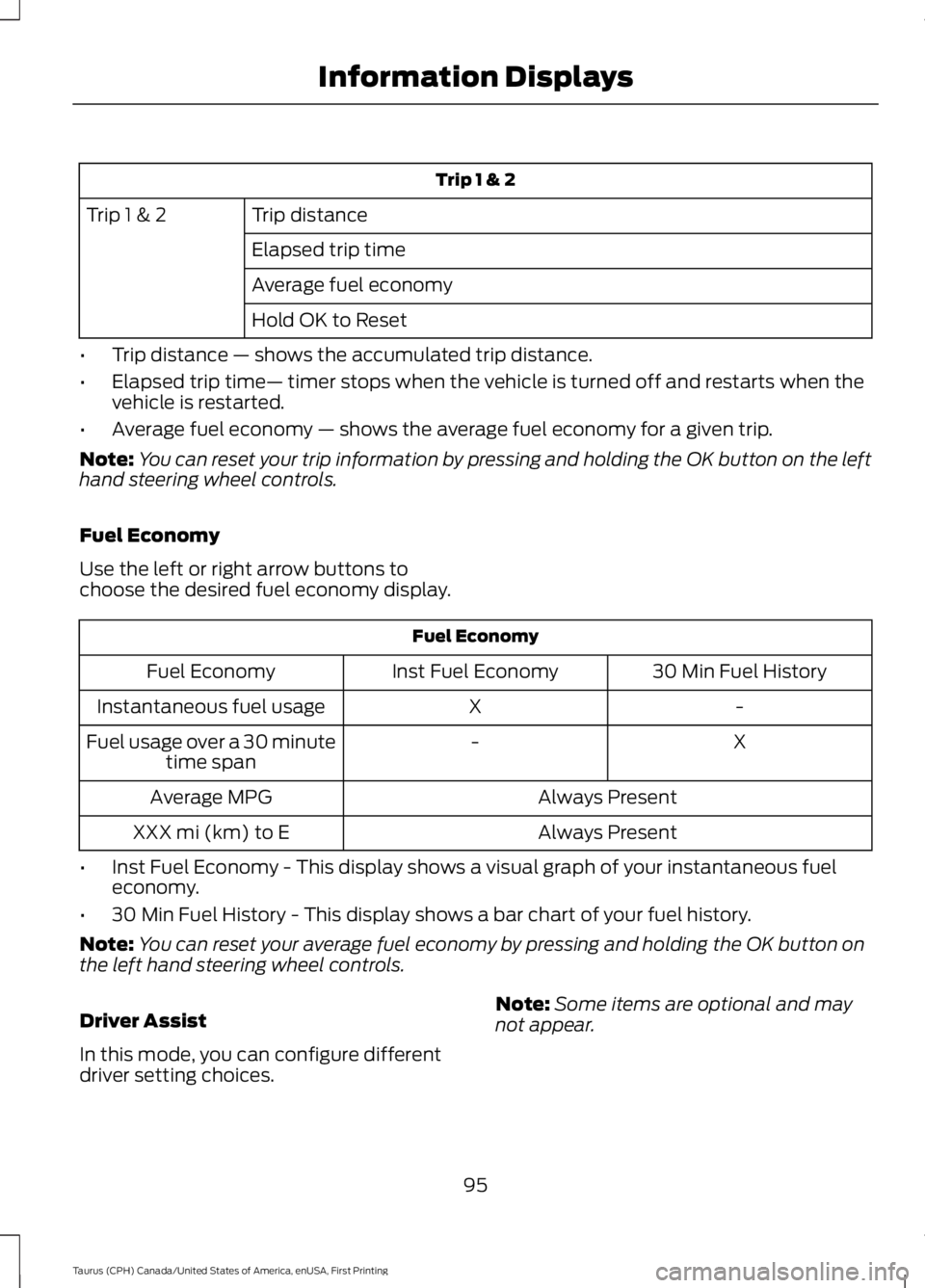
Trip 1 & 2
Trip distanceTrip 1 & 2
Elapsed trip time
Average fuel economy
Hold OK to Reset
•Trip distance — shows the accumulated trip distance.
•Elapsed trip time— timer stops when the vehicle is turned off and restarts when thevehicle is restarted.
•Average fuel economy — shows the average fuel economy for a given trip.
Note:You can reset your trip information by pressing and holding the OK button on the lefthand steering wheel controls.
Fuel Economy
Use the left or right arrow buttons tochoose the desired fuel economy display.
Fuel Economy
30 Min Fuel HistoryInst Fuel EconomyFuel Economy
-XInstantaneous fuel usage
X-Fuel usage over a 30 minutetime span
Always PresentAverage MPG
Always PresentXXX mi (km) to E
•Inst Fuel Economy - This display shows a visual graph of your instantaneous fueleconomy.
•30 Min Fuel History - This display shows a bar chart of your fuel history.
Note:You can reset your average fuel economy by pressing and holding the OK button onthe left hand steering wheel controls.
Driver Assist
In this mode, you can configure differentdriver setting choices.
Note:Some items are optional and maynot appear.
95
Taurus (CPH) Canada/United States of America, enUSA, First Printing
Information Displays
Page 100 of 504
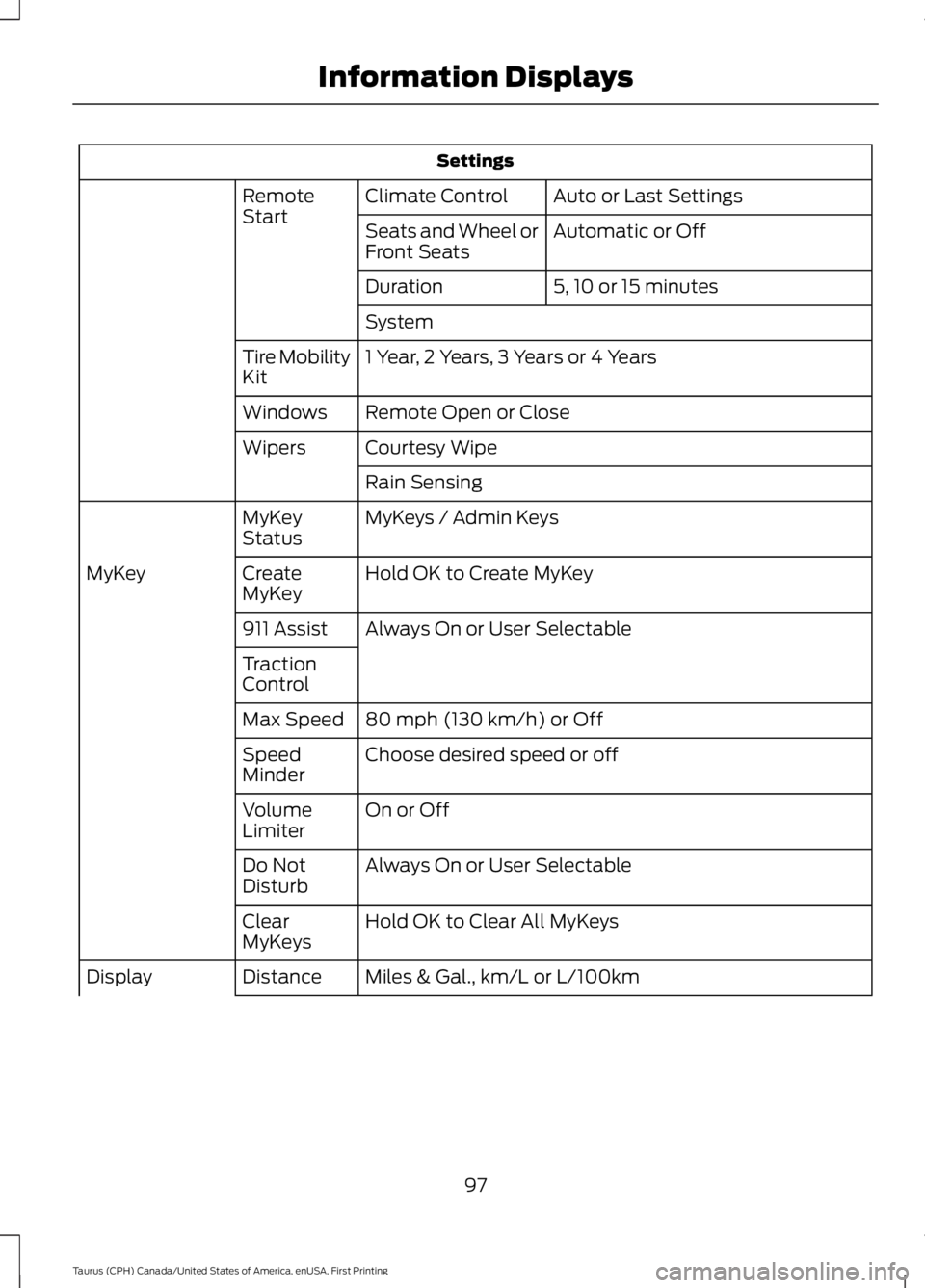
Settings
Auto or Last SettingsClimate ControlRemoteStartAutomatic or OffSeats and Wheel orFront Seats
5, 10 or 15 minutesDuration
System
1 Year, 2 Years, 3 Years or 4 YearsTire MobilityKit
Remote Open or CloseWindows
Courtesy WipeWipers
Rain Sensing
MyKeys / Admin KeysMyKeyStatus
Hold OK to Create MyKeyCreateMyKeyMyKey
Always On or User Selectable911 Assist
TractionControl
80 mph (130 km/h) or OffMax Speed
Choose desired speed or offSpeedMinder
On or OffVolumeLimiter
Always On or User SelectableDo NotDisturb
Hold OK to Clear All MyKeysClearMyKeys
Miles & Gal., km/L or L/100kmDistanceDisplay
97
Taurus (CPH) Canada/United States of America, enUSA, First Printing
Information Displays
Page 102 of 504
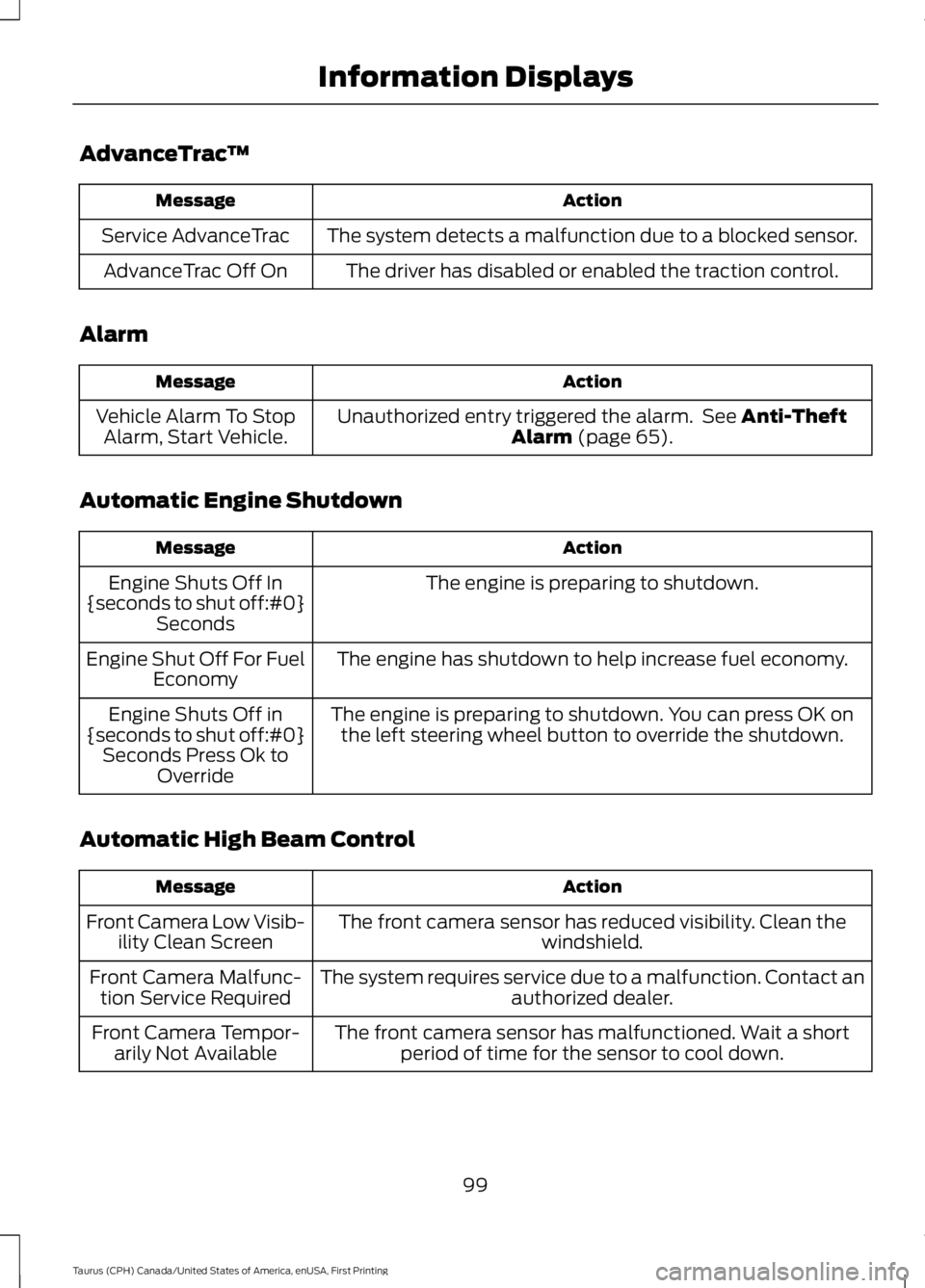
AdvanceTrac™
ActionMessage
The system detects a malfunction due to a blocked sensor.Service AdvanceTrac
The driver has disabled or enabled the traction control.AdvanceTrac Off On
Alarm
ActionMessage
Unauthorized entry triggered the alarm. See Anti-TheftAlarm (page 65).Vehicle Alarm To StopAlarm, Start Vehicle.
Automatic Engine Shutdown
ActionMessage
The engine is preparing to shutdown.Engine Shuts Off In{seconds to shut off:#0}Seconds
The engine has shutdown to help increase fuel economy.Engine Shut Off For FuelEconomy
The engine is preparing to shutdown. You can press OK onthe left steering wheel button to override the shutdown.Engine Shuts Off in{seconds to shut off:#0}Seconds Press Ok toOverride
Automatic High Beam Control
ActionMessage
The front camera sensor has reduced visibility. Clean thewindshield.Front Camera Low Visib-ility Clean Screen
The system requires service due to a malfunction. Contact anauthorized dealer.Front Camera Malfunc-tion Service Required
The front camera sensor has malfunctioned. Wait a shortperiod of time for the sensor to cool down.Front Camera Tempor-arily Not Available
99
Taurus (CPH) Canada/United States of America, enUSA, First Printing
Information Displays
Page 103 of 504
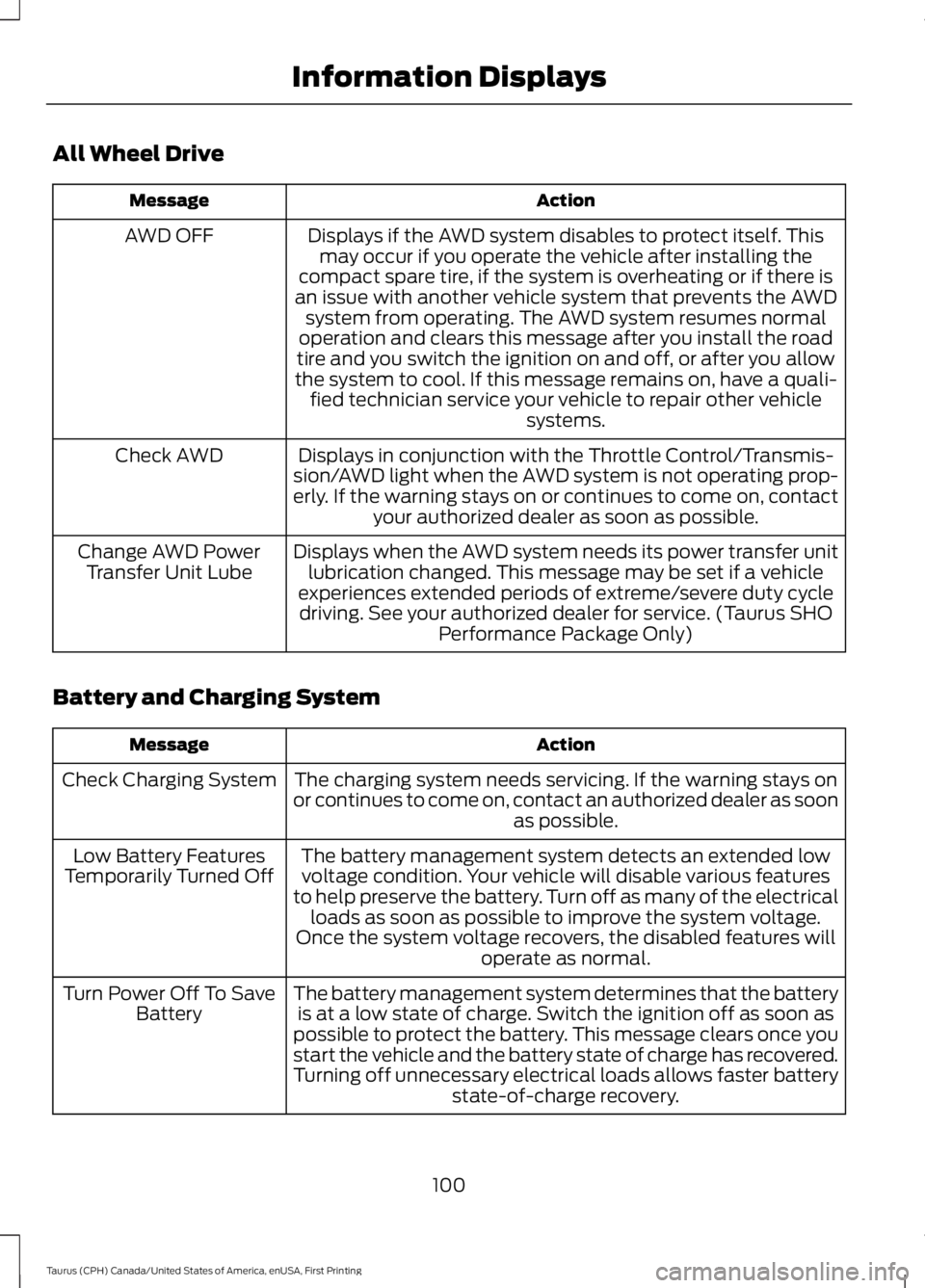
All Wheel Drive
ActionMessage
Displays if the AWD system disables to protect itself. Thismay occur if you operate the vehicle after installing thecompact spare tire, if the system is overheating or if there isan issue with another vehicle system that prevents the AWDsystem from operating. The AWD system resumes normaloperation and clears this message after you install the roadtire and you switch the ignition on and off, or after you allowthe system to cool. If this message remains on, have a quali-fied technician service your vehicle to repair other vehiclesystems.
AWD OFF
Displays in conjunction with the Throttle Control/Transmis-sion/AWD light when the AWD system is not operating prop-erly. If the warning stays on or continues to come on, contactyour authorized dealer as soon as possible.
Check AWD
Displays when the AWD system needs its power transfer unitlubrication changed. This message may be set if a vehicleexperiences extended periods of extreme/severe duty cycledriving. See your authorized dealer for service. (Taurus SHOPerformance Package Only)
Change AWD PowerTransfer Unit Lube
Battery and Charging System
ActionMessage
The charging system needs servicing. If the warning stays onor continues to come on, contact an authorized dealer as soonas possible.
Check Charging System
The battery management system detects an extended lowvoltage condition. Your vehicle will disable various featuresto help preserve the battery. Turn off as many of the electricalloads as soon as possible to improve the system voltage.Once the system voltage recovers, the disabled features willoperate as normal.
Low Battery FeaturesTemporarily Turned Off
The battery management system determines that the batteryis at a low state of charge. Switch the ignition off as soon aspossible to protect the battery. This message clears once youstart the vehicle and the battery state of charge has recovered.Turning off unnecessary electrical loads allows faster batterystate-of-charge recovery.
Turn Power Off To SaveBattery
100
Taurus (CPH) Canada/United States of America, enUSA, First Printing
Information Displays
Page 106 of 504
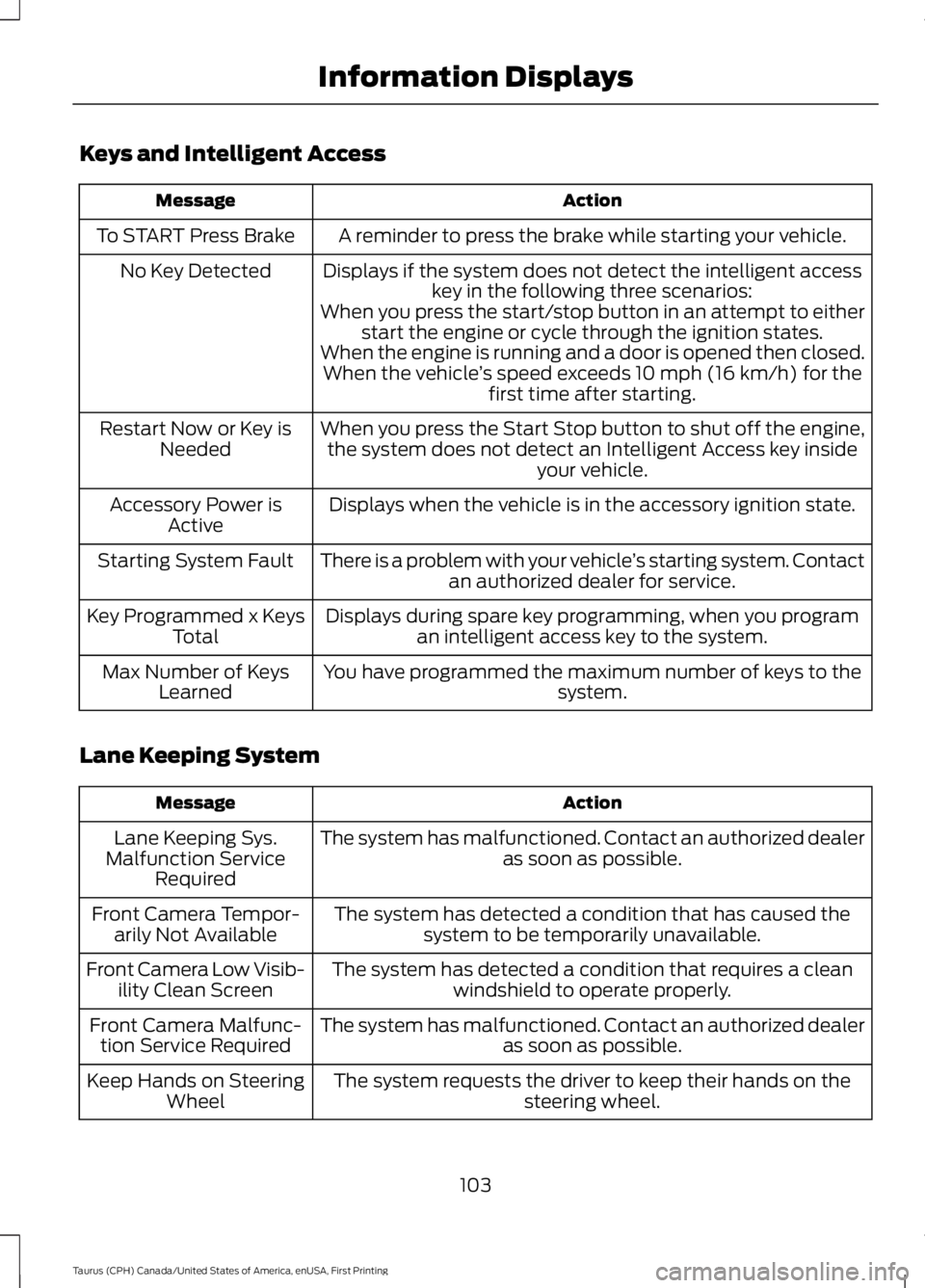
Keys and Intelligent Access
ActionMessage
A reminder to press the brake while starting your vehicle.To START Press Brake
Displays if the system does not detect the intelligent accesskey in the following three scenarios:No Key Detected
When you press the start/stop button in an attempt to eitherstart the engine or cycle through the ignition states.When the engine is running and a door is opened then closed.When the vehicle’s speed exceeds 10 mph (16 km/h) for thefirst time after starting.
When you press the Start Stop button to shut off the engine,the system does not detect an Intelligent Access key insideyour vehicle.
Restart Now or Key isNeeded
Displays when the vehicle is in the accessory ignition state.Accessory Power isActive
There is a problem with your vehicle’s starting system. Contactan authorized dealer for service.Starting System Fault
Displays during spare key programming, when you programan intelligent access key to the system.Key Programmed x KeysTotal
You have programmed the maximum number of keys to thesystem.Max Number of KeysLearned
Lane Keeping System
ActionMessage
The system has malfunctioned. Contact an authorized dealeras soon as possible.Lane Keeping Sys.Malfunction ServiceRequired
The system has detected a condition that has caused thesystem to be temporarily unavailable.Front Camera Tempor-arily Not Available
The system has detected a condition that requires a cleanwindshield to operate properly.Front Camera Low Visib-ility Clean Screen
The system has malfunctioned. Contact an authorized dealeras soon as possible.Front Camera Malfunc-tion Service Required
The system requests the driver to keep their hands on thesteering wheel.Keep Hands on SteeringWheel
103
Taurus (CPH) Canada/United States of America, enUSA, First Printing
Information Displays
Page 121 of 504
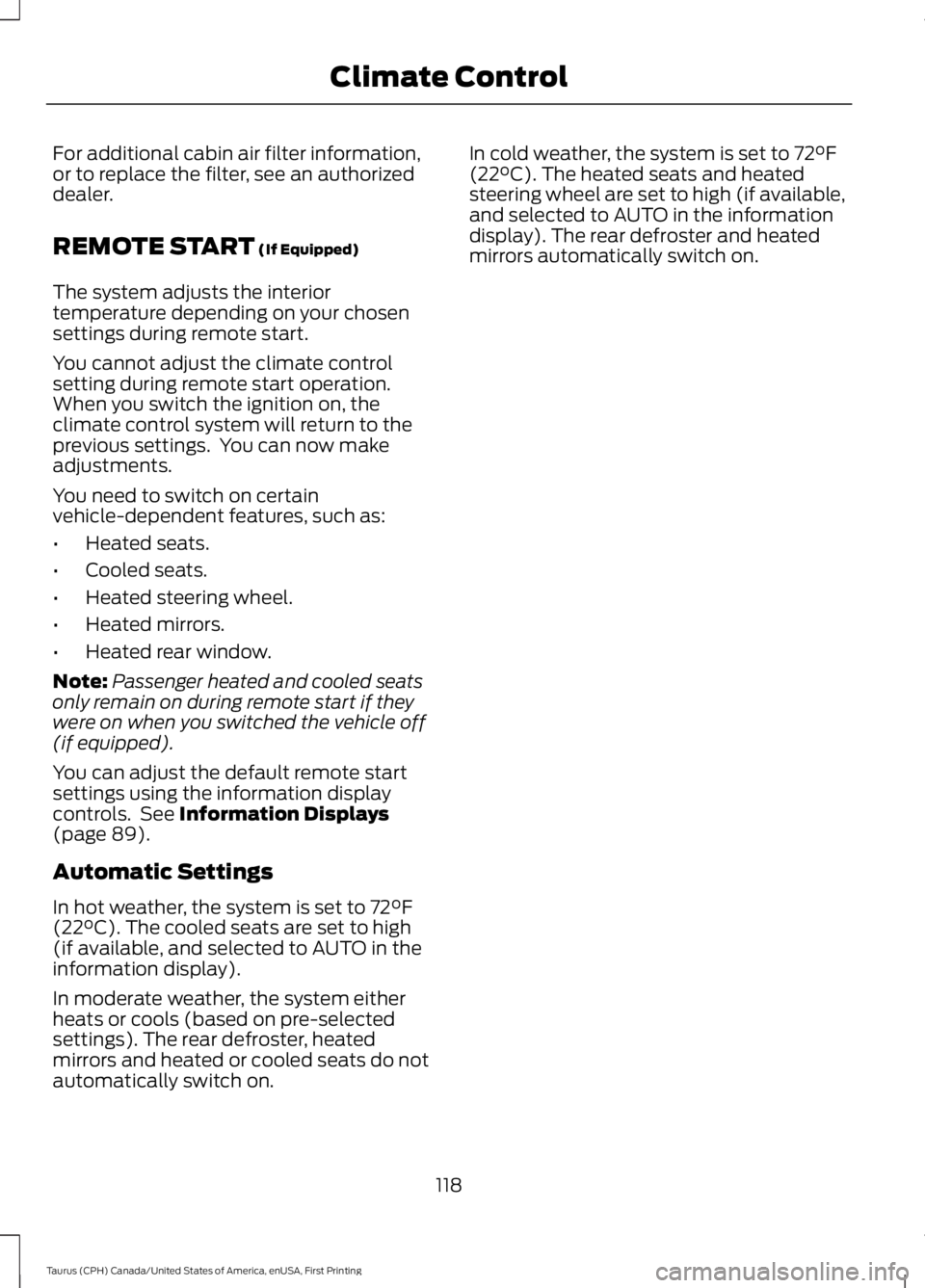
For additional cabin air filter information,or to replace the filter, see an authorizeddealer.
REMOTE START (If Equipped)
The system adjusts the interiortemperature depending on your chosensettings during remote start.
You cannot adjust the climate controlsetting during remote start operation.When you switch the ignition on, theclimate control system will return to theprevious settings. You can now makeadjustments.
You need to switch on certainvehicle-dependent features, such as:
•Heated seats.
•Cooled seats.
•Heated steering wheel.
•Heated mirrors.
•Heated rear window.
Note:Passenger heated and cooled seatsonly remain on during remote start if theywere on when you switched the vehicle off(if equipped).
You can adjust the default remote startsettings using the information displaycontrols. See Information Displays(page 89).
Automatic Settings
In hot weather, the system is set to 72°F(22°C). The cooled seats are set to high(if available, and selected to AUTO in theinformation display).
In moderate weather, the system eitherheats or cools (based on pre-selectedsettings). The rear defroster, heatedmirrors and heated or cooled seats do notautomatically switch on.
In cold weather, the system is set to 72°F(22°C). The heated seats and heatedsteering wheel are set to high (if available,and selected to AUTO in the informationdisplay). The rear defroster and heatedmirrors automatically switch on.
118
Taurus (CPH) Canada/United States of America, enUSA, First Printing
Climate Control