lights FORD TAURUS 2017 Owner's Manual
[x] Cancel search | Manufacturer: FORD, Model Year: 2017, Model line: TAURUS, Model: FORD TAURUS 2017Pages: 504, PDF Size: 5.84 MB
Page 404 of 504
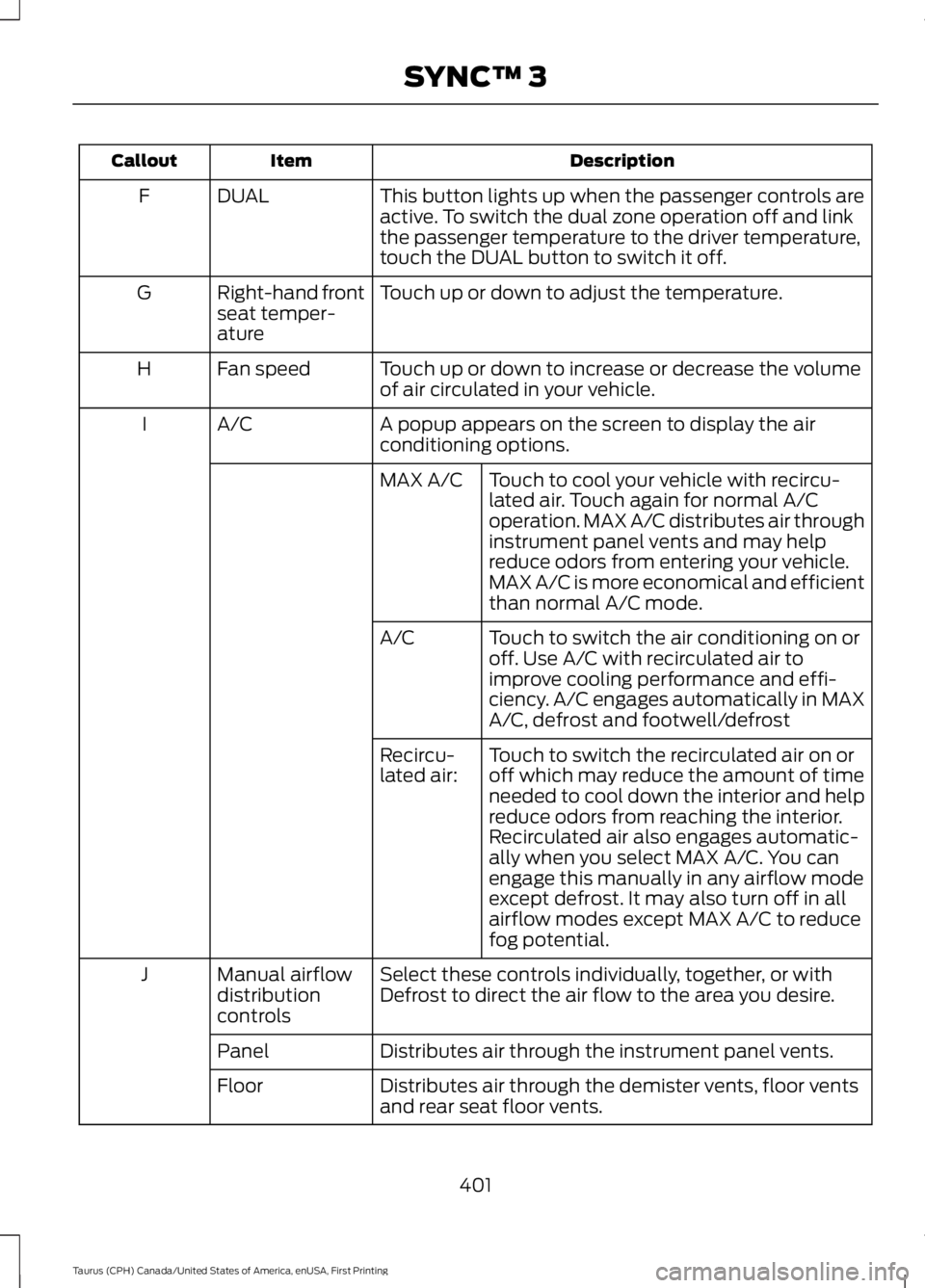
DescriptionItemCallout
This button lights up when the passenger controls areactive. To switch the dual zone operation off and linkthe passenger temperature to the driver temperature,touch the DUAL button to switch it off.
DUALF
Touch up or down to adjust the temperature.Right-hand frontseat temper-ature
G
Touch up or down to increase or decrease the volumeof air circulated in your vehicle.Fan speedH
A popup appears on the screen to display the airconditioning options.A/CI
Touch to cool your vehicle with recircu-lated air. Touch again for normal A/Coperation. MAX A/C distributes air throughinstrument panel vents and may helpreduce odors from entering your vehicle.MAX A/C is more economical and efficientthan normal A/C mode.
MAX A/C
Touch to switch the air conditioning on oroff. Use A/C with recirculated air toimprove cooling performance and effi-ciency. A/C engages automatically in MAXA/C, defrost and footwell/defrost
A/C
Touch to switch the recirculated air on oroff which may reduce the amount of timeneeded to cool down the interior and helpreduce odors from reaching the interior.Recirculated air also engages automatic-ally when you select MAX A/C. You canengage this manually in any airflow modeexcept defrost. It may also turn off in allairflow modes except MAX A/C to reducefog potential.
Recircu-lated air:
Select these controls individually, together, or withDefrost to direct the air flow to the area you desire.Manual airflowdistributioncontrols
J
Distributes air through the instrument panel vents.Panel
Distributes air through the demister vents, floor ventsand rear seat floor vents.Floor
401
Taurus (CPH) Canada/United States of America, enUSA, First Printing
SYNC™ 3
Page 411 of 504
3D city models are complete 3D modelsof entire city areas including navigableroads, parks, rivers and rendered buildings.3D landmarks and city models appear in3D map mode only. Coverage of thesevaries and improves with updated mapreleases.
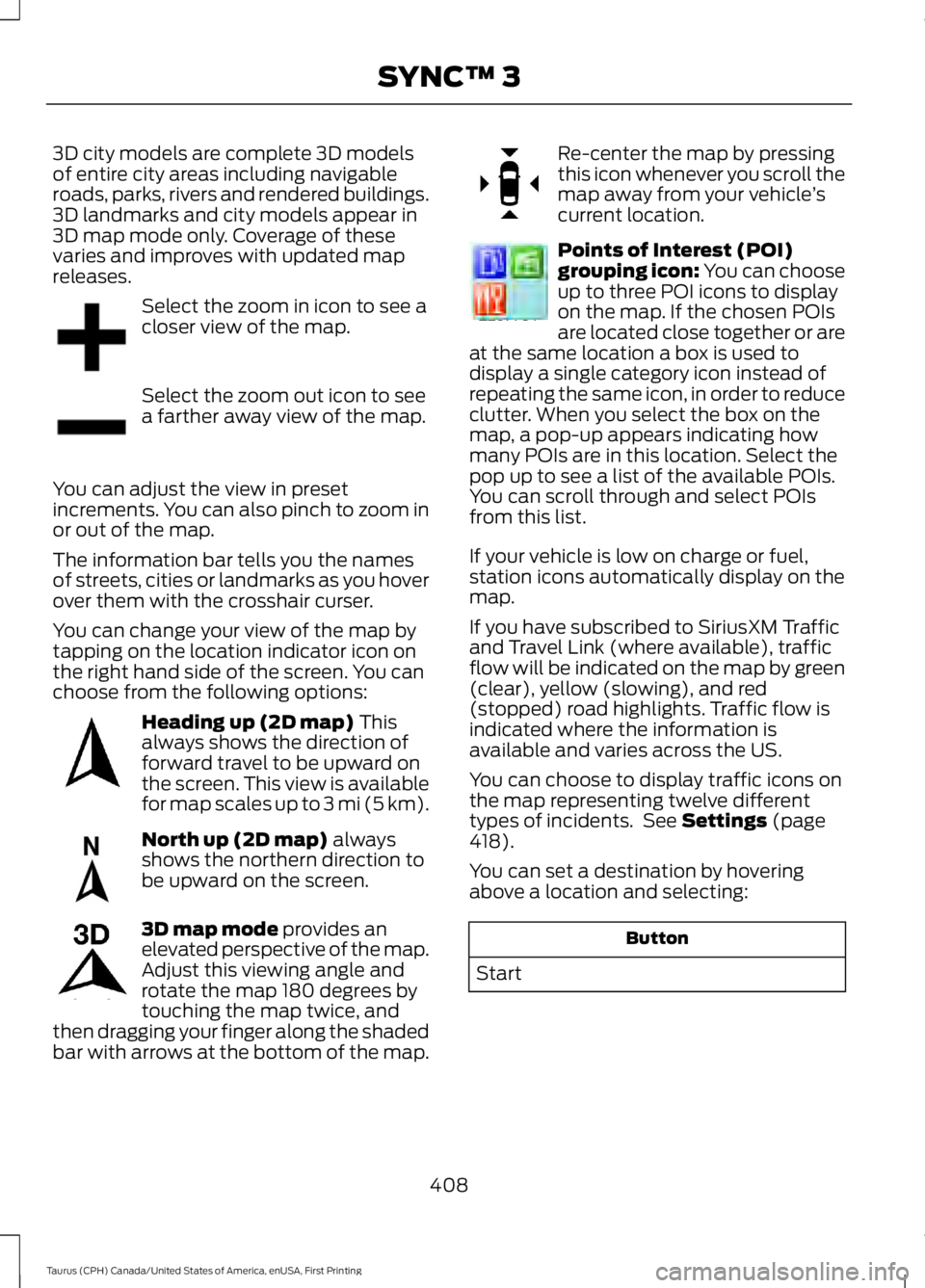
Select the zoom in icon to see acloser view of the map.
Select the zoom out icon to seea farther away view of the map.
You can adjust the view in presetincrements. You can also pinch to zoom inor out of the map.
The information bar tells you the namesof streets, cities or landmarks as you hoverover them with the crosshair curser.
You can change your view of the map bytapping on the location indicator icon onthe right hand side of the screen. You canchoose from the following options:
Heading up (2D map) Thisalways shows the direction offorward travel to be upward onthe screen. This view is availablefor map scales up to 3 mi (5 km).
North up (2D map) alwaysshows the northern direction tobe upward on the screen.
3D map mode provides anelevated perspective of the map.Adjust this viewing angle androtate the map 180 degrees bytouching the map twice, andthen dragging your finger along the shadedbar with arrows at the bottom of the map.
Re-center the map by pressingthis icon whenever you scroll themap away from your vehicle’scurrent location.
Points of Interest (POI)grouping icon: You can chooseup to three POI icons to displayon the map. If the chosen POIsare located close together or areat the same location a box is used todisplay a single category icon instead ofrepeating the same icon, in order to reduceclutter. When you select the box on themap, a pop-up appears indicating howmany POIs are in this location. Select thepop up to see a list of the available POIs.You can scroll through and select POIsfrom this list.
If your vehicle is low on charge or fuel,station icons automatically display on themap.
If you have subscribed to SiriusXM Trafficand Travel Link (where available), trafficflow will be indicated on the map by green(clear), yellow (slowing), and red(stopped) road highlights. Traffic flow isindicated where the information isavailable and varies across the US.
You can choose to display traffic icons onthe map representing twelve differenttypes of incidents. See Settings (page418).
You can set a destination by hoveringabove a location and selecting:
Button
Start
408
Taurus (CPH) Canada/United States of America, enUSA, First Printing
SYNC™ 3E207752 E207753 E207750 E207749 E207748 E207751 E207754
Page 452 of 504
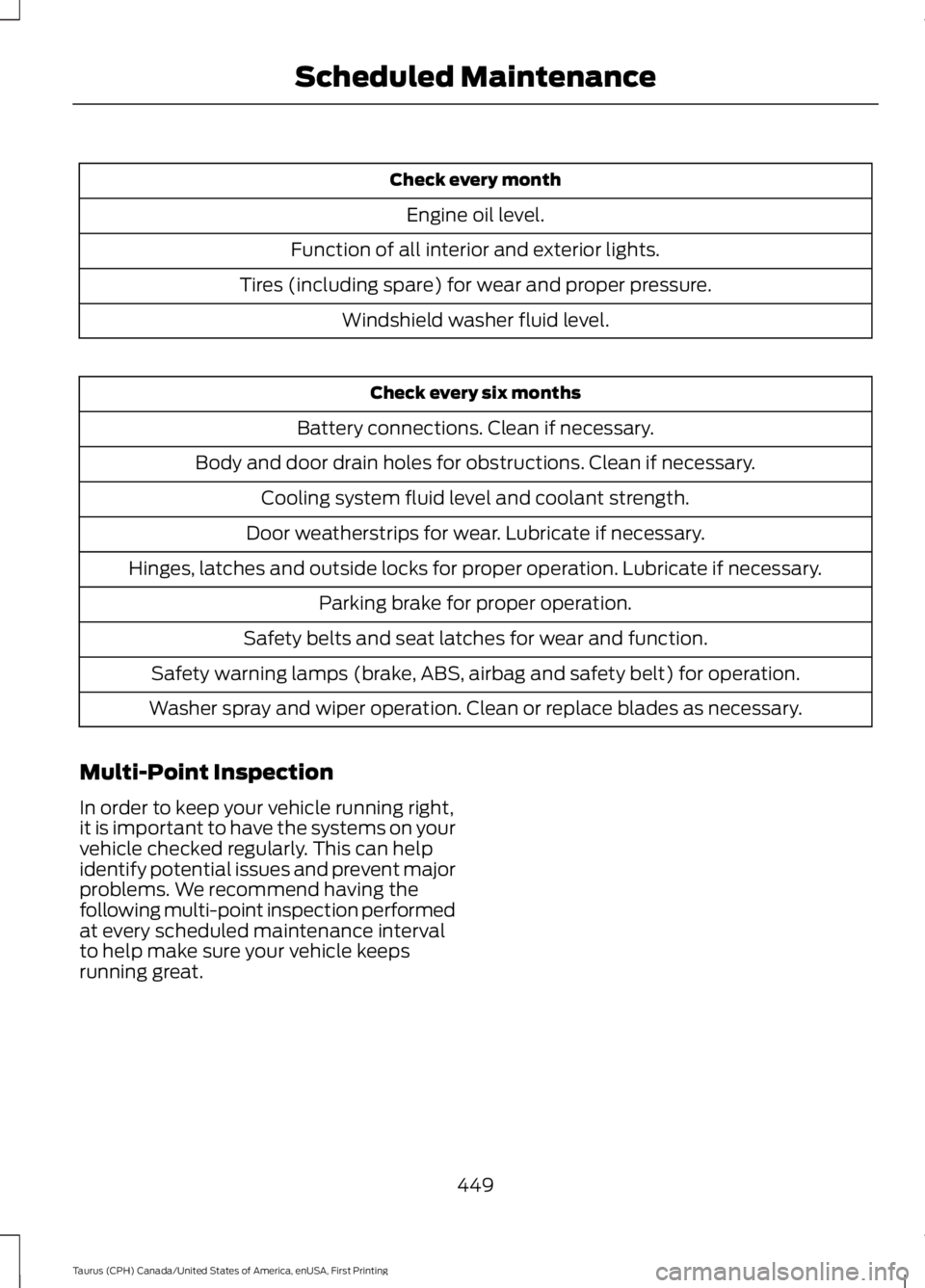
Check every month
Engine oil level.
Function of all interior and exterior lights.
Tires (including spare) for wear and proper pressure.
Windshield washer fluid level.
Check every six months
Battery connections. Clean if necessary.
Body and door drain holes for obstructions. Clean if necessary.
Cooling system fluid level and coolant strength.
Door weatherstrips for wear. Lubricate if necessary.
Hinges, latches and outside locks for proper operation. Lubricate if necessary.
Parking brake for proper operation.
Safety belts and seat latches for wear and function.
Safety warning lamps (brake, ABS, airbag and safety belt) for operation.
Washer spray and wiper operation. Clean or replace blades as necessary.
Multi-Point Inspection
In order to keep your vehicle running right,it is important to have the systems on yourvehicle checked regularly. This can helpidentify potential issues and prevent majorproblems. We recommend having thefollowing multi-point inspection performedat every scheduled maintenance intervalto help make sure your vehicle keepsrunning great.
449
Taurus (CPH) Canada/United States of America, enUSA, First Printing
Scheduled Maintenance
Page 496 of 504
Climate............................................................399Climate Control............................................109Climate Controlled Seats..........................128Cooled Seats........................................................128Heated Seats........................................................128Collision Warning System..........................197PRINCIPLE OF OPERATION............................197Coolant CheckSee: Engine Coolant Check............................243Crash Sensors and Airbag Indicator.......44Creating a MyKey............................................52Programming/Changing ConfigurableSettings...............................................................52Cross Traffic Alert.........................................193False Alerts...........................................................196Switching the System Off and On...............196System Errors.......................................................196System Lights, Messages and AudibleAlerts..................................................................195System Limitations............................................195Using the System...............................................193Cruise Control.................................................68Principle of Operation.......................................178Type 1........................................................................68Type 2.......................................................................68Cruise controlSee: Using Cruise Control................................178Customer Assistance..................................219
D
Data Recording..................................................9Event Data Recording..........................................10Service Data Recording........................................9Daytime Running Lamps.............................74Direction Indicators........................................76Doors and Locks..............................................57Driver Alert......................................................186PRINCIPLE OF OPERATION...........................186USING DRIVER ALERT.....................................186Driver and Passenger Airbags...................39Children and Airbags..........................................39Proper Driver and Front Passenger SeatingAdjustment........................................................39Driving Aids.....................................................186Driving Hints.....................................................211Driving Through Water................................212
DRLSee: Daytime Running Lamps.........................74
E
Economical Driving.......................................211Emission Control System..........................150On-Board Diagnostics (OBD-II).....................151Readiness for Inspection and Maintenance(I/M) Testing.....................................................151End User License Agreement.................465VEHICLE SOFTWARE END USER LICENSEAGREEMENT (EULA) ................................465Engine Block Heater.....................................141Using the Engine Block Heater......................142Engine Coolant Check................................243Adding Coolant..................................................244Coolant Change.................................................245Engine Coolant TemperatureManagement..................................................246Fail-Safe Cooling...............................................245Recycled Coolant...............................................245Severe Climates.................................................245Engine ImmobilizerSee: Passive Anti-Theft System.....................64Engine Oil Check...........................................241Adding Engine Oil...............................................242Engine Oil Dipstick - 2.0LEcoBoost™..................................................241Engine Oil Dipstick - 3.5L Duratec/3.5LEcoboost™..................................................241Engine Specifications - 2.0LEcoBoost™.................................................297Drivebelt Routing...............................................297Engine Specifications - 3.5LDuratec..........................................................297Drivebelt Routing...............................................298Engine Specifications - 3.5LEcoboost™.................................................298Drivebelt Routing...............................................298Entertainment..............................................389AM/FM Radio......................................................390Apps.......................................................................398Bluetooth Stereo or USB.................................397CD (If equipped)................................................396HD Radio™ Information (IfAvailable)........................................................393
493
Taurus (CPH) Canada/United States of America, enUSA, First Printing
Index
Page 503 of 504
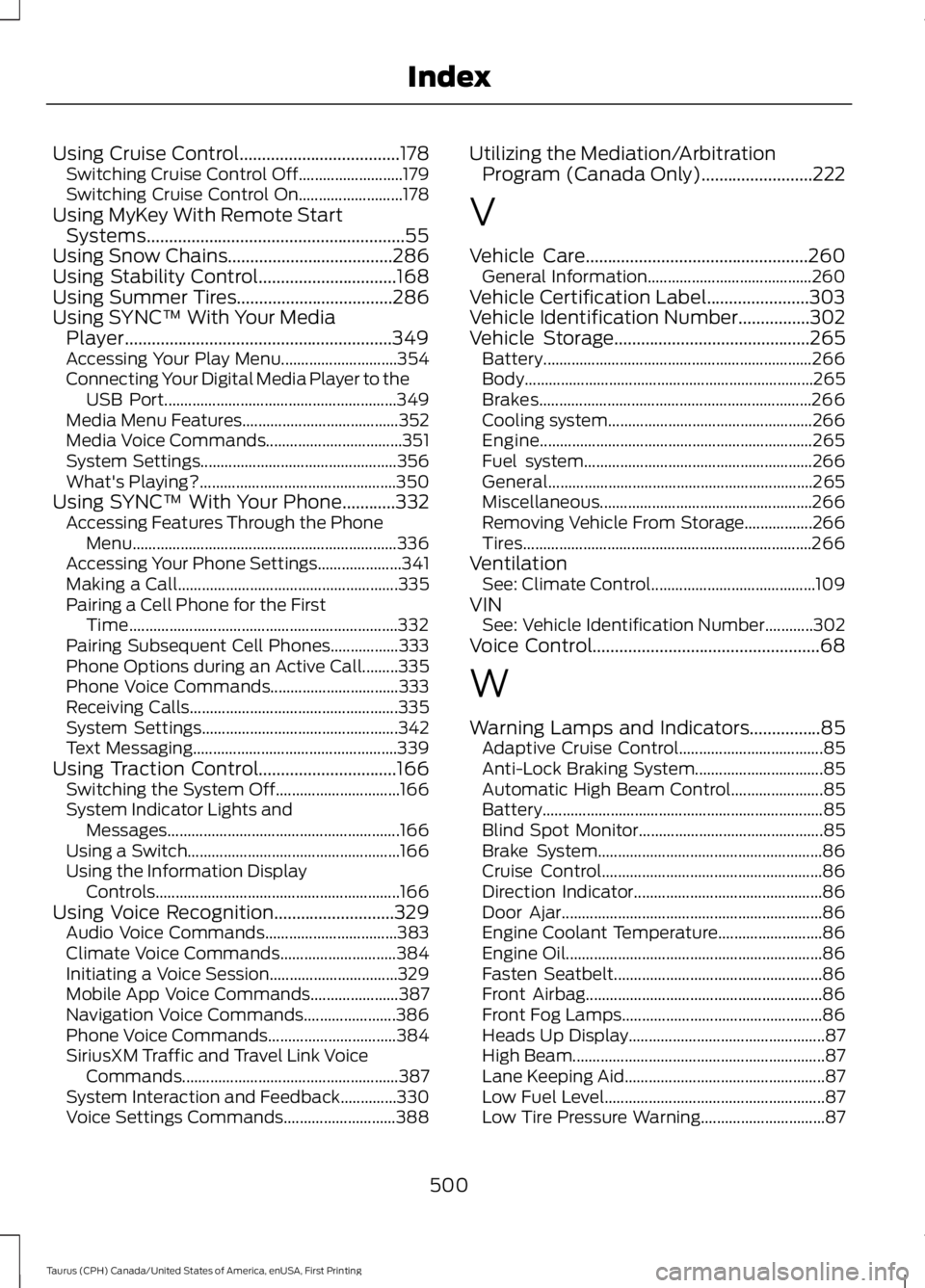
Using Cruise Control....................................178Switching Cruise Control Off..........................179Switching Cruise Control On..........................178Using MyKey With Remote StartSystems..........................................................55Using Snow Chains.....................................286Using Stability Control...............................168Using Summer Tires...................................286Using SYNC™ With Your MediaPlayer............................................................349Accessing Your Play Menu.............................354Connecting Your Digital Media Player to theUSB Port..........................................................349Media Menu Features.......................................352Media Voice Commands..................................351System Settings.................................................356What's Playing?.................................................350Using SYNC™ With Your Phone............332Accessing Features Through the PhoneMenu..................................................................336Accessing Your Phone Settings.....................341Making a Call.......................................................335Pairing a Cell Phone for the FirstTime...................................................................332Pairing Subsequent Cell Phones.................333Phone Options during an Active Call.........335Phone Voice Commands................................333Receiving Calls....................................................335System Settings.................................................342Text Messaging...................................................339Using Traction Control...............................166Switching the System Off...............................166System Indicator Lights andMessages..........................................................166Using a Switch.....................................................166Using the Information DisplayControls.............................................................166Using Voice Recognition...........................329Audio Voice Commands.................................383Climate Voice Commands.............................384Initiating a Voice Session................................329Mobile App Voice Commands......................387Navigation Voice Commands.......................386Phone Voice Commands................................384SiriusXM Traffic and Travel Link VoiceCommands......................................................387System Interaction and Feedback..............330Voice Settings Commands............................388
Utilizing the Mediation/ArbitrationProgram (Canada Only).........................222
V
Vehicle Care..................................................260General Information.........................................260Vehicle Certification Label.......................303Vehicle Identification Number................302Vehicle Storage............................................265Battery...................................................................266Body........................................................................265Brakes....................................................................266Cooling system...................................................266Engine....................................................................265Fuel system.........................................................266General..................................................................265Miscellaneous.....................................................266Removing Vehicle From Storage.................266Tires........................................................................266VentilationSee: Climate Control.........................................109VINSee: Vehicle Identification Number............302Voice Control...................................................68
W
Warning Lamps and Indicators................85Adaptive Cruise Control....................................85Anti-Lock Braking System................................85Automatic High Beam Control.......................85Battery......................................................................85Blind Spot Monitor..............................................85Brake System........................................................86Cruise Control.......................................................86Direction Indicator...............................................86Door Ajar.................................................................86Engine Coolant Temperature..........................86Engine Oil................................................................86Fasten Seatbelt....................................................86Front Airbag...........................................................86Front Fog Lamps..................................................86Heads Up Display.................................................87High Beam...............................................................87Lane Keeping Aid..................................................87Low Fuel Level.......................................................87Low Tire Pressure Warning...............................87
500
Taurus (CPH) Canada/United States of America, enUSA, First Printing
Index