key FORD TAURUS 2017 Workshop Manual
[x] Cancel search | Manufacturer: FORD, Model Year: 2017, Model line: TAURUS, Model: FORD TAURUS 2017Pages: 504, PDF Size: 5.84 MB
Page 380 of 504
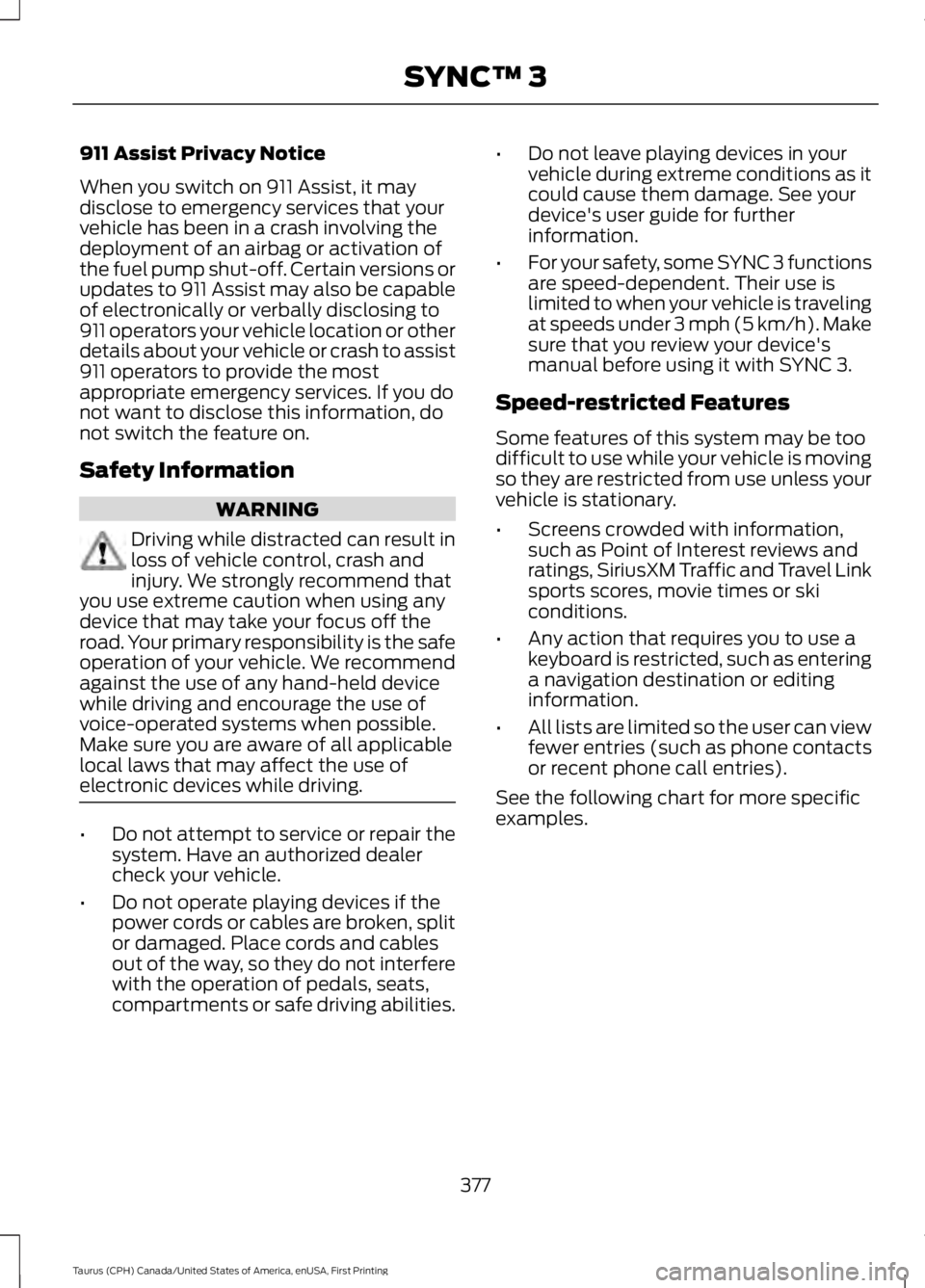
911 Assist Privacy Notice
When you switch on 911 Assist, it maydisclose to emergency services that yourvehicle has been in a crash involving thedeployment of an airbag or activation ofthe fuel pump shut-off. Certain versions orupdates to 911 Assist may also be capableof electronically or verbally disclosing to911 operators your vehicle location or otherdetails about your vehicle or crash to assist911 operators to provide the mostappropriate emergency services. If you donot want to disclose this information, donot switch the feature on.
Safety Information
WARNING
Driving while distracted can result inloss of vehicle control, crash andinjury. We strongly recommend thatyou use extreme caution when using anydevice that may take your focus off theroad. Your primary responsibility is the safeoperation of your vehicle. We recommendagainst the use of any hand-held devicewhile driving and encourage the use ofvoice-operated systems when possible.Make sure you are aware of all applicablelocal laws that may affect the use ofelectronic devices while driving.
•Do not attempt to service or repair thesystem. Have an authorized dealercheck your vehicle.
•Do not operate playing devices if thepower cords or cables are broken, splitor damaged. Place cords and cablesout of the way, so they do not interferewith the operation of pedals, seats,compartments or safe driving abilities.
•Do not leave playing devices in yourvehicle during extreme conditions as itcould cause them damage. See yourdevice's user guide for furtherinformation.
•For your safety, some SYNC 3 functionsare speed-dependent. Their use islimited to when your vehicle is travelingat speeds under 3 mph (5 km/h). Makesure that you review your device'smanual before using it with SYNC 3.
Speed-restricted Features
Some features of this system may be toodifficult to use while your vehicle is movingso they are restricted from use unless yourvehicle is stationary.
•Screens crowded with information,such as Point of Interest reviews andratings, SiriusXM Traffic and Travel Linksports scores, movie times or skiconditions.
•Any action that requires you to use akeyboard is restricted, such as enteringa navigation destination or editinginformation.
•All lists are limited so the user can viewfewer entries (such as phone contactsor recent phone call entries).
See the following chart for more specificexamples.
377
Taurus (CPH) Canada/United States of America, enUSA, First Printing
SYNC™ 3
Page 381 of 504
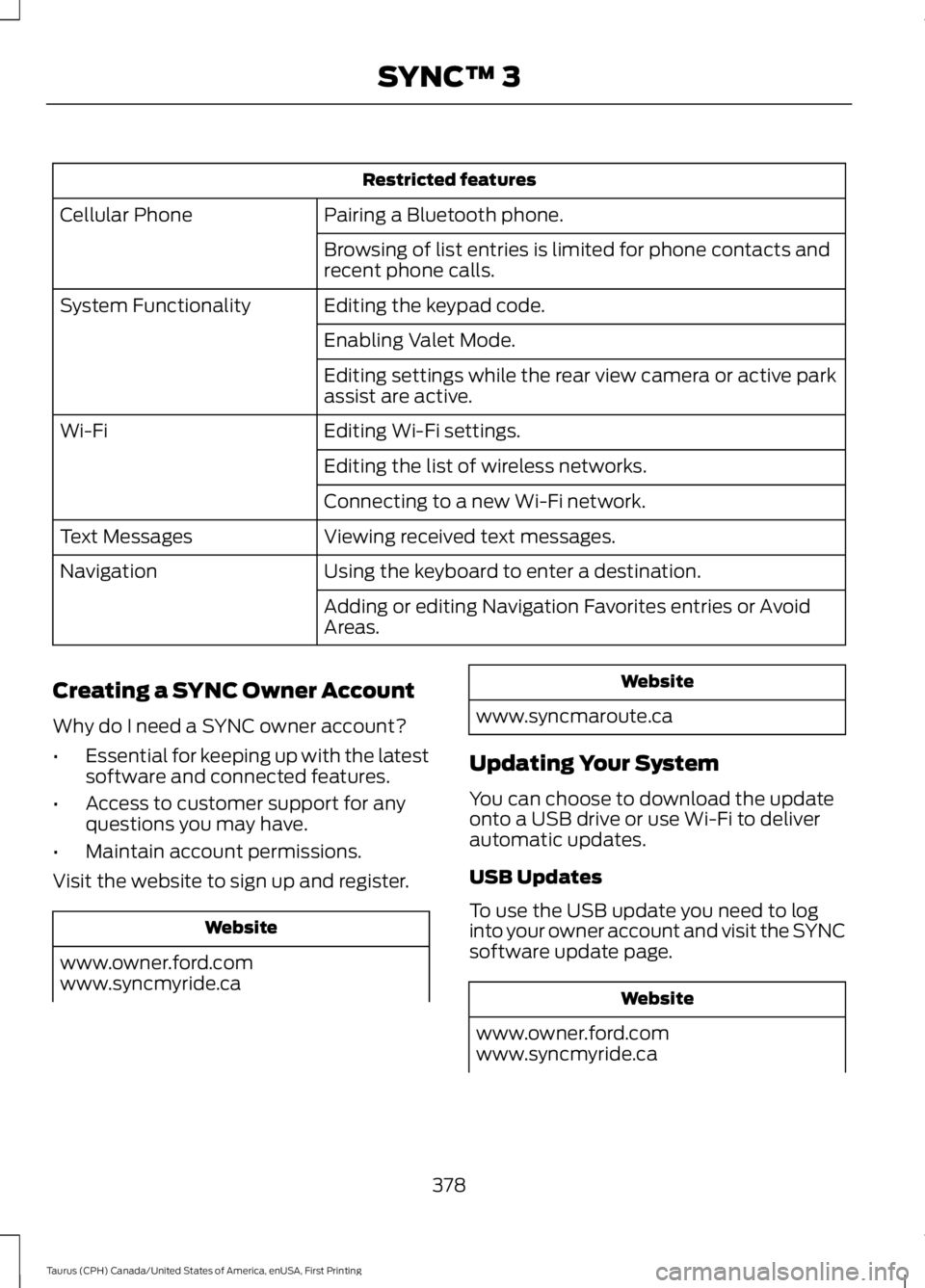
Restricted features
Pairing a Bluetooth phone.Cellular Phone
Browsing of list entries is limited for phone contacts andrecent phone calls.
Editing the keypad code.System Functionality
Enabling Valet Mode.
Editing settings while the rear view camera or active parkassist are active.
Editing Wi-Fi settings.Wi-Fi
Editing the list of wireless networks.
Connecting to a new Wi-Fi network.
Viewing received text messages.Text Messages
Using the keyboard to enter a destination.Navigation
Adding or editing Navigation Favorites entries or AvoidAreas.
Creating a SYNC Owner Account
Why do I need a SYNC owner account?
•Essential for keeping up with the latestsoftware and connected features.
•Access to customer support for anyquestions you may have.
•Maintain account permissions.
Visit the website to sign up and register.
Website
www.owner.ford.comwww.syncmyride.ca
Website
www.syncmaroute.ca
Updating Your System
You can choose to download the updateonto a USB drive or use Wi-Fi to deliverautomatic updates.
USB Updates
To use the USB update you need to loginto your owner account and visit the SYNCsoftware update page.
Website
www.owner.ford.comwww.syncmyride.ca
378
Taurus (CPH) Canada/United States of America, enUSA, First Printing
SYNC™ 3
Page 396 of 504
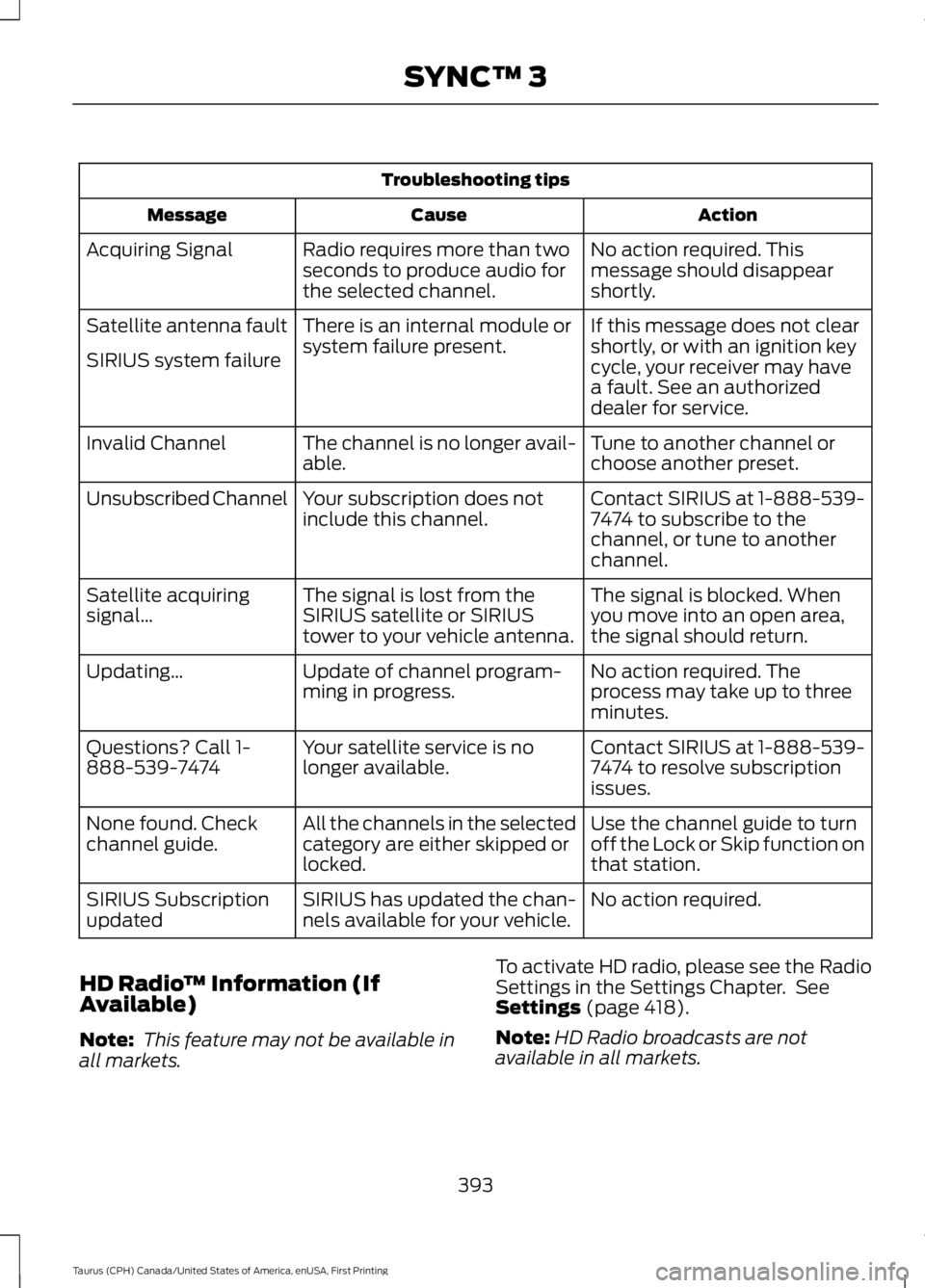
Troubleshooting tips
ActionCauseMessage
No action required. Thismessage should disappearshortly.
Radio requires more than twoseconds to produce audio forthe selected channel.
Acquiring Signal
If this message does not clearshortly, or with an ignition keycycle, your receiver may havea fault. See an authorizeddealer for service.
There is an internal module orsystem failure present.Satellite antenna fault
SIRIUS system failure
Tune to another channel orchoose another preset.The channel is no longer avail-able.Invalid Channel
Contact SIRIUS at 1-888-539-7474 to subscribe to thechannel, or tune to anotherchannel.
Your subscription does notinclude this channel.Unsubscribed Channel
The signal is blocked. Whenyou move into an open area,the signal should return.
The signal is lost from theSIRIUS satellite or SIRIUStower to your vehicle antenna.
Satellite acquiringsignal…
No action required. Theprocess may take up to threeminutes.
Update of channel program-ming in progress.Updating…
Contact SIRIUS at 1-888-539-7474 to resolve subscriptionissues.
Your satellite service is nolonger available.Questions? Call 1-888-539-7474
Use the channel guide to turnoff the Lock or Skip function onthat station.
All the channels in the selectedcategory are either skipped orlocked.
None found. Checkchannel guide.
No action required.SIRIUS has updated the chan-nels available for your vehicle.SIRIUS Subscriptionupdated
HD Radio™ Information (IfAvailable)
Note: This feature may not be available inall markets.
To activate HD radio, please see the RadioSettings in the Settings Chapter. SeeSettings (page 418).
Note:HD Radio broadcasts are notavailable in all markets.
393
Taurus (CPH) Canada/United States of America, enUSA, First Printing
SYNC™ 3
Page 407 of 504
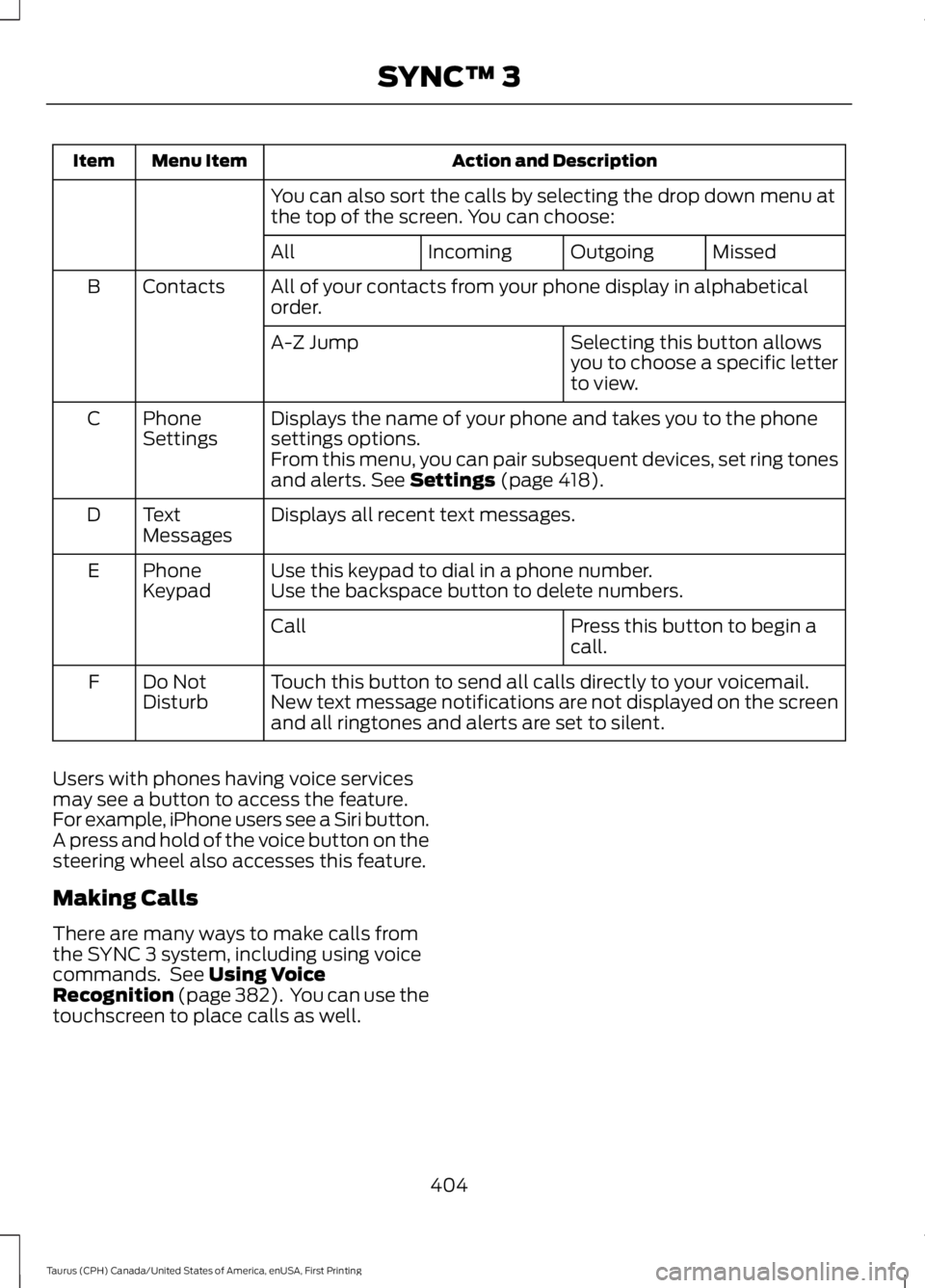
Action and DescriptionMenu ItemItem
You can also sort the calls by selecting the drop down menu atthe top of the screen. You can choose:
MissedOutgoingIncomingAll
All of your contacts from your phone display in alphabeticalorder.ContactsB
Selecting this button allowsyou to choose a specific letterto view.
A-Z Jump
Displays the name of your phone and takes you to the phonesettings options.PhoneSettingsC
From this menu, you can pair subsequent devices, set ring tonesand alerts. See Settings (page 418).
Displays all recent text messages.TextMessagesD
Use this keypad to dial in a phone number.PhoneKeypadEUse the backspace button to delete numbers.
Press this button to begin acall.Call
Touch this button to send all calls directly to your voicemail.New text message notifications are not displayed on the screenand all ringtones and alerts are set to silent.
Do NotDisturbF
Users with phones having voice servicesmay see a button to access the feature.For example, iPhone users see a Siri button.A press and hold of the voice button on thesteering wheel also accesses this feature.
Making Calls
There are many ways to make calls fromthe SYNC 3 system, including using voicecommands. See Using VoiceRecognition (page 382). You can use thetouchscreen to place calls as well.
404
Taurus (CPH) Canada/United States of America, enUSA, First Printing
SYNC™ 3
Page 408 of 504
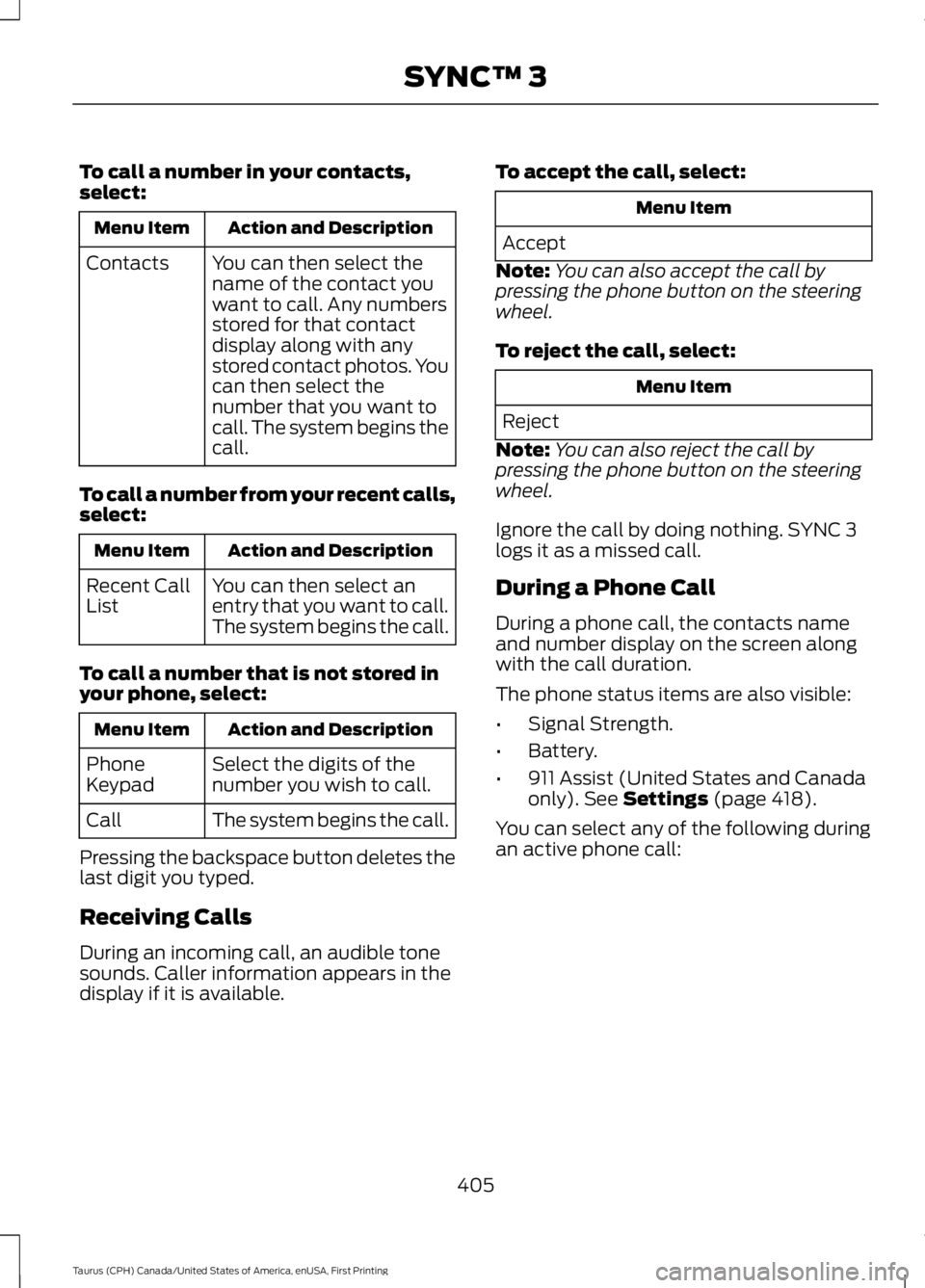
To call a number in your contacts,select:
Action and DescriptionMenu Item
You can then select thename of the contact youwant to call. Any numbersstored for that contactdisplay along with anystored contact photos. Youcan then select thenumber that you want tocall. The system begins thecall.
Contacts
To call a number from your recent calls,select:
Action and DescriptionMenu Item
You can then select anentry that you want to call.The system begins the call.
Recent CallList
To call a number that is not stored inyour phone, select:
Action and DescriptionMenu Item
Select the digits of thenumber you wish to call.PhoneKeypad
The system begins the call.Call
Pressing the backspace button deletes thelast digit you typed.
Receiving Calls
During an incoming call, an audible tonesounds. Caller information appears in thedisplay if it is available.
To accept the call, select:
Menu Item
Accept
Note:You can also accept the call bypressing the phone button on the steeringwheel.
To reject the call, select:
Menu Item
Reject
Note:You can also reject the call bypressing the phone button on the steeringwheel.
Ignore the call by doing nothing. SYNC 3logs it as a missed call.
During a Phone Call
During a phone call, the contacts nameand number display on the screen alongwith the call duration.
The phone status items are also visible:
•Signal Strength.
•Battery.
•911 Assist (United States and Canadaonly). See Settings (page 418).
You can select any of the following duringan active phone call:
405
Taurus (CPH) Canada/United States of America, enUSA, First Printing
SYNC™ 3
Page 409 of 504
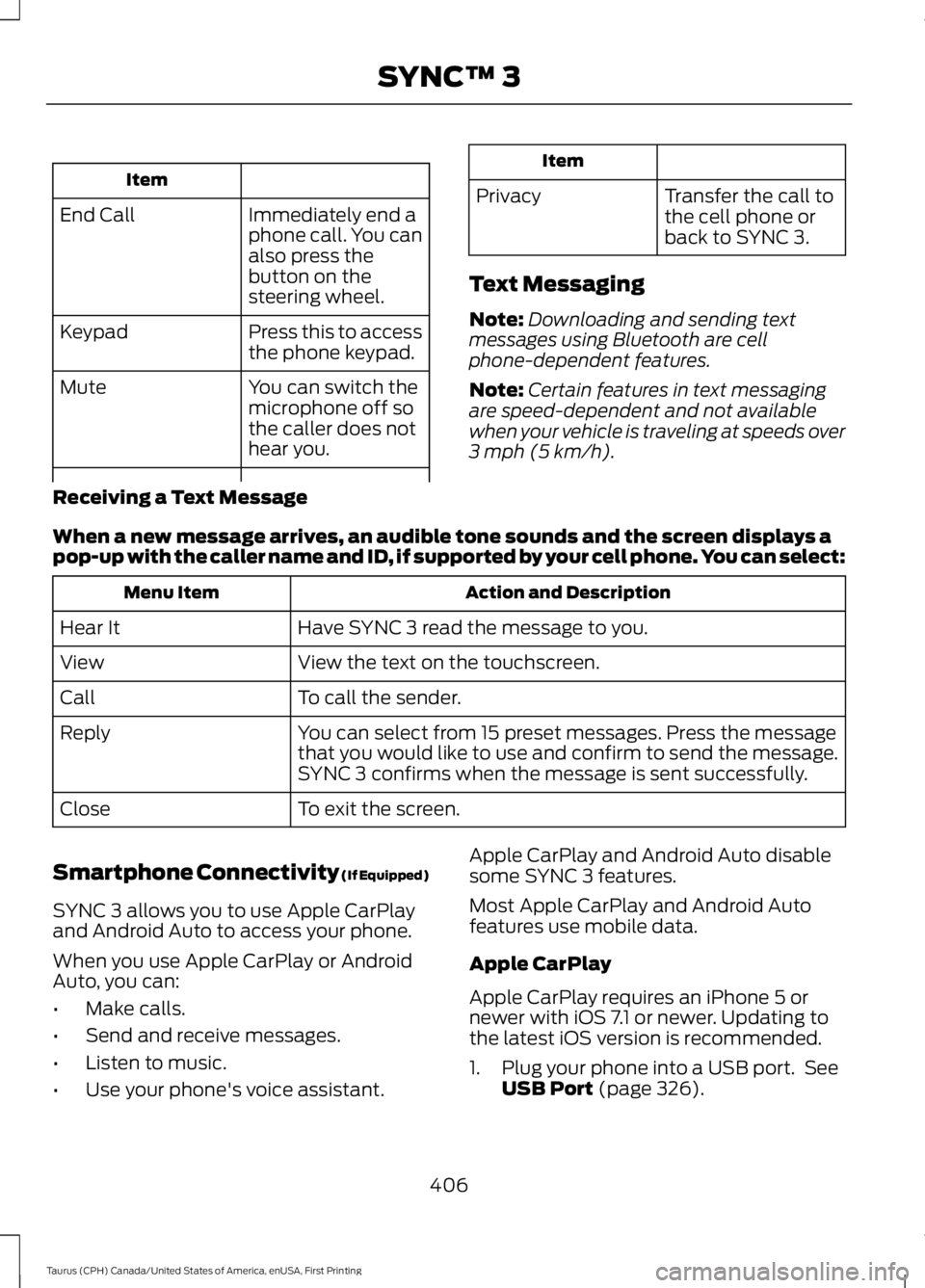
Item
Immediately end aphone call. You canalso press thebutton on thesteering wheel.
End Call
Press this to accessthe phone keypad.Keypad
You can switch themicrophone off sothe caller does nothear you.
Mute
Item
PrivacyTransfer the call tothe cell phone orback to SYNC 3.
Text Messaging
Note:Downloading and sending textmessages using Bluetooth are cellphone-dependent features.
Note:Certain features in text messagingare speed-dependent and not availablewhen your vehicle is traveling at speeds over3 mph (5 km/h).
Receiving a Text Message
When a new message arrives, an audible tone sounds and the screen displays apop-up with the caller name and ID, if supported by your cell phone. You can select:
Action and DescriptionMenu Item
Have SYNC 3 read the message to you.Hear It
View the text on the touchscreen.View
To call the sender.Call
You can select from 15 preset messages. Press the messagethat you would like to use and confirm to send the message.SYNC 3 confirms when the message is sent successfully.
Reply
To exit the screen.Close
Smartphone Connectivity (If Equipped)
SYNC 3 allows you to use Apple CarPlayand Android Auto to access your phone.
When you use Apple CarPlay or AndroidAuto, you can:
•Make calls.
•Send and receive messages.
•Listen to music.
•Use your phone's voice assistant.
Apple CarPlay and Android Auto disablesome SYNC 3 features.
Most Apple CarPlay and Android Autofeatures use mobile data.
Apple CarPlay
Apple CarPlay requires an iPhone 5 ornewer with iOS 7.1 or newer. Updating tothe latest iOS version is recommended.
1. Plug your phone into a USB port. SeeUSB Port (page 326).
406
Taurus (CPH) Canada/United States of America, enUSA, First Printing
SYNC™ 3
Page 432 of 504
Door Keypad Code
Select this button to add or erase apersonal door keypad code. To add orerase a personal code, you first need to
enter the five-digit factory set code. Youcan find this code on the owner's walletcard in the glove box or from yourauthorized dealer.
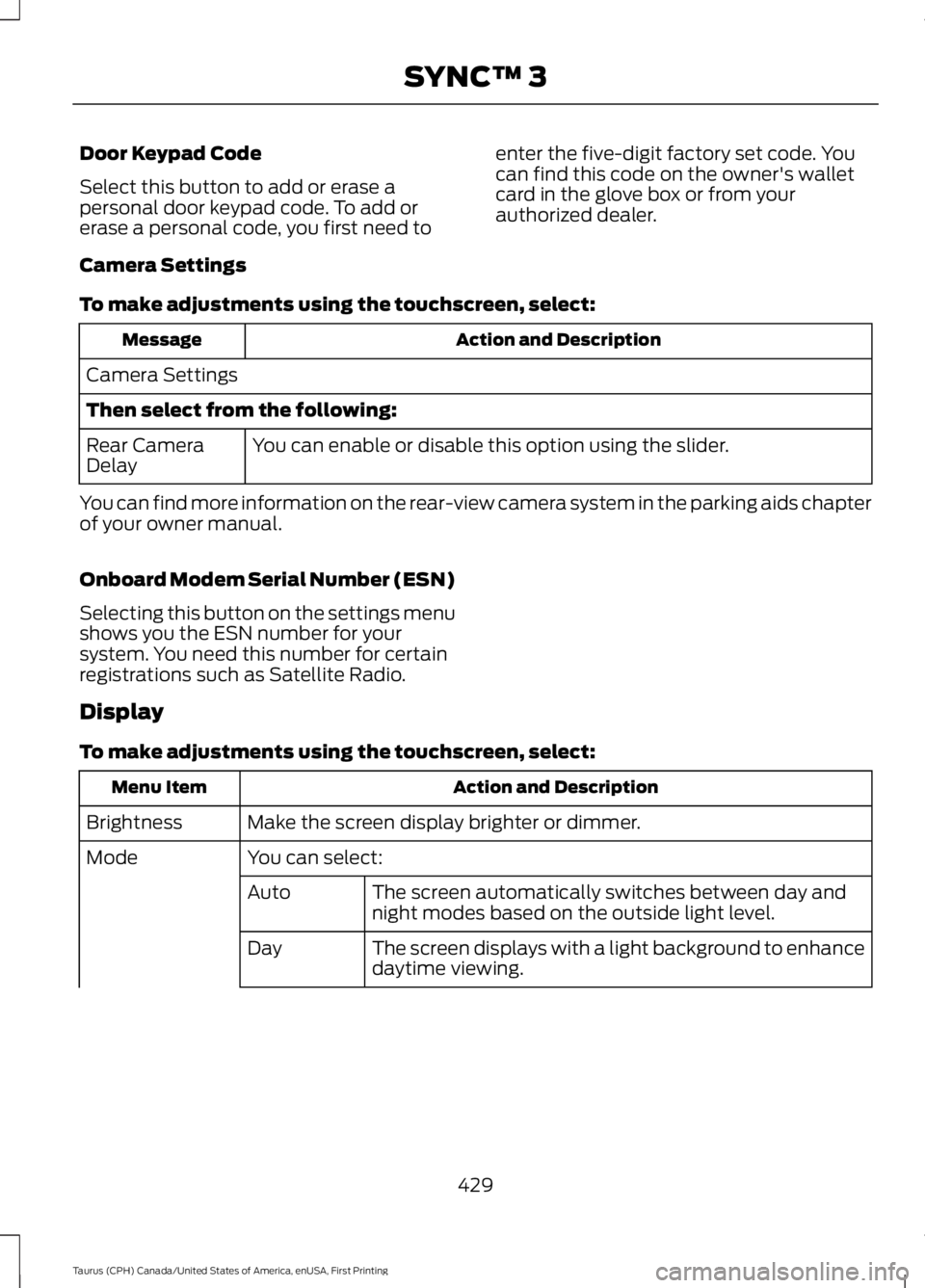
Camera Settings
To make adjustments using the touchscreen, select:
Action and DescriptionMessage
Camera Settings
Then select from the following:
You can enable or disable this option using the slider.Rear CameraDelay
You can find more information on the rear-view camera system in the parking aids chapterof your owner manual.
Onboard Modem Serial Number (ESN)
Selecting this button on the settings menushows you the ESN number for yoursystem. You need this number for certainregistrations such as Satellite Radio.
Display
To make adjustments using the touchscreen, select:
Action and DescriptionMenu Item
Make the screen display brighter or dimmer.Brightness
You can select:Mode
The screen automatically switches between day andnight modes based on the outside light level.Auto
The screen displays with a light background to enhancedaytime viewing.Day
429
Taurus (CPH) Canada/United States of America, enUSA, First Printing
SYNC™ 3
Page 443 of 504
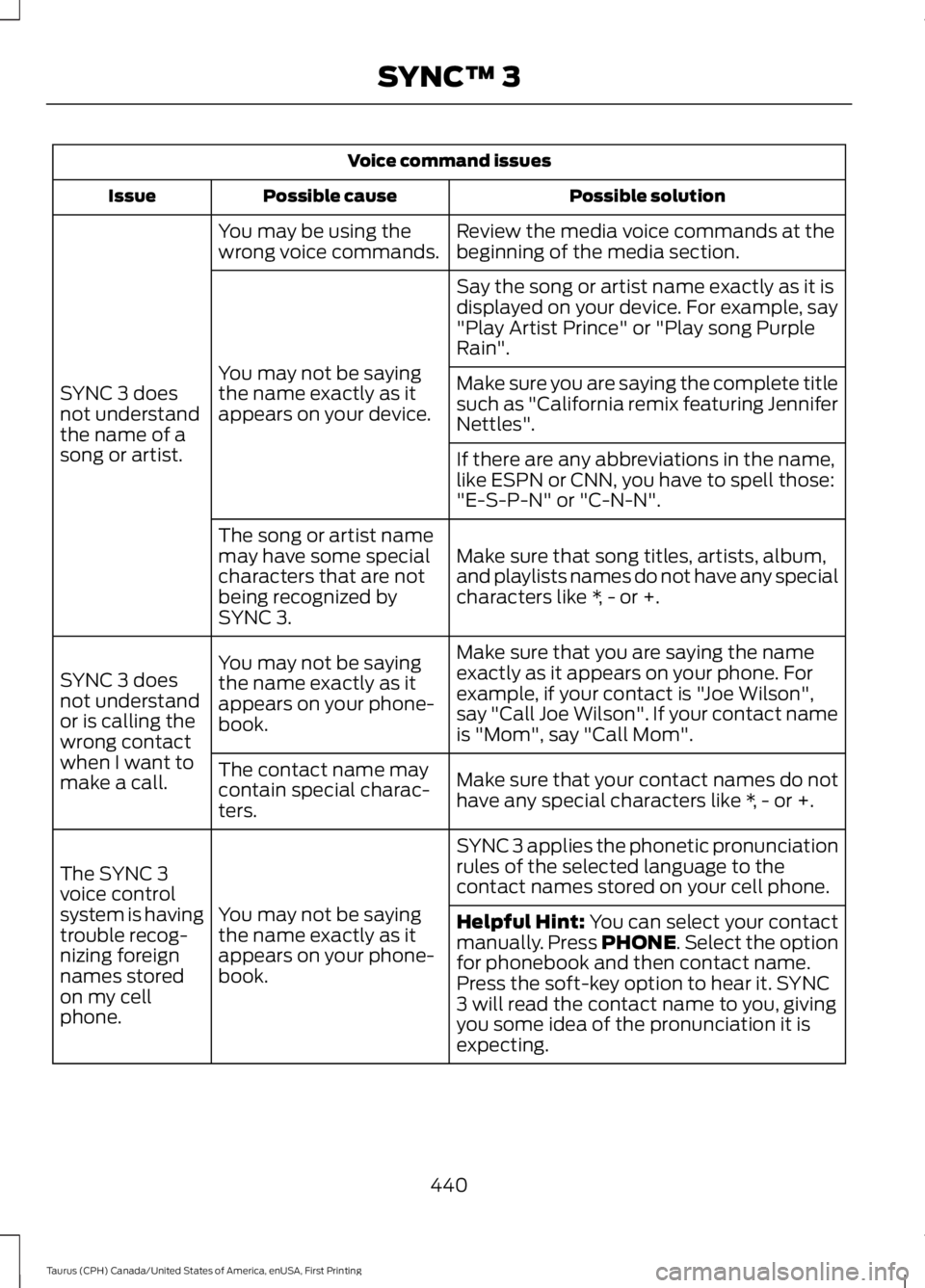
Voice command issues
Possible solutionPossible causeIssue
Review the media voice commands at thebeginning of the media section.You may be using thewrong voice commands.
SYNC 3 doesnot understandthe name of asong or artist.
Say the song or artist name exactly as it isdisplayed on your device. For example, say"Play Artist Prince" or "Play song PurpleRain".
You may not be sayingthe name exactly as itappears on your device.
Make sure you are saying the complete titlesuch as "California remix featuring JenniferNettles".
If there are any abbreviations in the name,like ESPN or CNN, you have to spell those:"E-S-P-N" or "C-N-N".
Make sure that song titles, artists, album,and playlists names do not have any specialcharacters like *, - or +.
The song or artist namemay have some specialcharacters that are notbeing recognized bySYNC 3.
Make sure that you are saying the nameexactly as it appears on your phone. Forexample, if your contact is "Joe Wilson",say "Call Joe Wilson". If your contact nameis "Mom", say "Call Mom".
You may not be sayingthe name exactly as itappears on your phone-book.
SYNC 3 doesnot understandor is calling thewrong contactwhen I want tomake a call.Make sure that your contact names do nothave any special characters like *, - or +.
The contact name maycontain special charac-ters.
SYNC 3 applies the phonetic pronunciationrules of the selected language to thecontact names stored on your cell phone.
You may not be sayingthe name exactly as itappears on your phone-book.
The SYNC 3voice controlsystem is havingtrouble recog-nizing foreignnames storedon my cellphone.
Helpful Hint: You can select your contactmanually. Press PHONE. Select the optionfor phonebook and then contact name.Press the soft-key option to hear it. SYNC3 will read the contact name to you, givingyou some idea of the pronunciation it isexpecting.
440
Taurus (CPH) Canada/United States of America, enUSA, First Printing
SYNC™ 3
Page 494 of 504
A
A/CSee: Climate Control.........................................109About This Manual...........................................7ABSSee: Brakes...........................................................164ABS driving hintsSee: Hints on Driving With Anti-LockBrakes................................................................164Accessories....................................................443Exterior Style.......................................................443Interior Style........................................................443Lifestyle.................................................................443Peace of Mind.....................................................443AccessoriesSee: Replacement PartsRecommendation............................................12ACCSee: Using Adaptive Cruise Control.............179Active Park Assist...........................................171Automatic Steering into ParkingSpace..................................................................173Deactivating the Park Assist Feature..........173Troubleshooting the System..........................174Using Active Park Assist...................................172Adjusting the Headlamps.........................255Horizontal Aim Adjustment...........................256Vertical Aim Adjustment.................................255Adjusting the Pedals....................................69Adjusting the Steering Wheel - VehiclesWith: Manual Adjustable SteeringColumn...........................................................66Adjusting the Steering Wheel - VehiclesWith: Power Adjustable SteeringColumn...........................................................66Easy Entry and Exit Feature..............................67End of Travel Position.........................................67Memory Feature....................................................67Airbag Disposal...............................................45Air ConditioningSee: Climate Control.........................................109Air FilterSee: Changing the Engine Air Filter.............259AlarmSee: Anti-Theft Alarm........................................65All-Wheel Drive..............................................157
Anti-Theft Alarm............................................65Arming the Alarm.................................................65Disarming the Alarm...........................................65Appendices....................................................465Apps..................................................................415...................................................................................415SiriusXM Traffic and Travel Link....................417At a Glance........................................................16Audible Warnings and Indicators.............88Headlamps On Warning Chime.....................88Key in Ignition Warning Chime........................88Keyless Warning Alert........................................88Parking Brake On Warning Chime.................88Audio Control...................................................67MEDIA.......................................................................67Seek, Next or Previous........................................67Audio Input Jack...........................................325Audio System.................................................315General Information..........................................315Audio Unit - Vehicles With: AM/FM/CD....................................................................316Menu Structure...................................................318Audio Unit - Vehicles With: PremiumAM/FM/CD..................................................320Audio Unit - Vehicles With: Sony AM/FM/CD............................................................321Autolamps.........................................................73Windshield Wiper ActivatedHeadlamps.........................................................73Automatic Climate Control - VehiclesWith: Premium AM/FM/CD......................111Automatic Climate Control - VehiclesWith: Sony Audio System........................113Automatic Climate Control - VehiclesWithout: Touchscreen Display..............110Automatic High Beam Control..................75Activating the System.........................................75Manually Overriding the System....................76Automatic Transmission............................153Automatic Transmission AdaptiveLearning.............................................................155Brake-Shift Interlock.........................................154If Your Vehicle Gets Stuck In Mud orSnow...................................................................155SelectShift Automatic™Transmission...................................................153Understanding the Positions of YourAutomatic Transmission.............................153
491
Taurus (CPH) Canada/United States of America, enUSA, First Printing
Index
Page 495 of 504
Automatic Transmission Fluid Check -2.0L EcoBoost™........................................2476F35 Transmission............................................247Automatic Transmission Fluid Check -3.5L Duratec/3.5L Ecoboost™............2476F50/6F55 Transmission...............................247Autowipers........................................................70Auxiliary Power Points................................13512 Volt DC Power Point.....................................135Locations...............................................................135AWDSee: All-Wheel Drive..........................................157
B
BatterySee: Changing the 12V Battery......................252Blind Spot Information System...............191Switching the System Off and On...............193System Errors.......................................................193System Limitations............................................193Using the System................................................192Bonnet LockSee: Opening and Closing the Hood..........236Booster Seats..................................................25Types of Booster Seats......................................25Brake Fluid Check.........................................251Brakes...............................................................164General Information..........................................164Breaking-In.......................................................211Bulb Specification Chart...........................257
C
Cabin Air Filter.................................................117California Proposition 65..............................11Capacities and Specifications - 2.0LEcoBoost™................................................304Specifications.....................................................304Capacities and Specifications - 3.5LDuratec.........................................................307Specifications.....................................................308Capacities and Specifications - 3.5LEcoboost™...................................................311Specifications........................................................311Capacities and Specifications................297Cargo Nets.....................................................200
Car WashSee: Cleaning the Exterior..............................260Center Console..............................................136Changing a Bulb...........................................256Front Fog Lamp..................................................256High-Intensity DischargeHeadlamps.....................................................256LED Lamps...........................................................256License Plate Lamp..........................................256Changing a Fuse...........................................234Fuses......................................................................234Changing a Road Wheel............................291Dissimilar Spare Wheel and Tire AssemblyInformation......................................................291Tire Change Procedure....................................292Changing the 12V Battery.........................252Battery Management System.......................253Changing the Engine Air Filter................259Changing the Wiper Blades.....................254Changing the Windshield WiperBlades...............................................................254Checking MyKey System Status...............54Checking the Wiper Blades.....................254Child Restraint and SeatbeltMaintenance.................................................35Child Restraint Positioning..........................27Child Safety.......................................................18General Information.............................................18Child Safety Locks.........................................28Left-Hand Side......................................................29Right-Hand Side...................................................29Cleaning Leather Seats.............................264Cleaning Products......................................260Materials...............................................................260Cleaning the Engine....................................262Cleaning the Exterior.................................260Exterior Chrome Parts.......................................261Exterior Plastic Parts.........................................261Stripes or Graphics.............................................261Underbody............................................................261Under Hood..........................................................261Cleaning the Instrument Panel andInstrument Cluster Lens.........................263Cleaning the Interior...................................263Cleaning the Wheels..................................264Cleaning the Windows and WiperBlades...........................................................262Clearing All MyKeys.......................................53
492
Taurus (CPH) Canada/United States of America, enUSA, First Printing
Index