steering wheel FORD TAURUS 2017 Workshop Manual
[x] Cancel search | Manufacturer: FORD, Model Year: 2017, Model line: TAURUS, Model: FORD TAURUS 2017Pages: 504, PDF Size: 5.84 MB
Page 385 of 504
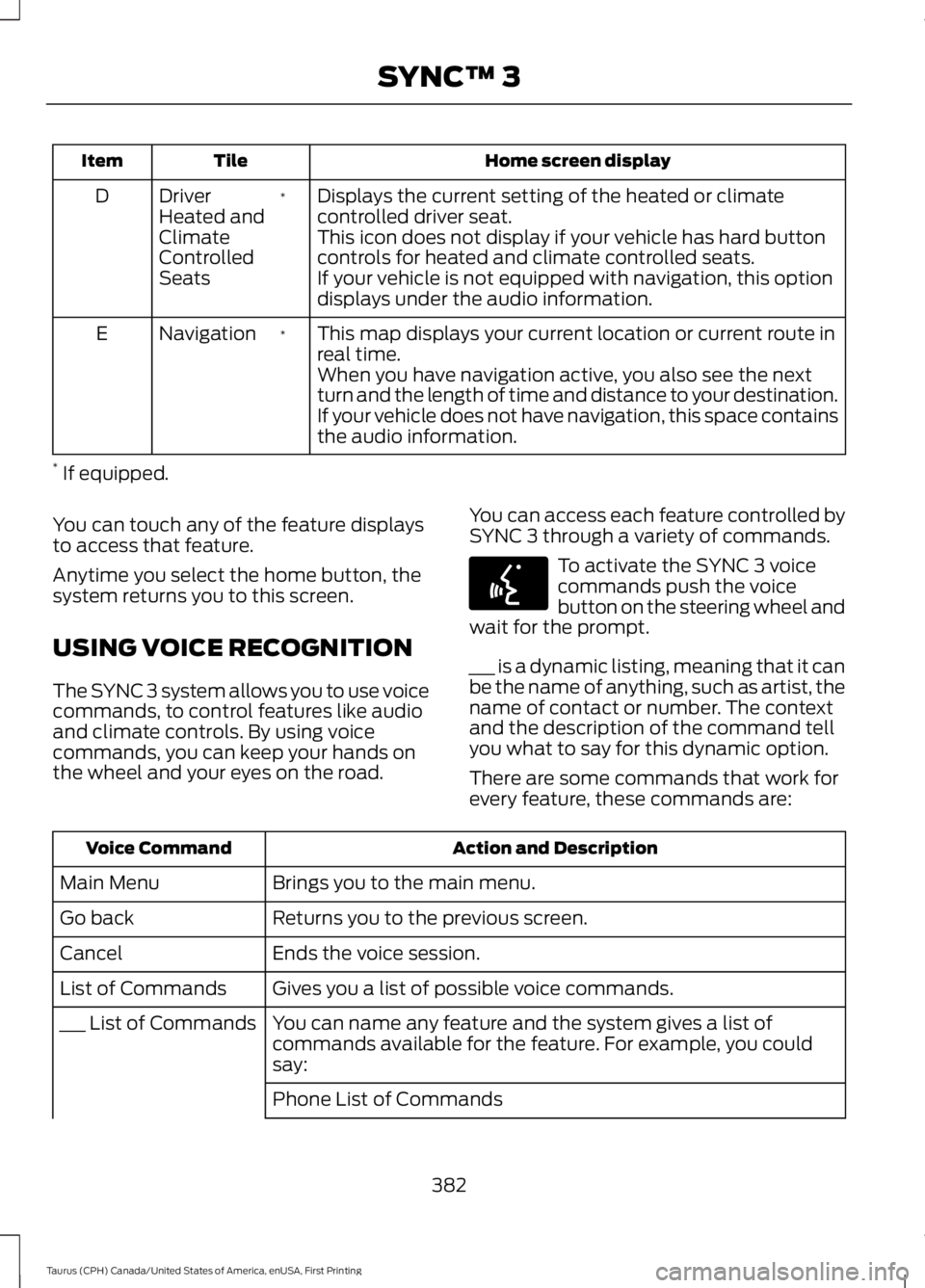
Home screen displayTileItem
Displays the current setting of the heated or climatecontrolled driver seat.*DriverHeated andClimateControlledSeats
D
This icon does not display if your vehicle has hard buttoncontrols for heated and climate controlled seats.If your vehicle is not equipped with navigation, this optiondisplays under the audio information.
This map displays your current location or current route inreal time.*NavigationE
When you have navigation active, you also see the nextturn and the length of time and distance to your destination.If your vehicle does not have navigation, this space containsthe audio information.
* If equipped.
You can touch any of the feature displaysto access that feature.
Anytime you select the home button, thesystem returns you to this screen.
USING VOICE RECOGNITION
The SYNC 3 system allows you to use voicecommands, to control features like audioand climate controls. By using voicecommands, you can keep your hands onthe wheel and your eyes on the road.
You can access each feature controlled bySYNC 3 through a variety of commands.
To activate the SYNC 3 voicecommands push the voicebutton on the steering wheel andwait for the prompt.
___ is a dynamic listing, meaning that it canbe the name of anything, such as artist, thename of contact or number. The contextand the description of the command tellyou what to say for this dynamic option.
There are some commands that work forevery feature, these commands are:
Action and DescriptionVoice Command
Brings you to the main menu.Main Menu
Returns you to the previous screen.Go back
Ends the voice session.Cancel
Gives you a list of possible voice commands.List of Commands
You can name any feature and the system gives a list ofcommands available for the feature. For example, you couldsay:
___ List of Commands
Phone List of Commands
382
Taurus (CPH) Canada/United States of America, enUSA, First Printing
SYNC™ 3E142599
Page 403 of 504
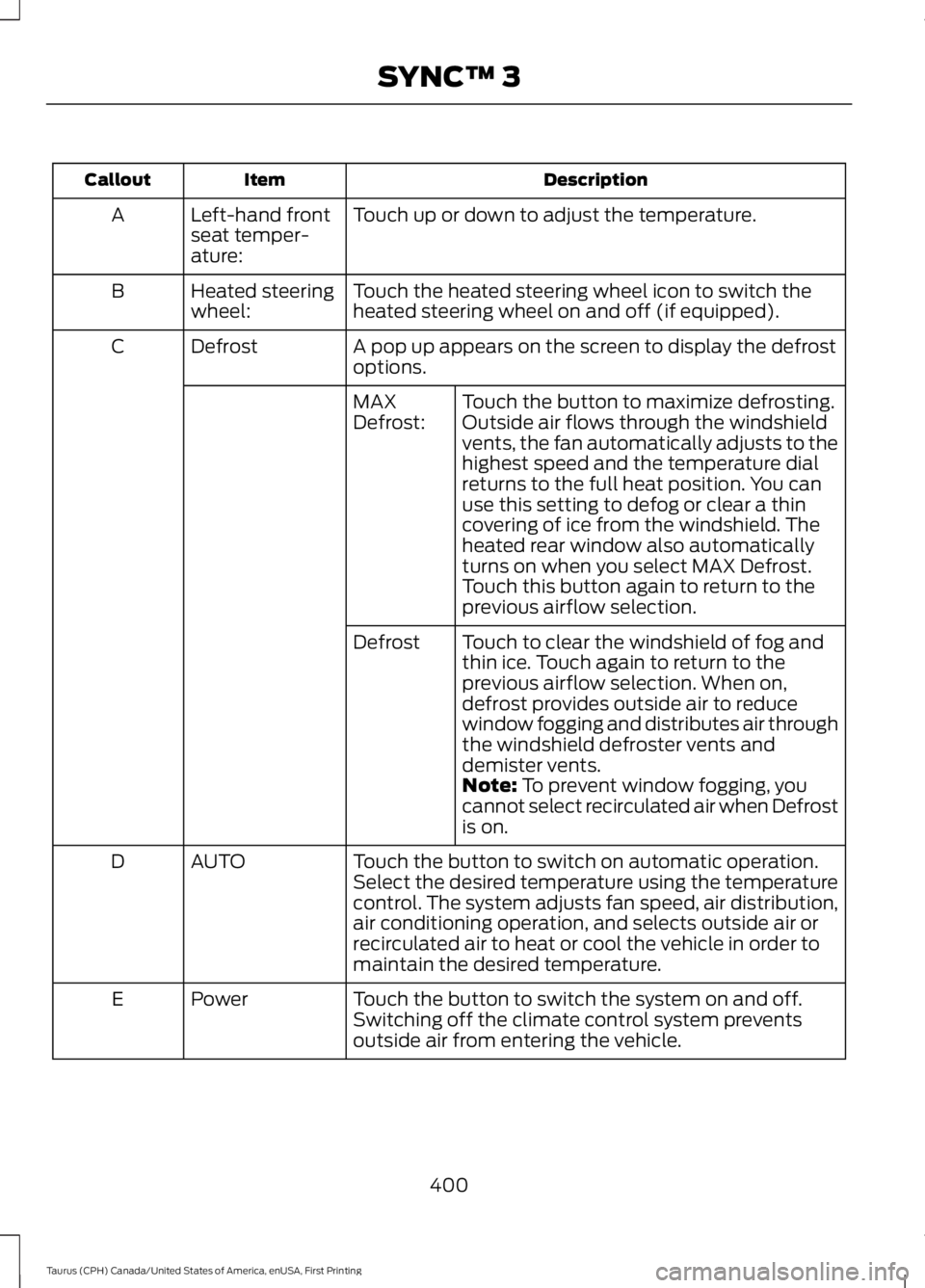
DescriptionItemCallout
Touch up or down to adjust the temperature.Left-hand frontseat temper-ature:
A
Touch the heated steering wheel icon to switch theheated steering wheel on and off (if equipped).Heated steeringwheel:B
A pop up appears on the screen to display the defrostoptions.DefrostC
Touch the button to maximize defrosting.Outside air flows through the windshieldvents, the fan automatically adjusts to thehighest speed and the temperature dialreturns to the full heat position. You canuse this setting to defog or clear a thincovering of ice from the windshield. Theheated rear window also automaticallyturns on when you select MAX Defrost.Touch this button again to return to theprevious airflow selection.
MAXDefrost:
Touch to clear the windshield of fog andthin ice. Touch again to return to theprevious airflow selection. When on,defrost provides outside air to reducewindow fogging and distributes air throughthe windshield defroster vents anddemister vents.
Defrost
Note: To prevent window fogging, youcannot select recirculated air when Defrostis on.
Touch the button to switch on automatic operation.Select the desired temperature using the temperaturecontrol. The system adjusts fan speed, air distribution,air conditioning operation, and selects outside air orrecirculated air to heat or cool the vehicle in order tomaintain the desired temperature.
AUTOD
Touch the button to switch the system on and off.Switching off the climate control system preventsoutside air from entering the vehicle.
PowerE
400
Taurus (CPH) Canada/United States of America, enUSA, First Printing
SYNC™ 3
Page 407 of 504
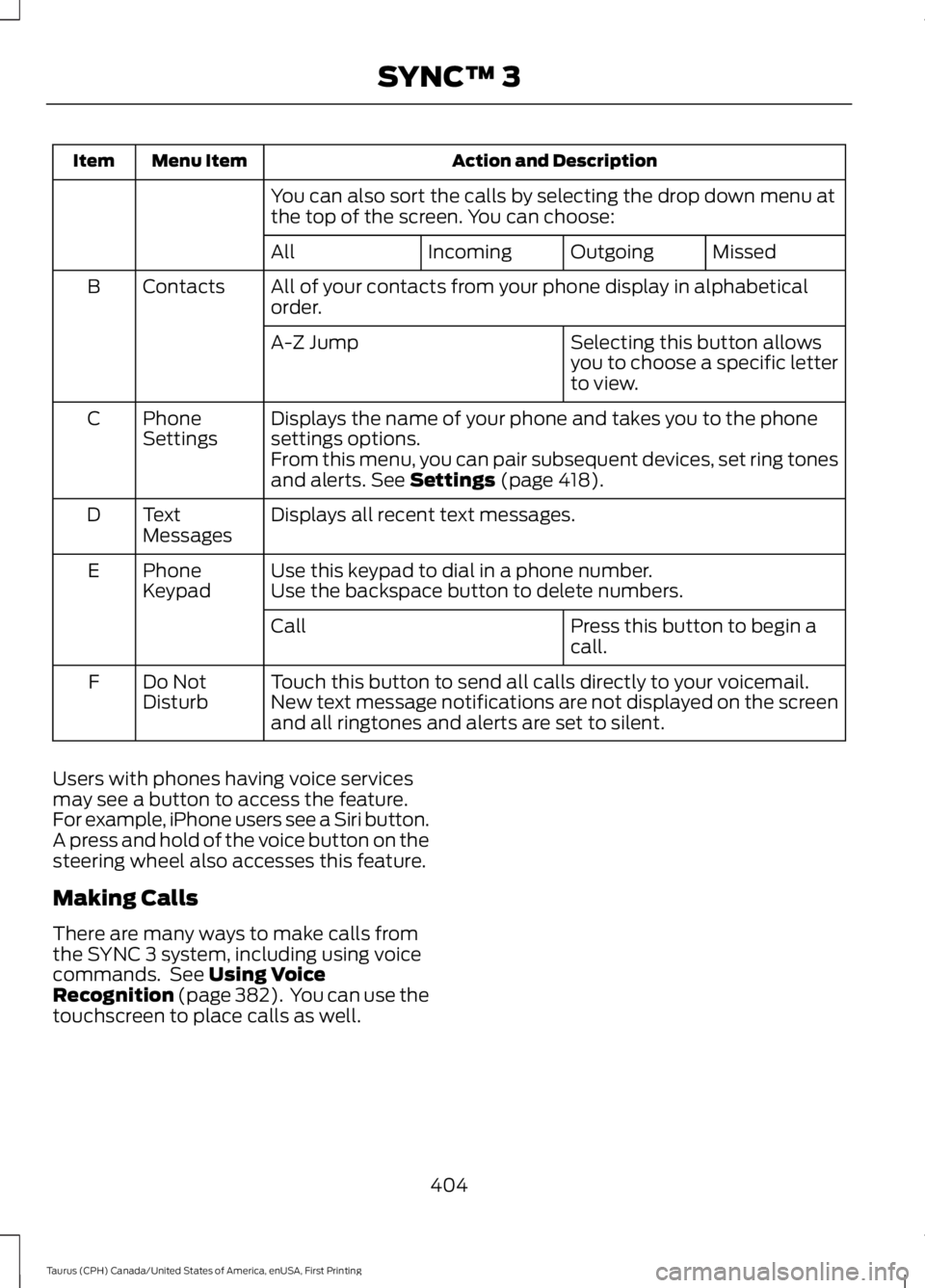
Action and DescriptionMenu ItemItem
You can also sort the calls by selecting the drop down menu atthe top of the screen. You can choose:
MissedOutgoingIncomingAll
All of your contacts from your phone display in alphabeticalorder.ContactsB
Selecting this button allowsyou to choose a specific letterto view.
A-Z Jump
Displays the name of your phone and takes you to the phonesettings options.PhoneSettingsC
From this menu, you can pair subsequent devices, set ring tonesand alerts. See Settings (page 418).
Displays all recent text messages.TextMessagesD
Use this keypad to dial in a phone number.PhoneKeypadEUse the backspace button to delete numbers.
Press this button to begin acall.Call
Touch this button to send all calls directly to your voicemail.New text message notifications are not displayed on the screenand all ringtones and alerts are set to silent.
Do NotDisturbF
Users with phones having voice servicesmay see a button to access the feature.For example, iPhone users see a Siri button.A press and hold of the voice button on thesteering wheel also accesses this feature.
Making Calls
There are many ways to make calls fromthe SYNC 3 system, including using voicecommands. See Using VoiceRecognition (page 382). You can use thetouchscreen to place calls as well.
404
Taurus (CPH) Canada/United States of America, enUSA, First Printing
SYNC™ 3
Page 408 of 504
To call a number in your contacts,select:
Action and DescriptionMenu Item
You can then select thename of the contact youwant to call. Any numbersstored for that contactdisplay along with anystored contact photos. Youcan then select thenumber that you want tocall. The system begins thecall.
Contacts
To call a number from your recent calls,select:
Action and DescriptionMenu Item
You can then select anentry that you want to call.The system begins the call.
Recent CallList
To call a number that is not stored inyour phone, select:
Action and DescriptionMenu Item
Select the digits of thenumber you wish to call.PhoneKeypad
The system begins the call.Call
Pressing the backspace button deletes thelast digit you typed.
Receiving Calls
During an incoming call, an audible tonesounds. Caller information appears in thedisplay if it is available.
To accept the call, select:
Menu Item
Accept
Note:You can also accept the call bypressing the phone button on the steeringwheel.
To reject the call, select:
Menu Item
Reject
Note:You can also reject the call bypressing the phone button on the steeringwheel.
Ignore the call by doing nothing. SYNC 3logs it as a missed call.
During a Phone Call
During a phone call, the contacts nameand number display on the screen alongwith the call duration.
The phone status items are also visible:
•Signal Strength.
•Battery.
•911 Assist (United States and Canadaonly). See Settings (page 418).
You can select any of the following duringan active phone call:
405
Taurus (CPH) Canada/United States of America, enUSA, First Printing
SYNC™ 3
Page 409 of 504
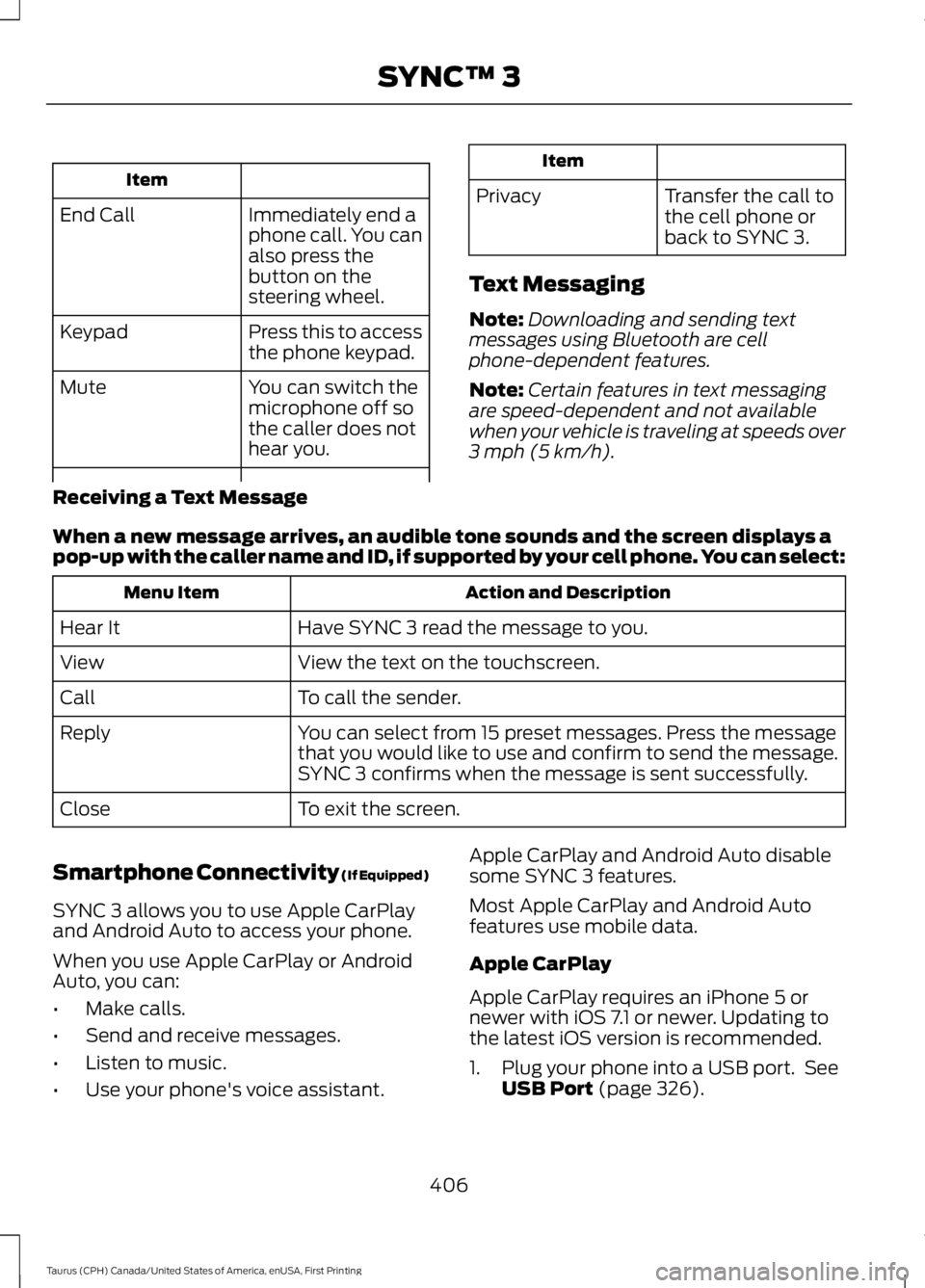
Item
Immediately end aphone call. You canalso press thebutton on thesteering wheel.
End Call
Press this to accessthe phone keypad.Keypad
You can switch themicrophone off sothe caller does nothear you.
Mute
Item
PrivacyTransfer the call tothe cell phone orback to SYNC 3.
Text Messaging
Note:Downloading and sending textmessages using Bluetooth are cellphone-dependent features.
Note:Certain features in text messagingare speed-dependent and not availablewhen your vehicle is traveling at speeds over3 mph (5 km/h).
Receiving a Text Message
When a new message arrives, an audible tone sounds and the screen displays apop-up with the caller name and ID, if supported by your cell phone. You can select:
Action and DescriptionMenu Item
Have SYNC 3 read the message to you.Hear It
View the text on the touchscreen.View
To call the sender.Call
You can select from 15 preset messages. Press the messagethat you would like to use and confirm to send the message.SYNC 3 confirms when the message is sent successfully.
Reply
To exit the screen.Close
Smartphone Connectivity (If Equipped)
SYNC 3 allows you to use Apple CarPlayand Android Auto to access your phone.
When you use Apple CarPlay or AndroidAuto, you can:
•Make calls.
•Send and receive messages.
•Listen to music.
•Use your phone's voice assistant.
Apple CarPlay and Android Auto disablesome SYNC 3 features.
Most Apple CarPlay and Android Autofeatures use mobile data.
Apple CarPlay
Apple CarPlay requires an iPhone 5 ornewer with iOS 7.1 or newer. Updating tothe latest iOS version is recommended.
1. Plug your phone into a USB port. SeeUSB Port (page 326).
406
Taurus (CPH) Canada/United States of America, enUSA, First Printing
SYNC™ 3
Page 418 of 504
SiriusXM Traffic and Travel Link
SiriusXM Traffic and Travel Link is availableon vehicles equipped with navigation andonly in select markets. You must activateand subscribe to receive SiriusXM Trafficand Travel Link information. It helps youlocate the best gas prices, find movielistings, get current traffic alerts, view theweather map, get accurate ski conditionsand see current sports scores. See Apps(page 415).
The system calculates a reasonableefficient route based on available speedlimits, traffic, and road conditions. You mayknow a local short cut that is more efficientat a given time than the route provided bySYNC 3, but you should expect a slightdifference in minutes or miles with theSYNC 3 route.
Navigation Map Updates
Annual navigation map updates areavailable for purchase through yourdealership, by calling 1-866-462-8837 inthe United States and Canada or01-800-557-5539 in Mexico. You can alsovisit:
Website
www.navigation.com/sync
You need to specify the make and modelof your vehicle to determine if there is anupdate available.
HERE is the digital map provider for thenavigation application. If you find map dataerrors, you may report them directly toHERE by going towww.here.com/mapcreator. HEREevaluates all reported map errors andresponds with the result of theirinvestigation by e-mail.
Map coverage includes the USA (includingPuerto Rico and the US Virgin Islands),Canada and Mexico.
APPS
The system enables voice, steering wheel,and touch screen control of SYNC 3AppLink enabled smartphone apps. Oncean app is running through AppLink, you cancontrol main features of the app throughvoice commands and steering wheelcontrols.
Note:Available AppLink enabled apps willvary by market.
Note:You must pair and connect yoursmartphone via Bluetooth to SYNC 3 toaccess AppLink.
Note:iPhone users need to connect thephone to the USB port.
Note:For information on available apps,supported smartphone devices andtroubleshooting tips please visit:
Websites
owner.ford.comwww.syncmyride.cawww.syncmaroute.ca
Note:Make sure you have an active accountfor the app that you have downloaded.Some apps will work automatically with nosetup. Other apps will want you to configureyour personal settings and personalize yourexperience by creating stations or favorites.We recommend you do this at home oroutside of your vehicle.
Note:We encourage you to review thesmartphone app’s terms of service andprivacy policies because Ford is notresponsible for your app or its use of data.
415
Taurus (CPH) Canada/United States of America, enUSA, First Printing
SYNC™ 3
Page 494 of 504
A
A/CSee: Climate Control.........................................109About This Manual...........................................7ABSSee: Brakes...........................................................164ABS driving hintsSee: Hints on Driving With Anti-LockBrakes................................................................164Accessories....................................................443Exterior Style.......................................................443Interior Style........................................................443Lifestyle.................................................................443Peace of Mind.....................................................443AccessoriesSee: Replacement PartsRecommendation............................................12ACCSee: Using Adaptive Cruise Control.............179Active Park Assist...........................................171Automatic Steering into ParkingSpace..................................................................173Deactivating the Park Assist Feature..........173Troubleshooting the System..........................174Using Active Park Assist...................................172Adjusting the Headlamps.........................255Horizontal Aim Adjustment...........................256Vertical Aim Adjustment.................................255Adjusting the Pedals....................................69Adjusting the Steering Wheel - VehiclesWith: Manual Adjustable SteeringColumn...........................................................66Adjusting the Steering Wheel - VehiclesWith: Power Adjustable SteeringColumn...........................................................66Easy Entry and Exit Feature..............................67End of Travel Position.........................................67Memory Feature....................................................67Airbag Disposal...............................................45Air ConditioningSee: Climate Control.........................................109Air FilterSee: Changing the Engine Air Filter.............259AlarmSee: Anti-Theft Alarm........................................65All-Wheel Drive..............................................157
Anti-Theft Alarm............................................65Arming the Alarm.................................................65Disarming the Alarm...........................................65Appendices....................................................465Apps..................................................................415...................................................................................415SiriusXM Traffic and Travel Link....................417At a Glance........................................................16Audible Warnings and Indicators.............88Headlamps On Warning Chime.....................88Key in Ignition Warning Chime........................88Keyless Warning Alert........................................88Parking Brake On Warning Chime.................88Audio Control...................................................67MEDIA.......................................................................67Seek, Next or Previous........................................67Audio Input Jack...........................................325Audio System.................................................315General Information..........................................315Audio Unit - Vehicles With: AM/FM/CD....................................................................316Menu Structure...................................................318Audio Unit - Vehicles With: PremiumAM/FM/CD..................................................320Audio Unit - Vehicles With: Sony AM/FM/CD............................................................321Autolamps.........................................................73Windshield Wiper ActivatedHeadlamps.........................................................73Automatic Climate Control - VehiclesWith: Premium AM/FM/CD......................111Automatic Climate Control - VehiclesWith: Sony Audio System........................113Automatic Climate Control - VehiclesWithout: Touchscreen Display..............110Automatic High Beam Control..................75Activating the System.........................................75Manually Overriding the System....................76Automatic Transmission............................153Automatic Transmission AdaptiveLearning.............................................................155Brake-Shift Interlock.........................................154If Your Vehicle Gets Stuck In Mud orSnow...................................................................155SelectShift Automatic™Transmission...................................................153Understanding the Positions of YourAutomatic Transmission.............................153
491
Taurus (CPH) Canada/United States of America, enUSA, First Printing
Index
Page 498 of 504
Hazard Warning Flashers...........................215Headlamp AdjustingSee: Adjusting the Headlamps.....................255Headlamp Exit Delay.....................................74Head Restraints.............................................119Adjusting the Head Restraint.........................120Tilting Head Restraints .....................................121Heated Seats..................................................127Rear Heated Seats..............................................127Heated Steering Wheel...............................68Heated Windows and Mirrors....................117Heated Exterior Mirror........................................117Heated Rear Window..........................................117HeatingSee: Climate Control.........................................109Hints on Controlling the InteriorClimate...........................................................115Cooling the Interior Quickly.............................116General Hints.........................................................115Heating the Interior Quickly.............................115Recommended Settings for Cooling............116Recommended Settings for Heating...........116Side Window Defogging in ColdWeather..............................................................117Hints on Driving With Anti-LockBrakes............................................................164Home Screen.................................................381Hood LockSee: Opening and Closing the Hood..........236
I
Ignition Switch................................................137In California (U.S. Only)............................220Information Display Control......................68Information Displays....................................89General Information...........................................89Information Messages.................................98Adaptive Cruise Control....................................98AdvanceTrac™.....................................................99Alarm........................................................................99All Wheel Drive...................................................100Automatic Engine Shutdown..........................99Automatic High Beam Control.......................99Battery and Charging System.......................100Blind Spot Information and Cross TrafficAlert System.....................................................101Brake System........................................................101
Collision Warning System...............................102Doors and Locks.................................................102Driver Alert............................................................102Fuel..........................................................................102Keys and Intelligent Access............................103Lane Keeping System.......................................103Maintenance........................................................104MyKey.....................................................................104Park Aid..................................................................105Passenger Sensing System Message.........105Power Steering....................................................105Reminder Messages..........................................105Remote Start.......................................................106Seats.......................................................................106Starting System..................................................106Tire Pressure Monitoring System.................106Traction Control...................................................107Transmission........................................................107Installing Child Restraints............................19Child Seats...............................................................19Using Lap and Shoulder Belts.........................20Using Lower Anchors and Tethers forCHildren (LATCH)............................................22Using Tether Straps.............................................23Instrument Cluster........................................83Instrument Lighting Dimmer......................74Instrument Panel Overview........................16Interior Lamps.................................................76Front Row Map Lamps.......................................76Second Row Map Lamps...................................77Interior Luggage CompartmentRelease............................................................62Interior Mirror....................................................81Auto-Dimming Mirror...........................................81Introduction.........................................................7
J
Jump Starting the Vehicle.........................216Connecting the Jumper Cables.....................216Jump Starting.......................................................217Preparing Your Vehicle......................................216Removing the Jumper Cables.........................217
495
Taurus (CPH) Canada/United States of America, enUSA, First Printing
Index
Page 501 of 504
Vehicles Sold in the United States: GettingRoadside Assistance....................................214Vehicles Sold in the United States: UsingRoadside Assistance....................................214Roadside Emergencies...............................214Running-InSee: Breaking-In...................................................211Running Out of Fuel....................................146Adding Fuel From a Portable FuelContainer..........................................................146Filling a Portable Fuel Container..................146
S
Safety Canopy™............................................43Safety Precautions.......................................143Satellite Radio...............................................322Satellite Radio Electronic Serial Number(ESN).................................................................323Satellite Radio Reception Factors...............323SIRIUS® Satellite Radio Service..................323Troubleshooting.................................................324Scheduled Maintenance Record...........455Scheduled Maintenance...........................447Seatbelt Extension........................................36Seatbelt Height Adjustment......................33Seatbelt Reminder........................................34Belt-Minder™........................................................34Seatbelts...........................................................30Principle of Operation........................................30Seatbelt Warning Lamp and IndicatorChime...............................................................33Conditions of operation.....................................33Seats..................................................................119Security..............................................................64Settings............................................................418911 Assist...............................................................423Ambient Lighting...............................................428Bluetooth..............................................................420Clock.......................................................................419Display...................................................................429General...................................................................427Media Player.........................................................419Mobile Apps.........................................................426Navigation............................................................424Phone.....................................................................420Radio......................................................................423Sound.....................................................................418
Valet Mode...........................................................430Vehicle...................................................................428Voice Control......................................................430Wi-Fi.......................................................................428Side Airbags.....................................................42Sitting in the Correct Position...................119Snow ChainsSee: Using Snow Chains.................................286Special Notices................................................12New Vehicle Limited Warranty.........................12On Board Diagnostics Data LinkConnector............................................................13Special Instructions..............................................12Special Operating Conditions ScheduledMaintenance..............................................453Exceptions............................................................454Speed ControlSee: Cruise Control.............................................178Stability Control............................................167Principle of Operation.......................................167Starter SwitchSee: Ignition Switch............................................137Starting a Gasoline Engine.......................138Automatic Engine Shutdown........................140Failure to Start.....................................................140Guarding Against Exhaust Fumes.................141Important Ventilating Information................141Stopping the Engine When Your Vehicle isMoving.................................................................141Stopping the Engine When Your Vehicle isStationary.........................................................140Vehicles with an Ignition Key..........................138Vehicles with Keyless Start.............................139Starting and Stopping the Engine..........137General Information...........................................137Steering............................................................196Electric Power Steering....................................196Steering Wheel...............................................66Storage Compartments.............................136SunroofSee: Moonroof.......................................................82Sun Shades.......................................................81Sun Visors..........................................................81Illuminated Vanity Mirror....................................81Supplementary Restraints System.........38Principle of Operation........................................38Symbols Glossary.............................................7
498
Taurus (CPH) Canada/United States of America, enUSA, First Printing
Index