warning FORD TAURUS 2017 Workshop Manual
[x] Cancel search | Manufacturer: FORD, Model Year: 2017, Model line: TAURUS, Model: FORD TAURUS 2017Pages: 504, PDF Size: 5.84 MB
Page 103 of 504
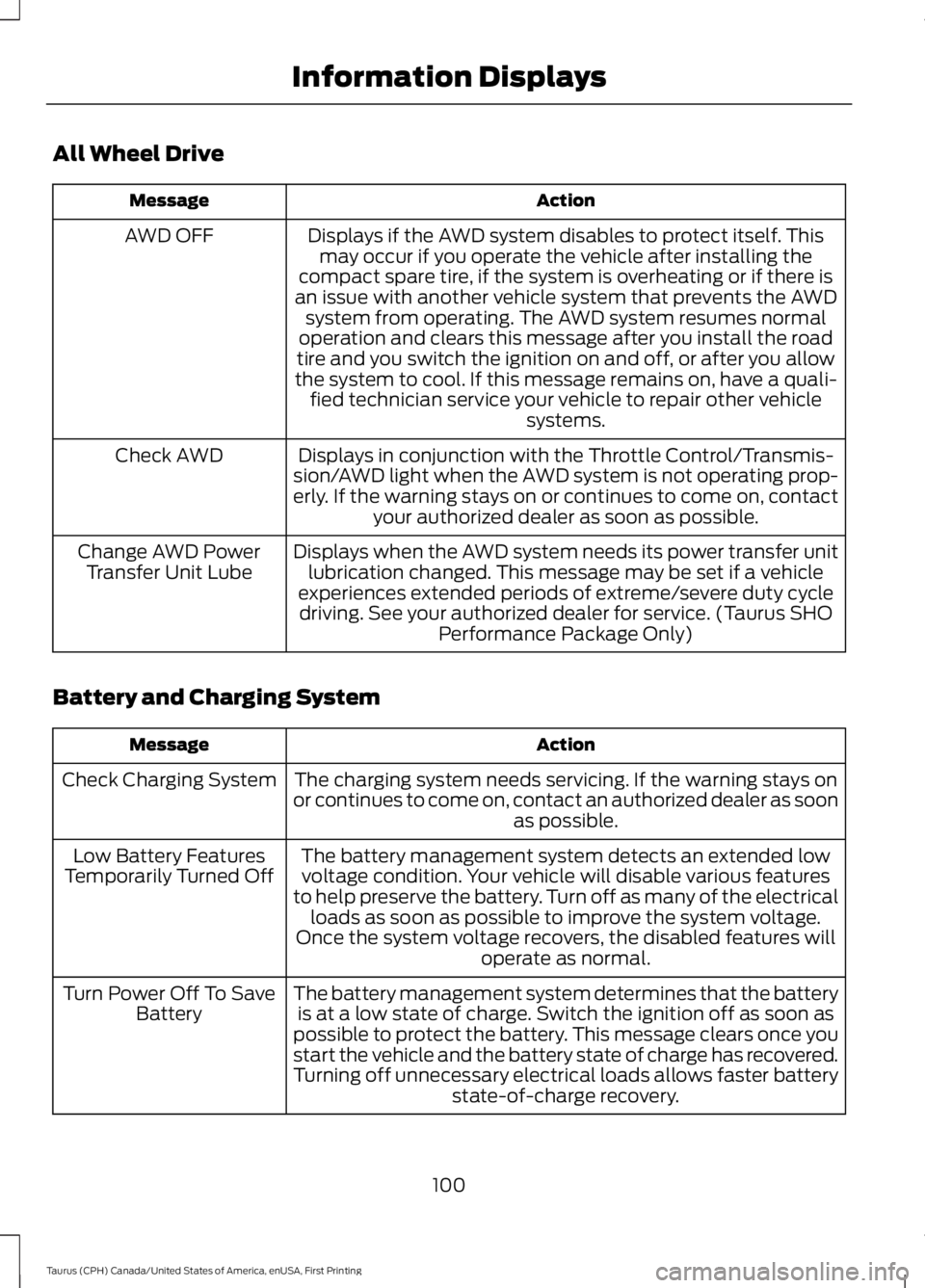
All Wheel Drive
ActionMessage
Displays if the AWD system disables to protect itself. Thismay occur if you operate the vehicle after installing thecompact spare tire, if the system is overheating or if there isan issue with another vehicle system that prevents the AWDsystem from operating. The AWD system resumes normaloperation and clears this message after you install the roadtire and you switch the ignition on and off, or after you allowthe system to cool. If this message remains on, have a quali-fied technician service your vehicle to repair other vehiclesystems.
AWD OFF
Displays in conjunction with the Throttle Control/Transmis-sion/AWD light when the AWD system is not operating prop-erly. If the warning stays on or continues to come on, contactyour authorized dealer as soon as possible.
Check AWD
Displays when the AWD system needs its power transfer unitlubrication changed. This message may be set if a vehicleexperiences extended periods of extreme/severe duty cycledriving. See your authorized dealer for service. (Taurus SHOPerformance Package Only)
Change AWD PowerTransfer Unit Lube
Battery and Charging System
ActionMessage
The charging system needs servicing. If the warning stays onor continues to come on, contact an authorized dealer as soonas possible.
Check Charging System
The battery management system detects an extended lowvoltage condition. Your vehicle will disable various featuresto help preserve the battery. Turn off as many of the electricalloads as soon as possible to improve the system voltage.Once the system voltage recovers, the disabled features willoperate as normal.
Low Battery FeaturesTemporarily Turned Off
The battery management system determines that the batteryis at a low state of charge. Switch the ignition off as soon aspossible to protect the battery. This message clears once youstart the vehicle and the battery state of charge has recovered.Turning off unnecessary electrical loads allows faster batterystate-of-charge recovery.
Turn Power Off To SaveBattery
100
Taurus (CPH) Canada/United States of America, enUSA, First Printing
Information Displays
Page 104 of 504
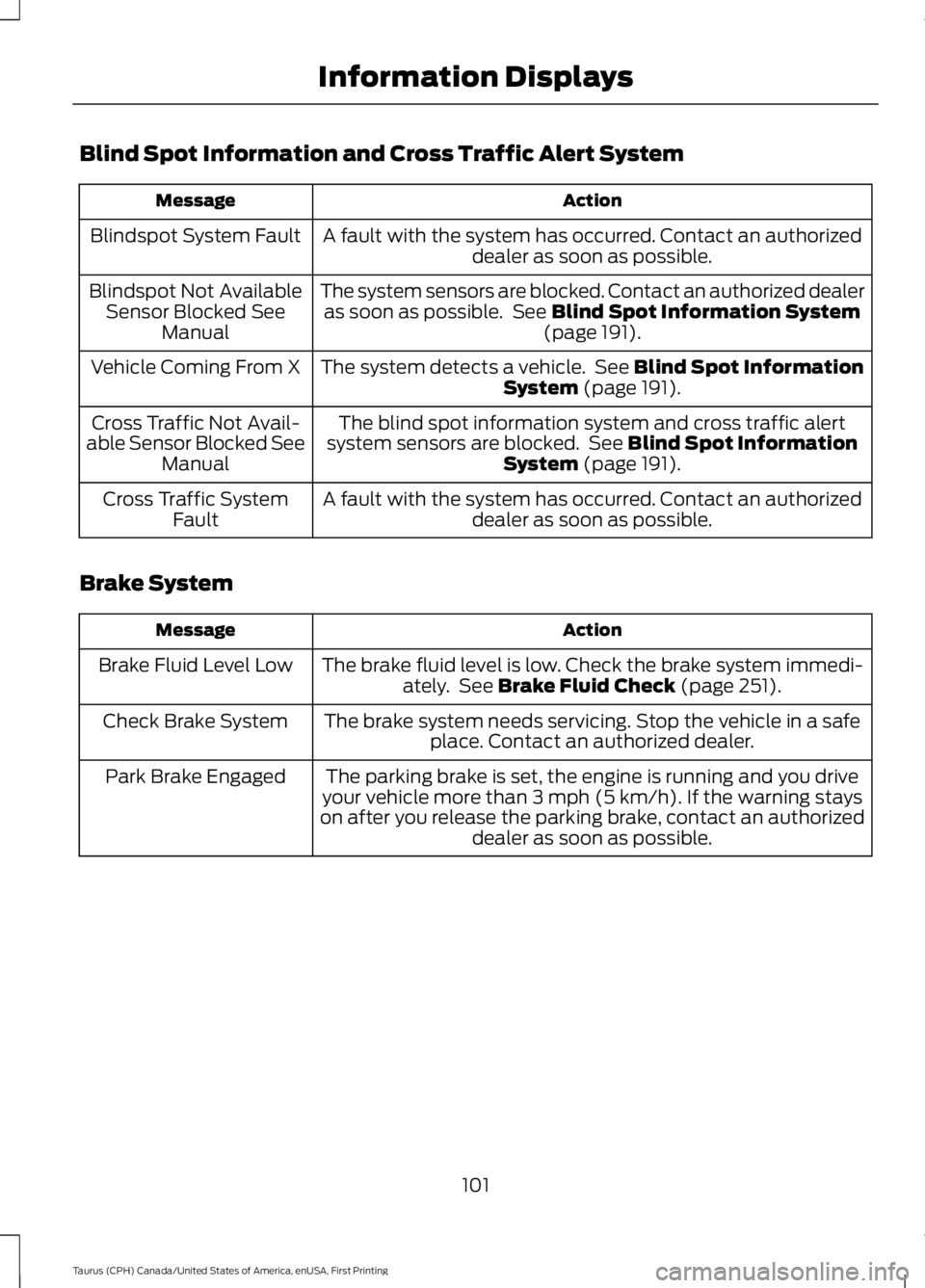
Blind Spot Information and Cross Traffic Alert System
ActionMessage
A fault with the system has occurred. Contact an authorizeddealer as soon as possible.Blindspot System Fault
The system sensors are blocked. Contact an authorized dealeras soon as possible. See Blind Spot Information System(page 191).
Blindspot Not AvailableSensor Blocked SeeManual
The system detects a vehicle. See Blind Spot InformationSystem (page 191).Vehicle Coming From X
The blind spot information system and cross traffic alertsystem sensors are blocked. See Blind Spot InformationSystem (page 191).
Cross Traffic Not Avail-able Sensor Blocked SeeManual
A fault with the system has occurred. Contact an authorizeddealer as soon as possible.Cross Traffic SystemFault
Brake System
ActionMessage
The brake fluid level is low. Check the brake system immedi-ately. See Brake Fluid Check (page 251).Brake Fluid Level Low
The brake system needs servicing. Stop the vehicle in a safeplace. Contact an authorized dealer.Check Brake System
The parking brake is set, the engine is running and you driveyour vehicle more than 3 mph (5 km/h). If the warning stayson after you release the parking brake, contact an authorizeddealer as soon as possible.
Park Brake Engaged
101
Taurus (CPH) Canada/United States of America, enUSA, First Printing
Information Displays
Page 105 of 504
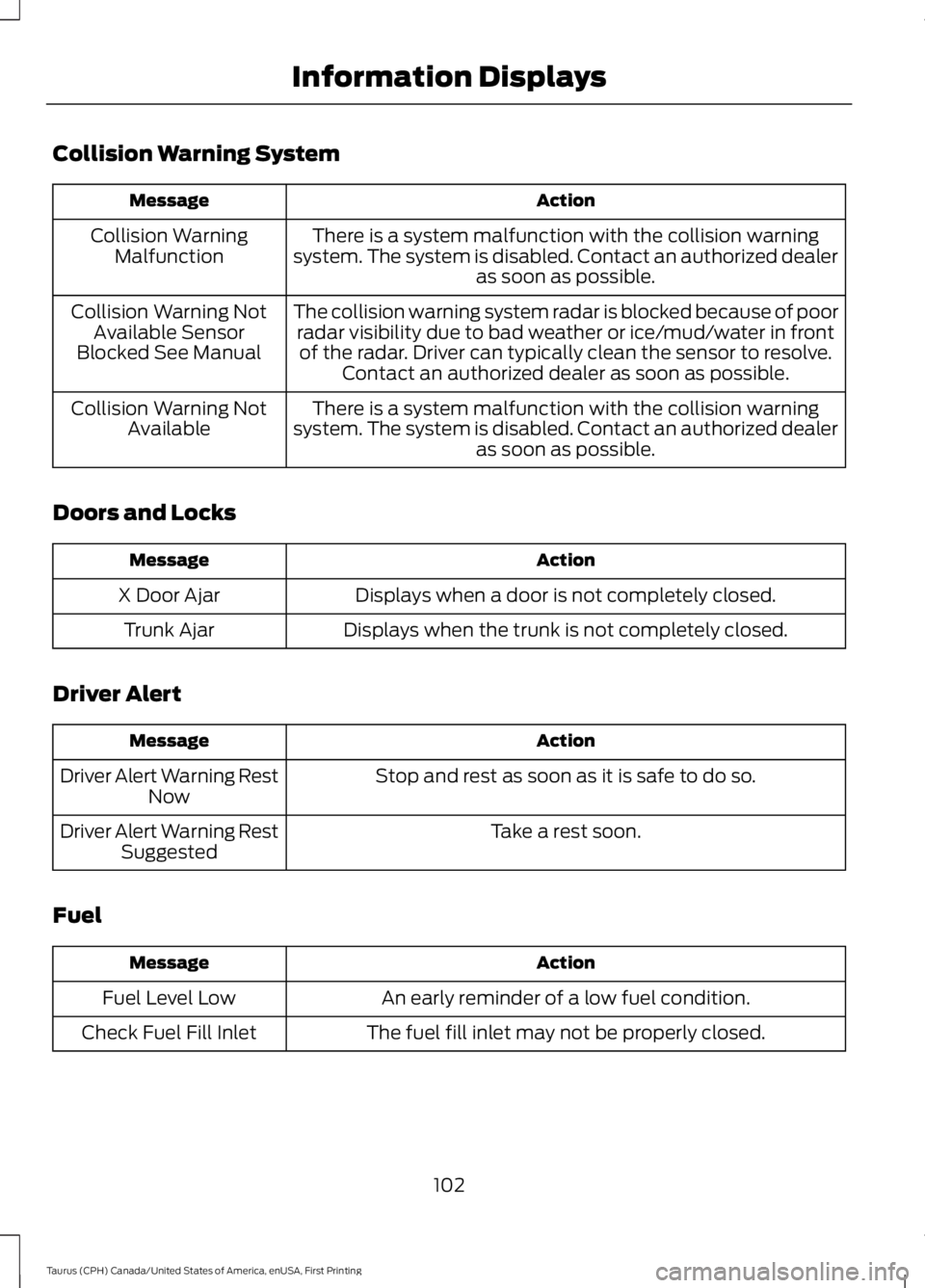
Collision Warning System
ActionMessage
There is a system malfunction with the collision warningsystem. The system is disabled. Contact an authorized dealeras soon as possible.
Collision WarningMalfunction
The collision warning system radar is blocked because of poorradar visibility due to bad weather or ice/mud/water in frontof the radar. Driver can typically clean the sensor to resolve.Contact an authorized dealer as soon as possible.
Collision Warning NotAvailable SensorBlocked See Manual
There is a system malfunction with the collision warningsystem. The system is disabled. Contact an authorized dealeras soon as possible.
Collision Warning NotAvailable
Doors and Locks
ActionMessage
Displays when a door is not completely closed.X Door Ajar
Displays when the trunk is not completely closed.Trunk Ajar
Driver Alert
ActionMessage
Stop and rest as soon as it is safe to do so.Driver Alert Warning RestNow
Take a rest soon.Driver Alert Warning RestSuggested
Fuel
ActionMessage
An early reminder of a low fuel condition.Fuel Level Low
The fuel fill inlet may not be properly closed.Check Fuel Fill Inlet
102
Taurus (CPH) Canada/United States of America, enUSA, First Printing
Information Displays
Page 107 of 504
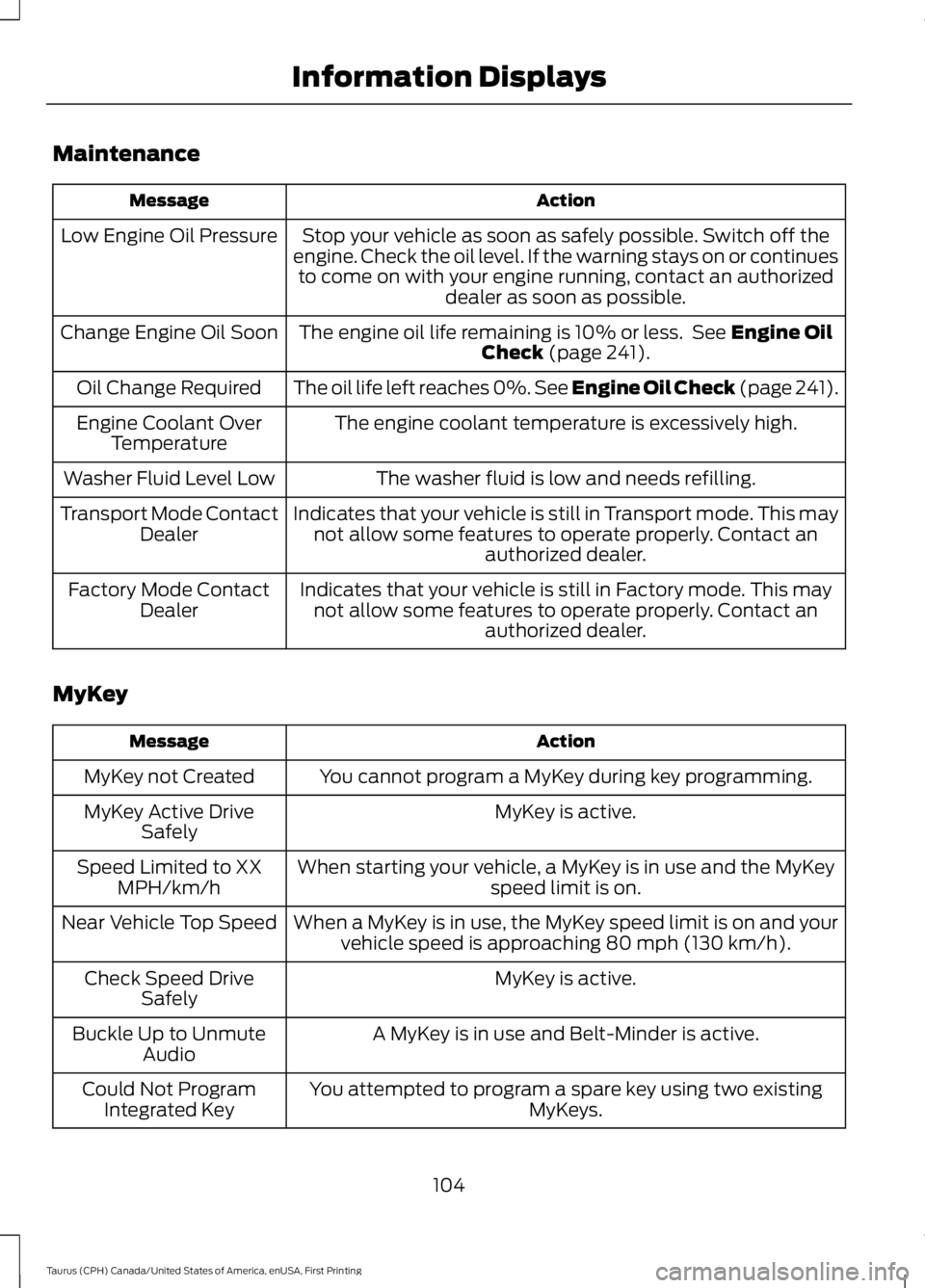
Maintenance
ActionMessage
Stop your vehicle as soon as safely possible. Switch off theengine. Check the oil level. If the warning stays on or continuesto come on with your engine running, contact an authorizeddealer as soon as possible.
Low Engine Oil Pressure
The engine oil life remaining is 10% or less. See Engine OilCheck (page 241).Change Engine Oil Soon
The oil life left reaches 0%. See Engine Oil Check (page 241).Oil Change Required
The engine coolant temperature is excessively high.Engine Coolant OverTemperature
The washer fluid is low and needs refilling.Washer Fluid Level Low
Indicates that your vehicle is still in Transport mode. This maynot allow some features to operate properly. Contact anauthorized dealer.
Transport Mode ContactDealer
Indicates that your vehicle is still in Factory mode. This maynot allow some features to operate properly. Contact anauthorized dealer.
Factory Mode ContactDealer
MyKey
ActionMessage
You cannot program a MyKey during key programming.MyKey not Created
MyKey is active.MyKey Active DriveSafely
When starting your vehicle, a MyKey is in use and the MyKeyspeed limit is on.Speed Limited to XXMPH/km/h
When a MyKey is in use, the MyKey speed limit is on and yourvehicle speed is approaching 80 mph (130 km/h).Near Vehicle Top Speed
MyKey is active.Check Speed DriveSafely
A MyKey is in use and Belt-Minder is active.Buckle Up to UnmuteAudio
You attempted to program a spare key using two existingMyKeys.Could Not ProgramIntegrated Key
104
Taurus (CPH) Canada/United States of America, enUSA, First Printing
Information Displays
Page 108 of 504
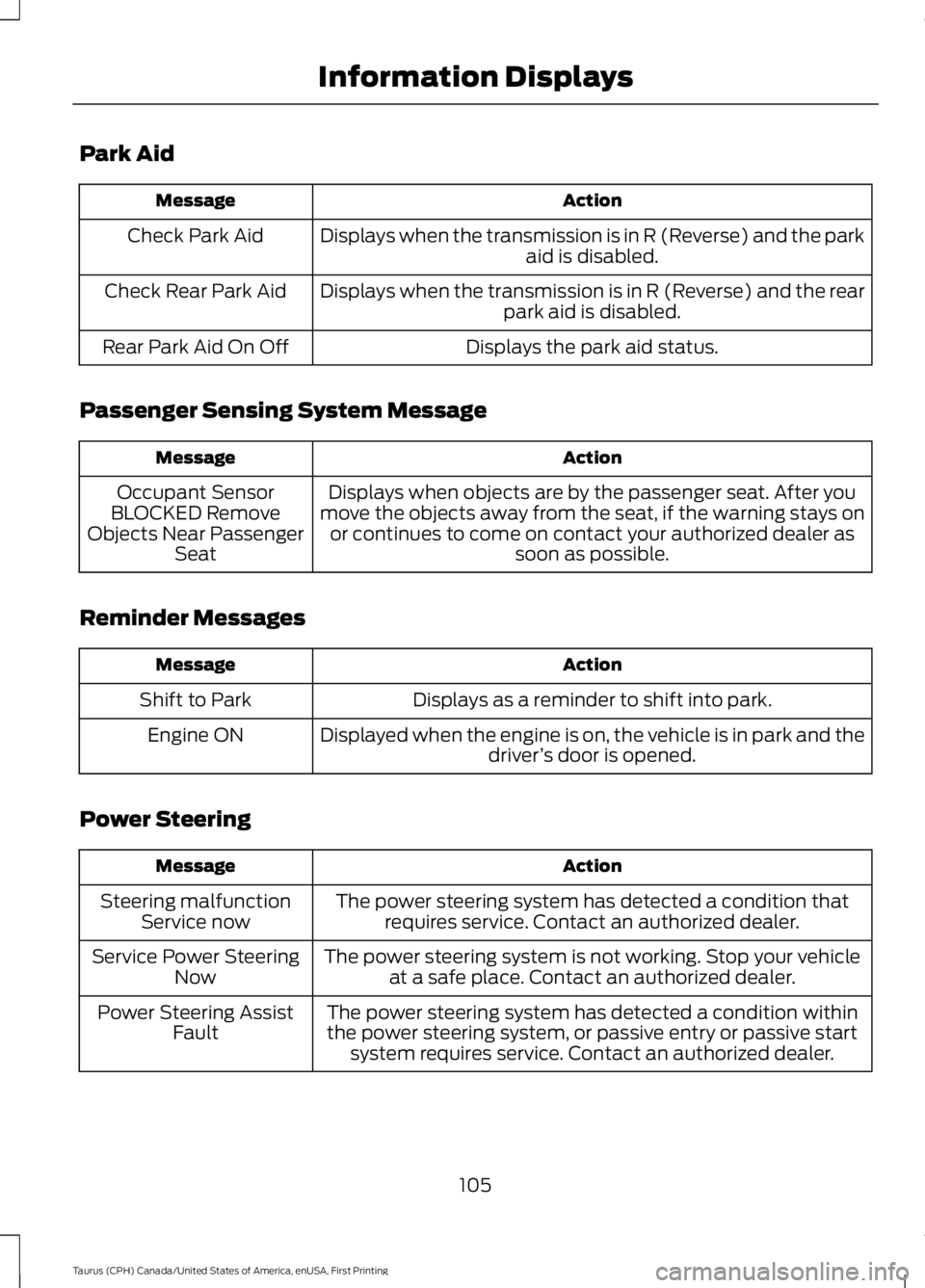
Park Aid
ActionMessage
Displays when the transmission is in R (Reverse) and the parkaid is disabled.Check Park Aid
Displays when the transmission is in R (Reverse) and the rearpark aid is disabled.Check Rear Park Aid
Displays the park aid status.Rear Park Aid On Off
Passenger Sensing System Message
ActionMessage
Displays when objects are by the passenger seat. After youmove the objects away from the seat, if the warning stays onor continues to come on contact your authorized dealer assoon as possible.
Occupant SensorBLOCKED RemoveObjects Near PassengerSeat
Reminder Messages
ActionMessage
Displays as a reminder to shift into park.Shift to Park
Displayed when the engine is on, the vehicle is in park and thedriver’s door is opened.Engine ON
Power Steering
ActionMessage
The power steering system has detected a condition thatrequires service. Contact an authorized dealer.Steering malfunctionService now
The power steering system is not working. Stop your vehicleat a safe place. Contact an authorized dealer.Service Power SteeringNow
The power steering system has detected a condition withinthe power steering system, or passive entry or passive startsystem requires service. Contact an authorized dealer.
Power Steering AssistFault
105
Taurus (CPH) Canada/United States of America, enUSA, First Printing
Information Displays
Page 109 of 504
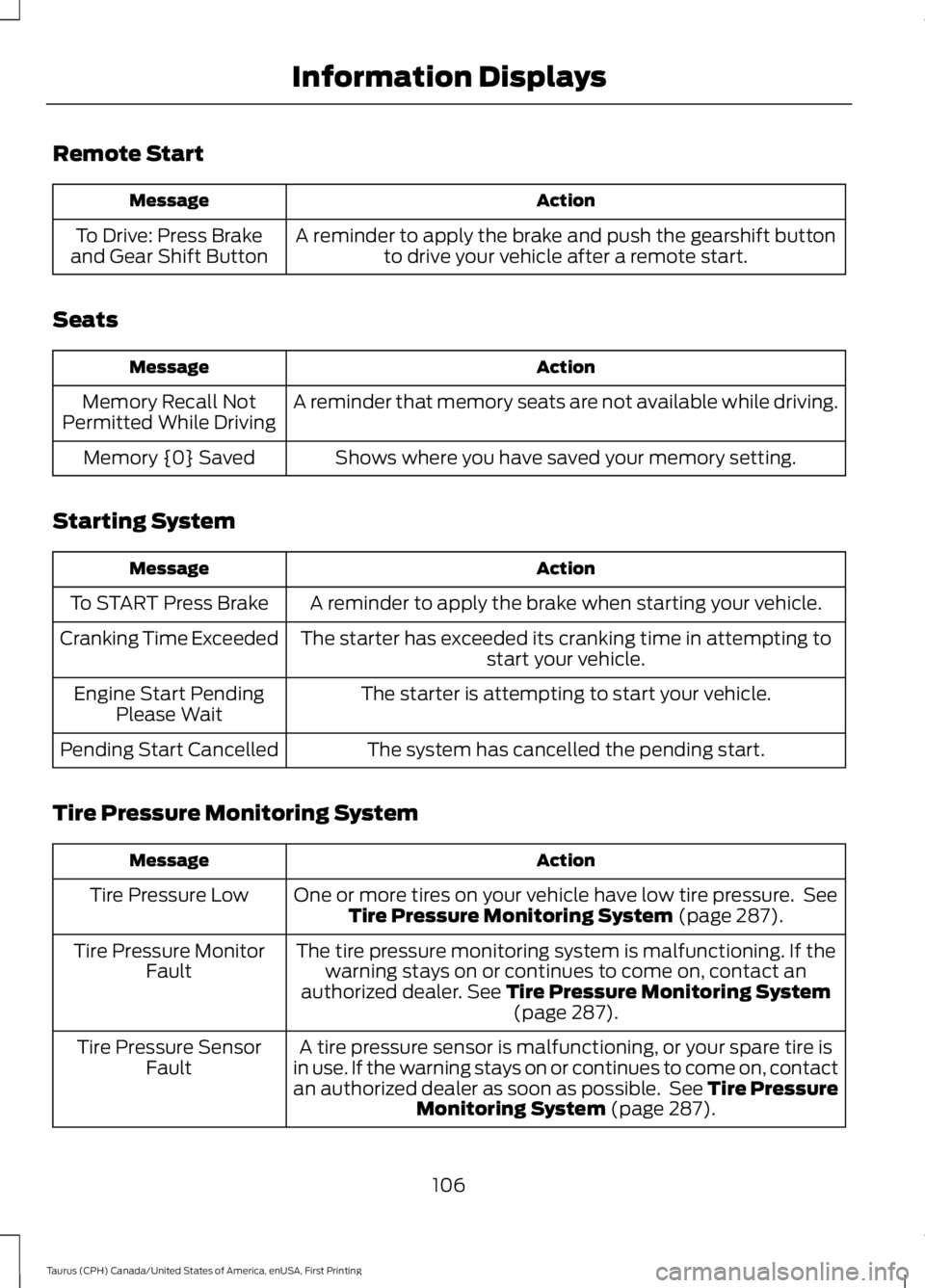
Remote Start
ActionMessage
A reminder to apply the brake and push the gearshift buttonto drive your vehicle after a remote start.To Drive: Press Brakeand Gear Shift Button
Seats
ActionMessage
A reminder that memory seats are not available while driving.Memory Recall NotPermitted While Driving
Shows where you have saved your memory setting.Memory {0} Saved
Starting System
ActionMessage
A reminder to apply the brake when starting your vehicle.To START Press Brake
The starter has exceeded its cranking time in attempting tostart your vehicle.Cranking Time Exceeded
The starter is attempting to start your vehicle.Engine Start PendingPlease Wait
The system has cancelled the pending start.Pending Start Cancelled
Tire Pressure Monitoring System
ActionMessage
One or more tires on your vehicle have low tire pressure. SeeTire Pressure Monitoring System (page 287).Tire Pressure Low
The tire pressure monitoring system is malfunctioning. If thewarning stays on or continues to come on, contact anauthorized dealer. See Tire Pressure Monitoring System(page 287).
Tire Pressure MonitorFault
A tire pressure sensor is malfunctioning, or your spare tire isin use. If the warning stays on or continues to come on, contactan authorized dealer as soon as possible. See Tire PressureMonitoring System (page 287).
Tire Pressure SensorFault
106
Taurus (CPH) Canada/United States of America, enUSA, First Printing
Information Displays
Page 118 of 504
HINTS ON CONTROLLING THE
INTERIOR CLIMATE
General Hints
WARNING
Prolonged use of recirculated air maycause the windows to fog up. If thewindows fog up, follow the settingsfor demisting the windshield.
Note:You may feel a small amount of airfrom the footwell air vents regardless of theair distribution setting.
Note:To reduce humidity build-up insideyour vehicle, do not drive with the systemswitched off or with recirculated air alwaysswitched on.
Note:Do not place objects under the frontseats as this may interfere with the airflowto the rear seats.
Note:Remove any snow, ice or leaves fromthe air intake area at the base of thewindshield.
Note:To improve the time to reach acomfortable temperature in hot weather,drive with the windows open until you feelcold air through the air vents.
Manual Climate Control
Note:To reduce fogging of the windshieldduring humid weather, adjust the airdistribution control to the windshield airvents position.
Automatic Climate Control
Note: Adjusting the settings when yourvehicle interior is extremely hot or cold isnot necessary. The system automaticallyadjusts to heat or cool the interior to yourselected temperature as quickly as possible.For the system to function efficiently, theinstrument panel and side air vents shouldbe fully open.
Note:If you select AUTO during coldtemperatures, the system directs airflow tothe windshield and side window vents. Inaddition, the fan may run at a slower speeduntil the engine warms up.
Note:If you select AUTO during hottemperatures, or the inside of the vehicle ishot, the system automatically usesrecirculated air to maximize interior cooling.When the interior reaches the selectedtemperature, the system automaticallyswitches to using outside air.
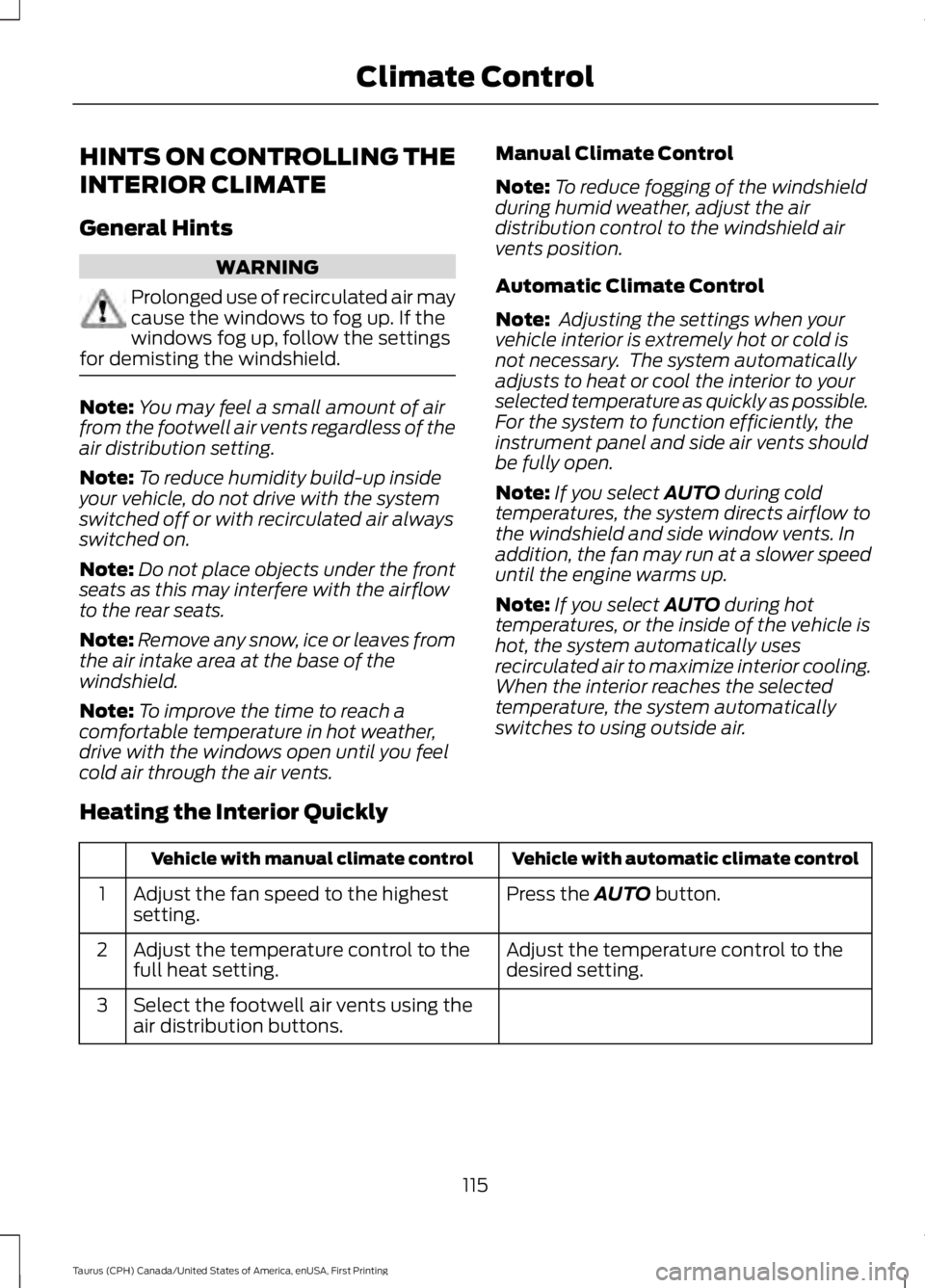
Heating the Interior Quickly
Vehicle with automatic climate controlVehicle with manual climate control
Press the AUTO button.Adjust the fan speed to the highestsetting.1
Adjust the temperature control to thedesired setting.Adjust the temperature control to thefull heat setting.2
Select the footwell air vents using theair distribution buttons.3
115
Taurus (CPH) Canada/United States of America, enUSA, First Printing
Climate Control
Page 122 of 504
SITTING IN THE CORRECT
POSITION
WARNINGS
Sitting improperly, out of position orwith the seatback reclined too farcan take weight off the seat cushionand affect the decision of the passengersensing system, resulting in serious injuryor death in the event of a crash. Always situpright against your seat back, with yourfeet on the floor.
Do not recline the seatback as thiscan cause the occupant to slideunder the safety belt, resulting inserious injury in the event of a crash.
Do not place objects higher than theseatback to reduce the risk of seriousinjury in the event of a crash or duringheavy braking.
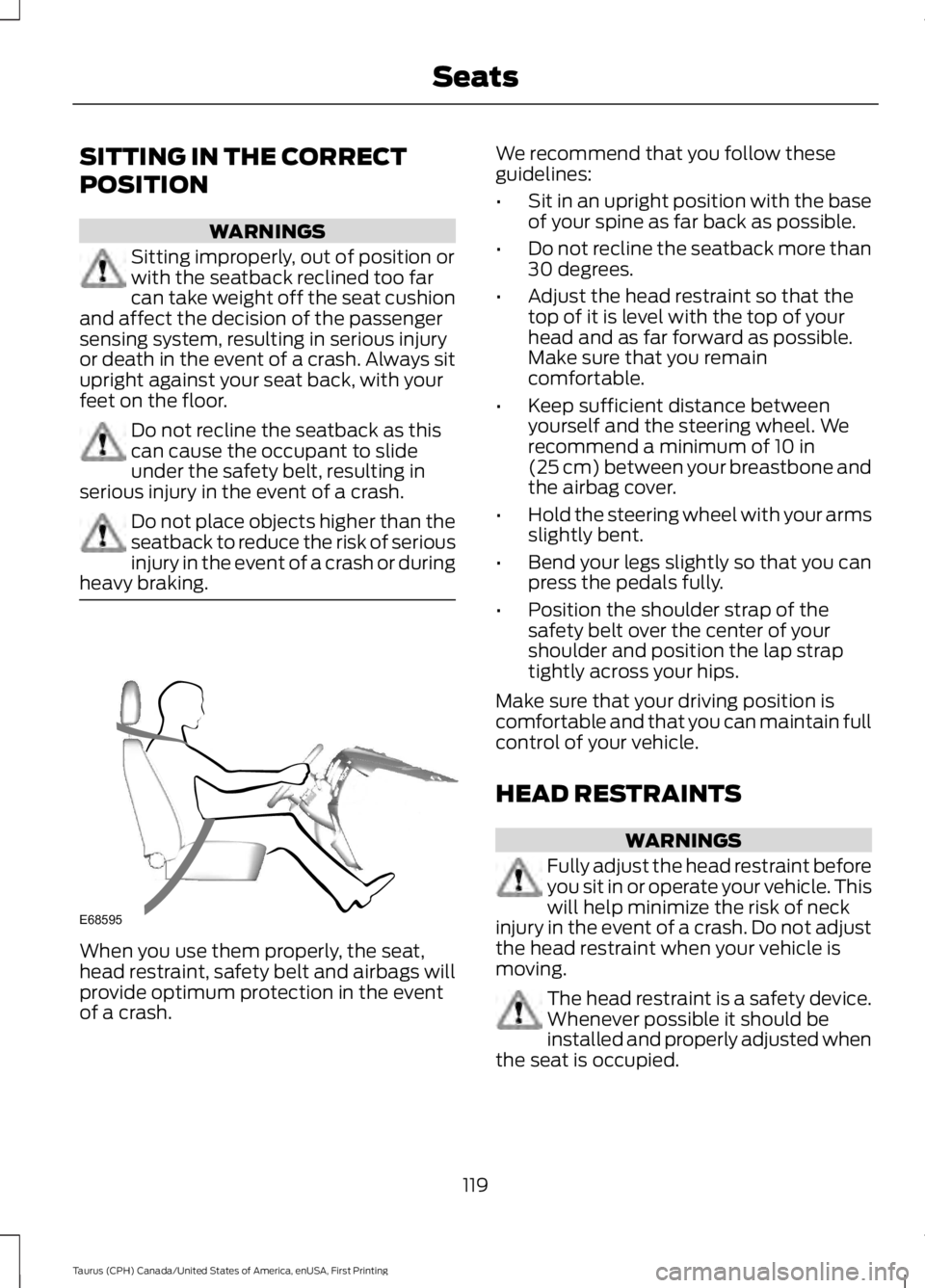
When you use them properly, the seat,head restraint, safety belt and airbags willprovide optimum protection in the eventof a crash.
We recommend that you follow theseguidelines:
•Sit in an upright position with the baseof your spine as far back as possible.
•Do not recline the seatback more than30 degrees.
•Adjust the head restraint so that thetop of it is level with the top of yourhead and as far forward as possible.Make sure that you remaincomfortable.
•Keep sufficient distance betweenyourself and the steering wheel. Werecommend a minimum of 10 in(25 cm) between your breastbone andthe airbag cover.
•Hold the steering wheel with your armsslightly bent.
•Bend your legs slightly so that you canpress the pedals fully.
•Position the shoulder strap of thesafety belt over the center of yourshoulder and position the lap straptightly across your hips.
Make sure that your driving position iscomfortable and that you can maintain fullcontrol of your vehicle.
HEAD RESTRAINTS
WARNINGS
Fully adjust the head restraint beforeyou sit in or operate your vehicle. Thiswill help minimize the risk of neckinjury in the event of a crash. Do not adjustthe head restraint when your vehicle ismoving.
The head restraint is a safety device.Whenever possible it should beinstalled and properly adjusted whenthe seat is occupied.
119
Taurus (CPH) Canada/United States of America, enUSA, First Printing
SeatsE68595
Page 123 of 504
WARNINGS
Install the head restraint properly tohelp minimize the risk of neck injuryin the event of a crash.
Note:Adjust the seatback to an uprightdriving position before adjusting the headrestraint. Adjust the head restraint so thatthe top of it is level with the top of your headand as far forward as possible. Make surethat you remain comfortable. If you areextremely tall, adjust the head restraint toits highest position.
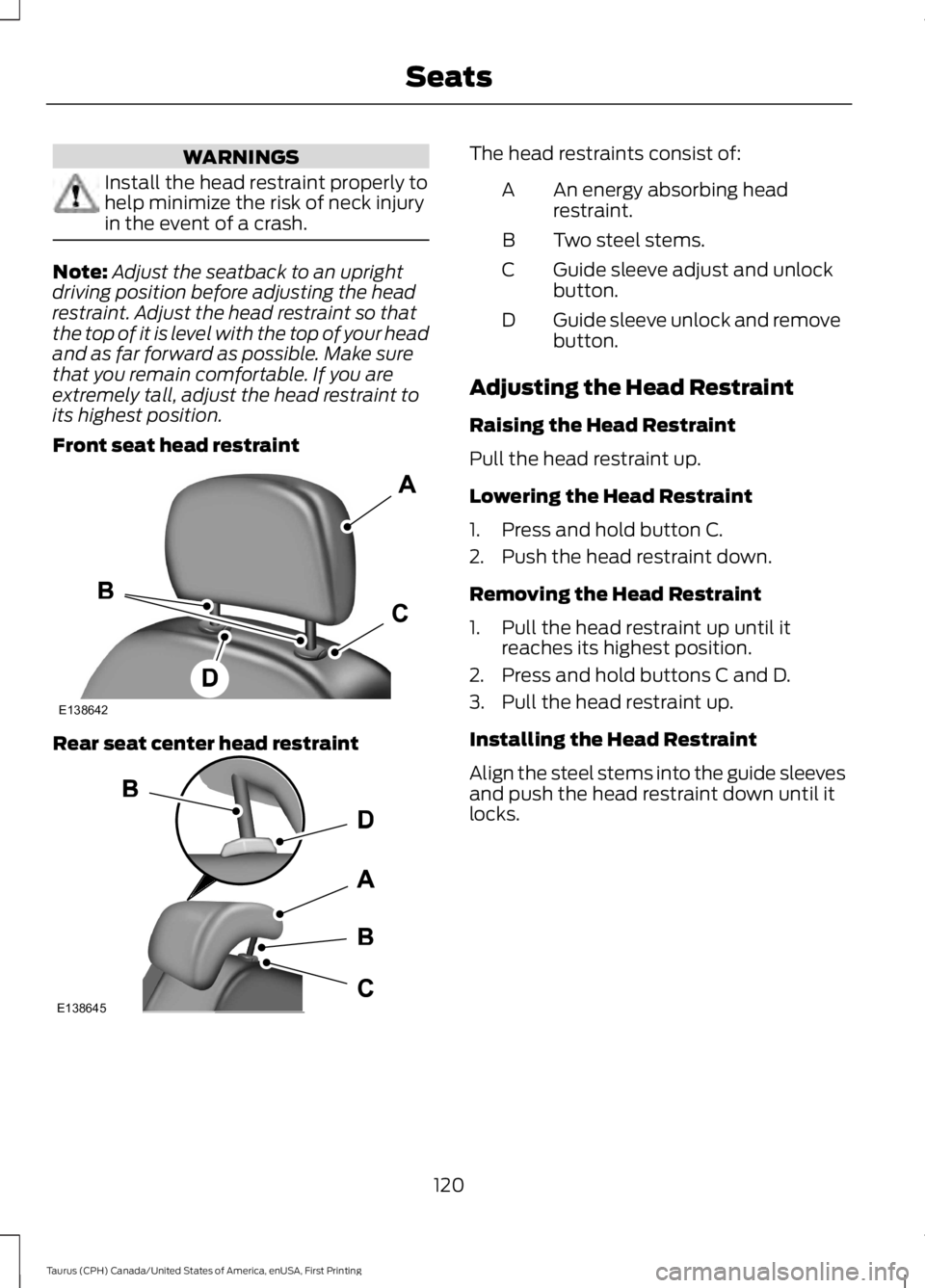
Front seat head restraint
Rear seat center head restraint
The head restraints consist of:
An energy absorbing headrestraint.A
Two steel stems.B
Guide sleeve adjust and unlockbutton.C
Guide sleeve unlock and removebutton.D
Adjusting the Head Restraint
Raising the Head Restraint
Pull the head restraint up.
Lowering the Head Restraint
1. Press and hold button C.
2. Push the head restraint down.
Removing the Head Restraint
1. Pull the head restraint up until itreaches its highest position.
2. Press and hold buttons C and D.
3. Pull the head restraint up.
Installing the Head Restraint
Align the steel stems into the guide sleevesand push the head restraint down until itlocks.
120
Taurus (CPH) Canada/United States of America, enUSA, First Printing
SeatsE138642 E138645
Page 124 of 504
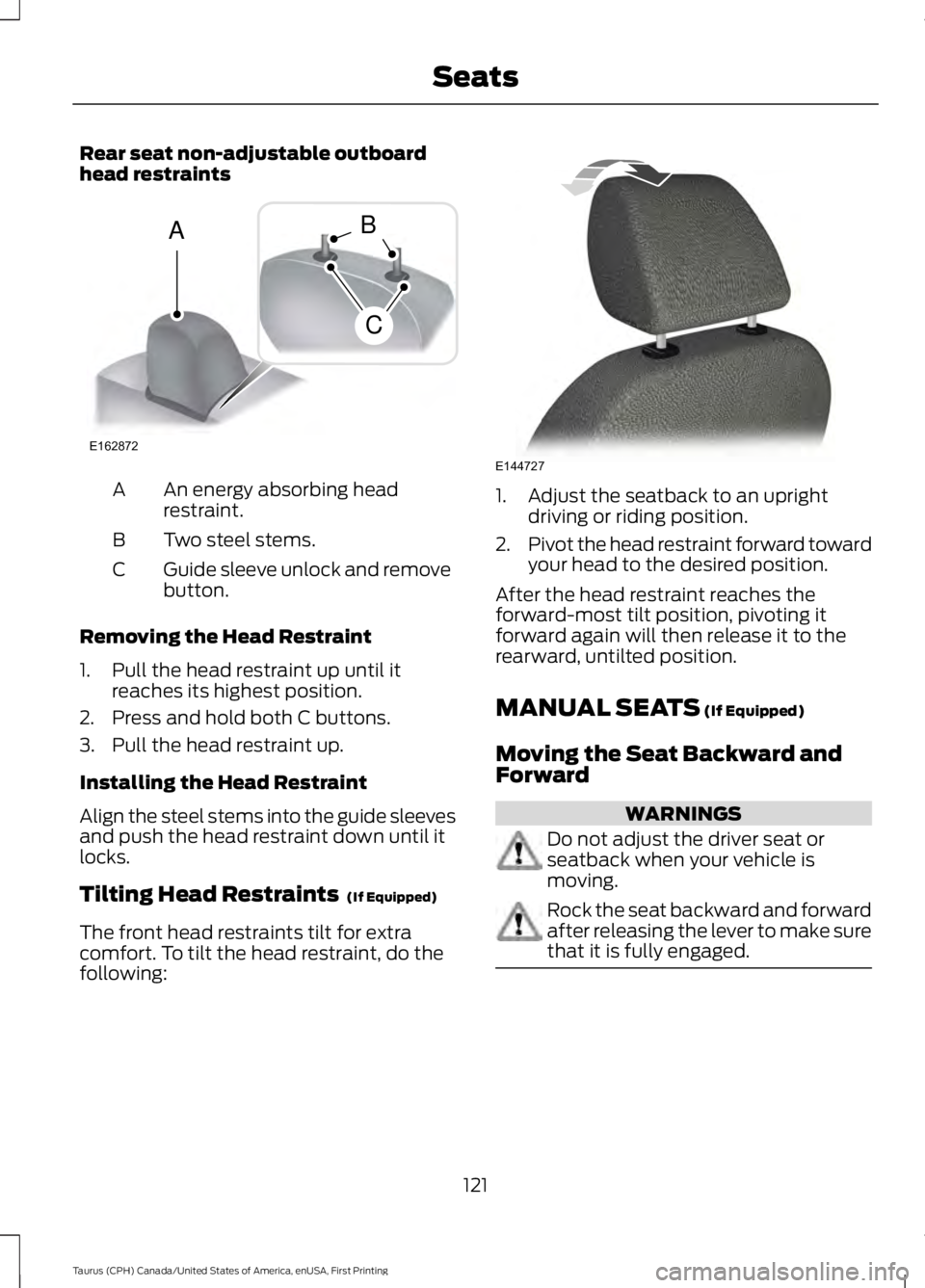
Rear seat non-adjustable outboardhead restraints
An energy absorbing headrestraint.A
Two steel stems.B
Guide sleeve unlock and removebutton.C
Removing the Head Restraint
1. Pull the head restraint up until itreaches its highest position.
2. Press and hold both C buttons.
3. Pull the head restraint up.
Installing the Head Restraint
Align the steel stems into the guide sleevesand push the head restraint down until itlocks.
Tilting Head Restraints (If Equipped)
The front head restraints tilt for extracomfort. To tilt the head restraint, do thefollowing:
1. Adjust the seatback to an uprightdriving or riding position.
2.Pivot the head restraint forward towardyour head to the desired position.
After the head restraint reaches theforward-most tilt position, pivoting itforward again will then release it to therearward, untilted position.
MANUAL SEATS (If Equipped)
Moving the Seat Backward andForward
WARNINGS
Do not adjust the driver seat orseatback when your vehicle ismoving.
Rock the seat backward and forwardafter releasing the lever to make surethat it is fully engaged.
121
Taurus (CPH) Canada/United States of America, enUSA, First Printing
SeatsE162872
A
C
B E144727