Page 50 FORD TAURUS 2018 Owner's Manual
[x] Cancel search | Manufacturer: FORD, Model Year: 2018, Model line: TAURUS, Model: FORD TAURUS 2018Pages: 510, PDF Size: 22.04 MB
Page 58 of 510
USING MYKEY WITH REMOTE
START SYSTEMS
MyKey is not compatible with non
Ford-approved, aftermarket remote start
systems. If you choose to install a remote
start system, see an authorized dealer for
a Ford-approved remote start system.
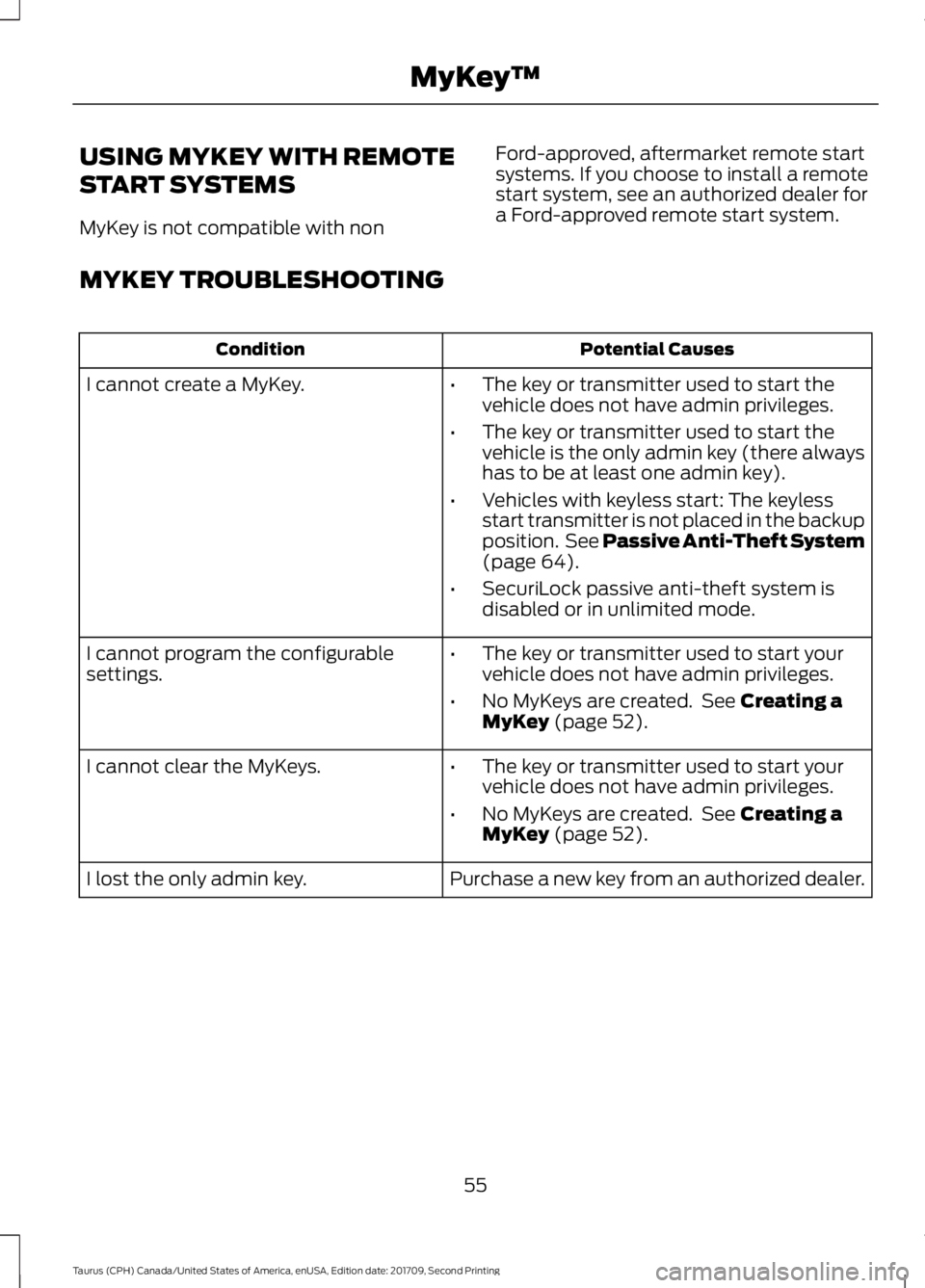
MYKEY TROUBLESHOOTING Potential Causes
Condition
I cannot create a MyKey. •The key or transmitter used to start the
vehicle does not have admin privileges.
• The key or transmitter used to start the
vehicle is the only admin key (there always
has to be at least one admin key).
• Vehicles with keyless start: The keyless
start transmitter is not placed in the backup
position. See Passive Anti-Theft System
(page 64).
• SecuriLock passive anti-theft system is
disabled or in unlimited mode.
• The key or transmitter used to start your
vehicle does not have admin privileges.
• No MyKeys are created. See
Creating a
MyKey (page 52).
I cannot program the configurable
settings.
•The key or transmitter used to start your
vehicle does not have admin privileges.
• No MyKeys are created. See
Creating a
MyKey (page 52).
I cannot clear the MyKeys.
Purchase a new key from an authorized dealer.
I lost the only admin key.
55
Taurus (CPH) Canada/United States of America, enUSA, Edition date: 201709, Second Printing MyKey
™
Page 59 of 510
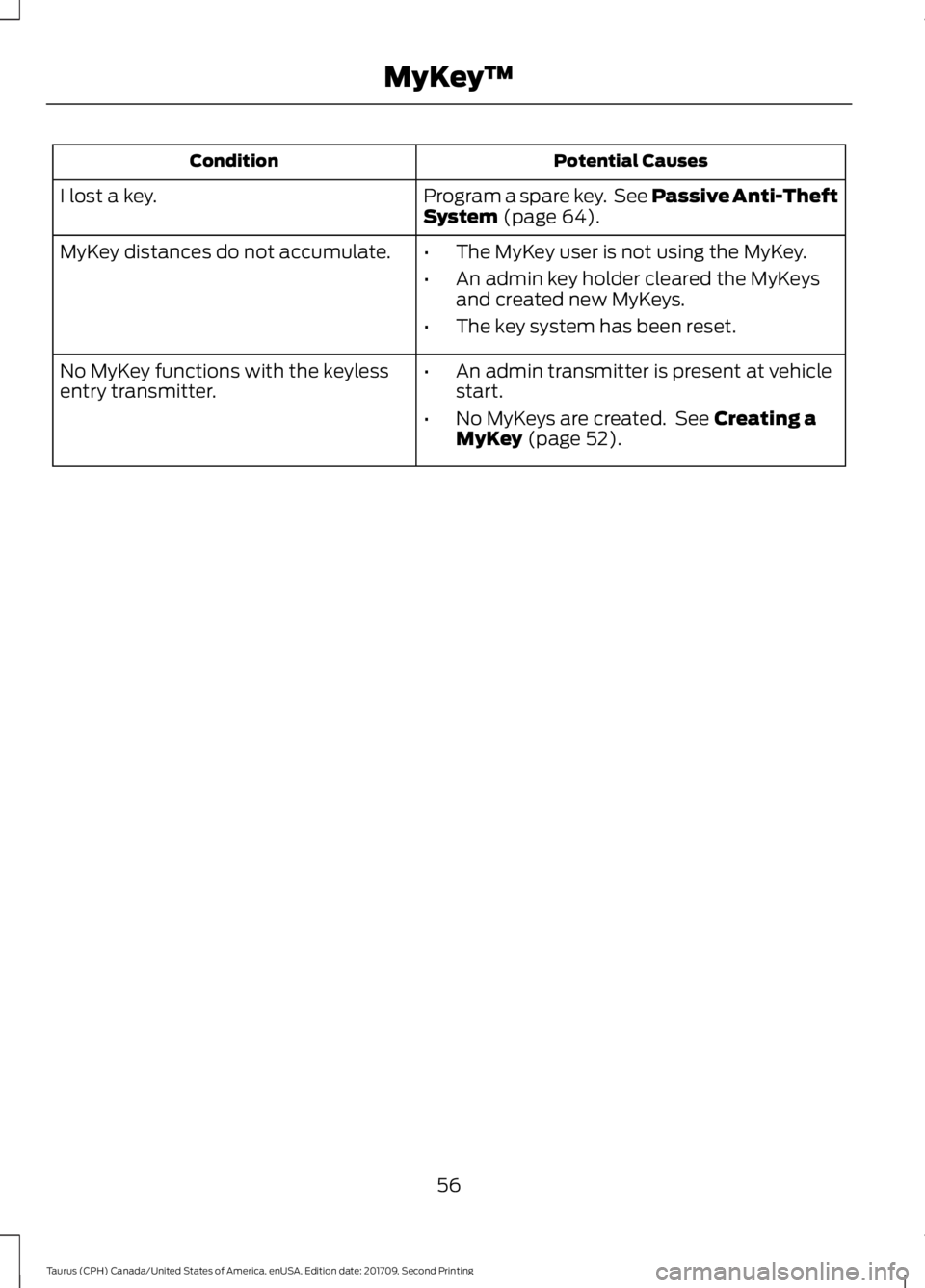
Potential Causes
Condition
Program a spare key. See Passive Anti-Theft
System (page 64).
I lost a key.
MyKey distances do not accumulate.
•The MyKey user is not using the MyKey.
• An admin key holder cleared the MyKeys
and created new MyKeys.
• The key system has been reset.
• An admin transmitter is present at vehicle
start.
• No MyKeys are created. See
Creating a
MyKey (page 52).
No MyKey functions with the keyless
entry transmitter.
56
Taurus (CPH) Canada/United States of America, enUSA, Edition date: 201709, Second Printing MyKey
™
Page 61 of 510
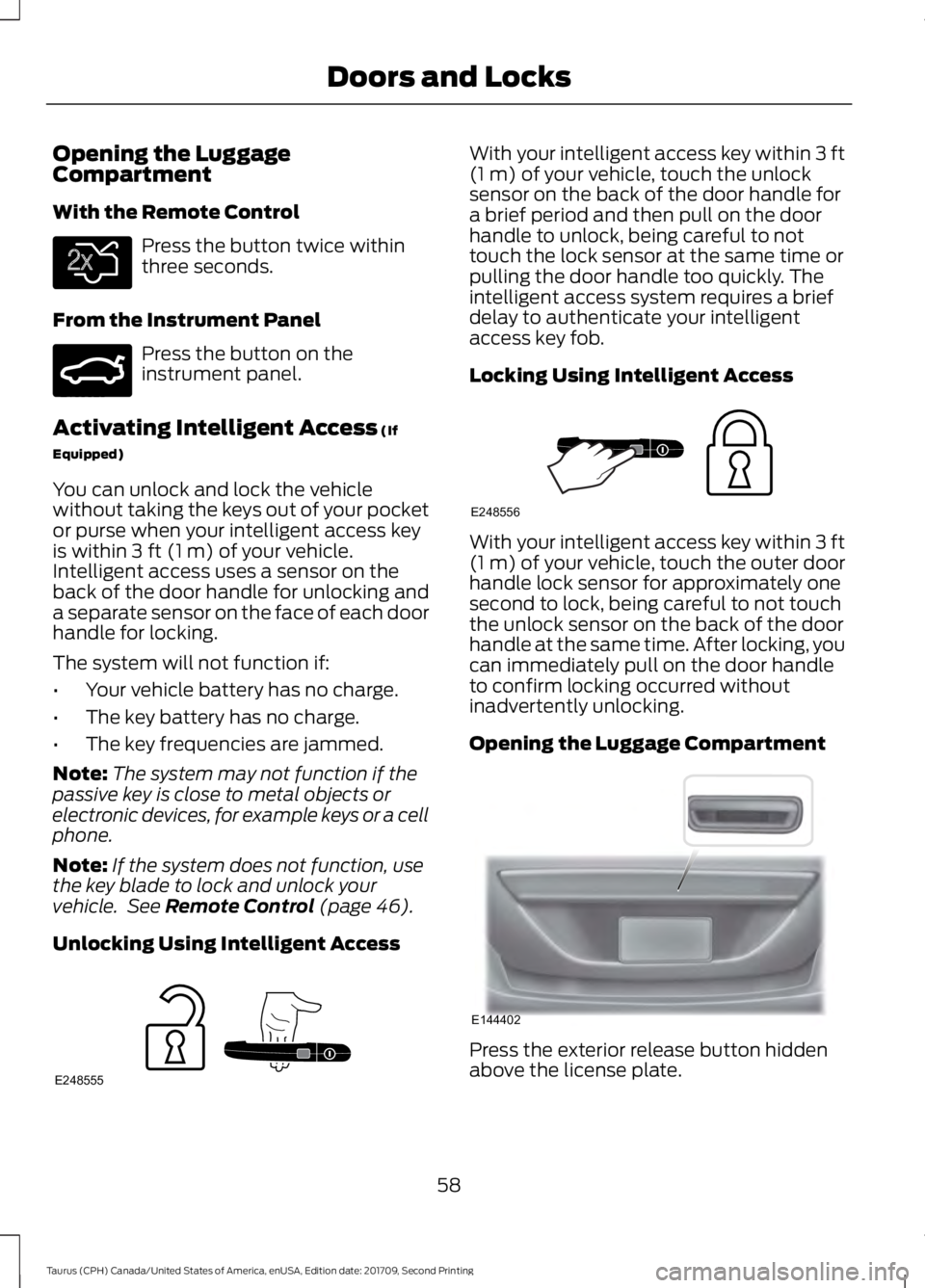
Opening the Luggage
Compartment
With the Remote Control
Press the button twice within
three seconds.
From the Instrument Panel Press the button on the
instrument panel.
Activating Intelligent Access (If
Equipped)
You can unlock and lock the vehicle
without taking the keys out of your pocket
or purse when your intelligent access key
is within
3 ft (1 m) of your vehicle.
Intelligent access uses a sensor on the
back of the door handle for unlocking and
a separate sensor on the face of each door
handle for locking.
The system will not function if:
• Your vehicle battery has no charge.
• The key battery has no charge.
• The key frequencies are jammed.
Note: The system may not function if the
passive key is close to metal objects or
electronic devices, for example keys or a cell
phone.
Note: If the system does not function, use
the key blade to lock and unlock your
vehicle. See
Remote Control (page 46).
Unlocking Using Intelligent Access With your intelligent access key within
3 ft
(1 m) of your vehicle, touch the unlock
sensor on the back of the door handle for
a brief period and then pull on the door
handle to unlock, being careful to not
touch the lock sensor at the same time or
pulling the door handle too quickly. The
intelligent access system requires a brief
delay to authenticate your intelligent
access key fob.
Locking Using Intelligent Access With your intelligent access key within
3 ft
(1 m) of your vehicle, touch the outer door
handle lock sensor for approximately one
second to lock, being careful to not touch
the unlock sensor on the back of the door
handle at the same time. After locking, you
can immediately pull on the door handle
to confirm locking occurred without
inadvertently unlocking.
Opening the Luggage Compartment Press the exterior release button hidden
above the license plate.
58
Taurus (CPH) Canada/United States of America, enUSA, Edition date: 201709, Second Printing Doors and LocksE138630 E159323 E248555 E248556 E144402
Page 63 of 510
Autounlock
Autounlock unlocks all the doors when:
•
The ignition is on, all the doors are
closed, and your vehicle has been
moving at a speed greater than 12 mph
(20 km/h).
• Your vehicle comes to a stop and you
switch the ignition off or to the
accessory position.
• You open the driver door within 10
minutes of switching the ignition off or
to accessory.
Note: The doors will not autounlock if you
electronically lock your vehicle after you
switch the ignition off and before you open
the driver door.
Enabling or Disabling Autounlock
You can enable or disable the autounlock
feature in the information display or an
authorized dealer can do it for you. See
General Information
(page 89).
Illuminated Entry
(If Equipped)
The interior lamps and some exterior
lamps illuminate when you unlock the
doors with the remote control.
The lamps turn off if:
• The ignition is on.
• You press the remote control lock
button.
• 25 seconds have elapsed.
The lamps do not turn off if:
• You switch them on with the lighting
control.
• Any door is open.
Illuminated Exit
(If Equipped)
The interior lamps and some exterior
lamps illuminate when all doors are closed
and you switch the ignition off. The lamps turn off if all the doors remain
closed and:
•
25 seconds have elapsed.
• You lock your vehicle from the outside.
Battery Saver
If you leave the courtesy lamps, interior
lamps or headlamps on, the battery saver
shuts them off 10 minutes after you switch
the ignition off.
Battery Saver for Intelligent Access
Keys (If Equipped)
If you leave the ignition switched on and
the engine is not running, the battery saver
will turn the ignition off when it detects a
certain amount of battery drain, or after
45 minutes have elapsed.
KEYLESS ENTRY
SECURICODE™ Keyless Entry
Keypad
The keypad is near the driver window. It
illuminates when touched.
Note: If you enter your entry code too fast
on the keypad, the unlock function may not
work. Enter your entry code again more
slowly.
60
Taurus (CPH) Canada/United States of America, enUSA, Edition date: 201709, Second Printing Doors and Locks
Page 65 of 510
The anti-scan feature turns off after any
of the following occur:
•
One minute of keypad inactivity.
• You press the unlock button on the
remote control.
• You switch your vehicle on.
• You unlock the vehicle using intelligent
access.
Locking and Unlocking the Doors
Locking All Doors
Press and hold 7·8 and 9·0 on the keypad
simultaneously with the driver door closed.
You do not need to enter a code first.
Unlocking All Doors
Enter the factory-set code or your personal
code, then press 3·4 on the keypad within
five seconds.
Unlocking Only the Driver Door
Enter the factory-set or your personal
five-digit code. You must press each
number within five seconds of each other.
The interior lamps illuminate.
Note: All doors unlock if the two-stage
unlocking feature is turned off. See Locking
and Unlocking (page 57).
INTERIOR LUGGAGE
COMPARTMENT RELEASE WARNINGS
Keep vehicle doors and luggage
compartment locked and keep keys
and remote transmitters out of a
child ’s reach. Unsupervised children could
lock themselves in the trunk and risk injury.
Children should be taught not to play in
vehicles. WARNINGS
Do not leave children or animals
unattended in the vehicle. On hot
days, the temperature in the trunk or
vehicle interior can rise very quickly.
Exposure of people or animals to these
high temperatures for even a short time
can cause death or serious heat-related
injuries, including brain damage. Small
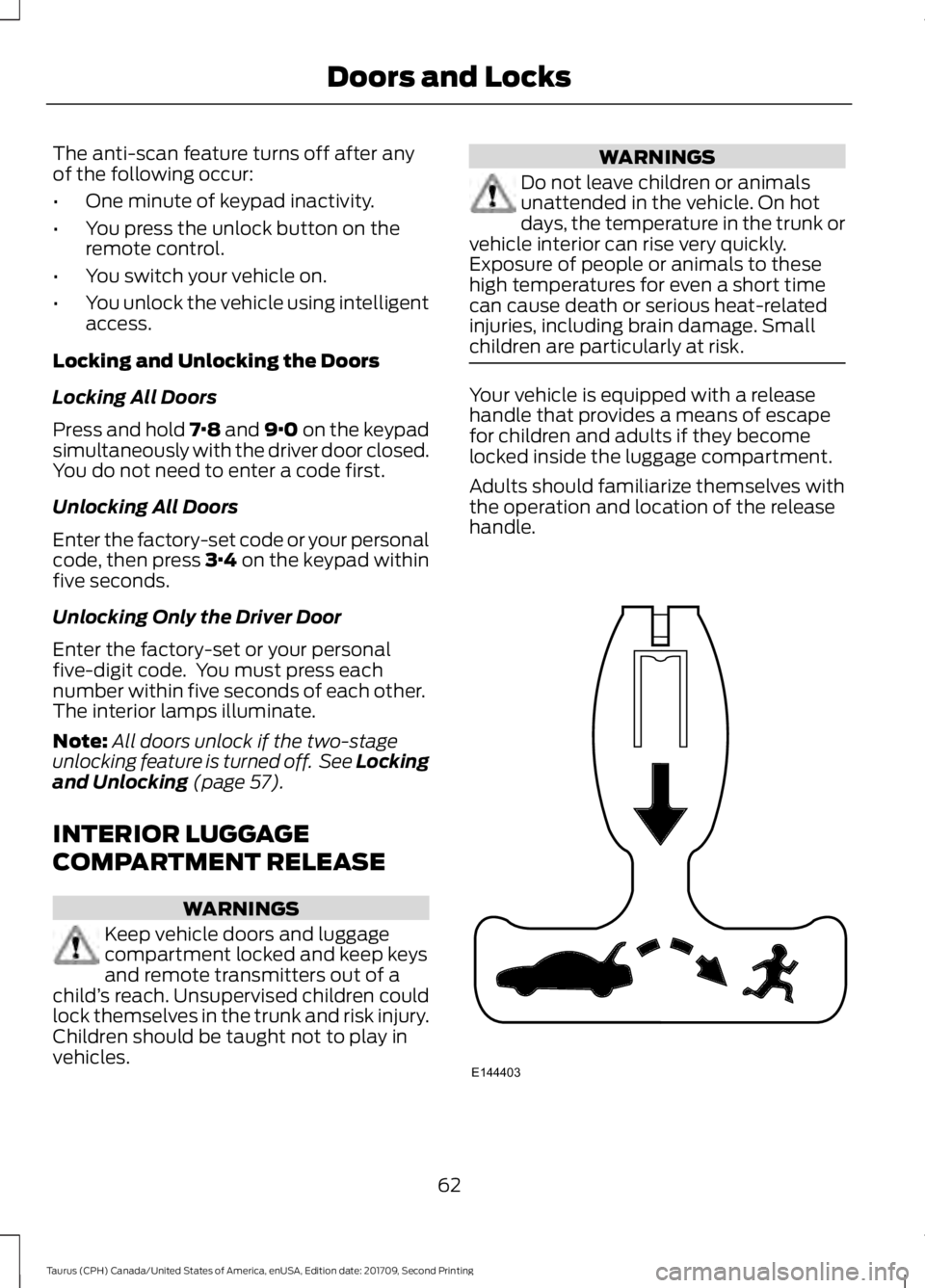
children are particularly at risk. Your vehicle is equipped with a release
handle that provides a means of escape
for children and adults if they become
locked inside the luggage compartment.
Adults should familiarize themselves with
the operation and location of the release
handle.
62
Taurus (CPH) Canada/United States of America, enUSA, Edition date: 201709, Second Printing Doors and LocksE144403
Page 69 of 510
ADJUSTING THE STEERING
WHEEL - VEHICLES WITH:
MANUAL ADJUSTABLE
STEERING COLUMN
WARNING
Do not adjust the steering wheel
when your vehicle is moving.
Note:
Make sure that you are sitting in the
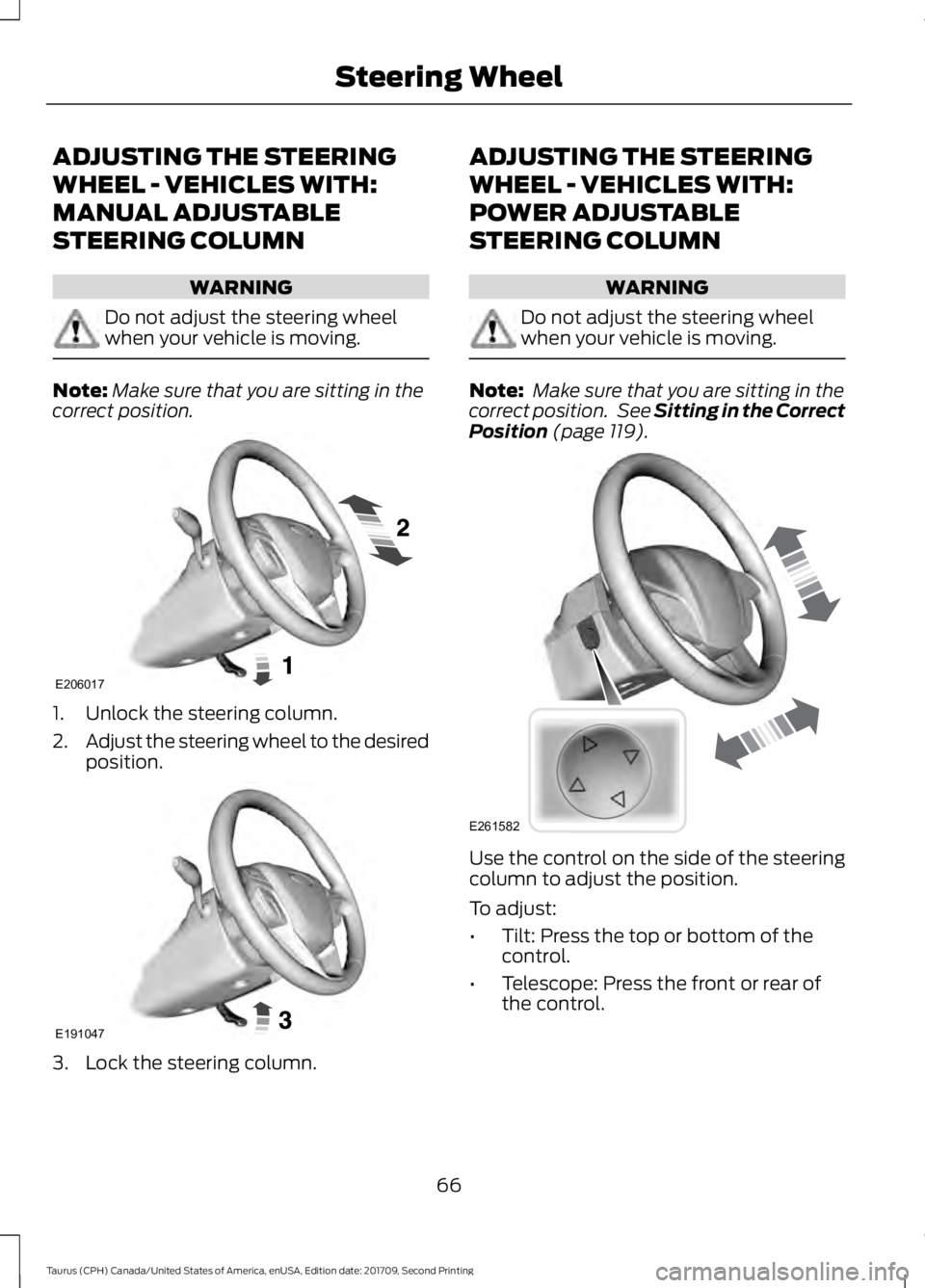
correct position. 1. Unlock the steering column.
2.
Adjust the steering wheel to the desired
position. 3. Lock the steering column. ADJUSTING THE STEERING
WHEEL - VEHICLES WITH:
POWER ADJUSTABLE
STEERING COLUMN WARNING
Do not adjust the steering wheel
when your vehicle is moving.
Note:
Make sure that you are sitting in the
correct position. See Sitting in the Correct
Position (page 119). Use the control on the side of the steering
column to adjust the position.
To adjust:
•
Tilt: Press the top or bottom of the
control.
• Telescope: Press the front or rear of
the control.
66
Taurus (CPH) Canada/United States of America, enUSA, Edition date: 201709, Second Printing Steering WheelE206017 E191047 E261582
Page 70 of 510
End of Travel Position
The steering column sets a stopping
position just short of the end of the column
position to prevent damage to the steering
column. A new stopping position sets if the
steering column encounters an object
when tilting or telescoping.
To reset the steering column to its normal
stopping position:
1. Confirm there is nothing obstructing
the motion of the steering column.
2. Press and hold the steering column control until the steering column stops
moving.
3. Press the steering column control again.
Note: The steering column may begin to
move again.
4. When the steering column stops, continue holding the control for a few
seconds.
5. Repeat for each direction as necessary.
A new stopping position sets. The next
time you tilt or telescope the steering
column, it stops just short of the end of the
column position.
Memory Feature
You can save and recall the steering
column position with the memory function.
See Memory Function (page 124).
Pressing the adjustment control during a
memory recall cancels the operation.
Easy Entry and Exit Feature
The column moves up when you switch
the ignition off. Switch the ignition on to
return the system to its previous settings.
You can switch this feature on or off in the
information display. See
Information
Displays (page 89). Note:
Depending on your vehicle, the
column may move up and in.
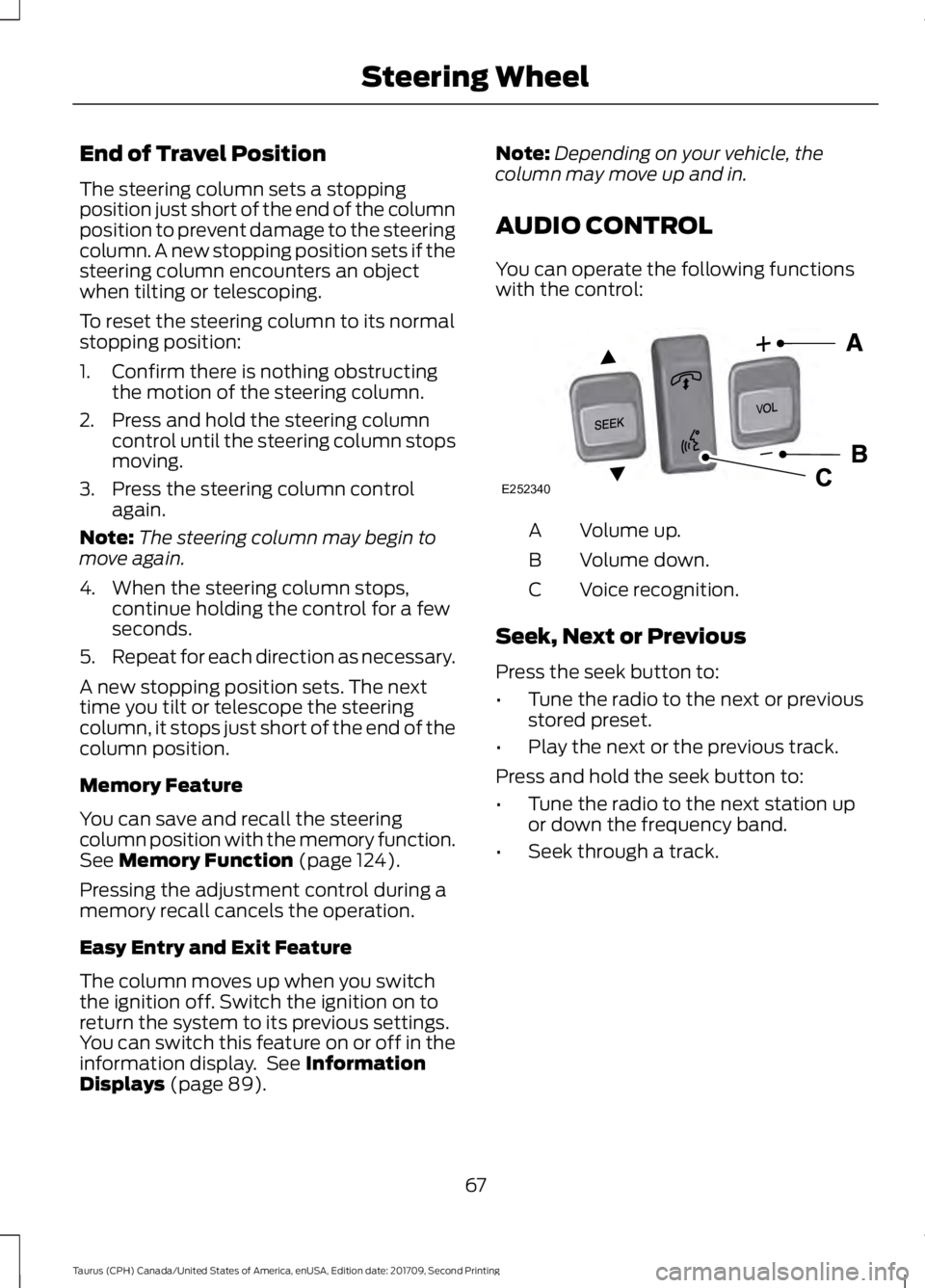
AUDIO CONTROL
You can operate the following functions
with the control: Volume up.
A
Volume down.
B
Voice recognition.
C
Seek, Next or Previous
Press the seek button to:
• Tune the radio to the next or previous
stored preset.
• Play the next or the previous track.
Press and hold the seek button to:
• Tune the radio to the next station up
or down the frequency band.
• Seek through a track.
67
Taurus (CPH) Canada/United States of America, enUSA, Edition date: 201709, Second Printing Steering WheelE252340
V
Page 71 of 510
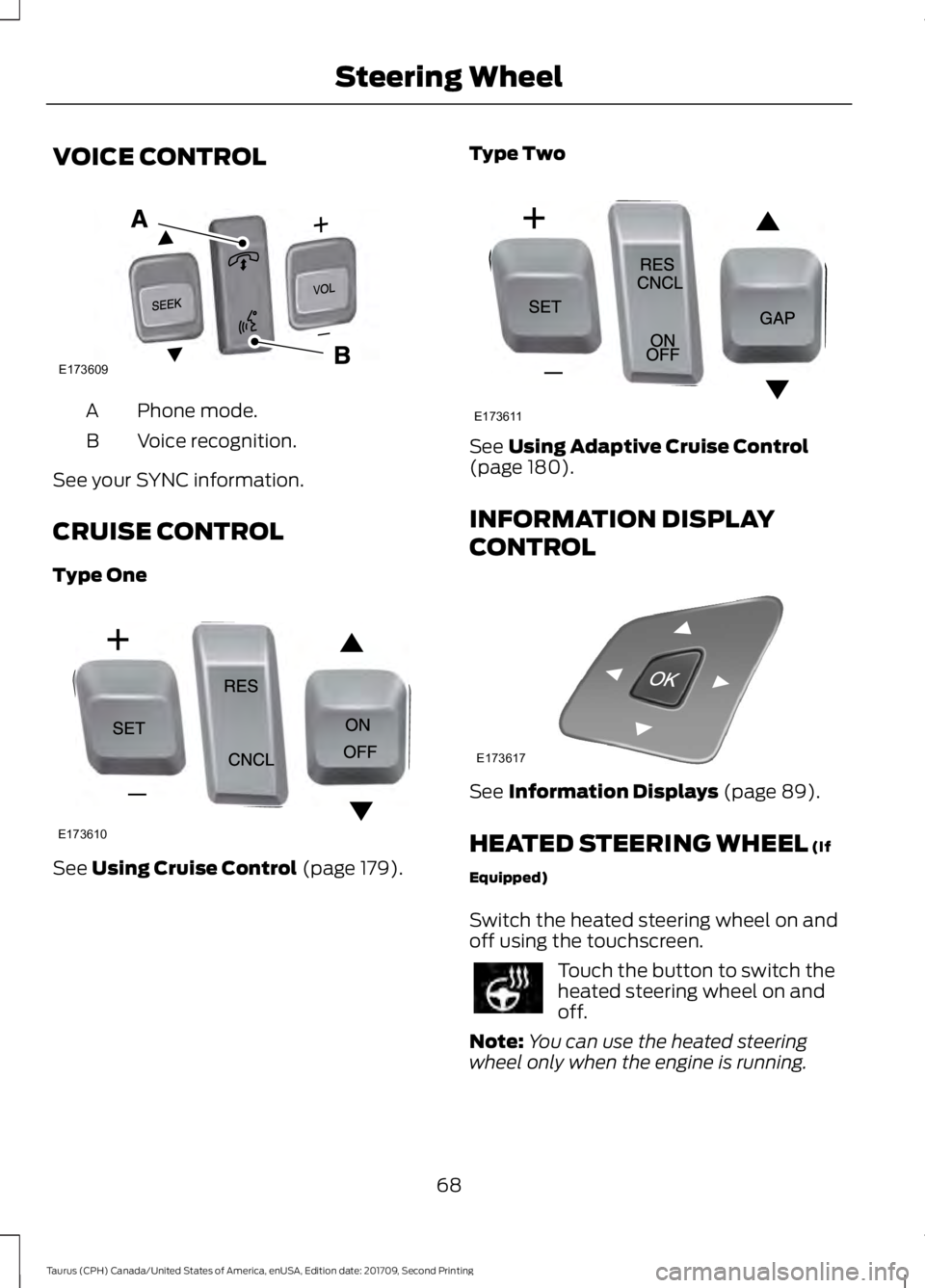
VOICE CONTROL
Phone mode.
A
Voice recognition.
B
See your SYNC information.
CRUISE CONTROL
Type One See Using Cruise Control (page 179). Type Two See
Using Adaptive Cruise Control
(page 180).
INFORMATION DISPLAY
CONTROL See
Information Displays (page 89).
HEATED STEERING WHEEL
(If
Equipped)
Switch the heated steering wheel on and
off using the touchscreen. Touch the button to switch the
heated steering wheel on and
off.
Note: You can use the heated steering
wheel only when the engine is running.
68
Taurus (CPH) Canada/United States of America, enUSA, Edition date: 201709, Second Printing Steering WheelE173609
V E173610 E173611 E173617
Page 73 of 510
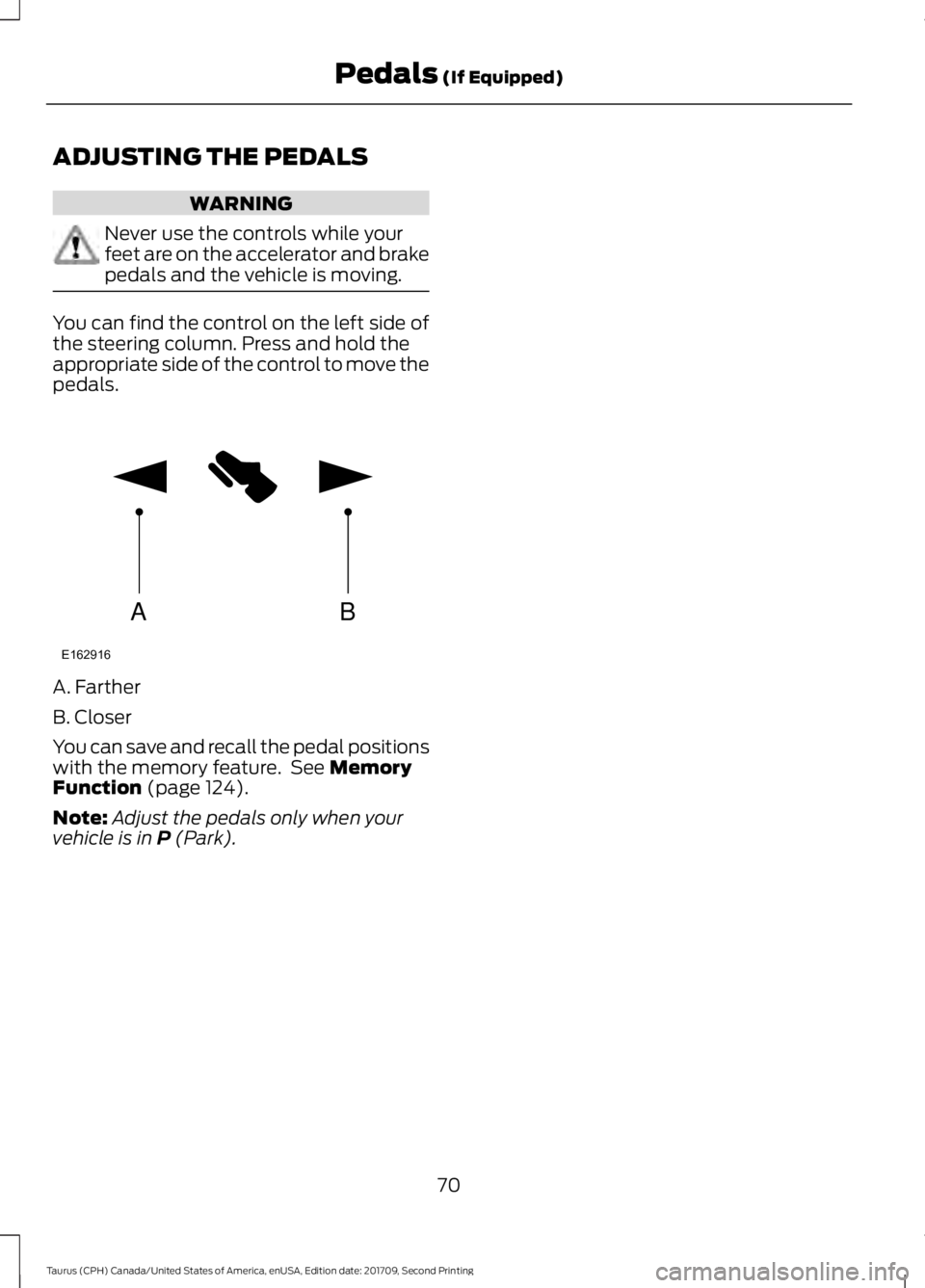
ADJUSTING THE PEDALS
WARNING
Never use the controls while your
feet are on the accelerator and brake
pedals and the vehicle is moving.
You can find the control on the left side of
the steering column. Press and hold the
appropriate side of the control to move the
pedals.
A. Farther
B. Closer
You can save and recall the pedal positions
with the memory feature. See Memory
Function (page 124).
Note: Adjust the pedals only when your
vehicle is in
P (Park).
70
Taurus (CPH) Canada/United States of America, enUSA, Edition date: 201709, Second Printing Pedals
(If Equipped)AB
E162916
Page 78 of 510
Use the instrument lighting dimmer to
adjust the brightness of the instrument
panel and all applicable lighting in your
vehicle.
•
Tap the top or bottom of the control
to the first detent to brighten or dim all
interior lighting incrementally.
• Press and hold the top or bottom of
the control to the first detent until you
reach the level you desire.
• Press and hold the top of the control
to the second detent to switch the
interior lights on.
• Press and hold the bottom of the
control to the second detent to switch
the interior lights off.
HEADLAMP EXIT DELAY
Set the delay time to keep the headlamps
on for up to three minutes after switching
off the ignition.
Follow the steps below to change the
delay time:
Note: Complete steps 1 through 6 within 10
seconds.
1. Switch the ignition off.
2. Select the autolamp position on the lighting control.
3. Switch the lighting control to the off position.
4. Switch the ignition on.
5. Switch the ignition off.
6. Select the autolamp position on the lighting control. The headlamps and
parking lamps turn on.
7. Switch the lighting control to the off position when reaching the required
delay time. The headlamps and parking
lamps turn off. Set the headlamp exit delay to one of the
following settings:
•
Off.
• 10 seconds.
• 20 seconds.
• 120 seconds.
Note: Adjust the time delay using the
display controls in the information display.
See Information Displays (page 89).
DAYTIME RUNNING LAMPS WARNING
The daytime running lamps system
does not activate the rear lamps and
may not provide adequate lighting
during low visibility driving conditions.
Make sure you switch the headlamps on,
as appropriate, during all low visibility
conditions. Failure to do so may result in a
crash. The system turns the lamps on in daylight
conditions.
To switch the system on, switch the
lighting control to the off, autolamp or
parking lamp position.
AUTOMATIC HIGH BEAM
CONTROL
WARNING
The system does not relieve you of
your responsibility to drive with due
care and attention. You may need to
override the system if it does not turn the
high beams on or off. 75
Taurus (CPH) Canada/United States of America, enUSA, Edition date: 201709, Second Printing Lighting