ECO mode FORD TAURUS 2018 Owner's Guide
[x] Cancel search | Manufacturer: FORD, Model Year: 2018, Model line: TAURUS, Model: FORD TAURUS 2018Pages: 510, PDF Size: 22.04 MB
Page 126 of 510
Note:
On vehicles with memory seats, to
prevent damage to the seat, the power
seats are designed to set a stopping position
just short of the end of the seat track. If the
seat encounters an object while moving
forward or backward, a new stopping
position will be set.
To reset the seat to its normal stopping
position, do the following.
1. After encountering the new stopping position, press the power seat control
again to override.
2. Continue pressing the control until it reaches the end of the seat track.
3. Continue pressing the control for about
two seconds. You will feel the seat
bounce back slightly.
Power Lumbar (If Equipped) Multi-Contour Front Seats With
Active Motion
(If Equipped)
Note: The massage system will turn off
after 20 minutes.
Note: The engine must be running or the
vehicle must be in accessory mode to
activate the seats. Note:
Allow a few seconds for any selection
to activate. The seatback and cushion
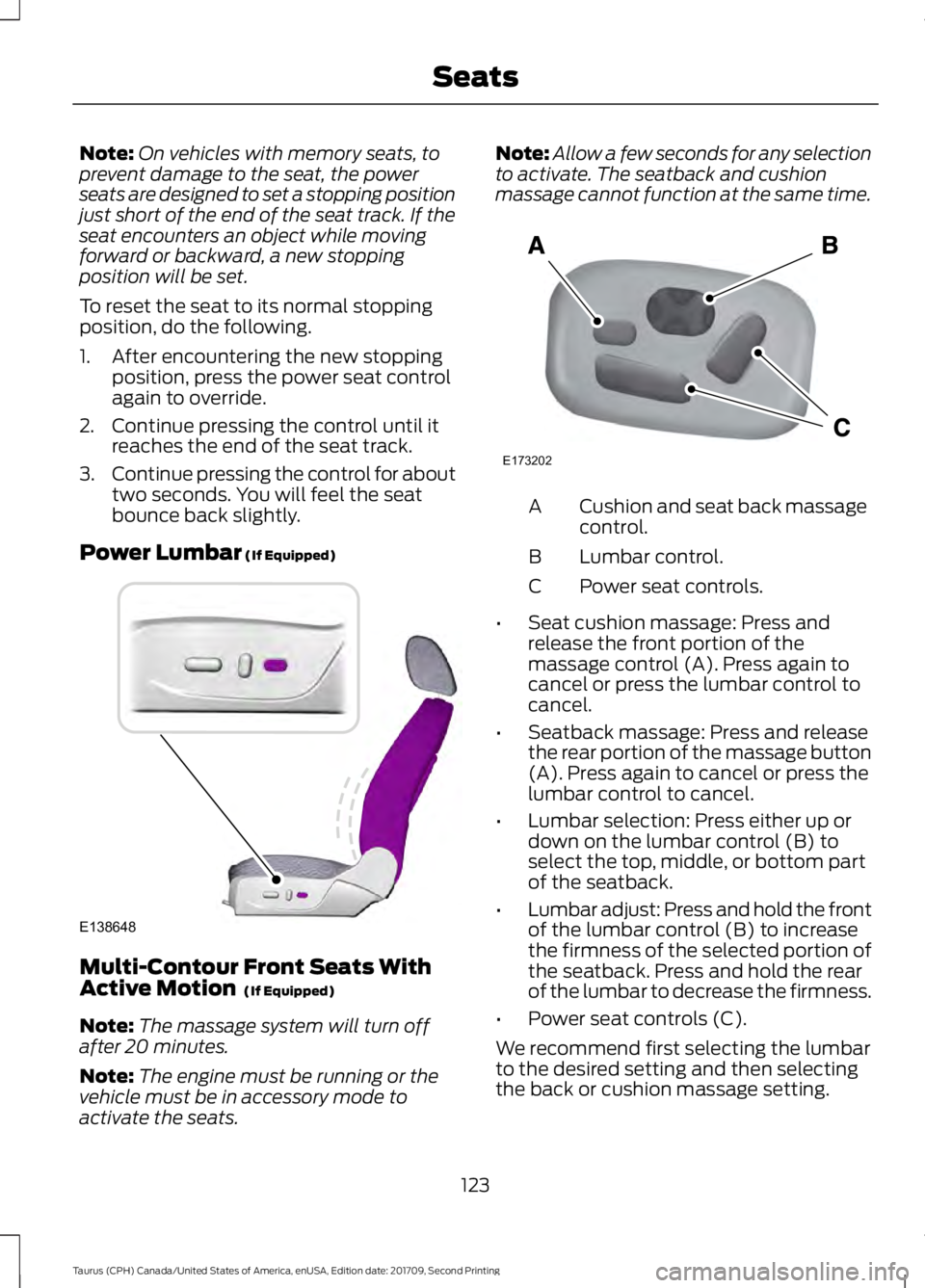
massage cannot function at the same time. Cushion and seat back massage
control.
A
Lumbar control.
B
Power seat controls.
C
• Seat cushion massage: Press and
release the front portion of the
massage control (A). Press again to
cancel or press the lumbar control to
cancel.
• Seatback massage: Press and release
the rear portion of the massage button
(A). Press again to cancel or press the
lumbar control to cancel.
• Lumbar selection: Press either up or
down on the lumbar control (B) to
select the top, middle, or bottom part
of the seatback.
• Lumbar adjust: Press and hold the front
of the lumbar control (B) to increase
the firmness of the selected portion of
the seatback. Press and hold the rear
of the lumbar to decrease the firmness.
• Power seat controls (C).
We recommend first selecting the lumbar
to the desired setting and then selecting
the back or cushion massage setting.
123
Taurus (CPH) Canada/United States of America, enUSA, Edition date: 201709, Second Printing SeatsE138648 E173202
Page 139 of 510
Ignition Modes
The keyless starting system has three
modes:
Off: Turns the ignition off.
• Without applying the brake pedal,
press and release the button once
when the ignition is in the on mode, or
when the engine is running but the
vehicle is not moving.
On:
All electrical circuits are operational
and the warning lamps and indicators
illuminate.
• Without applying the brake pedal,
press and release the button once.
Note: You may have to press the push
button ignition switch twice to switch the
ignition on.
Start:
Starts the engine.
• Press the brake pedal, and then press
the button for any length of time. An
indicator light on the button illuminates
when then ignition is on and when the
engine starts. STARTING A GASOLINE
ENGINE
When you start the engine, the idle speed
increases. This helps to warm up the
engine. If the engine idle speed does not
slow down automatically, have your
vehicle checked by an authorized dealer.
Note:
You can crank the engine for a total
of 60 seconds without the engine starting
before the starting system temporarily
disables. The 60 seconds does not have to
be all at once. For example, if you crank the
engine three times for 20 seconds each
time, without the engine starting, you
reached the 60-second time limit. A
message appears in the information display
alerting you that you exceeded the cranking
time. You cannot attempt to start the
engine for at least 15 minutes. After 15
minutes, you are limited to a 15-second
engine cranking time. You need to wait 60
minutes before you can crank the engine for
60 seconds again.
Before starting your vehicle, check the
following:
• Make sure all occupants have fastened
their safety belts.
• Make sure the headlamps and
electrical accessories are off.
• Make sure the parking brake is on.
• Make sure the transmission is in park
(P).
To start the engine, do the following:
Note: Do not touch the accelerator pedal.
1. Fully depress the brake pedal.
2. Turn the key to the start position to start the engine.
Note: The engine may continue cranking
for up to 15 seconds or until it starts.
Note: If you cannot start the engine on the
first try, wait for a short period and try again.
136
Taurus (CPH) Canada/United States of America, enUSA, Edition date: 201709, Second Printing Starting and Stopping the EngineE191075
Page 160 of 510
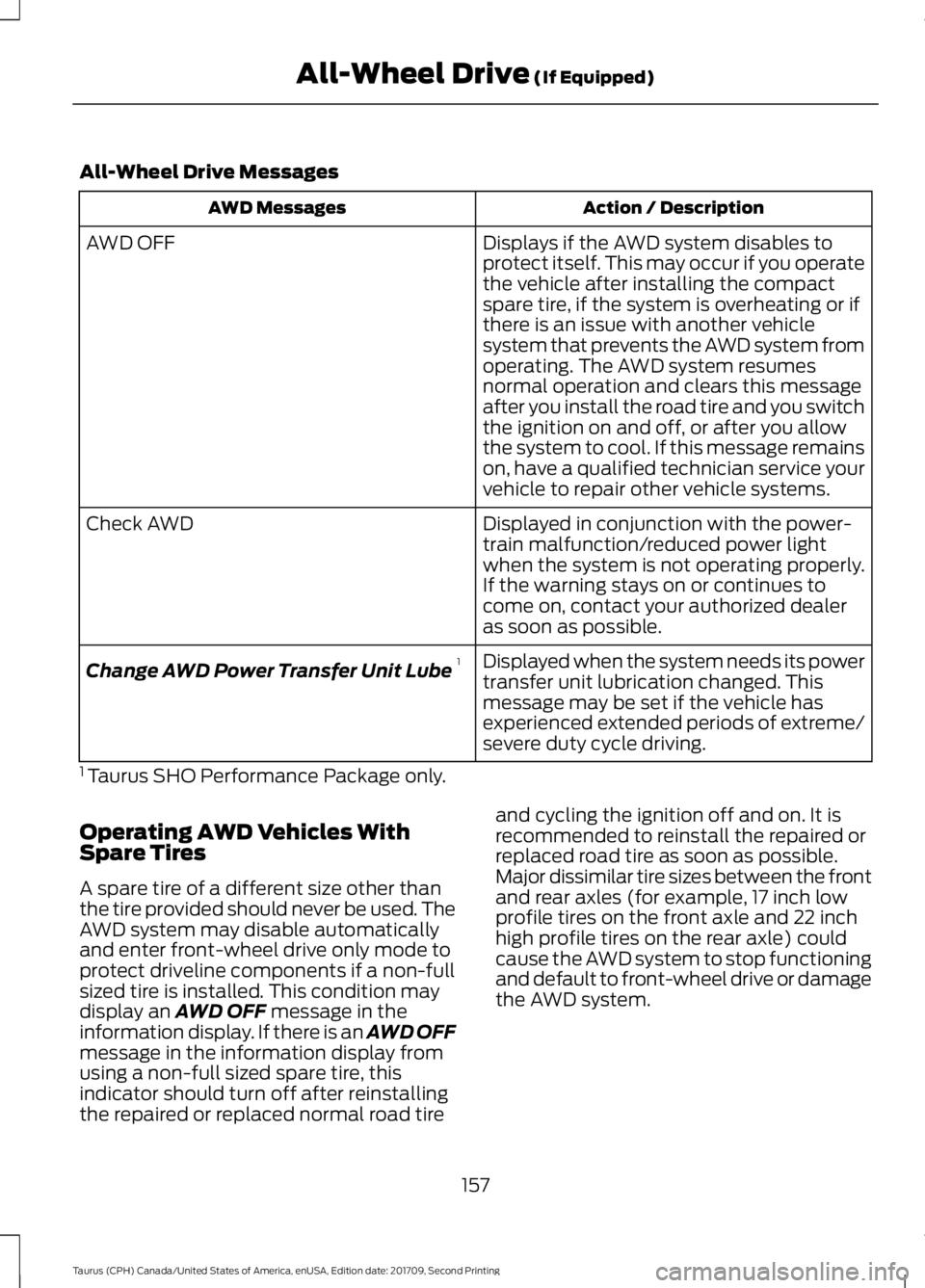
All-Wheel Drive Messages
Action / Description
AWD Messages
Displays if the AWD system disables to
protect itself. This may occur if you operate
the vehicle after installing the compact
spare tire, if the system is overheating or if
there is an issue with another vehicle
system that prevents the AWD system from
AWD OFF
operating. The AWD system resumes
normal operation and clears this message
after you install the road tire and you switch
the ignition on and off, or after you allow
the system to cool. If this message remains
on, have a qualified technician service your
vehicle to repair other vehicle systems.
Displayed in conjunction with the power-
train malfunction/reduced power light
when the system is not operating properly.
If the warning stays on or continues to
come on, contact your authorized dealer
as soon as possible.
Check AWD
Displayed when the system needs its power
transfer unit lubrication changed. This
message may be set if the vehicle has
experienced extended periods of extreme/
severe duty cycle driving.
Change AWD Power Transfer Unit Lube
1
1 Taurus SHO Performance Package only.
Operating AWD Vehicles With
Spare Tires
A spare tire of a different size other than
the tire provided should never be used. The
AWD system may disable automatically
and enter front-wheel drive only mode to
protect driveline components if a non-full
sized tire is installed. This condition may
display an AWD OFF message in the
information display. If there is an AWD OFF
message in the information display from
using a non-full sized spare tire, this
indicator should turn off after reinstalling
the repaired or replaced normal road tire and cycling the ignition off and on. It is
recommended to reinstall the repaired or
replaced road tire as soon as possible.
Major dissimilar tire sizes between the front
and rear axles (for example, 17 inch low
profile tires on the front axle and 22 inch
high profile tires on the rear axle) could
cause the AWD system to stop functioning
and default to front-wheel drive or damage
the AWD system.
157
Taurus (CPH) Canada/United States of America, enUSA, Edition date: 201709, Second Printing All-Wheel Drive
(If Equipped)
Page 171 of 510
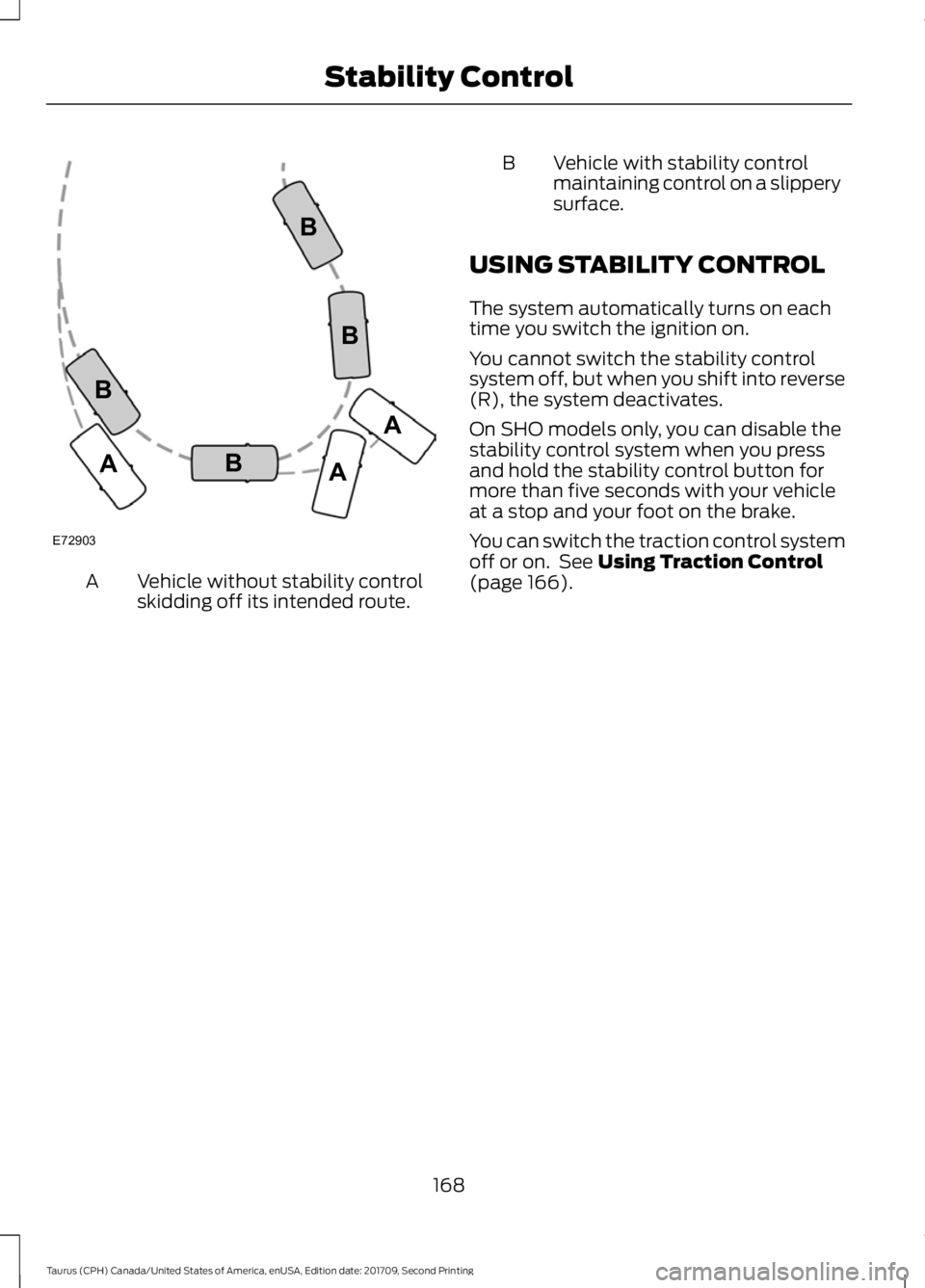
Vehicle without stability control
skidding off its intended route.
A B Vehicle with stability control
maintaining control on a slippery
surface.
USING STABILITY CONTROL
The system automatically turns on each
time you switch the ignition on.
You cannot switch the stability control
system off, but when you shift into reverse
(R), the system deactivates.
On SHO models only, you can disable the
stability control system when you press
and hold the stability control button for
more than five seconds with your vehicle
at a stop and your foot on the brake.
You can switch the traction control system
off or on. See Using Traction Control
(page 166).
168
Taurus (CPH) Canada/United States of America, enUSA, Edition date: 201709, Second Printing Stability ControlE72903A
AA
B
BB
B
Page 172 of 510
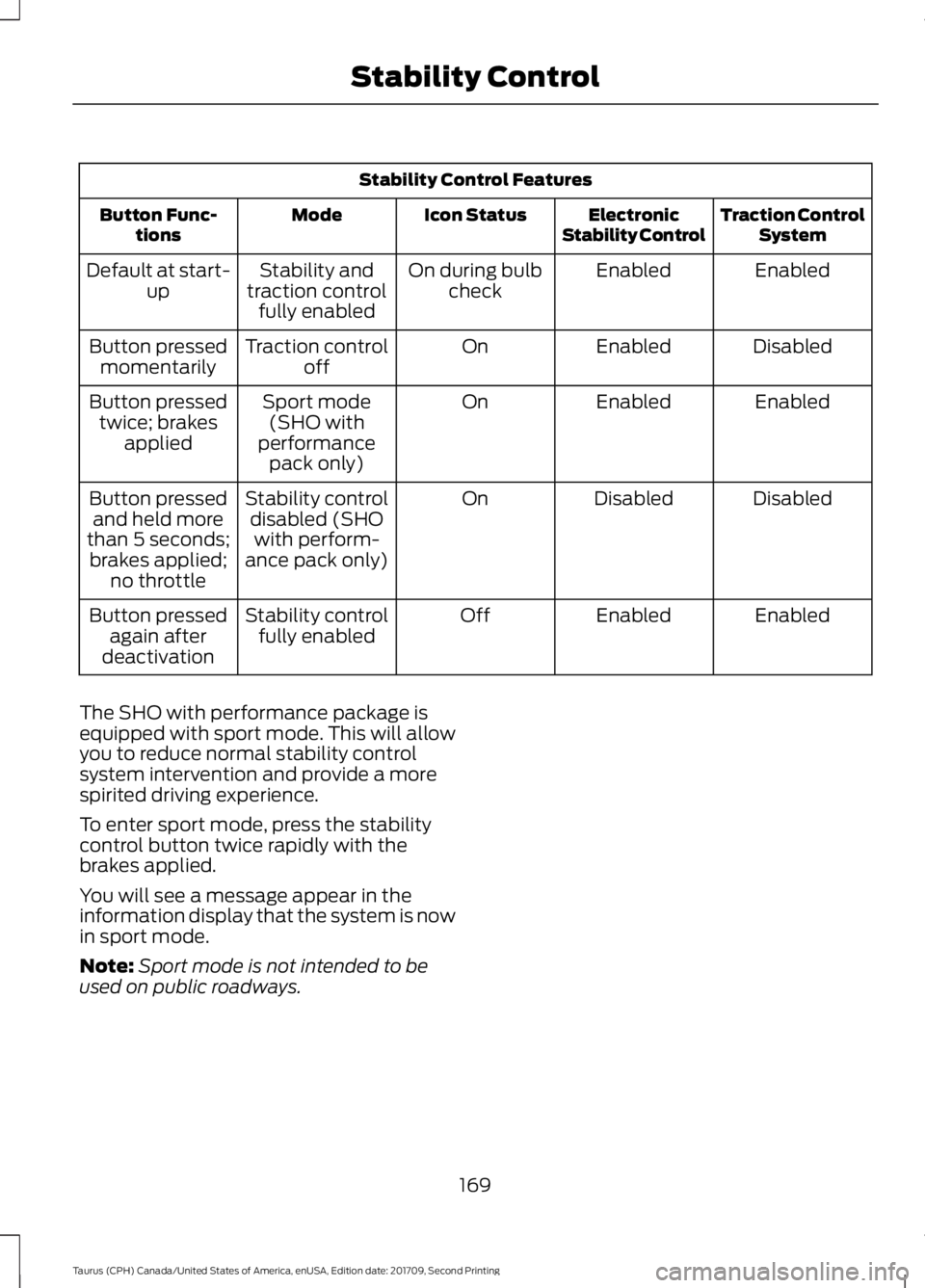
Stability Control Features
Traction ControlSystem
Electronic
Stability Control
Icon Status
Mode
Button Func-
tions
Enabled
Enabled
On during bulb
check
Stability and
traction control fully enabled
Default at start-
up
Disabled
Enabled
On
Traction control
off
Button pressed
momentarily
Enabled
Enabled
On
Sport mode
(SHO with
performance pack only)
Button pressed
twice; brakes applied
Disabled
Disabled
On
Stability control
disabled (SHOwith perform-
ance pack only)
Button pressed
and held more
than 5 seconds; brakes applied; no throttle
Enabled
Enabled
Off
Stability control
fully enabled
Button pressed
again after
deactivation
The SHO with performance package is
equipped with sport mode. This will allow
you to reduce normal stability control
system intervention and provide a more
spirited driving experience.
To enter sport mode, press the stability
control button twice rapidly with the
brakes applied.
You will see a message appear in the
information display that the system is now
in sport mode.
Note: Sport mode is not intended to be
used on public roadways.
169
Taurus (CPH) Canada/United States of America, enUSA, Edition date: 201709, Second Printing Stability Control
Page 182 of 510
PRINCIPLE OF OPERATION
Cruise control lets you maintain a set
speed without keeping your foot on the
accelerator pedal. You can use cruise
control when your vehicle speed is greater
than 20 mph (30 km/h).
USING CRUISE CONTROL
(If
Equipped) WARNINGS
Do not use cruise control on winding
roads, in heavy traffic or when the
road surface is slippery. This could
result in loss of vehicle control, serious
injury or death. When you are going downhill, your
vehicle speed could increase above
the set speed. The system does not
apply the brakes. Note:
Cruise control disengages if the
vehicle speed decreases more than 10 mph
(16 km/h) below the set speed when driving
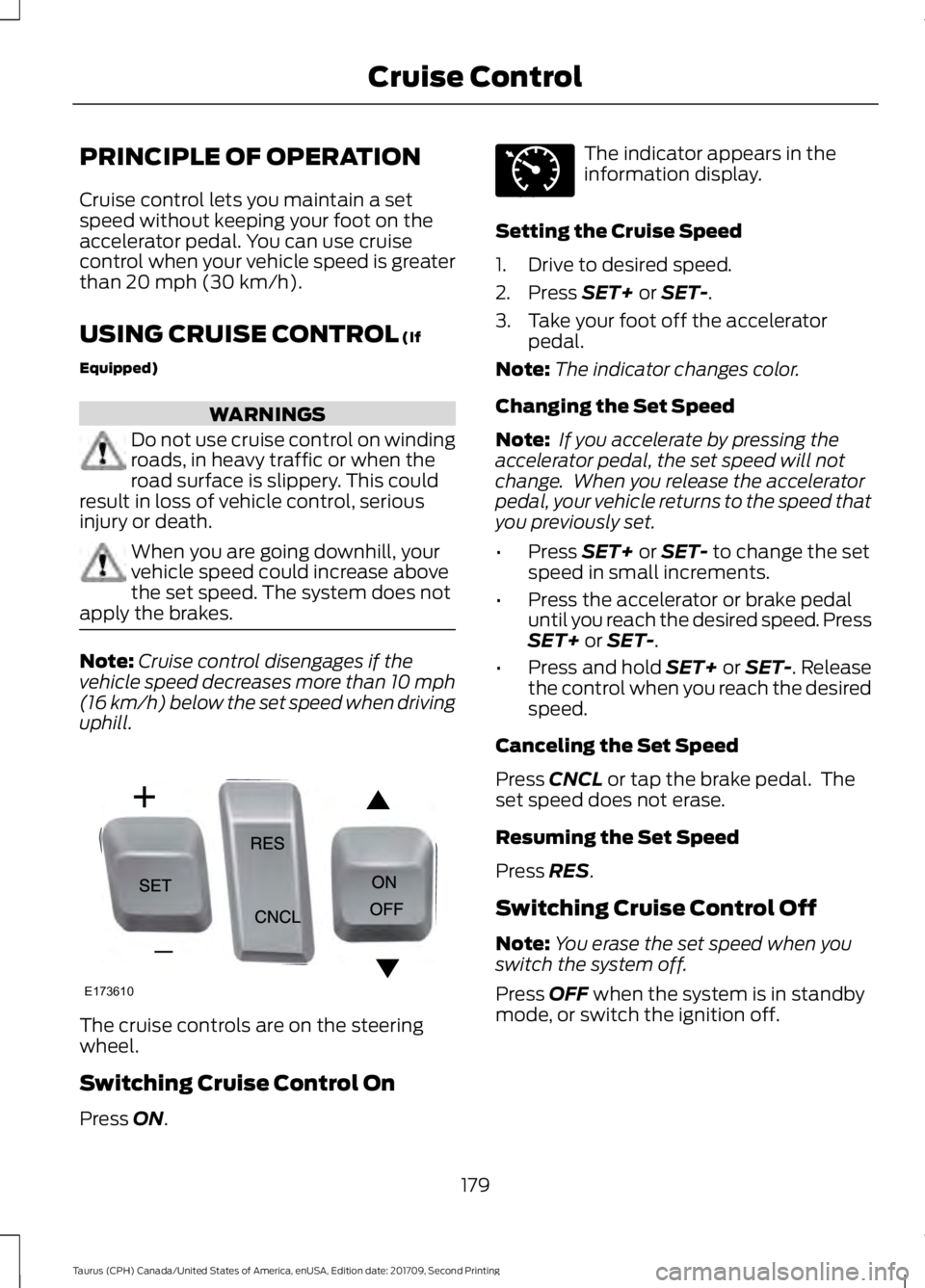
uphill. The cruise controls are on the steering
wheel.
Switching Cruise Control On
Press
ON. The indicator appears in the
information display.
Setting the Cruise Speed
1. Drive to desired speed.
2. Press
SET+ or SET-.
3. Take your foot off the accelerator pedal.
Note: The indicator changes color.
Changing the Set Speed
Note: If you accelerate by pressing the
accelerator pedal, the set speed will not
change. When you release the accelerator
pedal, your vehicle returns to the speed that
you previously set.
• Press
SET+ or SET- to change the set
speed in small increments.
• Press the accelerator or brake pedal
until you reach the desired speed. Press
SET+
or SET-.
• Press and hold SET+ or SET-. Release
the control when you reach the desired
speed.
Canceling the Set Speed
Press
CNCL or tap the brake pedal. The
set speed does not erase.
Resuming the Set Speed
Press
RES.
Switching Cruise Control Off
Note: You erase the set speed when you
switch the system off.
Press
OFF when the system is in standby
mode, or switch the ignition off.
179
Taurus (CPH) Canada/United States of America, enUSA, Edition date: 201709, Second Printing Cruise ControlE173610 E71340
Page 186 of 510
Changing the Set Speed
•
Press SET+ or SET- to change the set
speed in small increments.
• Press the accelerator or brake pedal
until you reach the desired speed. Press
SET+
or SET-.
• Press and hold
SET+ or SET- to
change the set speed in large
increments. Release the control when
you reach the desired speed.
The system may apply the brakes to slow
the vehicle to the new set speed. The set
speed displays continuously in the
information display when the system is
active.
Canceling the Set Speed
Press
CNCL or tap the brake pedal. The
set speed does not erase.
Resuming the Set Speed
Note: Only use resume if you are aware of
the set speed and intend to return to it.
Press
RES. Your vehicle speed returns to
the previously set speed and gap setting.
The set speed displays continuously in the
information display when the system is
active.
Automatic Cancellation
Note: If the engine speed drops too low, an
audible warning sounds and a message
appears in the information display.
Automatic braking releases.
The system does not operate below
12 mph (20 km/h)
.
Automatic cancellation can also occur if:
• The tires lose traction.
• The engine speed is too low.
• You apply the parking brake. Hilly Condition Usage
Note:
An audible alarm sounds and the
system shuts down if it applies brakes for
an extended period of time. This allows the
brakes to cool. The system functions
normally again after the brakes cool.
Select a lower gear when the system is
active in situations such as prolonged
downhill driving on steep grades, for
example in mountainous areas. The
system needs additional engine braking in
these situations to reduce the load on the
vehicle ’s regular brake system to prevent
it from overheating.
Switching Adaptive Cruise Control
Off
Note: You erase the set speed and gap
setting when you switch the system off.
Press
OFF when the system is in standby
mode, or switch the ignition off.
Detection Issues WARNINGS
On rare occasions, detection issues
can occur due to the road
infrastructures, for example bridges,
tunnels and safety barriers. In these cases,
the system may brake late or
unexpectedly. At all times, you are
responsible for controlling your vehicle,
supervising the system and intervening, if
required. If the system malfunctions, have your
vehicle checked as soon as possible.
The radar sensor has a limited field of view.
It may not detect vehicles at all or detect
a vehicle later than expected in some
situations. The lead vehicle graphic does
not illuminate if the system does not
detect a vehicle in front of you.
183
Taurus (CPH) Canada/United States of America, enUSA, Edition date: 201709, Second Printing Cruise Control
Page 188 of 510
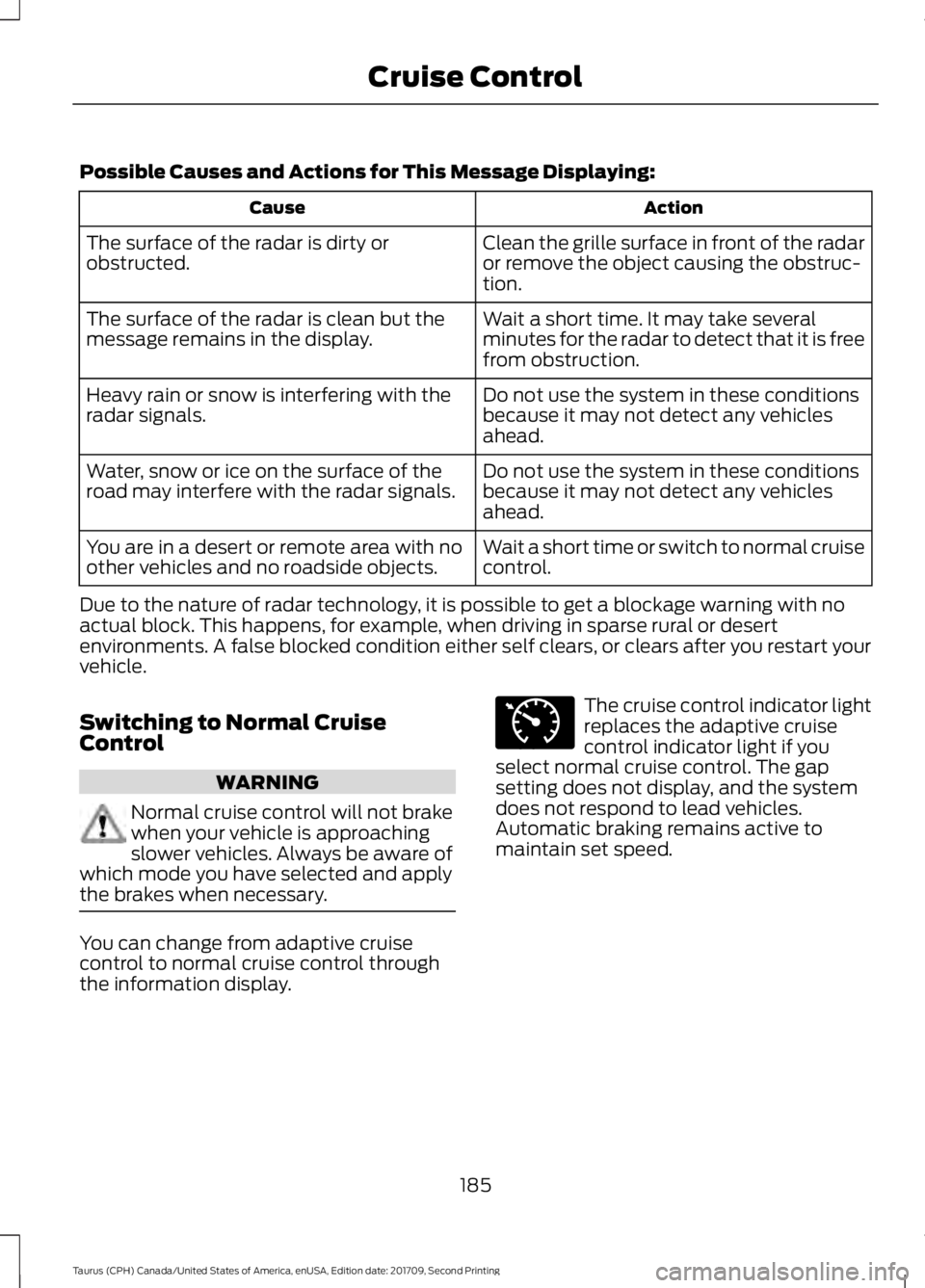
Possible Causes and Actions for This Message Displaying:
Action
Cause
Clean the grille surface in front of the radar
or remove the object causing the obstruc-
tion.
The surface of the radar is dirty or
obstructed.
Wait a short time. It may take several
minutes for the radar to detect that it is free
from obstruction.
The surface of the radar is clean but the
message remains in the display.
Do not use the system in these conditions
because it may not detect any vehicles
ahead.
Heavy rain or snow is interfering with the
radar signals.
Do not use the system in these conditions
because it may not detect any vehicles
ahead.
Water, snow or ice on the surface of the
road may interfere with the radar signals.
Wait a short time or switch to normal cruise
control.
You are in a desert or remote area with no
other vehicles and no roadside objects.
Due to the nature of radar technology, it is possible to get a blockage warning with no
actual block. This happens, for example, when driving in sparse rural or desert
environments. A false blocked condition either self clears, or clears after you restart your
vehicle.
Switching to Normal Cruise
Control WARNING
Normal cruise control will not brake
when your vehicle is approaching
slower vehicles. Always be aware of
which mode you have selected and apply
the brakes when necessary. You can change from adaptive cruise
control to normal cruise control through
the information display. The cruise control indicator light
replaces the adaptive cruise
control indicator light if you
select normal cruise control. The gap
setting does not display, and the system
does not respond to lead vehicles.
Automatic braking remains active to
maintain set speed.
185
Taurus (CPH) Canada/United States of America, enUSA, Edition date: 201709, Second Printing Cruise ControlE71340
Page 191 of 510
WARNINGS
In cold and severe weather
conditions the system may not
function. Rain, snow and spray can
all limit sensor performance. The system will not operate if the
sensor cannot track the road lane
markings.
The sensor may incorrectly track lane
markings as other structures or
objects. This can result in a false or
missed warning. Large contrasts in outside lighting
can limit sensor performance.
The system may not operate
properly if the sensor is blocked.
Keep the windshield free from
obstruction. If damage occurs in the immediate
area surrounding the sensor, have
your vehicle checked as soon as
possible. The system may not correctly
operate if your vehicle is fitted with
a suspension kit not approved by us.
Note:
The system works above 40 mph
(64 km/h).
Note: The system works as long as the
camera can detect one lane marking.
Note: When aid or alert and aid modes are
selected and the system detects no steering
activity for a short period, the system alerts
you to put your hands on the steering wheel.
The system may detect a light grip or touch
on the steering wheel as hands off driving.
Note: The system may not function if the
camera is blocked, or if the windshield is
damaged or dirty. The system notifies you to stay in your lane
through the steering system and the
instrument cluster display when the front
camera detects an unintentional drift out
of your lane is likely to occur. The system
automatically detects and tracks the road
lane markings using a camera mounted
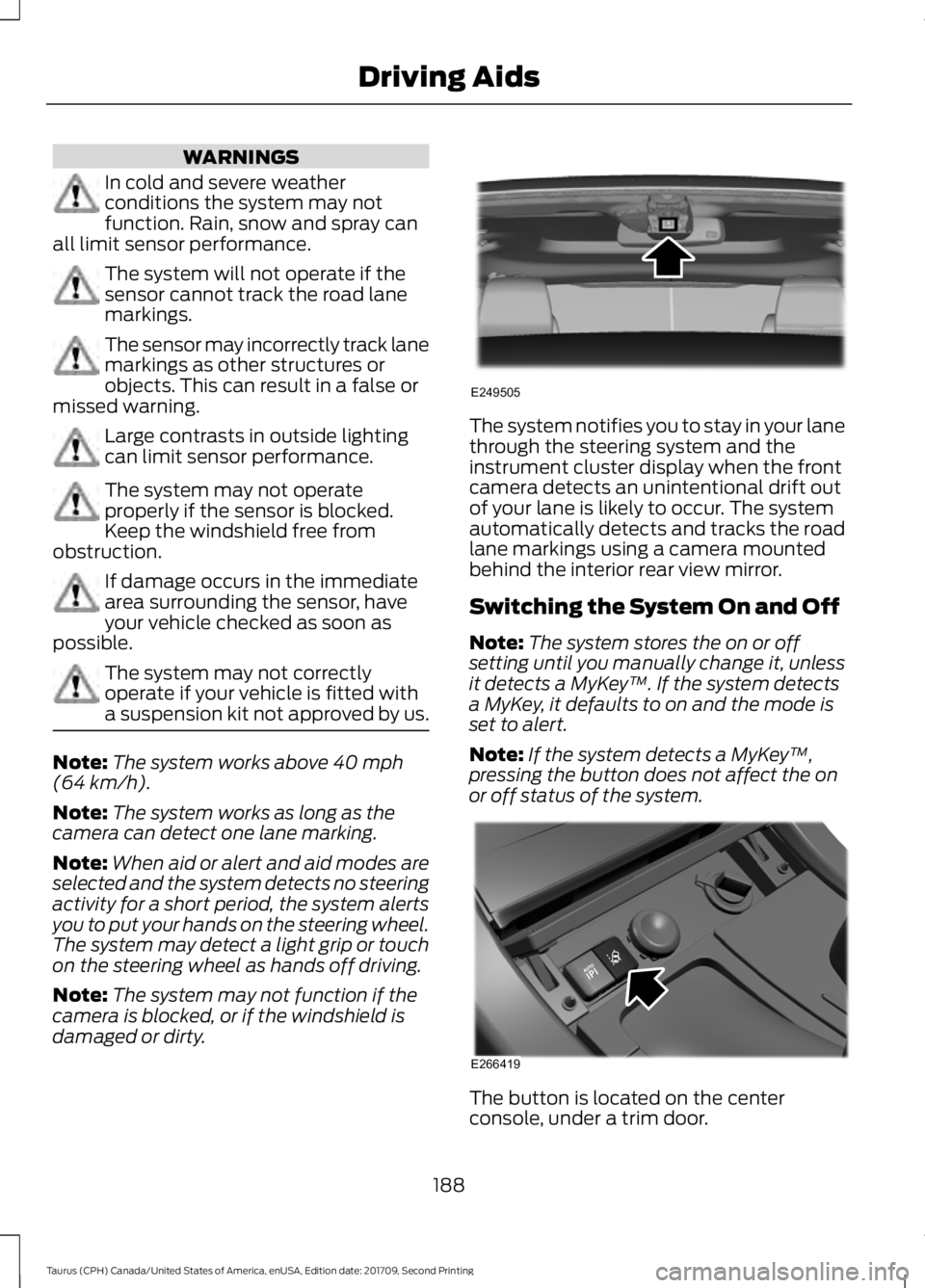
behind the interior rear view mirror.
Switching the System On and Off
Note:
The system stores the on or off
setting until you manually change it, unless
it detects a MyKey ™. If the system detects
a MyKey, it defaults to on and the mode is
set to alert.
Note: If the system detects a MyKey ™,
pressing the button does not affect the on
or off status of the system. The button is located on the center
console, under a trim door.
188
Taurus (CPH) Canada/United States of America, enUSA, Edition date: 201709, Second Printing Driving AidsE249505 E266419
Page 192 of 510
System Settings
The system has optional setting menus
available. To view or adjust the settings,
See General Information (page 89). The
system stores the last-known selection for
each of these settings. You do not need to
readjust your settings each time you switch
the system on.
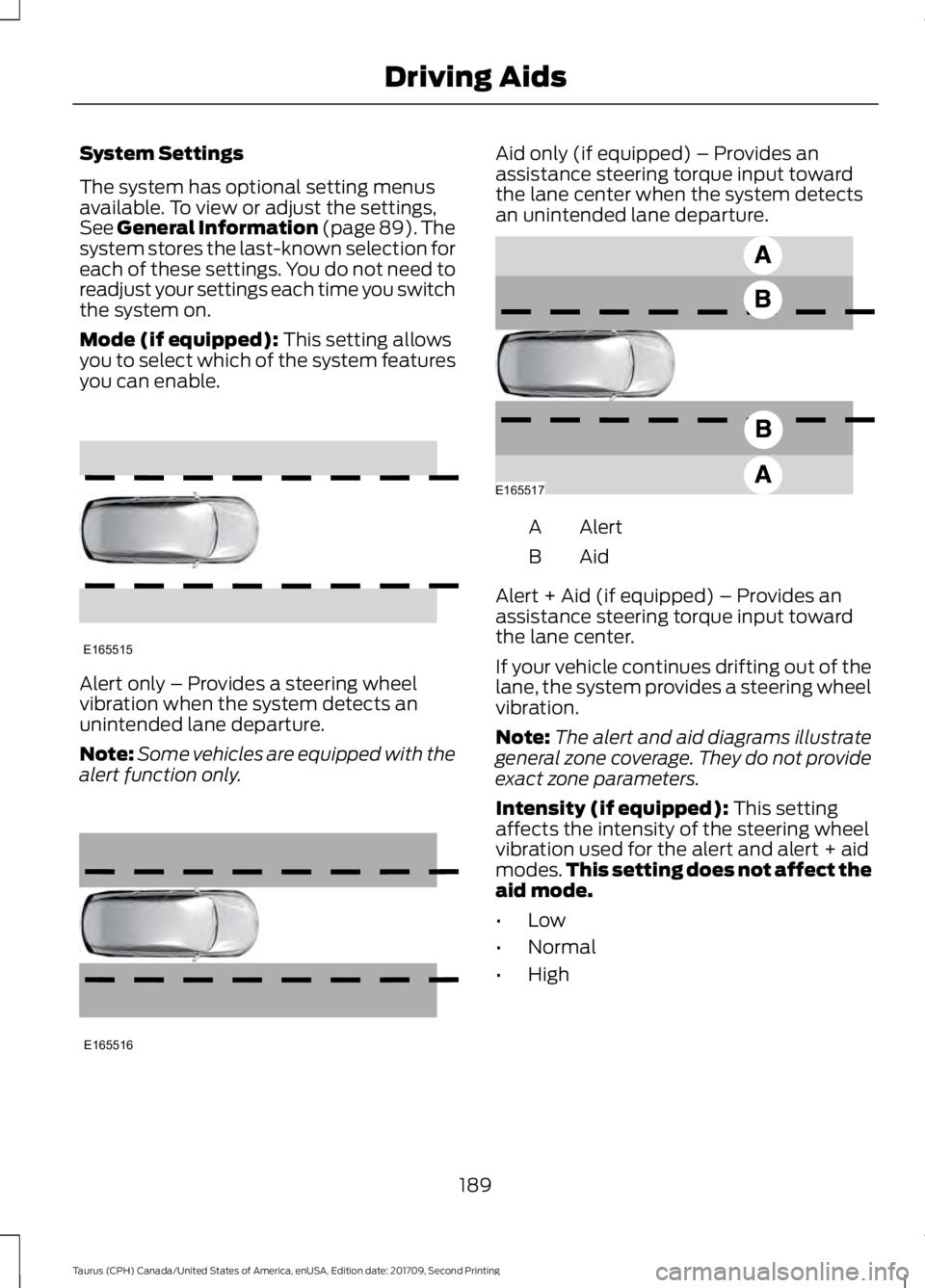
Mode (if equipped): This setting allows
you to select which of the system features
you can enable. Alert only – Provides a steering wheel
vibration when the system detects an
unintended lane departure.
Note:
Some vehicles are equipped with the
alert function only. Aid only (if equipped) – Provides an
assistance steering torque input toward
the lane center when the system detects
an unintended lane departure.
Alert
A
AidB
Alert + Aid (if equipped) – Provides an
assistance steering torque input toward
the lane center.
If your vehicle continues drifting out of the
lane, the system provides a steering wheel
vibration.
Note: The alert and aid diagrams illustrate
general zone coverage. They do not provide
exact zone parameters.
Intensity (if equipped):
This setting
affects the intensity of the steering wheel
vibration used for the alert and alert + aid
modes. This setting does not affect the
aid mode.
• Low
• Normal
• High
189
Taurus (CPH) Canada/United States of America, enUSA, Edition date: 201709, Second Printing Driving AidsE165515 E165516 E165517