wheel FORD TAURUS 2019 Owners Manual
[x] Cancel search | Manufacturer: FORD, Model Year: 2019, Model line: TAURUS, Model: FORD TAURUS 2019Pages: 515, PDF Size: 17.29 MB
Page 401 of 515

Item
Immediately end a
phone call. You can
also press the
button on the
steering wheel.
End Call
Press this to access
the phone keypad.
Keypad
You can switch the
microphone off so
the caller does not
hear you.
Mute Item
Privacy Transfer the call to
the cell phone or
back to SYNC 3.
Text Messaging
Note: Downloading and sending text
messages using Bluetooth are cell
phone-dependent features.
Note: Certain features in text messaging
are speed-dependent and not available
when your vehicle is traveling at speeds over
3 mph (5 km/h).
Receiving a Text Message
When a new message arrives, an audible tone sounds and the screen displays a
pop-up with the sender name and ID, if supported by your cell phone. You can
select: Action and Description
Menu Item
Have SYNC 3 read the message to you.
Hear It
View the text on the touchscreen.
View
To call the sender.
Call
You can select from 15 preset messages. Press the message
that you would like to use and confirm to send the message.
SYNC 3 confirms when the message is sent successfully.
Reply
To exit the screen.
Close
Smartphone Connectivity (If Equipped)
SYNC 3 allows you to use Apple CarPlay
and Android Auto to access your phone.
When you use Apple CarPlay or Android
Auto, you can:
• Make calls.
• Send and receive messages.
• Listen to music.
• Use your phone's voice assistant. Apple CarPlay and Android Auto disable
some SYNC 3 features.
Most Apple CarPlay and Android Auto
features use mobile data.
Apple CarPlay
Apple CarPlay requires an iPhone 5 or
newer with iOS 7.1 or newer. Updating to
the latest iOS version is recommended.
1. Plug your phone into a USB port. See
USB Port
(page 319).
398
Taurus (CPH) Canada/United States of America, enUSA, Edition date: 201806, First-Printing SYNC™ 3
Page 410 of 515

For restaurants, cityseeker can provide
information such as star rating, average
cost, review, handicap access, hours of
operation, and website address.
For hotels, cityseeker can provide
information such as star rating, price
category, review, check-in and checkout
times, hotel service icons and website
address. Hotel service icons include:
•
Restaurant
• Business center
• Handicap facilities
• Laundry
• Refrigerator
• 24 hour room service
• Fitness center
• Internet access
• Pool
• Wi-Fi
Attractions include nearby landmarks,
amusement parks, historic buildings and
more. cityseeker can provide information
such as star rating, reviews, hour of
operation and admission price.
SiriusXM Traffic and Travel Link (If
Equipped)
SiriusXM Traffic and Travel Link is available
on vehicles equipped with navigation and
only in select markets. You must activate
and subscribe to receive SiriusXM Traffic
and Travel Link information. It helps you
locate the best gas prices, find movie
listings, get current traffic alerts, view the
weather map, get accurate ski conditions
and see current sports scores. See Apps
(page 407). The system calculates a reasonable
efficient route based on available speed
limits, traffic, and road conditions. You may
know a local short cut that is more efficient
at a given time than the route provided by
SYNC 3, but you should expect a slight
difference in minutes or miles with the
SYNC 3 route.
Navigation Map Updates
Annual navigation map updates are
available for purchase through your
dealership, by calling 1-866-462-8837 in
the United States and Canada or
01-800-557-5539 in Mexico. You can also
visit:
Website
www.navigation.com/sync
You need to specify the make and model
of your vehicle to determine if there is an
update available.
HERE is the digital map provider for the
navigation application. If you find map data
errors, you may report them directly to
HERE by going to
www.here.com/mapcreator. HERE
evaluates all reported map errors and
responds with the result of their
investigation by e-mail.
Map coverage includes the USA (including
Puerto Rico and the US Virgin Islands),
Canada and Mexico.
APPS
The system enables voice, steering wheel,
and touch screen control of SYNC 3
AppLink enabled smartphone apps.
Once an app is running through AppLink,
you can control main features of the app
through voice commands and steering
wheel controls.
407
Taurus (CPH) Canada/United States of America, enUSA, Edition date: 201806, First-Printing SYNC™ 3
Page 441 of 515
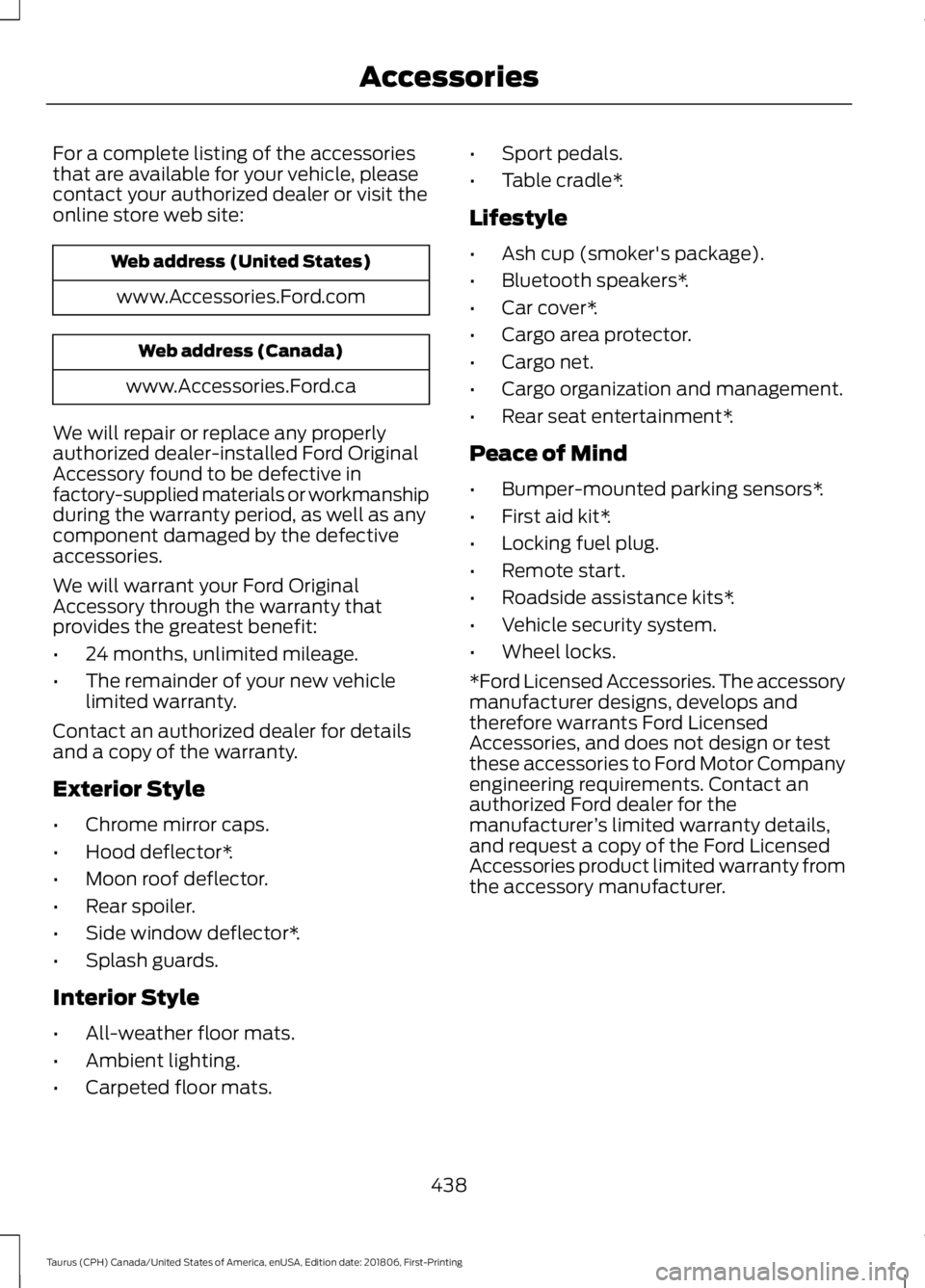
For a complete listing of the accessories
that are available for your vehicle, please
contact your authorized dealer or visit the
online store web site:
Web address (United States)
www.Accessories.Ford.com Web address (Canada)
www.Accessories.Ford.ca
We will repair or replace any properly
authorized dealer-installed Ford Original
Accessory found to be defective in
factory-supplied materials or workmanship
during the warranty period, as well as any
component damaged by the defective
accessories.
We will warrant your Ford Original
Accessory through the warranty that
provides the greatest benefit:
• 24 months, unlimited mileage.
• The remainder of your new vehicle
limited warranty.
Contact an authorized dealer for details
and a copy of the warranty.
Exterior Style
• Chrome mirror caps.
• Hood deflector*.
• Moon roof deflector.
• Rear spoiler.
• Side window deflector*.
• Splash guards.
Interior Style
• All-weather floor mats.
• Ambient lighting.
• Carpeted floor mats. •
Sport pedals.
• Table cradle*.
Lifestyle
• Ash cup (smoker's package).
• Bluetooth speakers*.
• Car cover*.
• Cargo area protector.
• Cargo net.
• Cargo organization and management.
• Rear seat entertainment*.
Peace of Mind
• Bumper-mounted parking sensors*.
• First aid kit*.
• Locking fuel plug.
• Remote start.
• Roadside assistance kits*.
• Vehicle security system.
• Wheel locks.
*Ford Licensed Accessories. The accessory
manufacturer designs, develops and
therefore warrants Ford Licensed
Accessories, and does not design or test
these accessories to Ford Motor Company
engineering requirements. Contact an
authorized Ford dealer for the
manufacturer ’s limited warranty details,
and request a copy of the Ford Licensed
Accessories product limited warranty from
the accessory manufacturer.
438
Taurus (CPH) Canada/United States of America, enUSA, Edition date: 201806, First-Printing Accessories
Page 449 of 515
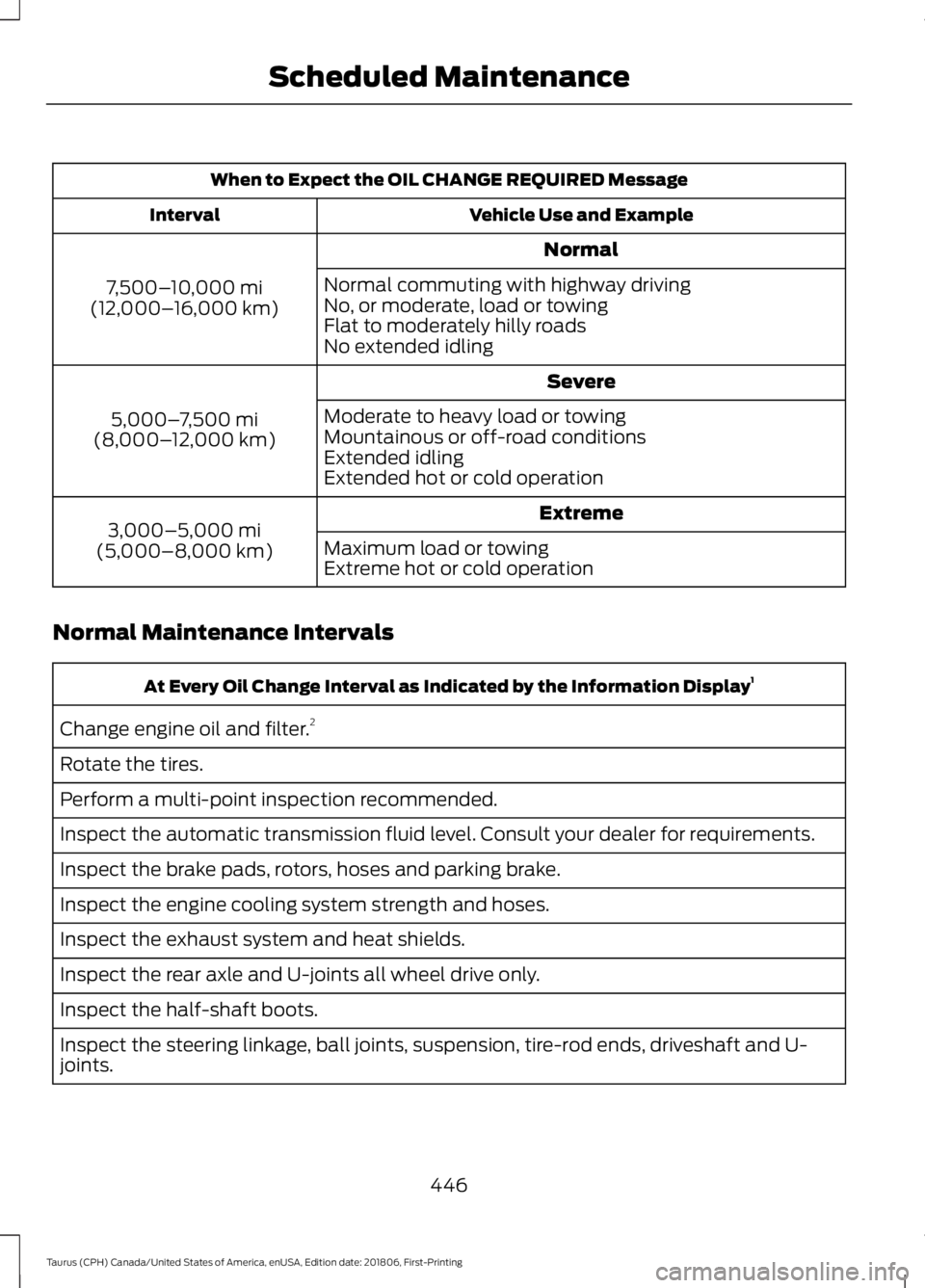
When to Expect the OIL CHANGE REQUIRED Message
Vehicle Use and Example
Interval
Normal
7,500– 10,000 mi
(12,000– 16,000 km) Normal commuting with highway driving
No, or moderate, load or towing
Flat to moderately hilly roads
No extended idling
Severe
5,000– 7,500 mi
(8,000– 12,000 km) Moderate to heavy load or towing
Mountainous or off-road conditions
Extended idling
Extended hot or cold operation
Extreme
3,000–5,000 mi
(5,000–8,000 km) Maximum load or towing
Extreme hot or cold operation
Normal Maintenance Intervals At Every Oil Change Interval as Indicated by the Information Display
1
Change engine oil and filter. 2
Rotate the tires.
Perform a multi-point inspection recommended.
Inspect the automatic transmission fluid level. Consult your dealer for requirements.
Inspect the brake pads, rotors, hoses and parking brake.
Inspect the engine cooling system strength and hoses.
Inspect the exhaust system and heat shields.
Inspect the rear axle and U-joints all wheel drive only.
Inspect the half-shaft boots.
Inspect the steering linkage, ball joints, suspension, tire-rod ends, driveshaft and U-
joints.
446
Taurus (CPH) Canada/United States of America, enUSA, Edition date: 201806, First-Printing Scheduled Maintenance
Page 450 of 515
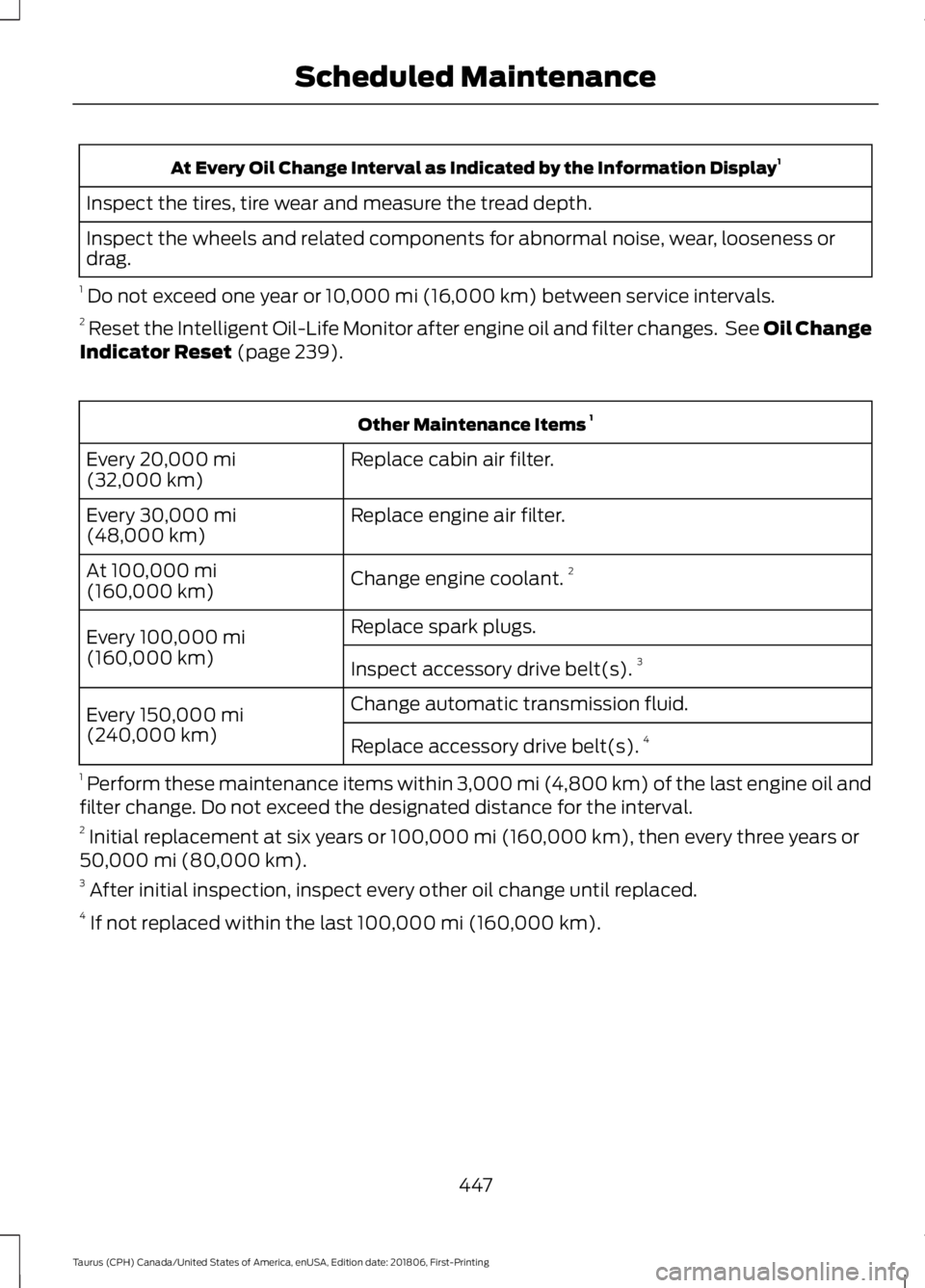
At Every Oil Change Interval as Indicated by the Information Display
1
Inspect the tires, tire wear and measure the tread depth.
Inspect the wheels and related components for abnormal noise, wear, looseness or
drag.
1 Do not exceed one year or 10,000 mi (16,000 km) between service intervals.
2 Reset the Intelligent Oil-Life Monitor after engine oil and filter changes. See Oil Change
Indicator Reset
(page 239). Other Maintenance Items
1
Replace cabin air filter.
Every
20,000 mi
(32,000 km)
Replace engine air filter.
Every
30,000 mi
(48,000 km)
Change engine coolant.2
At
100,000 mi
(160,000 km)
Replace spark plugs.
Every
100,000 mi
(160,000 km) Inspect accessory drive belt(s). 3
Change automatic transmission fluid.
Every
150,000 mi
(240,000 km) Replace accessory drive belt(s). 4
1 Perform these maintenance items within 3,000 mi (4,800 km) of the last engine oil and
filter change. Do not exceed the designated distance for the interval.
2 Initial replacement at six years or
100,000 mi (160,000 km), then every three years or
50,000 mi (80,000 km).
3 After initial inspection, inspect every other oil change until replaced.
4 If not replaced within the last
100,000 mi (160,000 km).
447
Taurus (CPH) Canada/United States of America, enUSA, Edition date: 201806, First-Printing Scheduled Maintenance
Page 452 of 515
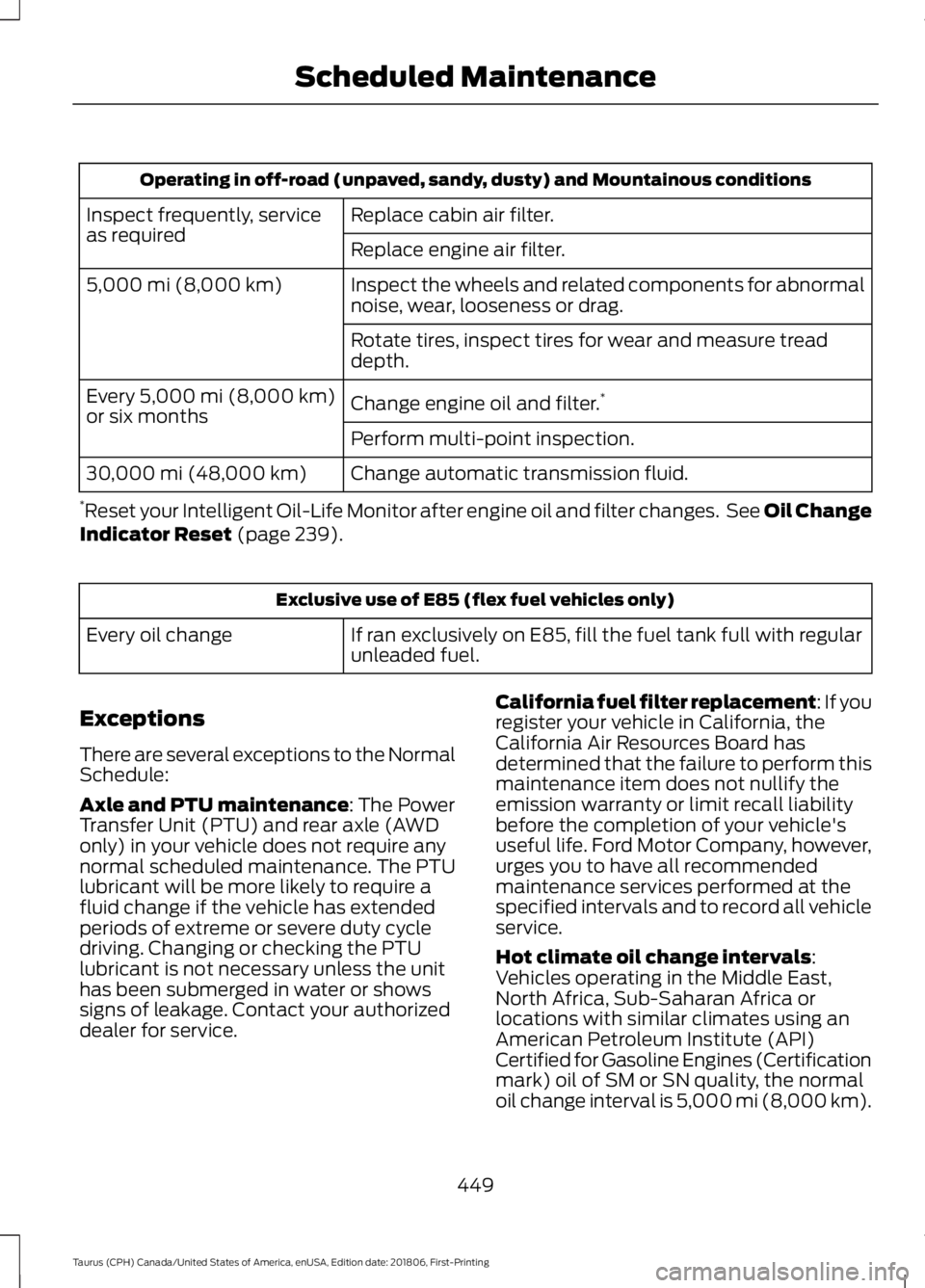
Operating in off-road (unpaved, sandy, dusty) and Mountainous conditions
Replace cabin air filter.
Inspect frequently, service
as required
Replace engine air filter.
Inspect the wheels and related components for abnormal
noise, wear, looseness or drag.
5,000 mi (8,000 km)
Rotate tires, inspect tires for wear and measure tread
depth.
Change engine oil and filter.*
Every 5,000 mi (8,000 km)
or six months
Perform multi-point inspection.
Change automatic transmission fluid.
30,000 mi (48,000 km)
* Reset your Intelligent Oil-Life Monitor after engine oil and filter changes. See Oil Change
Indicator Reset
(page 239). Exclusive use of E85 (flex fuel vehicles only)
If ran exclusively on E85, fill the fuel tank full with regular
unleaded fuel.
Every oil change
Exceptions
There are several exceptions to the Normal
Schedule:
Axle and PTU maintenance
: The Power
Transfer Unit (PTU) and rear axle (AWD
only) in your vehicle does not require any
normal scheduled maintenance. The PTU
lubricant will be more likely to require a
fluid change if the vehicle has extended
periods of extreme or severe duty cycle
driving. Changing or checking the PTU
lubricant is not necessary unless the unit
has been submerged in water or shows
signs of leakage. Contact your authorized
dealer for service. California fuel filter replacement: If you
register your vehicle in California, the
California Air Resources Board has
determined that the failure to perform this
maintenance item does not nullify the
emission warranty or limit recall liability
before the completion of your vehicle's
useful life. Ford Motor Company, however,
urges you to have all recommended
maintenance services performed at the
specified intervals and to record all vehicle
service.
Hot climate oil change intervals
:
Vehicles operating in the Middle East,
North Africa, Sub-Saharan Africa or
locations with similar climates using an
American Petroleum Institute (API)
Certified for Gasoline Engines (Certification
mark) oil of SM or SN quality, the normal
oil change interval is 5,000 mi (8,000 km)
.
449
Taurus (CPH) Canada/United States of America, enUSA, Edition date: 201806, First-Printing Scheduled Maintenance
Page 469 of 515
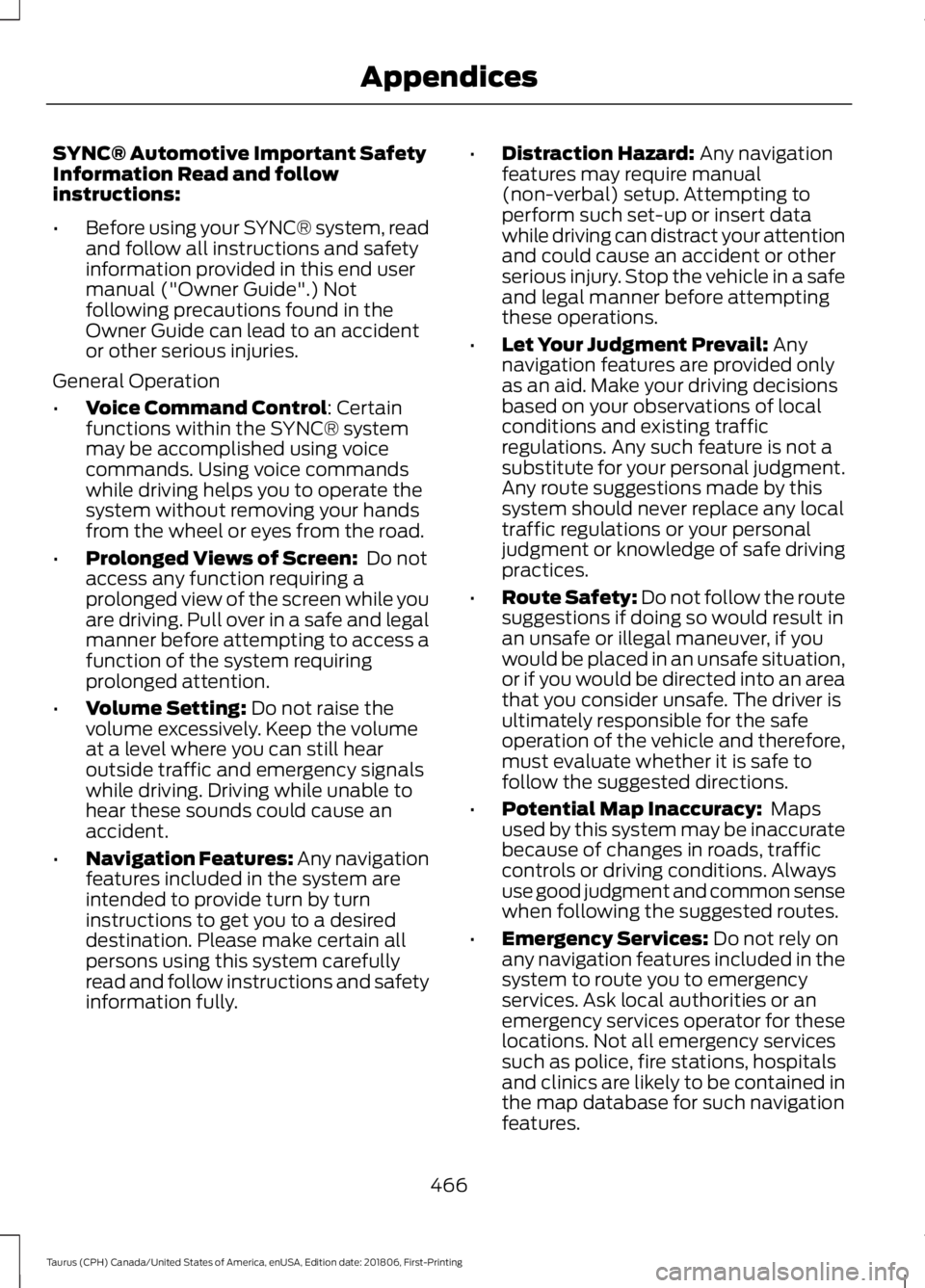
SYNC® Automotive Important Safety
Information Read and follow
instructions:
•
Before using your SYNC® system, read
and follow all instructions and safety
information provided in this end user
manual ("Owner Guide".) Not
following precautions found in the
Owner Guide can lead to an accident
or other serious injuries.
General Operation
• Voice Command Control: Certain
functions within the SYNC® system
may be accomplished using voice
commands. Using voice commands
while driving helps you to operate the
system without removing your hands
from the wheel or eyes from the road.
• Prolonged Views of Screen:
Do not
access any function requiring a
prolonged view of the screen while you
are driving. Pull over in a safe and legal
manner before attempting to access a
function of the system requiring
prolonged attention.
• Volume Setting:
Do not raise the
volume excessively. Keep the volume
at a level where you can still hear
outside traffic and emergency signals
while driving. Driving while unable to
hear these sounds could cause an
accident.
• Navigation Features:
Any navigation
features included in the system are
intended to provide turn by turn
instructions to get you to a desired
destination. Please make certain all
persons using this system carefully
read and follow instructions and safety
information fully. •
Distraction Hazard:
Any navigation
features may require manual
(non-verbal) setup. Attempting to
perform such set-up or insert data
while driving can distract your attention
and could cause an accident or other
serious injury. Stop the vehicle in a safe
and legal manner before attempting
these operations.
• Let Your Judgment Prevail:
Any
navigation features are provided only
as an aid. Make your driving decisions
based on your observations of local
conditions and existing traffic
regulations. Any such feature is not a
substitute for your personal judgment.
Any route suggestions made by this
system should never replace any local
traffic regulations or your personal
judgment or knowledge of safe driving
practices.
• Route Safety: Do not follow the route
suggestions if doing so would result in
an unsafe or illegal maneuver, if you
would be placed in an unsafe situation,
or if you would be directed into an area
that you consider unsafe. The driver is
ultimately responsible for the safe
operation of the vehicle and therefore,
must evaluate whether it is safe to
follow the suggested directions.
• Potential Map Inaccuracy:
Maps
used by this system may be inaccurate
because of changes in roads, traffic
controls or driving conditions. Always
use good judgment and common sense
when following the suggested routes.
• Emergency Services:
Do not rely on
any navigation features included in the
system to route you to emergency
services. Ask local authorities or an
emergency services operator for these
locations. Not all emergency services
such as police, fire stations, hospitals
and clinics are likely to be contained in
the map database for such navigation
features.
466
Taurus (CPH) Canada/United States of America, enUSA, Edition date: 201806, First-Printing Appendices
Page 504 of 515
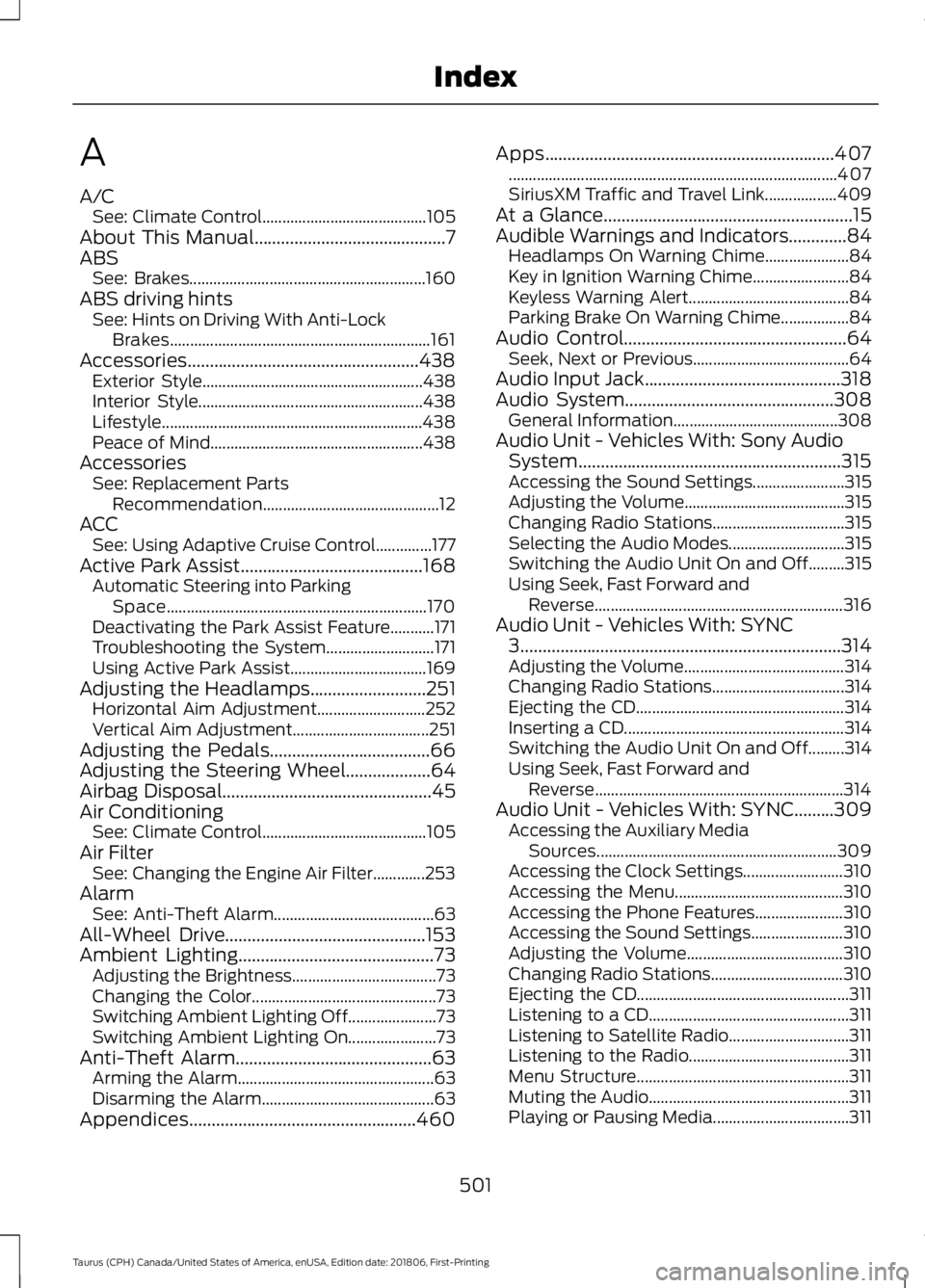
A
A/C
See: Climate Control......................................... 105
About This Manual...........................................7
ABS See: Brakes........................................................... 160
ABS driving hints See: Hints on Driving With Anti-Lock
Brakes................................................................. 161
Accessories....................................................438 Exterior Style....................................................... 438
Interior Style........................................................ 438
Lifestyle................................................................. 438
Peace of Mind..................................................... 438
Accessories See: Replacement Parts
Recommendation............................................ 12
ACC See: Using Adaptive Cruise Control..............177
Active Park Assist.........................................168 Automatic Steering into Parking
Space................................................................. 170
Deactivating the Park Assist Feature...........171
Troubleshooting the System........................... 171
Using Active Park Assist.................................. 169
Adjusting the Headlamps
..........................251
Horizontal Aim Adjustment........................... 252
Vertical Aim Adjustment.................................. 251
Adjusting the Pedals
....................................66
Adjusting the Steering Wheel...................64
Airbag Disposal...............................................45
Air Conditioning See: Climate Control......................................... 105
Air Filter See: Changing the Engine Air Filter.............253
Alarm See: Anti-Theft Alarm........................................ 63
All-Wheel Drive
.............................................153
Ambient Lighting............................................73
Adjusting the Brightness.................................... 73
Changing the Color.............................................. 73
Switching Ambient Lighting Off...................... 73
Switching Ambient Lighting On...................... 73
Anti-Theft Alarm
............................................63
Arming the Alarm................................................. 63
Disarming the Alarm........................................... 63
Appendices...................................................460 Apps
.................................................................407
........................................................................\
.......... 407
SiriusXM Traffic and Travel Link.................. 409
At a Glance........................................................15
Audible Warnings and Indicators.............84 Headlamps On Warning Chime..................... 84
Key in Ignition Warning Chime........................ 84
Keyless Warning Alert........................................ 84
Parking Brake On Warning Chime.................84
Audio Control..................................................64 Seek, Next or Previous....................................... 64
Audio Input Jack
............................................318
Audio System...............................................308 General Information......................................... 308
Audio Unit - Vehicles With: Sony Audio System...........................................................315
Accessing the Sound Settings....................... 315
Adjusting the Volume........................................ 315
Changing Radio Stations................................. 315
Selecting the Audio Modes............................. 315
Switching the Audio Unit On and Off.........315
Using Seek, Fast Forward and Reverse.............................................................. 316
Audio Unit - Vehicles With: SYNC 3
........................................................................\
314
Adjusting the Volume........................................ 314
Changing Radio Stations................................. 314
Ejecting the CD.................................................... 314
Inserting a CD....................................................... 314
Switching the Audio Unit On and Off.........314
Using Seek, Fast Forward and Reverse.............................................................. 314
Audio Unit - Vehicles With: SYNC.........309 Accessing the Auxiliary Media
Sources............................................................ 309
Accessing the Clock Settings......................... 310
Accessing the Menu.......................................... 310
Accessing the Phone Features...................... 310
Accessing the Sound Settings....................... 310
Adjusting the Volume....................................... 310
Changing Radio Stations................................. 310
Ejecting the CD..................................................... 311
Listening to a CD.................................................. 311
Listening to Satellite Radio.............................. 311
Listening to the Radio........................................ 311
Menu Structure..................................................... 311
Muting the Audio.................................................. 311
Playing or Pausing Media.................................. 311
501
Taurus (CPH) Canada/United States of America, enUSA, Edition date: 201806, First-Printing Index
Page 505 of 515
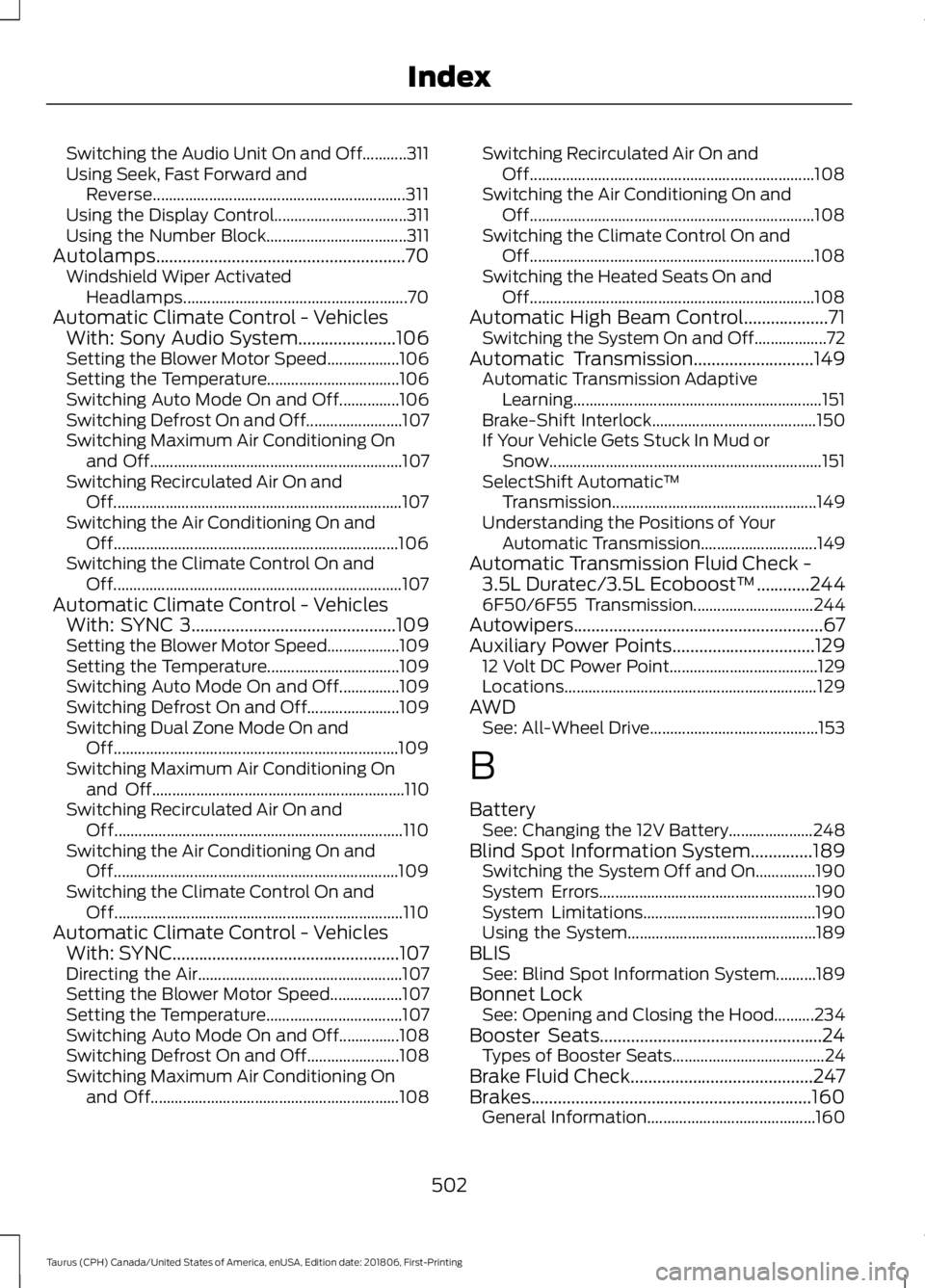
Switching the Audio Unit On and Off...........311
Using Seek, Fast Forward and
Reverse............................................................... 311
Using the Display Control................................. 311
Using the Number Block................................... 311
Autolamps........................................................70 Windshield Wiper Activated
Headlamps........................................................ 70
Automatic Climate Control - Vehicles With: Sony Audio System......................106
Setting the Blower Motor Speed.................. 106
Setting the Temperature................................. 106
Switching Auto Mode On and Off...............106
Switching Defrost On and Off........................ 107
Switching Maximum Air Conditioning On and Off............................................................... 107
Switching Recirculated Air On and Off........................................................................\
107
Switching the Air Conditioning On and Off....................................................................... 106
Switching the Climate Control On and Off........................................................................\
107
Automatic Climate Control - Vehicles With: SYNC 3..............................................109
Setting the Blower Motor Speed.................. 109
Setting the Temperature................................. 109
Switching Auto Mode On and Off...............109
Switching Defrost On and Off....................... 109
Switching Dual Zone Mode On and Off....................................................................... 109
Switching Maximum Air Conditioning On and Off............................................................... 110
Switching Recirculated Air On and Off........................................................................\
110
Switching the Air Conditioning On and Off....................................................................... 109
Switching the Climate Control On and Off........................................................................\
110
Automatic Climate Control - Vehicles With: SYNC...................................................107
Directing the Air................................................... 107
Setting the Blower Motor Speed.................. 107
Setting the Temperature.................................. 107
Switching Auto Mode On and Off...............108
Switching Defrost On and Off....................... 108
Switching Maximum Air Conditioning On and Off.............................................................. 108Switching Recirculated Air On and
Off....................................................................... 108
Switching the Air Conditioning On and Off....................................................................... 108
Switching the Climate Control On and Off....................................................................... 108
Switching the Heated Seats On and Off....................................................................... 108
Automatic High Beam Control...................71 Switching the System On and Off.................. 72
Automatic Transmission
...........................149
Automatic Transmission Adaptive
Learning.............................................................. 151
Brake-Shift Interlock......................................... 150
If Your Vehicle Gets Stuck In Mud or Snow.................................................................... 151
SelectShift Automatic ™
Transmission................................................... 149
Understanding the Positions of Your Automatic Transmission............................. 149
Automatic Transmission Fluid Check - 3.5L Duratec/3.5L Ecoboost™............244
6F50/6F55 Transmission.............................. 244
Autowipers........................................................67
Auxiliary Power Points
................................129
12 Volt DC Power Point..................................... 129
Locations............................................................... 129
AWD See: All-Wheel Drive.......................................... 153
B
Battery See: Changing the 12V Battery..................... 248
Blind Spot Information System..............189 Switching the System Off and On...............190
System Errors...................................................... 190
System Limitations........................................... 190
Using the System............................................... 189
BLIS See: Blind Spot Information System..........189
Bonnet Lock See: Opening and Closing the Hood..........234
Booster Seats..................................................24 Types of Booster Seats...................................... 24
Brake Fluid Check.........................................247
Brakes...............................................................160 General Information.......................................... 160
502
Taurus (CPH) Canada/United States of America, enUSA, Edition date: 201806, First-Printing Index
Page 506 of 515
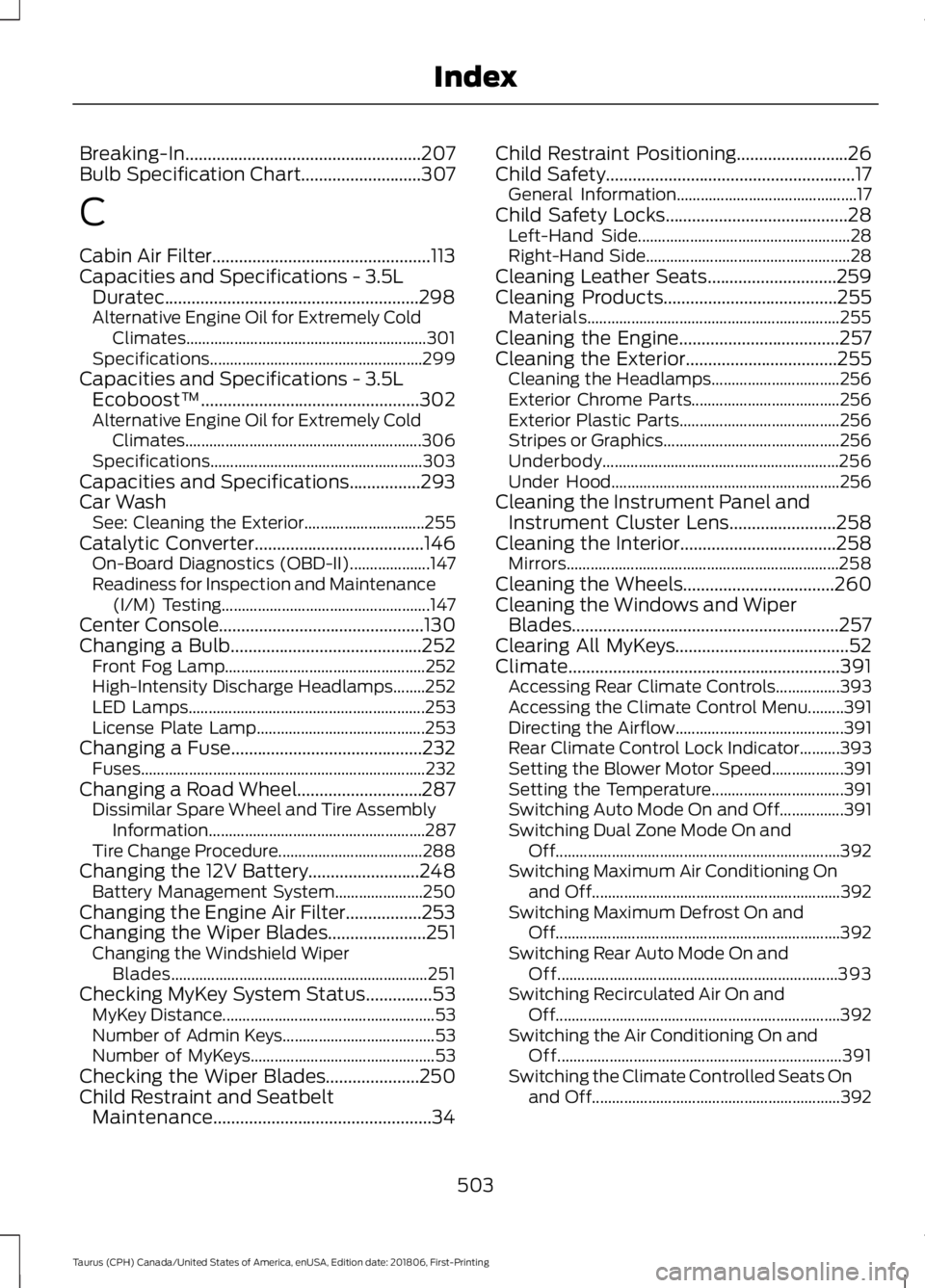
Breaking-In.....................................................207
Bulb Specification Chart...........................307
C
Cabin Air Filter.................................................113
Capacities and Specifications - 3.5L Duratec.........................................................298
Alternative Engine Oil for Extremely Cold Climates............................................................ 301
Specifications..................................................... 299
Capacities and Specifications - 3.5L Ecoboost™.................................................302
Alternative Engine Oil for Extremely Cold Climates........................................................... 306
Specifications..................................................... 303
Capacities and Specifications................293
Car Wash See: Cleaning the Exterior.............................. 255
Catalytic Converter
......................................146
On-Board Diagnostics (OBD-II).................... 147
Readiness for Inspection and Maintenance (I/M) Testing.................................................... 147
Center Console
..............................................130
Changing a Bulb...........................................252 Front Fog Lamp.................................................. 252
High-Intensity Discharge Headlamps........252
LED Lamps........................................................... 253
License Plate Lamp.......................................... 253
Changing a Fuse...........................................232 Fuses....................................................................... 232
Changing a Road Wheel............................287 Dissimilar Spare Wheel and Tire Assembly
Information...................................................... 287
Tire Change Procedure.................................... 288
Changing the 12V Battery.........................248 Battery Management System...................... 250
Changing the Engine Air Filter.................253
Changing the Wiper Blades
......................251
Changing the Windshield Wiper
Blades................................................................ 251
Checking MyKey System Status...............53 MyKey Distance..................................................... 53
Number of Admin Keys...................................... 53
Number of MyKeys.............................................. 53
Checking the Wiper Blades.....................250
Child Restraint and Seatbelt Maintenance.................................................34 Child Restraint Positioning
.........................26
Child Safety........................................................17
General Information............................................. 17
Child Safety Locks.........................................28 Left-Hand Side..................................................... 28
Right-Hand Side................................................... 28
Cleaning Leather Seats.............................259
Cleaning Products
.......................................255
Materials............................................................... 255
Cleaning the Engine....................................257
Cleaning the Exterior..................................255 Cleaning the Headlamps................................ 256
Exterior Chrome Parts..................................... 256
Exterior Plastic Parts........................................ 256
Stripes or Graphics............................................ 256
Underbody........................................................... 256
Under Hood......................................................... 256
Cleaning the Instrument Panel and Instrument Cluster Lens
........................258
Cleaning the Interior...................................258
Mirrors.................................................................... 258
Cleaning the Wheels..................................260
Cleaning the Windows and Wiper Blades............................................................257
Clearing All MyKeys.......................................52
Climate.............................................................391 Accessing Rear Climate Controls................393
Accessing the Climate Control Menu.........391
Directing the Airflow.......................................... 391
Rear Climate Control Lock Indicator..........393
Setting the Blower Motor Speed.................. 391
Setting the Temperature................................. 391
Switching Auto Mode On and Off................391
Switching Dual Zone Mode On and Off....................................................................... 392
Switching Maximum Air Conditioning On and Off.............................................................. 392
Switching Maximum Defrost On and Off....................................................................... 392
Switching Rear Auto Mode On and Off...................................................................... 393
Switching Recirculated Air On and Off....................................................................... 392
Switching the Air Conditioning On and Off....................................................................... 391
Switching the Climate Controlled Seats On and Off.............................................................. 392
503
Taurus (CPH) Canada/United States of America, enUSA, Edition date: 201806, First-Printing Index