mirror FORD TAURUS 2019 User Guide
[x] Cancel search | Manufacturer: FORD, Model Year: 2019, Model line: TAURUS, Model: FORD TAURUS 2019Pages: 515, PDF Size: 17.29 MB
Page 123 of 515
MEMORY FUNCTION
WARNING: Before activating the
memory seat, make sure that the area
immediately surrounding the seat is clear
of obstructions and that all occupants
are clear of moving parts. WARNING:
Do not use the
memory function when your vehicle is
moving.
This function automatically recalls the
position of the following:
• Driver seat.
• Power mirrors.
• Optional power adjustable pedals.
• Optional power steering column.
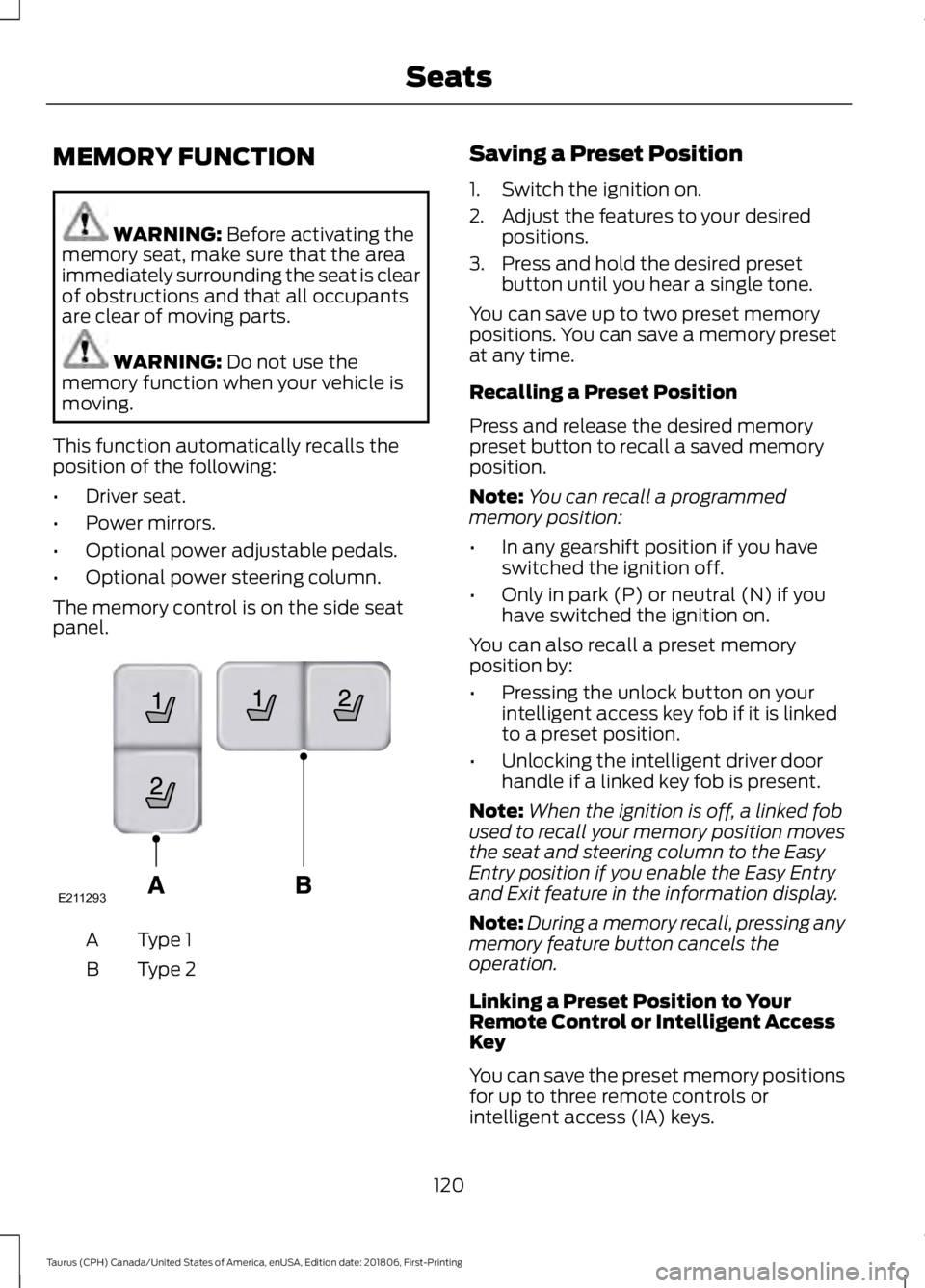
The memory control is on the side seat
panel. Type 1
A
Type 2
B Saving a Preset Position
1. Switch the ignition on.
2. Adjust the features to your desired
positions.
3. Press and hold the desired preset button until you hear a single tone.
You can save up to two preset memory
positions. You can save a memory preset
at any time.
Recalling a Preset Position
Press and release the desired memory
preset button to recall a saved memory
position.
Note: You can recall a programmed
memory position:
• In any gearshift position if you have
switched the ignition off.
• Only in park (P) or neutral (N) if you
have switched the ignition on.
You can also recall a preset memory
position by:
• Pressing the unlock button on your
intelligent access key fob if it is linked
to a preset position.
• Unlocking the intelligent driver door
handle if a linked key fob is present.
Note: When the ignition is off, a linked fob
used to recall your memory position moves
the seat and steering column to the Easy
Entry position if you enable the Easy Entry
and Exit feature in the information display.
Note: During a memory recall, pressing any
memory feature button cancels the
operation.
Linking a Preset Position to Your
Remote Control or Intelligent Access
Key
You can save the preset memory positions
for up to three remote controls or
intelligent access (IA) keys.
120
Taurus (CPH) Canada/United States of America, enUSA, Edition date: 201806, First-Printing SeatsE211293
Page 175 of 515
The system does not offer a particular space
The parking space is farther than 5 ft (1.5 m) or closer than 16 in (40 cm) away.
Your vehicle is going faster than
22 mph (35 km/h).
You may have recently disconnected or replaced the battery. After a battery disconnect,
the vehicle must be driven on a straight road for a short period of time. The system does not position your vehicle where I want in the space
Your vehicle is rolling in the opposite direction of the transmission. For example, rolling
forward when the transmission is in reverse (R).
An irregular curb along the parking space prevents the system from aligning your vehicle
properly.
Vehicles or objects bordering the space may not be positioned correctly.
Your vehicle was pulled too far past the parking space. The system performs best when
you drive the same distance past the parking space.
The tires may not be installed or maintained correctly. For example, not inflated correctly,
improper size or of a different size.
A repair or alteration has changed detection capabilities.
A parked vehicle has a high attachment. For example, a salt sprayer, snowplow or moving
truck bed.
The parking space length or position of parked objects changed after your vehicle passed.
The temperature around your vehicle changes quickly. For example, when driving from
a heated garage into the cold, or after leaving a car wash.
REAR VIEW CAMERA WARNING: The rear view camera
system is a reverse aid supplement
device that still requires the driver to use
it in conjunction with the interior and
exterior mirrors for maximum coverage. WARNING: Objects that are close
to either corner of the bumper or under
the bumper, might not be seen on the
screen due to the limited coverage of the
camera system.
172
Taurus (CPH) Canada/United States of America, enUSA, Edition date: 201806, First-Printing Parking Aids
Page 177 of 515
Active Guidelines (If Equipped)
Note:
Active guidelines are only shown with
fixed guidelines while your vehicle is in
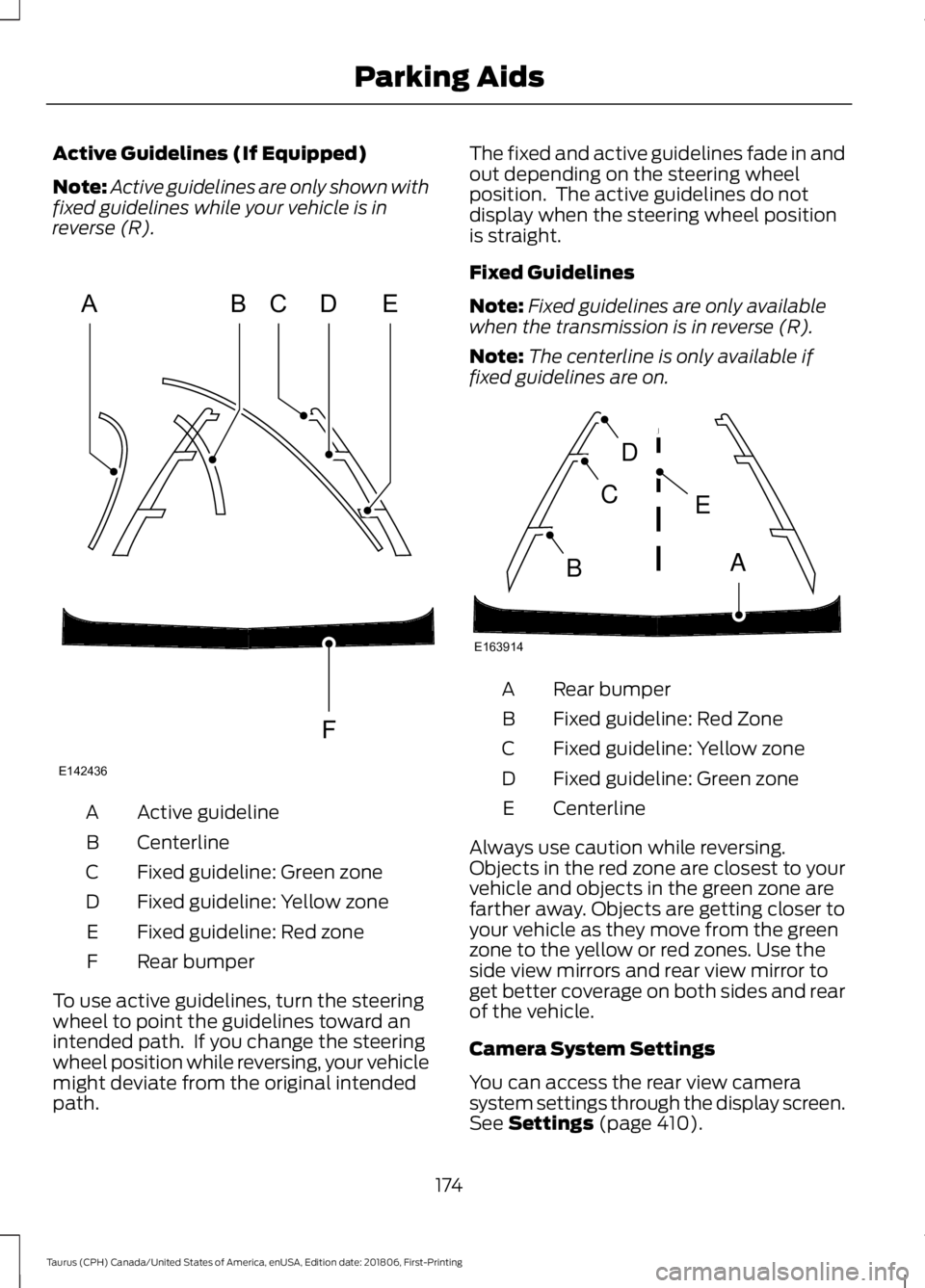
reverse (R). Active guideline
A
Centerline
B
Fixed guideline: Green zone
C
Fixed guideline: Yellow zone
D
Fixed guideline: Red zone
E
Rear bumper
F
To use active guidelines, turn the steering
wheel to point the guidelines toward an
intended path. If you change the steering
wheel position while reversing, your vehicle
might deviate from the original intended
path. The fixed and active guidelines fade in and
out depending on the steering wheel
position. The active guidelines do not
display when the steering wheel position
is straight.
Fixed Guidelines
Note:
Fixed guidelines are only available
when the transmission is in reverse (R).
Note: The centerline is only available if
fixed guidelines are on. Rear bumper
A
Fixed guideline: Red Zone
B
Fixed guideline: Yellow zone
C
Fixed guideline: Green zone
D
Centerline
E
Always use caution while reversing.
Objects in the red zone are closest to your
vehicle and objects in the green zone are
farther away. Objects are getting closer to
your vehicle as they move from the green
zone to the yellow or red zones. Use the
side view mirrors and rear view mirror to
get better coverage on both sides and rear
of the vehicle.
Camera System Settings
You can access the rear view camera
system settings through the display screen.
See Settings (page 410).
174
Taurus (CPH) Canada/United States of America, enUSA, Edition date: 201806, First-Printing Parking AidsABCD
F
E
E142436 E163914
A
E
D
C
B
Page 192 of 515
BLIND SPOT INFORMATION
SYSTEM (If Equipped)
WARNING: Never
use the Blind
Spot Information System as a
replacement for using the interior and
exterior mirrors or looking over your
shoulder before changing lanes. The
Blind Spot Information System is not a
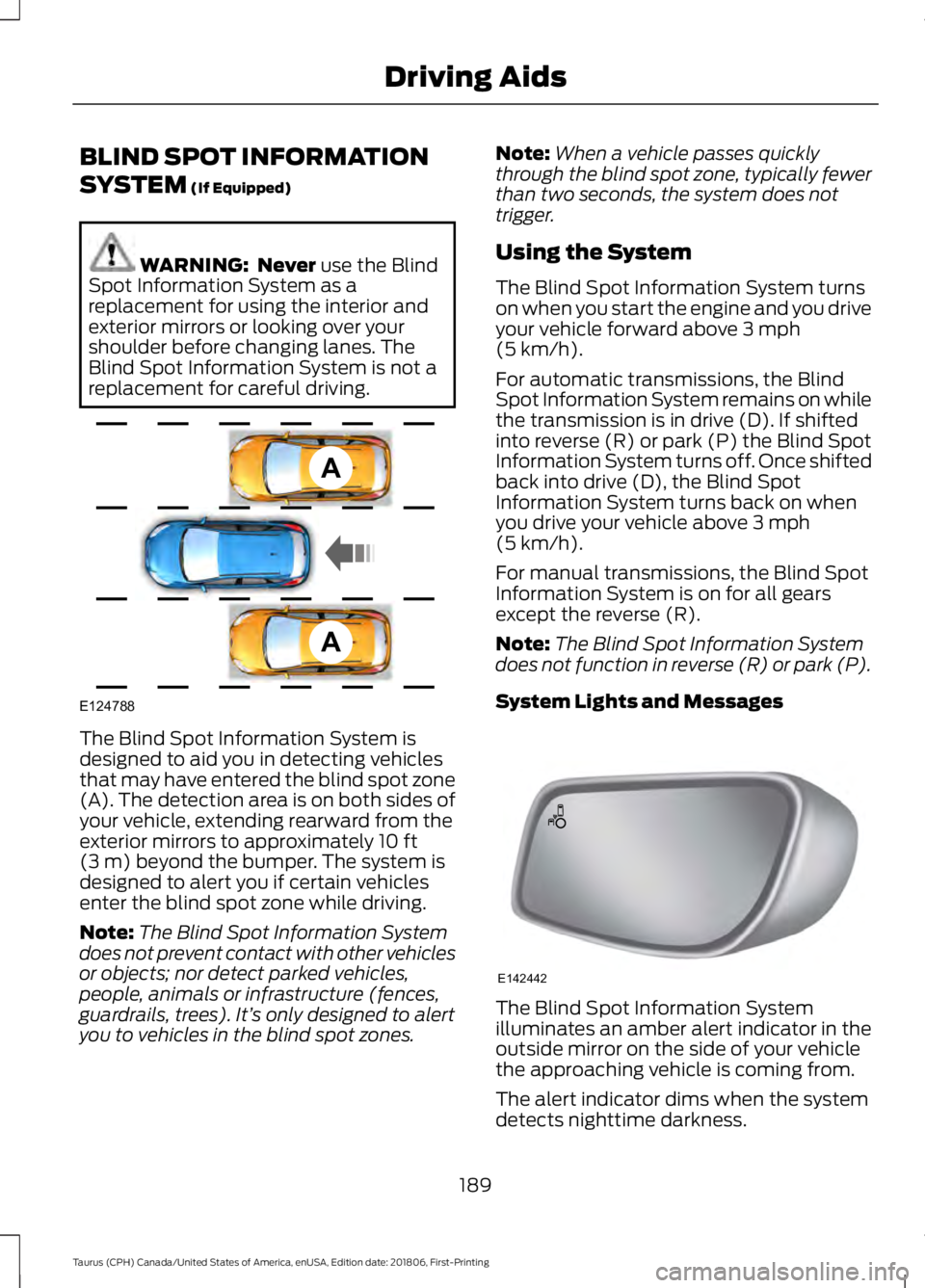
replacement for careful driving. The Blind Spot Information System is
designed to aid you in detecting vehicles
that may have entered the blind spot zone
(A). The detection area is on both sides of
your vehicle, extending rearward from the
exterior mirrors to approximately
10 ft
(3 m) beyond the bumper. The system is
designed to alert you if certain vehicles
enter the blind spot zone while driving.
Note: The Blind Spot Information System
does not prevent contact with other vehicles
or objects; nor detect parked vehicles,
people, animals or infrastructure (fences,
guardrails, trees). It’ s only designed to alert
you to vehicles in the blind spot zones. Note:
When a vehicle passes quickly
through the blind spot zone, typically fewer
than two seconds, the system does not
trigger.
Using the System
The Blind Spot Information System turns
on when you start the engine and you drive
your vehicle forward above
3 mph
(5 km/h).
For automatic transmissions, the Blind
Spot Information System remains on while
the transmission is in drive (D). If shifted
into reverse (R) or park (P) the Blind Spot
Information System turns off. Once shifted
back into drive (D), the Blind Spot
Information System turns back on when
you drive your vehicle above
3 mph
(5 km/h).
For manual transmissions, the Blind Spot
Information System is on for all gears
except the reverse (R).
Note: The Blind Spot Information System
does not function in reverse (R) or park (P).
System Lights and Messages The Blind Spot Information System
illuminates an amber alert indicator in the
outside mirror on the side of your vehicle
the approaching vehicle is coming from.
The alert indicator dims when the system
detects nighttime darkness.
189
Taurus (CPH) Canada/United States of America, enUSA, Edition date: 201806, First-Printing Driving AidsA
A
E124788 E142442
Page 194 of 515
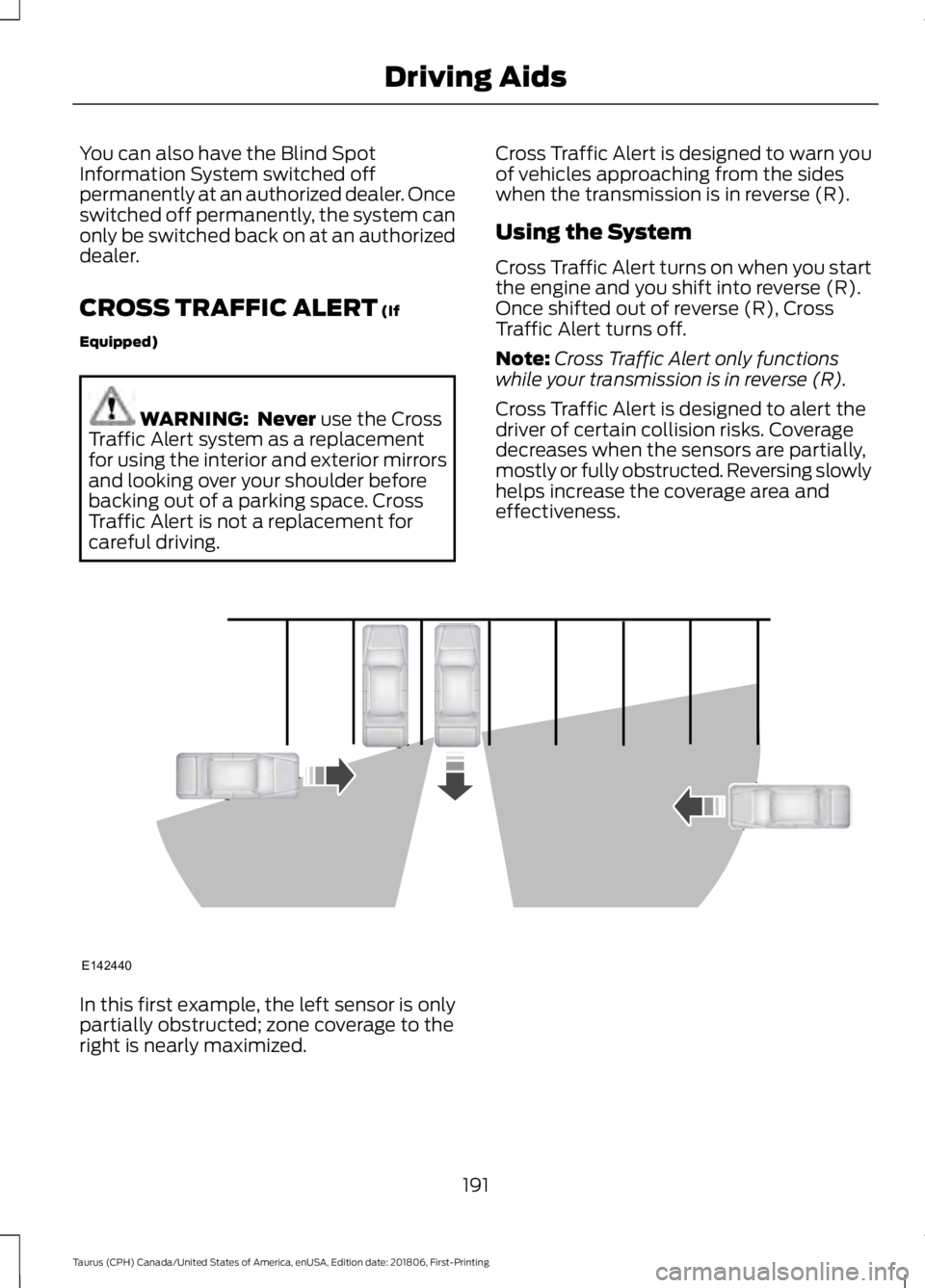
You can also have the Blind Spot
Information System switched off
permanently at an authorized dealer. Once
switched off permanently, the system can
only be switched back on at an authorized
dealer.
CROSS TRAFFIC ALERT (If
Equipped) WARNING: Never
use the Cross
Traffic Alert system as a replacement
for using the interior and exterior mirrors
and looking over your shoulder before
backing out of a parking space. Cross
Traffic Alert is not a replacement for
careful driving. Cross Traffic Alert is designed to warn you
of vehicles approaching from the sides
when the transmission is in reverse (R).
Using the System
Cross Traffic Alert turns on when you start
the engine and you shift into reverse (R).
Once shifted out of reverse (R), Cross
Traffic Alert turns off.
Note:
Cross Traffic Alert only functions
while your transmission is in reverse (R).
Cross Traffic Alert is designed to alert the
driver of certain collision risks. Coverage
decreases when the sensors are partially,
mostly or fully obstructed. Reversing slowly
helps increase the coverage area and
effectiveness. In this first example, the left sensor is only
partially obstructed; zone coverage to the
right is nearly maximized.
191
Taurus (CPH) Canada/United States of America, enUSA, Edition date: 201806, First-Printing Driving AidsE142440
Page 195 of 515
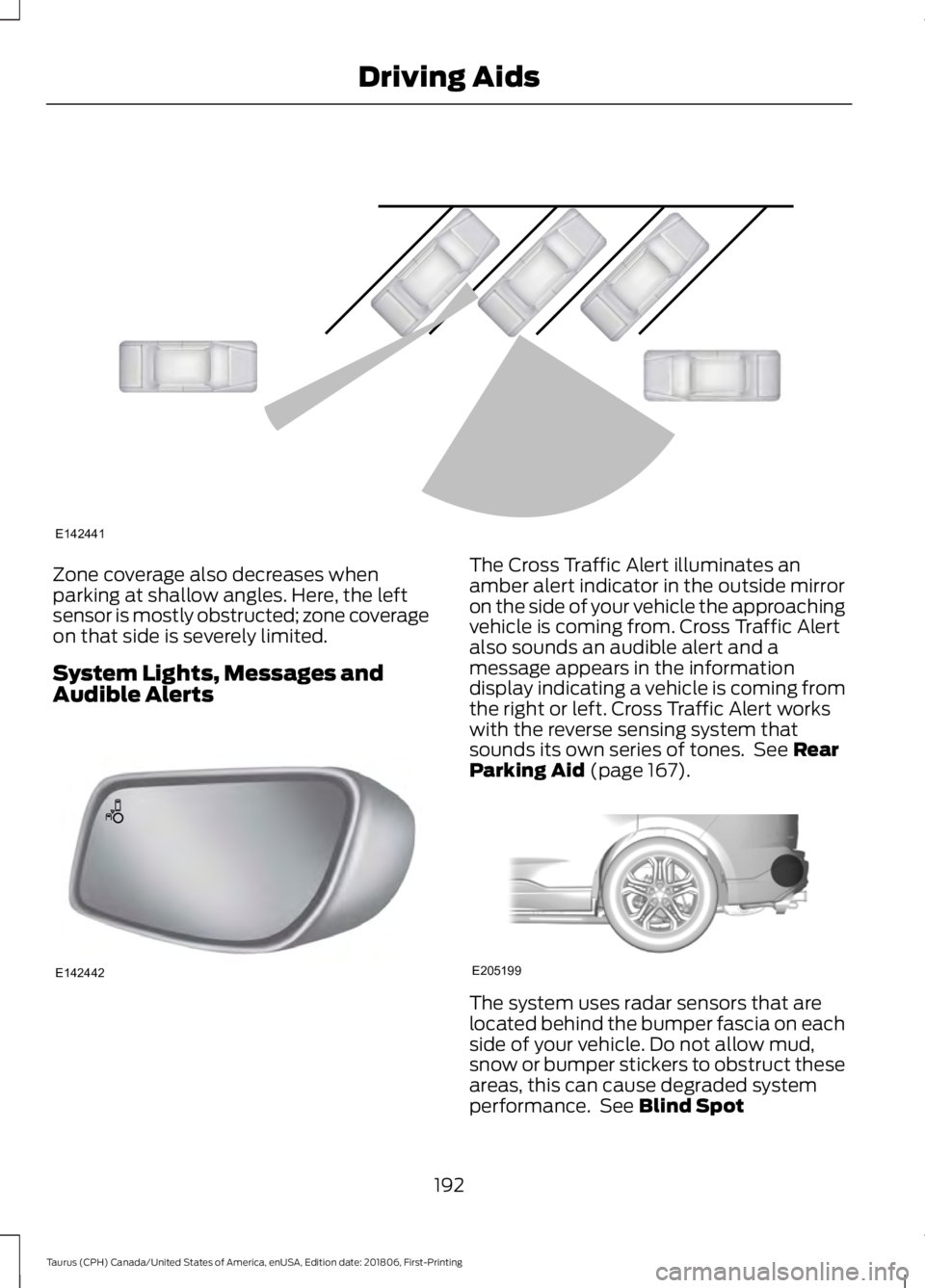
Zone coverage also decreases when
parking at shallow angles. Here, the left
sensor is mostly obstructed; zone coverage
on that side is severely limited.
System Lights, Messages and
Audible Alerts The Cross Traffic Alert illuminates an
amber alert indicator in the outside mirror
on the side of your vehicle the approaching
vehicle is coming from. Cross Traffic Alert
also sounds an audible alert and a
message appears in the information
display indicating a vehicle is coming from
the right or left. Cross Traffic Alert works
with the reverse sensing system that
sounds its own series of tones. See Rear
Parking Aid (page 167). The system uses radar sensors that are
located behind the bumper fascia on each
side of your vehicle. Do not allow mud,
snow or bumper stickers to obstruct these
areas, this can cause degraded system
performance. See
Blind Spot
192
Taurus (CPH) Canada/United States of America, enUSA, Edition date: 201806, First-Printing Driving AidsE142441 E142442 E205199
Page 228 of 515
Protected Components
Fuse Amp Rating
Fuse or Relay
Number
Climate controlled seats.
30A 1
28
Electric fan relay 1.
40A 1
29
Electric fan relay 2.
40A 1
30
Electric fan relay 3.
25A 1
31
Massage control seat relay.
Relay
32
Right-hand cooling fan relay.
Relay
33
Blower motor relay.
Relay
34
Left-hand cooling fan Number 1 relay.
Relay
35
Not used.
-
36
Not used.
-
37
Not used.
-
38
Not used.
-
39
Not used.
-
40
Not used.
-
41
Passenger power seat.
30A 2
42
Anti-lock brake system valves.
20A 1
43
Not used.
-
44
Rain sensor.
5A 2
45
Not used.
-
46
Not used.
-
47
Not used.
-
48
Not used.
-
49
Heated mirrors.
15A 2
50
Not used.
-
51
225
Taurus (CPH) Canada/United States of America, enUSA, Edition date: 201806, First-Printing Fuses
Page 234 of 515
Protected Components
Fuse Amp Rating
Fuse or Relay
Number
Push button ignition switch.
Intelligent access module power.
20A
27
Not used (spare).
15A
28
Radio.
20A
29
Global positioning system module.
Front park lamps.
15A
30
Not used (spare).
5A
31
Smart window motors.
15A
32
Master window and mirror switch.
Rear window power sunshade module.
Lock switch illumination.
Not used (spare).
10A
33
Reverse park aid module.
10A
34
Automatic high beam and lane departure
module.
Rear heated seat module.
Blind spot monitor module.
Rear video camera.
Motorized humidity sensor.
5A
35
Heads-up display.
Traction control switch.
Heated steering wheel.
10A
36
Not used (spare).
10A
37
Auto–dimming mirror (without automatic
high beam and lane departure module).
10A
38
Moonroof module and switch.
High beams.
15A
39
Rear park lamps.
10A
40
Extended power module.
7.5A
41
Not used (spare).
5A
42
Not used (spare).
10A
43
Not used (spare).
10A
44
231
Taurus (CPH) Canada/United States of America, enUSA, Edition date: 201806, First-Printing Fuses
Page 252 of 515
WARNING: Keep batteries out of
reach of children. Batteries contain
sulfuric acid. Avoid contact with skin,
eyes or clothing. Shield your eyes when
working near the battery to protect
against possible splashing of acid
solution. In case of acid contact with skin
or eyes, flush immediately with water for
a minimum of 15 minutes and get prompt
medical attention. If acid is swallowed,
call a physician immediately. WARNING:
Battery posts,
terminals and related accessories
contain lead and lead compounds,
chemicals known to the State of
California to cause cancer and
reproductive harm. Wash your hands
after handling
. WARNING: This vehicle may have
more than one battery. Removing the
battery cables from only one battery
does not disconnect your vehicle
electrical system. Make sure you
disconnect the battery cables from all
batteries when disconnecting power.
Failure to do so may cause serious
personal injury or property damage.
Your vehicle is fitted with a Motorcraft
maintenance-free battery which normally
does not require additional water.
When a battery replacement is required,
you must use a recommended
replacement battery that matches the
electrical requirements of the vehicle.
Note: After cleaning or replacing the
battery, make sure you reinstall the battery
cover or shield. Note:
If you add electrical accessories or
components to the vehicle, it may adversely
affect the low voltage battery performance
and durability. This may also affect the
performance of other electrical systems in
the vehicle.
For longer, trouble-free operation, keep the
top of the battery clean and dry.
If you see any corrosion on the battery or
terminals, remove the cables from the
terminals and clean with a wire brush. You
can neutralize the acid with a solution of
baking soda and water.
Because your vehicle ’s engine is
electronically controlled by a computer,
some control conditions are maintained
by power from the battery. When the
battery is disconnected or a new battery
is installed, the engine must relearn its idle
and fuel trim strategy for optimum
driveability and performance. Flexible fuel
vehicles (FFV) must also relearn the
ethanol content of the fuel for optimum
driveability and performance.
To restore the settings, do the following:
1. Apply the parking brake.
2. Shift into park (P) or neutral (N).
3. Switch off all accessories.
4. Press the brake pedal and start your vehicle.
5. Run the engine until it reaches normal operating temperature. While the
engine is warming up, complete the
following: Reset the clock. Reset the
power windows bounce-back feature.
See Windows and Mirrors (page 74).
Reset the radio station presets. See
Audio System
(page 308).
6. Allow the engine to idle for at least one
minute.
7. Drive the vehicle at least 10 mi (16 km)
to completely relearn the idle trim and
fuel trim strategy.
249
Taurus (CPH) Canada/United States of America, enUSA, Edition date: 201806, First-Printing Maintenance
Page 260 of 515
WAXING
Regular waxing is necessary to protect your
car's paint from the elements. We
recommend that you wash and wax the
painted surface once or twice a year.
When washing and waxing, park your
vehicle in a shaded area out of direct
sunlight. Always wash your vehicle before
applying wax.
•
Use a quality wax that does not contain
abrasives.
• Follow the manufacturer ’s instructions
to apply and remove the wax.
• Apply a small amount of wax in a
back-and-forth motion, not in circles.
• Do not allow wax to come in contact
with any non-body (low-gloss black)
colored trim. The wax will discolor or
stain the parts over time.
•Roof racks.
• Bumpers.
• Grained door handles.
• Side moldings.
• Mirror housings.
• Windshield cowl area.
• Do not apply wax to glass areas.
• After waxing, your car's paint should
feel smooth, and be free of streaks and
smudges.
CLEANING THE ENGINE
Engines are more efficient when they are
clean because grease and dirt buildup keep
the engine warmer than normal. When washing:
•
Take care when using a power washer
to clean the engine. The high-pressure
fluid could penetrate the sealed parts
and cause damage.
• Do not spray a hot engine with cold
water to avoid cracking the engine
block or other engine components.
• Spray Motorcraft Engine Shampoo and
Degreaser on all parts that require
cleaning and pressure rinse clean. In
Canada, use Motorcraft Engine
Shampoo.
• Never wash or rinse the engine while it
is hot or running; water in the running
engine may cause internal damage.
• Never wash or rinse any ignition coil,
spark plug wire or spark plug well, or
the area in and around these locations.
• Cover the battery, power distribution
box, and air filter assembly to prevent
water damage when cleaning the
engine.
CLEANING THE WINDOWS AND
WIPER BLADES
Car wash chemicals and environmental
fallout can result in windshield and wiper
blade contamination. Dirty windshield and
wipers will result in poor windshield wiper
operation. Keep the windshield and wiper
blades clean to maintain windshield wiper
performance.
257
Taurus (CPH) Canada/United States of America, enUSA, Edition date: 201806, First-Printing Vehicle Care