spare tire FORD TAURUS 2019 Owner's Manual
[x] Cancel search | Manufacturer: FORD, Model Year: 2019, Model line: TAURUS, Model: FORD TAURUS 2019Pages: 515, PDF Size: 17.29 MB
Page 294 of 515
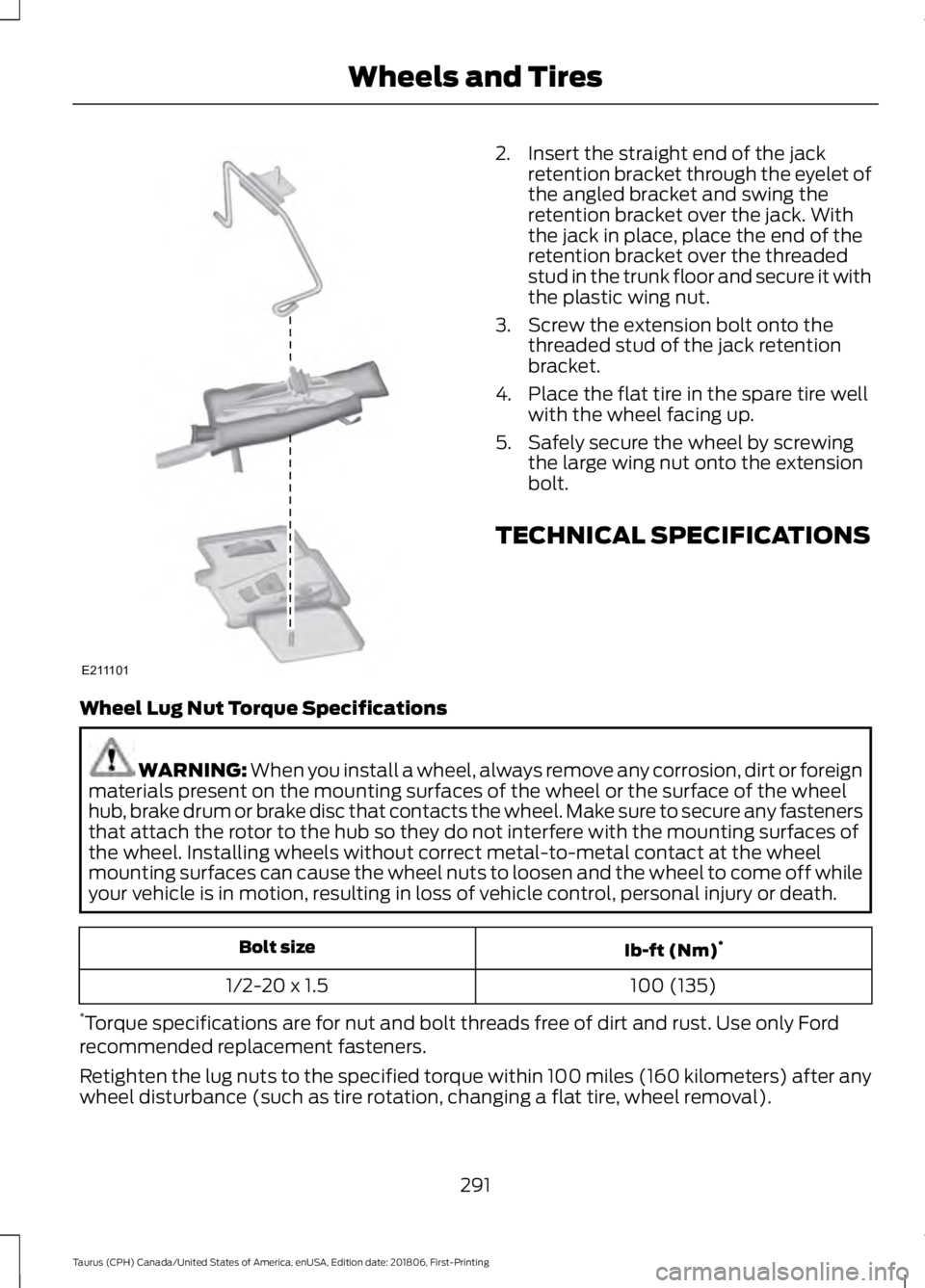
2. Insert the straight end of the jack
retention bracket through the eyelet of
the angled bracket and swing the
retention bracket over the jack. With
the jack in place, place the end of the
retention bracket over the threaded
stud in the trunk floor and secure it with
the plastic wing nut.
3. Screw the extension bolt onto the threaded stud of the jack retention
bracket.
4. Place the flat tire in the spare tire well with the wheel facing up.
5. Safely secure the wheel by screwing the large wing nut onto the extension
bolt.
TECHNICAL SPECIFICATIONS
Wheel Lug Nut Torque Specifications WARNING: When you install a wheel, always remove any corrosion, dirt or foreign
materials present on the mounting surfaces of the wheel or the surface of the wheel
hub, brake drum or brake disc that contacts the wheel. Make sure to secure any fasteners
that attach the rotor to the hub so they do not interfere with the mounting surfaces of
the wheel. Installing wheels without correct metal-to-metal contact at the wheel
mounting surfaces can cause the wheel nuts to loosen and the wheel to come off while
your vehicle is in motion, resulting in loss of vehicle control, personal injury or death. Ib-ft (Nm)
*
Bolt size
100 (135)
1/2-20 x 1.5
* Torque specifications are for nut and bolt threads free of dirt and rust. Use only Ford
recommended replacement fasteners.
Retighten the lug nuts to the specified torque within 100 miles (160 kilometers) after any
wheel disturbance (such as tire rotation, changing a flat tire, wheel removal).
291
Taurus (CPH) Canada/United States of America, enUSA, Edition date: 201806, First-Printing Wheels and TiresE211101
Page 447 of 515
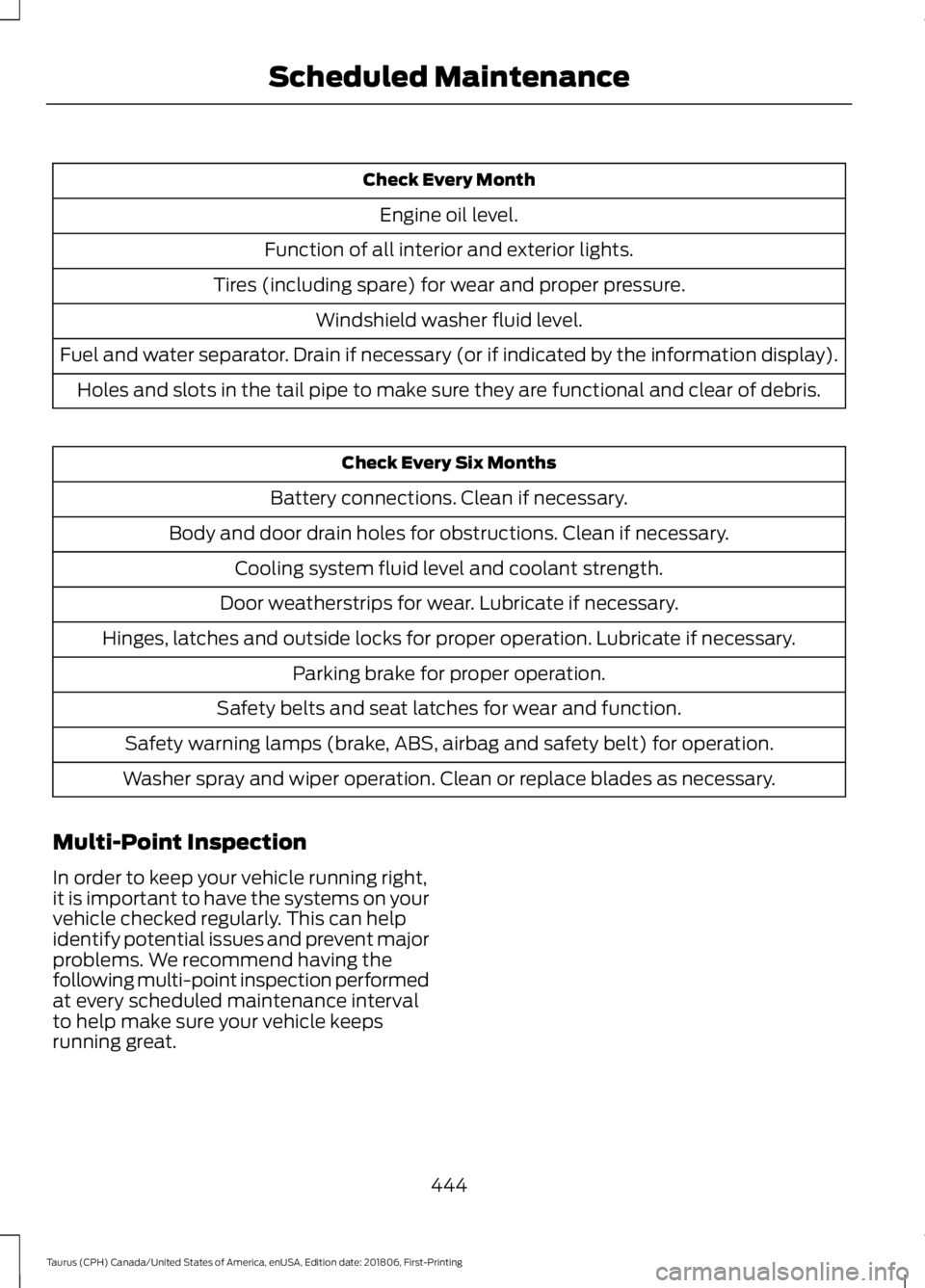
Check Every Month
Engine oil level.
Function of all interior and exterior lights.
Tires (including spare) for wear and proper pressure. Windshield washer fluid level.
Fuel and water separator. Drain if necessary (or if indicated by the information display). Holes and slots in the tail pipe to make sure they are functional and clear of debris. Check Every Six Months
Battery connections. Clean if necessary.
Body and door drain holes for obstructions. Clean if necessary. Cooling system fluid level and coolant strength.
Door weatherstrips for wear. Lubricate if necessary.
Hinges, latches and outside locks for proper operation. Lubricate if necessary. Parking brake for proper operation.
Safety belts and seat latches for wear and function.
Safety warning lamps (brake, ABS, airbag and safety belt) for operation.
Washer spray and wiper operation. Clean or replace blades as necessary.
Multi-Point Inspection
In order to keep your vehicle running right,
it is important to have the systems on your
vehicle checked regularly. This can help
identify potential issues and prevent major
problems. We recommend having the
following multi-point inspection performed
at every scheduled maintenance interval
to help make sure your vehicle keeps
running great.
444
Taurus (CPH) Canada/United States of America, enUSA, Edition date: 201806, First-Printing Scheduled Maintenance
Page 448 of 515
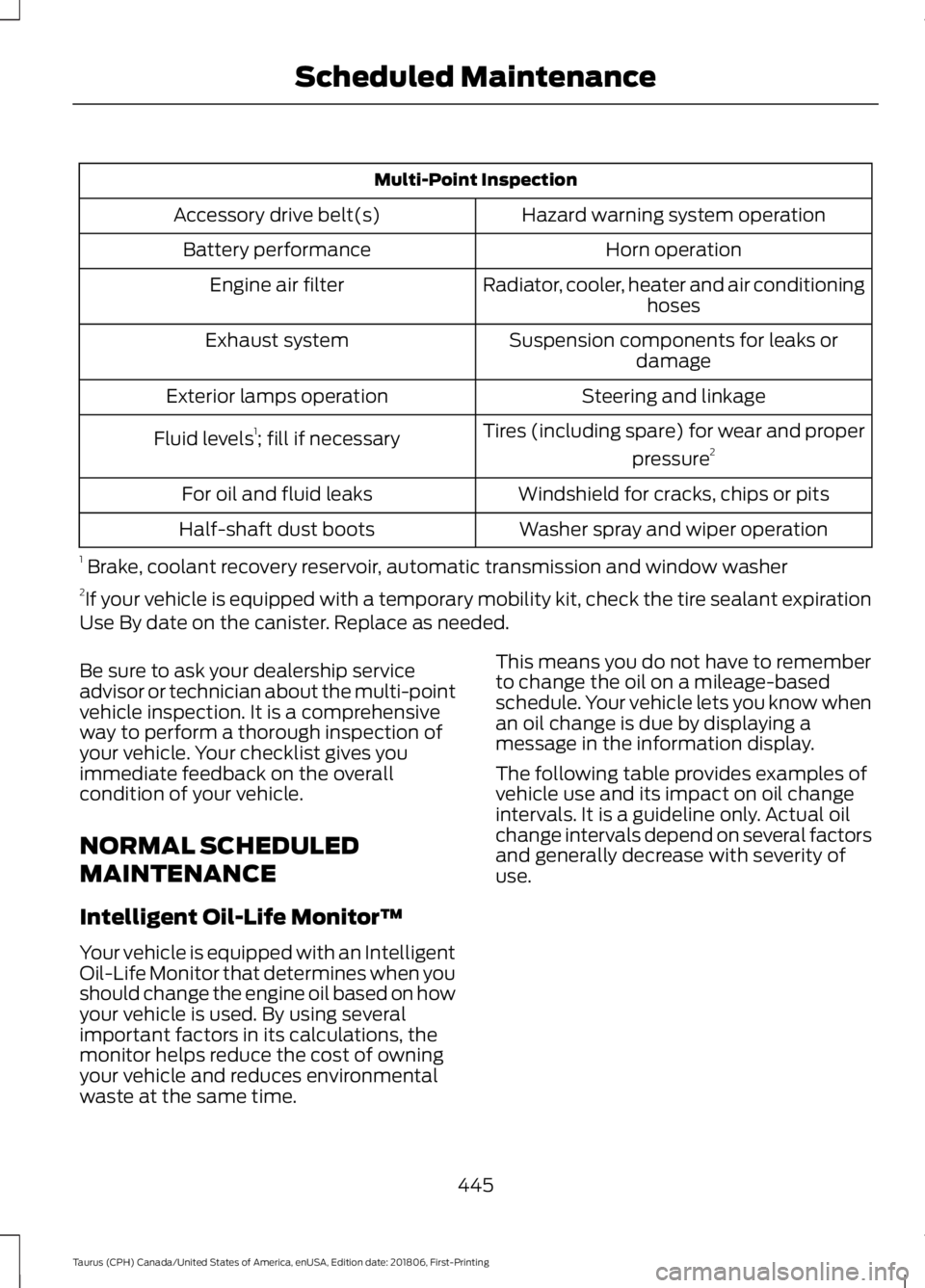
Multi-Point Inspection
Hazard warning system operation
Accessory drive belt(s)
Horn operation
Battery performance
Radiator, cooler, heater and air conditioninghoses
Engine air filter
Suspension components for leaks ordamage
Exhaust system
Steering and linkage
Exterior lamps operation
Tires (including spare) for wear and properpressure2
Fluid levels 1
; fill if necessary
Windshield for cracks, chips or pits
For oil and fluid leaks
Washer spray and wiper operation
Half-shaft dust boots
1 Brake, coolant recovery reservoir, automatic transmission and window washer
2 If your vehicle is equipped with a temporary mobility kit, check the tire sealant expiration
Use By date on the canister. Replace as needed.
Be sure to ask your dealership service
advisor or technician about the multi-point
vehicle inspection. It is a comprehensive
way to perform a thorough inspection of
your vehicle. Your checklist gives you
immediate feedback on the overall
condition of your vehicle.
NORMAL SCHEDULED
MAINTENANCE
Intelligent Oil-Life Monitor™
Your vehicle is equipped with an Intelligent
Oil-Life Monitor that determines when you
should change the engine oil based on how
your vehicle is used. By using several
important factors in its calculations, the
monitor helps reduce the cost of owning
your vehicle and reduces environmental
waste at the same time. This means you do not have to remember
to change the oil on a mileage-based
schedule. Your vehicle lets you know when
an oil change is due by displaying a
message in the information display.
The following table provides examples of
vehicle use and its impact on oil change
intervals. It is a guideline only. Actual oil
change intervals depend on several factors
and generally decrease with severity of
use.
445
Taurus (CPH) Canada/United States of America, enUSA, Edition date: 201806, First-Printing Scheduled Maintenance
Page 506 of 515
Breaking-In.....................................................207
Bulb Specification Chart...........................307
C
Cabin Air Filter.................................................113
Capacities and Specifications - 3.5L Duratec.........................................................298
Alternative Engine Oil for Extremely Cold Climates............................................................ 301
Specifications..................................................... 299
Capacities and Specifications - 3.5L Ecoboost™.................................................302
Alternative Engine Oil for Extremely Cold Climates........................................................... 306
Specifications..................................................... 303
Capacities and Specifications................293
Car Wash See: Cleaning the Exterior.............................. 255
Catalytic Converter
......................................146
On-Board Diagnostics (OBD-II).................... 147
Readiness for Inspection and Maintenance (I/M) Testing.................................................... 147
Center Console
..............................................130
Changing a Bulb...........................................252 Front Fog Lamp.................................................. 252
High-Intensity Discharge Headlamps........252
LED Lamps........................................................... 253
License Plate Lamp.......................................... 253
Changing a Fuse...........................................232 Fuses....................................................................... 232
Changing a Road Wheel............................287 Dissimilar Spare Wheel and Tire Assembly
Information...................................................... 287
Tire Change Procedure.................................... 288
Changing the 12V Battery.........................248 Battery Management System...................... 250
Changing the Engine Air Filter.................253
Changing the Wiper Blades
......................251
Changing the Windshield Wiper
Blades................................................................ 251
Checking MyKey System Status...............53 MyKey Distance..................................................... 53
Number of Admin Keys...................................... 53
Number of MyKeys.............................................. 53
Checking the Wiper Blades.....................250
Child Restraint and Seatbelt Maintenance.................................................34 Child Restraint Positioning
.........................26
Child Safety........................................................17
General Information............................................. 17
Child Safety Locks.........................................28 Left-Hand Side..................................................... 28
Right-Hand Side................................................... 28
Cleaning Leather Seats.............................259
Cleaning Products
.......................................255
Materials............................................................... 255
Cleaning the Engine....................................257
Cleaning the Exterior..................................255 Cleaning the Headlamps................................ 256
Exterior Chrome Parts..................................... 256
Exterior Plastic Parts........................................ 256
Stripes or Graphics............................................ 256
Underbody........................................................... 256
Under Hood......................................................... 256
Cleaning the Instrument Panel and Instrument Cluster Lens
........................258
Cleaning the Interior...................................258
Mirrors.................................................................... 258
Cleaning the Wheels..................................260
Cleaning the Windows and Wiper Blades............................................................257
Clearing All MyKeys.......................................52
Climate.............................................................391 Accessing Rear Climate Controls................393
Accessing the Climate Control Menu.........391
Directing the Airflow.......................................... 391
Rear Climate Control Lock Indicator..........393
Setting the Blower Motor Speed.................. 391
Setting the Temperature................................. 391
Switching Auto Mode On and Off................391
Switching Dual Zone Mode On and Off....................................................................... 392
Switching Maximum Air Conditioning On and Off.............................................................. 392
Switching Maximum Defrost On and Off....................................................................... 392
Switching Rear Auto Mode On and Off...................................................................... 393
Switching Recirculated Air On and Off....................................................................... 392
Switching the Air Conditioning On and Off....................................................................... 391
Switching the Climate Controlled Seats On and Off.............................................................. 392
503
Taurus (CPH) Canada/United States of America, enUSA, Edition date: 201806, First-Printing Index
Page 514 of 515
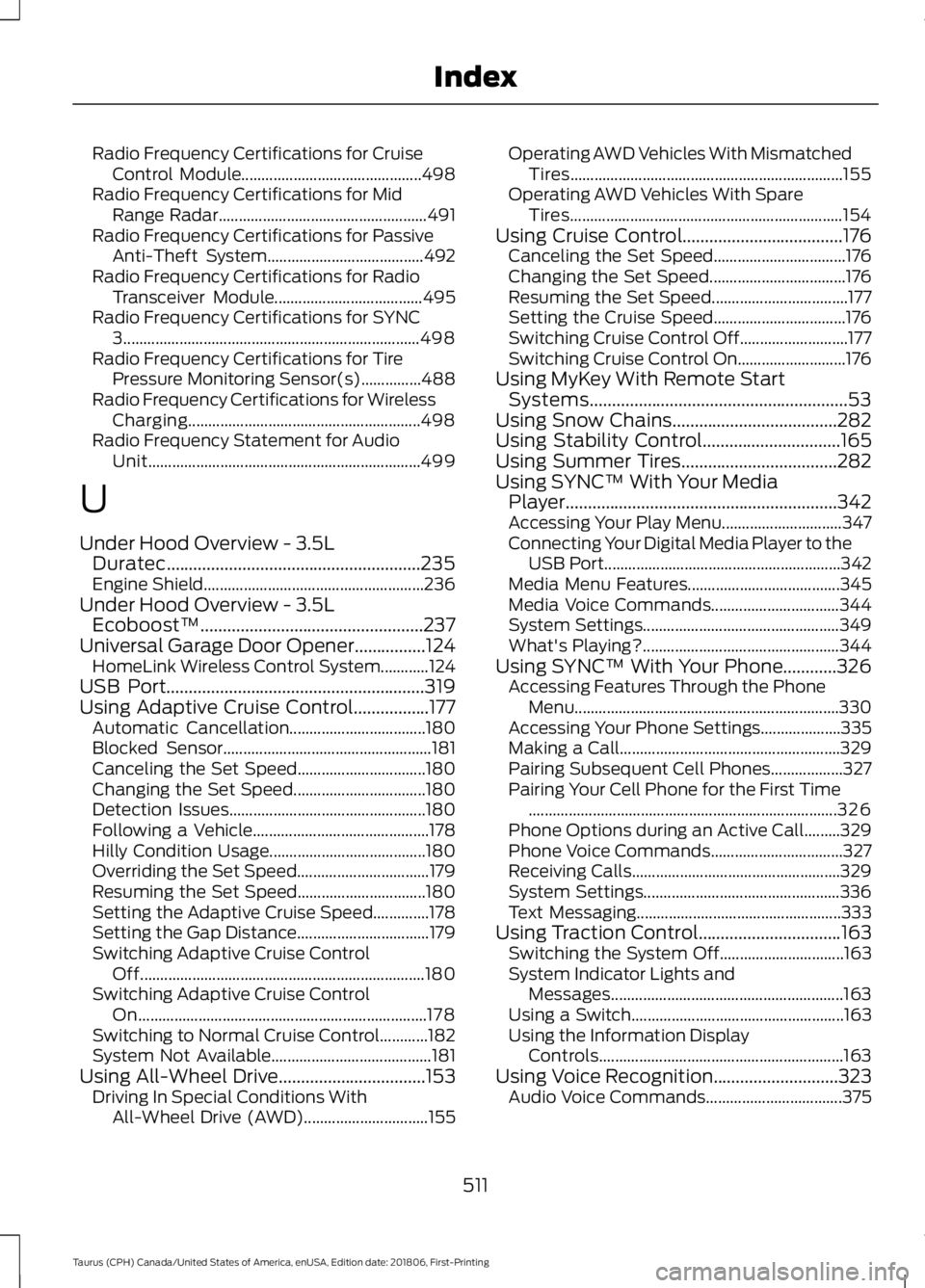
Radio Frequency Certifications for Cruise
Control Module............................................. 498
Radio Frequency Certifications for Mid Range Radar.................................................... 491
Radio Frequency Certifications for Passive Anti-Theft System....................................... 492
Radio Frequency Certifications for Radio Transceiver Module..................................... 495
Radio Frequency Certifications for SYNC 3........................................................................\
.. 498
Radio Frequency Certifications for Tire Pressure Monitoring Sensor(s)...............488
Radio Frequency Certifications for Wireless Charging.......................................................... 498
Radio Frequency Statement for Audio Unit.................................................................... 499
U
Under Hood Overview - 3.5L Duratec.........................................................235
Engine Shield....................................................... 236
Under Hood Overview - 3.5L Ecoboost™..................................................237
Universal Garage Door Opener................124 HomeLink Wireless Control System............124
USB Port..........................................................319
Using Adaptive Cruise Control.................177 Automatic Cancellation.................................. 180
Blocked Sensor.................................................... 181
Canceling the Set Speed................................ 180
Changing the Set Speed................................. 180
Detection Issues................................................. 180
Following a Vehicle............................................ 178
Hilly Condition Usage....................................... 180
Overriding the Set Speed................................. 179
Resuming the Set Speed................................ 180
Setting the Adaptive Cruise Speed..............178
Setting the Gap Distance................................. 179
Switching Adaptive Cruise Control Off....................................................................... 180
Switching Adaptive Cruise Control On........................................................................\
178
Switching to Normal Cruise Control............182
System Not Available........................................ 181
Using All-Wheel Drive
.................................153
Driving In Special Conditions With
All-Wheel Drive (AWD)............................... 155Operating AWD Vehicles With Mismatched
Tires.................................................................... 155
Operating AWD Vehicles With Spare Tires.................................................................... 154
Using Cruise Control....................................176 Canceling the Set Speed................................. 176
Changing the Set Speed.................................. 176
Resuming the Set Speed.................................. 177
Setting the Cruise Speed................................. 176
Switching Cruise Control Off........................... 177
Switching Cruise Control On........................... 176
Using MyKey With Remote Start Systems..........................................................53
Using Snow Chains.....................................282
Using Stability Control
...............................165
Using Summer Tires...................................282
Using SYNC™ With Your Media Player.............................................................342
Accessing Your Play Menu.............................. 347
Connecting Your Digital Media Player to the USB Port........................................................... 342
Media Menu Features...................................... 345
Media Voice Commands................................ 344
System Settings................................................. 349
What's Playing?................................................. 344
Using SYNC™ With Your Phone............326 Accessing Features Through the Phone
Menu.................................................................. 330
Accessing Your Phone Settings.................... 335
Making a Call....................................................... 329
Pairing Subsequent Cell Phones.................. 327
Pairing Your Cell Phone for the First Time ........................................................................\
..... 326
Phone Options during an Active Call.........329
Phone Voice Commands................................. 327
Receiving Calls.................................................... 329
System Settings................................................. 336
Text Messaging................................................... 333
Using Traction Control
................................163
Switching the System Off............................... 163
System Indicator Lights and Messages.......................................................... 163
Using a Switch..................................................... 163
Using the Information Display Controls............................................................. 163
Using Voice Recognition............................323 Audio Voice Commands.................................. 375
511
Taurus (CPH) Canada/United States of America, enUSA, Edition date: 201806, First-Printing Index