ECO mode FORD TAURUS 2019 Service Manual
[x] Cancel search | Manufacturer: FORD, Model Year: 2019, Model line: TAURUS, Model: FORD TAURUS 2019Pages: 515, PDF Size: 17.29 MB
Page 402 of 515

2. Follow the prompts on the
touchscreen.
3. Follow the prompts that appear on your phone to allow access to Apple
CarPlay.
After completing the setup, your phone
connects to CarPlay automatically when
plugged into a USB port.
To disable this feature from the
Settings screen, select: Menu Item
Apple CarPlay Preferences
Your device is listed if SYNC detects
Apple CarPlay. Select the name of your
device and set the Apple CarPlay switch
to off.
To return to SYNC 3, go to the Apple
CarPlay home screen and select the SYNC
app.
Note: Contact Apple for Apple CarPlay
support.
Android Auto
Android Auto is compatible with most
devices with Android 5.0 or newer.
1. Download the Android Auto app to your device from Google Play to
prepare your device (this may require
mobile data usage).
Note: The Android Auto App may not be
available within your current market.
2. Plug your device into a USB port. See USB Port (page 319).
3. Follow the prompt on the touchscreen.
4. Follow the prompts that appear on your device.
Note: You may be prompted to update
additional apps on your device (this may
require mobile data usage). To disable this feature from the
Settings screen, select: Menu Item
Android Auto Preferences
Your device is listed if SYNC detects
Android Auto. Select the name of your
device and set the Android Auto switch
to off.
Note: You may need to slide your Settings
screen to the left to select
Apple CarPlay
Preferences or Android Auto Preferences.
To return to SYNC 3, select the
speedometer icon in the Android Auto
menu bar at the bottom of the
touchscreen, and then touch the option to
return to SYNC.
Note: Contact Google for Android Auto
support.
NAVIGATION
(If Equipped)
Your navigation system is comprised of
two main features, destination mode and
map mode.
Map Mode
Map mode shows advanced viewing
comprised of 2D city maps, 3D landmarks
and 3D city models (when available). 2D
city maps show detailed outlines of
buildings, visible land use, landscape
features, and detailed railroad
infrastructure for the most essential cities
around the globe.
3D landmarks appear as clear, visible
objects that are typically recognizable and
have a certain tourism value.
399
Taurus (CPH) Canada/United States of America, enUSA, Edition date: 201806, First-Printing SYNC™ 3
Page 406 of 515

Description
Menu Item
Fuel
Hotel
ATMPress to view additional categories. Once you have selected
a category, follow the menus to find what you are looking
for.
See All
Inside of these categories you can search by:
Nearby
Along Route
Near Destination
In a City
Once you have chosen your destination, press: Action and Description
Menu Item
This saves the destination to your favorites.
Save
This shows you a map of your entire route. You can then choose your
route from three different options.
Start
Uses the fastest moving roads
possible.
Fastest
Uses the shortest distance possible.
Shortest
Uses the most fuel-efficient route.
Economical Route
The time and distance for each route also displays.
On the route screen, you can choose to cancel the current navigation.
The system asks for confirmation then returns you to the map mode
screen.
Cancel
Once you have chosen your destination, press: Action and Description
Menu Item
The system uses a variety of screens and prompts to guide you to your
destination.
Start
403
Taurus (CPH) Canada/United States of America, enUSA, Edition date: 201806, First-Printing SYNC™ 3
Page 420 of 515

Map Preferences
Action and Description
Menu Item
Map Preferences
Then select any of the following: When this option is active, the system shows 3D renderings of build-
ings.
3D City Model
When enabled, your vehicle ’s previously traveled route displays with
white dots.
Breadcrumbs
Enable this feature to display up to 3 POI icons on the navigation map.
POI Icons
A rest area POI icon may display on the map regardless of this setting.
Select POIs
When this feature is active you can select the
icons you want displayed by selecting:
This menu allows you to choose which incident icons you would like
to have displayed on the navigation map.
Incident Map
Icons
Route Preferences Second Level Messages, Actions and Descriptions
Menu Item
Route Preferences
Then select any of the following: Choose to have the system display your chosen route type.
Preferred Route
Eco
Fastest
Shortest
Bypass route selection in destination programming. The system only
calculates one route based on your preferred route setting.
Always Use ___
Route
When activated, the system uses your selected route type to calculate
only one route to the desired destination.
The system selects High Occupancy Vehicle or car pool lanes when
providing route guidance.
Use HOV Lanes
The system searches for and displays available parking locations as
you approach your destination.
Automatically
Find Parking
Select a level of cost for the calculated Eco Route. The higher the
setting, the longer the time allotment is for the route.
Eco Time
Penalty
417
Taurus (CPH) Canada/United States of America, enUSA, Edition date: 201806, First-Printing SYNC™ 3
Page 427 of 515
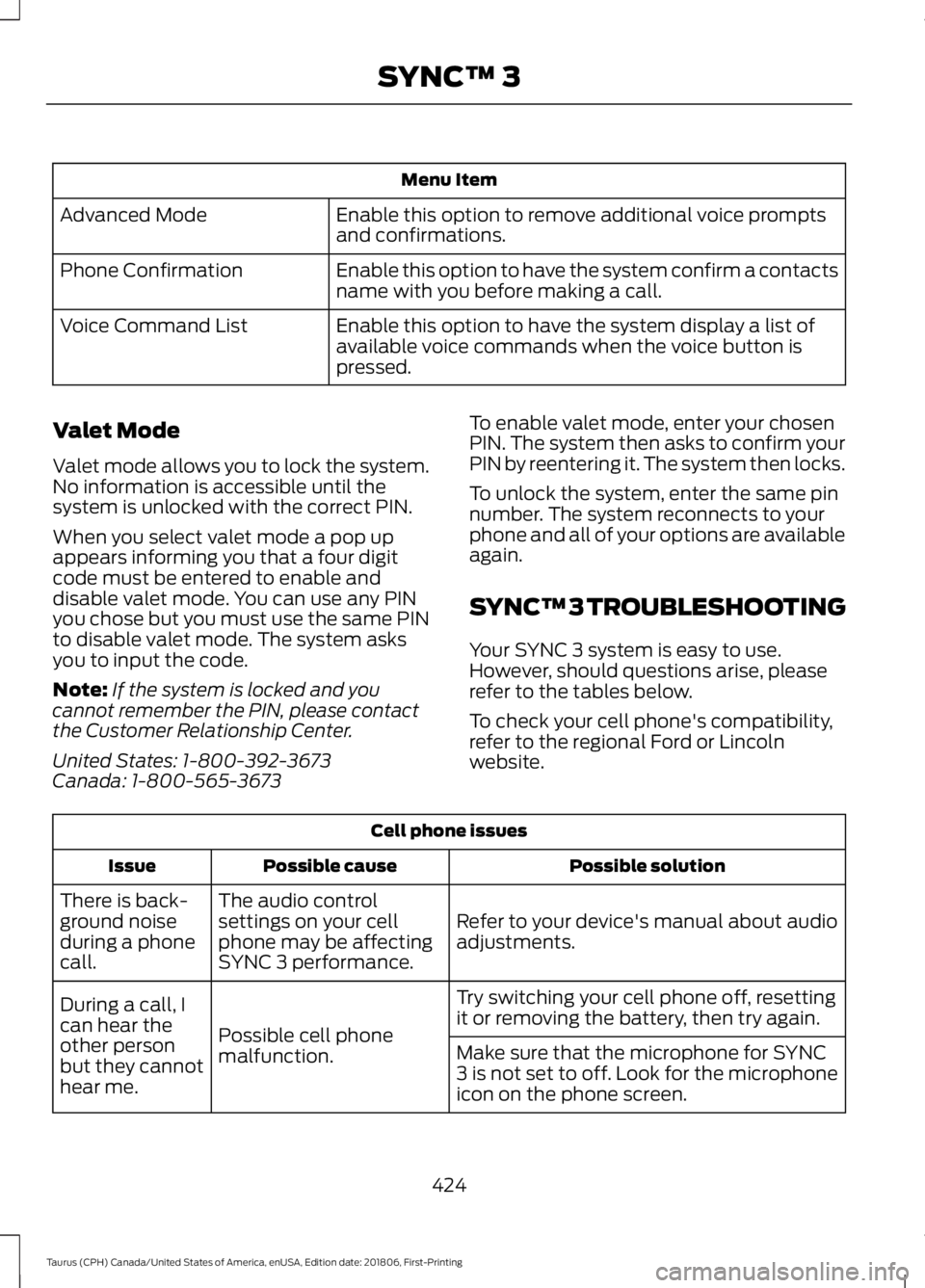
Menu Item
Enable this option to remove additional voice prompts
and confirmations.
Advanced Mode
Enable this option to have the system confirm a contacts
name with you before making a call.
Phone Confirmation
Enable this option to have the system display a list of
available voice commands when the voice button is
pressed.
Voice Command List
Valet Mode
Valet mode allows you to lock the system.
No information is accessible until the
system is unlocked with the correct PIN.
When you select valet mode a pop up
appears informing you that a four digit
code must be entered to enable and
disable valet mode. You can use any PIN
you chose but you must use the same PIN
to disable valet mode. The system asks
you to input the code.
Note: If the system is locked and you
cannot remember the PIN, please contact
the Customer Relationship Center.
United States: 1-800-392-3673
Canada: 1-800-565-3673 To enable valet mode, enter your chosen
PIN. The system then asks to confirm your
PIN by reentering it. The system then locks.
To unlock the system, enter the same pin
number. The system reconnects to your
phone and all of your options are available
again.
SYNC™ 3 TROUBLESHOOTING
Your SYNC 3 system is easy to use.
However, should questions arise, please
refer to the tables below.
To check your cell phone's compatibility,
refer to the regional Ford or Lincoln
website.Cell phone issues
Possible solution
Possible cause
Issue
Refer to your device's manual about audio
adjustments.
The audio control
settings on your cell
phone may be affecting
SYNC 3 performance.
There is back-
ground noise
during a phone
call.
Try switching your cell phone off, resetting
it or removing the battery, then try again.
Possible cell phone
malfunction.
During a call, I
can hear the
other person
but they cannot
hear me.
Make sure that the microphone for SYNC
3 is not set to off. Look for the microphone
icon on the phone screen.
424
Taurus (CPH) Canada/United States of America, enUSA, Edition date: 201806, First-Printing SYNC™ 3
Page 429 of 515
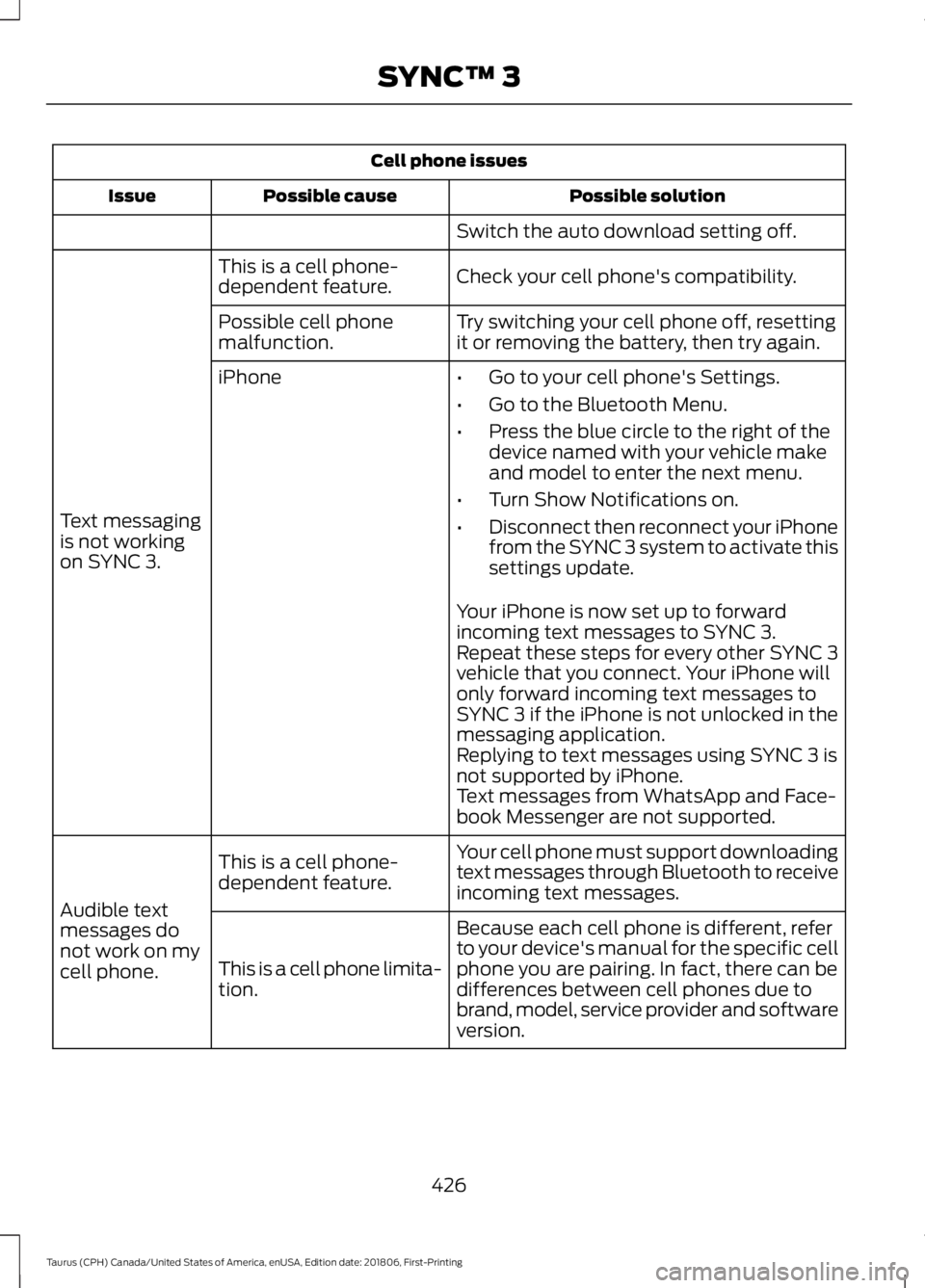
Cell phone issues
Possible solution
Possible cause
Issue
Switch the auto download setting off.
Check your cell phone's compatibility.
This is a cell phone-
dependent feature.
Text messaging
is not working
on SYNC 3. Try switching your cell phone off, resetting
it or removing the battery, then try again.
Possible cell phone
malfunction.
iPhone
•Go to your cell phone's Settings.
• Go to the Bluetooth Menu.
• Press the blue circle to the right of the
device named with your vehicle make
and model to enter the next menu.
• Turn Show Notifications on.
• Disconnect then reconnect your iPhone
from the SYNC 3 system to activate this
settings update.
Your iPhone is now set up to forward
incoming text messages to SYNC 3.
Repeat these steps for every other SYNC 3
vehicle that you connect. Your iPhone will
only forward incoming text messages to
SYNC 3 if the iPhone is not unlocked in the
messaging application.
Replying to text messages using SYNC 3 is
not supported by iPhone.
Text messages from WhatsApp and Face-
book Messenger are not supported.
Your cell phone must support downloading
text messages through Bluetooth to receive
incoming text messages.
This is a cell phone-
dependent feature.
Audible text
messages do
not work on my
cell phone. Because each cell phone is different, refer
to your device's manual for the specific cell
phone you are pairing. In fact, there can be
differences between cell phones due to
brand, model, service provider and software
version.
This is a cell phone limita-
tion.
426
Taurus (CPH) Canada/United States of America, enUSA, Edition date: 201806, First-Printing SYNC™ 3
Page 449 of 515
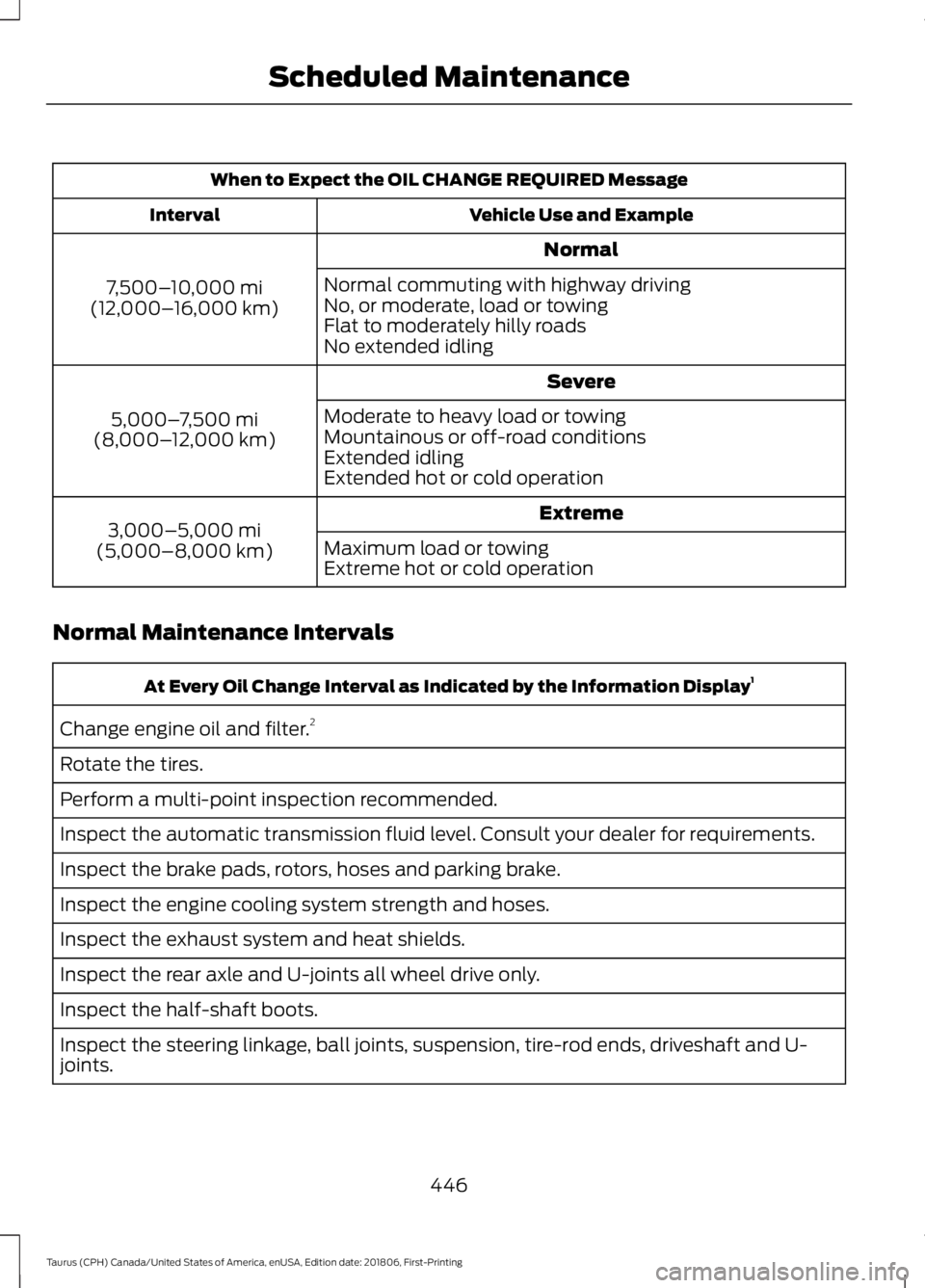
When to Expect the OIL CHANGE REQUIRED Message
Vehicle Use and Example
Interval
Normal
7,500– 10,000 mi
(12,000– 16,000 km) Normal commuting with highway driving
No, or moderate, load or towing
Flat to moderately hilly roads
No extended idling
Severe
5,000– 7,500 mi
(8,000– 12,000 km) Moderate to heavy load or towing
Mountainous or off-road conditions
Extended idling
Extended hot or cold operation
Extreme
3,000–5,000 mi
(5,000–8,000 km) Maximum load or towing
Extreme hot or cold operation
Normal Maintenance Intervals At Every Oil Change Interval as Indicated by the Information Display
1
Change engine oil and filter. 2
Rotate the tires.
Perform a multi-point inspection recommended.
Inspect the automatic transmission fluid level. Consult your dealer for requirements.
Inspect the brake pads, rotors, hoses and parking brake.
Inspect the engine cooling system strength and hoses.
Inspect the exhaust system and heat shields.
Inspect the rear axle and U-joints all wheel drive only.
Inspect the half-shaft boots.
Inspect the steering linkage, ball joints, suspension, tire-rod ends, driveshaft and U-
joints.
446
Taurus (CPH) Canada/United States of America, enUSA, Edition date: 201806, First-Printing Scheduled Maintenance
Page 489 of 515
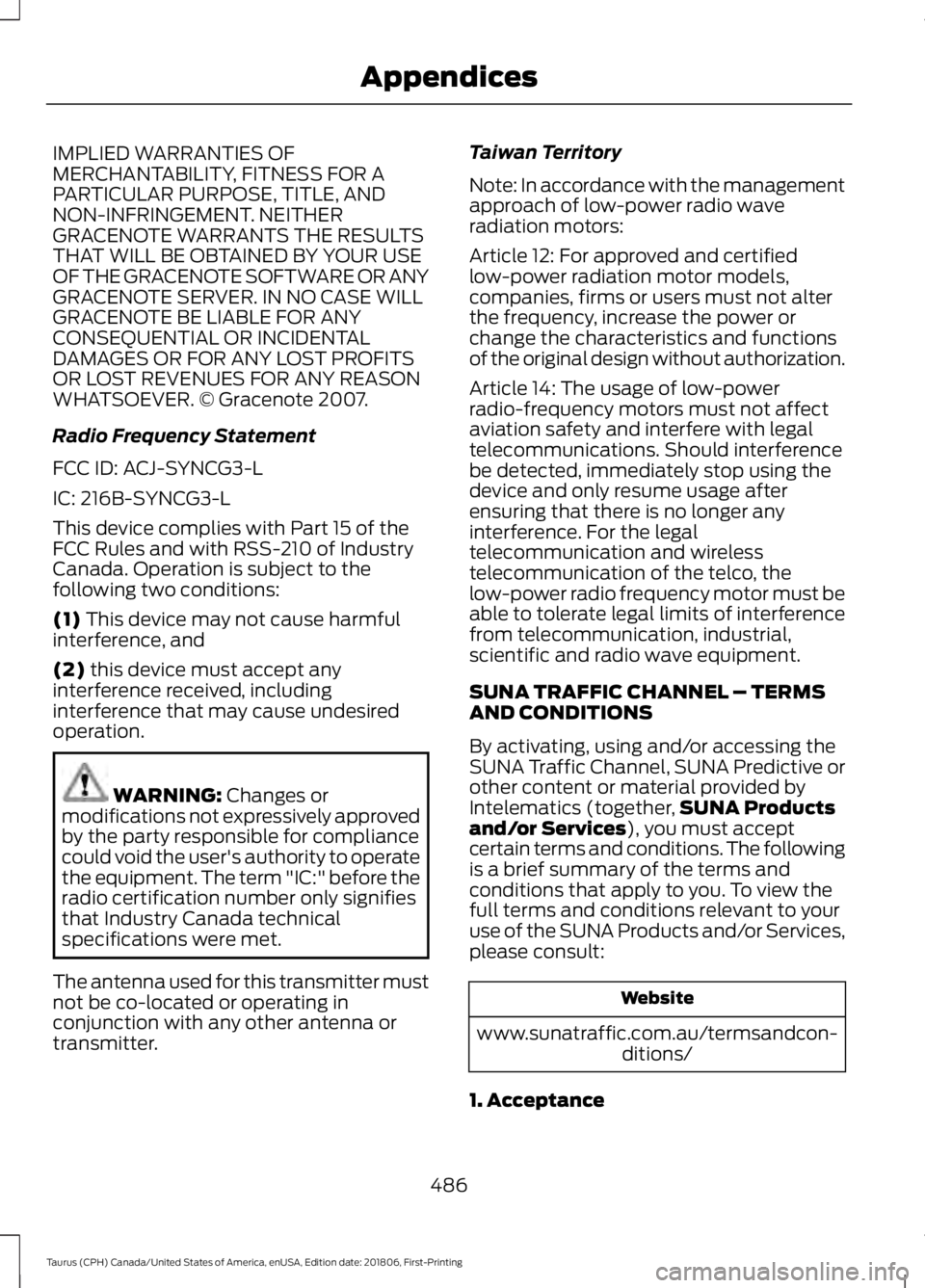
IMPLIED WARRANTIES OF
MERCHANTABILITY, FITNESS FOR A
PARTICULAR PURPOSE, TITLE, AND
NON-INFRINGEMENT. NEITHER
GRACENOTE WARRANTS THE RESULTS
THAT WILL BE OBTAINED BY YOUR USE
OF THE GRACENOTE SOFTWARE OR ANY
GRACENOTE SERVER. IN NO CASE WILL
GRACENOTE BE LIABLE FOR ANY
CONSEQUENTIAL OR INCIDENTAL
DAMAGES OR FOR ANY LOST PROFITS
OR LOST REVENUES FOR ANY REASON
WHATSOEVER. © Gracenote 2007.
Radio Frequency Statement
FCC ID: ACJ-SYNCG3-L
IC: 216B-SYNCG3-L
This device complies with Part 15 of the
FCC Rules and with RSS-210 of Industry
Canada. Operation is subject to the
following two conditions:
(1) This device may not cause harmful
interference, and
(2)
this device must accept any
interference received, including
interference that may cause undesired
operation. WARNING:
Changes or
modifications not expressively approved
by the party responsible for compliance
could void the user's authority to operate
the equipment. The term "IC:" before the
radio certification number only signifies
that Industry Canada technical
specifications were met.
The antenna used for this transmitter must
not be co-located or operating in
conjunction with any other antenna or
transmitter. Taiwan Territory
Note: In accordance with the management
approach of low-power radio wave
radiation motors:
Article 12: For approved and certified
low-power radiation motor models,
companies, firms or users must not alter
the frequency, increase the power or
change the characteristics and functions
of the original design without authorization.
Article 14: The usage of low-power
radio-frequency motors must not affect
aviation safety and interfere with legal
telecommunications. Should interference
be detected, immediately stop using the
device and only resume usage after
ensuring that there is no longer any
interference. For the legal
telecommunication and wireless
telecommunication of the telco, the
low-power radio frequency motor must be
able to tolerate legal limits of interference
from telecommunication, industrial,
scientific and radio wave equipment.
SUNA TRAFFIC CHANNEL – TERMS
AND CONDITIONS
By activating, using and/or accessing the
SUNA Traffic Channel, SUNA Predictive or
other content or material provided by
Intelematics (together,
SUNA Products
and/or Services
), you must accept
certain terms and conditions. The following
is a brief summary of the terms and
conditions that apply to you. To view the
full terms and conditions relevant to your
use of the SUNA Products and/or Services,
please consult: Website
www.sunatraffic.com.au/termsandcon- ditions/
1. Acceptance
486
Taurus (CPH) Canada/United States of America, enUSA, Edition date: 201806, First-Printing Appendices
Page 504 of 515
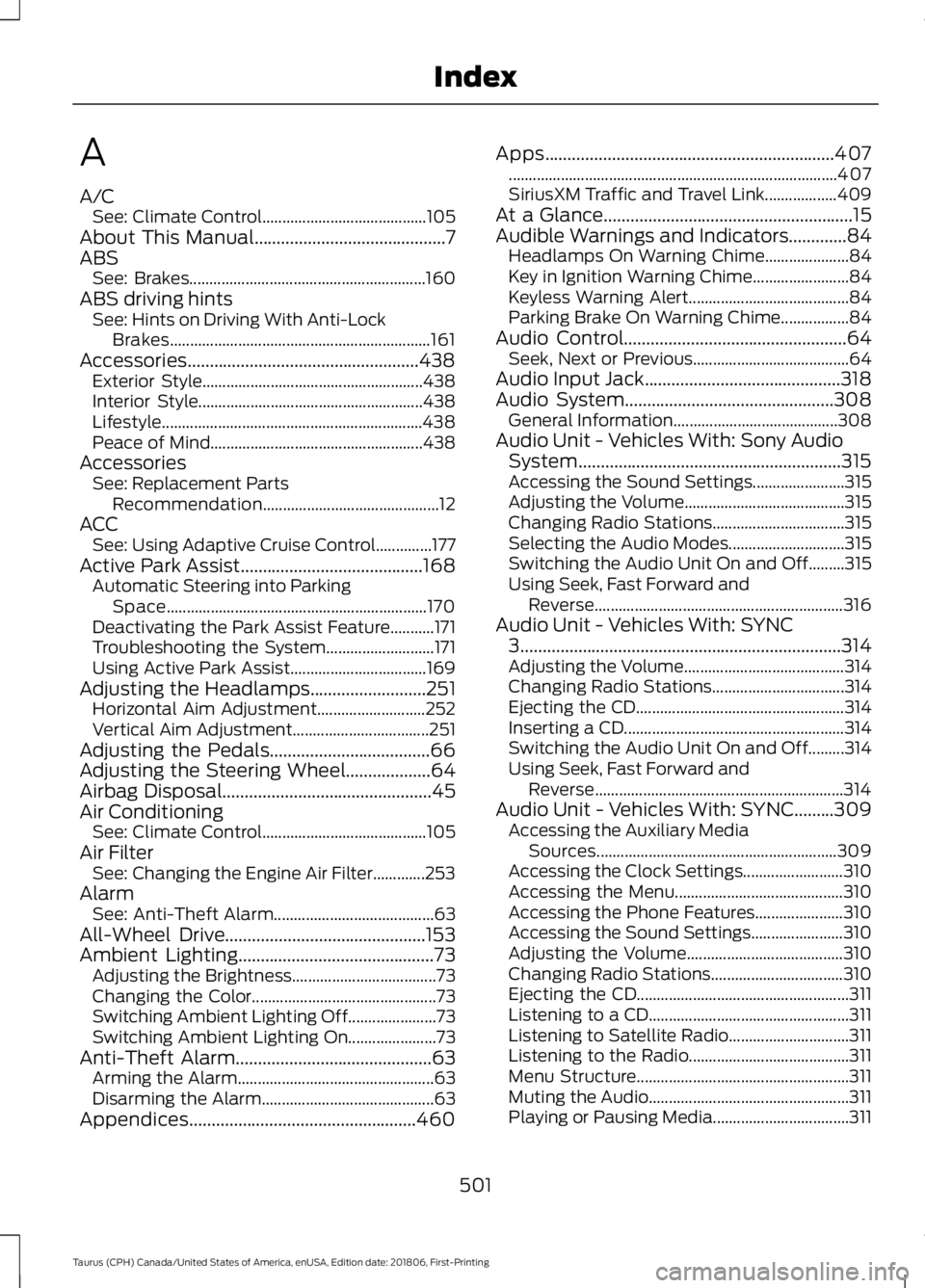
A
A/C
See: Climate Control......................................... 105
About This Manual...........................................7
ABS See: Brakes........................................................... 160
ABS driving hints See: Hints on Driving With Anti-Lock
Brakes................................................................. 161
Accessories....................................................438 Exterior Style....................................................... 438
Interior Style........................................................ 438
Lifestyle................................................................. 438
Peace of Mind..................................................... 438
Accessories See: Replacement Parts
Recommendation............................................ 12
ACC See: Using Adaptive Cruise Control..............177
Active Park Assist.........................................168 Automatic Steering into Parking
Space................................................................. 170
Deactivating the Park Assist Feature...........171
Troubleshooting the System........................... 171
Using Active Park Assist.................................. 169
Adjusting the Headlamps
..........................251
Horizontal Aim Adjustment........................... 252
Vertical Aim Adjustment.................................. 251
Adjusting the Pedals
....................................66
Adjusting the Steering Wheel...................64
Airbag Disposal...............................................45
Air Conditioning See: Climate Control......................................... 105
Air Filter See: Changing the Engine Air Filter.............253
Alarm See: Anti-Theft Alarm........................................ 63
All-Wheel Drive
.............................................153
Ambient Lighting............................................73
Adjusting the Brightness.................................... 73
Changing the Color.............................................. 73
Switching Ambient Lighting Off...................... 73
Switching Ambient Lighting On...................... 73
Anti-Theft Alarm
............................................63
Arming the Alarm................................................. 63
Disarming the Alarm........................................... 63
Appendices...................................................460 Apps
.................................................................407
........................................................................\
.......... 407
SiriusXM Traffic and Travel Link.................. 409
At a Glance........................................................15
Audible Warnings and Indicators.............84 Headlamps On Warning Chime..................... 84
Key in Ignition Warning Chime........................ 84
Keyless Warning Alert........................................ 84
Parking Brake On Warning Chime.................84
Audio Control..................................................64 Seek, Next or Previous....................................... 64
Audio Input Jack
............................................318
Audio System...............................................308 General Information......................................... 308
Audio Unit - Vehicles With: Sony Audio System...........................................................315
Accessing the Sound Settings....................... 315
Adjusting the Volume........................................ 315
Changing Radio Stations................................. 315
Selecting the Audio Modes............................. 315
Switching the Audio Unit On and Off.........315
Using Seek, Fast Forward and Reverse.............................................................. 316
Audio Unit - Vehicles With: SYNC 3
........................................................................\
314
Adjusting the Volume........................................ 314
Changing Radio Stations................................. 314
Ejecting the CD.................................................... 314
Inserting a CD....................................................... 314
Switching the Audio Unit On and Off.........314
Using Seek, Fast Forward and Reverse.............................................................. 314
Audio Unit - Vehicles With: SYNC.........309 Accessing the Auxiliary Media
Sources............................................................ 309
Accessing the Clock Settings......................... 310
Accessing the Menu.......................................... 310
Accessing the Phone Features...................... 310
Accessing the Sound Settings....................... 310
Adjusting the Volume....................................... 310
Changing Radio Stations................................. 310
Ejecting the CD..................................................... 311
Listening to a CD.................................................. 311
Listening to Satellite Radio.............................. 311
Listening to the Radio........................................ 311
Menu Structure..................................................... 311
Muting the Audio.................................................. 311
Playing or Pausing Media.................................. 311
501
Taurus (CPH) Canada/United States of America, enUSA, Edition date: 201806, First-Printing Index
Page 505 of 515
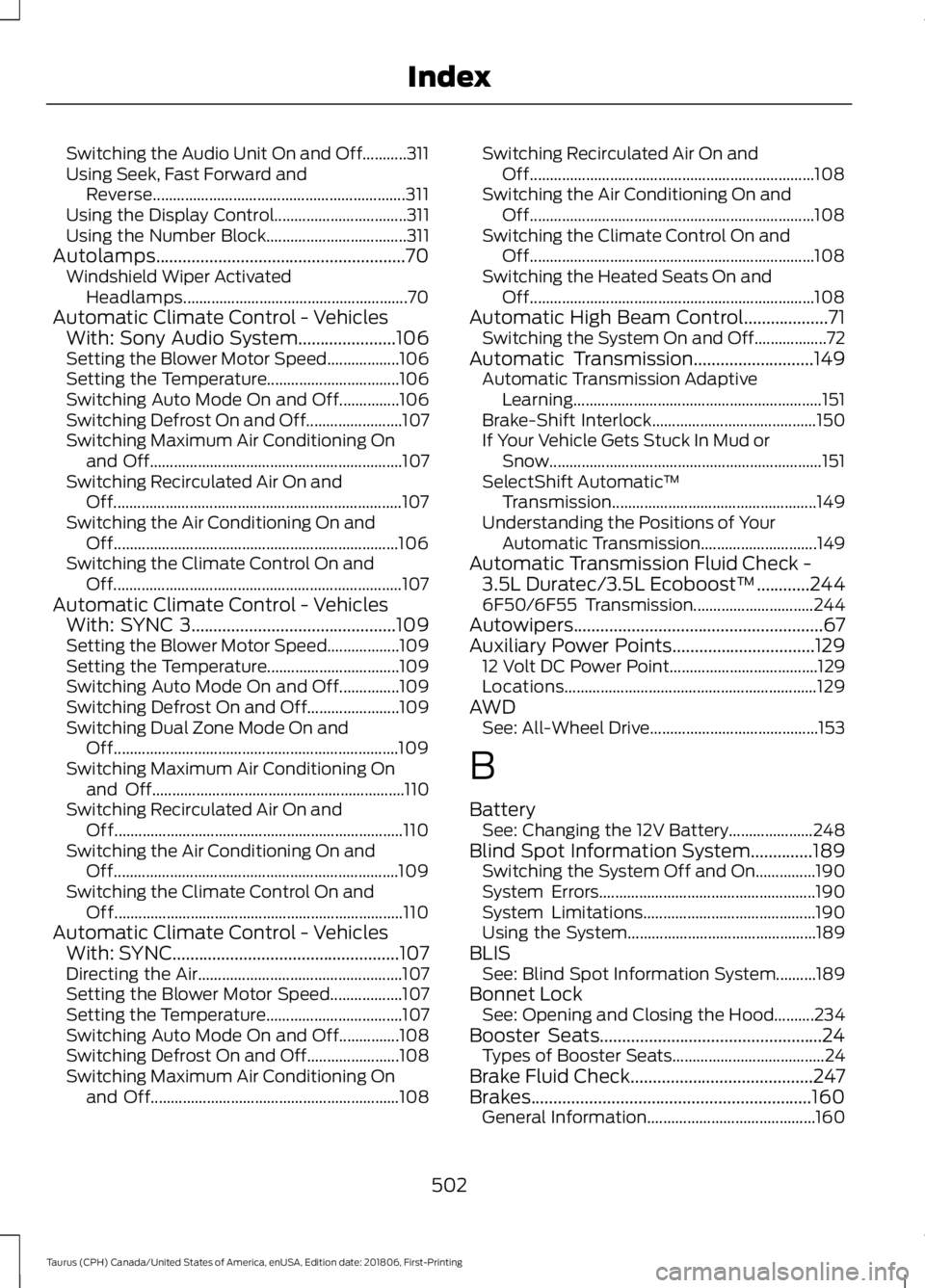
Switching the Audio Unit On and Off...........311
Using Seek, Fast Forward and
Reverse............................................................... 311
Using the Display Control................................. 311
Using the Number Block................................... 311
Autolamps........................................................70 Windshield Wiper Activated
Headlamps........................................................ 70
Automatic Climate Control - Vehicles With: Sony Audio System......................106
Setting the Blower Motor Speed.................. 106
Setting the Temperature................................. 106
Switching Auto Mode On and Off...............106
Switching Defrost On and Off........................ 107
Switching Maximum Air Conditioning On and Off............................................................... 107
Switching Recirculated Air On and Off........................................................................\
107
Switching the Air Conditioning On and Off....................................................................... 106
Switching the Climate Control On and Off........................................................................\
107
Automatic Climate Control - Vehicles With: SYNC 3..............................................109
Setting the Blower Motor Speed.................. 109
Setting the Temperature................................. 109
Switching Auto Mode On and Off...............109
Switching Defrost On and Off....................... 109
Switching Dual Zone Mode On and Off....................................................................... 109
Switching Maximum Air Conditioning On and Off............................................................... 110
Switching Recirculated Air On and Off........................................................................\
110
Switching the Air Conditioning On and Off....................................................................... 109
Switching the Climate Control On and Off........................................................................\
110
Automatic Climate Control - Vehicles With: SYNC...................................................107
Directing the Air................................................... 107
Setting the Blower Motor Speed.................. 107
Setting the Temperature.................................. 107
Switching Auto Mode On and Off...............108
Switching Defrost On and Off....................... 108
Switching Maximum Air Conditioning On and Off.............................................................. 108Switching Recirculated Air On and
Off....................................................................... 108
Switching the Air Conditioning On and Off....................................................................... 108
Switching the Climate Control On and Off....................................................................... 108
Switching the Heated Seats On and Off....................................................................... 108
Automatic High Beam Control...................71 Switching the System On and Off.................. 72
Automatic Transmission
...........................149
Automatic Transmission Adaptive
Learning.............................................................. 151
Brake-Shift Interlock......................................... 150
If Your Vehicle Gets Stuck In Mud or Snow.................................................................... 151
SelectShift Automatic ™
Transmission................................................... 149
Understanding the Positions of Your Automatic Transmission............................. 149
Automatic Transmission Fluid Check - 3.5L Duratec/3.5L Ecoboost™............244
6F50/6F55 Transmission.............................. 244
Autowipers........................................................67
Auxiliary Power Points
................................129
12 Volt DC Power Point..................................... 129
Locations............................................................... 129
AWD See: All-Wheel Drive.......................................... 153
B
Battery See: Changing the 12V Battery..................... 248
Blind Spot Information System..............189 Switching the System Off and On...............190
System Errors...................................................... 190
System Limitations........................................... 190
Using the System............................................... 189
BLIS See: Blind Spot Information System..........189
Bonnet Lock See: Opening and Closing the Hood..........234
Booster Seats..................................................24 Types of Booster Seats...................................... 24
Brake Fluid Check.........................................247
Brakes...............................................................160 General Information.......................................... 160
502
Taurus (CPH) Canada/United States of America, enUSA, Edition date: 201806, First-Printing Index
Page 506 of 515
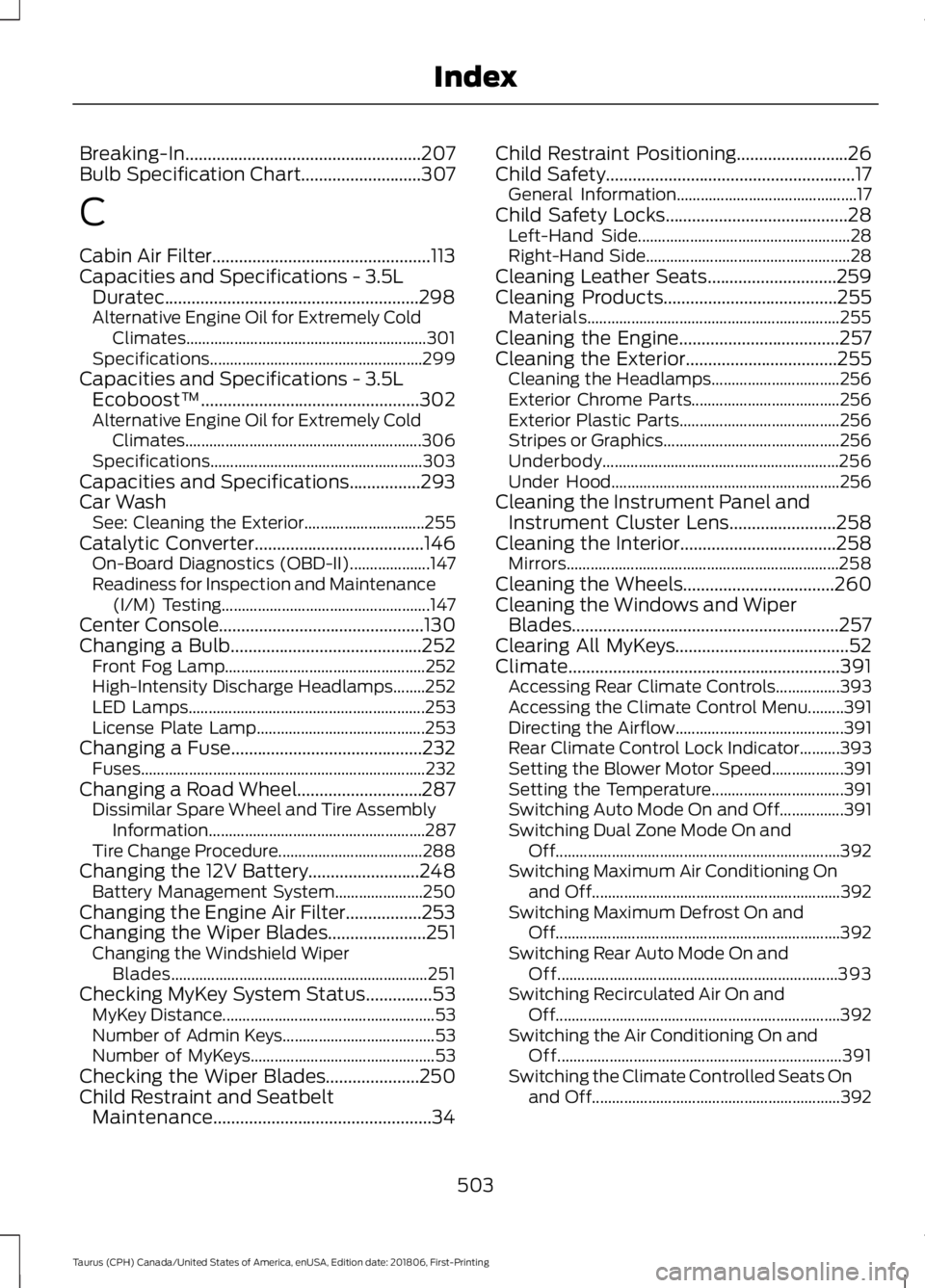
Breaking-In.....................................................207
Bulb Specification Chart...........................307
C
Cabin Air Filter.................................................113
Capacities and Specifications - 3.5L Duratec.........................................................298
Alternative Engine Oil for Extremely Cold Climates............................................................ 301
Specifications..................................................... 299
Capacities and Specifications - 3.5L Ecoboost™.................................................302
Alternative Engine Oil for Extremely Cold Climates........................................................... 306
Specifications..................................................... 303
Capacities and Specifications................293
Car Wash See: Cleaning the Exterior.............................. 255
Catalytic Converter
......................................146
On-Board Diagnostics (OBD-II).................... 147
Readiness for Inspection and Maintenance (I/M) Testing.................................................... 147
Center Console
..............................................130
Changing a Bulb...........................................252 Front Fog Lamp.................................................. 252
High-Intensity Discharge Headlamps........252
LED Lamps........................................................... 253
License Plate Lamp.......................................... 253
Changing a Fuse...........................................232 Fuses....................................................................... 232
Changing a Road Wheel............................287 Dissimilar Spare Wheel and Tire Assembly
Information...................................................... 287
Tire Change Procedure.................................... 288
Changing the 12V Battery.........................248 Battery Management System...................... 250
Changing the Engine Air Filter.................253
Changing the Wiper Blades
......................251
Changing the Windshield Wiper
Blades................................................................ 251
Checking MyKey System Status...............53 MyKey Distance..................................................... 53
Number of Admin Keys...................................... 53
Number of MyKeys.............................................. 53
Checking the Wiper Blades.....................250
Child Restraint and Seatbelt Maintenance.................................................34 Child Restraint Positioning
.........................26
Child Safety........................................................17
General Information............................................. 17
Child Safety Locks.........................................28 Left-Hand Side..................................................... 28
Right-Hand Side................................................... 28
Cleaning Leather Seats.............................259
Cleaning Products
.......................................255
Materials............................................................... 255
Cleaning the Engine....................................257
Cleaning the Exterior..................................255 Cleaning the Headlamps................................ 256
Exterior Chrome Parts..................................... 256
Exterior Plastic Parts........................................ 256
Stripes or Graphics............................................ 256
Underbody........................................................... 256
Under Hood......................................................... 256
Cleaning the Instrument Panel and Instrument Cluster Lens
........................258
Cleaning the Interior...................................258
Mirrors.................................................................... 258
Cleaning the Wheels..................................260
Cleaning the Windows and Wiper Blades............................................................257
Clearing All MyKeys.......................................52
Climate.............................................................391 Accessing Rear Climate Controls................393
Accessing the Climate Control Menu.........391
Directing the Airflow.......................................... 391
Rear Climate Control Lock Indicator..........393
Setting the Blower Motor Speed.................. 391
Setting the Temperature................................. 391
Switching Auto Mode On and Off................391
Switching Dual Zone Mode On and Off....................................................................... 392
Switching Maximum Air Conditioning On and Off.............................................................. 392
Switching Maximum Defrost On and Off....................................................................... 392
Switching Rear Auto Mode On and Off...................................................................... 393
Switching Recirculated Air On and Off....................................................................... 392
Switching the Air Conditioning On and Off....................................................................... 391
Switching the Climate Controlled Seats On and Off.............................................................. 392
503
Taurus (CPH) Canada/United States of America, enUSA, Edition date: 201806, First-Printing Index