fuel type FORD TAURUS 2019 Owners Manual
[x] Cancel search | Manufacturer: FORD, Model Year: 2019, Model line: TAURUS, Model: FORD TAURUS 2019Pages: 515, PDF Size: 17.29 MB
Page 82 of 515
GAUGES
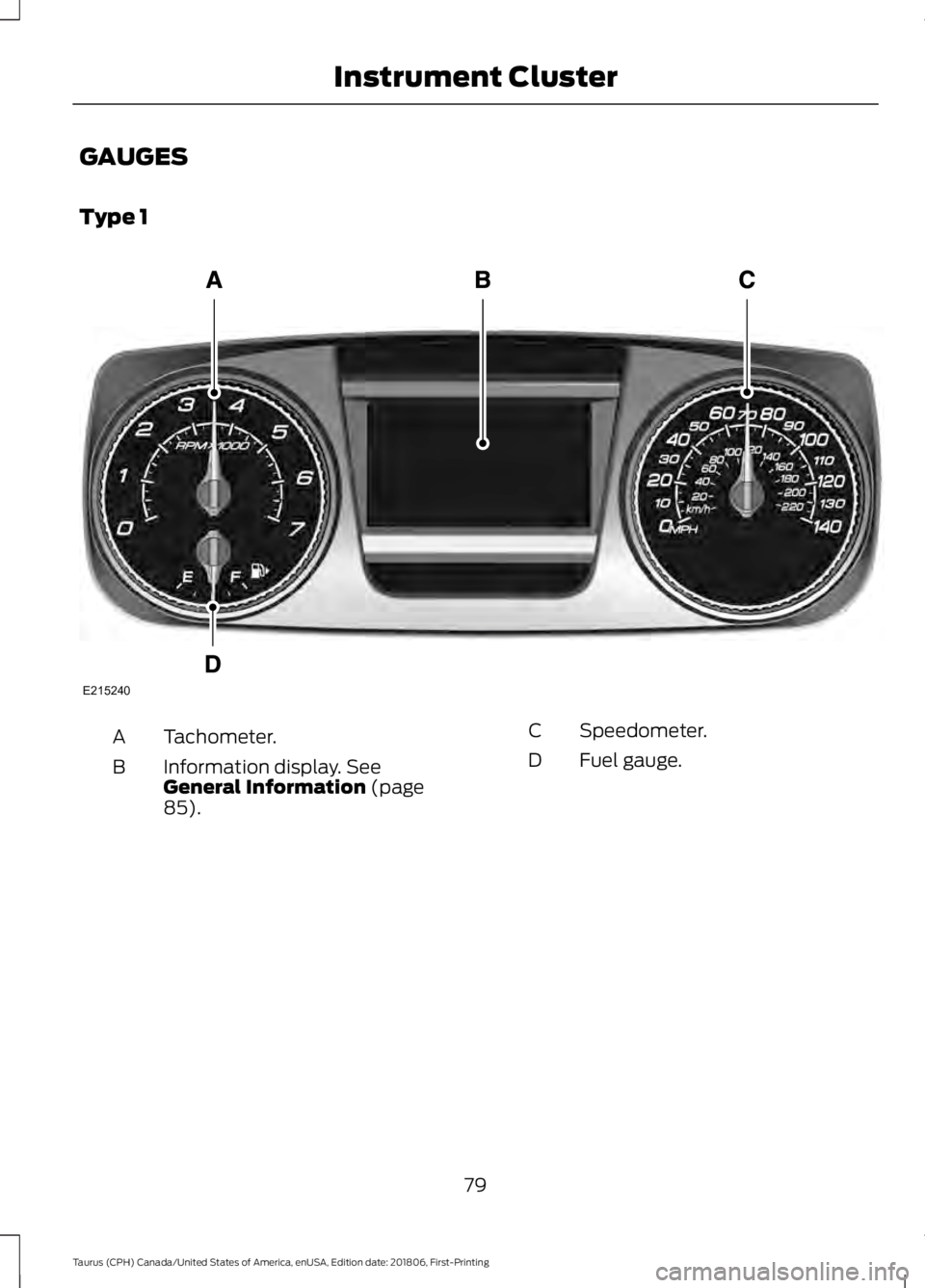
Type 1
Tachometer.
A
Information display. See
General Information (page
85).
B
Speedometer.
C
Fuel gauge.
D
79
Taurus (CPH) Canada/United States of America, enUSA, Edition date: 201806, First-Printing Instrument ClusterE215240
Page 83 of 515
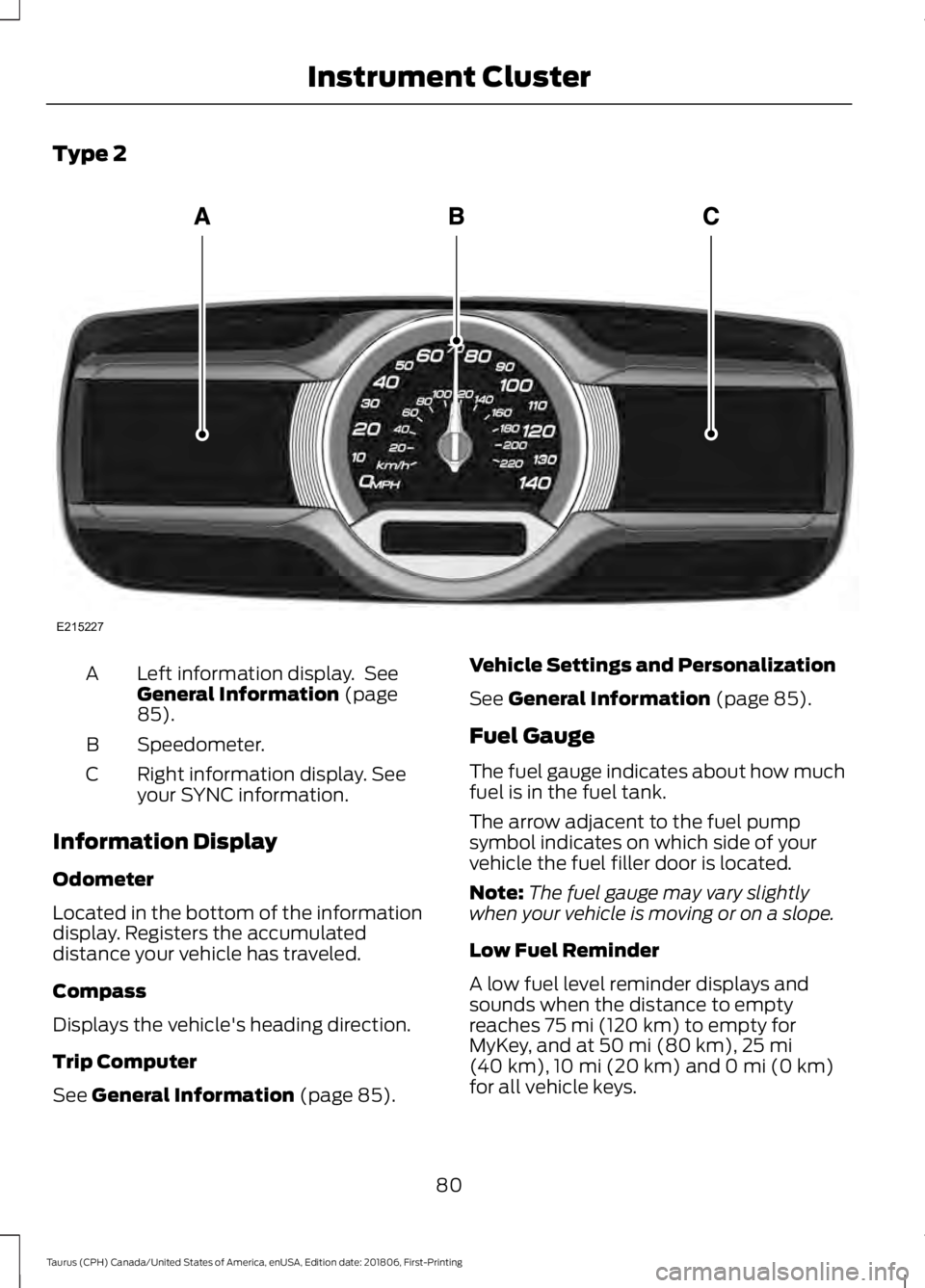
Type 2
Left information display. See
General Information (page
85).
A
Speedometer.
B
Right information display. See
your SYNC information.
C
Information Display
Odometer
Located in the bottom of the information
display. Registers the accumulated
distance your vehicle has traveled.
Compass
Displays the vehicle's heading direction.
Trip Computer
See
General Information (page 85). Vehicle Settings and Personalization
See
General Information (page 85).
Fuel Gauge
The fuel gauge indicates about how much
fuel is in the fuel tank.
The arrow adjacent to the fuel pump
symbol indicates on which side of your
vehicle the fuel filler door is located.
Note: The fuel gauge may vary slightly
when your vehicle is moving or on a slope.
Low Fuel Reminder
A low fuel level reminder displays and
sounds when the distance to empty
reaches
75 mi (120 km) to empty for
MyKey, and at 50 mi (80 km), 25 mi
(40 km), 10 mi (20 km) and 0 mi (0 km)
for all vehicle keys.
80
Taurus (CPH) Canada/United States of America, enUSA, Edition date: 201806, First-Printing Instrument ClusterE215227
Page 92 of 515
Settings
Volume Limiter Always On or User Selectable
Do Not
Disturb
Hold OK to Clear All MyKeys
Clear
MyKeys
Note: Some MyKey items only appear if a
MyKey is set.
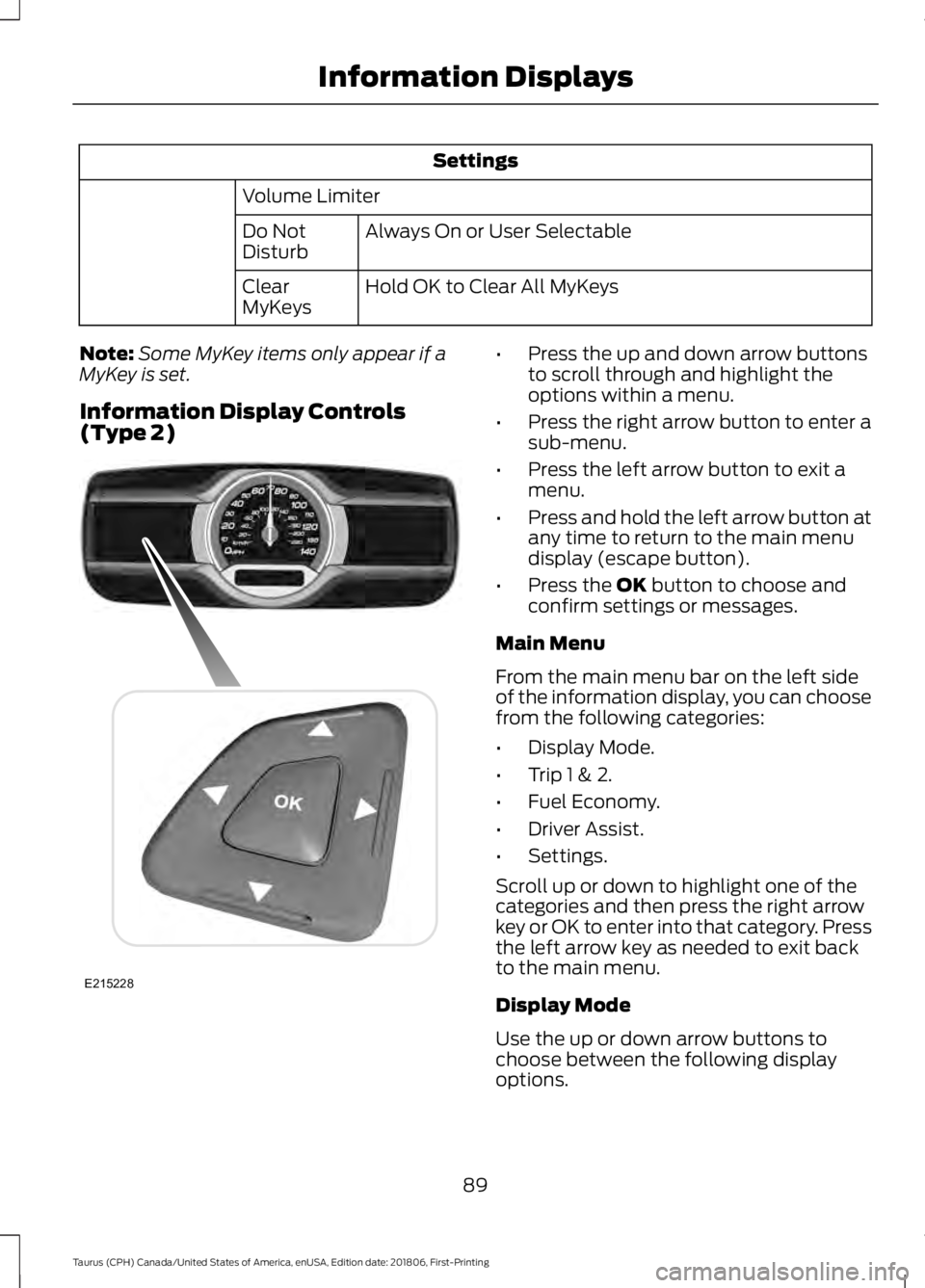
Information Display Controls
(Type 2) •
Press the up and down arrow buttons
to scroll through and highlight the
options within a menu.
• Press the right arrow button to enter a
sub-menu.
• Press the left arrow button to exit a
menu.
• Press and hold the left arrow button at
any time to return to the main menu
display (escape button).
• Press the OK button to choose and
confirm settings or messages.
Main Menu
From the main menu bar on the left side
of the information display, you can choose
from the following categories:
• Display Mode.
• Trip 1 & 2.
• Fuel Economy.
• Driver Assist.
• Settings.
Scroll up or down to highlight one of the
categories and then press the right arrow
key or OK to enter into that category. Press
the left arrow key as needed to exit back
to the main menu.
Display Mode
Use the up or down arrow buttons to
choose between the following display
options.
89
Taurus (CPH) Canada/United States of America, enUSA, Edition date: 201806, First-Printing Information DisplaysE215228
Page 97 of 515
Settings
Fuel Gauge or Fuel + Tach
Gauge
Display
Select your applicable language — Hold OK to Set
Language
Fahrenheit (°F) or Celsius (°C)
Temper-
ature
Note: Some MyKey items only appear if a
MyKey is set.
INFORMATION MESSAGES
Note: Depending on the vehicle options
equipped with your vehicle, not all of the
messages will display or be available.
Certain messages may display abbreviated
or shortened depending upon which cluster
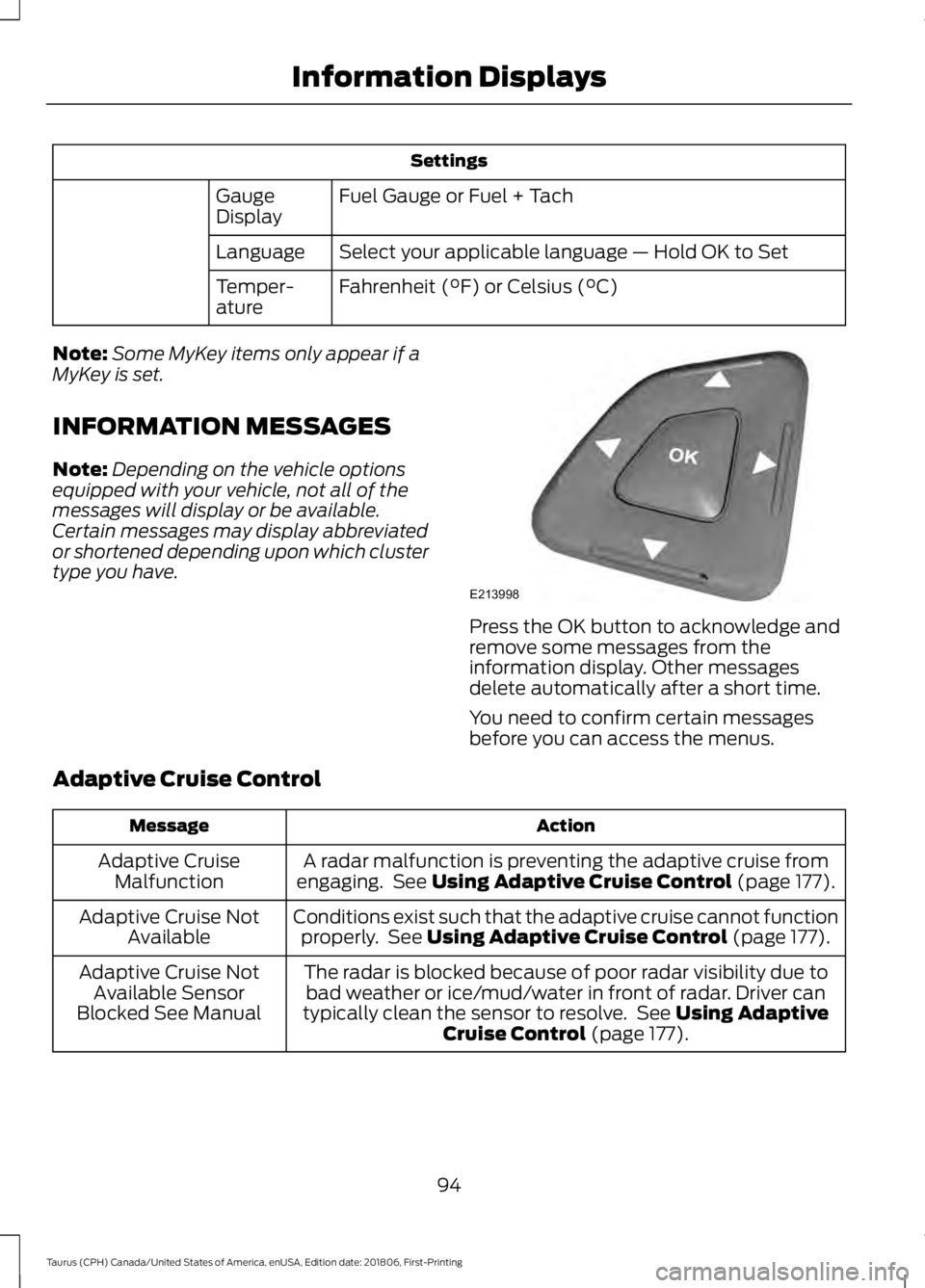
type you have. Press the OK button to acknowledge and
remove some messages from the
information display. Other messages
delete automatically after a short time.
You need to confirm certain messages
before you can access the menus.
Adaptive Cruise Control Action
Message
A radar malfunction is preventing the adaptive cruise from
engaging. See Using Adaptive Cruise Control (page 177).
Adaptive Cruise
Malfunction
Conditions exist such that the adaptive cruise cannot functionproperly. See
Using Adaptive Cruise Control (page 177).
Adaptive Cruise Not
Available
The radar is blocked because of poor radar visibility due tobad weather or ice/mud/water in front of radar. Driver can
typically clean the sensor to resolve. See
Using Adaptive
Cruise Control (page 177).
Adaptive Cruise Not
Available Sensor
Blocked See Manual
94
Taurus (CPH) Canada/United States of America, enUSA, Edition date: 201806, First-Printing Information DisplaysE213998
Page 147 of 515
Keep a record for at least one month and
record the type of driving, for example city
or highway. This provides an accurate
estimate of your vehicle
’s fuel economy
under current driving conditions. Keeping
records during summer and winter shows
how temperature impacts fuel economy.
Conditions
• Heavily loading your vehicle reduces
fuel economy.
• Carrying unnecessary weight in your
vehicle may reduce fuel economy.
• Avoid adding accessories that increase
aerodynamic drag to your vehicle such
as bug deflectors, car top carriers and
ski or bike racks.
• Using fuel blended with alcohol may
lower fuel economy.
• Fuel economy may decrease with lower
temperatures.
• Fuel economy may decrease when
driving short distances.
• You will get better fuel economy when
driving on flat terrain than when driving
on hilly terrain.
144
Taurus (CPH) Canada/United States of America, enUSA, Edition date: 201806, First-Printing Fuel and Refueling
Page 266 of 515
GENERAL INFORMATION
The recommended tire inflation pressures
are on the tire information label on the
driver side B-pillar.
Check and set the tire pressure at the
ambient temperature in which you are
intending to drive your vehicle and when
the tires are cold. See Technical
Specifications (page 291).
Note: Check your tire pressures regularly to
optimize fuel economy.
Only use approved wheel and tire sizes.
Using other sizes could damage your
vehicle and could make the National Type
Approval invalid.
Installation of any tires that are not the
original equipment tire size can cause the
speedometer to display incorrect vehicle
speed.
TIRE SEALANT AND INFLATOR
KIT
(If Equipped)
Note: The temporary mobility kit canister
contains enough sealant compound for one
tire repair only. See your authorized Ford
dealer for additional replacement sealant
canisters.
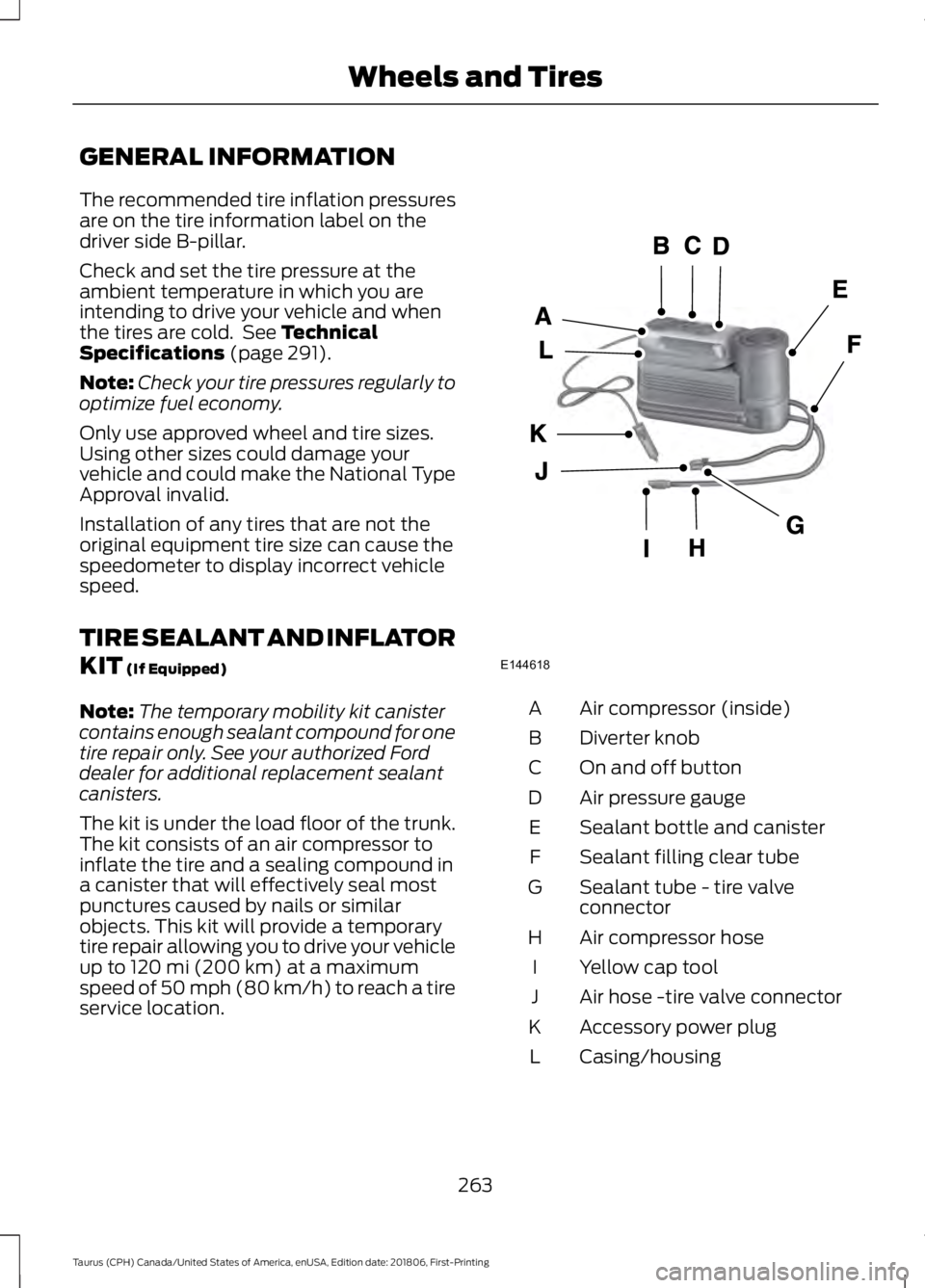
The kit is under the load floor of the trunk.
The kit consists of an air compressor to
inflate the tire and a sealing compound in
a canister that will effectively seal most
punctures caused by nails or similar
objects. This kit will provide a temporary
tire repair allowing you to drive your vehicle
up to
120 mi (200 km) at a maximum
speed of 50 mph (80 km/h) to reach a tire
service location. Air compressor (inside)
A
Diverter knob
B
On and off button
C
Air pressure gauge
D
Sealant bottle and canister
E
Sealant filling clear tube
F
Sealant tube - tire valve
connector
G
Air compressor hose
H
Yellow cap tool
I
Air hose -tire valve connector
J
Accessory power plug
K
Casing/housing
L
263
Taurus (CPH) Canada/United States of America, enUSA, Edition date: 201806, First-Printing Wheels and TiresE144618
Page 344 of 515
If you do not cancel the call, and SYNC
makes a successful call, a pre-recorded
message plays for the 911 operator, and
then the occupant(s) in your vehicle is able
to talk with the operator. Be prepared to
provide your name, phone number and
location immediately, because not all 911
systems are capable of receiving this
information electronically.
911 Assist May Not Work If
•
Your cellular phone or 911 Assist
hardware sustains damage in a crash.
• The vehicle's battery or the SYNC
system has no power.
• The phone(s) thrown from your vehicle
are the ones paired and connected to
the system.
911 Assist Privacy Notice
When you turn on 911 Assist, it may
disclose to emergency services that your
vehicle has been in a crash involving the
deployment of an airbag or activation of
the fuel pump shut-off. Certain versions or
updates to 911 Assist may also be capable
of electronically or verbally disclosing to
911 operators your vehicle location or other
details about your vehicle or crash to assist
911 operators to provide the most
appropriate emergency services. If you do
not want to disclose this information, do
not turn the feature on.
SYNC™ APPLINK ™
SYNC Mobile Apps
Note: You must pair and connect your
smartphone to SYNC to access AppLink.
Note: iPhone users need to connect the
phone to the USB port in order to start the
application. Note:
The AppLink feature is not available
if your vehicle is equipped with the MyFord
Touch system.
Note: Depending on your display type, you
can access AppLink from the media menu,
the phone menu, or by using voice
commands. Once an app is running through
AppLink, you can control main features of
the app through voice commands and
steering wheel controls.
To Access Using the Phone Menu
Press the phone button to access the
SYNC phone menu on-screen. You can
then scroll to: Menu item
Press OK to access a list
of available applications.
Mobile Apps
Scroll through the list of
available applications and
press OK to select a
particular app. Once an
app is running through
SYNC, you can access an
app’s menu by pressing the
MENU
button to first
access the SYNC menu.
Scroll until the app name followed by
"Menu", is displayed (such as, sticher
Menu), then press
OK. From here, you can
access an application's features, such as
Thumbs up and Thumbs down.
For more information, please visit: Website
www.SYNCMyRide.com
To Access Using the Media Menu
Press the
AUX button on the center
console.
341
Taurus (CPH) Canada/United States of America, enUSA, Edition date: 201806, First-Printing SYNC™
Page 403 of 515

3D city models are complete 3D models
of entire city areas including navigable
roads, parks, rivers and rendered buildings.
3D landmarks and city models appear in
3D map mode only. Coverage of these
varies and improves with updated map
releases.
Select the zoom in icon to see a
closer view of the map.
Select the zoom out icon to see
a farther away view of the map.
You can adjust the view in preset
increments. You can also pinch to zoom in
or out of the map.
The information bar tells you the names
of streets, cities or landmarks as you hover
over them with the crosshair curser.
You can change your view of the map by
tapping on the location indicator icon on
the right hand side of the screen. You can
choose from the following options: Heading up (2D map) This
always shows the direction of
forward travel to be upward on
the screen. This view is available
for map scales up to
3 mi (5 km). North up (2D map)
always
shows the northern direction to
be upward on the screen. 3D map mode
provides an
elevated perspective of the map.
Adjust this viewing angle and
rotate the map 180 degrees by
touching the map twice, and
then dragging your finger along the shaded
bar with arrows at the bottom of the map. Re-center the map by pressing
this icon whenever you scroll the
map away from your vehicle
’s
current location. Mute:
Press to mute the audio
navigation guidance. Press the
button again to un-mute the
guidance. Points of Interest (POI)
grouping icon: You can choose
up to three POI icons to display
on the map. If the chosen POIs
are located close together or are
at the same location a box is used to
display a single category icon instead of
repeating the same icon, in order to reduce
clutter. When you select the box on the
map, a pop-up appears indicating how
many POIs are in this location. Select the
pop up to see a list of the available POIs.
You can scroll through and select POIs
from this list.
If your vehicle is low on charge or fuel,
station icons automatically display on the
map.
If you have subscribed to SiriusXM Traffic
and Travel Link (where available), traffic
flow will be indicated on the map by green
(clear), yellow (slowing), and red
(stopped) road highlights. Traffic flow is
indicated where the information is
available and varies across the US.
You can choose to display traffic icons on
the map representing twelve different
types of incidents. See
Settings (page
410).
You can set a destination by hovering
above a location and selecting:
400
Taurus (CPH) Canada/United States of America, enUSA, Edition date: 201806, First-Printing SYNC™ 3E207752 E207753 E207750 E207749 E207748 E207751 E251780 E251779 E207754
Page 508 of 515
Engine Specifications - 3.5L
Duratec.........................................................293
Drivebelt Routing............................................... 293
Engine Specifications - 3.5L Ecoboost™.................................................293
Drivebelt Routing............................................... 294
Entertainment...............................................381 AM/FM Radio...................................................... 382
Apps....................................................................... 390
Bluetooth Stereo or USB................................ 389
CD (If equipped)................................................ 388
HD Radio ™ Information (If
Available)........................................................ 385
SiriusXM® Satellite Radio (If Activated)........................................................ 383
Sources.................................................................. 382
Supported Media Players, Formats and Metadata Information................................ 390
USB Ports............................................................. 390
Environment......................................................14
Essential Towing Checks..........................204 Before Towing a Trailer.................................... 205
Hitches.................................................................. 204
Launching or Retrieving a Boat or Personal Watercraft (PWC)........................................ 205
Safety Chains...................................................... 204
Trailer Brakes...................................................... 204
Trailer Lamps...................................................... 204
When Towing a Trailer..................................... 205
Event Data Recording See: Data Recording.............................................. 9
Export Unique Options..................................13
Exterior Mirrors.................................................75
Auto-Dimming Feature...................................... 76
Blind Spot Monitor............................................... 76
Fold-Away Exterior Mirrors................................ 75
Heated Exterior Mirrors....................................... 75
Integrated Blind Spot Mirrors........................... 76
Memory Mirrors..................................................... 76
Power Exterior Mirrors......................................... 75
Puddle Lamps........................................................ 76
F
Fastening the Seatbelts..............................30 Seatbelt Locking Modes..................................... 31
Using Seatbelts During Pregnancy...............30 Flat Tire
See: Changing a Road Wheel........................ 287
Flat Tire Inflation See: Tire Sealant and Inflator Kit.................263
Floor Mats
......................................................208
Foot Pedals See: Adjusting the Pedals................................. 66
Ford Credit
..........................................................11
US Only...................................................................... 11
Ford Protect..................................................440 Ford Protect Extended Service Plan
(CANADA ONLY)........................................... 441
Ford Protect Extended Service Plans (U.S. Only)................................................................. 440
Front Passenger Sensing System............39
Fuel and Refueling.......................................136
Fuel Consumption
........................................143
Advertised Capacity.......................................... 143
Calculating Fuel Economy.............................. 143
Filling the Fuel Tank........................................... 143
Fuel Filler Funnel Location........................138
Fuel Filter........................................................248
Fuel Quality - E85........................................136 Choosing the Right Fuel - Flex Fuel
Vehicles............................................................. 136
Switching Between E85 and Gasoline............................................................. 137
Fuel Quality - Gasoline...............................138 Choosing the Right Fuel................................... 138
Fuel Shutoff.....................................................211
Fuses.................................................................223
Fuse Specification Chart...........................223 Passenger Compartment Fuse
Panel
.................................................................. 228
Power Distribution Box.................................... 223
G
Garage Door Opener See: Universal Garage Door Opener............124
Gauges................................................................79 Fuel Gauge............................................................. 80
Information Display............................................ 80
Type 1........................................................................\
. 79
Type 2....................................................................... 80
Gearbox See: Transmission.............................................. 149
505
Taurus (CPH) Canada/United States of America, enUSA, Edition date: 201806, First-Printing Index
Page 513 of 515
Stability Control............................................164
Principle of Operation....................................... 164
Starter Switch See: Ignition Switch............................................ 131
Starting a Gasoline Engine
........................132
Cold Weather Starting - Flex Fuel
Vehicles.............................................................. 133
Failure to Start..................................................... 133
Guarding Against Exhaust Fumes................134
Important Ventilating Information...............134
Stopping the Engine When Your Vehicle is Moving................................................................134
Stopping the Engine When Your Vehicle is Stationary......................................................... 133
Starting and Stopping the Engine...........131 General Information........................................... 131
Steering
............................................................194
Electric Power Steering.................................... 194
Steering Wheel
...............................................64
Storage Compartments.............................130
Sunroof See: Moonroof........................................................ 77
Sun Visors..........................................................77 Illuminated Vanity Mirror.................................... 77
Supplementary Restraints System..........37 Principle of Operation......................................... 37
Symbols Glossary
.............................................7
SYNC™ 3.........................................................361 General Information.......................................... 361
SYNC™ 3 Troubleshooting......................424
SYNC™ Applications and Services........................................................339
911 Assist............................................................... 339
SYNC™ AppLink ™
......................................341
SYNC Mobile Apps............................................. 341
SYNC™.............................................................321 General Information........................................... 321
SYNC™ Troubleshooting
..........................352
T
Technical Specifications See: Capacities and Specifications............293
The Better Business Bureau (BBB) Auto Line Program (U.S. Only)........................218
Tire Care..........................................................269 Glossary of Tire Terminology......................... 270Information About Uniform Tire Quality
Grading............................................................. 269
Information Contained on the Tire Sidewall............................................................. 271
Temperature A B C............................................ 270
Traction AA A B C.............................................. 269
Treadwear............................................................ 269
Tire Inflation When Punctured See: Tire Sealant and Inflator Kit.................263
Tire Pressure Monitoring System...........283 Changing Tires With a Tire Pressure
Monitoring System....................................... 284
Understanding Your Tire Pressure Monitoring System ...................................... 285
Tire Repair Kit See: Tire Sealant and Inflator Kit.................263
Tire Sealant and Inflator Kit
....................263
First Stage: Reinflating the Tire with Sealing
Compound and Air....................................... 265
General Information......................................... 264
Second Stage: Checking Tire Pressure........................................................... 266
Tips for Use of the Kit...................................... 264
What to do after the Tire has been Sealed................................................................ 267
What to do when a Tire Is Punctured........265
Tires See: Wheels and Tires..................................... 263
Towing a Trailer
............................................202
Load Placement................................................. 202
Towing the Vehicle on Four Wheels.........................................................206
Emergency Towing........................................... 206
Recreational Towing........................................ 206
Towing.............................................................202
Traction Control
............................................163
Principle of Operation....................................... 163
Transmission Code Designation............297
Transmission..................................................149
Transporting the Vehicle
............................214
Type Approvals............................................488
Radio Frequency Certification for Keys and
Remote Controls.......................................... 499
Radio Frequency Certifications for Blind Spot Information System.......................... 497
Radio Frequency Certifications for Body Control Module............................................. 499
510
Taurus (CPH) Canada/United States of America, enUSA, Edition date: 201806, First-Printing Index