power steering FORD TAURUS 2019 Owners Manual
[x] Cancel search | Manufacturer: FORD, Model Year: 2019, Model line: TAURUS, Model: FORD TAURUS 2019Pages: 515, PDF Size: 17.29 MB
Page 5 of 515
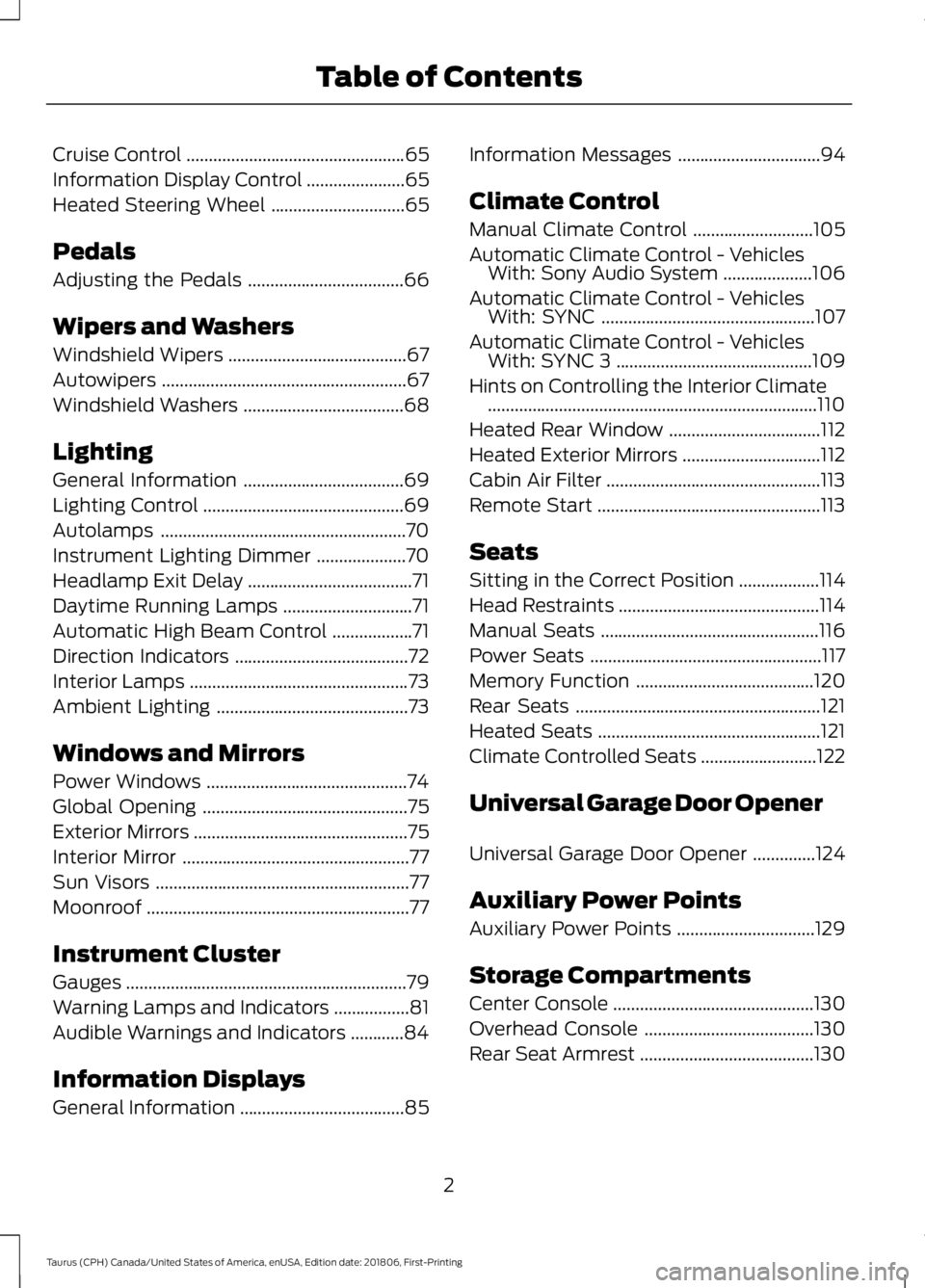
Cruise Control
.................................................65
Information Display Control ......................
65
Heated Steering Wheel ..............................
65
Pedals
Adjusting the Pedals ...................................
66
Wipers and Washers
Windshield Wipers ........................................
67
Autowipers .......................................................
67
Windshield Washers ....................................
68
Lighting
General Information ....................................
69
Lighting Control .............................................
69
Autolamps .......................................................
70
Instrument Lighting Dimmer ....................
70
Headlamp Exit Delay .....................................
71
Daytime Running Lamps .............................
71
Automatic High Beam Control ..................
71
Direction Indicators .......................................
72
Interior Lamps .................................................
73
Ambient Lighting ...........................................
73
Windows and Mirrors
Power Windows .............................................
74
Global Opening ..............................................
75
Exterior Mirrors ................................................
75
Interior Mirror ...................................................
77
Sun Visors .........................................................
77
Moonroof ...........................................................
77
Instrument Cluster
Gauges ...............................................................
79
Warning Lamps and Indicators .................
81
Audible Warnings and Indicators ............
84
Information Displays
General Information .....................................
85Information Messages
................................
94
Climate Control
Manual Climate Control ...........................
105
Automatic Climate Control - Vehicles With: Sony Audio System ....................
106
Automatic Climate Control - Vehicles With: SYNC ................................................
107
Automatic Climate Control - Vehicles With: SYNC 3 ............................................
109
Hints on Controlling the Interior Climate ........................................................................\
..
110
Heated Rear Window ..................................
112
Heated Exterior Mirrors ...............................
112
Cabin Air Filter ................................................
113
Remote Start ..................................................
113
Seats
Sitting in the Correct Position ..................
114
Head Restraints .............................................
114
Manual Seats .................................................
116
Power Seats ....................................................
117
Memory Function ........................................
120
Rear Seats .......................................................
121
Heated Seats ..................................................
121
Climate Controlled Seats ..........................
122
Universal Garage Door Opener
Universal Garage Door Opener ..............
124
Auxiliary Power Points
Auxiliary Power Points ...............................
129
Storage Compartments
Center Console .............................................
130
Overhead Console ......................................
130
Rear Seat Armrest .......................................
130
2
Taurus (CPH) Canada/United States of America, enUSA, Edition date: 201806, First-Printing Table of Contents
Page 7 of 515
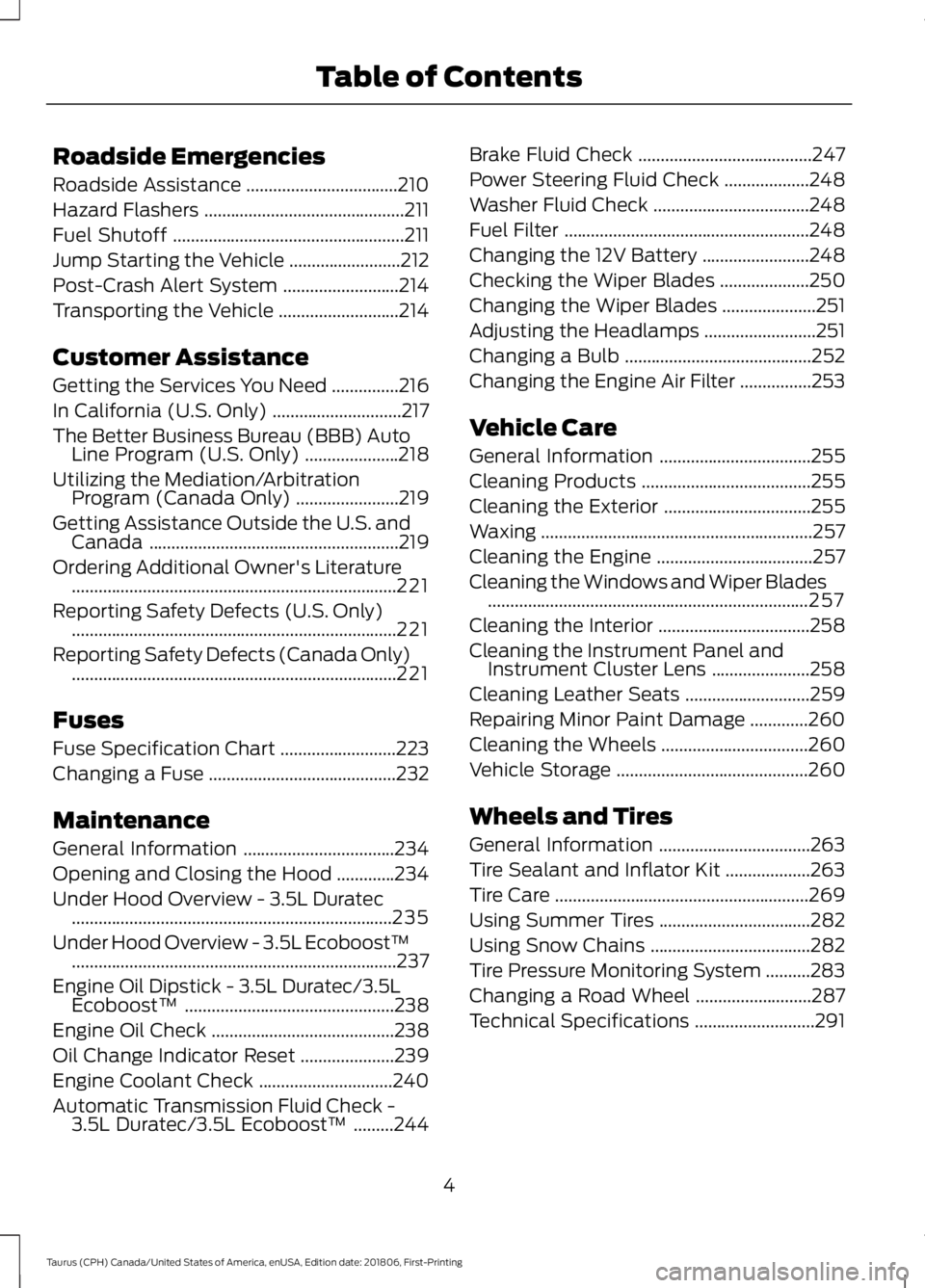
Roadside Emergencies
Roadside Assistance
..................................210
Hazard Flashers .............................................
211
Fuel Shutoff ....................................................
211
Jump Starting the Vehicle .........................
212
Post-Crash Alert System ..........................
214
Transporting the Vehicle ...........................
214
Customer Assistance
Getting the Services You Need ...............
216
In California (U.S. Only) .............................
217
The Better Business Bureau (BBB) Auto Line Program (U.S. Only) .....................
218
Utilizing the Mediation/Arbitration Program (Canada Only) .......................
219
Getting Assistance Outside the U.S. and Canada ........................................................
219
Ordering Additional Owner's Literature ........................................................................\
.
221
Reporting Safety Defects (U.S. Only) ........................................................................\
.
221
Reporting Safety Defects (Canada Only) ........................................................................\
.
221
Fuses
Fuse Specification Chart ..........................
223
Changing a Fuse ..........................................
232
Maintenance
General Information ..................................
234
Opening and Closing the Hood .............
234
Under Hood Overview - 3.5L Duratec ........................................................................\
235
Under Hood Overview - 3.5L Ecoboost™ ........................................................................\
.
237
Engine Oil Dipstick - 3.5L Duratec/3.5L Ecoboost™ ...............................................
238
Engine Oil Check .........................................
238
Oil Change Indicator Reset .....................
239
Engine Coolant Check ..............................
240
Automatic Transmission Fluid Check - 3.5L Duratec/3.5L Ecoboost™ .........
244Brake Fluid Check
.......................................
247
Power Steering Fluid Check ...................
248
Washer Fluid Check ...................................
248
Fuel Filter .......................................................
248
Changing the 12V Battery ........................
248
Checking the Wiper Blades ....................
250
Changing the Wiper Blades .....................
251
Adjusting the Headlamps .........................
251
Changing a Bulb ..........................................
252
Changing the Engine Air Filter ................
253
Vehicle Care
General Information ..................................
255
Cleaning Products ......................................
255
Cleaning the Exterior .................................
255
Waxing .............................................................
257
Cleaning the Engine ...................................
257
Cleaning the Windows and Wiper Blades ........................................................................\
257
Cleaning the Interior ..................................
258
Cleaning the Instrument Panel and Instrument Cluster Lens ......................
258
Cleaning Leather Seats ............................
259
Repairing Minor Paint Damage .............
260
Cleaning the Wheels .................................
260
Vehicle Storage ...........................................
260
Wheels and Tires
General Information ..................................
263
Tire Sealant and Inflator Kit ...................
263
Tire Care .........................................................
269
Using Summer Tires ..................................
282
Using Snow Chains ....................................
282
Tire Pressure Monitoring System ..........
283
Changing a Road Wheel ..........................
287
Technical Specifications ...........................
291
4
Taurus (CPH) Canada/United States of America, enUSA, Edition date: 201806, First-Printing Table of Contents
Page 12 of 515
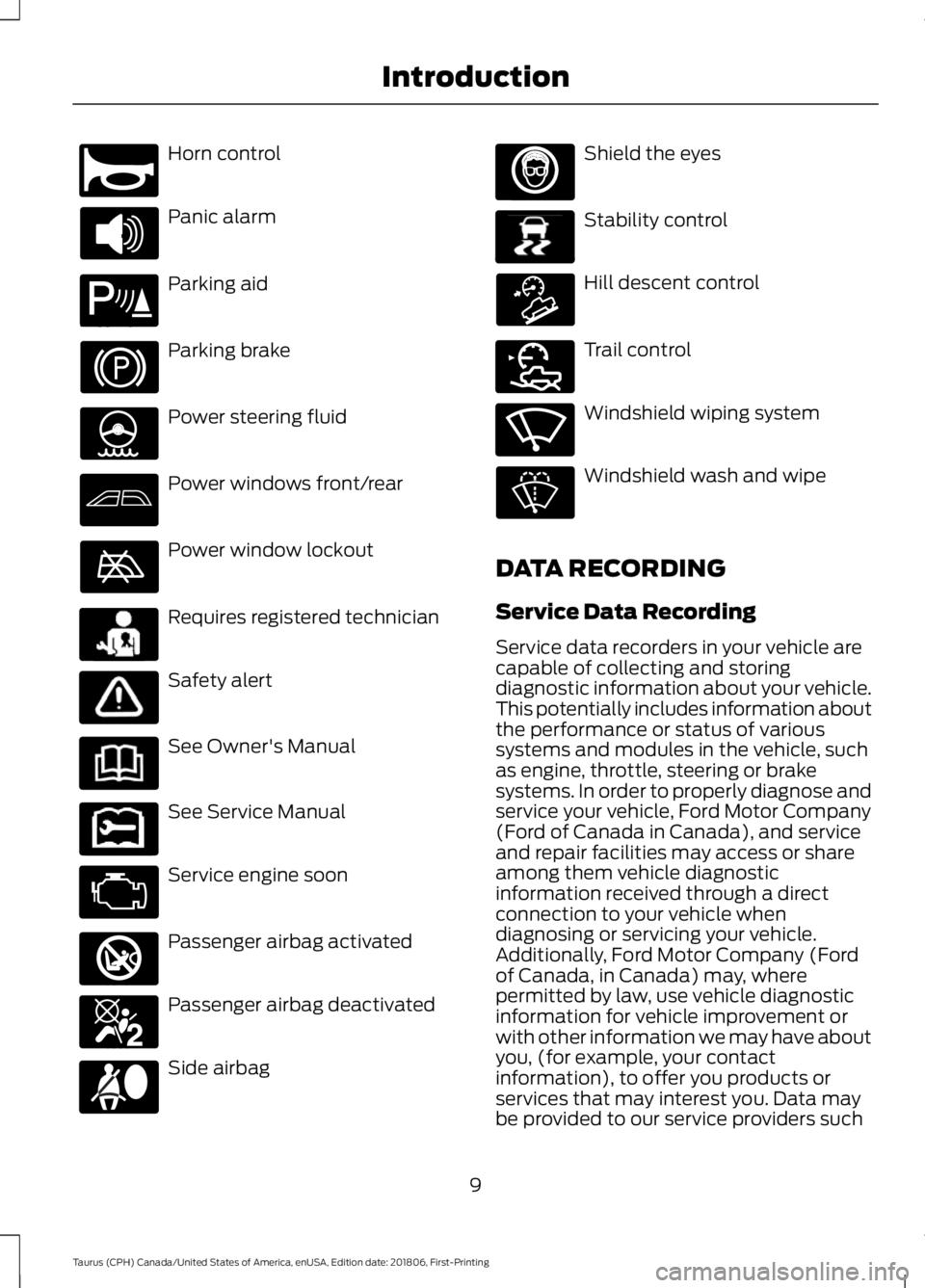
Horn control
Panic alarm
Parking aid
Parking brake
Power steering fluid
Power windows front/rear
Power window lockout
Requires registered technician
Safety alert
See Owner's Manual
See Service Manual
Service engine soon
Passenger airbag activated
Passenger airbag deactivated
Side airbag Shield the eyes
Stability control
Hill descent control
Trail control
Windshield wiping system
Windshield wash and wipe
DATA RECORDING
Service Data Recording
Service data recorders in your vehicle are
capable of collecting and storing
diagnostic information about your vehicle.
This potentially includes information about
the performance or status of various
systems and modules in the vehicle, such
as engine, throttle, steering or brake
systems. In order to properly diagnose and
service your vehicle, Ford Motor Company
(Ford of Canada in Canada), and service
and repair facilities may access or share
among them vehicle diagnostic
information received through a direct
connection to your vehicle when
diagnosing or servicing your vehicle.
Additionally, Ford Motor Company (Ford
of Canada, in Canada) may, where
permitted by law, use vehicle diagnostic
information for vehicle improvement or
with other information we may have about
you, (for example, your contact
information), to offer you products or
services that may interest you. Data may
be provided to our service providers such
9
Taurus (CPH) Canada/United States of America, enUSA, Edition date: 201806, First-Printing IntroductionE270945 E139213 E231159 E231158 E270849 E270850 E167012 E138639 E163957 E272858 E270969
Page 53 of 515
Note:
If you remote start your vehicle with
an integrated keyhead transmitter, you must
switch the ignition on before driving your
vehicle. If you remote start your vehicle with
an intelligent access transmitter, you must
press the push button ignition switch on the
instrument panel once while applying the
brake pedal before driving your vehicle.
The power windows do not work during
remote start and the radio does not turn
on automatically.
The parking lamps remain on and the
vehicle runs for 5, 10 or 15 minutes,
depending on the setting.
Extending the Engine Running Time
To extend the engine running time duration
of your vehicle during remote start, repeat
steps 1 and 2 while the engine is running.
If the duration is set to 10 minutes, the
duration extends by another 10 minutes.
For example, if your vehicle had been
running from the first remote start for 5
minutes, your vehicle continues to run now
for a total of 20 minutes. You can extend
the remote start up to a maximum of 35
minutes.
Wait at least five seconds before remote
starting after the engine stops running.
Turning Your Vehicle Off After Remote
Starting Press the button once. The
parking lamps turn off.
You may have to be closer to your vehicle
to remotely switch off your vehicle after
remote starting. This is due to the added
noise of your running vehicle.
You can switch this feature on or off in the
information display. See General
Information (page 85). Memory Feature
(If Equipped)
You can use the remote control to recall
memory settings for the driver seat, power
mirrors, power steering column and power
adjustable foot pedals. Press the unlock
button on the remote control or unlock
your vehicle with the intelligent access key
to recall the memory positions. You can
program the remote control or intelligent
access key to recall memory positions. See
Memory Function
(page 120).
REPLACING A LOST KEY OR
REMOTE CONTROL
Replacement keys or remote controls can
be purchased from an authorized dealer.
Authorized dealers can program remote
controls for your vehicle. See
Passive
Anti-Theft System (page 62).
50
Taurus (CPH) Canada/United States of America, enUSA, Edition date: 201806, First-Printing Keys and Remote ControlsE138625
Page 102 of 515
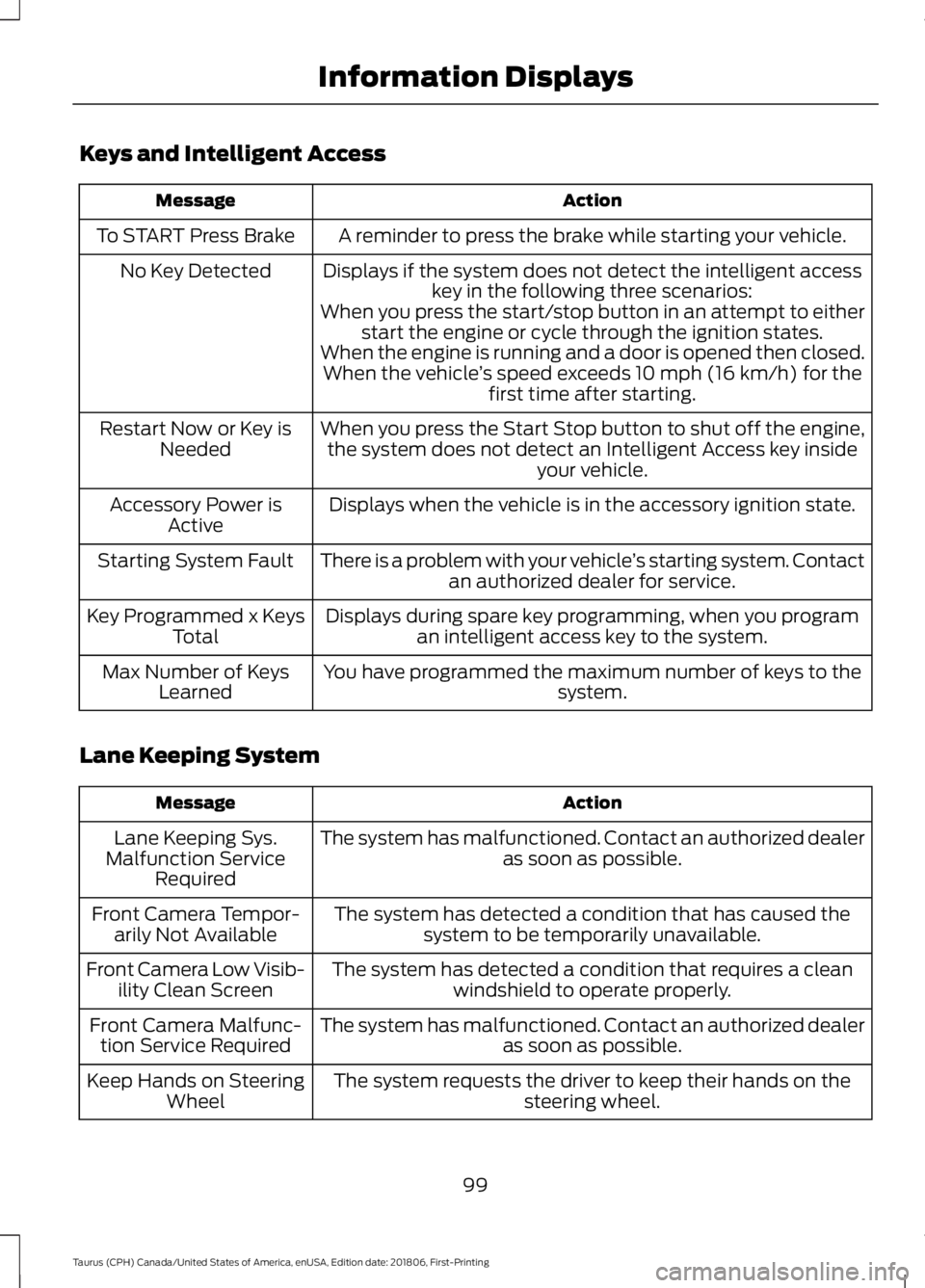
Keys and Intelligent Access
Action
Message
A reminder to press the brake while starting your vehicle.
To START Press Brake
Displays if the system does not detect the intelligent accesskey in the following three scenarios:
No Key Detected
When you press the start/stop button in an attempt to eitherstart the engine or cycle through the ignition states.
When the engine is running and a door is opened then closed. When the vehicle ’s speed exceeds 10 mph (16 km/h) for the
first time after starting.
When you press the Start Stop button to shut off the engine, the system does not detect an Intelligent Access key inside your vehicle.
Restart Now or Key is
Needed
Displays when the vehicle is in the accessory ignition state.
Accessory Power is
Active
There is a problem with your vehicle ’s starting system. Contact
an authorized dealer for service.
Starting System Fault
Displays during spare key programming, when you programan intelligent access key to the system.
Key Programmed x Keys
Total
You have programmed the maximum number of keys to the system.
Max Number of Keys
Learned
Lane Keeping System Action
Message
The system has malfunctioned. Contact an authorized dealer as soon as possible.
Lane Keeping Sys.
Malfunction Service Required
The system has detected a condition that has caused thesystem to be temporarily unavailable.
Front Camera Tempor-
arily Not Available
The system has detected a condition that requires a cleanwindshield to operate properly.
Front Camera Low Visib-
ility Clean Screen
The system has malfunctioned. Contact an authorized dealeras soon as possible.
Front Camera Malfunc-
tion Service Required
The system requests the driver to keep their hands on thesteering wheel.
Keep Hands on Steering
Wheel
99
Taurus (CPH) Canada/United States of America, enUSA, Edition date: 201806, First-Printing Information Displays
Page 105 of 515
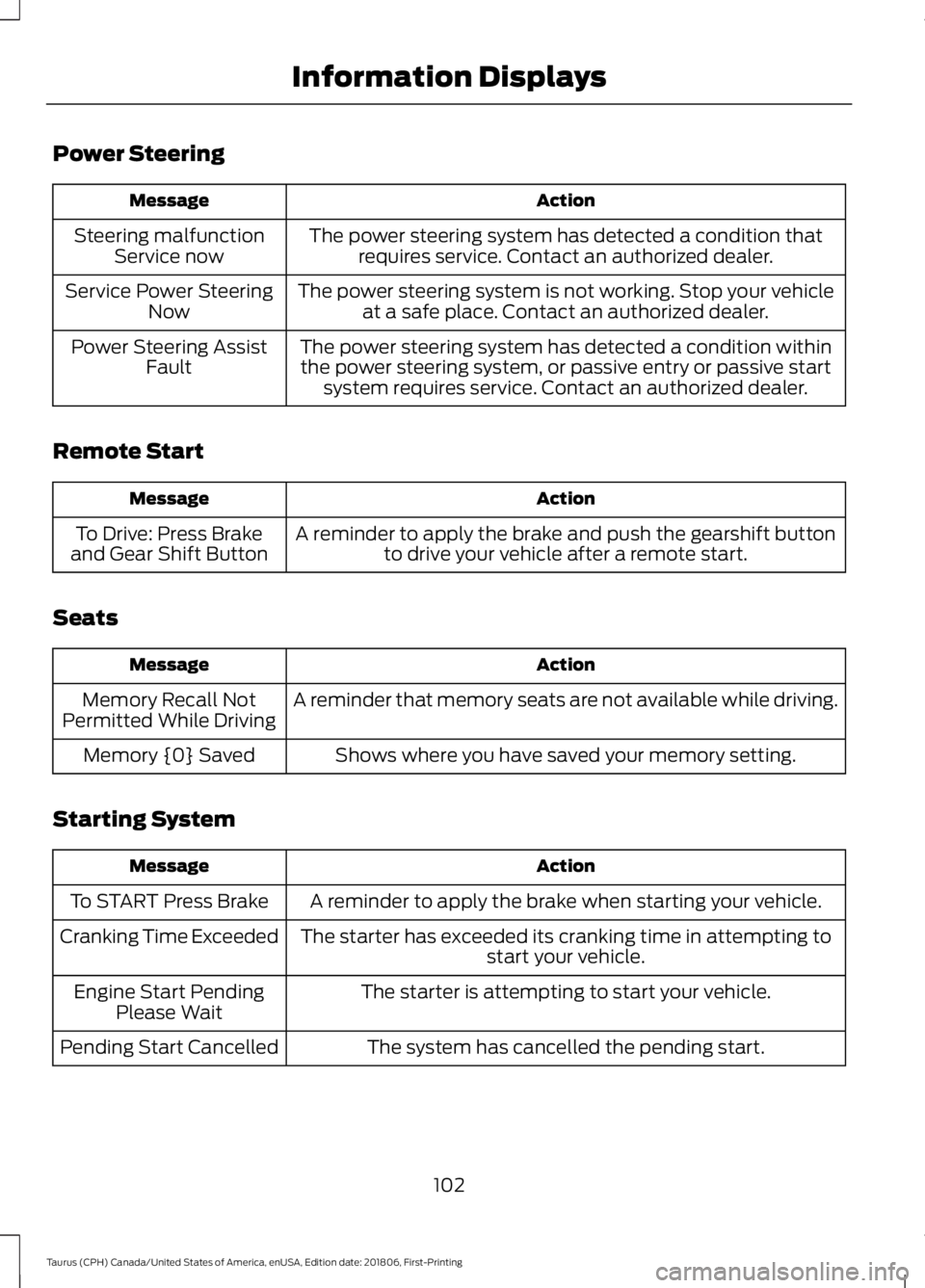
Power Steering
Action
Message
The power steering system has detected a condition thatrequires service. Contact an authorized dealer.
Steering malfunction
Service now
The power steering system is not working. Stop your vehicleat a safe place. Contact an authorized dealer.
Service Power Steering
Now
The power steering system has detected a condition withinthe power steering system, or passive entry or passive start system requires service. Contact an authorized dealer.
Power Steering Assist
Fault
Remote Start Action
Message
A reminder to apply the brake and push the gearshift buttonto drive your vehicle after a remote start.
To Drive: Press Brake
and Gear Shift Button
Seats Action
Message
A reminder that memory seats are not available while driving.
Memory Recall Not
Permitted While Driving
Shows where you have saved your memory setting.
Memory {0} Saved
Starting System Action
Message
A reminder to apply the brake when starting your vehicle.
To START Press Brake
The starter has exceeded its cranking time in attempting tostart your vehicle.
Cranking Time Exceeded
The starter is attempting to start your vehicle.
Engine Start Pending
Please Wait
The system has cancelled the pending start.
Pending Start Cancelled
102
Taurus (CPH) Canada/United States of America, enUSA, Edition date: 201806, First-Printing Information Displays
Page 123 of 515
MEMORY FUNCTION
WARNING: Before activating the
memory seat, make sure that the area
immediately surrounding the seat is clear
of obstructions and that all occupants
are clear of moving parts. WARNING:
Do not use the
memory function when your vehicle is
moving.
This function automatically recalls the
position of the following:
• Driver seat.
• Power mirrors.
• Optional power adjustable pedals.
• Optional power steering column.
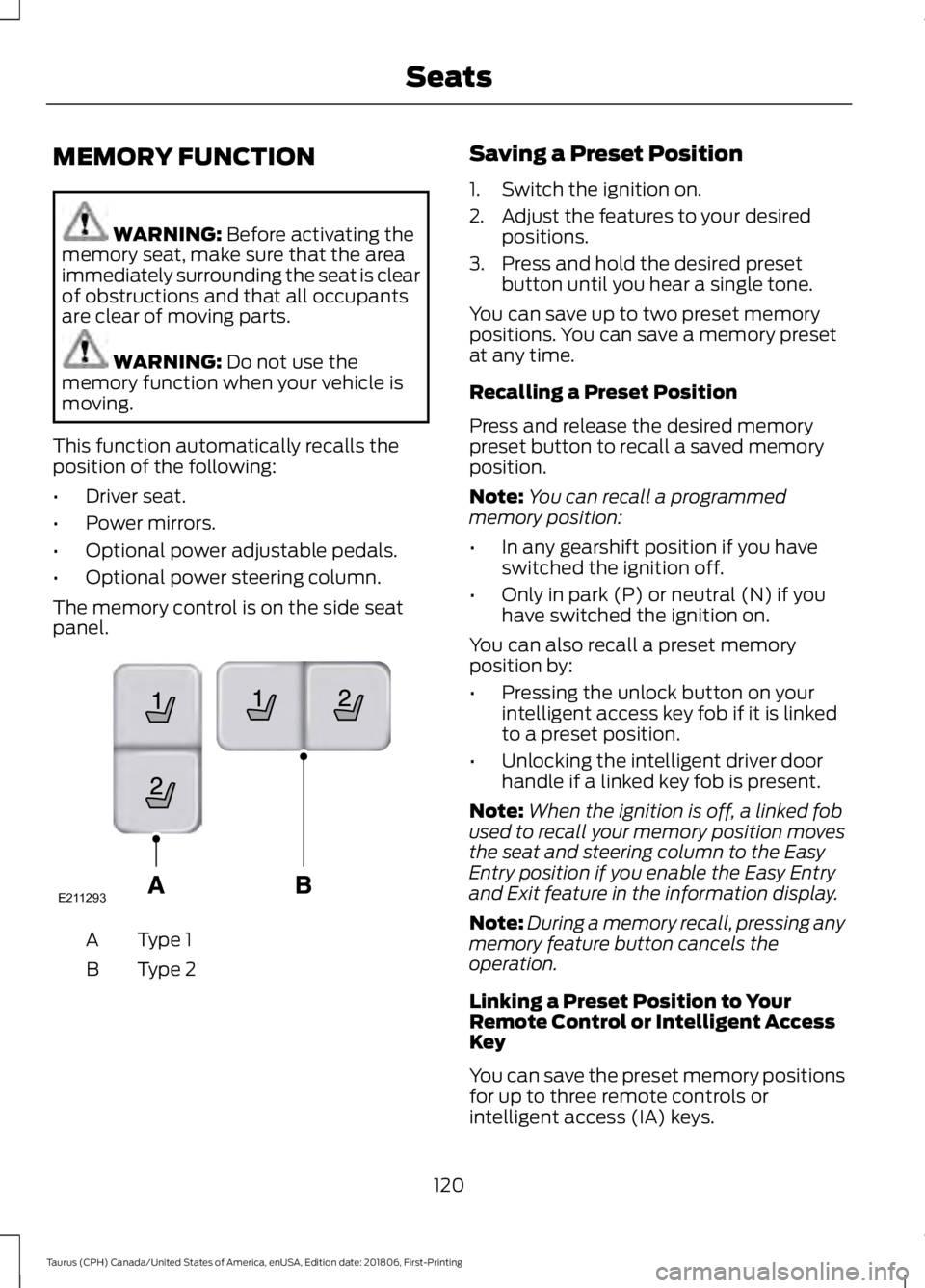
The memory control is on the side seat
panel. Type 1
A
Type 2
B Saving a Preset Position
1. Switch the ignition on.
2. Adjust the features to your desired
positions.
3. Press and hold the desired preset button until you hear a single tone.
You can save up to two preset memory
positions. You can save a memory preset
at any time.
Recalling a Preset Position
Press and release the desired memory
preset button to recall a saved memory
position.
Note: You can recall a programmed
memory position:
• In any gearshift position if you have
switched the ignition off.
• Only in park (P) or neutral (N) if you
have switched the ignition on.
You can also recall a preset memory
position by:
• Pressing the unlock button on your
intelligent access key fob if it is linked
to a preset position.
• Unlocking the intelligent driver door
handle if a linked key fob is present.
Note: When the ignition is off, a linked fob
used to recall your memory position moves
the seat and steering column to the Easy
Entry position if you enable the Easy Entry
and Exit feature in the information display.
Note: During a memory recall, pressing any
memory feature button cancels the
operation.
Linking a Preset Position to Your
Remote Control or Intelligent Access
Key
You can save the preset memory positions
for up to three remote controls or
intelligent access (IA) keys.
120
Taurus (CPH) Canada/United States of America, enUSA, Edition date: 201806, First-Printing SeatsE211293
Page 137 of 515
Stopping the Engine When Your
Vehicle is Moving
WARNING: Switching off the
engine when the vehicle is still moving
will result in a loss of brake and steering
assistance. The steering will not lock, but
higher effort will be required. When the
ignition is switched off, some electrical
circuits, including air bags, warning lamps
and indicators may also be off. If the
ignition was turned off accidentally, you
can shift into neutral (N) and re-start the
engine.
1. Shift into neutral and use the brakes to
bring your vehicle to a safe stop.
2. When your vehicle has stopped, shift into park (P) and switch the ignition
off.
3. Apply the parking brake.
Guarding Against Exhaust Fumes WARNING:
If you smell exhaust
fumes inside your vehicle, have your
vehicle checked by your authorized
dealer immediately. Do not drive your
vehicle if you smell exhaust fumes.
Carbon monoxide is present in exhaust
fumes. Take precautions to avoid its
dangerous effects.
Important Ventilating Information
If you stop your vehicle and then leave the
engine idling for long periods, we
recommend that you do one of the
following:
• Open the windows at least 1 in (3 cm).
• Set your climate control to outside air. ENGINE BLOCK HEATER WARNING:
Failure to follow
engine block heater instructions could
result in property damage or serious
personal injury. WARNING:
Do not use your heater
with ungrounded electrical systems or
two-pronged adapters. There is a risk of
electrical shock. WARNING:
Do not fully close the
hood, or allow it to drop under its own
weight when using the engine block
heater. This could damage the power
cable and may cause an electrical short
resulting in fire, injury and property
damage.
Note: The heater is most effective when
outdoor temperatures are below
0°F
(-18°C).
The heater acts as a starting aid by
warming the engine coolant. This allows
the climate control system to respond
quickly. The equipment includes a heater
element (installed in the engine block) and
a wire harness. You can connect the
system to a grounded 120-volt AC
electrical source.
We recommend that you do the following
for a safe and correct operation:
• Use a 16-gauge outdoor extension cord
that is product certified by
Underwriter ’s Laboratory (UL) or
Canadian Standards Association
(CSA). This extension cord must be
suitable for use outdoors, in cold
134
Taurus (CPH) Canada/United States of America, enUSA, Edition date: 201806, First-Printing Starting and Stopping the Engine
Page 158 of 515
Operating AWD Vehicles With
Mismatched Tires
WARNING: Only use replacement
tires and wheels that are the same size,
load index, speed rating and type (such
as P-metric versus LT-metric or
all-season versus all-terrain) as those
originally provided by Ford. The
recommended tire and wheel size may
be found on either the Safety
Compliance Certification Label (affixed
to either the door hinge pillar, door-latch
post, or the door edge that meets the
door-latch post, next to the driver's
seating position), or the Tire Label which
is located on the B-Pillar or edge of the
driver's door. If this information is not
found on these labels, then you should
contact your authorized dealer as soon
as possible. Use of any tire or wheel not
recommended by Ford can affect the
safety and performance of your vehicle,
which could result in an increased risk of
loss of vehicle control, vehicle rollover,
personal injury and death. WARNING:
The use of
non-recommended tires and wheels
could cause steering, suspension, axle,
transfer case or power transfer unit
failure. If you have questions regarding
tire replacement, contact your
authorized dealer as soon as possible.
Major dissimilar tire sizes between the front
and rear axles (for example, 17 inch low
profile tires on the front axle and 22 inch
high profile tires on the rear axle) could
cause the AWD system to stop functioning
and default to front-wheel drive or damage
the AWD system. However, the AWD system is capable of tolerating any
combination of new and worn tires of the
same original tire size. For example, using
3 worn tread tires and 1 new tread tire all
of the same original tire size, can be
tolerated by the AWD system.
Driving In Special Conditions With
All-Wheel Drive (AWD)
AWD vehicles are equipped for driving on
sand, snow, mud and rough roads and have
operating characteristics that are
somewhat different from conventional
vehicles, both on and off the highway.
When driving at slow speeds in deep sand
under high outside temperatures, use a low
gear when possible. Lower gear operation
will maximize the engine and transmission
cooling capability.
Under severe operating conditions, the A/C
may cycle on and off to protect
overheating of the engine.
Basic operating principles in special
conditions
•
Drive slower in strong crosswinds which
can affect the normal steering
characteristics of your vehicle.
• Be extremely careful when driving on
pavement made slippery by loose sand,
water, gravel, snow or ice.
155
Taurus (CPH) Canada/United States of America, enUSA, Edition date: 201806, First-Printing All-Wheel Drive
(If Equipped)
Page 162 of 515
Driving on Snow and Ice
WARNING: If you are driving in
slippery conditions that require tire
chains or cables, then it is critical that
you drive cautiously. Keep speeds down,
allow for longer stopping distances and
avoid aggressive steering to reduce the
chances of a loss of vehicle control
which can lead to serious injury or death.
If the rear end of your vehicle slides while
cornering, steer in the direction of the
slide until you regain control of your
vehicle.
Note: Excessive tire slippage can cause
driveline damage.
AWD vehicles have advantages over 2WD
vehicles in snow and ice but can skid like
any other vehicle.
Should you start to slide while driving on
snowy or icy roads, turn the steering wheel
in the direction of the slide until you regain
control.
Avoid sudden applications of power and
quick changes of direction on snow and
ice. Apply the accelerator slowly and
steadily when starting from a full stop.
Avoid sudden braking as well. Although an
AWD vehicle may accelerate better than
a two-wheel drive vehicle in snow and ice,
it won ’t stop any faster, because as in other
vehicles, braking occurs at all four wheels.
Do not become overconfident as to road
conditions.
Make sure you allow sufficient distance
between you and other vehicles for
stopping. Drive slower than usual and
consider using one of the lower gears. In
emergency stopping situations, apply the
brake steadily. Since your vehicle is
equipped with a four wheel (ABS), do not
“pump ” the brakes. See Hints on Driving
With Anti-Lock Brakes
(page 161). Maintenance and Modifications
The suspension and steering systems on
your vehicle have been designed and
tested to provide predictable performance
whether loaded or empty and durable load
carrying capability. For this reason, Ford
Motor Company strongly recommends that
you do not make modifications such as
adding or removing parts (such as lowering
kits or stabilizer bars) or by using
replacement parts not equivalent to the
original factory equipment.
Any modifications to a vehicle that raise
the center of gravity can make it more likely
the vehicle will rollover as a result of a loss
of control. Ford Motor Company
recommends that caution be used with
any vehicle equipped with a high load or
device (such as ladder or luggage racks).
Failure to maintain your vehicle properly
may void the warranty, increase your repair
cost, reduce vehicle performance and
operational capabilities and adversely
affect driver and passenger safety.
Frequent inspection of vehicle chassis
components is recommended if the vehicle
is subjected to off-highway usage.
159
Taurus (CPH) Canada/United States of America, enUSA, Edition date: 201806, First-Printing All-Wheel Drive
(If Equipped)