instrument panel FORD THUNDERBIRD 2004 11.G User Guide
[x] Cancel search | Manufacturer: FORD, Model Year: 2004, Model line: THUNDERBIRD, Model: FORD THUNDERBIRD 2004 11.GPages: 216, PDF Size: 5.69 MB
Page 160 of 216
•Do not use fuel, kerosene, or paint thinner to clean any parts.
• Wiper blades can be cleaned with isopropyl (rubbing) alcohol or
windshield washer solution. Be sure to replace wiper blades when they
appear worn or do not function properly.
INSTRUMENT PANEL AND CLUSTER LENS
Clean the instrument panel with a damp cloth, then dry with a dry cloth.
• Avoid cleaners or polish that increase the gloss of the upper portion of
the instrument panel. The dull finish in this area helps protect the
driver from undesirable windshield reflection.
Do not use chemical solvents or strong detergents when cleaning
the steering wheel or instrument panel to avoid contamination of
the air bag system.
• Be certain to wash or wipe your hands clean if you have been in
contact with certain products such as insect repellent and suntan
lotion in order to avoid possible damage to the interior painted
surfaces.
INTERIOR TRIM
• Clean the interior trim areas with a damp cloth, then dry by wiping
with a dry, soft, clean cloth.
• Do not use household or glass cleaners as these may damage the
finish.
CONVERTIBLE TOP AND PADDED MOLDING
Wash with Detail Wash (ZC-3-A), which is available from your dealer.
• Do not use stiff bristle brushes or abrasive materials or cleaners.
• Hot waxes applied by commercial car washes can affect the
cleanability of the convertible top material.
• Using high water pressure or wand-type car washes against the
convertible top and windows may cause water leaks and possible seal
damage.
2004 Thunderbird (tbr)
Owners Guide (post-2002-fmt)
USA English (fus)
Cleaning
160
Page 164 of 216
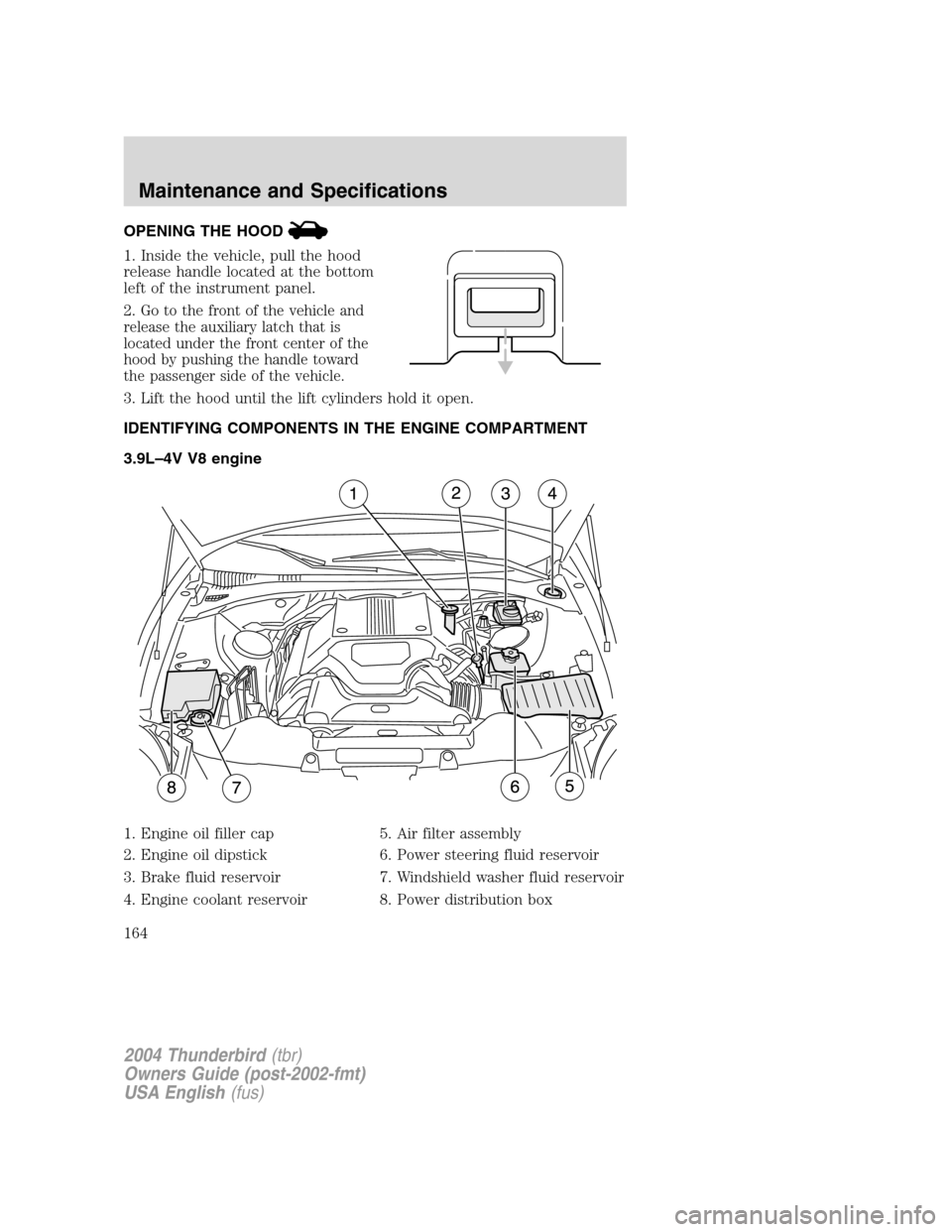
OPENING THE HOOD
1. Inside the vehicle, pull the hood
release handle located at the bottom
left of the instrument panel.
2.
Go to the front of the vehicle and
release the auxiliary latch that is
located under the front center of the
hood by pushing the handle toward
the passenger side of the vehicle.
3. Lift the hood until the lift cylinders hold it open.
IDENTIFYING COMPONENTS IN THE ENGINE COMPARTMENT
3.9L –4V V8 engine
1. Engine oil filler cap
2. Engine oil dipstick
3. Brake fluid reservoir
4. Engine coolant reservoir 5. Air filter assembly
6. Power steering fluid reservoir
7. Windshield washer fluid reservoir
8. Power distribution box
2004 Thunderbird
(tbr)
Owners Guide (post-2002-fmt)
USA English (fus)
Maintenance and Specifications
164
Page 207 of 216
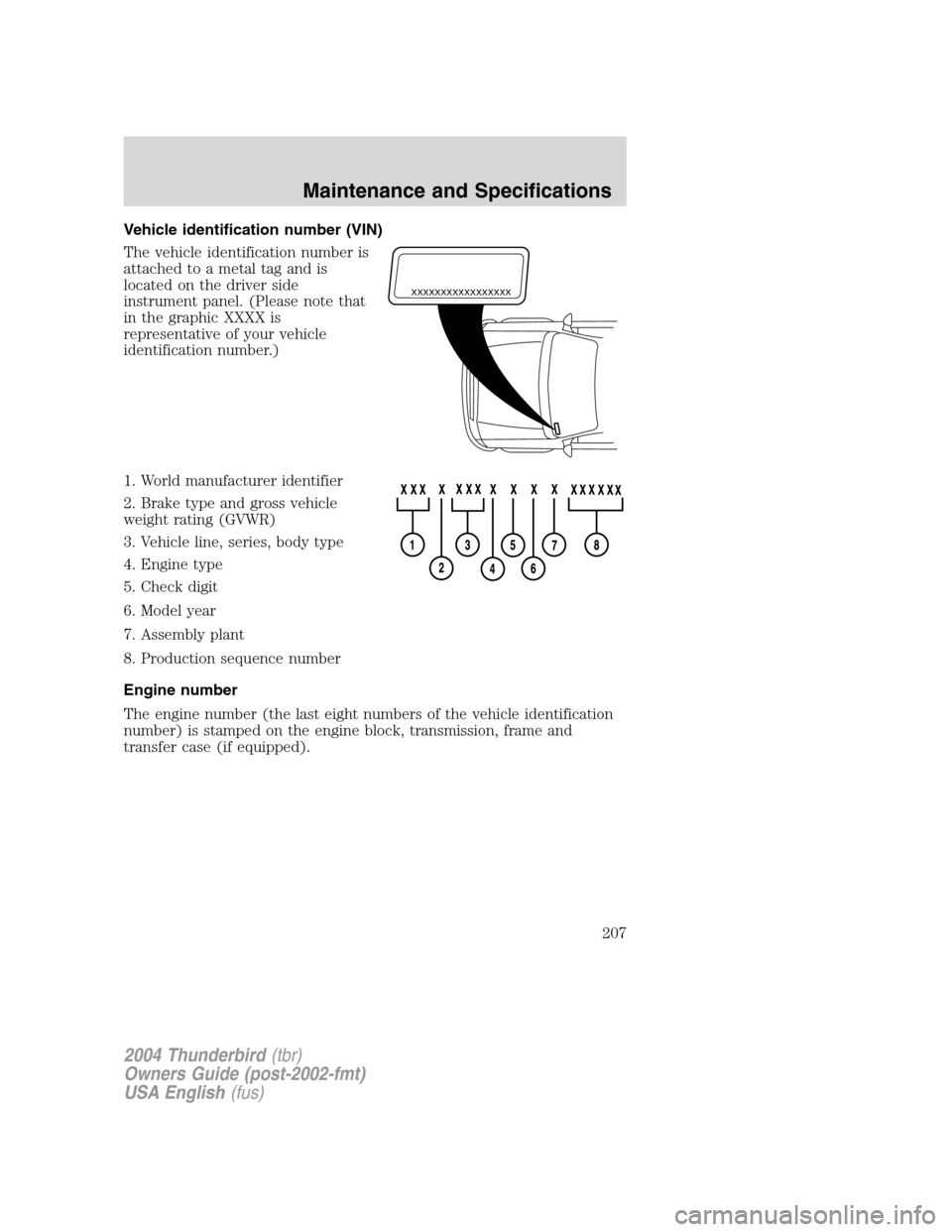
Vehicle identification number (VIN)
The vehicle identification number is
attached to a metal tag and is
located on the driver side
instrument panel. (Please note that
in the graphic XXXX is
representative of your vehicle
identification number.)
1. World manufacturer identifier
2. Brake type and gross vehicle
weight rating (GVWR)
3. Vehicle line, series, body type
4. Engine type
5. Check digit
6. Model year
7. Assembly plant
8. Production sequence number
Engine number
The engine number (the last eight numbers of the vehicle identification
number) is stamped on the engine block, transmission, frame and
transfer case (if equipped).
XXXXXXXXXXXXXXXXX
2004 Thunderbird(tbr)
Owners Guide (post-2002-fmt)
USA English (fus)
Maintenance and Specifications
207
Page 212 of 216
A
Accessory delay ..........................40
Air bag supplemental restraint
system ....................................86, 94and child safety seats ..............87
description ..........................86, 94
disposal ......................................97
driver air bag ......................88, 95
indicator light .....................89, 96
operation .............................88, 95
passenger air bag ...............88, 95
passenger deactivation
switch ........................................90
side air bag ................................94
Air cleaner filter .......186 –187, 201
Air conditioning ..........................22
Antifreeze
(see Engine coolant) ................170
Anti-lock brake system
(see Brakes) ......................112 –113
Anti-theft system ........................72 arming the system ....................72
disarming a triggered system ..72
Audio system (see Radio) .........16
Automatic transmission driving an automatic
overdrive .................................116
fluid, adding ............................186
fluid, checking ........................186
fluid, refill capacities ..............201
fluid, specification ..................205
Auxiliary power point .................39
Axle lubricant specifications ..203, 205
refill capacities ........................201
B
Battery .......................................168 acid, treating emergencies .....168
jumping a disabled battery ....141
maintenance-free ....................168
replacement, specifications ...201
servicing ..................................168
BeltMinder ...................................81
Brakes ........................................112 anti-lock ...........................112 –113
anti-lock brake system (ABS)
warning light ...........................112
fluid, checking and adding ....186
fluid, refill capacities ..............201
fluid, specifications .........203, 205
lubricant specifications ..203, 205
parking ....................................113
shift interlock ..........................115
Bulbs ............................................30
C
Capacities for refilling fluids ....201
Cassette tape player ...................16
Cell phone use ............................60
Certification Label ....................206
Changing a tire .........................136
Child safety restraints ................97 child safety belts ......................97
Child safety seats ......................100 attaching with tether straps ..104
in front seat ............................101
in rear seat ..............................101
LATCH .....................................107
Cleaning your vehicle engine compartment ..............158
instrument panel ....................160
interior .....................................161
interior trim ............................160
plastic parts ............................159
washing ....................................157
2004 Thunderbird (tbr)
Owners Guide (post-2002-fmt)
USA English (fus)
Index
Index
212
Page 214 of 216
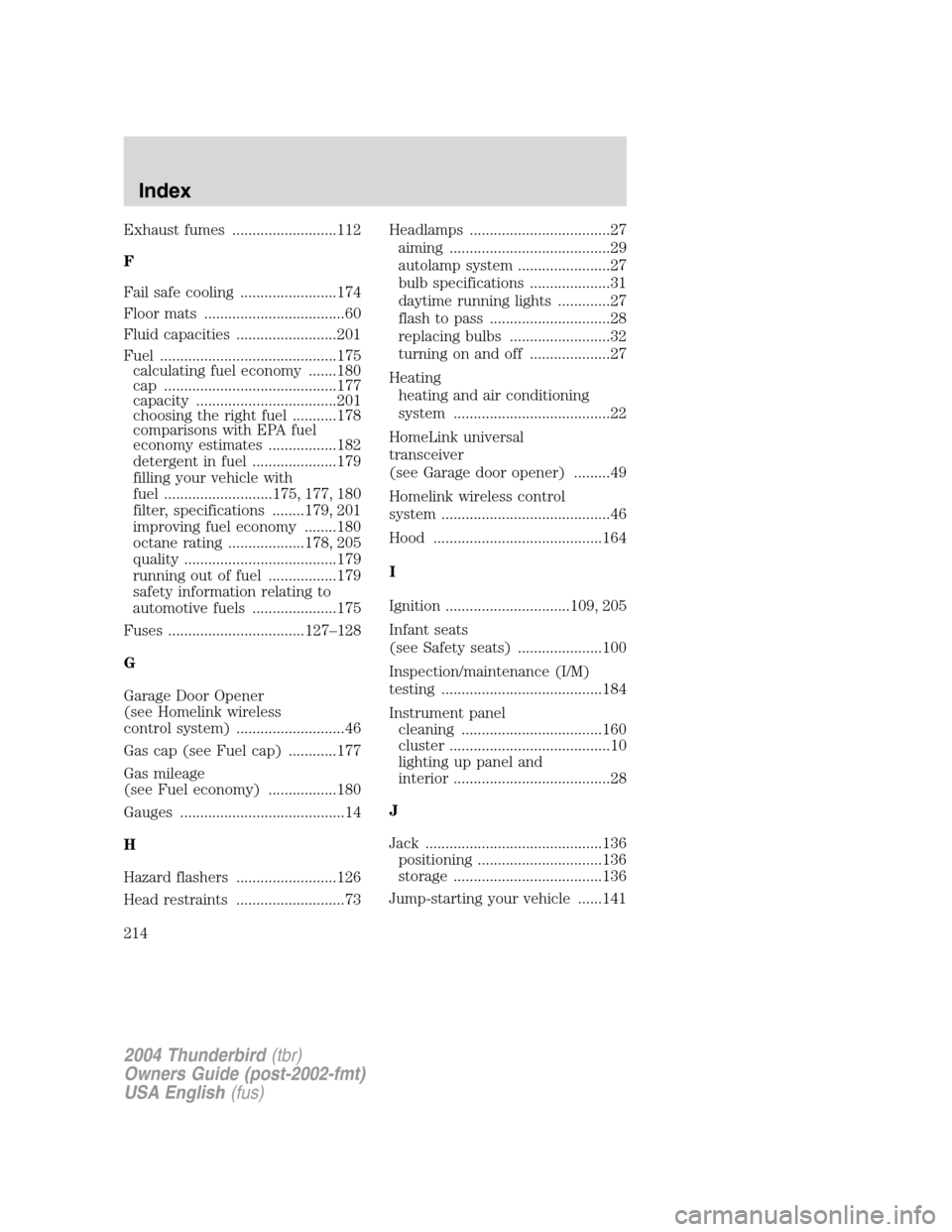
Exhaust fumes ..........................112
F
Fail safe cooling ........................174
Floor mats ...................................60
Fluid capacities .........................201
Fuel ............................................175calculating fuel economy .......180
cap ...........................................177
capacity ...................................201
choosing the right fuel ...........178
comparisons with EPA fuel
economy estimates .................182
detergent in fuel .....................179
filling your vehicle with
fuel ...........................175, 177, 180
filter, specifications ........179, 201
improving fuel economy ........180
octane rating ...................178, 205
quality ......................................179
running out of fuel .................179
safety information relating to
automotive fuels .....................175
Fuses ..................................127 –128
G
Garage Door Opener
(see Homelink wireless
control system) ...........................46
Gas cap (see Fuel cap) ............177
Gas mileage
(see Fuel economy) .................180
Gauges .........................................14
H
Hazard flashers .........................126
Head restraints ...........................73 Headlamps ...................................27
aiming ........................................29
autolamp system .......................27
bulb specifications ....................31
daytime running lights .............27
flash to pass ..............................28
replacing bulbs .........................32
turning on and off ....................27
Heating heating and air conditioning
system .......................................22
HomeLink universal
transceiver
(see Garage door opener) .........49
Homelink wireless control
system ..........................................46
Hood ..........................................164
I
Ignition ...............................109, 205
Infant seats
(see Safety seats) .....................100
Inspection/maintenance (I/M)
testing ........................................184
Instrument panel cleaning ...................................160
cluster ........................................10
lighting up panel and
interior .......................................28
J
Jack ............................................136 positioning ...............................136
storage .....................................136
Jump-starting your vehicle ......141
2004 Thunderbird (tbr)
Owners Guide (post-2002-fmt)
USA English (fus)
Index
214
Page 215 of 216
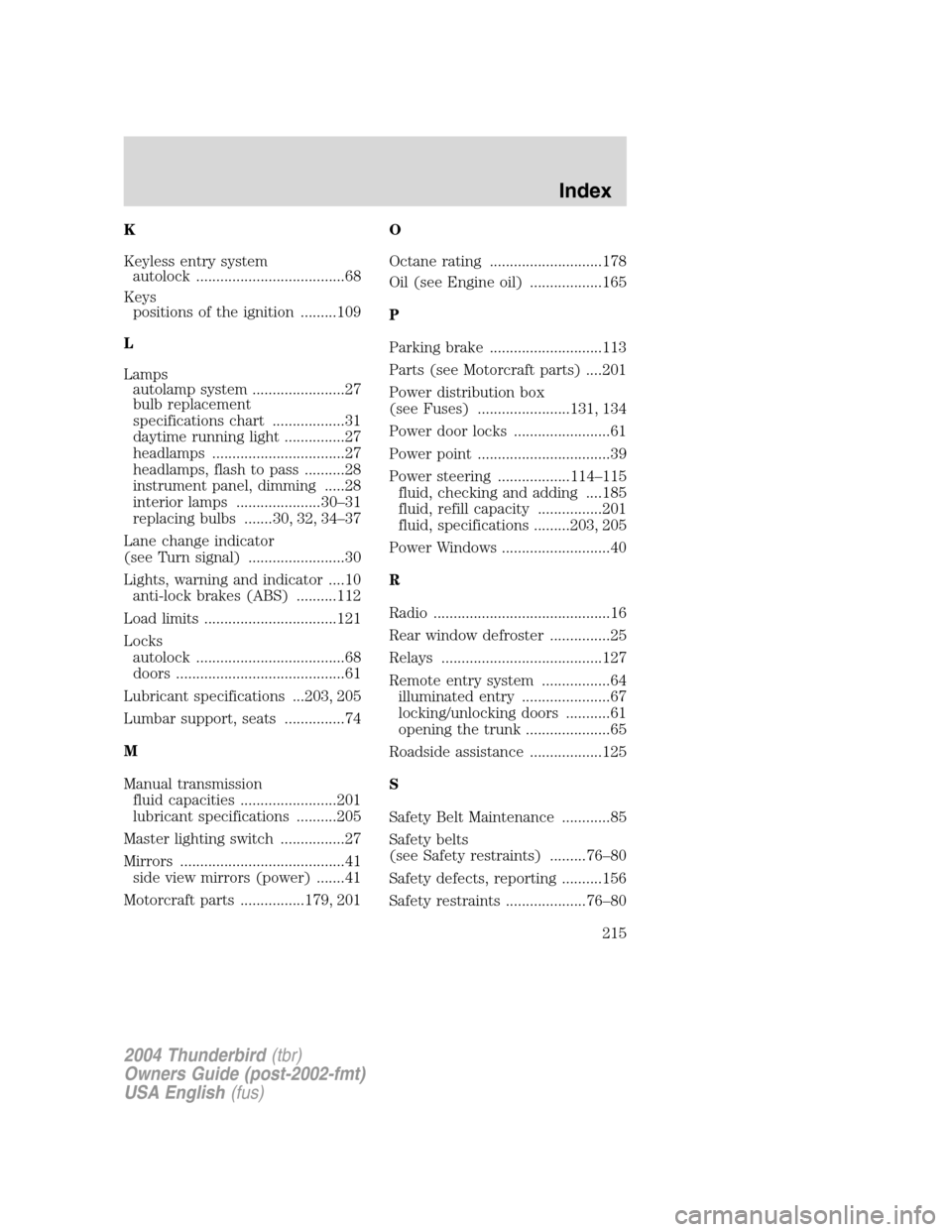
K
Keyless entry systemautolock .....................................68
Keys positions of the ignition .........109
L
Lamps autolamp system .......................27
bulb replacement
specifications chart ..................31
daytime running light ...............27
headlamps .................................27
headlamps, flash to pass ..........28
instrument panel, dimming .....28
interior lamps .....................30 –31
replacing bulbs .......30, 32, 34 –37
Lane change indicator
(see Turn signal) ........................30
Lights, warning and indicator ....10 anti-lock brakes (ABS) ..........112
Load limits .................................121
Locks autolock .....................................68
doors ..........................................61
Lubricant specifications ...203, 205
Lumbar support, seats ...............74
M
Manual transmission fluid capacities ........................201
lubricant specifications ..........205
Master lighting switch ................27
Mirrors .........................................41 side view mirrors (power) .......41
Motorcraft parts ................179, 201 O
Octane rating ............................178
Oil (see Engine oil) ..................165
P
Parking brake ............................113
Parts (see Motorcraft parts) ....201
Power distribution box
(see Fuses) .......................131, 134
Power door locks ........................61
Power point .................................39
Power steering ..................114
–115
fluid, checking and adding ....185
fluid, refill capacity ................201
fluid, specifications .........203, 205
Power Windows ...........................40
R
Radio ............................................16
Rear window defroster ...............25
Relays ........................................127
Remote entry system .................64 illuminated entry ......................67
locking/unlocking doors ...........61
opening the trunk .....................65
Roadside assistance ..................125
S
Safety Belt Maintenance ............85
Safety belts
(see Safety restraints) .........76 –80
Safety defects, reporting ..........156
Safety restraints ....................76 –80
2004 Thunderbird (tbr)
Owners Guide (post-2002-fmt)
USA English (fus)
Index
215